

Page 1
!!!!!!!!!!!!!!!!!!!!!!!!!!!!!!SC20MPC:!2!Mega!Pixels!Serial!JPEG!Camera!User!Manual!!
!
!!!!!Spinel!USA!LLC!!!!!!!!!!!!!!!!!!!!!!!!!!!!!!!!!!!!!!!!!!!!!!!!!!!!!!!!!!!!!!!!!!!!!!!!!!!!!!!!!!!!!!!!!!!!!!!!!!!!!!!!!!!!!!!!!!!!!!!!!!!!!!!!!!!!!!!!!!!!!!!!!!!!!!!!!!!!!!!!!!!!!!www.jpegcamera.com!
1!
2 Mega Pixels Serial JPEG Camera
SC20MPC User Manual, Rev. E
For latest user manual, please visit: www.jpegcamera.com
Introduction
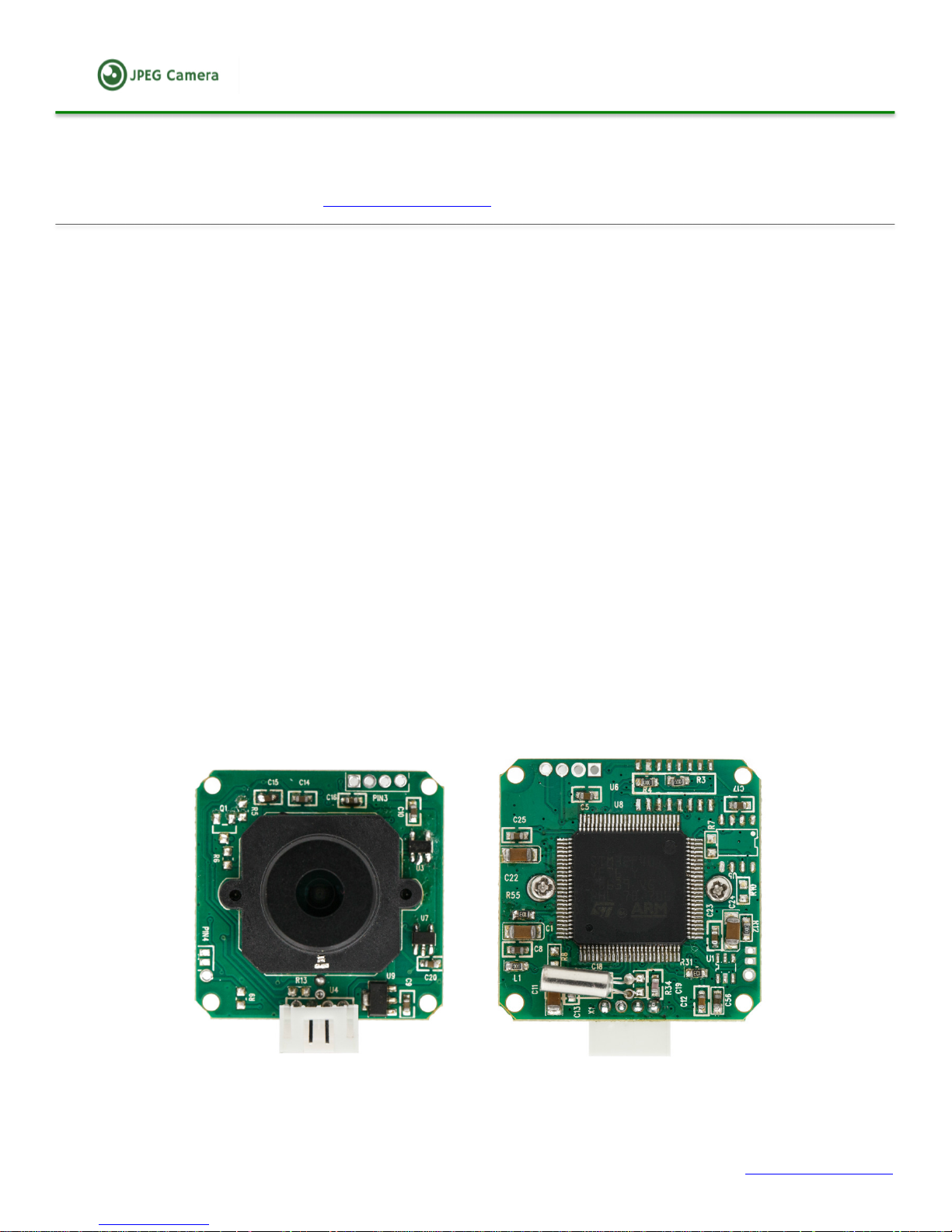
The SC20MPC Camera is a highly integrated serial JPEG camera module which can be attached to any host
system that requires a JPEG compressed still camera for embedded imaging applications.
The module uses a 1/4’’ CMOS color image sensor along with a JPEG compression chip that provides a low
cost and low powered camera system. The module has an on-board serial interface (TTL/RS232/RS485) that is
suitable for a direct connection to any host microcontroller UART or a PC system COM port.
The SC20MPC camera is capable of outputting JPEG format images only.
User commands are sent using a simple serial protocol that can instruct the camera to send high resolution
(160x120 to 1600x1200) JPEG images for storage or viewing.
The SC20MPC camera module comes in a compact form factor with a built in lens and PH 2.0 4Pin socket
connector that provides easy access to both power and serial data.
There are 8 lenses available for this camera from Spinel. A 60 degree (Standard), a 150 degree, 120 degree, 90
degree, a 45 degree, a 30 degree, a 15 degree and a 8 degree. The SC20MPC ships with the 60 degree lens
installed for standard order, other lenses can be installed in house before delivery for custom orders.
There is a locking screw on the side of the lens mount, which is used to lock the focus in place once set, to
prevent it from inadvertently being changed.
Features
• Small size, low cost and low powered camera module for embedded imaging applications.
• 5V DC Power Supply (standard), optional 12V or wide voltage 9-36V per request.
• On-board EEPROM provides a command-based interface to external host via serial link.
Page 2
!!!!!!!!!!!!!!!!!!!!!!!!!!!!!!SC20MPC:!2!Mega!Pixels!Serial!JPEG!Camera!User!Manual!!
!
!!!!!Spinel!USA!LLC!!!!!!!!!!!!!!!!!!!!!!!!!!!!!!!!!!!!!!!!!!!!!!!!!!!!!!!!!!!!!!!!!!!!!!!!!!!!!!!!!!!!!!!!!!!!!!!!!!!!!!!!!!!!!!!!!!!!!!!!!!!!!!!!!!!!!!!!!!!!!!!!!!!!!!!!!!!!!!!!!!!!!!www.jpegcamera.com!
2!
• High baud rate up to 1152000bps, which can transfer JPEG images or VGA preview @8bpp with
0.75~6 fps.
• On board 2 mega pixel color sensor and JPEG CODEC for different resolutions.
• Image size: 1600x1200/1280x960/1024x768/800x600/VGA/QVQAF/160x120.
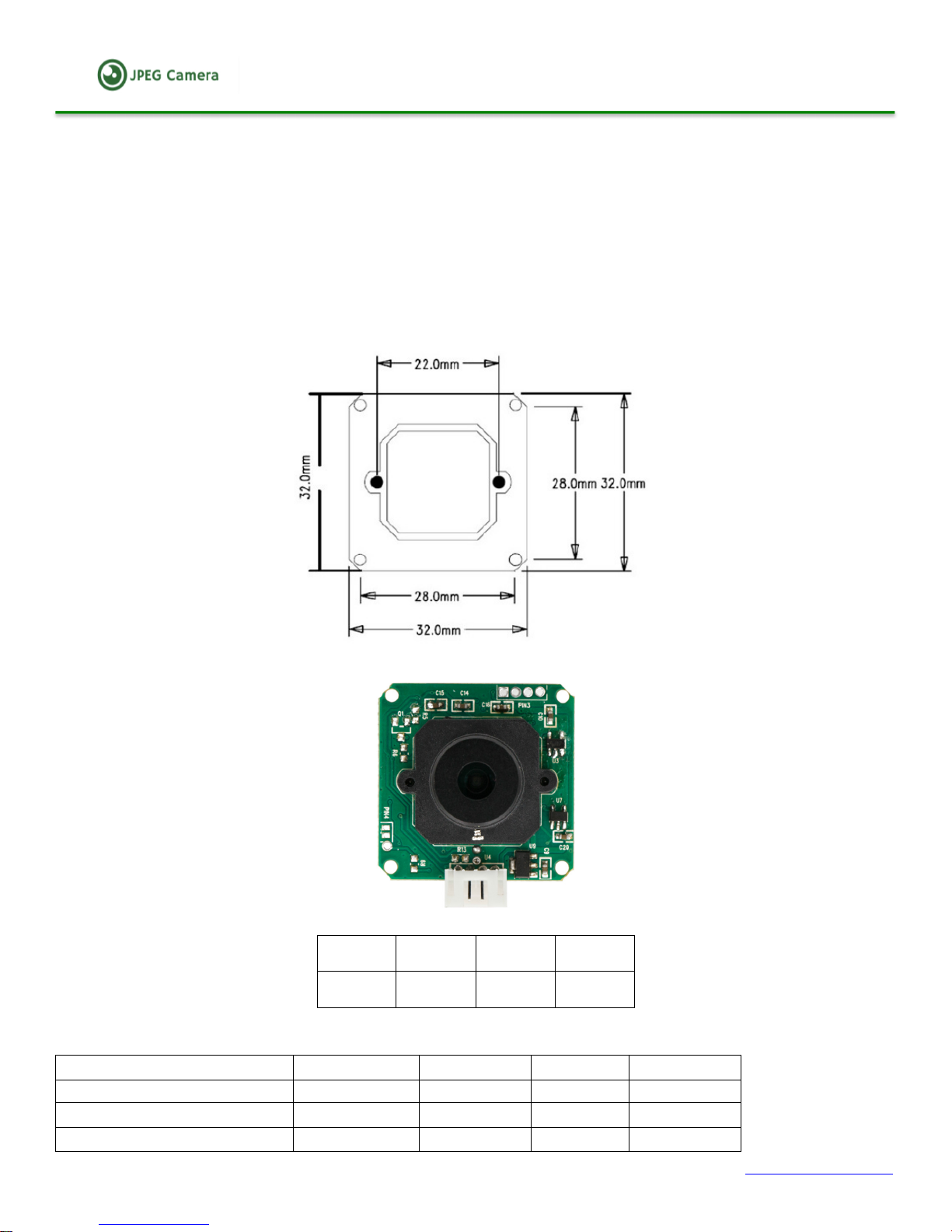
• Dimensions: 32mm x 32mm x 28mm (with lens). Weight ~0.3oz (9g).
• VC0706 protocol compatible.
Pin Configuration and Dimensions
From left to right:
Pin 1
Pin 2
Pin 2
Pin 4
RXD
TXD
GND
VCC
Electrical Specification
VDD = 3.3V+10%, TA = 0 to 25
Parameter
Min
Typ
Max
Unit
Operating Voltage
3.3
5.0
9.0
V
Operation Current
80
100
200
mA
Operating Ambient
-20
60
85
℃
Page 3

!!!!!!!!!!!!!!!!!!!!!!!!!!!!!!SC20MPC:!2!Mega!Pixels!Serial!JPEG!Camera!User!Manual!!
!
!!!!!Spinel!USA!LLC!!!!!!!!!!!!!!!!!!!!!!!!!!!!!!!!!!!!!!!!!!!!!!!!!!!!!!!!!!!!!!!!!!!!!!!!!!!!!!!!!!!!!!!!!!!!!!!!!!!!!!!!!!!!!!!!!!!!!!!!!!!!!!!!!!!!!!!!!!!!!!!!!!!!!!!!!!!!!!!!!!!!!!www.jpegcamera.com!
3!
OPTICAL CHARACTERISTICS
Item
Parameter
Image Sensor
1/4” CMOS, OV5640
Pixel Size
5.6um*5.6um
Shutter Type
Electronic Rolling Shutter
SNR max
45DB
Dynamic Range
60DB
Maximum Frame Rate
1600x1200@15fps
White Balance
Automatic
Exposure
Automatic, self-regulating
Lens viewing angle (6 options)
60 degree (default), 8, 15, 30, 45, 90, 120 and 150 degree optional
Focal Length
3.6mm(default), 1.7mm, 2.8mm, 6mm, 8mm, 12mm, 16mm, 24mm
optional
IR-cut filter
650nm(default for true color), 850nm and 940nm optional
IR-cut filter switch (ICR)
Default not available, can customized automatic IR-cut filter switch
with spinel supplied IR illuminator
Sensitivity
1250mV/Lux-sec
Command Protocol (HEX format data)
1. RESET
The host can reset the camera by issuing this command:
56 00 26 00
Receiving ACK command
0D 0A 49 6E 69 74 20 65 6E 64 0D 0A
2. GET IMAGE
The host issues this command to capture an image from camera.
56 00 36 01 00
Receiving ACK command
76 00 36 00 00
3. READ IMAGE DATA LENGTH
56 00 34 01 00
Receiving ACK command
76 00 34 00 04 00 00 XH XL
XH XL is the image date length, XH---high byte, XL---low byte.
4. READ IMAGE DATE
Send: 56 00 32 0C 00 0A 00 00 MH ML 00 00 KH KL 00 0A
Receiving ACK command
76 00 32 00 00 FF D8 。。。。。。 FF D9 76 00 32 00 00
00 00 MH ML is the starting address, it must be the multiple of 8, for instance 00 00.
00 00 KH KL is the image data length, lower bytes follow the higher bytes.
5. STOP CAPTURE
Page 4
!!!!!!!!!!!!!!!!!!!!!!!!!!!!!!SC20MPC:!2!Mega!Pixels!Serial!JPEG!Camera!User!Manual!!
!
!!!!!Spinel!USA!LLC!!!!!!!!!!!!!!!!!!!!!!!!!!!!!!!!!!!!!!!!!!!!!!!!!!!!!!!!!!!!!!!!!!!!!!!!!!!!!!!!!!!!!!!!!!!!!!!!!!!!!!!!!!!!!!!!!!!!!!!!!!!!!!!!!!!!!!!!!!!!!!!!!!!!!!!!!!!!!!!!!!!!!!www.jpegcamera.com!
4!
56 00 36 01 03
Receiving ACK command
76 00 36 00 00
6. SET JPEG RESOLUTION (IMAGE SIZE) (Default: 1600 x 1200)
The JPEG preview mode can support following image sizes. It is different from normal preview mode. The
default image size is 1600x1200, it will return back to default after power off or reset. A different default
image size can be preset prior to order.
Resolution
Commands
Return
160x120
56 00 54 01 22
76 00 54 00 00
320x240
56 00 54 01 11
76 00 54 00 00
640x480
56 00 54 01 00
76 00 54 00 00
800x600
56 00 54 01 1D
76 00 54 00 00
1024x768
56 00 54 01 1C
76 00 54 00 00
1280x960
56 00 54 01 1B
76 00 54 00 00
1600x1200
56 00 54 01 21
76 00 54 00 00
7. SET IMAGE COMPRESSION RATIO (Default: 36)
The host can set the default Baud rates using this command.
56 00 31 05 01 01 12 04 XX
Receiving ACK command 76 00 31 00 00
XX can usually range from 1 to 9, 99 is the most compressed, and 11 is the least compressed.
8. SET BAUD RATE (Default: 115200bps)
The host can set the temporary Baud rates using this command, the baud rate will return to default baud rate
after re-power up, the default baud rate can be preset in house by Spinel only and is not allowed to be changed
by users. Use the table below as a guide.
Baud
Rate
Commands
Return
9600
56 00 24 03 01 AE
76 00 24 00 00
38400
56 00 24 03 01 2A
76 00 24 00 00
57600
56 00 24 03 01 1C
76 00 24 00 00
115200
56 00 24 03 01 0D
76 00 24 00 00
128000
56#00#24#03#01#7E
76#00#24#00#00
230400
56#00#24#03#01#23
76#00#24#00#00
256000
56#00#24#03#01#56
76#00#24#00#00
460800
56#00#24#03#01#58
76#00#24#00#00
512000
56#00#24#03#01#42
76#00#24#00#00
576000
56#00#24#03#01#9E
76#00#24#00#00
600000
56#00#24#03#01#13
76#00#24#00#00
691200
56#00#24#03#01#87
76#00#24#00#00
921600
56#00#24#03#01#39
76#00"24"00"00
1152000
56#00#24#03#01#72
76#00#24#00#00
9. SET DEFAULT BAUD RATE
The host can set the default Baud rate using this command, the baud rate will be valid after power off. Use the
Page 5
!!!!!!!!!!!!!!!!!!!!!!!!!!!!!!SC20MPC:!2!Mega!Pixels!Serial!JPEG!Camera!User!Manual!!
!
!!!!!Spinel!USA!LLC!!!!!!!!!!!!!!!!!!!!!!!!!!!!!!!!!!!!!!!!!!!!!!!!!!!!!!!!!!!!!!!!!!!!!!!!!!!!!!!!!!!!!!!!!!!!!!!!!!!!!!!!!!!!!!!!!!!!!!!!!!!!!!!!!!!!!!!!!!!!!!!!!!!!!!!!!!!!!!!!!!!!!!www.jpegcamera.com!
5!
table below as a guide.
Baud%Rate!
Commands!
Return!
9600!
88"77"55"00"00"AE!
76#00#24#00#00!
38400!
88"77"55"00"00"2A!
76#00#24#00#00!
57600!
88"77"55"00"00"1C!
76#00#24#00#00!
115200!
88"77"55"00"00"0D!
76#00#24#00#00!
128000!
88"77"55"00"00"7E!
76#00#24#00#00!
256000!
88"77"55"00"00"56!
76#00#24#00#00!
10. SET IR-CUT FILTER
If the SC20MPC camera is customized with IR-cut filter, the host can set the filter by issuing the following
commands for day and night mode, no commands needed if the camera also comes with Spinel supplied
infrared LED plate that can control the IR-cut filter switcher automatically, otherwise commands are needed.
Mode
Commands
Return
Day mode
56 00 AA 00
76 00 AA 00 00
Night mode
56 00 AA 01
76 00 AA 00 00
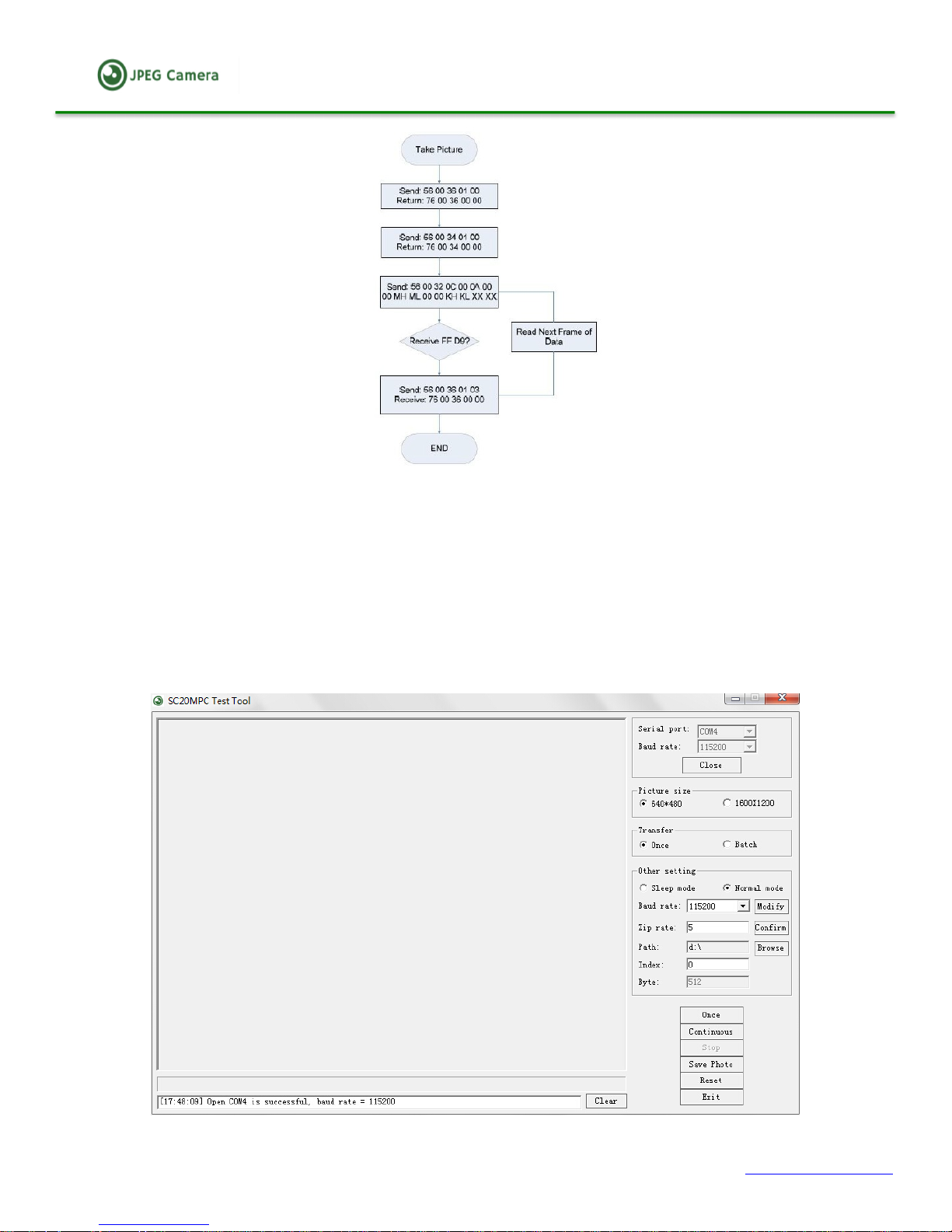
11. GET IMAGE PROCESS
1. Get image command
2. Read image data length command
3. Read image data command
4. Stop capture
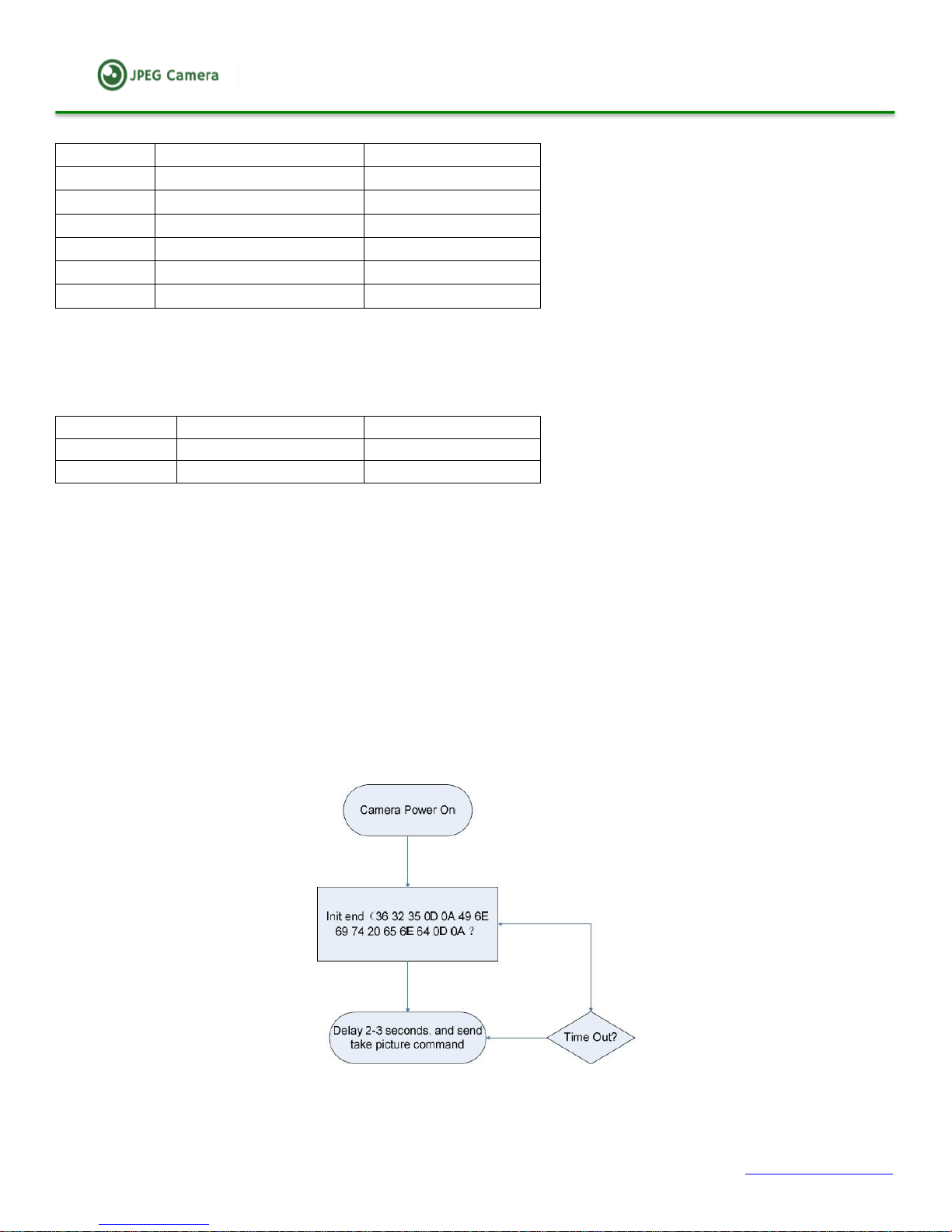
12. Program flow chart
12.1 Initialize
After power up, the camera will output:
Ctrl infr exist
User-defined
sensor 625
Init end (36 32 35 0D 0A 49 6E 69 74 20 65 6E 64 0D 0A)
12.2 Get JPEG image
Page 6
!!!!!!!!!!!!!!!!!!!!!!!!!!!!!!SC20MPC:!2!Mega!Pixels!Serial!JPEG!Camera!User!Manual!!
!
!!!!!Spinel!USA!LLC!!!!!!!!!!!!!!!!!!!!!!!!!!!!!!!!!!!!!!!!!!!!!!!!!!!!!!!!!!!!!!!!!!!!!!!!!!!!!!!!!!!!!!!!!!!!!!!!!!!!!!!!!!!!!!!!!!!!!!!!!!!!!!!!!!!!!!!!!!!!!!!!!!!!!!!!!!!!!!!!!!!!!!www.jpegcamera.com!
6!
TEST THE CAMERA WITH PC
1. Test with Spinel PC test tool
The PC Test Tool can be downloaded from our website: www.jpegcamera.com, the application only supports
window XP/7/8 as of now. The camera needs to have RS232 output or TTL to RS232 converter to connect to
the serial port of the PC, or use a USB to TTL converter if the camera comes in TTL output and the computer
doesn’t have a serial pot, please make sure select the default baud rate to ensure proper running.
The following image illustrates the interface of the evaluation software.
Page 7

!!!!!!!!!!!!!!!!!!!!!!!!!!!!!!SC20MPC:!2!Mega!Pixels!Serial!JPEG!Camera!User!Manual!!
!
!!!!!Spinel!USA!LLC!!!!!!!!!!!!!!!!!!!!!!!!!!!!!!!!!!!!!!!!!!!!!!!!!!!!!!!!!!!!!!!!!!!!!!!!!!!!!!!!!!!!!!!!!!!!!!!!!!!!!!!!!!!!!!!!!!!!!!!!!!!!!!!!!!!!!!!!!!!!!!!!!!!!!!!!!!!!!!!!!!!!!!www.jpegcamera.com!
7!
2. TEST AND TROUBLESHOOTING
For any technical issue or error, please use “SSCOM serial debug tool” to test the camera and figure out the
issue, the “SSCOM serial debug tool” and instruction can be downloaded from our website:
www.jpegcamera.com
For questions regarding this user manual, please email to [email protected] or
Or Call +1(800) 837-5859. Thank you.
 Loading...