

Page 1
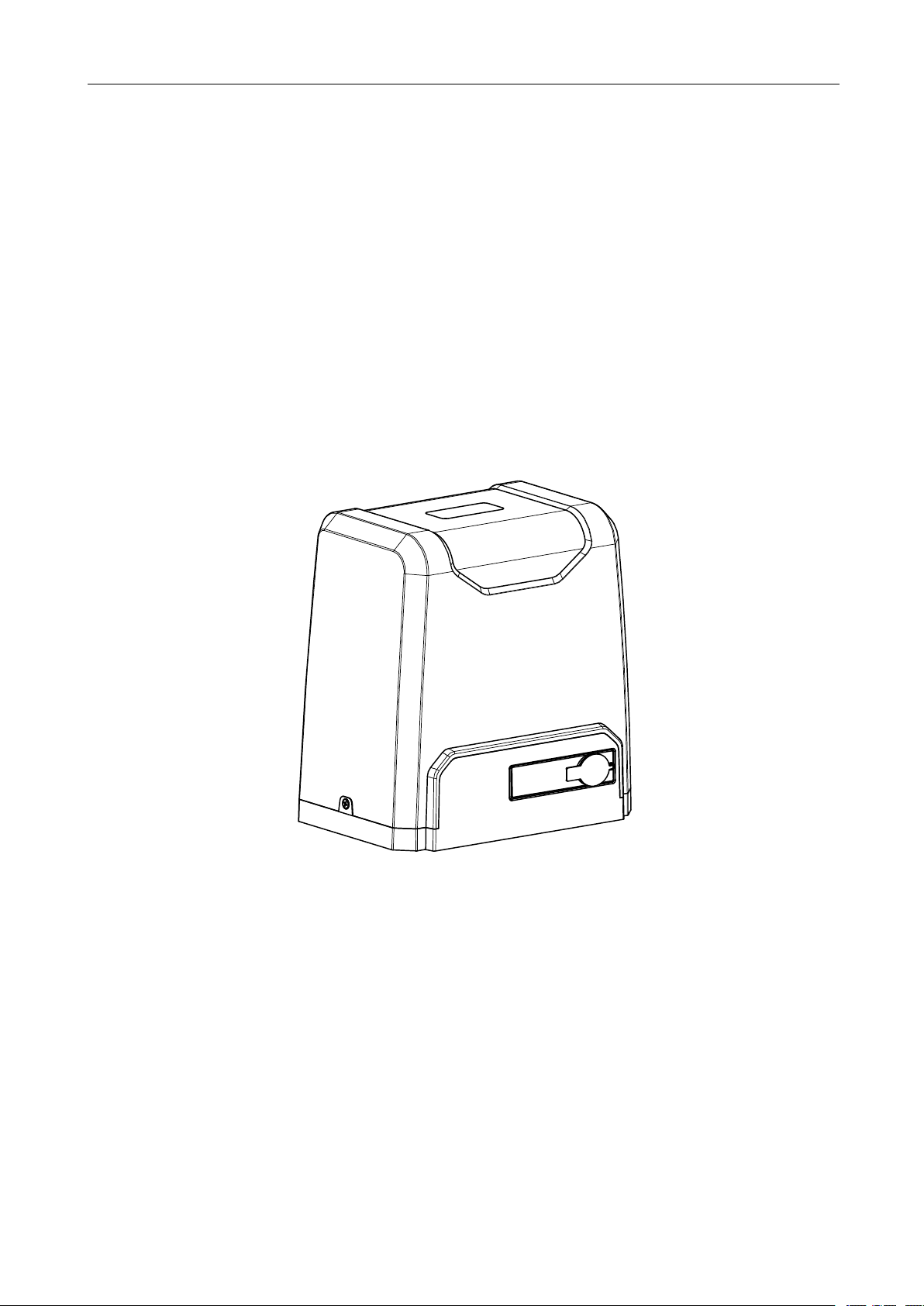
SL1000AC/SL1500AC
Sliding Gate Opener
User Manual
Page 2

1
Dear users,
Thank you for choosing this product. Please read this manual carefully before installation and use.
Please do not forget to include this manual if you send the product to a third party.
1. Safety Instruction
Please make sure that the power voltage being used matches with the supply voltage of gate opener
(AC110V or AC220V); kids are not allowed to touch the control devices or the remote-control unit.
The remote-control unit is single button mode or three button mode (please refer to the instructions
of the remote control in accordance with the actual gate opener type). The indicator light on the
remote-control unit will flicker when its button is pressed. Main engine and gate can be unlocked
with a disengagement wrench and the gate can be manually operated after disengagement.
Please make sure that nobody is around the main engine or gate when the switch is operated.
Please temporarily stop using the product if the main engine needs to be repaired or regulated. The
installation and maintenance of the product must be carried out by professionals.
Please read this manual carefully before installing、using、maintaining or repairing it. Without
following this manual, any injury or property losses caused by improper use or unauthorized
modification is out of the responsibility of our company.
Page 3
2
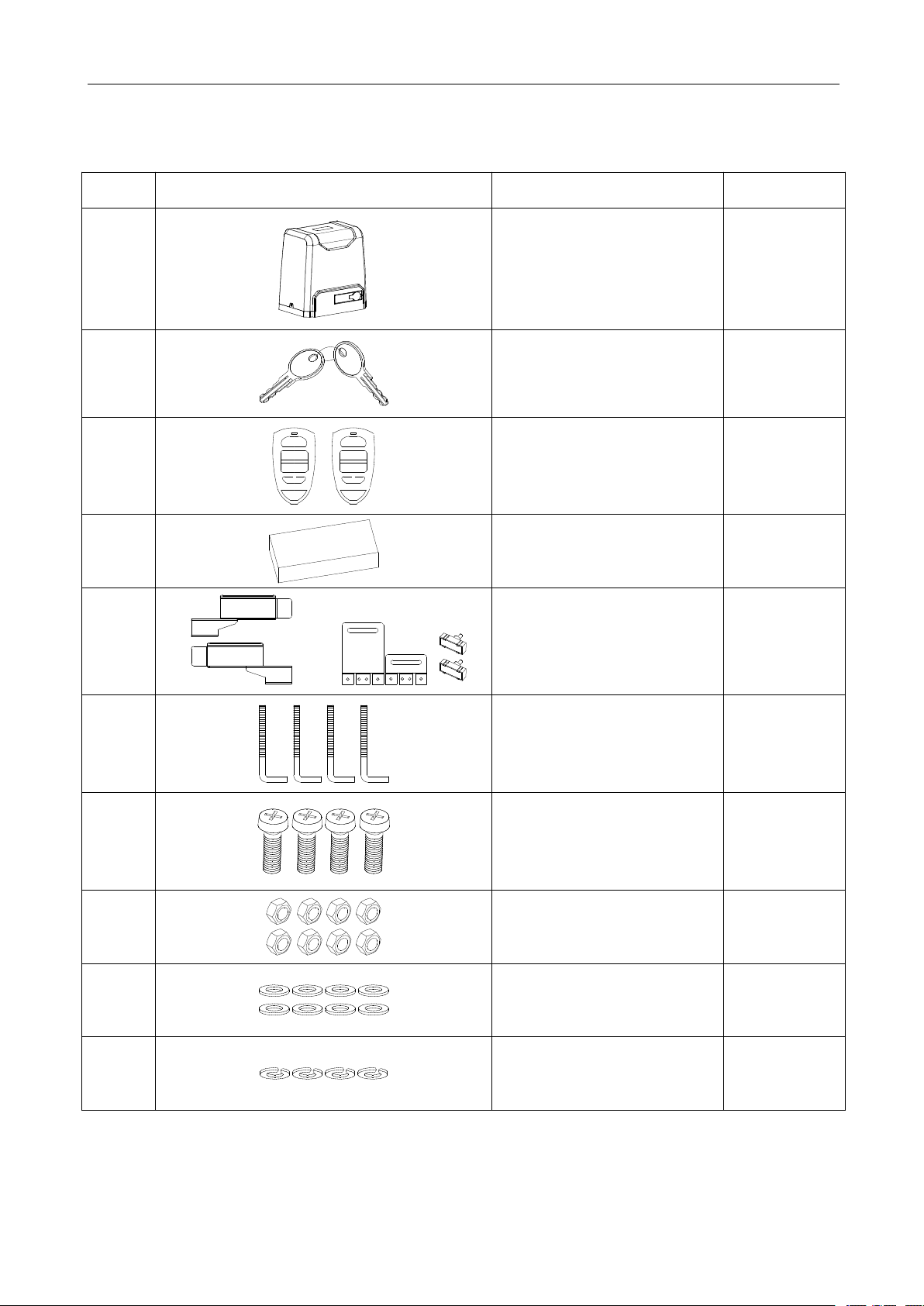
2. Packing List (standard)
No.
Picture
Name
Quantity
1
Main engine
1
2
Manual release key
2
3
A
B
C
D
A
B
C
D
Remote control
2
4
Spring limit switch
accessories box / Magnetic
limit switch accessories box
1
4-1
or
Spring limit switch block
/ Magnetic limit switch block
1
4-2
Foundation bolt M10
4
4-3
Spring limit switch block
mounting screw M6X10
/ Magnetic limit switch block
mounting screw M6X18
4
4-4
Nut M10
8
4-5
Flat washer Ø10
8
4-6
Spring washer Ø10
4
Page 4
3
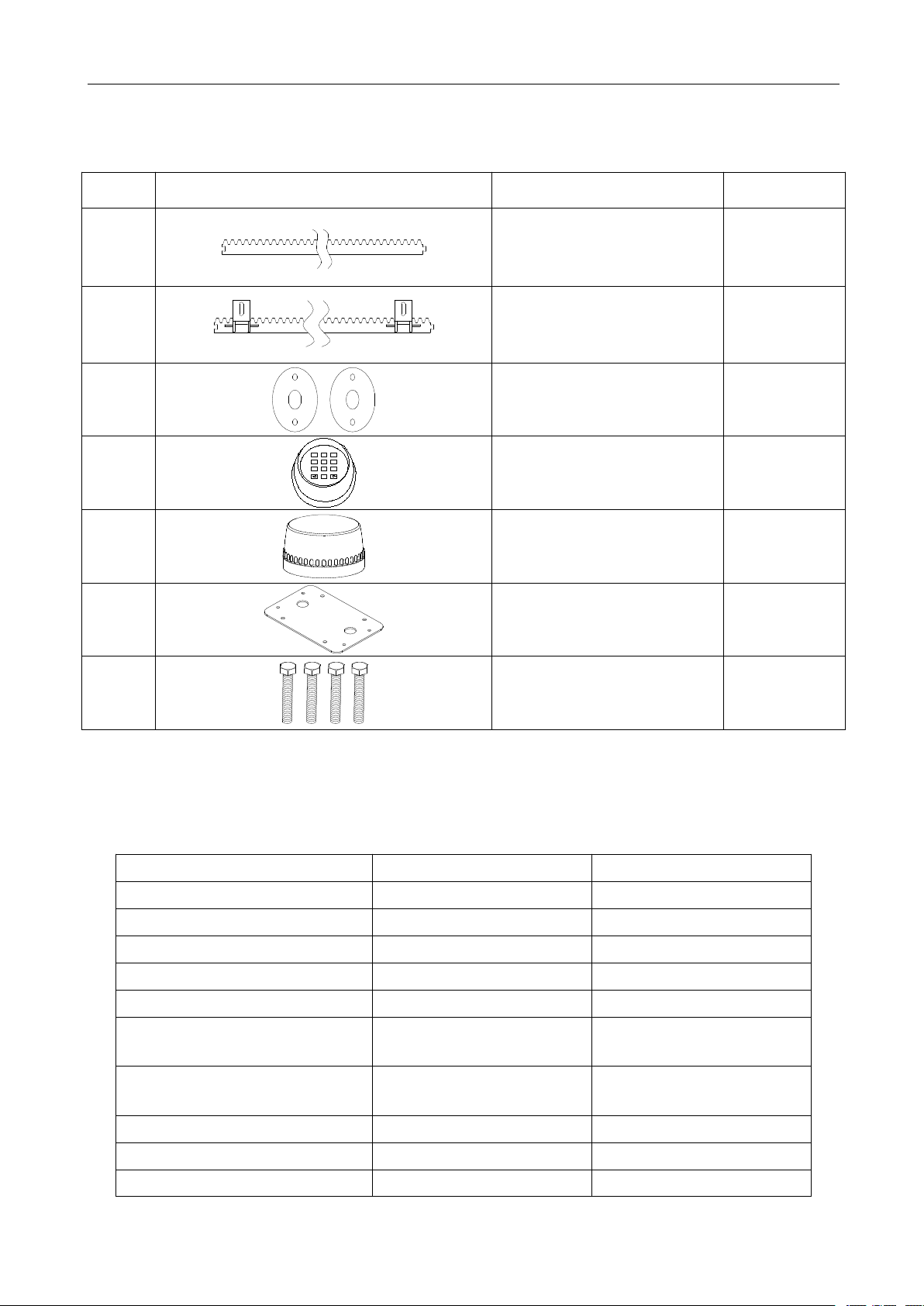
2. Packing List (optional)
No.
Picture
Name
Quantity
1
Steel gear rack
1m/pc
2
Nylon gear rack
1m/pc
3
Infrared sensor
1
4
0
8
5 6974
1 2 3
Wireless keypad
1
5
Alarm lamp
1
6
Mounting plate
1
7
Hexagon head bolt M10×60
4
Model
SL1000AC
SL1500AC
Power supply
220V/50Hz;110V/60Hz
220V/50Hz;110V/60Hz
Motor power
400W
550W
Gate moving speed
11-13m/min
11-13m/min
Maximum weight of gate
1000Kg
1500Kg
Remote control distance
≥30m
≥30m
Remote control mode
Single button mode
/ Three button mode
Single button mode
/ Three button mode
Limit switch
Spring limit switch
/ Magnetic limit switch
Spring limit switch
/ Magnetic limit switch
Noise
≤60dB
≤60dB
Working duty
S2, 20min
S2, 20min
Recording of up remote controls
25
25
3. Technical parameters
Page 5
4
Frequency
433.92 MHz
433.92 MHz
Working temperature
-20°C ~ +70°C
-20°C ~ +70°C
Package weight
15Kg
16Kg
4. Installation
⑤
④
③
②
0
8
5 6974
1 2 3
⑧
①
⑦
⑥
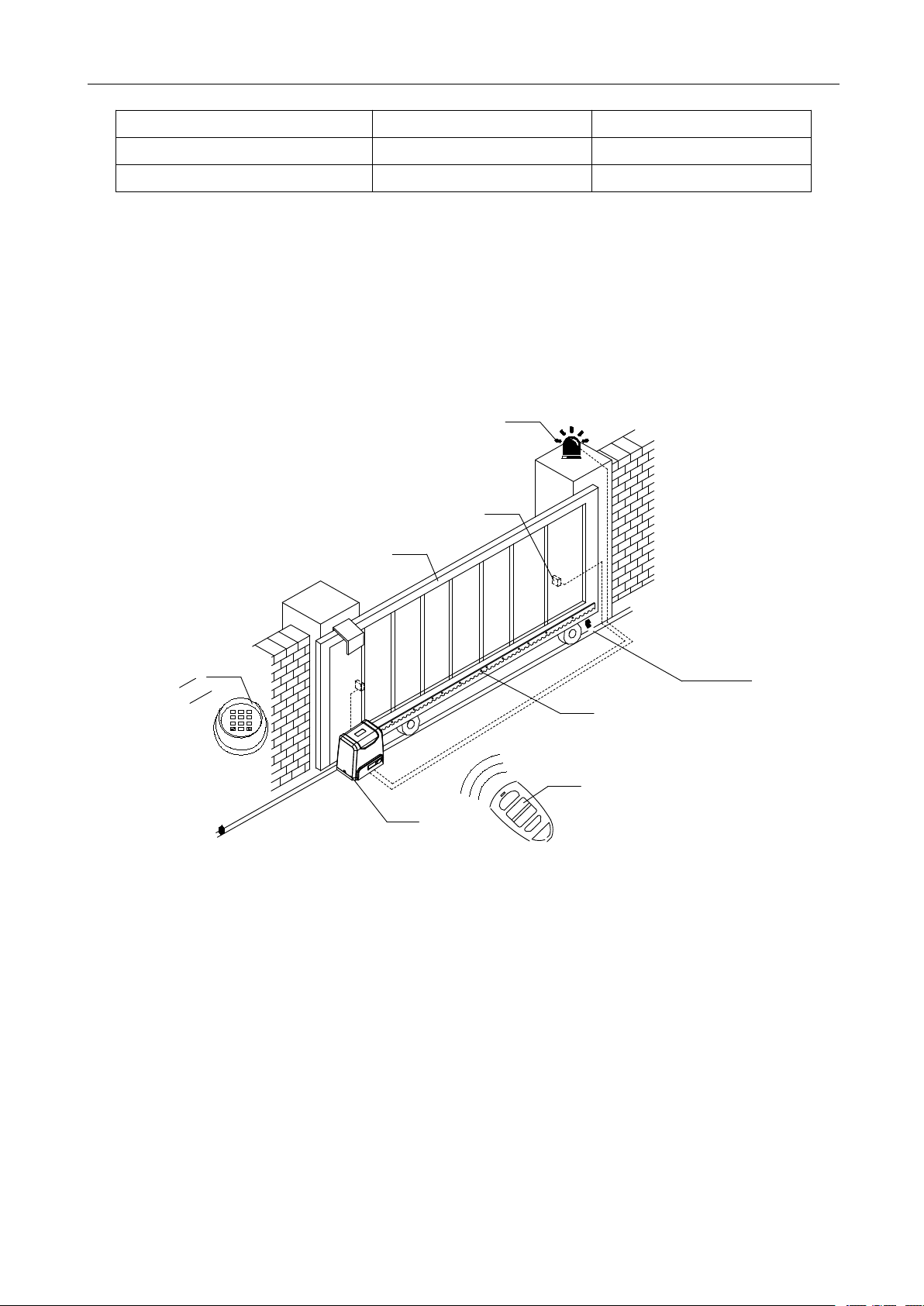
SL1000AC/SL1500AC sliding gate opener is applicable to gate weight less than 1000kg/1500kg,
and length of the sliding gate less than 12m. The drive mode adopts the rack and gear transmission.
This gate opener must be installed inside the enclosure or yard for protection.
4.1 Installation drawing
Gate opener;②Wireless keypad (optional);③Gate;④Infrared sensor (optional);
①
Alarm lamp (optional);⑥Safety stop block;⑦Gear rack;⑧Remote control;
⑤
Figure 1
4.2 Size of main engine and accessories
4.2.1 Size of main engine
Page 6
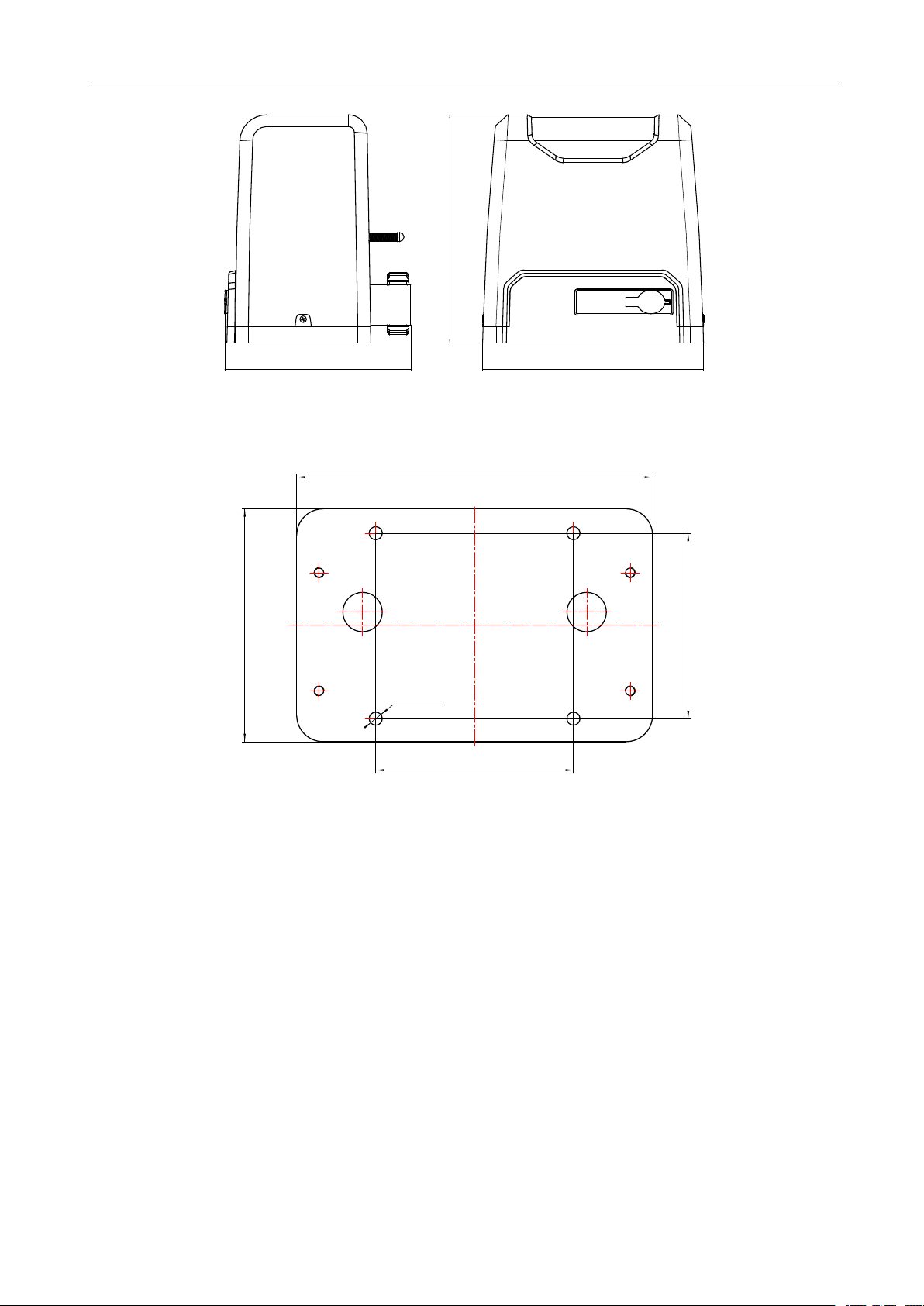
5
271
280
228
4.2.2 Size of mounting plate
27 0
17 7
150±0.3
141± 0.3
4×φ10
Figure 2
Figure 3
4.3 Installation procedures
4.3.1 Preparation work before installation
Please make sure that the sliding gate is correctly installed, the gate rail is horizontal, and the gate
can be manually moved smoothly before installing the gate opener.
Cable installation
In order to guarantee the normal operation of the gate opener and protect the cables from damages,
please bury the motor & power cable and controlling cable separately with two PVC tubes.
Concrete pedestal
Please precast a concrete pedestal with the size can be 500mm x 300mm, depth be 250mm in
advance, so as to firmly install SL1000AC/SL1500AC gate opener. Please make sure the
distance between the gate and gate opener is appropriate before casting the
pedestal.
Page 7

6
Embedded screws
Concrete
Power line
Mounting plate
Foundation bolt
Turn on 90°
Figure 4
4.3.2 Main engine installation
a) Dismantle the plastic housing on the main engine before installation and keep the relevant
fasteners properly;
b) Please prepare the power line for connecting the mounting plate to the main engine (the number
of power supply cable cores should not be less than 3 PCS, the sectional area of cable core should
be over 1.5mm² and the length should be determined by users according to the situation on
installation spot)
c) Please unlock the main engine before installation, the unlock method is: remove the rubber key
cover, insert the key, and open the manual release bar till it rotates by 90° as shown in Figure 5.
Then turn the output gear and the gear can be rotated easily;
Figure 5
4.3.3 Gear rack installation
Fix the mounting screws to the rack.
Put the rack on the output gear; make the rack engage with the output gear then weld the
mounting screws to the gate (each screw with one solder joints firstly).
Manually move the gate (gate should be moved smoothly after motor unlocked) to check
whether there is a fit clearance between rack and output gear, as shown in Figure 7.
Weld all the mounting screws to the gate firmly.
Page 8

7
Make sure that all racks on the same straight line.
1-21-2
GearGear rackrack
OutputOutput geargear
mmmm
Pull the gate after installed, make sure the entire trip is flexible without any stuck.
Figure 6
The fit clearance of output gear and rack is shown in Figure 7 below:
Figure 7
Warnings
·To ensure safety, install safety stop blocks on both ends of the rail to prevent the gate from running
out of the rail. Before installing the main engine, make sure that the safety stop blocks are in place
and whether it has the function of preventing the gate from running out of the rail or safety range.
·Please make sure that the main engine and its components have good mechanical properties, and
the gate can be operated flexibly when manually moved before installing the main engine.
·Please note that for this product, one control can only drive one main engine, otherwise, the control
system will be damaged.
·Earth leakage circuit breaker must be installed in where the gate movement can be seen, and the
minimum mounting height is 1.5m to avoid being touched by children.
·After installation, please check whether the mechanical property is good or not, whether gate
movement after manual unlocking is flexible or not, whether the installation for infrared sensor
(optional) is correct and effective.
Page 9

8
4.3.4 Limit switch adjustment
GateGate
SpringSpring limitlimit switchswitch
SpringSpring limitlimit switchswitch stopstop blockblock
GearGear rackrack
OutputOutput geargear
M6×10M6×10 M6×10M6×10
Spring limit switch - The installation position of spring limit switch is shown in Figure 8:
The installation of spring limit switch stop block is shown in Figure 9:
Figure 8
Figure 9
Page 10

9
Magnetic limit switch - The installation position of magnetic limit switch is shown in Figure 10:
GateGate
MagnetsMagnets
MagneticMagnetic limitlimit switchswitch stopstop blockblock
GearGear rackrack
OutputOutput geargear
≤20mm
M6×18M6×18 M6×18M6×18
Left side mounting
Right side mounting
The installation of magnetic limit switch stop block is shown in Figure 11:
Figure 10
Figure 11
Note: The default setting is right side mounting. (According to actual situation, please refer to the
“Note” of section 4.3.5.1 and 4.3.5.2 “Adjustment and operation” to adjust.)
Page 11

10
4.3.5 Control board wiring
+
+
O
+
24VDC24VDC
GNDGND
I.RI.R
CLLMCLLM
COMCOM
OPLMOPLM
COMCOM
STPSTP
X5X5
10A10A 250V250V
CLSCLS
OPNOPN
X1X1
W U V PEPE
D2D2 D1D1 C C
SW1SW1
ONON
AN1AN1
LED1LED1
X2X2X3X3
PEPE N L
X8X8
M
LED2LED2
X7X7
LampLamp
1 2 3
CapacitorCapacitor
MotorMotor
EarthEarth
PowerPower
RemoteRemote controlcontrol learninglearning buttonbutton
DIPDIP SwitchSwitch
24VDC24VDC
GNDGND
InfraredInfrared sensorsensor
CloseClose limitlimit switchswitch
StopStop controlcontrol buttonbutton
COMCOM
OpenOpen limitlimit switchswitch
CloseClose controlcontrol buttonbutton
OpenOpen controlcontrol buttonbutton
COMCOM
4.3.5.1 Standard control board
Figure 12
Wiring instruction:
1. Connect L and N to the power supply of AC220V/50HZ; AC110V/60HZ; L is Live wire, N is
Neutral wire, and PE is grounding wire.
2. Connect LAMP to D1, D2; voltage: AC220V/50HZ; AC110V/60HZ.
3. Connect the motor wire U to the REV motor wire, connect W to the FWD motor wire, and
connect V to the motor common wire.
4. Connect C, C to the capacitor wire.
X5 Terminal
24VDC Power supply for fittings +24VDC(Electric current ≤50mA);
GND Power ground;
I.R Photocell input (N.C.);
CLLM Close limit switch;
COM Limit switch common terminal;
OPLM Open limit switch.
X7 Terminal
COM Control button common terminal;
STP Stop control button (N.O.);
CLS Gate close control button (N.O.);
OPN Gate open control button (N.O.).
DIP Switch
1. External button switch. ON - Three button switch; OFF - Single button switch (X7 terminal
CLS button can be used to circularly control OPEN/STOP/CLOSE/STOP of the main engine)
2. Automatic close time.
Page 12

11
3. Automatic close time.
24VDC24VDC
GNDGN D
I.RI.R
CLLMCLLM
COMCOM
OPLMOPLM
COMCOM
STPS TP
X5X5
10A10A 250V250V
CLSC LS
OPNOPN
X1X1
PEPE N L
X8X8
X7X7
V+V-
V+V-
NO COM NC
InfraredInfrared receiverreceiver connectingconnecting
InfraredInfrared emitteremitter connectingconnecting
Setting for automatic close time:
2 ON 3 OFF: automatic close time is 15s,
2 OFF 3 ON: automatic close time is 30s,
2 OFF 3 OFF: automatic close time is 45s,
2 ON 3 ON: no automatic close function.
Infrared connection
Infrared photocell function: In the closing process, when infrared ray of the photocell is covered by
people or objects during its detection range, the gate will open immediately for security protection.
The distance between photocell receiver and photocell emitter should be more than 2 meters,
otherwise will affect the induction of the photocell.
If connect the infrared photocell, please remove the short connection between I.R and GND on the
X5 terminal.
Figure 13
Page 13

12
Adjustment and operation
ThreeThree buttonbutton modemode remoteremote controlcontrol
SingleSingle buttonbutton modemode remoteremote controlcontrol
A
B
C
D
OPENOPEN
A
B
C
D
CLOSECLOSE
STOPSTOP
CLOSECLOSE
OPENOPEN
STOPSTOP
Remote control operation
Three button mode remote control: OPEN/CLOSE/STOP of main engine are controlled by three
buttons separately on the remote control.
Single button mode remote control: OPEN/CLOSE/STOP of main engine are controlled by one
button circularly on the remote control.
Figure 14
Add extra remote control (remote control learning): Remove the main engine housing, then take
out the upper cover of the control box, press the learning button AN1 on the control board, and
indicator light LED2 will flash. Press the button that to be learned on the remote control once, The
LED2 will be off. Press the same button on the remote control twice, the LED2 will flash several
times and be off; remote control learning complete. A maximum of 25 remote controls can be
learned.
Delete remote control: To delete remote control that have been learned: press and hold the
learning button AN1, the indicator light LED2 will be on; Then release it until LED2 is off. After the
steps, all the matched remote controls will be deleted.
Note: To disengage gate opener, move the gate to the middle position, then close the clutch and
press the open button of external button switch to open the gate. If the gate opening direction is
wrong, you can change the direction through the toggle switch SW1 on the control board or
exchange the motor phase-sequence lines U and W. If the opening or closing limit is wrong,
please exchange limit switch lines CLLM and OPLM on the control board.
Page 14

13
4.3.5.1 Intelligent control board
L
P EP E
1313
LAMPLA MP
P EP E
32
1
4
5
6
7
9
1010
1111
1212
8
MOTMOT
MOTMOT
COMCOM
MOT1M OT1
MOT2M OT2
CAPCA P
SPEEDSPEED GNDGND VCCVCC
N
L N
OFFOFF
ONON
X1X1
J5J5
U1U1
HALLHALL
J2J2
U2U2
S1S1
VR3VR3
VR4VR4
LEARNLEARN
POWERPOWER
J1J1
J6J6
J3J3
1313
1111
5 6
VR1VR1
VR2VR2
8
1010
SW1SW1
1
2
3
J4J4
12VDC12VDC
GNDGND
OpenOpen limitlimit switchswitch
LoopLoop detetcordetetcor
O/S/CO/S/C switchswitch
StopStop controlcontrol buttonbutton
PedestrianPedestrian switchswitch
M
PowerPower
EarthEarth
CapacitorCapacitor
LampLamp
HallHall lineline
InfraredInfrared sensorsensor
COMCOM
CloseClose limitlimit switchswitch
OpenOpen controlcontrol buttonbutton
CloseClose controlcontrol buttonbutton
COMCOM
Wiring instruction:
1. Connect L and N to the power supply of AC220V/50HZ; AC110V/60HZ; L is live wire, N is
Neutral wire, and PE is grounding wire.
2. Connect LAMP to caution light; voltage: AC220V/50HZ; AC110V/60HZ.
3. Connect the motor wire MOT2 to the REV motor wire, connect MOT1 to the FWD motor wire,
and connect MOTCOM to the motor common wire.
4. Connect MOTCAP to the capacitor wire.
light)
J2 Terminal (For the convenience of wiring, this terminal is accompanied with failure diagnosis
1. Gate close control button (N.O.)
2. Gate open control button (N.O.)
3. Stop control button (N.O.)
4. Control button common terminal
5. Open/Stop/Close/Stop loop control button (N.O.)
6. Pedestrian mode control button (N.O.)
Press the button while the door is closed, it will open for 1 meter which is for pedestrian only.
J5 Terminal (For the convenience of wiring, this terminal is accompanied with failure diagnosis
Figure 15
Page 15

14
light)
1313
1212
SPEEDSPEED GNDGND VCCVCC
OFFOFF
ONON
X1X1
HALLHALL
U2U2
S1S1
VR3VR3
VR4VR4
LEARNLEARN
POWERPOWER
J1J1
1313
VR1VR1 VR2VR2
SW1SW1
1 2 3 4 5
7. Power supply for fittings: +12VDC(Electric current≤100mA
)
8. Photocell input (N.C.); short out the device with terminal 9(GND) if not used.
9. GND
10. Loop detector (sensor coil) connector (N.O.)
In the closing process, once vehicles are detected by the loop detector, the gate will open
immediately; when the vehicle passes, the gate will close automatically. When the gate is in
a halted state, it will keep this state when vehicles are detected; after the vehicle passes, the
gate will close automatically.
In the above loop detector function, users can make the gate close automatically 12
seconds later after the vehicle passes. Change the No.4 key of the dip switch on circuit
board, and the gate will close automatically 12 seconds later after the vehicle passes.
11. Close limit switch
12. Limit switch and other input signal common terminal
13. Open limit switch
Function adjustment
Functional parameters of the control board equipped with microprocessor can be adjusted through
potentiometer and dip switch, so as to meet different installation requirements.
Figure 16
Adjusting knob
VR1: When meet obstacle reverse function is enabled (DIP switch 5 on OFF position and the motor
assembled with the hall line), this knob is used for sensitivity adjustment of meeting obstacle.
Clockwise rotation to reduce sensitivity of obstacle, counter-clockwise rotation to increase sensitivity
of obstacle.
When meet obstacle reverse function is disabled (DIP switch 5 on ON position), this knob is used for
motor working total time adjustment. Clockwise rotation to increase, counter-clockwise rotation to
reduce. The total time can be set to 10 seconds as minimum and 90 seconds as maximum.
VR2: For brake force adjustment in limit position.
Clockwise rotation to increase, counter-clockwise rotation to reduce.
Rotate to the minimum to cancel brake function in place.
VR3: For slow stop width adjustment.
Clockwise rotation to increase, counter-clockwise rotation to reduce.
Page 16

15
Rotate to the minimum to cancel the slow stop function.
1313
7
9
1010
1111
1212
8
SPEEDSPEED GNDGND VCCVCC
OFFOFF
ONON
X1X1
J5J5
U1U1
HALLHALL
U2U2
S1S1
VR3VR3
VR4VR4
LEARNLEARN
POWERPOWER
J1J1
1313
1111
VR1VR1
VR2VR2
8
1010
SW1SW1
V+V-
V+V-
NO COM NC
InfraredInfrared receiverreceiver connectingconnecting
InfraredInfrared emitteremitter connectingconnecting
VR4: For motor output force adjustment to ensure safety.
Clockwise rotation to increase, counter-clockwise rotation to reduce.
Note: The default setting is VR1, VR2, VR3, VR4 are the maximum value, and the user can adjust
according to the actual requirement.
Warning: The motor output force cannot set too large, just to be able to drive the gate.
Dip switch
1. Soft start function. OFF - enabled; ON - disabled.
2. Limit switch setting. OFF- normal open (N.O.); ON - normal close (N.C.).
3. Automatic close time.
4. Automatic close time.
Setting for automatic close time:
3 OFF 4 ON: automatic close time is 12s,
3 ON 4 OFF: automatic close time is 24s,
3 ON 4 ON: automatic close time is 36s,
3 OFF 4 OFF: no automatic close function.
5. Meet obstacle reversal function. OFF - enabled; ON - disabled.
Infrared connection
Infrared photocell function: In the closing process, when infrared ray of the photocell is covered by
people or objects during its detection range, the gate will open immediately for security protection.
The distance between photocell receiver and photocell emitter should be more than 2 meters,
otherwise will affect the induction of the photocell.
If connect the infrared sensor, please remove the short connection between 8 and 9 on the J5
terminal.
Figure 17
Page 17

16
Adjustment and operation
ThreeThree buttonbutton modemode remoteremote controlcontrol
SingleSingle buttonbutton remoteremote controlcontrol
A
B
C
D
OPENOPEN
A
B
C
D
CLOSECLOSE
STOPSTOP
CLOSECLOSE
OPENOPEN
STOPSTOP
PedestrianPedestrian modemode PedestrianPedestrian modemode
Remote control operation
Three button mode remote control: OPEN/CLOSE/STOP of main engine are controlled by three
buttons separately on the remote control.
Single button mode remote control: OPEN/CLOSE/STOP of main engine are controlled by one
button circularly on the remote control.
Figure 18
Add extra remote control (remote control learning): Remove the main engine housing, then take
out the upper cover of the control box, press and hold the learning button S1 for 2 seconds, then the
indicator light LEARN will be on; press the button that to be learned on the remote control twice, the
LEARN will flash several times and be off; remote control learning complete. A maximum of 40
remote controls can be learned.
Delete remote control: To delete remote control that have been learned; press and hold the
learning button S1, the indicator light LEARN will be on; Then release it until LEARN is off. After the
steps, all the matched remote controls will be deleted.
The fourth button on the remote control is for pedestrian mode, press the button while the door is
closed, it will open for 1 meter which is for pedestrian only.
Note: To disengage gate opener, move the gate to the middle position, then close the clutch and
press the open button of external button switch to open the gate. If the gate opening direction is
wrong, you can exchange the motor phase-sequence lines MOT2 and MOT1. If the opening or
closing limit is wrong, please exchange limit switch lines which are connected to the
corresponding terminal 11 and 13 on the control board.
5. Others
5.1 Maintenance
Check whether the gate operates normally every month.
For the sake of safety, each gate is suggested to be equipped with infrared protector, and regular
inspection is required.
Before installation and operation of the gate opener, please read all instructions carefully.
Our company reverses the right to change the instruction without prior notice.
Page 18

17
5.2 Troubleshooting
Problems
Possible Reasons
Solutions
The gate cannot open or
close normally, and LED
does not light.
1.The power is off.
2.Fuse is burned.
3.Control board power wiring with
problem.
1.Switch on the power supply.
2.Check the fuse (code FU),
change the fuse if burnt.
3.Re wiring according to
instructions.
The gate can open but
cannot close.
1.Photocell wiring with problem.
2.Photocell mounting with problem.
3.Photocell is blocked by objects.
4.Sensitivity of obstacle is too high
(Intelligent type).
5.Hall switch parts is damaged
(Intelligent type).
1.If not connect photocell,
please make sure that the
infrared port and GND short
circuit; if connect infrared
sensor, please make sure the
wiring is correct and the
photocell is N.C.
2.Make sure that the photocell
mounting position can be
mutually aligned.
3.Remove the obstacle.
4.Reduce the sensitivity of
obstacle.
5.Change hall switch parts.
Remote control doesn’t
work.
1.Battery level of the remote
control is low.
2.Remote control learning is not
completed.
1.Change the remote control
battery.
2.Re-conduct remote control
learning.
Press OPEN, CLOSE
button, the gate is not
moving, motor has
noise.
1.Capacitor is broken.
2.Capacitor is poor connected.
3.Gate moving is not smoothly.
1.Change capacitor.
2.Check the capacitor wiring.
3.According to the actual
situation to adjust the motor or
the gate.
Not stop at the limit
position when opening /
closing.
1. The limit direction is wrong.
2. The mounting of magnetic limit
switch with problem.
1.Check whether the limit
switch wiring is consistent with
the actual direction of
operation.
2. Check whether the distance
between magnetic limit switch
and motor, and the height of
the magnetic limit switch can
reach up the mounting
requirement.
Leakage switch tripped.
Power supply line short circuit or
motor line short circuit.
Check wiring.
Page 19

18
Remote control working
distance is too short.
Signal is blocked.
Connect external receiver
antenna, 1.5 meters above
ground.
The gate moves to the
middle position to stop
or reverse.
1.Motor output force is not enough
(Intelligent type).
2.Sensitivity of obstacle is too big
(Intelligent type).
3.Gate meets obstacle.
1.Adjust the VR4.
2.Adjust the VR1.
3.Remove the obstacle.
Gate opens
automatically
Automatic close function has been
turned on but with incorrect
opening direction.
Please refer to the attentions
under 4.3.5.1 and 4.3.5.2 to
change the opening direction.
Warranty
Check Date
Check Content
Maintained by
Warranty Ordinance
1. To repair against this warranty card and invoice during the warranty period.
2. Warranty period: 1 year after the date of invoice.
3. Without unauthorized dismantling, any product broken or damage due to quality problem, we’ll
offer the repair service for free or replace for free.
4. The malfunction and damaged caused by incorrect use or man fault is not covered by this
warranty.
Maintenance Record
2018V1
 Loading...