

Page 1

www.joy-it.net
Pascalstr. 8 47506 Neukirchen-Vluyn
OLED DISPLAYMODUL 16X2
Controllable via SPI, Parallel 6800 and 8080
1. GENERAL INFORMATION
Dear customer,
Thank you for purchasing our product. In the following, we will show you
which things should be noted during the use.
Should you encounter any unexpected problems, do not hesitate to
contact us.
Page 2

www.joy-it.net
Pascalstr. 8 47506 Neukirchen-Vluyn
2. INTERFACES
This display can be controlled by dierent interfaces. It is possible to
switch between these interfaces by re-soldering resistors on the back of
the display.
The display is delivered in 6800 Parallel.
Parallel
6800 8080
SPI
The components marked in black (marked with X in the table) are Don't
Care components. This means that it does not matter, where these components are set.
SPI Parallel
6800 8080
SHL H H H
J68 / J80 J68 J80 X
PS H H L
CS L L Open
JCS
X X Short
Page 3

www.joy-it.net
Pascalstr. 8 47506 Neukirchen-Vluyn
3. USE WITH ARDUINO
3.1. Connection
3.1.1 SPI
Display Arduino
GND GND
VCC 5V
SCL Pin 13
SDO Pin 12
SDI Pin 11
CS Pin 10
Page 4

www.joy-it.net
Pascalstr. 8 47506 Neukirchen-Vluyn
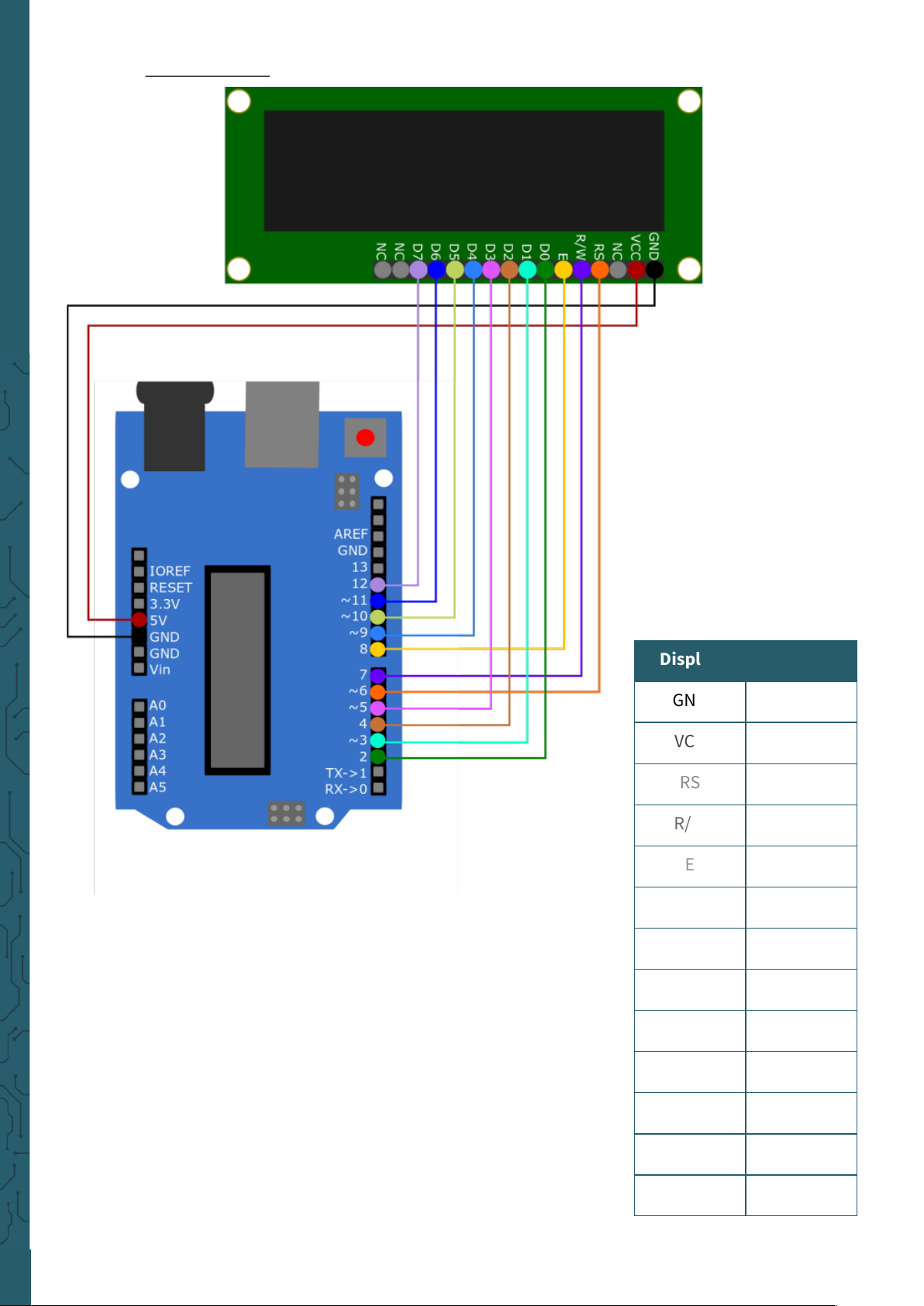
3.1.2 Parallel
3.1.2.1 4-bit
Display Arduino
GND GND
VCC 5V
RS Pin 6
R/W Pin 7
E Pin 8
D4 Pin 9
D5 Pin 10
D6 Pin 11
D7 Pin 12
Page 5
www.joy-it.net
Pascalstr. 8 47506 Neukirchen-Vluyn
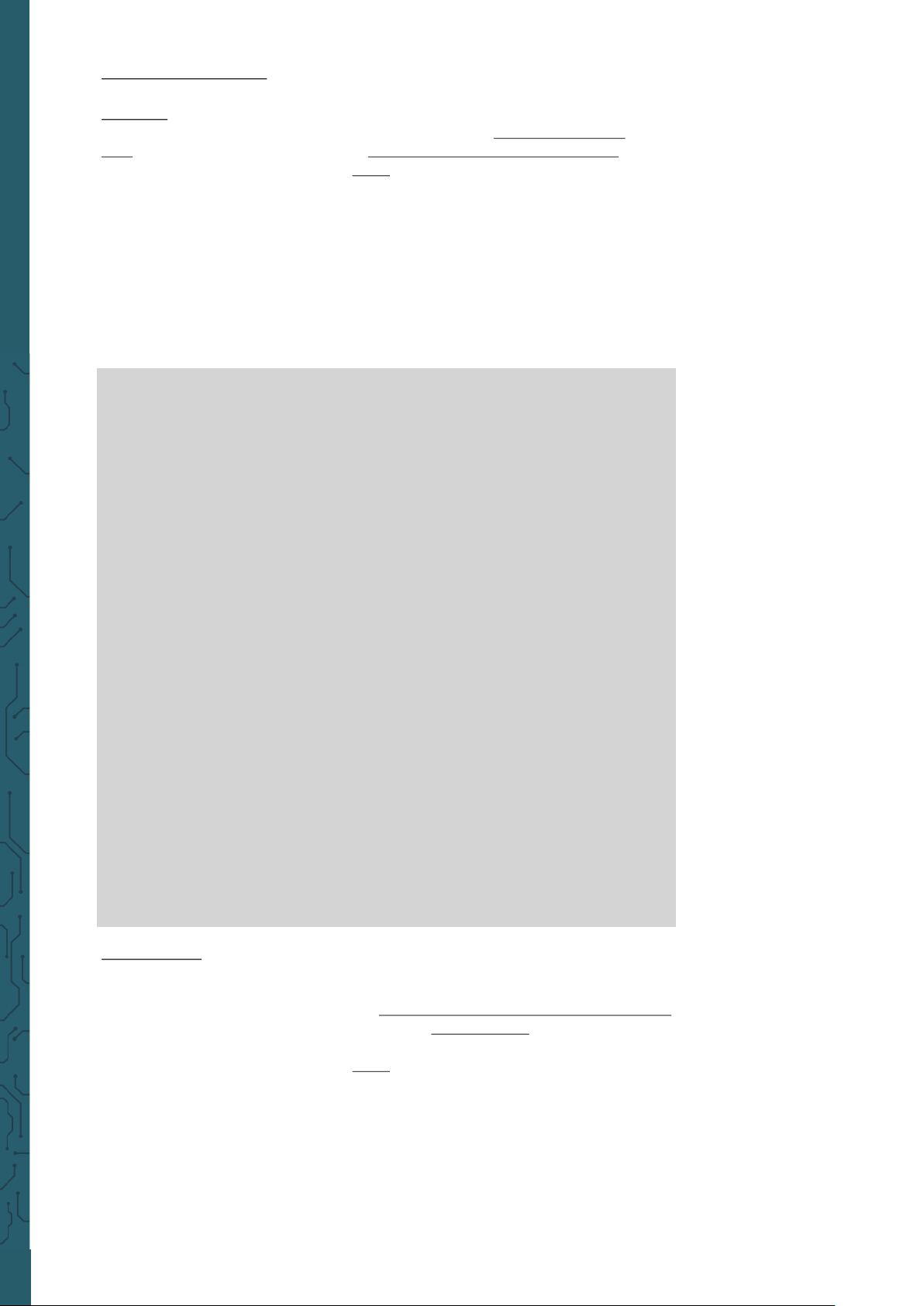
3.1.2.2 8-bit
Display Arduino
GND GND
VCC 5V
RS Pin 6
R/W Pin 7
E Pin 8
D0 Pin 2
D1 Pin 3
D2 Pin 4
D3 Pin 5
D4 Pin 9
D5 Pin 10
D6 Pin 11
D7 Pin 12
Page 6
www.joy-it.net
Pascalstr. 8 47506 Neukirchen-Vluyn
3.2. Code example
3.2.1 SPI
For the SPI connection, you can use the library iwi_SPI_RS0010 from
iwi1, which is published under the GNU General Public License v3.0 .
You can download the library here. You can include the downloaded
library in your Arduino IDE by selecting the .zip file under Sketch →
Include Library → Add .ZIP Library... . Select there the downloaded libra-
ry and restart your Arduino IDE to be able to use this library.
Copy the following code into your IDE to test your display. This will
display three dierent images on your display. To run the code example,
click on Upload.
Make sure that Board and Port are selected correctly under Tools.
#include "iwi_SPI_RS0010.h"
SPI_RS0010 rs;
void setup(){
rs.initSPI(12,11,13,10);
rs.begin(16,2,1);
}
void loop(){
rs.clearBuf();
rs.drawLine(0,0,100,16,1);
rs.displayBuf();
delay(2000);
rs.clear();
rs.clearBuf();
rs.drawString(0,0,"TEST",1,1,1);
rs.displayBuf();
delay(2000);
rs.clear();
rs.clearBuf();
rs.drawBoldString(0,0,"10:45",1,1);
rs.displayBuf();
delay(2000);
rs.clear();
rs.clearBuf();
}
3.2.1 Parallel
The display has 6800 and 8080 parallel interfaces. Both interfaces can
communicate with 4-bit as well as with 8-bit.
For this purpose, we provide the OLED16x2-IST0010-Arduino-Library
library. This has been published under the MIT-License.
You can download the library here. You can include the downloaded
library in your Arduino IDE by selecting the .zip file under Sketch →
Include Library → Add .ZIP Library... . Select there the downloaded libra-
ry and restart your Arduino IDE to be able to use the library.
There you will find four examples (4-bit 6800, 4-bit 8080, 8-bit 6800, 8-bit
8080). You can find these under File → Examples →
OLED16x2-IST0010-Arduino-Library.
Make sure that Board and Port are selected correctly under Tools.
Page 7
www.joy-it.net
Pascalstr. 8 47506 Neukirchen-Vluyn
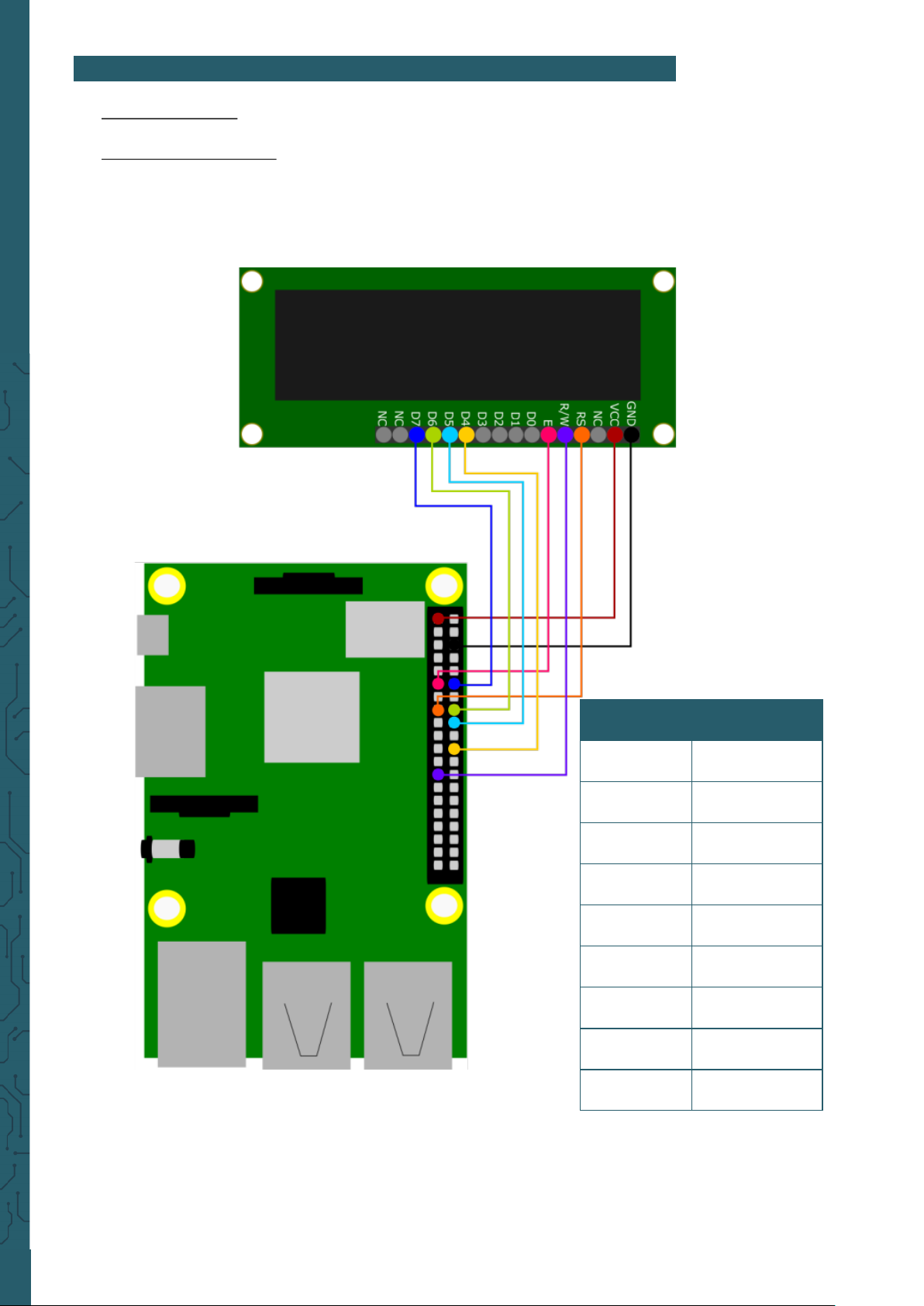
Display Raspberry Pi
GND GND
VCC 3.3 V
RS GPIO 22
R/W GND
E GPIO 17
D4 GPIO 25
D5 GPIO 24
D6 GPIO 23
D7 GPIO 18
4. USE WITH RASPBERRY PI
4.1 Connection
4.1.1 4bit Parallel 6800
Page 8
www.joy-it.net
Pascalstr. 8 47506 Neukirchen-Vluyn
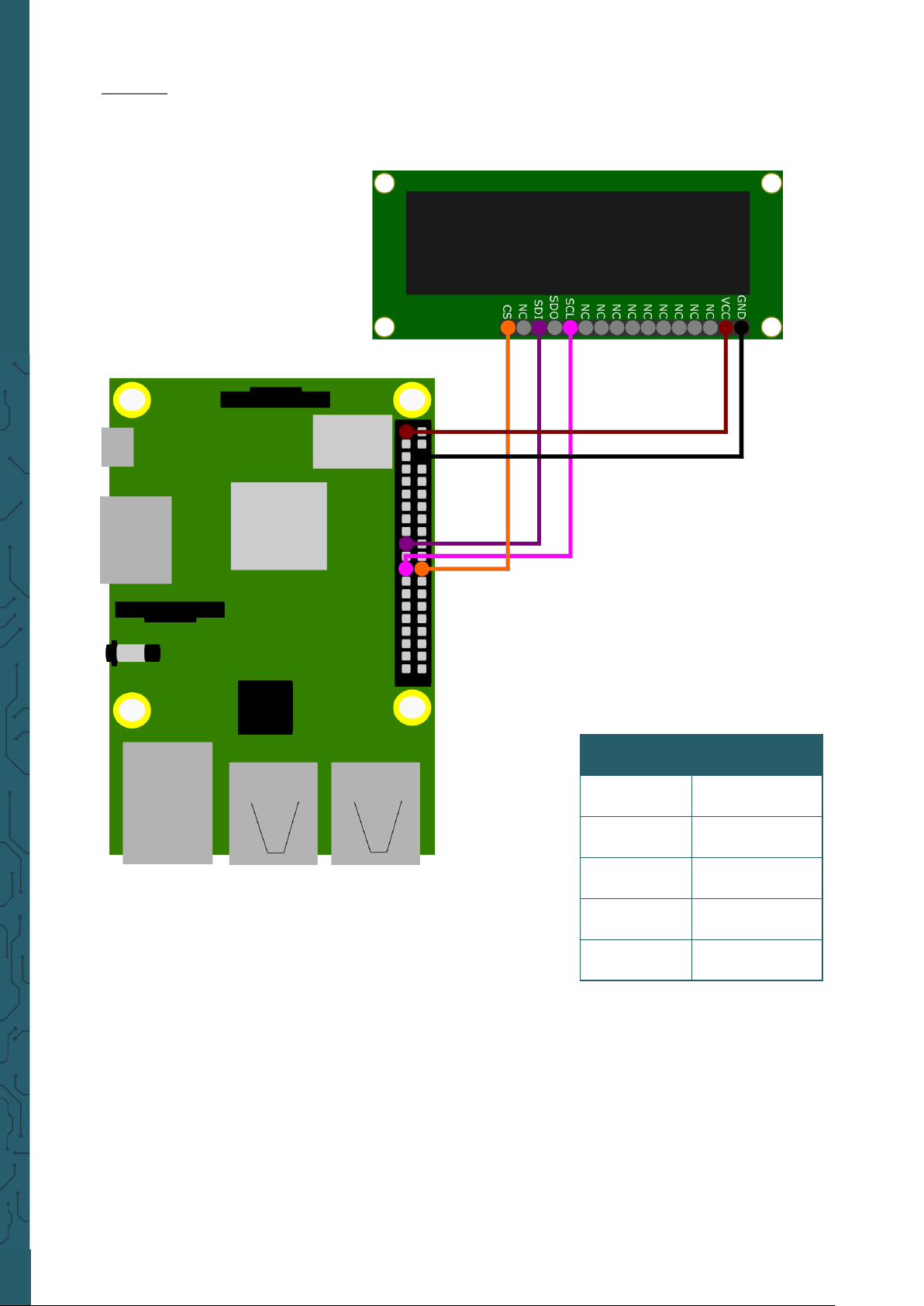
Display Raspberry Pi
GND GND
VCC 3.3 V
CS GPIO 8
MOSI GPIO 10
SCLK GPIO 11
4.1.2 SPI
Page 9

www.joy-it.net
Pascalstr. 8 47506 Neukirchen-Vluyn
4.2 Code example
4.2.1 4bit Parallel 6800
We use the library luma.oled for this communication type, which was
published by rm-hull. It has been published under the MIT-License.
However, you must first install the following program to be able to use
this library.
Now, download the library with the following command.
sudo -H pip3 install --upgrade luma.oled
sudo apt-get update
sudo apt-get install python3 python3-pip python3-pil libjpeg-dev
zlib1g-dev libfreetype6-dev liblcms2-dev libopenjp2-7 libtiff5 -y
The luma.oled library is now fully functional. You can now create a new
file with the following command. Copy the following code into it.
nano luma-ist0010.py
from luma.core.interface.parallel import bitbang_6800
from luma.oled.device import ws0010
import time
# Declare pins RS, E, D4, D5, D6, D7
parallel = bitbang_6800(RS=22, E=17, PINS=[25,24,23,18])
# set Display
try:
display = ws0010(parallel, selected_font='FT01')
display.text = 'Joy-IT' # Show text on the display
time.sleep(5)
display.text = 'COM-OLED16x2 \nParallel 6800'
time.sleep(5)
display.cleanup()
except KeyboardInterrupt:
display.cleanup()
You can save the file with CTRL + O and exit the editor with CTRL + X.
With the following command you can now execute the file.
python3 luma-ist0010.py
Page 10
www.joy-it.net
Pascalstr. 8 47506 Neukirchen-Vluyn
4.2.2 SPI
We use the library WS0010SowareSPI published under the MIT-
License by Joy-IT, in combination with Bistring, published under the
MIT-License by scott-griiths, for this communication type.
However, you must first install the following programs to be able to use
these librarys.
pip3 install --upgrade pip
Now, download the library with the following command.
sudo apt-get update
sudo apt-get install python3-pip python3-dev python3-rpi.gpio git -y
git clone https://github.com/joy-it/WS0010-Software-SPI.git
cd WS0010-Software-SPI/
Now you can execute the file Test.py directly and view it on your OLED
display by entering
python3 Test.py
nano Test.py
You can save the file with CTRL + O and exit the editor with CTRL + X.
With the following command you can now execute the edited file.
python3 Test.py
sudo pip3 install bitstring
Next, go to the directory you just added by entering
To stop the code just press CTRL + C.
If this is successful you can also edit the file as needed by typing
Page 11
www.joy-it.net
Pascalstr. 8 47506 Neukirchen-Vluyn
PR
5. GENERAL INFORMATION
Our Information and Take-back Obligations according to the
Electrical and Electronic Equipment Act (ElektroG)
Symbol on Electrial and Electronic Products:
This crossed-out bin means that electrical and electronic products do not
belong into the household waste. You must hand over your old appliance
to a registration place. Before you can hand over the old appliance, you
must remove used batteries and replacement batteries which are not
enclosed by the device.
Return Options:
As the end user, you can hand over your old appliance (which has
essentially the same functions as the new one bought with us) free of
charge for disposal with the purchase of a new device.
Small devices, which do not have outer dimensions bigger than 25 cm
can be handed in for disposal independently of the
purchase of a new product in normal household quantities.
1. Possibility of return at our company location during our opening
hours
Simac Electronics Handel GmbH, Pascalstr. 8, D-47506 Neukirchen-Vluyn
2. Possibility of return nearby
We will send you a parcel stamp with which you can send us your old
appliance free of charge. For this possibility, please contact us via e-mail
at [email protected] or via telephone.
Information about Package:
Please package your old appliance safe for transport. Should you not
have suitable packaging material or you do not want to use your own
material, you can contact us and we will send you an appropriate
package.
6. SUPPORT
If any questions remained open or problems may arise aer your
purchase,we are available by e-mail, telephone and ticket support
system to answer these.
E-Mail: [email protected]
Ticket-system: http://support.joy-it.net
Telephone: +49 (0)2845 98469 – 66 (10 - 17 o'clock)
For further information visit our website:
www.joy-it.net
Published: 09.04.2021
www.joy-it.net
SIMAC Electronics GmbH
Pascalstr. 8, 47506 Neukirchen-Vluyn
 Loading...