

Johnson Controls Unitary Products AL21, HL20, YZV, HC20, AC21 User's Information Manual
...Page 1
USER’S INFORMATION MANUAL
®
VARIABLE CAPACITY
OUTDOOR SPLIT-SYSTEM
AIR CONDITIONER AND HEAT PUMP
MODELS: YXV, AC21, AL21, YZV, HC20, HL20
TABLE OF CONTENTS
CONTACT INFORMATION . . . . . . . . . . . . . . . . . . . . . . . . . . . . . . . . . 1
SAFETY . . . . . . . . . . . . . . . . . . . . . . . . . . . . . . . . . . . . . . . . . . . . . . . .1
HOW YOUR SYSTEM WORKS . . . . . . . . . . . . . . . . . . . . . . . . . . . . . 1
COOLING CYCLE . . . . . . . . . . . . . . . . . . . . . . . . . . . . . . . . . . . . . . 1
HEATING CYCLE (HEAT PUMPS) . . . . . . . . . . . . . . . . . . . . . . . .1
SETTING THE THERMOSTAT . . . . . . . . . . . . . . . . . . . . . . . . . . . . 1
THERMOSTAT . . . . . . . . . . . . . . . . . . . . . . . . . . . . . . . . . . . . . . . . . . 2
YOUR KEY TO COMFORT . . . . . . . . . . . . . . . . . . . . . . . . . . . . . .2
HOME SCREEN . . . . . . . . . . . . . . . . . . . . . . . . . . . . . . . . . . . . . . .2
SECONDARY HOME SCREEN . . . . . . . . . . . . . . . . . . . . . . . . . . . 2
WI-FI NETWORK STATUS SCREEN . . . . . . . . . . . . . . . . . . . . . . .2
START-UP . . . . . . . . . . . . . . . . . . . . . . . . . . . . . . . . . . . . . . . . . . . . . .2
POWER FAILURE . . . . . . . . . . . . . . . . . . . . . . . . . . . . . . . . . . . . .3
Hx™ THERMOSTAT . . . . . . . . . . . . . . . . . . . . . . . . . . . . . . . . . . .3
TO MAXIMIZE OPERATING EFFICIENCY . . . . . . . . . . . . . . . . . . . . . 3
HEATING CONSERVATION . . . . . . . . . . . . . . . . . . . . . . . . . . . . . .3
COOLING CONSERVATION . . . . . . . . . . . . . . . . . . . . . . . . . . . . .3
CARE OF SYSTEM . . . . . . . . . . . . . . . . . . . . . . . . . . . . . . . . . . . . .3
COIL CARE . . . . . . . . . . . . . . . . . . . . . . . . . . . . . . . . . . . . . . . . . . .3
SERVICE CALLS . . . . . . . . . . . . . . . . . . . . . . . . . . . . . . . . . . . . . . .3
FILTER CARE . . . . . . . . . . . . . . . . . . . . . . . . . . . . . . . . . . . . . . . . .3
CLEARANCES . . . . . . . . . . . . . . . . . . . . . . . . . . . . . . . . . . . . . . . .3
PARTS INFORMATION . . . . . . . . . . . . . . . . . . . . . . . . . . . . . . . . . .3
EXTENDED WARRANTY . . . . . . . . . . . . . . . . . . . . . . . . . . . . . . . .3
SOME EFFICIENCY DO’S & DON’TS . . . . . . . . . . . . . . . . . . . . . .4
CHARACTERISTICS OF HEAT PUMPS . . . . . . . . . . . . . . . . . . . . . . .4
A CONSTANT HEAT . . . . . . . . . . . . . . . . . . . . . . . . . . . . . . . . . . . .4
WATER RUN-OFF . . . . . . . . . . . . . . . . . . . . . . . . . . . . . . . . . . . . . .4
OUTDOOR COIL DEFROSTING . . . . . . . . . . . . . . . . . . . . . . . . . .4
Limited Warranty . . . . . . . . . . . . . . . . . . . . . . . . . . . . . . . . . . . . . .5
CONTACT INFORMATION
• Go to website at www.york.com, then click on “Contact Us” and
follow the instructions.
• Contact us by mail:
We recommend that the user read all sections of this
manual and keep the manual for future reference.
WARNING
!
Cancer and Reproductive Harm – www.P65Warnings.ca.gov
SAFETY
!
WARNING
This product must be installed and serviced by a qualified installer or
service agency. Improper installation, adjustment, alteration, service
or maintenance can cause injury or property damage.
HOW YOUR SYSTEM WORKS
COOLING CYCLE
If your hand is wet and you blow on it, it feels cool because some of the
moisture is evaporating and becoming a vapor. This process requires
heat. The heat is being taken from your hand, so your hand feels cool.
That’s what happens with an air conditioner. During the cooling cycle,
your system will remove heat and humidity from your home and will
transfer this heat to the outdoor air.
Johnson Controls Unitary Products
Consumer Relations
5005 York Drive
Norman, OK 73069
HEATING CYCLE (HEAT PUMPS)
During the heating cycle, your system will remove heat and humidity
from the outdoor air and will transfer this heat to your home. This is possible because even 0°F outdoor air contains a great deal of heat.
Remember that your heat pump doesn’t generate much heat, it merely
transfers it from one place to another.
System Operation
Your thermostat puts full control of the comfort level in your home at
your fingertips and remotely using a smart device. DO NOT switch your
thermostat rapidly ON and OFF or between HEAT to COOL. This could
damage your equipment. Always allow at least 5 minutes between
changes.
SETTING THE THERMOSTAT
!
CAUTION
The main power to the system must be kept ON at all times to prevent
damage to the outdoor unit compressor. If necessary, the thermostat
control switch should be used to turn the system OFF. Should the
main power be disconnected or interrupted for 8 hours or longer, DO
NOT attempt to start the system for 8 hours after the power has been
restored to the outdoor unit. If heat is needed during this 8 hour
period, use emergency heat.
Johnson Controls Unitary Products 5321592-UUM-B-0818
Page 2
5321592-UUM-B-0818
THERMOSTAT
YOUR KEY TO COMFORT
With the touch on a screen or the swipe of an app, you are in complete
control of your touch-screen thermostat. Real-time alerts, home and
away modes, schedule creation and exclusive quick heat/cool settings
provide real benefits for real life – all available from your home or virtually anywhere in the world with your smart device, our HxTM Thermostat
app and an Internet connection. With automatic over-the-air updates
and you’re assured of efficient and reliable operation.
Intuitive, touch-based control.
An unobtrusive, 2.8-inch capacitive touch-screen features an exclusive,
easy-to-use hexagonal interface.
Complete control at home or away via your smart device.
Download our HxTM Thermostat app for iOS smart device and Android,
and control your system at home or away via Wi-Fi®, 3G or 4G – virtually anywhere with Internet access.
Always up-to-date.
Installed systems connected via Wi-Fi® receive the latest software
updates automatically.
Easy-access home and away modes.
Pre-set modes provide quick access to alternate settings.
Max Heat Setpoint - Choose the the maximum heating setpoint that is
available.
Min Cool Setpoint - Choose the minimum cooling setpoint that is avail-
able.
Refer to the thermostat user’s manual for additional information.
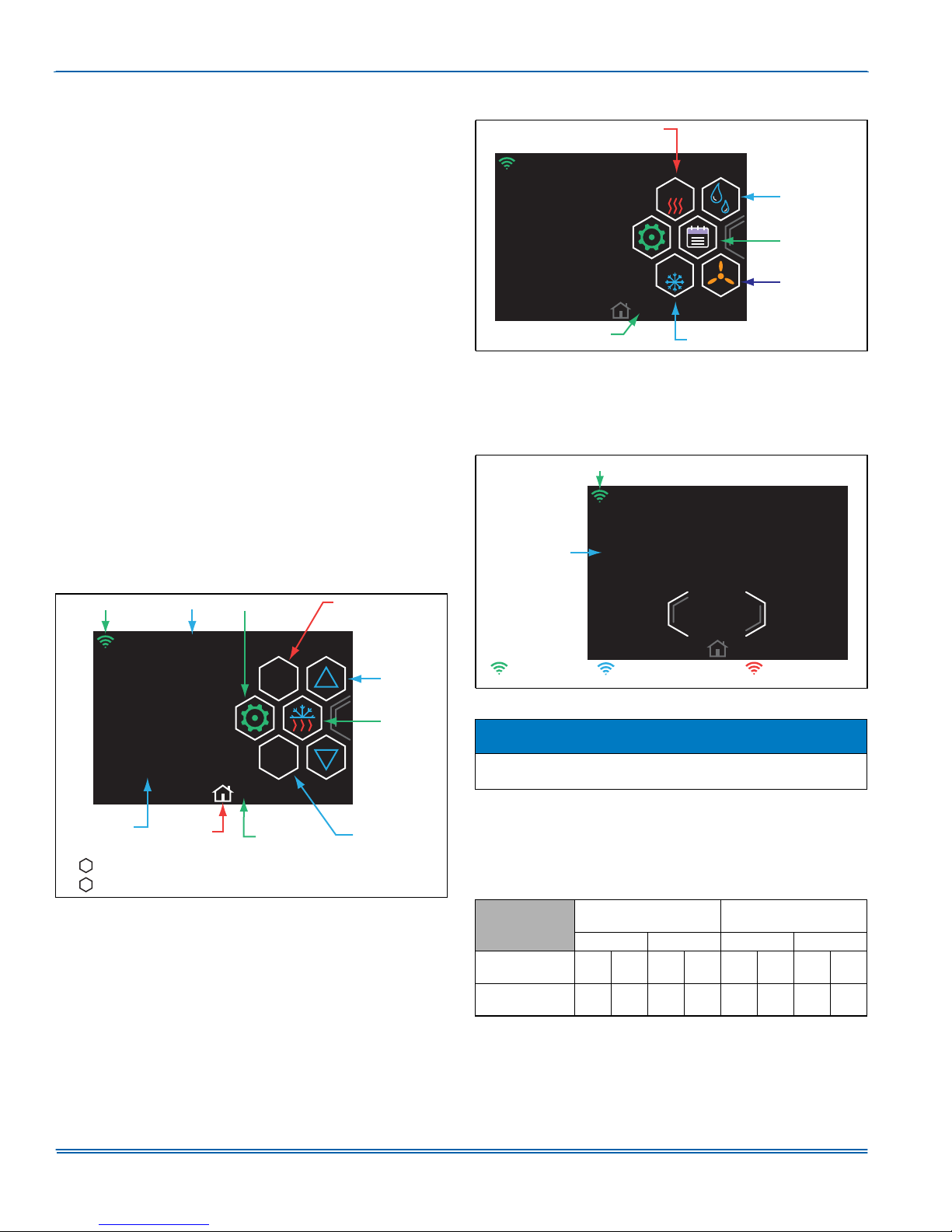
HOME SCREEN
:L)L6,*1$/
%$11(5
6(77,1*6
+($76(732,17
SECONDARY HOME SCREEN
MAX HEAT
3/31/16 11:14AM
MAX
HUMIDITY
º
SCHEDULE
(Visible in
Programmable
MAX
74
.
PAGE INDICATOR
FIGURE 2: Secondary Home Screen (swipe right to view)
WI-FI NETWORK STATUS SCREEN
Wireless Status Screen is invoked when the Wi-Fi® Signal Strength
Icon is pressed on the Banner. This screen provides Wi-Fi® connectivity information.
:L)L 6,*1$/
66,' +9$&
&211(&7,9,7<
,1)250$7,21
0$& IEFI
'61 $&:
5(* <(6
MAX COOL
:,5(/(6667$786
',6&211(&7
Mode only)
FAN
A0760-001
$0
5220
7(03(5$785(
6ZLSH/()7WRUHDFKWKH6HFRQGDU\+RPH6FUHHQ
6ZLSH5,*+7RUWDS+20(LFRQWRUHWXUQWRWKH+RPH6FUHHQ
FIGURE 1: Home Screen
+20(
3$*(
,1',&$725
83'2:1
$552:6
02'(
67$786
&22/
6(732,17
$
&211(&7('
*UHHQ
FIGURE 3: WI-FI- Network Status Screen
&211(&7('72/$1
%OXH
127&211(&7('
5HG
$
NOTICE
For full thermostat functionality please refer to the Homeowner and
Installer Quick Reference Guide located in the thermostat box.
START-UP
The maximum and minimum conditions for operation must be observed
to assure a system that will give maximum performance with minimum
service.
TABLE 1:
1.
Application Limitations
Air Temperature at
Outdoor Coil, °F
Min. Max. Min. Max.
Model
All Inverter
AC & HP
Operation outside these below this temperature is permissible for a short
period of time during morning warm-up.
DB
CoolDBHeatDBCoolDBHeat
35 -5 125 75 57 50 72 80
1
Air Temperature at
Indoor Coil, °F
WB
DB
WB
DB
Cool
Heat
Cool
Heat
2 Johnson Controls Unitary Products
Page 3
5321592-UUM-B-0818
If the main power supply to the outdoor and indoor units is off. Place the
system into operation as follows:
1. Enable mode.
2. Set temperature adjustment to the desired temperature on your
thermostat.
COOLING - The higher the setting, the lower the amount of energy consumed. Federal Guidelines recommend a setting of 78 °F.
HEATING - The lower the setting, the lower the amount of energy consumed. Federal guidelines recommend a setting of 65 °F or lower.
NOTICE
If your cooling and heating temperature adjustments are separate, be
sure to set both.
3. Select and set the fan operation mode you desire.
POWER FAILURE
Should power failure occur, when power is restored the system will
automatically resume operation using the set-points that were present
when power was interrupted.
When accidents, wind storms, etc. disrupt electrical power supply to
your house, switch thermostat to “OFF” position.
HxTM THERMOSTAT
This computerized electronic thermostat, when programmed, will function automatically to operate the system as follows: When the indoor
temperature rises above the higher (COOL) setting, the outdoor unit will
operate and the indoor fan will circulate the cooled, filtered air. When
the room temperature is lowered to the selected level, the system will
shut off. The indoor fan will either shut off or run continuously, depending upon your choice of fan switch setting. When the indoor temperature drops below the lower (HEAT) setting, the heating system will
operate, and the indoor fan will circulate the heated, filtered air. When
the indoor temperature rises to the selected setting, the system will shut
off. The indoor fan will either shut off or run continuously, depending
upon your choice of fan switch setting.
TO MAXIMIZE OPERATING EFFICIENCY
HEATING CONSERVATION
For the most efficient operation, keep storm windows and doors closed
all year long. They not only help insulate against heat and cold, but they
also keep out dirt, pollen, and noise.
Closing drapes at night, keeping fireplace dampers closed when not in
use, and running exhaust fans only when necessary will help you to
retain the air you have already paid to heat.
Keep lamps, televisions, or other heat producing sources away from the
thermostat. The thermostat will sense this extra heat and will not be
able to maintain the inside temperature to the desired comfort level.
COOLING CONSERVATION
To comfortably cool your home, your air conditioner must remove both
heat and humidity. Don’t turn your system off even though you will be
away all day. On most days it will be normal for this unit to run continuously, as it maintains comfort.
Keep windows closed after sundown. While the outdoor temperature at
night may be lower than indoors, the air is generally loaded with moisture which is soaked up by furniture, carpets, and fabrics. This moisture
must be removed when you restart your system.
The hotter the outside temperature, the greater the load on your system. Therefore do not be alarmed when your system continues to run
after the sun has set on a hot day. Heat is stored in your outside walls
during the day and will continue to flow into your home for several hours
after sunset.
Use your kitchen exhaust fan when cooking. One surface burner on
“HIGH” requires one ton of cooling. Turn on your bathroom exhaust fan
while showering to remove humidity. However, exhaust fans should not
be run excessively. It would decrease efficiency by removing conditioned air.
You can also help your system in the summer by closing drapes or
blinds and by lowering awnings on windows that get direct sunlight.
CARE OF SYSTEM
It is strongly recommended that regular periodic preventative maintenance be performed on this equipment. The person most familiar with
the equipment in your H.V.A.C. system is a dealer. The dealer can
ensure your maintenance program meets the conditions of the “Warranty”, maximize the efficiency of the equipment, and service your unit
within the federally mandated guidelines with regard to unlawful discharge of refrigerants into the atmosphere.
COIL CARE
Keep the outdoor unit free of foliage, grass clippings, leaves, paper, and
any other material which could restrict the proper air flow in and out of
the unit. The coil may be vacuumed to remove any debris from between
the fins. If the coil becomes excessively dirty, turn the main disconnect
switch to “Off” and wash the coil with your garden hose. Avoid getting
water into the fan motor and control box. Flush dirt from base pan after
cleaning the coil.
SERVICE CALLS
There are a few instances where the user can avoid unnecessary service calls. If unit stops functioning properly check the following items
before calling your servicing dealer:
1. Indoor section for dirty filter.
2. Outdoor section for leaf or debris blockage. Eliminate problem, turn
off the thermostat for 10 seconds and attempt start. Wait 5 minutes.
If system does not start, call your servicing dealer.
!
WARNING
Your system contains environmentally friendly refrigerant R-410A,
which operates at high pressures. You may be in danger if you try to
make an attempt to repair your unit. Please contact your local dealer.
FILTER CARE
Inspect the air filter(s) at least once a month. If they are dirty, wash
reusable filters with a mild detergent per manufacturer’s recommendations. Replace disposable filters with new filters. Install the clean filters
with “air flow” arrow in the same direction as the air flow in your duct.
Filters should be clean to assure maximum efficiency and adequate air
circulation.
CLEARANCES
The minimum clearances from the outdoor unit shown below must be
maintained should any patio or yard improvements be done around the
outdoor unit.
• 10" Clearance Coil Area
• 48" Overhead Clearance
• 18" to 24” is the minimum service panel access depending on
model. Refer to the installation manual for details.
• 24" Unit to Unit Distance
PARTS INFORMATION
Replacement parts are available from local contractor/dealer.
EXTENDED WARRANTY
Special warranty packages (called York Care Performance Promise)
are available through your contractor. These packages reduce the
potential cost of service calls following the first year of operation on your
cooling (or heating/cooling) system.
Johnson Controls Unitary Products 3
Page 4

5321592-UUM-B-0818
SOME EFFICIENCY DO’S & DON’TS
DON’T be a “thermostat jiggler”. Moving your thermostat setting will not
make your system heat or cool any faster. Adjust your thermostat to a
comfortable setting and leave it there.
DON’T restrict air circulation. Placing furniture, rugs, etc. in such a way
that they interfere with air vents will make your system work harder to
achieve a comfortable temperature level. This requires more energy,
which means greater cost to you.
DON’T locate lamps or other heat-producing appliances (radios, TV’s,
heaters, etc.) near your thermostat. The heat from these items will give
your thermostat “false information” about the temperature in the room.
DO select a comfortable thermostat setting, but keep in mind that moderation in temperature selection will save energy.
DO turn on your kitchen exhaust fan when cooking and your bathroom
exhaust fan when showering. Also, make sure your clothes dryer is
properly vented. If these items are neglected, an excess heat and
humidity condition may be created, causing your air conditioning system to run longer.
DO set your thermostat a few degrees lower than normal several hours
before entertaining a large group of people in a relatively small area.
People give off a considerable amount of heat and moisture in a closed
area.
DO keep drapes and venetian blinds closed when practical. These
items provide insulation against heat loss/gain.
DO contact a qualified service person to make repairs or adjustments to
your system. He has been trained to perform this service.
CHARACTERISTICS OF HEAT PUMPS
A CONSTANT HEAT
Heat pumps have a cooler supply air temperature than furnaces. The
common practice of over-sizing furnaces contributes to an “off-and-on
again” operation with short blasts of hot supply air. The heat pump system is sized more closely to the heating needs of your home. Heat is
supplied at a lower temperature over a longer period of time to provide
a more constant heat, and it may give you the impression that your system “never stops running”.
WATER RUN-OFF
During the heating cycle, in mild weather you may notice water running
off the outdoor coil. Moisture from the air is condensed on the outside
surface of the coil where it gathers and runs off. No need for alarm, your
unit has not sprung a leak!
OUTDOOR COIL DEFROSTING
At certain outdoor conditions (low temperature, high humidity), frost
may build up on the coil of the outdoor unit. In order to maintain heating
efficiency, the system will automatically defrost itself. Steam rising from
the outdoor unit is normal and is an indication of proper operation. The
vapor cloud will only last for a few minutes. When the defrost cycle is
completed, the system will automatically switch back to heating. Auxiliary heat is automatically energized to maintain comfort during defrost.
4 Johnson Controls Unitary Products
Page 5
5321592-UUM-B-0818
Limited Warranty
Residential Split AC & HP Communicating Variable Capacity Systems
WARRANTY TERMS: Johnson Controls Unitary Products (hereinafter “Company”) warrants this product to be free from defects in factory workmanship and material under normal use and service and will, at its option, repair or replace any parts, without charge, subject to the exclusions below, that
prove to have such defects according to the terms outlined in this warranty. Company reserves the right, at its sole discretion, to provide a replacement unit in the place of repair parts, in which case the warranty period for the replacement unit is limited to the remainder of the original warranty
period. Alternatively, Company may, at its option, extend a replacement allowance to be applied toward the purchase of a new unit marketed by Company. The exact amount of the allowance will be determined at the discretion of Company, based upon current market conditions, but in no case shall
this allowance exceed thirty (30) percent of the original consumer purchase price of the unit excluding such items as ductwork, wiring, piping, and
installation costs. The warranty period for repair or replacement parts or unit provided hereunder shall not extend beyond the warranty period stated
below. Company shall have no responsibility hereunder for installation, shipping, handling, or other charges except as specifically provided herein.
This warranty covers only the equipment described by the Product Model Number and Unit Serial Number on the equipment or listed on the Warranty
Registration Card, and applies only to products installed in the United States, Canada, or Puerto Rico. Tampering, altering, defacing, or removing the
product serial number will serve to void this warranty. This warranty extends only to the original consumer purchaser and is nontransferable. For this
warranty to apply, the product must be installed according to Company recommendations and specifications, and in accordance with all local, state,
and national codes; and the product or residence must not be removed from its place of original installation. This warranty does not apply to any unit
sold over the Internet, by telephone or other electronic means unless the dealer that buys or sells a unit over the Internet, by telephone or other electronic means also installs the unit. In the absence of a recorded Warranty Registration Card, the warranty period will begin upon product shipment
from Company. If you are unaware of the date the warranty became effective, contact Company at (877) 874-7378 or visit
www.upgproductregistration.com.
FOR PRODUCT REGISTRATION: For your benefit and protection, register your product with Company promptly after installation. This will initiate the
warranty period and allow us to contact you, should it become necessary. You can register your product online at
www.upgproductregistration.com or by returning the Warranty Registration Card on the back page of this packet.
System AHRI #:
System
Component
Outdoor Unit
Indoor Unit(s)
System Control
FOR WARRANTY SERVICE OR REPAIR: Notify your Installing Dealer or a Participating Dealer, preferably in writing, as soon as possible after discovery of the problem. Be sure to include the Product Model Number, Unit Serial Number, Installation Date, and a description of the problem. You
may find the Installing Dealer's name on this page or on the equipment, and you can locate Participating Dealers online at www.yorkupg.com.
If a Dealer response is not received within a reasonable amount of time, notify Company at: Johnson Controls Unitary Products, Consumer Relations,
5005 York Drive, Norman, OK 73069 or by telephone at (877) 874-7378. All warranty service or repair will be performed during regular business
hours, Monday through Friday 9:00 AM - 5:00 PM. Service requests sent to Company without prior Dealer contact will be referred back to a Participating Dealer. Because this process takes time, it is in the best interest of the Consumer to contact a Participating Dealer directly.
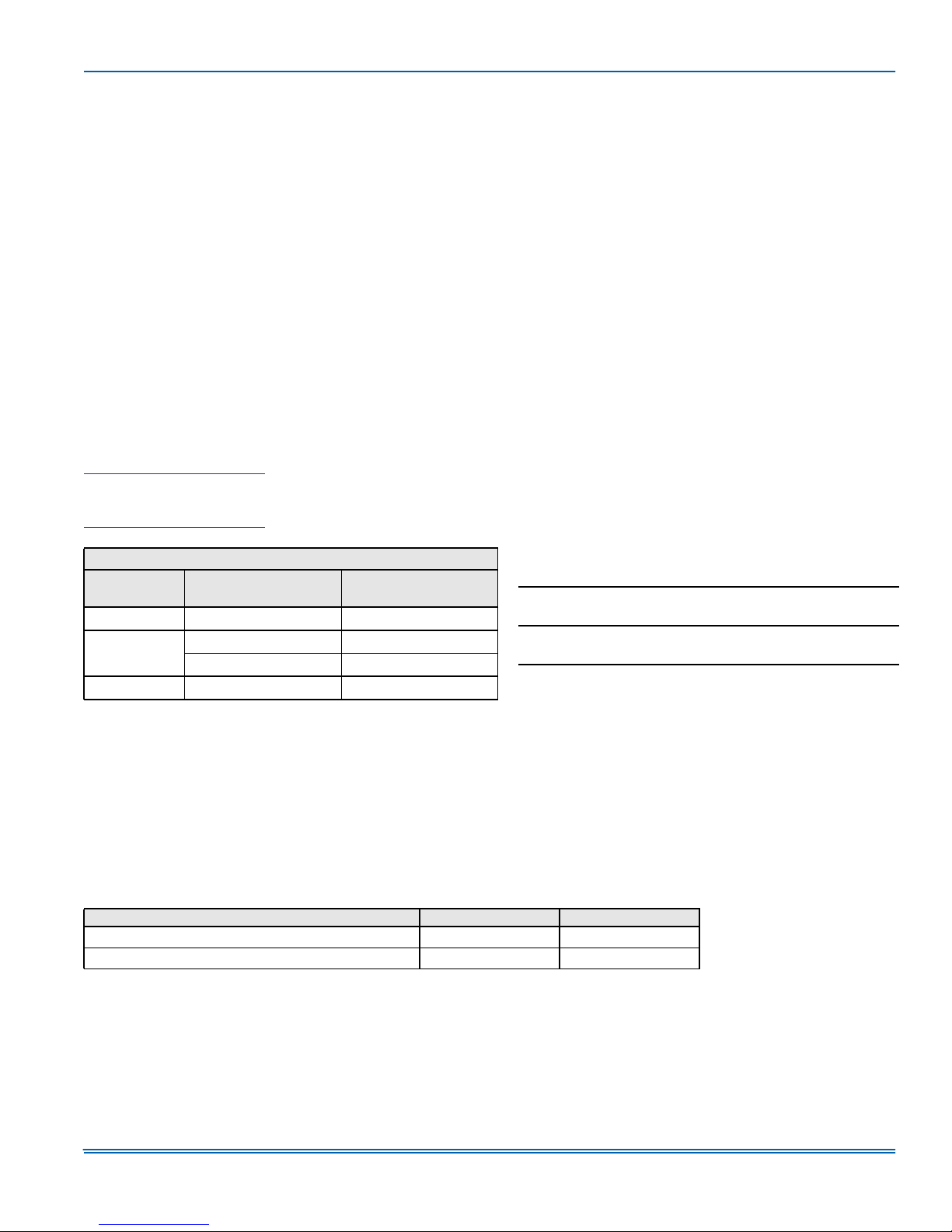
WARRANTY PERIOD: The warranty period in years, depending on the part, is as shown in the chart below.
For warranty coverage, these variable capacity designs are required to be installed as complete systems including the communicating HxTM thermo-
stat and variable speed communicating air handler, furnace & coil, or modular air handler & coil with factory mounted EEV. Company strongly rec-
ommends that a completed Startup Sheet is submitted at the time of warranty registration.
SYSTEM COMPONENT
YXV, AC21, AL21, YZV, HC20, HL20 Outdoor Unit
AVV or MC Indoor Unit with factory mounted EEV
NOTES:
To qualify for the † Extended 10-year parts warranty and/or the ‡ Lifetime compressor warranty, the unit must be registered online at www.upgproductregistration.com
within 90 days of installation for replacement units or within 90 days of closing for new home construction. In some states, registration is not required, but proof of installation is required.
Model Number Serial Number
COMPRESSOR PARTS
10 or Lifetime
Installation Date:
Installing Dealer:
Dealer Training Certification Number:
‡
—
5 or 10
5 or 10
†
†
MAINTENANCE: Company strongly recommends regular periodic preventive maintenance on this equipment. The person most familiar with the
equipment in your HVAC system is a Participating Dealer. The Participating Dealer can ensure that your maintenance program meets the “Company
Warranty” conditions, maximize the equipment efficiency, and service your unit within the mandated guidelines with regard to unlawful discharge of
refrigerants into the atmosphere.
Johnson Controls Unitary Products 5
Page 6

EXCLUSIONS: This warranty does not cover any:
1. Shipping, labor, or material charges or damages resulting from transportation, installation, or servicing.
2. Damage or repairs required as a consequence of mishandling, faulty installation, misapplication, abuse, improper servicing, unauthorized alteration, or improper operation.
3. Damages or failure to start resulting from improper voltage conditions, blown fuses, open circuit breakers, or other inadequacy or interruption of
electrical service or fuel supply.
4. Fuses, either internal or external to the product.
5. Labor or other costs incurred for diagnosing, repairing, removing, installing, shipping, servicing, or handling of either defective parts or replacement parts.
6. Products removed from their original location for reinstallation purposes.
7. Damages resulting from accident, abuse, fire, flood, alteration, or acts of God.
8. Damages resulting from use of the product in a corrosive atmosphere.
9. Normal maintenance, or damages resulting from failure to perform normal maintenance, as outlined in the installation and servicing instructions
or owner's manual.
10.Cleaning or replacement of filters, nozzles, or orifices.
11.Damages resulting from operation with inadequate supply of air or water; Damages resulting from failure to properly and regularly clean air and/
or water side of condenser and evaporator.
12.Damages resulting from: (I) freezing of condenser water or condensate; (II) inadequate or interrupted water supply; (III) use of corrosive water;
(IV) fouling or restriction of the water circuit by foreign material or like causes.
13.Damages caused by improper parts, components or accessories not suitable for use in or with the unit. For a list of parts that are known to be
compatible please reference the equipment renewal parts list, contact a Participating Dealer for assistance, or call 1-877-874-7378.
14.Electricity or fuel costs, or increases in fuel or electric costs, for any reason including additional or unusual use of supplemental electric heat.
This warranty is in lieu of all other express warranties. All implied warranties, including the implied warranty of merchantability and fitness for a particular purpose are limited in duration to the actual warranty period applicable to the part. Some states do not allow the disclaimer of implied warranties,
so the above disclaimer may not apply to you. In addition, some states do not allow limitations on how long an implied warranty lasts, so the above
limitation may not apply to you. In no event, whether as a result of breach of warranty or contract, tort (including negligence), strict liability, or otherwise, shall Company be liable for special, incidental, or consequential damages or expenses, including but not limited to loss of use of the equipment
or associated equipment, lost revenues or profits, cost of substitute equipment, or cost of fuel or electricity.
The above limitations shall inure to the benefit of Company's suppliers and subcontractors. The above limitation on consequential damages shall not
apply to injuries to persons in the case of consumer goods. Company does not assume, or authorize any other person to assume for Company, any
other liability for the sale of this product. Some states do not allow the exclusion or limitation of incidental or consequential damages, so the above
limitation may not apply to you. This warranty gives you specific legal rights. You may also have other rights which vary from state to state.
Subject to change without notice. Published in U.S.A. 5321592-UUM-B-0818
Copyright © 2018 by Johnson Controls, Inc. All rights reserved. Supersedes: 5321592-UUM-A-0317
York International Corp.
5005 York Drive
Norman, OK 73069
 Loading...