

Page 1
Page 2
PLEASE READ THIS ENTIRE
MANUAL BEFORE USE AND
SAVE THESE INSTRUCTIONS
FOR FUTURE REFERENCE
• Indoor use only.
• Do not carry Arctic Air™ when
filled with water. Some water
may remain in the unit even if
the tank is empty.
• Use only clean or distilled water.
• Please read and follow regular
maintenance as recommended
in the “Maintenance” section of
this guide.
• If a leak or spill occurs, unplug
Arctic Air™ and let it dry for 24
hours. Then, use as normal.
• Do not place in direct sunlight
for extended periods of time.
• When not using Arctic Air™
for extended periods of time,
empty the water tank, turn the
unit
speed for at least 4 hours. This
will dry out the filter and inside of
your unit.
• Only use the original power
adapter and cord supplied.
Thank you for purchasing Arctic Air™ from JML.
Please read these instructions in full and keep them safe for future reference.
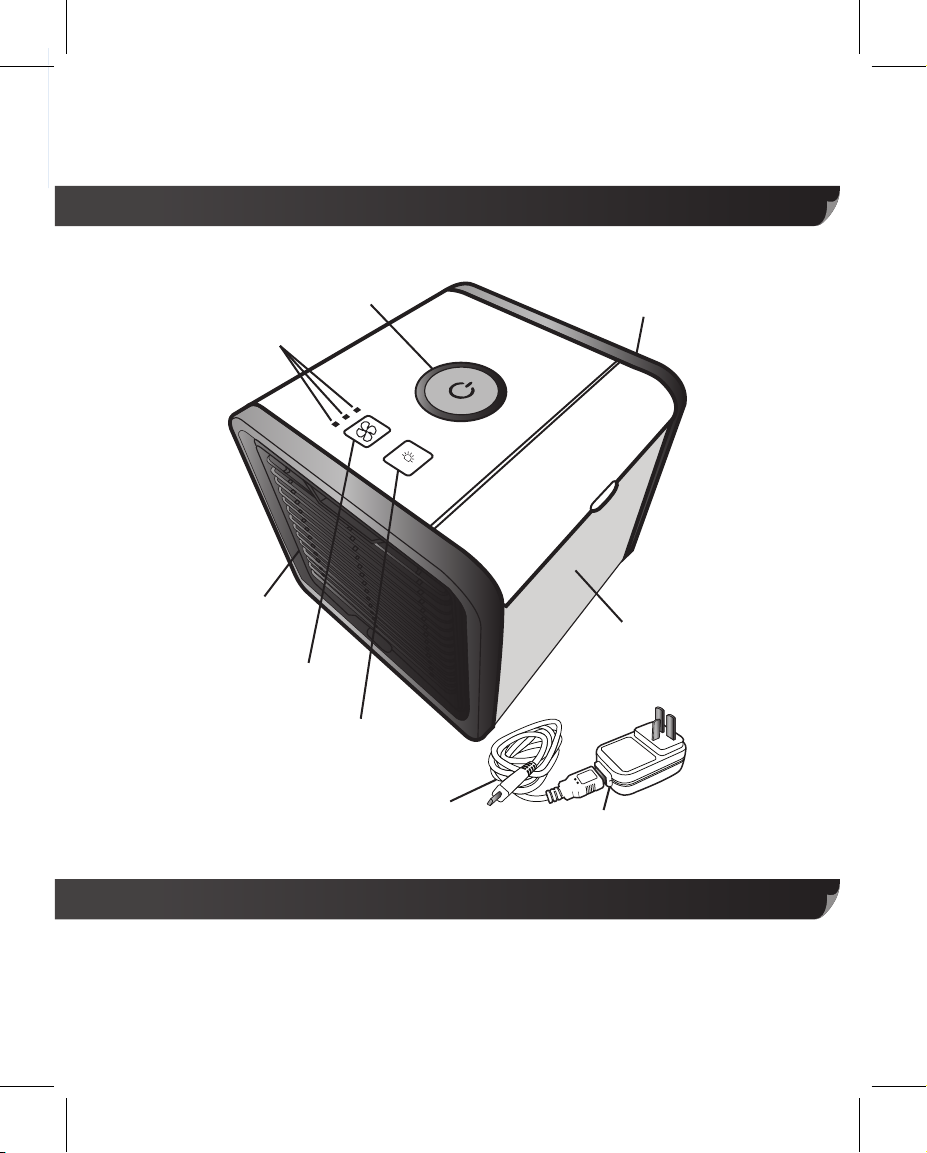
Your Arctic Air
Indicator Lights
Front Grill
TM
Fan Speed
Fan Speed
Button
On/Off
Button
HI
MED
LO
Light
Button
USB Cable
Information
INDOOR USE ONLY
Model no: 17013-B
Adaptor: SW-050150BS
For adaptor: 100-240V, 50/60Hz, 0.2A, class ll
For main unit: DC 5V, 1.5A, 10W
Back Grill
Water
Tank
USB Power
Adapter
Without adaptor:
For main unit: DC 5V, 2.0A, class lll
(Note for USB input: DC5V, 1.5A or 2.0A)
Page 3
• A replaceable filter is designed
specifically for this product. If
your cartridge has been
broken or damaged, you can
purchase a replacement.
• Arctic Air™ must be kept on a
level surface during use, tilting
the unit may cause water to
leak out of the base.
• Check the internal reservoir
before refilling – adding water
too early will cause the reservoir
to overfill and water will leak
from the base.
• If moving Arctic Air™ unplug
the unit and take care not to
spill any water from the
reservoir. If the reservoir is full
empty before moving.
• For best results, use very cold
water – the cooler the water
used to fill Arctic Air™, the
cooler the air that it produces.
• Children should be supervised
to ensure that they do not play
with the appliance.
• This appliance can be used by
children aged from 8 years and
Safety Warnings & Advice
PLEASE READ THIS ENTIRE
MANUAL BEFORE USE AND
SAVE THESE INSTRUCTIONS
FOR FUTURE REFERENCE
• Indoor use only.
• Do not carry Arctic Air™ when
filled with water. Some water
may remain in the unit even if
the tank is empty.
• Use only clean or distilled water.
• Please read and follow regular
maintenance as recommended
in the “Maintenance” section of
this guide.
• If a leak or spill occurs, unplug
Arctic Air™ and let it dry for 24
hours. Then, use as normal.
• Do not place in direct sunlight
for extended periods of time.
• When not using Arctic Air™
for extended periods of time,
empty the water tank, turn the
unit
on, and set to highest fan
speed for at least 4 hours. This
will dry out the filter and inside of
your unit.
• Only use the original power
adapter and cord supplied.
• Do not touch the power supply
or power cord with wet hands.
• Unplug Arctic Air™ when
cleaning, removing/replacing
filter, or moving the device.
• Do not place Arctic Air™ near a
heater or any electrical equipment.
• Do not place the device in
passageways or high traffic
areas where there is a possibility
of tripping or knocking it over.
• Do not allow any foreign
inside Arctic Air™.
• Do not place items on top of
Arctic Air™.
• Do not block the front and back
grills of the device.
• Do not turn the device upside
down.
• Do not submerge Arctic Air
under water or other liquids.
• Do not place Arctic Air™ near
open flames or fire sources.
• The manufacturer does not
bear any responsibility for any
damage from failure to comply
with this product guide.
objects
™
Page 4
Safety Warnings & Advice
• A replaceable filter is designed
specifically for this product. If
your cartridge has been
broken or damaged, you can
purchase a replacement.
• Arctic Air™ must be kept on a
level surface during use, tilting
the unit may cause water to
leak out of the base.
• Check the internal reservoir
before refilling – adding water
too early will cause the reservoir
to overfill and water will leak
from the base.
• If moving Arctic Air™ unplug
the unit and take care not to
spill any water from the
reservoir. If the reservoir is full
empty before moving.
• For best results, use very cold
water – the cooler the water
used to fill Arctic Air™, the
cooler the air that it produces.
above and persons with
reduced physical, sensory or
mental capabilities or lack of
experience and knowledge if
they have been given supervision
or instruction concerning use
of the appliance in a safe way
and understand the hazards
involved. Children should not
play with the appliance.
Cleaning and user maintenance
shall not be made by children
without supervision.
• If the supply cord is damaged,
it must be replaced by the
manufacturer, its service agent
or similarly qualified persons in
order to avoid a hazard.
• Children should be supervised
to ensure that they do not play
with the appliance.
• This appliance can be used by
children aged from 8 years and
Page 5
Safety Warnings & Advice
This marking indicates that this product should not be disposed with other
household waste throughout the EU. To prevent possible harm to the environment
or human health from uncontrolled waste disposal, recycle it responsibly to promote
the sustainable reuse of material resources. To return your used device, please use
the return and collection systems or contact the retailer where the product was
purchased. They can take this product for environmentally safe recycling.
Maintenance
We recommend cleaning the water tank and inside of the unit once weekly.
Use only a non-abrasive cloth and mild dish soap when needed.
Unplug the unit before cleaning.
For best continued results, we recommend changing the filter every 6 months.
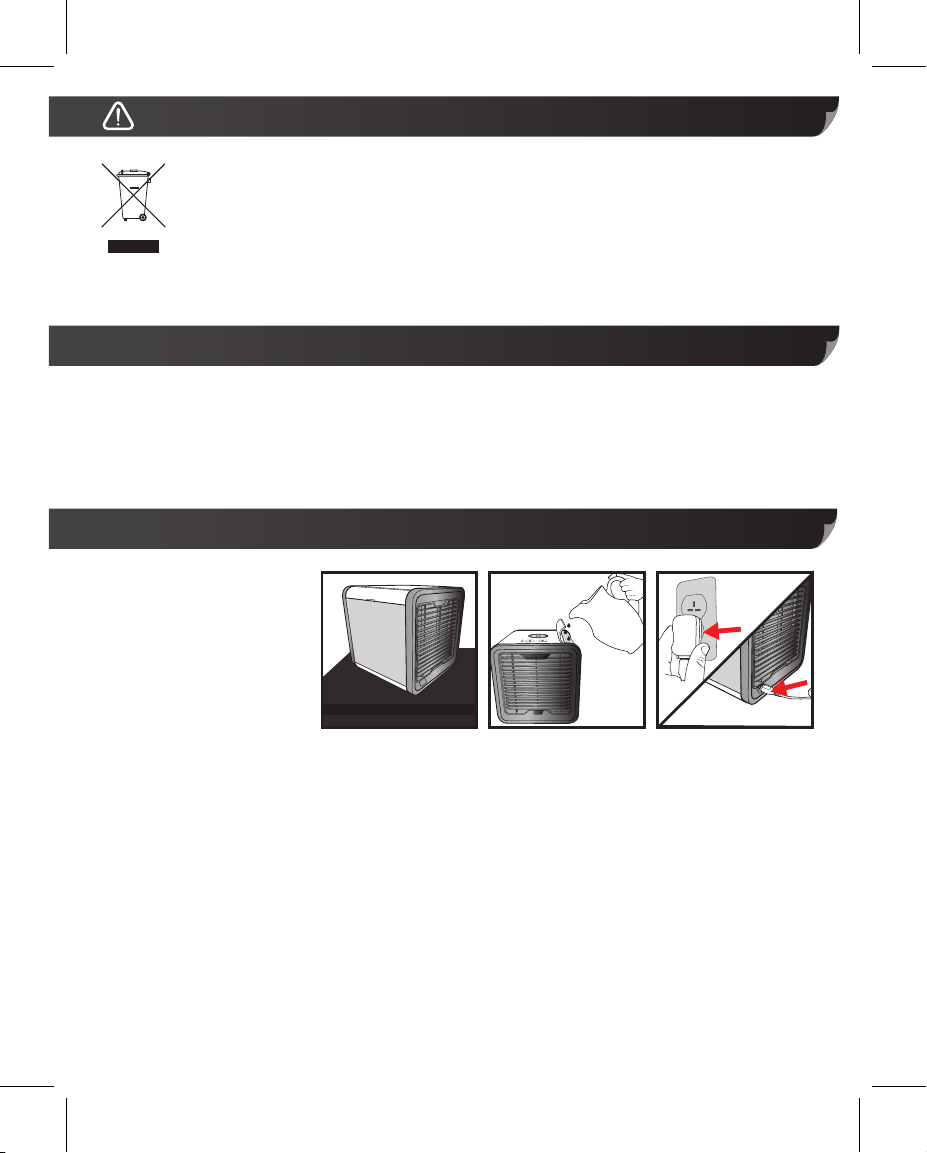
Setup
1. Place Arctic Air™ on a
flat surface. (See Fig 1)
2. Open the water tank
door and fill with water.
(See Fig 2) We
recommend a pitcher
or measuring cup.
3. Plug USB Power Adapter into an outlet. Then, insert larger USB end of cable into the
adapter and the smaller end into the power port on the back of Arctic Air™. (See Fig 3)
NOTE: You can also plug the larger USB end into a computer to power Arctic Air™.
The power should be SELV: (DC 5V, 1.5 or 2.0A)
Fig 1
Fig 2
Fig 3
Page 6
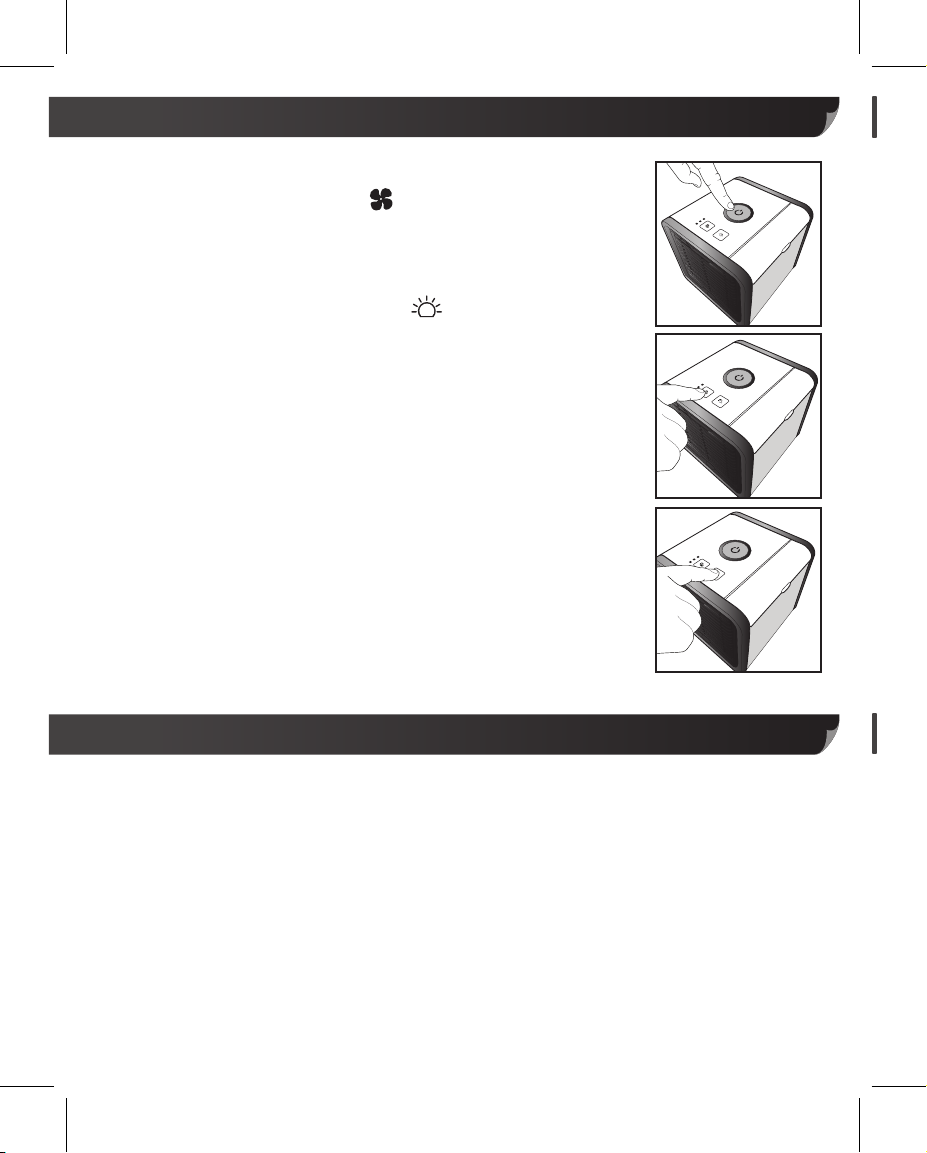
Usage
1. Press Power Button to power on Arctic Air™. (See Fig 4)
2. Set the Fan speed by pressing button. You can choose from
Low, Medium, and High Mode. The indicator lights next to the
button show you which mode Arctic Air™ is currently running at.
(See Fig 5)
3. Choose your light colour by pressing button. You can choose
between solid colours or a colour-cycle mode. (See Fig 6)
COLOUR ORDER: Blue, Red, White, Teal, Purple, Yellow,
Green, Colour Cycle
4. When you’re done, press the Power Button again to turn off your
Arctic Air™.
Fig 4
Fig 5
NOTE: We recommend running Arctic Air™ on HIGH mode for
at least 5 minutes before powering off to allow for drying.
LOW WATER: When the water level is low, the water tank will
blink 3 times every 60 seconds in AMBER colour. When the
tank is filled again, the light will function as normal again.
Fig 6
Tips
• Place Arctic Air™ on a raised surface such as a table, desk or counter top. This is the best
way to cool your personal area faster.
• Let the filter absorb water for at least 3 minutes after filling the tank and before use. Doing so
will get you the coolest air quicker.
• Try to stay within a few feet of Arctic Air™. You’ll feel the most benefit when sitting directly in
front.
• Arctic Air™ will run for up to 8 hours on a single fill on Low fan mode. Even if the water tank
is empty, the filter is still damp and Arctic Air™ is still cooling.
Page 7
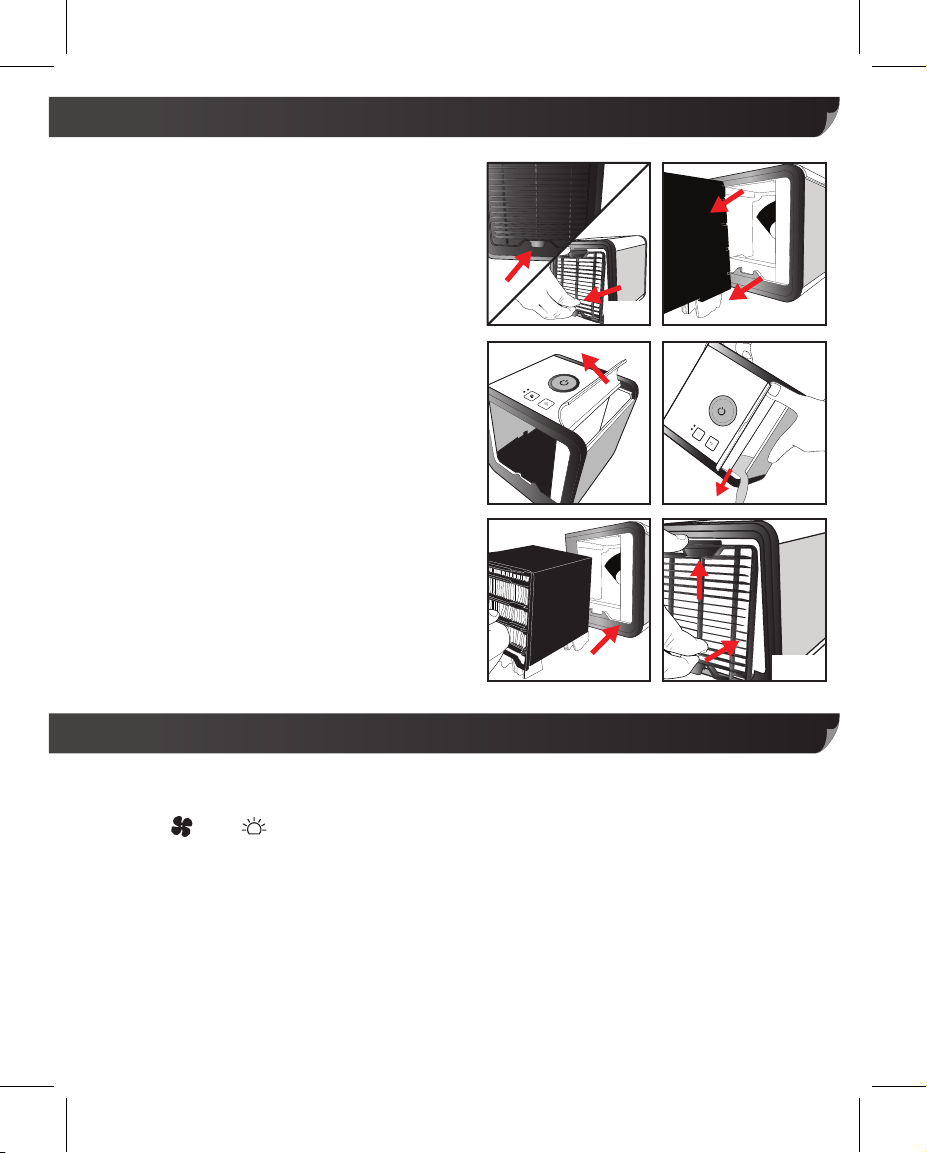
Emptying the water from Arctic Air
1. Gently press in the release tab on the bottom
of the front grill and pull the grill down, and
away from the unit. Place aside. (See Fig 7)
2. Grab onto the filter, lift up and carefully slide it
out of the unit completely. (See Fig 8)
3. Open the water tank. (See Fig 9)
4. Keep the flap up and tip the Arctic Air™
forward slowly to empty the water from the
water tank and internal water reservoir.
(See Fig 10)
5. Carefully replace the filter back into the Arctic
Air™ in the direction as shown by the
markings on top of the filter. (See Fig 11)
6. Insert the top tab of the front grill into the
slot, and press the release tab back into
place. (See Fig 12)
7. Use a dry cloth or kitchen towel to wipe off
any excess water on the wall or base of
Arctic Air™.
TM
Fig 9
Fig 8Fig 7
Fig 10
Fig 11
Fig 12
Changing the filter
The filter should be changed every 6 months, or when you feel Arctic Air™ is not functioning
as it should be. The water tank will light up AMBER until the filter is reset. To reset the filter,
hold the and button for 3 seconds until the tank is not AMBER any more and
replace the filter as described above.
To purchase a replacement filter visit www.jmldirect.com, or call UK: 0800 781 7831 (Freephone)
Warning! When you remove the front grill, the fan and power will turn off
and the water tank LED will blink red until the grill is put back in place.
/ ROI: 041-978 0003 (Local rate) or email [email protected]
This is a safety function.
Page 8
Distributed by JML
Customer Services: UK: 0800 781 7831 (Freephone) • ROI: 041-978 0003 (Local rate)
JML, Unit 1 Eastside, Port of Tyne, South Shields, NE33 5SP
©JohnMillsLtd/GS/04.18/TV/B • Made in China
 Loading...