

Page 1
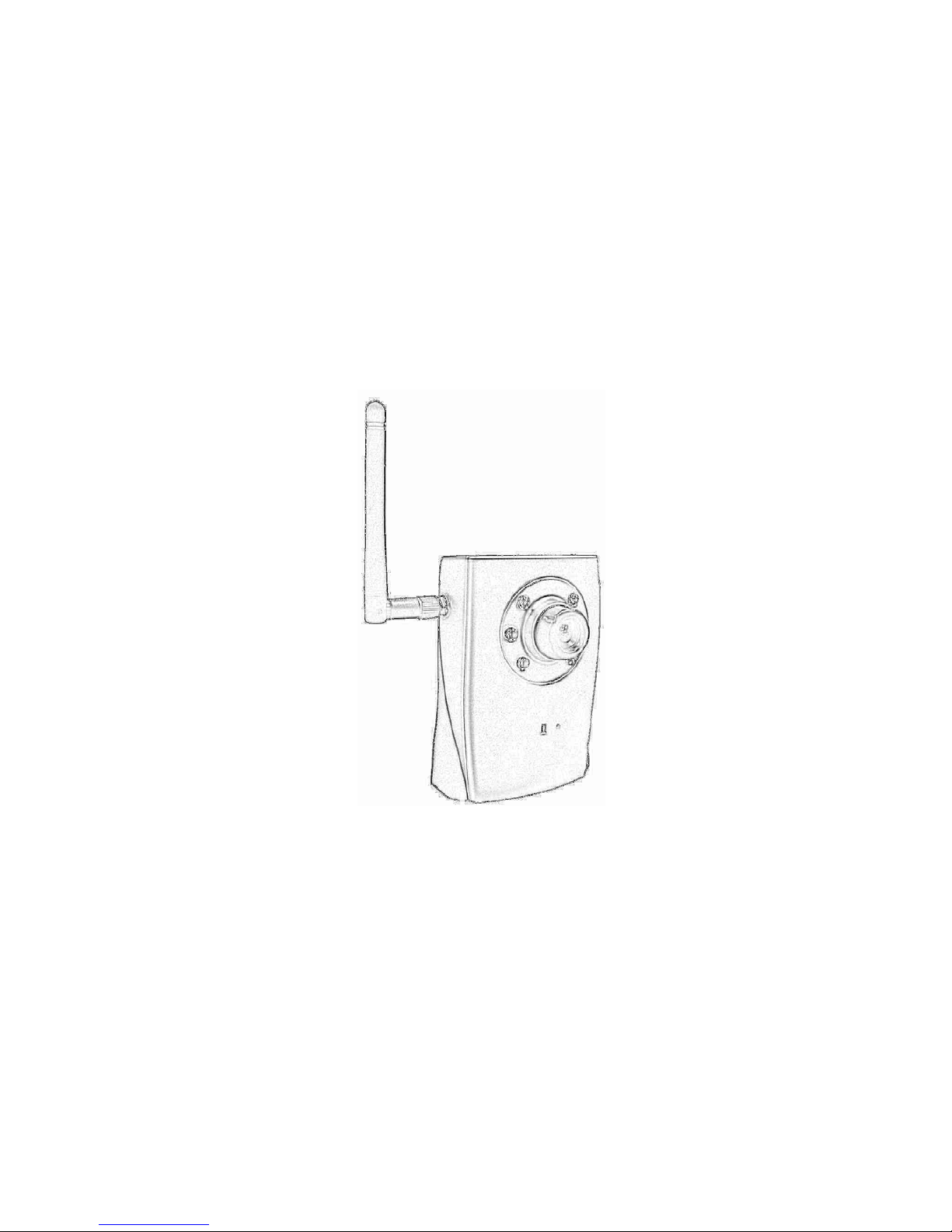
H.264 Cube
Mega-Pixel / Multi-Profile
Network Camera
User’s Manual
Firmware Version 5.a.1
Page 2

Network Camera User’s Guide
2/94
Owner's Record
The model and serial numbers are located at the bottom of device. Record these numbers in the
spaces provided below. Refer to these numbers whenever you call upon your dealer regarding this
product.
Model No. ____________________
Serial No. ____________________
To prevent fire or shock hazard, do not expose the unit to rain or moisture.
For AC Adaptor to avoid electrical shock, do not open the cabinet. Refer servicing
to qualified personnel only.
Notice: The changes or modifications not expressly approved by the party
responsible for compliance could void the user’s authority to operate the equipment.
For customers in the U.S.A.
This equipment has been tested and found to comply with the limits for a digital device, pursuant
to Part 15 of the FCC Rules. These limits are designed to provide reasonable p rotection against
harmful interference in a residential installation. This equipment generates, uses, and can radiate
radio frequency energy and, if not installed and used in accordance with the instructions, may
cause harmful interference to radio communications. However, there is no guarantee that
interference will not occur in a particular installation. If this equipment does cause harmful
interference to radio or television reception, which can be determined by turning the equipment
off and on, the user is encouraged to try to correct the interference by one or more of the
following measures:
– Reorient or relocate the receiving antenna.
– Increase the separation between the equipment and receiver.
– Connect the equipment into an outlet on a circuit different fro m that to which the receiver is
connected.
– Consult the dealer or an experienced radio/TV technician for help.
You are cautioned that any changes or modifications not expressly approved in this manual could
void your authority to operate this equipment.
The shielded interface cable recommended in this manual must be used with this equipment in
order to comply with the limits for a digital device pu rsuant to Subpart B of Part 15 of FCC
Rules.
Page 3

Network Camera User’s Guide
3/94
Declaration of Conformity
This device complies with part 15 of the FCC Rules. Operation is su bject to the following two
conditions:
(1) this device may not cause harmful interference, and
(2) this device must accept any interference received, including interference that may cause
undesired operation.
IMPORTANT NOTE: To comply with the FCC RF exposure compliance requirements, no
change to the antenna or the device is permitted. Any change to the antenna or the device could
result in the device exceeding the RF exposure requirements and void user ’s authority to operate
the device.
NOTICE TO USERS
© 2006~9 All rights reserved. This manual or the software described herein, in whole or in part,
may not be reproduced, translated or reduced to any machine readable form without prior written
approval.
WE PROVIDES NO WARRANTY WITH REGARD TO THIS MANUAL, THE SOFTWARE
OR OTHER INFORMATION CONTAINED HEREIN AND HEREBY EXPRESSLY
DISCLAIMS ANY IMPLIED WARRANTIES OF MERCHANTABILITY OR FITNESS FOR
ANY PARTICULAR PURPOSE WITH REGARD TO THIS MANUAL, THE SOFTWARE OR
SUCH OTHER INFORMATION. IN NO EVENT SHALL WE BE LIABLE FOR ANY
INCIDENTAL, CONSEQUENTIAL OR SPECIAL DAMAGES, WHETHER BASED ON
TORT, CONTRACT, OR OTHERWISE, ARISING OUT OF OR IN CONNECTION WITH
THIS MANUAL, THE SOFTWARE OR OTHER INFORMATION CONTAINED HEREIN OR
THE USE THEREOF.
We reserve the right to make any modification to this manual or the information contained herein
at any time without notice. The software described herein may also be governed by the terms of a
separate user license agreement.
Page 4

Network Camera User’s Guide
4/94
Table of Contents
Overview ............................................................................................................................. 6
Introduction.................................................................................................................6
Features.......................................................................................................................6
Minimum System Requirements................ ... ..............................................................7
Package Contents................................................................................................................8
Connections and Outlook....................................................................................................9
Hardware Installation....................................................................................................... 11
Preparation....................................................................................................................... 13
Search and Set up by IPWizard II.............................................................. ............... 13
Search................................................................................................................13
View.................................................................................................................. 14
LAN ..................................................................................................................15
Wireless............................................................................................................. 16
Using UPnP of Windows
®
XP or Vista.....................................................................20
Install the Device behind a NAT Router................................................................... 21
Access the device from the Internet Explorer for the first time................................22
Logging in as an User............. ... ................................... .. .......................................... 23
Logging in as an Administrator....................................................... ... .......................23
Operating the Network Camera........................................................................................24
Monitor Image Section ......................................... .. ...... .. ...... ..... ... ..... ..... ... ..... ...... .. ..24
V ideo Profile. .. ................................... ................................... .. ..................................24
Streaming Protocol....................................................................................................25
Language...................................................................................................................25
2-W ay Audio........................................................... .............................. ....................25
Full Screen................................................................................................................ 25
Status Bar.................................................................................................................. 25
Client Setting ............................................................................................................ 25
ActiveX Control.................................................... .. .................................................. 25
Digital Zoom.....................................................................................................26
Record...............................................................................................................27
Snapshot............................................................................................................ 27
Voice .................................................................................................................28
Statistics............................................................................................................ 28
About................................................................................................................. 29
Administrating the Device.................................................................................................30
System Setting ...................................... .. ................................... ... ............................30
Network: Configure Network settings............................................ ... ............... 30
Network..................................................................................................... 30
Wireless..................................................................................................... 32
DDNS service ............................... ............................................................35
PPPoE ....................................................................................................... 36
Streaming.................................................................................................. 38
UPnP.........................................................................................................39
Page 5

Network Camera User’s Guide
5/94
IP Filter .....................................................................................................40
IP Notification........................................................................................... 40
Camera: Adjust Camera parameters........................ ........................... ...............43
Picture.......................................................................................................43
System: Configure and maintain system....................................................... .... 45
System.......................................................................................................45
Date & Tim e............... ................................... .................................. ... ....... 46
Maintenance..............................................................................................48
Video: Configure profile................................................................................... 51
Common....................................................................................................51
V ideo Profile. .. ................................... ................................... .. ..................51
Audio: Audio parameters........................ ................................ ..........................54
User: Manage user name, password and login privilege... ...............................55
E-Mail: Setup E-Mail configuration............................................. ....................56
Object detection: Setup Object detection..........................................................58
Storage: Status and configuration of SD card...................................................59
Recording List: Files list inside the SD Card..... ... .................................. ... ....... 60
Event Server: Setup FTP/TCP/HTTP/SAMBA server configuration............... 61
FTP Server................................................. ... .................................. ... ....... 61
TCP Server................................................................................................ 62
HTTP Server.............................................................................................62
SAMBA Ser ver....................................................................... ... ............... 64
Event Schedule: Configure the event schedule.................................................65
Setting.......................................................................................................65
Record.......................................................................................................68
Appendix A: Restore Factory Default Settings................................................................. 69
Appendix B: T roubleshooting & Frequently Asked Questions..........................................70
Appendix C: PING IP Address.......................................................................................... 75
Appendix D: Bandwidth Estimation..................................................................................76
Appendix E: Specifications...............................................................................................77
Appendix F: Configure Port Forwarding Manually.........................................................79
Appendix G: DDNS Application .......................................................................................82
Appendix H: Power Line Frequency.................................................................................89
Appendix I: 3GPP............................................................................................................. 90
Appendix J: Enable UPnP of Windows XP....................................................................... 91
Page 6

Network Camera User’s Guide
6/94
Overview
This user’s guide explains how to operate this camera from a computer. User should
read this manual completely and carefully before you operate the device.
Introduction
This camera is an inexpensive and fully scalable surveillance device. Because the
Network Cameras can be plugged into your existing local area network (LAN), you will
potentially save thousands of dollars from unnecessary cabling.
The device is accessible via the LAN or Internet connection. Connect your device
directly to a local area network or xDSL modem, and with Micros oft® Internet Explorer
you get instant, on demand video streams. Within minutes you can set up the device to
capture a video sequence to a PC. The live video can b e uploaded to a website for the
world to see.
Features
z Easy installation with setup wizard
z UPnP device discovery and NAT router transversal for easy installation
z Dynamic IP Service, DIPS®, to search your IP camera from Internet easily
z H.264, MPEG4 and JPEG triple compression simultaneously
z Mega-pixel resolution up to 1280x1024
z Up to 11-profile encoder simultaneously
z Mega-pixel or VGA mode selectable
z UDP / TCP / HTTP protocols selectable
z Supports video/audio multi-casting
z IEEE 802.11n wireless LAN (WLAN model)
z WEP/WPA/WPA2-PSK wireless security (WLAN model)
z 3GPP for 3G mobile remote application
z 30 fps for VGA mode
z 15 fps for Mega-pixel mode
z Digital zoom
z Built-in 6 high-light LEDs for night mode or low Lux. environment
z Built-in microphone
z Audio line out
Page 7

Network Camera User’s Guide
7/94
z Two-way audio
z Intelligent motion detection up to 10 zones
z Image transmission using an FTP or e-mail for event
z DDNS and PPPoE
z Multi-channel control software for surveillance application
z On-line firmware upgrade
z 802.3af PoE support (wired model only)
Minimum System Requirements
z Microsoft Internet Explorer 6.0 or later
z Microsoft Media Player 11.0 or later (to playback recorded file)
z VGA Monitor resolution 1280 x 1024 or higher
z Pentium-4 2.0 GHz or higher
z Memory Size: 512MB or more
z Windows XP, Vista
Page 8
Network Camera User’s Guide
8/94
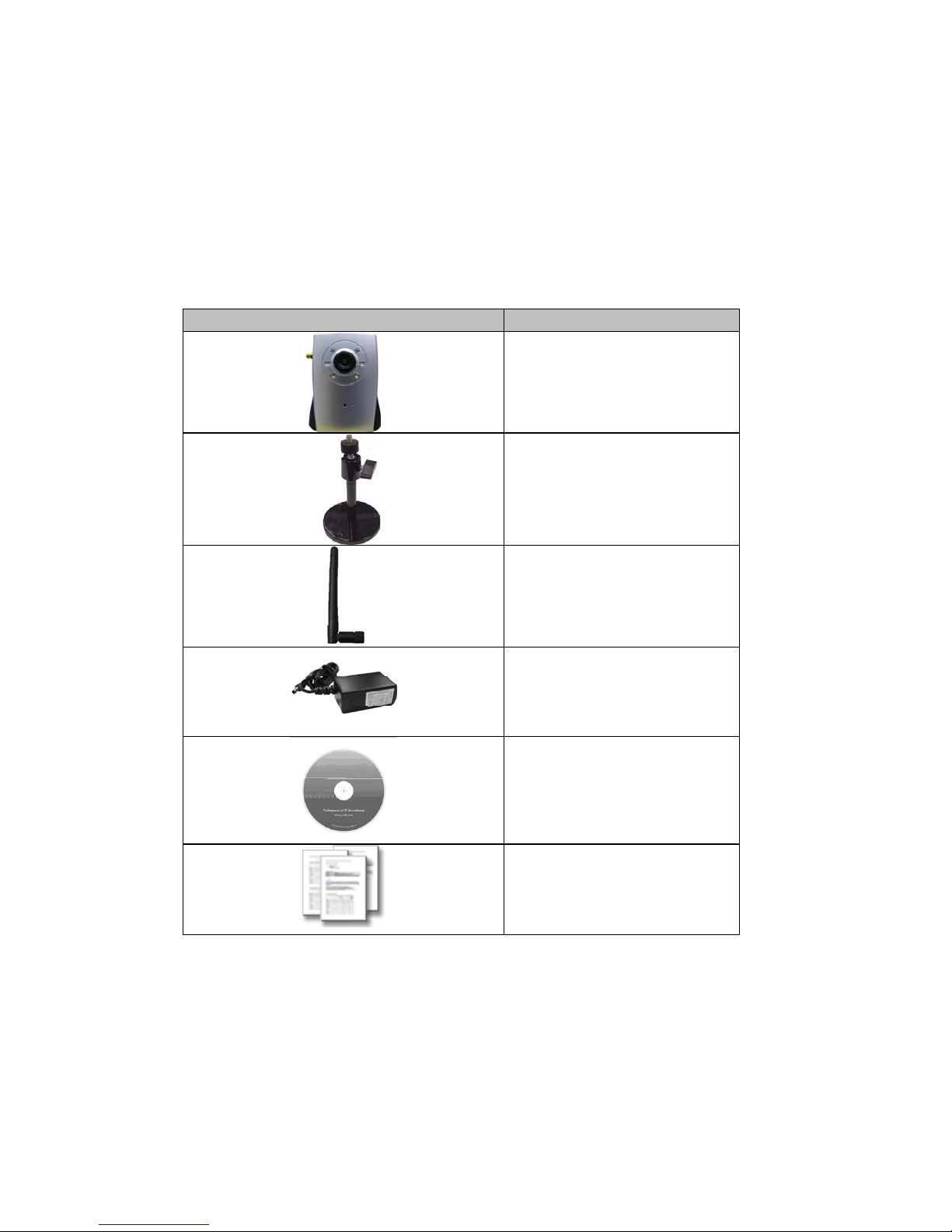
Package Contents
User can find the following items in the package:
Item Descriptions
1. This Unit is the main element of
the product.
2. Camera Stand with screws
3. Detachable WLAN Antenna
(for WLAN model only)
4. Power Adapter dedicates 12V
DC electric power output to
Network Camera.
5. User’s Manual CD provides
important information and
instructions for operating the
Network Camera..
6. Quick Start Guide provides
important information and
instructions for installing this device.
If any of the above items are missing, please contact your dealer immediately.
Note: Using a power supply with a different voltage than the one included with the
Network Camera will cause damage and void the warranty for this product.
Page 9
Network Camera User’s Guide
9/94
Connections and Outlook
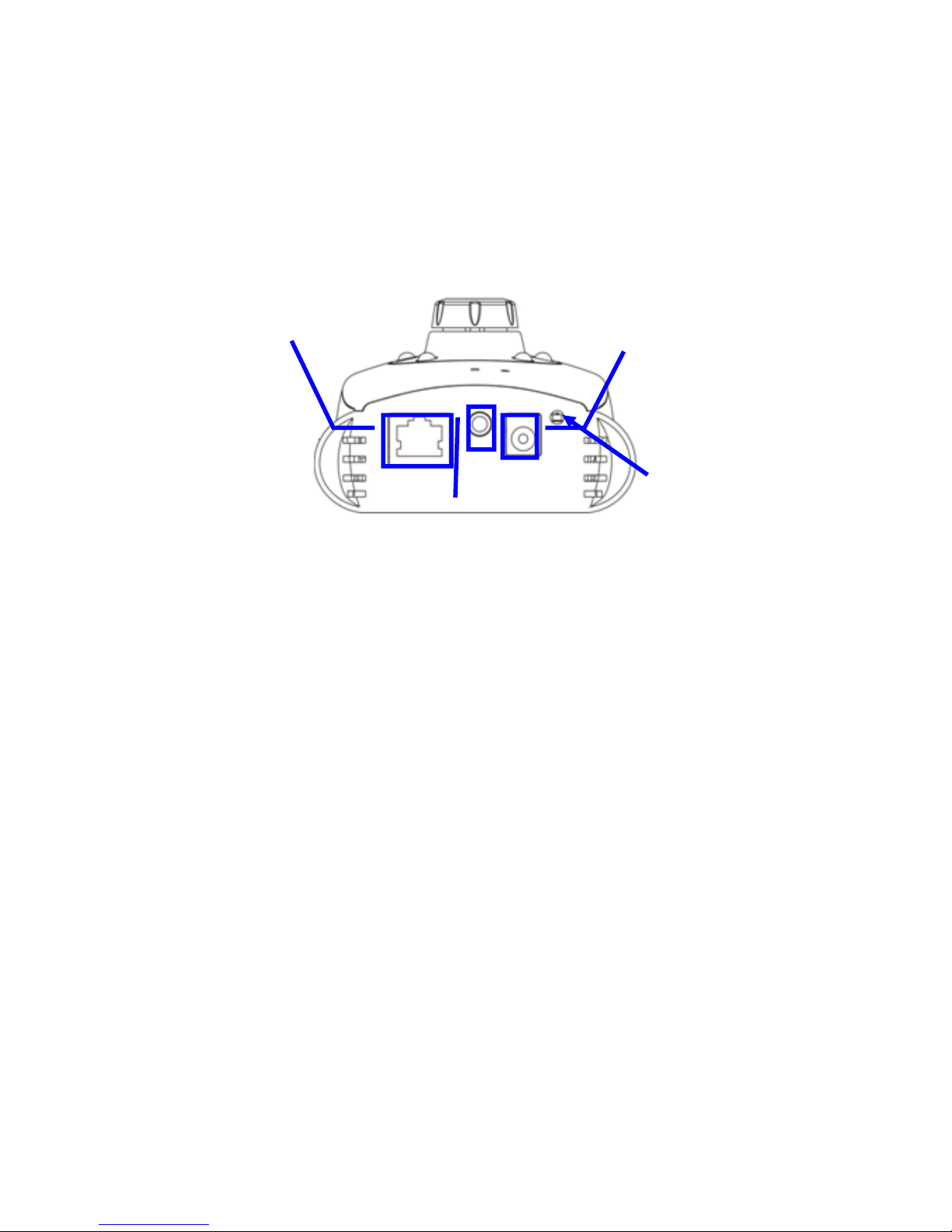
LAN Socket
The LAN socket is a RJ-45 connector for connections to 10Base-T Ethernet or
100Base-TX Fast Ethernet cabling. This Ethernet port built N- Way protocol can detect or
negotiate the transmission speed of the network automatically. Please use Category 5
“straight through” cable to connect the Network Camera to a 100Mbps Fast Ethernet
network switch or hub.
Audio Output Jack
Audio-out Jack allows this device to output audio or alerting sound.
DC Power Jack
The DC Power Jack is located on the Network Camera’s bottom. The input power is
12VDC. Note that supply the power to the Network Camera with the power adapter
included in package. Otherwise, the improper power adapter ma y damage the unit and
result in danger.
Factory Default Reset
This button is hidden in the pinhole beside the DC Power Jack. Please refer to the
Appendix A in this manual for more information.
LAN Socket
DC Power
Jack
Factory
Default Reset
Audio
Output Jack
Page 10
Network Camera User’s Guide
10/94
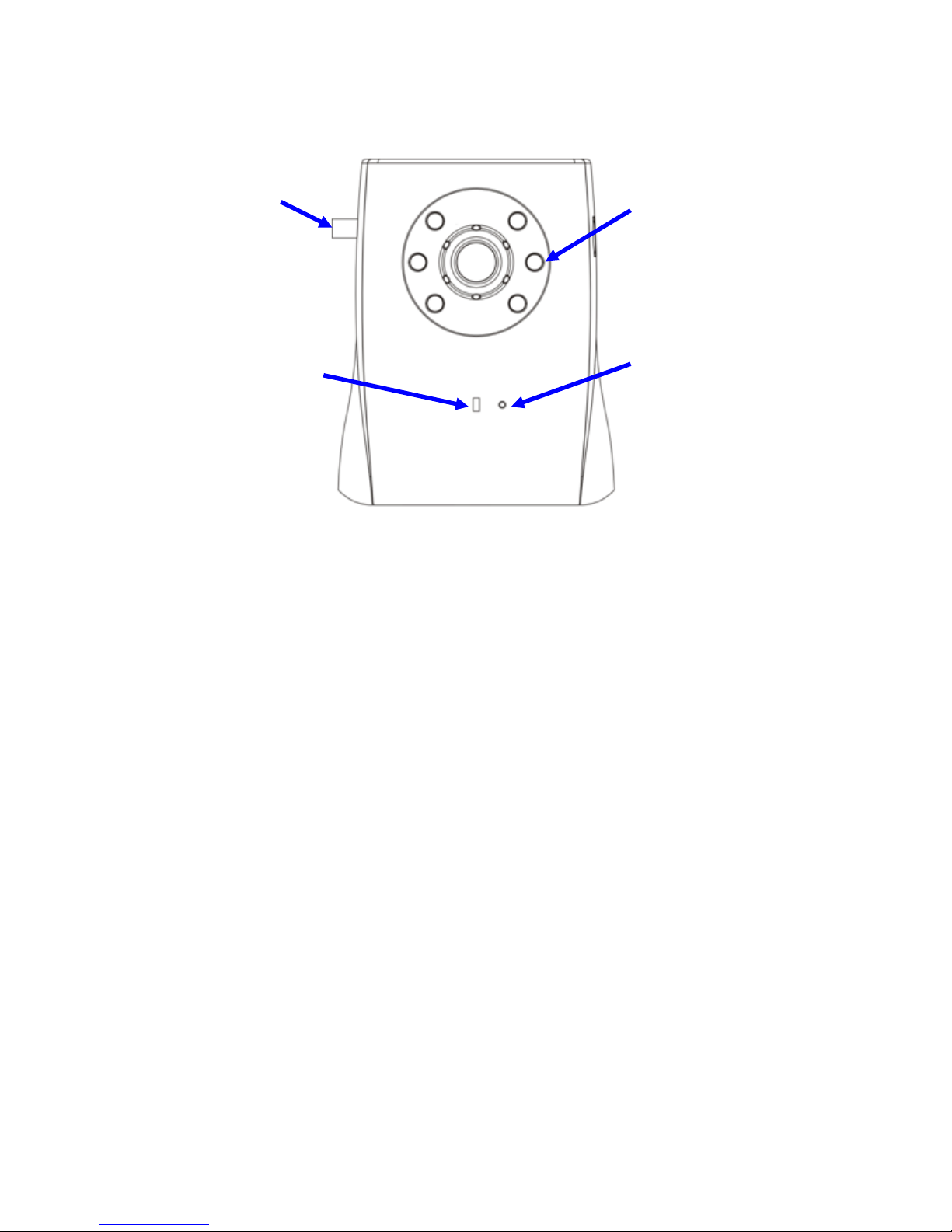
Antenna Connector
In case this Camera is wireless model, there is a connector for SMA type antenna.
Microphone
The Network Camera has built-in an internal microphone. This microphone is hidden in
the pinhole located on the front panel.
White-light LEDs
These LEDs are Infra-Red type. It’s very useful for low-lux environment to provide extra
light source for image sensor.
Network Accessing Type LED
This LED is used to indicate the network type of Network Camera. The green LED
means the Network Camera under wired Ethernet mode (LAN) and orange LED means
Camera under wireless mode (WLAN).
Microphone
Network
Accessing
Type LED
White-light
Antenna
Connector
Page 11
Network Camera User’s Guide
11/94
Hardware Installation
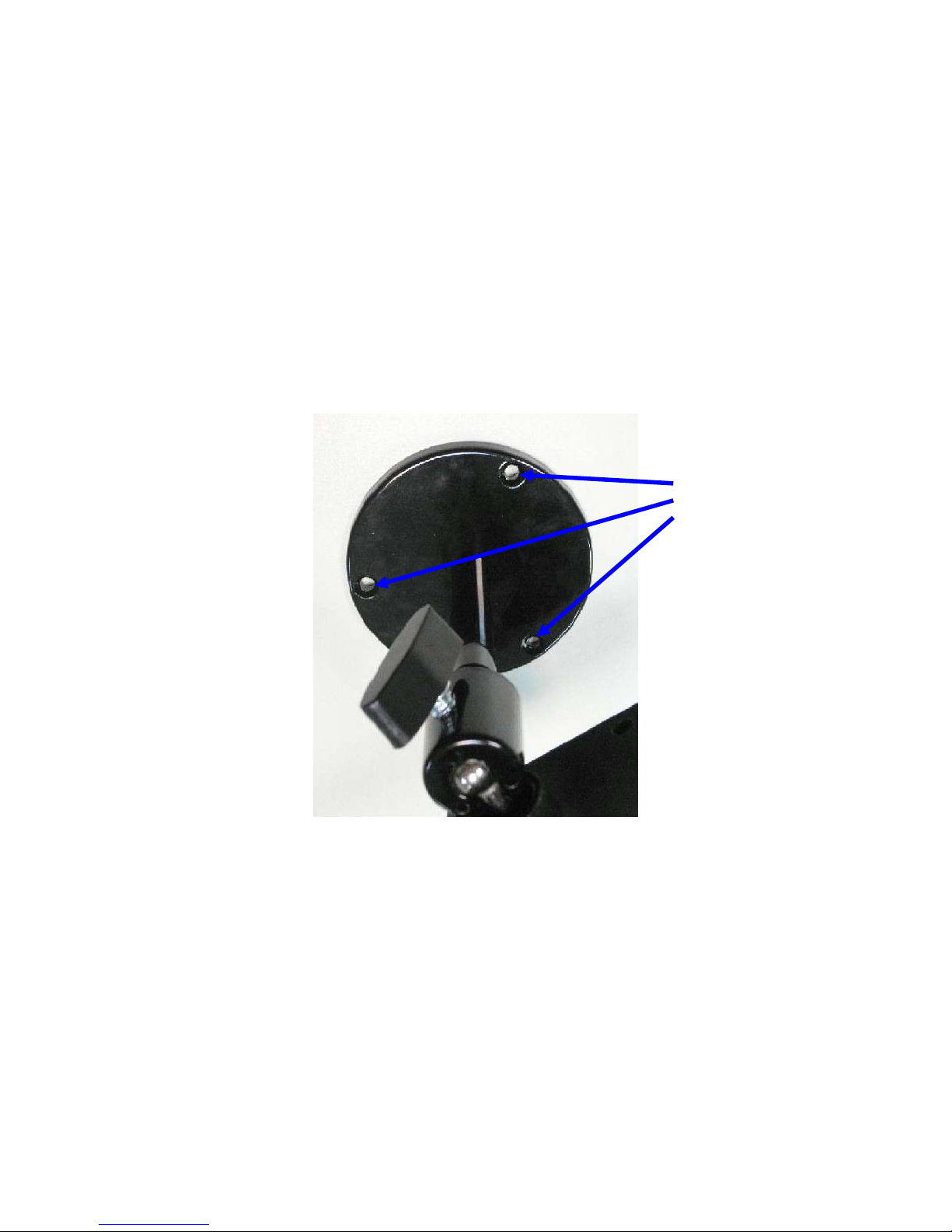
1. Attach the Camera with the included stand
2. Place the Camera on the table or fix it onto ceiling or wall
Use three screws to fix the Network Camera onto the ceiling or wall. You could also put
the Network Camera on the table directly.
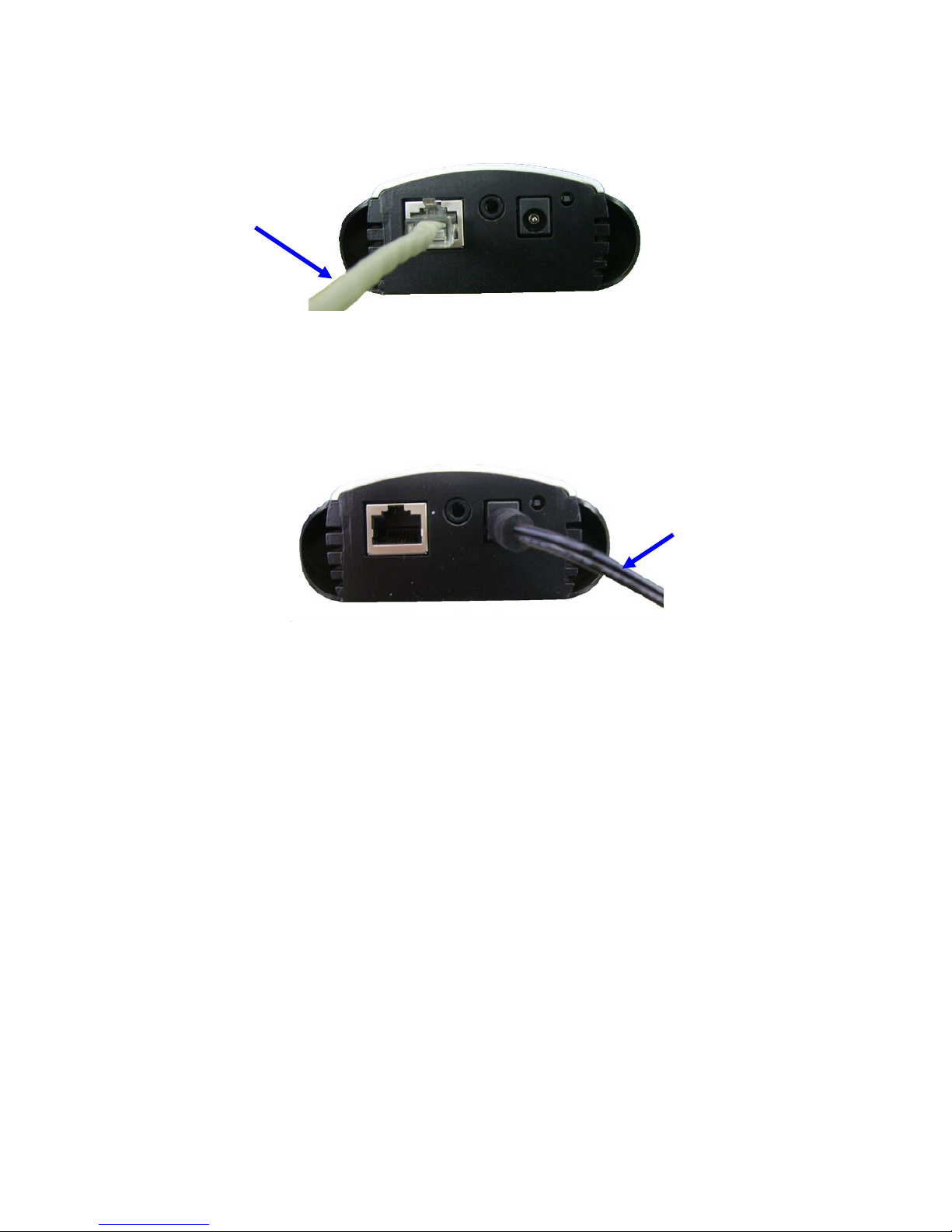
3. Plug an Ethernet cable into the Camera
Connect an Ethernet cable to the LA N socket located on the Ne twork Camera’s bottom
and attach it to the network.
Fixed it by
Page 12
Network Camera User’s Guide
12/94
4. Connect the external power supply to Camera
Connect the attached power adapter to the DC power jack of the Network Camera. Note:
Use the power adapter, 12VDC, included in the package and connect it to wall outlet for
AC power.
Once you have installed the Network Camera well and powered it on, the network
accessing type LED will turn on. It means the system is booting up successfully.
Furthermore, if you have a proper network connection, and access to the Network
Camera, the LED will flash green under wired mode or orange under wireless mode.
Ethernet
Cable
Power
Cable
Page 13
Network Camera User’s Guide
13/94
Preparation
Search and Set up by IPWizard II
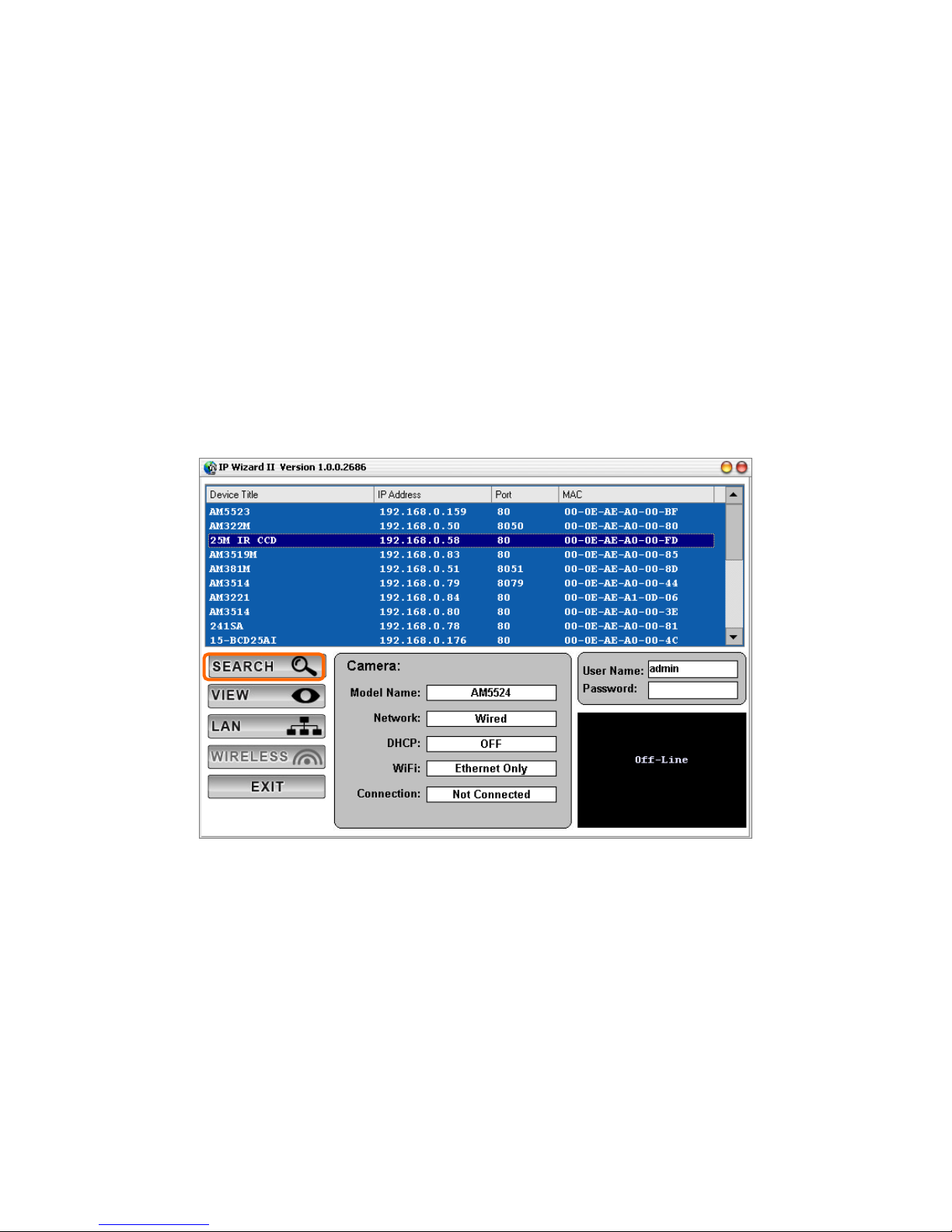
When you installed the Camera on a LAN environment, you have two easy ways to
search your Cameras by IPWizard II or UPnP™ discovery. Here is the w ay to execute
IPWizard II to discover Camera’s IP address and set up related parameter in a Camera.
Search
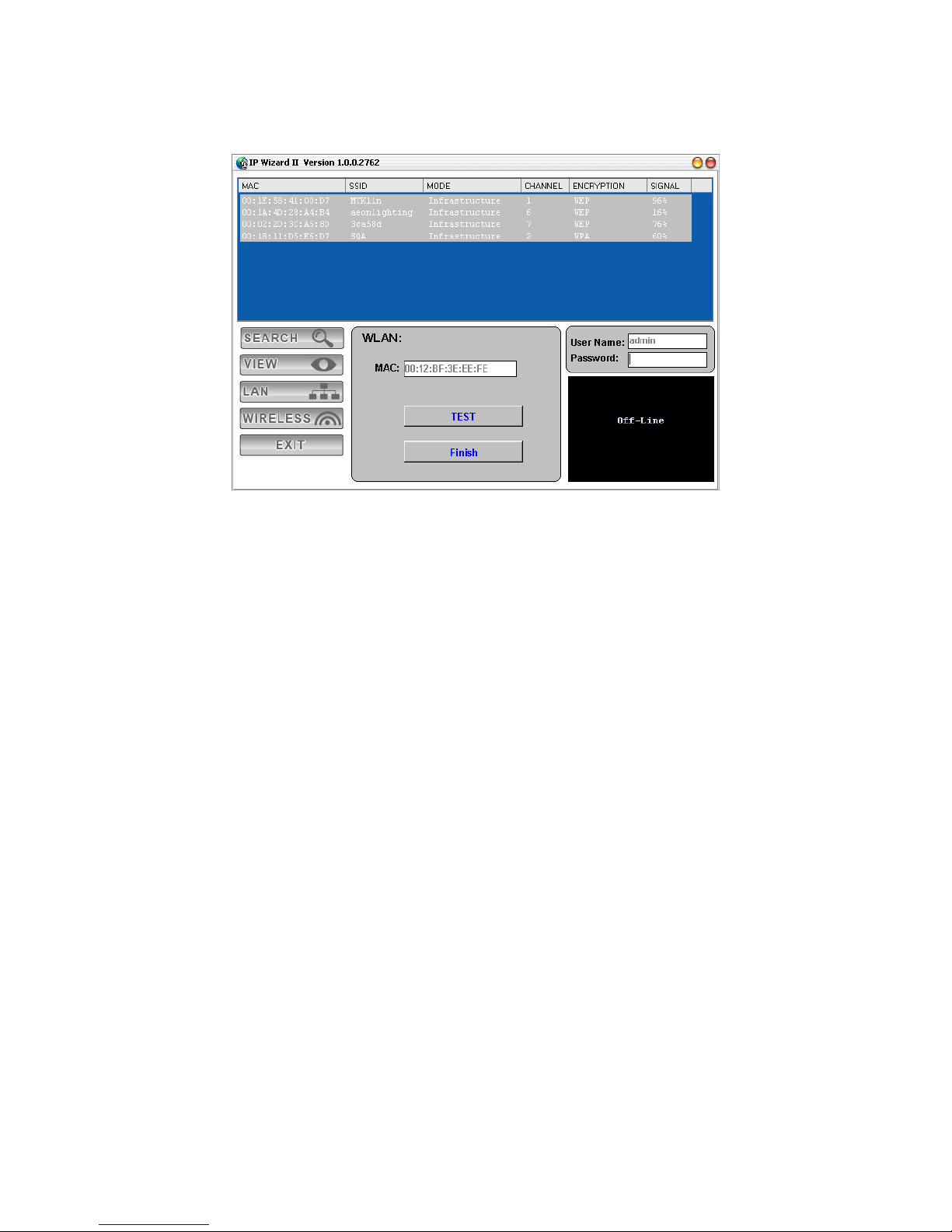
When launch the IPWizard II, a searching window will pop up. IPWizard II is starting to
search Network Cameras on the LAN. The existed devices will be listed as below.
Page 14
Network Camera User’s Guide
14/94
View
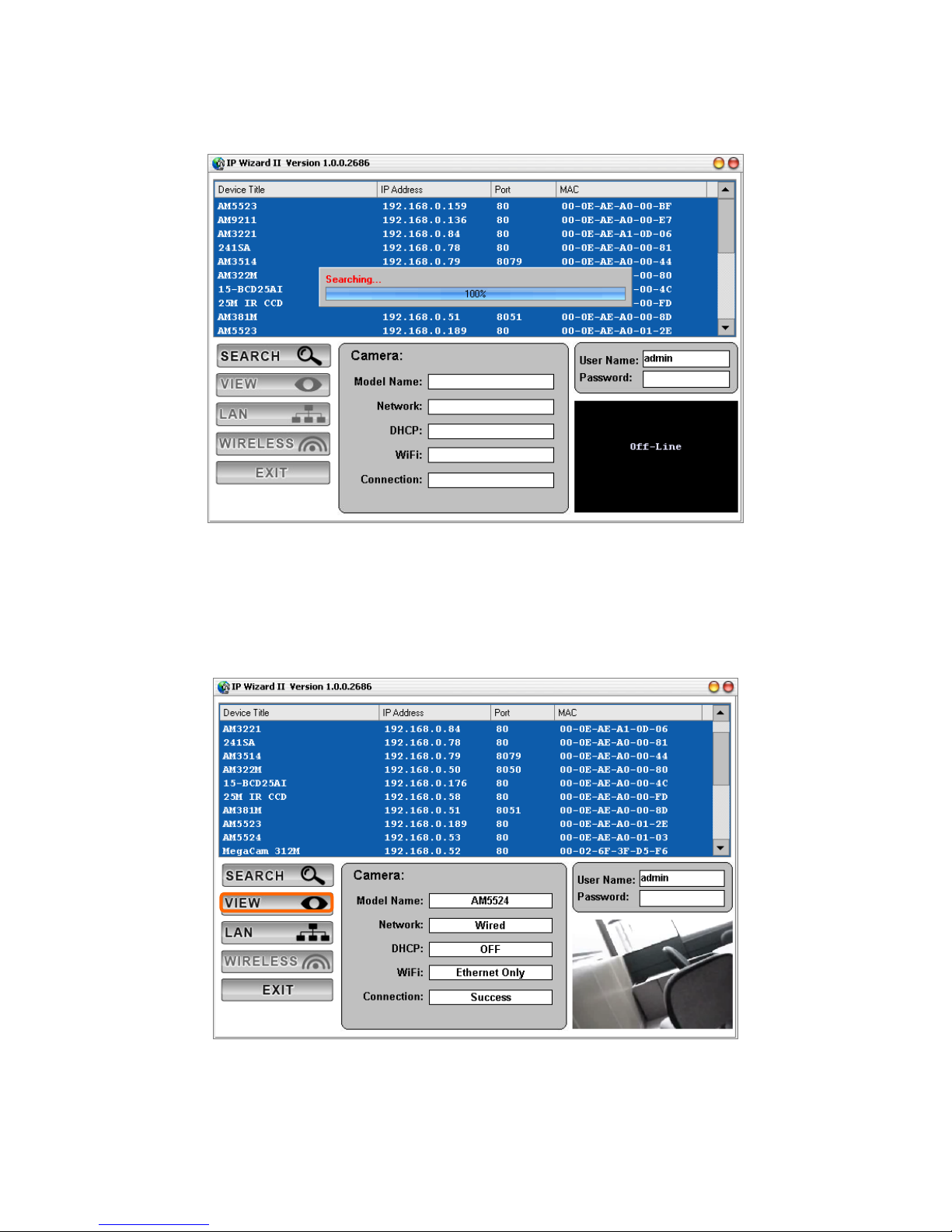
If IPWizard II finds network devices, View button will be available. Please select the
device you want to view and click the View button. Then you could see the video from
camera directly. Furthermore you could double click the left button of mouse to link to the
network device by browser.
Page 15
Network Camera User’s Guide
15/94
LAN
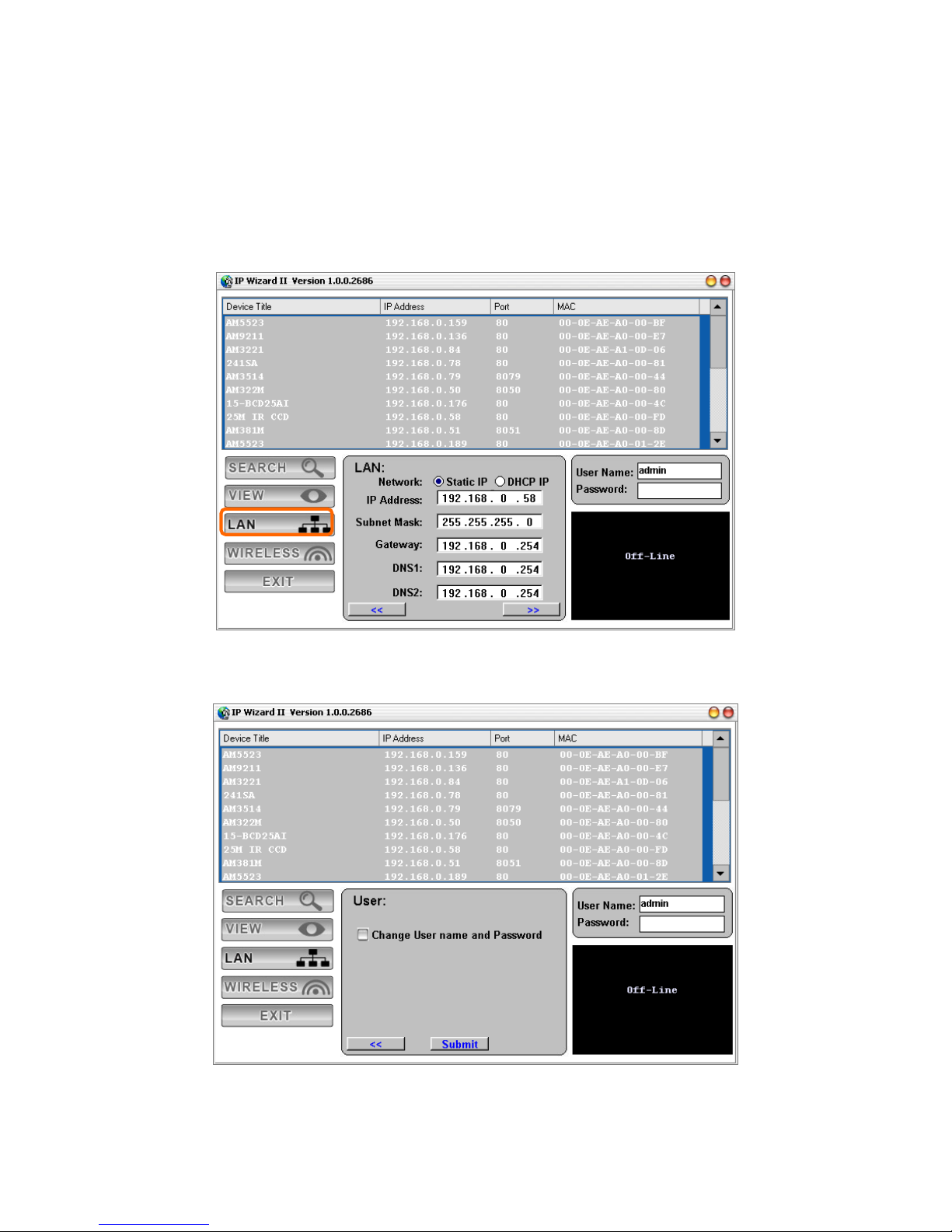
In case you want to change the IP related parameters of wired interface, please s elect
the device you want to configure and click the LAN button. Relative settings will be
carried out as below.
You could mod ify the relative settings of the selected device. Click “<<” button will quit
the LAN setting procedure and click “>>” button will move to next page as below.
Page 16
Network Camera User’s Guide
16/94
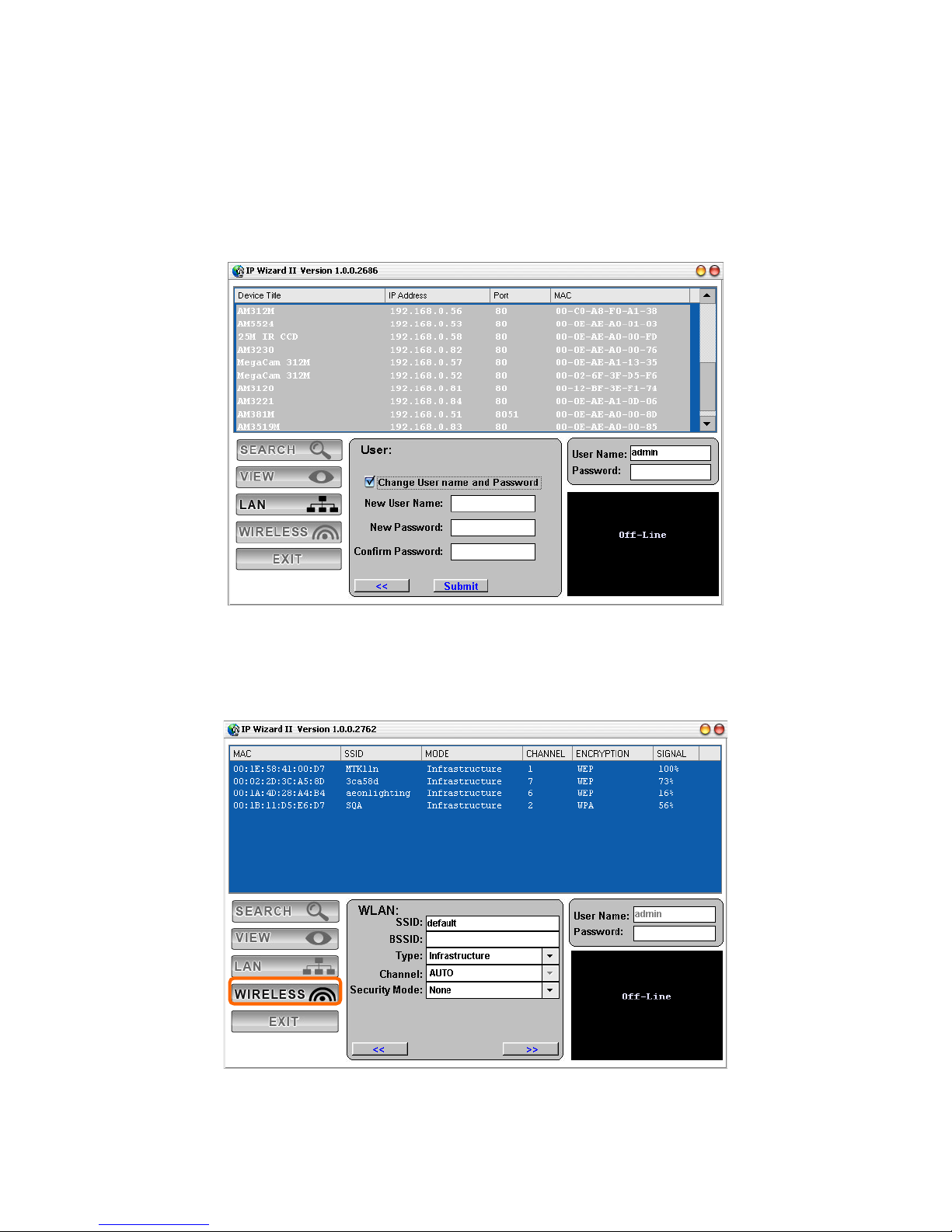
In case, you do not want to change username and/or password, then just click “Submit”
button to perform your setting accordingly. Click “<<” button will go back to previous
page.
If you like to change username and/or password of the device, just click the chec k button.
Then, the related fields will show up as below.
After keying in new username and password, click “Submit” button to perform your
setting accordingly. Click “<<” button will go back to previous page.
Wireless
Page 17
Network Camera User’s Guide
17/94
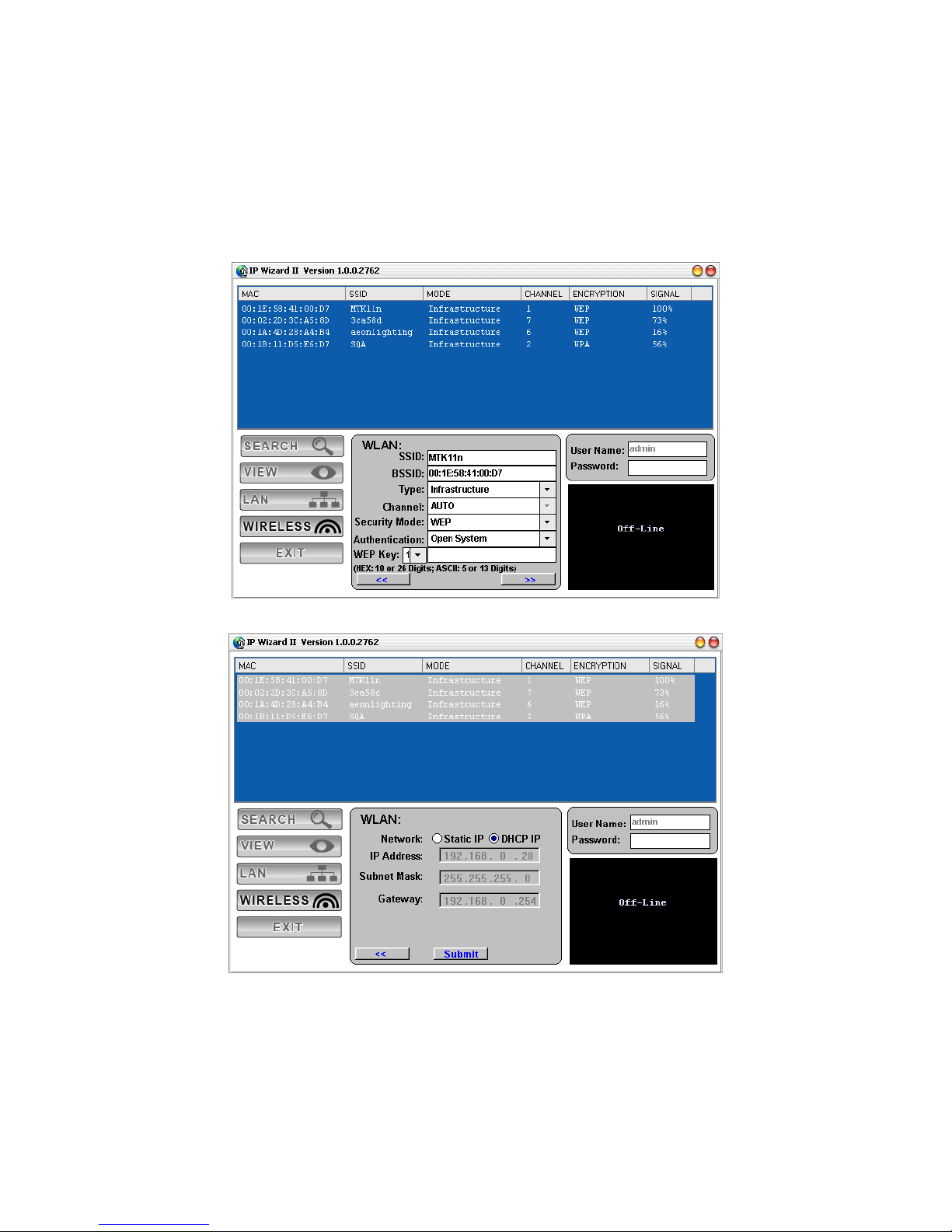
In case you want to change the IP related parameters of wireless interface, please select
the device you want to configure and click the WIRELESS button. Relative settings will
be carried out as above.
Click SSID to select your wireless AP or router and key in WEP or WPA key.
Click >> to next step:
Make sure wireless setting and then submit it.
Page 18
Network Camera User’s Guide
18/94
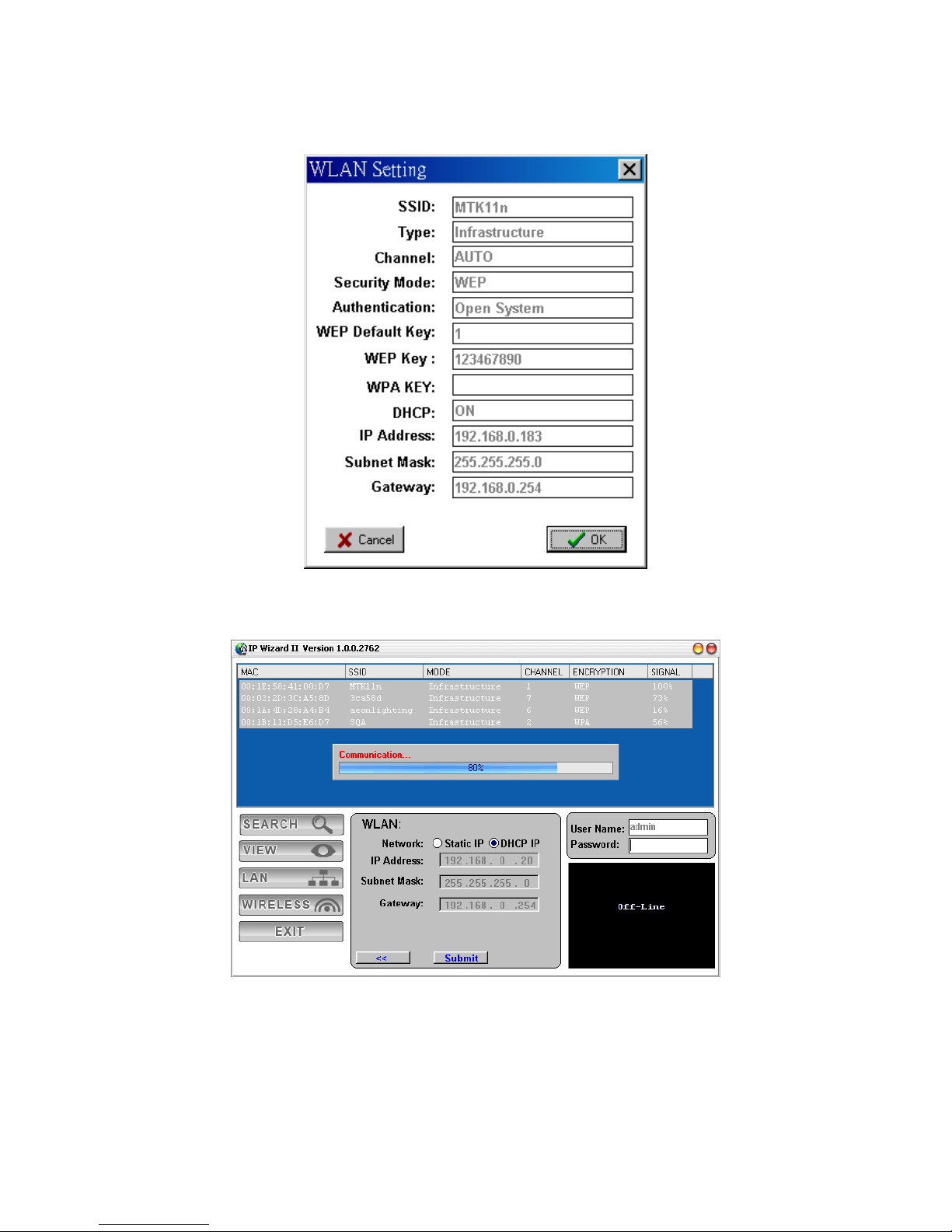
Click OK to confirm these parameters, then IPWizard II will start to configure this camera
with specified information.
Once this step finished, IPWizard II will prompt you to unplug the Ethernet cable to
activate wireless access. Then IPWizard II will prompt you to test wireless setting or
finish wireless procedure as below.
Page 19
Network Camera User’s Guide
19/94
Page 20
Network Camera User’s Guide
20/94
Using UPnP of Windows® XP or Vista
UPnP™ is short for Universal Plug and Play, which is a networking architecture that
provides compatibility among networking equipment, software, and peripherals. This
device is an UPnP enabled device. If the operating system, Windows XP or Vista, of
your PC is UPnP enabled, the Network Camera will be very easy to be found.
Please refer to Appendix J to enable UPnP setting s only if your ope rating system of PC
is running Windows XP.
Note: Windows 2000 does not support UPnP feature.
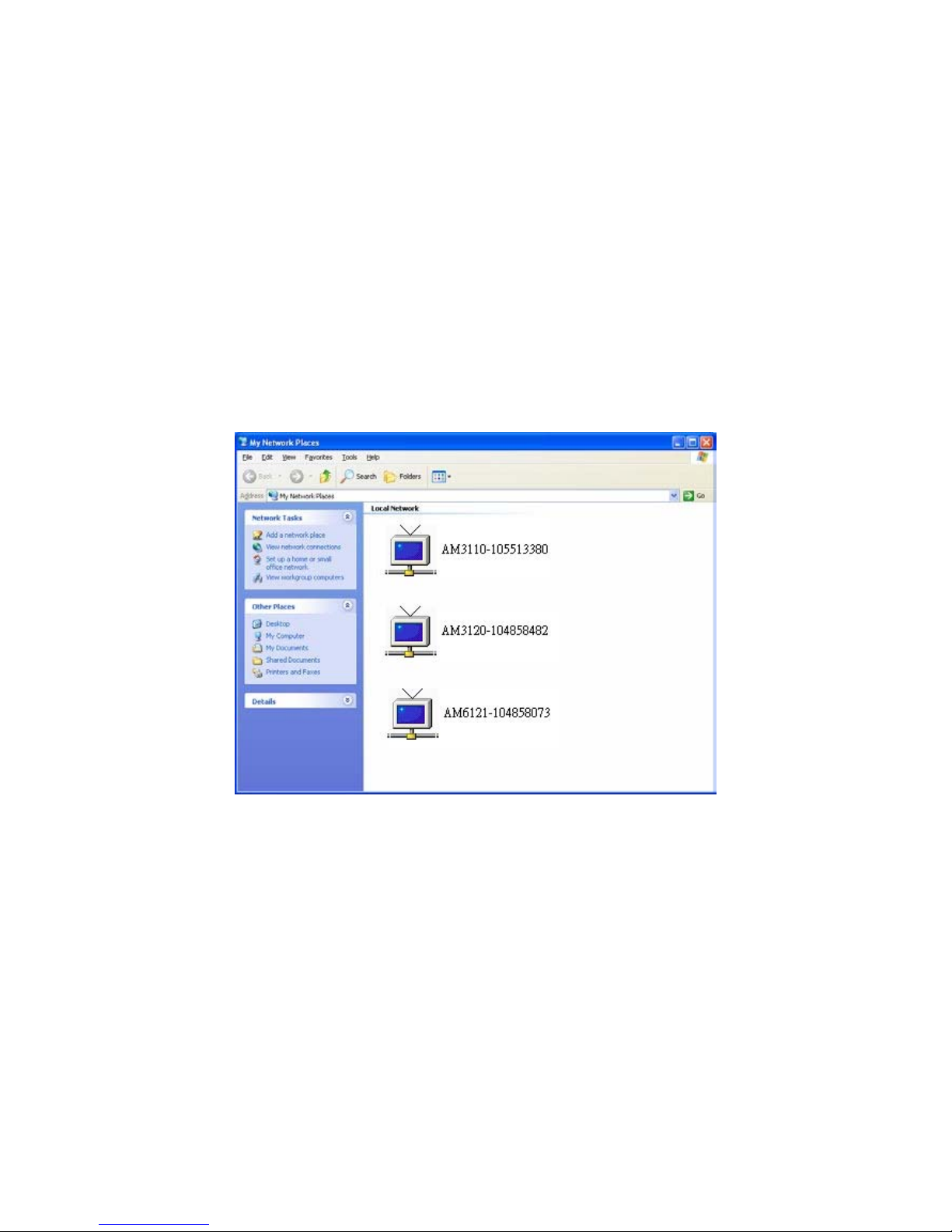
To discover your device, go to your Desktop and click My Network Places.
Click the targeted Device. Then Internet Explorer will connect to this Network Camera
automatically.
Page 21

Network Camera User’s Guide
21/94
Install the Device behind a NAT
Router
Once installed, the device is accessible on your LAN. To access the device from the
Internet you must configure your broadband router to allow incoming data traffic to the
device. If the device is installed on the LAN with a rou ter, then it may get a dynamic IP
address from the DHCP server. However, if the device wants to be accessed from the
WAN, its IP address needs to be setup as fixed IP, also the port forwarding or Virtual
Server function of router needs to be setup.
However, if your NAT router supports UPnP feature, it can be very easy to achieve NAT
traversal automatically. To do this, enable the NAT-traversal fea ture, which will attempt
to automatically configure the router to allow access to the camera.
Installing the device with an UPnP router on your network is an easy 3–step procedure:
(1) Enable UPnP option of your NAT router
(2) Enable UPnP NAT traversal option of the Network Camera (default)
(3) Access your Network Camera by DIPS
(1) Enable UPnP option of your NAT router
To use UPnP IGD function (NAT traversal), you need to make s ure the UPn P function is
enabled in your router. Most new home routers should support this function. Some of
routers are default enable and others are not. Please check user’s manu al of your NAT
router for detail.
(2) Enable UPnP NAT traversal option of the Network Camera
Refer to Setting Î Network Î UPnP page for detail NAT traversal setting. Note that
this option is default enabl ed .
(3) Access your Network Camera by DIPS
Refer to Setting Î System Î System page for detail DIPS information.
Page 22
Network Camera User’s Guide
22/94
Access the device from the Internet
Explorer for the first time
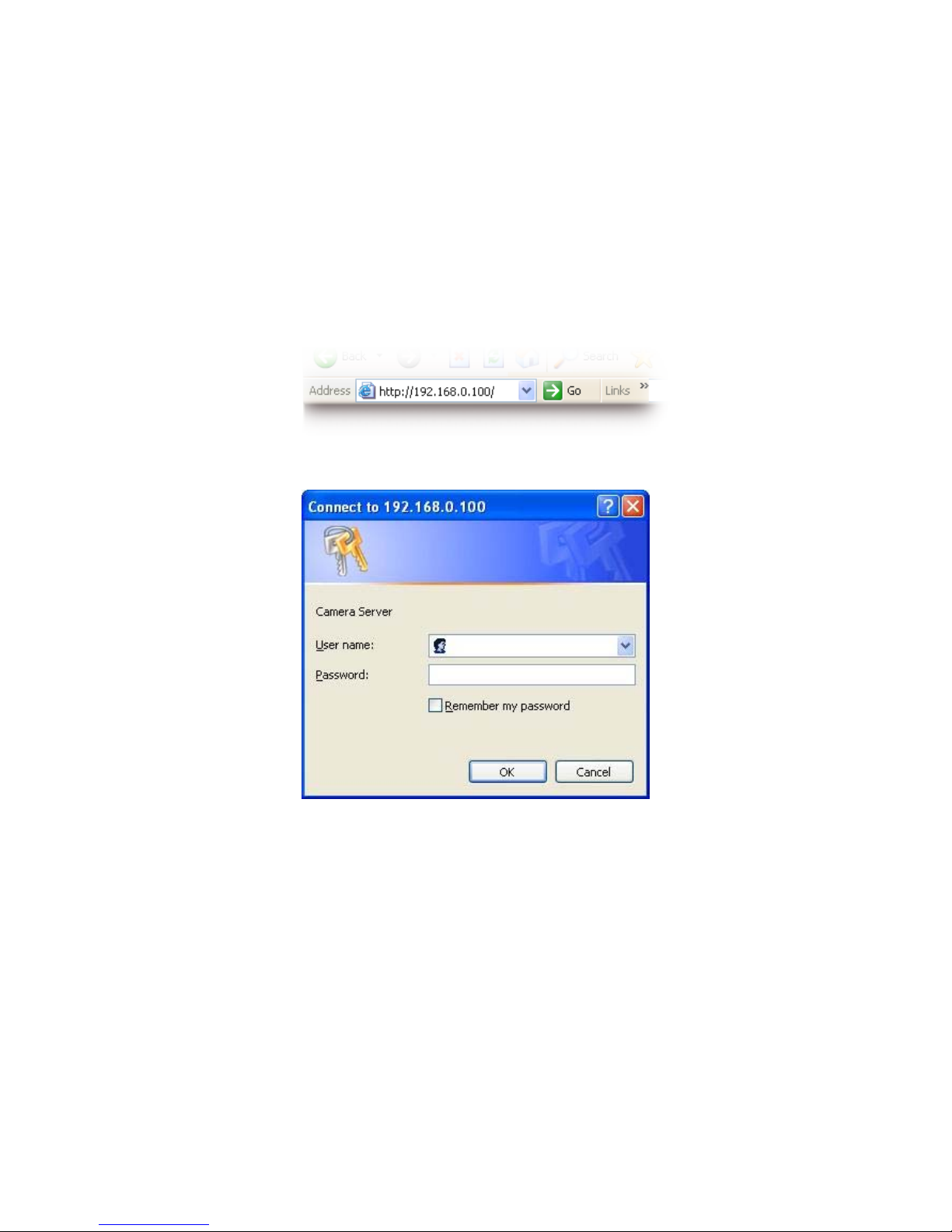
1. Start the web browser on the computer and type the IP address of the Camera you
want to monitor as below:
The Login Window of the Camera is prompted:
2. Type in your login name and password under “USERNAME” and “PASSWORD”
textbox.
For the first time use (default value), input the
User Name: admin
Password:
That’s, type in “admin” on the “USERNAME” as a default name and leave PASSWORD
textbox blank. Click “OK” button to start the main menu.
Page 23
Network Camera User’s Guide
23/94
3. According your browser’s security setting, the IE Web Page may prompt the
“Security Warning” window. If so, select “Yes” to install and run the ActiveX control into
your PC. Otherwise, the system will load the ActiveX silently.
4. After the ActiveX control was installed and ran, the first image will be displayed.
Logging in as an User
If you log in the Camera as an ordinary User, “Setting” function will be not accessible.
Logging in as an Administrator
If you log in the Camera as the Administrator, you can perform all the s ettings provided
by the device.
Page 24
Network Camera User’s Guide
24/94
Operating the Network Camera
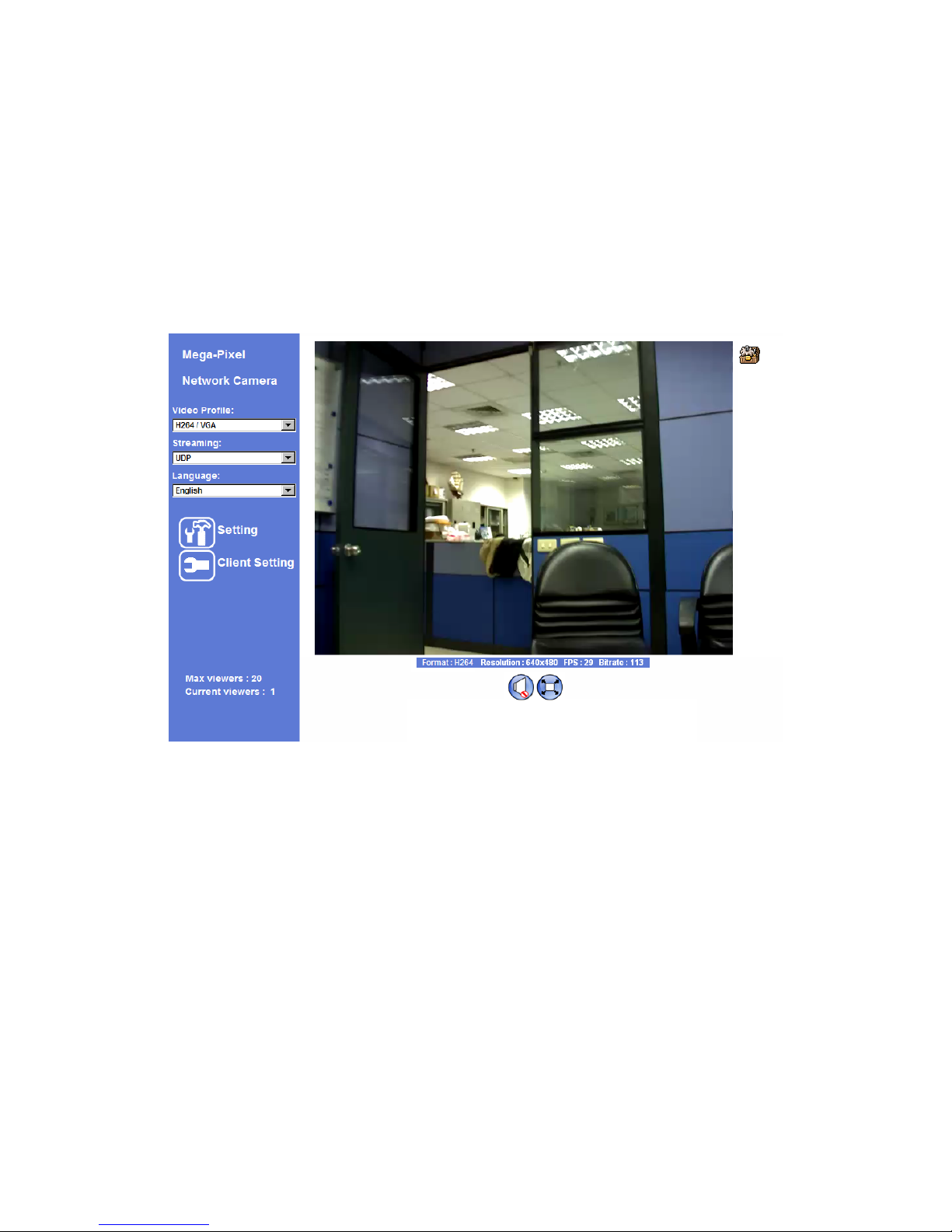
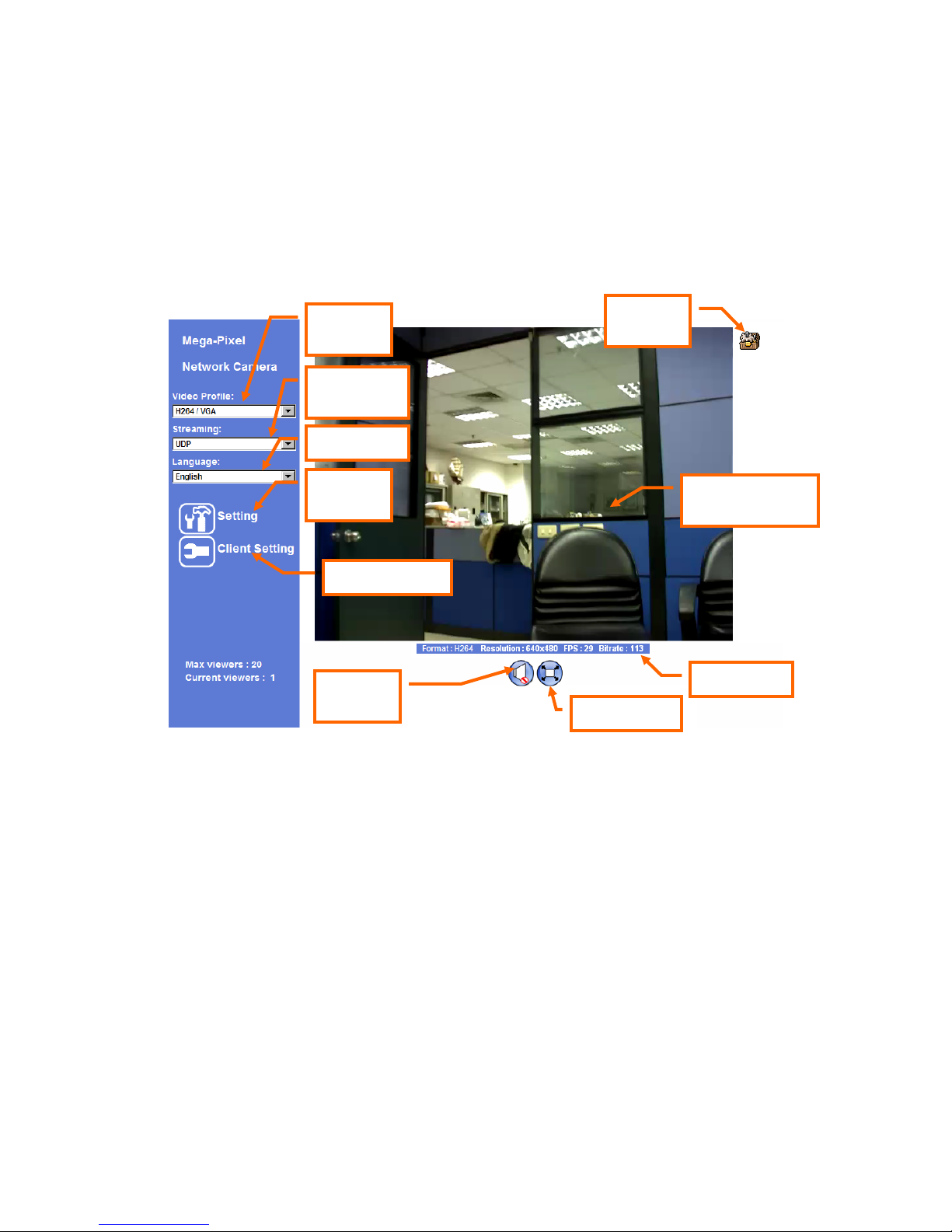
Start-up screen will be as follow no matter an ordinary users or an administrator.
Monitor Image Section
The image shot by the device is shown here. The date and time are displayed at the top
of the window.
Video Profile
The device supports either mega-pixel or multi-profile mode for both MEPG4 and JPEG
simultaneously. User can chose the proper and/or preferred profile which is listed here.
Monitor Image
Section
ActiveX
Control
Setting
Menu
Video
Profile
Streaming
Protocol
Language
2-Way
Audio
Full Screen
Status Bar
Client Setting
Page 25

Network Camera User’s Guide
25/94
Streaming Protocol
User can select proper streaming protocol according to networking environment.
Language
The device could provide multiple languages to meet customer’s requirement.
2-W ay Audio
The device supports 2-way audio function. User can chose to enable or disable this
function by toggling the icon below.
: Disable audio uploading function.
: Enable audio uploading function.
Full Screen
Enlarge video to full screen display.
: Enlarge video to full screen display. Press “ESC” key to disable this
function.
Status Bar
Shows information of the connected device such as encoder format, image resolution,
frame per second, and bitrate.
Client Setting
Some collections of client related functions for user’s easy use.
ActiveX Control
The plug-in ActiveX control supports a lot of functions by cli cking the left mouse button.
Page 26
Network Camera User’s Guide
26/94
Note that this feature only supports on the ActiveX control within Microsfoft® Internet
Explorer.
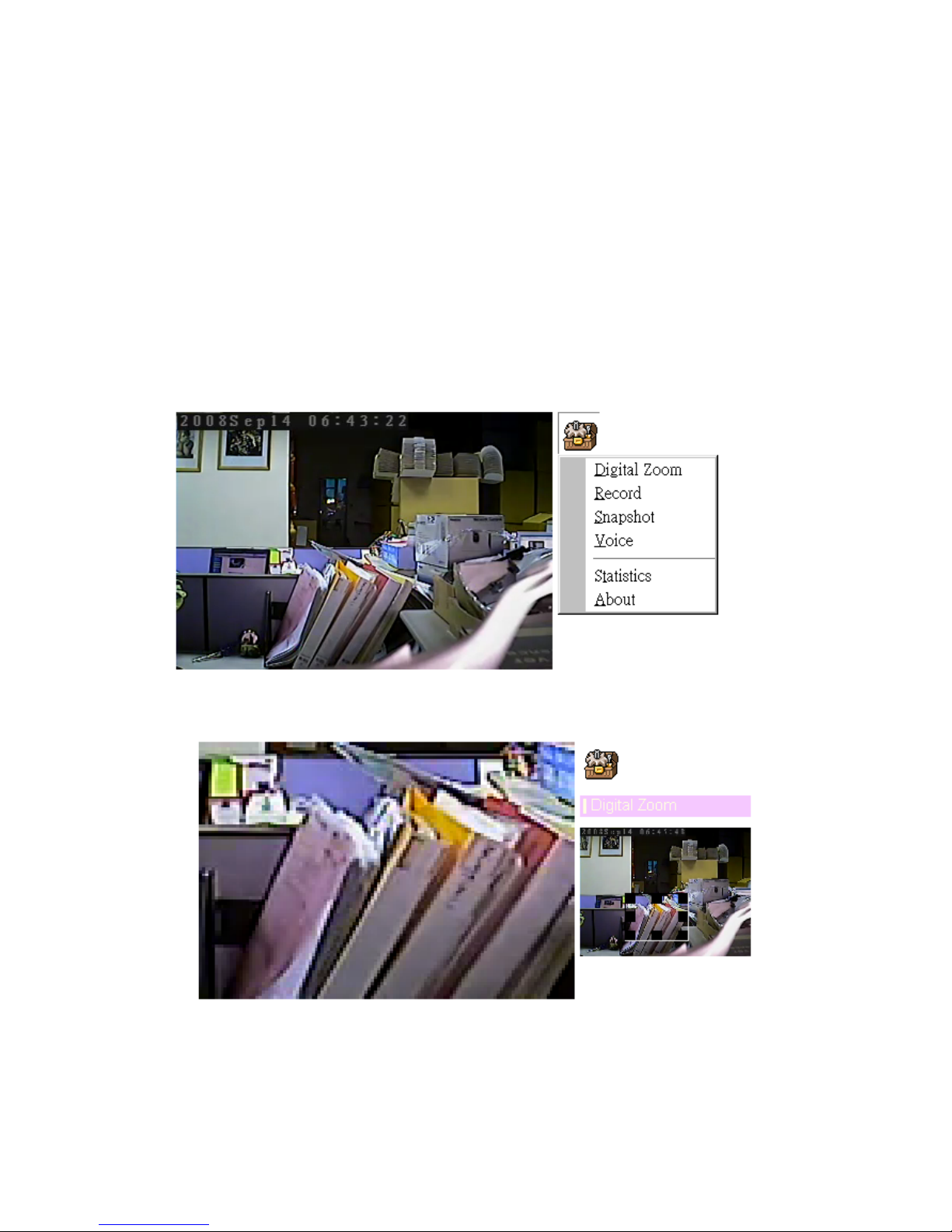
On the ActiveX control icon, click the Le ftMouseButton, then a menu pop-up. This menu
provides features that are unique to the ActiveX control. These features include:
• “Digital Zoom”,
• “Record”,
• “Snapshot”,
• “Voice”,
• “Statistics”,
• “About”
Digital Zoom
Click Digital Zoom to active this function as above. User can drag or s cale the box over
the video to adjust zoom ratio and position.
Page 27
Network Camera User’s Guide
27/94
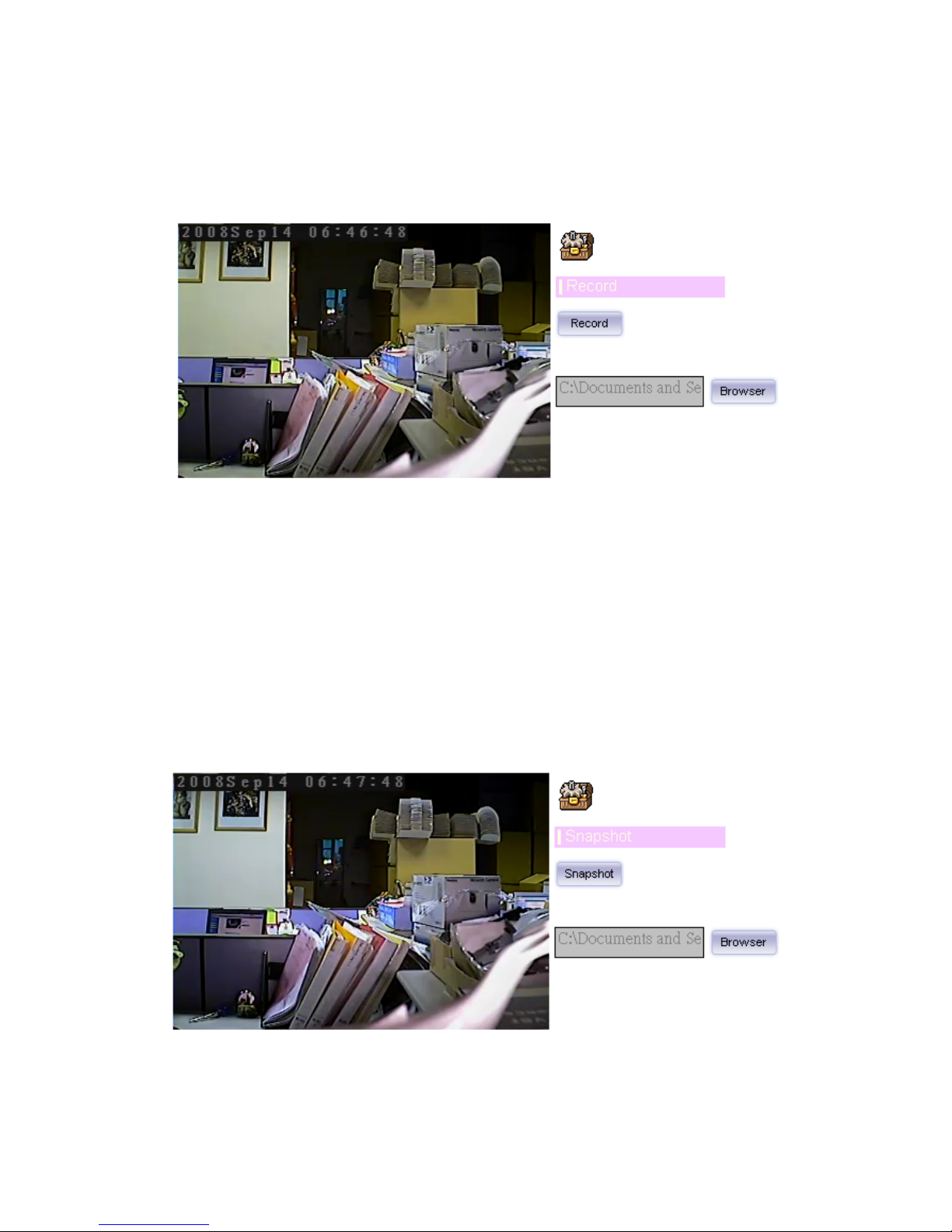
Record
Click Record to activate this function. Press Record button to start record ing. The video
file is saved as ASF format into your local PC. While you w ant to stop it, press Stop to
stop recording. Select Browser, the pop-up window to select the save path and file
name prefix, select OK to continue.
After stop recording, list the files, this file is named as Video_yyyymmddhhmmss.avi
The ASF files can be display by the standard Windows Media Player, but it needs the
DixectX 9.0 or later version to be installed.
Snapshot
Page 28
Network Camera User’s Guide
28/94
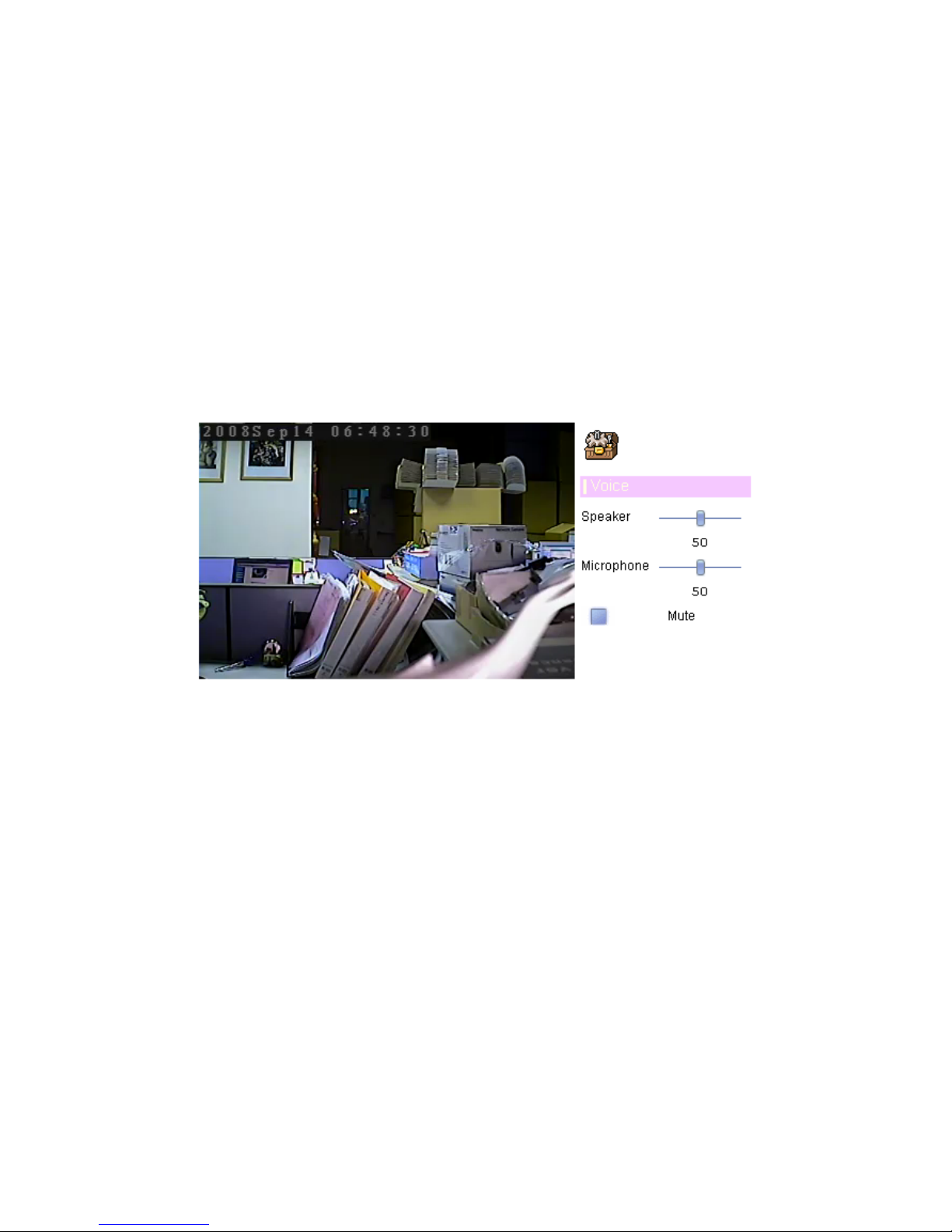
Click Snapshot to activate this function. Press Snapshot button to take a picture. The
image file is saved as JPEG format into your local PC. Select Browser, the pop-up
window to select the save path and file name prefix, select OK to continue.
If you like to retrieve the saved image, select the file to displa y the sav e d image by using
any one of graph editing tools.
Voice
Click Volume to activate this function. There are two control bars for speaker and
microphone volume respectively. Scroll these control bars to adjust the audio attribute.
Check the volume mute will mute the speaker output.
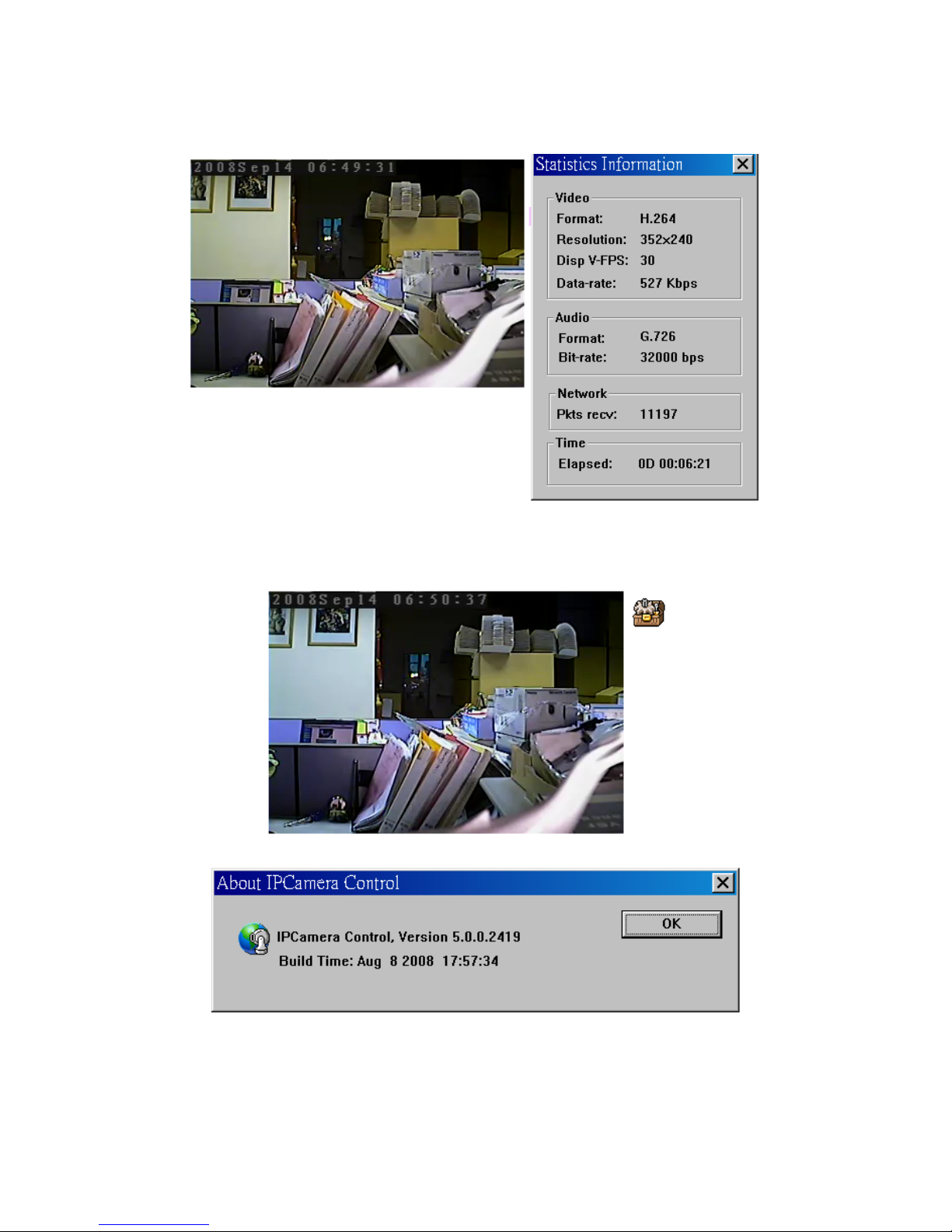
Statistics
Click Statistics to activate this function. A window will be popup to show the statistics
information of the streaming status. Note that this information is the statistics between
the device and your local PC.
Page 29
Network Camera User’s Guide
29/94
About
Click About to show this ActiveX information.
Page 30

Network Camera User’s Guide
30/94
Administrating the Device
System Setting
This function is only available for user logged into Camera as administrator.
Click on each menu name to display its setting page.
Item Action
Network Configure Network settings such as DHCP, DDNS, 3GPP, PPPoE
and UPnP
Camera Adjust camera parameters, day & night
System Configure system information, date & time, maintenance, and
view system log file.
Video Select Mega-pixel or Multi-profile mode and configure bit rate and
frame rate of video p rofiles
Audio Configure audio parameters
User Setup user name, password and login privilege
E-Mail Setup E-Mail configuration
Object Detection Setup Object detection
Storage Status and configuration of SD card
Recording List Files list inside the SD Card
Event Server Setup FTP/TCP/HTTP server for event
Event Schedule Configure the schedule while event triggered
Network: Configure Network settings
Use this menu to configure the network to connect the device and the clients.
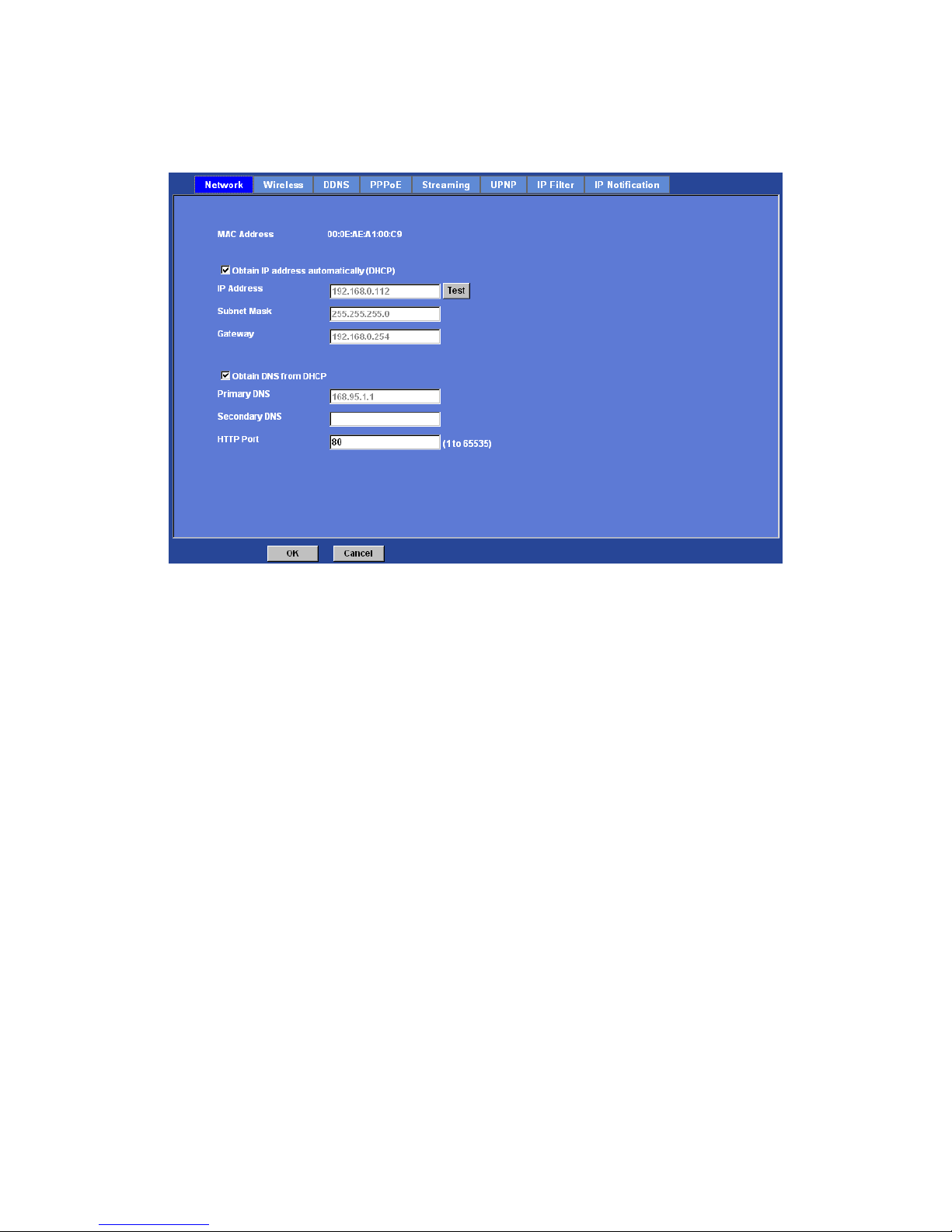
Network
This section provides the menu for connecting the device through Ethernet cable.
Page 31
Network Camera User’s Guide
31/94
MAC address:
Displays the Ethernet MAC address of the device. Note that user can not change it.
Obtain IP address automatically (DHCP):
DHCP: Stands for Dynamic Host Configuration Protocol.
Enable this checked box when a DHCP server is installed on the network to issue IP
address assignment. With this setting, the IP address is assig ned automatically. If this
device can not get an IP address within limited tries, the device will assign a default IP
address, 192.168.0.100, by itself as the default IP address.
IP address, Subnet mask, and Gateway:
If you do not select Obtain an IP address automatically, then you need to enter these
network parameters manually.
Obtain DNS from DHCP:
DNS: Stands for Domain Name System.
Enable this checked box when a DH CP server is installed on the network and provide
DNS service.
Primary DNS and Secondary DNS:
If you do not select Obtain DNS from DHCP, then you need to enter these parame ters
manually.
HTTP Port:
The device supports two HTTP ports. The first one is default port 80 and this port is fixed.
Page 32
Network Camera User’s Guide
32/94
This port is very useful for Intranet usage. The second HTTP port is change able. Users
could assign the second port number of http protocol, and the WAN users should follow
the port number to login. If the http port is not assigned as 80, users have to add the port
number in back of IP address. For example: http://192.168.0.100:8080
.
Therefore, the user can access the device by either
http://xx.xx.xx.xx/
, or
http://xx.xx.xx.xx:xxxx/
to access the device.
If multiple devices are installed on the LAN and also required to be accessed from the
WAN, then the HTTP Port can be assigned as the virtual server port mappin g to sup p ort
multiple devices.
Click “OK” to save and enable the setting.
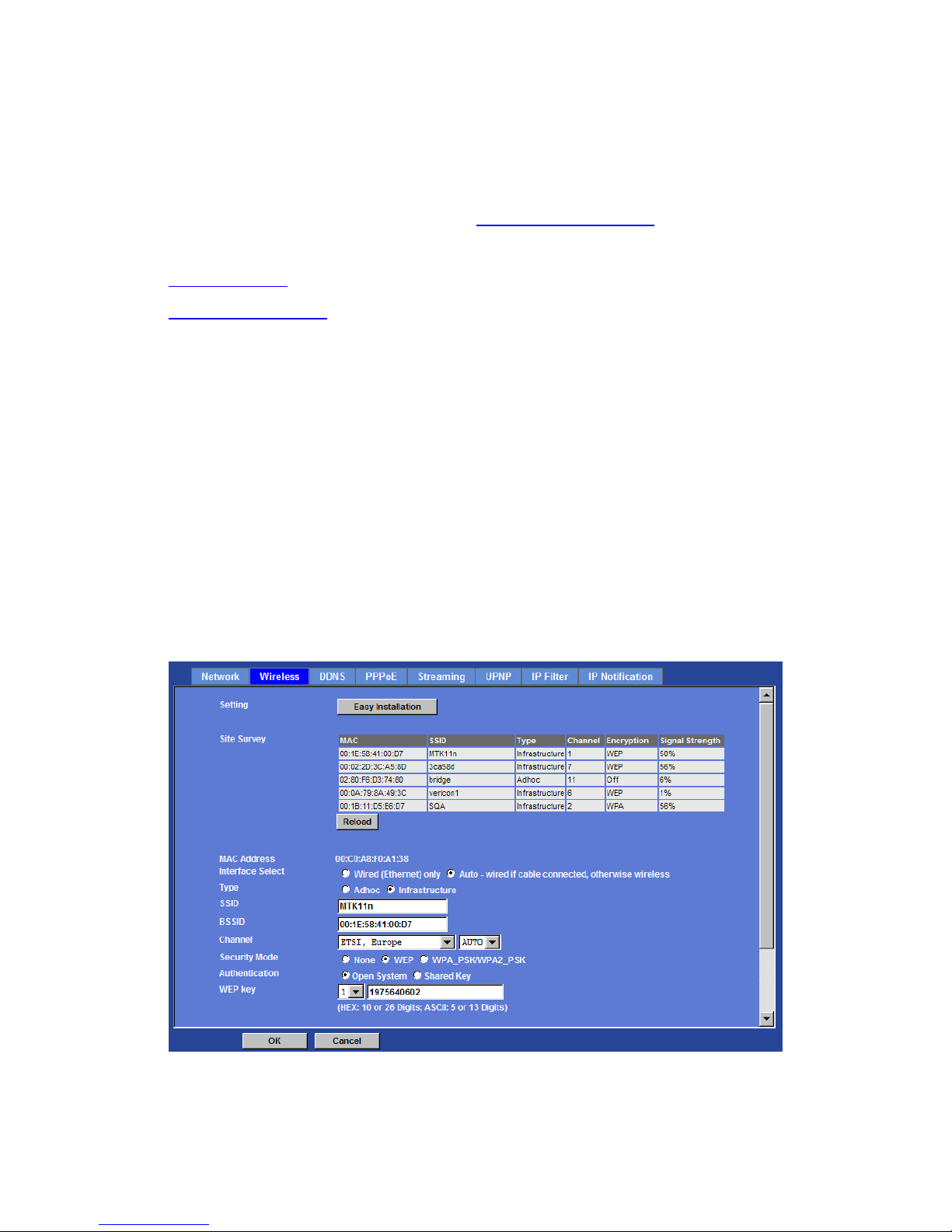
Wireless
If your device is a wireless model, you could assign the related para meters into wireless
setting. Using a wired connection ensures greater secrecy while making these settings.
These settings should always be made in the camera first a nd secondly in the wireless
access point. This ensures that the device is always accessible when making changes.
Note that this function is only available for the model with WLAN capability.
Page 33
Network Camera User’s Guide
33/94
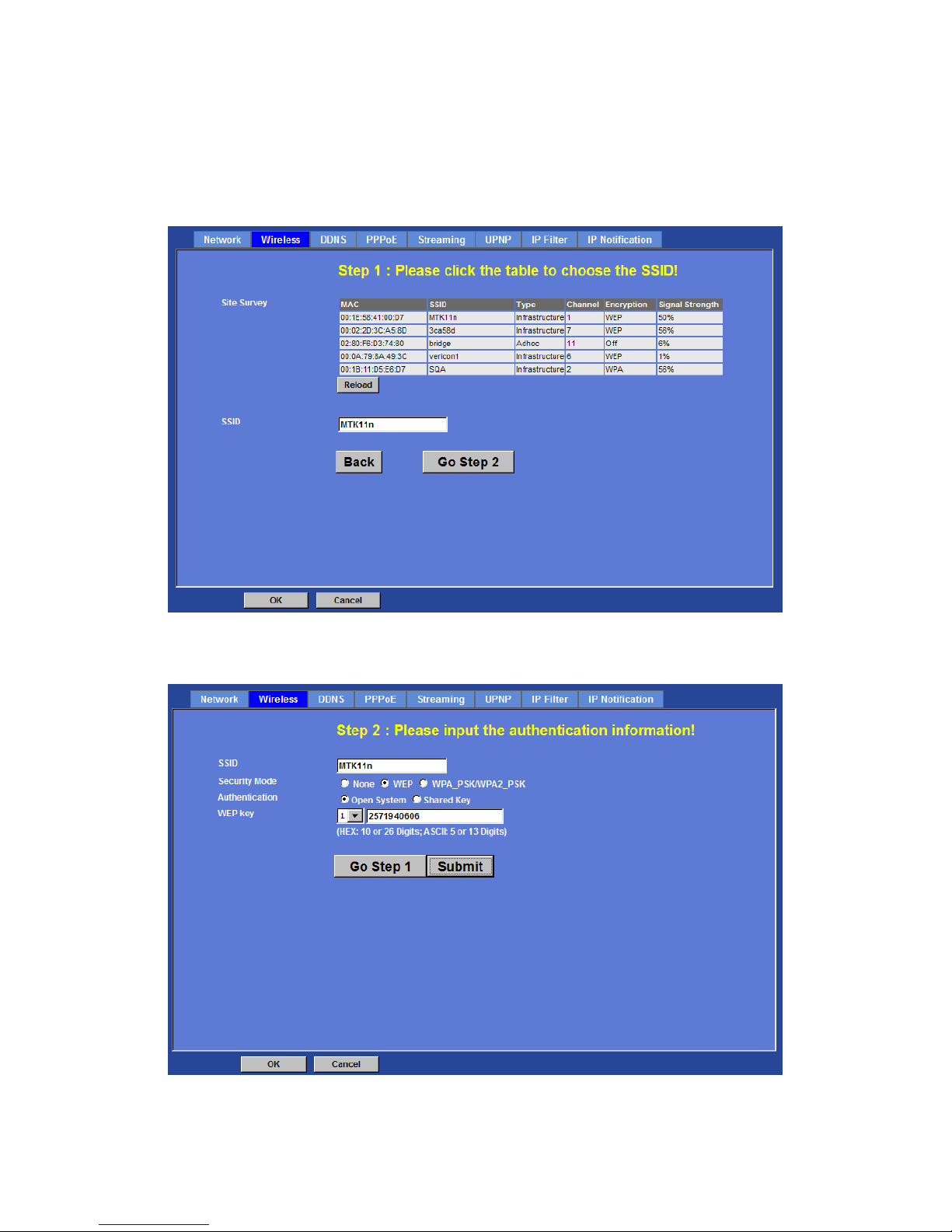
Setting (Easy Installation):
Provides a 2-step procedure to configure wireless setting:
Step 1: Select SSID of wireless router or access point (AP).
Step 2: Key in security key of WEP or WPA. Then click “Submit” button to activate
wireless setting.
Page 34

Network Camera User’s Guide
34/94
In case, user wants to configure wireless settings manually, please follow the steps as
below:
MAC address:
Displays the Ethernet MAC address of the WLAN card. Note that user can not change it.
Site survey:
Click the “Refresh” button. It will refresh information window which list is the resul t of a
network scan. Access points with a disabled SSID Broadcast will not appear unless the
camera is associated with it. The following information is provided:
Interface Select:
“Wired (Ethernet) only” or “Auto – wired if cable connected, otherwise wireless”:
Choose wired or wireless mode. However, note that wired is priority.
Type:
To select one of WLAN modes from Infrastructure or Ad-Hoc mode.
Security mode:
Shows which type of security the network uses. The device supports three security
methods:
None
WEP
WPA_PSK/WPA2_PSK
SSID:
This is the name of the wireless network the d evice is configured for. The field accepts
up to 32 alphanumeric characters. The name must be exactly the same as that used in
the wireless access point, or the connection will not be established.
Leaving this field blank means the device will attempt to access the nearest open
network.
Channel:
Chooses the wireless channel in use currently.
WEP settings:
- Authentication:
Select Open or Shared Key System Authentication, depending on the
method used by your access point. Not all access points have this option,
in which case they probably use Open System, which is sometimes
known as SSID Authentication.
- WEP Mode:
The key types available depend on the access point being used. The
following options are available:
•ASCII - In this method the string must be exactly 5 characters for 64-bit
WEP and 13 characters for 128-bit WEP.
•HEX - In this method the string must be exactly 10 hexadecimal (0-9, A-F)
Page 35

Network Camera User’s Guide
35/94
characters for 64-bit WEP and 26 hexadecimal characters for 128-bit
WEP.
- Web Key 1~4:
Key value of WEP.
WPA settings:
- WPA Key:
Key value of WPA. The device uses a pre-shared key (PSK) for key
management. The pre-shared key can be entered either as Manual hex,
as 64 hexadecimal characters, or as a Passphrase, using 8 to 63 ASCII
characters.
Obtain IP address automatically (DHCP):
Enable this checked box when a DHCP server is installed on the network to issue IP
address assignment. With this setting, the IP address is assigned automatically.
IP address, Subnet mask, and Gateway:
If you do not select Obtain an IP address automatically, then you need to enter these
network parameters manually.
Select “OK” to save and enable the setting.
Note: To enable WLAN function, user must set the se related parameters correctly at first.
Then power off the device and remove Ethernet cable from device. Power on the device
again and WLAN mode will be available accordingly.
DDNS service
DDNS: Stands for Dynamic Domain Name Server
Your Internet Service Provider (ISP) provides you at least one IP a ddress which you use
to connect to the Internet. The address you get ma y be static, meaning it never changes,
or dynamic, meaning it’s likely to change periodically. Just how often it changes,
depends on your ISP. A dynamic IP address complicates remote ac cess since you may
not know what your current WAN IP address is when you want to access your device
over the Internet. One of the possible solutions to the dynamic IP address problem
comes in the form of a dynamic DNS service.
A dynamic DNS service is unique because it provides a means of updating your IP
address so that your listing will remain current when your IP address changes. There are
several excellent DDNS services available on the Internet. One such service you can
use is www.DynDNS.org. You’ll need to register with the service and set up the domain
name of your choice to begin using it. Please refer to the home page of the service for
detailed instructions or refer to Appendix G for more information.
Page 36
Network Camera User’s Guide
36/94
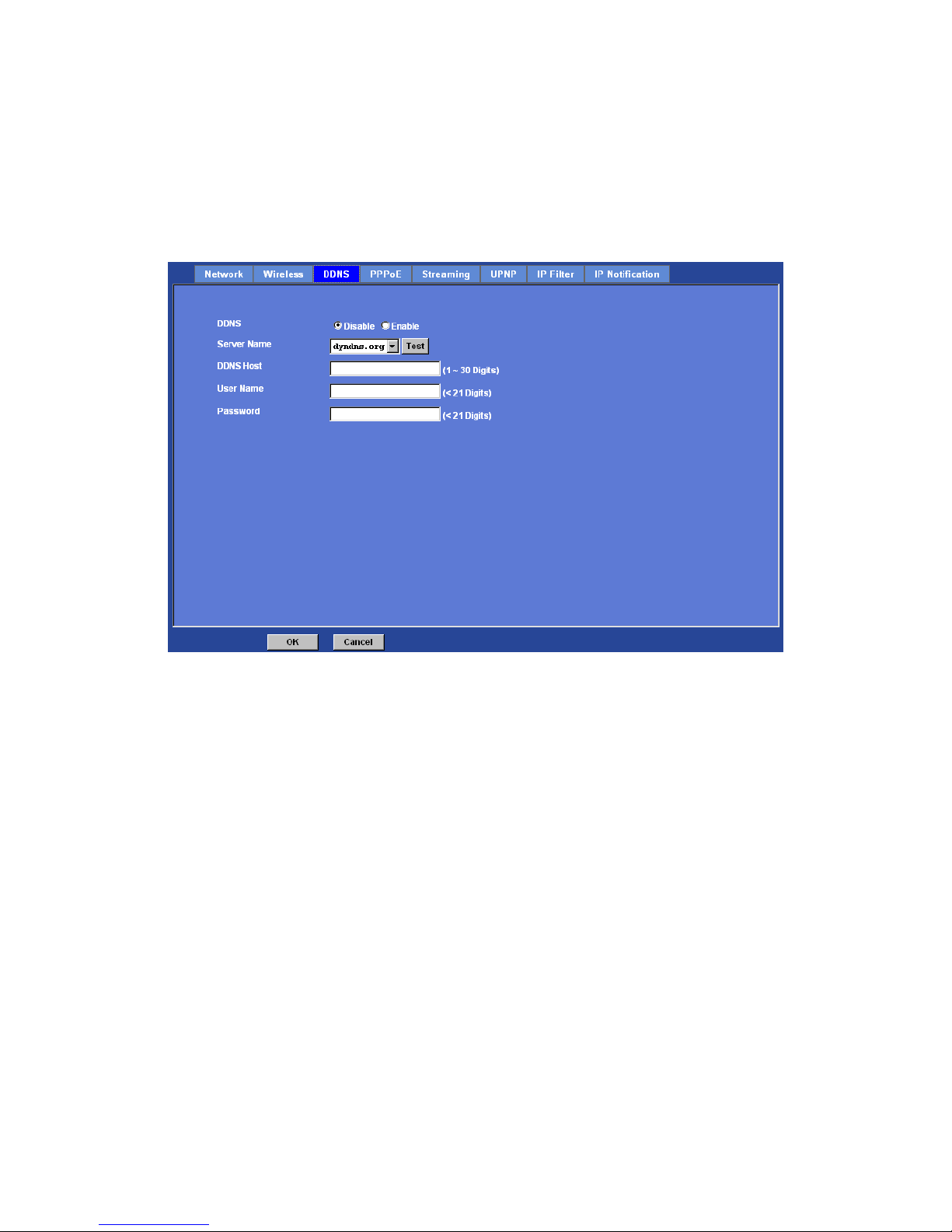
If your device is connected to xDSL directly, you might need this feature. However, if
your device is behind a NAT router, you will not need to enable this feature because
your NAT router should take care of this job. As to xDSL environment, most of the users
will use dynamic IP addresses. If us ers want to set up a web or a FTP server, then the
Dynamic Domain Name Server is necessary.
DDNS:
To enable or disable the DDNS service here.
Server name:
Choose the built-in DDNS server.
DDNSHost:
The domain name is applied of this device.
User name:
The user name is used to log into DDNS.
Password:
The password is used to log into DDNS.
PPPoE
PPPoE:
Page 37
Network Camera User’s Guide
37/94
PPPoE: Stands for Point to Point Protocol over Ethernet
A standard builds on Ethernet and Point-to-Point network protocol. It allows your device
with xDSL or cable connects with broadband network directly, then your device c an dial
up and get a dynamic IP address. For more PPPo E and Internet configuration, please
consult your dealer or ISP.
The device can directly connect to the xDSL, however, it should be setup on a LAN
environment to program the PPPoE information first, and then connect to the xDSL
modem. Power on again, then the device will dial on to the ISP connect to the WAN
through the xDSL modem.
The procedures are
• Connect to a LAN by DHCP or Fixed IP
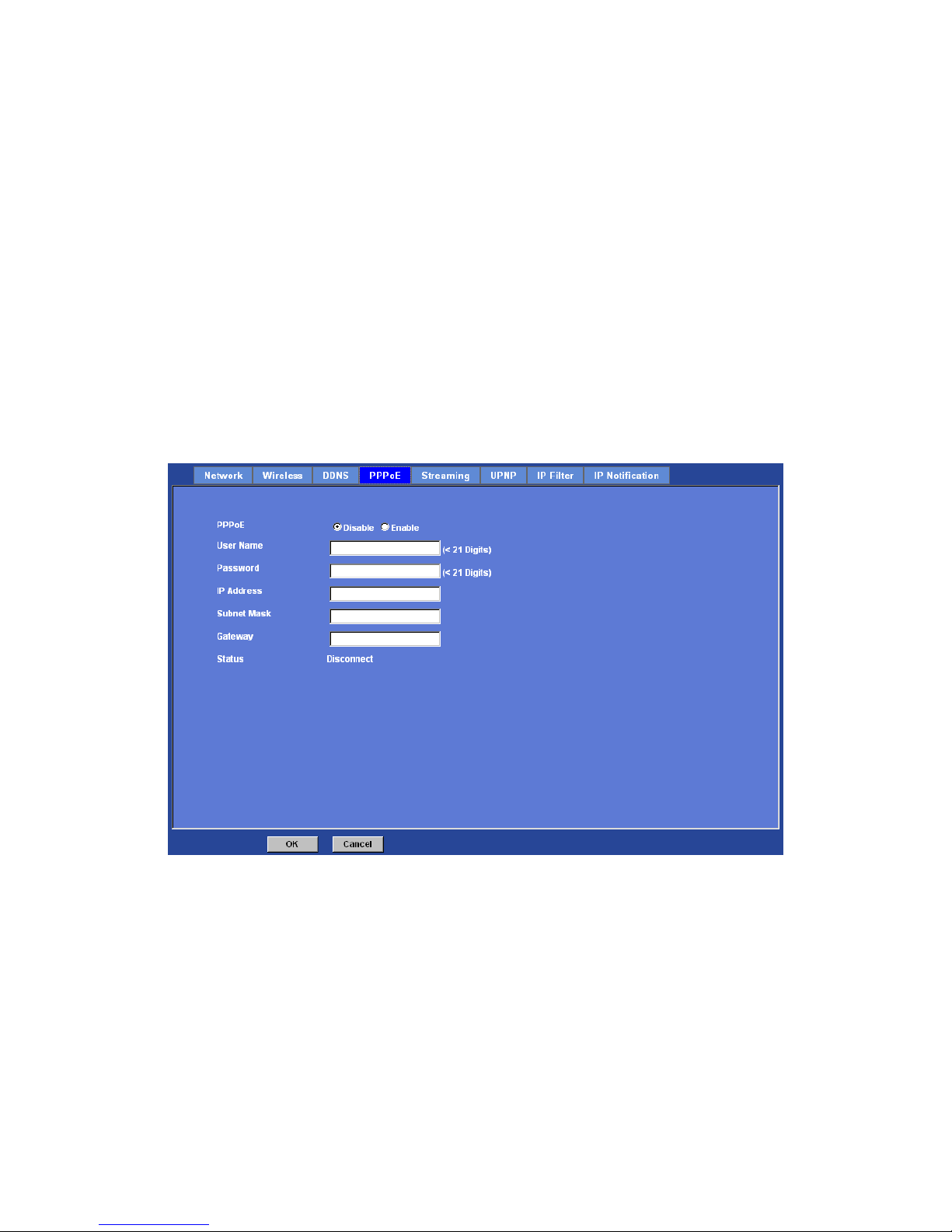
• Access the device, enter Setting Î Network Î PPPoE as below
PPPoE:
To enable or disable the PPPoE service here.
User name:
Type the user name for the PPPoE service which is provided by the ISP.
Password:
Type the password for the PPPoE service which is provided by the ISP.
IP address, Subnet mask, and Gateway (read only):
Page 38
Network Camera User’s Guide
38/94
Shows the IP information got from PPPoE server site.
Status:
Shows the Status of PPPoE connection.
Streaming
RTSP is a streaming control protocol, and a starting point for negotiating transports such
as RTP, multicast and Unicast, and for negotiating codecs. RTSP can be consid ered a
"remote control" for controlling the media stream delivered by a media server. RTSP
servers typically use RTP as the protocol for the actual transport of audio/video data.
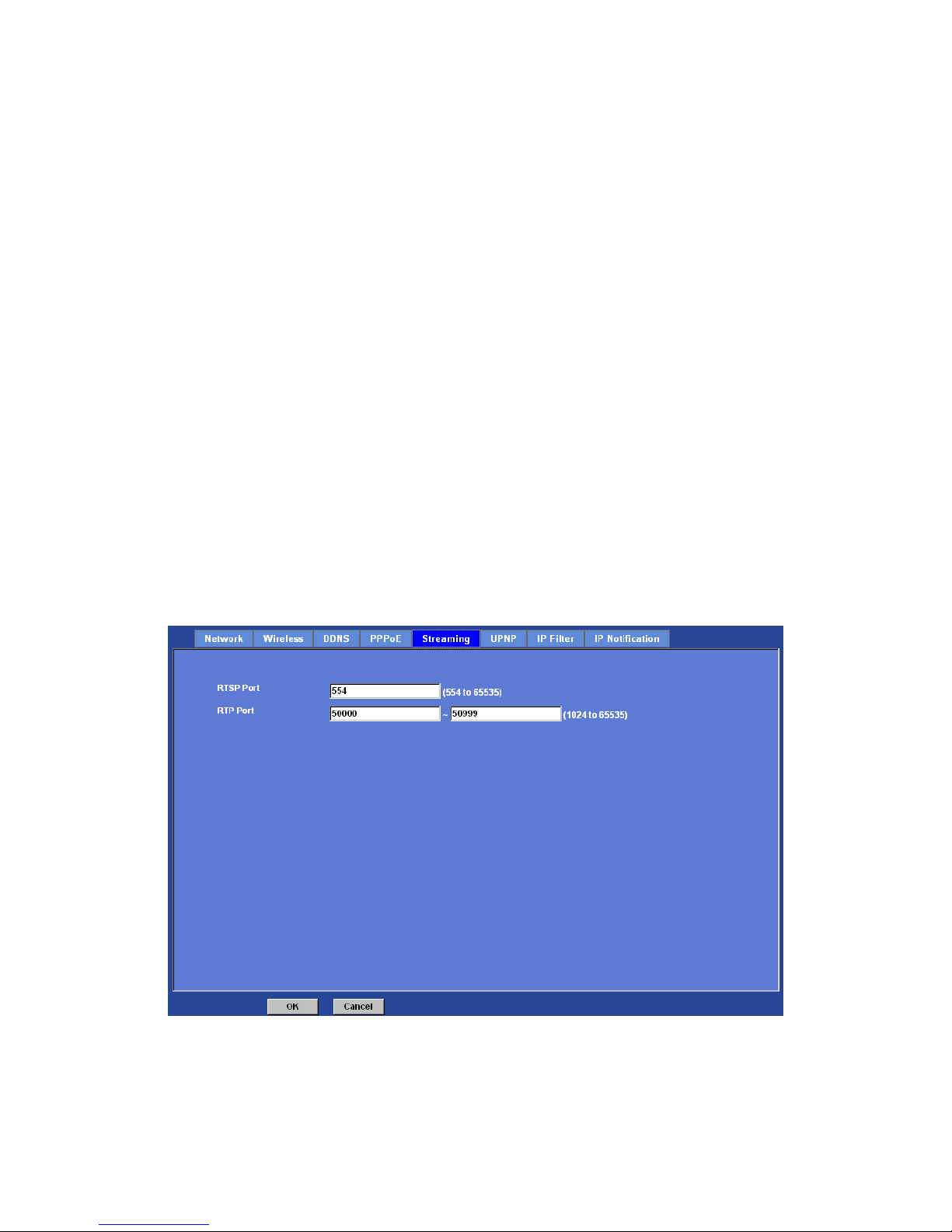
RTSP Port:
Choose the RTSP port. The RTSP protocol allows a connecting client to start a video
stream. Enter the RTSP port number to use. The default value is 554.
RTP Port:
Specify the range of transmission port number of video stream. The default range is
50000 to 50999. User can specify a number between 1024 and 65535.
Page 39
Network Camera User’s Guide
39/94
UPnP
UPnP is short for Universal Plug and Play, which is a networking architecture that
provides compatibility among networking equipment, software, and peripherals. This
device is an UPnP enabled Network Camera. If your operating system is UPnP enabled,
the device will automatically be detected and a new icon will be added to “My Network
Places.” If you do not want to use the UPnP functionality, it can be disabled.
In addition, this device also provides UPnP IGD function for NAT trav ersal easily. Use
NAT traversal when your device is located on a n intranet (LAN ) and you wish to make it
available from the other (WAN) side of a NAT router. With NAT traversal properly
configured, all HTTP traffic to an external HTTP port in the NAT router will be forwarded
to the device.
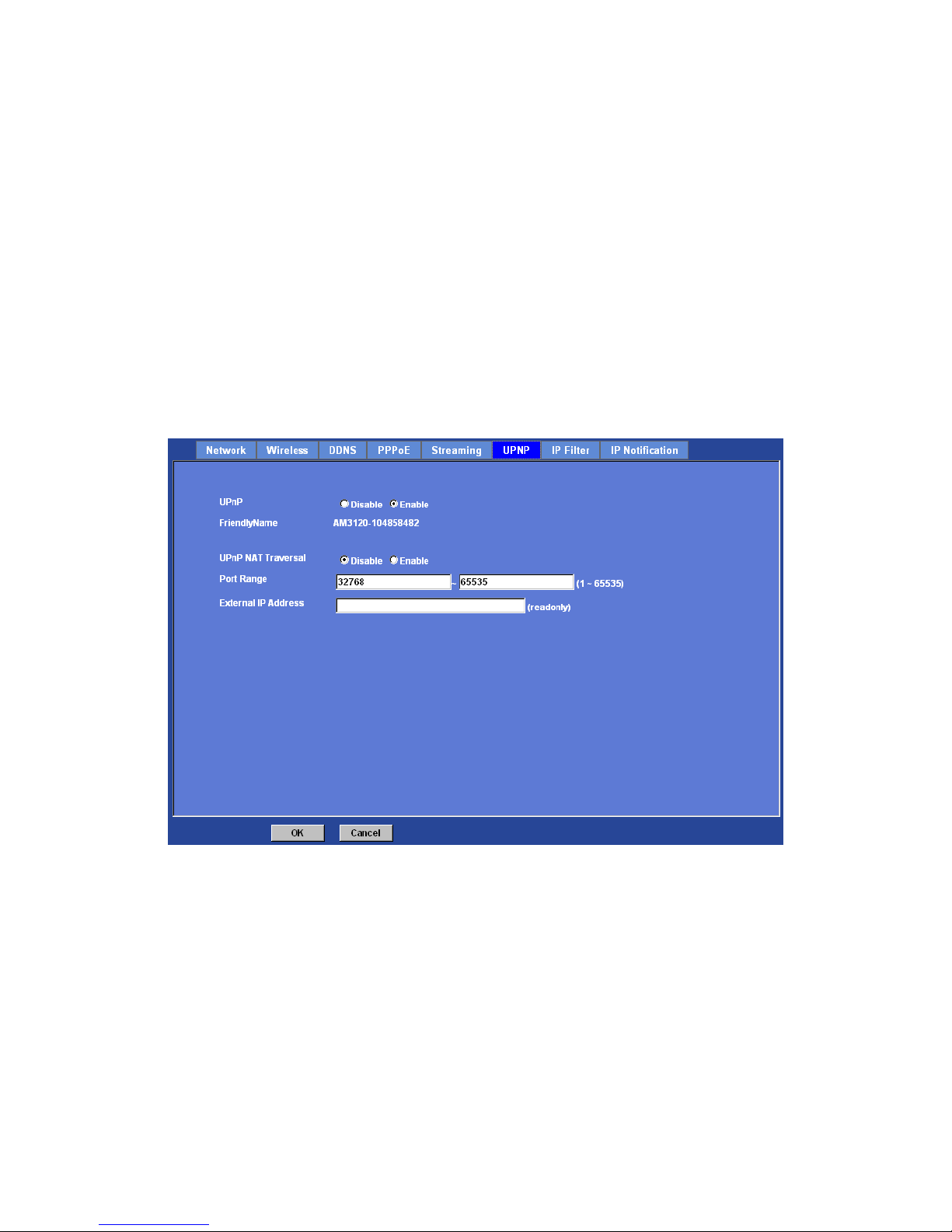
UPnP:
To enable or disable the UPnP service here.
Friendly Name:
Shows the friendly name of this device here.
UPnP NAT Traversal
When enabled, the device will attempt to configure port mapping in a NAT router on your
network, using UPnP™. Note that UPnP™ must be enabled in the NAT router first.
Page 40
Network Camera User’s Guide
40/94
Port Range:
The port range will open in NAT router.
External IP address:
Show the IP address and port for WAN access through Internet. If NAT traversal is
configured successfully, user can use this IP address and port to access this device. The
external IP address is not shown in case NAT traversal function is failed.
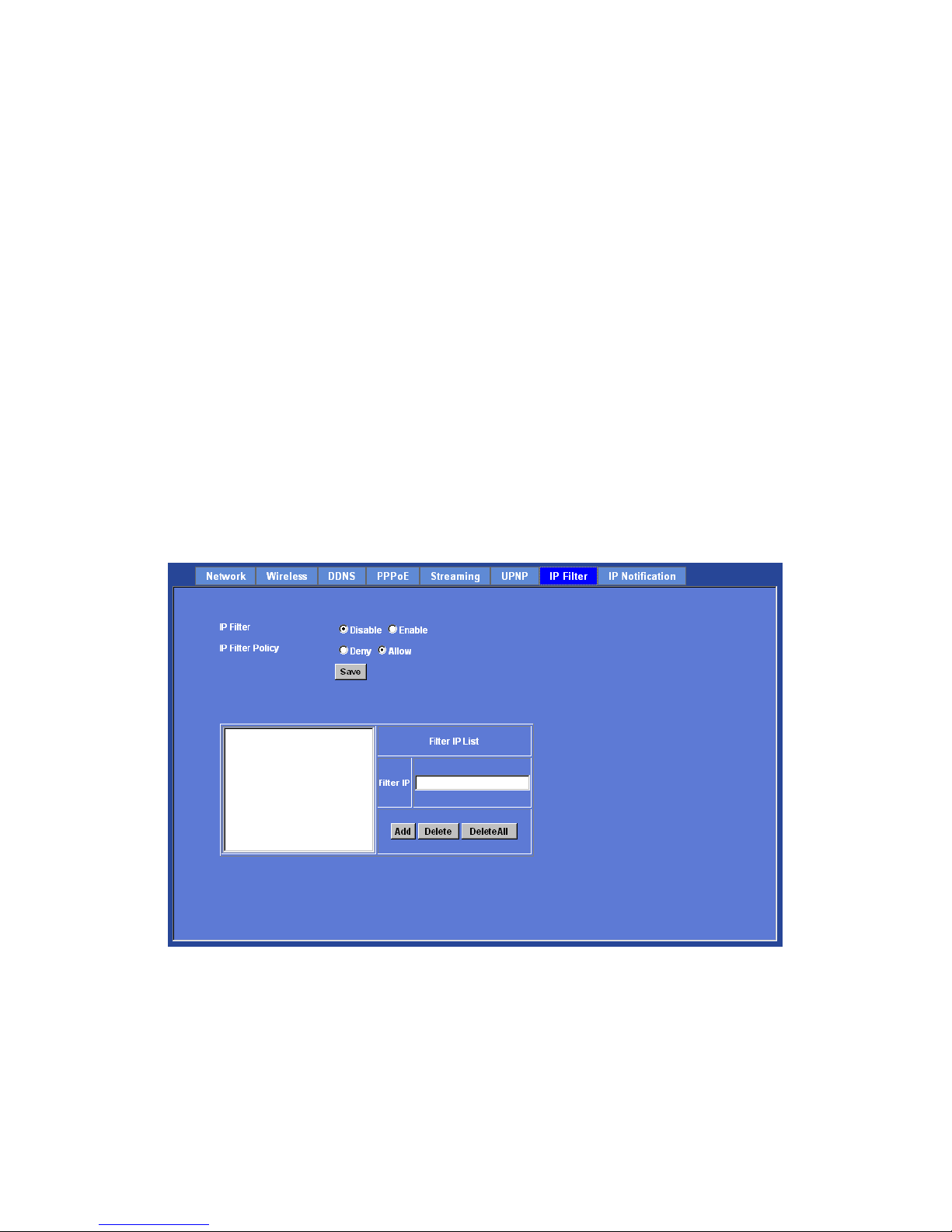
IP Filter
You can enter different user’s IP address which are allowing enter or denying by the
device.
IP Filter:
To enable or disable the IP filter function here.
IP Filter Policy:
Choose the filter policy where is denying or allowing.
IP Notification
Page 41
Network Camera User’s Guide
41/94
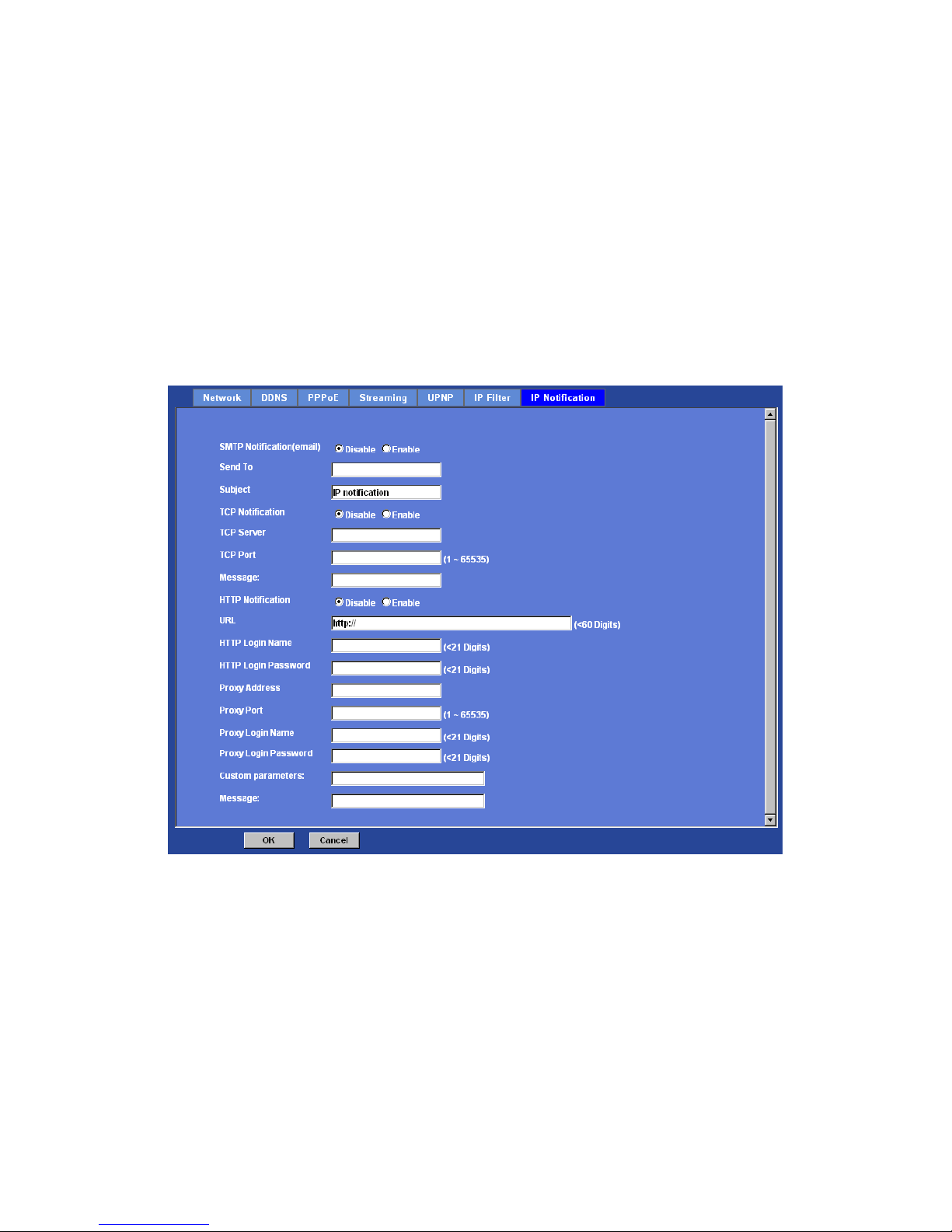
In case the IP address is changed, system is able to send out an email to alert someone
if the function is enabled.
SMTP Notification (e-mail):
If enable this function, then the “Send to“ and “Subject” fields need to be filled.
Send To:
Type the receiver’s e-mail address. This address is used for reply mail.
Subject:
Type the subject/title of the E-mail.
TCP Notification:
If enable this function, then the “TCP Server“, “TCP Port”, and “Message” fields need to
be filled.
TCP Server:
Type the server name or the IP address of the TCP server.
TCP Port:
Set port number of TCP server.
Page 42

Network Camera User’s Guide
42/94
Message:
The message will be sent to FTP server.
HTTP Notification:
If enable this function, then the fields below need to be filled.
URL:
Type the server name or the IP address of the HTTP server.
HTTP Login name:
Type the user name for the HTTP server.
HTTP Login Password:
Type the password for the HTTP server.
Proxy Address:
Type the server name or the IP address of the HTTP Proxy.
Proxy Port:
Set port number of Proxy.
Proxy Login name:
Type the user name for the HTTP Proxy.
Proxy Login Password:
Type the password for the HTTP Proxy.
Custom parameter:
User can set specific parameters to HTTP server.
Message:
The message will be sent to HTTP server.
Page 43
Network Camera User’s Guide
43/94
Camera: Adjust Camera parameters
Use this menu to set the functions of the camera parameters of the device.
Picture
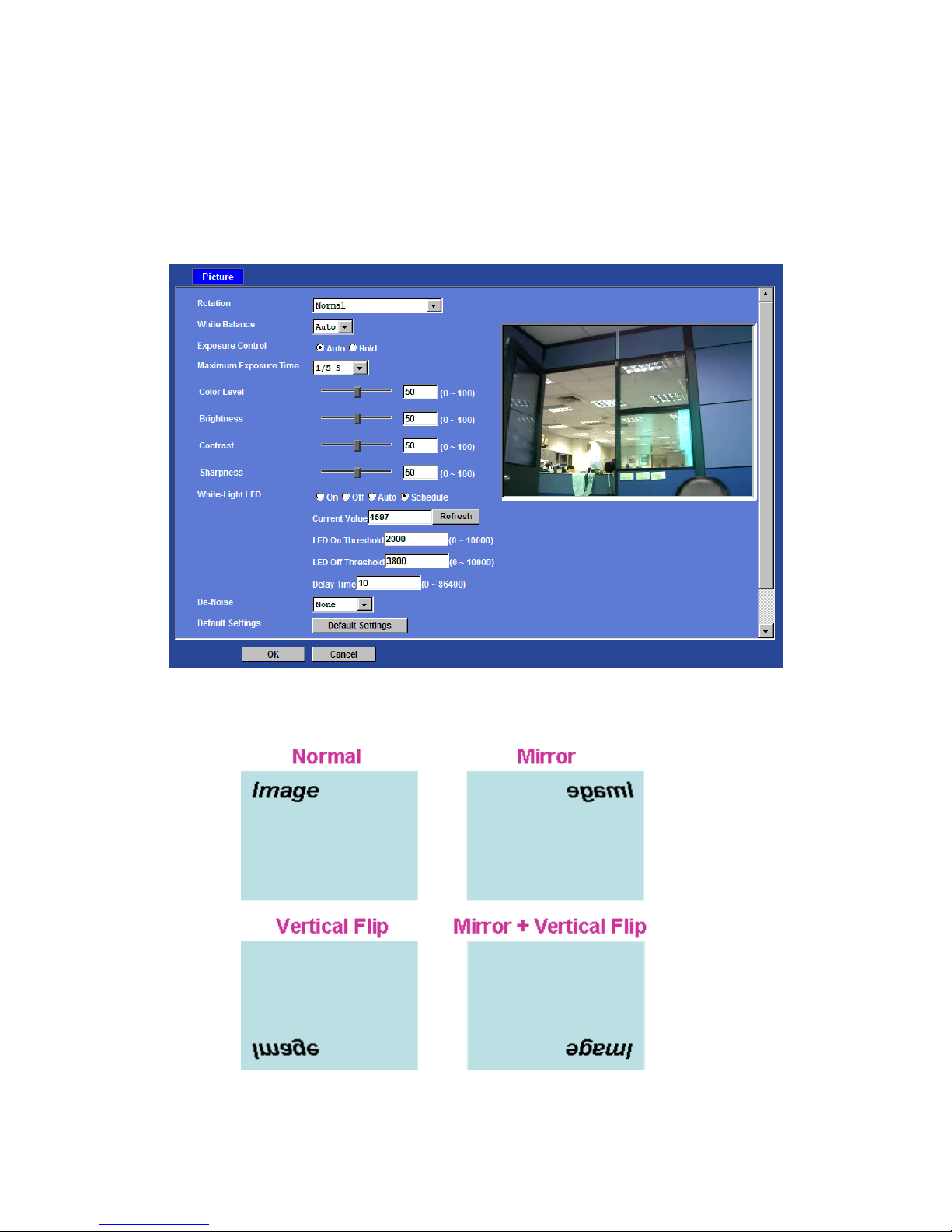
Rotation:
Turn the “Mirror” and “Vertical Flip” On or OFF. The image will be overturned as below.
Page 44

Network Camera User’s Guide
44/94
White Balance:
Auto: will adjust the white balance automatically.
Hold: will hold the white balance.
Exposure Control:
Auto: will adjust the internal gain automatically.
Hold: will hold the internal gain.
Maximum Exposure Time:
User can limit the maximum exposure time of th e image s ensor. The la rger value means
longer exposure time possibly.
Color Level:
Large value will be colorful.
Brightness:
Large value will brighten camera.
Sharpness:
Large value will sharpen camera.
Contrast:
Large value will contrast camera heavily.
White-Light LED:
User can turn On, Off, Auto or Schedule of the built-in White-light LEDs . This function is
very useful under low illumination environment even 0 Lux.
In case the Auto mode is selected, user needs to specify 3 parameters in advance:
LED ON Threshold (0~10000): this value set the thres hold to turn on white-light LED. It
should be lower or equal to LED OFF Threshold.
LED OFF Threshold (0~10000): this value set the threshold to turn off white-light LED . It
should be higher or equal to LED ON Threshold.
Delay Time: The delay time between LED ON/OFF switching.
Note that Current Value is the current luminance from the captured video. It’s a useful
reference to set LED ON/OFF Threshold.
De-Noise:
De-Noise can remove or lower unwanted noise and preserve fine details and edges.
Default Settings:
Restore to factory image settings.
Page 45
Network Camera User’s Guide
45/94
System: Configure and maintain system
Use this menu to perform the principal settings of the device.
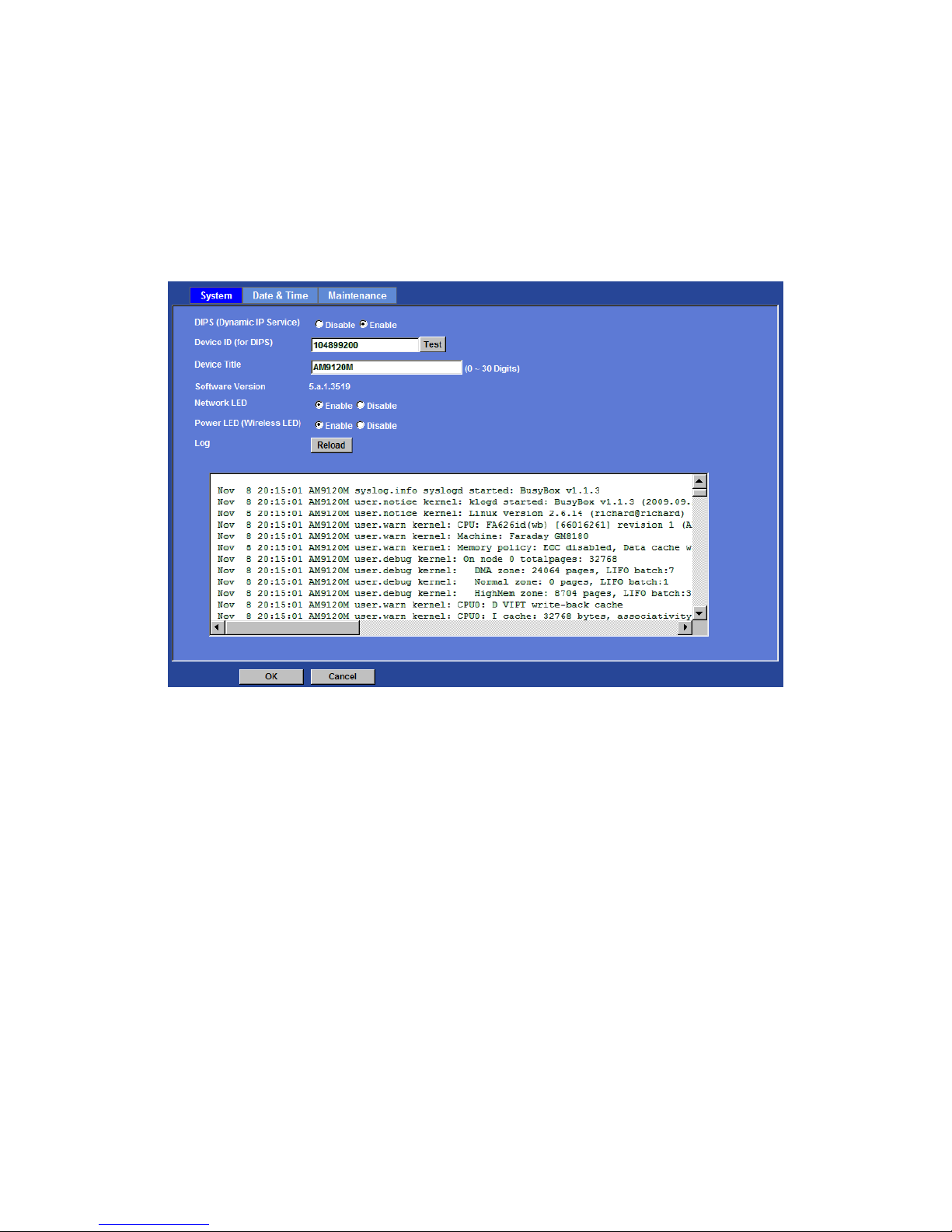
System:
DIPS (Dynamic IP Service):
To enable or disable the DIPS® (Dynamic IP Service) function.
Device ID (for DIPS):
It’s a unique number of each device for identification and this ID is used for DIPS.
In the Appendix G, it desc ribes ho w to loca te your device fro m In ternet by DDNS servic e.
However, we provide another easier way to do the same job called Dynamic IP Servic e,
DIPS®.
To use this service, just follow four steps below:
(1) Enable DIPS function of the device
(2) Check your Device ID from this page. This is a unique number for each device.
(3) If your device is behind a NAT router, please configure your device properly. You
could refer to section “Install the Camera behind a NAT Router” abov e . You onl y nee d to
do this job one time.
Page 46
Network Camera User’s Guide
46/94
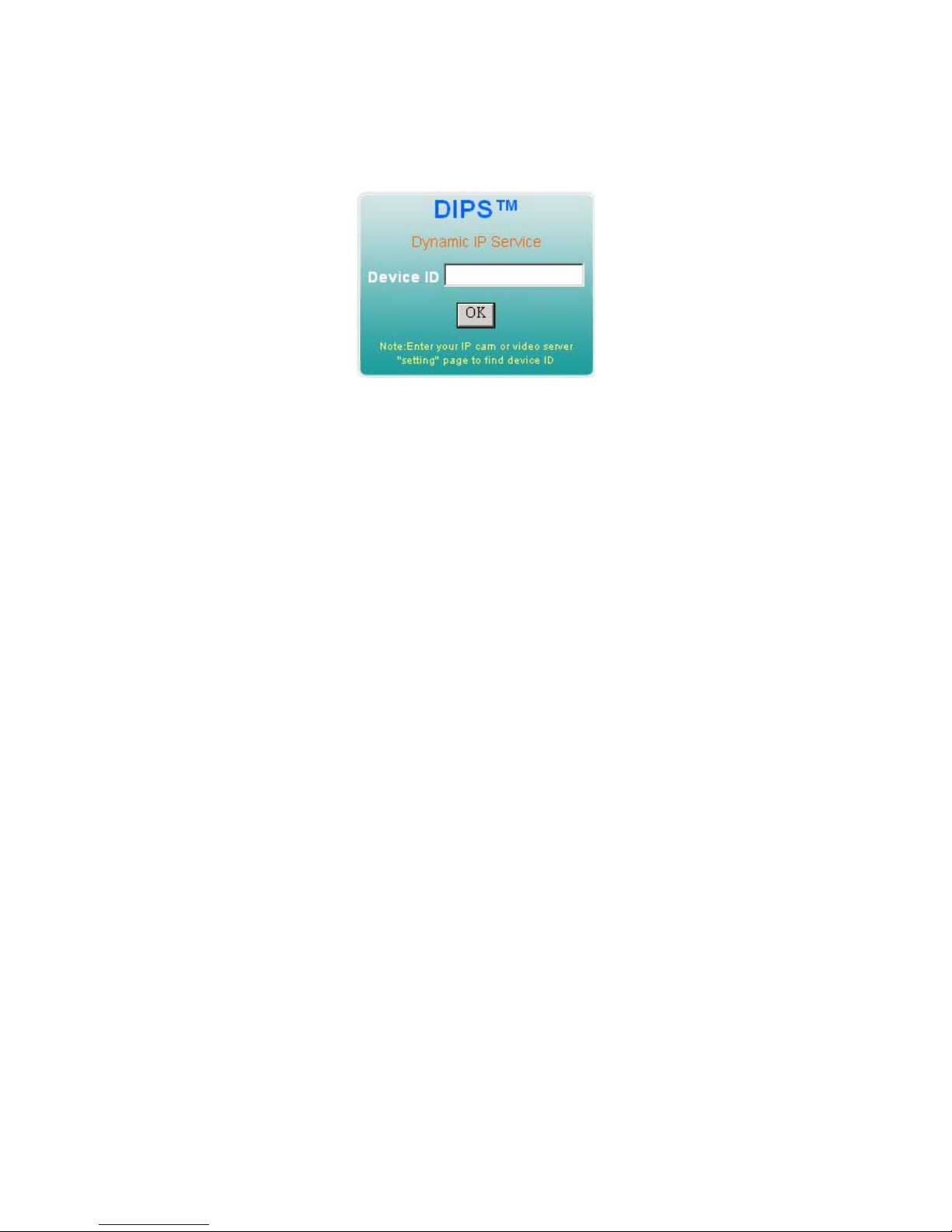
(4) Visiting our company’s web site, you can find DIPS service page as below:
Enter your Device Number and press “OK” button.
Then, a new web page will pop up and link to your device accordingly.
You will see that DIPS is a much easier service than DDNS.
Device Title:
You can enter the name of this unit here. It’s very useful to identify the specific device
from multiple units. The information will be shown on IPWizard II once the device is
found.
Software Version:
This information shows the software version of the device.
Network LED:
To turn on or off Network LED.
Power LED (Wireless LED):
To turn on or off Power LED (wireless LED if WLAN model).
Log:
User can check the system log information of the device, including the Main Info,
Appended Info, Operator IP, and so on …
Reload:
Click this button; user can refresh the log information of the device.
Date & Time
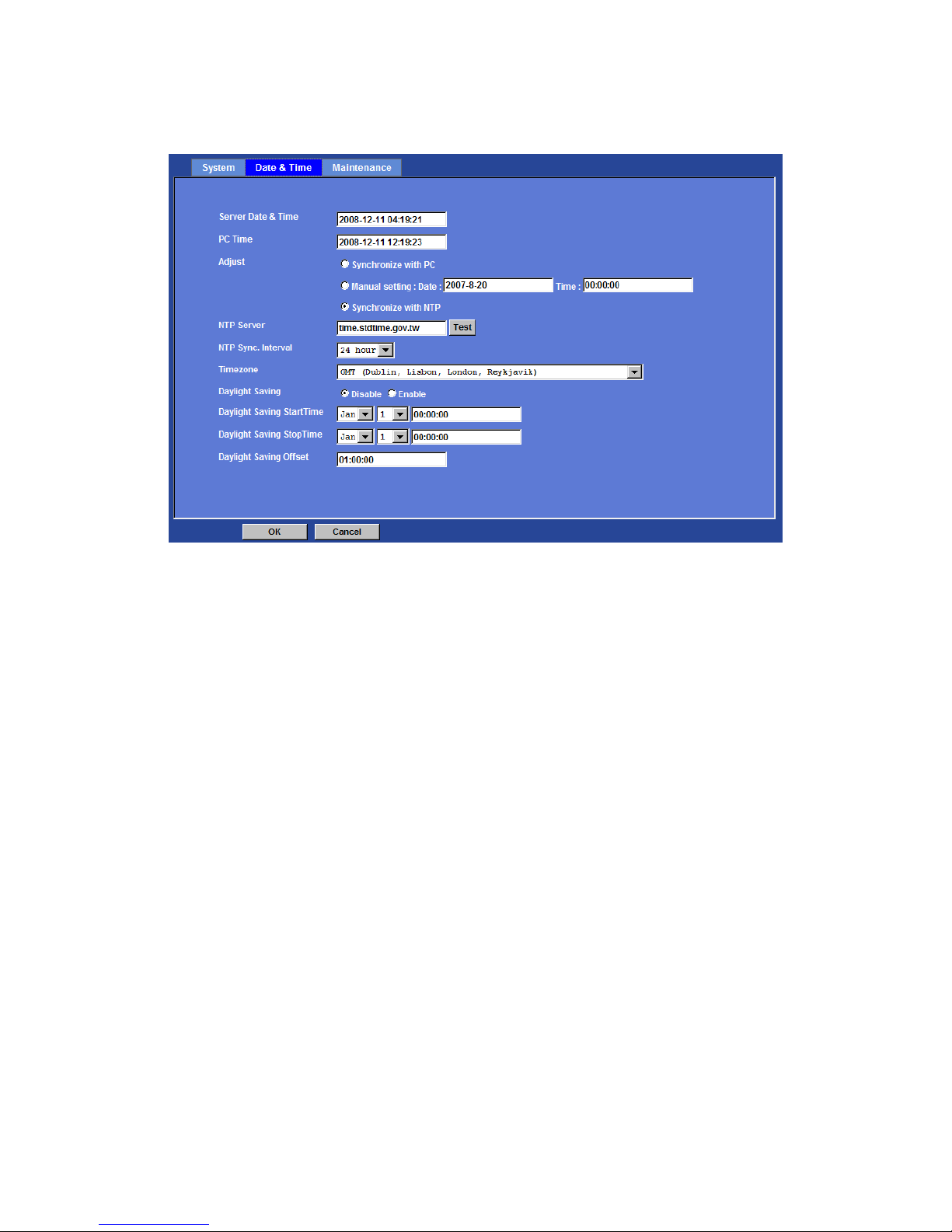
You can setup the device or make i t synchronized with PC o r remote NTP server. Also,
you may select your time zone in order to synchronize time locally.
Page 47

Network Camera User’s Guide
47/94
Server Date & Time:
Displays the date and time of the device.
PC Time:
Displays the date and time of the connected PC.
Adjust:
- Synchronize with PC:
Click this option to enable time synchronization with PC time.
- Manual setting:
Click this option to set time and date manually.
- Synchronize with NTP:
Click this option if you want to synchronize the device’s date and time with those of
time server called NTP server (Network Time Protocol).
NTP Server: Type the host name or IP address or domain name of the NTP
server.
NTP sync. Interval: Select an interval between 1 and 23 hours at which you
want to adjust the device’s time referring to NTP server
Time zone:
Set the time difference from Greenwich Mean Time in the area where the device is
installed.
Daylight Saving:
Disable or enable the daylight saving adjustment.
Page 48
Network Camera User’s Guide
48/94
Maintenance
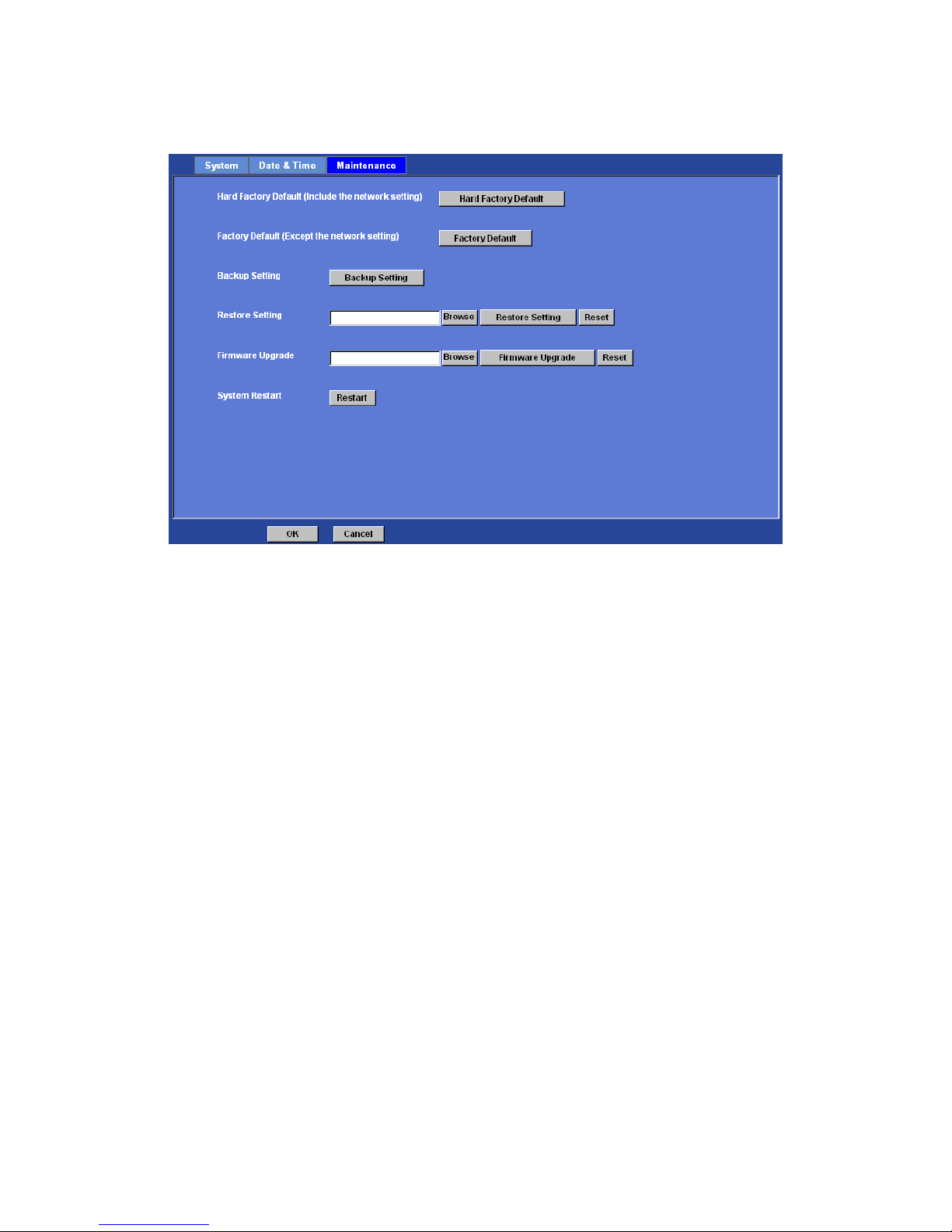
Hard Factory Default (Include the network setting):
Recall the device hard factory default settings. Note that c lick this button will reset all
device’s parameters to the factory settings (including the IP address).
Factory Default (Except the network setting):
The unit is restarted and most current settings are reset to factor y default values. This
action will not reset the network setting.
Backup Setting:
To take a backup of all of the parameters, click this button. If necessary, it will then be
possible to return to the previous settings, if settings are changed and there is
unexpected behavior.
Restore Setting:
Click the “Browse” button to locate the saved backup file and then click the “Restore
Setting” button. The settings will be restored to the previous configuration.
Page 49
Network Camera User’s Guide
49/94
Firmware Upgrade:
The device supports new firmware upgrade (the software that controls the operation in
the device). Please contact your dealer for the latest version if necessary.
Download the latest firmware file from our website or your dealer. Unzip this firmware file
to binary file and store it into your PC. Then follow the steps as bellows carefully:
1. Close all other application programs which are not necessary for firmware update.
2. Make sure that only you access this device while firmware updating.
3. Disable Motion Detection function.
4. Click “Browse” button. Select the Firmware binary file. (Note that it must make sure
that the Firmware only applies to this device, once update, it will be bu rned into FLASH
ROM of system.)
5. Once the firmware file was selected, click “Firmware Upgrade” button.
6. The upgrade progress information will be displayed. Once the uploading process
completed, the device will reboot the system automatically.
7. Please wait for timer countdown, and then you can use IPWizard II to search the
device again.
Page 50

Network Camera User’s Guide
50/94
Warning!!! The download firmware procedure can not be interrupted. If the
power and/or network connection are broken during the download procedure, it
might possibly cause serious damage to the device.
Strongly suggest that DO NOT upgrade firmware via Wireless LAN due to high
error rate possibly and don't allow any other clients to access this unit during
updating procedure.
Be aware that you should not turn off the power during updating the firmware and
wait for finish message.
Furthermore, the firmware upgrade procedure always is risk and do not try to
upgrade new firmware if it’s not necessary.
System Restart:
The device is restarted without changing any of the network settin gs. It means the IP
address of the device will not change after firmware upgrade.
Page 51
Network Camera User’s Guide
51/94
Video: Configure profile
This device provides 2 modes of video profile. The first one is Mega-pixel mode which
supports video resolution up to Mega-pixel. However the maximum frame rate of this
mode is up to 15fps only. The second one is VGA mode which supports video resolution
up to VGA but frame rate can be up to 30fps. User only can select either Mega-pixel or
VGA mode to operate the camera. Switching Mega-pixel and VGA, the devic e will take
time to reboot system.
Common
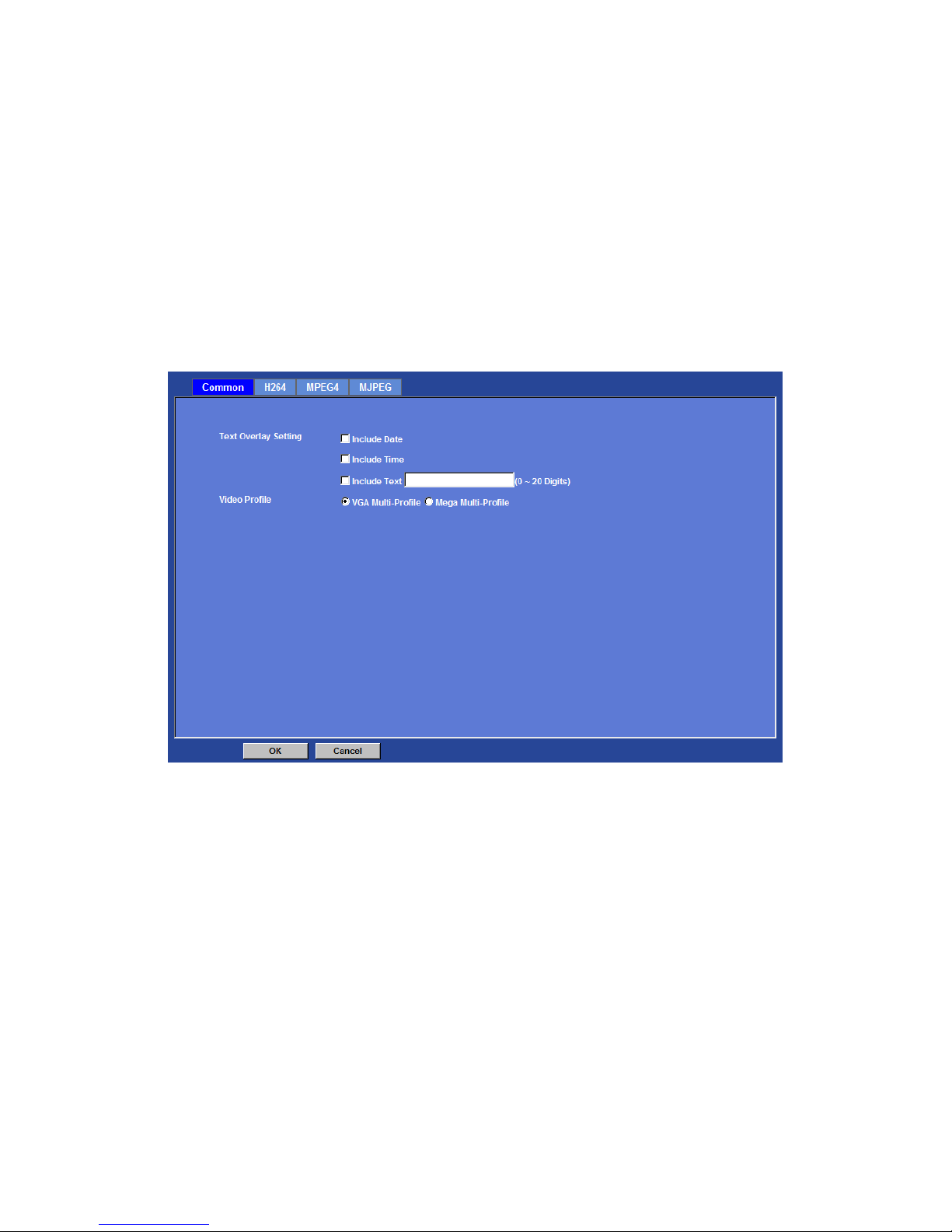
Text Overlay Setting:
There are some important information can be embedded into image, including date, time,
and/or text.
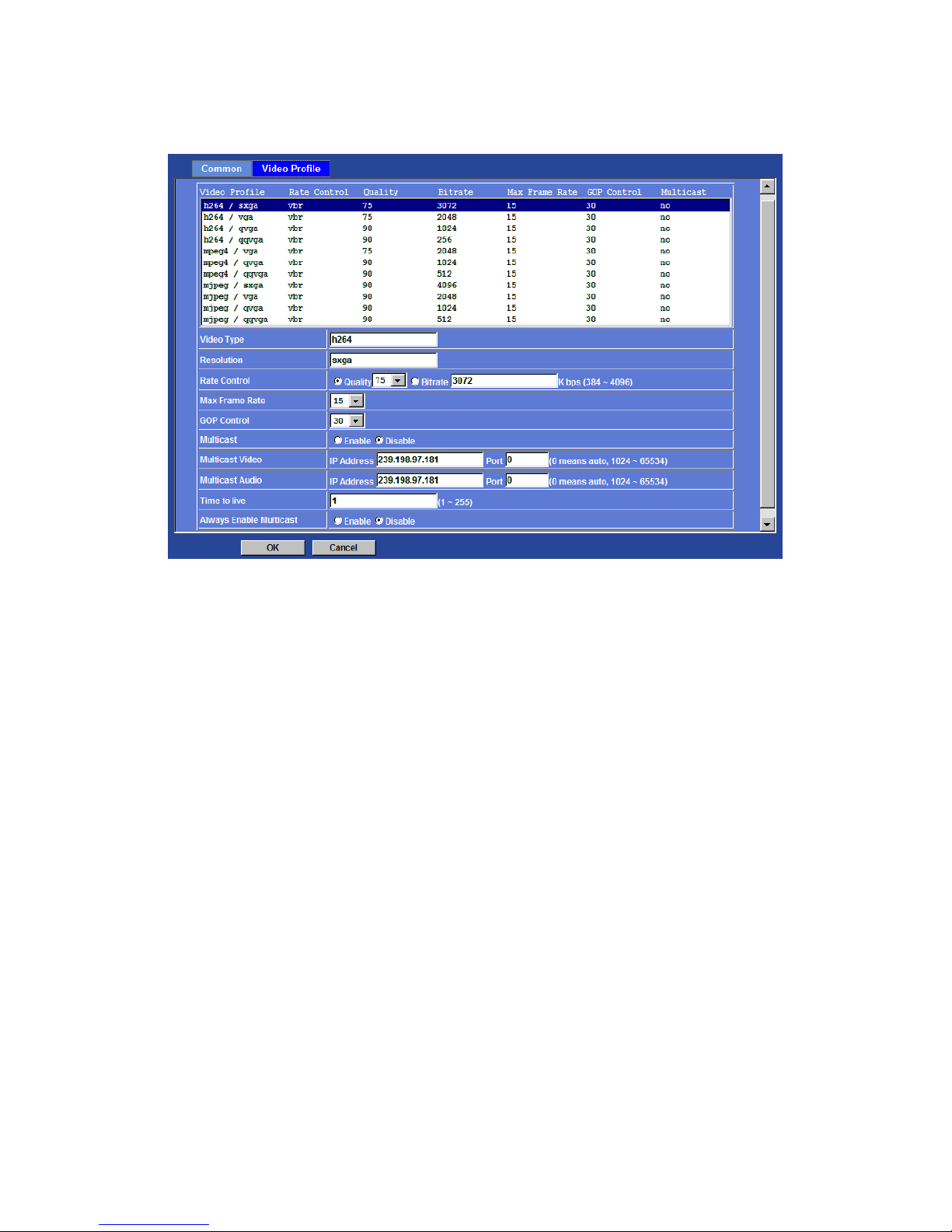
Video Profile:
User can only choose either VGA Multi-profile or Mega Multi-profile mode. VGA
Multi-profile mode can serve H.264, MPEG4, and JPEG streams up to VGA resolution
simultaneously. On the other hand, Mega-pixel mode, in addition to VGA resolution, it
can serve H.264/Mega and JPEG/Mega two more streams simultaneously.
Video Profile
Page 52
Network Camera User’s Guide
52/94
Video Type:
Video codec of the selected video profile.
Resolution:
Resolution of the selected video profile.
Rate Control:
Defines the rate control method of this profile. There are two op tions: Constant Bit Rate
(CBR) or Variable Bit Rate (VBR). For CBR, the video bit rate is between low to high
bandwidth based on different resolutions. User can set the desired bit rate to match the
limitation of bandwidth. For VBR, user should choo se the quality level to set the video
quality rather than bit rate. The quality level is between 1 and 100 . The higher value can
reach the better quality but of course will consume higher bandwidth.
Max Frame Rate:
Defines the targeted frame rate of this profile. For example, set the frame rate to 15 fps ,
then the image will be updated for 15 frames per second as possible. User need to set
reasonable max frame rate versus video quality under the limited bandwidth.
GOP Control:
Defines the Intra/Inter-frame (I/P) ratio of this profile. For example, set the GOP to 30,
then the video stream will have one Intra-frame every 30 frames.
Multicast Video:
IP address and port for multicast video streaming of the selected profile.
Multicast Audio:
Page 53

Network Camera User’s Guide
53/94
IP address and port for multicast audio streaming of the selected profile.
Always Enable Multicast:
Multicast streaming is always enabled or by request.
Page 54
Network Camera User’s Guide
54/94
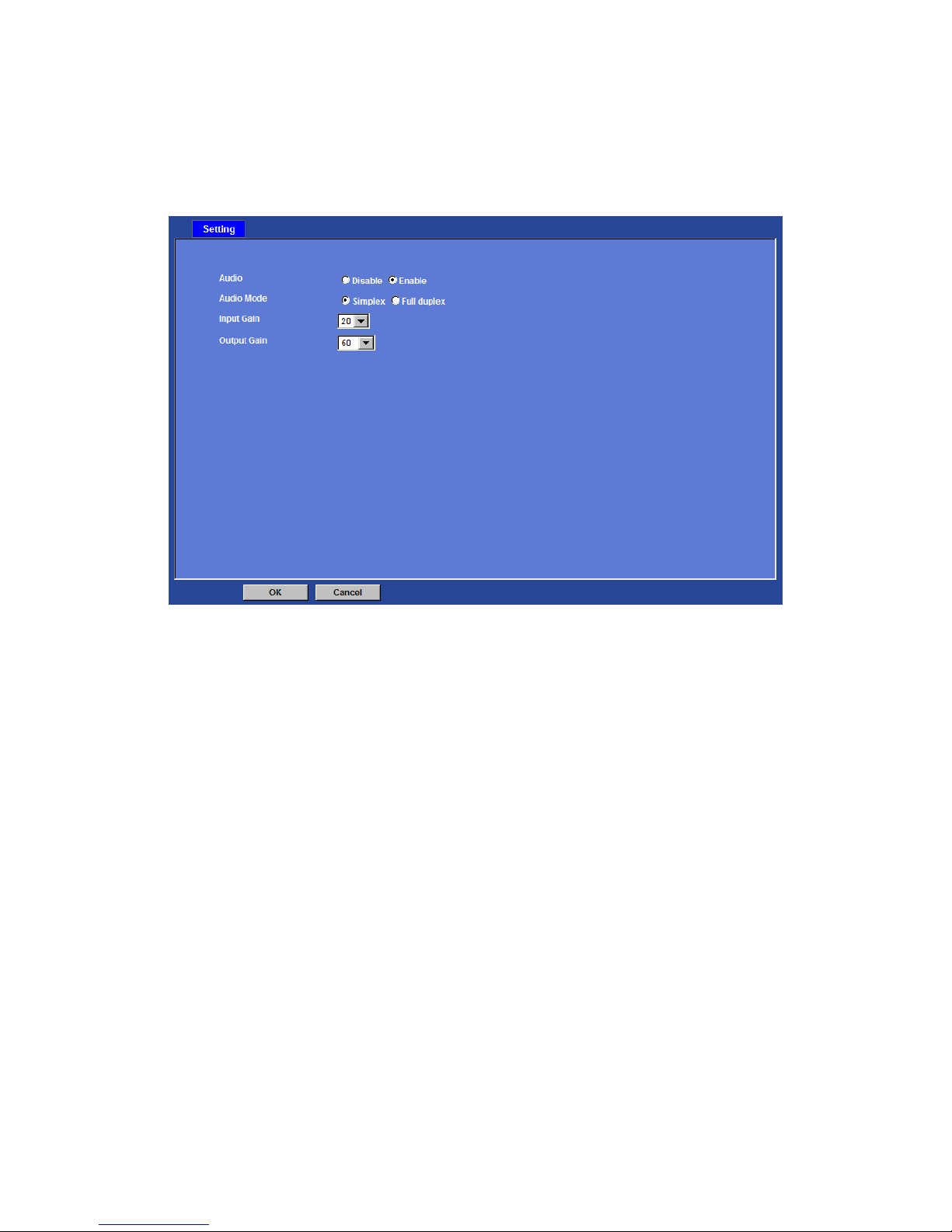
Audio: Audio parameters
Audio:
To enable or disable audio function
Audio Mode:
To select Simplex or Full duplex (2-way audio) mode
Input Gain:
To adjust gain of input audio
Output Gain:
To adjust gain of output audio
Page 55
Network Camera User’s Guide
55/94
User: Manage user name, password and login privilege
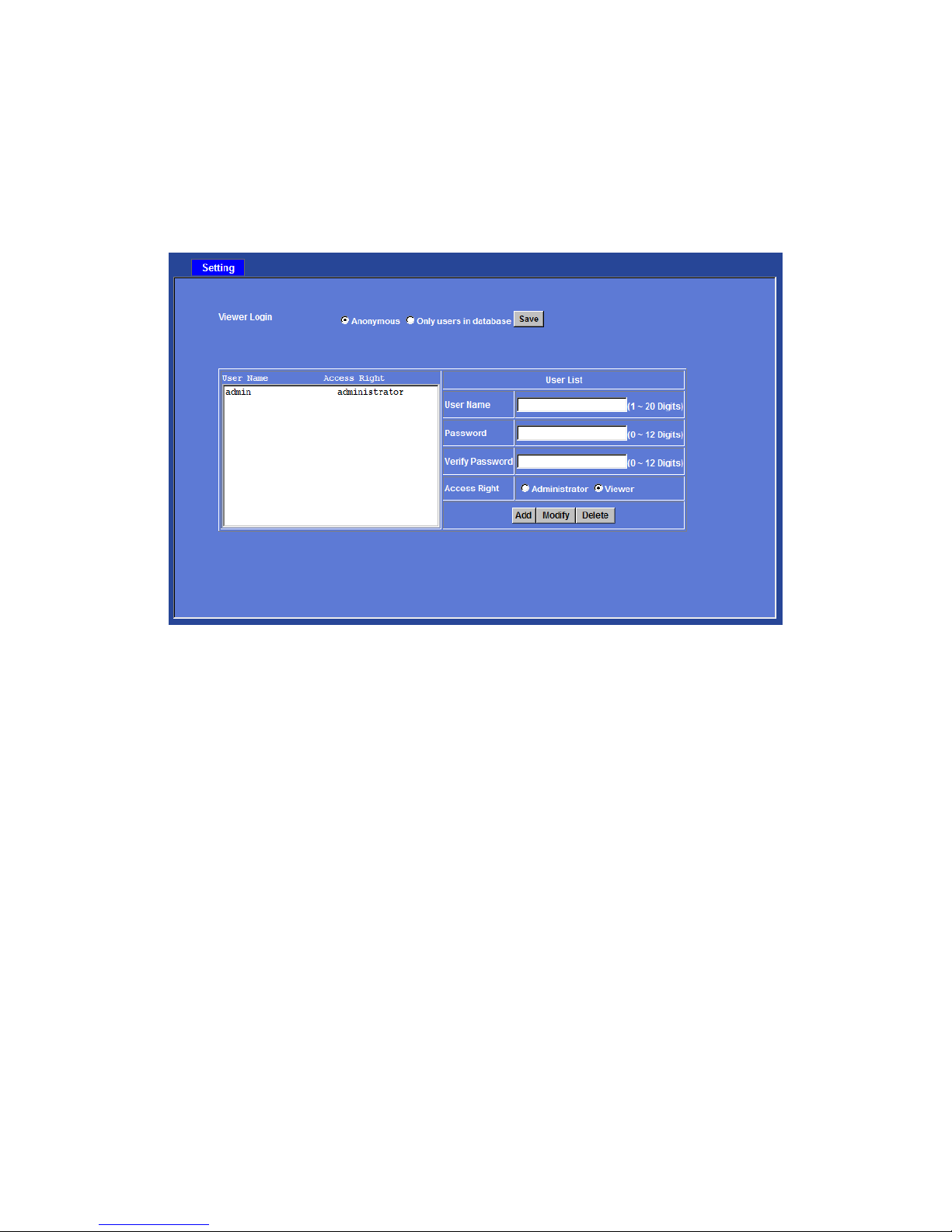
Use this menu to add, update, or remove the usernames and passwords of the
Administrator and viewer.
Viewer login:
Select “Anonymous” to allow any one viewing the video once connected. Otherwise, only
users in database can view the video after login.
Access right:
Administrator can access every function in this device. However, Viewers only can view
the video and access limited function.
Add, update, and remove of Users account:
Manage the user’s account of viewer user.
Page 56
Network Camera User’s Guide
56/94
E-Mail: Setup E-Mail configuration
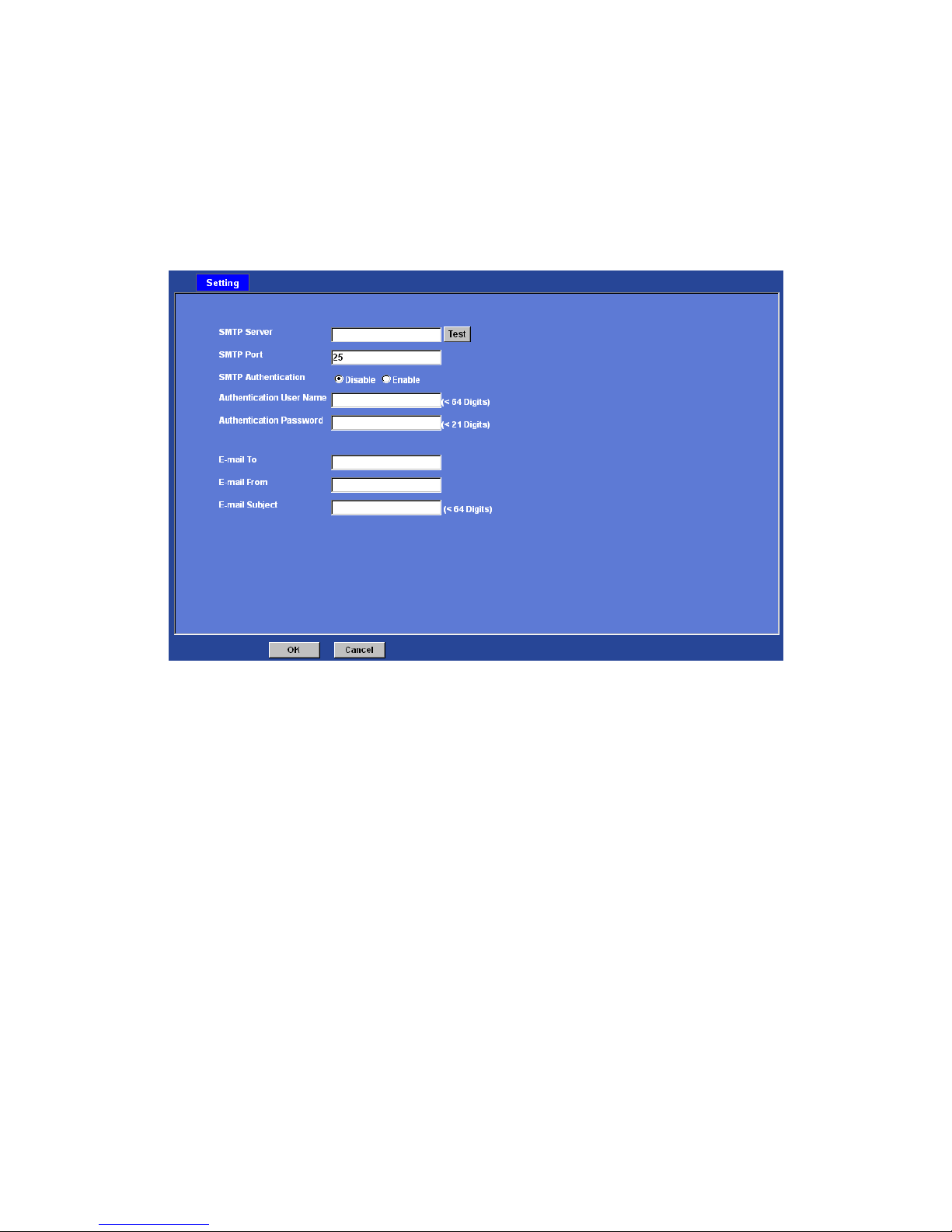
You may setup SMTP mail parameters for further operation of Eve nt Sched ule. That’s, if
users want to send the alarm message out, it will need to configure parameters here and
also add at least one event schedule to enable event triggering.
SMTP Server:
Type the SMTP server name or the IP address of the SMTP server.
Test:
Send a test mail to mail server to check this account is available or not.
SMTP Port:
Set port number of SMTP service.
SMTP Authentication:
Select the authentication required when you send an e-mail.
Disable: if no authentication is required when an e-mail is sent.
Enable: if authentication is required when an e-mail is sent.
Authentication User name:
Type the user name for the SMTP server if Authentication is Enable.
Authentication Password:
Type the password for the SMTP server if Authentication is Enable.
E-mail To:
Type the receiver’s e-mail address.
Page 57

Network Camera User’s Guide
57/94
E-mail From:
Type the sender’s E-mail address. This address is used for reply e-mails.
E-mail Subject:
Type the subject/title of the e-mail.
Page 58
Network Camera User’s Guide
58/94
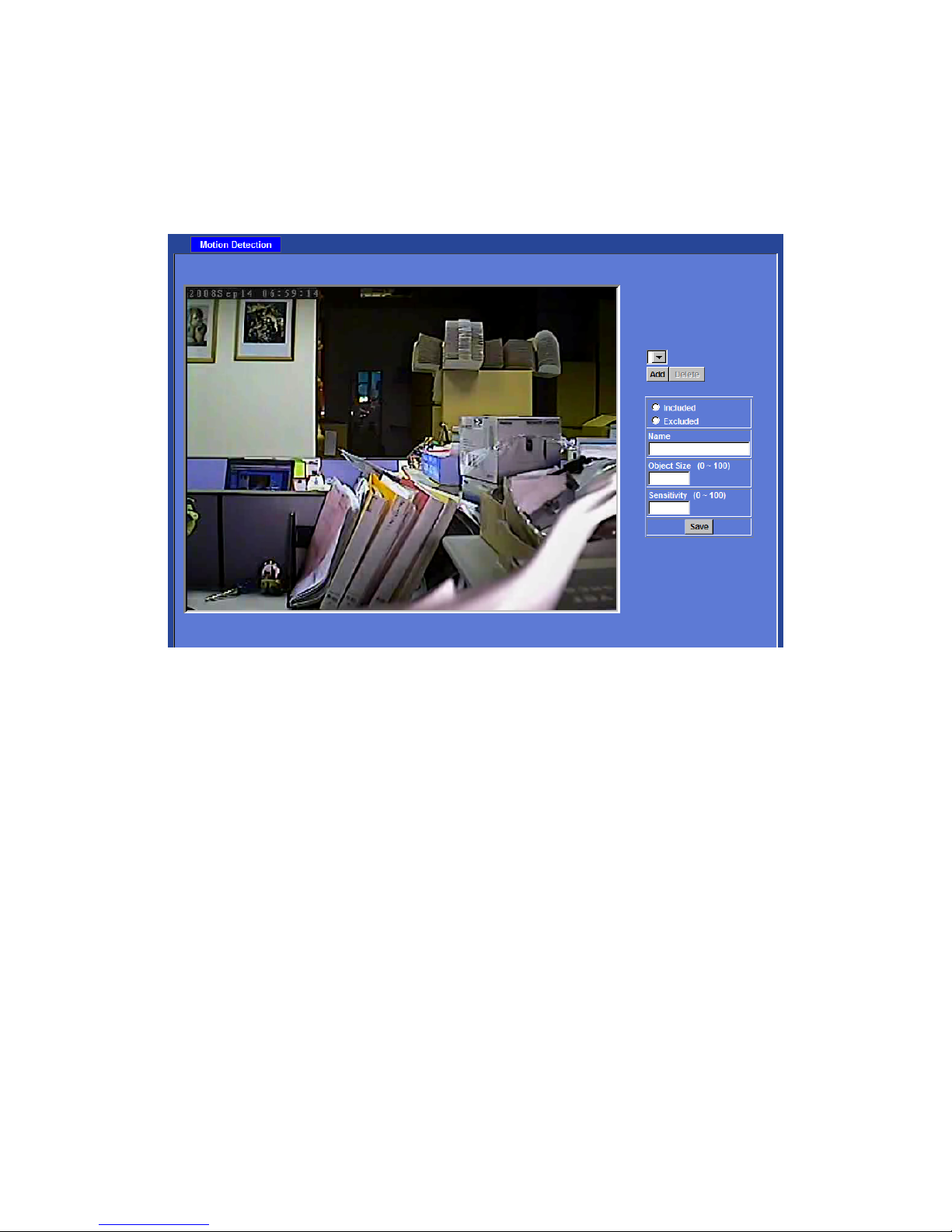
Object detection: Setup Object detection
Use this menu to specify motion detection window 1 to window 10 and set the conditions
for detection while observing a captured image.
Add and Del:
To add or delete the motion windows. User can specify up to 4 Included and/or Excluded
windows to monitor the video captured by this device. By dragging mouse on the image,
you can change the position and size of the selected motion window accordingly.
Included or Excluded Window:
These windows can be specified as Included or Excluded type.
Included windows target specific areas within the whole video image
Excluded windows define areas within an Includ e w indow that should be ignored
(areas outside Include windows are automatically ignored)
Name:
Name of the specified motion window.
Object Size:
Defines the object size of motion detection. The higher object size will only larger objects
trigger motion detection. The lower object size will even small objects trigger motion
detection too. Generally speaking, the smaller size will be easier to trigger event.
Sensitivity
Defines the sensitivity value of motion detection. The higher value will be more
sensitivity.
Page 59
Network Camera User’s Guide
59/94
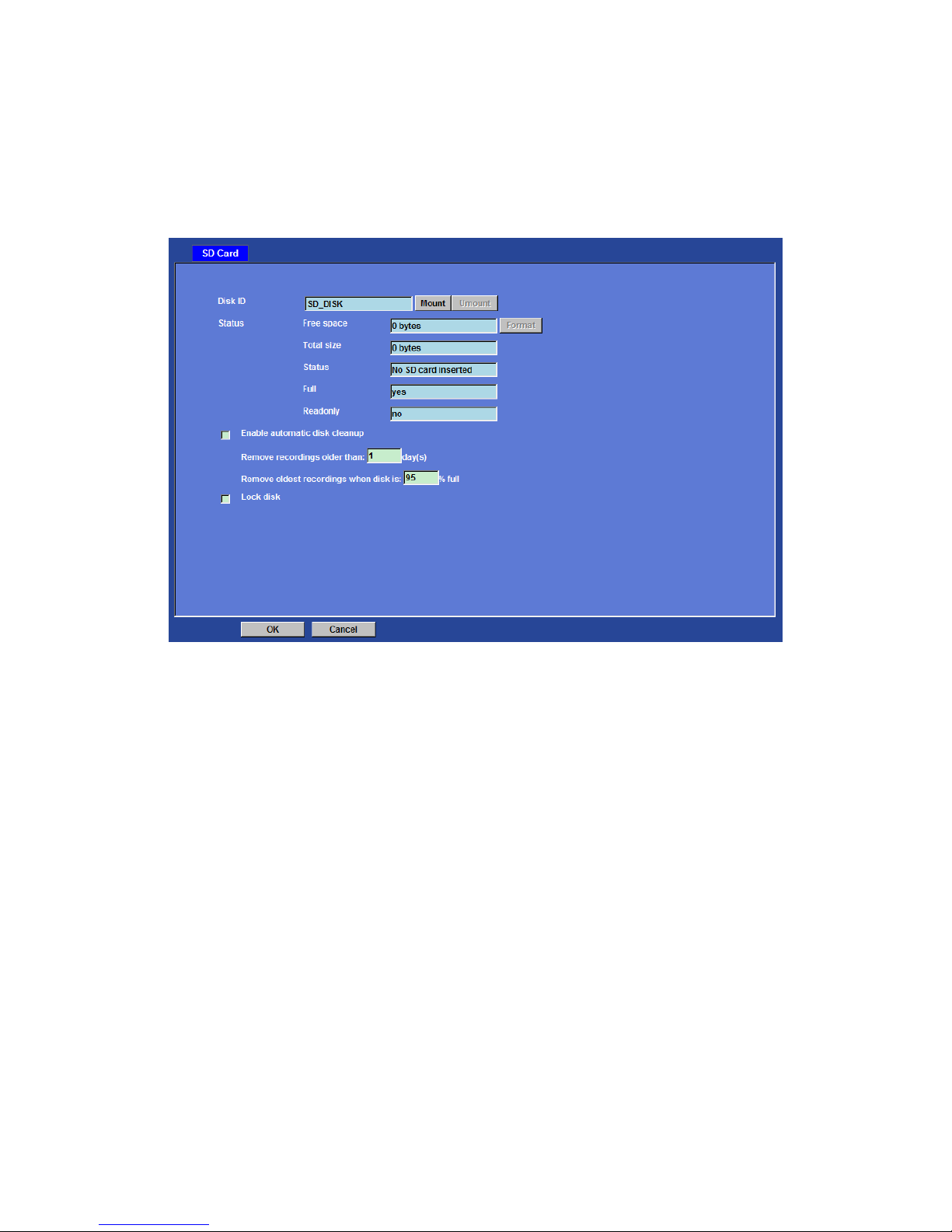
Storage: Status and configuration of SD card
This page shows the status of attached SD card. You may setup related parameters to
manage the attached SD card also.
Enable automatic disk cleanup:
Delete old recorded files while the conditions are reached as below.
Remove recordings order than:
Delete old files by days.
Remove oldest recordings when disk is:
Delete old files by left capacity.
Page 60

Network Camera User’s Guide
60/94
Recording List: Files list inside the SD Card
This page shows the files list information. User may play or delete the selected file.
Page 61
Network Camera User’s Guide
61/94
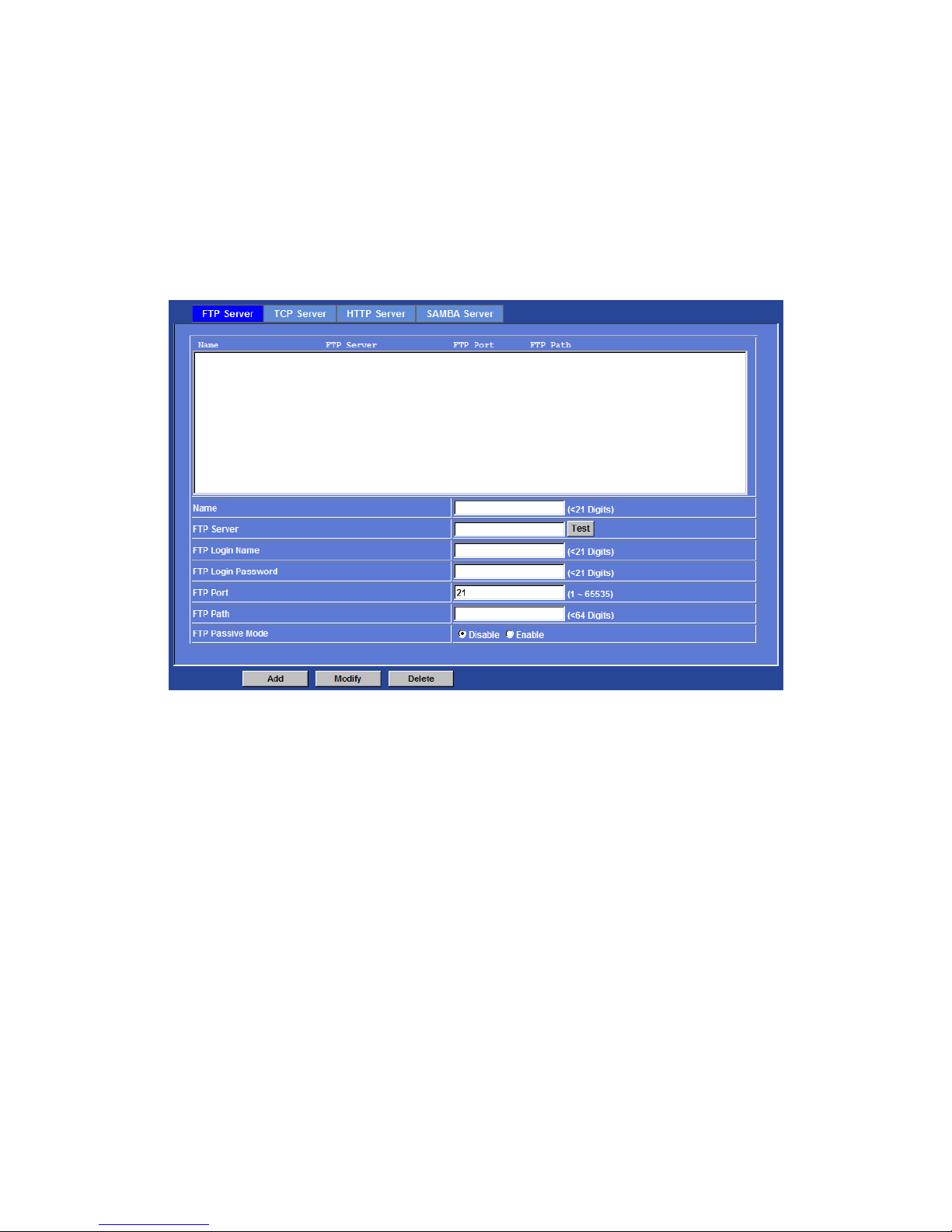
Event Server: Setup FTP/TCP/HTTP/SAMBA server configuration
FTP Server
You may setup FTP parameters for further operation o f Event Schedule. That’s, if users
want to send the alarm message to an FTP serve r, it will need to configure parameters
here and also add at least one event schedule to enable event triggering as SMTP.
Name:
User can specify multiple FTP paths as wish. Therefore, use r needs to specify a name
for each FTP setting.
FTP Server:
Type the server name or the IP address of the FTP server.
Test:
Check the FTP server whether this account is available or not.
FTP Login name:
Type the user name for the FTP server.
FTP Login Password:
Type the password for the FTP server.
FTP Port:
Set port number of FTP service.
Page 62
Network Camera User’s Guide
62/94
FTP Path:
Set working directory path of FTP server.
FTP Passive Mode:
Select passive or active mode connecting to FTP server.
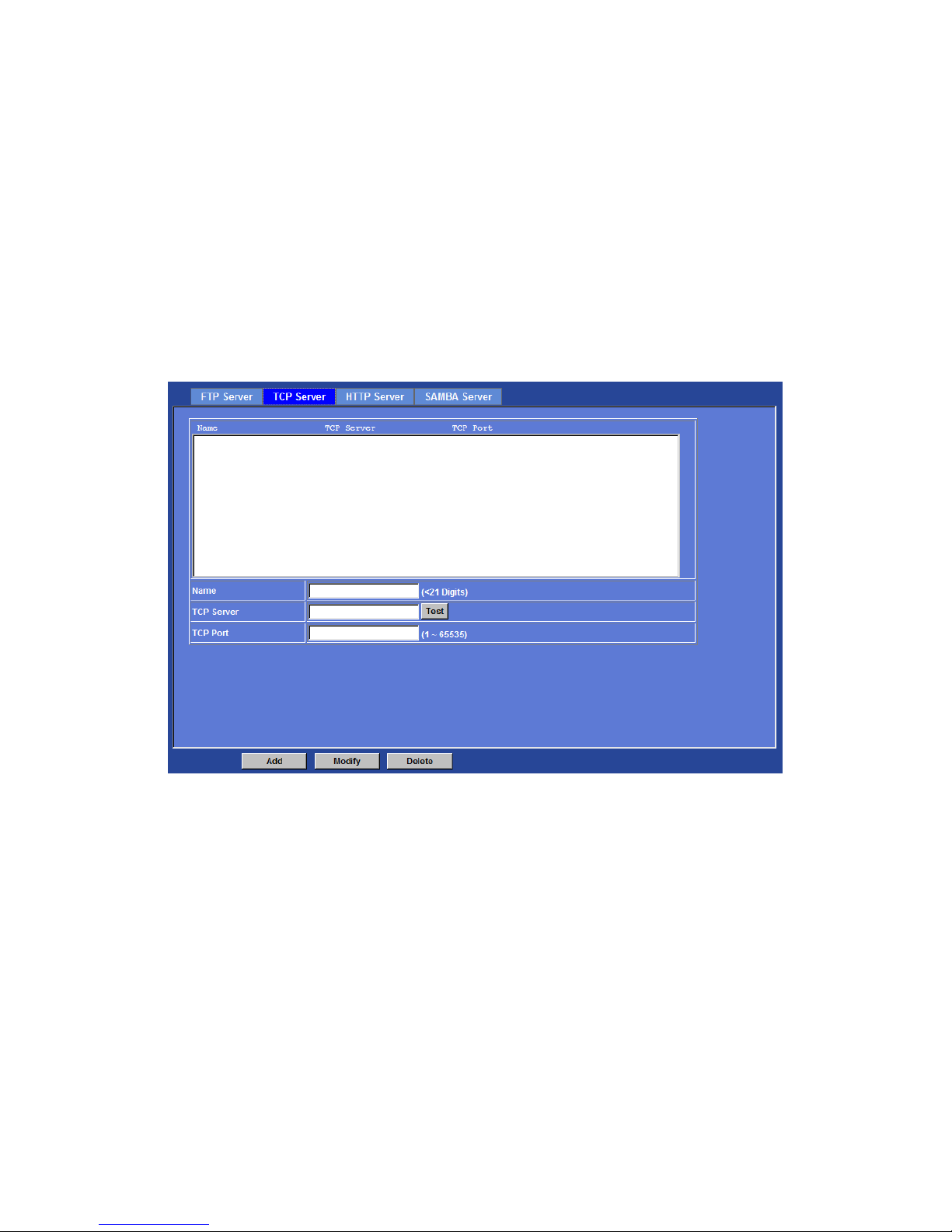
TCP Server
In addition to send video file to FTP server, the device als o can send event message to
specified TCP server.
Name:
User can specify multiple TCP servers as wish. Therefore, user needs to specify a name
for each TCP server setting.
TCP Server:
Type the server name or the IP address of the TCP server.
TCP Port:
Set port number of TCP server.
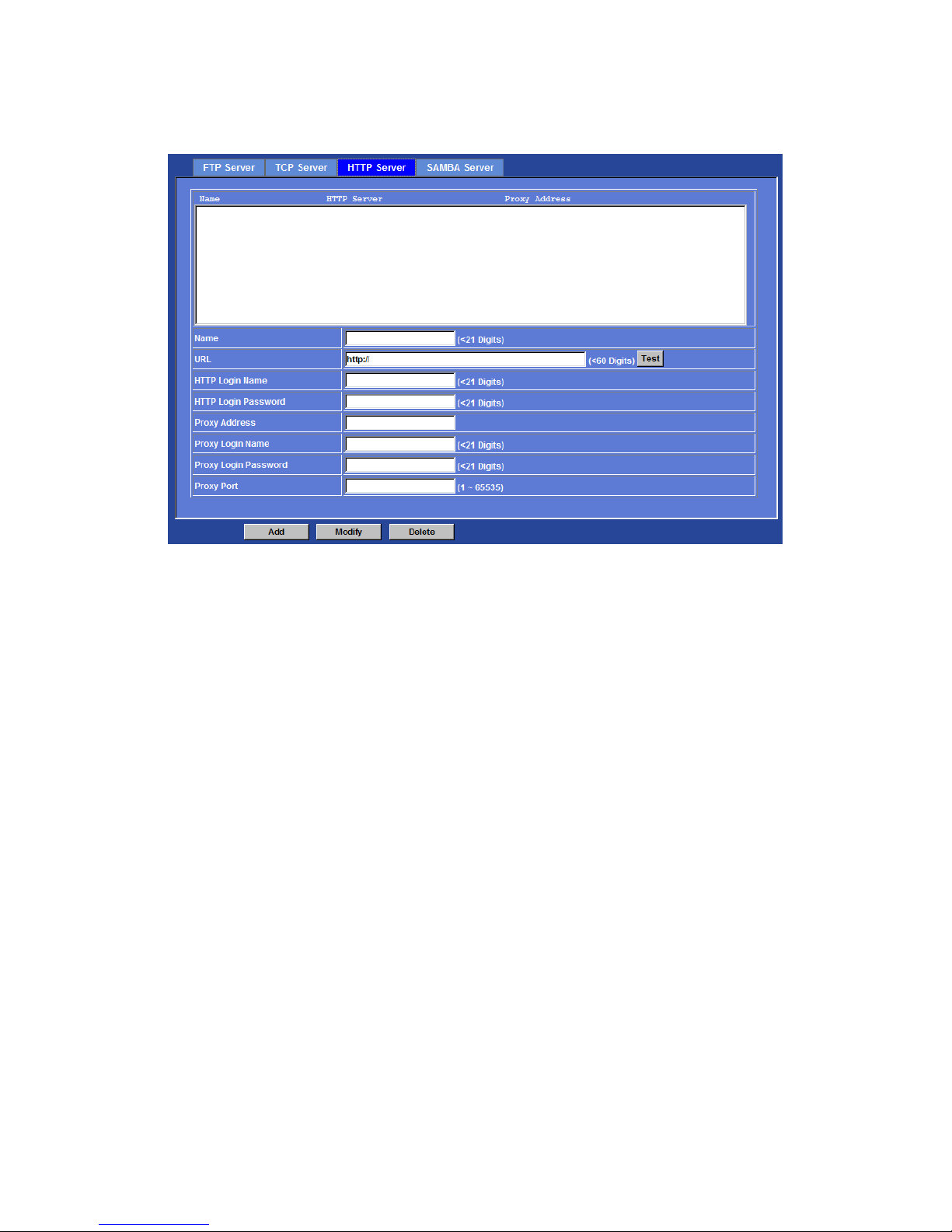
HTTP Server
The device also can send event message to specified HTTP server.
Page 63
Network Camera User’s Guide
63/94
Name:
User can specify multiple HTTP servers as wish. Therefore, user needs to specify a
name for each HTTP server setting.
URL:
Type the server name or the IP address of the HTTP server.
Test:
Check the HTTP server whether it is available or not.
HTTP Login name:
Type the user name for the HTTP server.
HTTP Login Password:
Type the password for the HTTP server.
Proxy Address:
Type the server name or the IP address of the HTTP Proxy.
Proxy Login name:
Type the user name for the HTTP Proxy.
Proxy Login Password:
Type the password for the HTTP Proxy.
Proxy Port:
Set port number of Proxy.
Page 64
Network Camera User’s Guide
64/94
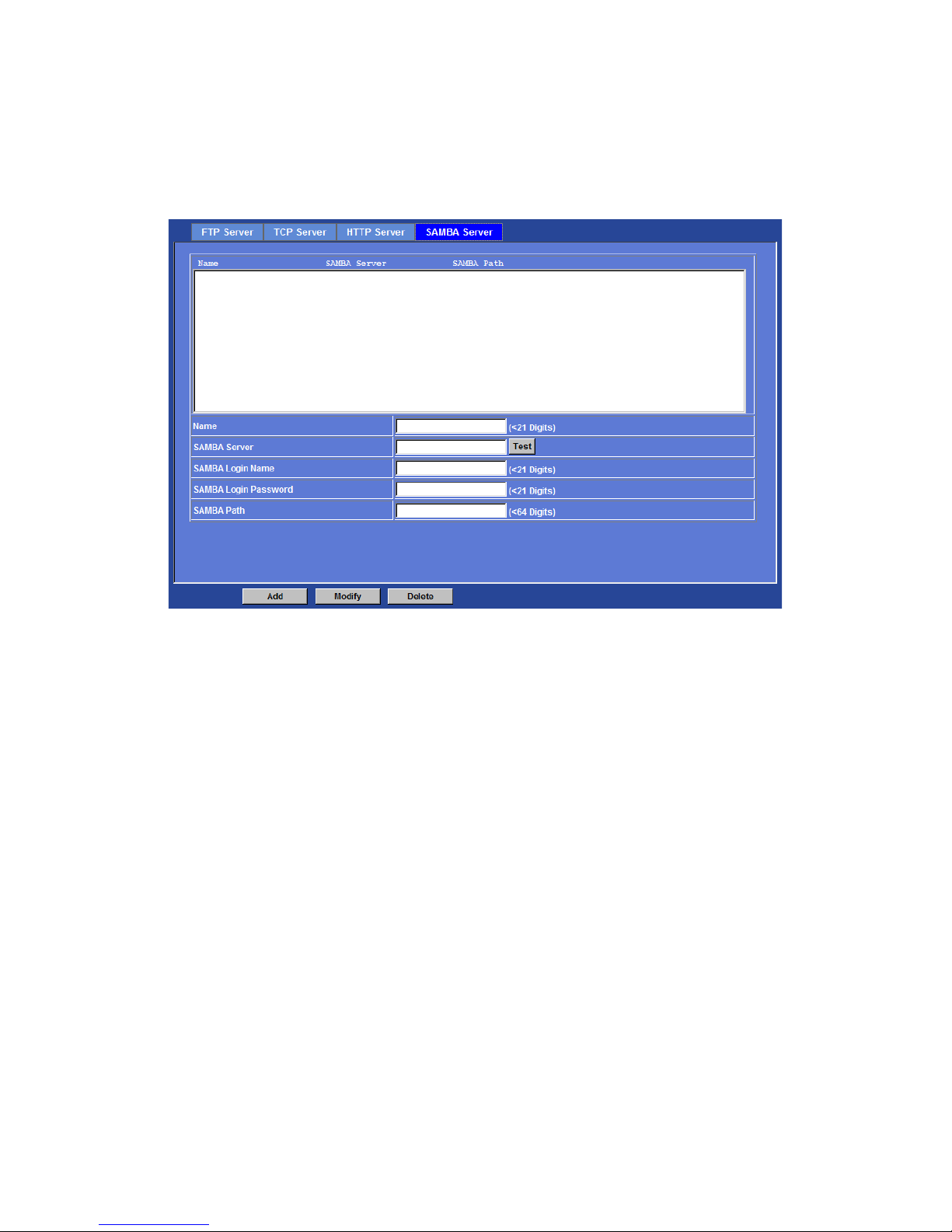
SAMBA Server
The device also can send video stream to specified SAMBA server.
Name:
User can specify multiple HTTP servers as wish. Therefore, user needs to specify a
name for each HTTP server setting.
SAMBA Server:
Type the server name or the IP address of the SAMBA server.
Test:
Check the SAMBA server whether this account is available or not.
SAMBA Login name:
Type the user name for the SAMBA server.
SAMBA Login Password:
Type the password for the SAMBA server.
SAMBA Path:
Set working directory path of SAMBA server.
Page 65
Network Camera User’s Guide
65/94
Event Schedule: Configure the event schedule
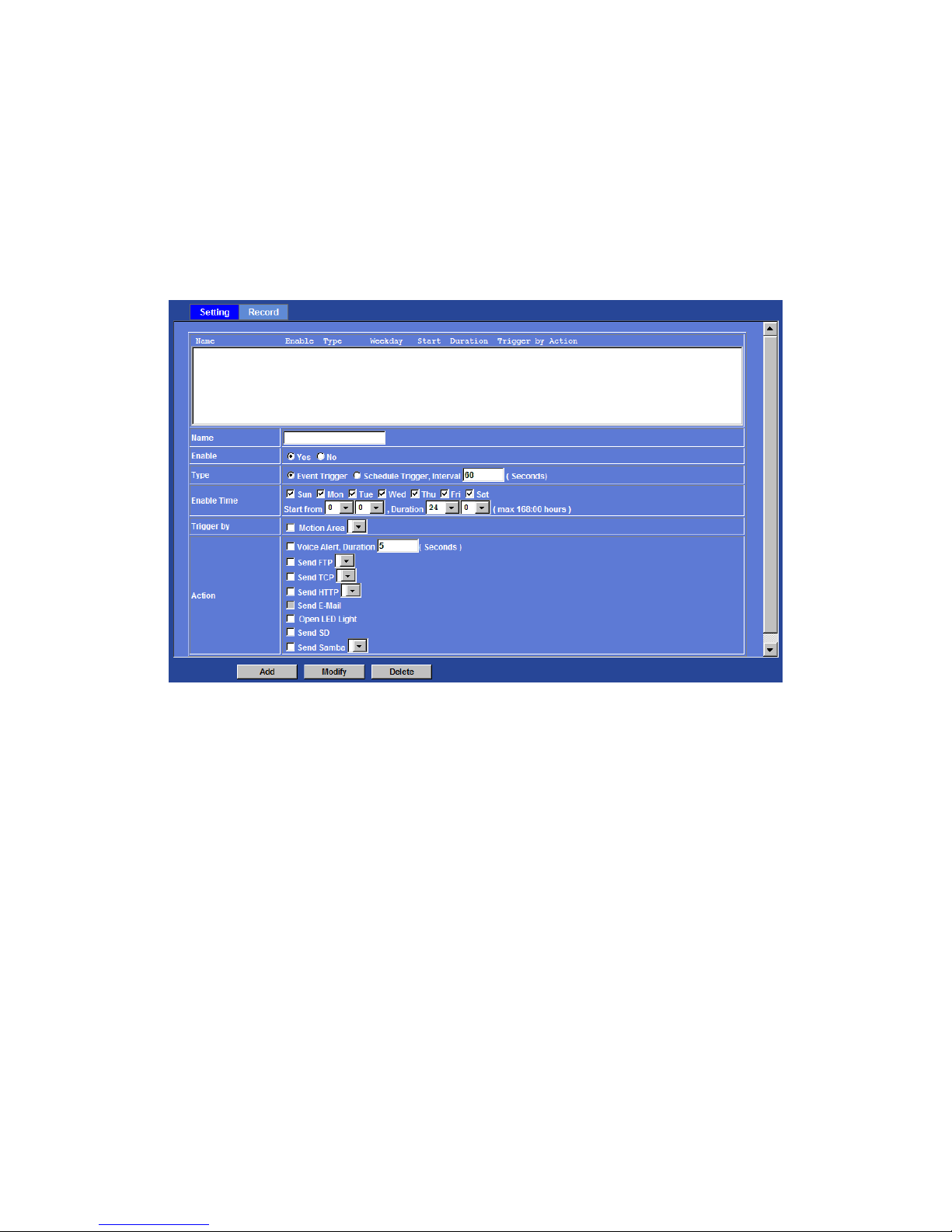
Setting
This menu is used to specify the schedule of Event or Sc hedule Trigger and activate the
some actions provided by this device. Where the Schedule Trigger will be activated by
user-define interval without event happened.
Name:
Name of the Event or Schedule.
Enable:
Enable or disable this Event or Schedule.
Type:
Event trigger or Schedule trigger.
Enable Time:
Define the feasible time slot.
Trigger by:
Select the triggered sources.
Action:
Define the actions once event triggered.
Page 66
Network Camera User’s Guide
66/94
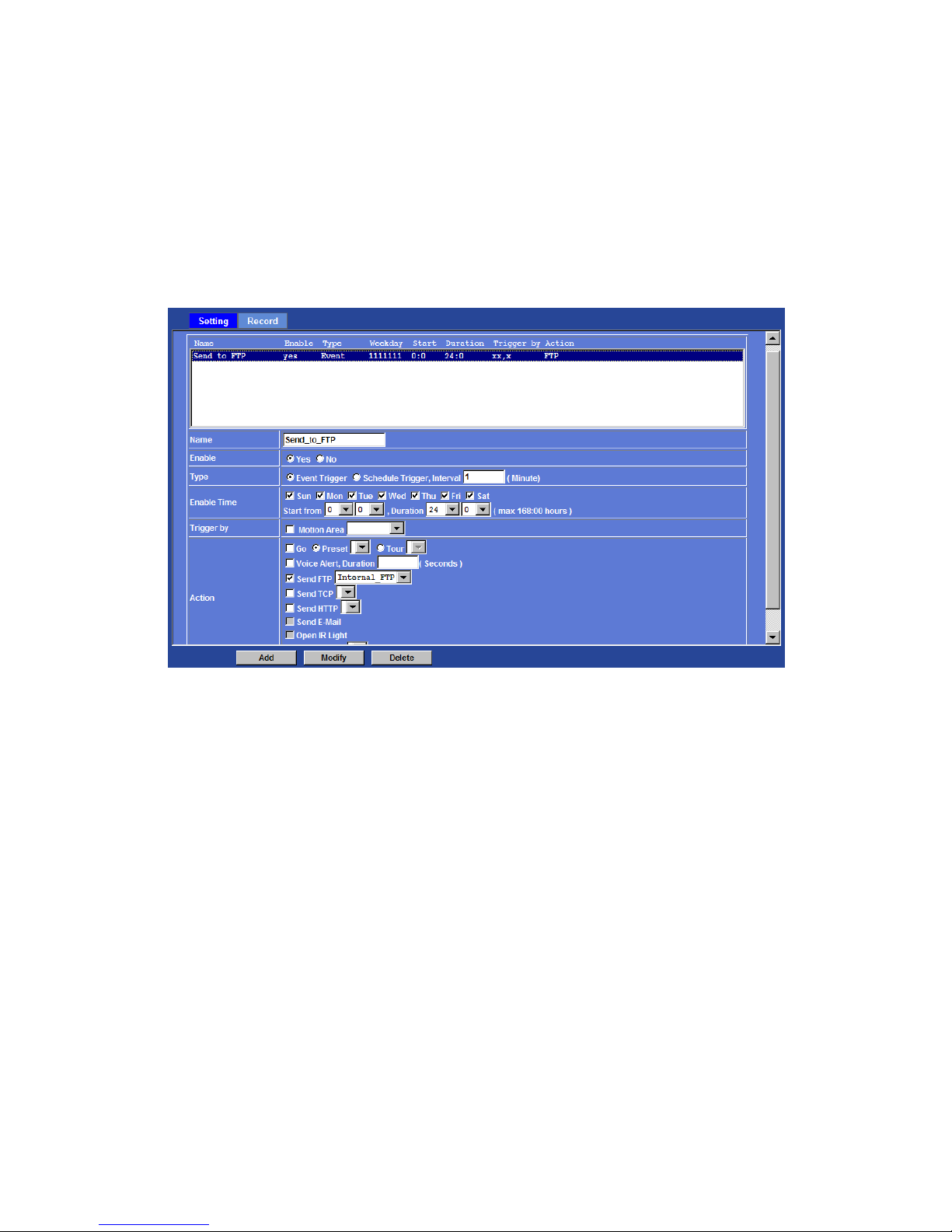
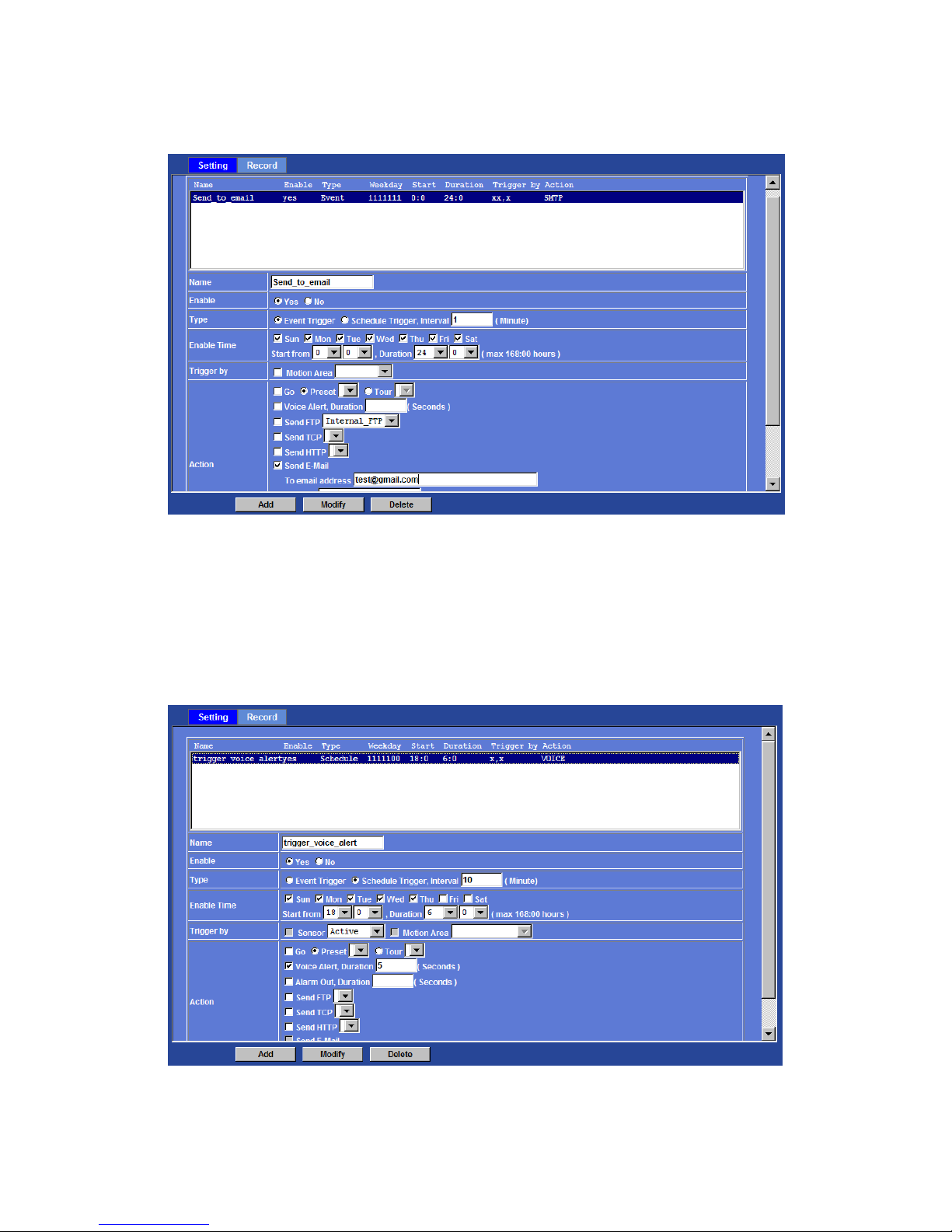
Example 1:
Send file to FTP server by motion triggered always:
1. Select event trigger
2. Enable time: start from 00:00 to 24:00 every day
3. Trigger by: Motion Area (Added in Object Detection page)
4. Action : Send FTP (Add in Event Server -> FTP Server page)
Example 2:
Send file to E-Mail server by motion triggered from Friday 18:00 to Saturday
06:00
1. Select event trigger.
2. Enable time: start from Friday 18:00 and keep work in 12 hous, so it will
stop on Saturday 06:00.
3. Trigger by : Motion Area (Added in Object Detection page)
4. Action : Send e-mail (Add in E-Mail page)
i. To email address: You need to input the receiver email
address.
ii. Subject: You could specify the email subject.
iii. Message: You could specify the email content.
Page 67
Network Camera User’s Guide
67/94
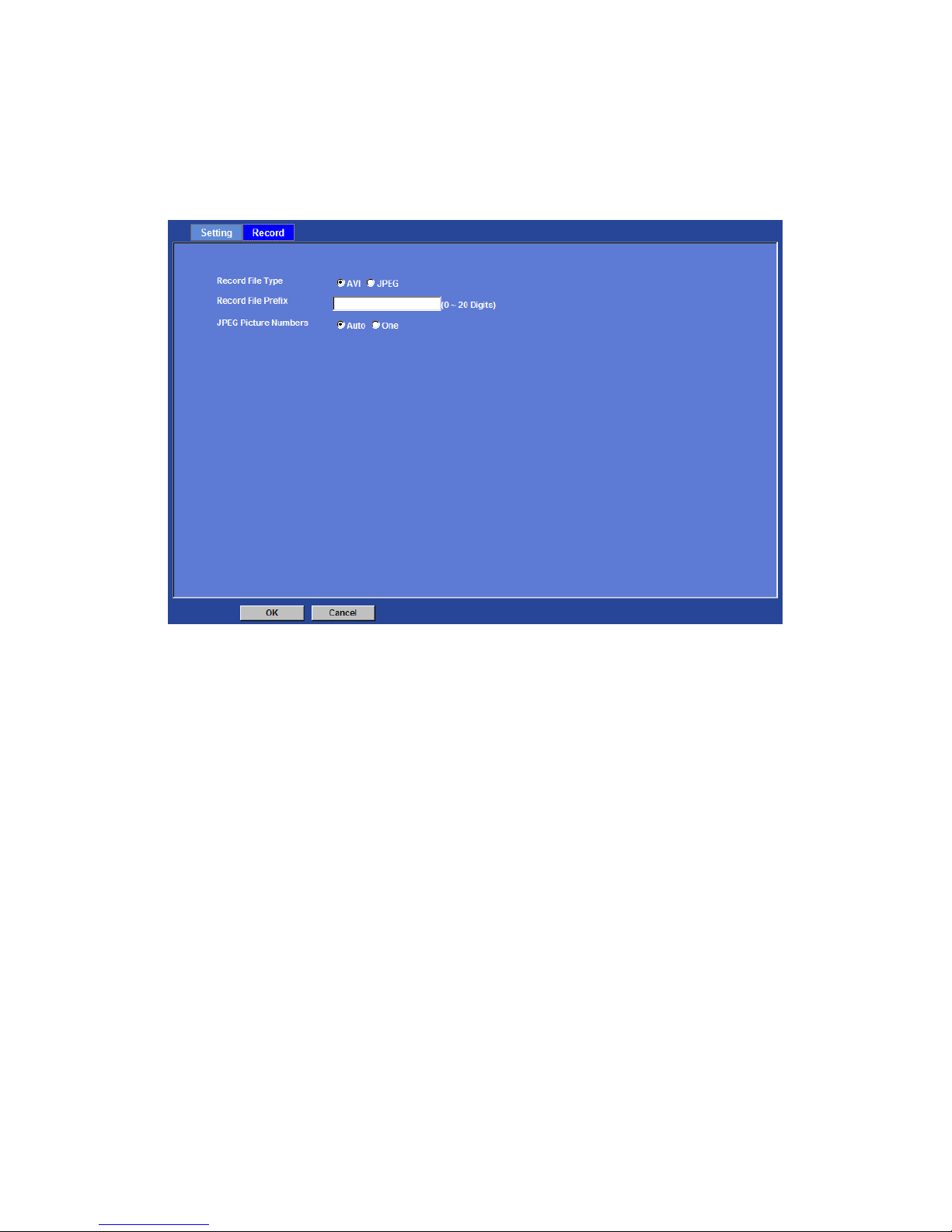
Example 3:
Enable Voice Alert every 10-minute during 18:00 to 24:00 from Monday to Friday.
1. Type: Select schedule trigger and interval is 10-minute.
2. Enable time: Select Monday to Friday, and set start time from 18:00 and
keep work in 6 hous.
3. Trigger by : You do not need to choose it, because this will be triggered
every minute
4. Action : Voice Alert
Page 68
Network Camera User’s Guide
68/94
Record
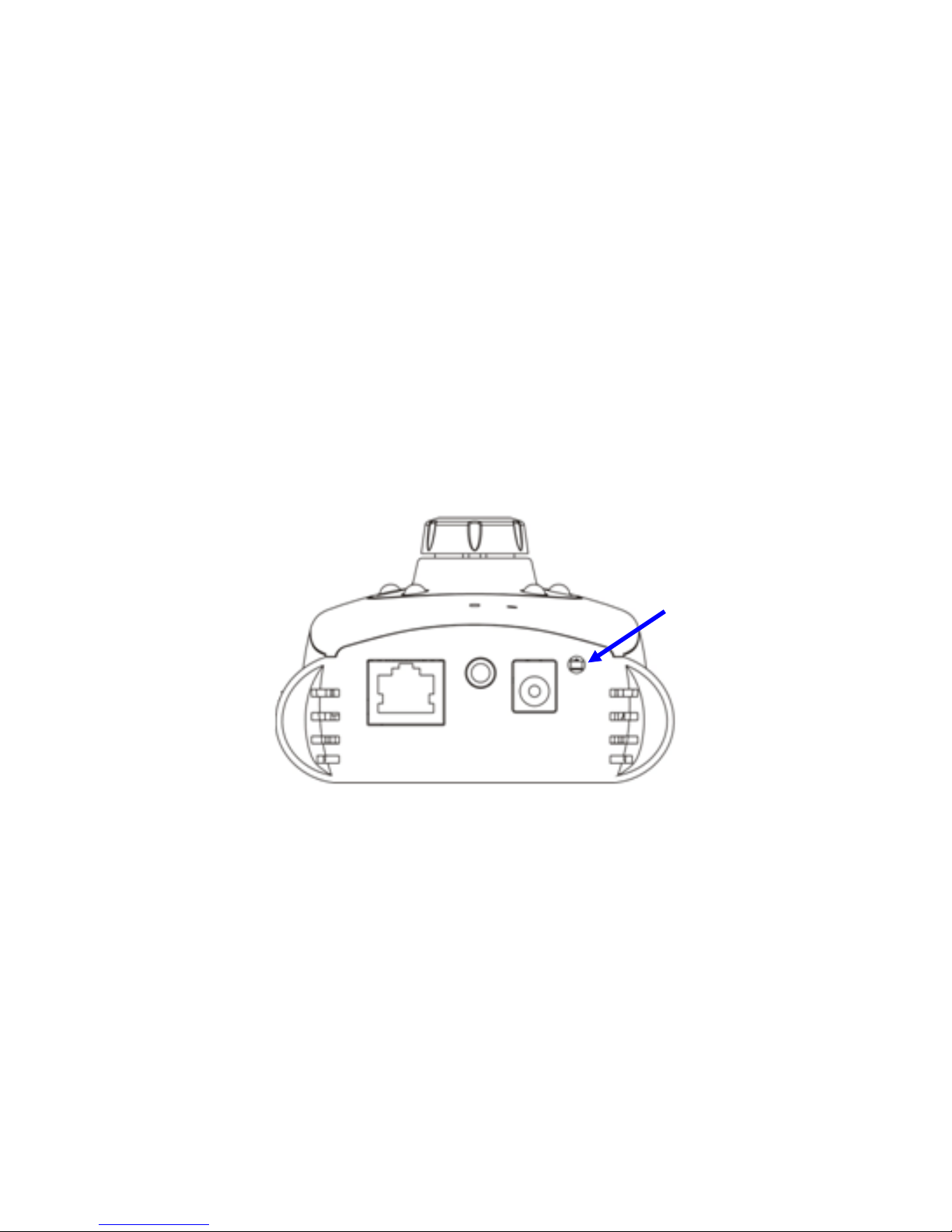
User can choose the type of record file for event or schedule application.
Record File Type:
Choose AVI or JPEG file format.
Record File Prefix:
Define the prefix of recorded filename.
JPEG Picture Numbers:
Define the picture numbers of JPEG to be sent out.
Page 69
Network Camera User’s Guide
69/94
Appendix A: Restore Factory
Default Settings
There is a button hidden in the pinhole near to the DC power connector. This button is
used to restore the all factory default settings. Sometimes restarting the devic e will make
the system back to a normal state. However, if the system still got problems after restart,
user can restore the factory default settings and install it again.
Restore the device:
1. Insert the paper clip or other suitable tool to press and hold the button down
continuously.
2. Hold it least 5 seconds and release the tool. Then the device has been
restored to default settings and reboot again.
Note: Restoring the factory default setting will lose the all previous settings included IP
address forever. User needs to run the IPWizard II program to s earch the device and
configure it to let the device work properly again.
Factory
Default Reset
Page 70

Network Camera User’s Guide
70/94
Appendix B: Troubleshooting &
Frequently Asked Questions
Question Answer or Resolution
Features
The video and audio
codec is adopted in the
device.
The device utilizes H.264, MPEG4 and JPEG triple
compression to providing high quality images. Where H.264
and MPEG4 are standards for video compression and JPEG
is a standard for image compression.
The audio codec is defined as AMR for 3GPP and
G.711/G.726 for RTSP streaming.
The maximum number
of users access the
device simultaneously.
The maximum number of users is limited to 20. However, it
also depends on the total bandwidth accessed to this device
from clients. The maximum data throughput of the device is
around 20~25Mbps for UDP mode and 10Mbps for HTTP
mode. Therefore, the actual number of connected clients is
varying by streaming mode, settings of resolution, codec
type, frame rate and bandwidth. Obviously, the performance
of the each connected client will slow down when many users
are logged on.
The device can be used
outdoors or not.
The device is not weatherproof. It needs to be equipped with
a weatherproof case for outdoors using. However, equipped
with a weatherproof case might disable the audio function of
the device.
Install this device
Status LED does not
light up.
• Check and confirm that the DC power adaptor, included in
packaged, is used. Secure the power connector and re-power
it on again.
• If the problem is not solved, the device might be faulty.
Contact your dealer for further help.
The network cabling is
required for the device.
The device uses Category 5 UTP cable allowing 10 and/or
100 Base-T networking.
The device will be
installed and work if a
firewall exists on the
network.
If a firewall exists on the network, port 80 is open for ordinary
data communication. The HTTP port and RTSP port need to
be opened on the firewall or NAT router.
The username and
password for the first
time or after factory
default reset
Username = admin and leave password blank.
Note that it’s all case sensitivity.
Forgot the username
and password
Follow the steps below.
1. Restore the factory default setting by press pressing and
Page 71

Network Camera User’s Guide
71/94
holding down more than 3 seconds on the device.
2. Reconfigure the device.
Forgot the IP address of
the device.
Check IP address of device by using the IPWizard II program
or by UPnP discovery.
IPWizard II program
cannot find the device.
• Re-power the device if cannot find the unit within 1 minutes.
• Do not connect device over a router. IPWiza rd II program
cannot detect device over a router.
• If IP address is not assigned to the PC which running
IPWizard II program, then IPWizard II program cannot find
device. Make sure that IP address is assigned to the PC
properly.
• Antivirus software on the PC might interfere with the setup
program. Disable the firewall of the antivirus software during
setting up this device.
• Check the firewall setting of your PC or Notebook.
Internet Explorer does
not seem to work well
with the device
Make sure that your Internet Explorer is version 6.0 or later. If
you are experiencing problems, try upgrading to the latest
version of Microsoft’s Internet Explorer from the Microsoft
webpage.
IPWizard II program fails
to save the network
parameters.
• Network may have trouble. Confirm the parameters and
connections of the device.
UPnP NAT Traversal
Can not work with NAT
router
• Maybe NAT router does not support UPnP function. Please
check user’s manual of router and turn on UPnP function.
• Maybe UPnP function of NAT router is not compatible to the
IP camera. Please contact your dealer to get the approval
routers list.
Some IP cameras are
working but others are
failed
• Maybe too many IP cameras have been installed on the
LAN, and then NAT router is out of resource to support more
cameras. You could turn off and on NAT router to clear out of
date information inside router.
Access this device
Cannot access the login
page and other web
pages of the Network
Camera from Internet
Explorer
• Maybe the IP Address of the Network Camera is already
being used by another device or computer. To confirm this
possible problem, disconnect the Network Camera from the
network first, and then run the PING utility to check it out.
• Maybe due to the network cable. Try correcting your
network cable and configuration. Test the network interface
by connecting a local computer to the Network Camera via a
crossover cable.
• Make sure the Internet connection and setting is ok.
• Make sure enter the IP address of Internet Explorer is
correct. If the Network Camera has a dynamic address, it
may have changed since you last checked it.
• Network congestion may prevent the web page appearing
quickly. Wait for a while.
The IP address and Subnet Mask of the PC and Network
Camera must be in the same class of the private IP address
Page 72

Network Camera User’s Guide
72/94
on the LAN.
• Make sure the http port used by the Network Camera,
default=80, is forward to the Network Camera’s private IP
address.
• The port number assigned in your Network Camera might
not be available via Internet. Check your ISP for available
port.
• The proxy server may prevent you from connecting directly
to the Network Camera, set up not to use the proxy server.
• Confirm that Default Gateway address is correct.
• The router needs Port Forwarding feature. Refer to your
router's manual for details.
• Packet Filtering of the router may prohibit access from an
external network. Refer to your router's manual for details.
• Access the Network Camera from the Internet with the
global IP address of the router and port number of Network
Camera.
• Some routers reject the global IP address to access the
Network Camera on the same LAN. Access with the private
IP address and correct port number of Network Camera.
• When you use DDNS, you need to set Default Gateway and
DNS server address.
• If it’s not working after above procedure, reset Network
Camera to default setting and installed it again.
• If the problem is not solved, the Network Camera might be
faulty. Contact your dealer for further help.
Image or video does not
appear in the main page.
• The first time the PC connects to Network Camera, a
pop-up Security Warning window will appear to download
ActiveX Controls. When using Windows XP, or Vista, log on
with an appropriate account that is authorized to install
applications.
• Network congestion may prevent the Image screen from
appearing quickly. You may choose lower resolution to
reduce the required bandwidth.
Check the device’s
ActiveX is installed on
your computer
Go to C:\Windows\Downloaded Program Files and check to
see if there is an entry for the file “IPCamera Control”. The
status column should show “Installed”. If the file is not listed,
make sure your Security Settings in Internet Explorer are
configured properly and then try reloading the device’s home
page. Most likely, the ActiveX control did not download and
install correctly. Check your Internet Explorer security settings
and then close and restart Internet Explorer. Try to browse
and log in again.
Internet Explorer
displays the following
message: “Your current
security settings prohibit
downloading ActiveX
controls”.
Setup the IE security settings or configure the individual
settings to allow downloading and scripting of ActiveX
controls.
The device work locally • Might be caused from the firewall protection. Check the
Page 73

Network Camera User’s Guide
73/94
but not externally. Internet firewall wit h your sy st em or net wo r k adm i nist r at o r.
The firewall may need to have some settings changed in
order for the device to be accessible outside your LAN.
• Make sure that the device isn’t conflicting with any other
web server running on your LAN.
• Check the configuration of the router settings allow the
device to be accessed outside your local LAN.
• Check the bandwidth of Internet connection. If the Internet
bandwidth is lower than target bit rate, the video streaming
will not work correctly.
The unreadable
characters are
displayed.
Use the operating system of the selected language. Set the
Encoding or the Character Set of the selected language on
the Internet Explorer.
Frame rate is slower
than the setting.
• The traffic of the network and the object of the image affect
the frame rate. The network congestion causes frame rate
slower than the setting.
• Check the bandwidth of Internet connection. If the Internet
bandwidth is lower than target bit rate, the video streaming
will not work correctly.
• Ethernet switching hub can smooth the frame rate.
Blank screen or very
slow video when audio is
enabled.
• Your connection to the device does not have enough
bandwidth to support a higher frame rate for the streamed
image size. Try reducing the video streaming size to 160x120
or 320x240 and/or disabling audio.
• Audio will consume 32 kbps. Disable audio to improve
video. Your Internet connection may not have enough
bandwidth to support streaming audio from the device.
Image Transfer on
e-mail or FTP does not
work.
• Default Gateway and DNS server address should be set up
correctly.
• If FTP does not work properly, ask your ISP or network
administrator about the transferring mode of FTP server.
Pan/Tilt does not work.
(including Click to
Center and Preset
Positioning)
• Click [Refresh] on the Internet Explorer when the
communication stops with the device. The image will refresh.
• Other clients may be operating Pan/Tilt.
• Pan/Tilt operation has reached the end of corner.
Pan/Tilt does not work
smoothly.
There may be a slight delay when you are using the Pan/Tilt
feature in conjunction with streaming audio and video. If you
find that there is a significant delay while panning or tilting the
camera, try disabling the audio streaming and/or reducing the
video streaming size.
Video quality of the device
The focus on the
Camera is bad.
• The lens is dirty or dust is attached. Fingerprints, dust, stain,
etc. on the lens can degrade the image quality.
The color of the image is
poor or strange.
• Adjust White Balance.
• To insure the images you are viewing are the best they can
be, set the Display property setting (color quality) to 16bit at
least and 24 bit or higher if possible within your computer.
•The configuration on the device image display is incorrect.
You need to adjust the image related parameters such as
brightness, contrast, hue and sharpness properly.
Page 74
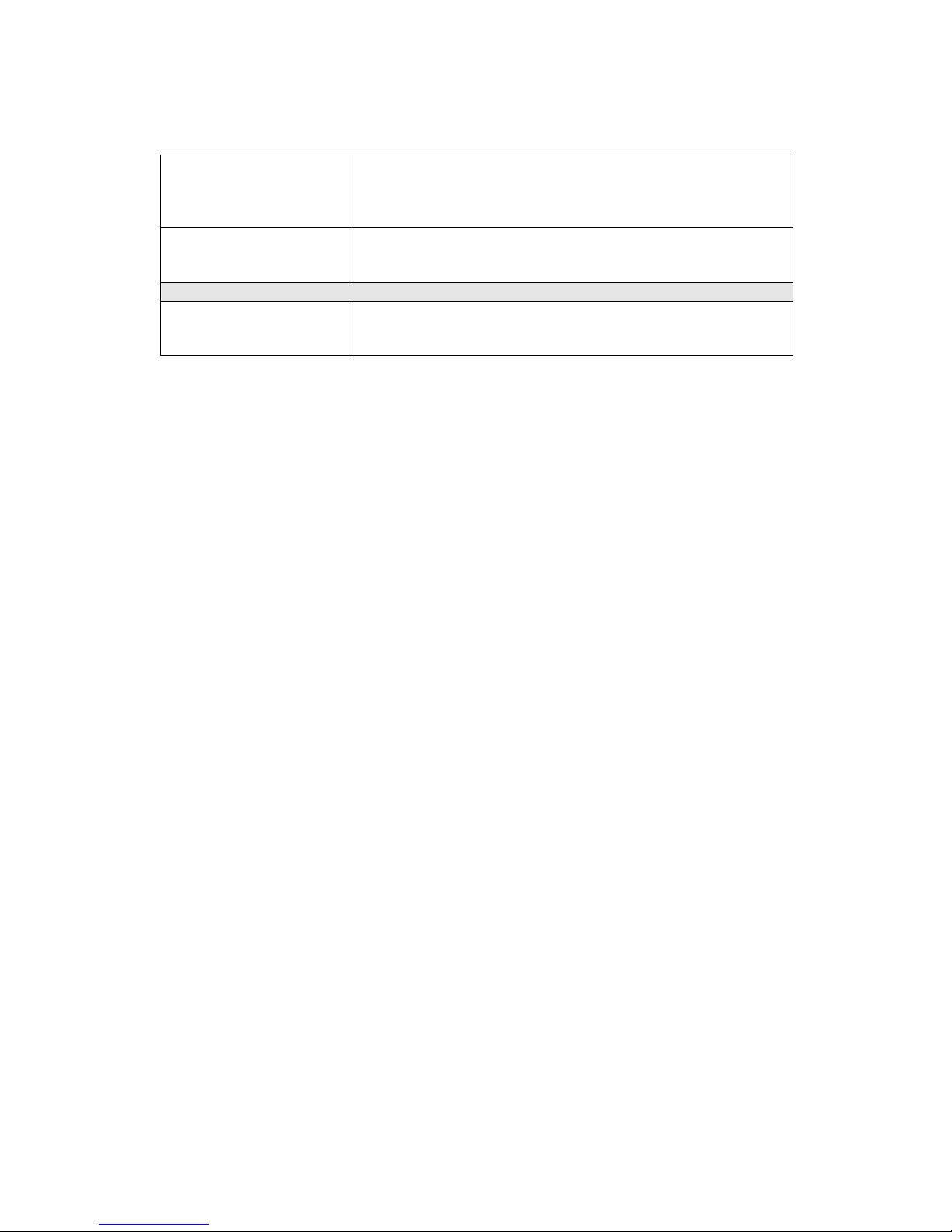
Network Camera User’s Guide
74/94
Image flickers. • Wrong power line frequency makes images flicker. Make
sure the 50 or 60Hz format of your device.
• If the object is dark, the image will flicker. Make the
condition around the Camera brighter.
Noisy images occur.
The video images might be noisy if the device is located in a
very low light environment. Make the condition around the
camera brighter or turn the White-light LED on.
Miscellaneous
Can not play the
recorded ASF file
Have installed Microsoft®’s DirectX 9.0 or later and use the
Windows Media Player 11.0 or later to play the AVI filed
recorded by the Device.
Page 75
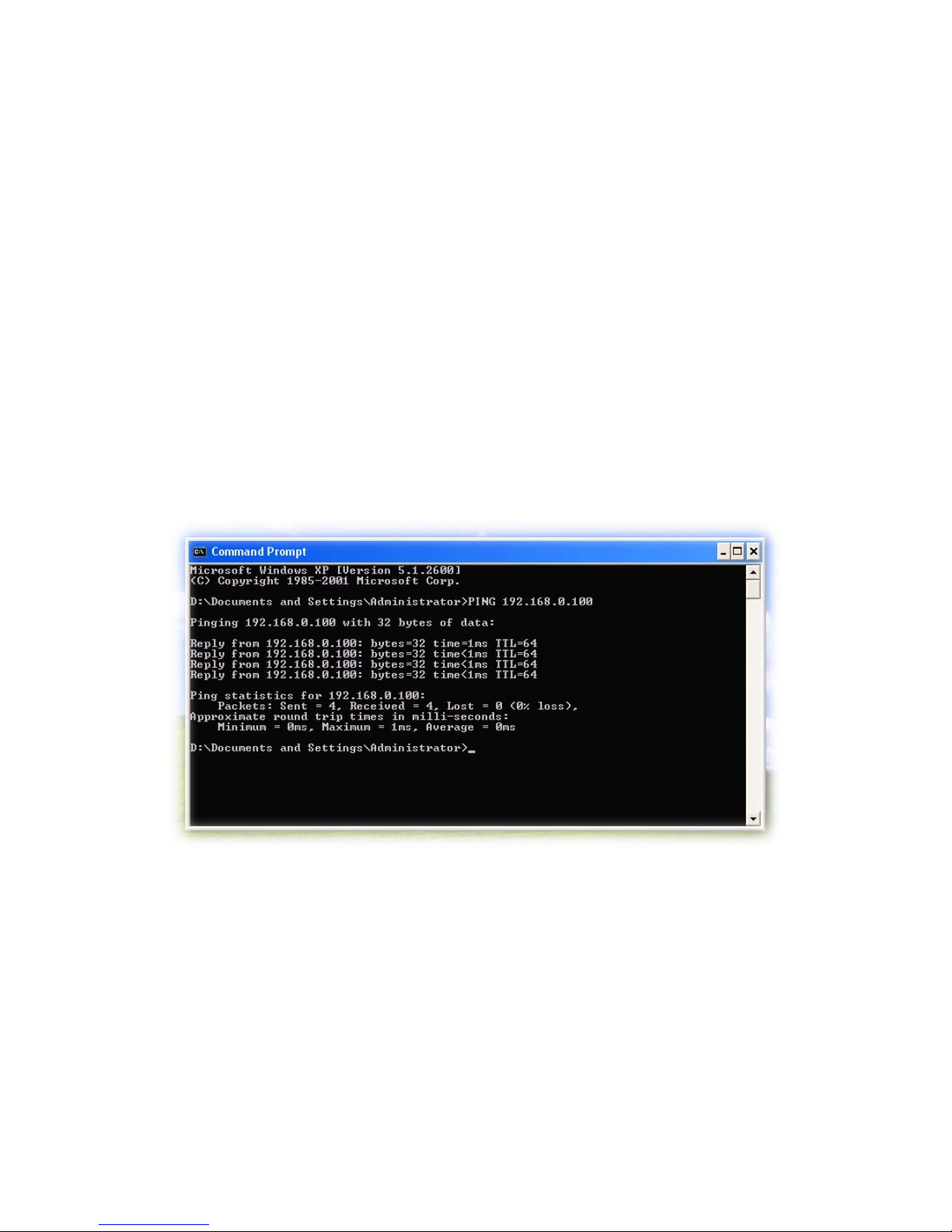
Network Camera User’s Guide
75/94
Appendix C: PING IP Address
The PING (stands for Packet Internet Groper) command is used to detect whether a
specific IP address is accessible by sending a packet to the specific address and waiting
for a reply. It’s also a very us eful tool to con firm the device installe d or if the IP addr ess
conflicts with any other devices over the network.
If you want to make sure the IP address o f the device, utilize the PING command as
follows:
z Start a DOS window.
z Type ping x.x.x.x, where x.x.x.x is the IP address of the device.
The replies, as illustrated below, will provide an explanation to the problem.
If you want to detect any other devices conflicts with the IP address of Network Camera,
also can utilize the PING command but you must disconnect the device from the network
first.
Page 76

Network Camera User’s Guide
76/94
Appendix D: Bandwidth Estimation
The frame rate of video transmitted from the device depends on connection bandwidth
between client and server, video resolution, codec type, and quality setting of server.
Here is a guideline to help you roughly estimate the bandwidth requirements form your
device.
The required bandwidth depends on content of video source. The slow motion video will
produce smaller bit rate generally and fast motion will produce higher bit rate vice versa.
Actual results generated by the device may be varying.
Image
Resolution
Average range of
data sizes for JPEG
mode
Average bit rate for
MPEG4 mode
Average bit rate for
H.264 mode
160 x 120
(QQVGA)
3 ~ 6k byte per
frame
64kbps~256kbps
@ 30fps
32kbps~192kbps
@ 30fps
320 x 240
(QVGA)
8 ~ 20k byte per
frame
256kbps~768kbps
@ 30fps
192kbps~512kbps
@ 30fps
640 x 480
(VGA)
20 ~ 50K byte per
frame
512kbps~2048kbps
@ 30fps
384kbps~1536kbps
@ 30fps
1280x1024
(SXGA)
100 ~ 200k byte per
frame
NA 512kbps~3076kbps
@ 15fps
Note: Audio streaming also takes bandwidth around 32kbps. Some
xDSL/Cable modem upload speeds could not even reach up to 128 kbps.
Thus, you may not be able to receive good quality video while also streaming
audio on a 128 kbps or lower connection. Even though the upload speed is
more than 128kbps, for optimal video performance, disabling audio
streaming will get better video performance.
Page 77

Network Camera User’s Guide
77/94
Appendix E: Specifications
Camera
Image Device
1.3 Mega-pixel image sensor
Effective Pixels
1280 x 1024 pixels
Sensitivity
1.0V/lux-sec (550nm)
Signal to Noise
44dB
Lens
f:4.3mm / F:1.8
IP Module
Video
Video Encoder
H.264, MPEG4 and Motion JPEG simultaneously (Tri-encoders)
Video Profile
1 1 profiles simult aneously
- H.264 SXGA/ VGA / QVGA / QQVGA
- MPEG4 VGA / QVGA / QQVGA
- M-JPEG SXGA/ VGA / QVGA / QQVGA
Frame Rate
Mega-pixel mode: Up to 15fps for all 11 profiles
VGA mode: Up to 30fps for all 9 profiles
Image Setting
De-noise
Brightness, sharpness, contrast, color
Text, time and date overlay
Streaming
Simultaneously multi-profile streaming
Streaming over UDP, TCP, or HTTP
Multicast streaming
M-JPEG streaming over HTTP
Supports 3GPP mobile surveillance
Controllable frame rate and bandwidth
Constant and variable bit rate (MPEG4 / H.264)
Audio
Audio Encoder
RTSP: G.711 64kbps, G.726 32kbps
3GPP: AMR
Audio Streaming
One-way or two-way
Microphone
Built-in microphone
Audio Output
Line level out
Network
Supported Protocols
TCP, UDP, HTTP, SMTP, FTP, NTP, DNS, DDNS, DHCP, ARP,
Bonjour, UPnP, RTSP, RTP, RTCP, PPPoE, 3GPP, ICMP,
IGMP, SAMBA
Security
Password protection, IP address filtering, user access log
Users
20 simultaneous unicast users
Unlimited users using multicast
Ethernet
10/100M auto negotiation
Wireless
IEEE 802.1 1n (for wireless model only)
System Integration
Application
Programming Interface
Open API for software in tegration
SDK
Alarm Triggers
Intelligent video motion detection and external input
Page 78

Network Camera User’s Guide
78/94
Motion Detection
10-zone video motion detection
Alarm Events
File upload via FTP, SAMBA or email
Notification via email, HTTP, and TCP
External output activation
Go to PTZ preset position
Audio alerting output
Video Buffer
Pre- and post- alarm buffering
General
RAM
128MB
ROM
8MB
Power Supply
12V DC external power adapter
PoE
IEEE 802.3af (for wired model only)
Power Consumption
6W max (WLAN model) or
5W max (LAN/POE model)
Connectors
RJ-45 10BaseT/100BaseTX ,
DC jack
Audio out
Antenna (wireless model only)
Indication LED
Two-Color LED
Illumination LED
6 white-light LEDs
Operating Temperature
0°C to 40°C (32°F to 104°F)
Operating Humidity
20% ~ 80% (non-condensing)
Dimension
TBD
Viewing System
OS
Windows® XP, Vista
Browser
IE 6.0 or latter / Firefox 2.0 or later
Cell Phone
With 3GPP player
Video Player
VLC, Quick Time, Real Player
Software
Search & Installation
IPWizard II
Bundled NVR Program
SecuGuard 64CH Basic
Optional NVR Program
SecuGuard 64CH Pro.
Page 79

Network Camera User’s Guide
79/94
Appendix F: Configure Port
Forwarding Manually
The device can be used with a router. If the device wants to be acc essed fro m the WAN,
its IP address needs to be setup as fixed IP ad dress, also the port forwarding or Virtual
Server function of router needs to be setup. This device supports UPnP traversal
function. Therefore, user could use this feature to configure port forwarding of NAT
router first. However, if user needs to configure port forwarding manually, please follow
the steps as below:
Manually installing the device with a router on your network is an easy 3–step procedure
as following:
(1 ) As sign a local/fixed IP address to your device
(2) Access the Router with Your Web browser
(3) Open/Configure Virtual Server Ports of Your Router
(1) Assign a local/fixed IP address to your device
The device must be assigned a local and fixed IP Address that allows it to be recognized
by the router. Manually setup the device with a fixed IP address, for example,
192.168.0.100.
(2) Access the Router with Your Web browser
The following steps generally apply to any router that you have on your network. The
D-Link DI-624 is used as an example to cl arify the configuration process. Configure the
initial settings of the router by following the steps outlined in the router’s Quick
Installation Guide.
If you have cable or DSL service, you will most likely have a dynamically assigned WAN
IP Address. ‘Dynamic’ means that your router’s WAN IP address can c hange from time
to time depending on your ISP. A dynamic WAN IP Address identifies your rou ter on the
public network and allows it to access the Internet. To find out what your router’s WAN
IP Address is, go to the Status screen on your rou ter and locate the WAN information
for your router. As shown on the following page the WAN IP Address will be listed. This
will be the address that you will need to type in your web browser to view your camera
over the Internet. Be sure to uncheck the Reset IP address at next boot button at the
top of the screen after modifying the IP address. Failure to do so will reset the IP
address when you restart your computer.
Page 80
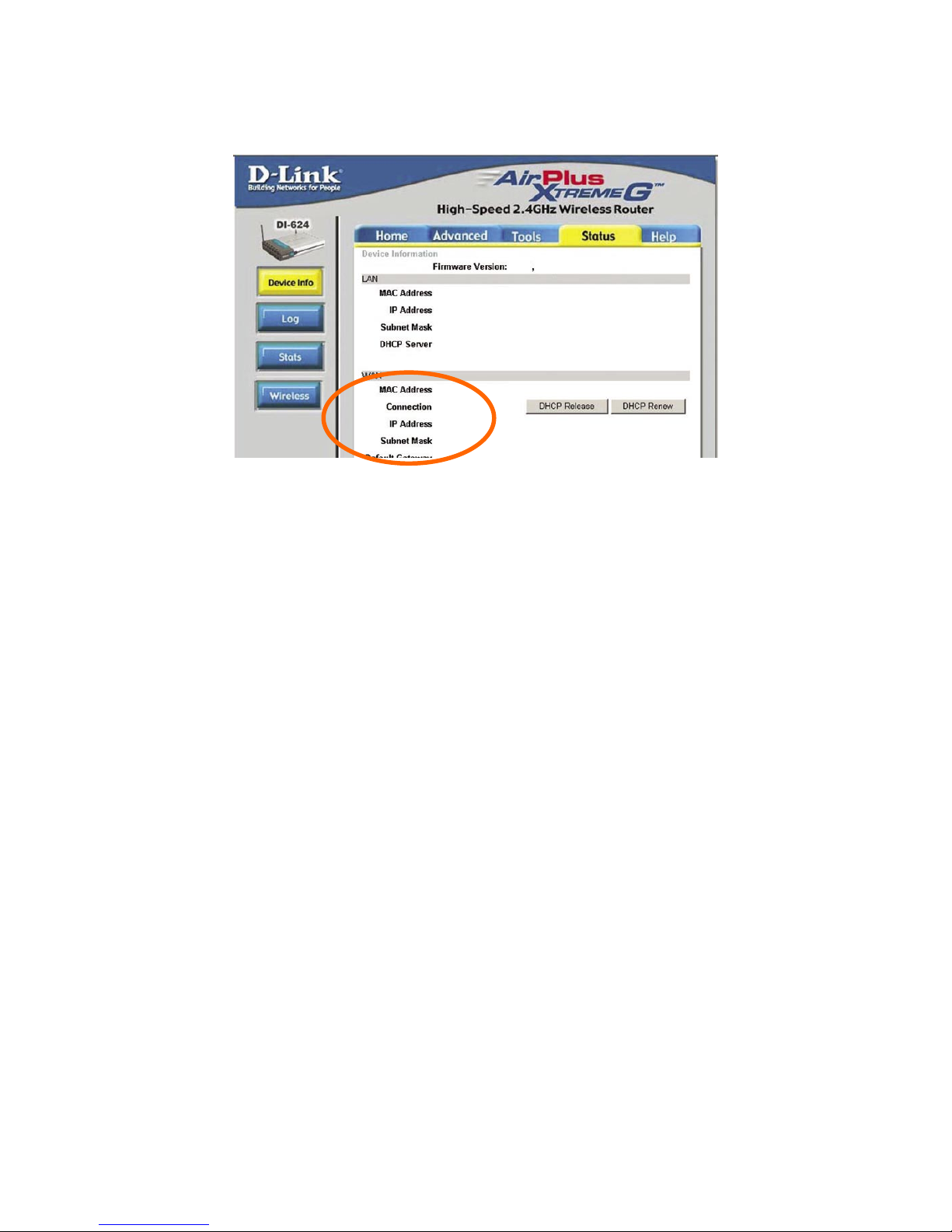
Network Camera User’s Guide
80/94
Your WAN IP Address will be listed here.
Note: Because a dynamic WAN IP can change from time to time depending on your
ISP, you may want to obtain a Static IP address from your IS P. A Static IP address is a
fixed IP address that will not change over time and w ill be more convenient for you to
use to access your camera from a remote location. If you could not get a Static IP
address from your ISP, the DIPS™ or DDNS is a solution alternatively. Please refer to
Appendix G for more information.
(3) Open/set Virtual Server Ports to enable remote image viewing
The firewall security features built into the router an d most routers prevent users from
accessing the video from the device over the Internet. The router connects to the
Internet over a series of numbered ports. The ports normally used by the device are
blocked from access over the Internet. Therefore, these ports need to be made
accessible over the Internet. This is accomplished using the Virtual Server function on
the router. The Virtual Server ports used by the camera must be opened through the
router for remote access to your camera. Virtua l Server is accessed by clicking on the
Advanced tab of the router screen.
Follow these steps to configure your router’s Virtual Server settings
• Click Enabled.
• Enter a unique name for each entry.
• Select Both under Protocol Type (TCP and UDP)
• Enter your camera’s local IP Address (e.g., 192.168.0.100, for example) in the
Private IP field.
Page 81
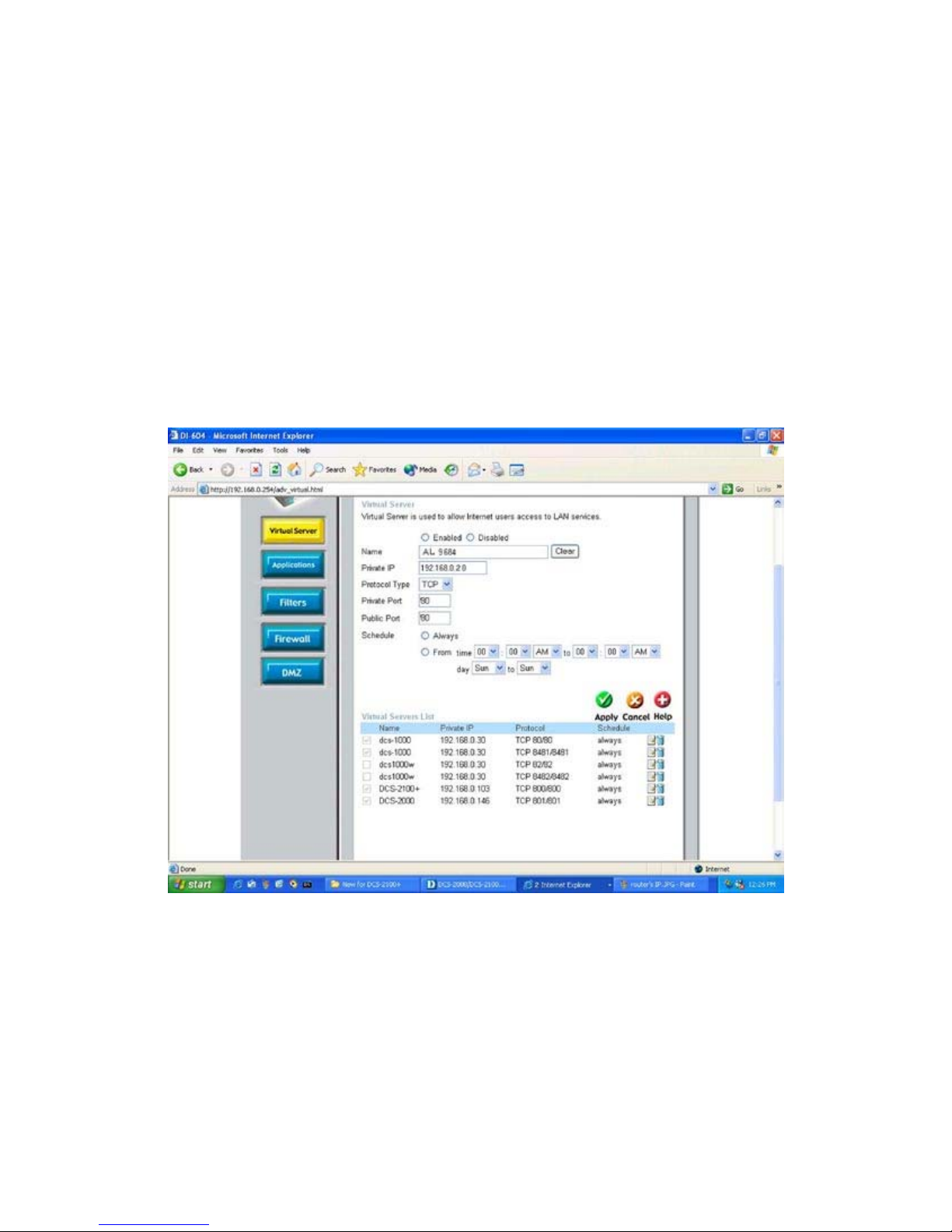
Network Camera User’s Guide
81/94
•
If you are using the default camera port settings, enter 80 into the Public and
Private Port section, click Apply.
• Scheduling should be set to Always so that the camera images can b e accessed
at any time.
A check mark appearing before the entry name will indicate that the ports are enabled.
Important: Some ISPs bloc k access to port 80. Be sure to c heck with your ISP so that
you can open the appropriate ports accordingly. If your ISP does not pass tra ffic on port
80, you will need to change the port the camera uses from 80 to something else, such as
8080. Not all routers are the same, so refer to y our user manual for specific instructions
on how to open ports.
Enter valid ports in the Virtual Server section of your router. Please make sure to check
the box on this line to enable settings. Then the device can be access from WAN by the
router’s WAN IP Address.
By now, you have finished your entire PC configuration for this device.
Page 82

Network Camera User’s Guide
82/94
Appendix G: DDNS Application
1. Preface
If you have a Cable modem or xDSL, this is a gr eat way to hos t your own Netwo rked
Device or other TCP/IP Service. Get your own domain like www.yourname.com,
www.yourname.com.tw etc. (Note: This domain must be registered w ith Internic via
registration authorities such as Network Solutions, DirectNIC, Register.com etc).
Your domain name's dynamic IP address is automatically tracked by a DDNS server.
Host your own Networked Device and much more no ma tter what your c omputer' s IP
address may be and even if you have dialup, DSL or cable modem internet
connection where your computer's IP address c hanges all the time!! DDNS service
supports all top level domain names including but not limited
to .com, .net, .org, .to, .uk etc.
2. Ethernet Network Environment
Normally, DDNS service is only necessary for the users that could only obtain
dynamic IP addresses. As to the users that could obtain the static valid IP address,
they do not usually have to apply the DDNS service. Before we decide if DDNS is
necessary for the users, we have to check what kind of Ethernet network
environment we have to install our Networked Device on.
(1) Environment of Fixed Valid IP Network
If users could obtain valid IP addresses, they could save the effort to apply DDNS
service. Because the IP address in this environment is fixed, users could input
the IP address or domain name of demo site directly in the IE browser.
(2) Environment of Dynamic IP Network
If users is under an environment of dynamic IP network (Dial-up xDSL), they
have to apply a domain name in advance. Then apply DDNS service. Finally
setup the necessary information of DDNS and PPPoE of the Networked Device
in order to let the outside administrator be able to access through internet.
3. Application Steps—DDNS & Domain Name
(1). Visit the following web site: http://www.dyndns.org/
(2). Click “Account”
Page 83
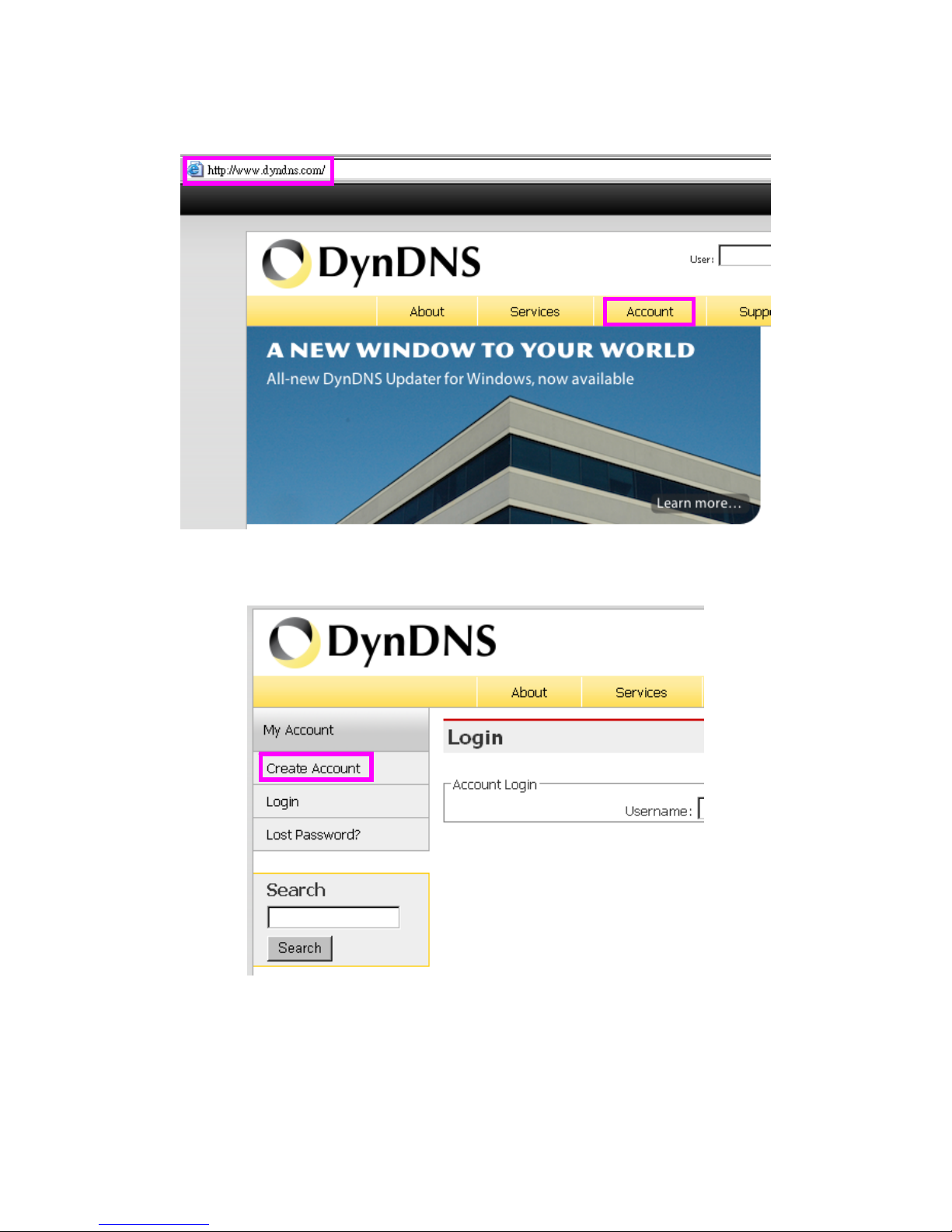
Network Camera User’s Guide
83/94
(3). After the columns show up at the left side, click “Create Account”.
(4). Fill the application agreement and necessary information.
a. Username
b. E-mail address and confirmation
c. Password and confirmation
Page 84
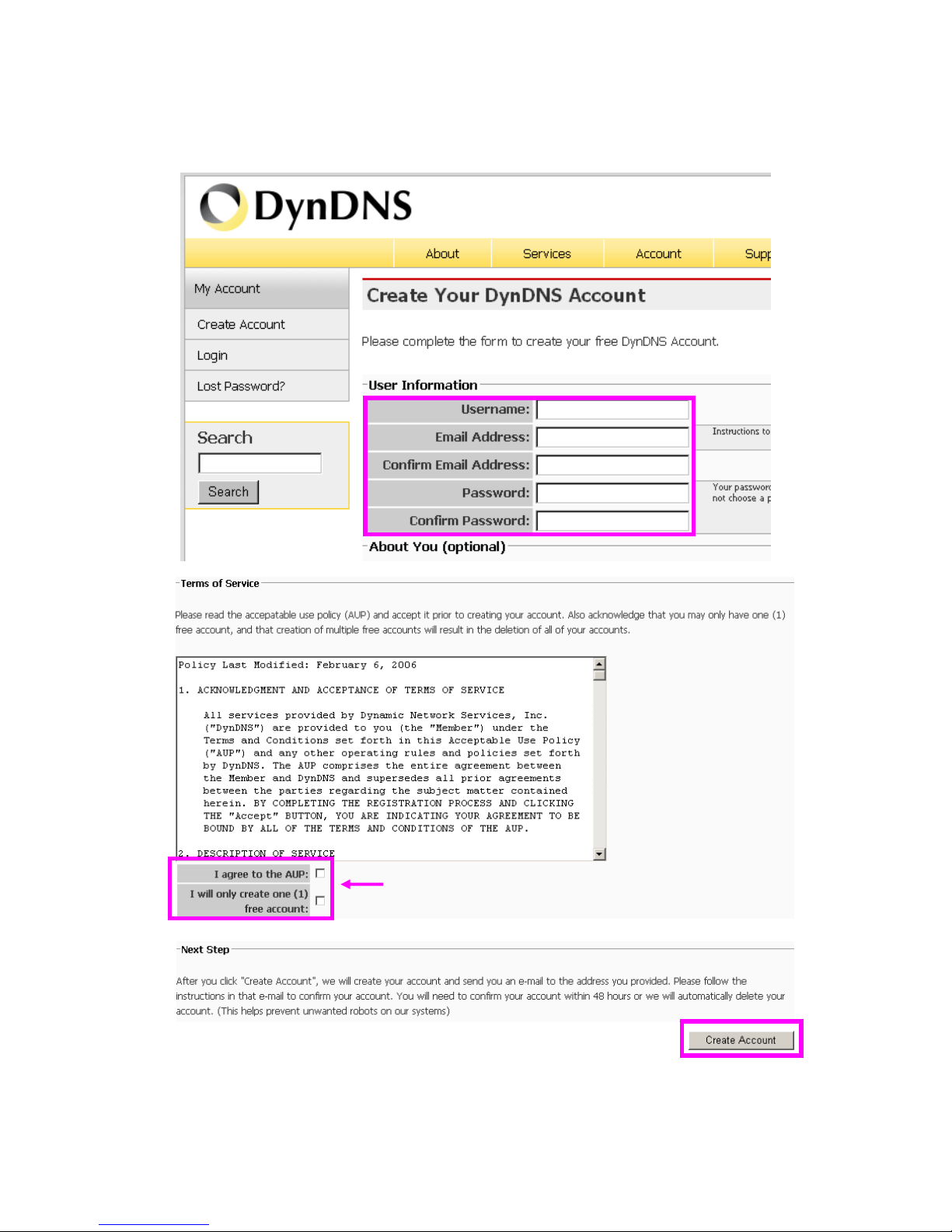
Network Camera User’s Guide
84/94
d. Submit all the input information and finish creating an account
Click these two options
Page 85
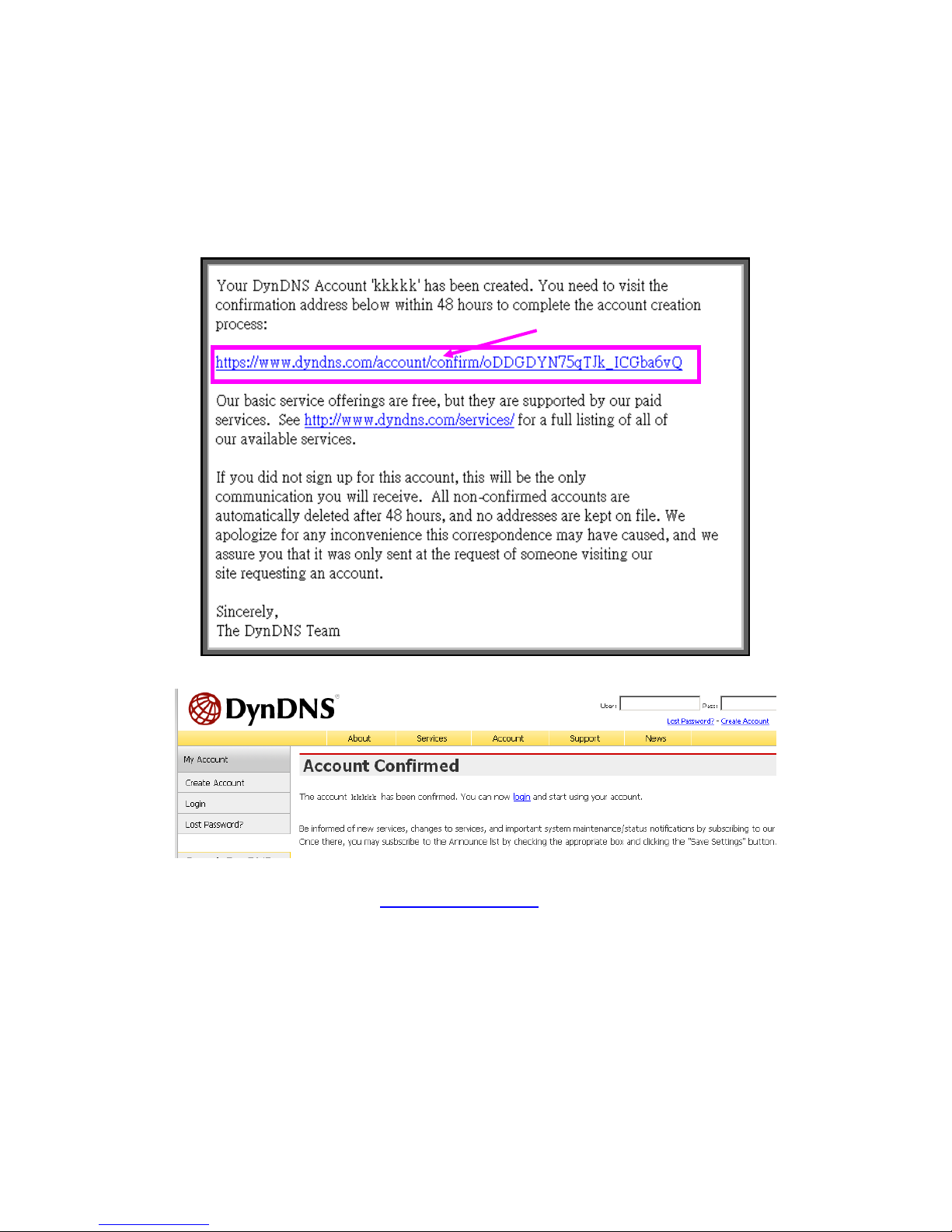
Network Camera User’s Guide
85/94
(5). Check your e-mail mailbox. There will be an e-mail with a title “Your DynDNS
Account Information“. Click the hyperlink address to con firm the DDNS service
that you just applied. Then DDNS you applied activated.
(6). Enter the web page http://www.dyndns.org/ again. Input your username and
password that you just applied to login administration interface of DDNS server.
Click to confirm
Page 86
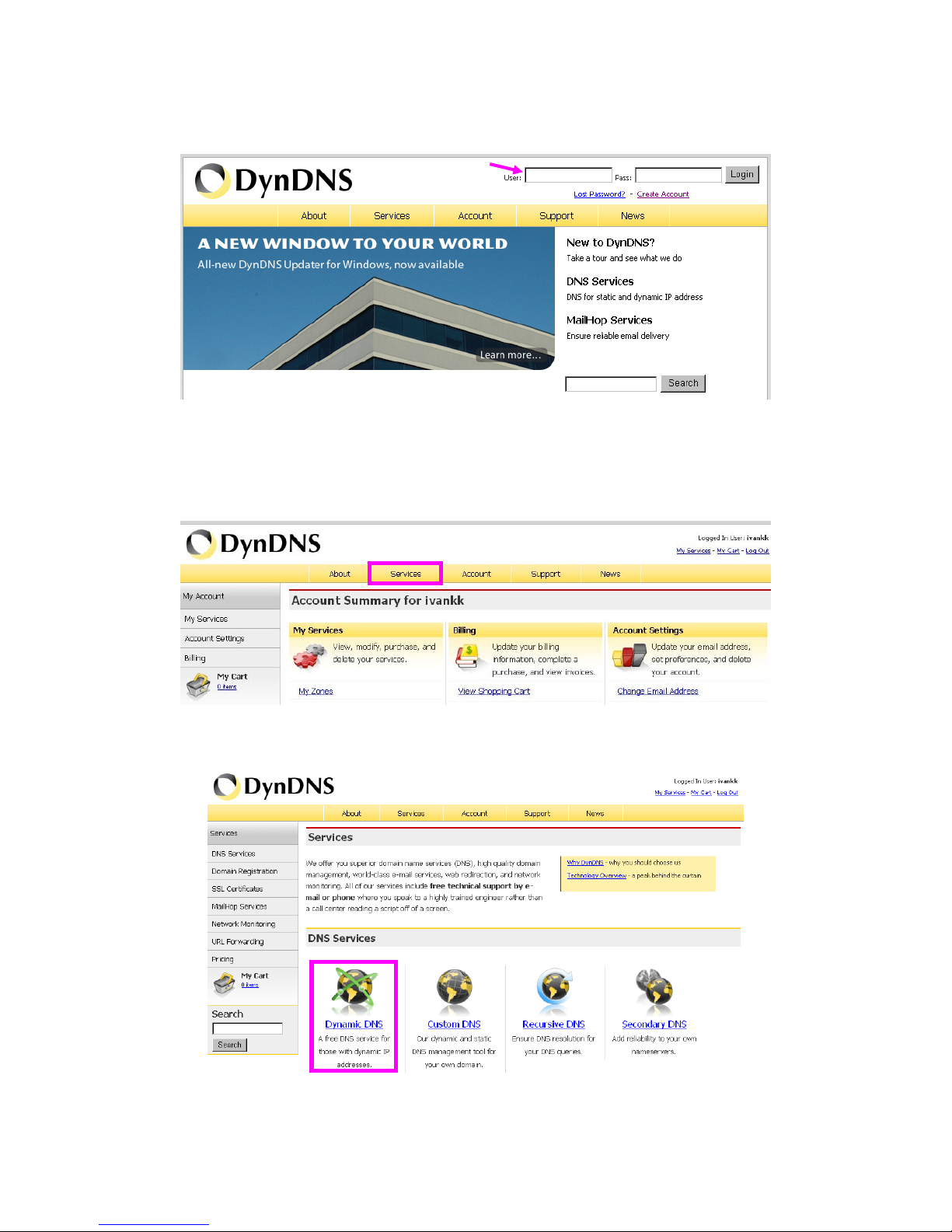
Network Camera User’s Guide
86/94
(7). If the correct username and password are input, you can see the following
picture at the top-right of the login page.
(8). Click the “Services”.
(9). Click the “ Dynamic DNS ”.
Input your account
Page 87
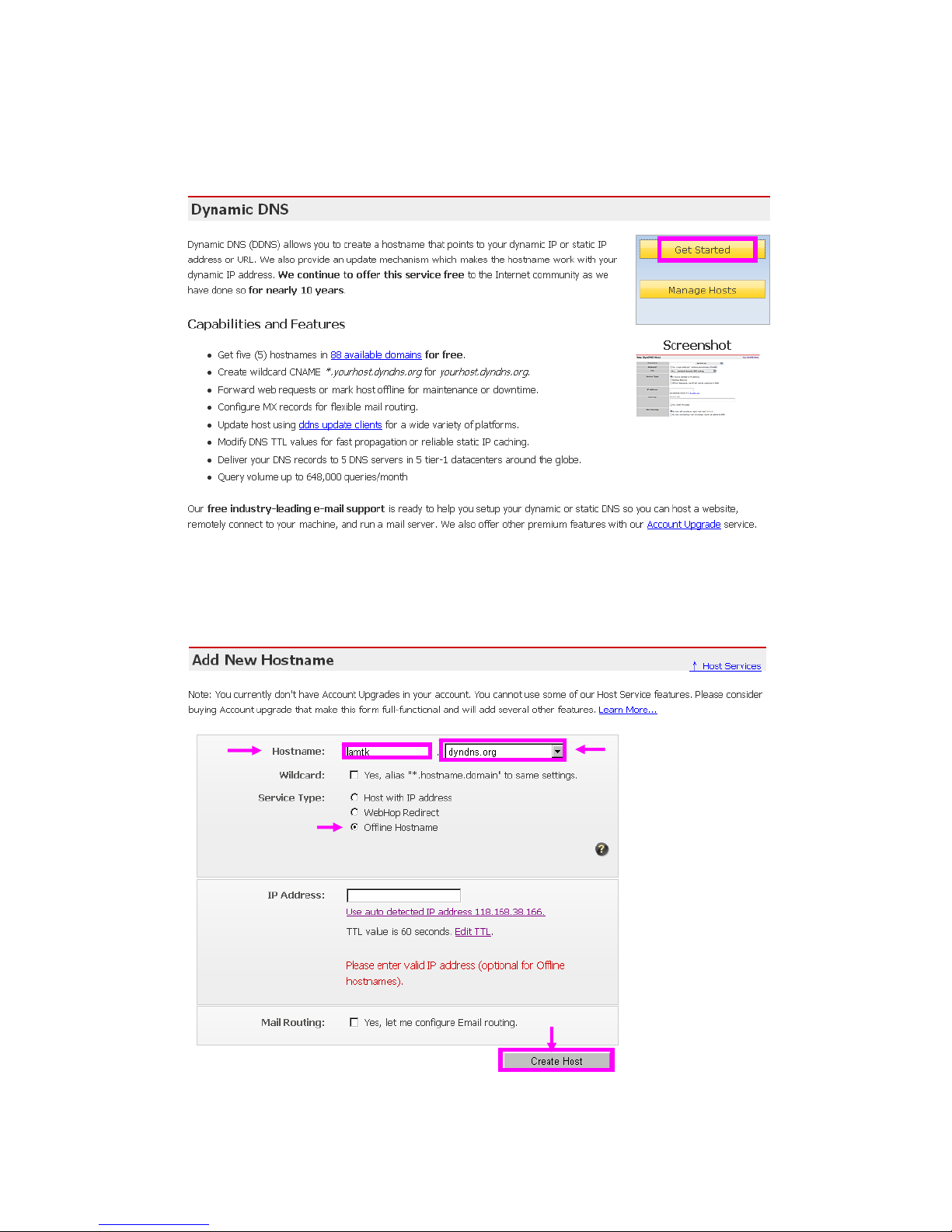
Network Camera User’s Guide
87/94
(10). Click the “Get Started”.
(11 ). We could create a domain name without any charge at this step. First, we inp ut
the host name. (Pink No.1) Then we pick a d omain that is eas y to remembe r. (Pink
No.2) The 3
rd
step is to click “Offline Hostname” from Service Type. (Pink No.3)
Finally, click the “Create Host” to submit the domain name information and finish
DDNS application. (Pink No.4)
1
2
3
4
Page 88

Network Camera User’s Guide
88/94
4. Setup the DDNS and PPPoE of Networked Device
At last, users have to enter the web page of Networked Device and setup the necessary
information of DDNS and PPPoE after the application of DD NS service. Please check
the user manual to access the DDNS and PPPoE pages. After saving the modification,
restart the device. Then the external users c ould browse the Networked Device by the
input of their domain name.
Page 89

Network Camera User’s Guide
89/94
Appendix H: Power Line Frequency
COUNTRY
VOLTAGE FREQUENCY COMMENTS
Argentina 220V 50 Hz
*Neutral and line wires are reversed from that used in
Australia and elsewhere.
Australia 230V* 50 Hz
*Outlets typically controlled by adjacent switch.
Though nominal voltage has been officially changed to 230V,
240V is within tolerances and commonly found.
Austria 230V 50 Hz
Brazil 110/220V* 60 Hz
*127V found in states of Bahia, Paran?(including Curitiba),
Rio de Janeiro, S緌 Paulo and Minas Gerais (though 220V
may be found in some hotels). Other areas are 220V only,
with the exception of Fortaleza (240V).
Canada 120V 60 Hz
China, People's Republic of 220V 50 Hz
Finland 230V 50 Hz
France 230V 50 Hz
Germany 230V 50 Hz
Hong Kong 220V* 50 Hz
India 230V 50 Hz
Italy 230V 50 Hz
Japan 100V 50/60 Hz*
*Eastern Japan 50 Hz (Tokyo, Kawasaki, Sapporo,
Yokohoma, and Sendai); Western Japan 60 Hz (Osaka,
Kyoto, Nagoya, Hiroshima)
Malaysia 240V 50 Hz
Netherlands 230V 50 Hz
Portugal 230V 50 Hz
Spain 230V 50 Hz
Sweden 230V 50 Hz
Switzerland 230V 50 Hz
Taiwan 110V 60 Hz
Thailand 220V 50 Hz
United Kingdom 230V* 50 Hz
*Outlets typically controlled by adjacent switch.
Though nominal voltage has been officially changed to 230V,
240V is within tolerances and commonly found.
United States of America 120V 60 Hz
Page 90

Network Camera User’s Guide
90/94
Appendix I: 3GPP
To use the 3GPP function, in addition to previous section, you might need more
information or configuration to make this function work.
Note that to use the 3GPP function, it strongly recommends to install the Networked
Device with a public and fixed IP address without any firewall protection.
RTSP Port:
Port 554 is the default for RTSP service. However, sometimes, some service providers
change this port number for some reasons. If so, user needs to change this port
accordingly.
Dialing procedure:
1. Choose a verified player (PacketVideo or Realplayer currently)
2. Use the following URL to access:
rtsp://host/mpeg4/media.3gp
Where host is the host name or IP address of the camera.
Compatible 3G mobile phone:
Please contact your dealer to get the approved list of compatible 3G phone.
Page 91
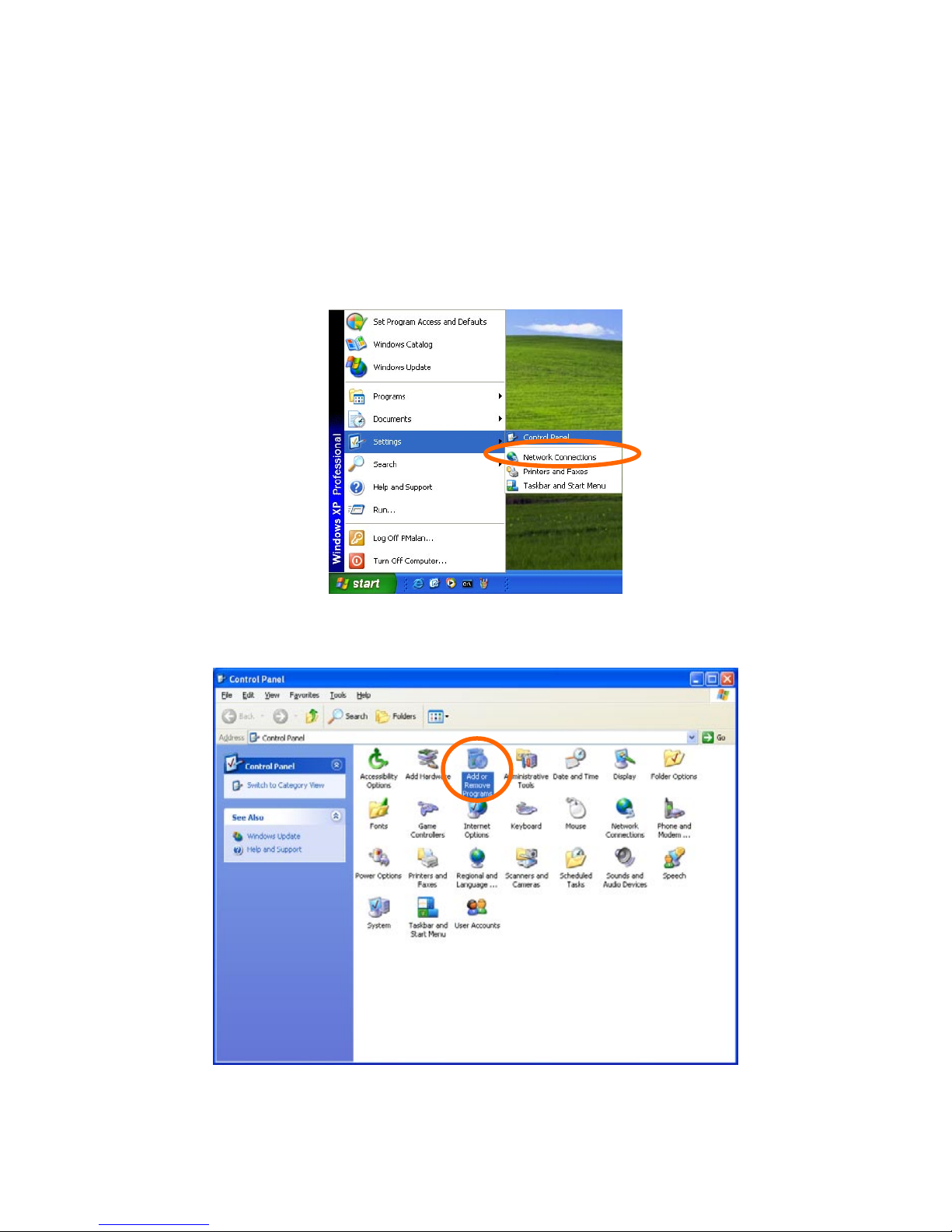
Network Camera User’s Guide
91/94
Appendix J: Enable UPnP of
Windows XP
Use the following steps to enable UPnP settings only if your operatin g system of PC is
running Windows XP.
Go to Start > Settings.
Click Control Panel
Page 92
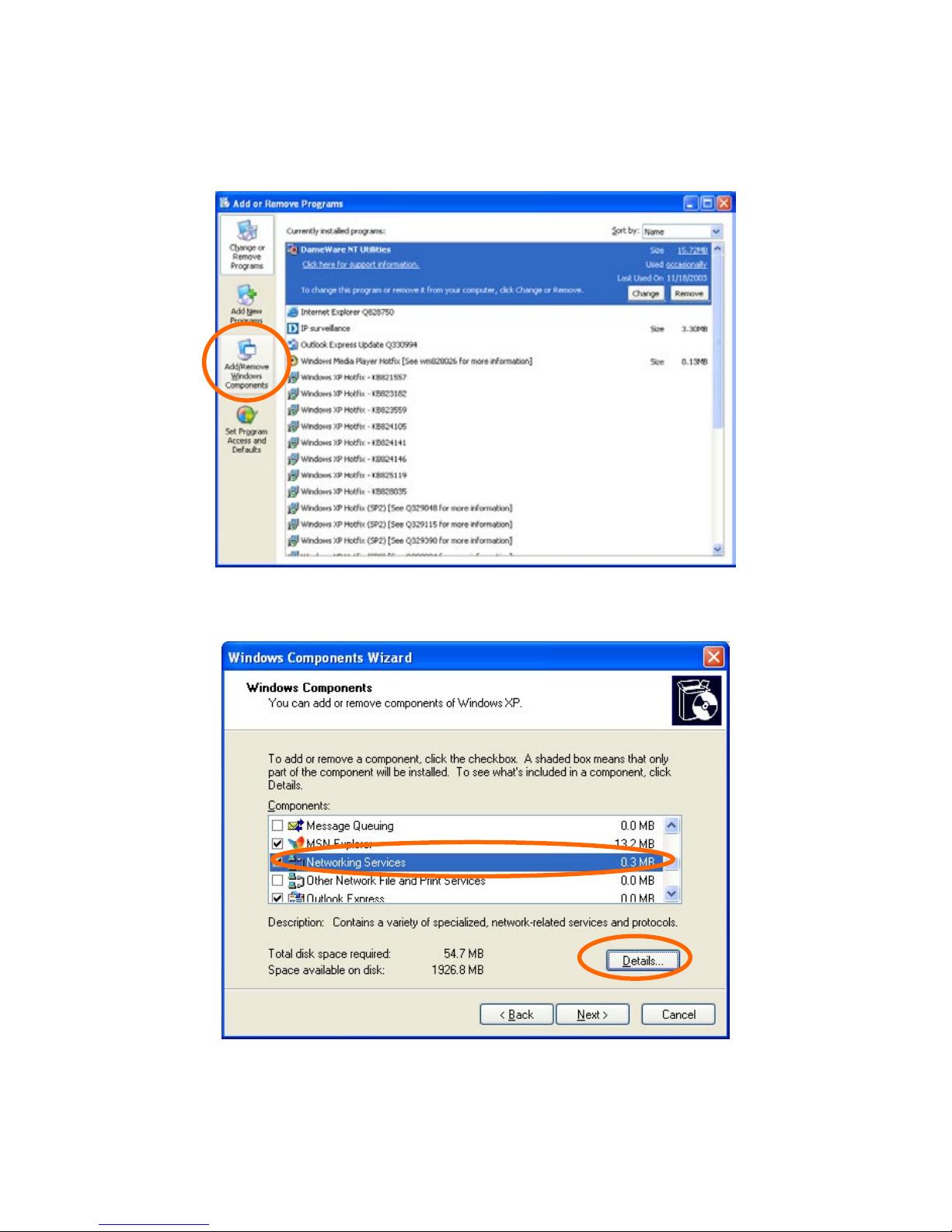
Network Camera User’s Guide
92/94
Click Add or Remove Progr am s
Click Add/Remove Windows Components
The following screen will appear:
Select Networking Services
Page 93
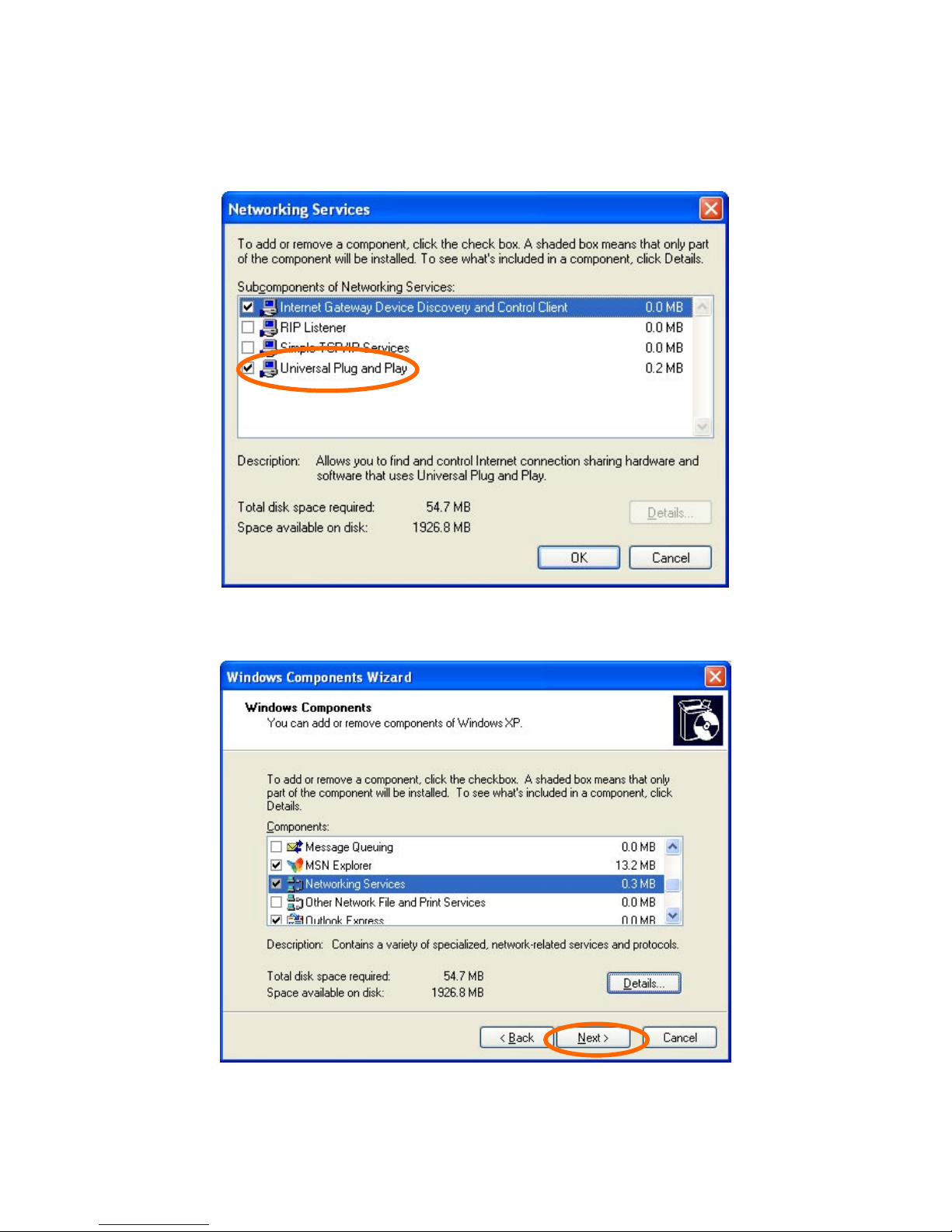
Network Camera User’s Guide
93/94
Click Details
Select Universal Plug and Play
Click Ok
Page 94
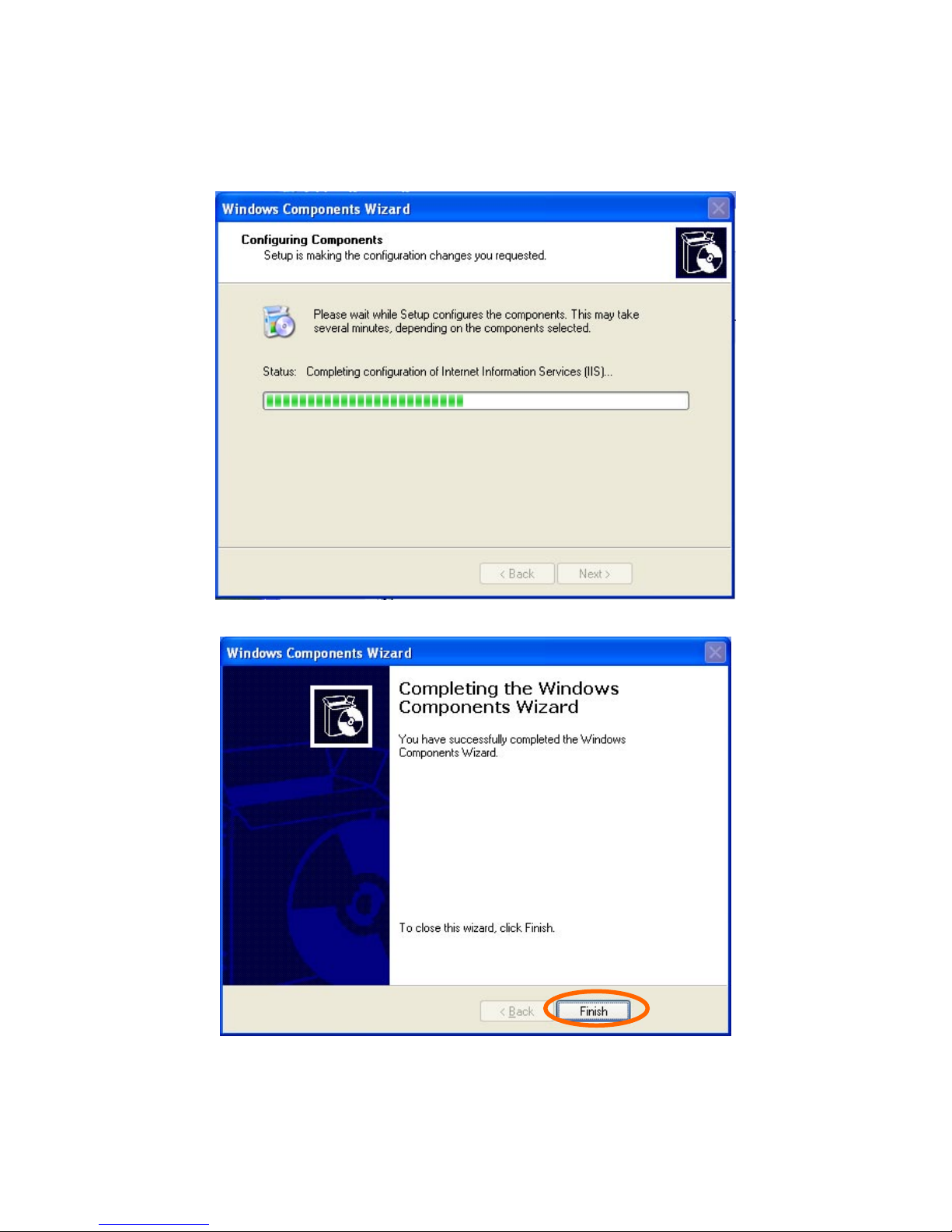
Network Camera User’s Guide
94/94
Click Next
Please wait while Setup configures the components.
Click Finish
 Loading...