

Page 1
We love that you are rocking JLab Audio!
We take pride in our products and fully stand behind them.
A
C
F
T
S
I
I
O
T
A
S
30
G
DAY
U
E
A
T
R
N
A
W
T
O
D
Y
E
E
T
I
M
I
L
REWIND WIRELESS
HEADPHONES
A
B
S
.
E
S
D
.
U
C
U
S
T
O
M
U
E
S
R
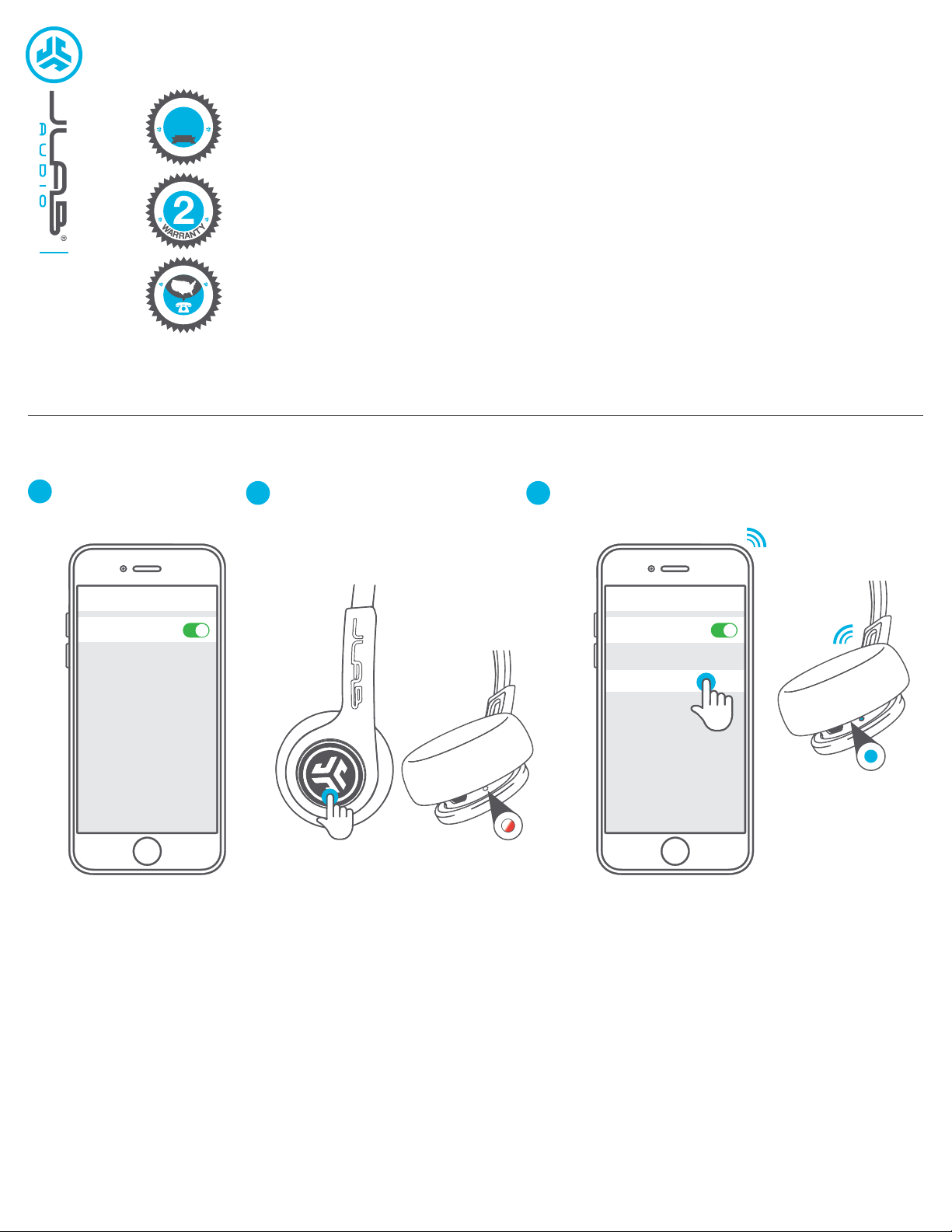
FIRST TIME SETUP: BLUETOOTH PAIRING
YOUR SATISFACTION IS GUARANTEED
N
You may exchange or return merchandise within 30 days of the purchase date.
E
Learn more at jlabaudio.com/guarantee
YOUR WARRANTY
A
R
You may register your product at jlabaudio.com/register. All warranty claims are subject to JLab Audio
authorization and at our sole discretion. Retain your proof of purchase to ensure warranty coverage.
CONTACT US
T
R
Reach out to us at [email protected] or visit jlabaudio.com/contact
O
P
P
Turn on the Bluetooth
1
in your device settings.
Press and hold button for
2
10 seconds. Release.
Select “JLab Rewind” in your device settings to connect.
3
Light will slow blink blue when Bluetooth is paired.
Light will blink red and blue
near the foam ear pad to
indicate pairing mode.
Settings
Bluetooth
PAIRING NEW / ADDITIONAL DEVICES:
Turn OFF Bluetooth on your previously paired device and turn ON Bluetooth on new device.
Repeat FIRST TIME STEUP process for new devices.
Settings
Bluetooth
JLab Rewind
Notes:
• Bluetooth is a wireless radio technology, which means it is sensitive to objects between the headphone and the connected device.
The headphone is designed to be used within 33 feet (10 meters) of a connected device, with no major objects in between (walls, etc.).
• Once successfully connected, the headphone will memorize your device and automatically pair when turned on in the future.
Only one device may be connected at a time. To pair a different device, first unpair the current one through its Bluetooth settings.
• If for any reason Bluetooth connection is lost, manually reconnect your Bluetooth device.
Page 2
ACCESSORIES
MICRO USB
CABLE
2 SETS OF FOAM
EAR CUSHIONS
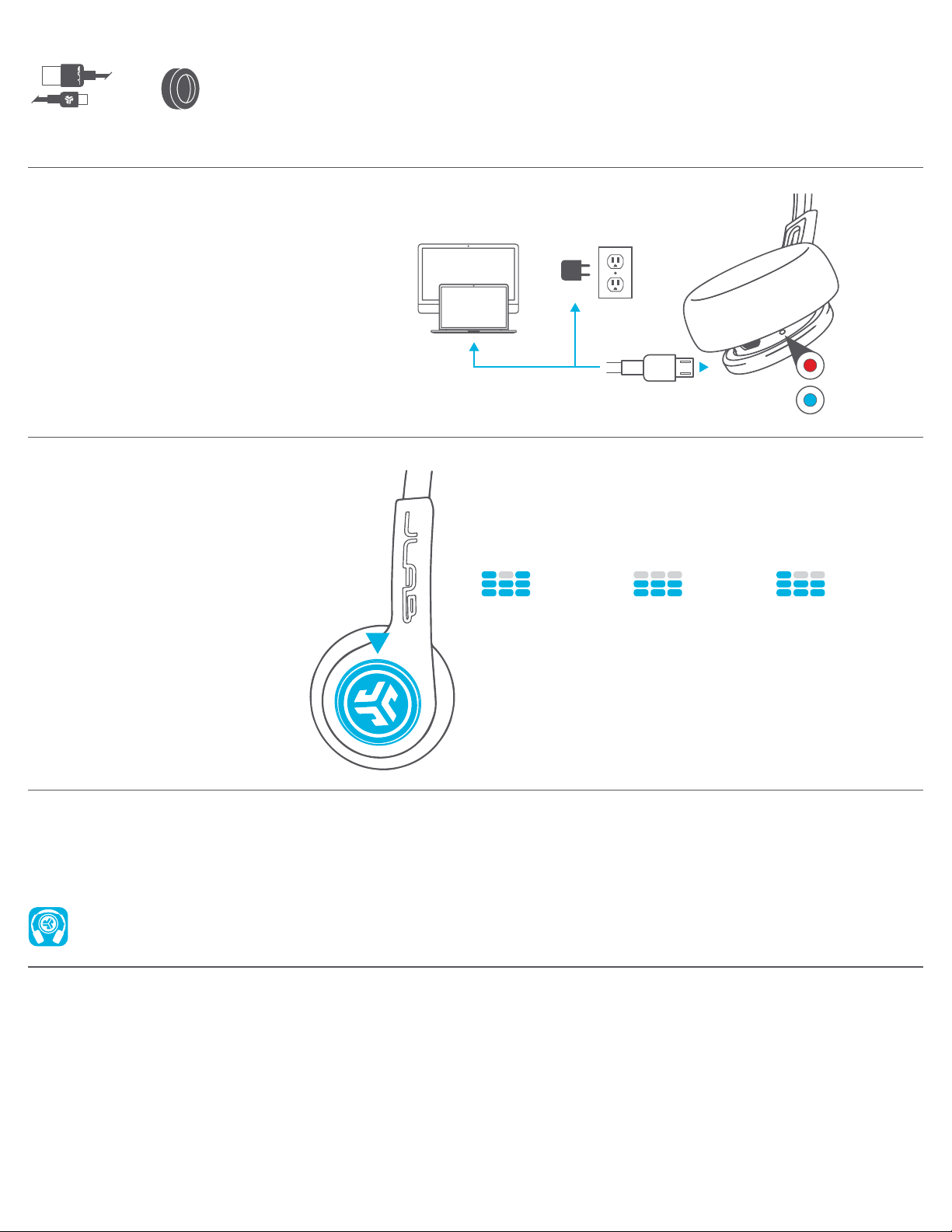
CHARGING
Note: Headphones will not turn on while charging.
Allow about 3 hours to fully charge.
Connect the Rewind Headphone to a computer or
USB 5V output device with the provided charging cable.
Red light will indicate charging and blue light will
indicate a full charge.
BUTTON FUNCTIONS
BLUETOOTH PAIRING:
(Follow First Time Setup instructions).
POWER ON: Press & hold 2 seconds.
POWER OFF: Press & hold 4 seconds.
(slow blinking blue light indicates power is on)
PLAY / PAUSE / ANSWER / HANG UP:
1 click.
ACTIVATE SIRI (iOS) OR
“OK GOOGLE” (ANDROID):
2 click.
TRACK FORWARD:
Press & hold 2 seconds.
OR
EQUALIZER MODES
TOGGLE EQ CHANGE
3 click. (Rewind will cycle 3 EQ settings)
JLab SIGNATURE
(One Beep)
JLab C3™ signature
sound with amplified
vocals and bass
BALANCED
(Two Beeps)
Even sound with no
additional sound
enhancements
CHARGING
FULLY
CHARGED
BASS BOOST
(Three Beeps)
Amplified bass
and sub-bass
WARM-UP YOUR HEADPHONES
Optional: Burn-in is the process for exercising new audio equipment. We recommend 40 hours of burn-in time for most headphones to reach
optimal performance. The main purpose of the process is to loosen the diaphragm of a newly crafted headphone and to stress the headphone
driver. Normal, everyday use can also burn-in the headphones though JLab’s proprietary burn-in provides an ideal mix of sounds and
frequency sweeps to achieve this.
Burn-in your audio equipment with the JLab Audio app available on the App Store and Google Play.
Or access the burn-in method at: jlabaudio.com/burnin
CAUTIONS
• Avoid getting moisture or liquids on the headphone cups.
• Avoid extreme heat, cold, and humidity.
• Avoid dropping or crushing headphones, stressing the cable by
rapid pulling or extreme force, or bending the cable at a sharp
angle.
• Wax may build up in headphone cups, lowering the sound quality.
Carefully remove the wax with a cotton swab or other small tool to
improve the sound quality.
• If you experience discomfort or pain, try lowering the volume
or discontinuing use temporarily.
• If you experience regular discomfort while using this product,
discontinue use and consult your physician.
• We recommend you treat your headphones as you would a nice
pair of sunglasses and keep them in safe location when not in use.
JLABAUDIO.COM
 Loading...