

Page 1
We love that you are rocking JLab Audio!
We take pride in our products and fully stand behind them.
W
T
O
D
Y
E
E
T
I
A
M
R
I
L
A
B
S
.
E
S
D
.
U
C
U
S
T
GO AIR
EARBUDS
O
BLUETOOTH PAIRING
T
R
O
P
P
M
U
E
S
R
YOUR WARRANTY
All warranty claims are subject to JLab Audio
authorization and at our sole discretion. Retain your
proof of purchase to ensure warranty coverage.
CONTACT US
Reach out to us at
or visit jlabaudio.com/contact
REGISTER TODAY
jlabaudio.com/register
Product updates | How-to tips
FAQs & more
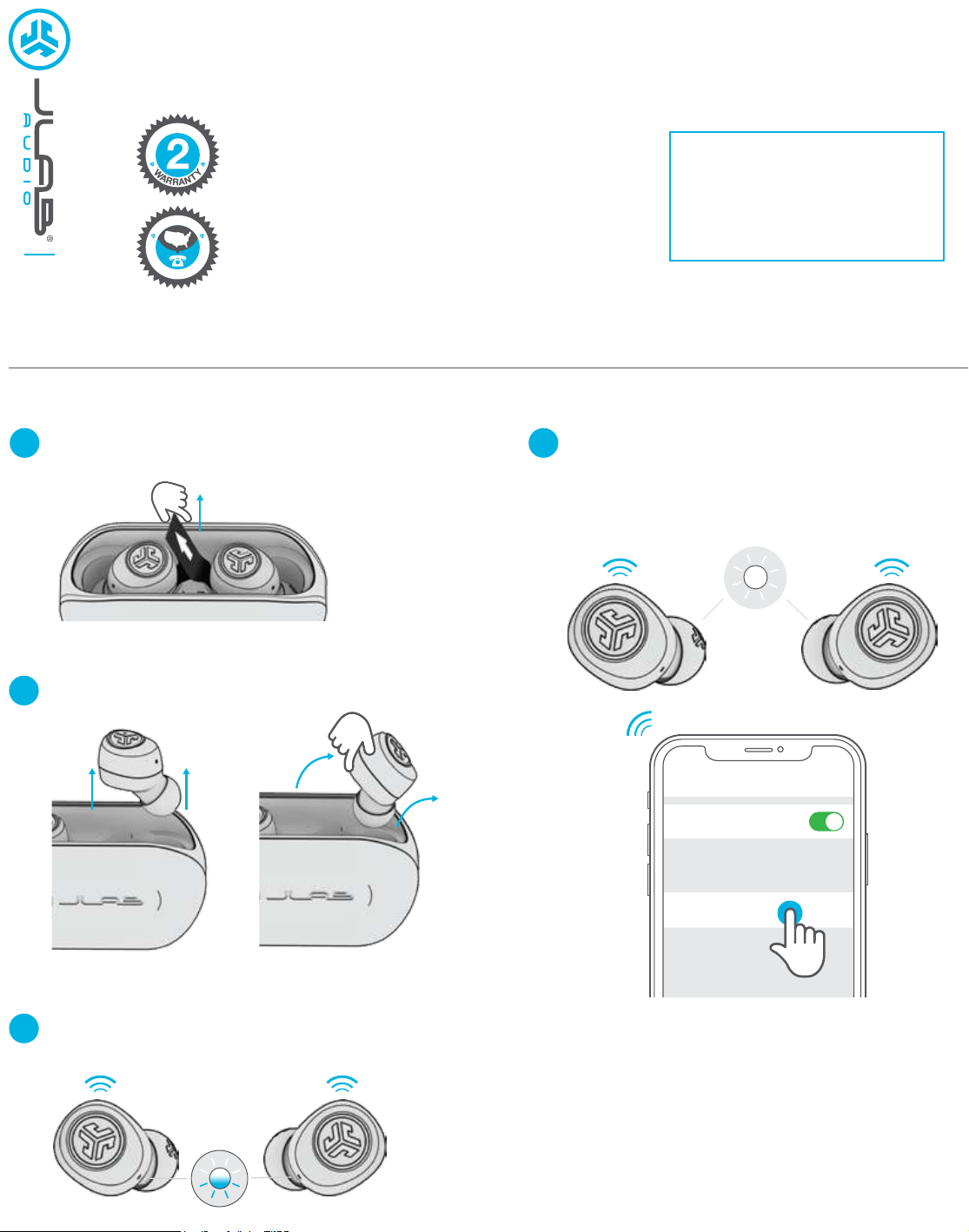
Remove pull tab.
1
The charging case light will start pulsing blue.
Remove earbuds by pulling straight up or from side.
2
A. B.
Select “JLab GO Air” in your device's
4
Bluetooth settings to connect.
Voice prompt “You’re connected” followed by
solid white lights will indicate you are connected.
Settings
Bluetooth
JLab GO Air
One earbud will blink blue/white indicating
3
ready to pair to your device.
ADDING NEW / ADDITIONAL BLUETOOTH DEVICES:
Turn OFF Bluetooth from any previously connected
device. Turn ON Bluetooth from new device.
Take earbuds out of the case.
Earbuds will automatically enter Bluetooth Pairing.
Select “JLab GO Air” in device settings to connect.
Page 2
BUTTON FUNCTIONS
VOICE PROMPTS
“Hello”:
“Ready to Pair”: GO Air is ready
to pair to Bluetooth device
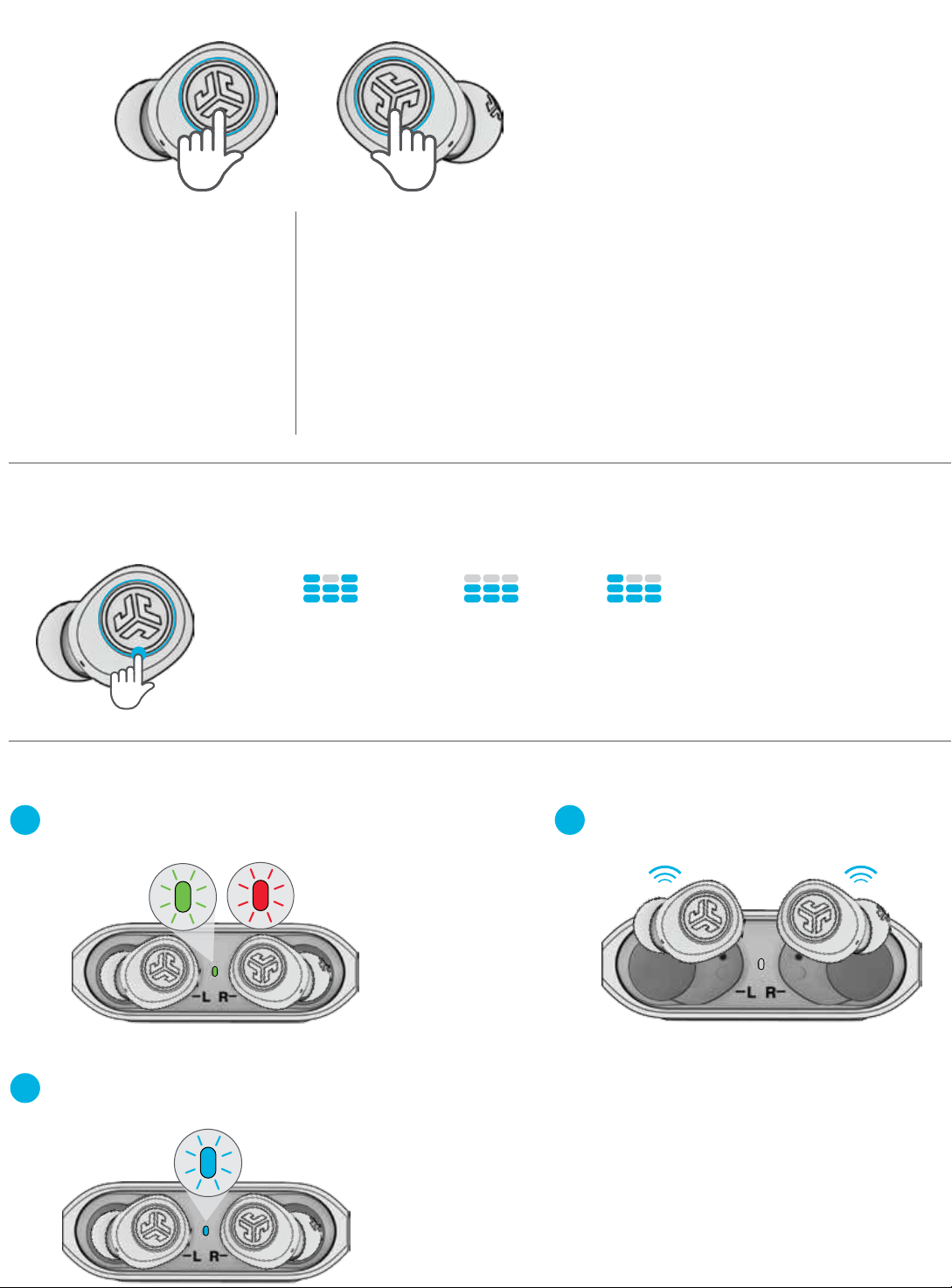
LEFT RIGHT
VOLUME DOWN: Single tap
SIRI (iOS) or “OK GOOGLE”
(ANDROID): Double tap
TRACK BACK: Press & hold 1+ sec
EQ CHANGE: Triple tap
POWER ON: Press & hold 3+ sec
VOLUME UP: Single tap
PLAY / PAUSE: Double tap
TRACK FORWARD: Press & hold 1+ sec
ANSWER: Single tap
HANGUP: Double tap
REJECT INCOMING CALLS:
Press & hold 1+ sec
EQ CHANGE: Triple tap
POWER ON: Press & hold 3+ sec
“Bluetooth Connected”:
Earbud is connected to device
“Battery Full”: 100-75%
“Battery Medium”: 75-25%
“Low Battery”: Less than 25%
(When power decreases to 10%,
“Low Battery” will play one time)
“Goodbye”: Power OFF
CUSTOM EQ3 SOUND MODES
Tap either the right or left earbud 3 times for different EQ settings (GO Air will cycle 3 EQ settings).
Power ON
JLab SIGNATURE
JLab C3™ signature
sound with amplified
bass and vocals
CHARGING EARBUDS
Earbuds will power off when placed in the case
1
and first show charging case battery level.
Solid green
100-25%
Then pulsing blue light indicates earbuds are
2
charging and turns off when fully charged.
Blinking red
less than 25%
(charge case)
BALANCED
Even sound with
no additional
enhancements
BASS BOOST
Amplified bass
and sub-bass
Earbuds will auto power on and connect
3
to your device when removed.
Page 3

CHARGING CASE
Connect the GO Air into a
computer or USB 5V 1A
(or less) output device.
Fully
Charged
Charging
OR
FITTING
QUICK TIPS
• The left or right earbud can be used independently for music and
phone calls. Simply choose one and take out of the case to connect.
• Only ONE Bluetooth device can be connected at a time. Turn off
Bluetooth on unwanted devices and turn on Bluetooth on chosen
device to connect.
WARNING
Fully dry off the earbuds before
putting in the charging case to
Try all ear tips for best
fit and proper seal.
Place the earbud in the ear
canal and slightly rotate to
adjust for best fit.
avoid any damage to the case.
The earbuds are sweat/water
resistant but the case is not.
CAUTIONS
• Avoid extreme heat, cold, and humidity.
• Avoid dropping or crushing the earbuds.
• Wax may build up in the earbud tips, lowering the sound quality.
Carefully remove the wax with a cotton swab or other small tool to improve the sound quality.
• If you experience discomfort or pain, try lowering the volume or discontinuing use temporarily.
• If you experience regular discomfort while using this product, discontinue use and consult your physician.
• We recommend you treat your earbuds as you would a nice pair of sunglasses and keep them in safe location when not in use.
Shop products | Product alerts | Burn-in your headphones
JLab Audio + Burn-in Tool
JLABAUDIO.COM
 Loading...