

Page 1

Order Number
: GETEC-C1-18-414
FCC Part 15 subpart C
Test Report Number
: GETEC-E3-18-021 Page 1 / 1
EUT Type: Feeling Pen
FCC ID.: 2ARG2JKP3000
APPENDIX H
: USER’S MANUAL
Page 2
FeelingPen User Manual JJTech. CO., LTD
∙Homepage : www.jj-tech.kr / www.feelingpen.com
∙Dear User :
Thank you for choosing a feeling pen. Please read this
user's guide before using the product for correct operation
and various performance benefits.
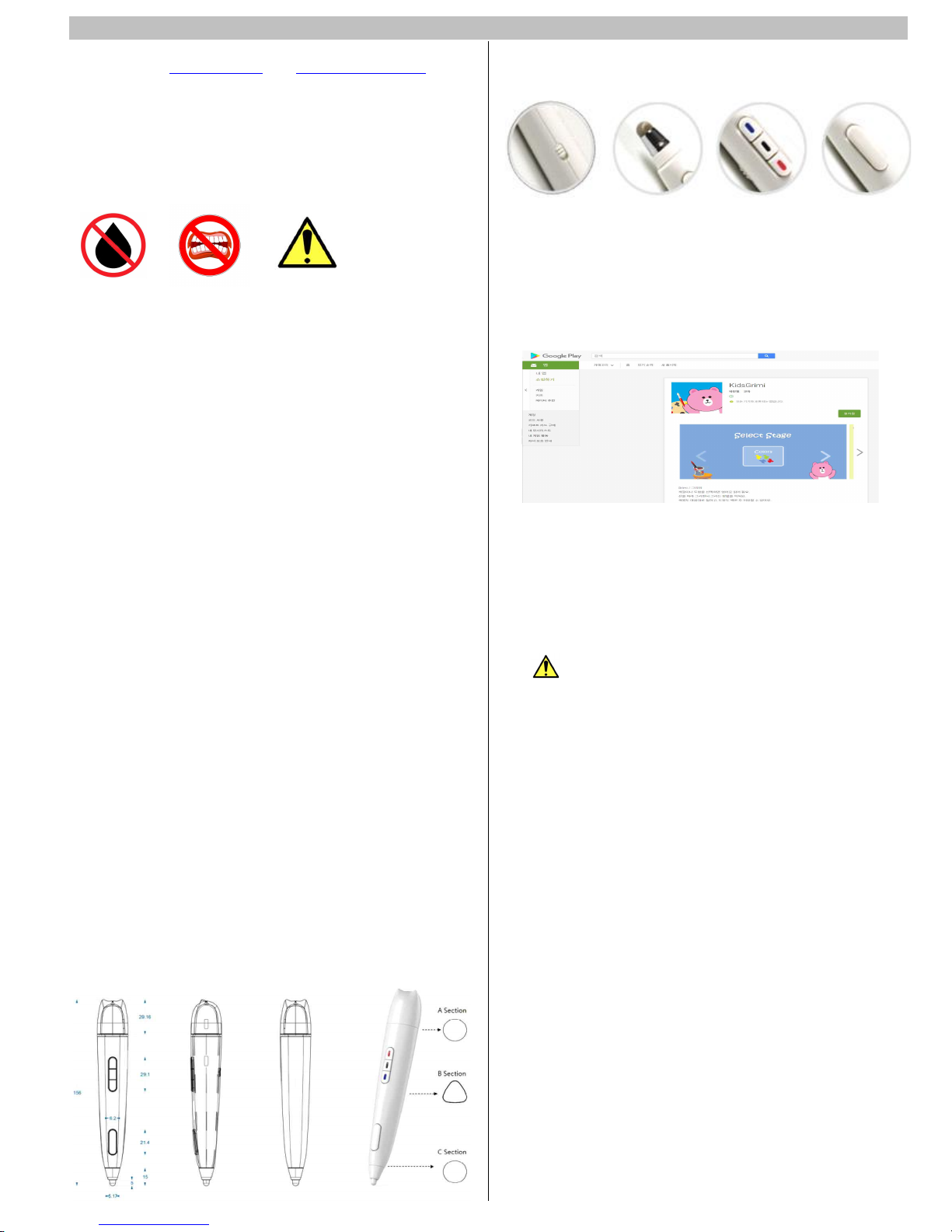
∙Precautions / Tips
Notes:
§ Keep the room temperature when using or storing the
product.
§ Do not place the product in rain or moisture.
§ If the unit emits smoke, sounds strange, smells, or
drops or breaks, turn off the power and contact
service center.
§ Do not disassemble or deform the product by force.
§ To clean the product, do not use chemicals /
flammable substances (benzene, thinner). wipe with a
soft dry cloth.
§ Do not put the product into your mouth or apply
force to your teeth.
§ When using USB for charging, use an output voltage
of 5V DC.
§ Do not dispose of it at high temperature. (It is very
dangerous in high temperature or fire above 60
degrees!)
∙제품 설명
§ Product name : Wireless Feeling Pen
§ Model name: JKP-3000
§ OS : Android 4.4+, IOS(preparing)
§ Bluetooth version : - BLE 4.1
§ Charging mode : power adapter output (DC 5V)
§ Battery : High-performance lithium polymer battery
(DC 3.7V)
§ USB Cable : 1M
§ Pen weight : 60g
§ Appearance Material: Non-toxic ABS
§ +Model Components
- USB cable, pen tip(6Ø 4EA), character
cover 1EA, user`s guide
∙Feelingen overview
∙Take control
power on/off pen tip Replacement 3-color selection Eraser button
∙Download demo content
① Access to Google Play Store
② Type “kidsgrimi” or “Art with Oringa” in the search
box
③ Install the program
∙Bluetooth connection procedure
- When It runs the program with Bluetooth on the smart
device, it automatically finds the Bluetooth of the
Feelingpen.
- When the Bluetooth of Feelingpen is found normally, the
execution screen changes to "Vibration ON".
∙ Disposal of waste electrical and electronic
products
- Garbage of parts and electronic products.
Parts or products marked with the following symbols must
not be disposed of with other wastes at the end of their
useful life. Separate the product from other wastes to
prevent environmental or personal health hazards resulting
from improper disposal of such waste. Also, in order to
ensure the sustainable and repeatable use of materials and
resources, recycle the product as requested
Contact your local retailer or related organization to
inquire about the environmental responsibility of family
users for electronic product recycling.
Company users must contact the vendor to verify the
terms of the purchase agreement. This product should not
be mixed with other commercial wastes.
∙Recharge
- Open the top of the pen by turning the lid.
- Connect the provided USB cable to the USB port to
charge it.
- Charging too long can cause the Feelingpen to fail.
- It takes about 2 hours.
- Please use only charger with rated output of 5.0V /
1.2A or less.
- Do not charge the Feelingpen with the car fast charger.
Page 3
FeelingPen User Manual JJTech. CO., LTD
* How to keep the battery
FeelingPen has a built-in lithium polymer battery. Be
sure to charge and store at room temperature (5 ℃ ~ 35
℃). Overcharge and over-discharge can shorten the
battery life. Do not charge for a long time. When not in
use, charge the battery from time to time to prevent the
battery from discharging completely.
*Battery life and exchange
Since the battery is a consumable item, the usage time
is gradually reduced. Replace with a new battery if the
usage time is less than 50% of the time of purchase or
leakage occurs. The battery will be consumed even if you
do not use the peeling pen. Even after long periods of
non-use, charge the battery before use.
- Charging may take longer if you connect it to a
computer and charge it with a USB cable.
- Battery life depends on the type of use, temperature and
duration of use.
∙Service Regulations and Explanation
A/S Service regulations :
1) Advisory Services: Users who use the product should
read carefully.
2) Replacement Service: Replacement period should be
within 7 days from the date of purchase, and any faults
that occur without artificial use should be maintained in
the condition that the product, accessories and packaging
are completed (if the appearance is not damaged). Select
Replace or Repair. You can choose when the service
center will contact you and process it.
3) Warranty Service : In the event of non-routine use
within the warranty period, we will provide warranty
service. (Can be hosted within 3 months free warranty
period, maintenance and repair charge for artificial
damage)
4) Subscription Services : Maintenance and repair charges
may occur for 2 years from the date of purchase. You
must pay a fee for the components due to maintenance,
shipping and labor costs.
* A/S Service Note:
1. The date of payment or the date of purchase invoice
can not be valid evidence of the date of production of the
product.
2. Quality issues do not include user's personal quality,
hue and other subjective differences.
3. The package is not within warranty coverage.
4. For discontinued models, the company can only repair
functions.
5. The distributor is not responsible for the company.
* To protect your rights and interests, please fill out the
form for maintenance.
Manufacturer address: 11F, 475, Dongdaegu-ro, Dong-gu, Daegu
City, 41256, Rep. of Korea
Importer:
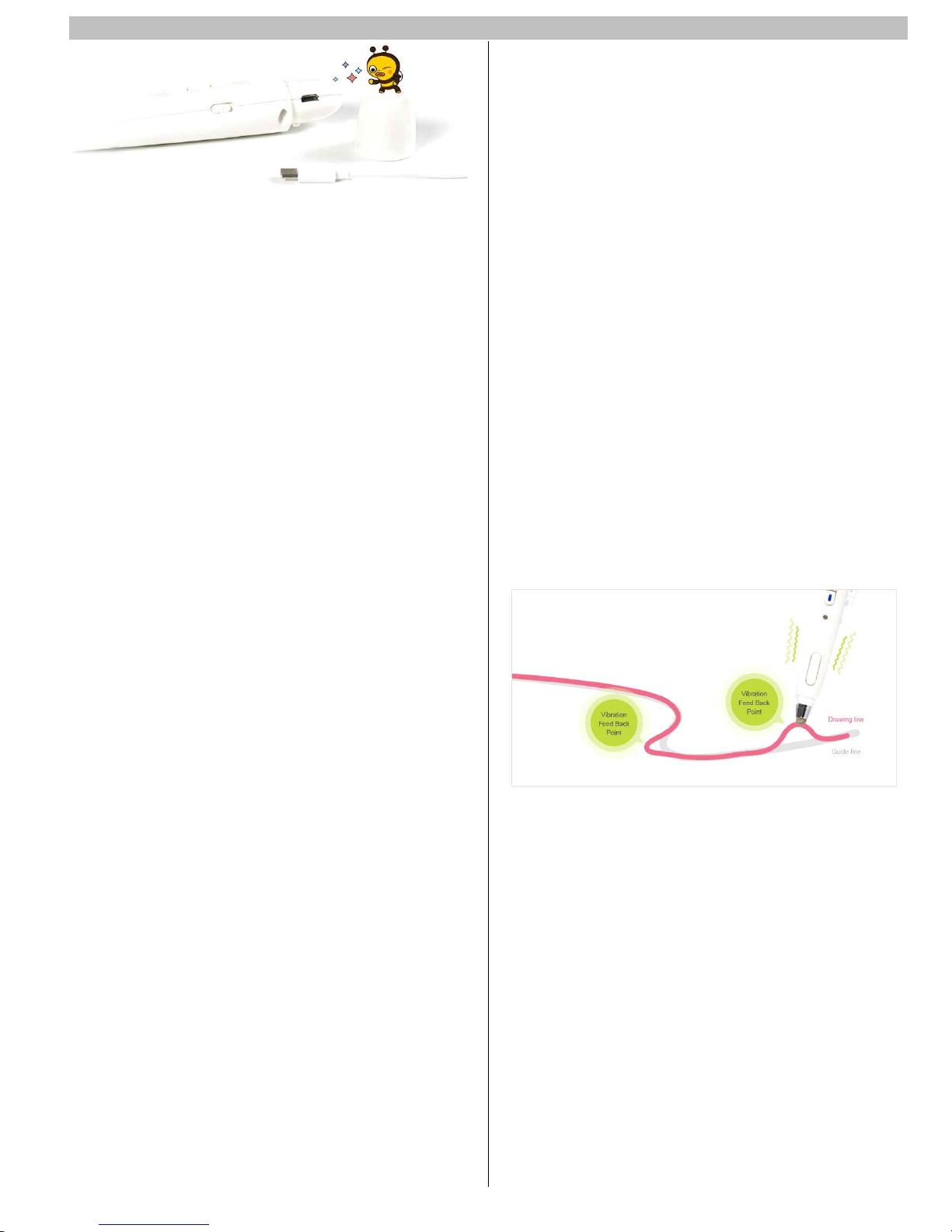
* Vibration Feed Back
Vibration Feed Back Technology changes paradigm of Digital Pen.
This Technology delivers new feeling to all peoples experiencing
visual and hearing difficulties and Olders who are risky for
dementia and basic education guide for children
∙RF Specificaton
Technology: Bluetooth Low Energy
Communication distance: 10 m
Frequency range: 2402 MHz ~ 2480 MHz
Number of Channel: 40
Output power: - 2 dBm
Operating tamp.: -10 ~ 45’C
Hardware Version: JKP-B41RGB-Ver1.0
Software Version: JKP-FARGB-Ver1.0
Page 4

FeelingPen User Manual JJTech. CO., LTD
FCC Statement
This device complies with Part 15 of the FCC Rules.
Operation is subject to the following two conditions: (1)
this device may not cause harmful interference, and (2)
this device must accept any interference received,
including interference that may cause undesired operation.
Caution
Changes or modifications not expressly approved by the
manufacturer could void the user's authority to operate
the equipment.
Note : The manufacturer is not responsible for any Radio
or TV interference caused by unauthorized modifications
to this equipment. Such modifications could void the user's
authority to operate the equipment.
FCC RF Radiation Exposure Statement:
This equipment complies with FCC radiation exposure
limits set forth for an uncontrolled environment. This
transmitter must not be co-located or operating in
conjunction with any other antenna or transmitter. End
users must follow the specific operating instructions for
satisfying RF exposure compliance.
 Loading...