

Page 1
TFT LCD Monitor : VX1500 1/8
Issued Date :
Mar 10, 2003
Ver. 3.0
d. TO :
Jinyoung Contech Co., Ltd.
Rm#501 Mario Tower, 222-12, Guro-Dong, Guro-Gu, Seoul, Korea
TEL : 82-2-890-6400 FAX : 82-2-890-6406
HOME PAGE : http://www.jyct.com/
Page :
8pages
TFT LCD MONITOR 15” USER’S MANUAL
VX1500
- With Touch Screen (Optional)
1. Introduction
VX1500 of slim shape is a TFT Monitor for the industrials which have an analog RGB signal input,
including OSD function for adjusting the optimized display screen, and touch screen, instead of using a
mouse. It is designed for the industrials which using aluminum and Steel chassis with slim type.
2. Specifications
2.1 LCD Monitor Specifications
- Display Size : 15” TFT Color LCD
- Active Area(H x W) : 304.1 x 228.1 mm
- Supporting Resolutions : Full display by zooming out on VGA/SVGA/XGA
- Driver Element : a-SI TFT active matrix
- Pixel Arrangement : RGB vertical stripe
- Display Mode : Normally white
- Surface treatment : Haze 13, Anti-glare & Hard – Coating (3H)
- Resolution : 1024 x 768 dots
- Aspect Ratio : 4:3
- Max. Colors : 16,777,216 color
- Pixel Pitch(H x W) : 0.297 x 0.297 mm
- Luminance(cd/m
2
) : Typ. 250
- Contrast Ratio : Typ. 450 : 1
- Backlight Life Time : Typ. 35,000 Hr
- Viewing Angel : Typ. Hor. 65°/65°, Ver. 50°/60°
Page 2
TFT LCD Monitor : VX1500 2/8
- Response Time(ms) : Typ. 2.5(R)/9.5(F)
- Screen Adjustment : OSD (On Screen Display) include Auto Adjustment compliant
- Mount Type : Panel Mount & Wall Mount & Stand Type & VESA Standard ARM Mount
- Supporting Analog R.G.B signal (Analog VGA) input
- Chassis Material : Front - Aluminum, Rear – Steel
- RGB Input : 0.7Vpp±10%, 75 Ohms
- Input Rating : AC 100-240V @ 0.8-0.4A, 50/60Hz or DC 12V @ 2.3A
- Ampere requirement : AC 100V @ 0.8A, AC 200V @ 0.4A, DC 12V @ 2.3A
- Power requirement : 30W
- Power Consumption : Max. 30W
- Power Saving Mode : Less than 3W
- Storage Temperature : -20 ~ 60°C(-4~140°F)
- Operating Temperature : 0 ~ 50°C(-32~122°F)
- Storage Humidity : 5 ~ 90% RH, non-condensing
- Operating Humidity : 20 ~ 90% RH, non-condensing
- Operating Altitude : 10,000 Feet
- Dimensions(W x H x D) : Without Power Type ; 372 x 296 x 44.5 mm
- Weight : Net ; 5.0 kg, Gross ; 7.3 kg
- Refresh Rate : Max. 1024 x 768 @ 75Hz (60Hz for optimal display)
- Main Frequency : Max. 94.5 MHz
- Frequency : Hor. 31.5 ~ 60 kHz, Ver. 56 ~ 85 Hz
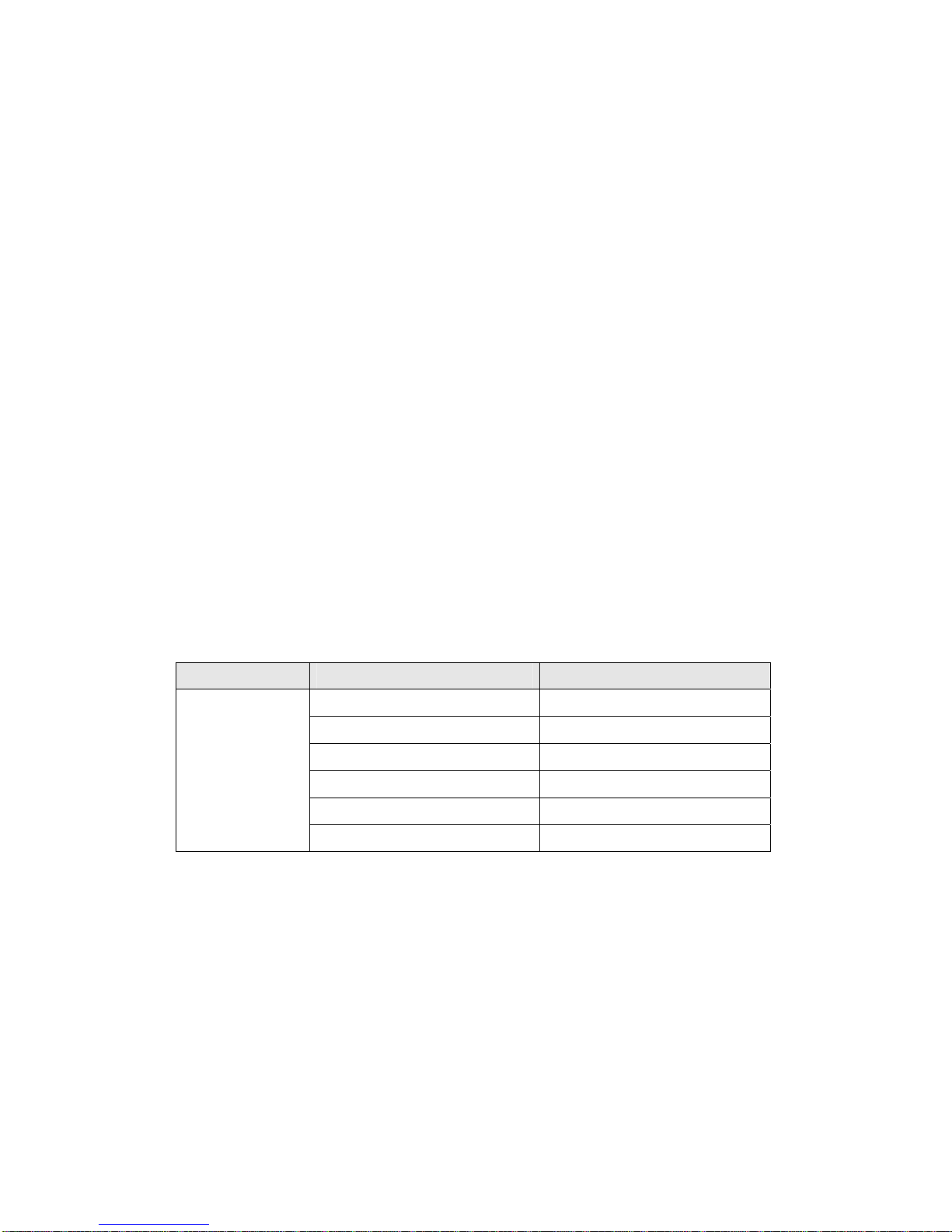
- Compatibility of Vertical Frequency
PC MODE Vertical Frequency (Hz)
640 x 480 60 / 72 / 75 / 85
800 x 600 56 / 60 / 72 / 75 / 85
1024 x 768 60 / 70 / 75 / 85
DOS 640 x 350 70
DOS 640 x 400 70
IBM
compatibles
DOS 720 x 400 70
Page 3

TFT LCD Monitor : VX1500 3/8
2.2 Touch Screen Specifications (Option)
- Touch Screen Type : Analog Resistive 8-Wire Type
- Touch Screen Controller Interface : Serial (RS-232)
- Touch Screen Drivers : MS-DOS, Windows 3.1/95/98/ME/NT/2000/XP/2003, Linux
- Drift compensation for fluctuations in the temperature and humidity
- Antiglare scratch resistant finish
- Gloved or Ungloved finger or Stylus activation
- Chemically strengthened glass backing panel
- Optically bonded buffer layer
- Transmittance : Typ. > 74%
- Durability : Point Activation Typ. 1,000,000
Gouge Hardness 4H per ASTM D3363-92a
Note : These specifications are subject to change for up-date without notification
Page 4
TFT LCD Monitor : VX1500 4/8
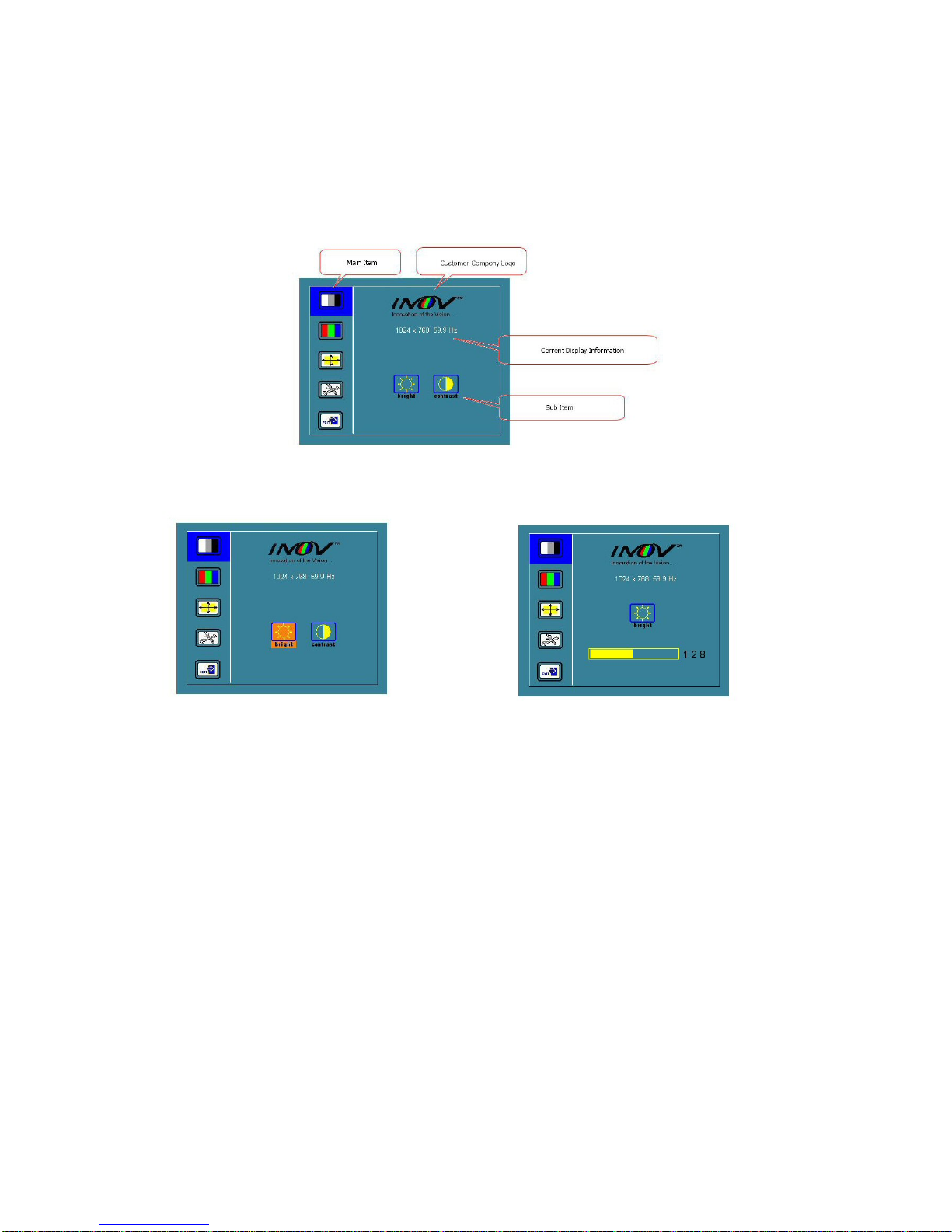
3. OSD Functions
Selected Menu Button :
Selected SEL Button: Selected Sub item:
Page 5
TFT LCD Monitor : VX1500 5/8
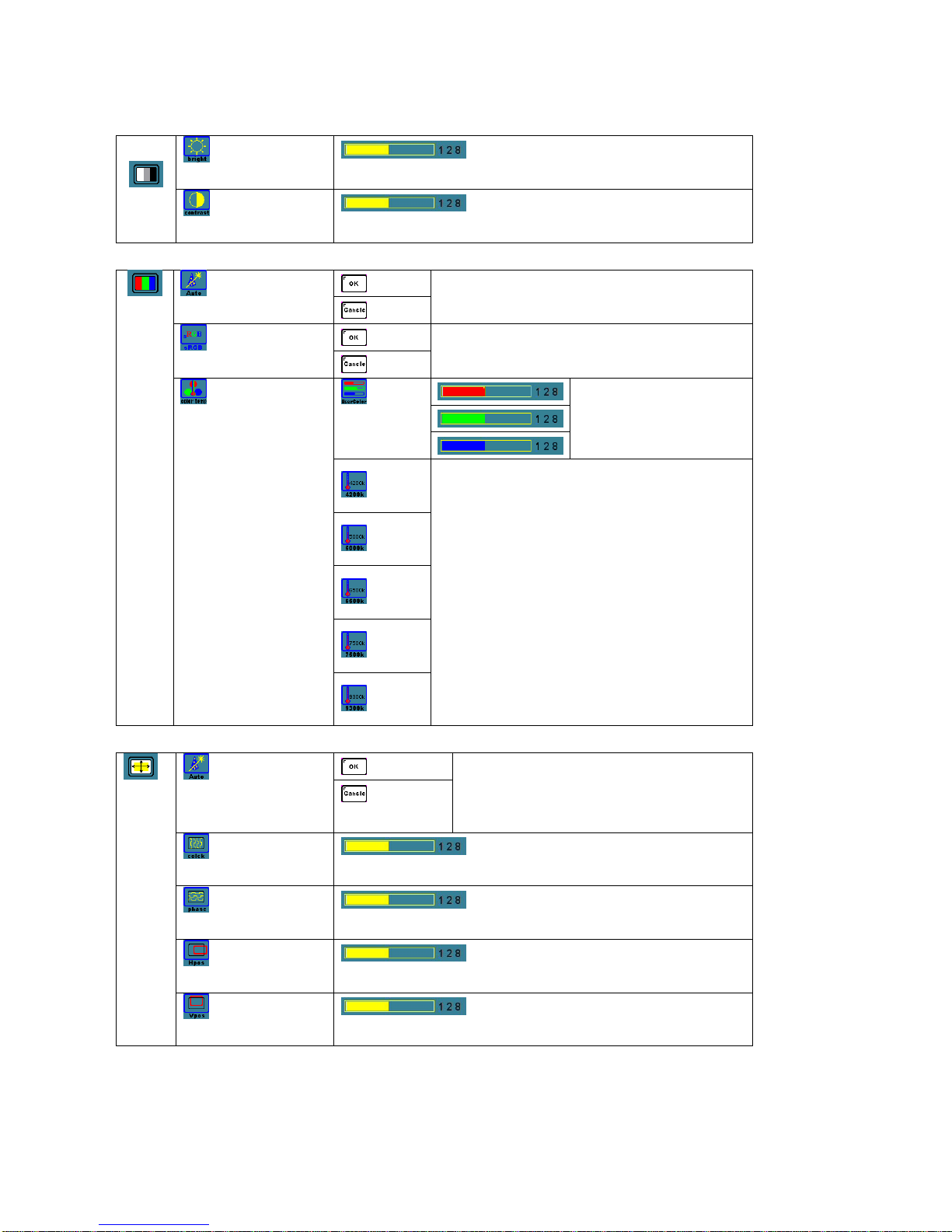
3.1 Brightness & Contrast
Brightness Item
Adjust Panel Brightness Level.
Contrast Item
Adjust Panel Contrast Level.
3.2 Color Control
Color Adjust Item
Adjust Color Level automatically. If the image adjusted is
good, select "ok" or not, select "cancel" and adjust again.
Super RGB Item
Setting up s-RGB mode.
Automatic adjustment for Color Level.
User can adjust warmness as
users please.
4200K
5000K
6500K
7500K
Color Temperature Item
9300K
Adjust the warmness of the image displayed.
The higher temperature the coolest image looks like.
The lower temperature the warmest image looks like.
3.3 Image Control
Image Auto Adjust Item
Auto adjustment H,V Position of image and Clock &
Phase. If the result adjusted is good, select "ok" or not,
select "cancel" and adjust again
H-T otal Adjust Item
Adjust increase/decrease image of horizontal size
Phase Adjust Item
Adjust data sampling position of image.
H-Position Adjust Item
Move the image horizontally.
V-Position Adjust Item
Move the image horizontally.
Page 6
TFT LCD Monitor : VX1500 6/8
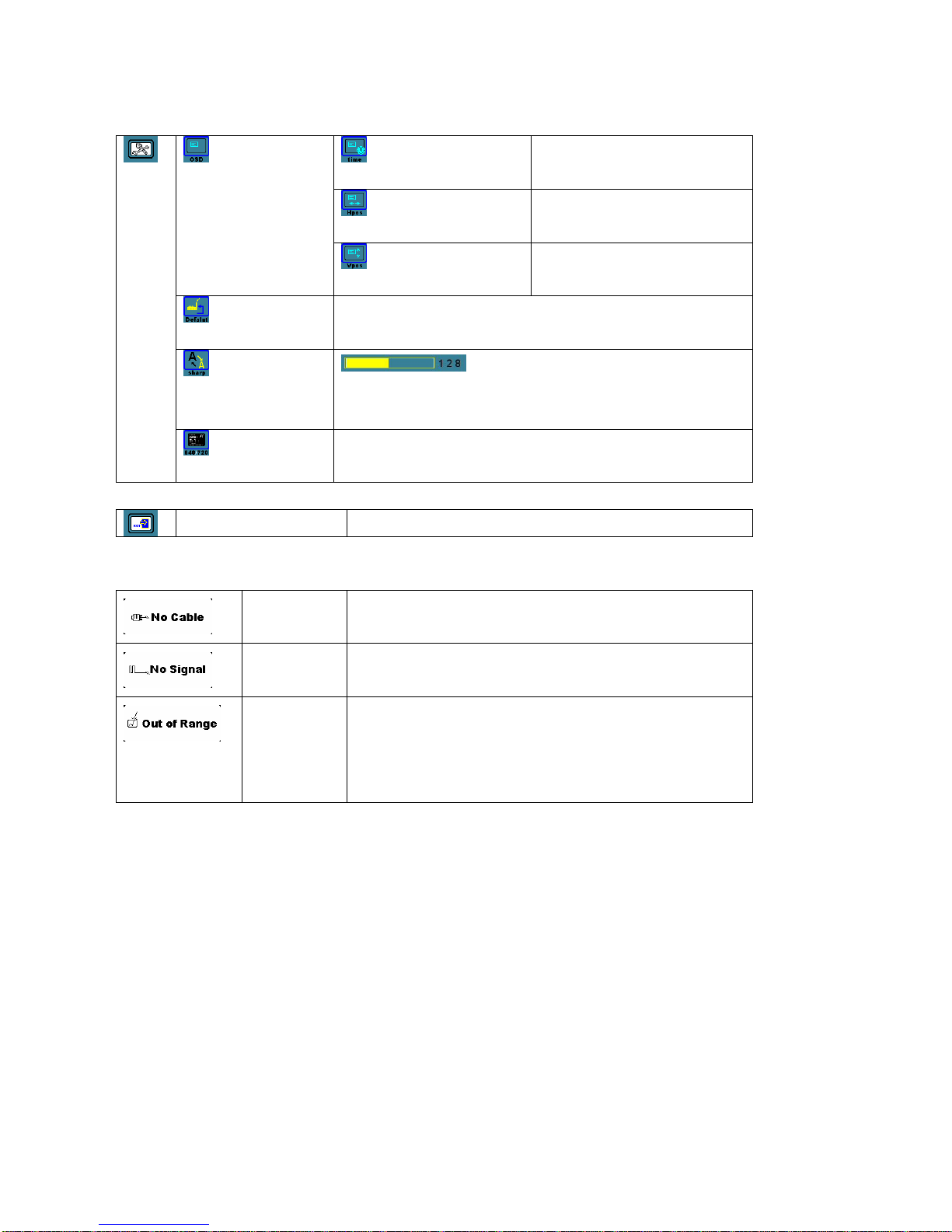
3.4 OSD utility
OSD Display Time Adjust Item
Adjust OSD display time.
OSD H-Position Adjust Item
Move the OSD menu horizontally.
OSD Adjust Item
OSD V-Position Adjust Item
Move the OSD menu vertically.
User Value Initial Item
Reset user’s value
Image Sharpness
Adjust Item
Adjust sharpness of the image.
DOS Mode Select Item
Adjust Dos screen resolution to 640 x 400 or 720 x 400
Menu Exit Item OSD Exit
3.5 Warning Message
No Cable
In case of not connected PC VGA Cable with A/D Controller, the
message “No Cable ” is displayed.
No signal
If there is no PC VGA Signal(R,G,B H-SYNC, V-SYNC), the
message “No Signal ” is displayed.
Out of Range
In case of detecting the mode (resolution) that cannot be totally
supported by LCD.
In order to remove the phenomenon, it should be adjusted into the
mode (resolution) that can be supported by LCD.
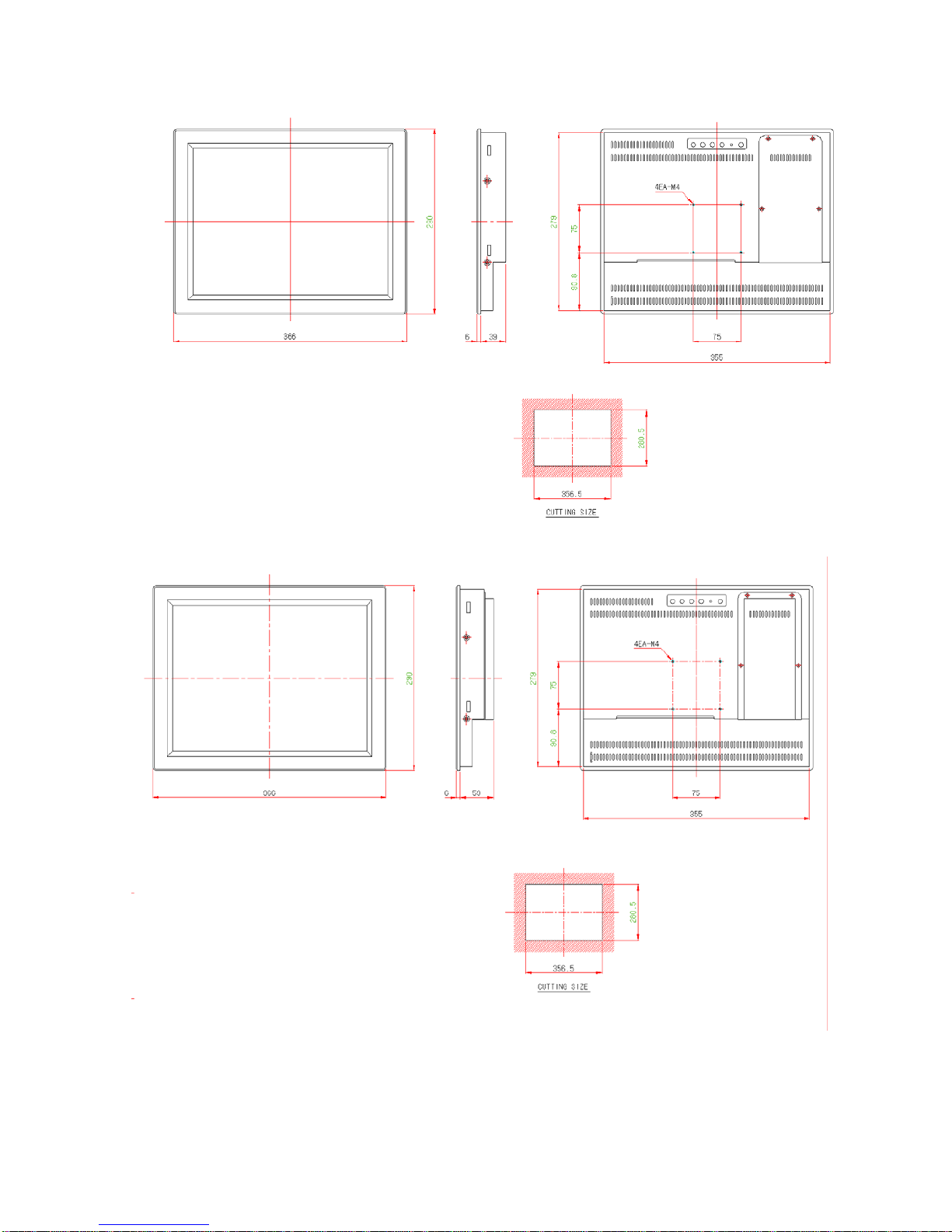
4. Dimensions Introduction
Page 7
TFT LCD Monitor : VX1500 7/8
* No power Type
* Power Type
Page 8

TFT LCD Monitor : VX1500 8/8
Appendix
1. Packing List
y LCD Monitor
y LCD Monitor Manual
y AC Power Inlet Cable or AC Adapter
y VGA Cable
y Supporters, 4PCS
y Touch Cable (Optional)
y Touch Screen Install Diskette (Optional)
y Touch Screen User’s Manual (Optional)
 Loading...