

Page 1
V1.0
○
A
○
B
○
C
○
G
○
H
○
D
○
A
Magnet inside
○
B
Clamp Film
○
C
Connecting LED
○
D
On/Off Switch
○
E
Indicator LED
○
F
Micro USB Power Port
○
G
Pen Tip
○
H
Pen Cap
○
E
○
F
Electronic tablet
701
VitalASC VisNote Stylus Pad User Manual
VitalASC VisNote Stylus Pad :
Package included
Page 2

V1.0
VisNote Stylus Pad
VisNote Stylus Pen
Micro USB Charger Cable
VisNotes Book(A5 size X 20 Pages)
User Manual
Adaptive Operation System
Windows (10X is recommended), iMac
Wireless Connecting
BlueTooth 3.0
Available time
Continuous Use : 12 Hours
Standby : 360 Days Max.
Charging time
USB +5V / 1 Hours
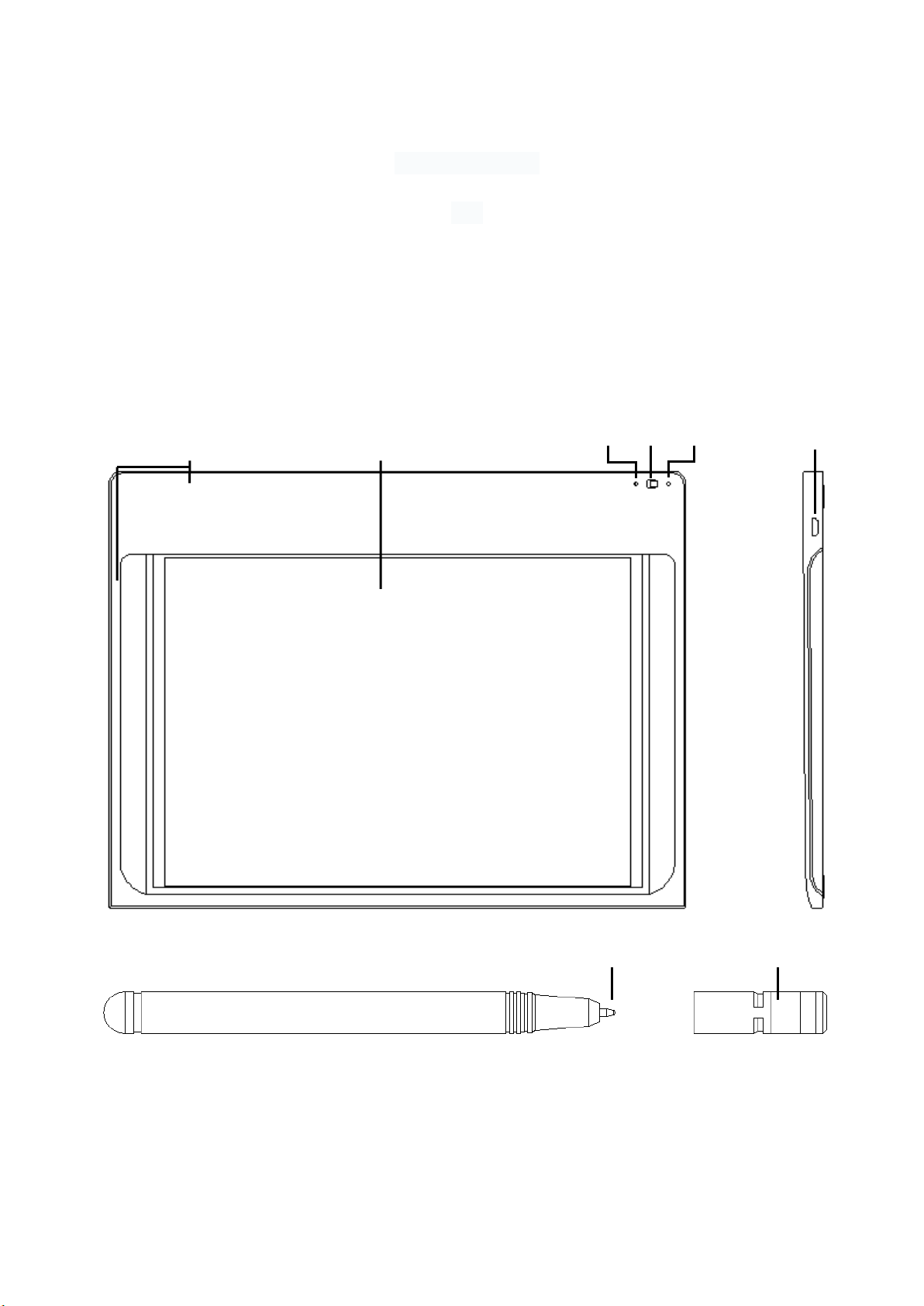
The Function of Related Parts:
A
○
Magnetic Inside
Attracts the Pen Cap on Two Different Place. This Allows the Pen to Be Caught by Pad.
B
○
Clamp Film
Locate the Vis Note Book upon the Film and Clamp the Final Page of the Book.
This Device Will Limit the Book onto the Pad and Easy to Write on the Note.(*1)
C
○
Connecting LED
Flash Blue – Means Bluetooth is Searching for Connecting.
Go out When Connected.(*2)
Blue – Means No Connected, Please Power On again to retry.
D
○
On/Off Switch
Left – Turn off the Power.
Right – Turn on the Power. Bluetooth will Begin to Search for Connecting.
E
○
Indicator LED
(1) Blue – Means Power on.
(2) Red – Means Power is Charging. Change to Blue When Power is full.
(3) Flash Red – Means Need to be recharged.
F
○
Micro USB Power Port
Use the Micro USB Cable to Charge.(*3).
G
○
Pen Tip
Pen with Ink. Can be exchanged to another Refill with a Clamp. (*4)
H
○
Pen Cap
Protect the Pen Tip, Can be Attracted by a Magnet.
*1 : Please Do not Write on the Clamp Film Directly with Vis Note Stylus Pen.
Do Place a Paper or Vis Note Book on it and Write on the Paper.
*2 : This Pad will Remember the Last Device Which Have Been Connected.
Next Time it will connect to the Last Device Immediately.
If Wish to Connect to Another Device, Please Close the BT of the Last Device at First.
If have Connected to Another Device, And Wish to Connect to the First Device,
Please Remove the Pad Item from the BT Menu of the First Device then Re-connect.
*3 : This Port is for Charging Only, It can not Transfer the Stylus Data to Computer.
*4 : Can Buy the Refill from the Internet. “Bamboo Spark/Slate/Folio Refill”
*5. This product is connected to the computer via Bluetooth and can draw pictures, normal use is
generally placed next to the computer, belonging to mobile devices
Page 3

V1.0
Customer Service
This device complies with part 15 of the FCC Rules. Operation is subject to the condition that this device does
not cause harmful interference (1) this device may not cause harmful interference, and (2) this device must
accept any interference received, including interference that may cause undesired operation.
Any changes or modifications not expressly approved by the party responsible for compliance
could void the user's authority to operate the equipment.
NOTE: This equipment has been tested and found to comply with the limits for a Class B digital device,
pursuant to Part 15 of the FCC Rules. These limits are designed to provide reasonable protection against
harmful interference in a residential installation. This equipment generates, uses and can radiate radio
frequency energy and, if not installed and used in accordance with the instructions, may cause harmful
interference to radio communications. However, there is no guarantee that interference will not occur in a
particular installation.
If this equipment does cause harmful interference to radio or television reception,
which can be determined by turning the equipment off and on, the user is encouraged to try to correct the
interference by one or more of the following measures:
-- Reorient or relocate the receiving antenna.
-- Increase the separation between the equipment and receiver.
-- Connect the equipment into an outlet on a circuit different
from that to which the receiver is connected.
-- Consult the dealer or an experienced radio/TV technician for help.
To maintain compliance with FCC’s RF Exposure guidelines, This equipment should be installed and operated
with minimum distance between 20cm the radiator your body: Use only the supplied antenna.
FCC ID: 2AFNZ-701
 Loading...