

Page 1
Portable Power Station
User Manual
V4
403
Wh
V6
622
Wh
V10
1036
Wh
Page 2
IMPORTANT
SAFETY
INSTRUCTION
Do not operate or store the jeri portable power station in a
wet environment such as rain, snow, high humidity
location or any place where could cause water ingress.
Do not clean the jeri portable power station with direct
water, wet towel, or harsh chemicals.
Do not operate or store the jeri portable power station
close to a heat source such as open flames, stoves or other
device which can produce heat.
Do not cover or wrap the jeri portable power station while
it is operating. Use the product in a ventilated space.
Do not expose the product to mechanical shocks such as
dropping, crushing, or puncturing the unit.
Do not disassemble or repair the jeri portable power
station by any unauthorised person or organization.
Incorrect disassemble may cause electrical jolts, explosion,
or fire.
Do not insert foreign objects through the output ports,
input ports or ventilation holes.
Read all instructions
before use this product to
avoid personal injury and
property damage.
Keep the device out of reach of children. If being used by
children, an adult must supervise the application.
Keep the product sitting at a stable horizontal position if it
is not operating or stored on the ground. Be mindful that
children and adults could get injured if the unit drops onto
the human body from a certain height.
Keep the unit dry and clean especially for the charge
and discharge ports. Use a dry cloth to clean the units if
needed.
Connect and operate the device according to the manual.
Misusing or incorrect connections to the jeri portable
station may cause electrical shock or damage to itself and
other devices.
Your jeri portable power station might become warm
during its operation. It is not suggested to use the product
under the direct sunlight when it is a hot weather over 40
degrees Celsius.
In the unlikely event of leakage or explosion, sand or a
chemical fire distinguisher could be used.
It is suggested to recycle or dispose the jeri portable
power station which is a battery product according to the
local guidelines.
This product is not intended to be used to power up high
power consumption equipment related to personal safety,
such as medical equipment, nuclear facility equipment,
CPAP (Sea Pap).
Page 3

Index
- Portable Power Station -
Items Included
Product Information
First-time Charge
Charging Methods
How to Use Your jeri
Store and Care Your jeri Portable Power Station
Specifications
Troubleshooting
Warranty and Registration
4
5
5
6 - 7
8 - 9
9
10
11
12 - 15
Safety Signal – Activate SOS (Light)
Double click the LED light ON/OFF Button to turn on the SOS light mode.
Further press one more time to turn the SOS light mode off.
User Manual / V1.0
3
Page 4
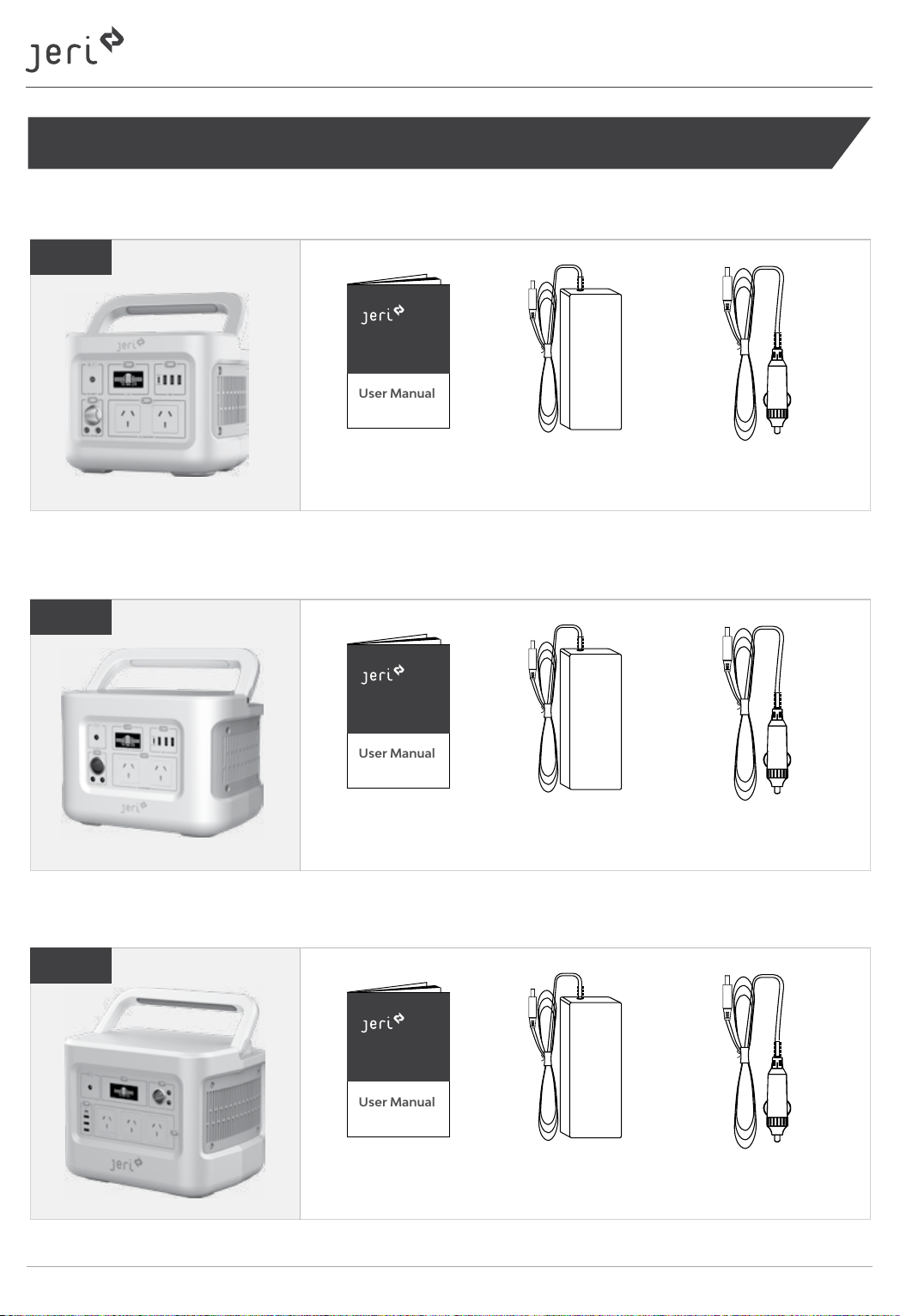
Items Included
User Manual
User Manual
User Manual
jeri - Portable Power Station V4
V4
- Portable Power Station -
User Manual
jeri - Portable Power Station V6
V6
User Manual
jeri - Portable Power Station V10
AC Power Adapter
AC Power Adapter
Car Charging Cable
Car Charging Cable
V10
4
User Manual
AC Power Adapter
Car Charging Cable
User Manual / V1.0
Page 5
Product Information
- Portable Power Station -
6
2
3
4
5
7
8
91
10
11
12
13
14
15
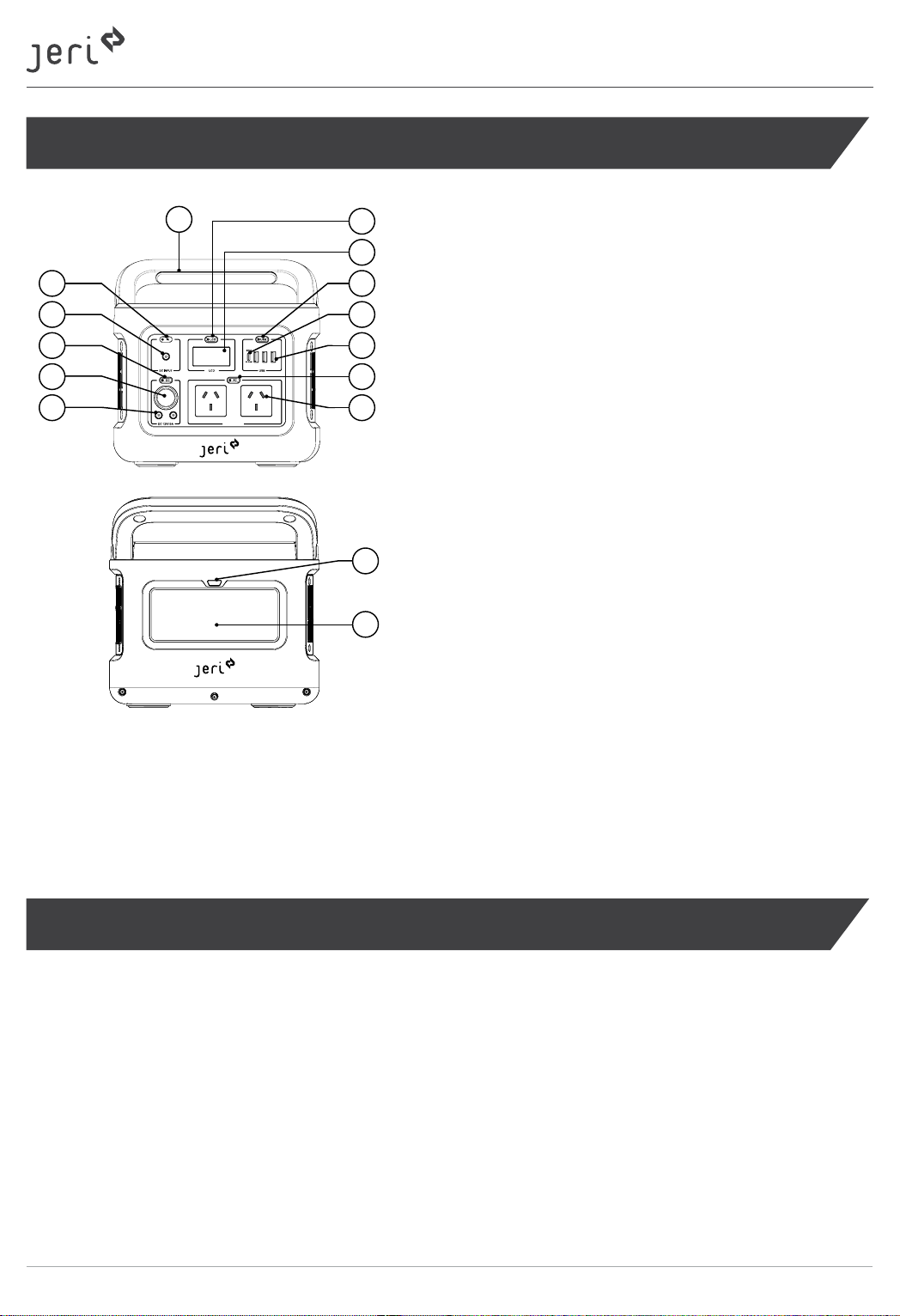
1. Input Power LED
2. DC Input Port
3. DC Output Ports ON/OFF Button
4. 12V DC Output Car Port
5. 12V DC 5525 Output Ports
6. Collapsible Handle
7. LCD Screen ON/OFF Button
8. LCD Screen
9. USB Output ON/OFF Button
10. USB-C PD Input/Output Port
11. USB A Output Ports
12. AC Output Ports ON/OFF Button
13. 230V AC Output Ports
14. LED light ON/OFF Button
15. LED Light
Note:
jeri V4 and V10 product will look different but the buttons and functions are the same.
The first-time Charge
Make sure your jeri portable power station have been fully charge before your use it for the first time.
Note (Charging):
When it is charging, the battery sign on the LCD will flash and input power will be shown. When fully
charged, battery sign on the LED will have four solid green lines and the battery power percentage will
show 100%. The charger can be removed after being fully charged.
User Manual / V1.0
5
Page 6
- Portable Power Station -
Charging Methods
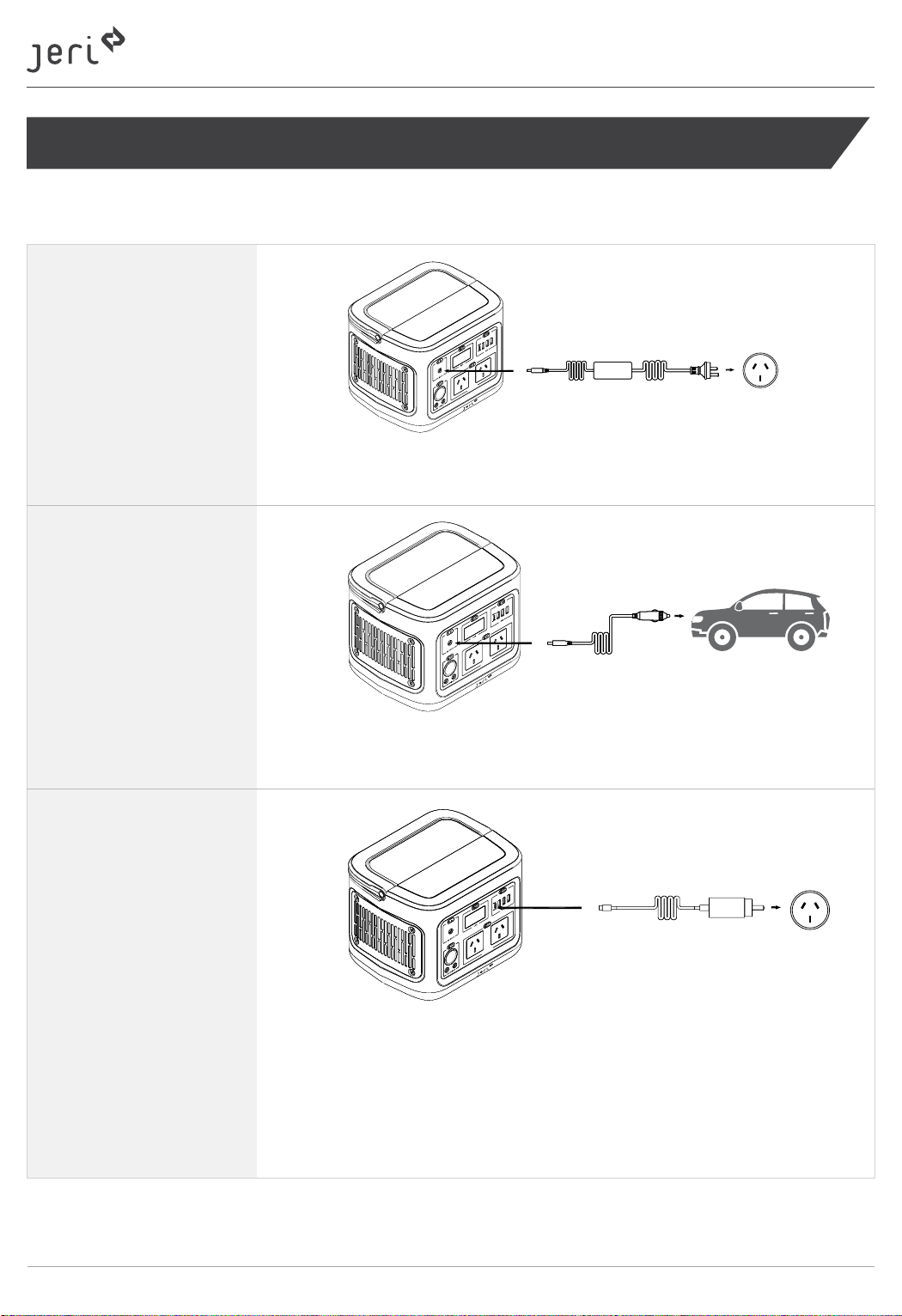
The jeri portable power station can be charged through the following 4 methods.
AC power adapter
Connect the jeri portable power station with an AC socket through
the AC charging adapter as the picture above.
Car Charger
USB-C Cable
*USB-C cable required.
Connect the jeri portable power station to the 12V output in the car
through the car charging cable as the picture above.
Connect the jeri portable power station USB-C port with a power
source through a USB-C cable. Charging can start at both ON and
OFF state of the Output ON/OFF Button.
Note:
A USB-C cable is not included in this package as an accessory.
6
User Manual / V1.0
Page 7
- Portable Power Station -
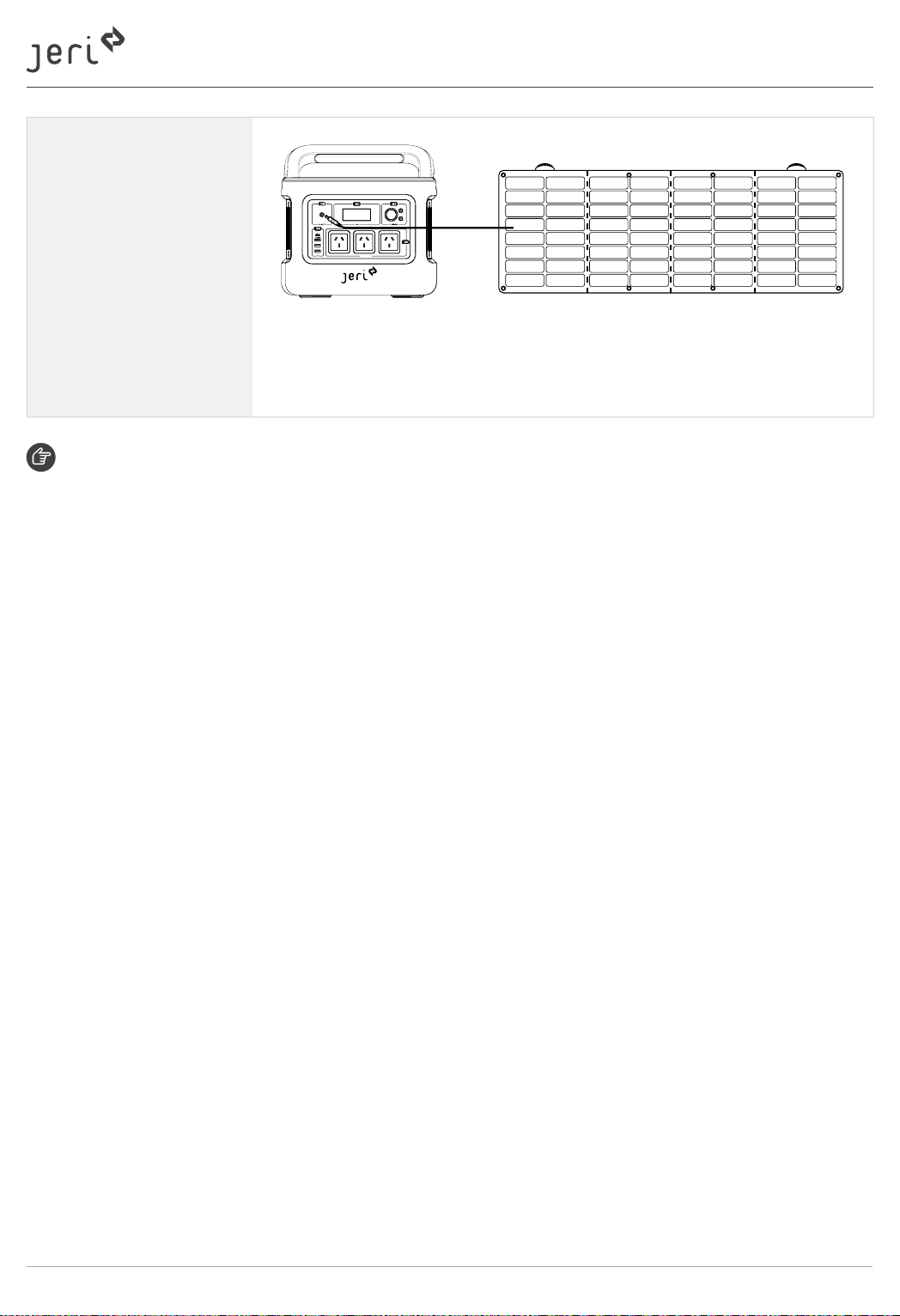
Solar Panel
*Optional accessory
Connect the jeri portable power station to the a portable solar panel
which is an optional accessory through the charging cable from the
solar panel as the picture above.
Fast Charge
You can use a combination of charging ports to boost the input power for the jeri.
The combination charge methods can be as below,
• USB-C + AC power adapter
• USB-C + Car charger
• USB-C + Solar panel
User Manual / V1.0
7
Page 8
- Portable Power Station -
How to Use Your jeri
DC and AC Output
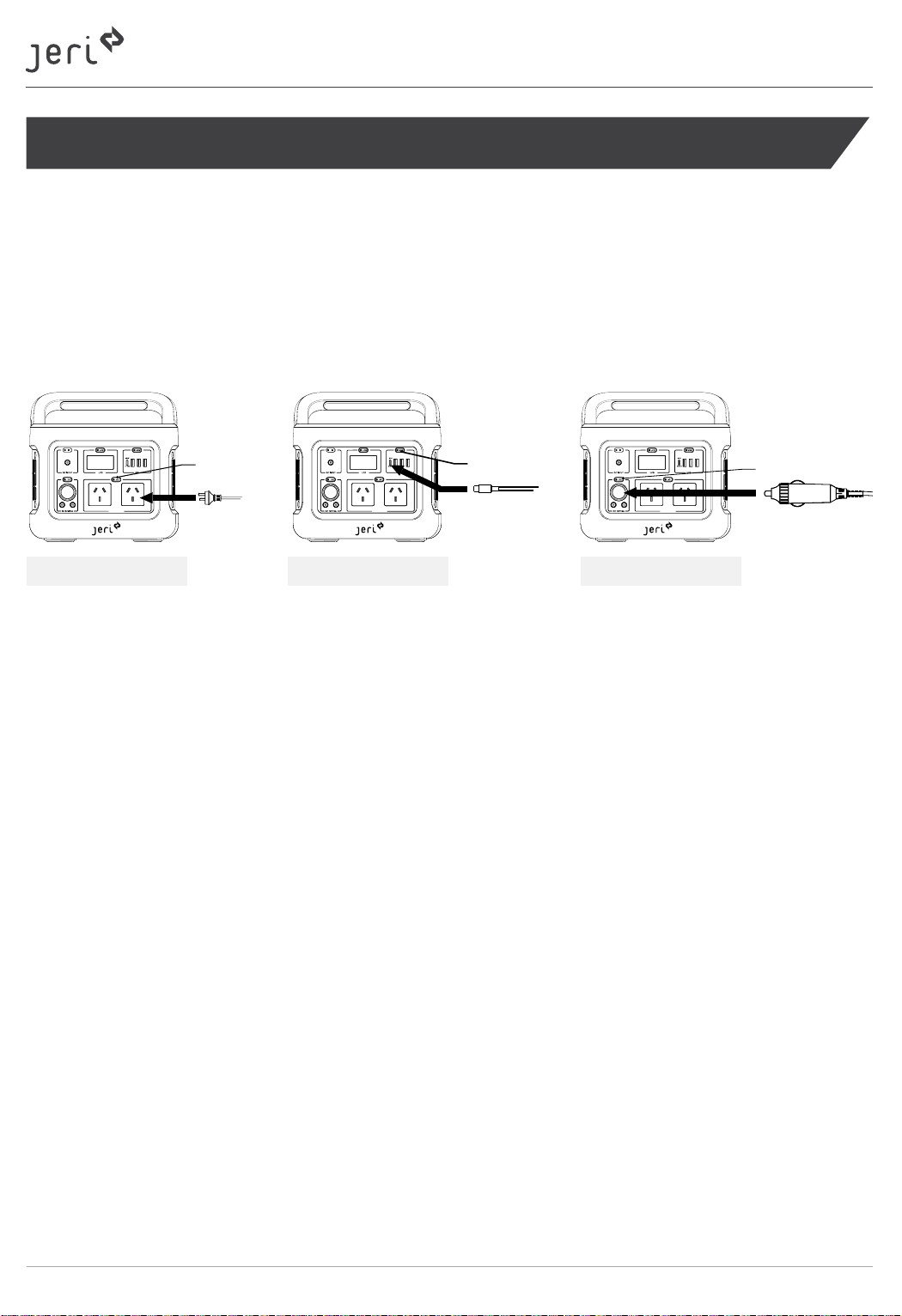
The jeri can be used to power up a variety of electrical appliances through its DC and AC output ports.
It will start to power up your device after pressing the corresponding ON/OFF button to an ON state as
pictures shown below.
If possible, keep your jeri connected to a power source when it is not in use. You can use your jeri as
normal while charging it.
AC Button
AC Port Output USB Port Output Car Port Output
Notes:
To save power, the jeri will be automatically turned off if no output is connected for 3 hours. (This is a default 3 hour
sleep timer)
The input and output of the USB-C are not controlled by the USB button. The USB-C port can work in both ON and
OFF state of the USB button.
USB Button
DC Button
LED Light
Press the LED light ON/OFF Button one/two/three times for switching between the LED light’s
20% / 50% / 100% brightness. Further press the LED light ON/OFF Button for the fourth time to turn off
the LED light.
8
User Manual / V1.0
Page 9
- Portable Power Station -
Store and Care Your jeri Portable Power Station
For Daily Use and Short Trips
Connecting your jeri to a power source when not using. This will prolong the battery life and ensure
the power station is always in a ready-to-use state. Keep it at a dry and in a cool environment and
avoid any place where close to an open flame.
For Long-term Maintenance
Follow steps above and charge the battery every 3 month to ensure the battery life.
Please note that keeping the battery at a low or empty level for a long period can cause damage to the
battery life and its peak capacity.
User Manual / V1.0
9
Page 10
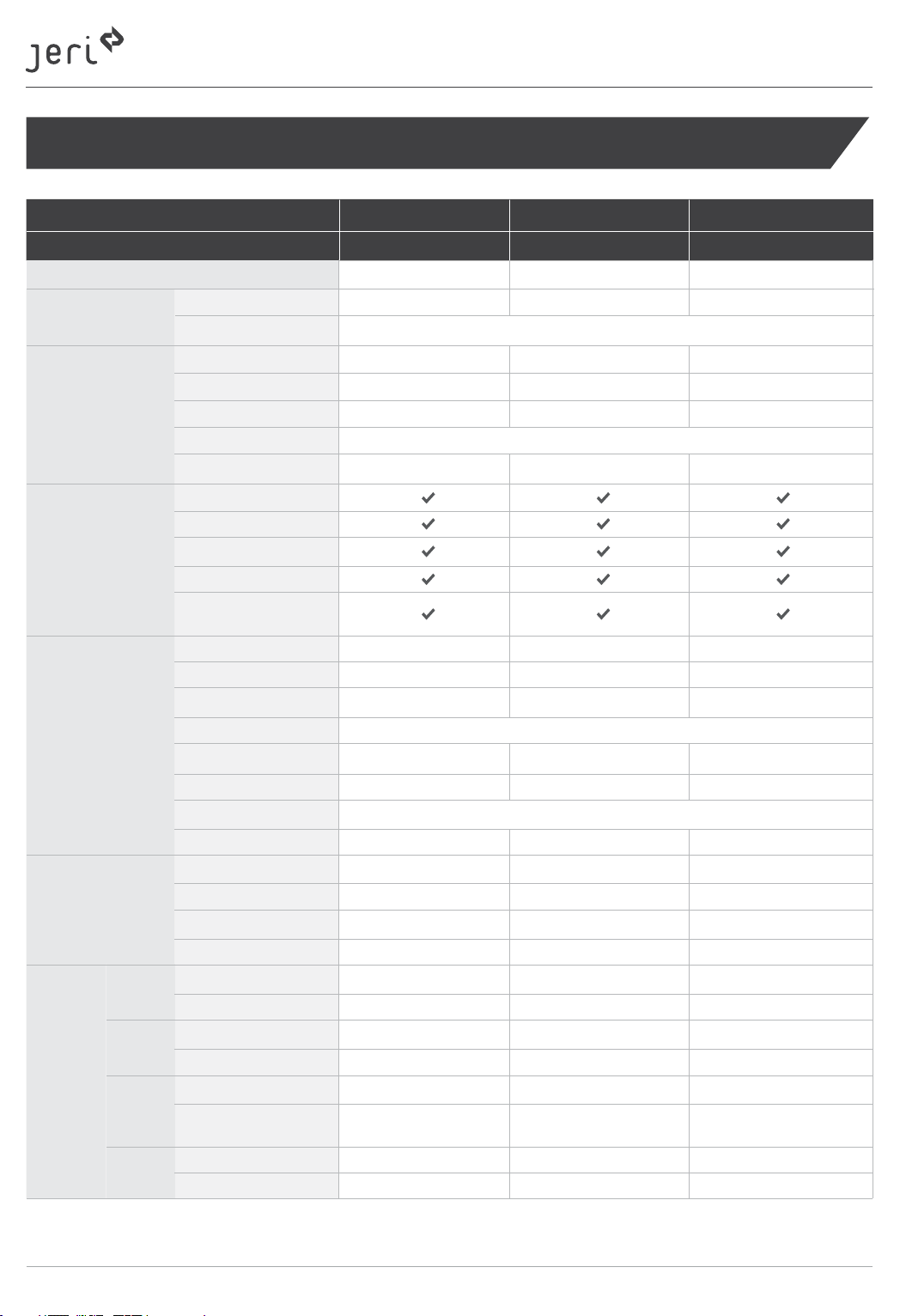
Specifications
Product Name V4 V6 V10
Model No. JER-400-PP-A1 JER-600-PP-A1 JER-1000-PP-A1
Capacity 403Wh 622Wh 1036Wh
Input ports
Output Ports
Protection
Basic Info
Charge
DC
Output
AC
Output
Dischagre
USB A
Output
USB C
Output
DC5525 1*120W 12~24V 1*120W 12~24V 1*180W 12~24V
USB C PD 1x 100W 5V 3A/9V 3A/12V 3A/15V 3A/20 V5A
Car port 1*13.3V 10A 1*13.3V 10A 1*13.3V 10A
DC 5525 2*13.3V 10A 2*13.3V 10A 2*13.3V 10A
USB A
USB C PD
AC Output
Short circuit protection
Overcurrent protection
Overcharge protection
Low voltage protection
Over temperature
protection
Weight 4.8kg 6.8kg 11.2kg
Dimensions 244.5*188*200mm 290*210*205mm 377.5*232*230mm
LED light 3W (Max) 3W (Max) 3W (Max)
Operating Temperature 0°C ~ + 40°C for charge, -10°C~ + 40°C for discharge
Operating Humidity 20% - 90% RH 20% - 90% RH 20% - 90% RH
Life Cycle Around 500 Around 500 Around 500
Certification FCC, UL2743, UN38.3, PSE, RCM
Warranty 12 months 12 months 12 months
AC port 4.5 Hours 7 Hours 6 Hours
USB C 4 Hours 6.5 Hours 10.5 Hours
Car Port 3.5 Hours 5.5 Hours 8.5 Hours
Solar Panel (120W) *
Car Fridge (60W) 6 Hours 9 Hours 15 Hours
Drone (50Wh) 7 Recharges 11 Recharges 19 Recharges
32-inch TV (40W) 9 Hours 14 Hours 24 Hours
Laptop (62Wh) 6 Recharges 9 Recharges 15 Recharges
Smartphone (4352mAh) 22 Recharges 35 Recharges 55 Recharges
Motion Camera
(1180mAh)
Smartphone (3227mAh) 30 Recharges 48 Recharges 80 Recharges
Laptop (49.9Wh) 7 Recharges 12 Recharges 19 Recharges
- Portable Power Station -
3*5V 2.4A 3*5V 2.4A 3*5V 2.4A
1x 100W 5V 3A/9V 3A/12V 3A/15V 3A/20V 5A
2*230V 400W, 800W Max 2*230V 600W, 1000W Max 3*230V 1000W, 2000W Max
1
4~8 Hours 6~10 Hours 9~13 Hours
90 Recharges 140 Recharges 230 Recharges
The charging time might be varied based on the weather. A longer charging time might be required if it is a cloudy
*1
or rainy day.
10
User Manual / V1.0
Page 11
- Portable Power Station -
Trouble Shooting
Charging issue with the jeri (Input)
Check if the charging cable is correctly connected jeri PPS to the power source and the power
source switch is at ON state.
Using an alternative charging method to verify if the problem is from the cable or the jeri.
For example, if you are using an AC adpaper to Charge your jeri, try a USB-C cable to charge it to
test whether the jeri is allowing to charge.
In the event of an error Code – Check the table below on the LCD.
jeri power (Output)
Check if the cable is connected correctly.
Make sure the corresponding ON/OFF button is at ON state.
Check if the jeri still has power. If not, please charge your jeri. You can still use it while charging.
Check if the rate of power of connected device is higher than the rated output of the jeri.
If yes, the jeri cannot power up this device.
Check if any of the error codes in the table below is on the LCD.
Error Codes
Output Overload Protection: The symbol will flash for 5 seconds when an AC output overload
condition is detected. In this situation, please disconnect all cables and reduce the number of devices
which to be connected to your jeri Poratble PPS.
Input Overvoltage Protection:
The symbol will flash for 5 seconds when
an input overvoltage condition is detected.
In this situation, please disconnect all
cables and reconnect them when the jeri
PPS goes back to the normal operation
condition.
Low Temperature Alarm:
This low temperature symbol will be displayed if the power station is attempted to
be used outside the allowable operating
temperature.
Please only use your jeri PPS at where is
within its operating temperature range.
Low Power Alarm:
The symbol will flash when the power
station battery capacity is less than 3%.
In this situation, please connect jeri PPS
to a power source.
High Temperature Alarm:
This high temperature symbol will be
displayed if the power station is attempted to be used outside the allowable
operating temperature.
Please only use your jeri PPS at where is
within its operating temperature range.
Please contact our technical team through the below email if you still experience an issue with your jeri PPS.
E: [email protected] | T: +61 03 9239 8088 (Menu > Service)
User Manual / V1.0
11
Page 12
- Portable Power Station -
Warranty and Registration of Your jeri Portable Power Station
Warranty Registration and Terms and Conditions
Congratulations on choosing your jeri by Clenergy. To ensure that you get the best performance from
your purchase please read the following warranty terms and conditions, complete the registration form
and keep it for your records.
Alternatively, Please go to www.clenergy.com.au/solution-centre/service-centre/ and create your
profile and attach purchase details to your account.
If any problems arise, please contact the company or outlet you purchased your product from.
Please retain a copy of the warranty registration form and proof of payment for any future warranty
claim.
12 Months Limited Product Warranty
Our goods come with guarantees under the Australian Consumer Law. You are entitled to a replacement or refund for a major failure and for compensation for any other reasonably foreseeable loss or
damage. You are also entitled to have the goods repaired or replaced if the goods fail to be of
acceptable quality and the failure does not amount to a major failure.
The benefits given by this warranty are separate to any other rights and remedies you may have under
laws in relation to the goods or services to which this warranty relates.
12
User Manual / V1.0
Page 13
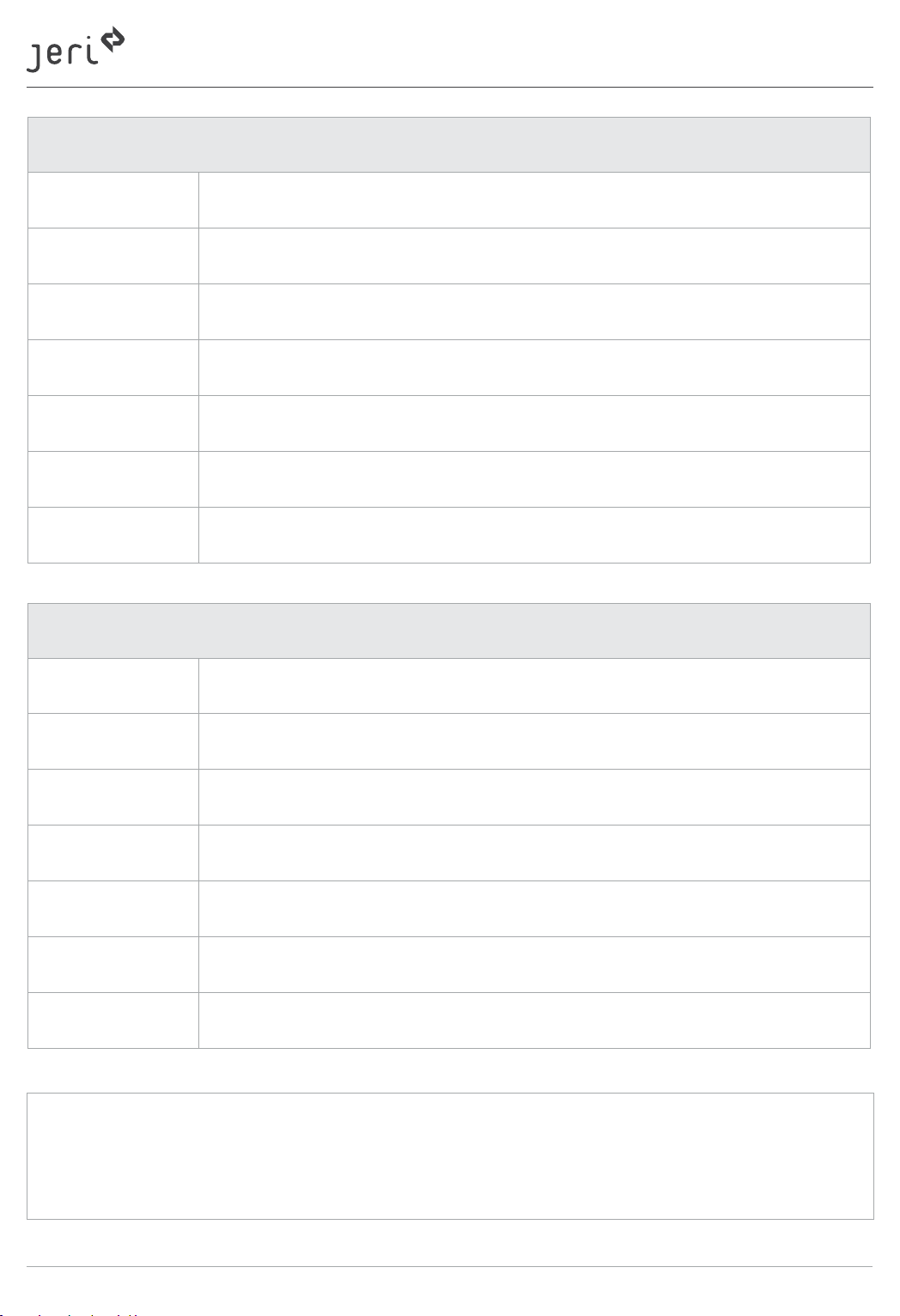
Name
Street Address
Suburb
Post Code
State
Contact Number
Email
- Portable Power Station -
Your Details
Name
Street Address
Suburb
Post Code
State
Contact Number
Email
Note:
Retailer’s Details
User Manual / V1.0
13
Page 14
- Portable Power Station -
Clenergy warrants to the original purchaser (“Purchaser”) of product(s) that the Product shall be free
from defects in material and workmanship for a period of twelve (12) months from the date of
purchase.
Clenergy will replace or repair the product during the warranty period and
subject to the following conditions:
The product does not perform in accordance with its design specifications.
The product fails during the warranty period as long as it is used correctly as per the user manual.
During the warranty period, Clenergy will replace the faulty product if this is considered to be the
most appropriate course of action.
Any and all costs for repair or replacement outside the warranty period are the responsibility of the
Customer.
Clenergy holds stock in Australia expressly for the purpose of warranty repairs or replacements.
If there are any questions or concerns regarding the conditions of this warranty, please write or
email us at the address below.
The warranty does not apply if:
The warranty period is expired.
Damage is caused by incorrect use including dropping or placement in water or exposure to
excessive precipitation.
The product has been altered or damaged.
The product has been repaired or altered by non-accredited or unauthorised person.
Found to have unauthorised modifications.
How to make a warranty claim
If the product is suspected of having a defect that needs to be attended to, you should follow the
process to make a claim as laid out below, if you are out of warranty, please contact Clenergy directly
for assistance the contact details are the same regardless:
From the paperwork that was originally provided by your retailer, you will be able to determine if you
are still covered by warranty and who to contact in case of a defect to the product.
Once you have identified who supplied the product you should contact them directly and they will
arrange for an inspection of the unit and whether the product should be returned to Clenergy for an
assessment.
14
User Manual / V1.0
Page 15
- Portable Power Station -
If however you are unsure how to make a claim, or are out of the Warranty period or don’t know who
you purchased your Clenergy product through, then you can contact us at Clenergy Australia for sup-
port as detailed below.
Enquiries can be made by phone, letter, email or website portal as below.
Note:
To claim through website portal, please register an online account and then you can submit, manage
and view your claim from the account.
Phone: 03 9017 6688
Email: [email protected]
www.clenergy.com.au/solution-centre/service-centre/
User Manual / V1.0
15
Page 16
Power Your Freedom
A Clenergy Technologies Company
1/10 Duerdin St Clayton VIC 3168 Australia
Global Contact Numbers
CN: +86 592 311 0088 | AU: +61 3 9239 8088 | JP: +81 45 228 8226
DE: +49 (0) 40 3562 389 00 | TH: +66 (0) 2 277 5201 | PH: +63 977 840 7240
Global Partners
UK: +44 (0) 1604 877573
@ClenergyClub / @ClenergyAus @Clenergy @Clenergy_global
@jeri.clenergy @jeri.clenergy @jeri.clenergy
W: www.jerifreedom.com.au E: [email protected]
MADE IN CHINA | DESIGNED IN AUSTRALIA
 Loading...