

Page 1
®
JBL
loudspeakers
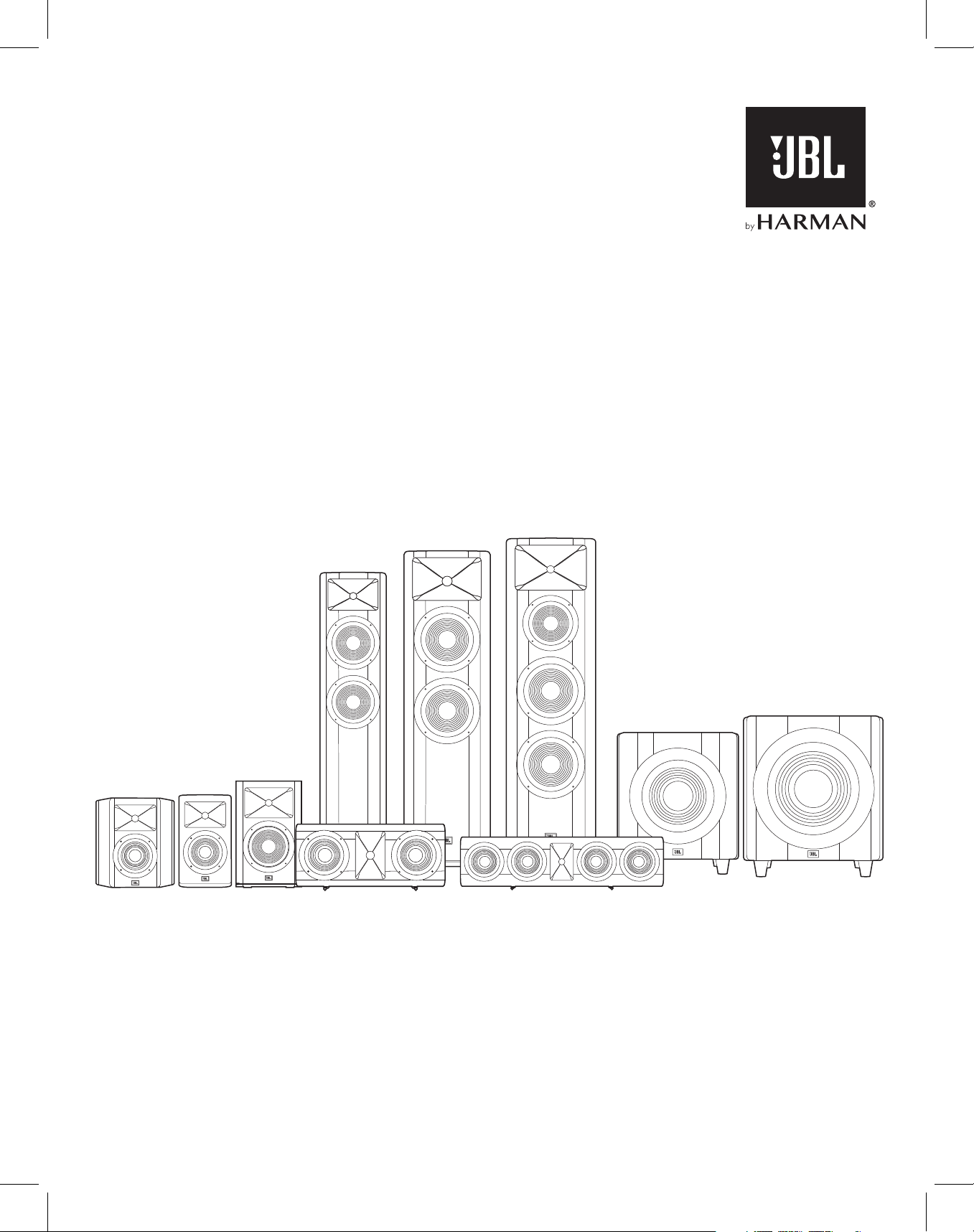
STUDIO 6 SERIES
Studio 698
Studio 690
Studio 680
Studio 660P
Studio 650P
Studio
610
Studio
620
Studio
630
Studio 625C Studio 665C
OWNER’S MANUAL
Page 2
THANK YOU FOR CHOOSING THIS JBL® PRODUCT
For more than 60 years, JBL® engineers have been involved in every aspect of music and film recording and
reproduction, from live performances to the recordings you play on the go and in your home, car or office.
We’re confident that the JBL system you have chosen will provide every note of enjoyment you expect – and that when
you think about purchasing additional audio equipment for your home, car or office, you will once again choose JBL
products.
Please take a moment to register your new product on our Web site, www.jbl.com. Registering enables us to keep
you posted on our latest advancements and helps us to understand our customers and build products that meet their
needs.
INCLUDED ITEMS
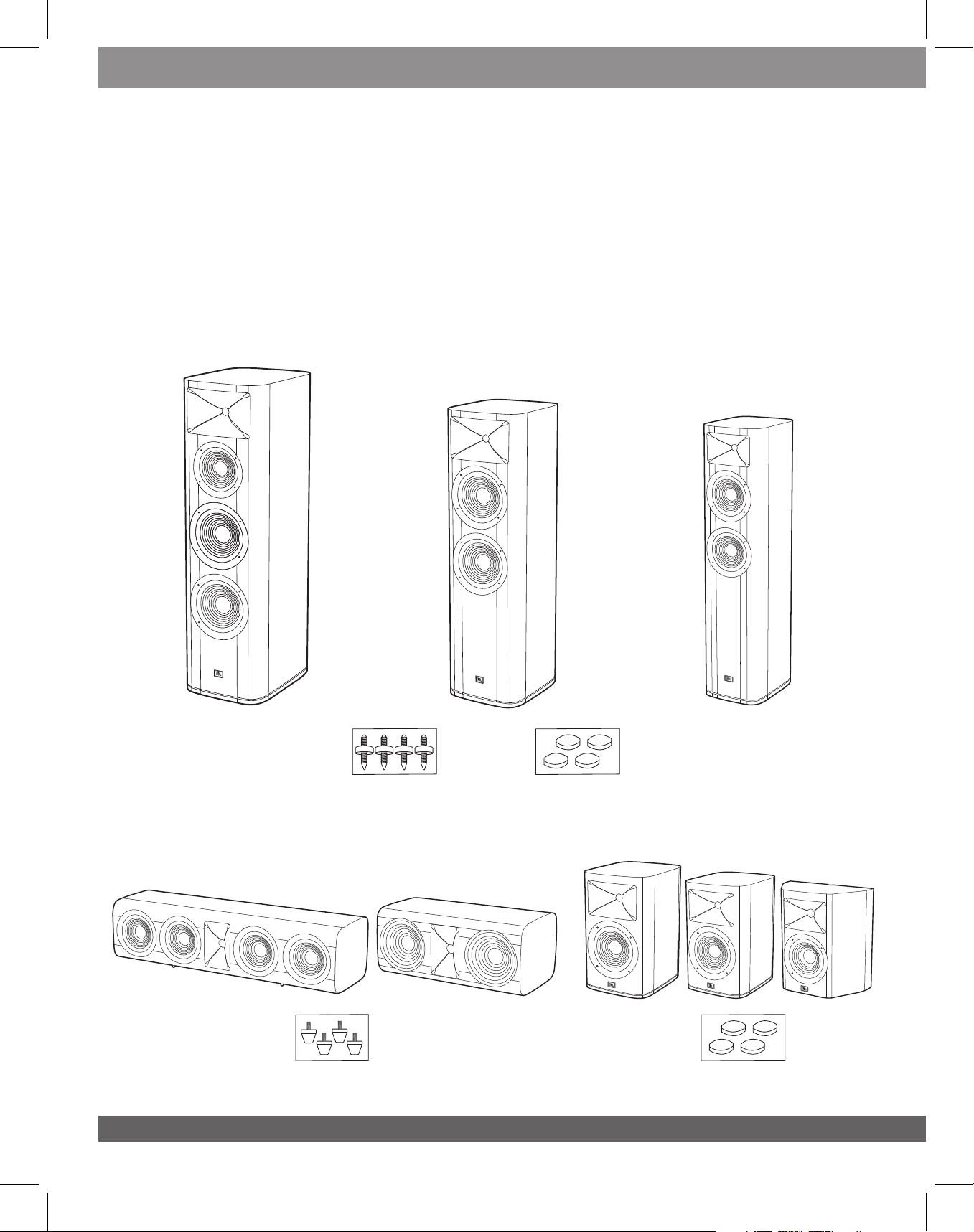
Studio 698
Studio 690
Studio 680
Carpet Spikes
Studio 698/690/680
Rubber Feet
Studio 665C/625C
(Pre-installed)
2
Feet Pad
Studio 698/690/680
Studio 630/620/610 Studio 665C/625C
Feet Pad
Studio 630/620/610
Page 3
PLACEMENT
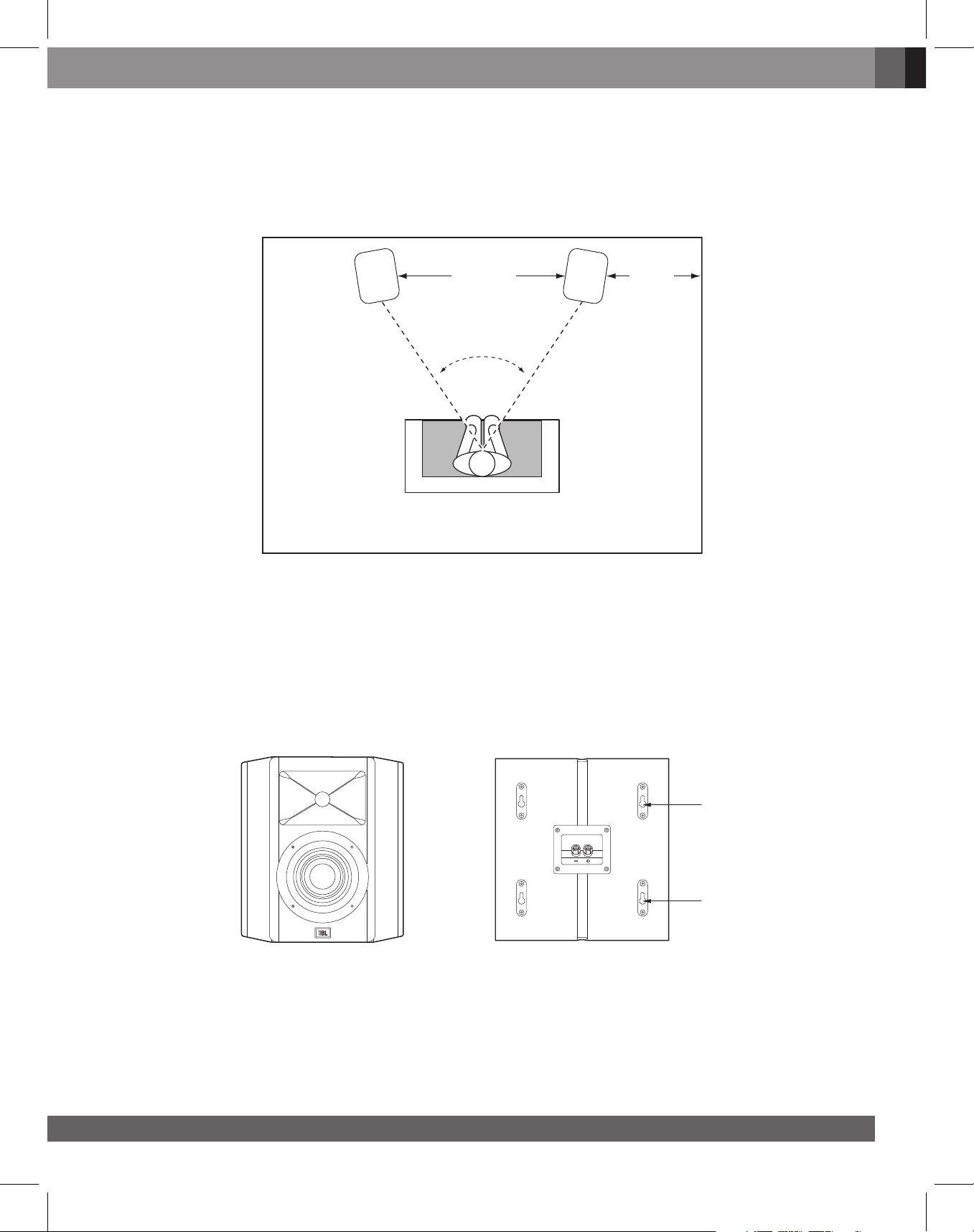
STUDIO 698/STUDIO 690/STUDIO 680 – LEFT AND RIGHT CHANNELS
For the best results, place the speakers 6 – 10 feet (1.8m – 3m) apart. Angling the speakers toward the listening
position can improve the stereo imaging. The speakers will produce the most accurate stereo soundstage when the
angle between the listener and the speakers is between 40 and 60 degrees.
English
6 – 10 ft
(1.8m – 3m)
>20 in
(>51cm)
40° – 60°
Generally, bass output will increase as the speaker is moved closer to a wall or corner.
For the best performance, we recommend that you place the speakers at least 20 inches (51cm) away from the side walls.
WALL MOUNTING THE STUDIO 610
We have designed the Studio 610 speakers to mount directly onto a wall. Each speaker has four keyholes on the back
and will require four 4.0x38mm wood screws fastened to a wall stud. If a wall stud is unavailable, install an anchor
appropriate for a 4.0x38mm screw.
NOTE: You are responsible for the correct selection and use of mounting hardware (available through hardware stores)
that will ensure the proper and safe wall-mounting of the speakers. 4.0x38mm wood screws not provided.
Keyholes
Keyholes
1) Using the included wall brackets, mark the positions on the wall where you would like to place the mounting screws.
2) Fasten four 4.0x38mm wood screws to the wall using the markings from Step 1 as your guide. Leave an 1/16”
(1.59mm) space between the wall and screwhead. If a wall stud is not available, use an appropriate anchor.
3) Place the speaker on the wall by aligning the keyholes on the back of the speaker to the screwheads on the wall.
Once positioned properly, the speaker should slide down slightly and become secure.
www.jbl.com
3
Page 4
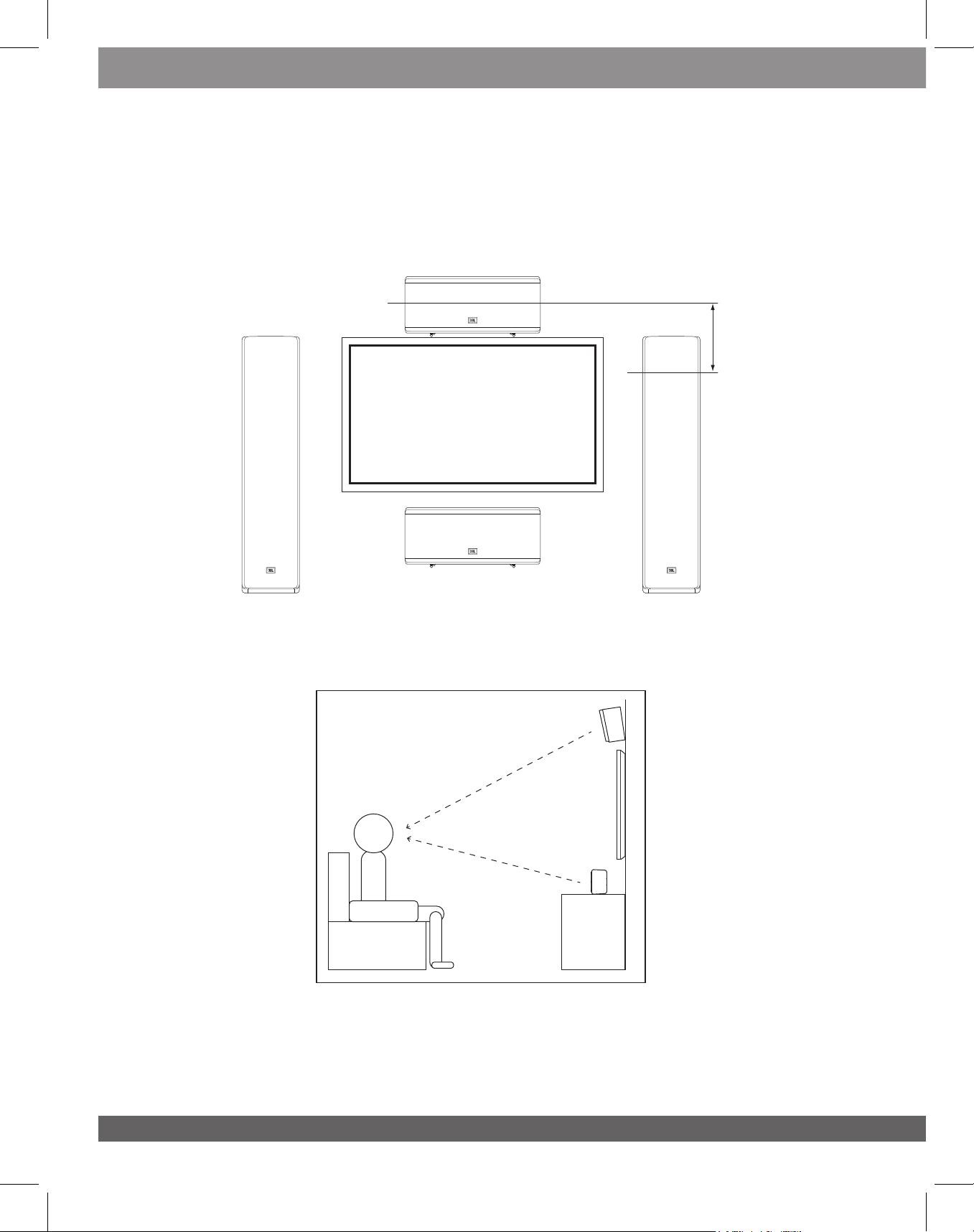
STUDIO 625C/665C
You should place the 625C/665C center speaker directly above or below the center of your TV screen. The center of the
speaker’s horn should be no more than 2 feet (61cm) above or below the centers of the front left and front right
speakers’ horns. If your TV set is deep enough, you can set the center speaker on top of the TV, with the speaker’s
front edge even with the TV’s front edge.
Studio 625C/665C
Center Speaker
< 2ft (61cm)
TV
Studio
698/690/680/630/620
Front Left Speaker
Studio 698/690
680/630/620
Front Right
Speaker
TV
Note: You can place 625C/665C below or above the TV.
Note: For better audio listening performance, please align the center speaker towards your head level position.
4
Page 5
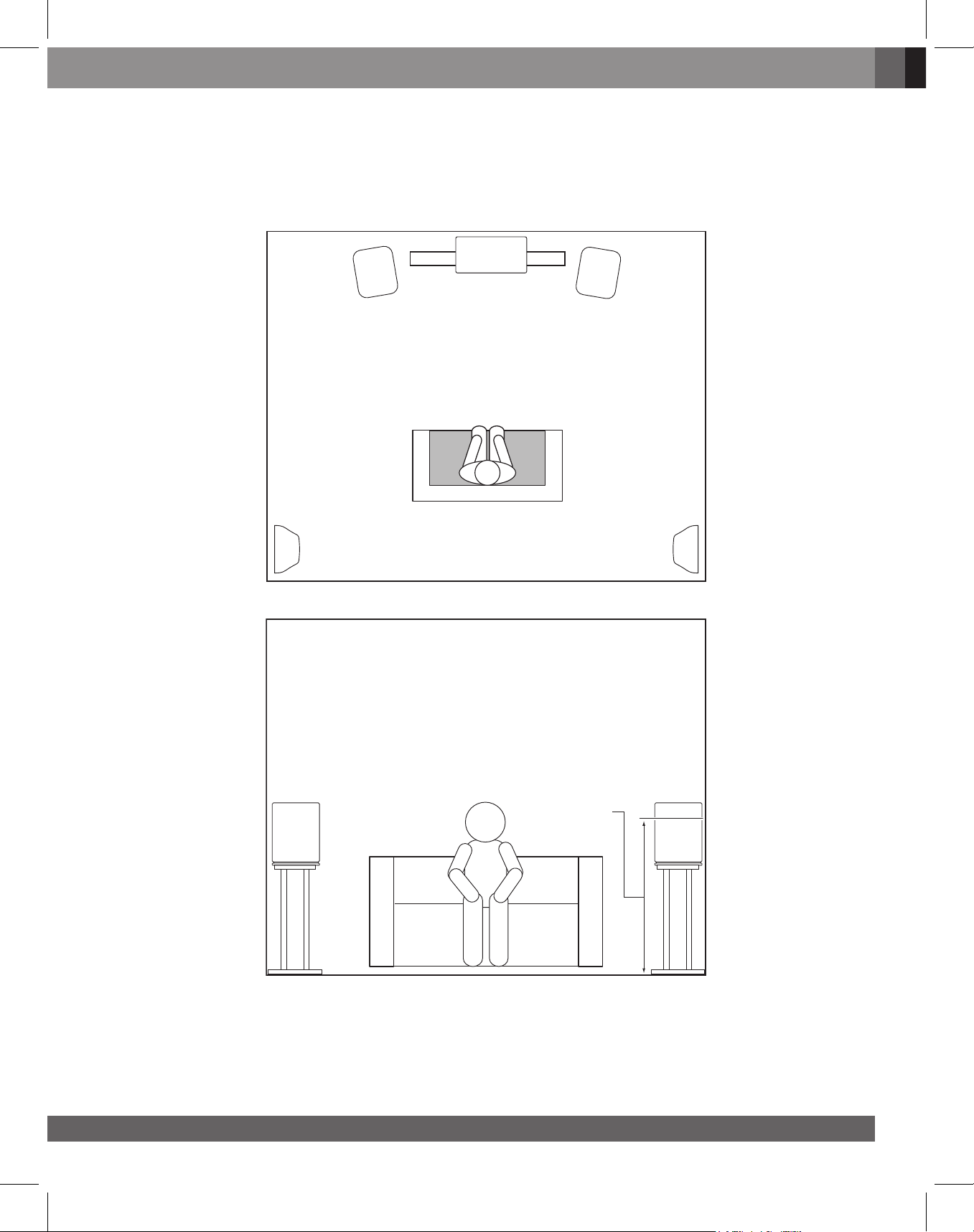
STUDIO 630/620/610 – SURROUND CHANNELS (5.1-CHANNEL SYSTEM)
When you use Studio 630/620/610 speakers as surround-channel speakers in a 5.1-channel system, place them slightly behind
the listening position, facing each other. Ideally, they should be 3 – 4 feet (0.9m – 1.2m) above the floor. An alternate
location would be on a wall behind the listening position, facing forward. The surround speakers should not call
attention to themselves while they’re playing. Experiment with their placement until you hear a diffuse, ambient sound
accompanying the sounds that you hear from the front left, front right and center speakers.
English
Studio
698/690/
680/630/620
Front Left
Speaker
Studio 630/620/610
Surround Left
Speaker
TV
Studio 625C/665C
Center Speaker
Studio
698/690/
680/630/620
Front Right
Speaker
Studio 630/620/610
Surround Right
Speaker
Studio 630/620/610 Studio 630/620/610
Surround Right
Speaker
Surround Left
Speaker
3 – 4 ft
(0.9m – 1.2m)
www.jbl.com
5
Page 6
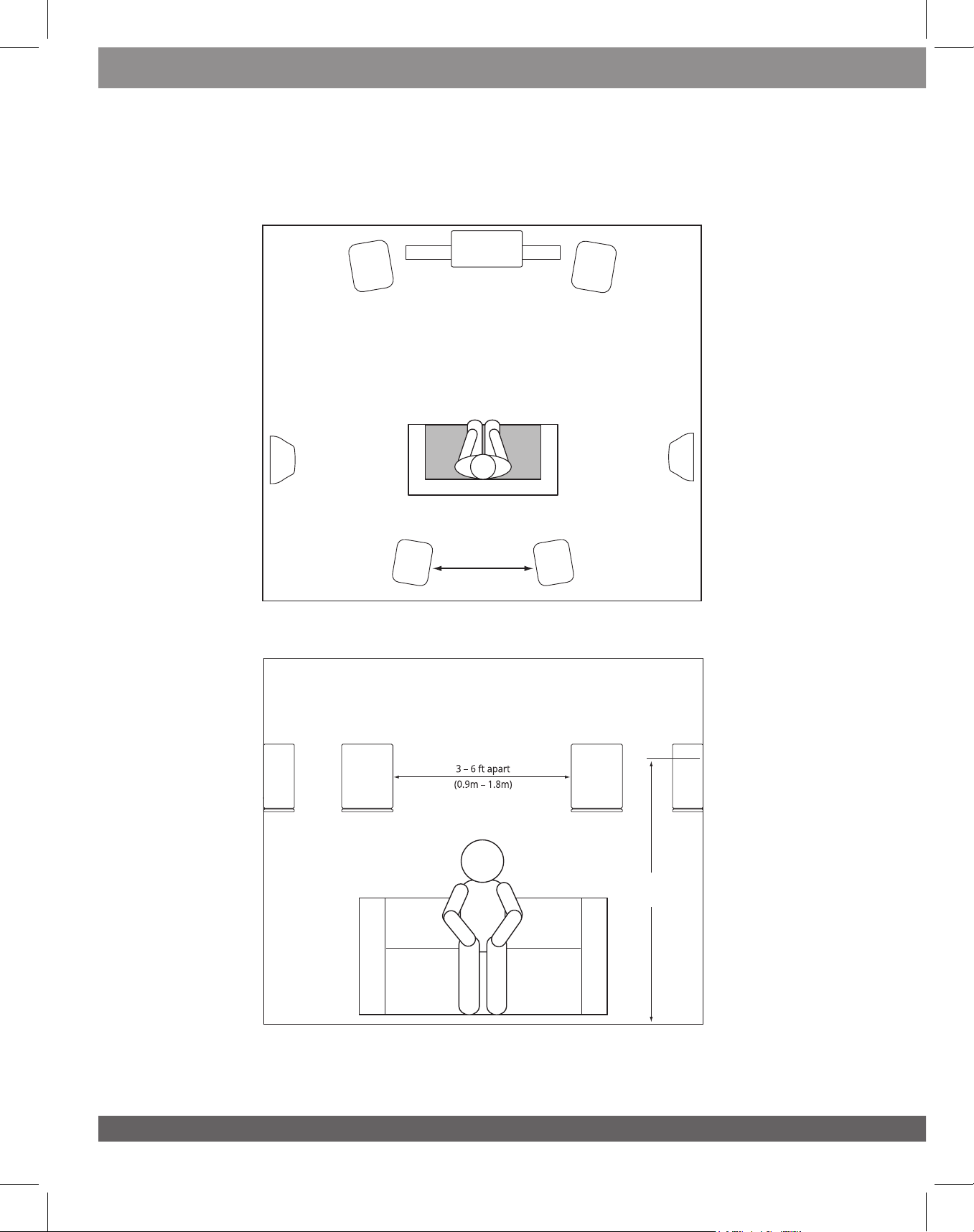
STUDIO 630/620/610 – SURROUND CHANNELS (7.1-CHANNEL SYSTEM)
When you use Studio 630/620/610 speakers as surround-channel speakers in a 7.1-channel system, place the surround
side speakers directly to the sides of the listening position, at least 3 – 4 feet (0.9m – 1.2m) above the floor. Place the
surround back speakers on the wall behind the listening position, also at least 3 – 4 feet (0.9m – 1.2m) above the floor
and 3 – 6 feet (0.9m – 1.8m) apart.
Studio
698/690/
680/630/620
Front Left
Speaker
Studio 630/620/610
Surround Left
Speaker
Studio 630/620/610
Left Surround Back
Speaker
TV
Studio 625C/665C
Center Speaker
3 – 6 ft apart
(0.9m – 1.8m)
Studio
698/690/
680/630/620
Front Right
Speaker
Studio 630/620/610
Surround Right
Speaker
Studio 630/620/610
Right Surround Back
Speaker
Surround Right
Back Speaker
Studio 630/620/610 Studio 630/620/610
6
Surround Left
Back Speaker
5 – 6 ft
(1.5m – 1.8m)
Page 7
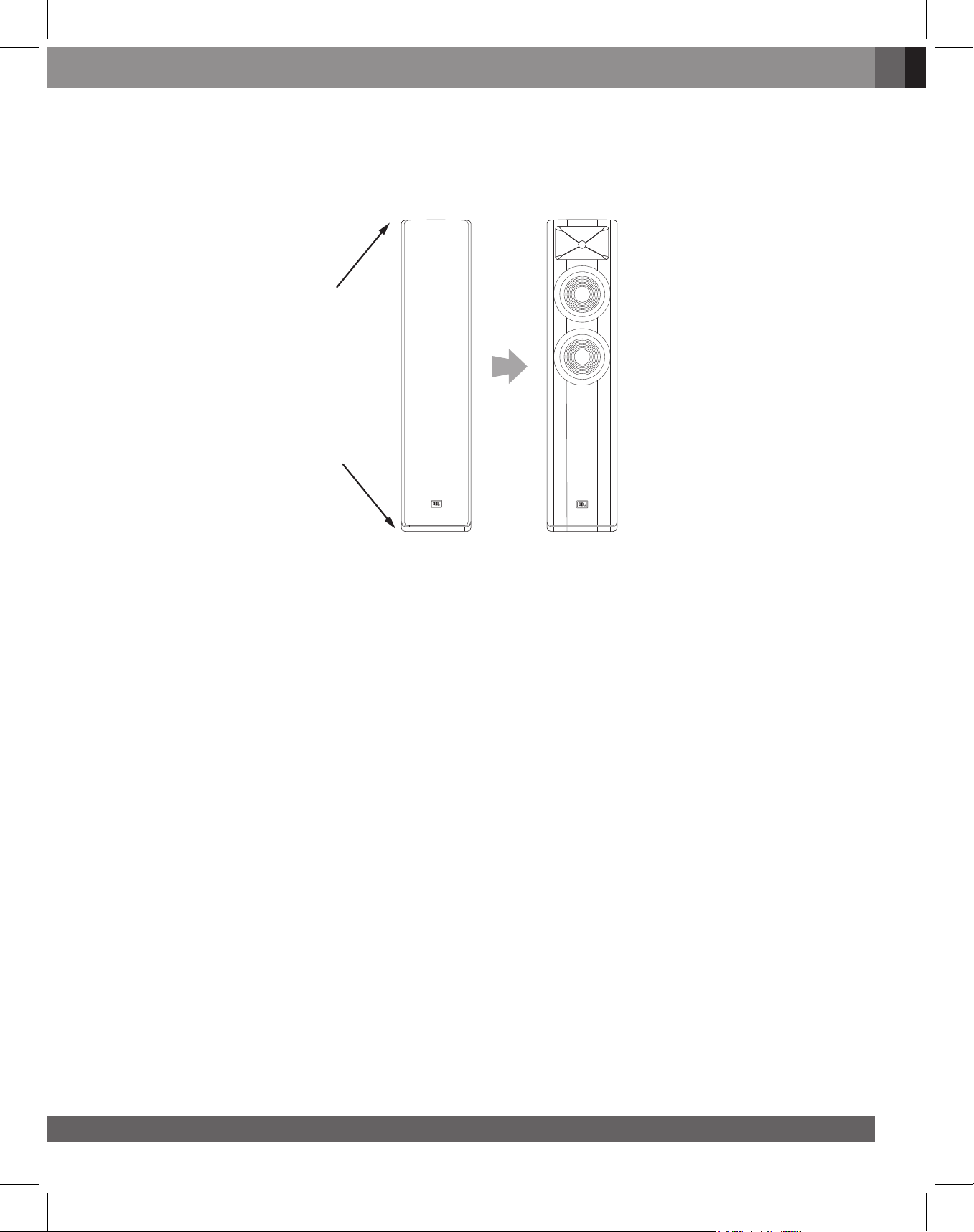
REMOVING THE GRILLES
You can remove the Studio 6 speaker grilles by pulling them away from the enclosure.
Remove Grille
Remove Grille
English
www.jbl.com
7
Page 8
CONNECTIONS
CAUTION: Make sure that all of the system’s electrical components are turned OFF (and preferably
unplugged from their AC outlets) before making any connections.
Speakers and amplifiers have corresponding positive and negative (“+” and “–”) connectors. All Studio 6 series
speakers have connectors that are marked “+” and “–” on the terminal-cup assembly. Additionally, the “+” connectors
have red markings, while the “–” connectors have black markings.
To ensure proper polarity, connect each “+” connector on the back of the amplifier or receiver to the respective “+”
(red) connector on each speaker. Connect the “–” connectors in a similar way. Do not reverse polarities (i.e., “+” to “–”
or “–” to “+”) when making connections. Doing so will cause poor stereo imaging and diminished bass performance.
IMPORTANT: Make sure the “+” and “–” wires or connectors do not touch each other or the other terminal.
Touching wires can cause a short circuit that can damage your receiver or amplifier.
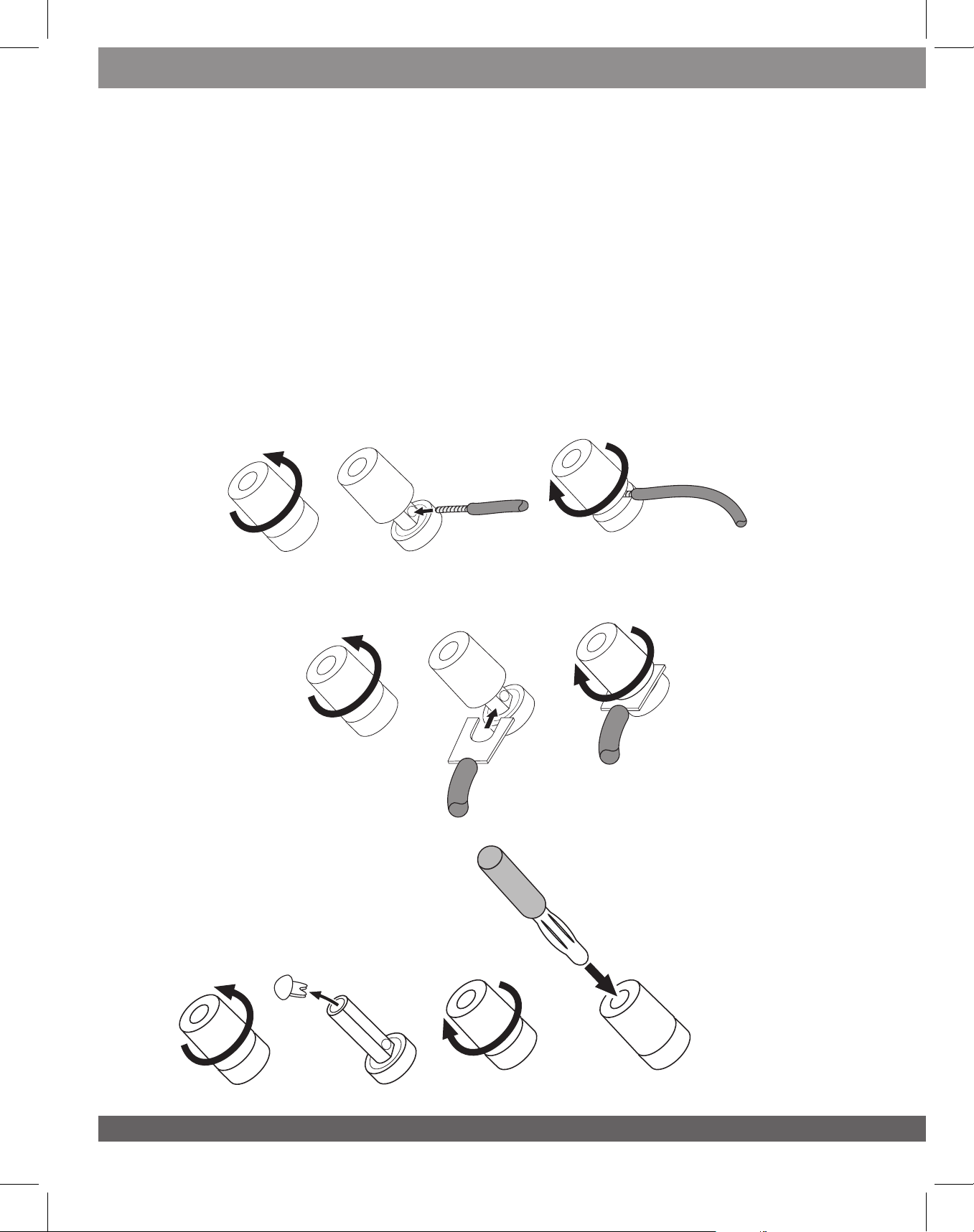
The Studio 6 series speakers’ gold-plated speaker connectors can accept a variety of wire connector types: bare wire,
pin connectors, spade connectors and banana connectors.
USING BARE WIRE OR PIN CONNECTORS:
1. 2. 3.
USING SPADE CONNECTORS:
1. 2. 3.
USING BANANA CONNECTORS:
1. 2. 3. 4.
8
Page 9
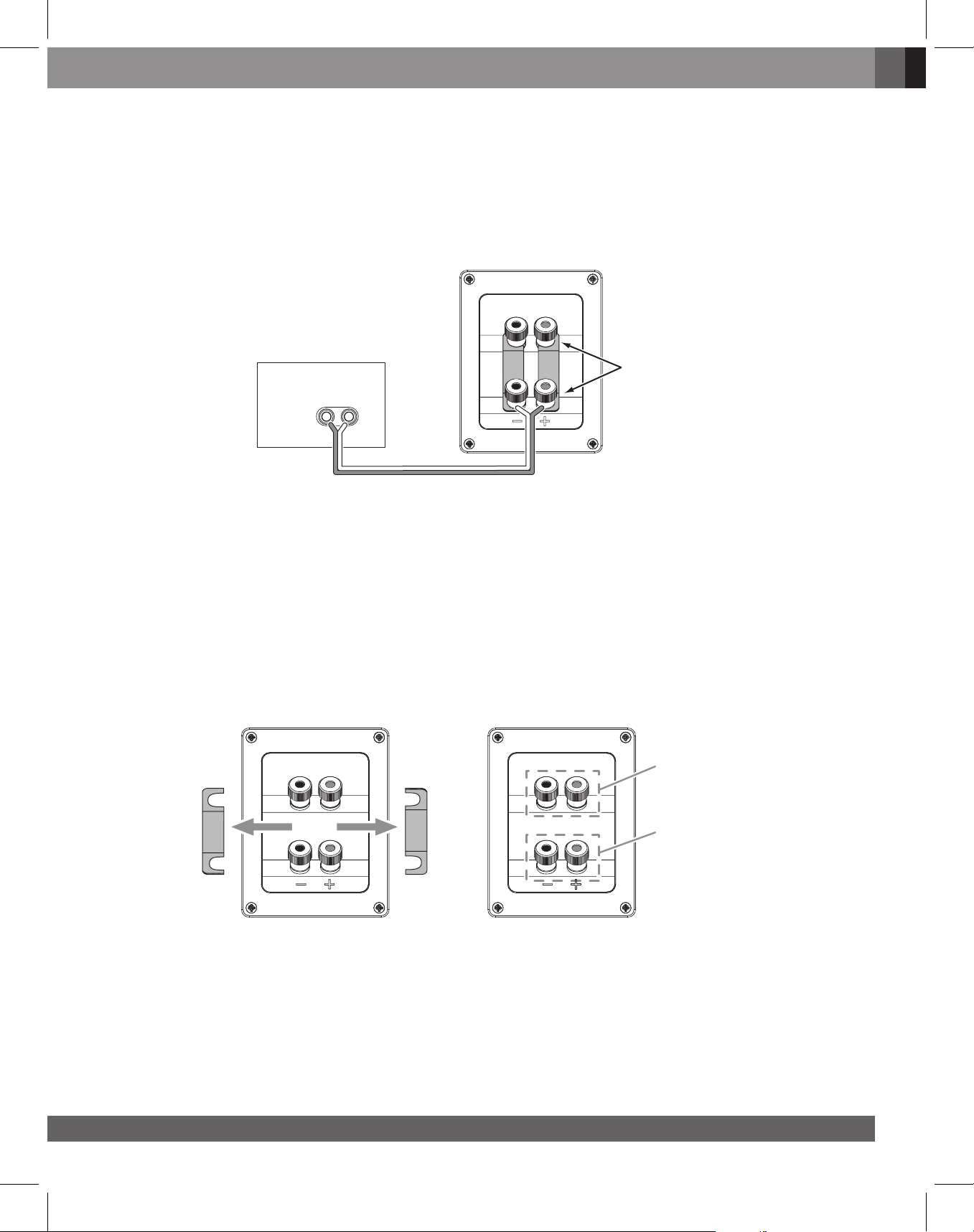
BASIC SINGLE-WIRE CONNECTION
To connect the speakers using a single wire, connect the amplifier to each speaker as shown in the illustration below.
You can use either set of connectors on the connector panel.
IMPORTANT: Do not remove the metal jumper bars from between the two sets of connectors when
connecting the speaker wires.
Speaker
Connector Panel
English
Receiver or Amplifier
(One Channel Shown)
+–
BI-WIRE CONNECTION
Studio 698/690/680 speaker connector panels have two sets of input connectors that are joined by metal jumper
bars. The upper set of connectors is for the compression-driver/horn assembly, and the lower set of connectors is
for the woofer(s). This arrangement allows you to bi-wire the speakers using a single stereo amplifier or using two
stereo amplifiers. Bi-wiring can offer performance advantages and more flexibility in power-amplifier selection over a
conventional single-wire connection.
Before bi-wiring the speakers, remove the jumper bars.
Use Either Set
of Connectors
Do Not Remove
Jumper Bars
Remove Jumper Bars
Compression Driver/
Horn Connectors
Woofer
Connectors
www.jbl.com
9
Page 10
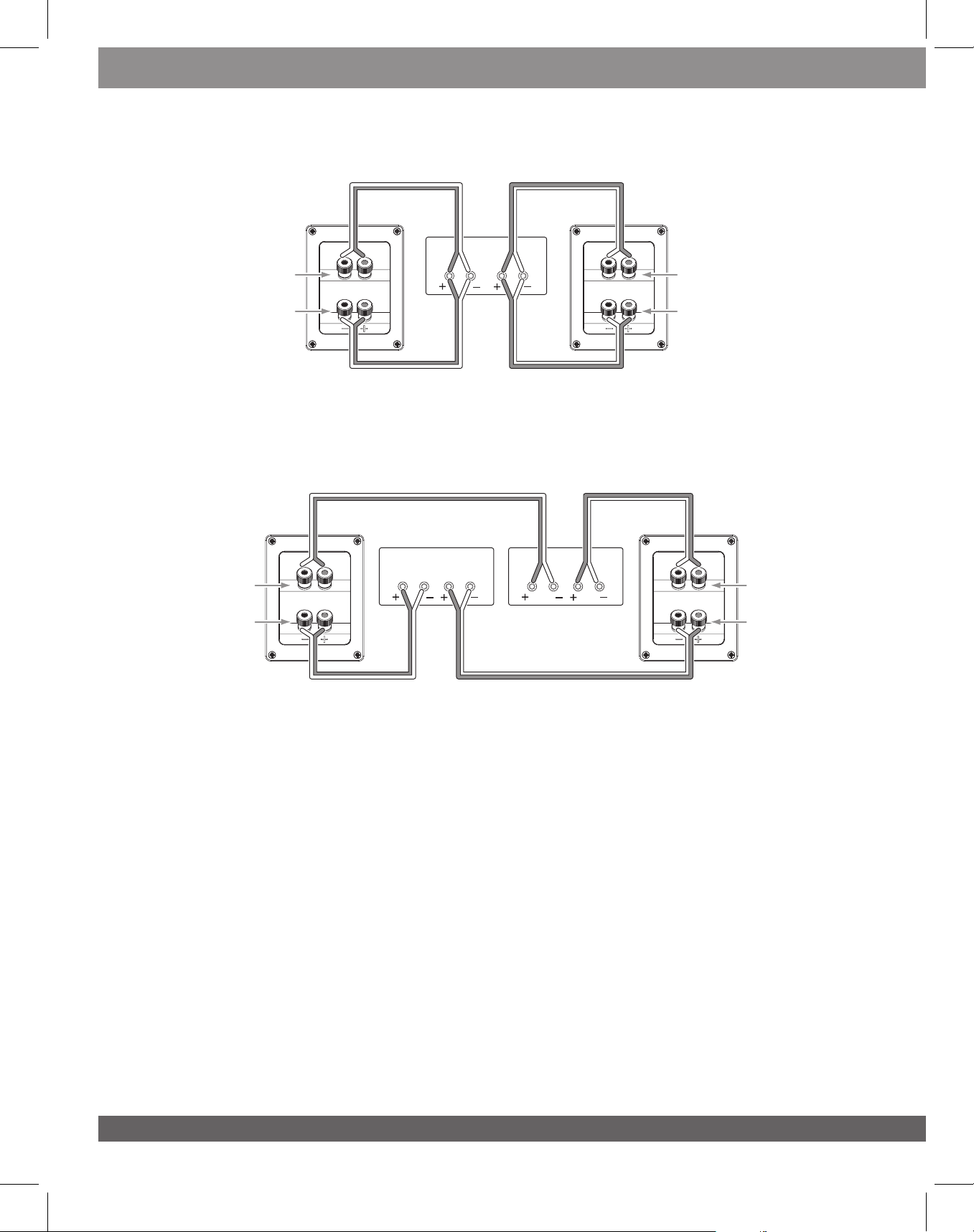
SINGLE-AMPLIFIER BI-WIRING
Left
Speaker
Compression Driver/
Horn Connector
Woofer
Connector
DUAL-AMPLIFIER BI-WIRING
Left
Speaker
Compression
Driver/Horn
Connector
Woofer
Connector
Left
Ch.
Amplifier 1
Left
Ch.
Right
Ch.
Amplifier
Left
Ch.
Right
Ch.
Amplifier 2
Right
Ch.
Right
Speaker
Compression Driver/
Horn Connector
Woofer
Connector
Right
Speaker
Compression
Driver/Horn
Connector
Woofer
Connector
10
For more information about various speaker-wire and connection options, contact your local JBL dealer.
CARING FOR YOUR SPEAKERS
• Wipe the cabinet with a clean, dry cloth to remove dust. Damp cloth may dull the cabinet’s finish. Do not use
volatile liquids such as benzene, paint thinner or alcohol on the cabinet.
• Do not spray insecticide near the cabinet.
• To remove dust from the grille fabric, use a vacuum cleaner set to low suction.
• Never apply suction or pressurized air to the horn opening.
• Do not wash the grilles in water, as it may fade the color or make it uneven.
• If the surfaces of the woofer cones become dusty, you can carefully sweep them clean with a soft, dry calligraphy
brush or paint brush. Do not use a damp cloth.
Page 11
SPECIFICATI ONS
STUDIO 698
Dual 8", 6" mid, 3-way compression driver floor standing loudspeaker
6" (152mm) PolyPlas Mid-range Transducer
Dual 8” (203mm) PolyPlas cone Low-Frequency Transducer
High Definition Imaging (HDI) Waveguide with 1” (25mm) High Frequency Compression Driver
Recommended Amplifier Power: Max 250W
Frequency Response: 36 Hz - 40 kHz
Sensitivity: 90 dB, 1M, @ 2.83V
Nominal Impedance: 6 Ohms
Crossover Frequencies: 320 Hz, 1.8 kHz
Enclosure Type: Bass-Reflex via Rear-Firing Tuned Port
English
Dimensions (W x D x H): 300 x 400 x 1058 mm
Weight:
STUDIO 690
Dual 8", 2.5-way compression driver floor standing loudspeaker
Dual 8" (203mm) PolyPlas Low-Frequency Woofer
High Definition Imaging (HDI) Waveguide with 1” (25mm) High Frequency Compression Driver
Recommended Amplifier Power: Max 250W
Frequency Response: 36 Hz - 40 kHz
Sensitivity: 90 dB, 1M, @2.83V
Nominal Impedance: 6 Ohms
Crossover Frequencies: 600 Hz, 1.7 kHz
35.84 kg
Enclosure Type: Bass-Reflex via Rear-Firing Tuned Port
Dimensions (W x D x H): 300 x 350 x1058 mm
Weight: 29.38 kg
www.jbl.com
11
Page 12
STUDIO 680
Dual 6.5", 2.5-way compression driver floor standing loudspeaker
Dual 6.5" (165mm) PolyPlas Low-Frequency Woofer
High Definition Imaging (HDI) Waveguide with 1” (25mm) High Frequency Compression Driver
Recommended Amplifier Power: Max 200W
Frequency Response: 38 Hz - 40 kHz
Sensitivity: 88dB, 1M, @2.83V
Nominal Impedance: 6 Ohms
Crossover Frequencies: 600 Hz, 1.8 kHz
Enclosure Type: Bass-Reflex via Rear-Firing Tuned Port
Dimensions (W x D x H): 230 x 300 x 1005 mm
Weight: 22.64 kg
STUDIO 630
Single 6.5", 2-way compression driver bookshelf loudspeaker
6.5" (165mm) PolyPlas Low-Frequency Woofer
High Definition Imaging (HDI) Waveguide with 1” (25mm) High Frequency Compression Driver
Recommended Amplifier Power: Max 150W
Frequency Response: 45 Hz - 40 kHz
Sensitivity: 85 dB, 1M, @2.83V
Nominal Impedance: 6 Ohms
Crossover Frequencies: 1.9 kHz
Enclosure Type: Bass-Reflex via Rear-Firing Tuned Port
Dimensions (W x D x H): 230 x 280 x 372 mm
Weight: 9.02 kg
12
Page 13
STUDIO 620
Single 5.25", 2-way compression driver bookshelf loudspeaker
5.25" (133mm) PolyPlas Low-Frequency Woofer
High Definition Imaging (HDI) Waveguide with 1” (25mm) High Frequency Compression Driver
Recommended Amplifier Power: Max 100W
Frequency Response: 50 Hz - 40 kHz
Sensitivity: 84 dB, 1M, @2.83V
Nominal Impedance: 6 Ohms
Crossover Frequencies: 2.3 kHz
Enclosure Type: Bass-Reflex via Rear-Firing Tuned Port
Dimensions (W x D x H): 190 x 240 x 312 mm
Weight: 6.88 kg
English
STUDIO 610
Single 5.25", 2-way compression driver wall mountable surround loudspeaker
5.25" (133mm) PolyPlas Low-Frequency Woofer
High Definition Imaging (HDI) Waveguide with 1” (25mm) High Frequency Compression Driver
Recommended Amplifier Power: Max 100W
Frequency Response: 65 Hz - 40 kHz
Sensitivity: 84 dB, 1M, @2.83V
Nominal Impedance: 6 Ohms
Crossover Frequencies: 2.4 kHz
Enclosure Type: Sealed Enclosure
Dimensions (W x D x H): 285 x 150 x 300 mm
Weight: 5.86 kg
www.jbl.com
13
Page 14
STUDIO 665C
Quad 5.25", 2.5-way compression driver center loudspeaker
Quad 5.25" (133mm) PolyPlas Low-Frequency Woofer
High Definition Imaging (HDI) Waveguide with 1” (25mm) High Frequency Compression Driver
Recommended Amplifier Power: Max 200W
Frequency Response: 58 Hz - 40 kHz
Sensitivity: 90 dB, 1M, @2.83V
Nominal Impedance: 6 Ohms
Crossover Frequencies: 600 Hz, 2.2 kHz
Enclosure Type: Bass-Reflex via Rear-Firing Tuned Port
Dimensions (W x D x H): 760 x 230 x 190 mm
16.12 kgWeight:
STUDIO 625C
Dual 5.25", 2-way compression driver center loudspeaker
Dual 5.25" (133mm) PolyPlas Low-Frequency Woofer
High Definition Imaging (HDI) Waveguide with 1” (25mm) High Frequency Compression Driver
Recommended Amplifier Power: Max 150W
Frequency Response: 64 Hz - 40 kHz
Sensitivity: 85 dB, 1M, @2.83V
Nominal Impedance: 6 Ohms
Crossover Frequencies: 1.7 kHz
Enclosure Type: Sealed Enclosure
Dimensions (W x D x H): 440 x 190 x 190 mm
Weight: 8.62 kg
14
Page 15
Торговая марка : JBL
Назначение товара : Пассивная акустическая система (Studio 610, 620, 630, 625C, 665C,
680, 690, 698)
Изготовитель : Харман Интернешнл Индастриз Инкорпорейтед, США, 06901
Коннектикут, г.Стэмфорд, Атлантик Стрит 400, офис 1500
Страна происхождения : Индонезия
Импортер в Россию :
OOO “ХАРМАН РУС СиАйЭс“, Россия, 127018, г.Москва, ул. Двинцев, д.12, к 1
Гарантийный период : 1 год
Информация о сервисных центрах : www.harman.com/ru тел. +7-800-700-0467
Срок службы : 5 лет
Товар не подлежит обязательной сертификации
Дата производства :
Дата изготовления устройства определяется по двум буквенным
обозначениям из второй группы символов серийного номера изделия, следующих
после разделительного знака «-». Кодировка соответствует порядку букв латинского
алфавита, начиная с января 2010 года: 000000-MY0000000, где «M» - месяц
производства (А - январь, B - февраль, C - март и т.д.) и «Y» - год производства (A -
2010, B - 2011, C - 2012 и т.д.).
English
HARMAN International Industries, Inc.
8500 Balboa Boulevard, Northridge, CA 91329 USA
www.jbl.com
© 2018 HARMAN International Industries, Incorporated. All rights reserved.
JBL and HDI (High Definition Imaging) are trademarks of HARMAN International
Industries, Incorporated, registered in the United States and/or other countries.
PolyPlas and Symmetrical Field Geometry are trademarks of HARMAN
International Industries, Incorporated.
Teonex is a registered trademark of DuPont Tenjin Films.
Features, specifications and appearance are subject to change without notice.
EN : For additional languages, please visit jbl.com
FR : Pour les autres langues, veuillez visiter jbl.com
ES : Para obtener otros idiomas, visite jbl.com
DE : Informationen in weiteren Sprachen finden Sie unter jbl.com
IT : Per altre lingue, visitare jbl.com
NL : Voor andere talen kun je terecht op jbl.com
NO : For flere sprak, ga til jbl.com
FI : Muita kielia varten, kay sivustolla jbl.com
SV : For ytterligare sprak, ga till jbl.com
DA : Der henvises til jbl.com for yderligere sprog
PL : W przypadku innych językow odwiedź stronę jbl.com
RU : Если вам нужны версии на других языках, перейдите на сайт jbl.com
ID : Untuk bahasa lainnya, silakan kunjungi jbl.com
JP : 他の言語で読むには、jbl.comにアクセスしてください
KO : 추가 언어에 대해서는 jbl.com에서 확인하십시오
CHN : 如需其他语言,请访问 jbl.com
PT : Para outros idiomas, acesse jbl.com
CHT : 如需其他語言,請訪問jbl.com
HE :
תופשל תופסונ , רקב רתא jbl.com
jbl.com ةرﺎﻳز ﻰﺟﺮﻳ ،ﺔﻴﻓﺎﺿﻹا تﺎﻐﻠﻟ
AR :
www.jbl.com
15
Page 16

 Loading...