

Page 1
GUARANTEED NEVER TO HURT OR FALL OUT
W
I
T
S
T
L
O
C
N
e
v
e
r
F
a
l
l
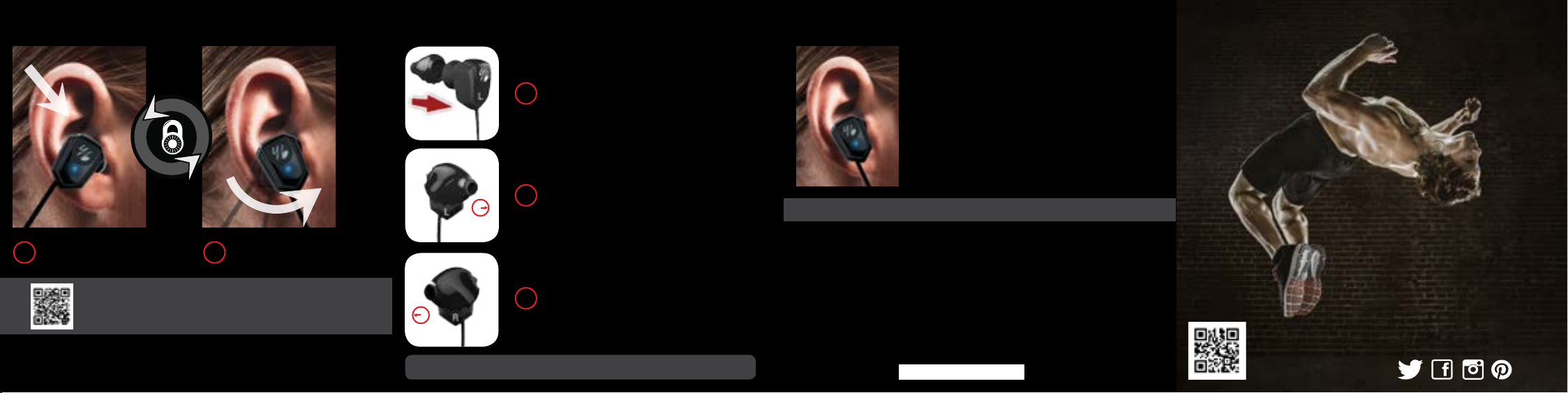
Insert sound tunnel. Twist into place.
1 2
For a Getting Started video featuring TwistLock® in action,
scan the QR code or visit yurbuds.com/inspire-twistlock
Our earbuds fit differently than other brands in that they are designed to fill the bowl of your ear with the
sound tunnel extending down into your ear canal. They are not meant to be pushed down into the ear
canal. The back of the bud should brace lightly against the back of the bowl of your ear.
K
O
u
t
FIT ENHANCERS TO EARPHONE
Wrap left enhancer around left earphone.
1
Repeat for right side.
Start with the left bud and rotate sound tunnel
2
between 3-4 o’clock position. Adjust for comfort.
3:00
Repeat with the right bud and rotate sound tunnel
3
between 8-9 o’clock position. Adjust for comfort.
9:00
TO CLEAN ENHANCERS: Remove & wash with warm soapy water
NEED ANOTHER SIZE?
If the earbuds are not perfect, send us your picture for a FREE
personalized fit. Take a photo of your current earbuds in your
ear and email it to [email protected]. yurbuds will send
you the correct size for free, or exchange your model for a
better-fitting option.
CONTACT US:
900 Spruce St. Suite 550
St. Louis, MO 63102, USA
www.yurbuds.com/contact
PRODUCT RETURNS: Please contact yurbuds for customer support before returning to store.
LIMITED YURBUDS WARRANTY
yurbuds™ purchased from authorized retailers are warranted against defects in materials and workmanship for a period of ONE year from the date
of purchase of the product. If a defect exists, yurbuds™, at its discretion and to the extent permitted by law will (I) repair the product at no charge,
or (2) replace the product if it is irreparable. This warranty excludes damage resulting from abuse, accident, modifications or other causes that are
not defects in materials and workmanship. THIS WARRANTY DOES NOT AFFECT YOUR STATUTORY RIGHTS. Visit yurbuds.com for our complete
product warranty policy.
The use of mobile devices and their accessories may be prohibited or restricted in certain areas. Always obey the laws and regulations on the use of
these products. For details on GUARANTEED NEVER TO FALL OUT see yurbuds.com/legal.
This device complies with Part 15 of the FCC Rules. Operation is subject to the following two conditions: (1) this device may not cause harmful
interference, and (2) this device must accept any interference received, including interference that may cause undesired operation. Changes or
modifications not expressly approved by the party responsible for compliance could void the user’s authority to operate the equipment.
This device complies with Industry Canada licence-exempt RSS standard(s).
Operation is subject to the following two conditions:
1. This device may not cause interference, and
2. This device must accept any interference, including interference that may cause undesired operation of the device.
CALL US TOLL FREE:
(888)YUR-BUD1 or
(888)987-2831
CONNECT WITH US.
Page 2
POWER & PAIR
MUSIC & CALLS
CHARGE
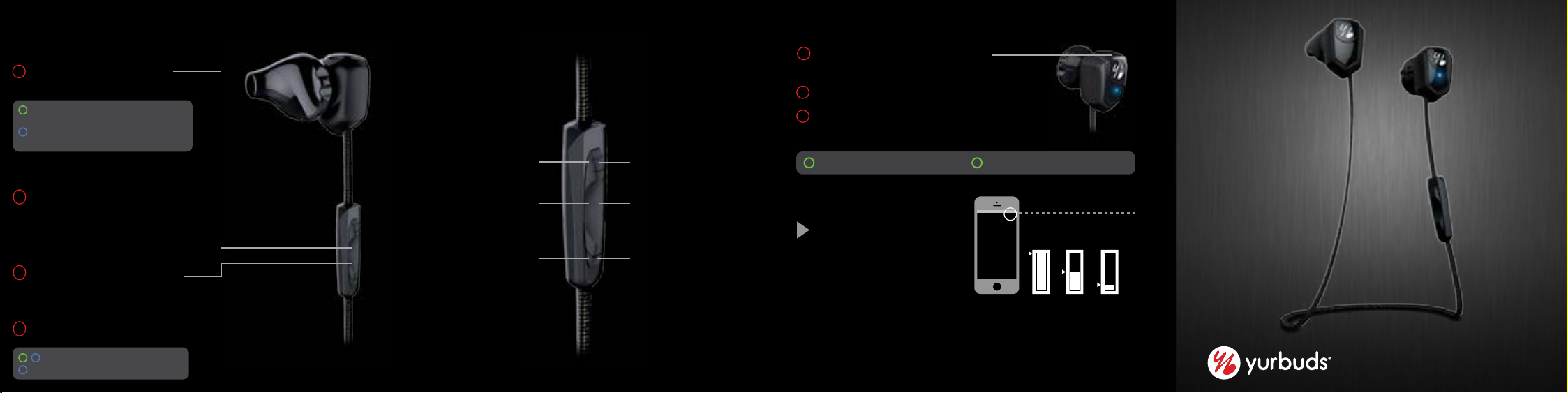
POWERING ON/OFF
1
Briefly press and hold the Center
button on the 3-Button Control.
GREEN FLASH WITH AUDIBLE ALERT:
Power on, Not Paired
EXTENDED BLUE FLASH WITH AUDIBLE
ALERT: Powered Off
PAIRING
2
FIRST TIME USE: LEAP Wireless will
automatically be set to pairing mode. Skip
to step 4 to complete set-up.
CONSECUTIVE USES: Begin with LEAP Wireless
powered off and your Bluetooth device powered
on and in search mode.
3
Press and hold the Center button on the
3-Button Control for an extended period of time,
until the light is alternately flashing green and
blue indicating it is pairing mode.
4
Select “yurbuds LEAP Wireless” on your device.
BLUE & GREEN FLASH: Pairing Mode
BLUE FLASH: Power on, Paired
*Green light flashes rapidly when
pairing in low power mode
VOLUME
Volume Up: 1 Click
CALLS
Answer/End Calls: 1 Click
Voice Activation*: 2 Clicks
VOLUME
Volume Down: 1 Click
TRACK
Next Track: Long Press
Pause/Play: 1 Click
Previous Track: Long Press
*Compatible with iOS only
1
Locate the charging port at the top of the
right earphone.
Lift cover for USB charging port.
2
3
Plug in device with the provided
charging cable.
FLASHING GREEN: Indicates Charging
CHARGE STATUS
On-Screen Indicator* shows
level of charge.
SOLID GREEN: Indicates Fully Charged
STATUS
FULL HALF CRITICAL
AUDIBLE ALERTS
Status provided once when battery is low.
FOR MORE INSTRUCTIONAL DETAILS FOR YURBUDS LEAP WIRELESS, PLEASE VISIT YURBUDS.COM
and welcome to yurbuds
THANK YOU
 Loading...