

Page 1

JBL CLICK
Page 2
JBL CLICK
Quick Start Guide
EN
1
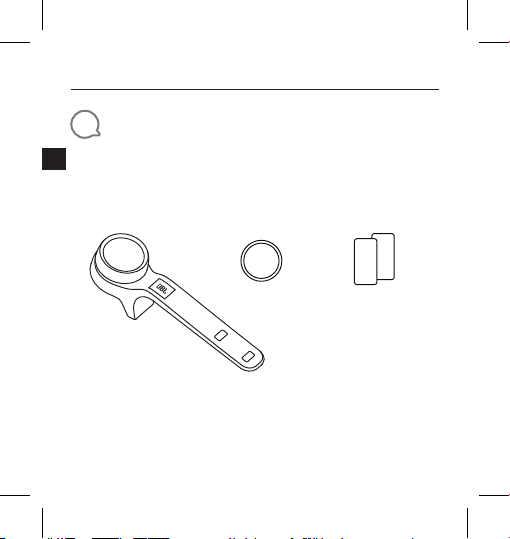
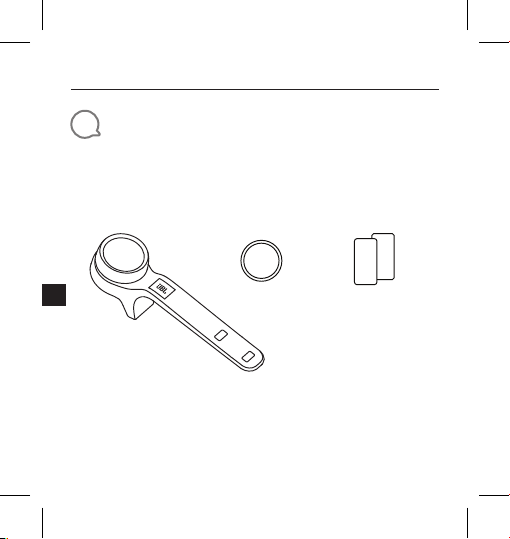
What’s in the box
CLICK x 1 CR2032 x 1 Safety Sheet /
2
QSG x 1
S
Q
Page 3
JBL CLICK
Quick Start Guide
EN
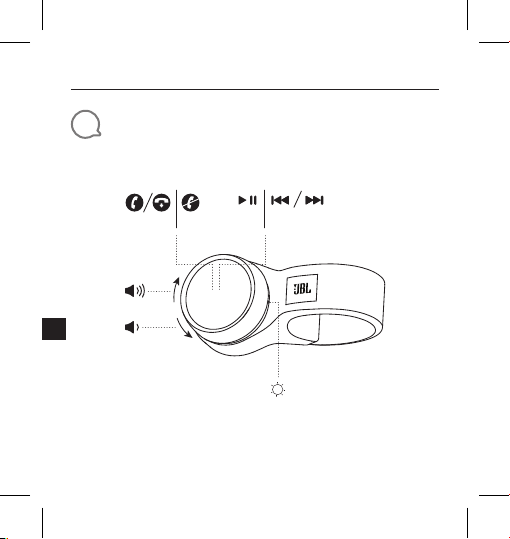
2
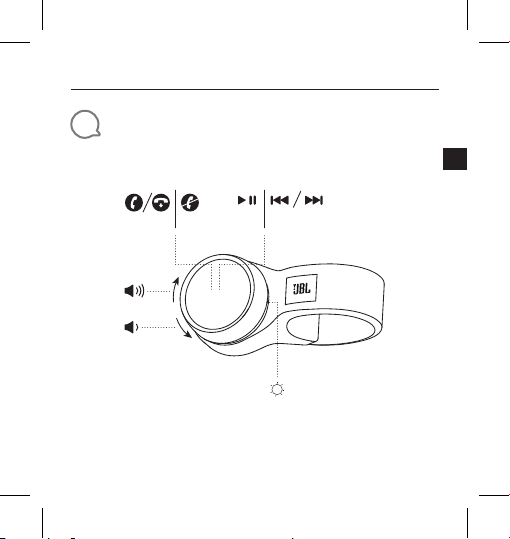
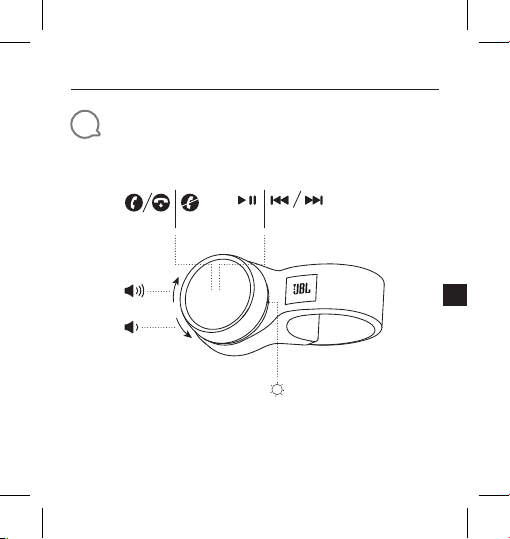
Overview
×1 ×1 ×3 ×2
3
Page 4
JBL CLICK
Quick Start Guide
EN
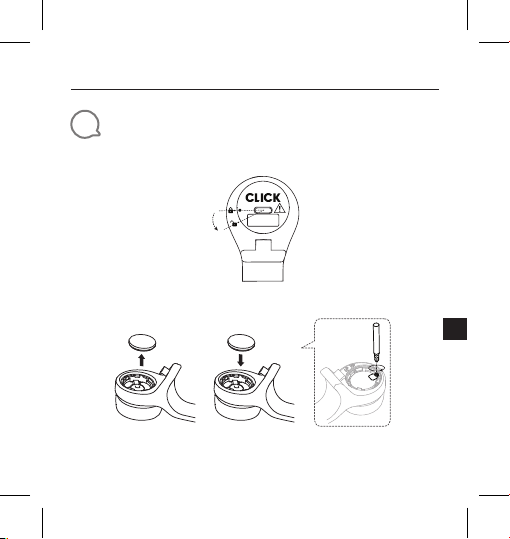
3
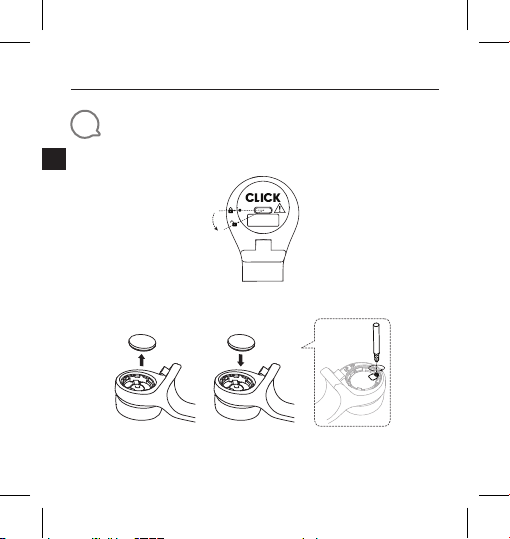
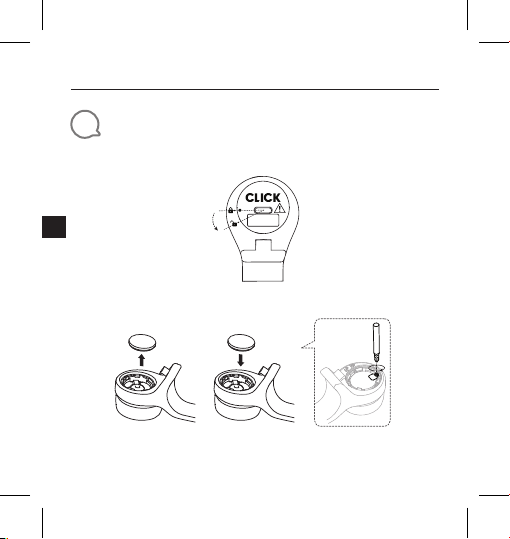
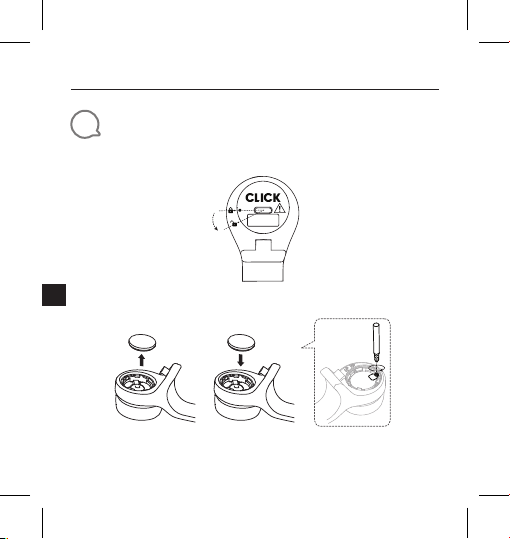
Inserting and replacing battery
1. Open and close the battery cover
Close
Open
* Remove the insulation foil before use
2. Replace the battery
* Change the battery when the LED starts flashing fast (4Hz)
4
Page 5
JBL CLICK
Quick Start Guide
EN
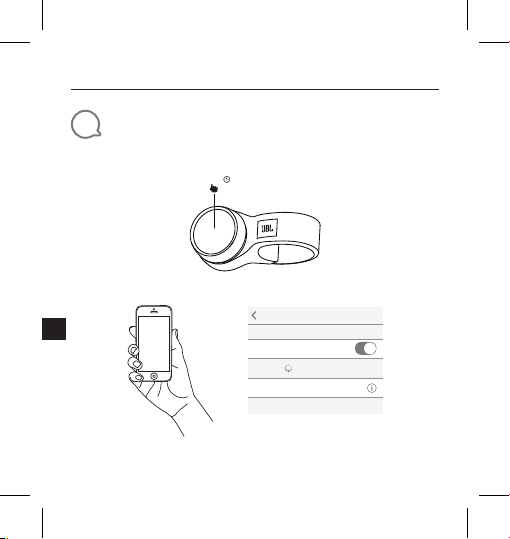
4
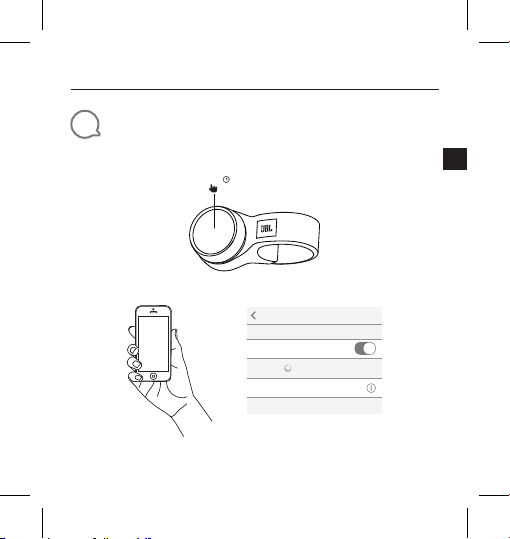
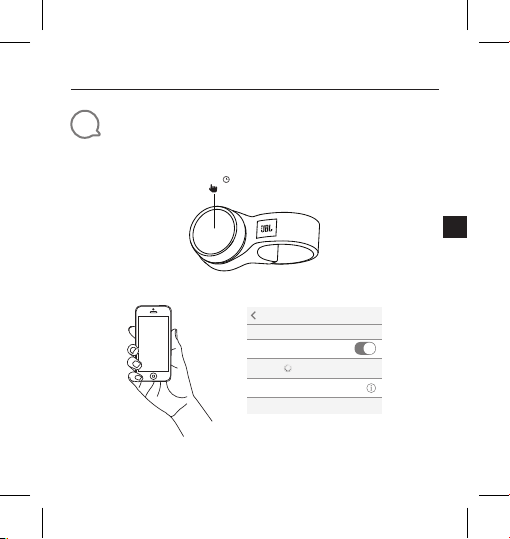
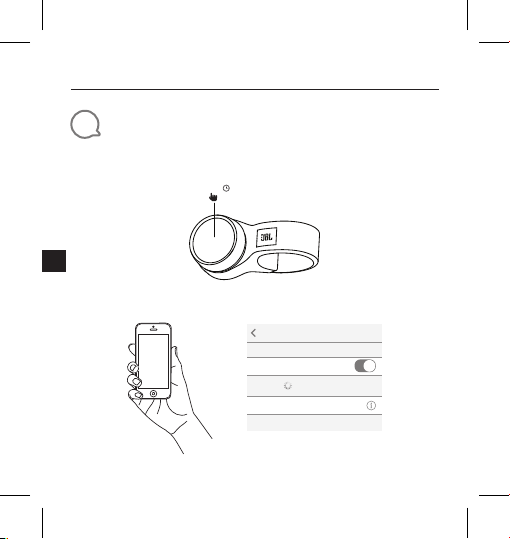
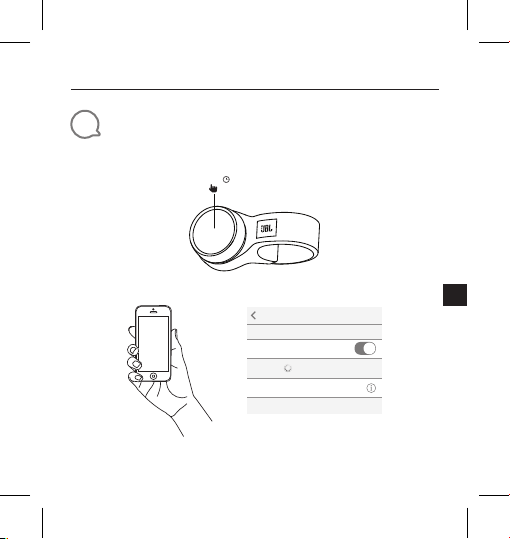
Bluetooth® Connection
1. Press and hold the knob
2. Connect to Bluetooth device
5.0s
Settings Bluetooth
Bluetooth
DEVICES
JBL Click
Now Discoverable
Choose“JBL Click”to connect
Connected
5
Page 6
JBL CLICK
Quick Start Guide
EN
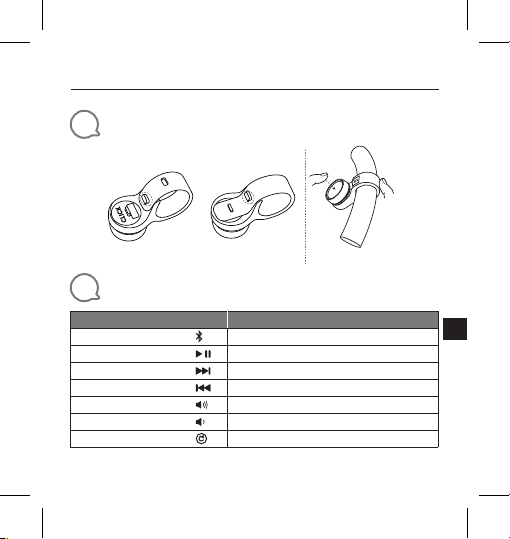
5
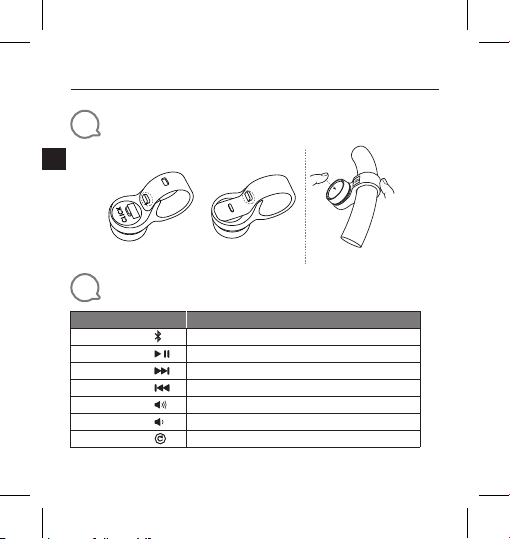
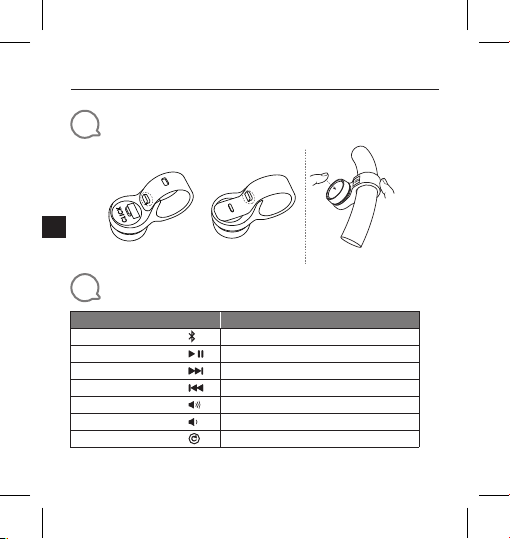
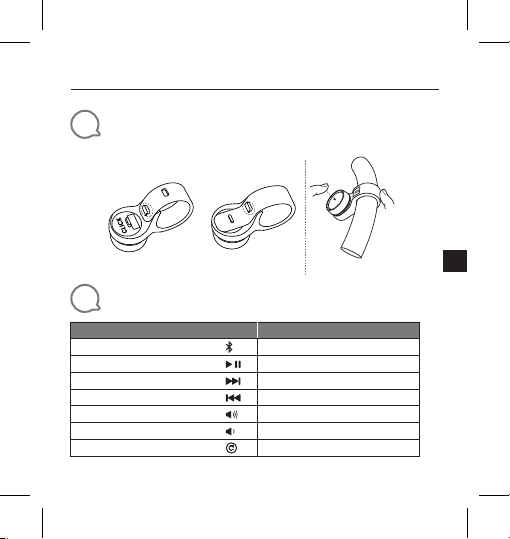
Installation ( Mounting and Dismounting )
6
Interaction
Action
Activate pairing
Play/Pause
Next Track
Previous Track
Volume Up
Volume Down
Factory Reset
6
Steering Wheel Handle Bar
Mounting Dismounting
Gesture
Press and hold for 5 seconds
Press
Press twice
Press triple
Rotate the knob to the right
Rotate the knob to the left
Press and hold for 10 seconds
Page 7
JBL CLICK
Quick Start Guide
EN
7
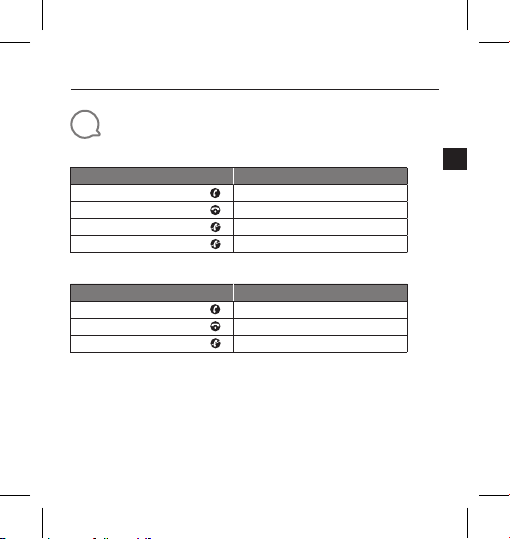
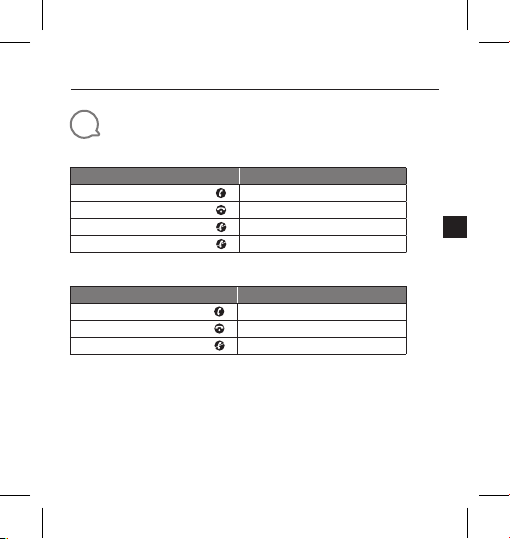
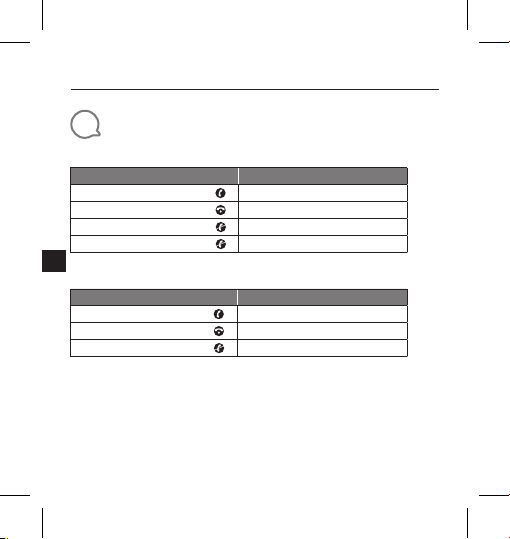
Phone Call
iPhone
Action
Answering an incoming call
Ending an active call
Ignoring an incoming call
Ending an outgoing call
Gesture
Press
Press
Press twice
Not supported
Android phone *
Action
Answering an incoming call
Ending an active call
Ignoring an incoming call
* Most of Android phones installed OS 8.0.0 or above support phone call function
* Due to huge variety of android phones, different phones have different key definition for phone
call support.
* Due to Android limitation, most messenger APPs call feature (answer ,reject ,end) on Android
are not supported.
* Some VIVO and OPPO phones don’t support phone call function.
Gesture
Press
Press
Press and hold for 1.5 seconds
7
Page 8
JBL CLICK
Quick Start Guide
EN
8
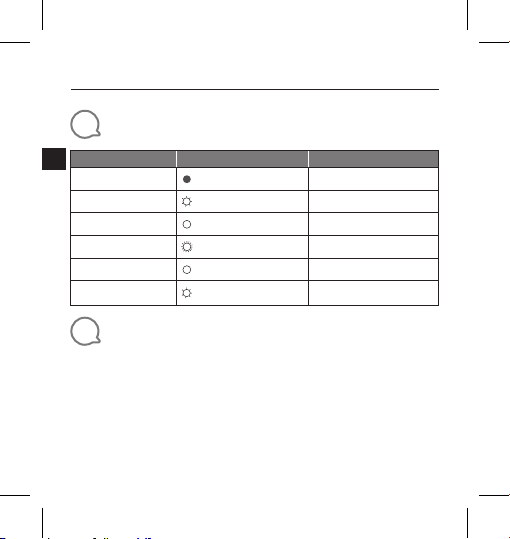
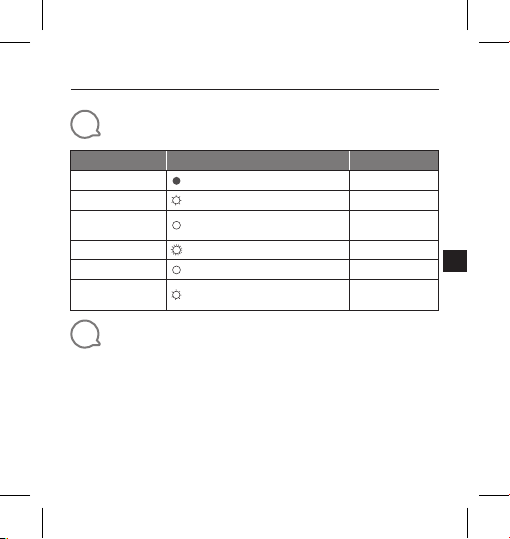
LED Behavior
Mode LED Status
Stand-by
Advertising
After battery insertion
Bluetooth pairing
Bluetooth connected
Low battery
9
Technical Specification
• Bluetooth® Version: 4.2
• Bluetooth
• Bluetooth
• Support: HID ANCS
• Power Supply: 3 V CR2032 battery
• Dimension (W × D × H): 139.9 x 38.3 x 39.6 mm
• Weight: 38 g
8
Timeout
Off
White, Slow Flash 3 minutes
White, Constant 5 seconds
White, Fast Flash(4Hz) 1.5 minutes
White, Constant 3 seconds
White, Slow Flash(1Hz) Until the battery power off
®
transmitter power: -20 to + 8 dBm
®
transmitter frequency range: 2.402 G - 2.480 G
Page 9
JBL CLICK
Kurzanleitung
DE
1
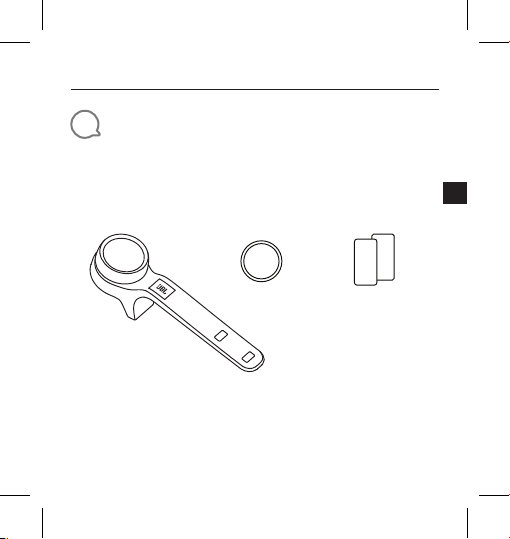
Verpackungsinhalt
CLICK x 1 CR2032 x 1 Sicherheitsdatenblatt/
Kurzanleitung x 1
Q
S
9
Page 10
JBL CLICK
Kurzanleitung
DE
2
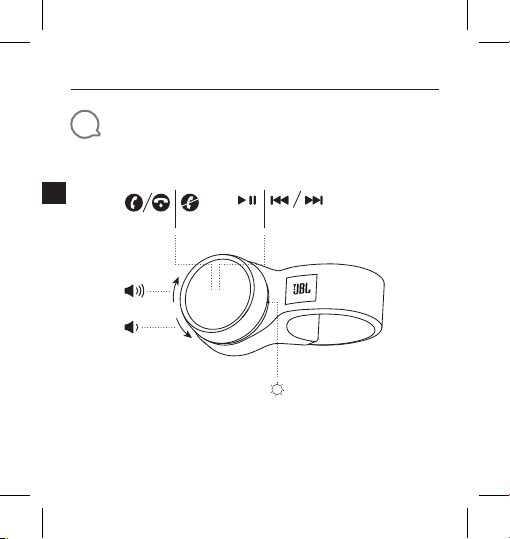
Übersicht
×1 ×1 ×3 ×2
10
Page 11
JBL CLICK
Kurzanleitung
DE
3
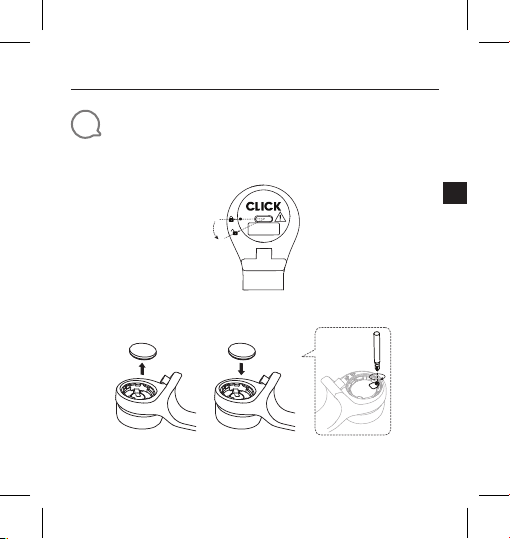
Einsetzen und Auswechseln der Batterie
1. Öffnen und Schließen des Batteriefachs
Schließen
Offen
* Entferne die Isolationsfolie vor dem Gebrauch.
2. Ersetzen der Batterie
* Wechsle die Batterie, wenn die LED schnell zu blinken beginnt (4Hz).
11
Page 12
JBL CLICK
Kurzanleitung
DE
4
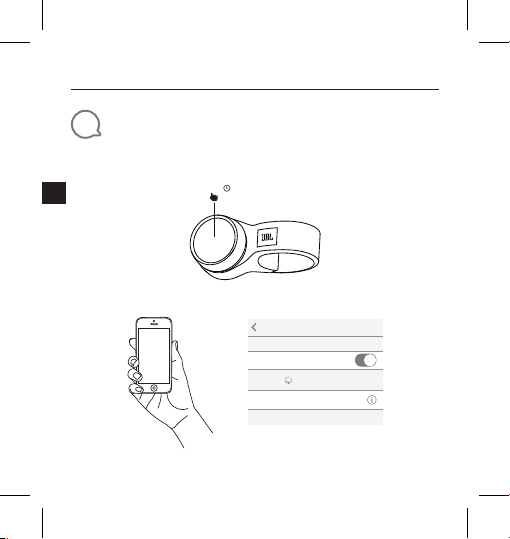
Bluetooth®-Verbindung
1. Halte den Knopf gedrückt.
2. Mit Bluetooth-Gerät verbinden
12
5,0s
Settings Bluetooth
Bluetooth
DEVICES
JBL Click
Now Discoverable
„JBL Click“ zum Verbinden auswählen
Connected
Page 13
JBL CLICK
Kurzanleitung
DE
5
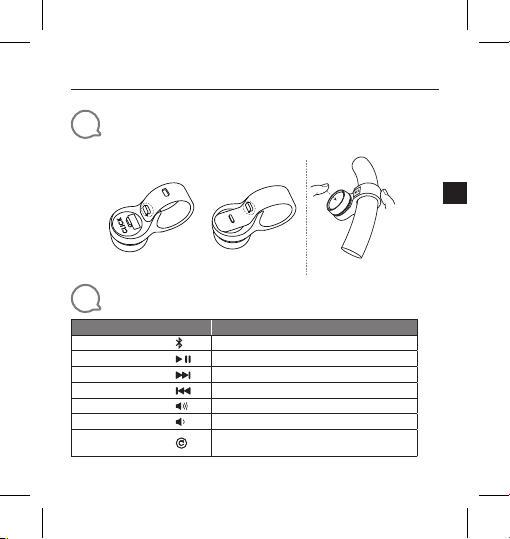
Installation (Montage und Demontage)
6
Interaktion
Aktion
Kopplung aktivieren
Wiedergabe/Pause
Nächster Track
Vorheriger Track
Lautstärke höher
Lautstärke niedriger
Reset auf die
Werkseinstellungen
Lenkrad
Montage Demontage
Lenker
Geste
Halte die Taste 5 Sekunden lang gedrückt.
Drücke
Drücke 2 Mal
Drücke 3 Mal
Drehe den Knopf nach rechts
Drehe den Knopf nach links
Halte die Taste 10 Sekunden lang gedrückt.
13
Page 14
JBL CLICK
Kurzanleitung
DE
7
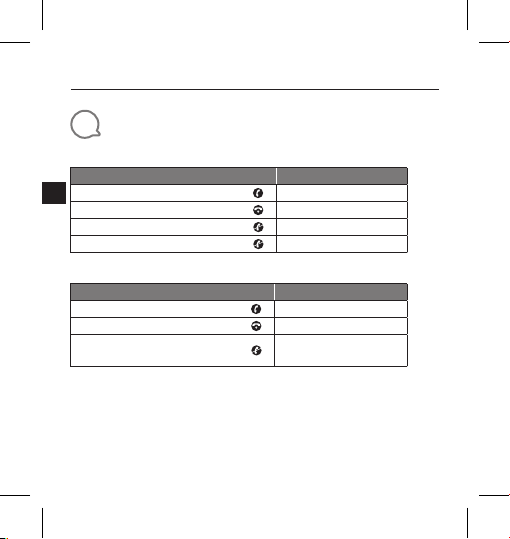
Telefonanruf
iPhone
Aktion
Annehmen eines eingehenden Anrufs
Beenden eines aktiven Anrufs
Ignorieren eines eingehenden Anrufs
Einen ausgehenden Anruf beenden
Android-Mobiltelefon *
Aktion
Annehmen eines eingehenden Anrufs
Beenden eines aktiven Anrufs
Ignorieren eines eingehenden Anrufs
* Die meisten Android-Telefone, auf denen das Betriebssystem 8.0.0 oder höher installiert
ist, unterstützen die Telefonanruffunktion.
* Aufgrund der großen Vielfalt an Android-Telefonen verfügen verschiedene Telefone über
unterschiedliche Tastendefinitionen für die Unterstützung von Telefonaten.
* Aufgrund der Android-Beschränkung werden die meisten Messenger-Apps mit
Anruffunktion (Annehmen, Ablehnen, Beenden) auf Android nicht unterstützt.
* Einige VIVO und OPPO Telefone unterstützen die Telefonanruffunktion nicht.
14
Geste
Drücke
Drücke
Drücke 2 Mal
Wird nicht unterstützt
Geste
Drücke
Drücke
Halte die Taste 1,5
Sekunden lang gedrückt.
Page 15
JBL CLICK
Kurzanleitung
DE
8
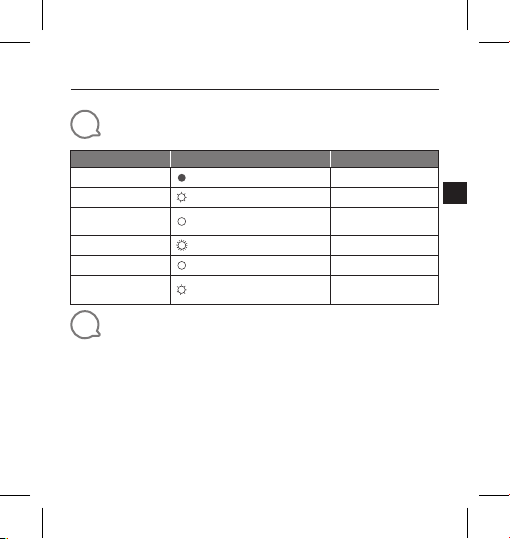
LED-Verhalten
Modus LED-Status
Stand-by-Modus
Bereitschaftsanzeige
Nach dem Einlegen
der Batterie
Bluetooth-Kopplung
Bluetooth verbunden
Schwacher Akku
9
Technische Daten
• Bluetooth®-Version: 4.2
• Bluetooth
• Frequenzbereich für die Bluetooth
2,402–2,480 GHz
• Unterstützt: HID ANCS
• Stromversorgung: 3V CR2032-Batterie
• Abmessungen (B x T x H): 139.9 x 38.3 x 39.6mm
• Gewicht: 38g
Aus
Weiß, kurzes Blinken 3 Minuten
Weiß, leuchtet 5 Sekunden
Weißer, schnell blinkend (4Hz) 1,5 Minuten
Weiß, leuchtet 3 Sekunden
Weiß, langsam blinkend (1Hz)
®
-Übertragungsleistung: -20 bis + 8 dBm
Dauer
Bis zur Abschaltung
der Batterie
®
-Übertragung:
15
Page 16
JBL CLICK
Guía de inicio rápido
ES
1
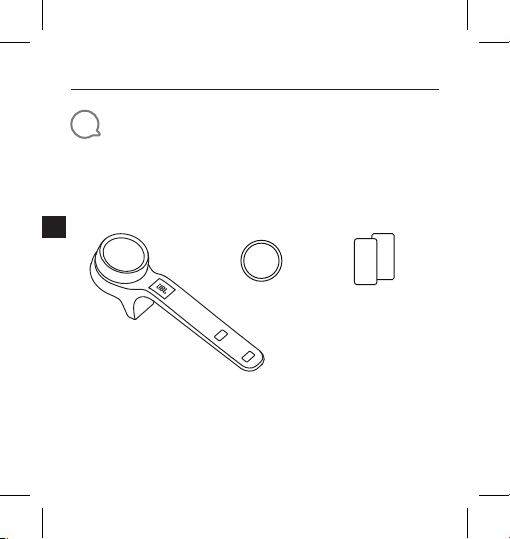
Contenido de la caja
CLICK x 1 CR2032 x 1 Lámina de
16
seguridad /
QSG x 1
Q
S
Page 17
JBL CLICK
Guía de inicio rápido
ES
2
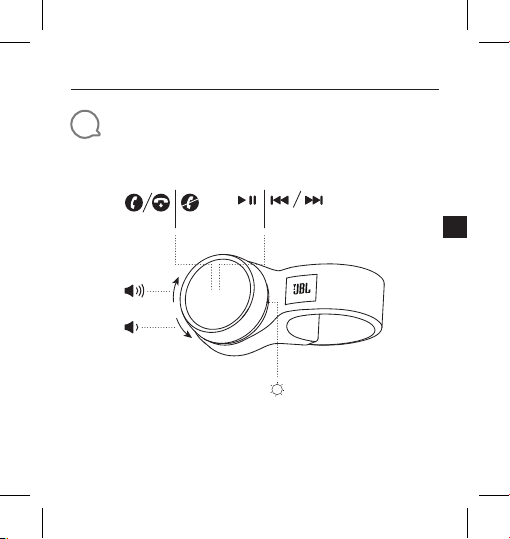
Resumen
×1 ×1 ×3 ×2
17
Page 18
JBL CLICK
Guía de inicio rápido
ES
3
Introducir y cambiar la batería
1. Abrir y cerrar la tapa de batería
* Saque la película aislante antes del uso
2. Cambiar la batería
* Cambie la batería cuando el LED comience a parpadear rápidamente (4Hz)
18
Cerrar
Abrir
Page 19
JBL CLICK
Guía de inicio rápido
ES
4
Bluetooth® Conexión
1. Mantenga pulsado el mando
2. Conectar con dispositivo Bluetooth
5,0s
Settings Bluetooth
Bluetooth
DEVICES
JBL Click
Now Discoverable
Seleccione «JBL Click» para conectar
Connected
19
Page 20
JBL CLICK
Guía de inicio rápido
ES
5
Instalación (montaje y desmontaje)
Volante
6
Interacción
Acción
Activar emparejamiento
Reproducir/Pausa
Pista siguiente
Pista anterior
Subir volumen
Bajar volumen
Reinicio de fábrica
20
Soporte Desmontaje
Manillar
Gesto
Mantener pulsado 5 segundos.
Pulse
Pulsar dos veces
Pulsar tres veces
Gire el mando a la derecha
Gire el mando a la izquierda
Mantener pulsado 10 segundos.
Page 21
JBL CLICK
Guía de inicio rápido
ES
7
Llamada
iPhone
Acción
Responder llamada entrante
Finalizar llamada activa
Ignorar llamada entrante
Finalizar una llamada saliente
Gesto
Pulse
Pulse
Pulsar dos veces
No se admite
Teléfono Android *
Acción
Responder llamada entrante
Finalizar llamada activa
Ignorar llamada entrante
* La mayoría de teléfonos Android con SO 8.0.0 o superior instalado soportan la función
de llamada.
* Debido a la amplia variedad de teléfonos Android, distintos teléfonos tienen distintas
definiciones de teclas para el soporte de llamadas.
* Debido a las limitaciones de Android, la mayoría de funciones de llamada de APP de
mensajería (responder, rechazar, finalizar) en Android no están soportadas.
* Algunos teléfonos VIVO y OPPO no admiten la función de llamada telefónica.
Gesto
Pulse
Pulse
Mantener pulsado 1,5 segundos.
21
Page 22
JBL CLICK
Guía de inicio rápido
ES
8
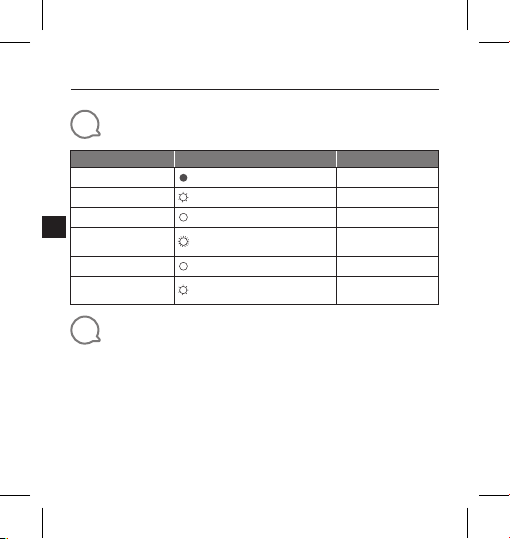
Comportamiento LED
Modo Estado LED
Espera
Publicidad
Tras insertar la batería
Emparejamiento
Bluetooth
Bluetooth conectado
Batería baja
9
Especificaciones técnicas
• Bluetooth® Versión: 4.2
• Bluetooth
• Bluetooth
• Soporte: HID ANCS
• Alimentación: batería CR2032 3 V
• Dimensiones (L × P × A): 139.9 x 38.3 x 39.6 mm
• Peso: 38 g
22
Apagado
Blanco, parpadeo lento 3 minutos
Blanco, fijo 5 segundos
Blanco, parpadeo rápido (4 Hz) 1,5 minutos
Blanco, fijo 3 segundos
Blanco, parpadeo lento (1 Hz)
®
potencia de transmisor: -20 a + 8 dBm
®
Gama de frecuencia de transmisor:
2,402 G - 2,480 G
Tiempo excedido
Hasta que se apague
la batería
Page 23
JBL CLICK
Guide de démarrage rapide
FR
1
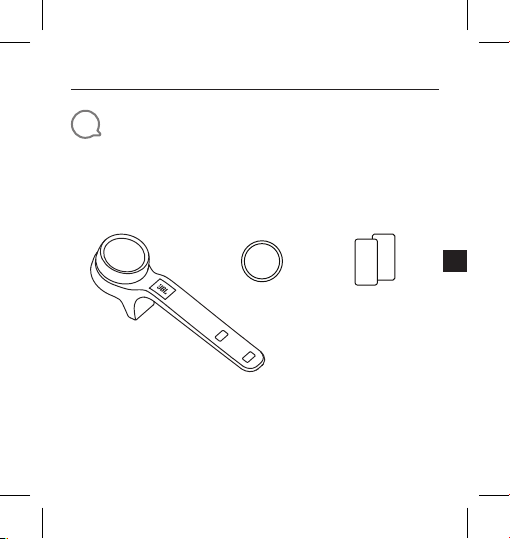
Contenu de la boîte
1 CLICK 1 CR2032 Fiche de sécurité /
Guide de
démarrage rapide
Q
S
23
Page 24
JBL CLICK
Guide de démarrage rapide
FR
2
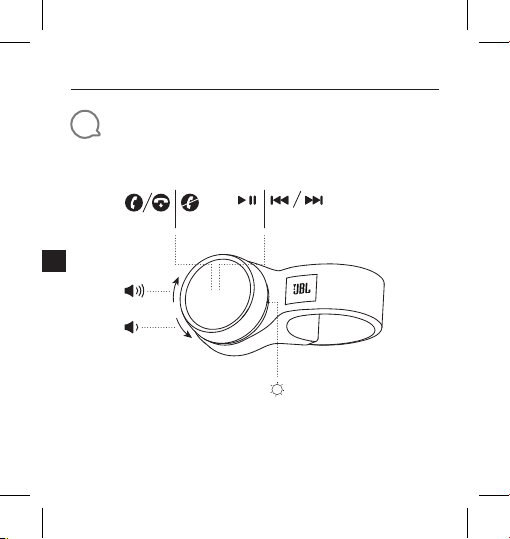
Présentation
24
×1 ×1 ×3 ×2
Page 25
JBL CLICK
Guide de démarrage rapide
FR
3
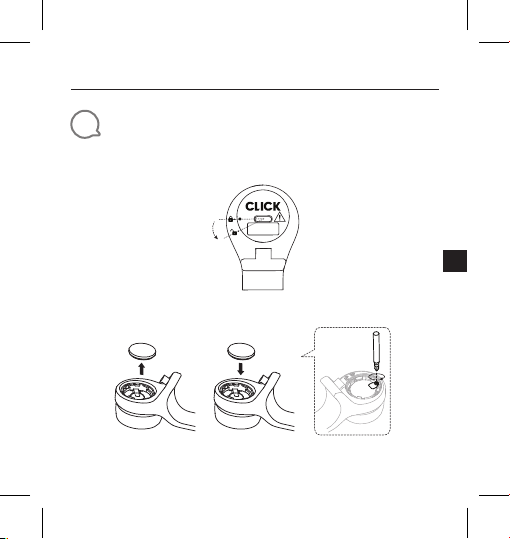
Insérer et remplacer la pile
1. Ouvrir et fermer le couvercle de la pile.
Fermer
Ouvrir
* Retirer le film isolant avant l'utilisation.
2. Remplacement de la pile.
* Remplacer la pile lorsque la LED clignote rapidement (4Hz).
25
Page 26
JBL CLICK
Guide de démarrage rapide
FR
4
Connexion Bluetooth
1. Appuyer longuement sur le bouton.
®
5,0s
2. Connecter à l'appareil Bluetooth.
26
Settings Bluetooth
Bluetooth
DEVICES
JBL Click
Now Discoverable
Choisir «JBL Click » pour la connexion.
Connected
Page 27
JBL CLICK
Guide de démarrage rapide
FR
5
Installation (montage et démontage)
Volant de direction
Montage Démontage
6
d'interagir
Action
Activation du jumelage
Lecture/Pause
Piste suivante
Piste précédente
Augmentation du volume
Diminution du volume
Réinitialisation aux valeurs d'usine
Guidon
Geste
Appuyer pendant 5 secondes
Appuyer
Appuyer deux fois
Appuyer trois fois
Tourner le bouton vers la droite
Tourner le bouton vers la gauche
Appuyer pendant 10 secondes
27
Page 28
JBL CLICK
Guide de démarrage rapide
FR
7
Appel téléphonique
iPhone
Action
Répondre à un appel entrant
Mettre fin à l'appel en cours
Ignorer un appel entrant
Fin d’un appel sortant.
Téléphone Android *
Action
Répondre à un appel entrant
Mettre fin à l'appel en cours
Ignorer un appel entrant
* La plupart des téléphones Android utilisant un SE 8.0.0 ou postérieur supportent la
fonction d'appel téléphonique.
* En raison de l'immense variété de téléphones Android, différents téléphones ont des
affectations de touches différentes pour le support de l'appel téléphonique.
* En raison d'une limitation d'Android, la plupart des fonctionnalités d'appel des
applications de messagerie (réponse, rejet, fin) sur Android ne sont pas supportées.
* Certains téléphones VIVO et OPPO ne supportent pas la fonction d’appel téléphonique.
28
Geste
Appuyer
Appuyer
Appuyer deux fois
Non supporté.
Geste
Appuyer
Appuyer
Appuyer pendant 1,5 secondes
Page 29
JBL CLICK
Guide de démarrage rapide
FR
8
Comportement de la LED
Mode État de la LED
Veille
Publicité
Après insertion de la
pile
Jumelage Bluetooth
Bluetooth connecté
Batterie faible
9
Spécifications techniques
• Version du Bluetooth®: 4.2
• Puissance de l’émetteur Bluetooth
• Bande de fréquences de l’émetteur Bluetooth
2,402G - 2,480G
• Compatibilité: HID ANCS
• Alimentation électrique: Pile 3V CR2032
• Dimensions (L x P x H): 139.9 x 38.3 x 39.6mm
• Poids: 38g
Hors délai
Désactivé
Blanche, clignotement lent 3minutes
Blanche, fixe 5secondes
Blanche, clignotement rapide (4Hz) 1,5minutes
Blanche, fixe 3secondes
Blanche, clignotement lent (1Hz)
Jusqu'à l'extinction
de la pile
®
: -20 à + 8dBm
®
:
29
Page 30
JBL CLICK
Guida di avvio rapido
IT
1
Contenuto della confezione
CLICK x 1 CR2032 x 1 Scheda dei dati
30
di sicurezza /
QSG x 1
Q
S
Page 31
JBL CLICK
Guida di avvio rapido
IT
2
Panoramica
×1 ×1 ×3 ×2
31
Page 32
JBL CLICK
Guida di avvio rapido
IT
3
Inserimento e sostituzione della batteria
1. Apertura e chiusura del vano batteria
* Rimuovere la pellicola isolante prima dell'uso
2. Sostituzione della batteria
* Sostituire la batteria quando il LED inizia a lampeggiare velocemente (4Hz)
32
Chiuso
Aperto
Page 33
JBL CLICK
Guida di avvio rapido
IT
4
Collegamento Bluetooth®:
1. Tenere premuta la manopola
2. Collegamento ad un dispositivo Bluetooth
5,0s
Settings Bluetooth
Bluetooth
DEVICES
JBL Click
Now Discoverable
Scegliere"JBL Click" per collegarsi
Connected
33
Page 34
JBL CLICK
Guida di avvio rapido
IT
5
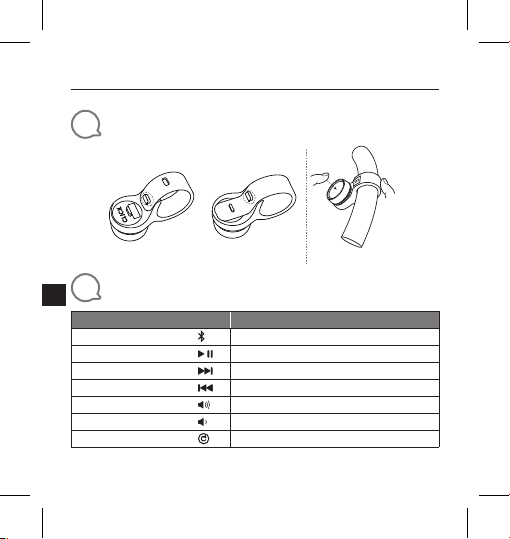
Installazione (montaggio e smontaggio)
Volante
Montaggio Smontaggio
6
Interazione
Funzione
Attivazione abbinamento
Play/Pausa
Brano successivo
Brano precedente
Volume su
Volume giù
Reset
34
Manubrio
Azione
Tenere premuto per 5 secondi
Premere
Premere due volte
Premere tre volte
Ruotare la manopola verso destra
Ruotare la manopola verso sinistra
Tenere premuto per 10 secondi
Page 35
JBL CLICK
Guida di avvio rapido
IT
7
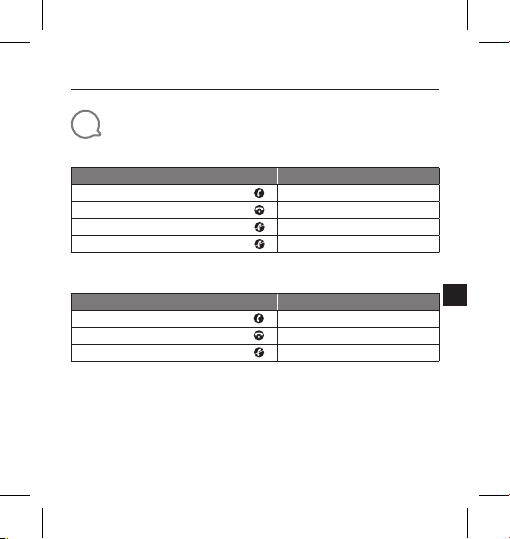
Telefonata
iPhone
Funzione
Rispondere ad una chiamata in arrivo
Terminare una chiamata in corso
Ignorare una chiamata in arrivo
Termina una chiamata in uscita
Azione
Premere
Premere
Premere due volte
Non supportato
Telefono Android *
Funzione
Rispondere ad una chiamata in arrivo
Terminare una chiamata in corso
Ignorare una chiamata in arrivo
* La maggior parte dei telefoni Android con installato OS 8.0.0 o superiore supportano la
funzione di chiamata telefonica.
* A causa della grande varietà di telefoni Android, diversi telefoni hanno una diversa definizione
dei tasti per il supporto della chiamata telefonica.
* A causa delle limitazioni di Android, la maggior parte delle funzioni di chiamata delle APP di
messaggistica (risposta, rifiuto, termine) su Android non sono supportate.
* Alcuni telefoni VIVO e OPPO non supportano la funzione di chiamata telefonica.
Azione
Premere
Premere
Tenere premuto per 1,5 secondi
35
Page 36
JBL CLICK
Guida di avvio rapido
IT
8
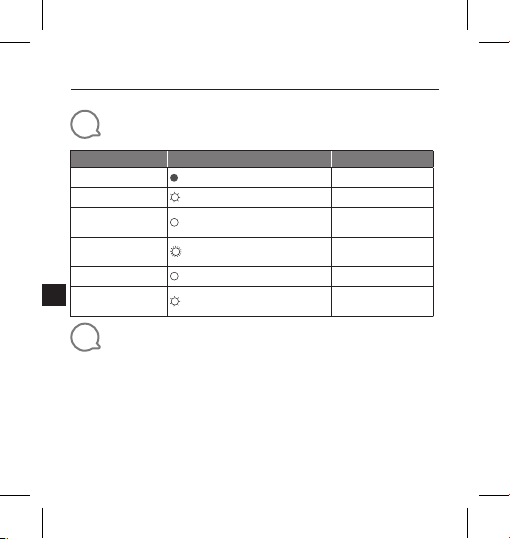
Comportamento LED
Modalità Stato LED
Stand-by
Esposizione
Dopo l'installazione
della batteria
Abbinamento
Bluetooth
Bluetooth connesso
Batteria scarica
9
Specifiche tecniche
• Versione Bluetooth®: 4.2
• Potenza del trasmettitore Bluetooth
• Intervallo di frequenza del trasmettitore Bluetooth
• Supporta: HID ANCS
• Alimentazione: Batteria 3V CR2032
• Dimensioni (L x P x A): 139.9 x 38.3 x 39.6 mm
• Peso: 38 g
36
Spento
Bianco, lampeggio lento 3 minuti
Bianco, fisso 5 secondi
Bianco, lampeggio veloce (4Hz) 1,5 minuti
Bianco, fisso 3 secondi
Bianco, lampeggio lento (1Hz)
2,402G - 2,480G
Spegnimento
Fino a quando la
batteria è esaurita
®
: da -20 a + 8dBm
®
:
Page 37
JBL CLICK
クイックスタートガイド
JP
1
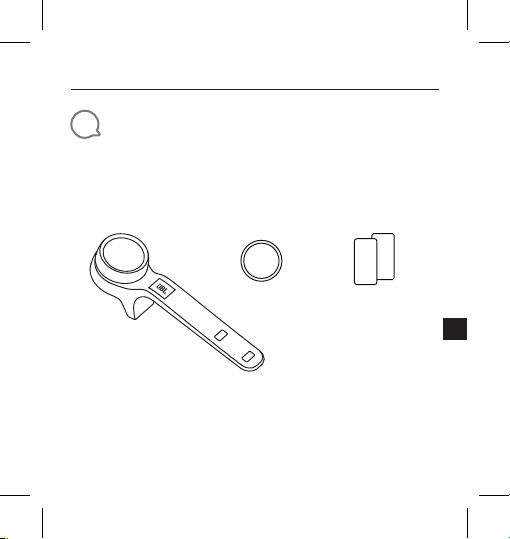
同梱品
CLICKx1 CR2032x1 安全シート/
QSGx1
S
Q
37
Page 38
JBL CLICK
クイックスタートガイド
JP
2
製品概要
38
×1 ×1 ×3 ×2
Page 39
JBL CLICK
クイックスタートガイド
JP
3
電池の挿入と取り替え
1. 電池カバーの開閉
閉じる
開く
* 使用前に絶縁紙を外します
2. 電池の交換
* LEDが素早く点滅したら、電池を交換してください
39
Page 40
JBL CLICK
クイックスタートガイド
JP
4
Bluetooth®接続
1. ノブを長押ししてください
2. Bluetooth対応デバイスに接続
40
5.0
秒
Settings Bluetooth
Bluetooth
DEVICES
JBL Click
Now Discoverable
接続するには「JBL Click」を選択
Connected
Page 41
JBL CLICK
クイックスタートガイド
JP
5
装着(取り付けと取り外し)
自動車用ハン
ドル
設置 取り外し
6
対応
作動
アクティブペアリング
再生/一時停止
次のトラック
前のトラック
ボリュームアップ
ボリュームダウン
工場出荷時へのリセット
自転車用ハン
ドル
ジェスチャー
5秒間押し続ける
1回押す
2回押す
3回押す
ノブを右に回転する
ノブを左に回転する
10秒間押し続ける
41
Page 42
JBL CLICK
クイックスタートガイド
JP
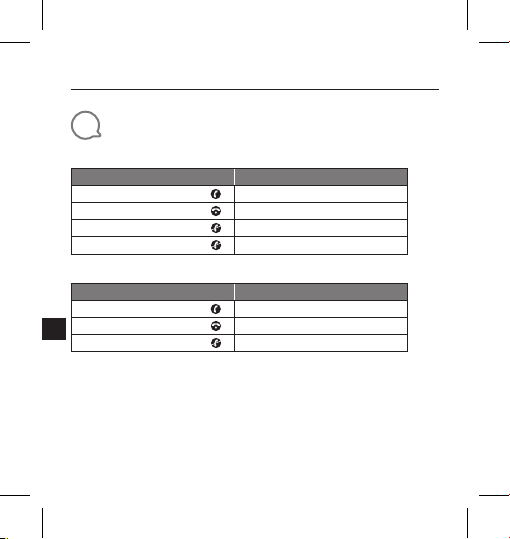
7
通話
iPhone
作動
電話の着信に応答する
通話を終える
電話の着信を無視する
電話の発信を終了します
Androidスマートホン*
作動
電話の着信に応答する
通話を終える
電話の着信を無視する
* Android スマホは、OS 8.0 以降の通話機能に対応しています
* Android スマホの場合、機種により通話対応キーが異なります。
* Android スマホの場合、Androidのメッセンジャーアプリの通話機能 ( 応答、通話拒否、終話)
には対応していません。
* 一部の VIVO および OPPOホンは通話機能に対応していません。
42
ジェスチャー
1回押す
1回押す
2回押す
対応していません
ジェスチャー
1回押す
1回押す
1.5秒間押し続ける
Page 43
JBL CLICK
クイックスタートガイド
JP
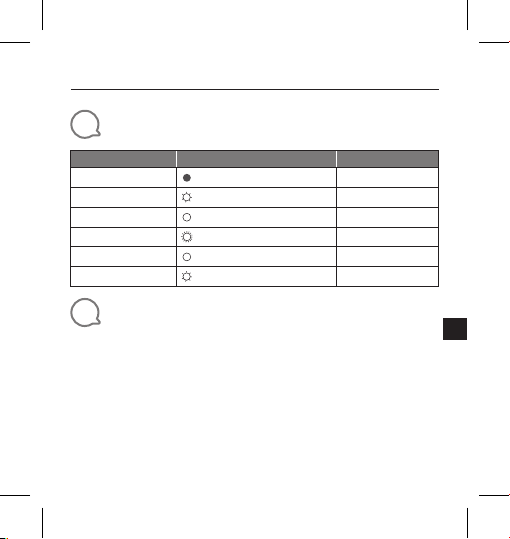
8
LEDの動作
モード LEDの状態
スタンバイ
広告
電池の挿入後
Bluetoothペアリング
Bluetooth接続済み
バッテリー残量少
9
製品仕様
• Bluetooth®バージョン:4.2
• Bluetooth
• Bluetooth
2.402 G〜2.480 G
• 対応: HID ANCS
• 電源:3 V CR2032電池
• 寸法(幅x奥行x高さ):
• 重量:38 g
オフ
白色、ゆっくり点滅 3分
白色、点灯 5秒
白色、素早く点滅 1.5分
白色、点灯 3秒
白色、ゆっくり点滅 電池が切れるまで
®
対応トランスミッター出力:-20 〜 + 8 dBm
®
対応トランスミッター周波数帯域:
139.9 x 38.3 x 39.6
タイムアウト
mm
43
Page 44
JBL CLICK
Guia de início rápido
PT-
BR
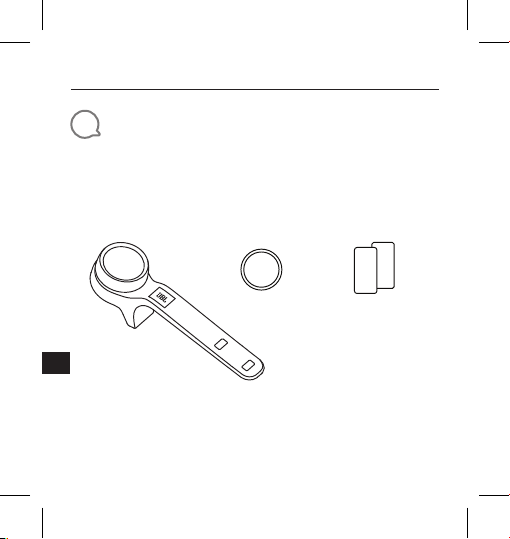
1
Conteúdo da caixa
1 × JBL CLICK 1 × Bateria
44
CR2032
1× Ficha de
Segurança e
Guia de Início Rápido
Q
S
Page 45
JBL CLICK
Guia de início rápido
PT-
BR
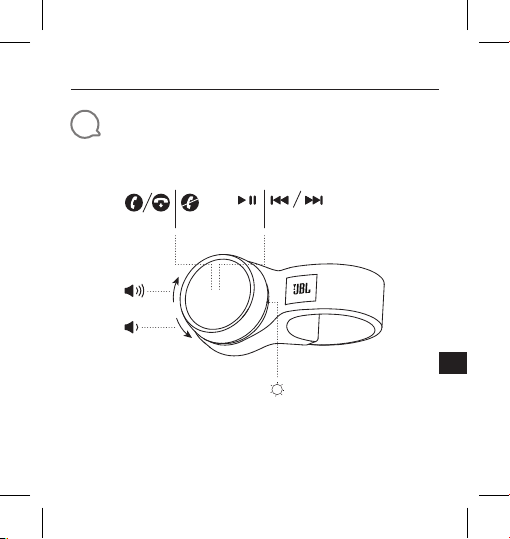
2
Apresentação
×1 ×1 ×3 ×2
45
Page 46
JBL CLICK
Guia de início rápido
PT-
BR
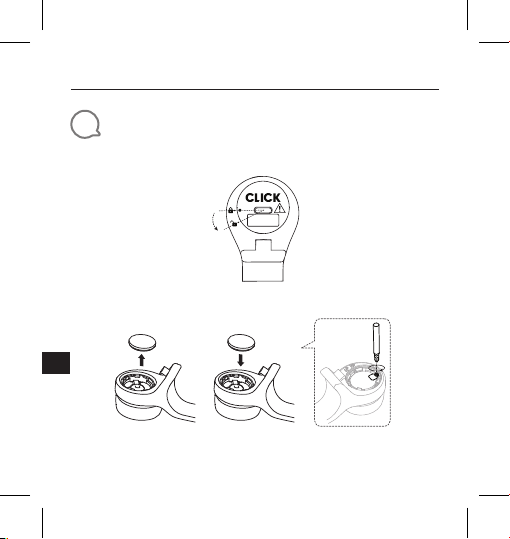
3
Colocação e troca da bateria
1. Abra e feche a tampa do compartimento de bateria
* Retire o isolante antes de usar
2. Troque a bateria
* Troque a bateria quando o LED começar a piscar rapidamente (4vezes por segundo)
46
Fechar
Abrir
Page 47
JBL CLICK
Guia de início rápido
PT-
BR
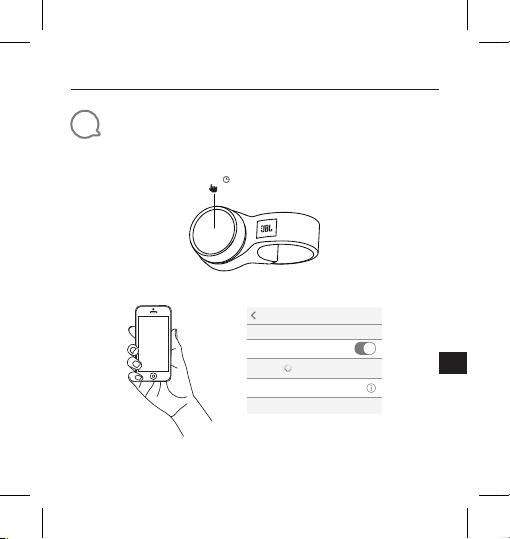
4
Conexão Bluetooth
1. Mantenha pressionado o botão
2. Conecte um dispositivo Bluetooth
®
5,0 s
Settings Bluetooth
Bluetooth
DEVICES
JBL Click
Now Discoverable
Selecione "JBL Click" para conectar
Connected
47
Page 48
JBL CLICK
Guia de início rápido
PT-
BR
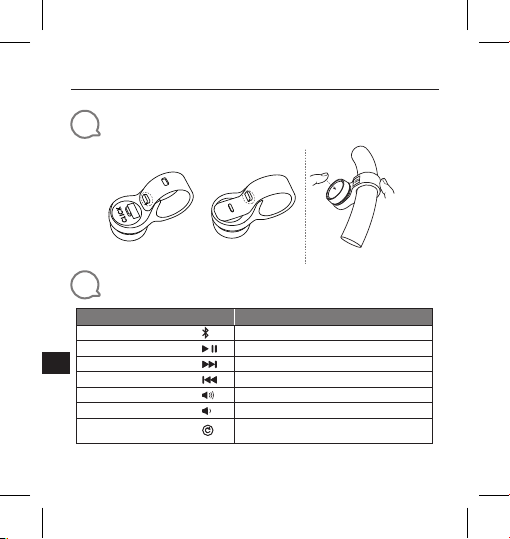
5
Instalação (montagem e desmontagem)
6
Interação
Ação
Ativar emparelhamento
Play/Pausa
Próxima faixa
Faixa anterior
Aumentar volume
Diminuir volume
Restaurar configurações
de fábrica
48
Volante
Montagem Desmontagem
Guidão
Procedimento
Mantenha pressionado por cinco segundos
Pressione
Pressione duas vezes
Pressione três vezes
Gire o botão para a direita
Gire o botão para a esquerda
Mantenha pressionado por dez segundos
Page 49
JBL CLICK
Guia de início rápido
PT-
BR
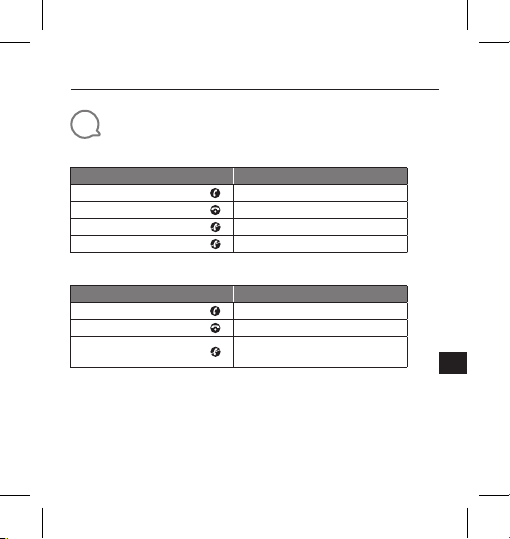
7
Chamada
iPhone
Ação
Atender a uma chamada
Encerrar a chamada
Recusar uma chamada
Encerrando chamada
Procedimento
Pressione
Pressione
Pressione duas vezes
Não suportado
Smartphone Android*
Ação
Atender a uma chamada
Encerrar a chamada
Recusar uma chamada
* A maioria dos smartphones Android (versão OS 8.0.0 ou superior) suporta chamadas
* O botão de suporte depende do modelo do smartphone Android.
* Devido a limitações do sistema Android, a maioria dos controles de chamada (atender,
recusar e encerrar) não são suportados.
* Alguns telefones VIVO e OPPO não suportam a função de chamada.
Procedimento
Pressione
Pressione
Mantenha pressionado por um
segundo e meio
49
Page 50
JBL CLICK
Guia de início rápido
PT-
BR
8
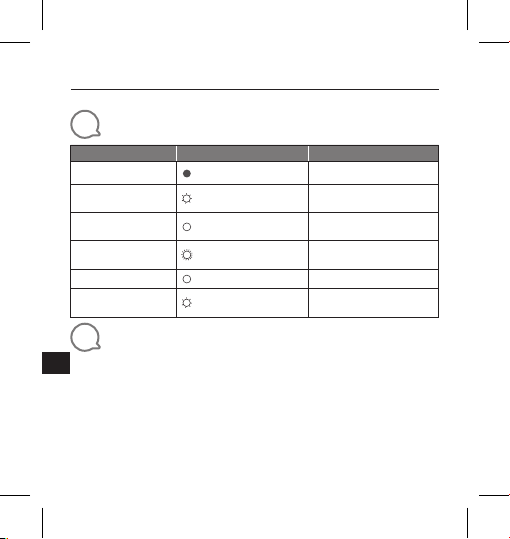
Funcionamento do LED
Modo Status do LED
Espera
Anúncio
Após introdução da
bateria
Emparelhamento
Bluetooth
Bluetooth conectado
Bateria fraca
9
Especificações técnicas
• Versão Bluetooth®: 4.2
• Potência de transmissão Bluetooth
• Faixa de frequência de transmissão Bluetooth
• Padrões suportados: HID ANCS
• Alimentação de energia: 3 V (bateria CR2032)
• Dimensões (L x P x A): 139.9 x 38.3 x 39.6 mm
• Peso: 38 g
50
2,402 a 2,480GHz
Timeout
Apagado
Branco piscando
devagar
Branco constante 5 segundos
Branco piscando quatro vezes por segundo
Branco constante 3 segundos
Branco piscando uma
vez por segundo
3 minutos
1,5 minutos
Até a bateria acabar
®
: -20 a + 8dBm
®
:
Page 51
Este equipamento não tem direito à proteção contra interferência prejudicial e não pode causar
interferência em sistemas devidamente autorizados.
Para maiores informações, consulte o site da ANATEL – www.anatel.gov.br
Este produto está homologado pela ANATEL, de acordo com os procedimentos
regulamentados pela Resolução n°. 242/2000 e atende aos requisitos técnicos aplicados.
The Bluetooth® word mark and logos are registered trademarks owned by the Bluetooth SIG,
Inc. and any use of such marks by HARMAN International Industries, Incorporated is under
license. Other trademarks and trade names are those of their respective owners.
51
Page 52

Торговая марка: JBL
Назначение товара: Беспроводной пульт управления
Изготовитель: Харман Интернешнл Индастриз Инкорпорейтед,
Страна происхождения: Китай
Импортер в Россию: OOO “ХАРМАН РУС СиАйЭс“, Россия, 127018, г.Москва,
Гарантийный период: 1 год
Информация о сервисных центрах: www.harman.com/ru тел. +7-800-700-0467
Срок службы: 3 года
Товар сертифицирован
Дата производства: Дата изготовления устройства определяется по двум
Используйте устройство только по прямому назначению в соответствии с предоставленной
инструкцией. Не пытайтесь самостоятельно вскрывать корпус товара и осуществлять
ремонт. В случае обнаружения недостатков или дефектов, обращайтесь за гарантийным
обслуживанием в соответствии с информацией из гарантийного талона. Особые условия
хранения, реализации и (или) транспортировки не предусмотрены. Избегайте воздействия
экстремальных температур, долговременного воздействия влаги, сильных магнитных
полей. Устройство предназначено для работы в жилых зонах. Срок годности не ограничен
при соблюдении условий хранения.
США, 06901 Коннектикут, г.Стэмфорд, Атлантик Стрит
400, офис 1500
ул. Двинцев, д.12, к. 1
буквенным обозначениям из второй группы символов
серийного номера изделия, следующих после
разделительного знака «-». Кодировка соответствует
порядку букв латинского алфавита, начиная с января
2010 года: -000000MY0000000, где «M» - месяц
производства (А - январь, B - февраль, C - март и т.д.) и
«Y» - год производства (A - 2010, B - 2011, C - 2012 и т.д.).
JBL_Click_QSG_SOP_V16
 Loading...