

Page 1
Power amplifiers
QUICKSTART GUIDE
MODELS | SA4, SA4-D, MA4, MA4-D, LA4, LA4-D
Page 2
IMPORTANT SAFETY INSTRUCTIONS
IMPORTANTES INSTRUCTIONS DE SÉCURITÉ
WICHTIGE SICHERHEITSINSTRUKTIONEN
INSTRUCCIONES DE SEGURIDAD IMPORTANTES
1. Read these instructions.
2. Keep these instructions.
3. Heed all warnings.
4. Follow all instructions.
5. Do not use this apparatus near water.
6. Clean only with a dry cloth.
7. Do not block any ventilation openings. Install in
accordance with the manufacturer’s instructions.
8. Do not install near any heat sources such as radiators,
heat registers, stoves, or other apparatus (including
ampliers) that produce heat.
9. Do not defeat the safety purpose of the polarized or
grounding-type plug. A polarized plug has two blades
with one wider than the other. A grounding-type plug
has two blades and a third grounding prong. The wide
blade or the third prong is provided for your safety. If
the provided plug does not t into your outlet, consult
an electrician for replacement of the obsolete outlet.
10. Protect the power cord from being walked on
or pinched, particularly at plugs, convenience
receptacles, and the point where they exit from the
apparatus.
11. Only use attachments/accessories specied by the
manufacturer.
12. Use only with a cart, stand, tripod, bracket, or table
specied by the manufacturer, or sold with the
apparatus. When a cart is used, use caution when
moving the cart/apparatus combination to avoid injury
from tip-over.
13. Unplug this apparatus during lightning storms or when
unused for long periods of time.
14. Refer all servicing to qualied service personnel.
Servicing is required when the apparatus has been
damaged in any way, such as power-supply cord or
plug is damaged, liquid has been spilled or objects
have fallen into the apparatus, the apparatus has
been exposed to rain or moisture, does not operate
normally,or has been dropped.
15. Use the mains plug to disconnect the apparatus from
the mains.
16. WARNING: TO REDUCE THE RISK OF FIRE OR ELECTRIC
SHOCK, DO NOT EXPOSE THIS APPARATUS TO RAIN OR
MOISTURE.
17. DO NOT EXPOSE THIS EQUIPMENT TO DRIPPING OR
SPLASHING AND ENSURE THAT NO OBJECTS FILLED
WITH LIQUIDS, SUCH AS VASES, ARE PLACED ON THE
EQUIPMENT.
18. THE MAINS PLUG OF THE POWER SUPPLY CORD SHALL
REMAIN READILY OPERABLE.
CAUTION
RISK OF ELECTRIC SHOCK
DO NOT OPEN
AVIS
RISQUE DE CHOC ÉLECTRIQUE
N’OUVREZ PAS
TO PREVENT ELECTRIC SHOCK DO NOT REMOVE TOP OR
BOTTOM COVERS. NO USER SERVICEABLE PARTS INSIDE. REFER
SERVICING TO QUALIFIED SERVICE PERSONNEL.
À PRÉVENIR LE CHOC ÉLECTRIQUE N’ENLEVEZ PAS LES
COUVERCLES. IL N’Y A PAS DES PARTIES SERVICEABLE
À L’INTÉRIEUR. TOUS REPARATIONS DOIT ETRE FAIRE PAR
PERSONNEL QUALIFIÉ SEULMENT.
PARA PREVENIR UN CHOQUE ELÉCTRICO, NO RETIRE LAS
CUBIERTAS SUPERIOR O INFERIOR. NO EXISTEN PARTES QUE
PUEDAN SER REPARADAS POR EL USUARIO AL INTERIOR.
REMITA EL SERVICICO AL PERSONAL TÉCHNICAL CALIFICADO.
TO COMPLETELY DISCONNECT THIS EQUIPMENT FROM THE AC
MAINS, DISCONNECT THE POWER SUPPLY CORD PLUG FROM
THE AC RECEPTACLE. THE MAINS PLUG OF THE POWER SUPPLY
CORD SHALL REMAIN READILY OPERABLE.
POUR DÉMONTER COMPLÈTEMENT L’ÉQUIPEMENT DE
L’ALIMENTATION GÉNÉRALE, DÉMONTER LE CÂBLE
D’ALIMENTATION DE SON RÉCEPTACLE. LA PRISE
D’ALIMENTATION RESTERA AISÉMENT FONCTIONNELLE.
PARA DESCONECTAR COMPLETAMENTE EL EQUIPO
DEL SUMINSTRO ELECTRICO, DESCONECTE EL CABLE
DE ALIMENTACION DE LA TOMA DE CA. LAS PATAS DEL
CONECTOR DEL CABLE DE ALIMENTACIÓN DEBERAN
MANTENERSE EN BUEN ESTADO.
WATCH FOR THESE SYMBOLS:
The lightning bolt triangle is used to alert the user to the risk of
electric shock.
The exclamation point triangle is used to alert the user to
important operating or maintenance instructions.
REGARDEZ CES SYMBOLES:
La triangle avec le sigle ‘’foudre’’ est employée pour alerter
l’utilisateur au risque de décharge électrique. Le triangle
avec un point d’exclamation est employée pour alerter
l’utilisateur d’instruction importantes pour lors opérations de
maintenance.
ATENCION CON ESTOS SÍMBOLOS:
El triángulo con el símbolo de rayo eléctrico es usado para
alertar al usuario de el riesgo de un choque eléctrico. El
triángulo con el signo de admiración es usado para alertar
al usuario de instrucciones importantes de operación o
mantenimiento.
The Centric Amplied Control System
are certied only at 120V~ in Canada.
IMPORTANT
Système de contrôle Centric Amplied require Class 2 output
wiring. Les amplicateurs de série de I-Tech exigent des
câbles de sortie de classe 2.
Centric Amplied Kontrollsystem Klasse die 2
Produktionsverdrahtung.
Sistema de control amplicado central requieren de un
cableado de salida Clase 2.
MAGNETIC FIELD
CAUTION! Do not locate sensitive high-gain equipment
such as preampliers directly above or below the unit.
Because this amplier has a high power density, it has a
strong magnetic eld which can induce hum into unshielded
devices that are located nearby. The eld is strongest just
above and below the unit.
If an equipment rack is used, we recommend locating the
ampliers) in the bottom of the rack and the preamplier or
other sensitiv e equipment at the top.
FCC COMPLIANCE NOTICE
This device complies with part 15 of the FCC rules. Operation is
subject to the following two conditions: (1) This device may not
cause harmful interference, and (2) this device must accept
any interference received, including interference that may
cause undesired operation.
CAUTION: Changes or modications not expressly approved
by the party responsible for compliance could void the user’s
authority to operate the equipment.
NOTE: This equipment has been tested and found to comply
with the limits for a Class B digital device, pursuant to part
15 of the FCC Rules. These limits are designed to provide
reasonable protection against harmful interference in a
residential installation. This equipment generates, uses, and
can radiate radio frequency energy and, if not installed and
used in accordance with the instruction manual, may cause
harmful interference to radio communications. However, there
is no guarantee that interference will not occur in a particular
installation. If this equipment does cause harmful interference
to radio or television reception, which can be determined by
turning the equipment off and on, the user is encouraged to
try to correct the interference by one or more of the following
measures:
• Reorient or relocate the receiving antenna.
• Increase the separation between the equipment and
receiver.
• Connect the equipment into an outlet on a circuit
different from that to which the receiver is connected.
• Consult the dealer or an experienced radio/TV technician
for help.
2 JBL DSI SERIES POWER AMPLIFIERS
Page 3
WELCOME
Quick Reference Chart
Thank you for purchasing a JBL DSi 2 Cinema amplier, one in a
complete line of high-performance ampliers based on exclusive
DriveCore technology powered by Crown. The DSi 2 Series ampliers
are designed, engineered, and manufactured to the industry’s
highest quality standards and offer cinema system integrators with the
advanced features and exibility required for challenging 21st-century
Cinema-sound applications.
Please take the time to study the owners manual so that you can obtain
the best possible service from your amplier at http://jblpro.com.
Trademark Notice: Com-Tech, BCA, JBL, Amcron, DriveCore, Drivecore
Install are Trademarks of HARMAN International..
WHATS INCLUDED
1. JBL DSi 2.0 Amplier
2. 2 Phoenix Terminals for Analog Input.
3. 8 Spade Lugs for Amplier Output.
4. Phoenx Terminal for GPIO.
5. 1 Power cord (except for ‘-NP’ Variants)
WHAT YOU WILL NEED
(not supplied):
• Input wiring cables
• Output wiring cables
• Flathead screwdriver
• Phillips screwdriver
• Rack for mounting amplier (or a stable surface for stacking)
• Category 5e or higher cabling
• 1 Power cord for ‘-NP’ Models
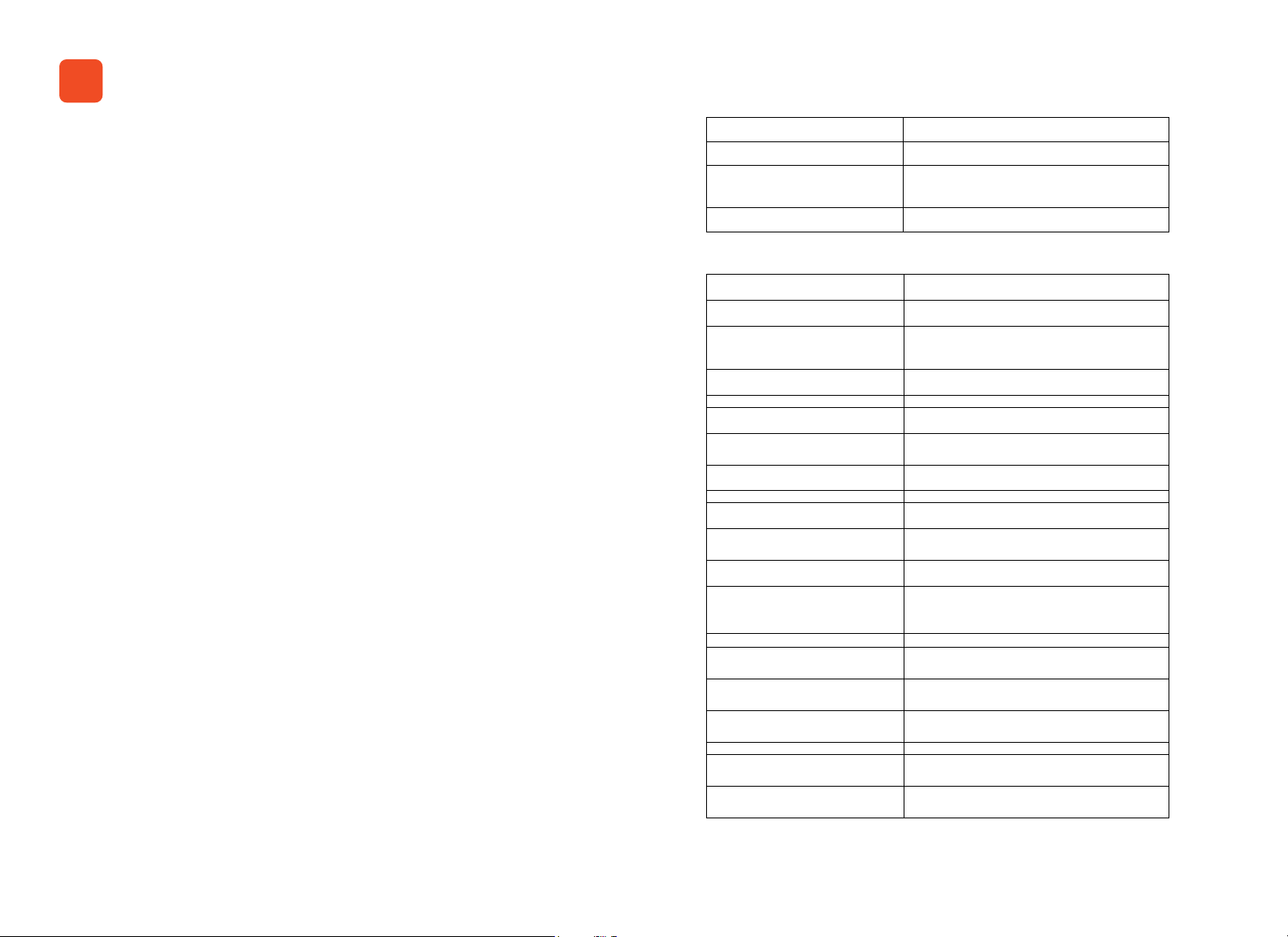
POWER ON Press Power Button momentarily
POWER OFF Press and Hold Power button for 2s
FRONT PANEL LOCK/UNLOCK
DIAGNOSTICS SCREEN Press and Hold Encoder
Simultaneously Press and Hold Select 1
Button and Encoder
Ordering Information
ORDERING INFORMATION
SA4 SA4 Amplier with Analog only Inputs
MA4 MA4 Amplier with Analog only Inputs
LA4 LA4 Amplier with Analog only Inputs
SA4-D SA4 Amplier with Analog + AES67 Inputs
MA4-D
LA4-D LA4 Amplier with Analog + AES67 Inputs
Sufx '- US' Amplier Model with US power cord
Sufx '- EK'
Sufx '- CN' Amplier Model with China power cord
Sufx '-NP'
Example: SA4-D-US
Example: LA4-CN
Example: SA4-NP
Spare Analog Input
Connector
Spare Speaker Terminal
Spade Lugs
MA4 Amplier with Analog + AES67
Inputs
Amplier Model with EU, UK and Korea
Power cord
Amplier Model with NO power
cord. Power cords may be ordered
separately.
SA4 Amplier with Analog + AES67 Inputs
with US power cord
LA4 Amplier with Analog only Inputs
with China power cord
SA4 Amplier WITHOUT any power cord
(No Power cord)
(P/N 5024623).
(P/N PV10-6LF-L)
3QUICK START GUIDE
Page 4
1
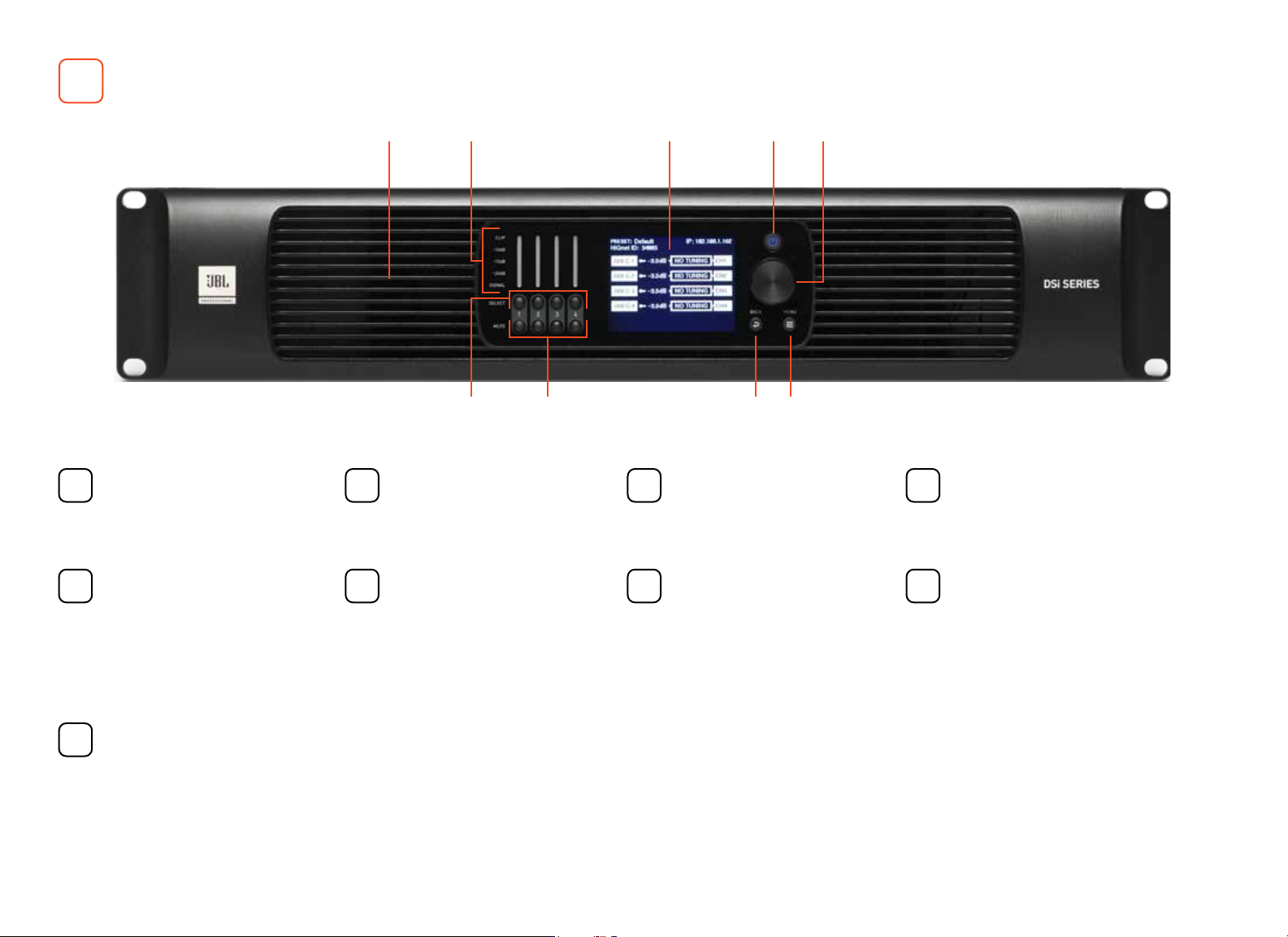
FRONT PANEL OVERVIEW
COOLING VENTS/AIR FILTERS
1
Provides cooling air ow. Do not
block or cover these vents.
ENCODER
5
This encoder supports rotary
and pushbutton operation. It
is used to navigate the DSi 2’s
menus and select on-screen
options. It is also used to adjust
individual channel or overall
system volume.
POWER BUTTON
9
Turns the amplier power on or
off. The Power button has an
integrated power symbol that
illuminates blue when the power
is on and green when the power
is off.
1
2
6
SIGNAL LEVEL LED INDICATORS
2
These LEDs indicate channel
INPUT levels.
CHANNEL SELECT BUTTONS
6
Pressing one of these buttons
will select the corresponding
channel; turning the ENCODER
will then control the volume of
the selected channel.
3
4987
LCD (DISPLAY)
3
This color LCD provides product
information and visual feedback
for operating the DSi 2 amplier
from the front panel.
CHANNEL MUTE BUTTONS
7
Pressing each of these
buttons will mute/ unmute the
corresponding amplier output
channel. Note that when a
channel is muted, the front
panel SIGNAL LEDs will still light
to indicate input signal level
presence, the CLIP LEDs will still
light to indicate input clipping,
and the LCD will ash “Mute”.
5
BACK BUTTON
4
Press this button to navigate
back one level when navigating
menus.
MENU BUTTON
8
Pressing this button will enter
the Main menu, where amplier
settings can be edited.
4 JBL DSI SERIES POWER AMPLIFIERS
Page 5

2
REAR PANEL OVERVIEW
COOLING VENTS
1
Do not block/cover these vents.
1
2
34 7
75
6 6
AES67 PRIMARY /
2
SECONDARY PORTS
These two RJ45 connectors are
used for AES67 Audio transport
and are available only on the
‘-D’ DSi 2 amplier models. This
implementation of AES67 allows
for up to 64 channels of digital
audio over Category 5e wiring.
GENERAL PURPOSE INPUT
3
/OUTPUT (GPIO)
This 8-pin block connector
combines the 2-in, 2-out GPIO
with the SLEEP and AMP STATUS
pins from the AUX circuit.
ETHERNET
4
(NETWORK CONTROL) PORT
Connect this RJ45 port to
a computer or network for
monitoring and controlling the
amplier over Category 5e
wiring via the Audio
Architect software.
AC POWER INLET
5
Connect the included AC power
cord to this standard 15A, IEC
type 320 inlet. Supported mains
voltage range is 100-240V~.
OUTPUT TERMINAL (BARRIER
6
BLOCK) CONNECTORS
Two four-pole, touch-proof
terminal strip per channel pair.
Accepts up to 10 AWG wire or
terminal forks.
ANALOG AUDIO INPUT
7
CONNECTORS
Connect your audio source
outputs to these inputs using the
provided plug-in connectors.
One 6-pin plug-in connector can
be used per input pair. These
inputs are high impedance,
balanced connections.
5QUICK START GUIDE
Page 6

3
INSTALLING THE AMP
UNPACKING
Unpack your amplier and inspect for any damage that may have
occurred during transit. If damage is found, notify the shipping
company immediately. Only you can initiate a claim for shipping
damage, though JBL will be happy to help as needed. If the product
arrived showing signs of damage, save the shipping carton for the
shipper’s inspection.
We also recommend that you save all packing materials for use if you
ever need to transport the unit. Never ship the unit without the factory
carton and packing materials.
CAUTION: Before you begin, make sure your amplier is disconnected
from the power source.
INSTALLING THE AMPLIFIER
Mount the unit in a standard 19-inch (48.3 cm) equipment rack (EIA RS310B). You can also place a single amp on a solid, stable surface or stack
multiple amps.
NOTE: Ampliers should be supported at both the front and rear of
the rack.
PROPER COOLING
When using an equipment rack, mount units directly on top of each
other. Close any open spaces in the rack with blank panels. (Open
spaces will reduce cooling efciency.) DO NOT block front or rear air
vents.
CLIP
-10dB
-15dB
PRESET: Default
HiQnet ID: 34885
-20dB
IP: 192.168.1.102
ANLG 1
SIGNAL
–3.5dB
NO TUNING
ANLG 2
CH1
SELECT
–3.5dB
NO TUNING
ANLG 3
CH2
–3.5dB
1 2 3 4
NO TUNING
MUTE
ANLG 4
CH3
–3.5dB
NO TUNING
CH4
BACK MENU
CLIP
-10dB
-15dB
PRESET: Default
HiQnet ID: 34885
-20dB
IP: 192.168.1.102
ANLG 1
SIGNAL
–3.5dB
NO TUNING
ANLG 2
CH1
SELECT
–3.5dB
NO TUNING
ANLG 3
CH2
–3.5dB
1 2 3 4
NO TUNING
MUTE
ANLG 4
CH3
–3.5dB
NO TUNING
CH4
BACK MENU
CLIP
-10dB
-15dB
PRESET: Default
HiQnet ID: 34885
-20dB
IP: 192.168.1.102
ANLG 1
SIGNAL
–3.5dB
NO TUNING
ANLG 2
CH1
SELECT
–3.5dB
NO TUNING
ANLG 3
CH2
–3.5dB
1 2 3 4
NO TUNING
MUTE
ANLG 4
CH3
–3.5dB
NO TUNING
CH4
BACK MENU
CLIP
-10dB
-15dB
PRESET: Default
HiQnet ID: 34885
-20dB
IP: 192.168.1.102
ANLG 1
SIGNAL
–3.5dB
NO TUNING
ANLG 2
CH1
SELECT
–3.5dB
NO TUNING
ANLG 3
CH2
–3.5dB
1 2 3 4
NO TUNING
MUTE
ANLG 4
CH3
–3.5dB
NO TUNING
CH4
BACK MENU
The rack should be a minimum of 2 inches (5.1 cm) away from the
amplier, and the back of the rack should be a minimum of 4 inches
(10.2 cm) from the amplier back panel.
6 JBL DSI SERIES POWER AMPLIFIERS
Page 7

4
HARDWARE SETUP
CONNECTING THE AC POWER CORD
Connect your amplier to the AC mains power outlet using the supplied AC power cord. First, connect the IEC end of the cord
to the IEC connector on the amplier. Then plug the other end of the cord to the AC mains.
WARNING: The third (ground) prong of the supplied AC power cord connector is a required safety feature. Do not
attempt to disable this ground connection by using an adapter or other methods.
Make certain the AC mains voltage and current ratings are sufcient to deliver full power to all ampliers. DSi 2 Series
ampliers use a universal power supply. The AC voltage requirements are 100V-240V~, 50/60Hz (±10%). If the AC line
voltage varies outside of this acceptable range, the amplier’s power supply will turn off and the blue Power LED will ash.
The amplier will turn back on when the AC line voltage returns to safe operating levels.
POWER UP PROCEDURE
When turning on the amplier for the rst time:
1. Ensure all connections are disconnected with the exception of the power cord.
2. Press the amplier’s POWER button. The Power indicator will light blue and the amplier will boot as long as sufcient
mains power is provided.
3. Once boot up is complete, turn the ENCODER counter-clockwise until all amp levels are set to -80dB in the front panel
LCD. (The Encoders affect the OUTPUT levl of hte Amplier.)
4. Congure the amplier as described in .
5. Once the amplier has been properly congured for the application, turn off the power — by pressing and holding the
Power button for 2 seconds — then disconnect the power cord.
6. Turn down the level of your audio source.
7. Make all connections as described in “Wiring Input Connectors” and “Wiring Output Connectors” on page 8.
8. Once all connections have been made, reconnect the power cord and turn on the amplier power.
9. Turn your audio source up to an optimum level. Refer to all device meters and ensure that at no point in the signal
chain is the signal being clipped in any way. If any of the amplier’s Clip indicators light yellow, reduce the source
level until the Clip LEDs no longer light.
10. Turn the amplier’s ENCODER clockwise until the desired loudness or power level is achieved, while making sure the
amplier’s clip LEDs do not light.
7QUICK START GUIDE
Page 8

WIRING INPUT CONNECTORS
JBL recommends using pre-built or professionally wired balanced cables
(two-conductor plus shield). Balanced wiring provides better rejection of
unwanted noise and hum, however, unbalanced line may also be used.
Use 6-pin plug-in cable ends at the amp input connectors. A male
connector is supplied for each input of your model of amplier. Additional
connectors are available from JBL (P/N 5024623).
Figure 4 shows connector pin assignments for balanced wiring and Figure
5 shows connector pin assignments for unbalanced wiring. Note that for
bridge mono operation, only the odd-numbered input channels (1,3)
should be wired for each bridged pair.
WIRING OUTPUT CONNECTORS
Before making any output connections, ensure the power cord is
disconnected from the amplier and carefully review the total impedance
for loudspeakers connected to each amplier output. If multiple
loudspeakers are connected to an output (i.e., in series, parallel, or
series-parallel), be certain the total system impedance is within allowed
specication for the output.
SOURCE
INPUT
Figure 4a: Balanced wiring
SOURCE
INPUT
Figure 4b: Unbalanced wiring
For low-impedance loads, refer to the table below and select the
appropriate size of wire based on the distance from amplier to speaker.
Distance Wire Size
Up to 25 ft. (7.6m) 16 AWG
26-40 ft. (7.9-12.2m) 14 AWG
41-60 ft. (12.5-18.3m) 12 AWG
> 60 ft (18.3m) 10 AWG
8 JBL DSI SERIES POWER AMPLIFIERS
Figure 4c: Wiring output connectors
Page 9

5
AES
67
Option available only on
‘-D’ Models
FRONT PANEL MENUS & NAVIGATION OVERVIEW
The below diagram shows the DSI 2’s front panel menu
Home Screen
Press MENU Button
Configure Amplifier
Home Screen
Press MENU Button
Turn ENCODER
Adjusts System Volume(all channels)
Press CH1 SELECT Button
(hold button for CH1 Info)
Press CH2 SELECT Button
(hold button for CH2 Info)
Press CH3 SELECT Button
(hold button for CH3 Info)
Press and hold ENCODER
Press CH4 SELECT Button
(hold button for CH4 Info)
CH1 Selected
CH2 Selected
CH3 Selected
CH4 Selected
Turn ENCODER
Adjusts Channel 1 Volume
Turn ENCODER
Adjusts Channel 2 Volume
Turn ENCODER
Adjusts Channel 3 Volume
Turn ENCODER
Adjusts Channel 4 Volume
MENU STRUCTURE
structure, as well as how to navigate and control
channel volume.
Configure Amplifier System Settings Network AES67
Guided Setup
Amp Wiring
(Y, Bridge)
Input Source
Speaker Tunings /
DSP
Output Fader
Linking
Save Preset
Load Preset
*Turn ENCODER to Scroll through options and Press to Select
AES67 Option available only on ‘-D’ Models
Lighting / Display
Menu
Security
Amp Sensitivity
Mode
Power Modes
Diagnostics
Config (DHCP)
IP Address
Subnet Mask
Gateway
HiQnet Address
AES67 Status
AES67 Settings
Scroll and select Using ENCODER
Guided Setup
Amp Wiring
(Y, Bridge)
Input Source
Speaker Tunings /
DSP
Output Fader
Linking
Save Preset
Load Preset
Input Delay
Input PEQ
Xover
Output PEQ
Output Delay
Limiter
Speaker Tuning
9QUICK START GUIDE
Page 10

THE HOME SCREEN
The Home screen (shown in Figure 5a) is the rst screen displayed in the DSi 2’s front panel display once the amplier has
completed the boot sequence.
From the Home screen, the ENCODER can be turned to adjust system volume or pressed and held to access the Diagnostics
screen, the CHANNEL SELECT buttons can be pressed (or held) to adjust individual channel volume using the ENCODER, or the
MENU button can be pressed to enter the Main menu to congure and view information about the amplier.
The Home screen shows at-a-glance amplier conguration information, as shown in Figure 5b. Here you can see the currently
loaded device preset, device IP address, DSi 2 conguration, channel volume settings, and more.
Figure 5a: Home screen
HiQnet ID
Conguration
Current Device Preset
Channel Volume Settings
Error Messages Are Displayed Here
Figure 5b: Home screen layout
Device IP Address
10 JBL DSI SERIES POWER AMPLIFIERS
Page 11

6
DSI SERIES FEATURES
Please refer to the DSi User Guide for in depth descriptions and instruction on the following features.
CONFIGURING THE AMP
Read how to congure the DSi 2 amplier for your application using the front panel user interface. This includes assigning
input channels, editing internal routing and DSP settings, and conguring output mode settings. DSi 2 Series ampliers can be
congured using the built-in Guided Setup or manually using the individual menu options in the Congure Amplier menu.
Conguration can also be performed from a PC using HiQnet Audio Architect.
INTRODUCTION TO HIQNET AUDIO ARCHITECT
DSi 2 ampliers can be set up from either the front panel or from the HiQnet Audio Architect software program. Access to some
settings and functionality are only available from Audio Architect.
The latest version of Audio Architect can be downloaded at www.audioarchitect.harmanpro.com. To communicate with
Audio Architect, the amplier must be connected to a TCP\IP network via the rear panel Ethernet port and, in some cases,
congured for the network.
INSTALLING AUDIO ARCHITECT & CONFIGURING THE NETWORK
Network settings can be congured from either the DSi 2’s front panel or from the NetSetter software application. DHCP is
enabled by default, allowing the DSi 2 ampliers to automatically obtain an IP address when connecting to an Ethernet
switch or router with an active DHCP server, or when using Auto-IP.
USING HIQNET AUDIO ARCHITECT
JBL DSi 2 ampliers have Digital Signal Processing built in. When using a DSi 2 amp, the loudspeaker processing
(crossovers, limiters, EQs, and delays) are in the onboard DSP, making discrete rackmount loudspeaker processing devices
unnecessary. This drastically reduces setup time, commissioning, rack space, and costs. The DSi 2’s internal DSP can be
used to perform the following:
11QUICK START GUIDE
Page 12

SUMMARY OF WARRANTY:
JBL Professional 8500 Balboa Blvd. Northridge, CA 91329 U.S.A. warrants to you, the
ORIGINAL PURCHASER and ANY SUBSEQUENT OWNER of each NEW JBL product,
for three years from the date of purchase by the original purchaser (the “warranty
period”) that the new JBL product is free of defects in materials and workmanship.
We further warrant the new JBL product regardless of the reason for failure, except
as excluded in this Warranty.
*Warranty is only valid within the United States of America. For information on
Warranty outside of the U.S.A, please contact your local distributor.
FACTORY SERVICE
JBL accepts no responsibility for non-serviceable
product that is sent to us for factory repair. It is the
owner’sresponsibility to ensure that their product is
serviceable prior to sending it to the factory.
SPOC (Single Point of Contact) for SERVICE/WARRANTY :
HProTechSupportUSA@harman.com Tech Support
HOW TO OBTAIN WARRANTY SERVICE
You must notify us of your need for warranty service within the warranty period.
All components must be shipped in a factory pack, which, if needed, may
be obtained from us free of charge. Corrective action will be taken within
a reasonable time of the date of receipt of the defective product by us or
our authorized service center. If the repairs made by us or our authorized
service center are not satisfactory, notify us or our authorized service center
immediately.
DISCLAIMER OF CONSEQUENTIAL AND INCIDENTAL DAMAGES
YOU ARE NOT ENTITLED TO RECOVER FROM US ANY INCIDENTAL DAMAGES
RESULTING FROM ANY DEFECT IN THE NEW JBL PRODUCT. THIS INCLUDES ANY
DAMAGE TO ANOTHER PRODUCT OR PRODUCTS RESULTING FROM SUCH A
DEFECT. SOME STATES DO NOT ALLOW THE EXCLUSION OR LIMITATIONS OF
INCIDENTAL OR CONSEQUENTIAL DAMAGES, SO THE ABOVE LIMITATION OR
EXCLUSION MAY NOT APPLY TO YOU.
HProWarrantyClaims@harman.com Warranty claims
https://pro.harman.com/service General service site,
assistance from After-Sales Services 844-776-4899
For SERVICE/ WARRANTY Outside the US., Please contact
your local JBL/HARMAN Representative.
Refer to User Manual Page 79 & 80 for more details.
© 2020 Harman International Industries, Incorporated CAT CTA 01/20
 Loading...