

Page 1

J
J
D
D
C
C
5
5
U
U
s
s
e
err’’
s
s
M
M
a
a
n
n
u
u
a
all
110000KK ppiixxeellss
DDuuaall MMooddee DDiiggiittaall CCaammeerraa
Page 2

1
FCC part 15.21
Warning: Changes or modifications to this unit not expressly approved by the party
responsible for compliance could void the user’s authority to operate the equipment.
FCC part 15.105
NOTE: This equipment has been tested and found to comply with the limits for a
Class B digital device, pursuant to Part 15 of the FCC Rules. These limits are
designed to provide reasonable protection against harmful interference in a
residential installation. This equipment generates, uses, and can radiate radio
frequency energy and, if not installed and used in accordance with the instructions,
may cause harmful interference to radio communications. However, there is no
guarantee that interference will not occur in a particular installation. If this
equipment does cause harmful interference to radio or television reception, which
can be determined by turning the equipment off and on, the user is encouraged to
try to correct the interference by one or more of the following measures:
- Reorient or relocate the receiving antenna.
- Increase the separation between the equipment and receiver.
- Connect the equipment into an outlet on a circuit different from that to which
the receiver is connected.
- Consult the dealer or an experienced radio TV technician for help.
Pertinent testing documentation is available for verification.
Page 3

2
FCC part 15 ............................................................................. 1
11.
. CCaammeerraa ............................................................................. 3
22.. UUssiinngg yyoouurr ccaammeerra
a............................................................... 3
22..11 IInnsseerrttiinngg bbaatttteerry
y .......................................................... 3
2
2..22 SSlleeeepp mmooddee ((aauuttoommaattiicc ppoowweerr--ssaavviinngg mmooddee)).............. 4
22..33 TTaak
k
iinngg pphhoottoos
s.............................................................. 4
22..44 UUssiinngg vvaarriioouuss MMOODDEESS ooff tthhee ccaammeerra
a ......................... 4
3. Installation Software............................................................. 8
3.1 Driver Installation ........................................................ 8
3.2 Photo impression installation ...................................... 9
3.3 Transferring photos to your computer ......................... 9
3.4 Uploading a photo with increased resolution ............ 10
3.5 Creating / saving video clips ..................................... 10
3.6 Web camera...............................................................11
4 Problem-solving ...................................................................11
55 TTeecchhnniiccaall SSppeecciiffiiccaattiioonns
s ...................................................... 12
IImmppoorrttaanntt NNOOTTEES
S ............................................................... 13
Page 4
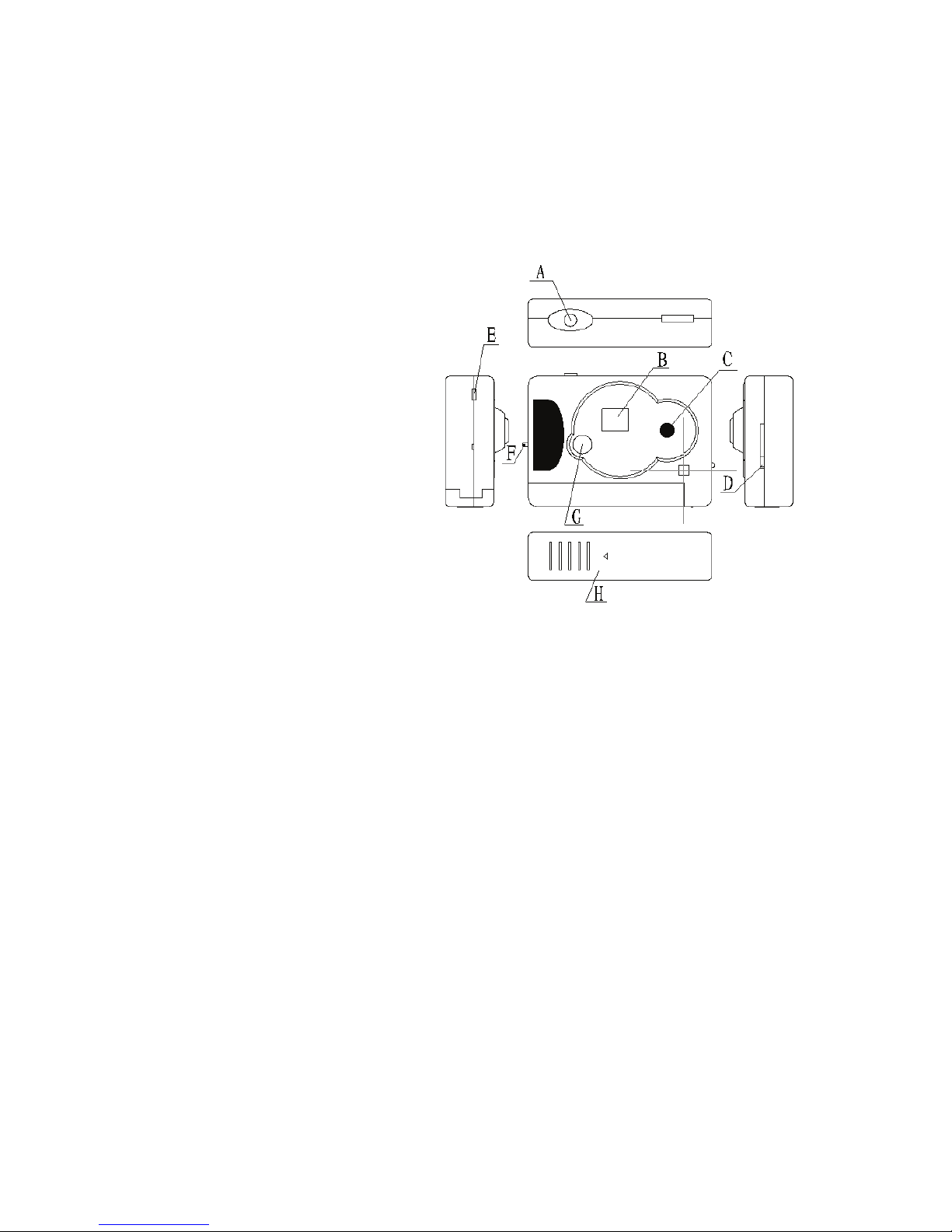
3
11.
.
CCaammeerraa
AA.. SShhuutttteerr BBuuttttoonn
BB.. LLCCDD ssccrreeeenn
CC.. LLeennss
DD.. VViieewwffiinnddeerr BBuuttttoonn
EE.. UUSSBB CCaabbllee PPoorrtt
FF..
KKeeyy CChhaaiinn SSoocckkeett
GG.... MMooddee BBuuttttoonn
HH.. BBaatttteerryy CCoovveerr
22.. UUssiinngg yyoouurr ccaammeerraa
22..11 IInnsseerrttiinngg bbaatttteerryy
SSlli
i
ddee ooffff tthhee BBaatttteerryy CCoovveerr ttoo ooppeenn bbaatttteerryy ccoommppaarrttmmeen
ntt..
IInnsseerrtt nneeww AAAAAA aallkkaalliinnee bbaatttteerryy aaccccoorrddiinngg ttoo iin
n
ddiiccaatteedd ++ // -- ppoollaarriittyy..
SSlliiddee oonn tthhee BBaatttteerryy CCoovveerr
aanndd ccoovveerr tthhee bbaatttteerryy ccoommppaarrttmmeenntt..
PPrreessss tthhee MMOODDE
E
bbuuttttoonn ttoo ppoowweerr oonn tthhee ccaammeerraa..
NNoottee:: PPlleeaassee nnoottiiccee tthhaatt ccaammeerraa lloosseess aallll ssttoorreedd iim
maaggeess wwhheenn bbaatttteerryy iiss eexxhhaauusstteedd oorr
rreemmoovveedd..
TTrraannssffe
e
rr aallll iimmaaggeess ffrroomm ccaammeerraa ttoo tthhee ccoommppuutteerr bbeeffoorree rreem
moovviinngg oorr rreeppllaacciinngg tthhee
bbaatttteerryy ttoo ssaavvee ssttoorree iimmaagge
e
ss!!
Page 5

4
22..22 SSlleeeepp mmooddee ((aauuttoommaattiicc ppoowweerr--ssaavviinngg mmooddee))
IIff yyoouurr ccaammeerraa iiss nnoott ccoonnnneecctteedd wwiitthh tthhee ccoommppuutteerr a
anndd yyoouu aarree nnoott uussiinngg tthhee
ccaammeerraa lloonnggeerr tthhaatt 3300 sseec
c
,, ccaammeerraa wwiillll aauuttoommaattiiccaallllyy ttuurrnn tthhee ppoowweerr ooffff ttoo
e
exxtteenndd bbaatttteerryy lliiffee..
BBllaannkk LLCCDD ssccrreeeenn iinnddiiccaatteess tthhee sslleeeepp mmooddee..
YYoouu
ccaann ttuurrnn ccaammeerraa ttoo tthhee sslleeeepp mmooddee ((mmaannuuaallllyy)) bbyy pprr
eessssiinngg tthhee
MMOODDEE bbuuttttoonn,, tthheenn LLCCDD ssccrreeeenn sshhoowwss ““ooff..”
” PPrreessss tthhee SShhuutttteerr BBuuttttoonn;; yyoouu wwiillll hheeaarr
tthhee bbeeeepp
aass ccaammeerraa wwiillll ggoo ttoo tthhee sslleeeepp mmooddee..
PPrreessss tthhee MMO
ODDEE bbuuttttoonn ttoo aaccttiivvaattee tthhee ccaammeerraa,, ddiiggiittss oonn tthhee LLCC
DD ssccrreeeenn
aanndd tthhee bbeeeepp ssoouunndd wwiillll ccoonnffiirrmm tthhaatt ccaammeer
raa hhaass bbeeeenn aaccttiivvaatteedd..
22..33 TTaakkiinngg pphhoottooss
-- PPrre
e
ssss tthhee MMOODDEE bbuuttttoonn ttoo ppoowweerr uupp tthhee ccaammeerraa..
-- SSlliidde
e tthhee VViieewwffiinnddeerr BBuuttttoonn uupp ttoo eexxtteenndd tthhee VViieewwffiinnddeerr
.. LLooookk tthhrroouugghh iittss lleennss aanndd
aaiimm aatt tthhee pphhoottooggrraapphheer
r sscceennee..
-- PPrreessss tthhee SShhuutttteerr BBuuttttoonn ttoo ttaakkee aa ppiiccttu
u
rree.. DDeeccrreeaasseedd nnuummbbeerr aappppeeaarrss oonn LLCCDD
ssccrreeeenn,, bbeeeepp wwi
illll ccoonnffiirrmm ttaakkeenn ppiiccttuurree..
-- TThhee ccaammeerraa iiss rreeaaddyy t
t
oo ttaakkee pphhoottoo,, jjuusstt pprreessss tthhee SShhuutttteerr bbuuttttoonn,, aa ddiisst
tiinncctt,, ssiinnggllee
bbeeeepp ssoouunnddss aanndd aa pphhoottoo iiss ttaakkeenn..
IIf
f
yyoouu hheeaarr ttwwoo bbeeeeppss,, tthheenn ppiiccttuurree ccaannnnoott bbee ttaakkeenn b
beeccaauussee iitt iiss ttoooo ddaarrkk,, oorr tthhee
ccaammeerraa’’ss mmeemmoorryy iiss f
f
uullll..
22..44 UUssiinngg vvaarriioouuss MMOODDEESS ooff tthhee ccaammeerraa
TThhee LLC
CDD ssccrreeeenn ddiissppllaayyss ffoolllloowwiinngg ssyymmbboollss wwhheenn tthhee MMOODDEE
bbuuttttoonn iiss pprreesssseedd
Page 6
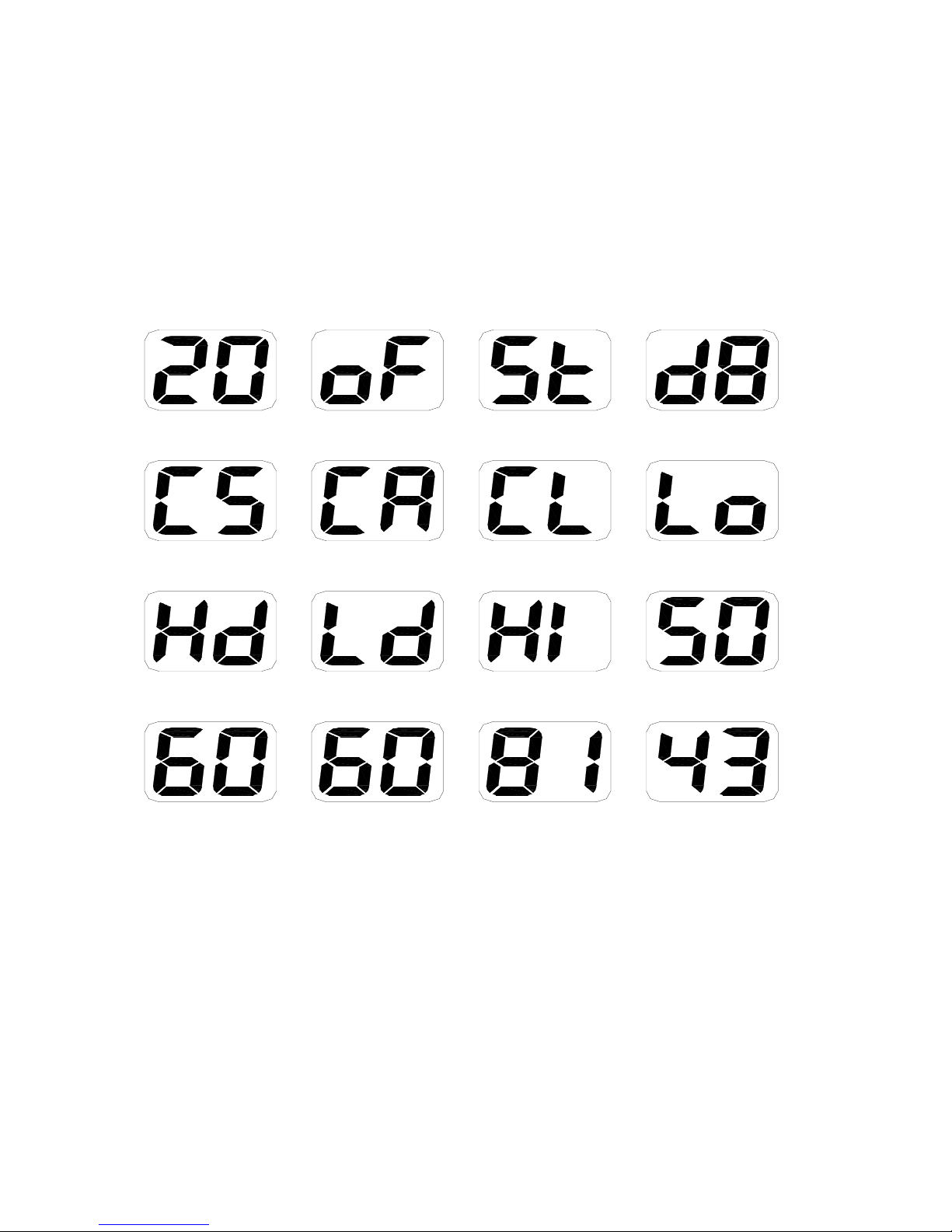
5
ccoonnsseeccuuttiivveellyy;; tthhee iinntteerrpprreettaattiioonnss aarree aass ffoolllloowwss::
H i-reso lu tio n
pictures
Timer mode
AVI mode
Ready to close or
shutdown m ode
D elete all
D elete last
Change to low
resolution
C h ange to 50 H z
Change to normal
mode
Change to
com pressed m ode
Change to 60 Hz
Com pression high
resolution pictures
L o w res olu tio n
pictures
C o m pressio n low
resolution pictures
Change to high
resolution
Continuous mode
PPSS:: DDiissppllaayy iiss oonnllyy 22 ddiiggiittss,, ssoo ffoorr 33 ddiiggiitt nnuummbbe
errss ee..gg.. tthhee ccoommpprreessssiioonn llooww
rreessoolluuttiioonn mmooddee wwiillll
ddiissppllaayy ttwwoo ttiimmeess,, 22 && 4433 rreepprreesseennttss 224433,,11&&1100 rreepprre
esseennttss 111100..
Page 7

6
22..44..11 ““SStt”” SSeellff--ttiimmeerr mmooddee
PPrreessss tthhee MMOODDEE bbuuttttoonn
uunnttiill tthhee LLCCDD ssccrreeeenn ddiissppllaayyss ““SStt””,, tthheenn pprreessss tthhee
SShhuutttteerr
BBuuttttoonn..
CCaammeerraa wwiillll ““bbeeeepp”” tteenn ttiimmeess aanndd a
auuttoommaattiiccaallllyy ttaakkee aa ppiiccttuurree aafftteerr tteenn sseeccoonnddss..
22..44..22 ““dd88”” AAVVII mmooddee
-- PPrreessss tthhee MMOODDEE bbuuttttoonn aanndd s
seelleecctt ““ddBB,,”” tthheenn pprreessss tthhee SShhuutttteerr BBuuttttoonn..
-- CCaammeer
r
aa wwiillll ccoonnttiinnuuoouussllyy ccaappttuurree sscceennee,, aass lloonngg aass yyoouu k
keeeepp tthhee SShhuutttteerr BBuuttttoonn
ddeepprreesssseedd,, oorr uunnttiill ccaammeerraa’
’
ss mmeemmoorryy bbeeccoommeess ffuullll ((aapppprrooxx 66 sseecc))..
22..44..33 ““CCSS”
” ccoonnttiinnuuoouuss mmooddee
-- PPrreessss tthhee MMOODDEE bbuuttttoonn aanndd sseelle
e
cctt ““CCSS,,”” tthheenn pprreessss tthhee SShhuutttteerr BBuuttttoonn..
-- CCaammeerraa wwi
illll ccoonnttiinnuuoouussllyy ccaappttuurree 33 pphhoottooss..
22..44..44 ““CCAA”” C
C
lleeaarr aallll // DDeelleettee aallll ttaakkeenn ppiiccttuurreess
-- PPrreessss tthhee MMO
ODDEE bbuuttttoonn ttoo sseelleecctt ""CCAA""..
-- PPrreessss tthhee SShhuutttteerr BBu
u
ttttoonn ttoo ccoonnffiirrmm yyoouurr sseelleeccttiioonn,, ddiiggiittss oonn tthhee LLCCDD s
sccrreeeenn ssttaarrtt
ttoo bblliinnkk..
-- PPrreessss tthhee SShhuutttteerr BBuuttttoonn a
a
ggaaiinn ttoo ddeelleettee aallll iimmaaggeess ffrroomm tthhee ccaammeerraa..
22..44..55 ““C
CLL”” CClleeaarr llaasstt // DDeelleettee llaasstt ttaakkeenn ppiiccttuurree
-- PPrrees
s
ss tthhee MMOODDEE bbuuttttoonn ttoo sseelleecctt ""CCLL""..
-- PPrreessss tthhee SShhuut
ttteerr BBuuttttoonn,, ccaammeerraa wwiillll bbeeeepp aanndd ddeelleettee llaasstt ttaakkeenn
ppiiccttuurree aanndd LLCCDD
ssccrreeeenn wwiillll sshhooww hhiigghheerr nnuummbbeerr..
Page 8

7
IIff tthhee llaasstt pphhoottoo ttaakkeenn wwaass ttaakkeenn iinn CCoonnttiinnuuoouuss mmood
dee,, tthheenn tthhee ccoommpplleettee rreeccoorrddeedd
cclliipp wwiillll bbee ddeelleetteed
d
..
22..44..66 ““LLOO”” // ““HHII”” rreessoolluuttiioonn
-- PPrreessss tthhee MMOODDEE
bbuuttttoonn ttoo sseelleecctt ddeessiirreedd rreessoolluuttiioonn mmooddee;;
LLOO lloow
w
rreessoolluuttiioonn -- yyoouu ccaann ssaavvee mmoorree ppiiccttuurreess,, oorr HHII hhiig
ghh rreessoolluuttiioonn -- bbeetttteerr
qquuaalliittyy,, bbuutt yyoouu ccaann ssttoorree l
l
eessss ppiiccttuurreess iinn yyoouurr ccaammeerraa..
-- WWhheenn tthhee LLCCDD ssccrreeeenn
ddiissppllaayyss ddeessiirreedd mmooddee,, pprreessss tthhee SShhuutttteerr BBuuttttoonn ttoo
ccoonnffiirrmm
sseelleeccttiioonn..
TThhee LLCCDD ssccrreeeenn wwiillll sshhooww nnuummbbe
err ooff aavvaaiillaabbllee ppiiccttuurreess wwhhiicchh ccaann bbee ttaakkeenn aatt tthhee
sseelleecctteedd rreessoolluuttiioonn mmooddee..
YYoouu ccaann cchhaannggee rreessoolluuttiioon
n aatt aannyy ttiimmee,, aass nneeeeddeedd..
22..44..77 ““5500 // 6600”” ffrreeqquueennc
c
yy
VVaarriioouuss ccoouunnttrriieess uussee ddiiffffeerreenntt ffrreeqquueenncciieess ooff t
thhee eelleeccttrriiccaall ppoowweerr;; 5500HHzz oorr 6600HHzz..
SSeelleecctt ““5500 // 660
0
”” mmooddee ((ttoo aavvooiidd fflliicckkeerriinngg iimmaaggeess)) ddeeppeennddss oonn yyoouur
r ccuurrrreenntt llooccaattiioonn..
-- PPrreessss tthhee MMOODDEE ttoo sseelleecctt ““5500/
/
6600"" mmooddee,, tthheenn pprreessss tthhee SShhuutttteerr BBuuttttoonn ttoo ccoonnffiirrmm
sseelleeccttiioonn..
22..44..88 ““HHdd // LLdd”” CCoommpprreessssiioonn rraattee
YYoou
u
ccaann sseelleecctt HHdd hhiigghh ddeennssiittyy,, oorr LLdd llooww ddeennssiittyy ccoommp
prreessssiioonn rraattee mmooddeess..
NNoottee tthhaatt aatt tthhee HHdd ((hhiigghh ddeenns
s
iittyy)) yyoouu ccaann ccoommpprreessss // ssttoorree mmoorree ppiiccttuurreess,, aanndd lle
essss
Page 9
8
ppiiccttuurreess wwhheenn yyoouu sseelleecctt tthhee LLdd ((llooww ddeennssiittyy)) mmooddee,
, hhoowweevveerr HHdd ccoommpprreessssiioonn rraattee
wwiillll sslliigghhttllyy lliimmiitt q
q
uuaalliittyy ooff iimmaaggeess..
-- PPrreessss tthhee MMOODDEE BBuuttttoonn ttoo sseelleecct
t ddeessiirreedd ““HHdd”” oorr ““LLdd”” ccoommpprreessssiioonn mmooddee..
-- PPrreessss tth
h
ee SShhuutttteerr BBuuttttoonn ttoo ccoonnffiirrmm sseelleeccttiioonn..
3. Installation Software
Do not connect the camera to computer before installing software is fully
completed
- Insert the CD in your computer’s CD-ROM drive, and follow up step-by-step
installation on computer’s screen.
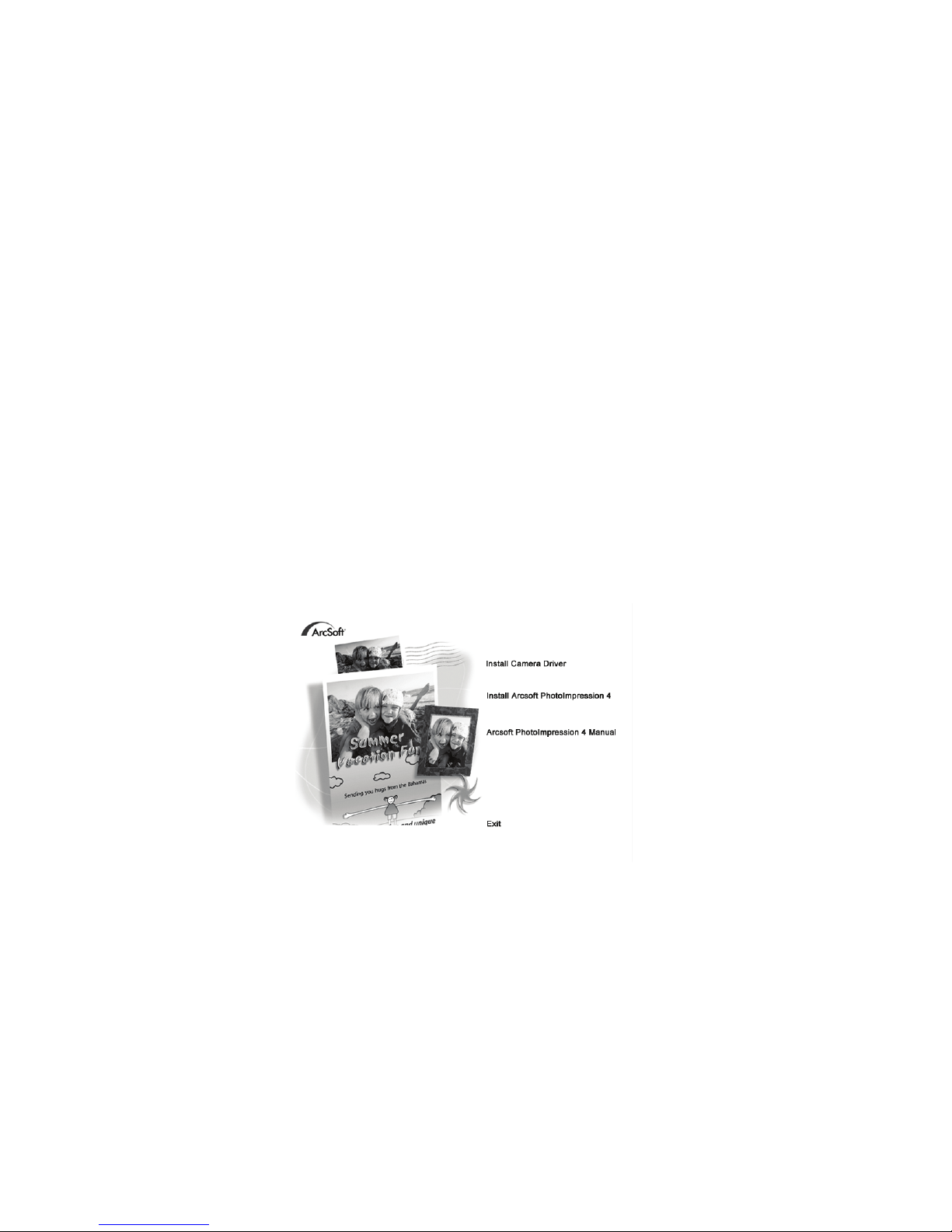
An interface will appear. On the right of the interface there are four buttons.
3.1 Driver Installation
- Insert CD in your CD-ROM drive, Click on <Install Camera Driver>, follow up its
step-by-step instructions and finish installation.
Page 10

9
- Restart the computer, <Dual Mode Camera> will appear on the desktop of your
computer.
3.2 Photo impression installation
- Insert CD into the CD-ROM drive and select <Install Arcsoft Photoimpression 4.0>
- Follow instruction and complete installation.
- Restart computer.
3.3 Transferring photos to your computer
Ä Connect your camera to the computer with the USB cable.
Ä Double-click the Photo
impression icon and start the program
Ä Click on "Get photo" and select the Digital Camera
Ä Select "data source": Dual Mode Camera
Ä Click on "Acquire" in the bottom left corner.
The photo transfer window appears on the screen. Click the "download" button.
All taken photos will appear inside the interface window. Using the mouse,
select any picture; right click if you like to zoom a picture.
You may left click and "select all photos" of the interface then click on the
button "Transfer photos." All images will be transferred into the Arcsoft Photo
impression application software.
You can select / save pictures, or assign titles to your pictures and select the
place where you are storing images, like My Documents, Desktop, My pictures
folder, etc.
When you have pictures transferred / downloaded into the computer, then you
can delete images from camera and take another picture.
Page 11

10
Photo management: with the new Photoimpression interface it is very easy to
process your photos.
Editing: Photoimpression has a wide range of editing options such as correcting
brightness and contrast that are all easily accessible, go to www.adobe.com if you
need more information regarding Photo Express application software.
Help.
To access the ArcSoft Photoimpression 4 Manual on the CD-ROM, you will need
Adobe PDF Reader software. This is available as a free download from
http://www.adobe.com
3.4
Uploading a photo with increased resolution
After downloading photos, click on the button "edit image" in the upload
window and select "Increase resolution", then click on the "OK" button to
confirm. Select “transfer” button to transfer those photos to Arcsoft photo
impression 4.0 Software, then photos will be uploaded with
400K pixels
resolution.
3.5 Creating / saving video clips
Video clips are saved at with the "AVI capture" mode,
- Connect your camera to your computer and select “MyDSC.exe” located in
the folder ‘Dual Mode Camera’ on your desktop.
- Click on the "Download,” then select "Save photos" on the interface window.
A window will open, you can choose the folder where you like to save the
video and save as [.avi] file.
Page 12

11
3.6 Web camera
- Connect your camera to a computer and run PCCam program located in the
folder <Dual mode camera> on your desktop.
- Select <PCCam> in the 'Devices' menu, then select <Preview> in <Options>
mode.
- Computer will display stream video from the camera.
You can select ‘Video Capture Pin’ in the ‘Options’ menu, to change the size of
the screen / image.
4 Problem-solving
Here are the most common problems:
When press the mode button the camera does not turn on:
----BBaatttteerryy lleevveell iiss llooww.. YYoouu sshhoouulldd rreeppllaaccee nneeww bbaat
ttteerryy..
TThhee ccaammeerraa ccaannnnoott ddoowwnnllooaadd pphhoottoo oorr ddiissppllaay
y
““nnoo pphhoottooss””::
---- RReessttaarrtt tthhee ccoommppuutteerr aanndd rreeccoonnnneecct
t tthhee ccaammeerraa..
CChheecckk tthhaatt tthhee ffoollddeerr DDuuaall
MMooddee CCaammeerraa iiss iinn tthhee CCo
onnttrrooll PPaanneell // SSyysstteemm sseettttiinnggss.. IIff ddeevviiccee iiss nnoott
ppr
r
eesseenntt tthheenn ddiissccoonnnneecctt ccaammeerraa aanndd rreeiinnssttaallll DDrriivveerr a
aggaaiinn..
---- IIff tthhee ccaammeerraa ddrriivveerr wwaass ssuucccceessssffuullllyy iinnssttaalllleedd,
, bbuutt ssttiillll yyoouu ccaann’’tt sseeee iimmaaggeess,,
tthheenn ddiissccoonnnneecctt c
c
aammeerraa,, UUNNIINNSSTTAALLLL tthhee ssooffttwwaarree aanndd rreessttaarrtt yyoouurr ccoommp
puutteerr..
---- AAtt llaasstt,, rree--iinnssttaallll tthhee DDrriivveerr aanndd aapppplli
i
ccaattiioonn ssooffttwwaarree ffrroomm CCDD aaggaaiinn.. CCoonnnneecctt tthhee
ccaammeerraa.
.
Page 13

12
55 TTeecchhnniiccaall SSppeecciiffiiccaattiioonnss
RReessoolluuttiioonn:: 110000KK PPiixxeells
s ((((335522XX228888)) CCIIFF
CCoolloorrss:: 2244 bbiittss
LLeennss:: NNoonn--sspphheerriic
c
aall LLeennss ff==55..44mmmm
AAppeerrttuurree:: 11:: 22..66
FFooccuussiinngg rraannggee:: 0
0..55mm ––iinnffiinniittyy
SSttoorraaggee CCaappaacciittyy:: 22MMBB
PPhhoottooss::
HHiigghh--r
r
eessoolluuttiioonn ((335522XX228888 ppiixxeellss)),, 2200 ppiiccttuurreess
CCoommpprreessssiioon
n,, hhiigghh--rreessoolluuttiioonn ppiiccttuurreess,, 6600 ppiiccttuurreess
LLooww--rreessoollu
u
ttiioonn ((117766XX114444 ppiixxeellss)),, 8811 ppiiccttuurreess
CCoommpprreessssiioonn,, lloow
w--rreessoolluuttiioonn,, 224433 ppiiccttuurreess
PPoowweerr ssuuppppllyy:: 11 AAAAAA aallkka
a
lliinnee bbaatttteerryy rreeqquuiirreedd
IInntteerrffaaccee::UUSSBB ppoorrtt
SSyysstteemm ccoom
mppaattiibbiilliittyy::
PPeennttiiuumm IIII aanndd aabboovvee PPeerrssoonnaall CCoommppuutte
e
rrss
WWiinnddoowwss 9988SSEE//22000000//MMEE//XXPP OOppeerraattiinngg SSyysstteemm
3322 MMB
B oorr aabboovvee MMeemmoorryy ((6644 MMBB oorr aabboovvee RReeccoommmmeennddeedd))
6600
MMBB HHaarrdd DDiisskk CCaappaacciittyy
CCDD--RROOMM DDrriivvee
CCoolloorr MMoonniittoorr
((NNoott LLoowweerr tthhaann 880000**660000,, 2244 BBiitt))
UUSSBB iinntteerrffaaccee
Page 14

13
IIm
mppoorrttaanntt
N
N
O
OTTEESS
11.. BBeeffoorree uussiinngg yyoouurr ccaammeerraa ttoo ttaakkee mmaannyy pphhoottooss,, pplleeaassee
ssaammppllee ssoommee pphhoottooss ttoo vveerriiffyy tthhee ccaammeerraa wwoorrkks
s
wweellll aanndd
ppiiccttuurreess ccaann bbee ddoowwnnllooaaddeedd OOKK.. TThhiiss wwiillll
aavvooiidd aannyy
ccoonnsseeqquueennttiiaall pprroobblleemm wwiitthh lloosstt iimmaaggeess..
22.. PPlleeaassee ttrraannssffeerr aallll ccaappttuurreedd pphhoottooss ttoo yyoouurr ccoom
mppuutteerr
bbeeffoorree rreeppllaacciinngg tthhee bbaatttteerriieess
33.. UUssiinngg yyoouur
r
ccaammeerraa wwhheenn tthheerree iiss bbooddyy ssttaattiicc--eelleeccttrriicciittyy mmaayy
p
poowweerr ooffff yyoouurr ccaammeerraa oorr ssttoopp PPCC--CCAAMM,, ssiimmppllyy rreessttaarrtt iitt aanndd
tthhee ccaammeerraa wwiillll wwoorrkk aaggaaiinn.
.
 Loading...