

Page 1

CS 5.1 Surround Sound Converter
Copyright © Jaton Corporation, 2002.
Trademark(s)® Registered.
All rights reserved.
Release Revision 0.20
Page 2

5.1 AV Switch Box
CS 5.1 Surround Sound Converter
2
Welcome!
Thank you for purchasing the 5.1 AV Switch Box!
This product is designed to provide years of service allowing you
to select between a wide variety of audio and video components.
This remarkable Switch Box has been engineered to provide you
with many years of the home theater enjoyment.
Please take a few minutes to read this manual thoroughly before
you connect and operate the 5.1 AV Switch Box.
CAUTION
You are cautioned that any changes or modifications not
expressly approved in this manual could void your authority to
operate this equipment.
Do not place the unit near heat sources, rain, moisture or
mechanical shock, and ensure that there is nothing to interfere
with proper ventilation/airflow.
TO PREVENT FIRE OR SHOCK HAZARD, DO NOT EXPOSE
THE UNIT TO RAIN OR MOISTURE!
The “ lightening bolt” symbol is intended to alert the user to the
presence of un-insulated “dangerous voltage” with the product’s
enclosure that may be of electric shock to persons.
!
Page 3

5.1 AV Switch Box
CS 5.1 Surround Sound Converter
3
The “exclamation mark” symbol is intended to alert the user to
the presence of important operating and maintenance
instructions in the literature accompanying the appliance.
Features:
The 5.1 AV Switch Box as a multiple audio / video source
selector servers to your television. It allows you to quickly and
easily select which audio / video source you wish to use, without
disconnecting and reconnecting your components.
Once connected, you can switch between components using
buttons on the front panel of the Switch Box or by using the
Infrared Remote Control that came with your Switch Box unit.
• Convert stereo audio to 6 speakers surround
• Independent AV source control
• Composite Video In/Out only
• 5.1 channel pre-amp outputs
• Source Direct switch bypasses, tone controls and bass
management for purest sound quality
• Switched AC outlet built-in
Easy of use
Switch between components using the front panel buttons or your
infrared remote control.
Expansion
Connect up to 5 components such as Satellite Receivers, DVD
players, Laser Disc players, VCRs, Camcorders, Video Games
etc. and switch between them in any order. It works with any
component having composite connectors. No adapters are
required.
Page 4

5.1 AV Switch Box
CS 5.1 Surround Sound Converter
4
Quality
Internal amplification minimizes signal loss and balances color
for the best possible picture.
Circle Surround
Circle Surround® ("CS") is a powerful and versatile multichannel
decoder capable of delivering up to 5.1 channels of audio from
any stereo, matrix encoded or Circle Surround encoded
material. The first in the Circle Surround family of technologies,
CS incorporates superior steering of surround information and
remarkable center channel placement, while maintaining
full-range bandwidth in each speaker.
With Circle Surround, listeners may now enjoy their 5.1 home
entertainment systems with any stereo source material including
music on CDs, television programming, cable broadcasts
and movies on VHS. It also decodes any matrix encoded
material, providing better performance than older systems such
as Dolby Pro Logic ®. Optimal results can be achieved with
playback of Circle Surround encoded source material.
Circle Surround Features:
Backwards Compatibility: Circle Surround delivers up to a 5.1
channel home theater experience from many formats, including
stereo, Dolby Surround® and down-mixed Dolby Digital®
& DTS®. It provides the most accurate decoding of surround
material with true center channel dialog isolation and outstanding
separation among the rear channels.
Smoother Steering: CS is designed to immerse listeners in a
realistic surround environment. The exceptional steering and
channel separation of CS establishes new performance
benchmarks for matrix surround decoding. Using patented dualband technology, CS provides smoother steering between left
and right surround channels and from front to rear
Page 5

5.1 AV Switch Box
CS 5.1 Surround Sound Converter
5
surround channels compared to alternative technologies. The
thrill of this experience can rival discrete 5.1 surround sound
formats.
Full bandwidth: CS playback provides full bandwidth in each
channel for outstanding audio quality, which can be experienced
from any source via a simple stereo connector.
Flexibility: CS decoding can be easily implemented for a wide
variety of product applications including computers, laptops,
game consoles, TVs, DVD players or Internet and web
devices. Since the 5.1 CS encoded signal can be carried over
standard stereo cables or broadcast methods, listeners in all
types of environments can now experience breathtaking
surround sound from the widest possible variety of sources.
Specification
Physical Dimension:
Width = 8 ¼”, Height = 2 ¼”, Depth
= 6” (Box Unit Only)
Audio Inputs
Reference Level: -10dBV (47Ω)
Maximum Level: + 6dBV (1 kHz, 1%
distortion)
Video Inputs
Composite signal Vp-p=1.0V
(75Ω)
Input Video Source:
Video Camcorder
VCR, TV, Satellite Tuner
CD Recorder
Laser Disc Player
DVD/VCD/CD/MP Players
Video Game Console
Input Audio Source:
6 CH Audio Output devices
Page 6

5.1 AV Switch Box
CS 5.1 Surround Sound Converter
6
2 CH Stereo Audio Output
device
Video Output:
Composite Signal: Vp-p=1.0V (75Ω)
- Output:
• TVset, Video Projector
Audio Output:
CS 5.1 (6 CH) output
Audio S/N ratio:
90 dB or more
Audio Frequency
response:
20 Hz to 20 kHz
Distortion:
Less than 0.3% (with reference
input, 1 kHz)
Power requirement:
AC 120V~, 60 Hz (Original Design )
AC 220~, 50 Hz (Optional Design)
Power consumption:
5 Watts (3 Watts in standby mode)
Check List:
• Switch Box Unit (1)
• Infrared remote Control (1)
• User’s Manual (Printed)
• Register Card (Printed)
All cables will connect to this unit are sold separately. Your
Package may also contain other printed material with special
offers for direct purchase of related products as well.
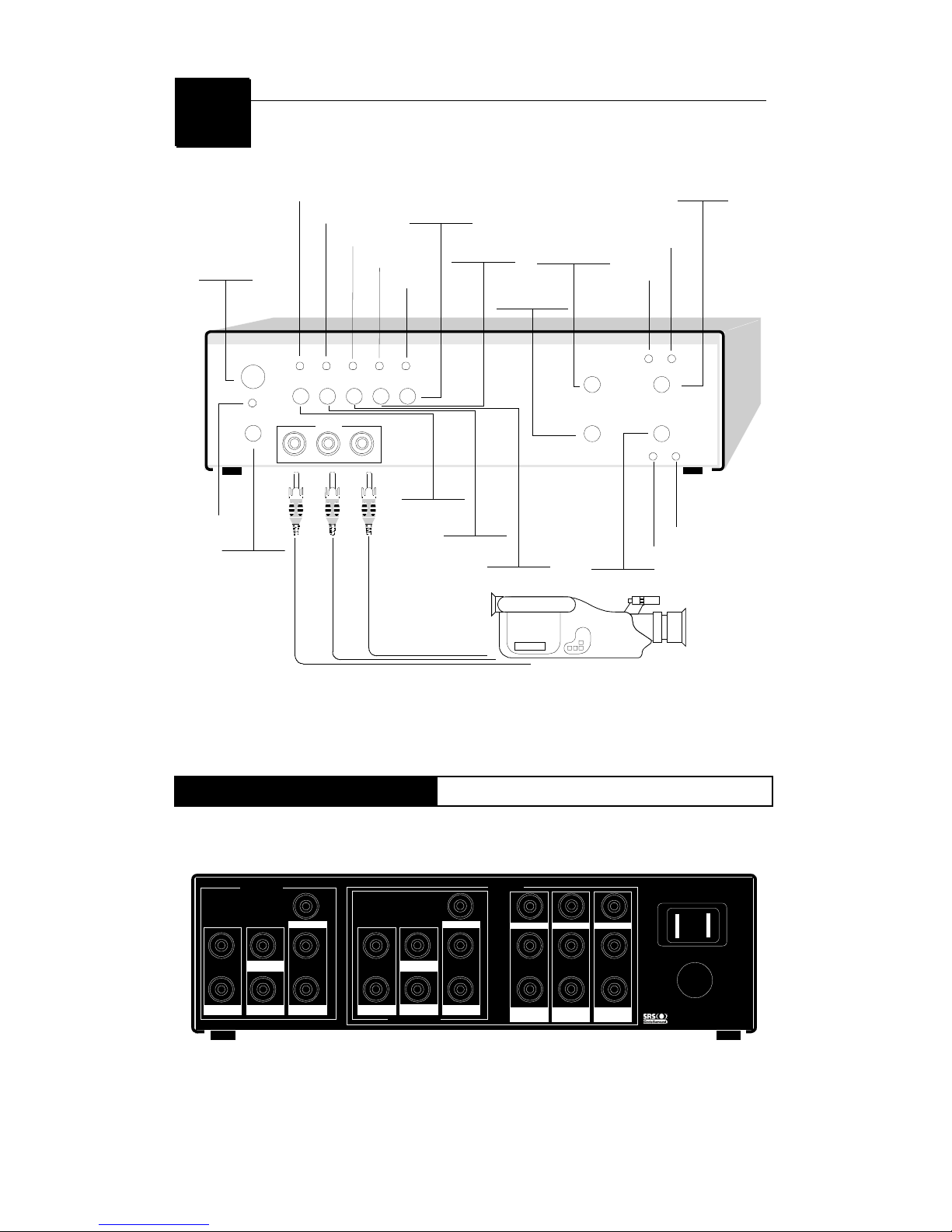
Box Unit [F]
Front Side
The touch button panel on the front side of AV5.1 Switch Box provides
quick access to commonly used functions.
Page 7
5.1 AV Switch Box
CS 5.1 Surround Sound Converter
7
POWER
VCR/CD TV/DSS DVD/VCD AUX 6CH/DVD
AUX
R L VIDEO
MASTER VOLUME
MODE
CS 5.1
CS 5.1 STEREO
MUSIC CINEMA
+
-
Infrared Receiver
Power Button
LED-VCR/CD
LED-TV/DSS
LED-DVD/VCD
LED-AUX
LED-6 ch/DVD
LED-CS 5.1
(MODE)
LED-STEREO
(MODE)
MODE Button
LOUDER-MASTER
VOLUME
SOFTER-MASTER
VOLUME
CS 5.1 Button
LED-CINEMA
LED-MUSIC
6 CH/DVD Button
AUX Button
DVD/VCD Button
TV/DSS Button
VCR/CD Button
LED-POWER
Camcorder
If your remote control doesn’t function at all, then these buttons
on Box front panel will act as a keypad for you.
Box Unit [R]
Rear Side
While connections on the rear panel of the AV5.1 Switch Box are
labeled for specific component names for easy reference, you can
substitute a mentioned device in its place.
OUTPUT
6 CH INPUT
INPUT
SWITCHED AC OUTLET
Surround
L
R
Front
L
R
Front
L
R
Surround
L
R
Woofer
Center
Woofer
Center
DVD/VCD
Video
L
R
TV/DSS
Video
L
R
VCR/CD
Video
L
R
is a trademark of SRS Labs, Inc
VideoVideo
Rear Side Diagram.
Page 8
5.1 AV Switch Box
CS 5.1 Surround Sound Converter
8
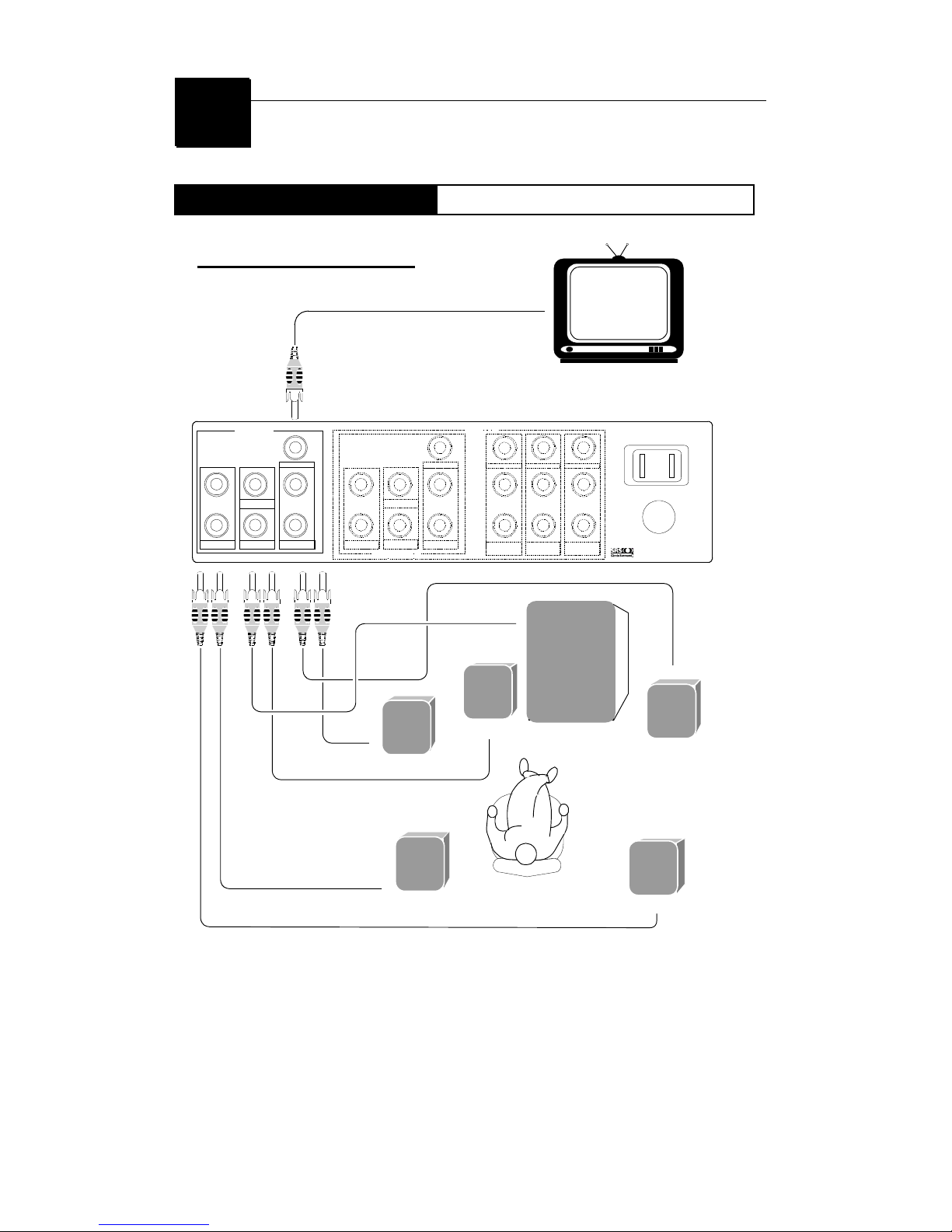
Output Connection
Box Unit
OUT PU T
6 CH INPUT
INPUT
SWITCHED AC OUTLET
Surround
L
R
Fron t
L
R
Fron t
L
R
Surround
L
R
Woofer
Center
Woofer
Center
DVD/VCD
Video
L
R
TV / D S S
Video
L
R
VCR/CD
Video
L
R
is a trademark of SRS Labs, Inc
VideoVideo
Te le vi si on
S ub w oo f er
S ur r ou nd Ri g ht
Fr ont Left
Center
Fr ont Right
S ur r ou nd Le f t
L
L
R R
OUTPUT SECTION
This illustration is for information purpose only. This
product has a pre-amplifier only. It requires a 5.1
power amplifier to drive the speakers..
Page 9
5.1 AV Switch Box
CS 5.1 Surround Sound Converter
9
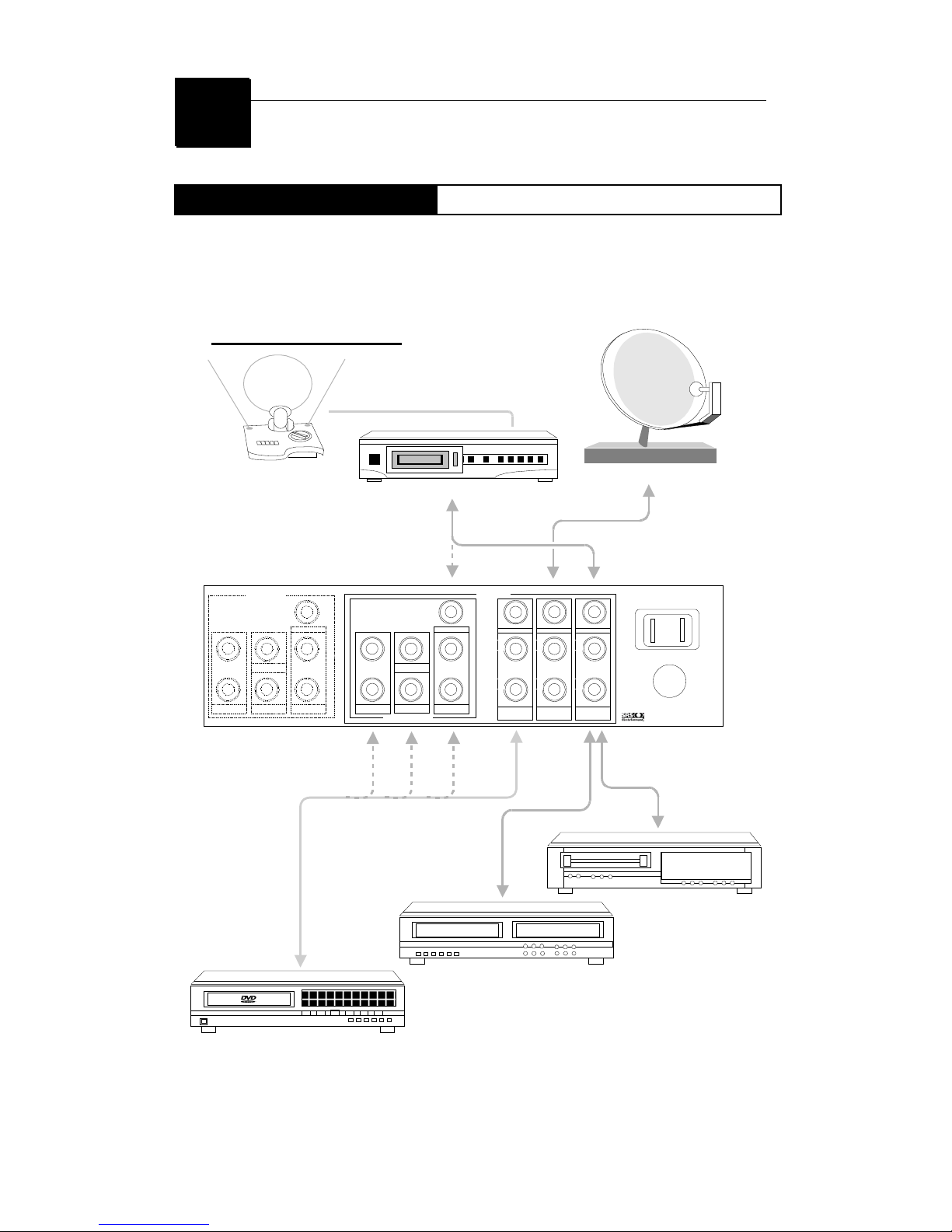
Input Connections
Box Unit
Certainly, you can plug many of AV sources into the Switch Box
to convert two channels stereo audio up to multiple channels.
OUTPUT
6 CH INPUT
INPUT
SWITCHED AC OUTLET
Surround
L
R
Front
L
R
Front
L
R
Surround
L
R
Woofer
Center
Woofer
Center
DVD/VCD
Video
L
R
TV/DSS
Video
L
R
VCR/CD
Video
L
R
is a trademark of SRS Labs, Inc
VideoVideo
L
L
R
R
INPUT SECTION
VCR
CD Recorder
DVD Player
MD Player
TV Attena Direct Satellite Tuner
Page 10
5.1 AV Switch Box
CS 5.1 Surround Sound Converter
10
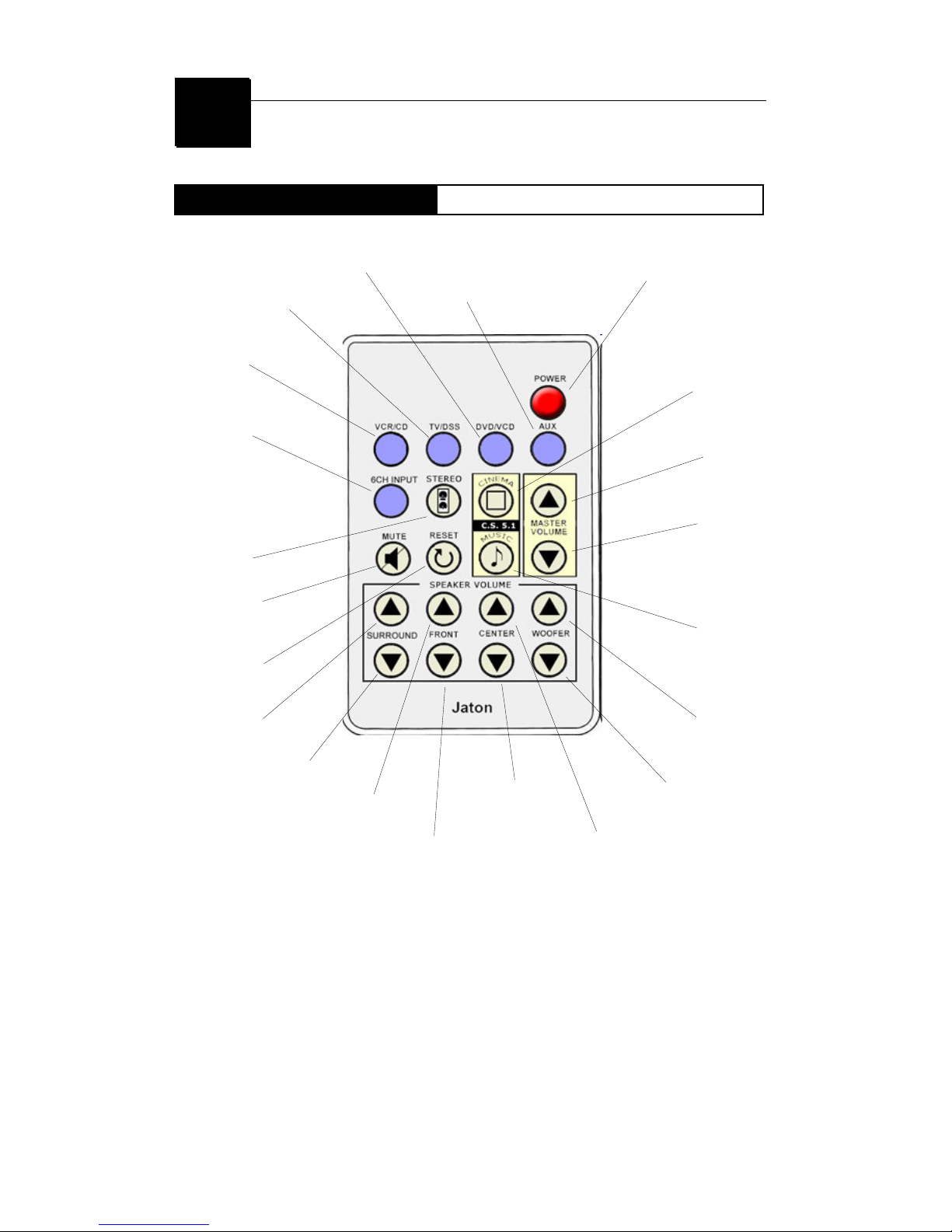
Remote control
How to use
Press to turn the Input
component ON or OFF.
Press to turn the Input
component ON or OFF.
Press to turn the audio
Output volume ON or OFF.
Press to select audio
Output mode in Stereo.
Press to reset te audio
Output modes.
Press to increase the volume
of surround speakers.
Press to decrease the volume
of surround speakers.
Press to increase the
volume of front speakers.
Press to decrease the
volume of front speakers.
Press to turn the Input
component ON or OFF.
Press to turn the Input
component ON or OFF.
Press to turn the Input
component ON or OFF.
Press to turn the power ON or OFF.
Press to select
the audio Output
in mode of CS 5.1
-Cinema.
Press to increase
the volume of
audio Output.
Press to decrease
the volume of
audio Output.
Press to increase the
volume of Sub Woofer.
Press to decrease the
volume of Sub Woofer.
Press to decrease the
volume of Center speaker.
Press to increase the
volume of center speaker.
Press to select the
audio Output mode
of CS 5.1 - Music.
Page 11
5.1 AV Switch Box
CS 5.1 Surround Sound Converter
11
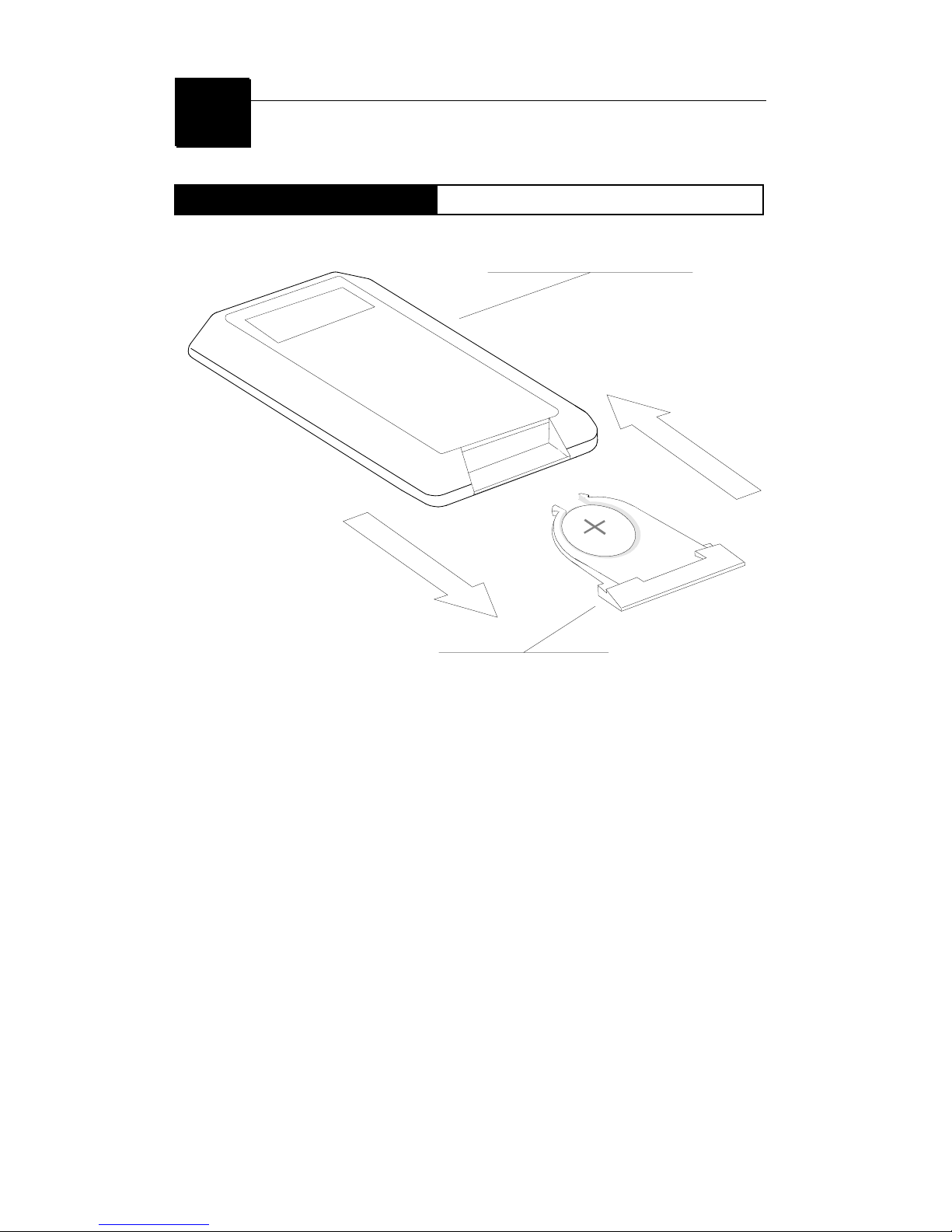
Battery Installation
Replacement Instruction
P
U
L
L
O
U
T
P
U
L
L
I
N
Rear Side of Remote Control
Battery Tray
Battery Specification:
Lithium Battery - CR2025 -3V
Battery Installation:
Pull out the Battery Tray from the rear side of the Switch
Box Unit, place new Lithium Battery with face up as
shown above (positive “+” polarity is on top of the
battery). Then pull in the Battery Tray back into the
Switch Box Unit. Misuse of battery could result in
damage to the circuit of your Infrared Remote Control.
Page 12

5.1 AV Switch Box
CS 5.1 Surround Sound Converter
12
TROUBLESHOOTING
1. Check to see that the AC power plug is firmly connected to the Switch Box and
that the power light is on.
2. Check to see that all video and audio cables are firmly inserted into the proper
connectors.
3. Make sure there is a valid signal coming from the device being set up. For
example, if a VCR is connected, a tape should be playing.
4. Make sure that you have selected the channel corresponding to the device. For
example, check to see that your VCR is connected to the VCR input of the
Switch Box and that the VCR button on the Switch Box is selected.
When selecting the device to be preset, push the device button firmly and make
sure the indicator light in the center of the device button is lit.
5. Plug the output cable from the device directly into the television to check the
cable.
6. It may help to isolate one channel of Switch Box at a time and test each
individually. All channels are the same and may be used interchangeably.
7. Make sure the infrared receiver windows on the Switch Box is not blocked and
the Switch Box is located so it is in line of sight with your remote.
8. If problems are encountered when proceed to the Switch Box, such as the
device indicator lights not turning off, fresh battery may be required in the
remote.
9. If the Switch Box stops responding to your infrared remote control signals,
power to the Switch Box may have been interrupted. Check your VCR to see if
the display is flashing for confirmation of a power loss. If this has occurred, the
Switch Box will need to be re-programmed (Dealer service required).
10. The Switch Box only responds to infrared signals. Radio frequency-controlled
remotes whose signals travel through walls and floors cannot control the
Switch Box.
Should any problem persist, consult your nearest JATON dealer.
Page 13

5.1 AV Switch Box
CS 5.1 Surround Sound Converter
13
For technical support, email to [email protected] or call Customer Service
at (408) 934-9369
Trademark Acknowledgment.
All trademarks in this document are registered. All rights
reserved.
CS5.1 and symbol are trademarks of SRS Labs, Inc.
Limited Warranty.
These limited warranties extend to original consumer purchaser
or any person receiving this set as a gift from the original
consumer purchaser and to no other purchaser or transferee.
Limited Ninety (90) Day Warranty
JATON warrant this product against defects in materials
or workmanship for a period of ninety (90) days after the
date of original retail purchase. During this period,
JATON will repair or replace a defective product or part,
at their option, with a new or refurbished product or part
without charge to you. You must deliver the entire
product to JATON or a JATON Authorized Service
Station. You are responsible for all transportation and
insurance charges for the unit to and from the Authorized
Service Station.
Limited One (1) Year Warranty
JATON further warrant the parts in this product against
defects in materials or workmanship for a period of one
(1) year after the date of original retail purchase. During
this period, JATON will repair or replace a defective
product or part, at their option, with a new or refurbished
product or part without charge to you, except that if a
defective part is replaced after ninety (90) days from the
date of the original retail purchase you pay labor charges
Page 14

5.1 AV Switch Box
CS 5.1 Surround Sound Converter
14
involved in the replacement. You must also deliver the
entire product to JATON or a JATON Authorized Service
Station. You are responsible for all transportation and
insurance charges for the unit to and from the Authorized
Service Station.
Register Product
You should read the owner’s manual thoroughly before operating
this product. You should complete and mail the enclosed
Registration card within thirty (30) days after you, or the person
who has given you this product as a gift, purchased this product.
This is one way to enable JATON to provide you with better
customer service and improved products. Failure to return the
card will not affect your rights under this warranty.
Your Responsibility
The above warranties are subject to the following conditions:
1. You must retain your bill of sale or provide other proof of
purchase.
2. You must notify JATON or a JATON Authorized Service
Station within thirty (30) days after you discover a defective
product or part.
3. All warranty servicing of this product must be made by
JATON or a JATON Authorized Service Station.
4. JATON warranties are effective only if the product is
purchased and operated in the same continent territorial
regions.
5. Labor service charges for set installation. Set up, adjustment
of customer controls and installation or repair of antenna
systems are not covered by this warranty. Reception
problems caused by inadequate antenna systems are your
responsibility.
6. Warranties extend only to defects in materials or
workmanship as limited above and do not extend to any
Page 15

5.1 AV Switch Box
CS 5.1 Surround Sound Converter
15
product or parts which have been lost or discarded by you or
to damage to products or parts caused by misuse, accident,
damage caused by Acts of God, such as lightning or
fluctuations in electric power, improper installation, improper
maintenance or use in violation of instructions furnished by
us; or to units which have been altered or modified without
authorization of JATON or to damage to products or part
thereof which have had the serial number removed, altered,
defaced or rendered illegible.
7. Physically damaged this unit, or remote control is not
acceptable for repair or exchange whether in or out of
warranty and will be returned as received.
All warranties implied by state law, including the implied
warranties of merchantability and fitness for a particular purpose,
are expressly limited to the duration of the limited warranties set
forth above. With the exception of any warranties implied by state
law as hereby limited, the foregoing warranty is exclusive and in
lieu of all other warranties, guarantees, agreements and similar
obligations of manufacturer or seller with respect to the repair or
replacement of any parts. In no event shall JATON be liable for
consequential or incidental damages.
No person, agent, distributor, dealer or company is authorized to
change, modify or extend the terms of these warranties in any
manner whatsoever. The time within which an action must be
commenced to enforce any obligation of JATON arising under
the warranty or under any statute, or law of the United States or
any state thereof, is hereby limited to ninety (90) days from the
date you discover or should have discovered, the defect.
This limitation does not apply to implied warranties arising under
state law.
This warranty gives you specific legal rights and you may also
have other rights which may vary from state to state. Some
states do not allow limitation on how long an implied warranty
lasts, when an action may be brought, or the exclusion or
limitation of incidental or consequential damages, so the above
provisions may not apply to you.
Page 16
5.1 AV Switch Box
CS 5.1 Surround Sound Converter
16
IMPORTANT: PACKING AND SHIPPING
INSTRUCTION
When you return the merchandise back to JATON Service
Station, you must pack the enclosure (Switch Box Unit) and the
product’s original carton box into a legal shipping material
(Shipping Box), Do Not use Jaton product carton box for your
shipping box.
Warranty Service Use Only
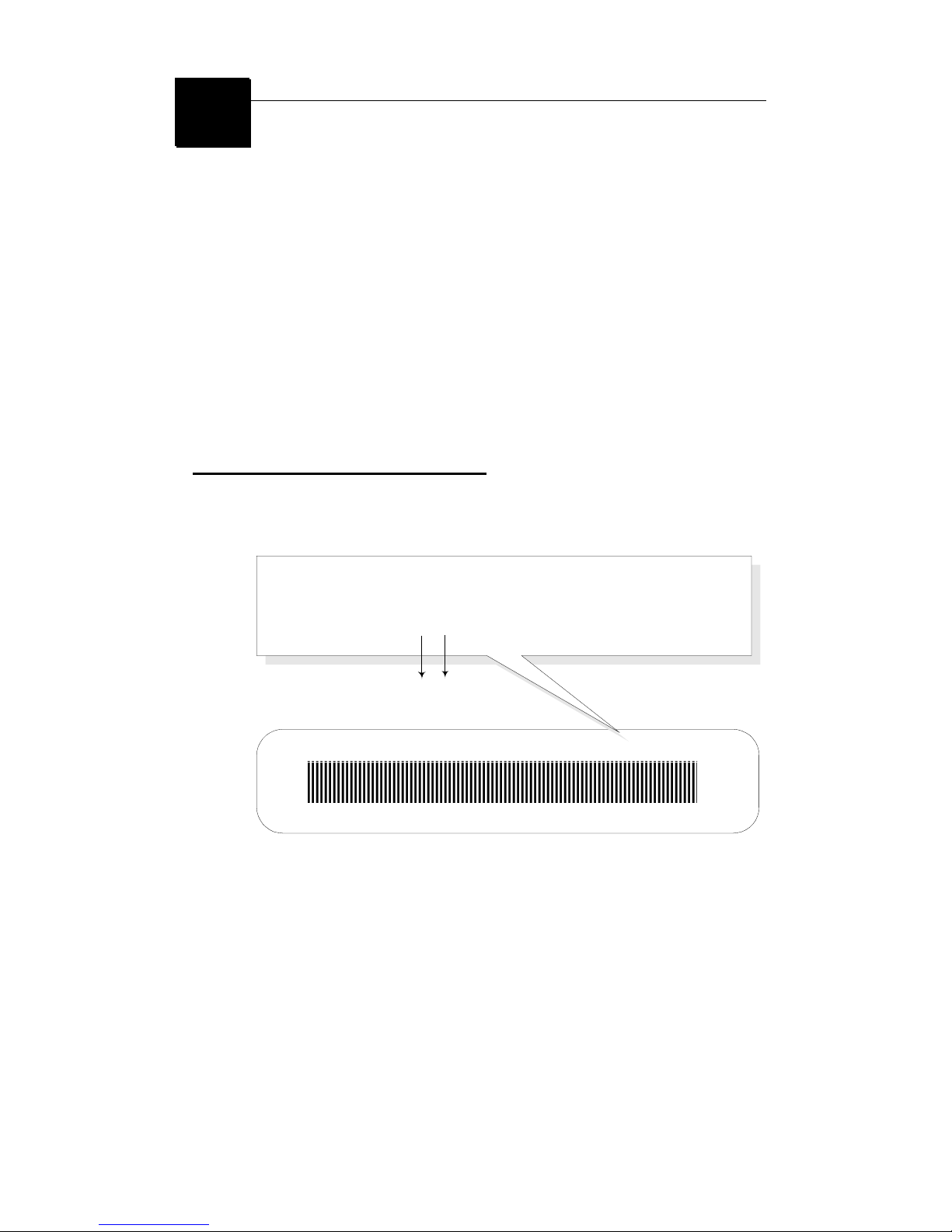
XXXX XX XXXXXX00.0xxxx/xxxx
XXXXX-XXX-XX S/N: A008000015
Product Label and Manufactured Date Code
Serial Number - ten or eleven digit code, the serial number consists of the following parts:
Packaging Type Manufactured Date Code Production Numerical Code
A 00 8 000015
Year Month
 Loading...