

Page 1
Modem Cradle Kit
Quick Start Guide
Page 2

Copyright 2008 Janam Technologies LLC. All rights reserved.
XP Series, XP20, XP30, XM Series, XM60, Janam and the Janam logo are trademarks of Janam Technologies LLC. Other
product and brand names may be trademarks or registered trademarks of their respective owners.
Janam Technologies LLC assumes no responsibility for any damage or loss resulting from, or in connection with the use
or application of any product. Janam Technologies LLC assumes no responsibility for any loss or claims by third parties
which may arise through the use of this product. Janam Technologies LLC assumes no responsibility for any damage or
loss caused by deletion of data as a result of malfunction, dead battery or repairs. Be sure to make backup copies of all
important data on other media to protect against data loss.
Contents of this guide are subject to change. For the most current version, please go to www.janam.com
CK-XP-1M Modem Cradle Kit Quick Start Guide
Page 3

The Modem Cradle Kit (CK-XP-1M) extends mobile solutions, enabling users to connect remotely with a host PC or access
the Internet at any time using a dial-up phone line. With the USB connector, the cradle easily connects to a computer, and it
is also a battery charger for the the handheld device and spare battery.
To help you get started with your CK-XP-1M, this guide features:
- Hardware Overview
- Getting Started
- Regulatory Information
For additional product details, visit www.janam.com or call +1.877.JANAM.99.
Content and Additional Resources
Page 4
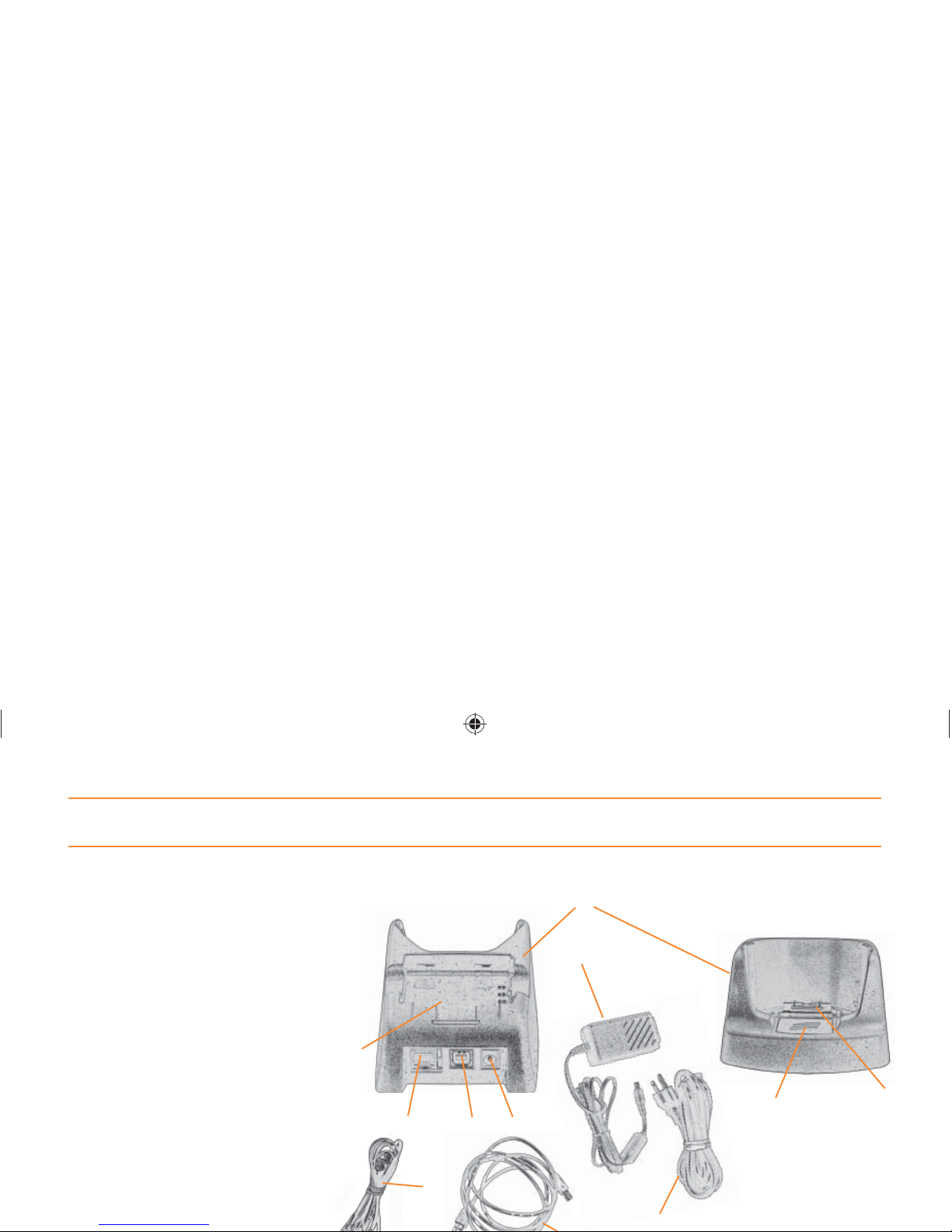
Modem Cradle Kit Hardware Overview
1. Cradle (CR-XP-1M)
2. Power Supply (PS-XP-1)
3. Line Cord (LC-XP-1)
4. USB Type-A to Type-B Cable*
5. RJ-11 Telephone Cord*
6. Spare battery-charging well
7. RJ-11 Jack
8. USB Type B Port
9. Power Receptacle
10. Synch button
11. Connector
* Comes with cradle kit.
Not separately orderable.
3
2
1
9
8
7
5
10
6
11
Page 5

Getting Started
A. MODEM SET UP
The USB cable should not be connected to the cradle and the computer during modem operations. If the USB cable
is connected, modem communication will fail.
1. Connect the power supply and line cord.
2. Plug the power supply into the power supply receptacle on the cradle.
3. Plug an RJ-11 telephone cord into the RJ-11 jack of the cradle.
4. Connect the other end of the RJ-11 cord into a standard analog phone connection. DO NOT CONNECT TO A
DIGITAL TELEPHONE LINE. IT MAY DAMAGE THE CRADLE.
5. Plug the cradle’s power supply into a power outlet.
B. USB/COMPUTER SET UP
We recommend you turn your computer off before connecting the cradle. After following the steps below, turn the
computer back on.
1. Connect the power supply and line cord.
2. Plug the power supply into the power supply receptacle on the cradle.
Page 6

Getting Started (Continued)
D. INSTALLING A BATTERY IN THE SPARE CHARGING WELL
1. Use only Janam batteries (BA-XP-1 or BA-XP-2).
2. Note position of connectors and, holding battery with label facing up, position battery with connectors aligned.
3. Place the Janam battery into well and snap into place.
4. The standard battery (BA-XP-1) will charge in three hours. The double capacity battery (BA-XP-2) will charge in
approximately six hours.
E. REMOVING A BATTERY FROM THE SPARE CHARGING WELL
Battery removal is smooth and easy when done properly. Follow the instructions below. Do
A
A
C. INSERTING A JANAM DEVICE INTO THE MODEM CRADLE
For best results, insert your Janam mobile device into the cradle as follows:
1. Place the mobile device in cradle, seating the device without trying to join connectors.
2. Tilt-rotate the device forward (bringing top end of unit forward) as you fi rmly apply downward pressure to fully
insert in cradle and join the connectors.
Page 7

Regulatory Information
For European Community Users
Janam Technologies complies with Directive 2002/69/EC of THE EUROPEAN PARLIAMENT AND OF THE COUNCIL
OF 27 January 2003 on waste electrical and electronic equipment (WEEE).
Waste Electrical and Electronic Equipment Information
This product has required the extraction and use of natural resources for its production. It may contain hazardous
substances that could impact health and the environment, if not properly disposed.
In order to avoid the dissemination of those substances in our environment and to diminish the pressure on
the natural resources, we encourage you to use the appropriate take-back systems for product disposal. Those
systems will reuse or recycle most of the materials of the product you are disposing in a sound way.
The crossed out wheeled bin symbol informs you that the product should not be disposed of along with
municipal waste and invites you to use the appropriate separate take-back systems for product disposal.
Page 8

FCC Regulatory Compliancy
This device is designed to be compliant with rules and regulations in locations it is sold and will be labeled as required.
CAUTION
Janam’s Regulatory Engineering Department must approve changes or modifi cations not covered in this user guide. Changes or modifi cations
made without written approval may void the user authority to operate this equipment.
Radio Frequency Interference Requirement
FCC Statement
This equipment has been tested and found to comply with the limits for a Class B digital device, pursuant to Part 15 of the FCC Rules. These
limits are designed to provide reasonable protection against harmful interference in a residential installation. This equipment generates, uses,
and can radiate radio frequency energy and, if not installed and used in accordance with the instructions, may cause harmful interference
to radio communications. However, there is no guarantee that interference will not occur in a particular installation. If this equipment
does cause harmful interference to radio or television reception, which can be determined by turning the equipment off and on, the user is
encouraged to try to correct the interference by one or
more of the following measures:
• Reorient or relocate the receiving antenna
• Increase the separation between the equipment and receiver
• Connect the equipment into an outlet on a circuit different from that to which the receiver is connected
• Consult the dealer or an experienced radio or television technician for help.
Janam is not responsible for radio/TV interference caused by using unauthorized cables or by making unauthorized changes to this equipment.
Radio Frequency Interference Requirement - Canada
This Class B digital apparatus complies with Canadian ICES-003.
Cet appareil numérique de la classe B est conforme à la norme NMB-003 du Canada.
Page 9

• This equipment must be connected to the telephone network or premises wiring using a compatible modular jack (RJ11C) compliant with
the applicable FCC Part 68 rules and requirements adopted by ACTA. A compliant telephone cord and modular plug are provided with this
product. It is designed to be connected to a compatible modular jack that is also compliant.
• If this equipment, the Modem Charging Cradle CR-XP-1M, causes harm to the telephone network, the telephone company will notify you
in advance that temporary discontinuance of service may be required. Also, you will be advised of your right to fi le a complaint with the
FCC if you believe it is necessary.
• The telephone company may make changes in its facilities, equipment, operations or procedures that could affect the operation of this
equipment. If this happens, the telephone company will provide advance notice in order for you to make necessary modifi cations to
maintain uninterrupted service.
• If trouble is experienced with the Modem Charging Cradle CR-XP-1M, please visit www.janam.com for repair or warranty information. If
the equipment is causing harm to the telephone network, the telephone company may request that you disconnect the equipment until
the problem is resolved.
• This equipment must not be used on party lines.
• If your home has specially wired alarm equipment connected to the telephone line, ensure the installation of this modem does not disable
your alarm equipment. If you have questions about what will disable alarm equipment, consult your telephone company.
• No user repairable parts are contained within this equipment.
Canada
This equipment meets the applicable Industry Canada Terminal Equipment Technical Specifi cations. This is confi rmed by the registration
number on the product label. The abbreviation “IC” before the registration number signifi es that registration was performed based on a
Declaration of Conformity indicating that Industry Canada technical specifi cations were met. It does not imply that Industry Canada approved
the equipment.
The European Economic Area
Janam hereby declares that this device is in compliance with the essential requirements and other relevant provisions of Directive 1999/5/EC.
A Declaration of Conformity may be obtained by sending an email to [email protected].
Page 10

―Notes―
 Loading...