

Page 1
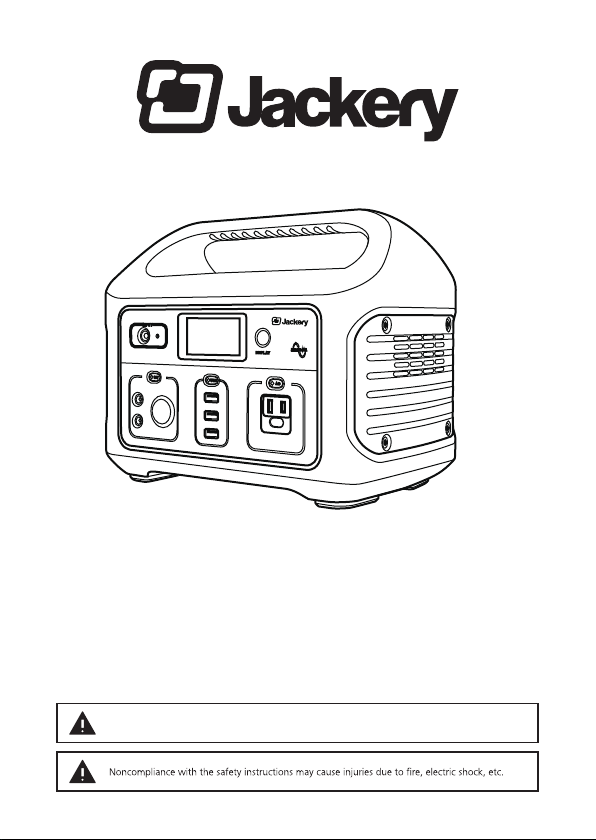
Instruction manual
Jackery Explorer 440
Outdoor Portable Power
Thank you for purchasing Jackery Explorer 440 To safely use this device, please read this manual ca refully and keep
it (together with the warranty card) in a safe place. If you pass the mobile storage system on to another user, make
sure that you hand over the instruction manual and warranty card as well. Please keep any additional documents
together with this manual.
CHARGE FIRST! Before reading through the manual, you can begin to charge up you Explorer 440
by connecting it to the power supply p rovided and plugging it in at the wall.
Page 2

Contents
1. Set includes 4
2. Introduction 5
3. Safety instructions 6
4. Lifting and transportation 10
5. Get to know your Explorer 440 11
6. Charging 12
6.1. What it can power 12
6.2. LCD battery display 12
6.3. Charging via solar panel 13
6.4. Charging via mains power supply 13
7. Using the Explorer 440 14
8.
9. Solar panels 16
10. Troubleshooting 16
11. Storage 17
12. Service life of lithium ion batteries 17
13. Frequently Asked Questions (FAQs) 18
14. Disposal and recycling 20
15. Warranty and customer service 21
15
Page 3

Explorer 440
Instruction manual
Outdoor Portable Power
Page 4
Instruction Manual / Jackery Explorer 440
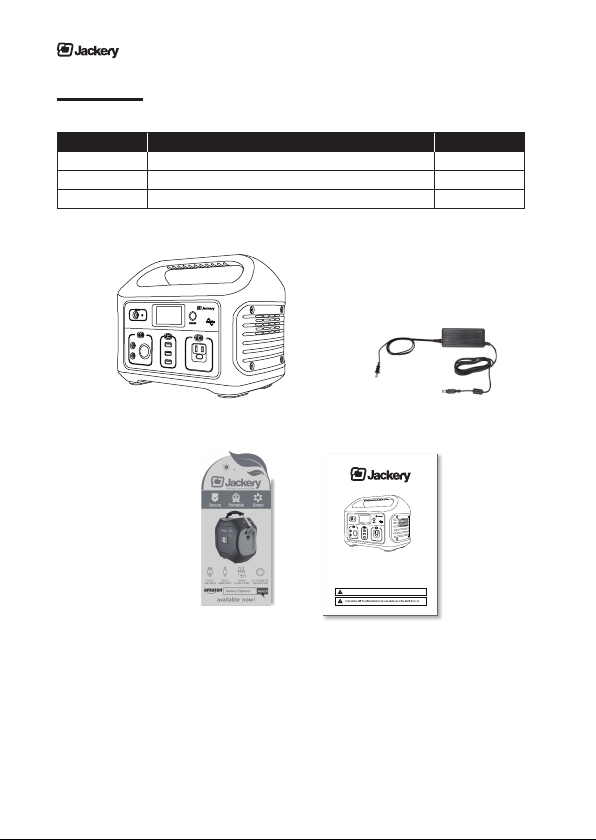
1. Set includes
No. Item Quantity
1 Jackery Explorer 440 1
2 AC Wall Charger (2 pieces) 1
3 Instruction manual and and thank you card 1
1
2
Instruction manual
Jackery Explorer 440
Outdoor Portable Power
Thank you for purchasing Jackery Explorer 440 To safely use this device, please read this manual carefully and keep
it (together with the warranty card) in a safe place. If you pass the mobile storage system on to another user, make
sure that you hand over the instruction manual and warranty card as well. Please keep any additional documents
together with this manual.
CHARGE FIRST! Before reading through the manual, you can begin to charge up you Explorer 440
by connecting it to the power supply provided and plugging it in at the wall.
3
4
Page 5

Instruction Manual / Jackery Explorer 440
2. Int roduction
Congratulations on purchasing Jackery Explorer 440 Outdoor Partable Power, a plug-and-play power supply for outdoor use. W ith 440 Wh watt-hours of stored energy, you can keep appliances, or electronic devices running for
hours.
The Jackery Explorer 440 Outdoor Partable Power is designed to keep you powered up outdoor in you RV or during
emergencies or power outage.
Note the following points while reading th rough this instruction manual:
• This manual was p repared with care and to the best of our knowledge.
Contact us, should you have any questions relating to the product.
• This manual may not be copied or duplicated, except for personal use.
Disclaimer
•
accidents, intentional misconduct on the part of the custome r, abuse or other abnormal conditions.
• Do not repair any damage to the AC plug or power supply on your own.
•
ranty terms and conditions a re beyond our responsibility.
• Our company assumes no liability for damages caused by incorrect use or non-compliance with this
instruction manual.
•
www.jackery.com
• Intended use: The Jackery Explorer 440 portable power unit is intended as a power supply for electro-
nic devices with a maximum power consumption of 300 W. Our product is not suitable to be used with
equipment that relates to one‘s own personal safety and relies heavily on electricity, such as medical devices, equipment for nuclear facilities, the manufacture of air and spacecraft, etc. We therefore assume no
the afo rementioned devices.
-
5
Page 6
Instruction Manual / Jackery Explorer 440
3. Safety instructions
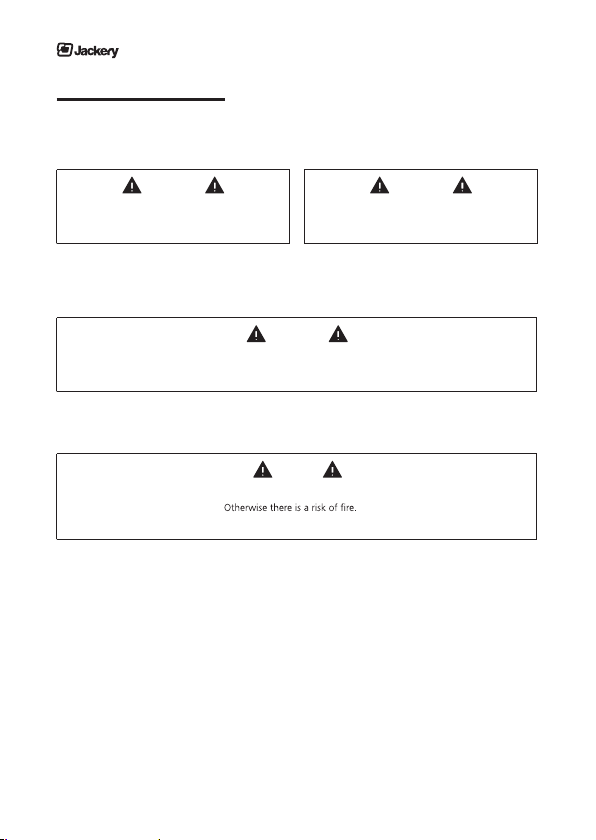
Observe these instructions to ensure safe usage.
Explanation of symbols
This symbol together with
DANGER means
This symbol together with
WARNING means
This symbol together with
CAUTION means
This symbol together with
ATTENTION means
• Serious injuries include blindness, burns, electric shock, fractures, poisoning, etc., which can lead to
complications, hospitalization or permanent treatment.
• Injuries include burns, electric shock, etc., which do not lead to hospitalization or permanent treatment.
• Property damage: includes buildings, belongings and pets, etc.
This device complies with part 15 of the FCC Rules. Operation is subject to the following
two conditions: (1) This device may not cause harmful interference, and (2) this device must
accept any interference received, including interference that may cause undesired operation.
Noncompliance may very likely lead
to serious injury or death.
Noncompliance may lead
to serious injury or death.
Noncompliance may lead
to injuries and/or property damage.
Noncompliance may damage the unit.
6
Page 7

Instruction Manual / Jackery Explorer 440
Danger
Do NOT disassemble, repair or modify the unit or the battery.
Do NOT charge, use or store the unit in a bathroom or in an area exposed to rain or moisture.
Only use the output socket to power external devices. Never connect the output to mains power
under any circumstances.
Do NOT touch the unit or the plug-in points if your hands are wet.
Doing so may result in electric shock.
Do NOT connect any metallic objects to the AC input or output.
Do NOT dispose the unit together with household waste.
Follow the local law to dispose the unit.
Do NOT use any inappropriate power cords.
Do NOT use the unit if it is not functioning correctly.
Do NOT move the unit if it is recharging or in use.
Doing so may result in electric shock, damage to the unit or other injuries.
7
Page 8
Instruction Manual / Jackery Explorer 440
Warning
Use and store the unit only in a clean and dry environment. Do not use and store in dusty and wet
envoirnment.
with the connections.
Check the unit prior to every use. Do not use the unit if it is damaged, broken.
If you notice that the unit has any damage or cracks, is broken, or has other abnormalities, do NOT continue to
use the unit and contact your dealer or our customer service center.
Do not use the unit if the power cord is damaged or broken.
Keep the unit away from children. Do NOT let children use the power supply unit.
Doing so may result in an accident or injuries. This unit must not be used by children. The unit and its connec tion cables must be kept out of reach of children. Children must not play with the unit.
This unit may only be used by persons with reduced physical, sensory or mental capabilities or lack of experien ce and knowledge if they are monitored or have been instructed in how to safely use the unit and understand
the resulting risks.
Keep this product away from pets.
Do NOT use or store the unit in an area or environment with high temperature.
Doing so may cause the unit to deform or overheat.
areas with tap water.
In a storm, unplug the power cord from the socket.
Do NOT charge the unit via power supply systems that operate outside of 100-240V.
Do NOT place the unit on its side or upside down while in use or storage.
Doing so may result in leakage or cause the unit to overheat leading to other accidents.
8
Page 9

Instruction Manual / Jackery Explorer 440
Caution
If rust, peculiar odors, overheating or other abnormal circumstances are observed, stop using the unit immedi ately and contact the dealer or our customer service center.
The unit complies with all legal requirements for transport of dangerous goods.
The capacity of the lithium battery pack in the unit exceeds 100 Wh.
Based on international standards: If this unit is to be sent by airplane, it must be transported in accordance with
IATA standard packaging. IATA instructions and labelling requirements and the relevant declarations must be
completed.
Make sure that the unit is properly secured when transporting it in a motor vehicle.
Only charge, use and store the unit within an ambient temperature of 0 to 40 °C (32 - 104 °F).
Operating the unit above or below this temperature range may result in overheating or reduced performance.
Switch the unit off immediately if it has accidentally fallen, was dropped or was exposed to vibrations.
To prevent accidents, please contact the dealer or our customer service center to have the unit checked and
repaired.
Carefully read the instructions for the electric devices that you intend to connect to your power
supply unit.
Make sure that the device you are connecting is switched off before you connect it.
A device starting up suddenly may lead to accidents or injuries.
If the protective function is activated and the output of the device is switched off, disconnect the electric de vices from the power output. Switch the unit off in case of non-use/storage in order to prevent electric shock
and the battery from discharging unnecessarily, etc.
9
Page 10
4. Lifting and transportation
1. Carry the unit with both hands.
Instruction Manual / Jackery Explorer 440
ATTENTION
Keep the unit away f rom
other objects when moving.
Take extra care to ensu re that the unit is never
2. Placing the unit on a stable surface.
ATTENTION
Place the unit on a stable surface.
By doing so, it is easier to read the indicators.
3. Transporting the device .
DANGER
The unit should not be subjected to any impact or vibrations.
Keep the unit‘s original packaging and use it when you need to transport the unit.
ATTENTION
allowed to fall to the g round.
10
Page 11
Instruction Manual / Jackery Explorer 440
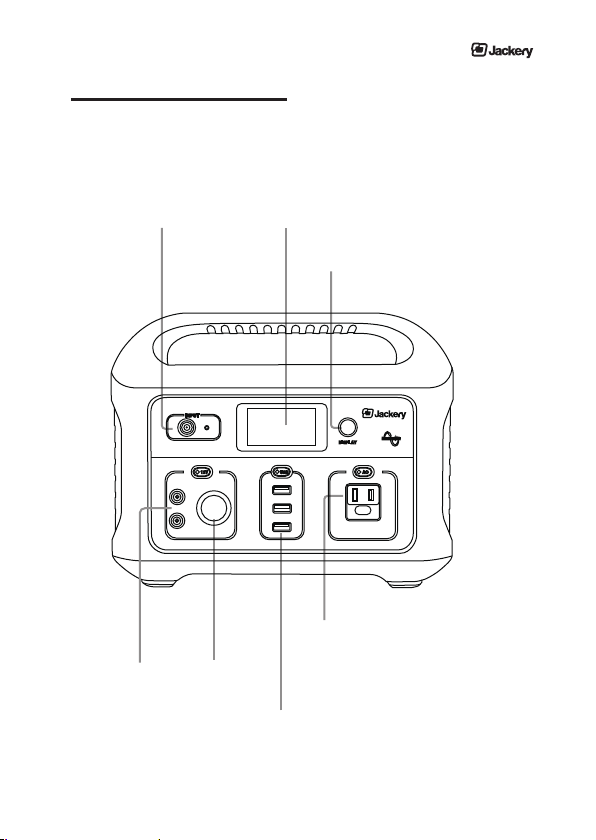
5. Get to know Jackery Explorer 440
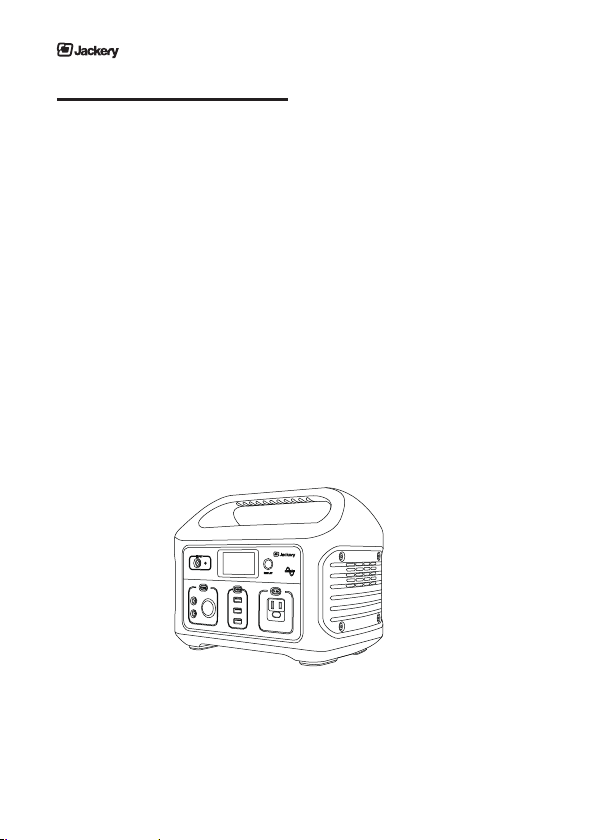
Charging Input:
8mm round port, for solar panel /
wall charger: 25.2V
12V Car Port
DC Port
LCD Battery Indicator
LCD Screen Switch
Power Output:
(Wall outlet, for smaller home appliances)
110V AC, 60HZ, 300W continuous,
500W peak
USB ports, for standard USB devices:
5V 2.1A x 3 (21W max)
11
Page 12
Explorer 440 Outdoor Partable Power
6. Charging
Before use or storage, plug your Explorer 440 into the wall until it is fully charged. If the display shows less than 20%
capacity, plug it into a power sou rce, like an AC outlet or a solar panel as soon as possible.
ATTENTION
Only charge the unit when the ambient temperatu re is between 0 and +40 °C (32 - 104 °F).
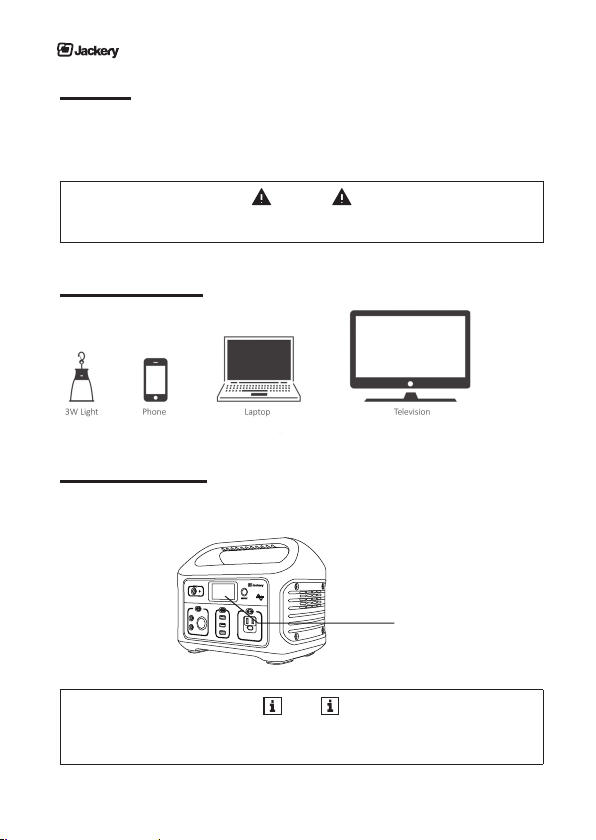
6.1. What it can power
...
and many more
6.2. LCD battery display
The LCD Display indicates the pe rcentage of total charge remaining in your Explorer 440.
LCD Display
NOTE
Charging time may vary depending on the ambient temperature involving the solar charger.
End the charging process by switching off the unit a nd pulling the plug out of the sock et.
12
Page 13
Instruction Manual / Jackery Explorer 440
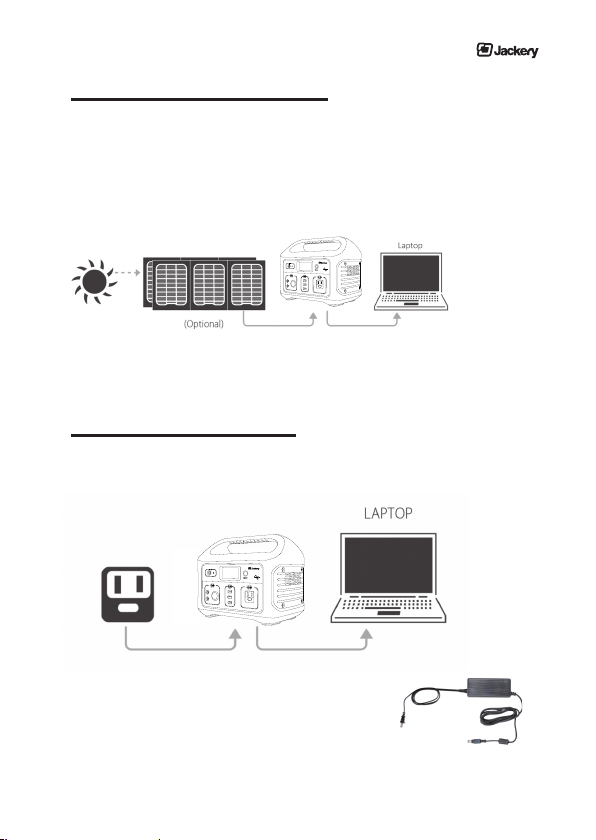
6.3. Charging via solar panel (not included)
The 8mm input port is c ompatible with solar panels with an input voltage of 25.2V
1. Place your solar panel where it will get as much direct sunlight as possible. See the graphic in the solar
section for help.
2. Solar charge times depend on weather conditions.
100W Solar Panel
6.4. Charging via mains power supply
Use the AC wall charger provided and plug you Explorer 440 into any outlet. When the digital indicator shows 100,
your device is fully charged. It will be fully charged after about 8 Hrs.
The AC wall charger consists of two pieces.
Connect the two pieces by plugging the cable into the box.
13
Page 14

Explorer 440 Outdoor Partable Power
7. Using the Explorer 440
What to power f rom Explorer 440
• USB: Smartphones, Digital Cameras, E-Readers, Tablets, Consoles, etc.
• 12V: Lights, DC devices etc.
• AC: Laptops, Display Monitors, Appliances, etc.
How to use Explorer 440
1. Press the power button unde rneath the LCD displa y.
2. You‘ll know your device is working when the LCD displays the pe rcentage charge remaining.
3. Plug in your device for mobile powe r.
Best-use strategy
• When charging devices with Explorer 440, take note of the LCD Display..
•
If you plug in devices that have a high power requrement, the charge lever of Explorer 440 can drop quickly and
you may not get be able to extract the enti re 440Wh of energy.
• If you’ re charging devices that draw power slowly (e.g., a tablet), you will be able to extract close to the
full 440 Wh out of Explorer 440. If you’re experiencing shorter run times,you can check the device’s power
requirements.
App ropriate temperatu re usage
• Cold temperatures can impact both the Explorer 440 battery capacity and the output power.
• The Explorer 440 can power your devices at temperatures ranging from 0 - 40°C (32 - 104 °F). If your working
temperature is outside this range, the Explorer 440 may stop working.
ATTENTION
Make su re that the elect ronic device you are powering works p roperly prior to use.
The max. power consumption for elect ronic devices is 300 W .
Due to the di fferent types of electric devices, it is possible that they may not operate
even if their power consumption is less than 300 W.
14
Page 15
Instruction Manual / Jackery Explorer 440
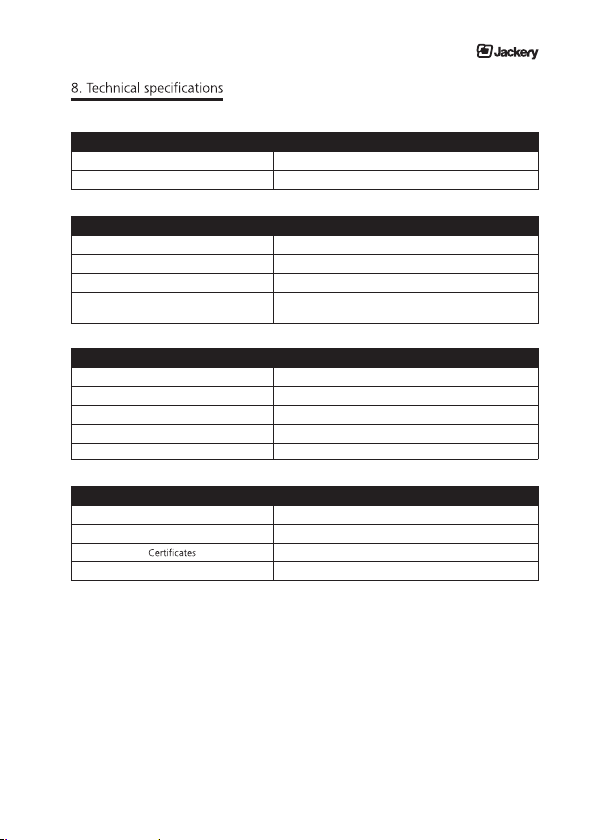
Wall charger (25.2V) About 8 Hrs
Charge times
Solar panel (100 W) About 10hrs (Full Sun)
Battery
Cell type Lithium-ion
Pack capacity 440 Wh
Lifecycles >500
Management system
Temperature control, Surge p rotection,
Short circuit protection
Ports
1x DC (input) DC 25.2V
3x USB ports (output) 21W max
AC Output
110V 300W
1x DC car outlet 13.3V,10A
2x AC Output
120W max
General
Weight 5.7KG
Operating temperature 32 - 104 °F (0 - 40 °C)
FCC, RoHS, UN38.3
Warranty 24 months
15
Page 16

Explorer 440 Outdoor Partable Power
9. Solar panels
1. Solar panels don’t store energy from the sun, they collect it.
Use your solar panel to charge your Explorer 440 so that you can use it day or night to power your devices.
2. Not all solar charge times are created equal.
Most solar panel manufacturers calculate recharge times using the following equation:
Devices Watt Hours / Solar Panel Watts = Solar Recharge Times.
So theoretically, a 13 watt solar panel would charge a 50 watt-hour battery pack in 3.84 hours (50/13 = 3.84) –
results across all manufacturers, these tests are completed in laboratory settings. The truth is, on a good, sunny
day, you’ll received about 50-75% of your solar panel’s rated wattage.
3. Solar panels generate power even in overcast conditions.
Solar panels utilize IR, UV, and visible rays from the sun that can penetrate through clouds. Although the
the sun.
4. Don‘t place the solar panel in shaded areas or behind windows.
Although you should seek out the shade on sunny days, your solar panels will collect more energy when fully
in the bright sunlight.
5. Proper alignment works wonders.
mother nature do the rest.
10. Troubleshooting
If your device is not being powered correctly or isn‘t charging when connected to your Explorer 440,
check the remaining charge by pressing the ON/OFF button.
1. Ensure the device has been switched on and the LED is showing the percentage of remaining charge.
2. Check the battery display. If it is at 20% or below, recharge your Explorer 440.
3. Verify your device is suitable for use with the Explorer 440.
a. All Explorer 440 output ports have their own max. power. Check the Explorer 440’s technical specifications
to ensure you device is compatible.
What should I do if the unit gets wet?
Immediately turn off the unit and wait until you are certain that it is completely dry before turning it back on.
If you are unsure about when it is safe to turn it back on, please contact after sales service.
16
Page 17
Instruction Manual / Jackery Explorer 440
11. Storage
1. Charging to maximum capacity
Fully charge the power supply unit prior to long-term storage. Charge the power supply unit at least once every
three months.
2. Turn off all switches
As soon as the Explorer 440 power supply unit is charged fully, switch off the main switch and the other
ON/OFF buttons and disconnect the adaptor from the main unit.
3. Cleaning
Wipe away any dirt using a damp cloth.
ATTENTION
Gasoline, thinner, kerosene, petroleum, etc. have the characteristics of solvents.
4. Storage
Store the power supply unit only in a dry and dust-free environment which is out of reach of children. Suitable
storage temperature: 0 to 40°C (32 - 104 °F). Keep out of direct sunlight. Make sure that the unit rests on a
stable surface.
Do not use.
12. Service life of lithium ion batteries
Charge, supply current and store between 0 and 40°C (32 - 104 °F).
Using the battery at temperatures outside the lower and upper limits reduces the battery‘s running time.
Do not connect a continuous load of more than 300 W.
The unit‘s output stops automatically in case of overloading, since it reduces the running time of the battery.
Do not continue to charge the battery after it has charged completely.
Pay attention to the indicated capacity. Do not charge the battery once it has been fully charged or the charging
process has been concluded. Otherwise the service life of the lithium battery may be reduced.
Switch off the unit if it is not being used.
Unnecessary power consumption also reduces the running time of the lithium battery.
Fully charge the battery prior to placing it in storage.
Fully charge the power supply unit prior to lengthy periods of non-use for storage and recharge the unit. After
prolonged storage, it may be necessary to charge and discharge the battery several times in order to reach full
capacity.
17
Page 18
Explorer 440 Outdoor Partable Power
13. F requently Asked Questions ( FAQs)
What type of battery is in a Explorer 440?
Explorer 440 contains a battery pack which consists of an array of cylindrical 18650 lithium battery cells with high
energy density.
How do I know if my Explorer 440 is charged?
To check the charge level of the Explorer 440, refer to the LCD Battery Displa y.
Can I charge the Explorer 440 while supplying power at same time?
The Explorer 440 power supply unit can be used to charge the devices during the charging process of the unit itself
Can I take my Explorer 440 on a plane?
No, you can’t.
hazardous by airlines.
Explorer 440
How do I know if my device will work with the Explorer 440?
You will need to check the amount of power your device requires. This may require some research on your end.
An online search or examining the user guide for your device should suffice. To be compatible with the Explorer 440
you should use devices that require less than 300 W.
contains a large number of lithium-ion batteries with a capacity considered to be
18
Page 19
Instruction Manual / Jackery Explorer 440
How long will the Explorer 440 run my device?
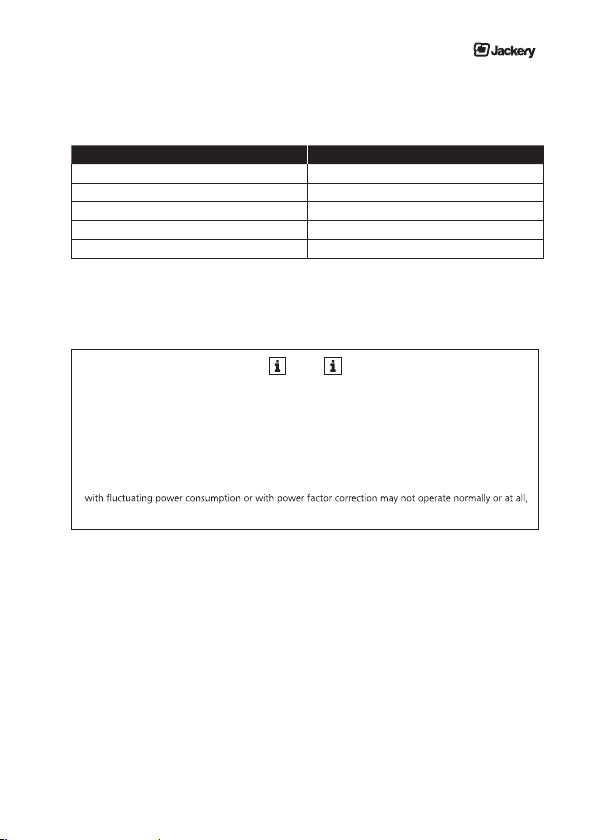
Here are some common devices and their power requirements.
Device Lithium Power from Explorer 440
LED Light (5 W) 70Hrs
Smartphones (5 W) 30+ Recharges
Laptop (60 W) 3~5 Recharges
Console (95 W) ~4 hrs
Mini Fridge (70 W) 5Hrs
When you’re deciding on what to power using your Explorer 440 recharge, do some research into your device’s
power consumption. For more quick tips and learning tools, please email our customer service for help.
NOTE
The approximate values were determined at an ambient temperature of 25°C (77°F) and with a fully char -
ged battery. These values may vary, depending on the manufacturer of the electric device, unit, etc.
The above data are to be used only as reference points.
Certain types of devices may not operate, even if the output of the power supply unit is below 300 W.
In case of overload, the unit switches off automatically and the output is interrupted.
Desktop computers, and other devices with high power consumption, as well as household devices
even if the their specified operating power is below 300 W.
19
Page 20
Explorer 440 Outdoor Partable Power
14. Disposal and recycling
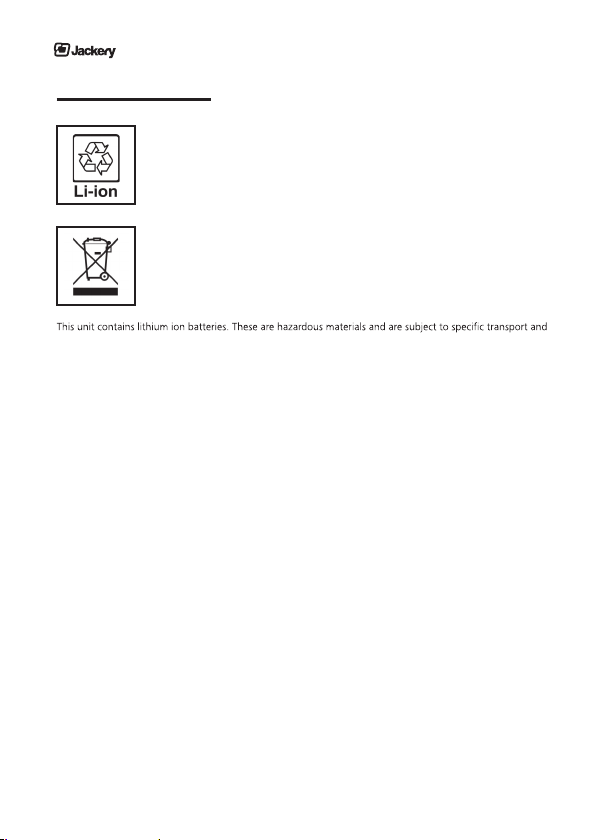
Lithium ion battery
As soon as the end of the battery‘s service life is reached, the entire lithium ion battery can
be recycled. Do not open or disassemble the unit.
Electric device
Old electric devices may not be disposed together with normal household waste. Accor ding to the directive 2012/19/EU, the device must be disposed of in a controlled manner
at the end of its service life. The recyclable materials contained in the unit shall be sent to
recycling to reduce the burden on the environment.
handling regulations. Lithium ion batteries may ignite or explode if handled incorrectly.
For the safe disposal of the unit, contact a collection point or your local municipality for more information and
indicate that the unit contains lithium batteries.
Package
The product package consists of recyclable materials. Dispose of these in an environmentally friendly manner
and sort the materials in the provided collection systems.
20
Page 21

Instruction Manual / Jackery Explorer 440
15. Warranty and customer service
LIMITED WARRANTY
JACKERY INC. warrants to the original consumer purchaser that this Jackery Explorer product will be free from
defects in workmanship and material under normal consumer use during the applicable warranty period
identified in Paragraph 2, below, subject to the exclusions set forth in paragraph 5, below. This warranty
statement sets forth JACKERY’s total and exclusive warranty obligation. We will not assume, nor authorize any
person to assume for us, any other liability in connection with the sales of our products.
WARRANTY PERIOD
The warranty period for this Jackery Explorer is 24 months. In each case, the warranty period is measured
starting on the date of purchase by the original consumer purchaser. The sales receipt from the first
consumer purchase, or other reasonable documentary proof, is required in order to establish the start date of
the warranty period.
REMEDY
JACKERY will repair or replace (at JACKERY’s option and expense) any JACKERY product that fails to operate
during the applicable warranty period due to defect in workmanship or material.
LIMITED TO ORIGINAL CONSUMER BUYER
The warranty on JACKERY’s product is limited to the original consumer purchaser and is not transferable to
any subsequent owner.
EXCLUSIONS
JACKERY’s warranty does not apply to (i) any product that is misused, abused, modified, damaged by
accident, or used for anything other than normal consumer use as authorized in JACKERY’s the-current
product literature, or (ii) any product purchased through an online auction house. JACKERY’s warranty does
not apply to the battery cell unless the battery cell is fully charged by you within seven(7) days after you
purchase the product and at least once every 6 months thereafter.
HOW TO RECEIVE SERVICE
To obtain warranty service, contact our customer service team by [email protected].
Jackery Inc.
1171 Montague Expy.
Milpitas, CA 95035
Made in China
21
Page 22
Explorer 440 Outdoor Partable Power
REPAIR TERMS AND CONDITIONS
1. In the case of device failure which can be attributed to poor workmanship, please take the original sales
receipt with purchase date (invoice, etc.) to the retail store. In case of normal use, the power supply unit
will be repaired or replaced free of charge within the two year warranty period. In addition to that, the
customer must bear any shipping charges that may occur.
2. The repair is not free of charge in the following cases, even within the warranty period.
•
• The equipment failure was caused by improper use (including use that does not comply with the inst -
ructions set forth in the manual).
•
•
deposits - on the inside or outside of the machine) or improper maintenance (mildew, dust, etc.).
• Damage was caused by use of unit for purposes other than intended (charged and recharged more
than 500 times, etc.)
•
and/or damage during inspection or repair.
• Faults that can be attributed to causes that are not cited above are beyond our scope of responsibility.
3. Note that we do not assume any liability for consequential damages (foreseeable damages, psychologi cal damages, etc.).
22
Page 23

Page 24

Jackery Inc.
TM and 2018 Jackery Inc. All rights reserved.
Made in China www.jackery.com
Page 25
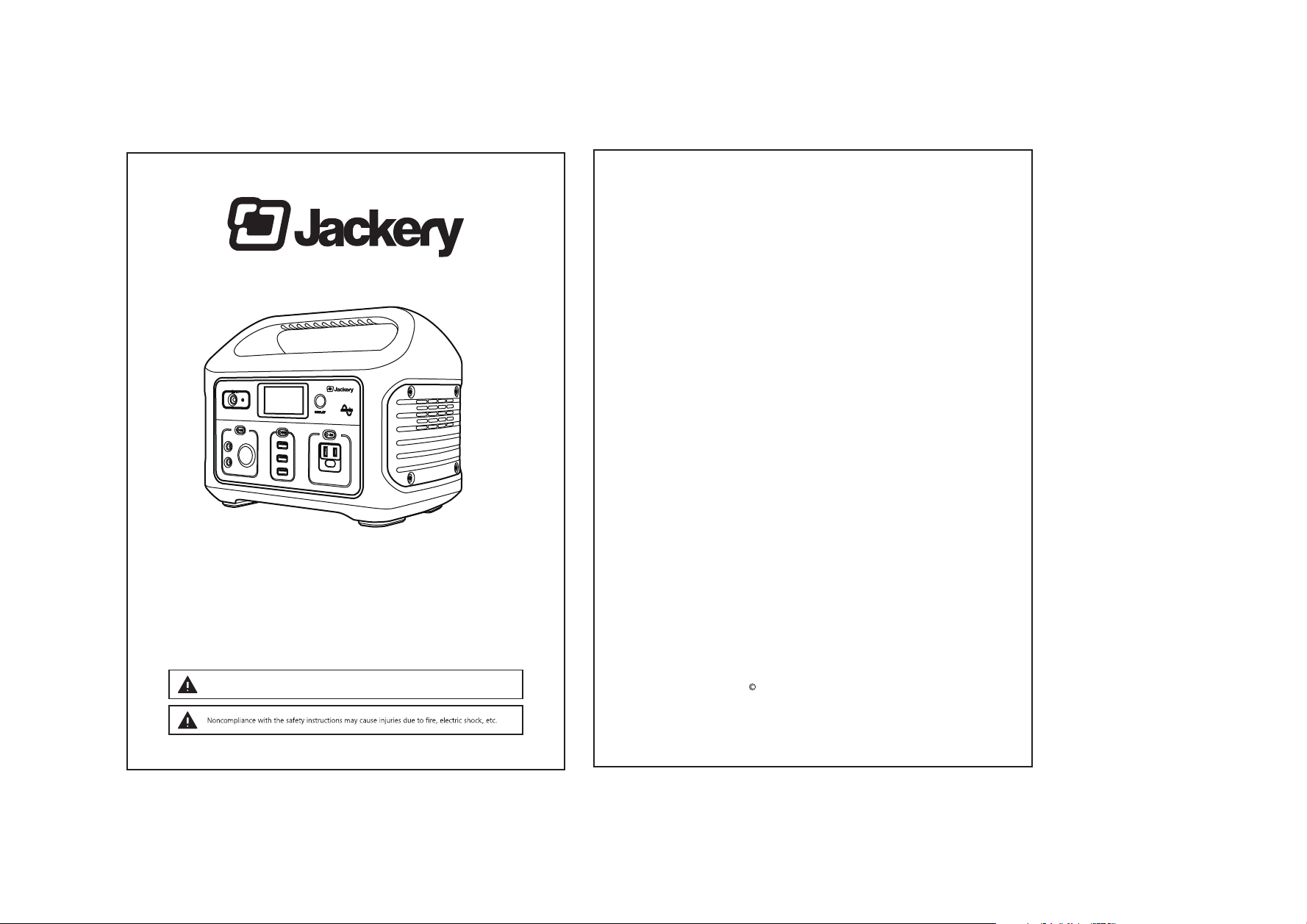
Instruction manual
Jackery Explorer 440
Outdoor Portable Power
Thank you for purchasing Jackery Explorer 440 To safely use this device, please read this manual ca refully and keep
it (together with the warranty card) in a safe place. If you pass the mobile storage system on to another user, make
sure that you hand over the instruction manual and warranty card as well. Please keep any additional documents
together with this manual.
CHARGE FIRST! Before reading through the manual, you can begin to charge up you Explorer 440
by connecting it to the power supply p rovided and plugging it in at the wall.
Jackery Inc.
TM and 2018 Jackery Inc. All rights reserved.
Made in China www.jackery.com
 Loading...