

Page 1

For more information, please visit
www.jabra.com
NEED MORE HELP?
Why wait? Go to our support page and find all the answers you’re looking for
24-hours a day. www.jabra.com/stealth
81-03899 B
Contact details to Jabra Support:
NA Support
Email: [email protected]
Twitter: twitter.com/jabra_US
www.jabra.com/mobilesupport
(For the latest support info
and online user manuals)
1 (800) 327-2230 (U.S.)
1 (800) 489-4199 (Canada)
Page 2

jabra.com/stealth
JABRA STEALTH
GET STARTED IN UNDER
MINUTES
5
Page 3
MADE IN CHINA
MODEL: OTE18
FCC ID: BCEOTE18
IC: 2386COTE18
© 2014 GN Netcom A/S (North America: GN Netcom US, Inc.). All rights
reserved. Jabra® is a registered trademark of GN Netcom A/S. All other
trademarks included herein are the property of their respective owners.
The Bluetooth® word mark and logos are owned by the Bluetooth SIG, Inc.
and any use of such marks by GN Netcom A/S is under license. (Design
and specifications subject to change without notice).
Declaration of Conformity can be found on
www.jabra.com/CP/US/declarations-of-conformity
Page 4

ENGLISH ..................................... 1
FRANÇAIS .................................. 5
ESPAÑOL .................................... 9
PORTUGUÊS ...........................13
Page 5
1
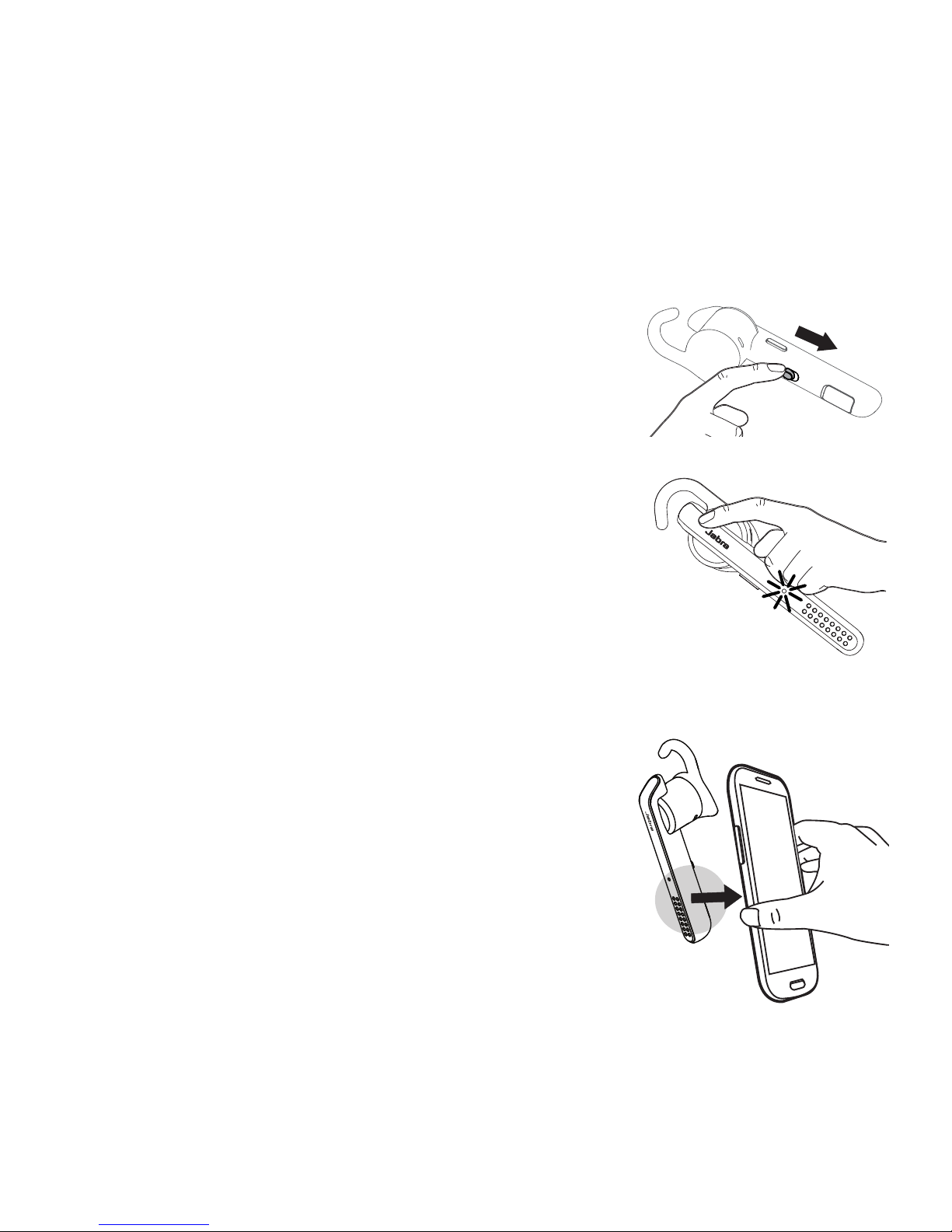
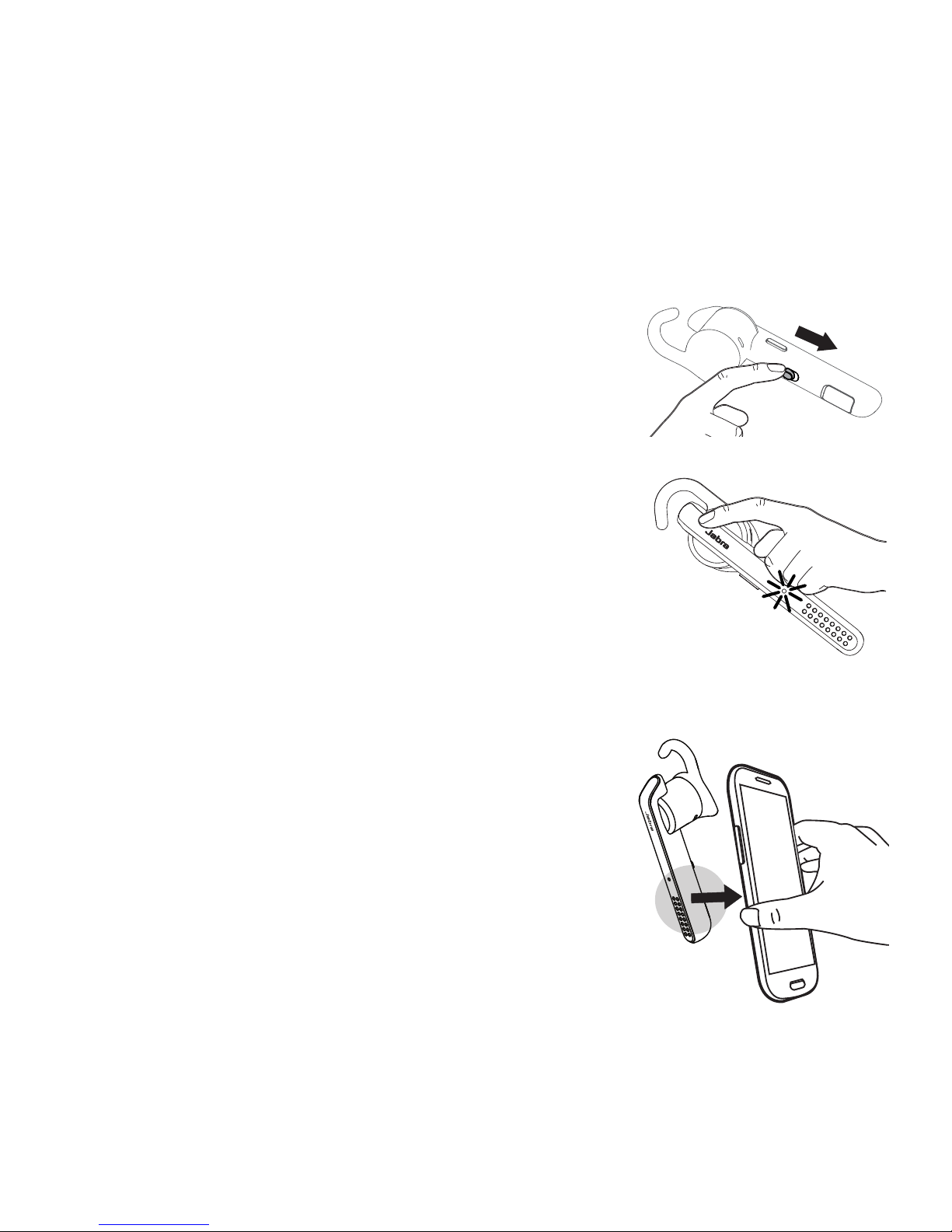
1 HOW TO CONNECT
CONNECT TO MOBILE DEVICE
1. Turn the headset on (set the On/o switch
to the On position).
2. Press and hold (3secs) the Answer/end
button until the Bluetooth indicator ashes
blue and pairing mode is announced in the
headset.
3. Follow the voice-guided pairing instructions
to pair to your Bluetooth device.
CONNECT TO MOBILE DEVICE (USINGNFC)
1. Ensure that NFC is enabled on your mobile
device.
2. Slowly slide the NFC zone of the headset
against the NFC zone of the mobile device
until a connection is conrmed.
Page 6
2
ENGLISH
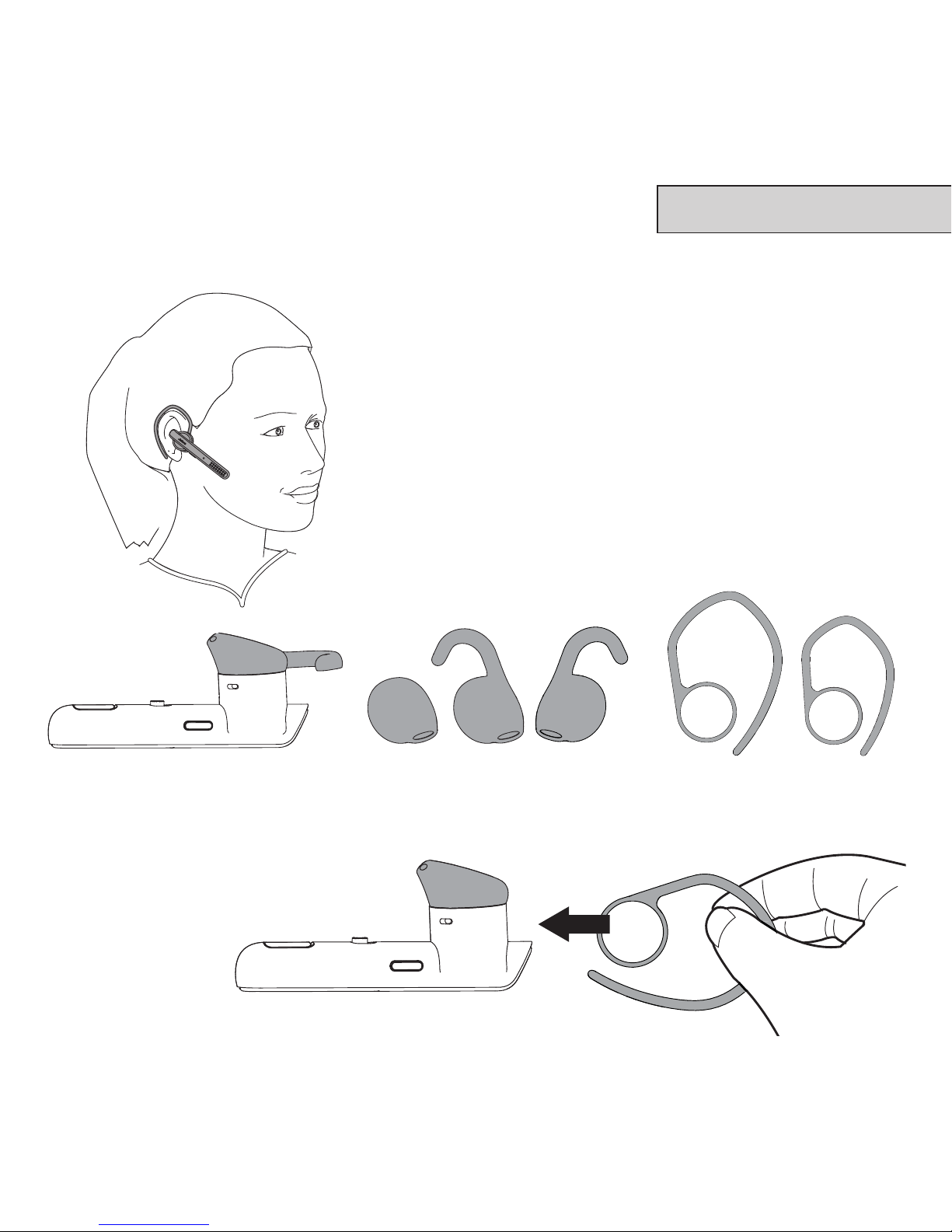
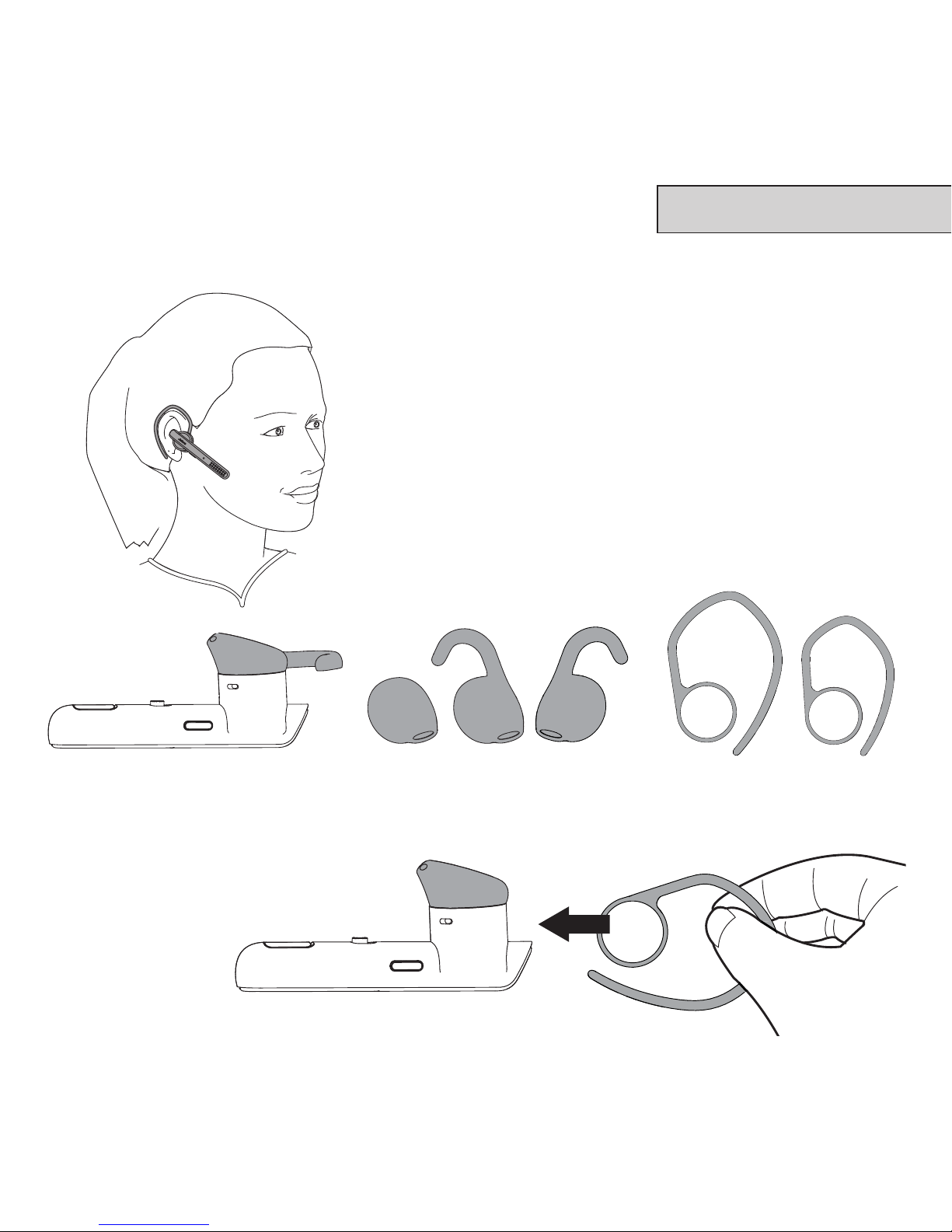
2 HOW TO WEAR
The headset can be worn on the left or right
ear. There are 3eargel styles, and 2earhook
styles.
ATTACHING THE EARHOOK
R L
Page 7
3
3 HOW TO USE
DID YOU KNOW?
The Jabra Assist app can help you locate your headset using GPS tracking.
Download the Jabra Assist App for your AndroidTM or iOS device to
enhance your Jabra experience.
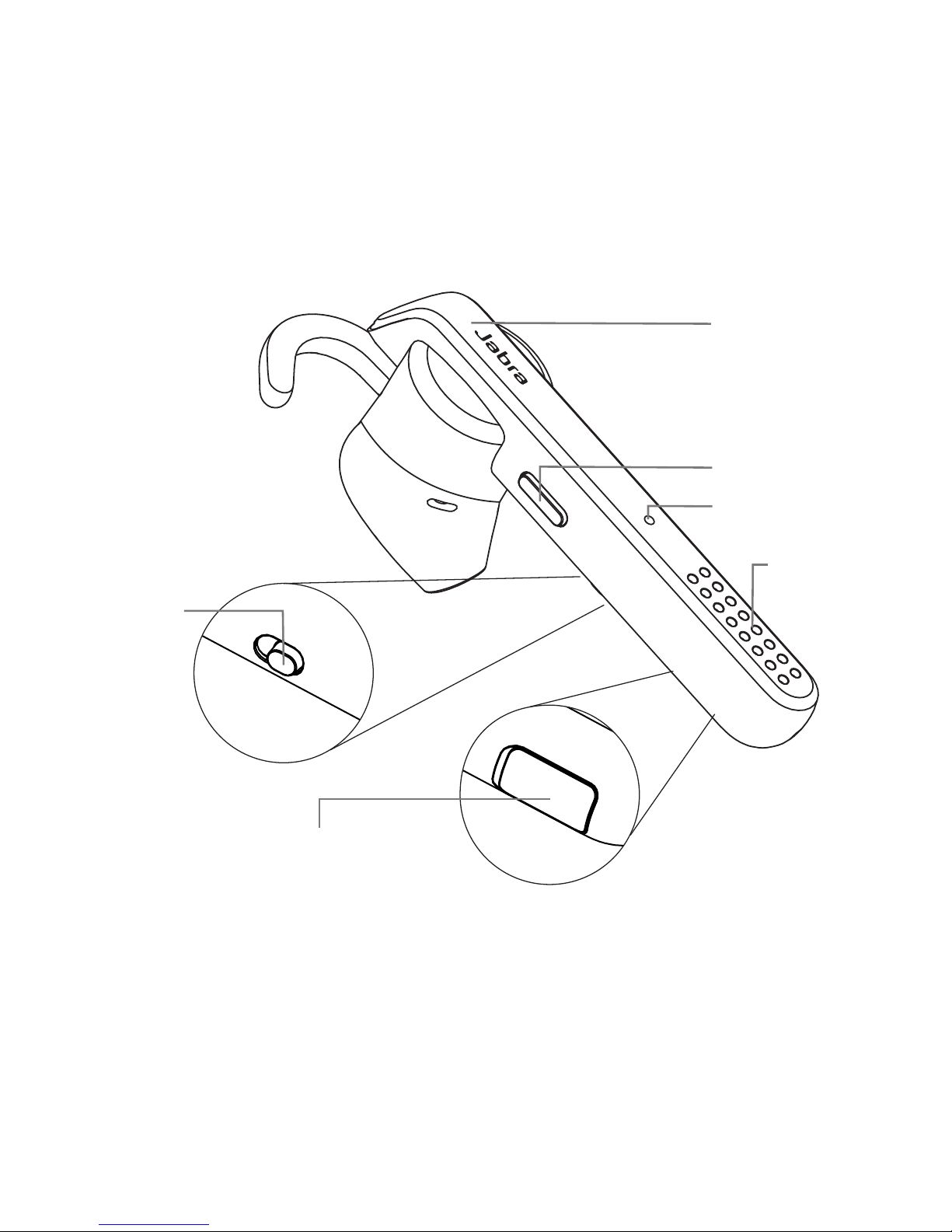
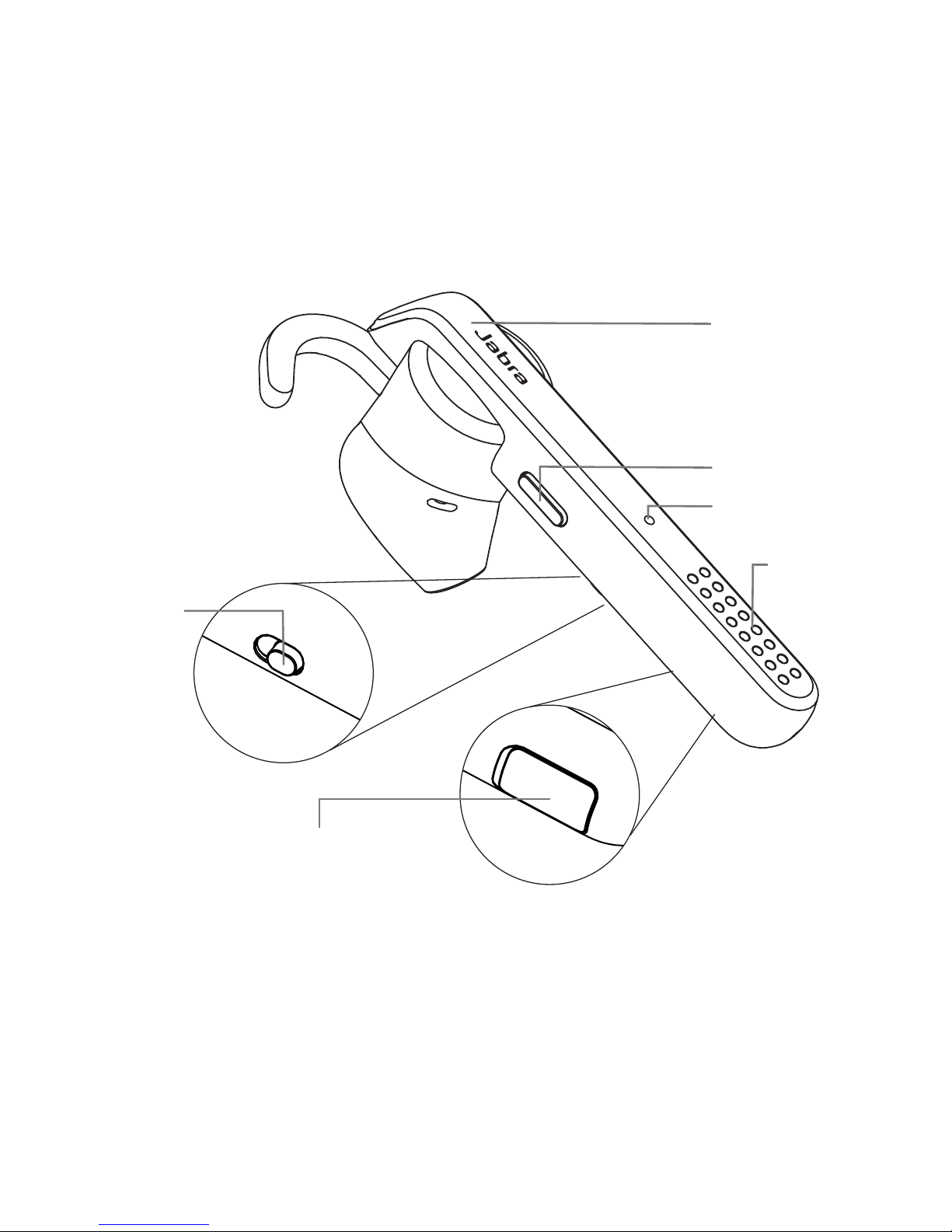
Answer/end button
Voice button
On/o switch
Microphones
USB charging port
Bluetooth indicator
Page 8
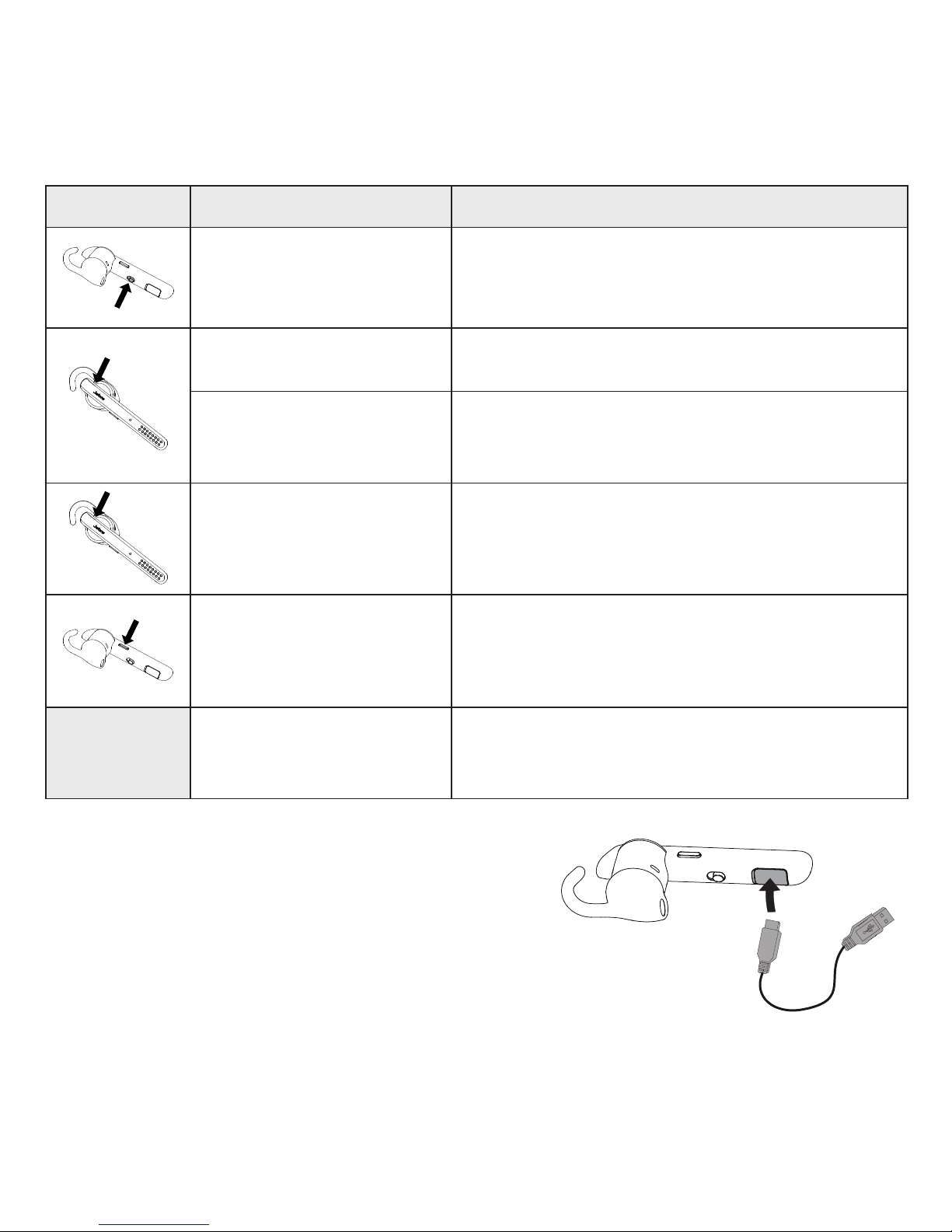
4
FUNCTION ACTION
On/o Slide the On/o switch
Answer/end call Tap the Answer/end button
Reject call
Press and hold (1 sec) the Answer/
end button
Redial last number
Double-tap the Answer/end button
when not on a call
Activate voice
dialing (phone
dependant)
Press and hold (1 sec) the Voice
button
Speaker volume
Use the volume controls on the
connected mobile device
CHARGE THE HEADSET
Pull back the charging cover to expose the USB
charging port. It takes approx. 2hours to fully
charge the battery.
Page 9
5
1 COMMENT LE CONNECTER
CONNEXION À UN PÉRIPHÉRIQUE MOBILE
1. Allumez le casque (réglez le commutateur
Marche/Arrêt à la position Marche).
2. Maintenez appuyée (3secondes) la touche
Réponse/Fin jusqu’à ce que l’indicateur
Bluetooth clignote en bleu et que le mode
d’appariement soit annoncé dans le casque.
3. Suivez les instructions vocales d’appariement
pour apparier votre périphérique Bluetooth.
CONNEXION À UN PÉRIPHÉRIQUE MOBILE
(AVECNFC)
1. Assurez-vous que la fonction NFC est activée
sur votre périphérique mobile.
2. Glissez lentement la zone NFC du casque
directement contre la zone NFC du
périphérique mobile jusqu’à la conrmation
d’une connexion.
Page 10
6
FRANÇAIS
2 COMMENT LE PORTER
Le casque se porte sur l’oreille gauche ou
droite. Il y a 3types d’oreillette Eargel et
2types de crochet auriculaire.
ATTACHER LE CROCHET AURICULAIRE
D G
Page 11
7
3 COMMENT L’UTILISER
LE SAVIEZ-VOUS?
Avec l’application Jabra Assist, vous pouvez localiser votre casque à l’aide
du repérage du casque par GPS. Téléchargez l’application Jabra Assist pour
votre AndroidTM ou un appareil iOS pour améliorer votre expérience Jabra.
Bouton Réponse/Fin
Bouton pour la Voix
Commutateur
Marche/Arrêt
Microphones
Port de charge USB
Indicateur Bluetooth
Page 12
8
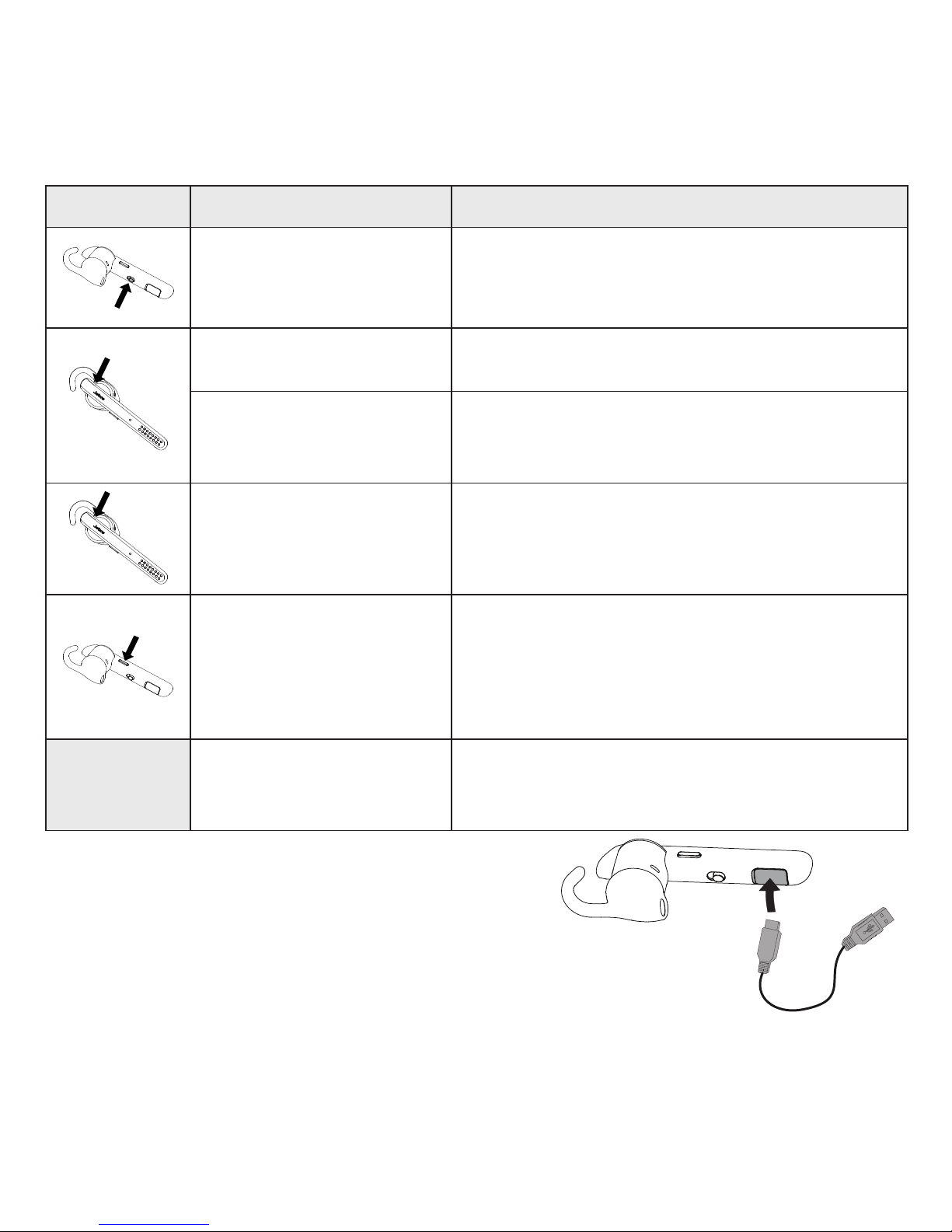
FONCTION ACTION
Marche/arrêt
Faites glisser le commutateur
Marche/Arrêt
Réponse/n d’appel Appuyez sur la touche Réponse/Fin
Refuser un appel
Maintenez appuyée (1seconde) la
touche Réponse/Fin
Recomposer le
dernier numéro
Appuyez deux fois sur la touche
Réponse/Fin quand vous n’êtes pas
en cours d’appel
Activer la
Composition vocale
(varie en fonction du
téléphone)
Maintenez appuyée (1seconde) la
touche Voix
Volume du hautparleur
Utilisez le contrôle du volume sur
l’appareil mobile connecté.
CHARGE DU CASQUE
Glissez le couvercle de charge pour que le port
de charge USB soit visible. Une charge complète
s’eectue en environ 2heures.
Page 13
9
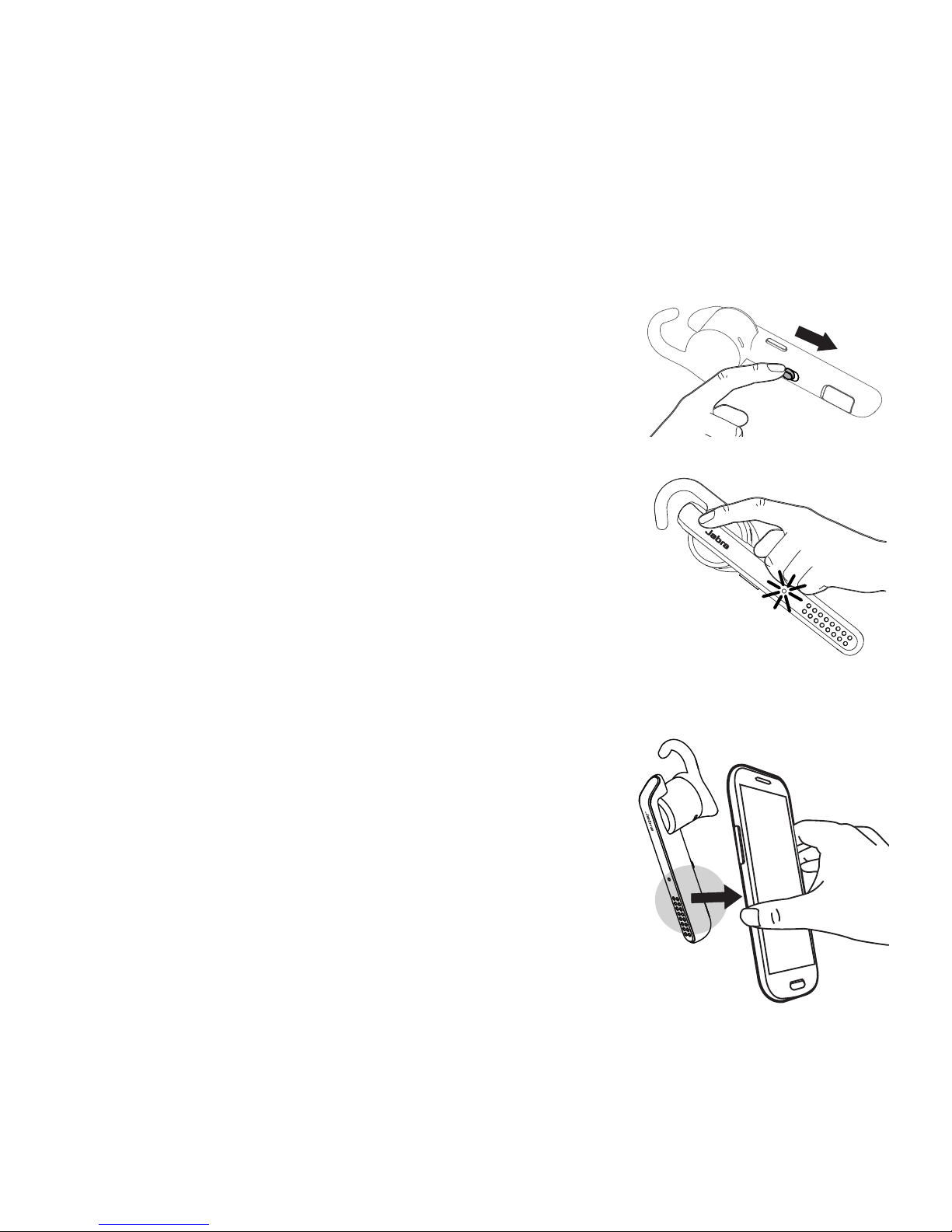
1 CÓMO CONECTARLOS
CONEXIÓN A DISPOSITIVO MÓVIL
1. Encienda el auricular (ajuste el interruptor
Encender/Apagar en la posición de
Encender).
2. Presione y mantenga presionado
(3segundos) el botón Responder/Finalizar
del auricular hasta que parpadee la luz
azul de Bluetooth y se anuncie el modo de
sincronización en el auricular.
3. Siga las instrucciones por voz para
sincronizar su dispositivo Bluetooth.
CONEXIÓN A DISPOSITIVO MÓVIL
(MEDIANTENFC)
1. Cerciórese de que NFC esté activo en su
dispositivo móvil.
2. Deslice lentamente la zona NFC del auricular
sobre la zona NFC del dispositivo móvil
hasta que se conrme una conexión.
Page 14
10
ESPAÑOL
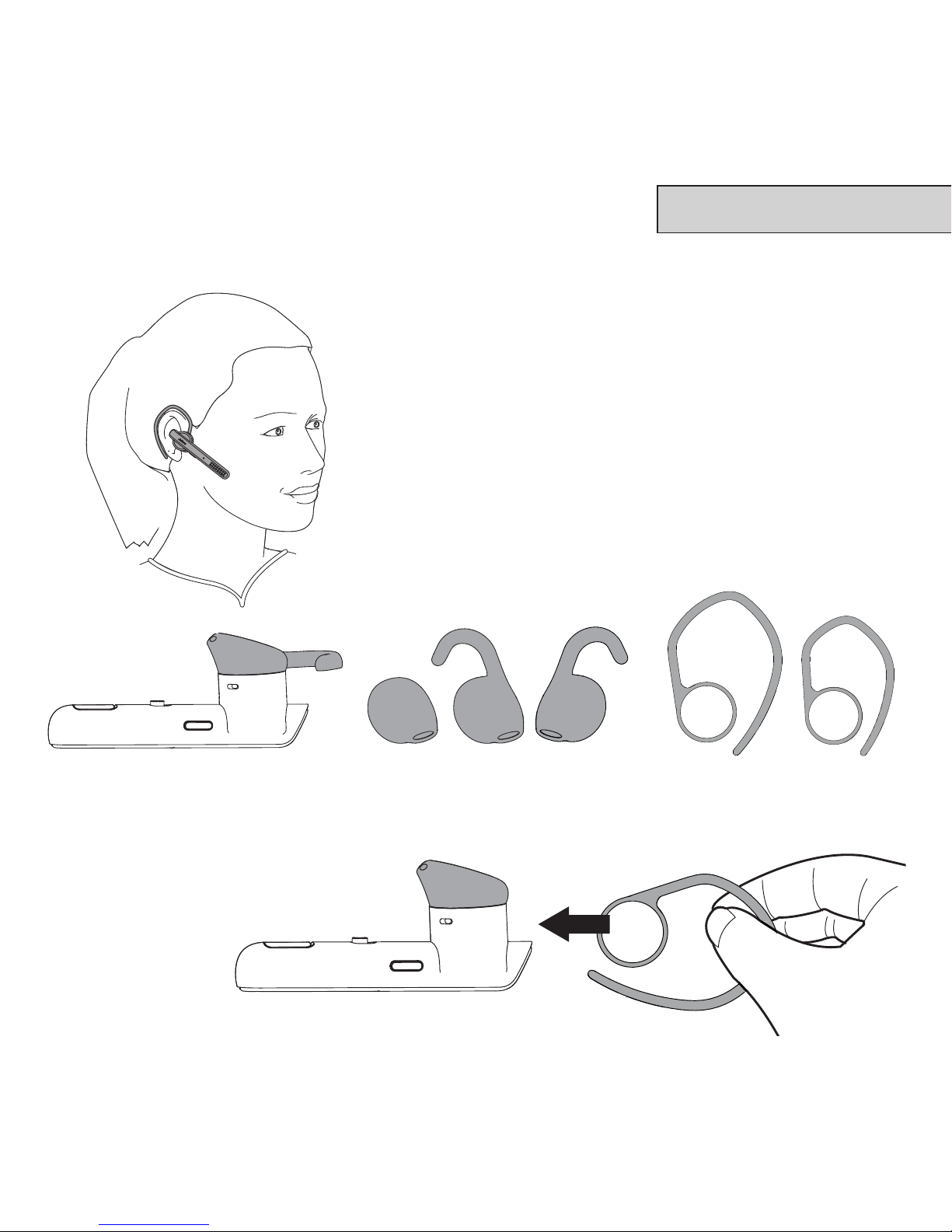
2 CÓMO USARLOS
Puede usar el auricular en la oreja izquierda
o en la derecha. Hay 3estilos de eargel y
2estilos de gancho para la oreja.
CÓMO COLOCAR EL GANCHO PARA LA OREJA
D I
Page 15
11
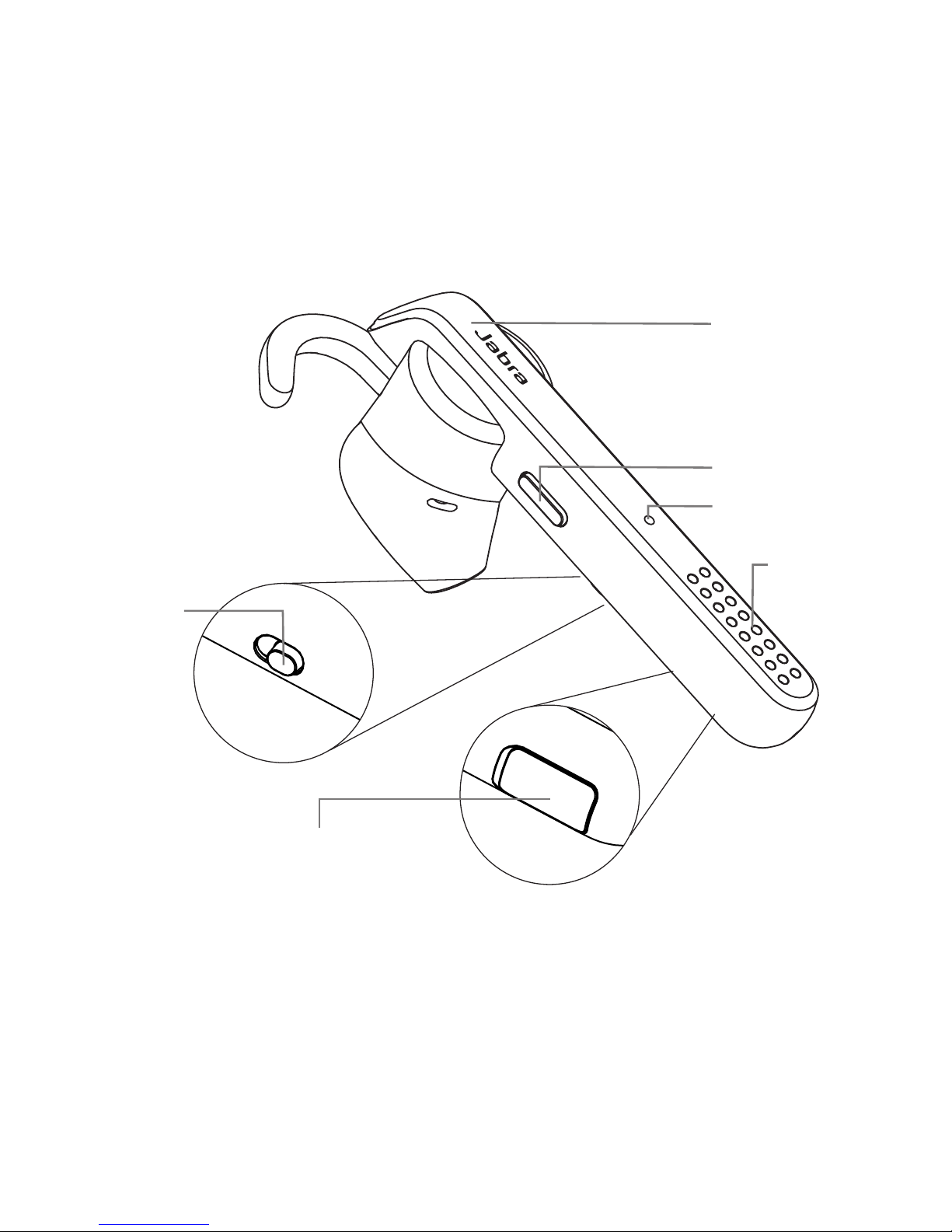
3 CÓMO UTILIZARLOS
¿SABÍA QUE...?
La aplicación Jabra Assist puede ayudarle a localizar el auricular mediante
rastreo por GPS. Descargue la aplicación Jabra Assist para su dispositivo
AndroidTM o iOS para mejorar su experiencia con Jabra.
Botón Responder/
Finalizar
Botón de voz
Interruptor
Encender/
Apagar
Micrófonos
Puerto USB para
el cargador
Indicador de
Bluetooth
Page 16
12
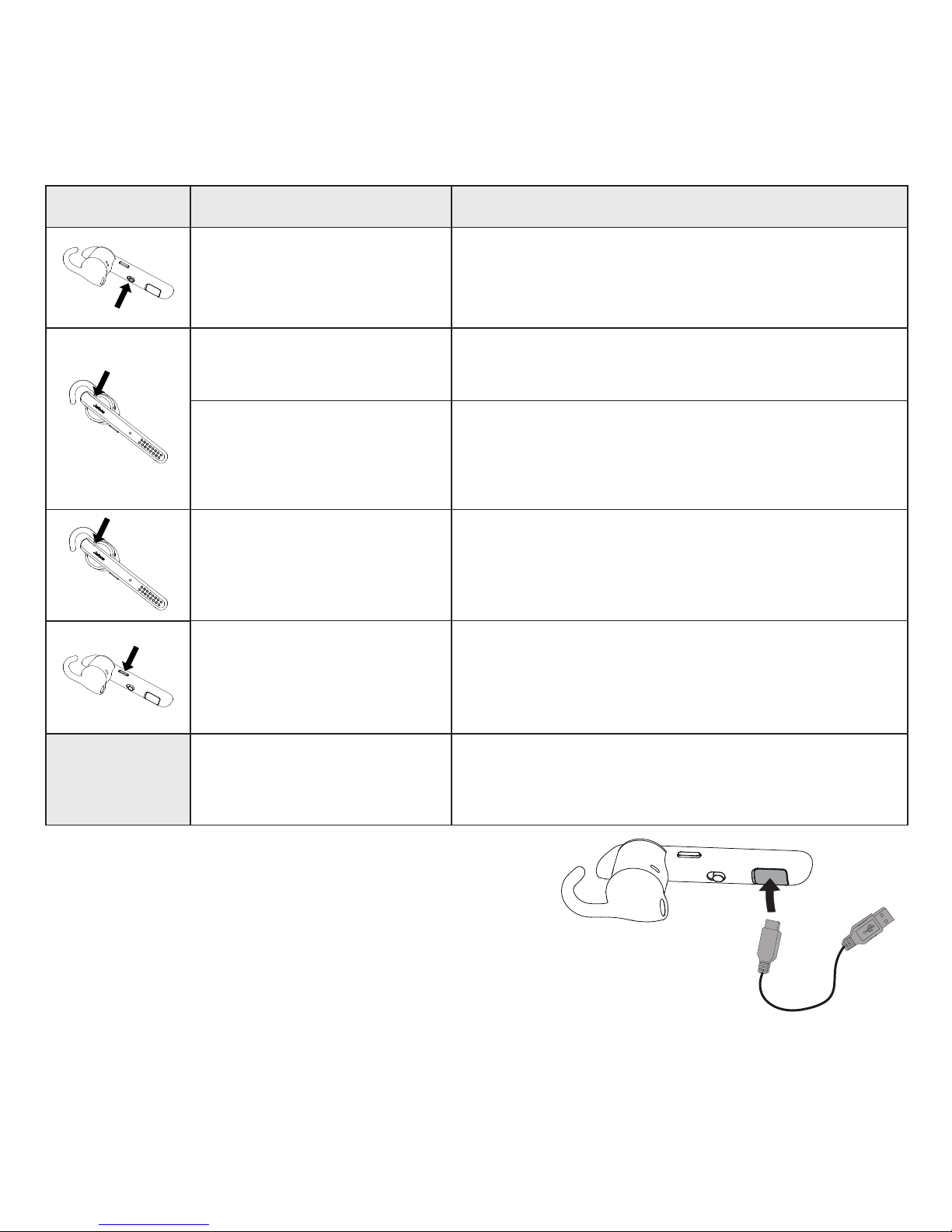
FUNCIÓN ACCIÓN
Encender/Apagar
Deslice el interruptor Encender/
Apagar.
Responder/Finalizar
llamada
Pulse el botón Responder/Finalizar.
Rechazar llamada
Presione el botón Responder/
Finalizar y manténgalo presionado
(1 segundo).
Volver a marcar el
último número
Pulse dos veces el botón Responder/
Finalizar cuando no esté en una
llamada.
Activar marcación
por voz (depende
del teléfono)
Mantenga presionado (1 segundo) el
botón de Voz.
Volumen del altavoz
Utilice los controles de volumen en el
dispositivo móvil conectado.
CARGA DEL AURICULAR
Tire de la tapa de carga hacia atrás para dejar expuesto
el puerto de carga USB. Lleva aproximadamente
2horas cargar la batería por completo.
Page 17
13
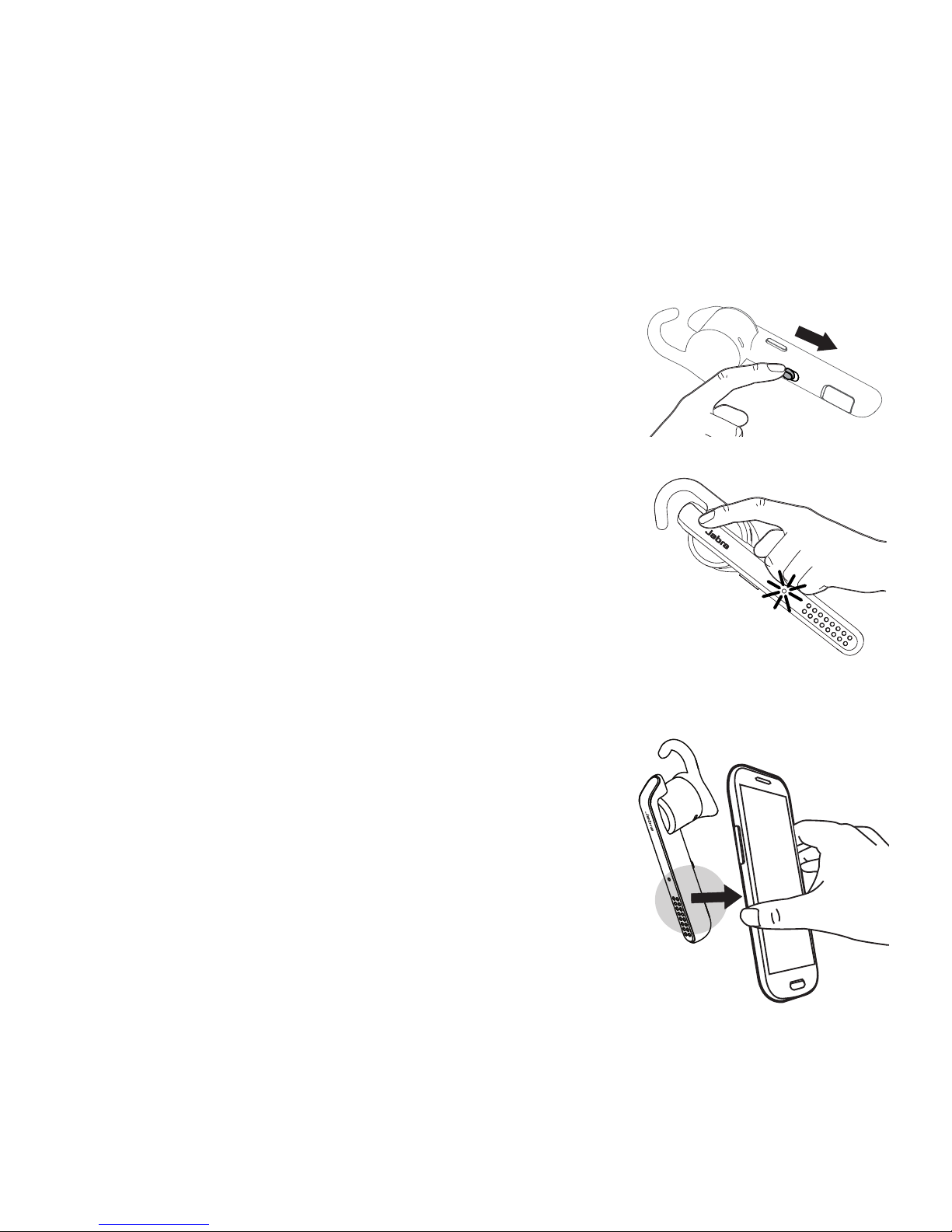
1 COMO SE CONECTAR
CONECTE-SE AO DISPOSITIVO MÓVEL
1. Ligue o headset (vire a chave Ligar/Desligar
para a posição de ligado).
2. Pressione e segure (por 3segundos) o
botão Atender/Terminar até o indicador
do Bluetooth piscar em azul e o modo de
pareamento for anunciado no headset.
3. Siga as instruções de voz de pareamento
para parear o seu dispositivo Bluetooth.
CONECTE-SE AO DISPOSITIVO MÓVEL
(USANDONFC)
1. Certique-se de que o NFC esteja habilitado
no seu dispositivo móvel.
2. Deslize lentamente a zona NFC do headset
contra a zona NFC do dispositivo móvel até
uma conexão ser conrmada.
Page 18
14
PORTUGUÊS
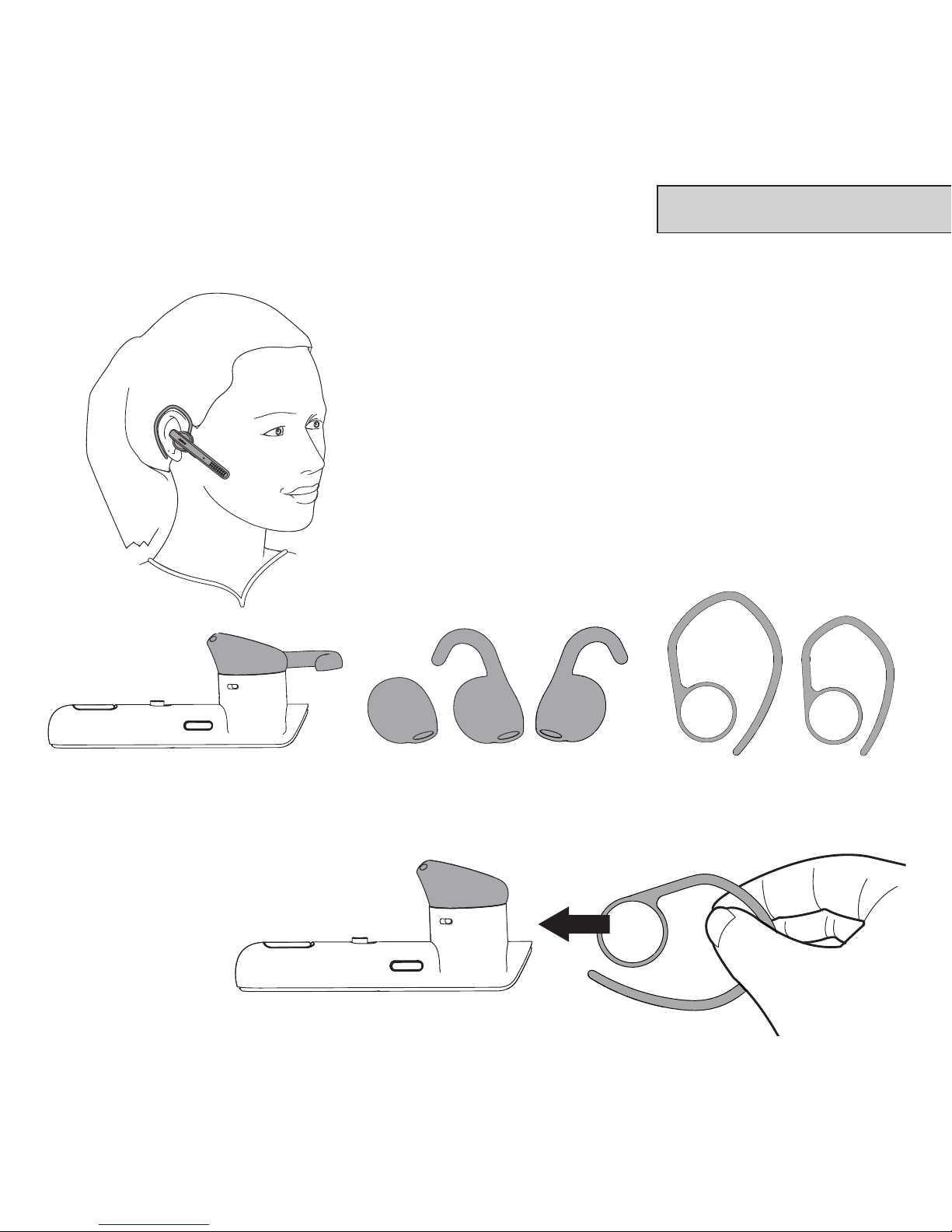
2 COMO USAR
O headset pode ser usado na orelha
esquerda ou direita. Há três estilos de gel de
ouvido e 2estilos de gancho de orelha.
ANEXANDO O GANCHO DE ORELHA
D E
Page 19
15
3 COMO USAR
VOCÊ SABIA?
O aplicativo Jabra Assist pode ajudá-lo a localizar o seu headset usando
rastreamento por GPS. Baixe o aplicativo Jabra Assist para o seu
dispositivo AndroidTM ou iOS para melhorar a sua experiência Jabra.
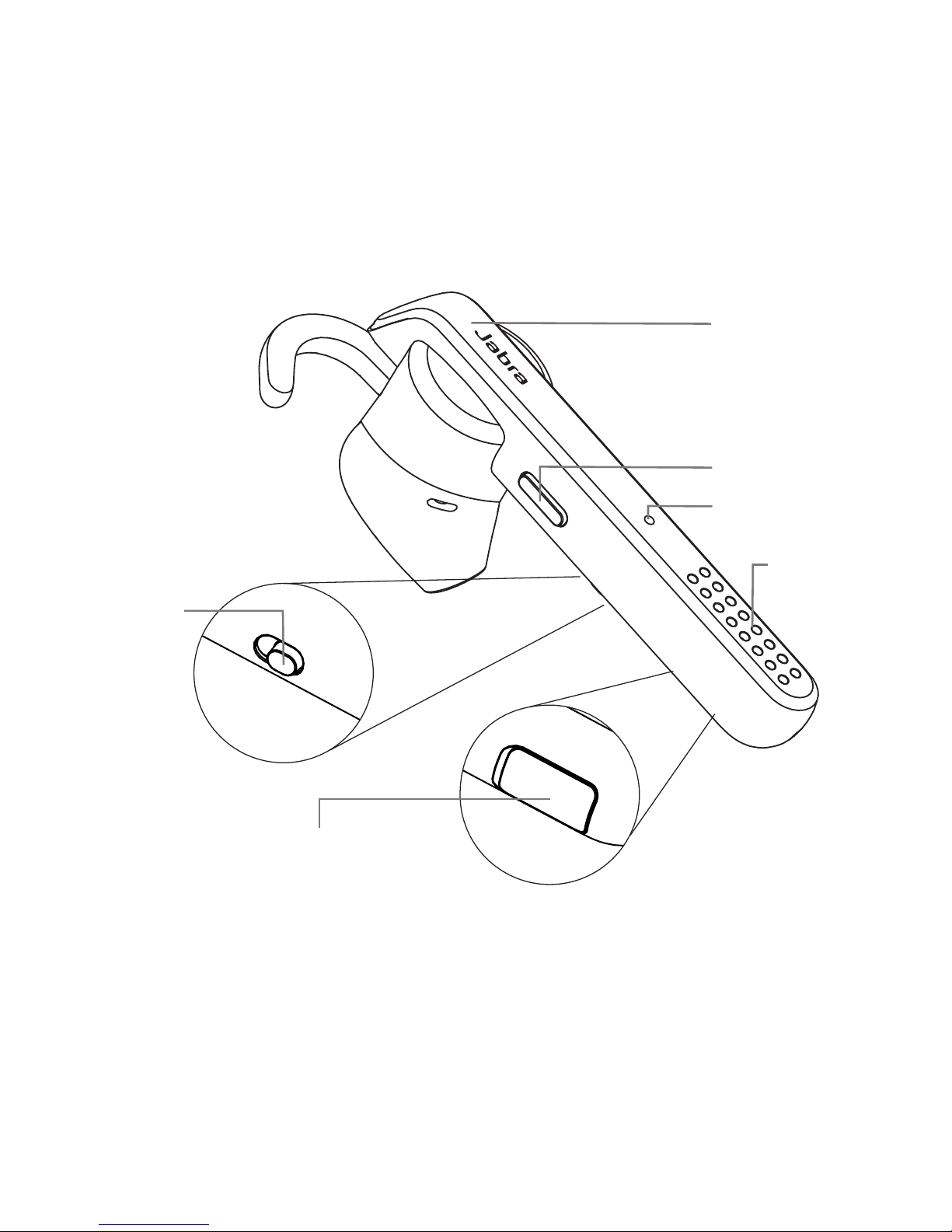
Botão Atender/
Terminar
Botão Voz
Chave Ligar/
Desligar
Microfones
Porta de
carregamento USB
Indicador de
Bluetooth
Page 20
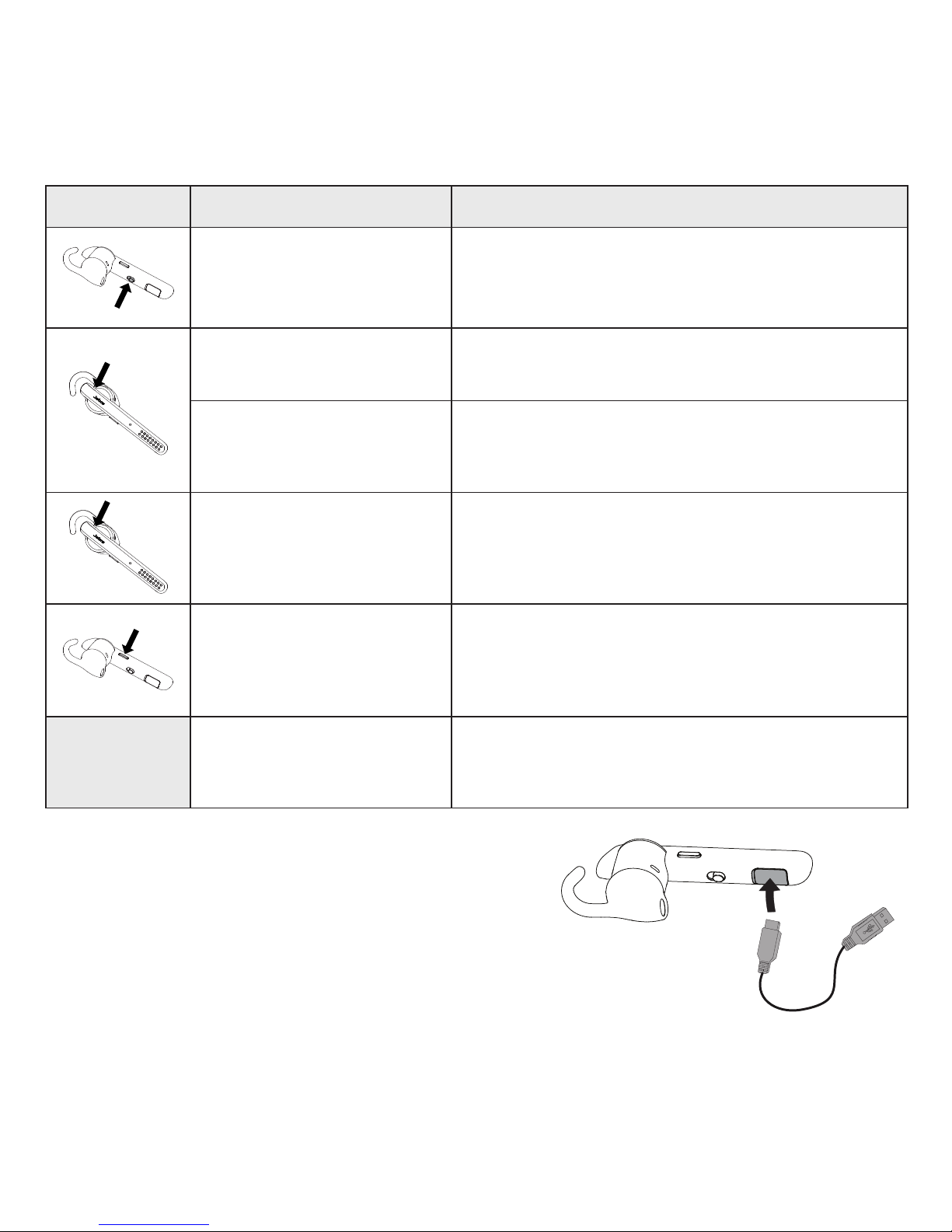
16
FUNÇÃO AÇÃO
Ligar/Desligar Deslize a chave Ligar/Desligar
Atender/Terminar
chamada
Toque no botão Atender/Terminar
Rejeitar chamada
Pressione e segure (por 1 segundo) o
botão Atender/Terminar
Rediscar último
número
Dê um toque duplo no botão
Atender/Terminar quando não
estiver em uma chamada
Ativar discagem por
voz (dependente do
telefone)
Pressione e segure (por 1 segundo) o
botão Voz
Volume do altofalante
Use os controles de volume no
dispositivo móvel conectado
CARREGAR O HEADSET
Retire a tampa de carregamento para expor a porta
de carregamento USB. Leva aproximadamente
2horas para carregar completamente a bateria.
 Loading...