

Page 1
jabra.com/roxwireless
JABRA ROX WIRELESS
NEED MORE HELP?
Why wait? Go to our support page and find all the answers you’re looking for
24-hours a day. www.jabra.com/roxwireless
81-03822 B
Get started in under
Minutes
5
Contact details to Jabra Support:
EUROPE
Austria
Belgique/Belgium
Czech Republic
Denmark
Finland
France
Germany
Italy
Luxembourg
Netherlands
Norway
Poland
Portugal
Russia
Spain
Sweden
Switzerland
Turkey
United Kingdom
International
PHONE
+43 720880558
+32 28080766
-+45 699 18794
+45 352 56540
+33 182880251
+49 30896778991
+39 06 622076 74
+45 352 56540
+31 208080962
+47 22577785
-+45 352 56540
-+34 911875539
+46 852507012
+41 435002460
-+44 2033180070
+45 352 56540
EMAIL
-[email protected]
[email protected]
[email protected]
[email protected]
[email protected]
[email protected]
--
For more information, please visit
www.jabra.com
Page 2
Declaration of Conformity can be found on
www.jabra.com/CP/US/declarations-of-conformity
© 2013 GN Netcom A/S (North America: GN Netcom US, Inc.). All rights
reserved. Jabra
®
is a registered trademark of GN Netcom A/S. All other
trademarks included herein are the property of their respective owners. The Bluetooth
®
word mark and logos are owned by the Bluetooth
SIG, Inc. and any use of such marks by GN Netcom A/S is under license.
(Design and specifications subject to change without notice). Dolby and
the double-D symbol are registered trademarks of Dolby laboratories.
Confidential unpublished works. Copyright 2003-2010 Dolby Laboratories.
All rights reserved.
MADE IN CHINA
MODEL: OTE16
ENGLISH ..................................... 1
FRANÇAIS ................................. X
DEUTSCH ...................................X
NEDERLANDS ........................... X
ITALIANO .................................... X
ESPAÑOL ....................................X
MAGYAR .....................................X
ROMÂNĂ ....................................X
SUOMI .........................................X
DANSK/SVENSKA ....................X
...................................X
ČESKY ..........................................X
.............................X
POLSKI ......................................... X
PORTUGUÊS .............................. X
TÜRKÇE .......................................X
ΕΛΛΗΝΙΚΑ .................................X
X ............................................ ةيبرعلا
X ........................................... یسراف
Page 3
jabra
jabra
21
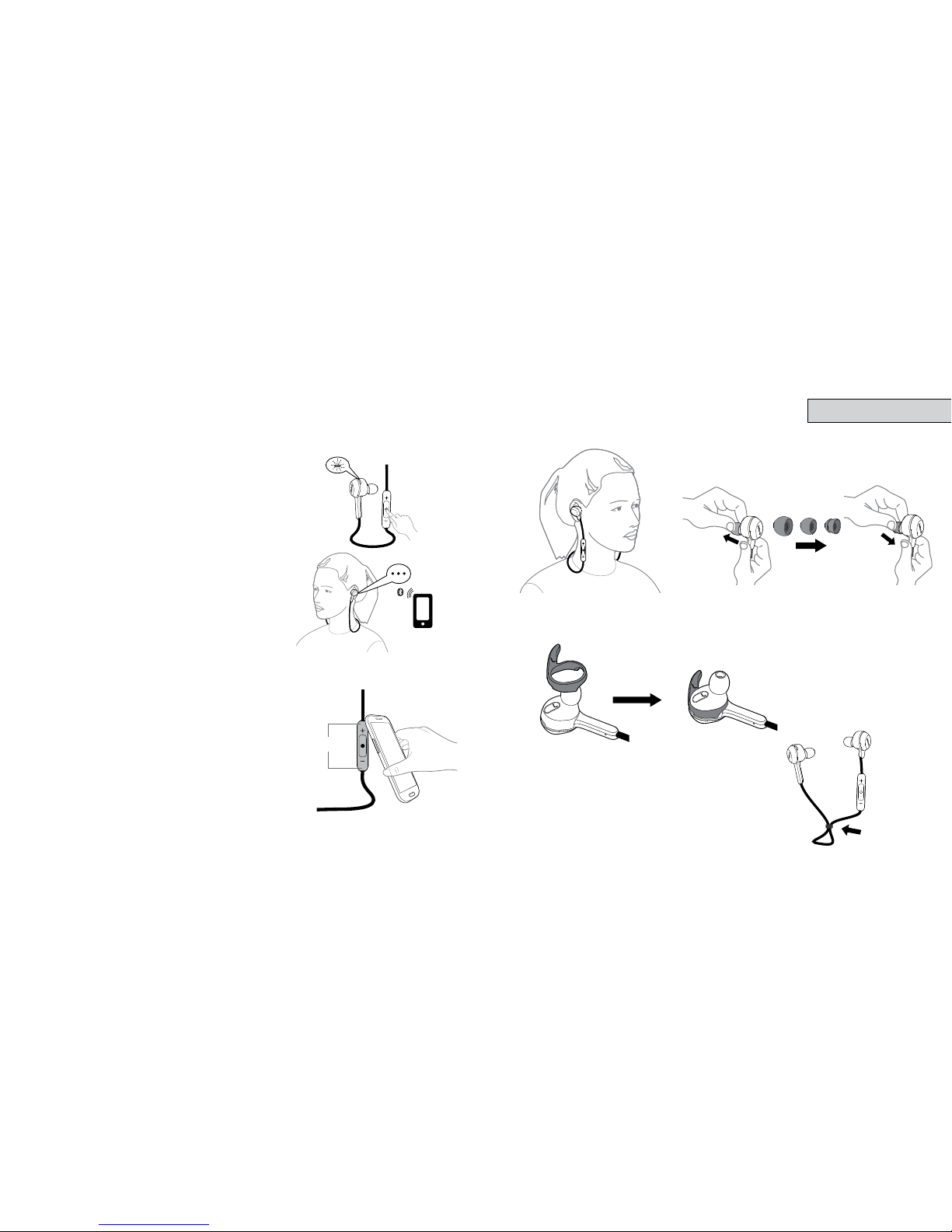
1 how to connect
2 how to wear
ENGLISH
CONNECT WITH A BLUETOOTH® DEVICE
1. Press and hold (5 secs) the Multi-function
button until the LED rapidly ashes blue.
2. Wear the headset, and follow the
voice-guided pairing instructions to pair
to your Bluetooth device.
CONNECT WITH AN NFC DEVICE
1. Ensure that NFC is enabled on your mobile
device.
2. Slowly slide the NFC zone of the headset
(button side of the control box) directly
against the NFC device until an NFC
connection is conrmed.
WEARING THE EAR SPRINGS
For the perfect active t, attach the ear springs as illustrated.
USING THE FITCLIP
Attach the tclip to the cable, and adjust
for optimal t.
NFC zone
Page 4
jabra
43
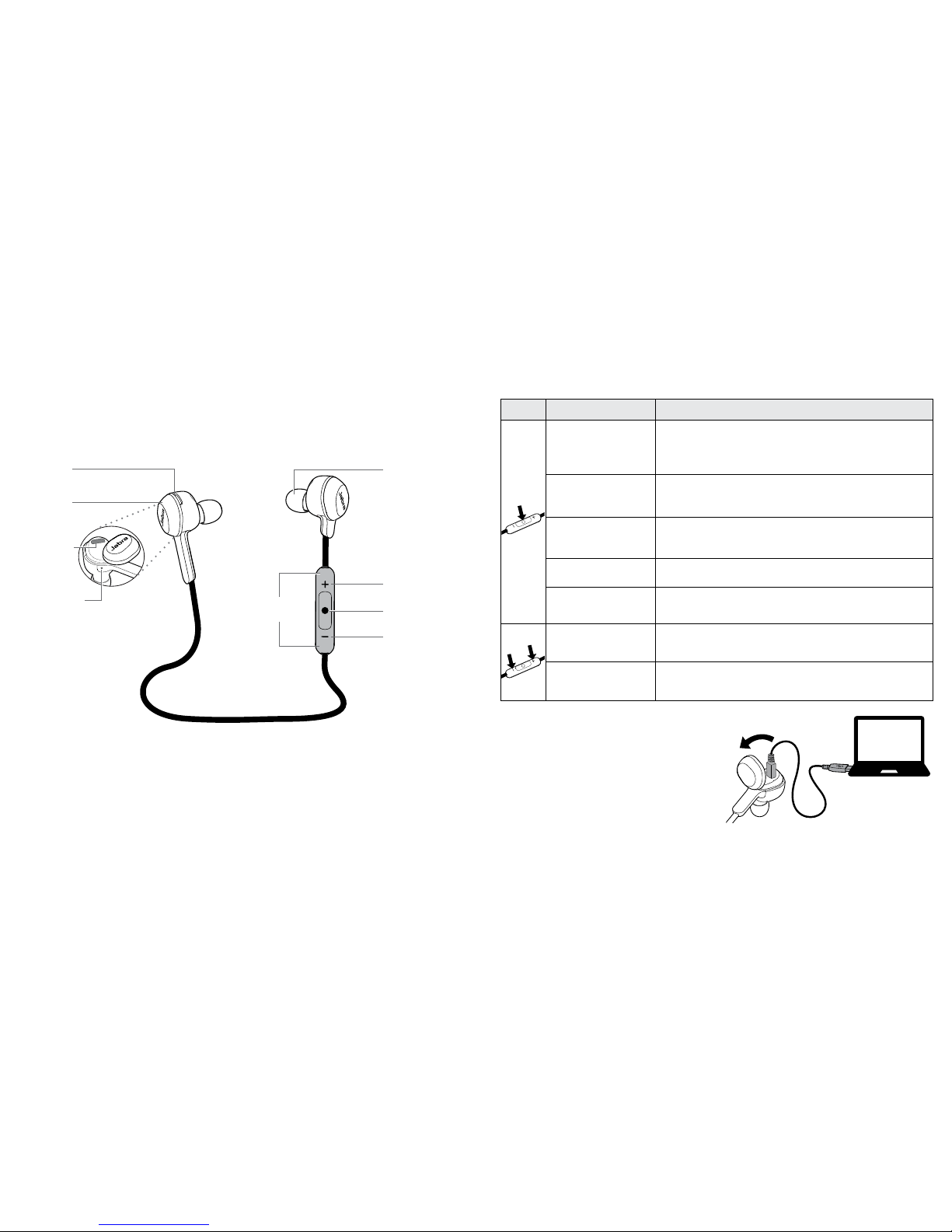
3 how to USe
FUNCTION ACTION
Turn on/o
Press and hold (1 sec) the Multi-function
button until the LED ashes, or separate/join
the magnetic earbuds
Play/pause music
Tap the Multi-function button,
or separate/join the magnetic earbuds
Answer/end call
Tap the Multi-function button,
or separate/join the magnetic earbuds
Reject call Double-tap the Multi-function button
Redial last
number
Double-tap the Multi-function button when
not on a call
Adjust speaker
volume
Tap the Volume up or Volume down button
Skip track
Press and hold (2 secs) the Volume up or
Volume down button
IMPORTANT
The earbuds are magnetic. Join or separate them to turn the Jabra Rox
Wireless o/on, play/pause music or end/answer a call.
CHARGING
Remove the magnetic cover on the
right earbud to expose the USB port.
Plug the supplied USB cable between
headset and PC to begin charging.
It takes approx. 2.5 hours to fully
charge the battery.
Eargel
TM
Volume up
Multi-function
button
Volume down
NFC zone
(button side)
LED
indicator
Micro-USB
port
Microphone
Magnetic
cover
 Loading...