

Page 1

Installation, Configuration & User Manual
for
iZone 211 & iZone 311
Page 2

Section Description Page No.
1.0 Installation 4
1.1 iZone 211—Wiring layout for base system 4
1.2 iZone 311—Wiring layout for base system 5
1.3 Optional equipment for temperature controlled zones 6
1.4 Optional equipment for wired WiFi control 7
1.5 Optional equipment for wireless WiFi control 8
1.6 Optional equipment for isave addition (iZone 311 only) 9
1.7 Wiring connection for AC units (iZone 311 only) 10
1.8 Wiring connection for LG units (iZone 311 only) 11
1.9 Wiring connection for Temperzone units (iZone 311 only) 12
1.10 General installation instructions 13
2.0 System initialisation
14
3.0 System Configuration
15
3.1 Configuration main menu 16-17
3.2 Zone setup 18
3.3 AC unit configuration (iZone 311 only) 19
3.4 Sensor configuration 20
3.5 Pairing and configuring iZone RF sensors 21
3.6 Sensor calibration 22
3.7 Fan auto configuration
3.8 WiFi bridge configuration
Table of contents
Page 3

Table of contents
Section Description Page No.
3.9 Manual IP configuration 26
3.10 WiFi connection 27
3.11 Smart phone configuration 28
3.12 Home automation integration 29
3.13 iSense controller configuration
30
4.0 User Manual
4.1 iZone 211 home screen 32
4.2 iZone 311 home screen 33
4.3 AC unit control 34
4.4 Zone control 35
4.5 Edit zone names and settings 36
4.6 Adjusting temperature controlled zones 37
4.7 Zone airflow summary 38
4.8 Changing zone airflows 39
4.9 Favourites 40
4.10 Assigning and editing favourites 41
4.11 Schedules 42
4.12 Setting and editing a schedule 43
4.13 Setting the time 44
4.14 Changing the home screen colour 45
4.15 iSense controller 46
4.16 Further assistance 48
Page 4
4
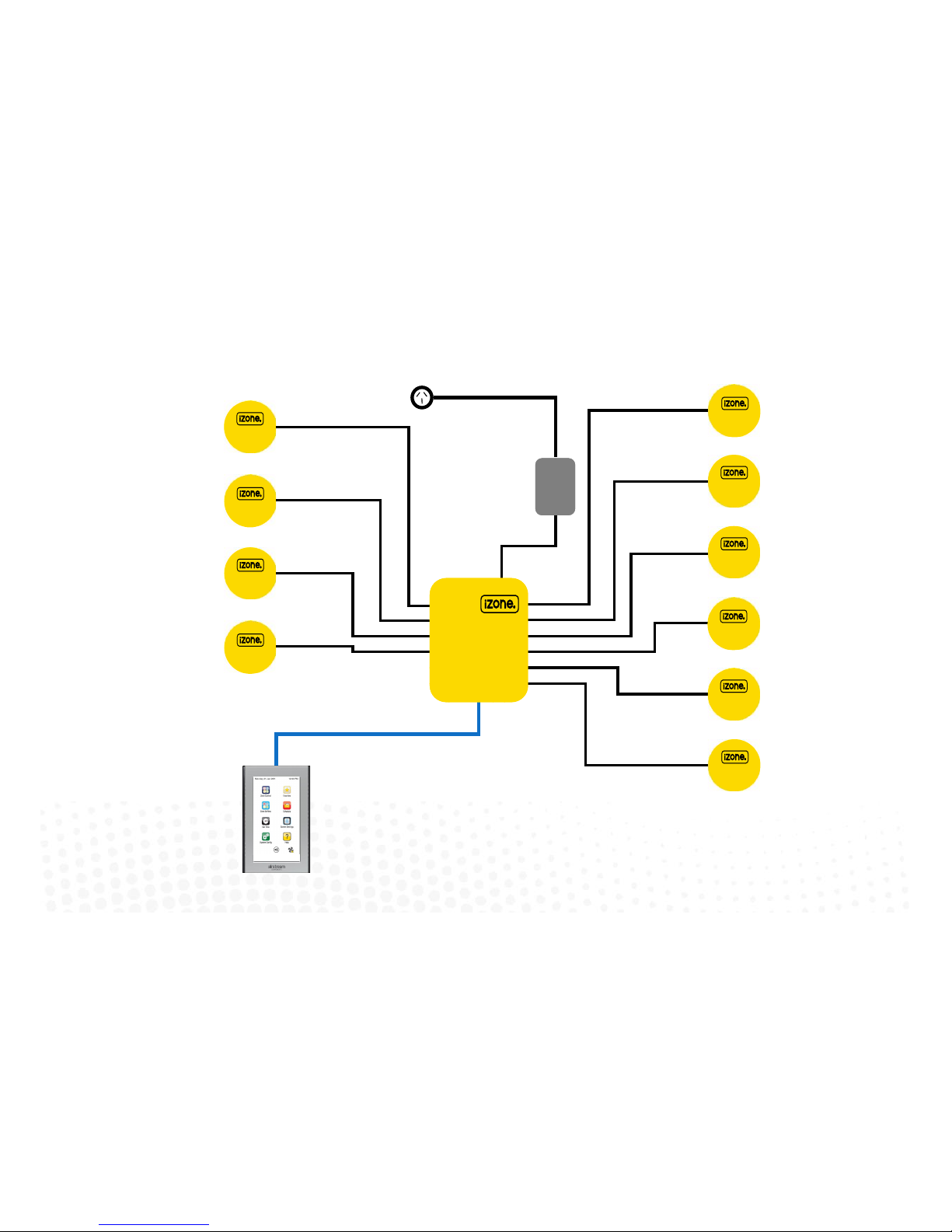
1.1 iZone 211 - Wiring layout for base system
iZone
CCTS
Zone 1
Zone 3
Zone 2
Zone 4
Zone 6
Zone 10
Zone 8
Zone 9
Zone 7
Zone 5
10 Zone system with 1 colour touch screen shown above
A maximum of 12 zones and 12 colour touch screens can be supported by
one iZone system (See Network Extension Module 1.3 for Details)
CZDA
CT24AC
CCPU
Central Processing Unit
Page 5
5
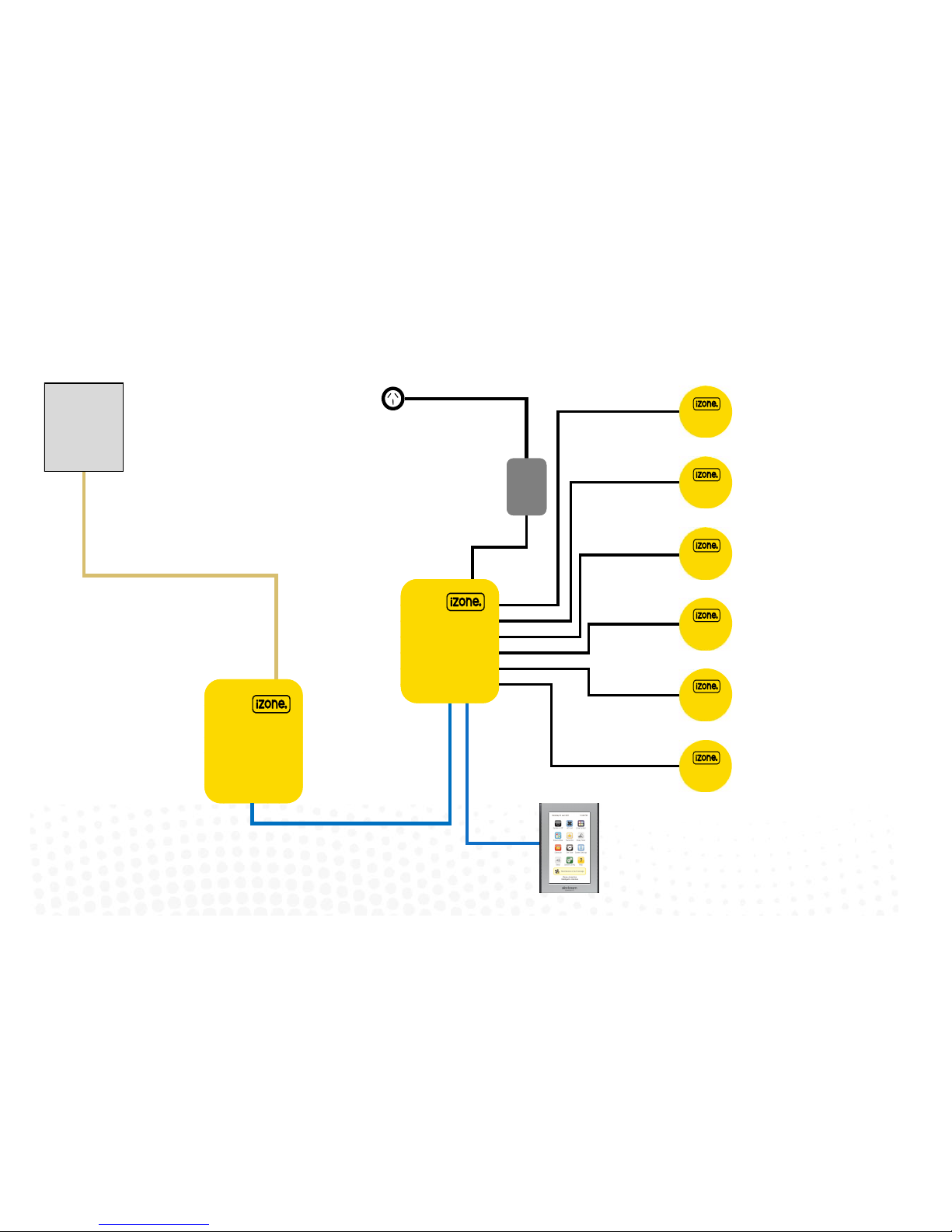
1.2 iZone 311 - Wiring layout for base system
CCPU
Central Processing Unit
CZDA
Zone 3
Zone 2
Zone 4
Zone 6
Zone 5
CT24AC
6 Zone system with 1 colour touch screen shown.
A maximum of 12 zones and 12 colour touch screens can be supported by one
iZone system (See Network Extension Module 1.3 for Details)
CACUM
AC Unit Module
Zone 1
AC Unit
AC unit control cable.
See table for locaon of connecon in
AC unit (1.7)
CCTS
Make sure you have the
correct model of CACUM for
the make of AC unit. See back
of CACUM for details
Page 6

1.3 Optional equipment for temperature controlled zones
CCPU
Central Processing Unit
CDTS
Installed into the
supply air duct o
the fan coil unit
CCTS
CCTS (oponal)
Install addional
colour touch screens
in zones requiring
temperature control
CSM (oponal)
Install Sensor Module
to allow for Wired
temperature sensors
(CS) & Wireless
temperature sensors
(CRFS
CS (oponal)
Wired Temperature
Sensors (Max 12 per
system)
CRFS (oponal)
Wireless Temperature
Sensors (Max 12 per
system)
CSM
Sensor Module
CZCO
(oponal)
Wired Zone
Controllers
with
temperature
and occupancy
sensor (Max 12
per system)
Connect Sensor
module to any
network port in the
system (CCTS or
CNEM)
6
CNEM
Network Extension Module
CT24AC
CCTS
CNEM (oponal)
Install Network
Extension Module to
provide addional
network ports if
required
CR (oponal)
Wireless Repeaters
R
Page 7
7
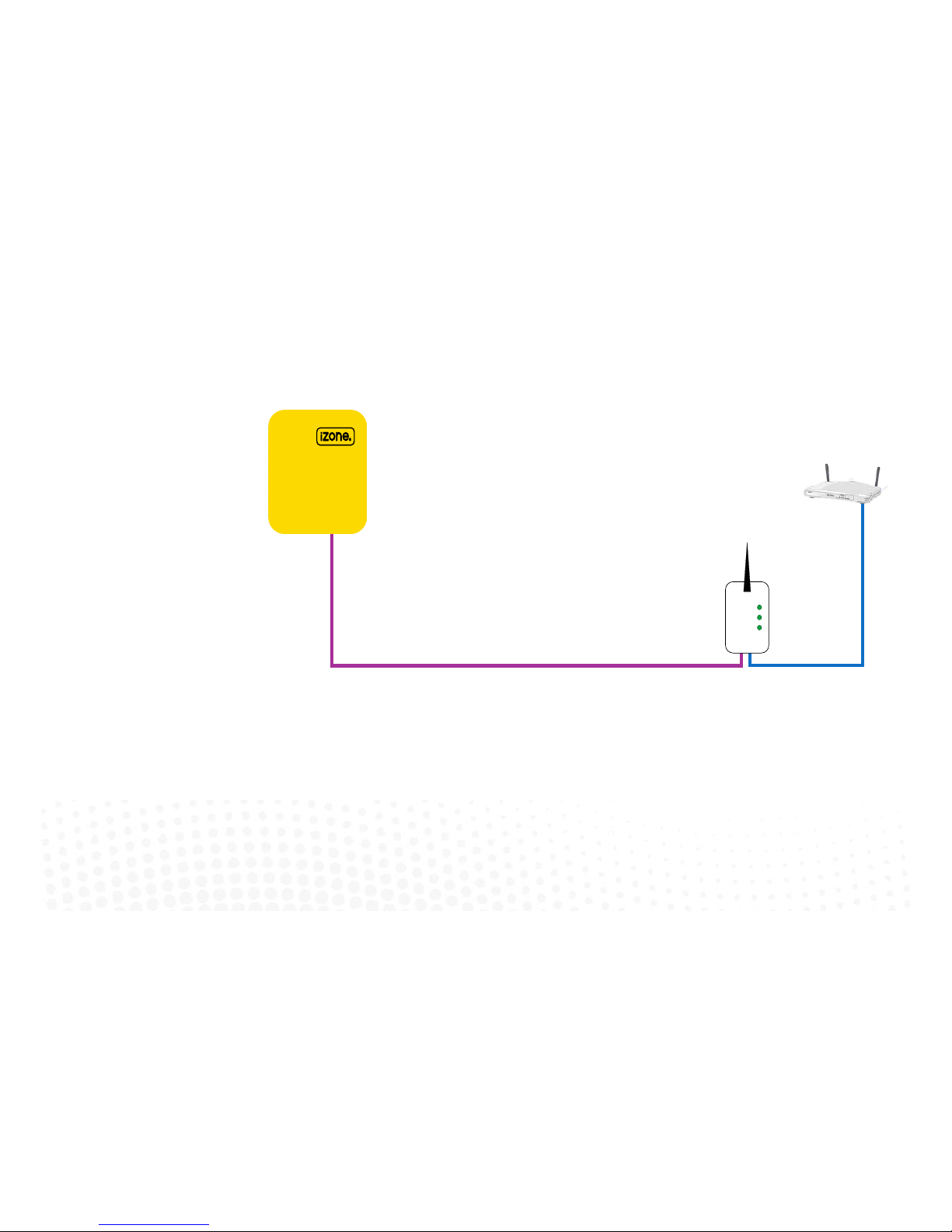
1.4 Optional equipment for wired WiFi Control of system
CCPU
Central Processing Unit
CB
Wired
Bridge
Customers
router or
modem
RJ45-12
This cable is specic for
connecng the CCPU and Wired
Bridge
B
Page 8
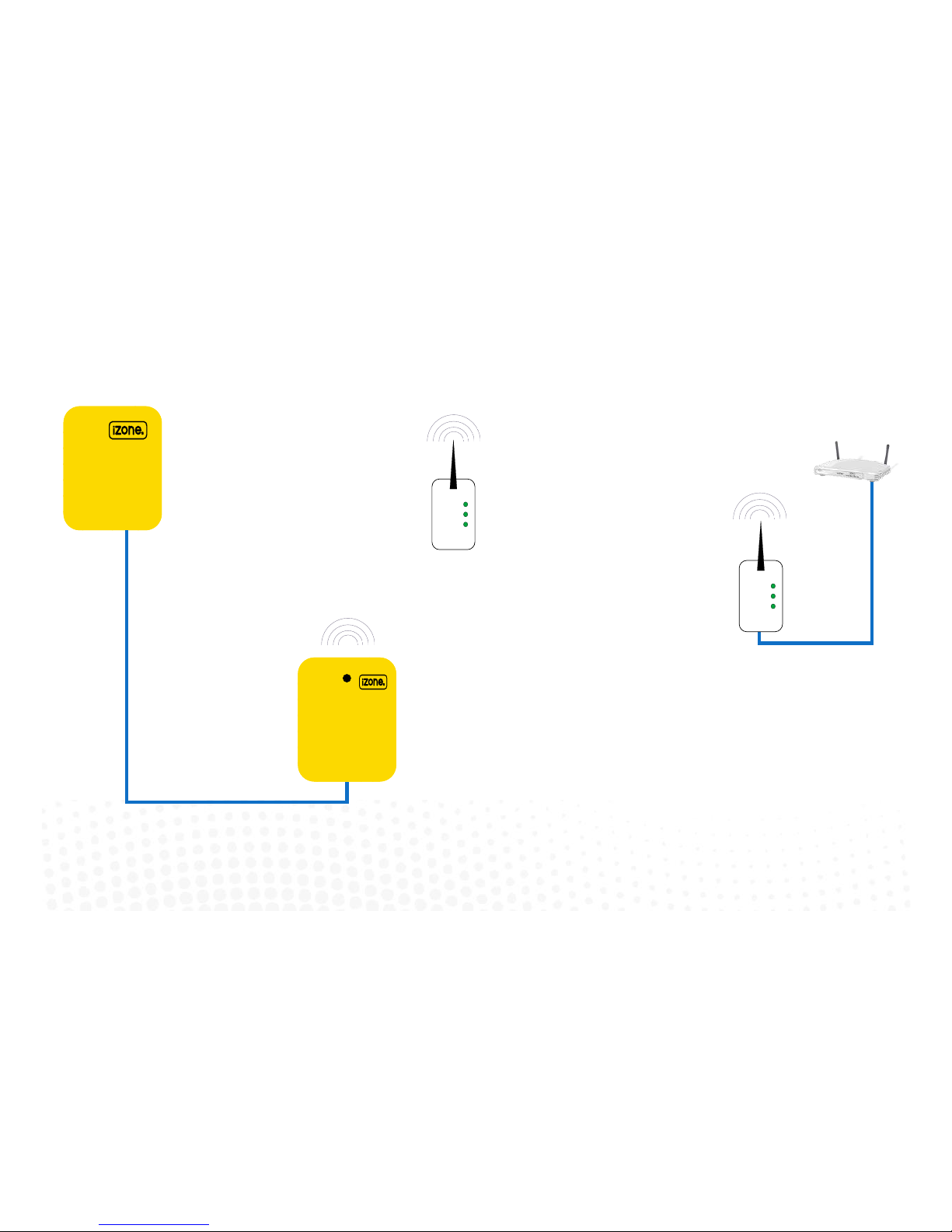
1.5 Optional equipment for wireless WiFi control
CCPU
Central Processing Unit
CSM
Install Sensor Module
to allow for wirless
communicaon with
Wireless Bridge (CB).
Only one CSM is
required per system.
CSM
Sensor Module
CB
Wireless
Bridge
Customers
router or
modem
8
B
CR (oponal)
Wireless Repeaters
R
Page 9
9
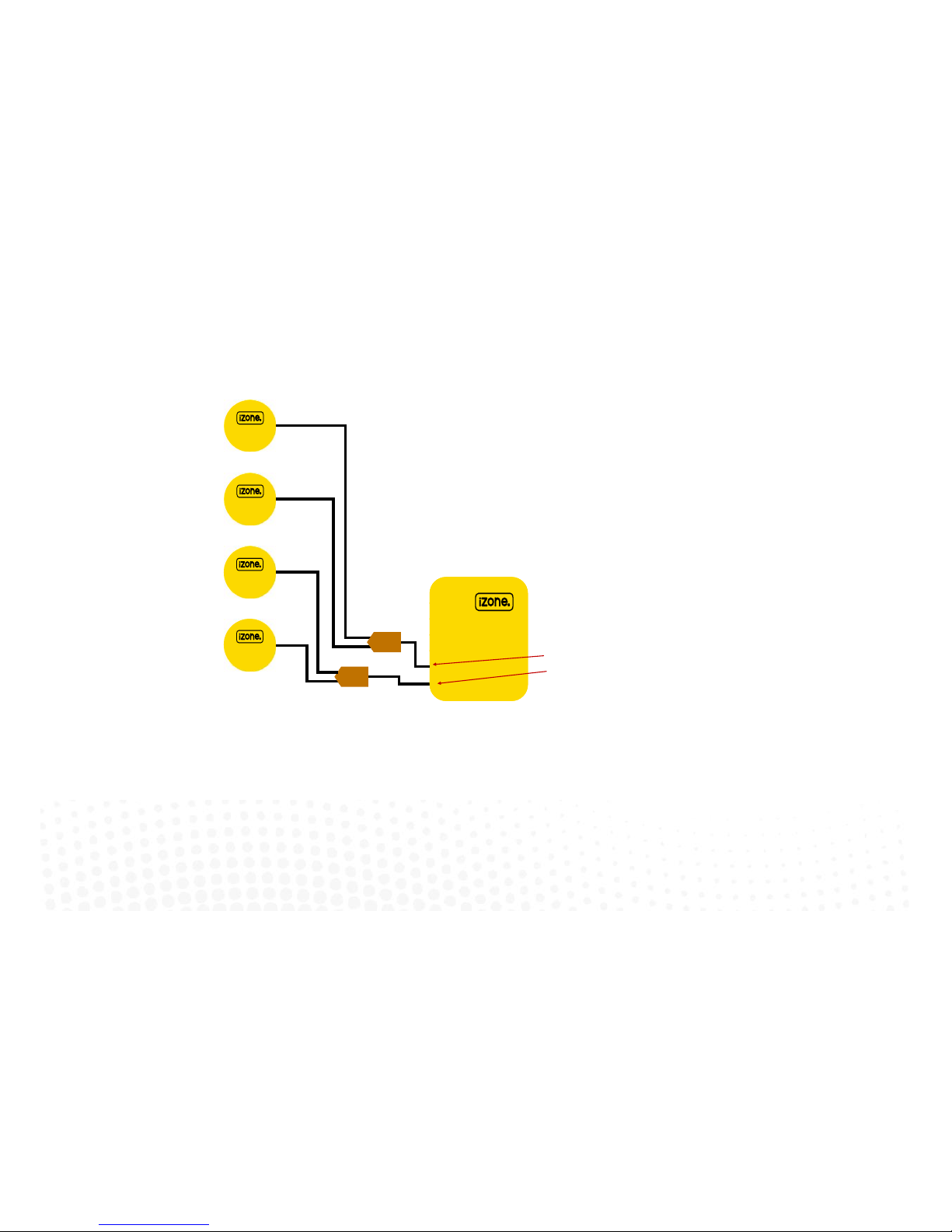
1.6 iZone 311 - Optional equipment for isave addition
CCPU
Central Processing Unit
Note:
When the isave option is used the iZone system is limited to a maximum of
10 Zones
Return
Air Damper 1
Return
Air Damper 2
Outside Air
Air Damper 1
Outside Air
Air Damper 2
CDAK
CDAK
Use Zone 12 port on CCPU for Outside Air dampers
Use Zone 11 port on CCPU for Return Air dampers
Page 10

1.7 iZone 311 - Wiring connection to AC units
Unit Make Connection
Daikin Take the P1 / P2 control wire from the fan coil
unit and connect it to the AC Unit Control
Cable on the CACUM.
LG See detailed instructions on 1.8 page 11
Mitsubishi Electric Take the Remote Controller (A / B) control
wire from the fan coil unit and connect it to
the AC Unit Control Cable on the CACUM.
Panasonic Take the A / B control wire from the fan coil
unit and connect it to the AC Unit Control
Cable on the CACUM.
Temperzone See detailed instructions on 1.9 page 12
Toshiba Take the A / B control wire from the fan coil
unit and connect it to the AC Unit Control
Cable on the CACUM.
10
Page 11
11
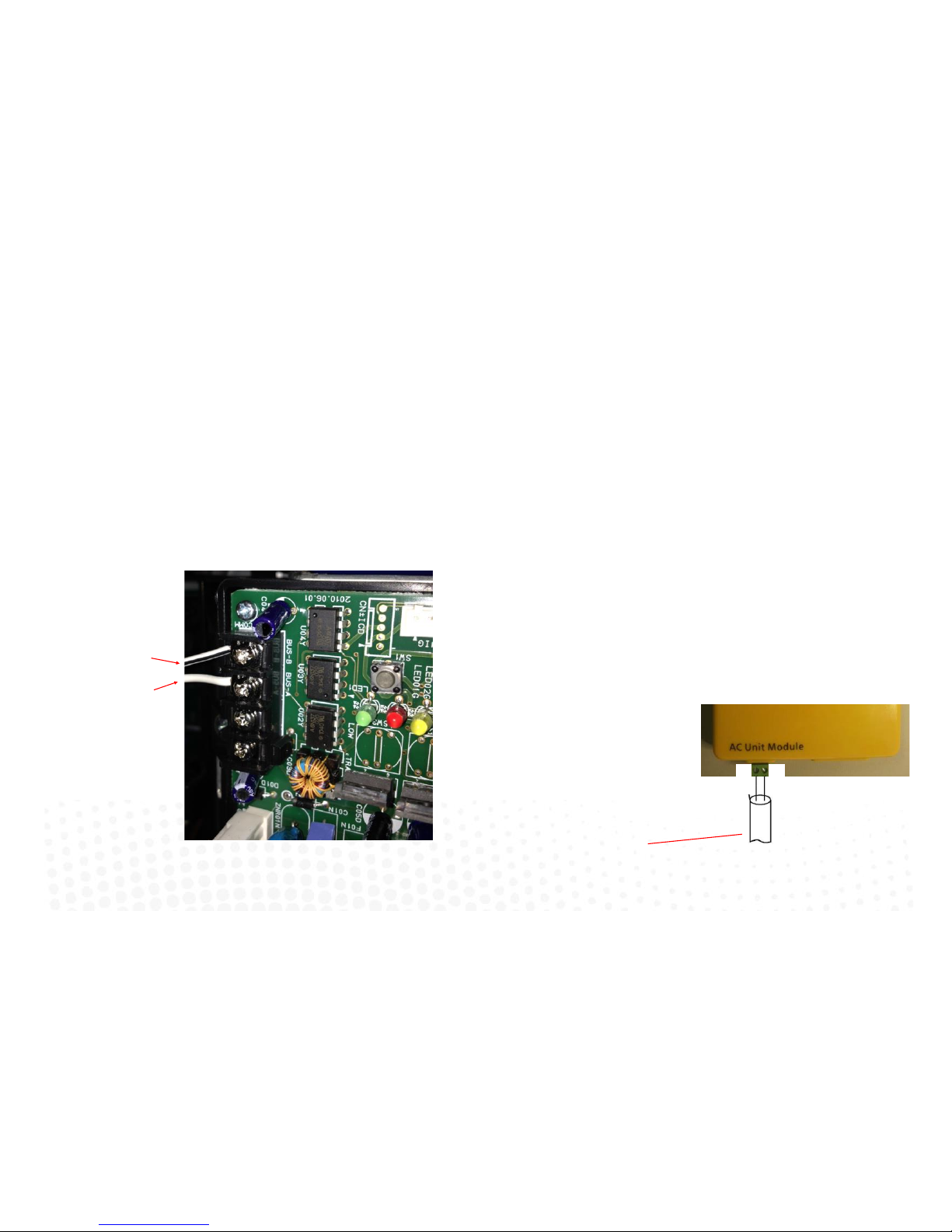
1.8 iZone 311 - Wiring connection to LG units
Unit Make Connection
LG
LG condensing unit must be supplied with an
optional PI485 Gateway (M) board in the
condensing unit.
1. Connect a shielded, 2 core, twisted pair control cable from the CACUM to the PI485
Gateway (M) board in the condensing unit. (This cable is supplied by the installer). Polarity
is critical see Fig (C) & (D) for correct connection.
Fig (C) - LG PI485 Gateway (M) board in condensing
unit
Shielded, 2 core,
twisted pair control
cable (not supplied)
Shielded, 2 core,
twisted pair control
cable (not supplied)
Fig (D) - iZone /
LG AC Unit Module
A
B
Correct polarity for
CACUM
A B
Page 12
12
1.9 iZone 311 - Wiring connection to Temperzone units
Unit Make Connection
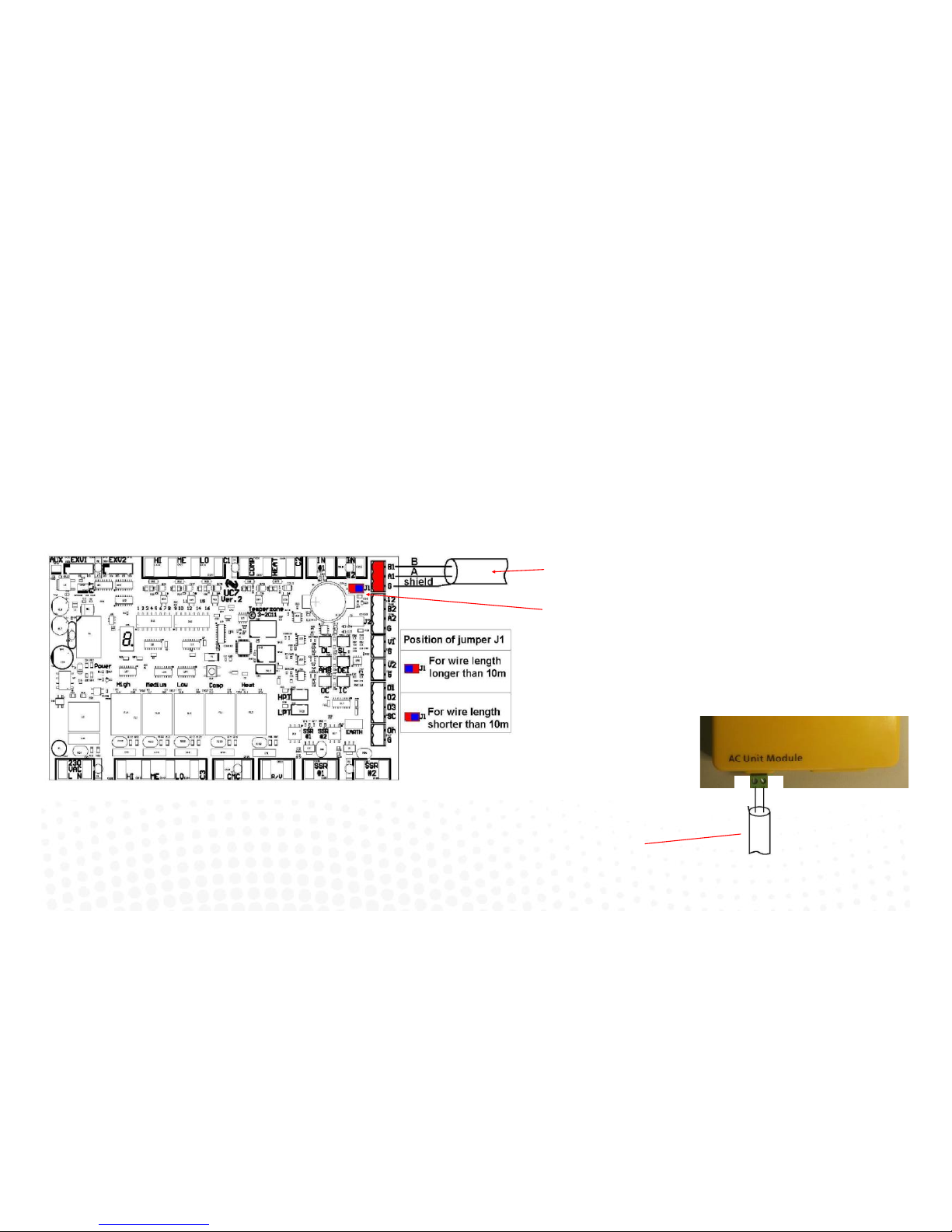
Temperzone 1. Connect a shielded, 2 core, twisted pair control cable from the CACUM to the UC7 board
in the condensing unit. (This cable is supplied by the installer). Polarity is critical see Fig A
& B for correct connection.
2. Adjust location of jumper J1 to suit the length of control cable installed.
3. Ensure the dip switches in the condensing unit are set correctly for the installed
compressor type (digital / fixed speed) and fan speed control. Refer to the Temperzone
service manual.
Fig (A) - Temperzone UC7 outdoor
Shielded, 2 core, twisted pair
control cable (not supplied)
Adjust jumper J1 to suit cable
length
Shielded, 2 core,
twisted pair control
cable (not supplied)
Correct polarity for
CACUM
A B
Fig (B) - iZone / Temperzone AC
Unit Module
Page 13

13
1.10 General installation instructions
1. The CCPU and CACUM can be installed on top of the indoor fan coil unit.
2. The CSM should be installed on the ceiling in the centre of the house. If any wireless sensor (CRFS) or wireless bridge (CB) is not within
the range of the CSM then additional repeaters (CR) should be added to help relay the signal from the field device to the CSM.
3. Do not run the blue network cables alongside 240 Volt wiring.
4. When installing network cables down wall cavities or chasing network cables into walls, tape up and protect the RJ45 connector to avoid
damage to the connectors. Installation damage to cables is not covered under warranty.
5. Always install zones in consecutive ports starting at Zone 1. The back of the CCPU is marked with the zone port numbers.
6. Do not directly hardwire the CT24V into the AC unit’s power supply. This may void the warranty as it will require an electrician in the event
that a repair of the iZone power supply is required.
7. Connect Zone Damper Actuators (CZDA) to the zone ports using the RJ11 cables as shown.
8. Connect the Colour Touch Screens (CCTS) to the CAN ports using the RJ45 cables. If you are connecting more than 3 components
requiring CAN ports to the system you will need to connect a Network Extension Module (CNEM) to one of the CAN ports on the CCPU
using a short RJ45 cable. The CACUM will also support one CAN port.
9. If any zone is temperature controlled connect a Duct Temperature Sensor (CDTS) to the CDTS port. Install the sensor into the supply air
duct upstream of all dampers. Secure the sensor in place by using reinforced aluminium tape.
10. When installing temperature controlled zones ensure the CCTS or sensor for the associated zone is installed in a location that is
representative of the temperature in the room / zone . The sensor should be installed at approximately 1600mm above the floor and
should not be subject to draughts, direct sunlight or heat from equipment such as computers, TV screens etc. The supply air outlets to
this room must not blow conditioned air directly onto the sensors or touch screens, as a temperature sensor is located in the CCTS.
11. Connect the AC unit control cable to the CACUM. See table 1.7 For details. (This cable is not supplied by Airstream.)
12. The building must be fitted with a compatible WiFi modem. Contact Airstream for a list of approved and recommended modems.
13. If connecting the iZone system to a Home Automation system use an RS 232 or RS 484 serial connector.
14. Only connect the power supply to the CT24VAC port after all components have been connected.
Page 14
14
2.0 System initialisation
All new or modified systems must be initialised prior to system configuration.
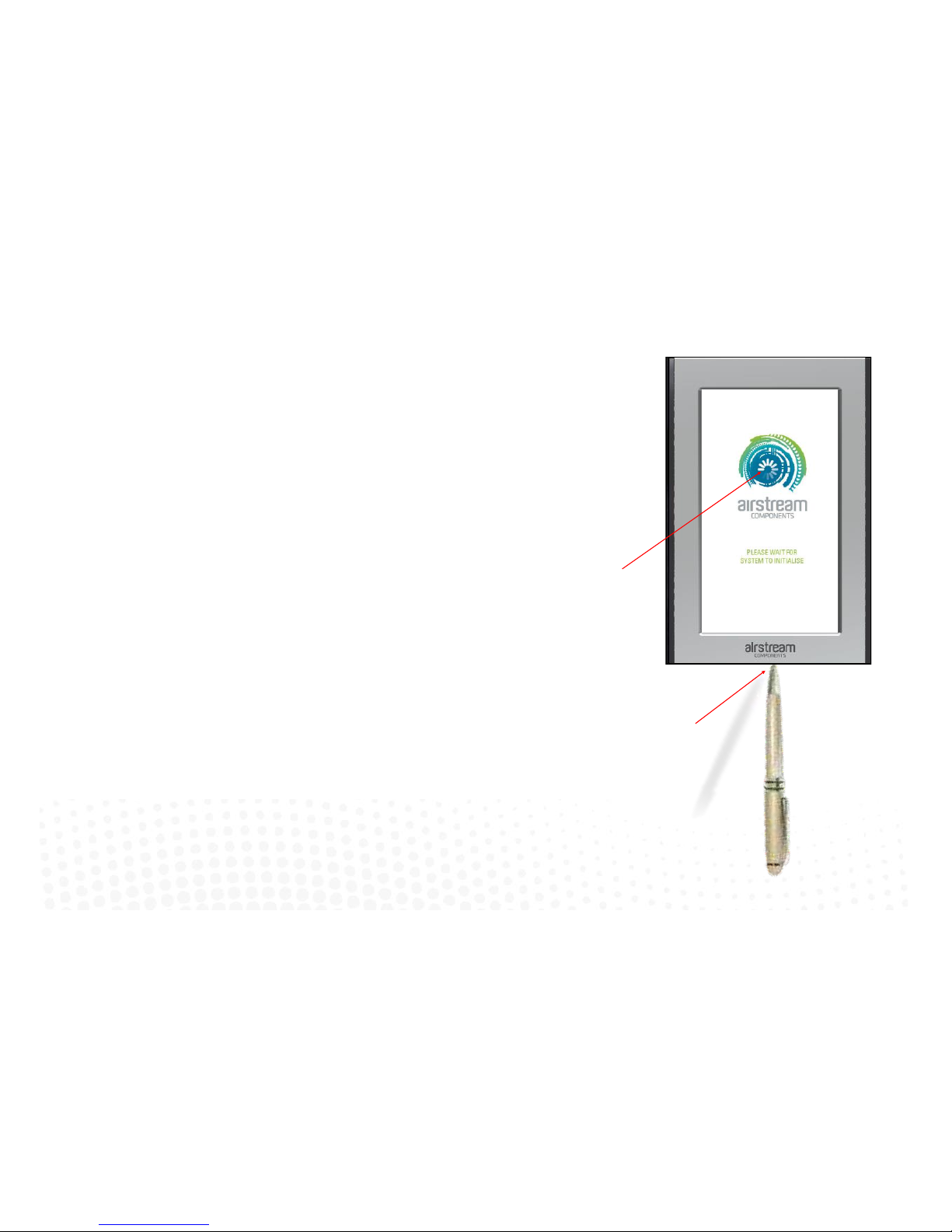
To initialise the system press the button on the underside of any colour touch
screen. This button is recessed so you will need to use a pen to press the button.
The time to initialise the system will vary depending on the number of motors
connected.
The system will also initialise when power is restored after a power failure.
Airstream logo will spin while system is
inialising.
Using a pen, press the buon on the
underside of the screen.
Page 15

15
3.0 System configuration
WARNING ! Only qualified iZone install ers should configure the i Zone System. Incorrect config ur ation could result in
damage to your air conditioning unit and system.
To configure your system click on the System Config icon on the home page.
Enter the system password “wamfud” and press the enter button. The enter button must always be touched to
save changes.
You will now be in the System Configuration area:
Page 16
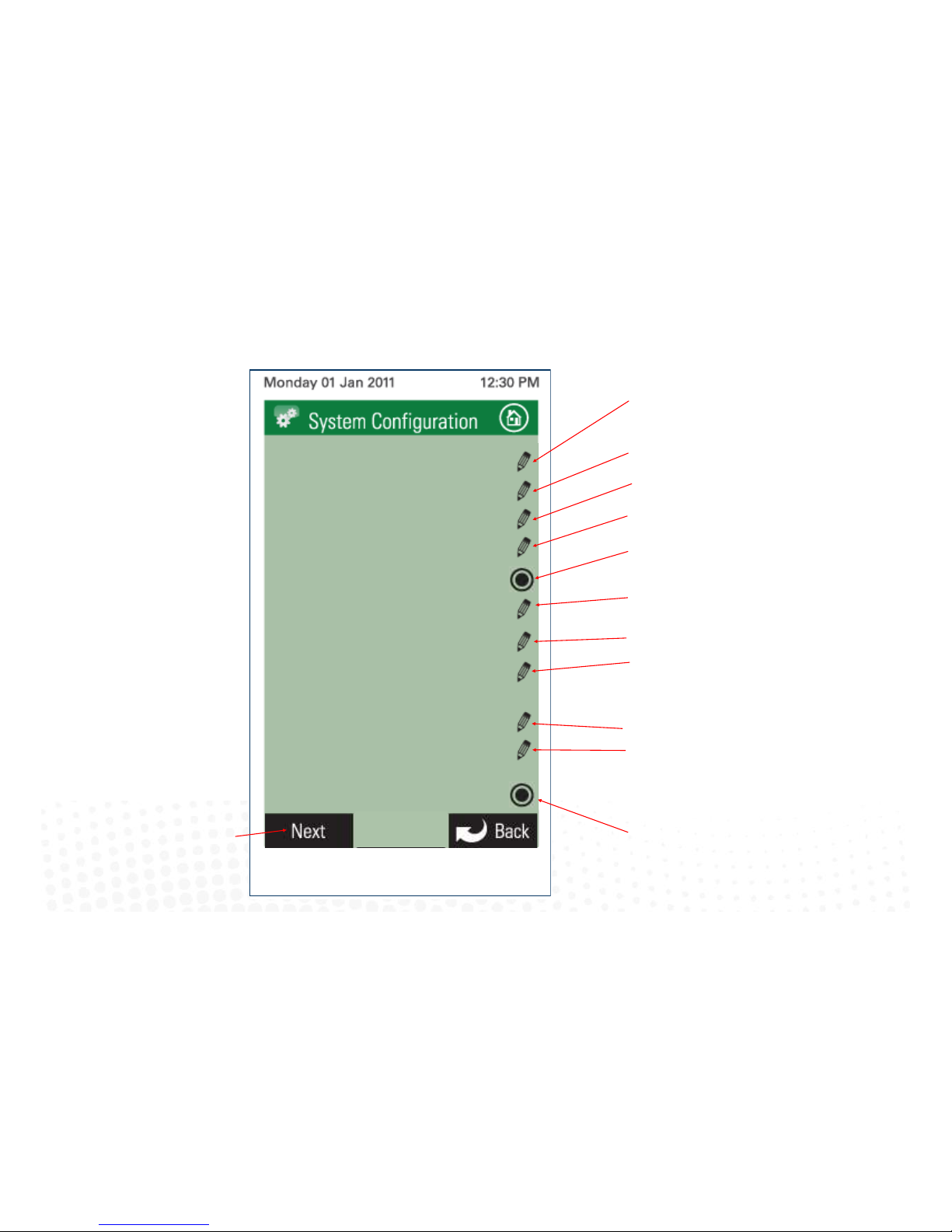
3.1 Configuration main menu
16
Touch here to edit the number of zones installed.
Touch here to edit the number of variable
electronic constant zones required.
Touch here to edit the rst tag line.
Touch here to edit the second tag line.
Touch here to set up Fan Auto mode.
When the Fan mode is set to auto, fan
speeds will change automacally when
zones are closed or opened
Touch here to enable Auto O funcon. When
enabled AC unit will automacally switch o when
all zones are closed
iZone
Inventive . Intelligent . Intuitive
AC Unit Control
iZone
Inventive . Intelligent . Intuitive
No. of Zones 4
No. of Constants 1
Zone Setup
AC Unit Setup
FeeAir
Sensor Config
Sensor Calibration
Fan Auto Setup
Tag Lines
Type in Tag Line 1 here
Type in Tag Line 2 here
Auto Off
Touch here to enable Free Air icons.
isave components must be installed and
electronic hardware set up accordingly
Touch here to set up AC Unit Control
(see 2.7).
Touch to proceed to the next
conguraon page (see page 17).
Touch here to set up and congure each
zone (see 2.7).
Touch here to congure wired and
wireless sensors
Touch here to calibrate sensors
Note:
Information on the
configuration screen
may vary depending
which devices are
connected to the
system and if it is an
iZone 311 or 211
Page 17
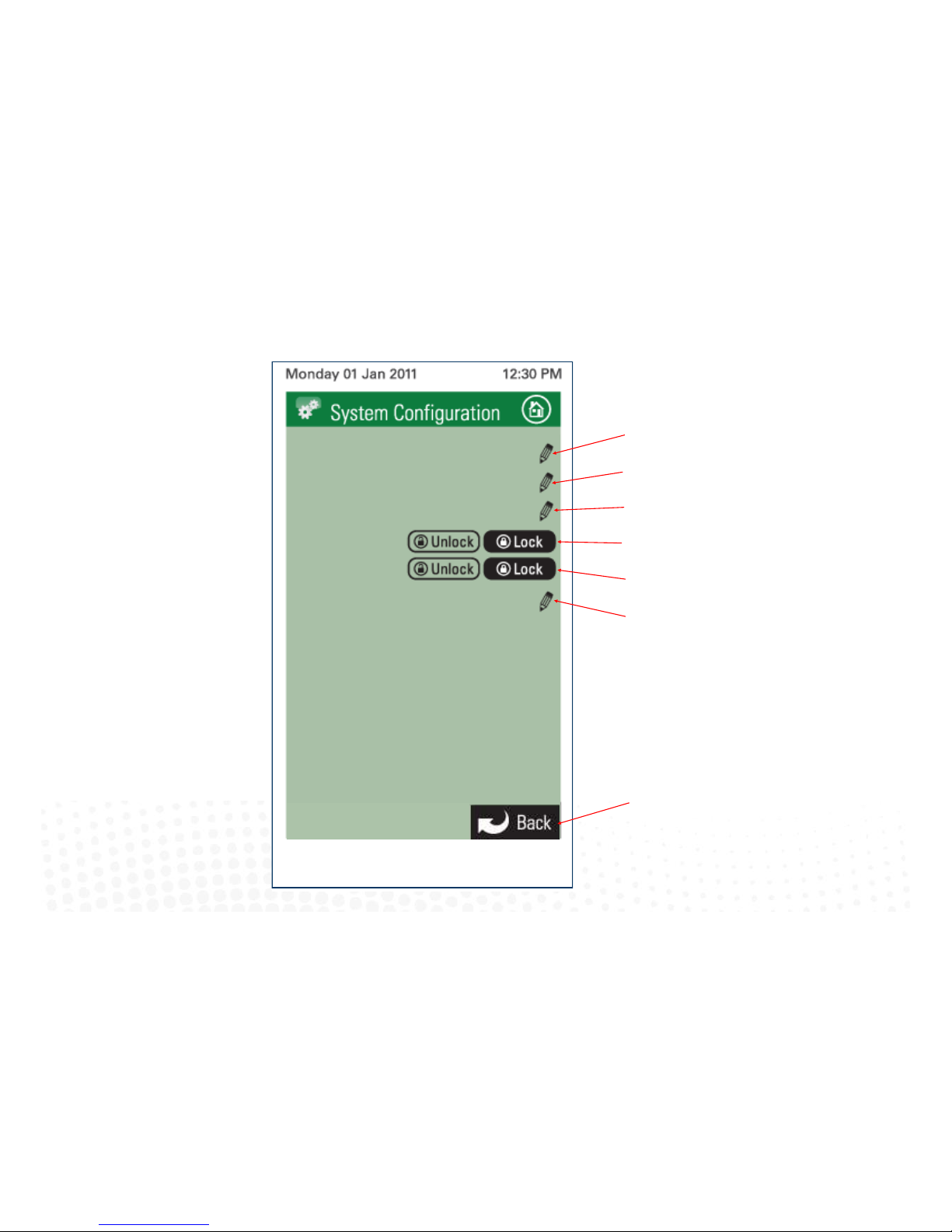
3.1 Configuration main menu cont.
17
Touch here to congure the WiFi
Touch here to view the list of devices connected to
this system
Touch to here to go back to the previous
conguraon page (see Page 16).
Touch here to enter your own password
Touch here to lock all airow adjustment
Touch here to lock minimum airow adjustment
Touch here to congure lter warning period
AC Unit Control
Change Password
*********
WiFi Bridge Config
Filter Clean Frequency
iZone
Inventive . Intelligent . Intuitive
iZone
Inventive . Intelligent . Intuitive
Lock Airflow
Min Airflow
iZone Device List
Note:
Information on the
configuration screen
may vary depending
which devices are
connected to the
system and if it is an
iZone 311 or 211
Page 18
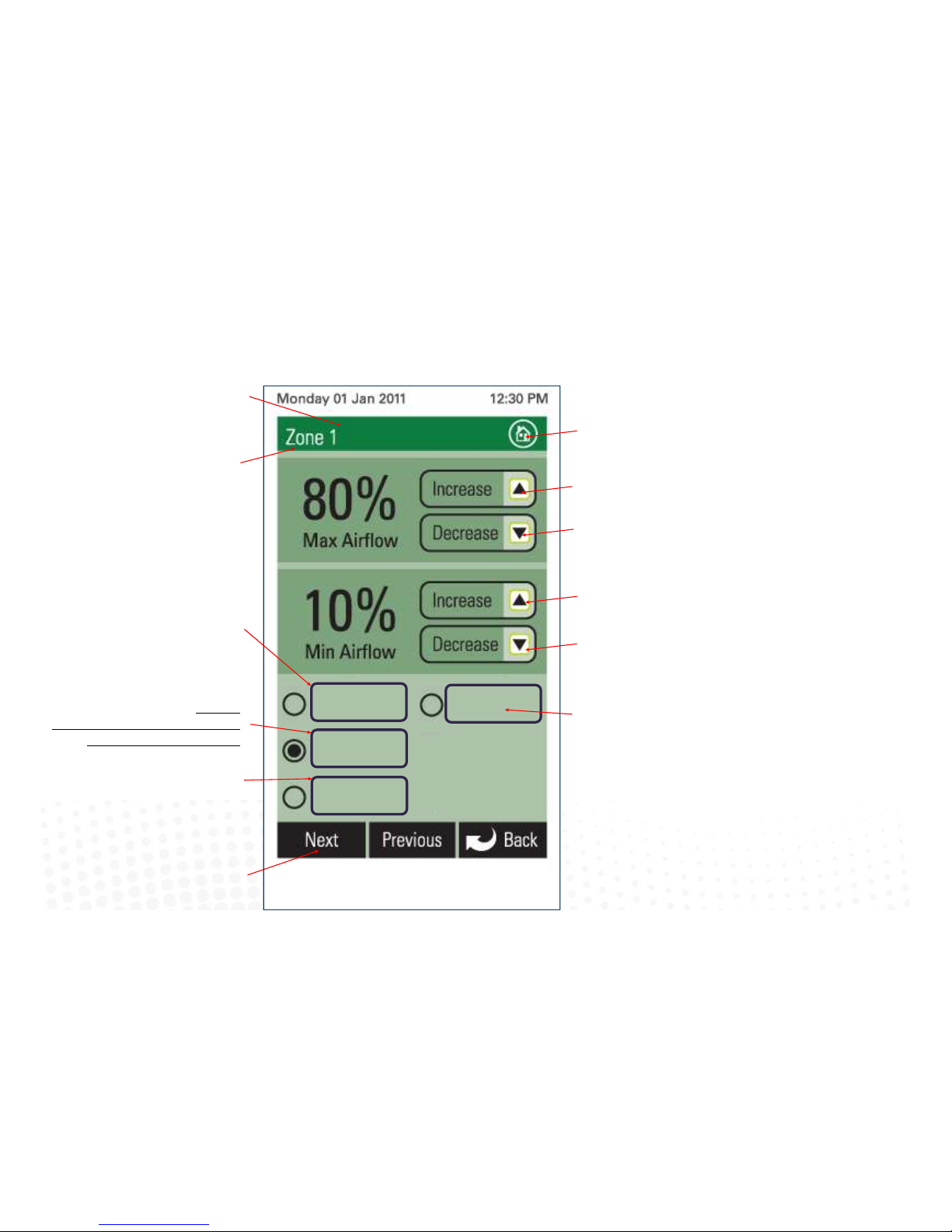
18
3.2 Zone set up
Touch here to increase the
maximum airow to the zone
iZone
Inventive . Intelligent . Intuitive
Touch here to decrease the
maximum airow to the zone
Touch here to decrease the minimum
airow to the zone
Touch here to increase the
minimum airow to the zone
Touch here to make this zone an
electronic variable constant.
Press repeatedly if more than one
constant zone is required. This will step
through the constant numbers. Select
which constant you want this zone to be
Touch here to make this zone a
temperature controlled zone. This must
only be done from the screen installed in
the temperature controlled zone
Touch here to make this zone an open /
close zone
This is the zone that is currently being
congured. If the zone has been named
its name will show here
Touch here to go to the home
screen
Touch here to proceed to the next zone
Const 1
Climate
Opn / Cls
Lock
*
An * here indicates the temperature for this
zone is being read from this panel
Touch here to lock this touch screen
controller in a zone only mode
Page 19
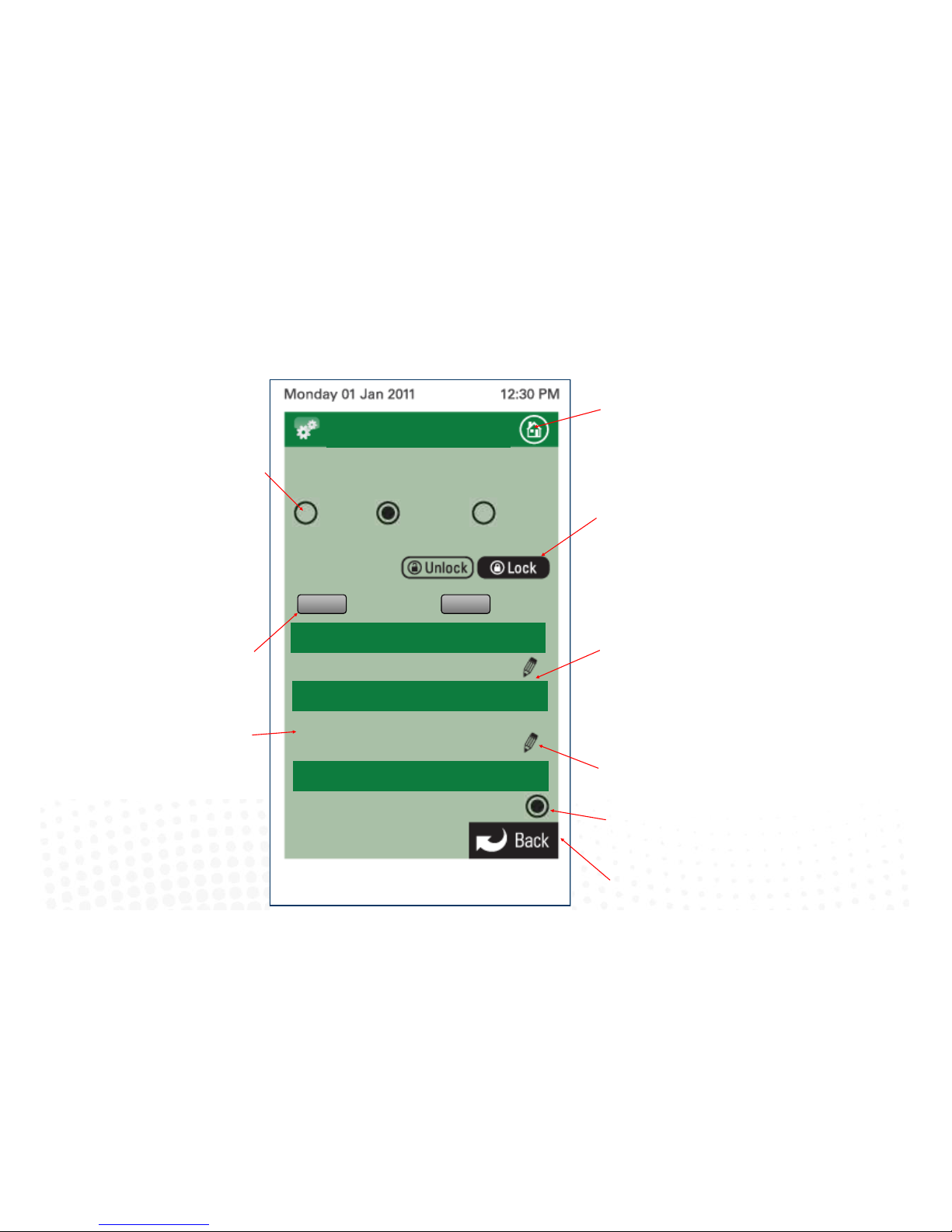
19
3.3 AC unit configuration (iZone 311 only)
Touch to lock the Economy mode.
The Economy mode will limit the
maximum and minimum
temperature range for all
controllers.
Toggle the high and low buons to select
the maximum and minimum temperature
set points desired for “Economy Lock
Mode”.
Touch to lock the AC Unit. You will need
to enter a PIN number and then the
number of days you want the system to
operate for unl it is automacally
locked o. Do not forget your PIN.
Service charges will apply for a
technician to aend site to unlock your
system.
Touch here to go back and save the
changes.
Select method of controlling the AC unit.
R/Air will control using the unit’s return
air sensor.
Master will control the AC unit from the
colour touch screen that has been
selected as the Master (3.1).
Zones will automacally control the AC
unit from the temperature controlled
zones (3.1.2).
Touch here to go to the home
screen.
iZone
Inventive . Intelligent . Intuitive
Inventive . Intelligent . Intuitive
iZone
AC Unit Control
iZone
Inventive . Intelligent . Intuitive
AC Unit Controlling Sensor
AC Unit Config
R/Air
Master
Zones
Economy
27.0
HIGH
19.5
LOW
Lock AC Unit
AC Unit Lock
AC Unit
Daikin
Fault History
Indicates a Daikin AC unit module is
connected to this system
Touch here to view the fault history with
this AC unit.
Room Temp. Display
Show Room Temp Display
Touch here to display the actual AC unit controlling
temperature on the AC unit control screen (see 4.3) Not
available for R/Air temp on some AC unit makes.
Page 20
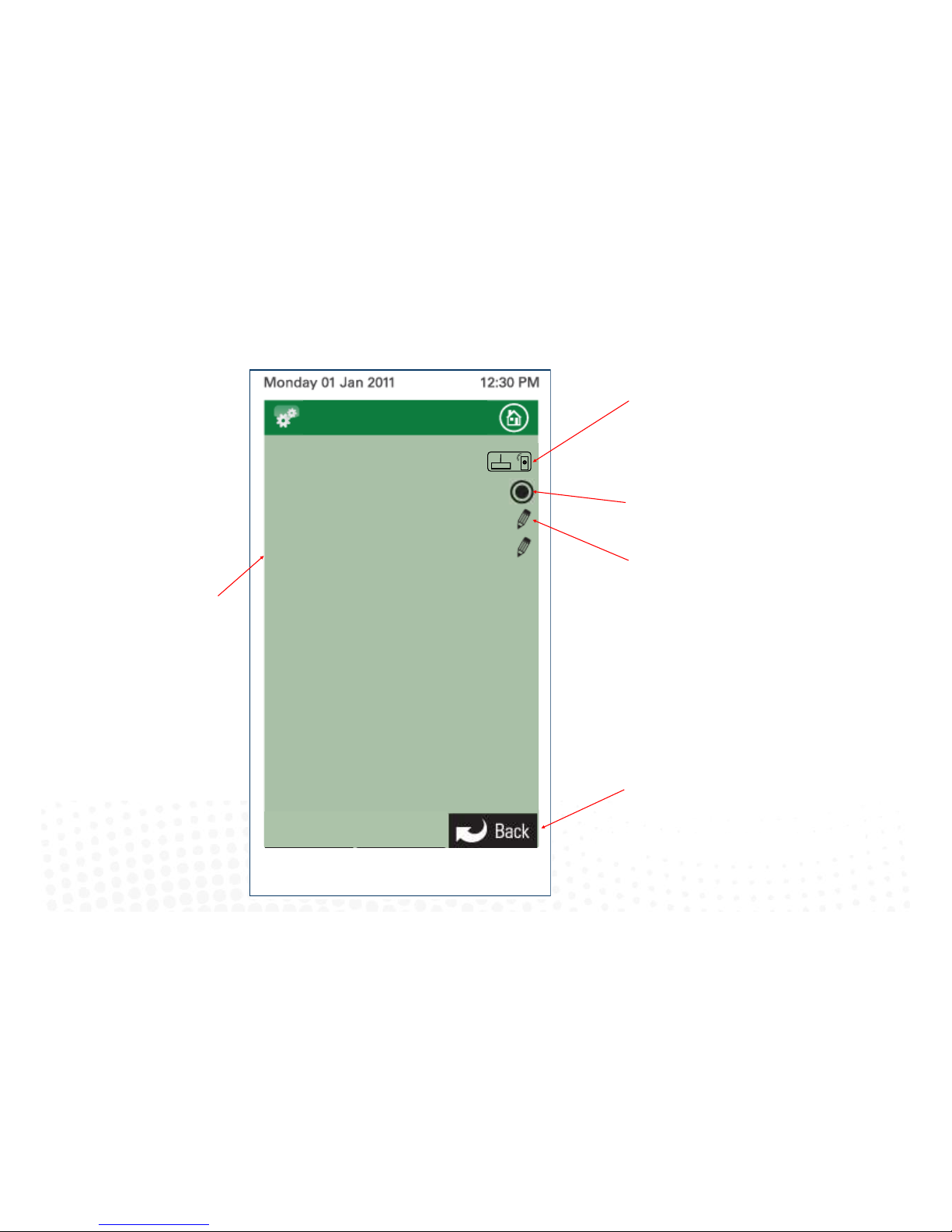
3.4 Sensor configuration
20
Hold down the “Pairing Buon” on the iZone
wireless device. (see 3.5).
Then press here to pair the device to your iZone
system
Touch here to allow wired zone sensor LEDs
to automacally turn o aer use.
iZone
Inventive . Intelligent . Intuitive
AC Unit Control
iZone
Inventive . Intelligent . Intuitive
Pair Wireless Devices
Wired Sensor LED Auto Off
Sensor Battery Status
Rf Channel Config 1
Displays the Radio frequency
channel the system has been
congured to. This channel can be
changed if RF interference is being
experienced.
If the channel is changed all
wireless devices need to be paired
Touch here to view the status of the
sensor baeries.
Touch here to go back and save the
changes.
Sensor Config
Page 21
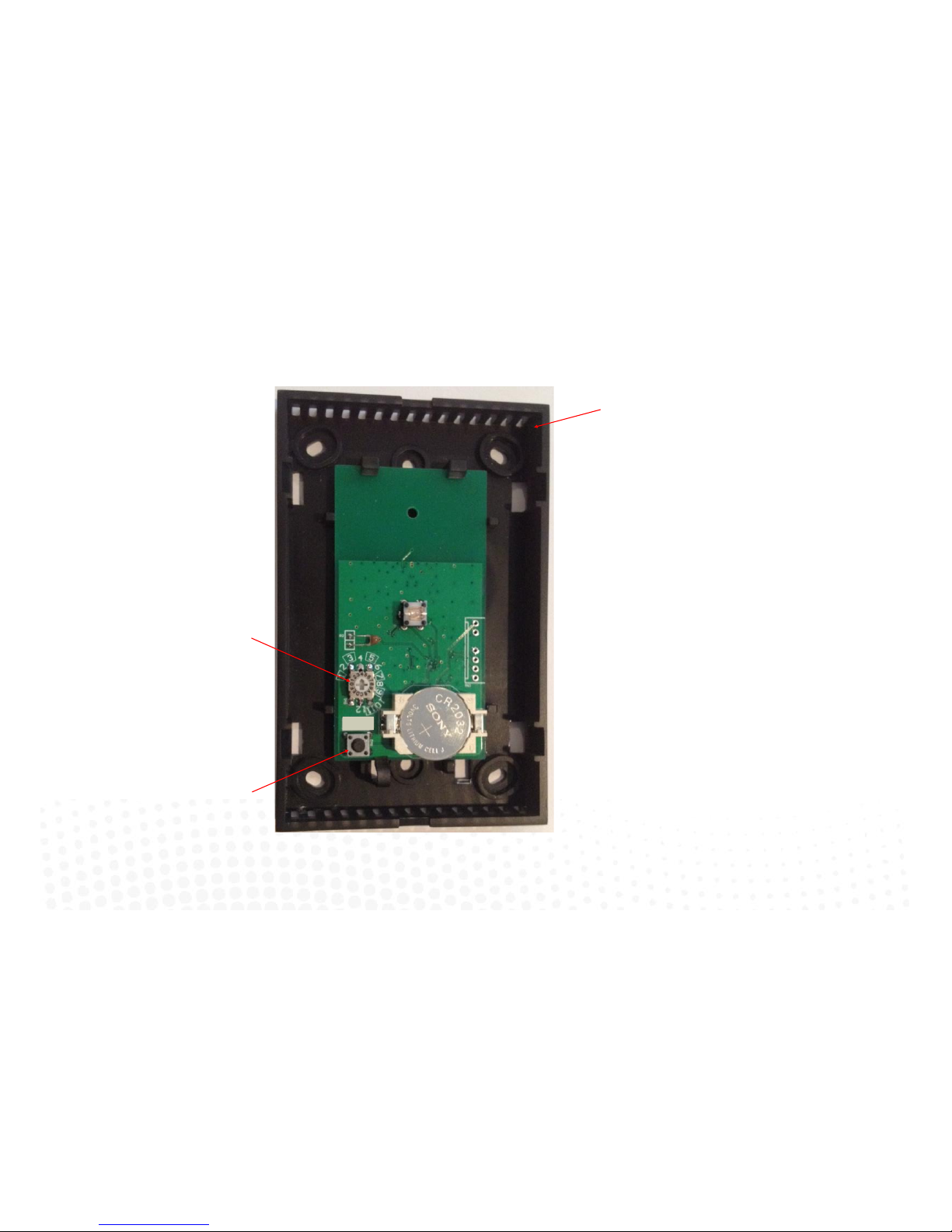
21
3.5 Pairing and configuring iZone RF Sensors
Set the zone selector switch to the correct
zone number
Remove front cover from sensor
Press and hold Pairing buon on the
wireless device . At the same me press
the Pairing Buon on the touch screen
(see 3.4) and wait unl the update is
complete
Pair
Note:
To pair other devices such as an iZone
bridge or repeater simply press the
pairing buon on the device and at the
same me press the paring buon on the
touch screen and wait for the update to
complete.
Page 22
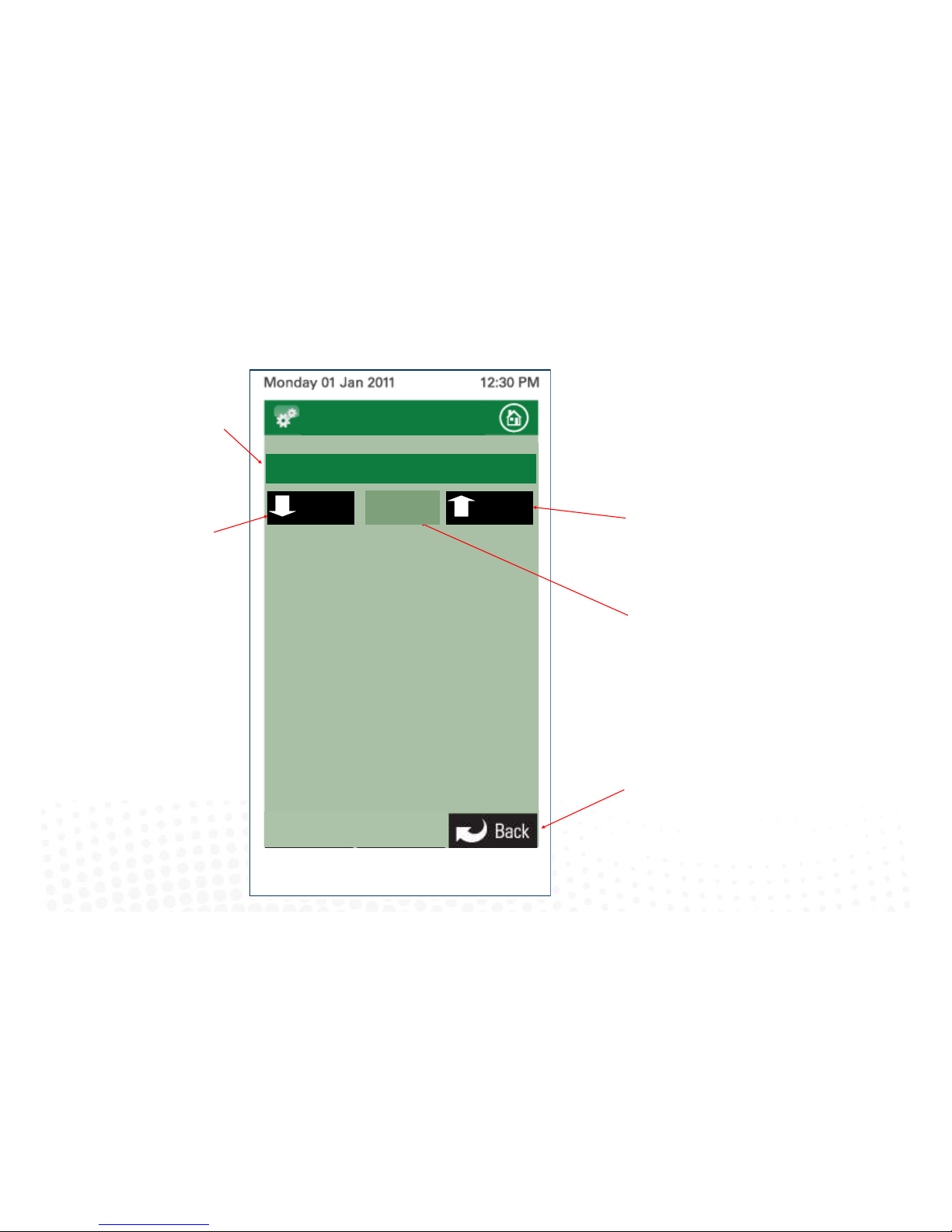
3.6 Sensor Calibration
22
Touch here to adjust the calibraon up by
+0.1 deg C
iZone
Inventive . Intelligent . Intuitive
AC Unit Control
iZone
Inventive . Intelligent . Intuitive
Touch here to adjust the calibraon
down by -0.1 deg C
Total calibraon oset from
manufactured seng
Touch here to go back and save the
changes.
Sensor Calibration
Office (22.2)
Down Up
-0.2
Re-calibrated temperature for this
zone
Note:
Re-calibraon of the
temperature sensor in the
touch screens (CCTS) can only
be done from the touch screen
you want to re-calibrate.
Page 23
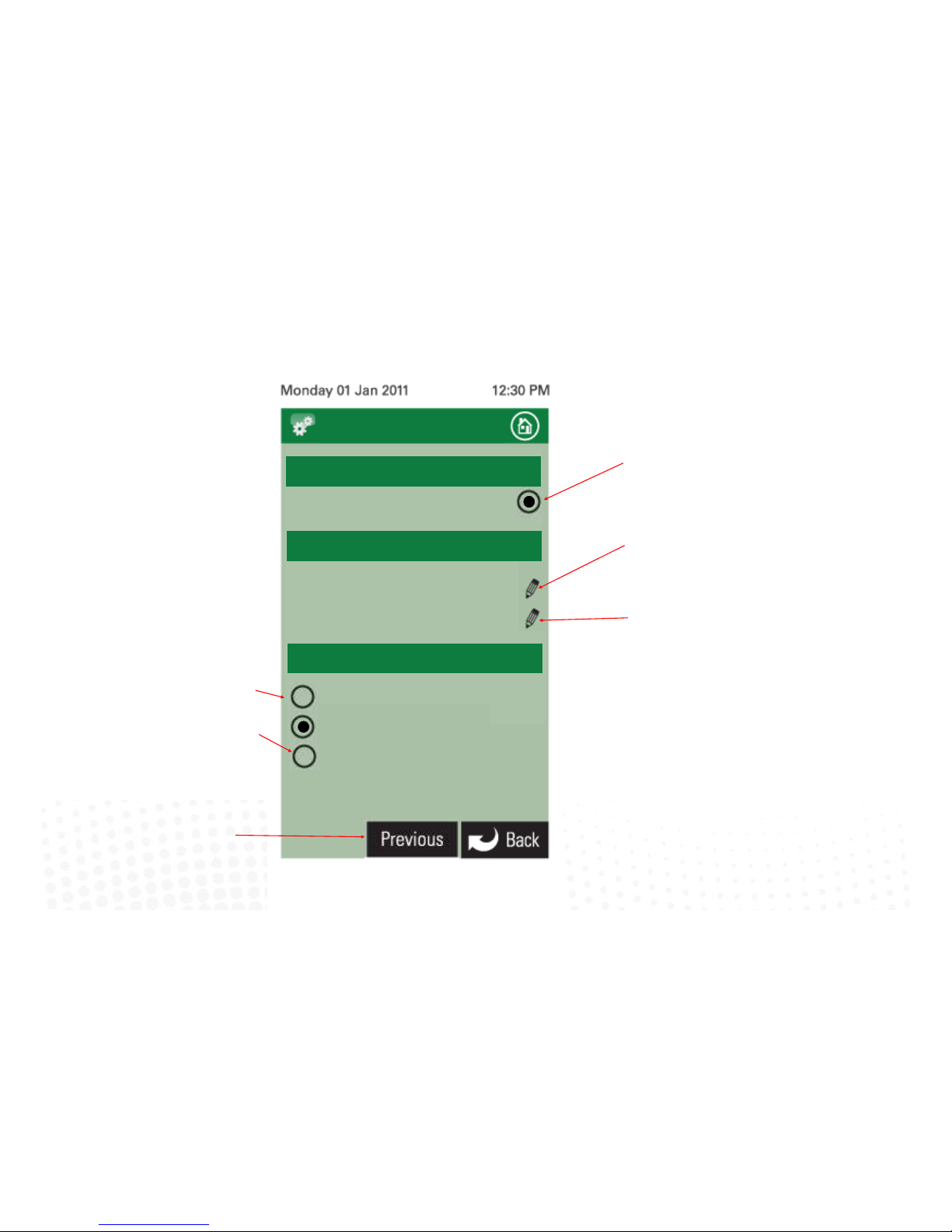
3.7 Fan auto configuration (iZone 311 only)
23
Touch here to enable Fan Auto control and
to proceed with Fan Auto set up
Touch here to set the AC Unit capacity for this
system. The capacity selecon will provide an
approximate airow capacity for the AC Unit.
iZone
Inventive . Intelligent . Intuitive
Inventive . Intelligent . Intuitive
iZone
Unit Capacity [kW] 14
Fan Airow [l/s] 1020
Touch to here to go back to the previous
conguraon page (see 2.6).
Fan Auto Config
Capacities
Enable Fan Auto Control
Auto Fan
Touch here to ne tune the airow capacity. You
can set the exact airow in litres per second. This is
available from the AC Unit manufacturer
2– Speed Fan
3– Speed Fan
Variable Speed Fan
Select Fan Type
Select the correct fan speed type for the
system installed. Refer to AC Unit
Manufacturer manual
Only available on certain AC unit makes
Page 24
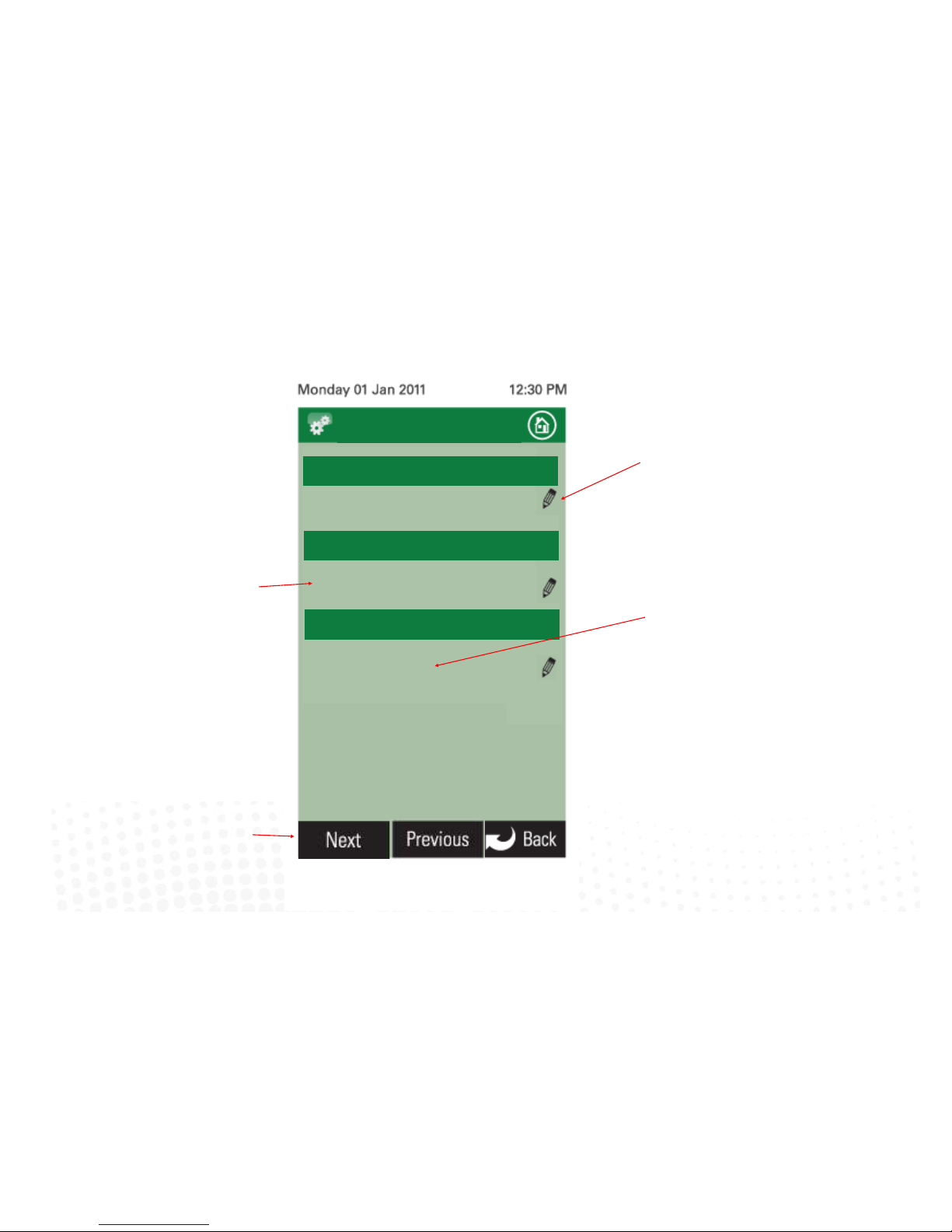
3.7 Fan auto configuration cont. (iZone 311 only)
24
Touch here to set the kitchen area in
square meters
iZone
Inventive . Intelligent . Intuitive
Inventive . Intelligent . Intuitive
iZone
Living 33
Touch to here to go to the next 3 zones
Fan Auto Config
Zone 2 Area (sqm)
Zone 1 Area (sqm)
Kitchen 10
Current area set for Zone 3
Zone name
Zone 3 Area (sqm)
Master Bed 21
Page 25
25
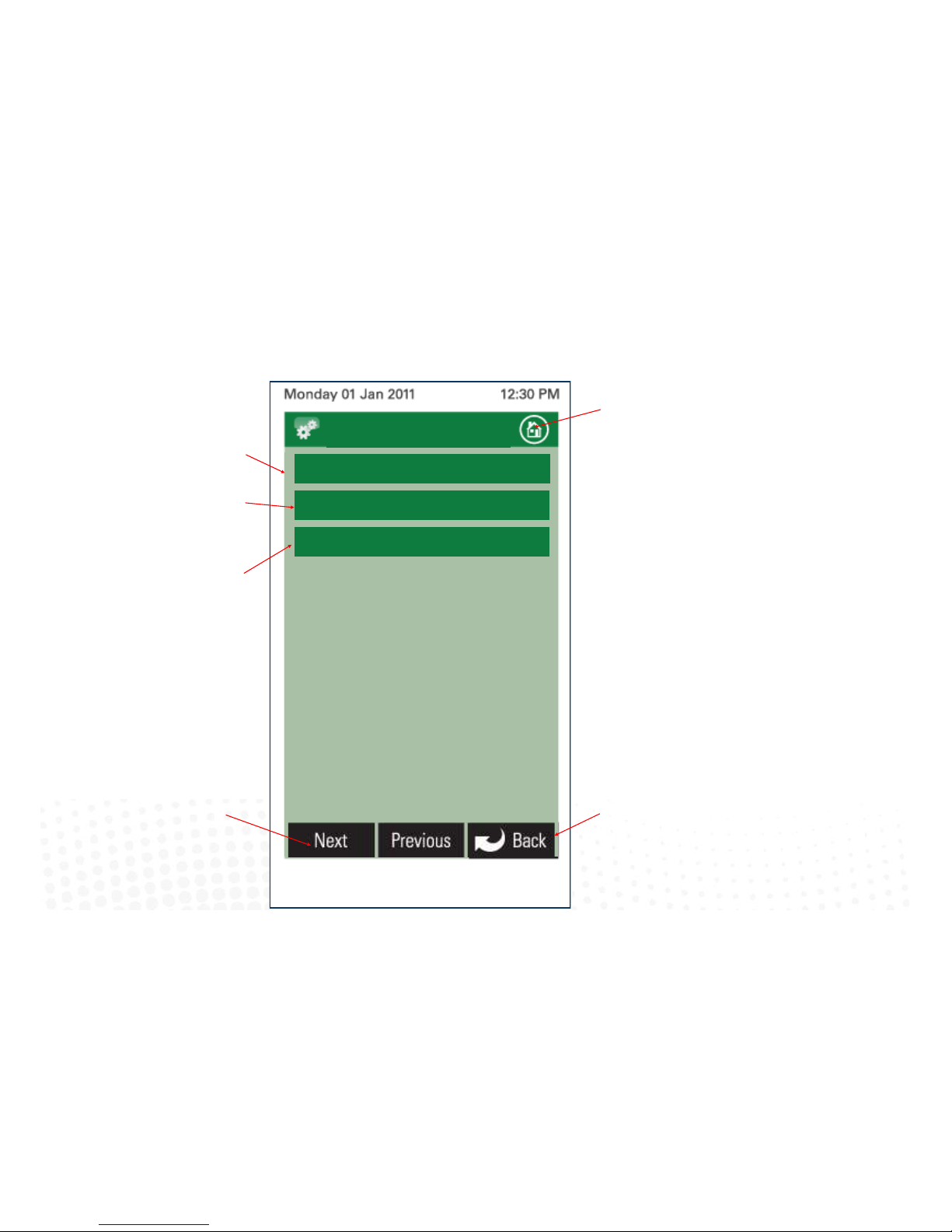
3.8 Wifi bridge configuration
iZone
Inventive . Intelligent . Intuitive
AC Unit Control
iZone
Inventive . Intelligent . Intuitive
ID: 123123123
WiFi Configuration
IP: 192.118.27.69
MAC: 00:04:A5:G9:32:39
Displays the iZone system idencaon
number
Displays the Bridge IP address allocated by
the DHCP
Displays iZone Ethernet controller MAC
address
Touch here to go to the home
screen.
Touch here to go back and save the
changes.
Touch here to go to the manual WiFi
conguraon
Page 26
26
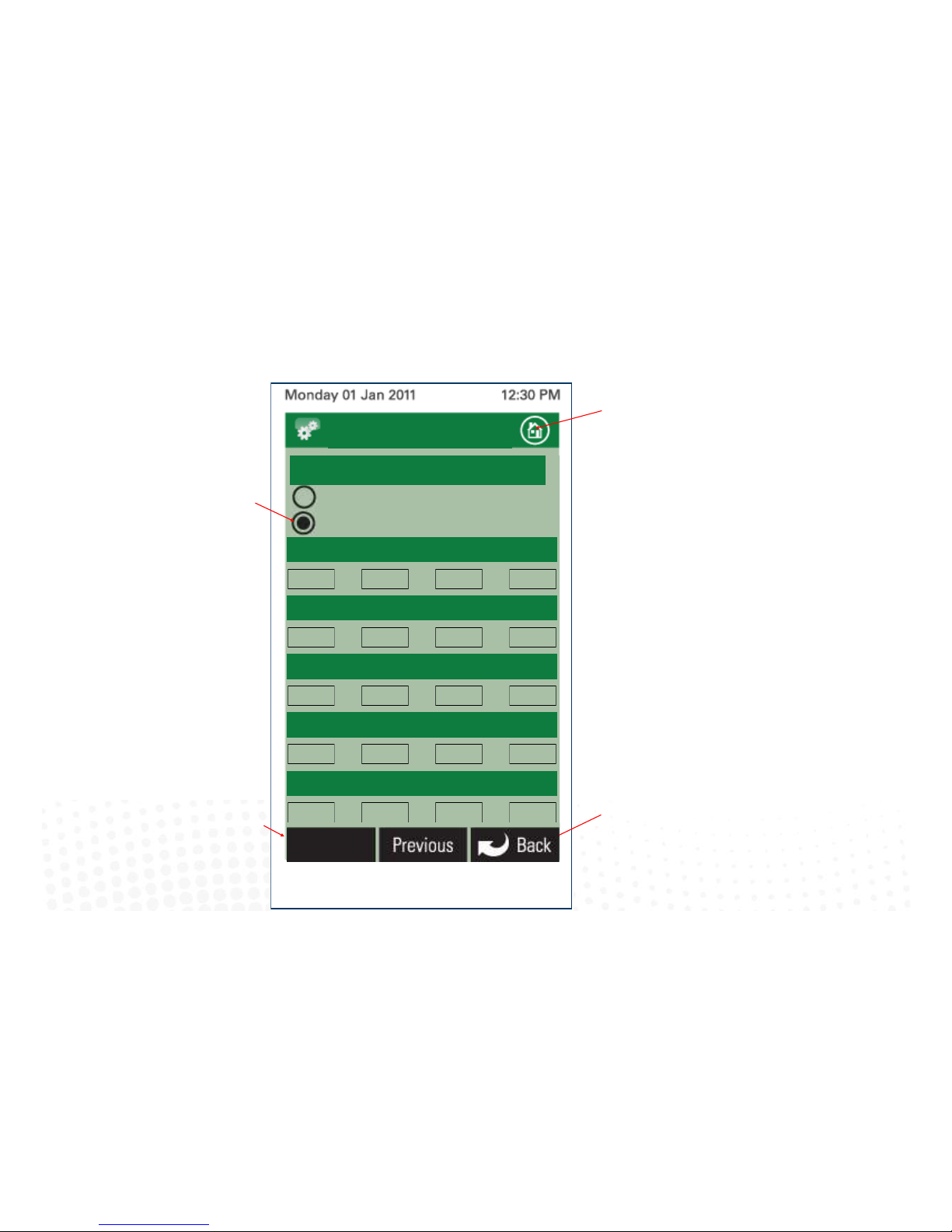
3.9 Manual IP Configuration
Touch here to go back without saving the
changes.
Select either Auto or Manual Conguraon.
If manual is selected you will need to know
the IP, Subnet Mask, Default Gateway,
Primary DNS Server and Secondary DNS
Server addresses if applicable
Touch here to go to the home
screen.
Touch here to apply the changes to the
conguraon
iZone
Inventive . Intelligent . Intuitive
iZone
Inventive . Intelligent . Intuitive
WiFi Configuration
IP Address
Manual Configuration
Auto Configuration
IP Address
0 0 0 0
0 0 0 0
0 0 0 0
0 0 0 0
0 0 0 0
Subnet Mask
Default Gateway
Primary DNS Server
Secondary DNS Server
Apply
Page 27
27
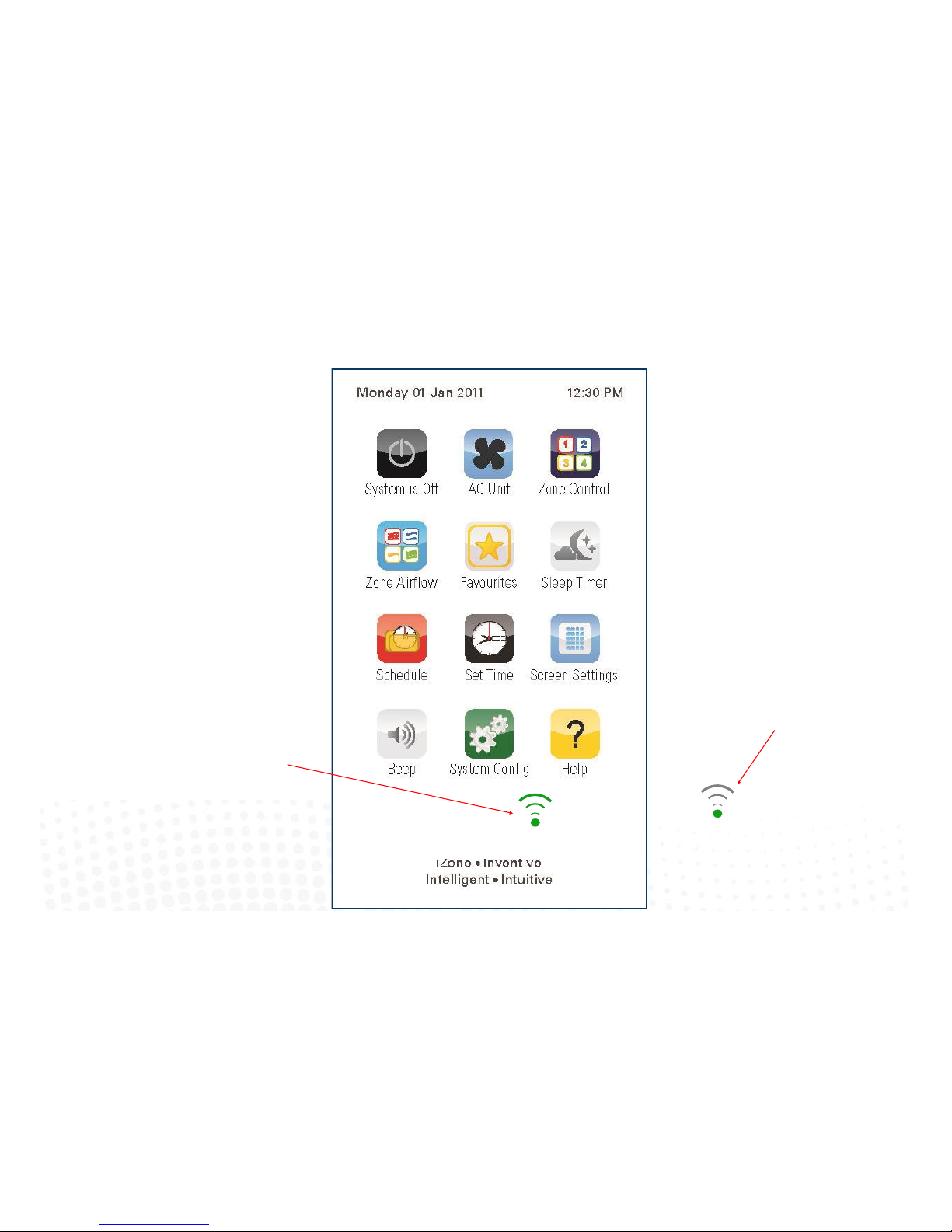
3.10 WiFi connection
A green symbol indicates the iZone
system is now connected to WiFi and
ready to use
A grey symbol indicates the
Bridge is connected to the
iZone system but is not
connected to the home
computer network
Page 28

28
3.11 Smart phone configuration
You will need to download the iZone App onto your smart phone. When using WiFi from inside the home / office you will not be
required to enter a password just press login.
If you want to access the system using your smart phone from outside the WiFi range you will need to subscribe to iZone World
Wide. Go to
http://www.air-stream.com.au/izone-world-wide-service.html
To subscribe you will need the serial number that is printed on your iZone system ID number this is a
nine digit number.
You will also be asked for a password which you should remember as you will need this password to access your system when you
are trying to access your system from outside the WiFi range.
To reduce the data usage there may be a slight delay between changing a function on your phone, and the system updating, when
using iZone World Wide.
Page 29

29
3.12 Home automation integration
iZone systems can be integrated into any home automation system that has an RS 232 or RS485 serial interface. The iZone home
automation module is fitted as standard with RS 232 and RS 485 connectors for serial interface.
For serial interface specifications please download a copy of Airstream’s Technical Catalogue at
http://www.air-stream.com.au/images/airstream_technical_catalogue.pdf
Your home automation integrator will need to write the suitable code to control your AC system. This service is not provided by
Airstream or iZone.
Page 30
30
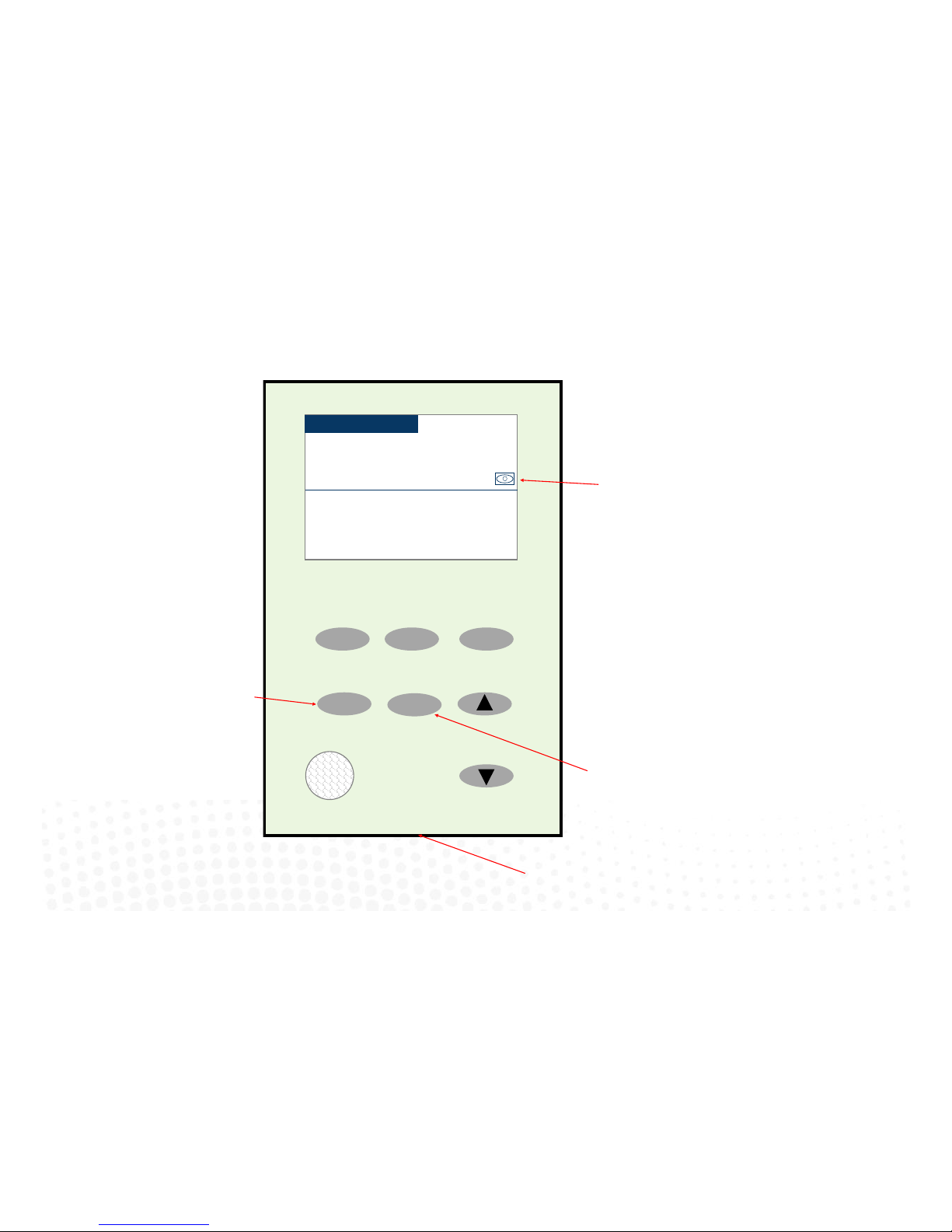
3.13 iSense controller configuration
Press and hold the “Airow” buon to
congure the controller. Here you can
congure the correct Zone to control and
you can calibrate the sensor if required
Press and hold the “iSense” buon to enter
the Occupancy Strategy conguraon
menu. Follow the prompts to select the
most appropriate strategy for your room or
use the Custom Setup opon to design your
own strategy
Indicates the iSense has been
acvated on this controller.
Open
Close
Climate
Airow
iSense
Study
3:15PM
22.0oC
95%
Airflow
21.9oC
Actual
15.8oC
Induct
Note:
When iSense has been acvated
movement is required in the range of the
occupancy sensor to keep the zone
operang. The use of the iSense feature in
bedrooms, when the occupants are asleep,
is not recommended.
System reset buon under
Page 31

31
Page 32
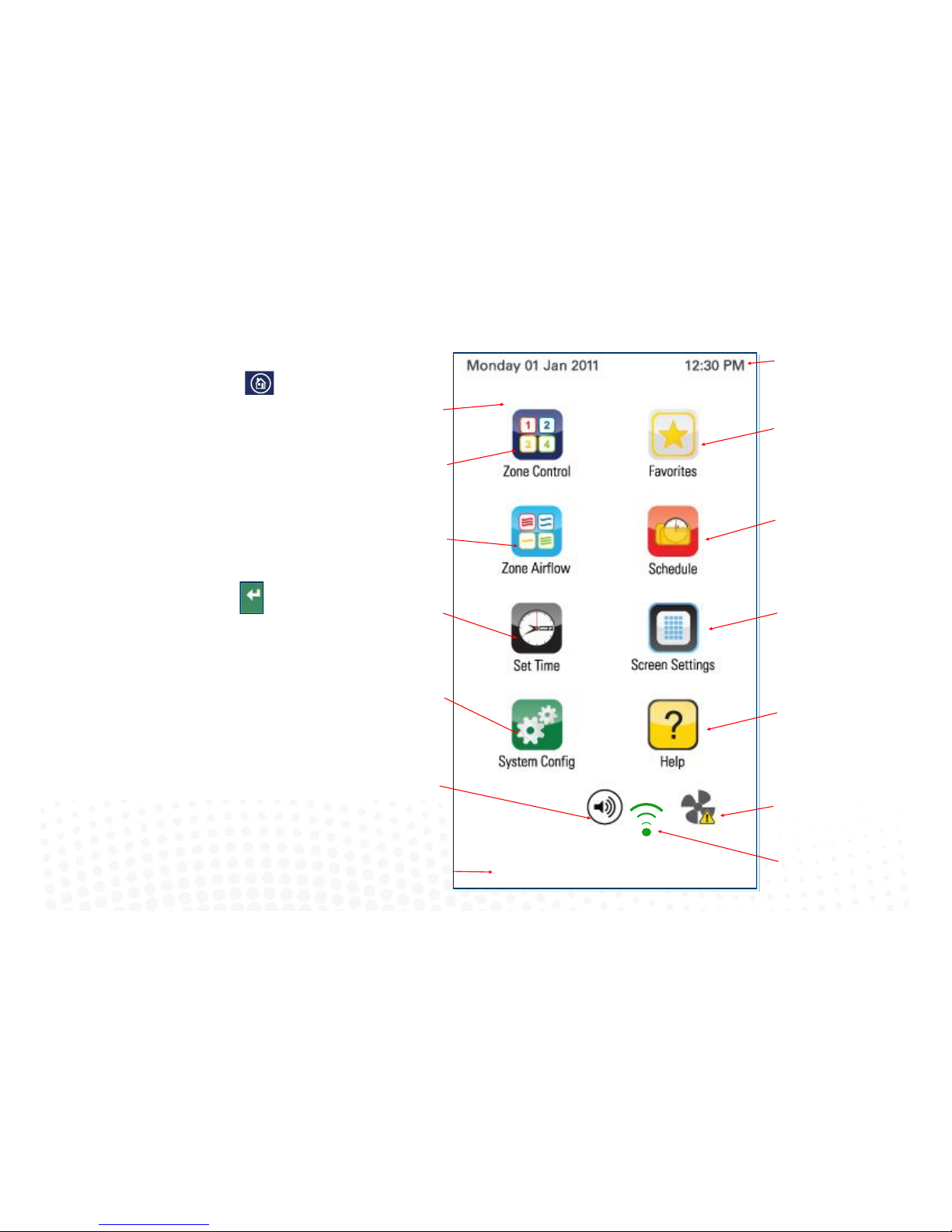
4.1 iZone 211 home screen
32
iZone
Inventive . Intelligent . Intuitive
Home screen
Press to acvate a favourite
mode or to congure a new
favourite (4.9)
Press to acvate a schedule
or to congure a new
schedule (4.11)
Press to change screen
sengs (4.14)
Press to get more help
about your iZone system
A/C system maintenance
required. Press here for
instrucons.
System date and me
Press to change zone
status (4.4)
Press to change zone
airow (4.7)
Press to set system
me (4.13)
Press to congure
system (3.0)
Press to acvate or
deacvate this screens
audio feed back (beep
on touch)
Installing company’s tag line will
vary depending on the installaon
company
To get back to the Home
screen at any time press.
When entering names or
values using the keyboard
it is easier to use a thin
object such as a toothpick.
Do not use sharp, hard
objects as they may
damage the screen. The
enter button must always
be pressed to save the
changes you have made.
Some functions may have
been locked by your
installer to ensure the
commissioned values are
not changed. To make
changes to these values
contact your installation
company.
WiFi connecon
Page 33
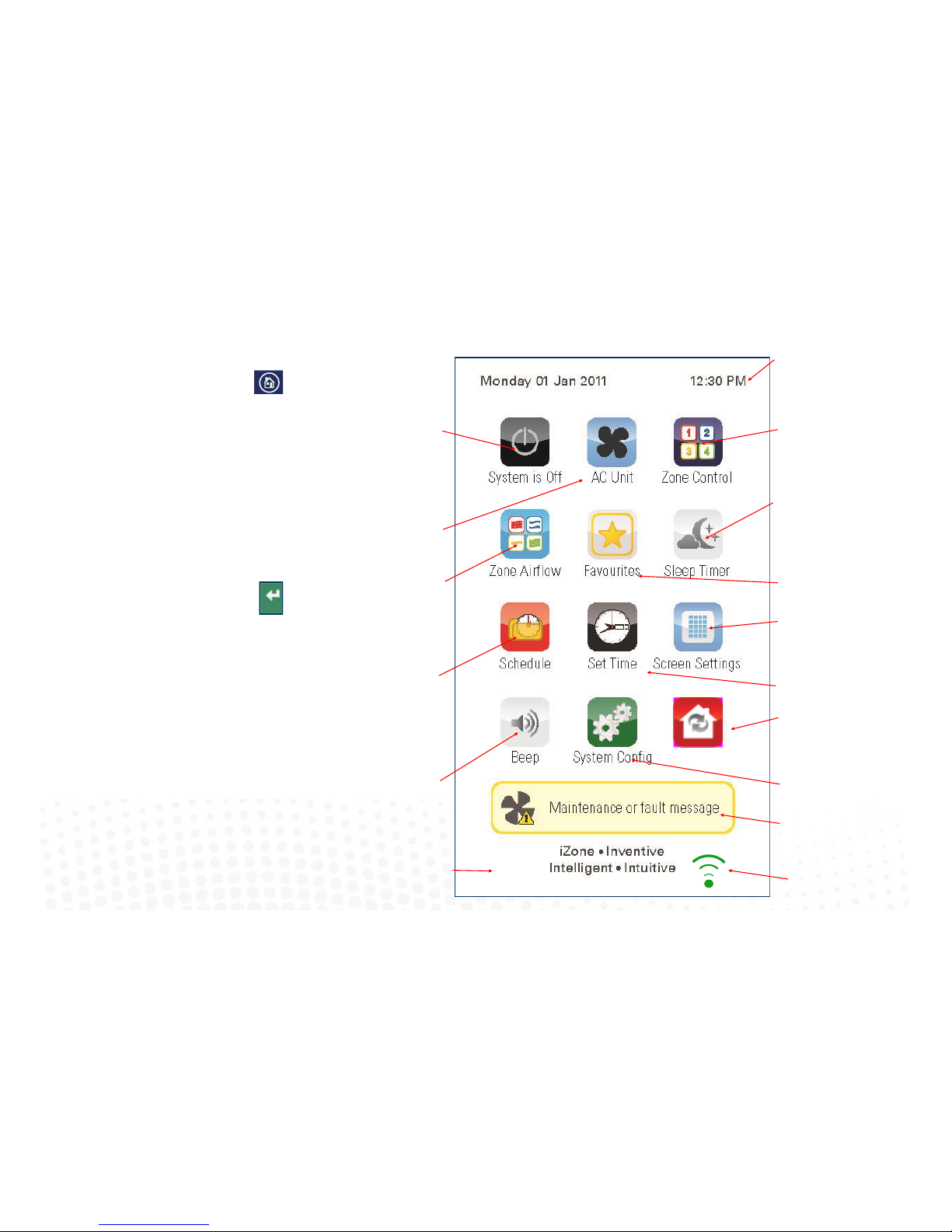
4.2 iZone 311 home screen
To get back to the Home
screen at any time press.
When entering names or
values using the keyboard
it is easier to use a thin
object such as a toothpick.
Do not use sharp, hard
objects as they may
damage the screen. The
enter button must always
be pressed to save the
changes you have made.
Some functions may have
been locked by your
installer to ensure the
commissioned values are
not changed. To make
changes to these values
contact your installation
company.
33
Press to acvate a favourite
mode or to congure a new
favourite (4.9).
Press to acvate a schedule
or to congure a new
schedule (4.11).
Press to change screen
sengs (4.14).
Press to congure the
system (3.0).
A/C system maintenance
required or A/C unit fault
code. Press to clear
System date and me.
Press to change zone
status (4.4).
Press to change zone
airow (4.7).
Press to set system
me and date (4.13).
Press to acvate or
deacvate this screens
audio feed back (beep
on touch).
Tag line this will vary depending on
the installaon company.
Press to toggle sleep mer
opons.
Press to turn your system
on or o.
Press to change the A/C
unit sengs (4.3).
isave is Off
Press to switch isave
On
WiFi connecon
Page 34
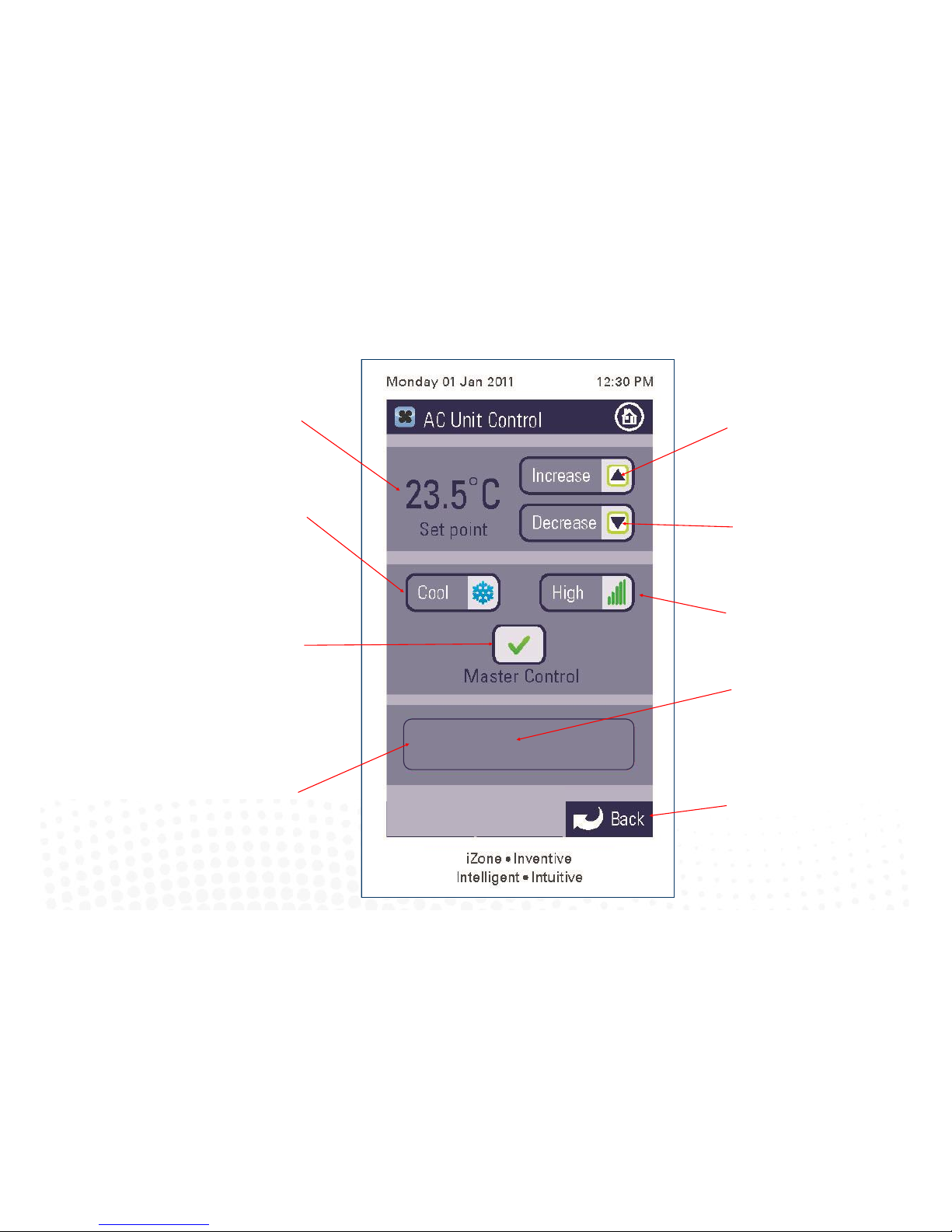
Normal 22.0 C
System Status
34
Current AC unit set
point.
Press here to change
the mode.
Indicates the temperature measured
by this panel is currently controlling
the AC unit (Only applicable if
systems congured for “AC unit
controlling sensor—Master” opon.
(See 3.3).
Indicates the current status of
the AC unit. If a fault code
appears here please contact
your installer.
4.3 AC unit control (iZone 311 only)
Press here to increase the AC unit
set point. (Not applicable if “AC
unit controlling sensor—Zones”
opon selected. See 3.3).
Press here to decrease the AC unit
set point (Not applicable if “AC unit
controlling sensor—Zones” opon
selected. See 3.3).
Press here to change the fan
speed.
Press here to go back to the
home page.
AC unit actual temperature
(RA, sensor or touch screen)
Page 35
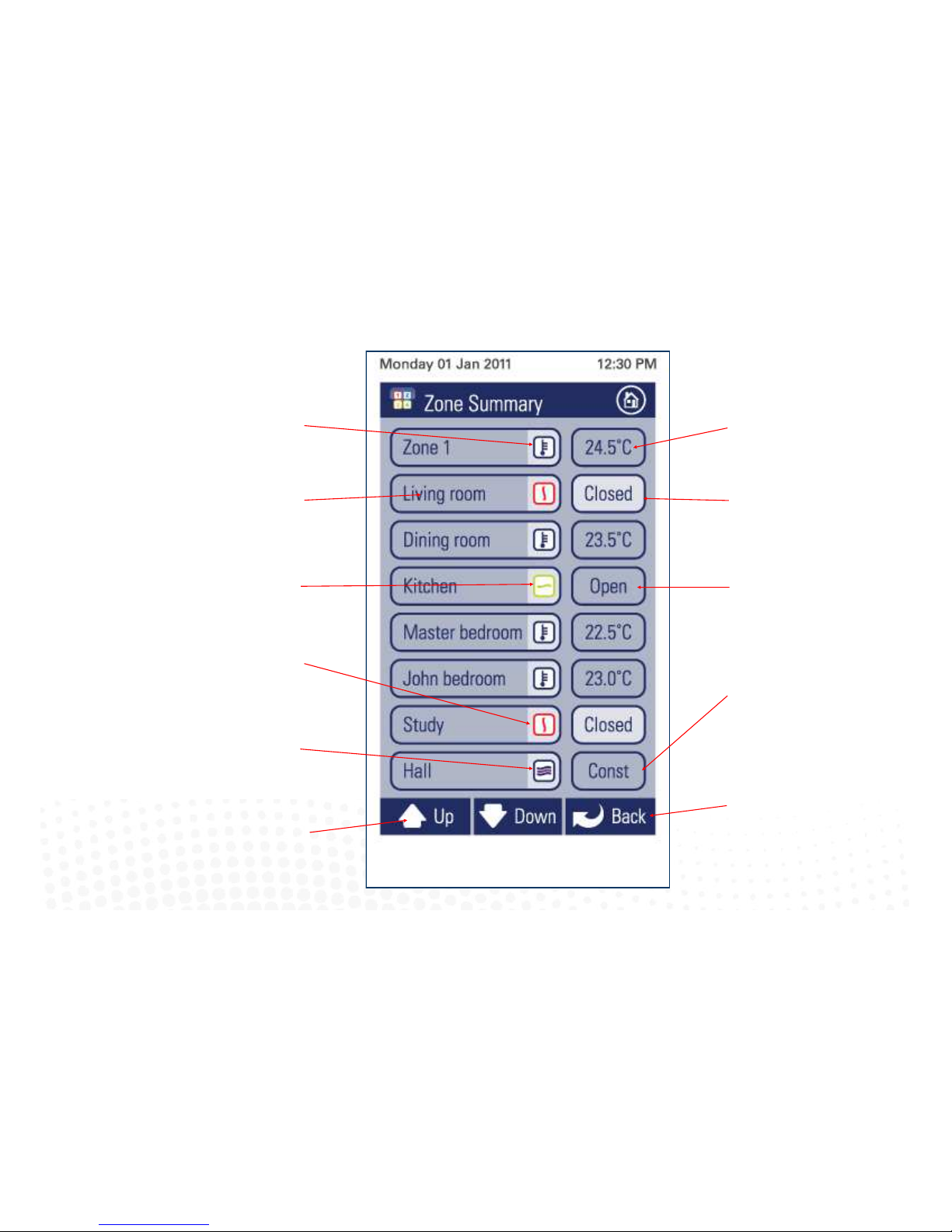
35
Indicates this zone is
currently in climate
control mode.
Zone Name. Press to
edit zone name and
other zone sengs
(3.2).
Indicates this zone is
currently fully open.
Indicates this zone is
currently closed.
Indicates the hall is an
electronic constant and
it is currently acve.
Scroll up or down to see more
zones.
4.4 Zone control
iZone
Inventive . Intelligent . Intuitive
Indicates Zone 1
temperature set point. Press
here to change the Set
point. (3.2).
Indicates this zone is closed.
Press here to open the zone.
Indicates this zone is open.
Press here to close the zone.
Indicates this zone is
currently being overridden
by the system and is being
used as a constant because
too many zones are closed.
Press here to go back to the
home page
Page 36
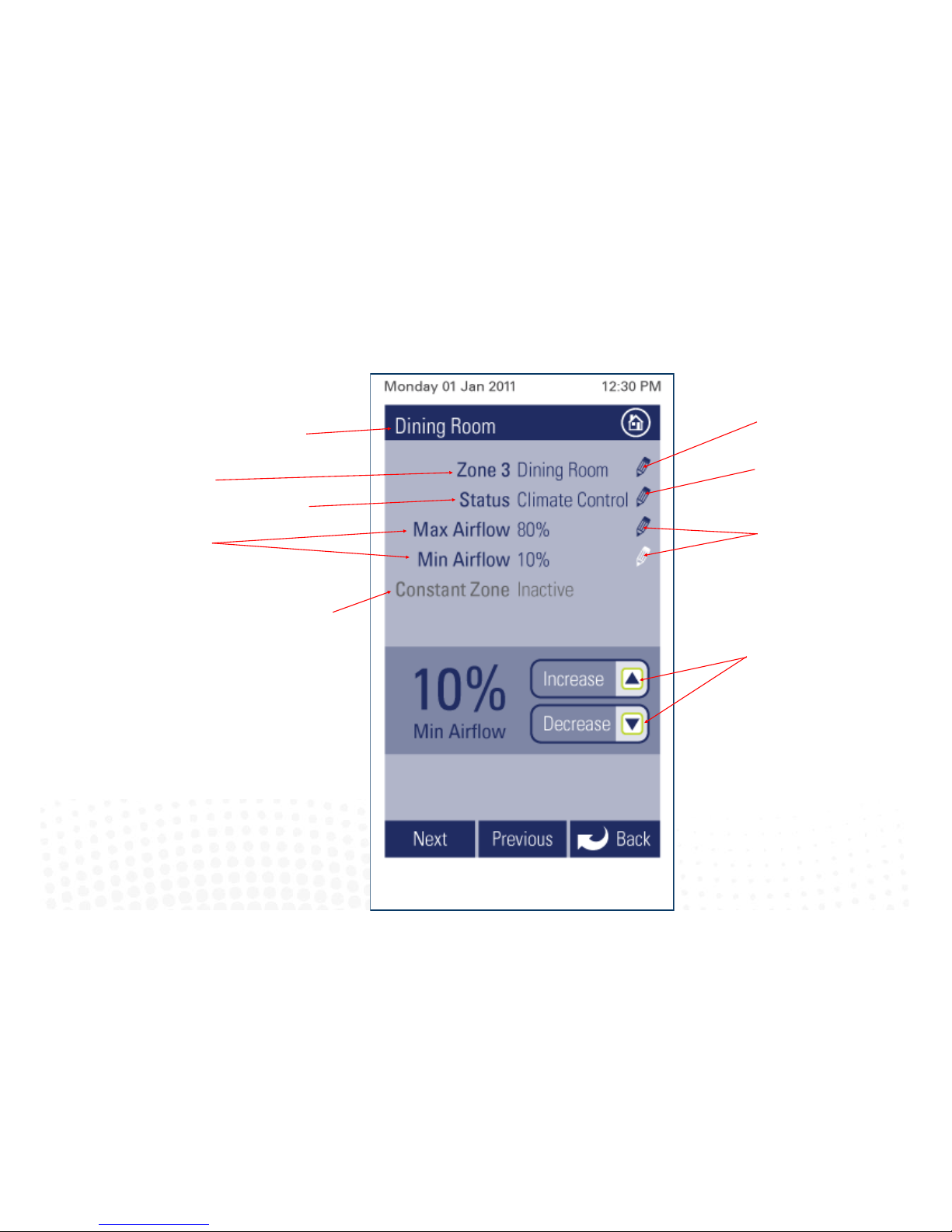
4.5 Edit zone names & settings
iZone
Inventive . Intelligent . Intuitive
Press to edit zone name.
Press to edit current zone
status.
Press to change maximum
and minimum airow set
points.
Current zone being
edited.
System zone number
and display name.
Zone maximum and
minimum air ow set
points.
Status of this zone if it
has been selected as an
electronic constant.
36
Current zone
status.
Press to increase or
decrease air ow set point.
Page 37
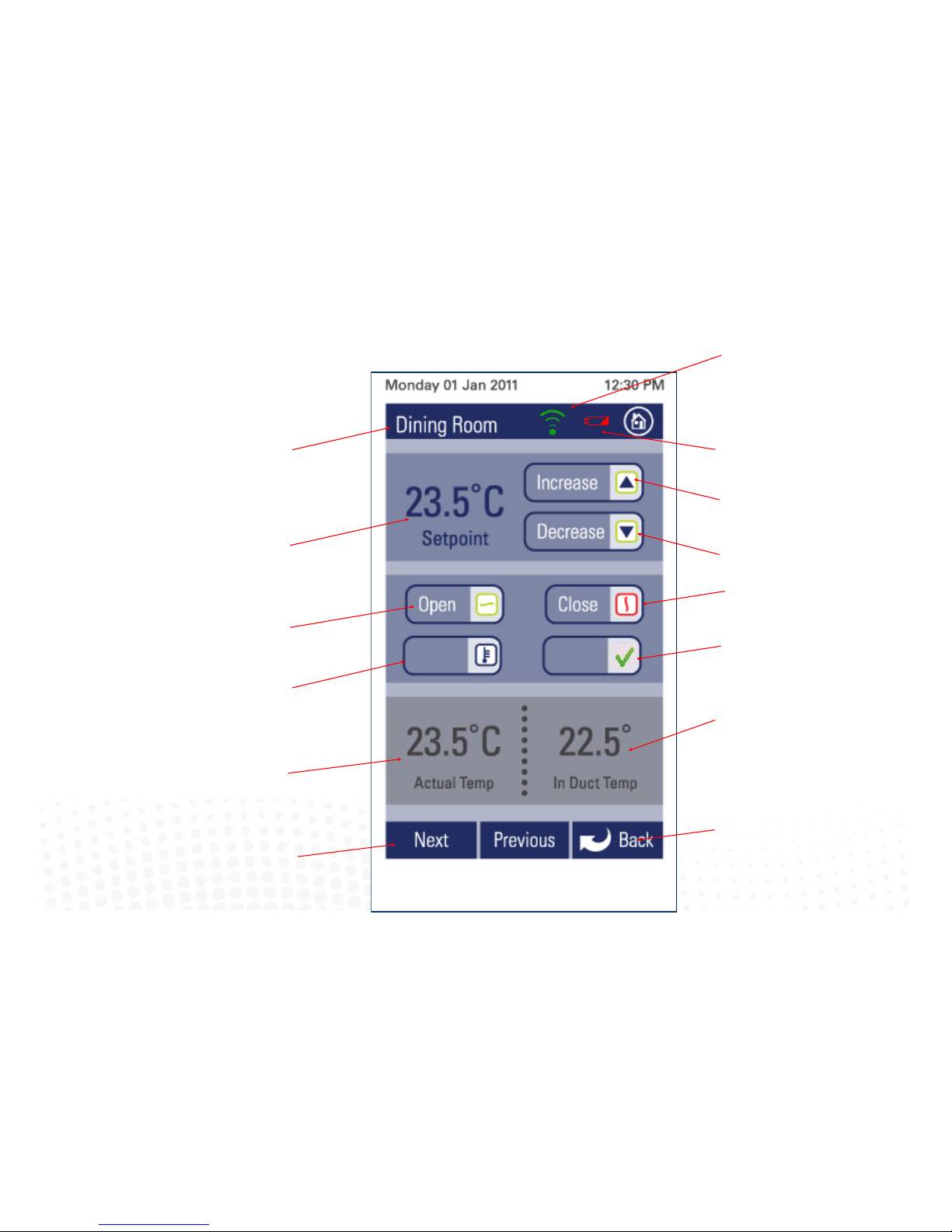
37
4.6 Adjusting temperature controlled zones
Indicates current
zone being adjusted.
Indicates current temperature set point required for
this zone.
Press here to allow iZone to
automacally control the
temperature in this zone.
Indicates the actual
temperature in this
zone (as measured by
iZone).
Scroll up or down to see more
zones.
iZone
Inventive . Intelligent . Intuitive
Press here to increase the current zone
set point temperature.
Press here to decrease the current zone
set point temperature.
Press here to select this zone as the
master (only available if congured for
Master AC unit control. (see 3.3)
Indicates the current
temperature of the air
inside the air condioning
system ductwork.
Press here to go back to the
zone summary.
Indicates baery in the sensor serving
this zone requires replacement. (only if
Rf sensor is installed)
Indicates RF strength from sensor
serving this zone is acceptable (only if
RF sensor is installed.)
Press here to fully
open this zone.
Master
Climate
Press here to close this zone.
Page 38
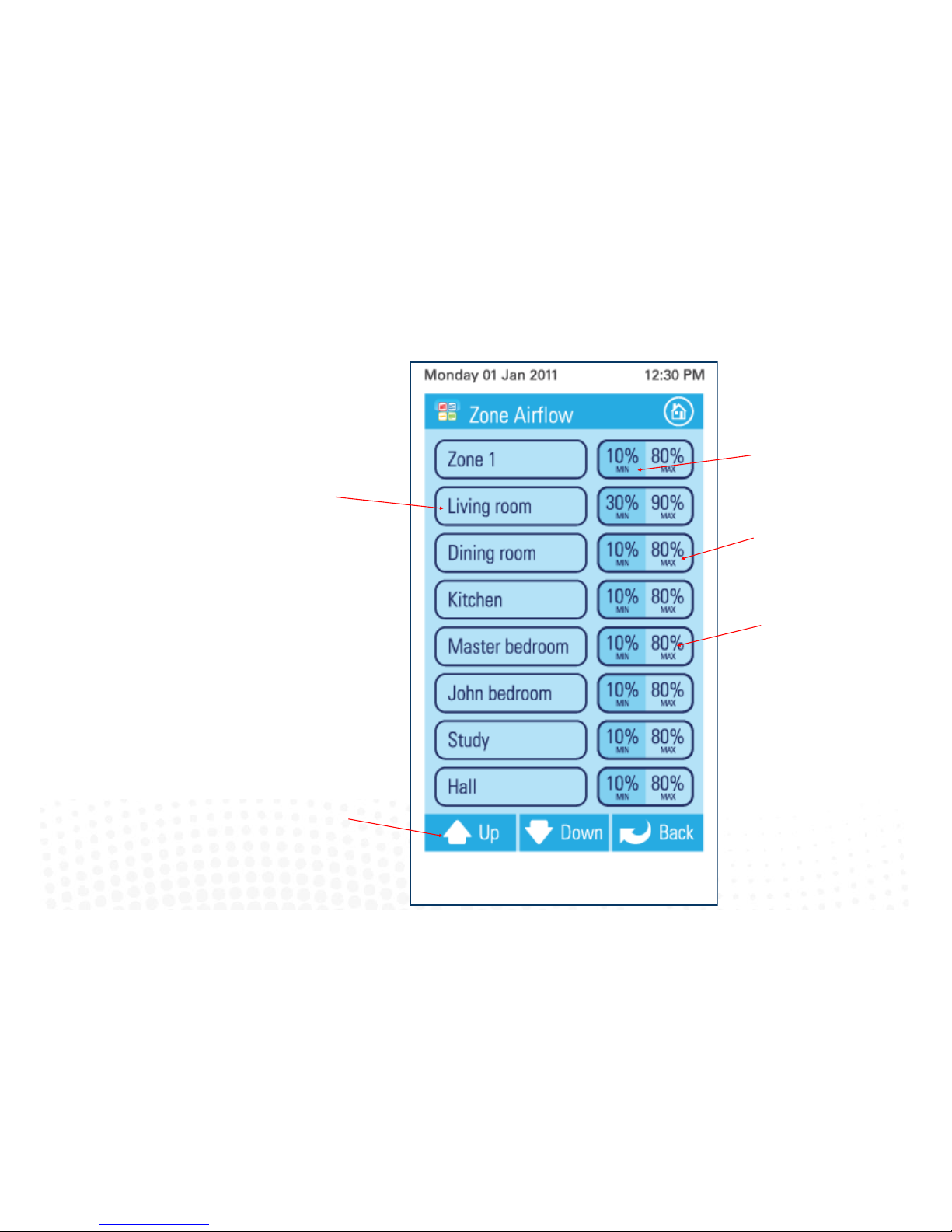
4.7 Zone airflow summary
iZone
Inventive . Intelligent . Intuitive
Zone name.
38
Scroll up or down to see
more zones.
Indicates current minimum
air ow seng to this zone.
Indicates current maximum
air ow seng to this zone.
Press here to change the
zone air ow sengs (3.2).
Page 39
39
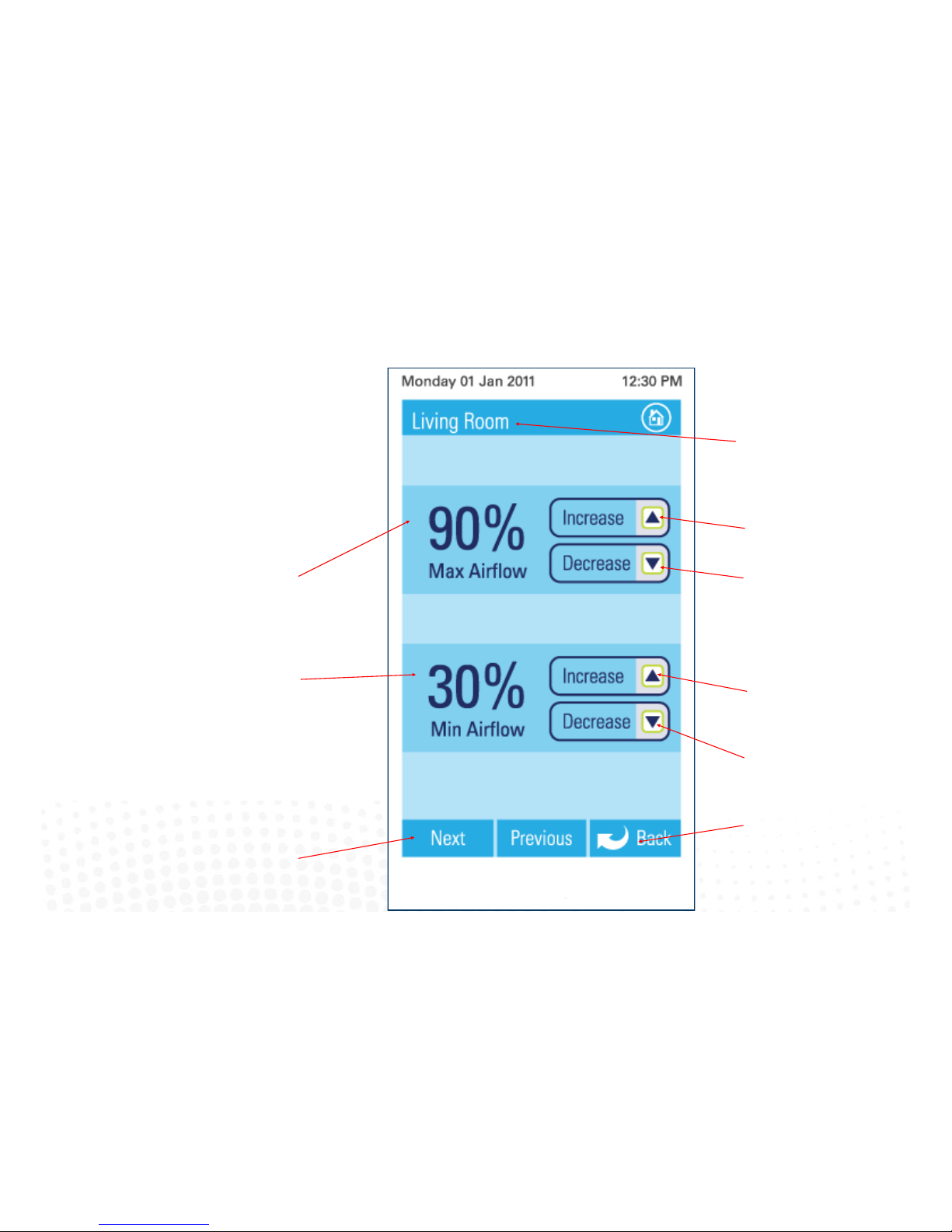
4.8 Changing zone airflows
Indicates current zone
that you are changing
the airow to.
Indicates the current
maximum airow seng
for this zone.
Scroll up or down to see more
zones.
iZone
Inventive . Intelligent . Intuitive
Press here to increase the
maximum airow to this
zone.
Press here to go back to the
airow summary.
Indicates the current
minimum airow seng for
this zone.
(This is usually set at 0%).
Press here to decrease the
maximum airow to this
zone.
Press here to increase the
minimum airow to this
zone.
Press here to decrease the
minimum airow to this
zone.
Please note: It is possible to lock the maximum and minimum
airow sengs in the conguraon menus. If you screen does not
display as indicated here and you require to make changes to
airows please contact your installer to acvate your display.
Page 40
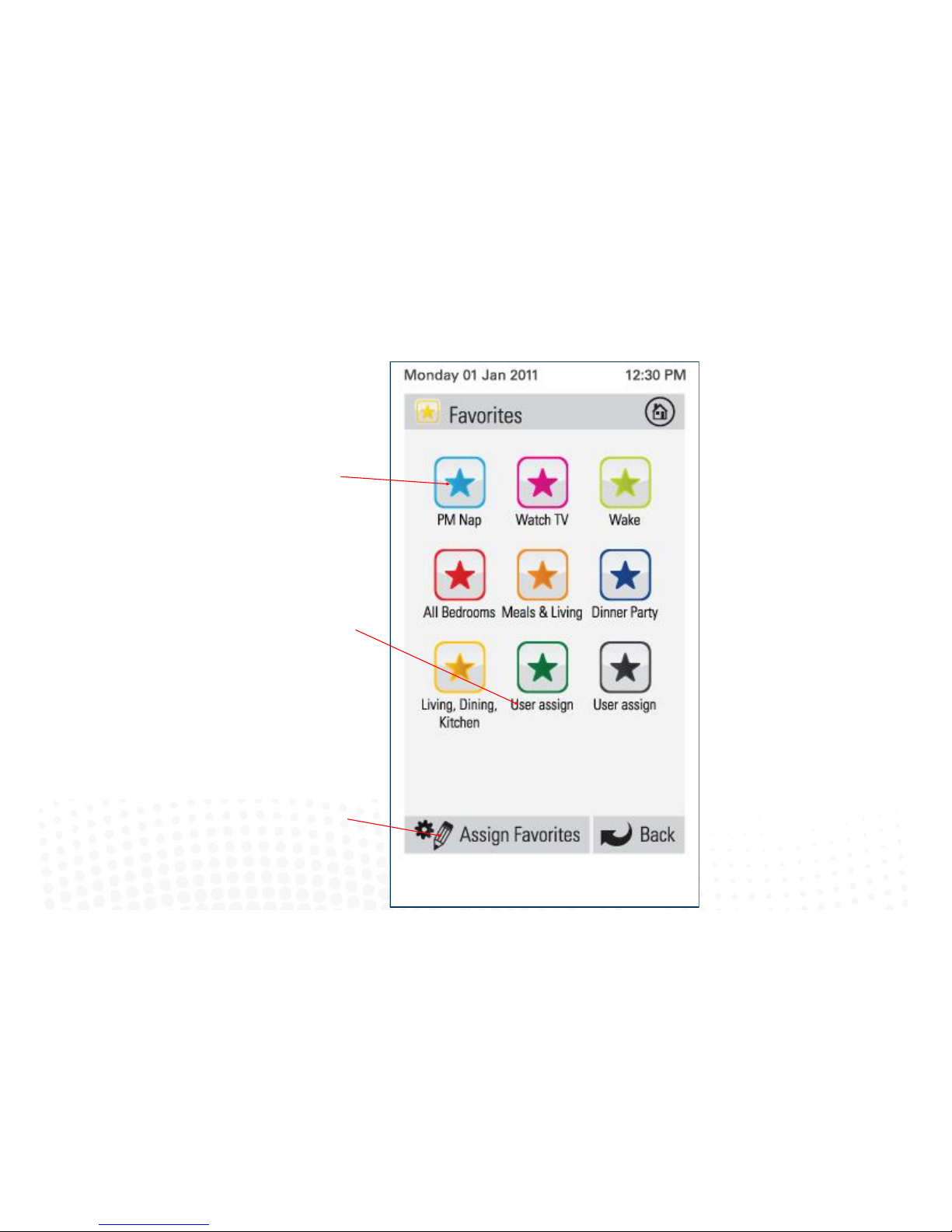
4.9 Favourites
iZone
Inventive . Intelligent . Intuitive
Press the favourite you would like and iZone will
automacally change all the zones sengs for
this favourite.
Indicates this favourite
has not been used.
40
Press here to setup and
edit favourites
Page 41
41
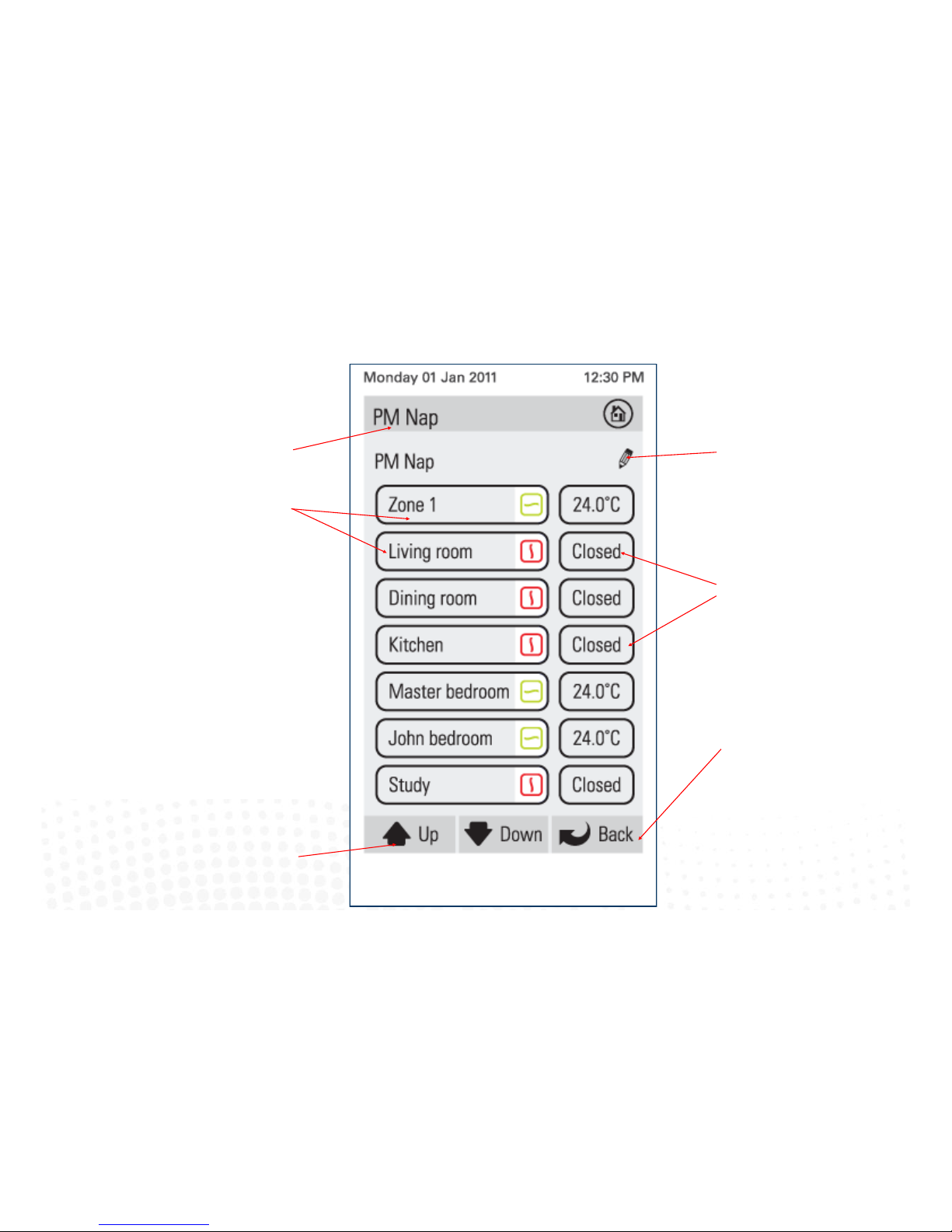
4.10 Assign and edit favourites
Indicates current
favourite being
changed.
Zone names.
Scroll up or down to see more
zones.
iZone
Inventive . Intelligent . Intuitive
Press here to change the
name of this favourite.
Indicates what mode you
want each zone to operate
in when this favourite is
used. Change each zone
seng to suit your
requirements for this
favourite.
Press here to go back to the
favourites summary.
Pressing the back buon will
save the favourite seng
selected.
Page 42
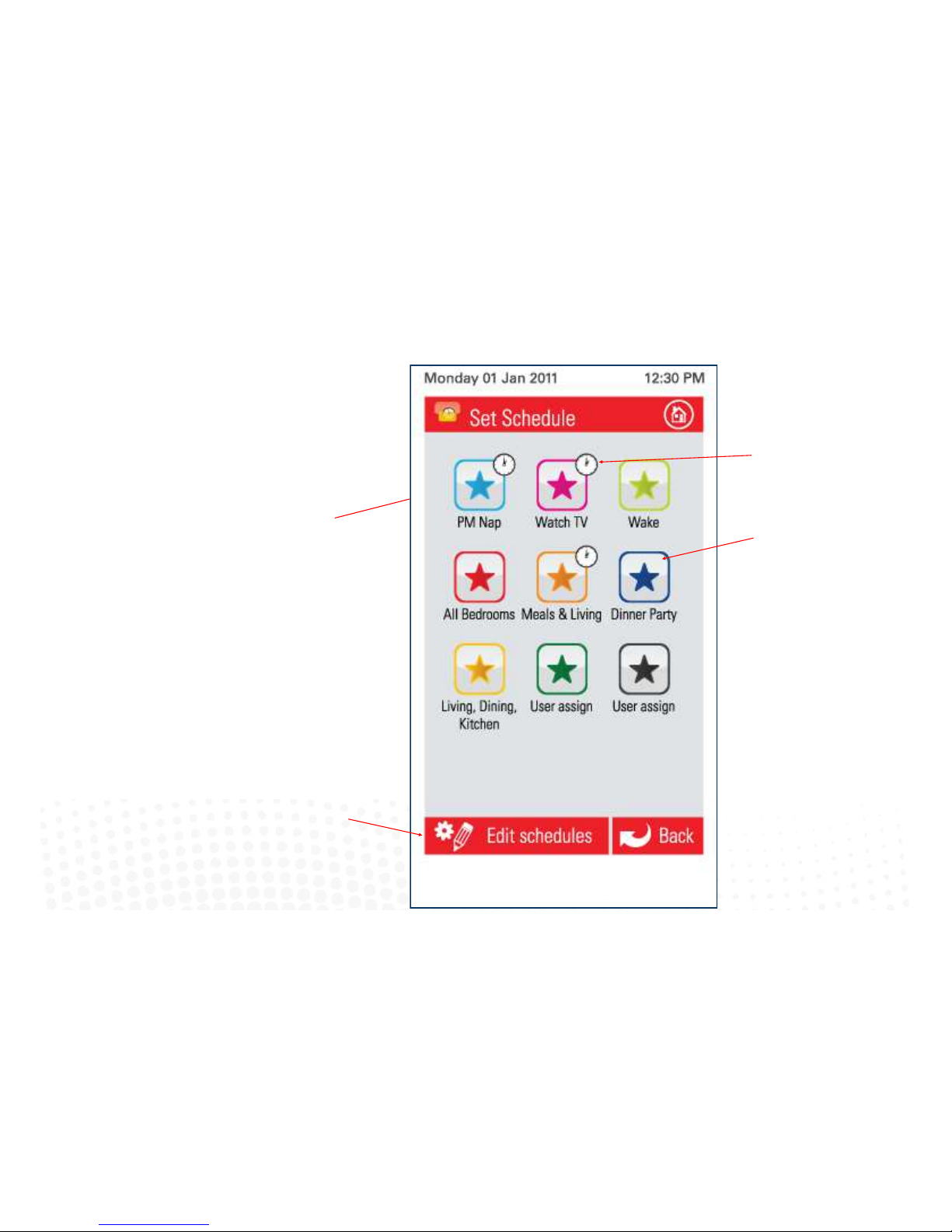
4.11 Schedules
Any of your favourites can be set to
automacally start at any me of your
choosing. Press here to enable the me based
schedule for favourite (PM Nap).
42
Press here to set up or
edit a schedule on any
favourite
Indicates an automac me
schedule has been enabled
for this favourite.
Indicates no automac me
schedule has been enabled
for this favourite.
iZone
Inventive . Intelligent . Intuitive
Page 43
43
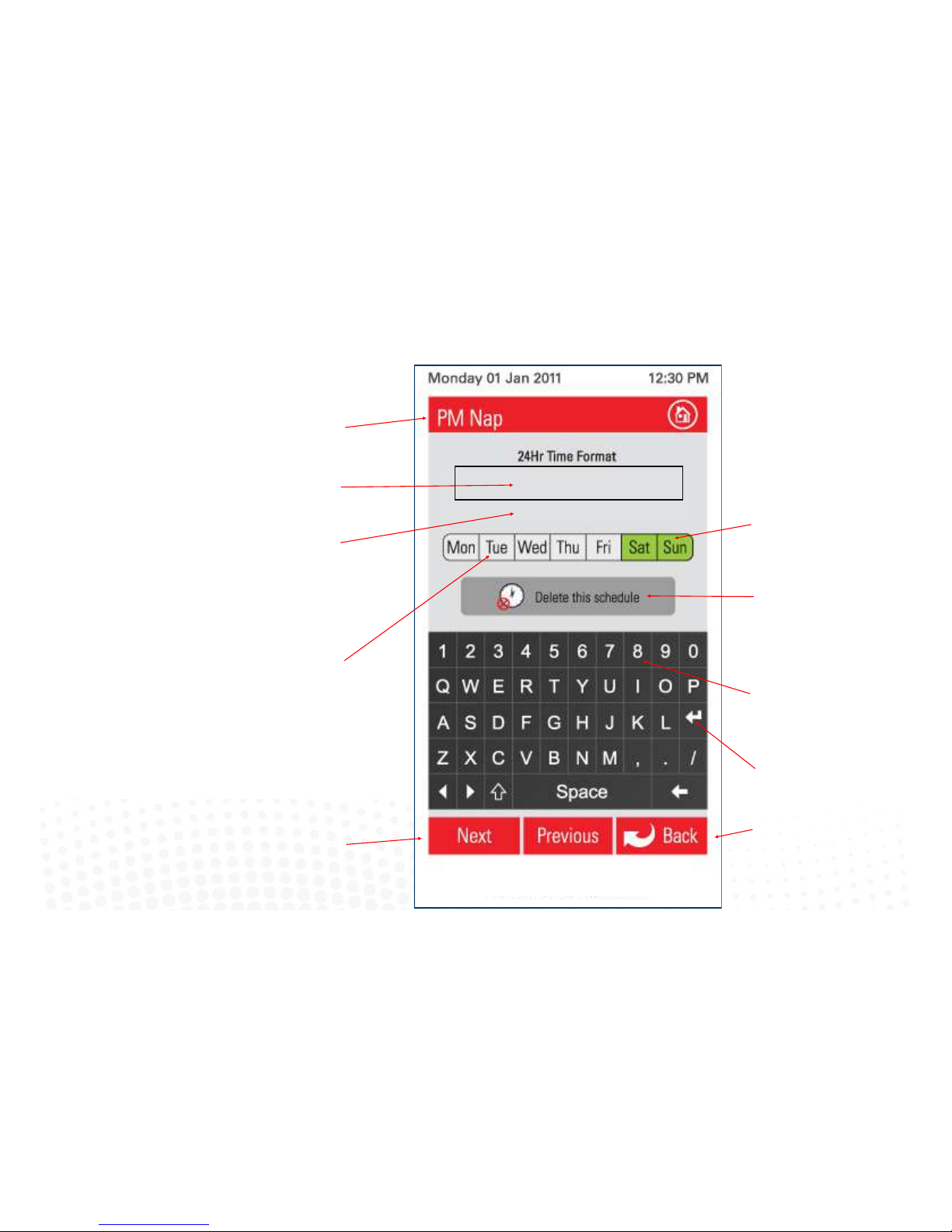
4.12 Setting and editing a schedule
Indicates current schedule
that you are changing or
seng.
Indicates the start me
for this schedule.
Press next to see the next schedule.
iZone
Inventive . Intelligent . Intuitive
Indicates the days this
schedule will apply. Press to
stop the schedule running
on this day.
Press here to go back to the
schedule summary.
Press here to delete this
schedule.
Press the key pad to change
the me. Remember it is in 24
hour format so for 2:30 am
type in 0230.
Press the enter buon to
save your new seng.
Indicates the days this
schedule will not run.
Press the day you want
the schedule to apply to.
START-08:00
STOP-17:30
Indicates the stop me for
this schedule.
Page 44
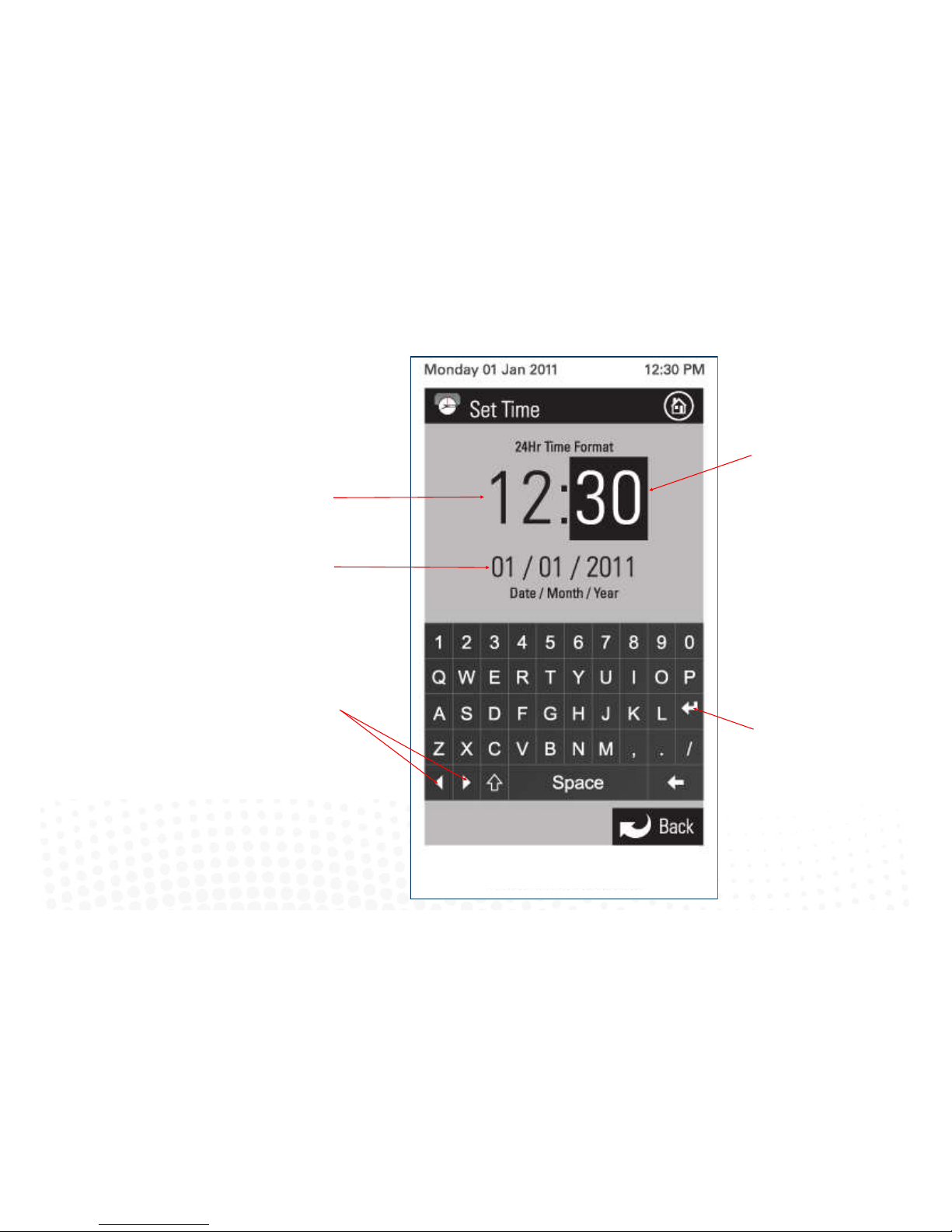
4.13 Setting the time
iZone
Inventive . Intelligent . Intuitive
Current me.
44
Indicates the minutes are be
changed.
You must press the enter
buon to save the changes
you have made.
Current date.
Press the le or right arrows to
move to the value you want to
change.
Page 45
45
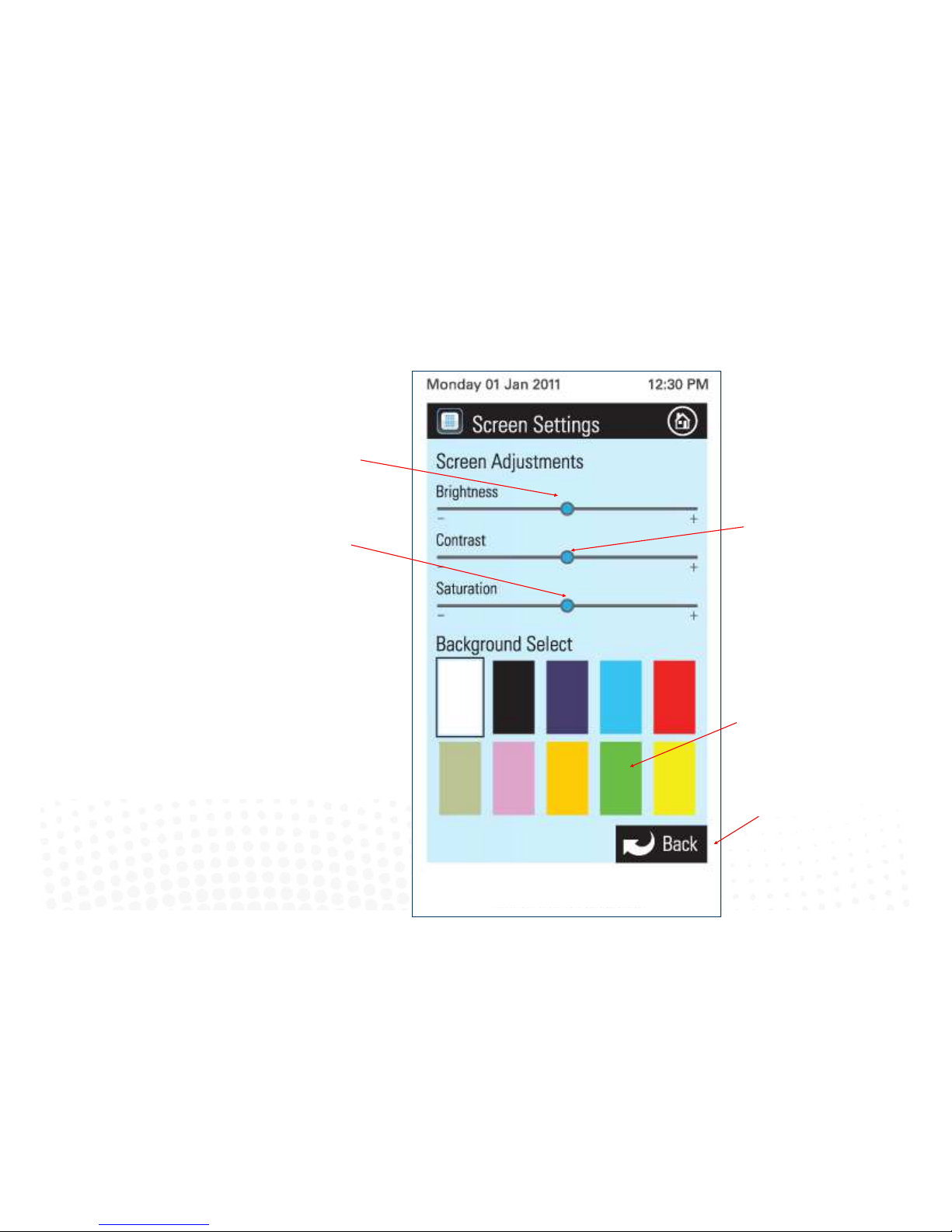
4.14 Changing the home screen colour
Slide le / right to adjust
the screen brightness.
iZone
Inventive . Intelligent . Intuitive
Slide le / right to adjust the
screen contrast.
Press here to go back to the
home screen.
Press the colour you would
like for your home screen.
Fine adjustments to the
shade, tone, hue can be
made using the brightness,
contrast and saturaon
slides.
Slide le / right to adjust
the screen saturaon.
Page 46
46
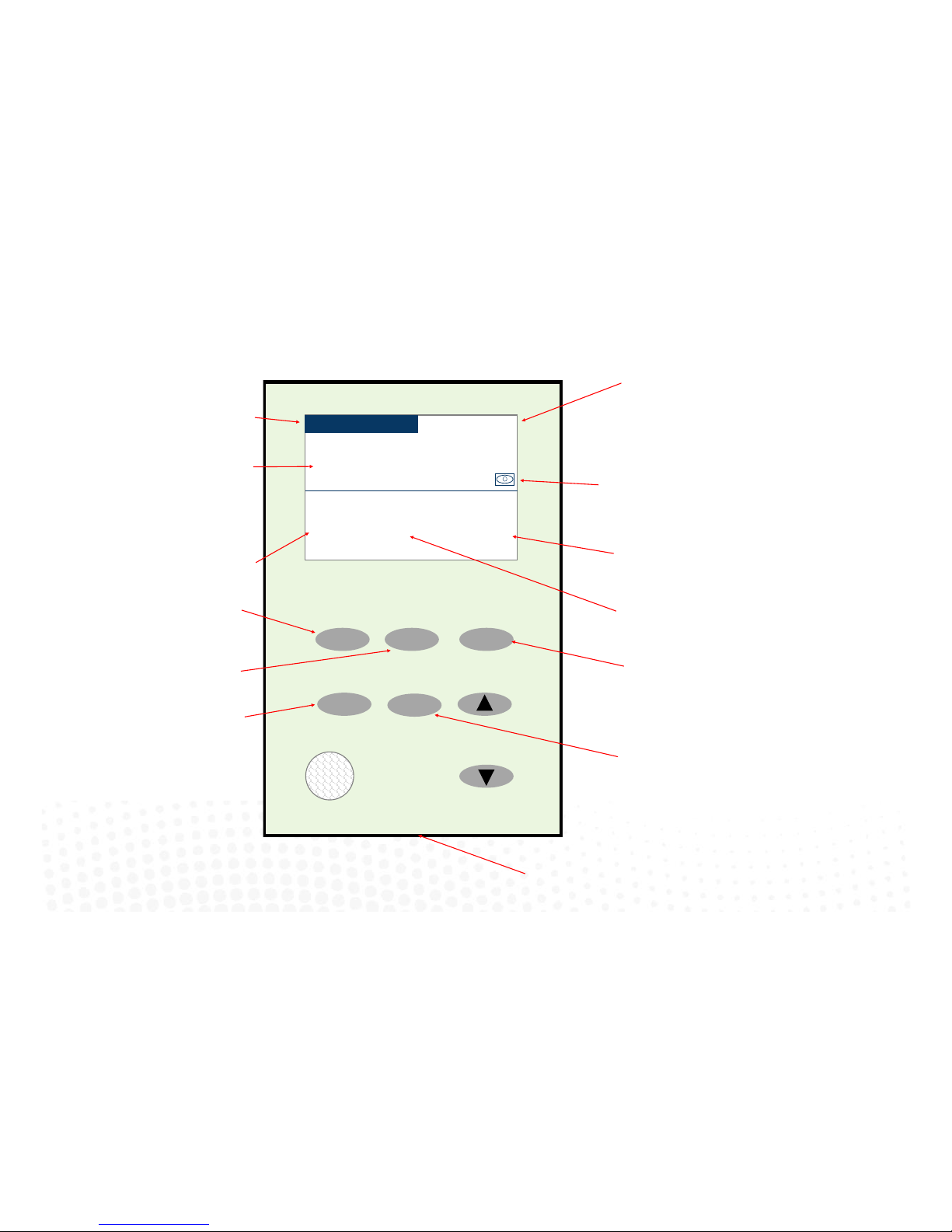
4.15 iSense controller
Press to adjust the maximum airow to
this zone. Use the up and down arrows to
adjust the maximum airow required to
this zone
Indicates zone name this unit is controlling
Indicates the iSense has been
acvated on this controller.
Open Close
Climate
Airow
iSense
Study
3:15PM
22.0oC
95%
Airflow
21.9oC
Actual
15.8oC
Induct
Note:
When iSense has been acvated
movement is required in the range of the
occupancy sensor to keep the zone
operang. The use of the iSense feature in
bedrooms, when occupants are sleeping, is
not recommended.
System reset buon under
Press to Open this zone fully
Indicates zone setpoint temperature
Indicates system me
Indicates the air temperature inside
the supply air duct
Indicates the maximum airow set for this
zone
Indicates the current zone
temperature
Press to Close this zone fully
Press to acvate or de-acvate the iSense
occupancy sensor
Press to Climate control this zone. Adjust
required set-point temperature using the
up and down arrows
Page 47

47
Page 48

4.16 Further assistance
1. If you require warranty or maintenance on your air conditioning system or iZone system you should contact your installation company.
2. If you want to add more zones or temperature control to any zone you should contact your installation company.
3. If your require assistance setting up or operating your iZone Home Automation Module contact:
Airstream Components
www.air-stream.com.au
info@air-stream.com.au
Phone 08 9418 6631
INNOVATION BROUGHT TO YOU BY airstream
48
 Loading...