

Page 1
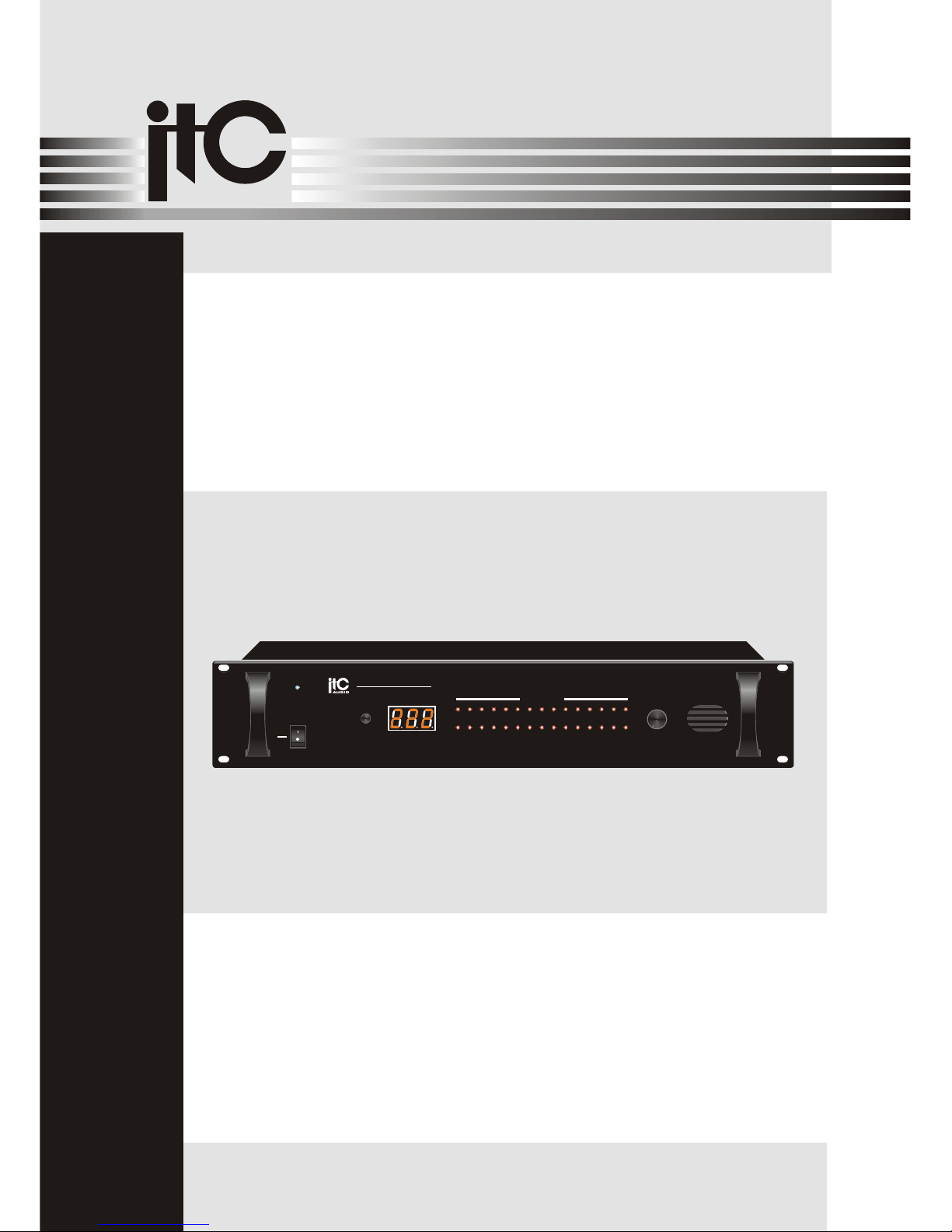
Please follow the instructions in this manual to obtain the optimum results from this unit.
We also recommend that you keep this manual handy for future reference.
OPERATION MANUAL
T-6723
MIXER AMPLIFIER
PUBLIC ADDRESS SYSTEM
AUDIOAUDIO
ON
OFF
POWER
11 12 13
14
15
1
2
3
4
5
6
7
8
9
10
ALARM ZONES
1617181920 21 22 23
24
25
2627282930
VOLUME
5
0
1
2
3
4 6
7
8
9
10
REST
EMERGENCY SWITCH
T-6723
Page 2

2
TABLE OF CONTENTS
1. SAFETY PRECAUTIONS ...................................................................................3
2. GENERAL DESCRIPTION ................................................................................5
3. FEATURES ...........................................................................................................5
4. NOMENCLATURE AND FUNCTIONS
4.1 Front Panel ......................................................................................................... 6
4.2 Rear Panel..........................................................................................................7
5.
5.1 ..............................................................................8
5.2 .............................................................................................8
5.3 .................................................................................... 8
5.4 Reset............................................................................................................... 8
5.5 Address Tag Setup............................................................................................. 8
6. APPLICATIONS .................................................................................................10
7.SPECIFICATIONS .............................................................................................11
8.DIMENSIONAL DIAGRAM .............................................................................. 12
OPERATION
Fire Alarm Collection Function
Alarm Light Display
Mp3 Alarm Music Player
Page 3
Be sure to read the instructions in this section carefully before use.
Make sure to observe the instructions in this manual as the conventions of safety symbols and messages
regarded as very important precautions are included.
We also recommend you keep this instruction manual handy for future reference.
Safety Symbol and Message Conventions
Safety symbols and messages described below are used in this manual to prevent bodily injury and property
damage which could result from mishandling. Before operating your product, read this manual first and
understand the safety symbols and messages so you are thoroughly aware of the potential safety
Indicates a potentially hazardous situation which, if mishandled, could
result in death or serious personal injury.
Indicates a potentially hazardous situation which, if mishandled, could
result in moderate or minor personal injury, and/or property damage.
When Installing the Unit
Do not expose the unit to rain or an environment
where it may be splashed by water or other liquids,
as doing so may result in fire or electric shock.
Use the unit only with the voltage specified on the
unit. Using a voltage higher than that which is
specified may result in fire or electric shock.
Do not cut, kink, otherwise damage nor modify the
power supply cord. In addition, avoid using the
power cord in close proximity to heaters, and never
place heavy objects -- including the unit itself -- on
the power cord, as doing so may result in fire or
electric shock.
Be sure to replace the unit's terminal cover after
connection completion. Because high voltage is
applied to the speaker terminals, never touch these
terminals to avoid electric shock.
Be sure to ground to the safety ground (earth)
terminal to avoid electric shock. Never ground to a
gas pipe as a catastrophic disaster may result.
Avoid installing or mounting the unit in unstable
locations, such as on a rickety table or a slanted
surface. Doing so may result in the unit falling
down, causing personal injury and/or property
damage.
When the Unit is in Use
Should the following irregularity be found during
use, immediately swh off the power, disconnect
the power supply plug from the AC outlet and
contact your nearest dealer. Make no
further attempt to operate the unit in this condition
as this may cause fire or electric shock.
If you detect smoke or a strange smell coming
from the unit.
If water or any metallic object gets into the unit
If the unit falls, or the unit case breaks
If the power supply cord is damaged (exposure of
the core, disconnection, etc.)
If it is malfunctioning (no tone sounds.)
To prevent a fire or electric shock, never open nor
remove the unit case as there are high voltage
components inside the unit. Refer all servicing to
your nearest dealer.
ITC
ITC
Do not place cups, bowls, or other containers of
liquid or metallic objects on top of the unit. If they
accidentally spill into the unit, this may cause a fire
or electric shock.
Do not insert nor drop metallic objects or
flammable materials in the ventilation slots of the
unit's cover, as this may result in fire or electric
shock.
3
1. SAFETY PRECAUTIONS
Page 4
An all-pole mains swh with a contact separation of at least 3 mm in each pole shall be incorporated in
the electrical installation of the building.
When Installing the Unit
Never plug in nor remove the power supply plug
with wet hands, as doing so may cause electric
shock.
When unplugging the power supply cord, be sure
to grasp the power supply plug; never pull on the
cord itself. Operating the unit with a damaged
power supply cord may cause a fire or electric
shock.
When moving the unit, be sure to remove its power
supply cord from the wall outlet. Moving the unit
with the power cord connected to the outlet may
cause damage to the power cord, resulting in fire or
electric shock. When removing the power cord, be
sure to hold its plug to pull.
Do not block the ventilation slots in the unit's cover.
Doing so may cause heat to build up inside the unit
and result in fire.
Avoid installing the unit in humid or dusty locations,
in locations exposed to the direct sunlight, near the
heaters, or in locations generating sooty smoke or
steam as doing otherwise may result in fire or
electric shock.
When the Unit is in Use
Do not place heavy objects on the unit as this may
cause it to fall or break which may result in
personal injury and/or property damage. In
addition, the object itself may fall off and cause
injury and/or damage.
Make sure that the volume control is set to
minimum position before power is swhed on.
Loud noise produced at high volume when power is
swhed on can impair hearing.
Do not operate the unit for an extended period of
time with the sound distorting. This is an indication
of a malfunction, which in turn can cause heat to
generate and result in a fire.
Contact your dealer as to the cleaning. If
dust is allowed to accumulate in the unit over a
long period of time, a fire or damage to the unit
may result.
ITC
If dust accumulates on the power supply plug or in
the wall AC outlet, a fire may result. Clean it
periodically. In addition, insert the plug in the wall
outlet securely.
Swh off the power, and unplug the power supply
plug from the AC outlet for safety purposes when
cleaning or leaving the unit unused for 10 days or
more. Doing otherwise may cause a fire or electric
shock.
SAFETY PRECAUTIONS
4
Page 5
5
3. FEATURES
2. GENERAL DESCRIPTION
1.Emergency signal warning function.
2.Warning trigger player automation.
3.Have 30road division warning.
4.30 filed input,full automation identify,expand to300.
The T-6723 is a public address emergency swh with can provide an ideal public address solution from
small to big places such us mosques, schools, hotels and factories to train stadium and air stations.
Page 6
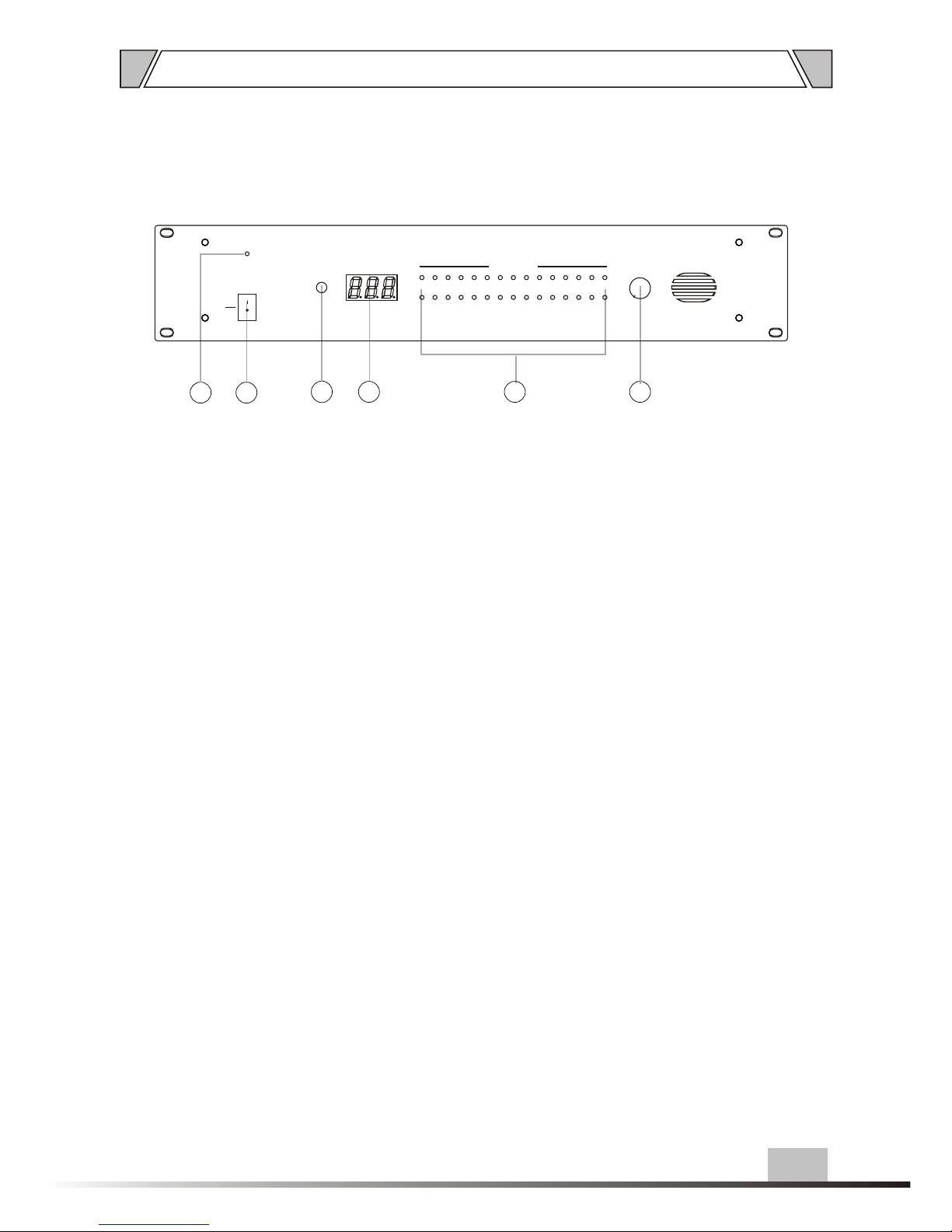
6
4.1 FRONT PANEL
1. POWER
Power indicator
2. POWER SWITCH
On top of the opening Power
Press the end, power shut down
3. ALARM LAYER
Reset button
2
4. ALARM LAYER
Display the working
5. SLAVE
1~30 filed warning indicator
6. VOLUME
Volume control
1
4 6
3
5
ON
OFF
POWER
11 12 13
14
15
1
2
3
4
5
6
7
8
9
10
ALARM ZONES
1617181920 21 22 23
24
25
2627282930
VOLUME
5
0
1
2
3
4 6
7
8
9
10
REST
Page 7
7
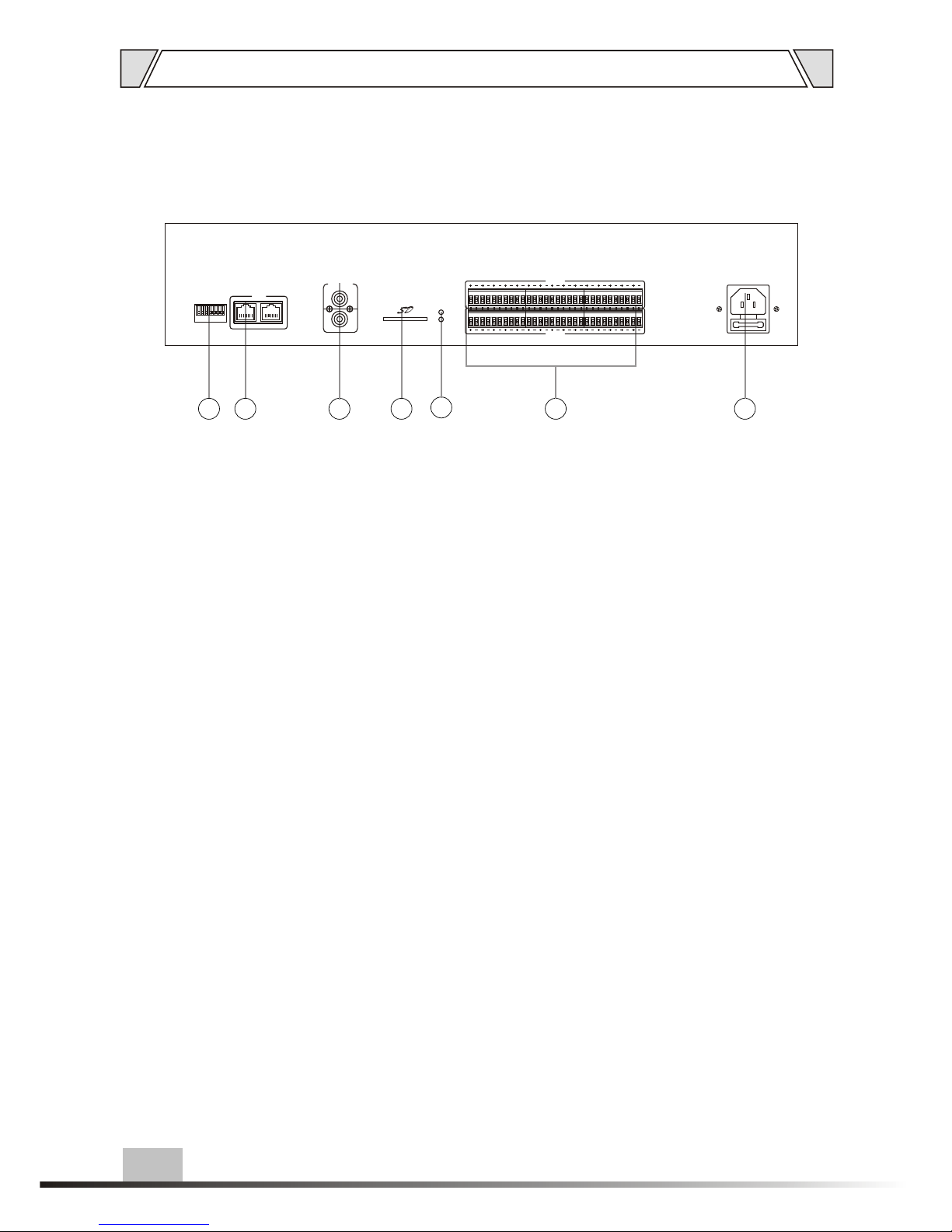
NOMENCLATURE AND FUNCTIONS
14.STATUS INDICATOR
When the SD card is running, PLAYING
(green light), when no SD card, ERRER
(red light).
15.IN 1~30
1-30 field warning singal input
16.~220-240V 50/60Hz POWER INPUT
10.ADDRESS TAG
Address choose
11.COM
Com communicate point
12.AUDIO SIGNAL OUTPUT
13.SD CARD
4.2 REAR PANEL
1615
14
13
12
1110
USE ONLY WITHA 250W FUSE
IN 1-15
IN 16-30
COM
ERROR
PLAYING
ADDRESS
TAG
OUTPUT
LL
RR
ON
5
162
738
4
DIP
Page 8

8
5.1 FIRE ALARM COLLECTION FUNCTION
5.OPERATION
30 Road fire alarm collection ,30 LED alarm display,as long as shorcircuit boards, after
triggering alarm input terminals, you can trigger internal alarms, internal CPU through the
calculations, the alarm signal by RJ422 communications will send out alarm signal, while
playing the corresponding zone alarm music,the corresponding LED display, expand able
to 300 partitions.
5.2 ALARM LIGHT DISPLAY
Shows the corresponding alarm zone, there are shorcircuit alarm signals, LED flashing display,
indicating shorcircuit alarm signal being sent , but not receive the confirmation signal.As the
main success of the alarm signal received , and respond to a verification signal, LED is in a
constant light condition.
5.3 Mp3 ALARM MUSIC PLAYER
When a short circuit alarm signal, the builin MP3 music player corresponds to alarm through
the alarm signal output will be sent to the amplifier music amplification , when the police
lifted, or receivedreset signal, the alarm music to stop playing.
1. when the address code is designed to 1,T-6223A is designed to first, MP3 music playback
1-300 zone alarm
2. when the address code designed for 2 pm ,T-6223A is designed to second, MP3 players
1-300 area pre-alarm music
3. When the address code designed for 3,T-6223A is designed to third sets,MP3 playback
signal 1-300 Area undo Music
4. When the address code designed other time,T-6223A Zhizuo alarm collection use,builin
Mp3 invalid
Note: SD card MP3 storage method: extended to 300 partition, the SD card root directory
need to build three files, folders, file names are named 1,2,3, each folder must deposit
100 MP3, and numbered 1-100 , when the insufficient number of partitions when the
number of MP3, play the last one, but the Mp3 songs in front of 100 is necessary for a
storage folder mode
5.4 RESET
T-6223A at alarm state,press reset button,you can cancel all of the T-6223A alarm state,and
stop MP3 playback
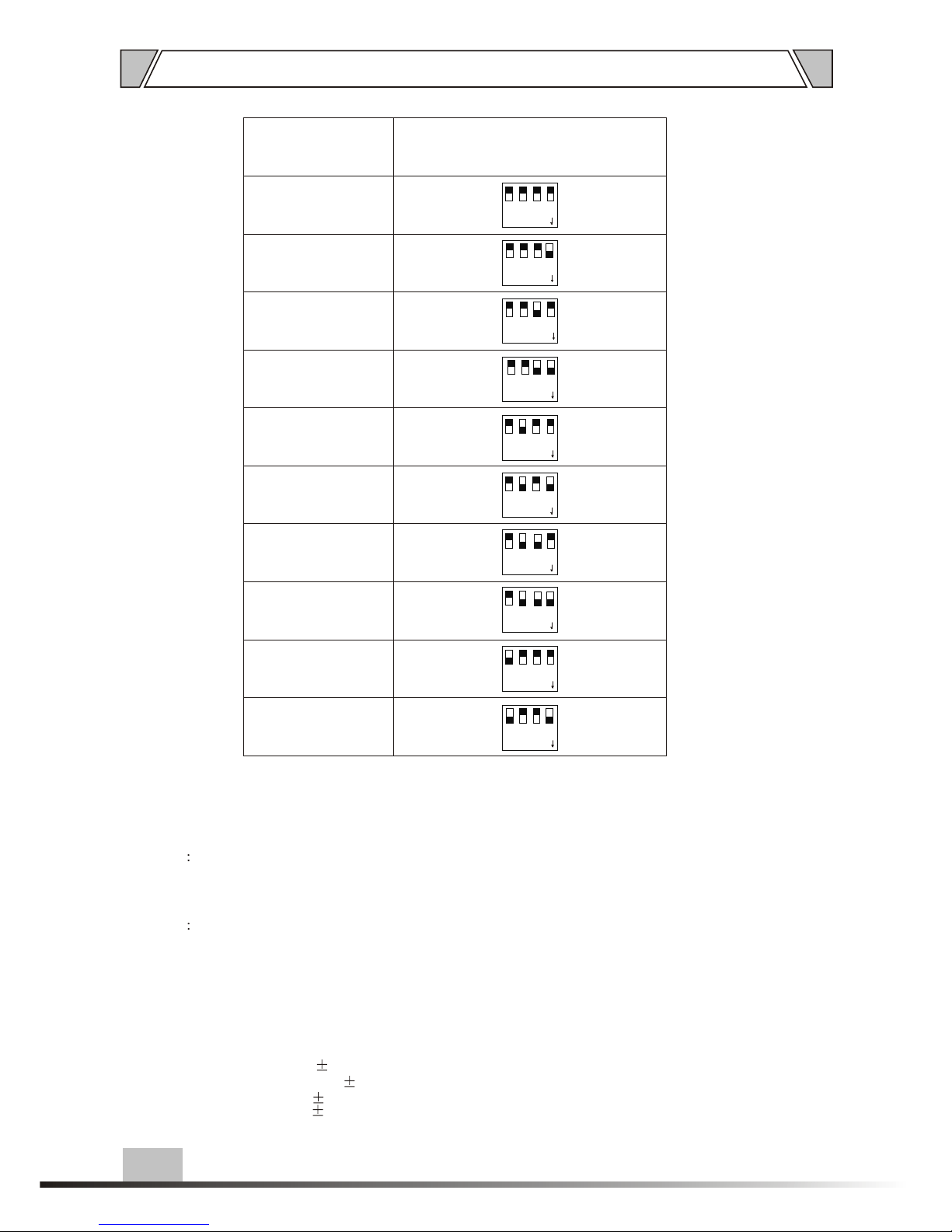
5.5 ADDRESS TAG SETUP
1.Address code swh 1-2-3-4 No. 1-4, as
the addresses design of T-6223A
Page 9
9
ADDRESS COAD
1
1
1
1
2
2
2
2
3
3
3
3
4
4
4
4
DIP
DIP
DIP
DIP
ON
ON
ON
ON
1 2 3 4
DIP ON
1 2 3 4
DIP ON
1122334
4
DIP
DIPONONONON
WARNING AREA
1-30
151-180
31-60
181-210
61-90
211-240
91-120
241-270
121-150
271-300
1122334
4
DIP
DIPONONONON
OPERATION
2.address code swh 5 NO.5 as a choice of alarm trigger method
3.Address code swh 6-7-8 No. 6 to NO.8 as a design of neighboring alarm
0 aopen-type trigger
1 regular closed Trigger
A normal open shorcircuit triggered mode: the methods is to shorcircuit the alarm input
port , trigger the alarm , T-6223A will keep in an alarm status after disconnecting the
alarm input . If want to cancel this status , press reset button directly , also other
machine can send a reset order through the RS422 port to T-6223A
B normal closed shorcircuit triggered mode, the method is keep the alarm input port
shorting,trigger the alarm,T-6223 A will discharge the alarm status automatically
after alarm short port disconnecting, through Tung RS422 port, it can send alarm
to withdraw the signal , cancel the corresponding alarm music , also through
pressing the third player to release music music.
Neighboring alert data communications sent through the Rj422
000 non-adjacent alarm
001 near police 1
010 adjacent Alarm 2
011 near alarm 3
100 near alarm 4
111 alarm region
Page 10
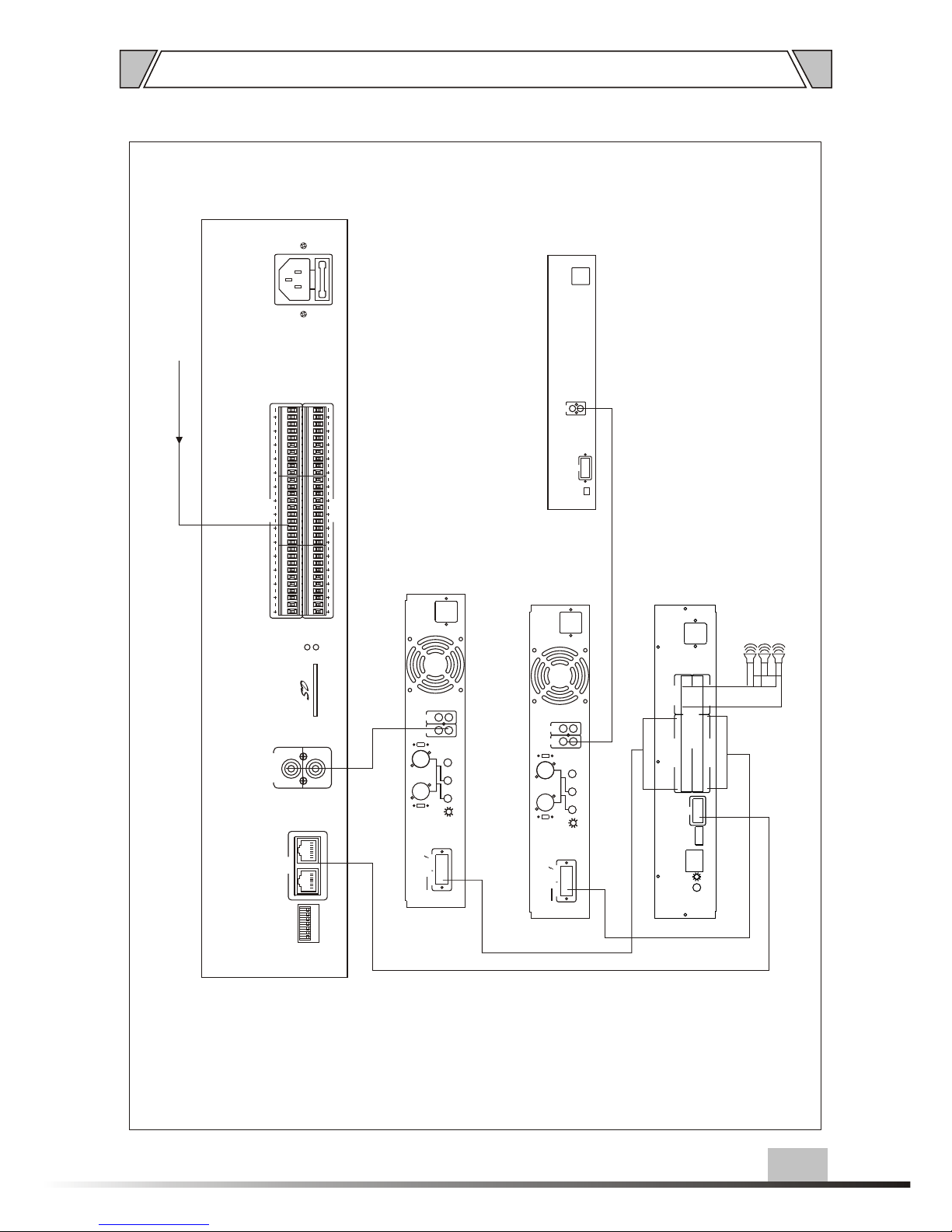
6. APPLICATIONS
REAR PANEL CONNECTIONS
FIRE ALARM SIGNAL INPUT
MIXER AMPLIFIER
PAGING SELECTOR
MIC 2
IN
CHIME
VOL
ADDRESS
COM
ALARM IN(CH1~CH10)
MUSIC IN(CH1~CH10)
OUT(CH6~CH10)
OUT(CH1~CH5)
+
-
+
-
+
-
+
-
+
-
+
-
+
-
+
-
+
-
+
-
+
-
+
-
+
-
+
-
+
-
+
-
+
-
+
-
+
-
+
-
+
-
+
-
+
-
+
-
+
-
+
-
+
-
+
-
+
-
+
-
ALARM IN ALARM OUT
+ A -+ B - + B -+ A -
+
- -
+
+
+
LINE1
IN
LINE2
IN
AUDIO
OUT
MIXER AMPLIFIER
MIC2
MIC3
PHANTOM
+48V
PHANTOM
+48V
OUTPUT
COM 4-16 70V 100V
AUX
OUT
MUTE
EMC INPUT
LINE 1 LINE 2
OFF
ON
OFF
ON
MIC2
MIC3
PHANTOM
+48V
PHANTOM
+48V
OUTPUT
COM 4-16 70V 100V
AUX
OUT
MUTE
EMC INPUT
LINE 1 LINE 2
OFF
ON
OFF
ON
AUDIO
OUT
R
L
COM
ADRESS TAG
AUDIO SOURCES
SPEAKERS
10
USE ONLY WITHA 250W FUSE
IN 1-15
IN 16-30
COM
ERROR
PLAYING
ADDRESS
TAG
OUTPUT
LL
RR
ON
5
1
6
2
7
3
8
4
DIP
Page 11
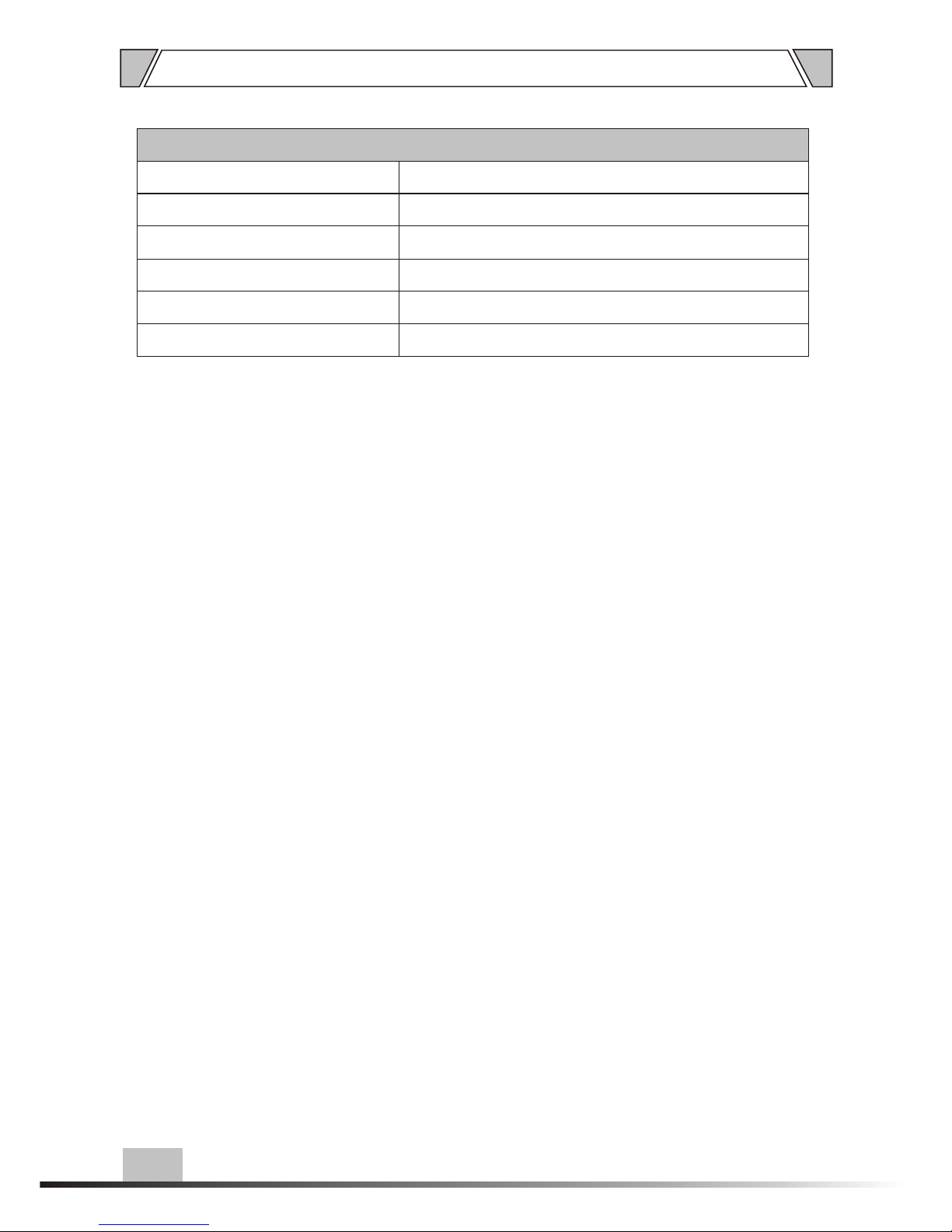
7.SPECIFICATIONS
11
MODEL
EMERGENCY SWHEMERGENCY SWH
T-6723
DIMENSION(mm)
NET WEIGHT
GROSS WEIGHT
484X353X88
POWER CONSUMPTION
POWER REQUIREMENTS
~220-240V 50/60Hz
6.5Kg
5.3Kg
30W
Page 12
USE ONLY WITHA 250W FUSE
IN 1-15
IN 16-30
COM
ERROR
PLAYING
ADDRESS
TAG
OUTPUT
LL
RR
ON
5
162
738
4
DIP
12
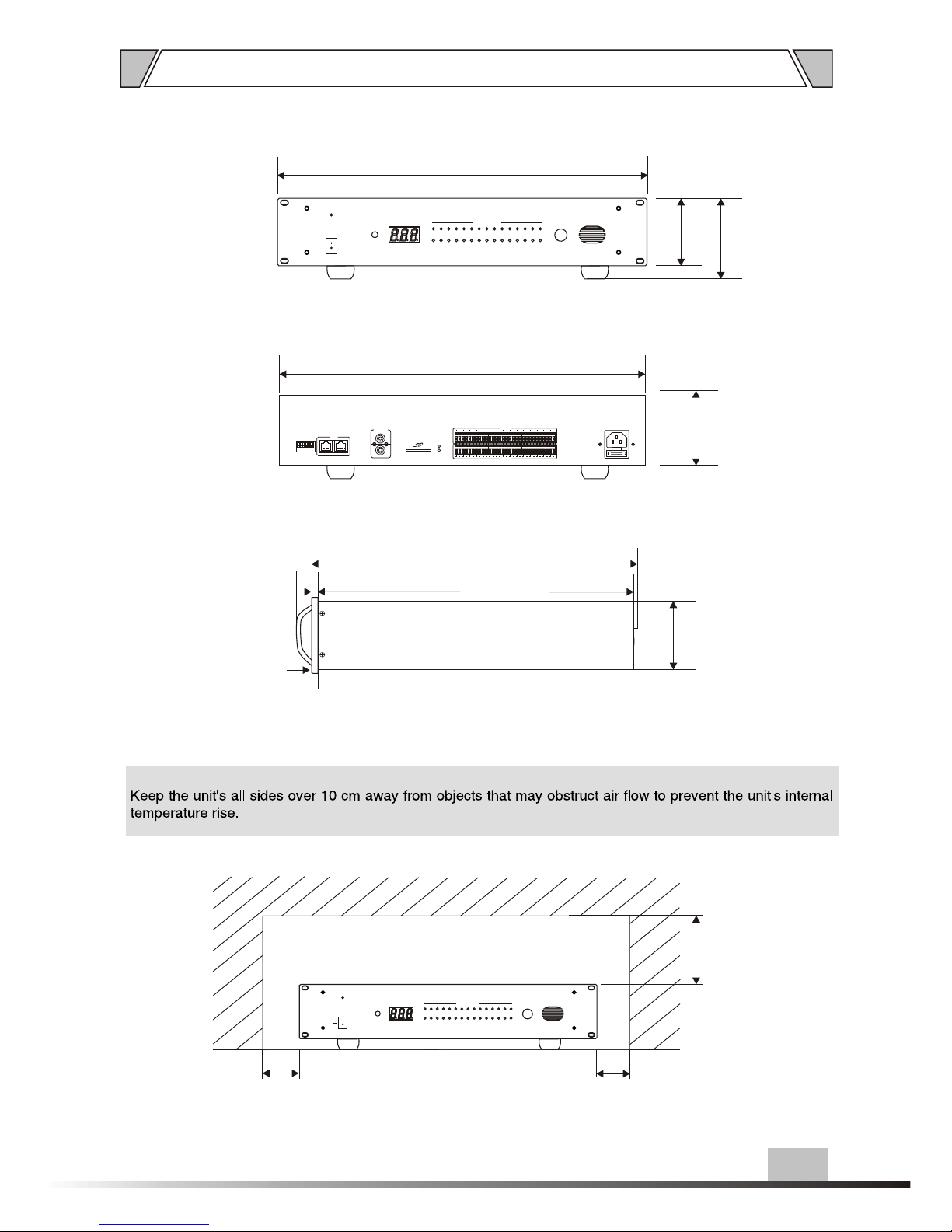
8. DIMENSIONAL DIAGRAM
100
Over
100
Over
Over
100
UNIT :mm
6
84
84
25
328
322
88
94
436
484
UNIT :mm
ON
OFF
POWER
11 12 13
14
15
1
2
3
4
5
6
7
8
9
10
ALARM ZONES
1617181920 21 22 23
24
25
2627282930
VOLUME
5
0
1
2
3
4 6
7
8
9
10
REST
ON
OFF
POWER
11 12 13
14
15
1 2
3
4
5
6 7
8 9
10
ALARM ZONES
1617181920 21 22 23
24
25
2627282930
VOLUME
5
0
1
2
3
4 6
7
8
9
10
REST
Page 13

PUBLIC ADDRESS SYSTEM
VersionV0.1
AUDIOAUDIO
 Loading...