

Page 1
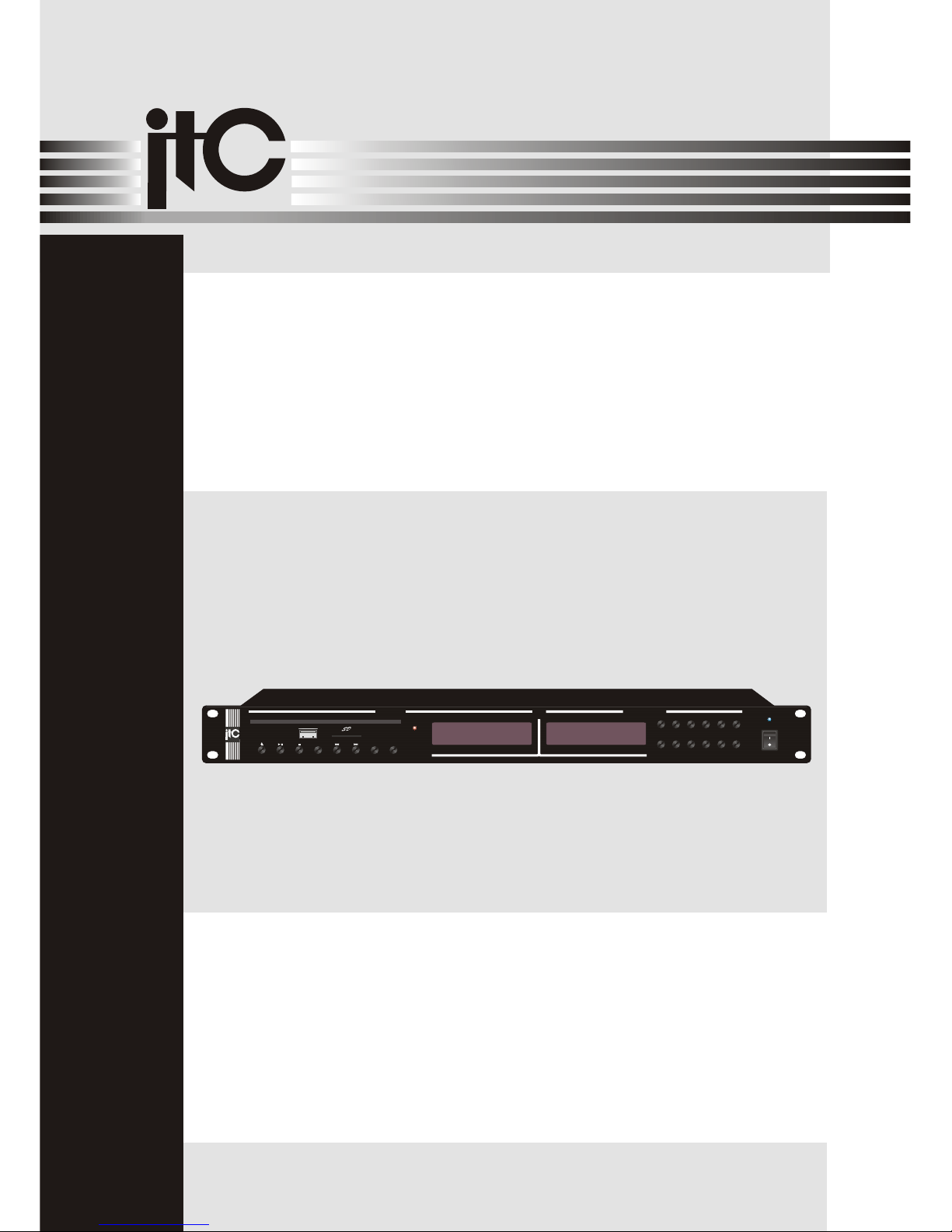
Please follow the instructions in this manual to obtain the optimum results from this unit.
We also recommend that you keep this manual handy for future reference.
OPERATION MANUAL
PUBLIC ADDRESS SYSTEM
AUDIOAUDIO
CD + TUNER PLAYER
T-2221
REMOTE
AM/FM DTS TUNER
PREV
NEXT
USB/CD
EJECT PLAY STOP
PLAY
MODE
MUTE
USB
UP
6
AUTO/
MANUAL
5
4
MEM
3
ST/MON
AM/FM
2
1
DOWN
POWER
CD PLAYER
CD + TUNER PLAYER
T-2221
IR STATUS
AUDIOAUDIO
Page 2

2
TABLE OF CONTENTS
1. SAFETY PRECAUTIONS .......................................................................................3
2. FEATURES ...............................................................................................................5
3. NOMENCLATURE AND FUNCTIONS
3.1 Front Panel .......................................................................................................... 5
3.2 Real Panel ............................................................................................................6
3.3 Remote control .....................................................................................................6
4. CONTROL INSTRUCTION..................................................................................... 7
5. .................................................................................................. 8
6. .................................................................................................. 9
BLOCK DIAGRAM
SPECIFICATIONS
Page 3
Be sure to read the instructions in this section carefully before use.
Make sure to observe the instructions in this manual as the conventions of safety symbols and messages
regarded as very important precautions are included.
We also recommend you keep this instruction manual handy for future reference.
Safety Symbol and Message Conventions
Safety symbols and messages described below are used in this manual to prevent bodily injury and property
damage which could result from mishandling. Before operating your product, read this manual first and
understand the safety symbols and messages so you are thoroughly aware of the potential safety
Indicates a potentially hazardous situation which, if mishandled, could
result in death or serious personal injury.
Indicates a potentially hazardous situation which, if mishandled, could
result in moderate or minor personal injury, and/or property damage.
When Installing the Unit
Do not expose the unit to rain or an environment
where it may be splashed by water or other liquids,
as doing so may result in fire or electric shock.
Use the unit only with the voltage specified on the
unit. Using a voltage higher than that which is
specified may result in fire or electric shock.
Do not cut, kink, otherwise damage nor modify the
power supply cord. In addition, avoid using the
power cord in close proximity to heaters, and never
place heavy objects -- including the unit itself -- on
the power cord, as doing so may result in fire or
electric shock.
Be sure to replace the unit's terminal cover after
connection completion. Because high voltage is
applied to the speaker terminals, never touch these
terminals to avoid electric shock.
Be sure to ground to the safety ground (earth)
terminal to avoid electric shock. Never ground to a
gas pipe as a catastrophic disaster may result.
Avoid installing or mounting the unit in unstable
locations, such as on a rickety table or a slanted
surface. Doing so may result in the unit falling
down, causing personal injury and/or property
damage.
When the Unit is in Use
Should the following irregularity be found during
use, immediately switch off the power, disconnect
the power supply plug from the AC outlet and
contact your nearest dealer. Make no further
attempt to operate the unit in this condition as this
may cause fire or electric shock.
If you detect smoke or a strange smell coming
from the unit.
If water or any metallic object gets into the unit
If the unit falls, or the unit case breaks
If the power supply cord is damaged (exposure of
the core, disconnection, etc.)
If it is malfunctioning (no tone sounds.)
To prevent a fire or electric shock, never open nor
remove the unit case as there are high voltage
components inside the unit. Refer all servicing to
your nearest dealer.
ITC
ITC
Do not place cups, bowls, or other containers of
liquid or metallic objects on top of the unit. If they
accidentally spill into the unit, this may cause a fire
or electric shock.
Do not insert nor drop metallic objects or flammable
materials in the ventilation slots of the unit's cover,
as this may result in fire or electric shock.
3
1. SAFETY PRECAUTIONS
Page 4
An all-pole mains switch with a contact separation of at least 3 mm in each pole shall be incorporated in
the electrical installation of the building.
When Installing the Unit
Never plug in nor remove the power supply plug
with wet hands, as doing so may cause electric
shock.
When unplugging the power supply cord, be sure
to grasp the power supply plug; never pull on the
cord itself. Operating the unit with a damaged
power supply cord may cause a fire or electric
shock.
When moving the unit, be sure to remove its power
supply cord from the wall outlet. Moving the unit
with the power cord connected to the outlet may
cause damage to the power cord, resulting in fire or
electric shock. When removing the power cord, be
sure to hold its plug to pull.
Do not block the ventilation slots in the unit's cover.
Doing so may cause heat to build up inside the unit
and result in fire.
Avoid installing the unit in humid or dusty locations,
in locations exposed to the direct sunlight, near the
heaters, or in locations generating sooty smoke or
steam as doing otherwise may result in fire or
electric shock.
When the Unit is in Use
Do not place heavy objects on the unit as this may
cause it to fall or break which may result in
personal injury and/or property damage. In
addition, the object itself may fall off and cause
injury and/or damage.
Make sure that the volume control is set to
minimum position before power is switched on.
Loud noise produced at high volume when power is
switched on can impair hearing.
Do not operate the unit for an extended period of
time with the sound distorting. This is an indication
of a malfunction, which in turn can cause heat to
generate and result in a fire.
Contact your dealer as to the cleaning. If dust
is allowed to accumulate in the unit over a long
period of time, a fire or damage to the unit may
result.
ITC
Switch off the power, and unplug the power supply
plug from the AC outlet for safety purposes when
cleaning or leaving the unit unused for 10 days or
more. Doing otherwise may cause a fire or electric
shock.
SAFETY PRECAUTIONS
4
If dust accumulates on the power supply plug or in
the wall AC outlet, a fire may result . Clean it
periodically. In addition,insert the plug in the wall
outlet securely.
Page 5
2. FEATURES
1.
2.
3.
4.
5.
6.
Dual music source player, built in AM/FM tuner
Built in CD, MP3 source
One road CD output
One road AM/FM tuner output
With IR remote control function
With independent volume control
3. NOMENCLATURE AND FUNCTIONS
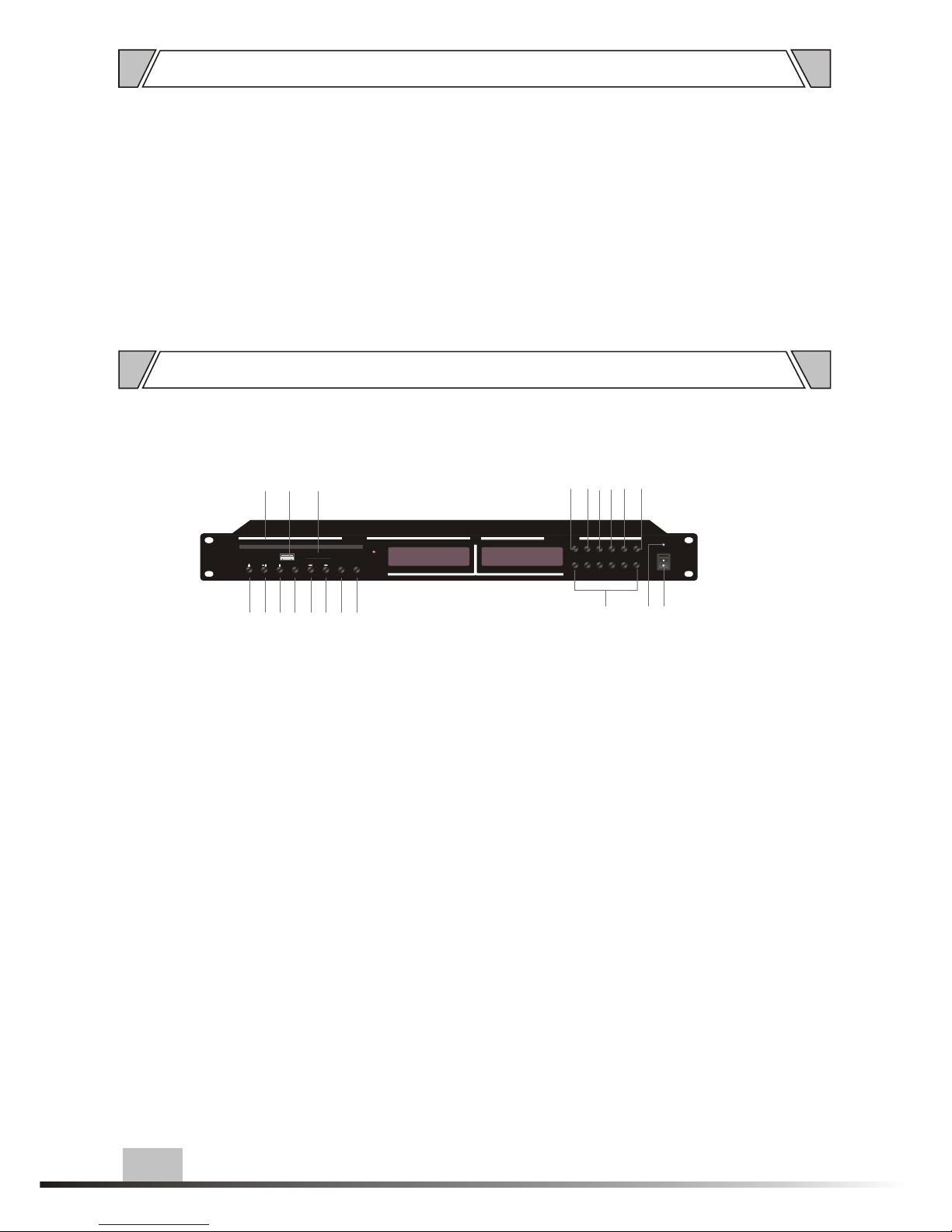
3.1 FRONT PANEL
1
5
REMOTE
AM/FM DTS TUNER
PREV
NEXT
USB/CD
EJECT PLAY STOP
PLAY
MODE
MUTE
SD
USB
UP
6
AUTO/
MANUAL
5
4
MEM
3
ST/MON
AM/FM
2
1
DOWN
POWER
CD PLAYER
IR STATUS
17
10
2 4
5 678
181920
9
1615
141312
11
3
1.
3.
5.
7.
9.
In/out bin
2. Play
Stop
4. Play mode (USB/SD card)
Last
6. Next
USB mode/CD mode switch
8. Mute
Tuner channel select
10.Power indicator
11.
13.
15.
17.
19.
Power switch
12. Down
UP
14. AM/FM tuner mode (manual/ auto mode)
Menu
16. Next
Mute
18. SD card slot
USB interface
20. Bin gate
NOTE:
The case has been connected with power cord, please insert power into the grounded
power grid, avoid static electricity interrupting to damage equipment.
Page 6
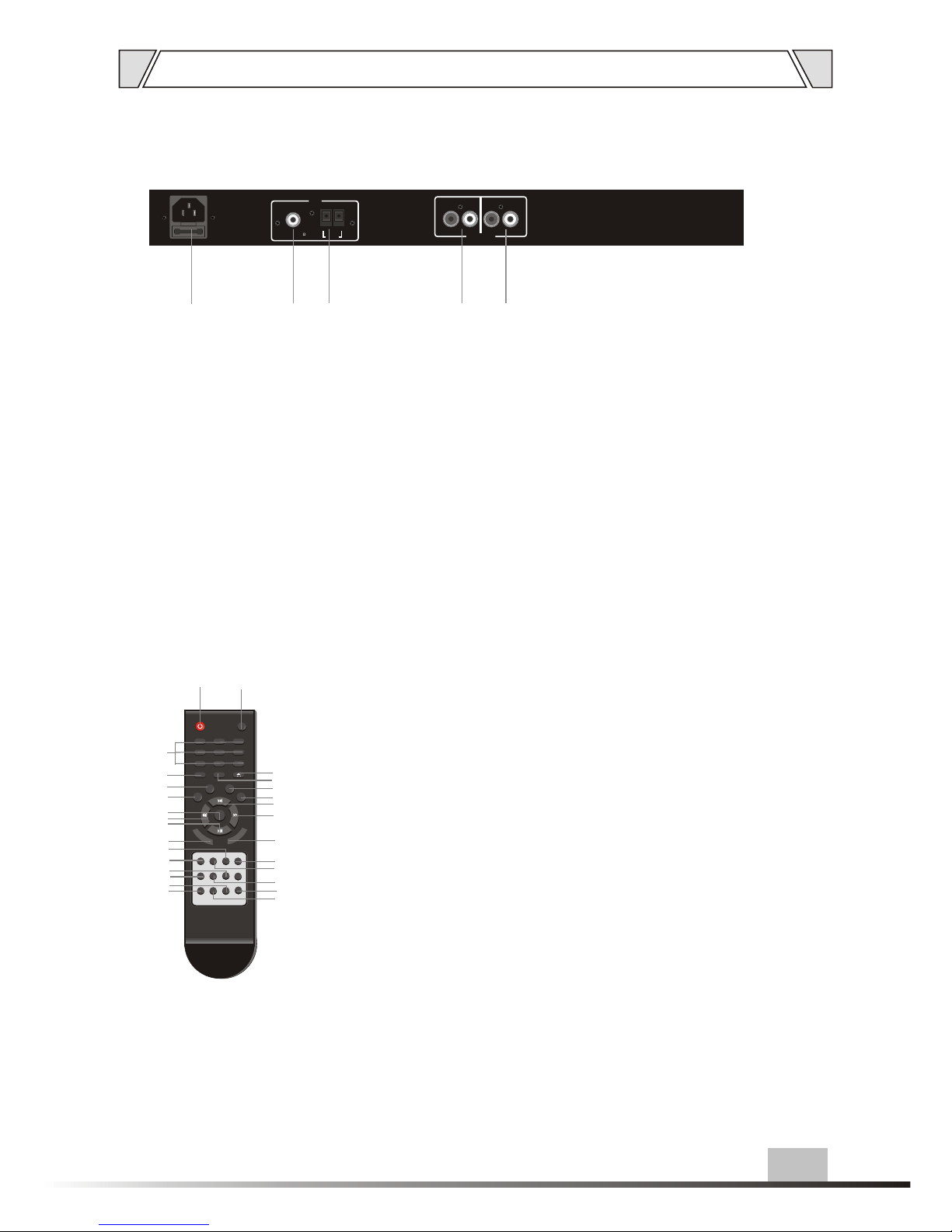
NOMENCLATURE AND FUNCTIONS
3.2 REAR PANEL
21. ~220-240V 50/60Hz power input
22. FM antenna
23. AM antenna. Stop
24. Tuner output
"R" right channel "L" left channel
25. CD output
"R" right channel " L" left channel
3.3 REMOTE CONTROL
6
1 Power button
2 Programming key
3 Number keys
4 Number keys
5 Play / Pause
6 Duplicate keys
7 Menu key
15 Channel shift keying
16 On / Off key
17 Enter
18 Manual key
19 Radio button
20 Next button
21 Mute button
8 Last
9 REW
10 Increase/decrease volume
11 Manual / automatic mode button
12 Previous button
13 Radio auto / manual switch button
14 Radio button
22 Left and right adjustment key
23 Next
24 Fast forward key
25 USB / CD key conversion
26 Stop button
27 Channel +10 hex key
28 In / out doors button
23
5
4
6
7
8
9
10
11
12
13
14
15
16
17
19
18
µçÔ´
ÔÝÍ£
Í£Ö¹
È·ÈÏ
1
2 3
4
5 6
7 8
9
0/10
10+
ѡʱ
ÉèÖÃ
²¥·Å
·µ»Ø
±êÌâ
¿ìÍË
¿ì½ø
ÉÏÒ»Çú
ÏÂÒ»Çú
ÒôÁ¿+
ÉùµÀ
¸ù²Ëµ¥
VGA
PBC ÓïÒô
ÒôÁ¿-
×ÖÄ» ½Ç¶È
3D
ÆÁÏÔ
Öظ´
¾²Òô
ÖÆʽ
POWER
1
2 3
4
5 6
7 8
9
0
AM/FM
OPEN/
CLOSE
+10
PLAY/PAUSE
STOP
USB/CD
ENTER
L
R
PRO
GA
M
SWITCH
F.INPUT
MONO/ST
MEM
AUTO MEM
AUTO/
MANUAL
TUNER- TUNER+
MUTE
CH-
CH+
TUNER/CD
R
E
P
E
A
T
V
O
L+
V
O
L-
1 2
3
20
21
22
24
25
26
27
28
ANT
FM
UNBAL/75
AM
LOOP
ANT
USE ONLY WITHA 250W FUSE
TUNER
CD PLAYER
AUDIO OUT
R L R L
25
21
242322
Page 7
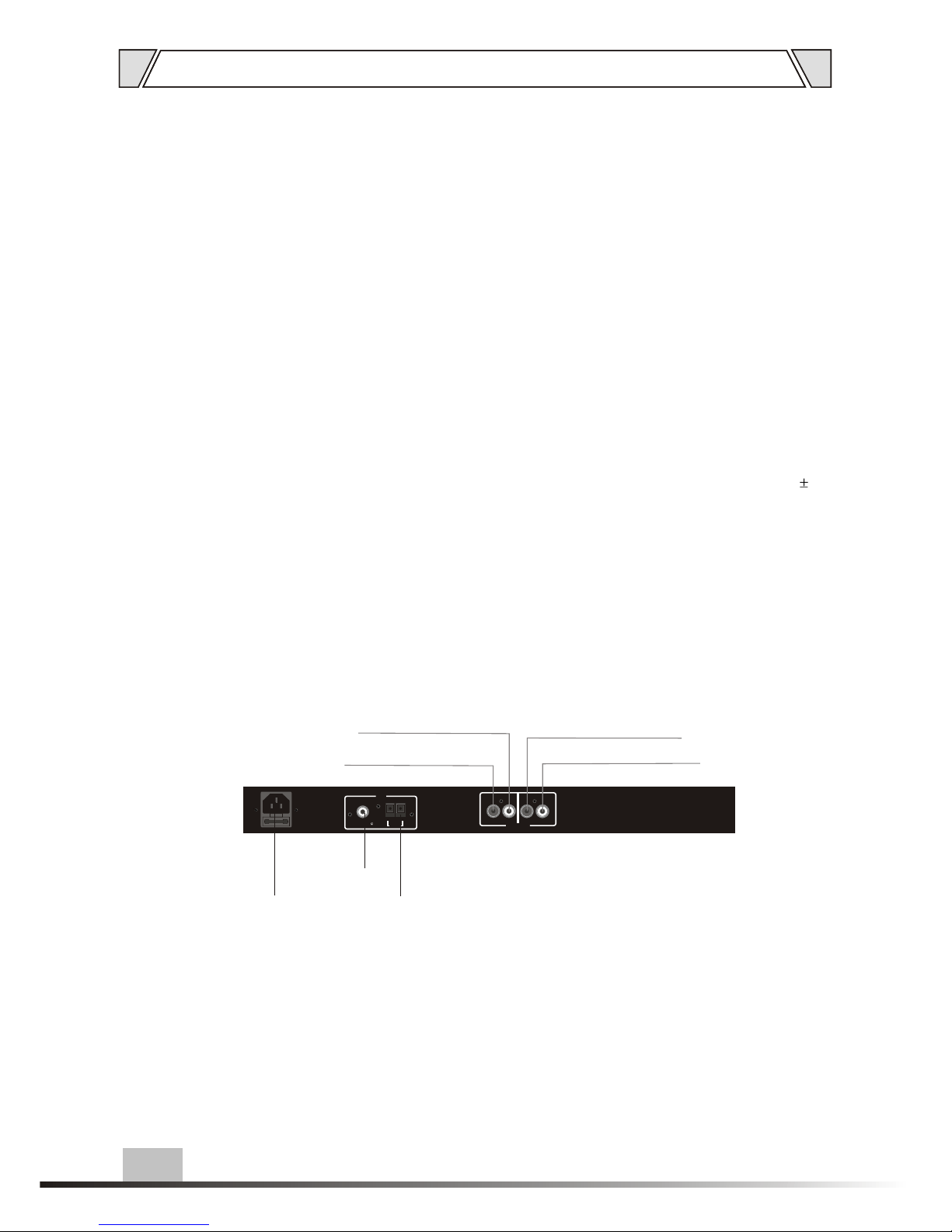
4.CONTROL INSTRUCTION
Connection:
7
ANT
FM
UNBAL/75
AM
LOOP
ANT
USE ONLY WITHA 250W FUSE
TUNER
CD PLAYER
AUDIO OUT
R L R L
-240 /60HzConnect ~220 V 50 power
Connect FM antenna
Connect AM antenna
CD left channel output
CD right channel output
AM/FM tuner right channel output
AM/FM tuner left channel output
1.
2.
3.
4.
5.
6.
7.
8.
9.
10.
11.
Press "Power Switch",connect with power,power indicator is on,display shows CLOSE,
equipment will be reading status in 2 seconds,display shows CORD,if there is no disc,
it will show NO DISC.
Press "IN/EJECT", display shows OPEN, player will eject tray automatically.
Put disc onto tray.
Press "In/EJECT" again, display shows CLOSE, it begins reading Disc (CORD)
in 2 seconds.
No matter what disc, after reading, it will automatically cycle play all.
Press STOP, stop, it shows total songs and total time.
Press PLAY, it begins cycle play all.
Insert USB/SD card, press USB/SD button on remote control,it can read the content,
and can control by re mote control or the function keys on the front panel.(NOTE: The
max for the USB is 8GB)
If there is no disc in the player, it will automatically convert to read USB or SD card.
The valid distance for the remote control is within 6 meters, the valid angle is 45
degree.
Press remote control can control specified CD/MP3 function.
Page 8
S
up
p
l
y
P
ow
e
r
MC
U
C
D
D
i
sp
l
ay
Tu
ne
r
D
i
sp
l
ay
T
u
n
er
Mod
u
l
e
C
D
V
ol
u
m
e
T
un
er
V
o
l
um
e
C
D
M
od
ul
e
L
R
Vol
um
e
O
U
TP
U
T
L
R
C
D
O
U
TP
U
T
~2
2
0
V
-2
4
0
V
5
0
/
6
0
Hz
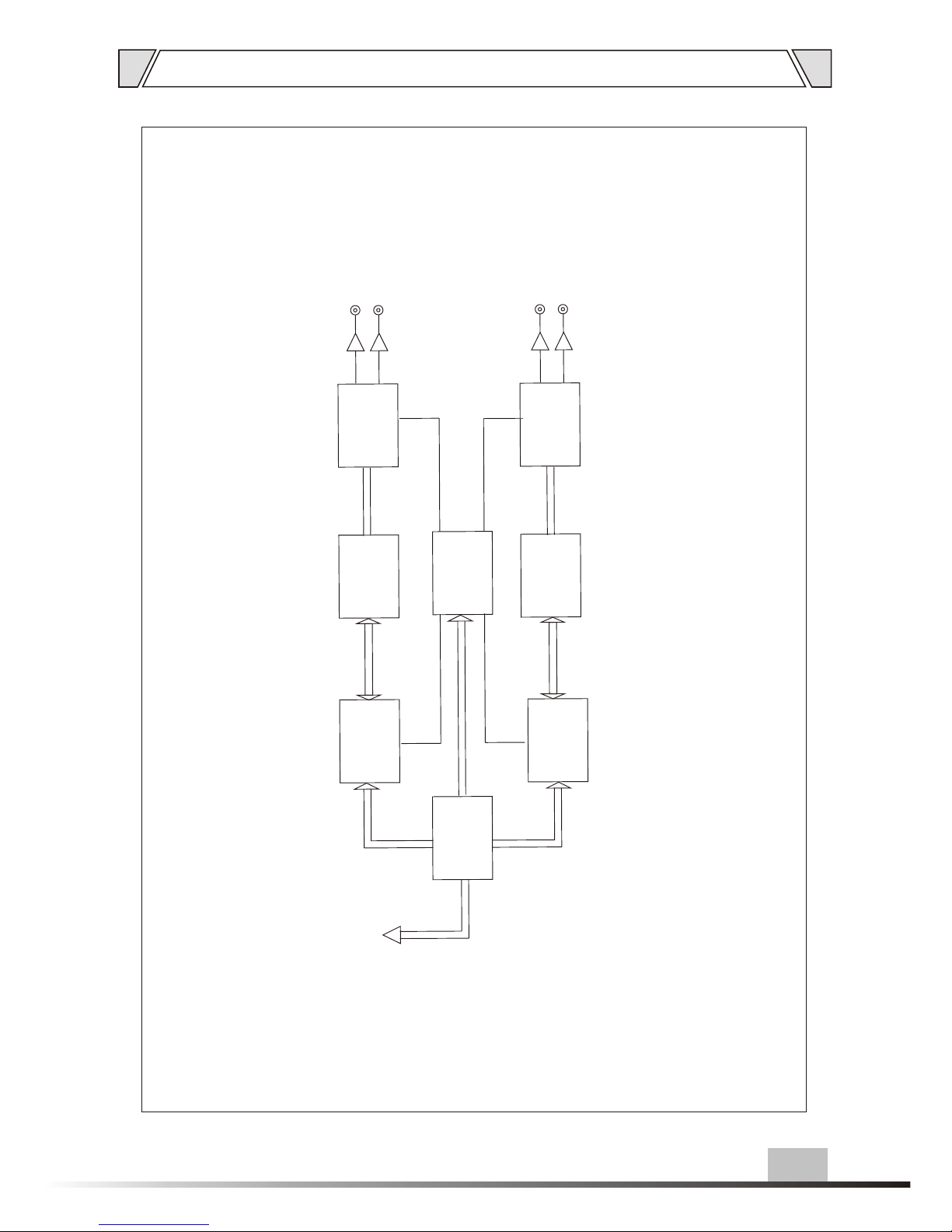
5. BLOCK DIAGRAM
8
Page 9
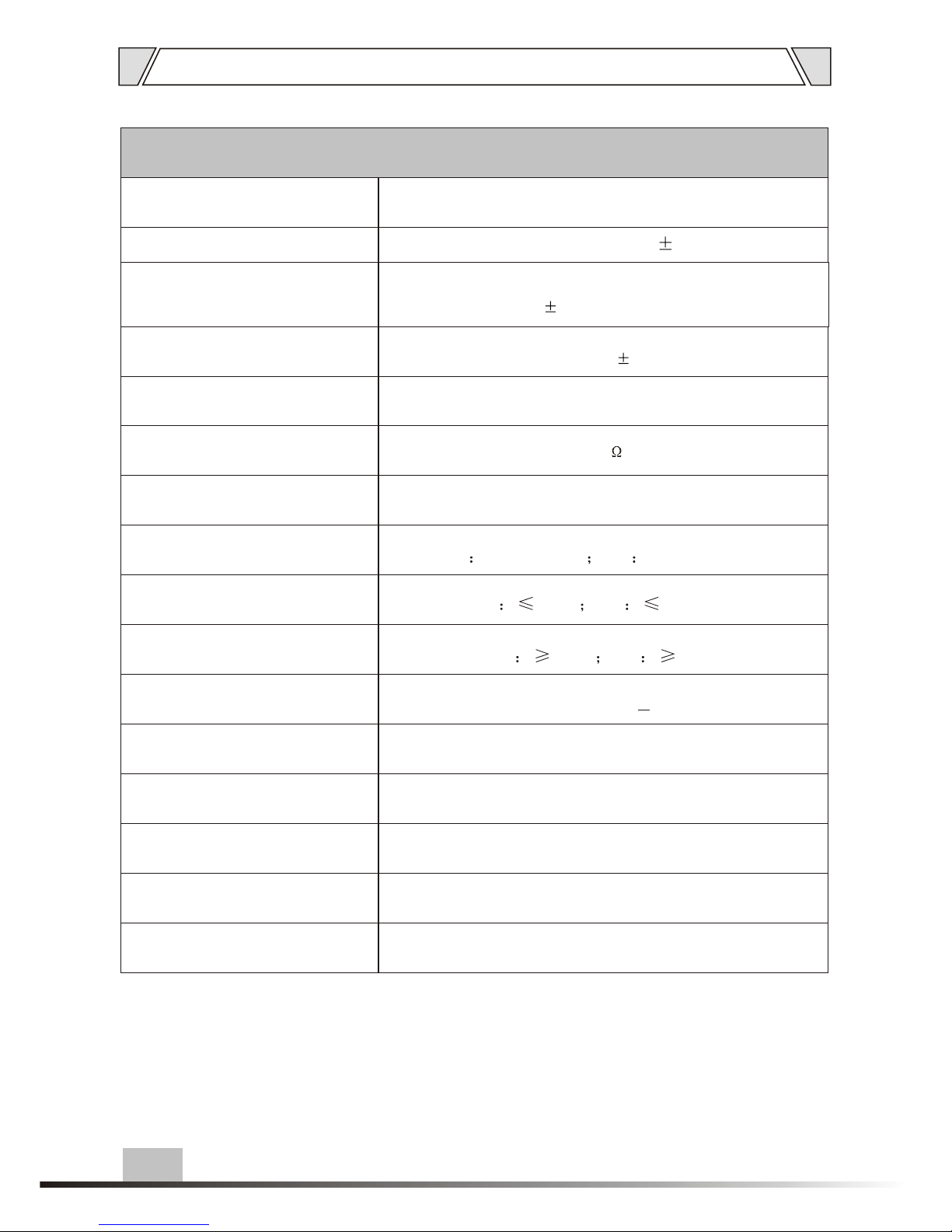
6. SPECIFICATIONS
T-2221
output noise
in pause status: 0.15 0.1mv
Monitor output
enter 300mv sine wave signal, max volume,
8ohms overload, output
non-lossy: 1.85 0.1V
Signal output range
enter 990hz sine wave signal -128kbps-44.1KHZ
-2.00Vpp
Signal:1.5 0.1V
Output level
500mV
Output impedance
1K
Power consumption
10VA
Frequency
FM 87-108HMZ AM 522-1611KHZ
Sensitivity
FM 20uV AM 6.0mV/m
SNR
FM 40dB AM 36dB
Communication protocol
20Hz~20KHz(+1dB)
Communication speed
RS422
Power input
4800BPS
Power input
~220-240V 50/60Hz
484X215X48
3.7Kg
Net weight
Dimension
9
Model
Page 10

PUBLIC ADDRESS SYSTEM
VersionV0.1
AUDIOAUDIO
 Loading...