

Page 1
Page 2

01
Page 3

iT7m Bluetooth Speaker with
Speakerphone User Guide
Bluetooth Speaker with Speakerphone
User Guide
Welcome to the iT7m Bluetooth Speaker
with Speakerphone.
Technology: This device is Bluetooth ready,
built on version 3.0. This device is compatible
with almost all Bluetooth enabled mobile
phones, tablets, laptops and other Bluetooth
enabled devices.
Bluetooth Version: Bluetooth V3.0,
backward compatible with previous
versions (V2.0, V2.1)
Bluetooth range: 10M, or approximately
33 feet.
Frequency: 2.4GHz, or 2400MHz
Brief introduction
The iT7m Bluetooth Speaker is a powerful
compact audio system. Crafted for mobile
use, the iT7m is engineered to produce a
clear, rich sound, resulting in the most
superior and remarkable audio performance.
Designed to impress, with stunning curves,
the iT7m offers style and durability to fit your
life, at home or on the go, with the latest in
02
Page 4
advanced technology, using Bluetooth 3.0 to
connect wirelessly to your mobile, Bluetooth
enabled devices, and is suitable for all A2DP
stereo Bluetooth devices, including iPad,
iPad2, iPhone, iPod Touch.
The iT7m Bluetooth Speaker is fully supported
by A2DP, allowing you to enjoy wireless stereo
music and it can also be connected using the
3.5mm audio cable.
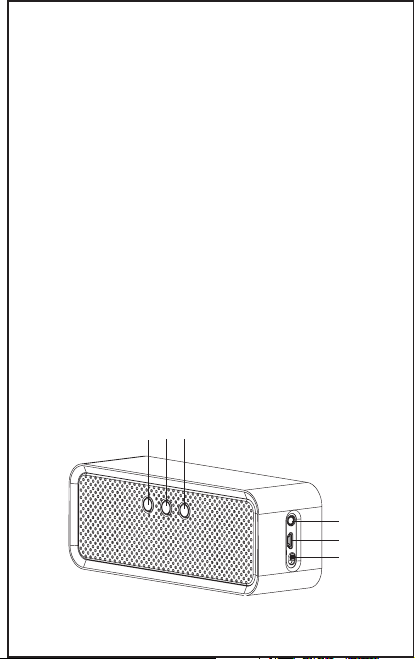
Product structure diagram
1. Multifunction button (press and hold for
eight (8) seconds to enter pairing mode)
2. Volume down
3. Volume up
4. Audio Input
5. Micro USB charging port
6. On/Off switch
123
4
5
6
03
Page 5

Basic operation
1.Turn ON: From the OFF position, locate
the ON/ OFF switch, slide the switch to the
ON position. The blue LED flashes with an
indication tone.
2.Turn OFF: From the ON position, locate
the ON/ OFF switch, slide the switch to the
OFF position. The red LED flashes with an
indication tone
3.Pairing: Turn ON the device, hold and
press the Multifunction button for 6 to 8
seconds, or until the red and blue LEDs
flash alternately, indicating that the iT7m
Bluetooth Speaker is in pairing mode and
searching for a device. Once a device is
found, you can manage your connection
through your Bluetooth enabled device to
complete the pairing process.
4.Connection: Connect your phone to the
iT7m Bluetooth Speaker after pairing is
successful.
5.Answer Call: While paired, press and
immediately release the Multifunction button
to answer an incoming call.
04
Page 6

6.End Call: To end a call simply press and
immediately release the Multifunction button,
a tone will sound to indicate the function has
been completed.
7.Reject Call: Press and hold the
Multifunction button for three (3) seconds to
reject the call; a tone will sound to indicate
the function has been completed.
8.Adjust Volume: A short press and release
of the VOL (+) button to turn up the volume; a
tone will sound when maximum volume is
reached. Similarly, a short press and release
of the VOL (-) button to turn down the volume;
a tone will sound when minimum volume is
reached.
9.Redial: IIn standby mode, press and
release the Multifunction button twice.
10.Voice Dial: IIn the standby mode, press
and hold the Multifunction button for 3
seconds. (This function requires that your
phone supports this functionality).
05
Page 7

11.Transfer Call from iT7m Bluetooth
Speaker to Phone:
During a call, press and hold the Multifunction
button for 3 seconds until you hear a tone; the
same operation can transfer the sound from
your phone to the iT7m Bluetooth Speaker.
12.Microphone Mute: Press and hold the
VOL(-) button to open and close the mute
function; a tone will sound to indicate the
function has been completed successfully.
13.Pause / Play: Short press and release
the Multifunction button to play or pause
music.
14.Previous and Next: While the music is
playing, press and hold the VOL (+) to select
Next, ; press and hold VOL (-) to select
Previous.
06
Page 8

Pairing with Bluetooth devices
Pairing is the process of connecting two
devices via Bluetooth.
For example, when using a Bluetooth enabled
mobile phone with the iT7m Bluetooth Speaker
it is necessary to operate the mobile phone
Bluetooth to search for Bluetooth devices,
select and then connect wirelessly with a PIN.
The iT7m Bluetooth Speaker pairing
steps are as follows:
1.Ensure that both the iT7m Bluetooth
Speaker, and the device you wish to connect
to, is powered ON.
2.On the device you wish to connect, access
the device’s Bluetooth Settings and enable
Bluetooth connections.
3.Search for, discover, add, or find new
devices.
4.Next, press and hold the Multifunction
button for 6 to 8 seconds or until the LED
lights are flashing red and blue alternately.
5.Your device will discover the speaker as
iT7m, select and confirm this device.
(NOTE: Each Bluetooth device is different,
please check the User Guide for your
specific device.)
07
Page 9

6.If prompted for a PIN or Password,
enter: 0000, and confirm.
(NOTE: Upon successful connection, the blue
LED on your iT7m will flash and sound an alert.
After this process the blue LED light will flash
once every 5 seconds. If the pairing has failed,
the LEDs will continue to flash red and blue
alternately and you will need to complete steps
1 through 6 again, to attempt to re-pair your
device.)
Making Voice Calls
If supported by your phone, turn the Voice
Recognition feature on, and use your iT7m
Bluetooth Speaker as a speakerphone.
1. Press and release the Multifunction button
once; you will hear a tone to indicate the voice
function activated
2. Say the name of the person you wish to call.
(NOTE: The iT7m Bluetooth Speaker’s voice
call function is determined by the mobile phone
you are using.)
Low Battery Alert and Charging
Instructions.
When your device is operating on a low
battery, the red LED will flash and an alert will
sound once every 30 seconds; this indicator
08
Page 10

often lasts for 5 to 10 minutes before the
device shuts down and powers off on its own.
Charge your iT7m Bluetooth Speaker via the
Micro USB and USB cable included in the
packaging. While the iT7m Bluetooth Speaker
is charging the red LED will turn on until the
device is finished charging; a full charge may
take between 2-3 hours.
SPECIAL NOTES:
1.Pairing mode may last up to five (5) minutes
to ensure the device is found.
2.Pairing mode will automatically commence,
only if:
a.The iT7m Bluetooth Speaker is powered on
and pre-set with another device; it will
automatically search and connect to the
pre-set device.
b.When the iT7m Bluetooth Speaker
disconnects from a mobile phone due to
exceeding the effective range (typically 10
meters, or 33 feet), the iT7m will attempt to
reconnect if it re-enters the effective range
within 10 minutes of exit.
c.Support Bluetooth 2.1,
(Do not need to enter the pairing code
manually if testing with Bluetooth 2.1 dongle)
09
Page 11

Battery Information
The iT7m Bluetooth Speaker is powered by
a rechargeable battery. For maximum battery
performance always use the charger that is
included with your iT7m and promptly
disconnect it when charging is complete or
the battery is full. Avoid extreme weather
conditions, as this may hinder the battery
’s
capacity. The ideal temperature for this iT7m
Bluetooth Speaker is 59°F to 78°F; any
extreme weather can impair the performance
of the device, and may cause it not to operate.
A fully charged battery left unused may result
in complete discharge over an extended
period of time. For the safety of the
environment never dispose of any battery in
the trash. For your safety do not damage the
battery or dispose of batteries in a fire as this
may cause an explosion. Although the battery
can be charged and discharged multiple times,
the battery will eventually wear over time.
Following the advice herein can help improve
and extend your battery’s life.
10
Page 12

 Loading...