

Page 1

Preliminary Edition
2015 Microchip Technology Inc.
page 1
BM23 Bluetooth®
Evaluation Board User’s Guide
Page 2

BM23 BLUETOOTH
EVALUTATION BOARD USER’S GUIDE
Preliminary Edition
2015 Microchip Technology Inc.
page 2
Index
Preface .................................................................................... Error! Bookmark not defined.
1 OVERVIEW ...................................................................................................................... 5
1.1 INTRODUCTION...................................................................................................................................... 5
1.2 BM23 EVALUATION BOARD FEATURES .............................................................................................. 5
1.3 BM23 EVALUATION BOARD CONTENTS .............................................................................................. 7
2. Getting Started ............................................................................................................. 10
2.1 INTRODUCTION.................................................................................................................................... 10
2.2 HARDWARE REQUIREMENTS ............................................................................................................ 10
2.3 APPLICATION DEMONSTRATION ....................................................................................................... 10
2.4 SOFTWARE/UTILITY REQUIREMENTS .............................................................................................. 13
2.5 MODULE CONFIGURATION ................................................................................................................. 25
APPENDIX A. BM23 AUDIO EVALUATION BOARD SCHEMATICS ............................... 26
APPENDIX B. CLASS D AMPLIFIER DAUGHTER BOARD ............................................ 37
Page 3

BM23 BLUETOOTH
EVALUTATION BOARD USER’S GUIDE
Preliminary Edition
2015 Microchip Technology Inc.
page 3
PREFACE
INTRODUCTION
This chapter contains general information that will be useful to know before using the
Product Name. Items discussed in this chapter include:
Document Layout
Recommended Reading
The Microchip Web Site
Customer Support
Document Revision History
DOCUMENT LAYOUT
This user’s guide describes how to use the BM23 Bluetooth Evaluation Board. The document is organized as
follows:
Chapter 1. “Overview” – This chapter introduces the BM23 Bluetooth Evaluation Board and provides an
overview of various features.
Chapter 2. “Getting Started” – This chapter describes
The hardware components and setup of the BM23 Bluetooth Evaluation Board.
The application demonstrations of the BM23 Bluetooth Evaluation Board.
Software/Utility Requirements of the BM23 Bluetooth Evaluation Board.
Appendix A. “BM23 Audio Evaluation Board Schematics” – This appendix includes a schematic of the
BM23 Bluetooth Evaluation Board.
RECOMMENDED READING
This user’s guide describes how to use the BM23 Bluetooth Evaluation Board. Other useful documents are
listed below. The following Microchip documents are available and recommended as supplemental reference
resources:
STEREO Module Data Sheet (DSxxxxxxxx)
THE MICROCHIP WEB SITE
Microchip provides online support via our web site at http://www.microchip.com. This
web site is used as a means to make files and information easily available to
customers. Accessible by using your favorite Internet browser, the web site contains
the following information:
Product Support – Data sheets and errata, application notes and sample programs, design resources,
user’s guides and hardware support documents, latest software releases and archived software
General Technical Support – Frequently Asked Questions (FAQs), technical support requests, online
discussion groups, Microchip consultant program member listing
Business of Microchip – Product selector and ordering guides, latest Microchip press releases, listing of
seminars and events, listings of Microchip sales offices, distributors and factory representatives
Page 4

BM23 BLUETOOTH
EVALUTATION BOARD USER’S GUIDE
Preliminary Edition
2015 Microchip Technology Inc.
page 4
CUSTOMER SUPPORT
Users of Microchip products can receive assistance through several channels:
Distributor or Representative
Local Sales Office
Field Application Engineer (FAE)
Technical Support
Customers should contact their distributor, representative or Field Application Engineer
(FAE) for support. Local sales offices are also available to help customers. A listing of
sales offices and locations is included in the back of this document.
Technical support is available through the web site at: http://support.microchip.com
DOCUMENT REVISION HISTORY
Revision A (Aug 2015)
This is the initial released version of this document.
Page 5

BM23 BLUETOOTH
EVALUTATION BOARD USER’S GUIDE
Preliminary Edition
2015 Microchip Technology Inc.
page 5
1 OVERVIEW
1.1 INTRODUCTION
This user’s guide describes the hardware and software setup for the BM23 Bluetooth® Evaluation Board.
This board contains the hardware needed to evaluate the BM23 Bluetooth module. The BM23 module is
mounted to an evaluation board that demonstrates the module’s key features. The evaluation board
contains:
PIC18 MCU and YAMAHA YDA174 DSP on board
12 push buttons to control audio playback
Status LEDs
The BM23 supports the following Bluetooth profiles: A2DP, AVRCP, and HFP/HSP
A2DP stereo audio (Sink mode support for Sub-Band Coding (SBC)),
AVRCP media player remote control
HFP/HSP for accepting a phone call support.
For data sheet and other details related to BM23 module, refer to the Microchip web
site at http://www.microchip.com.
This chapter discusses the following topics:
BM23 Evaluation Board Features
BM23 Evaluation Board Contents and Part Details
1.2 BM23 EVALUATION BOARD FEATURES
The BM23 Evaluation Board has the following features:
Fully qualified Bluetooth version 4.1 module, fully compatible with Bluetooth version 3.0, 2.0, 1.2
system.
Embedded BM23 module with postage-stamp size form factor of 15 x 29 x 2.5 mm (include shielding
case)
Embedded Bluetooth stack profiles: A2DP, AVRCP, and HFP/HSP
Stereo audio output for highest quality audio
Castellated SMT pads for easy and reliable PCB mounting
Environmentally friendly, RoHS compliant
Bluetooth SIG certified
Integrate MCU and DSP on board for easy function and feature demonstration.
Page 6

BM23 BLUETOOTH
EVALUTATION BOARD USER’S GUIDE
Preliminary Edition
2015 Microchip Technology Inc.
page 6
Page 7
BM23 BLUETOOTH
EVALUTATION BOARD USER’S GUIDE
Preliminary Edition
2015 Microchip Technology Inc.
page 7
1.3 BM23 EVALUATION BOARD CONTENTS
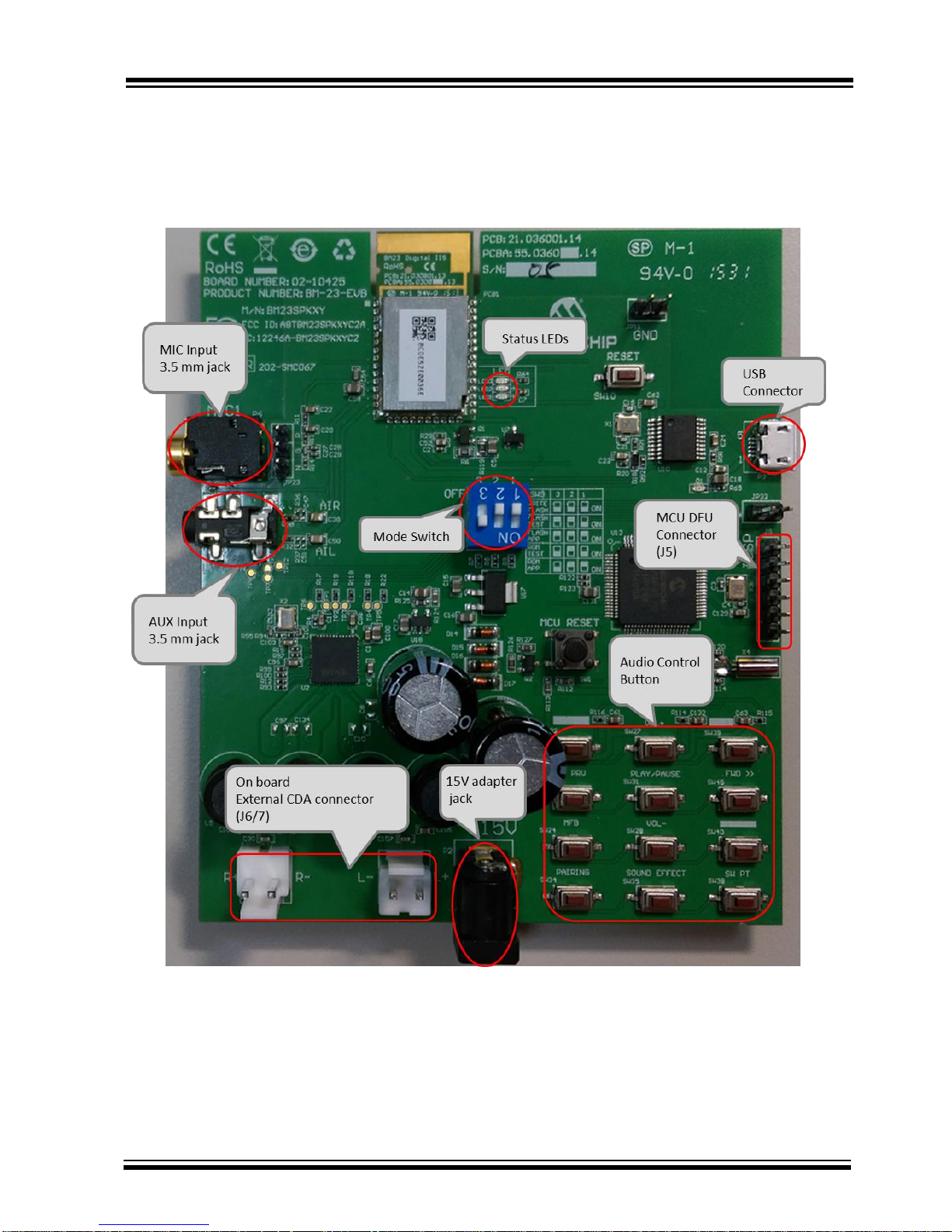
BM23 Evaluation Board contains the following components as shown in Figure 1-1 which describes the
evaluation board’s interfaces and connectors. Table 1-1 describes the various components of the evaluation
board.
FIGURE 1-1: BM23 EVALUATION BOARD
Page 8
BM23 BLUETOOTH
EVALUTATION BOARD USER’S GUIDE
Preliminary Edition
2015 Microchip Technology Inc.
page 8
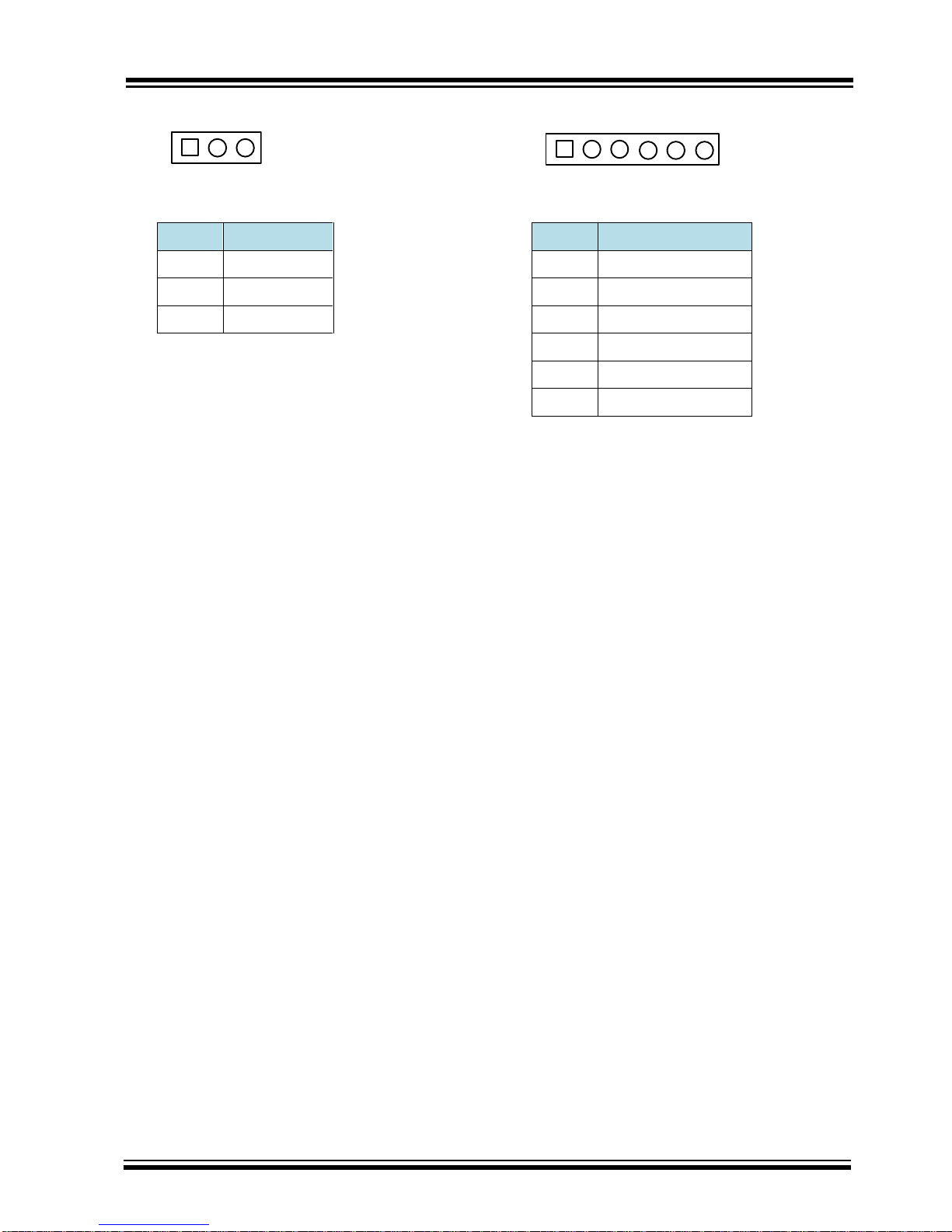
MIC (JP23) ICSP (J5)
Pin
Description
Pin
Description
1
MIC_P1
1
Reset
2
AGND
2
ICD3 power
3
MIC_N1
3
GND
4
PGD
5
PGC
6
NC
1 2 3
1 2 3 4 5
6
Page 9

BM23 BLUETOOTH
EVALUTATION BOARD USER’S GUIDE
Preliminary Edition
2015 Microchip Technology Inc.
page 9
TABLE 1-1:BM23 EVALUATION BOARD HARDWARE
Hardware Component
Description
BM23
Bluetooth® 4.1 Module
USB Connector
USB to UART for EEPROM R/W for BM23.
15V Adapter Jack
Connect to 15V adapter (P2) for main power source of whole system.
Amplifier Audio Out
External AMP Connector JP6 / 7
Audio In
Audio 3.5 mm jack for Mono microphone input(P6) and AUX input(P8)
Status LEDs
Red and Blue LEDs show the pairing/connection status
MFB Button
Switch to turn on/off BM23 module (SW24)
Play/Pause Button
Button to play or pause the audio playback (SW31)
Previous Track Button
Button to skip track backwards (SW23)
Next Track Button
Button to skip track forwards(SW45)
Volume Up Button
Button to increase volume (SW27)
Volume Down Button
Button to decrease volume (SW28)
Reset Button
Reset BM23 (SW10); Reset MCU (SW1)
Page 10
BM23 BLUETOOTH
EVALUTATION BOARD USER’S GUIDE
Preliminary Edition
2015 Microchip Technology Inc.
page 10
2. Getting Started
2.1 INTRODUCTION
This chapter describes how the BM23 Evaluation Board works. Certain hardware and utilities are essential to
support the evaluation/development of demo applications. This chapter discusses the following topics:
Hardware Requirements
Software/Utility Requirements
Module Configuration
2.2 HARDWARE REQUIREMENTS
2.2.1 HARDWARE SETUP
To setup the evaluation hardware, perform the following steps:
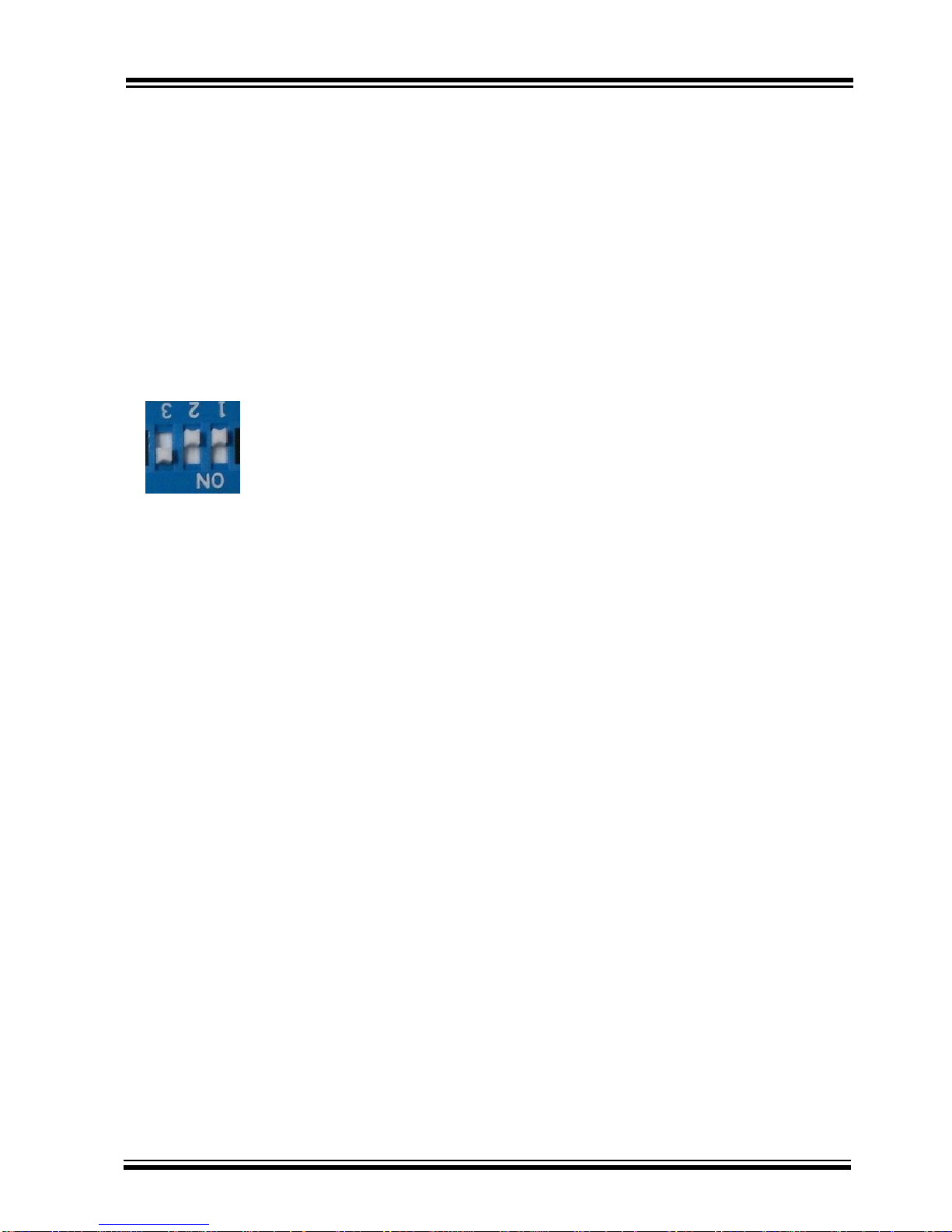
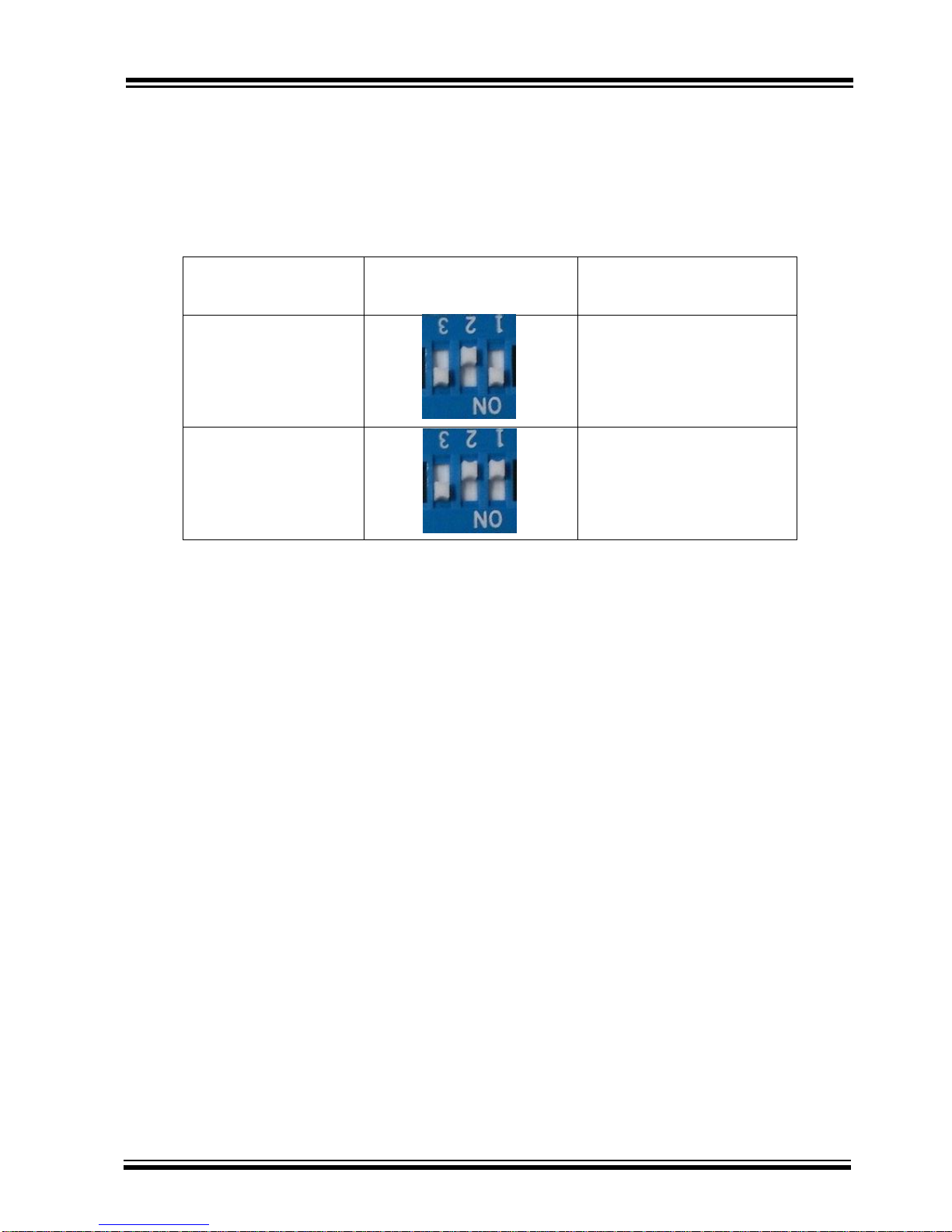
1. Make sure pin 1 / 2 / 3 of “SW9” in “Off / Off / On” state make .system in application mode.
2. Connect the speaker line to the amplifier output connector (J6 / 7).
2.2.2 USING THE EVALUATION BOARD
1. Connect 15V adapter P2.
2. Click MFB button to turn-on and enter pairing mode. The status LEDs will blink. Now the BM23 Evaluation
board should be discoverable.
3. Turn on Bluetooth device manager on a host device (PC or smartphone), the host device will display a list
of discoverable Bluetooth devices. Select the device and connect with it.
4. If the pairing with the device is successful, BM23 evaluation board can connect to the host device. Once
connected, BM23 evaluation board enables Advanced Audio Distribution Profile (A2DP) for audio
playback and Audio Video Remote Control Profile (AVRCP) for player control.
2.3 APPLICATION DEMONSTRATION
2.3.1 AUDIO DEMONSTRATION
In this demonstration, user can play an audio stream on both BM23 evaluation boards using a computer or
smartphone. The following are the steps to perform the demonstration.
1. Connect BM23 evaluation board to a host device (PC or smartphone) that has an audio source.
2. Connect speakers to BM23 evaluation board J6 / 7.
3. Open the audio source on the host device. Microchip recommends using media player.(e.g. Microsoft
Media Player, iTunes, and Android).
4. Start the audio stream on the media player.
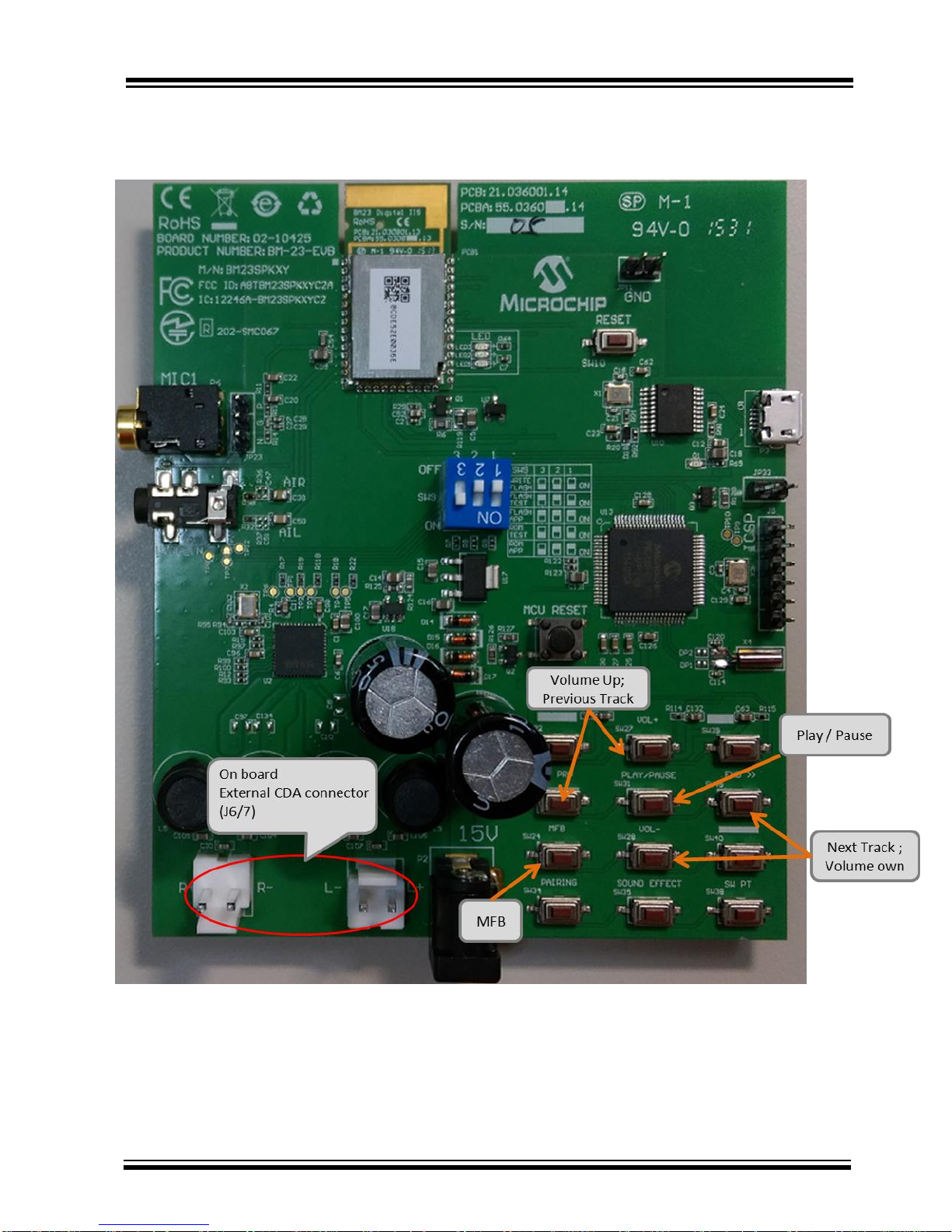
When BM23 evaluation board is connected to an audio source compatible with Bluetooth AVRCP, the audio
control buttons are use to:
Control the volume of audio output.
Go to the previous track.
Page 11
BM23 BLUETOOTH
EVALUTATION BOARD USER’S GUIDE
Preliminary Edition
2015 Microchip Technology Inc.
page 11
Go to the next track.
Start / stop playing the current track.
FIGURE 1-2: BM23 EVALUATION BOARD AUDIO CONTROL BUTTONS
Page 12

BM23 BLUETOOTH
EVALUTATION BOARD USER’S GUIDE
Preliminary Edition
2015 Microchip Technology Inc.
page 12
2.3.2 HSP/HFP DEMONSTRATION
In this demonstration, user can explore the hands-free profile setting to receive an incoming voice call from a
paired smartphone. This demonstration requires a microphone. It would be good to use a PC
headset/microphone (with two-plugs). The following are the steps to perform the demonstration.
1. Connect the speakers / microphone to BM23 evaluation board’s audio out connector (J6/7) and MIC
input (P6) respectively.
2. Connect BM23 evaluation board to a smartphone that supports the A2DP and HFP/HSP Bluetooth
profiles.
3. From another one phone, initiate a call to the smartphone that is paired with BM23 evaluation board. The
A2DP stream pauses and the ringtone plays on the speakers.
4. Click button “MFB” on BM23 evaluation board to accept the incoming call.
Page 13
BM23 BLUETOOTH
EVALUTATION BOARD USER’S GUIDE
Preliminary Edition
2015 Microchip Technology Inc.
page 13
2.4 SOFTWARE/UTILITY REQUIREMENTS
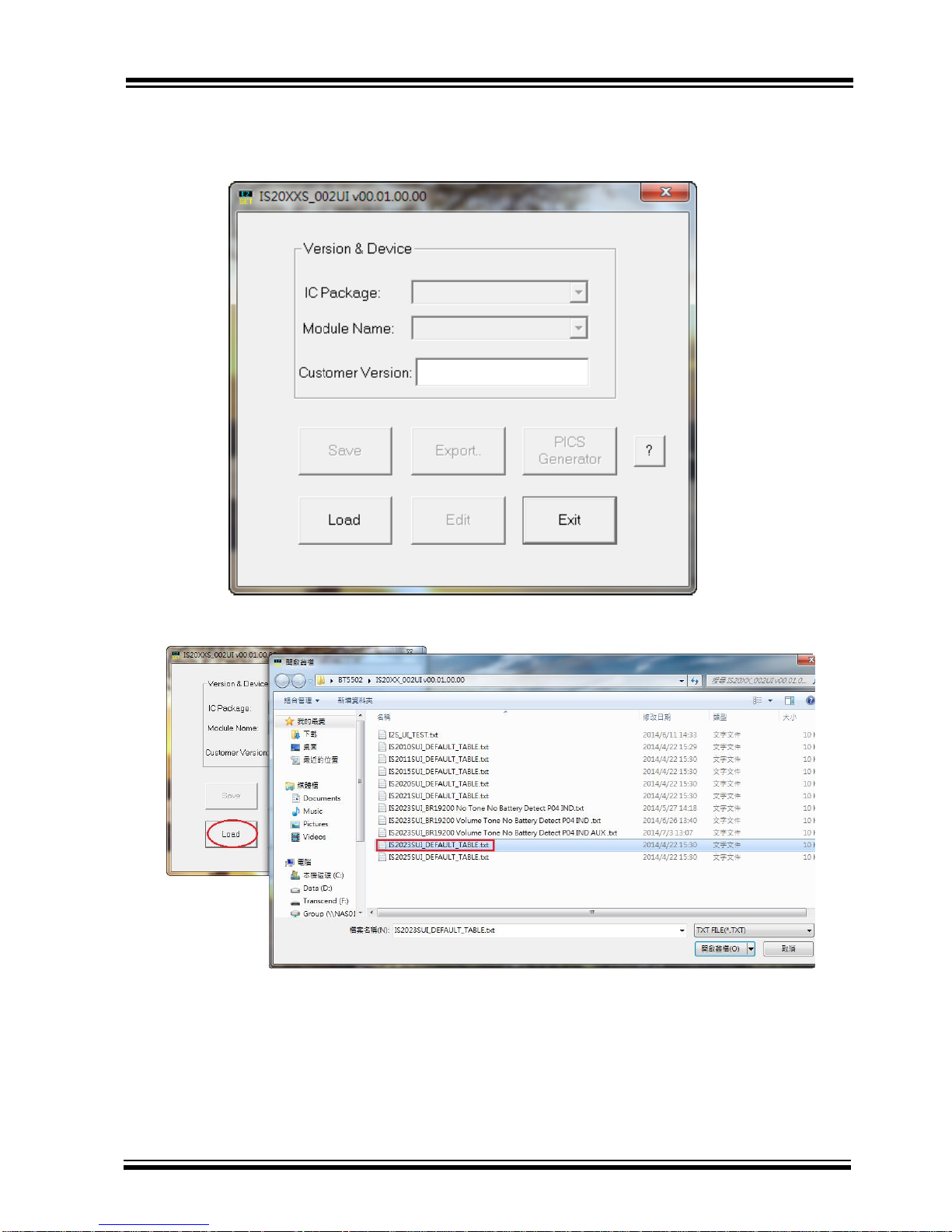
2.4.1 UI SETTING
Step1. Open UI tool
Step2. Firstly, you can load default UI setting or previous setting file.
Page 14
BM23 BLUETOOTH
EVALUTATION BOARD USER’S GUIDE
Preliminary Edition
2015 Microchip Technology Inc.
page 14
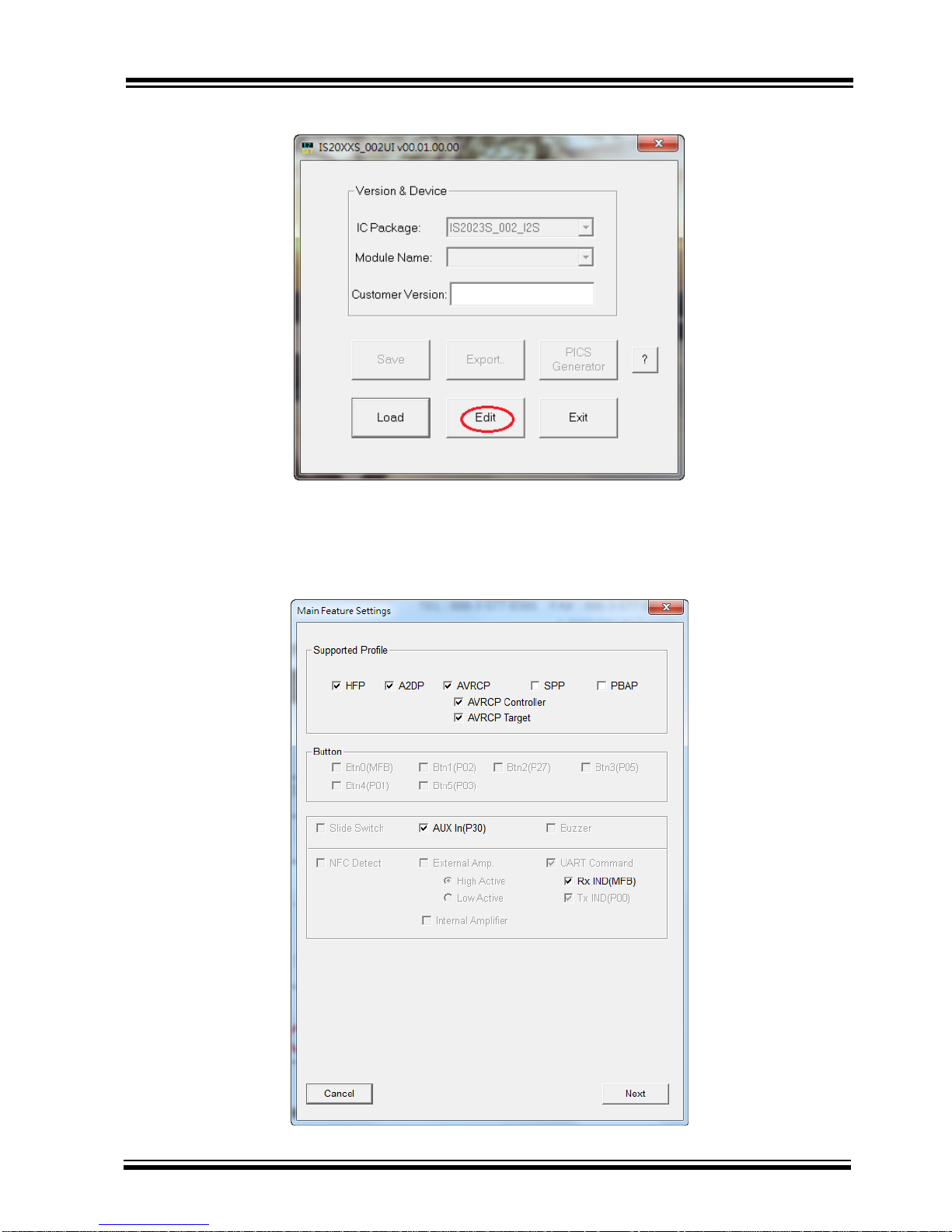
Step3. Click “Edit” to modify the settings meet your needs.
Step4. In the main settings, it can enable or disable supported profile or function which system need.
Click “Next” for other setting.
Page 15
BM23 BLUETOOTH
EVALUTATION BOARD USER’S GUIDE
Preliminary Edition
2015 Microchip Technology Inc.
page 15
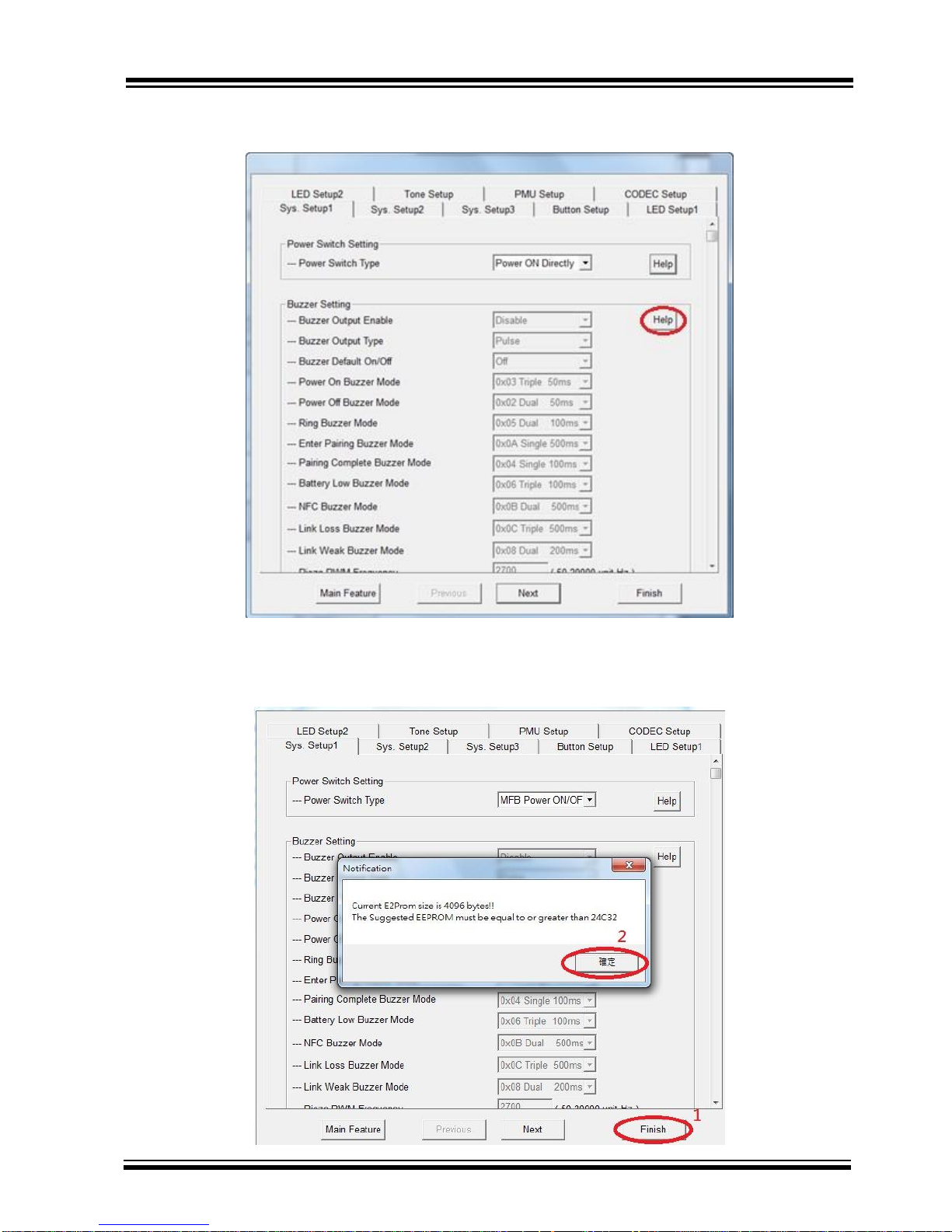
Step5. You can do system and functional setting in these pages.
Click “Help” you can get more detail information.
Step6. After finish parameter set up, click “Finish” button and a message will remind you check EEPROM
size on your system.
Page 16
BM23 BLUETOOTH
EVALUTATION BOARD USER’S GUIDE
Preliminary Edition
2015 Microchip Technology Inc.
page 16
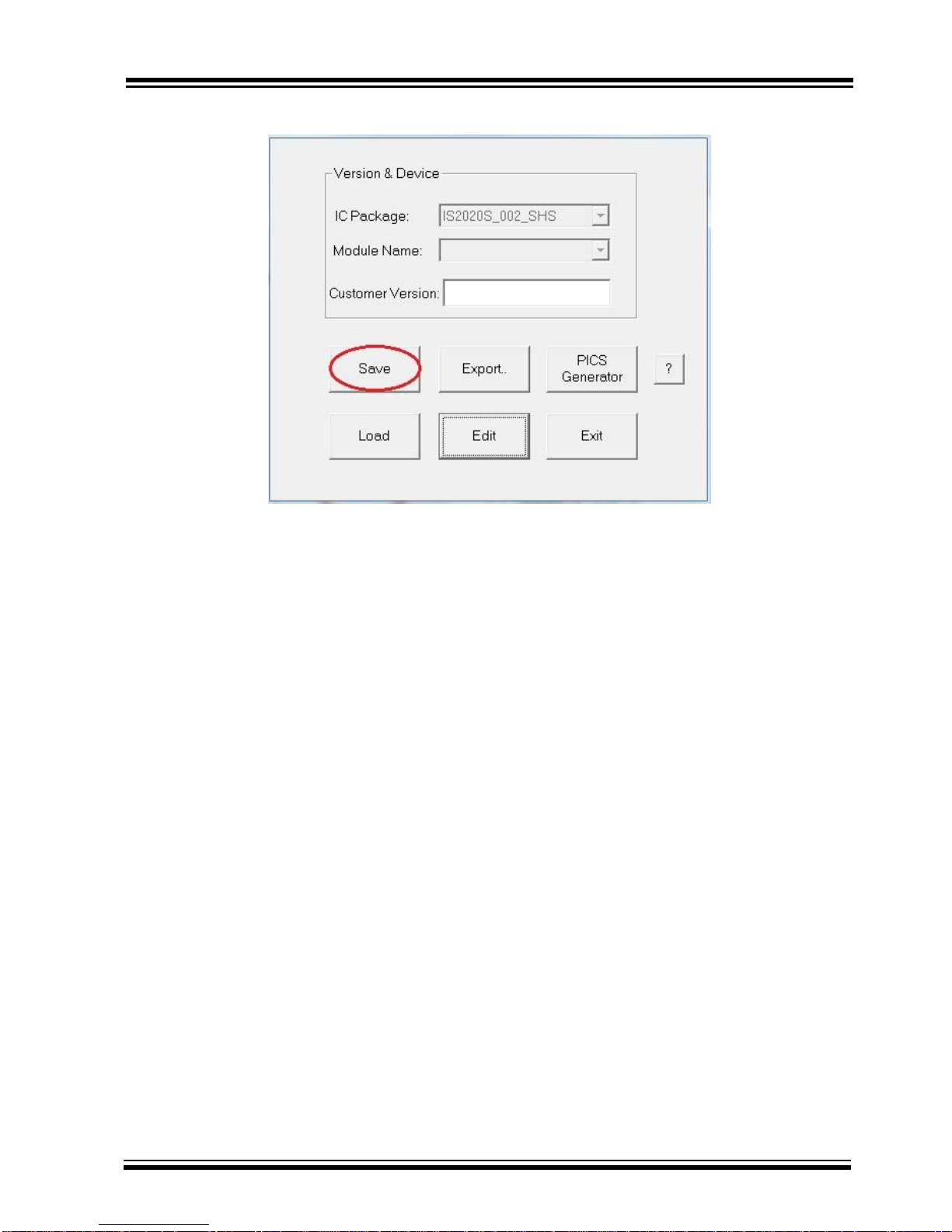
Step7. Click “Save” button to save these UI parameter as a “.txt” file
Step8. We will use MPET tool to merge it with EEPROM table and use EEPROM tool load these parameter
to system.
Page 17
BM23 BLUETOOTH
EVALUTATION BOARD USER’S GUIDE
Preliminary Edition
2015 Microchip Technology Inc.
page 17
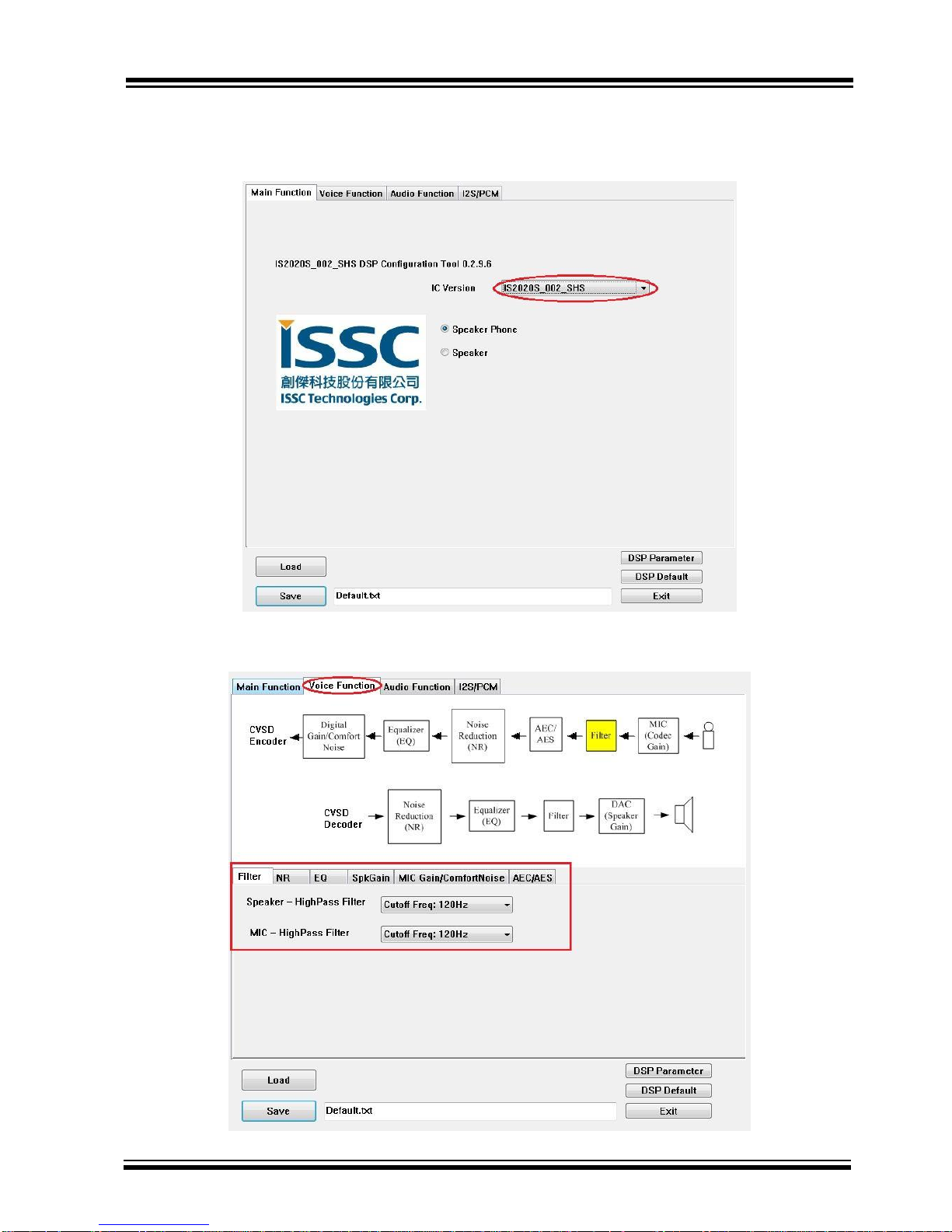
2.4.2 DSP TOOL SETTING
Step1. Open DSP tool
Step2. Select IC version ““IS2020_XXX_SHS” (XXX is the version of chip, e.g. IS2020S-203)
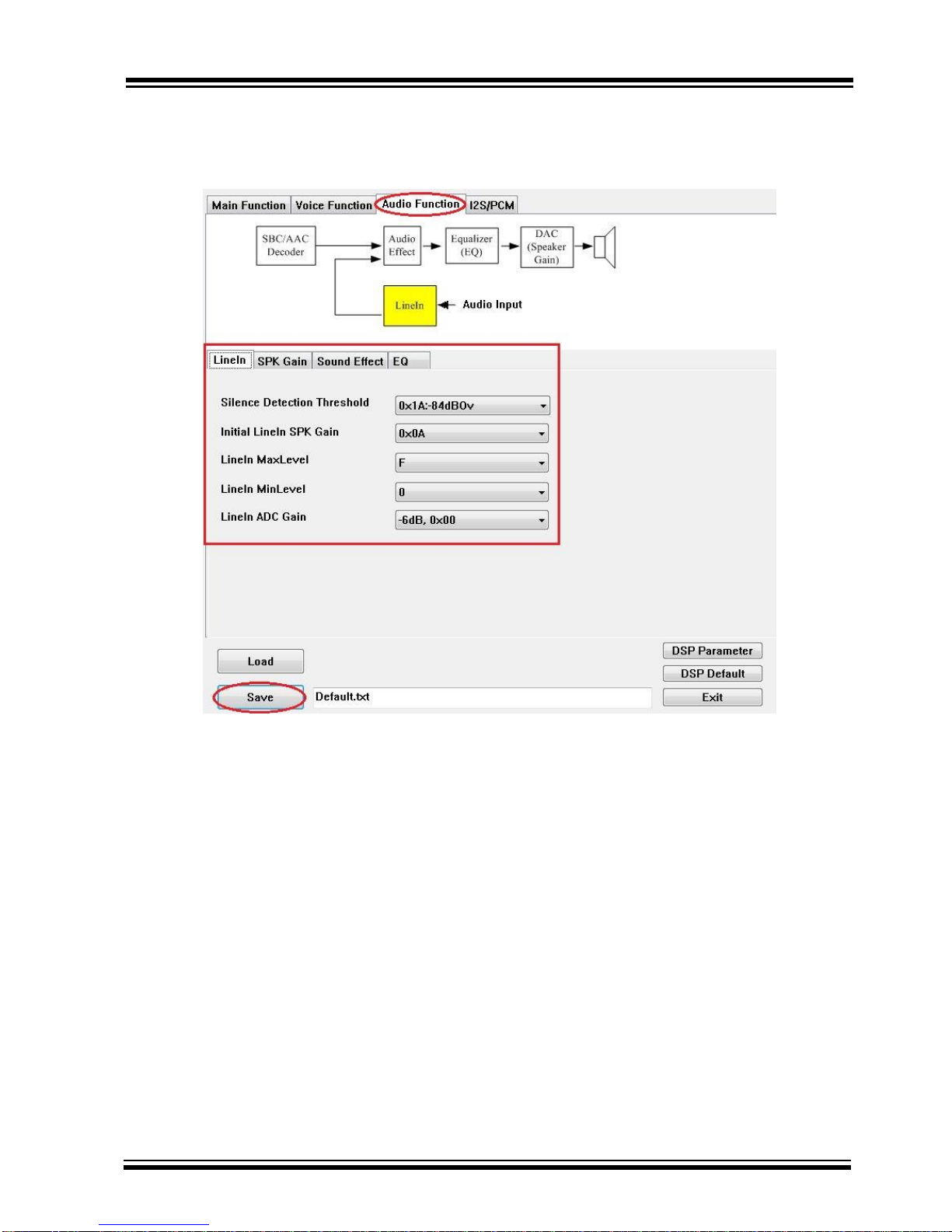
Step3. You can setup all voice and audio function in these pages.
Page 18
BM23 BLUETOOTH
EVALUTATION BOARD USER’S GUIDE
Preliminary Edition
2015 Microchip Technology Inc.
page 18
Step4. Click “Save” button to save these DSP parameter as a “.txt” file after finish all DSP
setting. Then use MPET tool to merge it with EEPROM table and use EEPROM tool load
these parameter to system.
Page 19
BM23 BLUETOOTH
EVALUTATION BOARD USER’S GUIDE
Preliminary Edition
2015 Microchip Technology Inc.
page 19
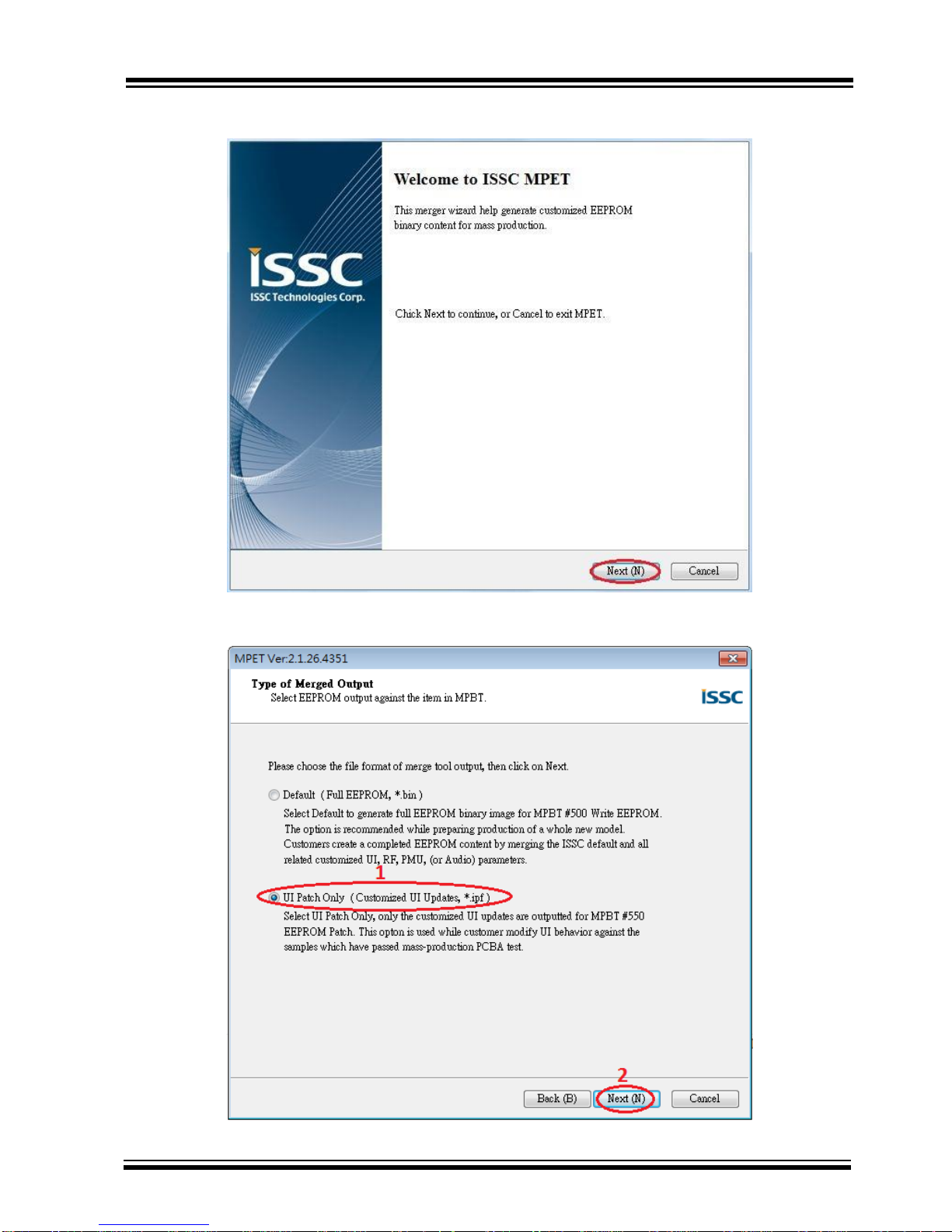
2.4.3 MERGE TOOL SETTING
Step1. Open MPET tool, click “Next” to set up.
Step2. Select “UI Patch Only” to use full EEPROM table to merge UI and DSP parameter.
Page 20
BM23 BLUETOOTH
EVALUTATION BOARD USER’S GUIDE
Preliminary Edition
2015 Microchip Technology Inc.
page 20
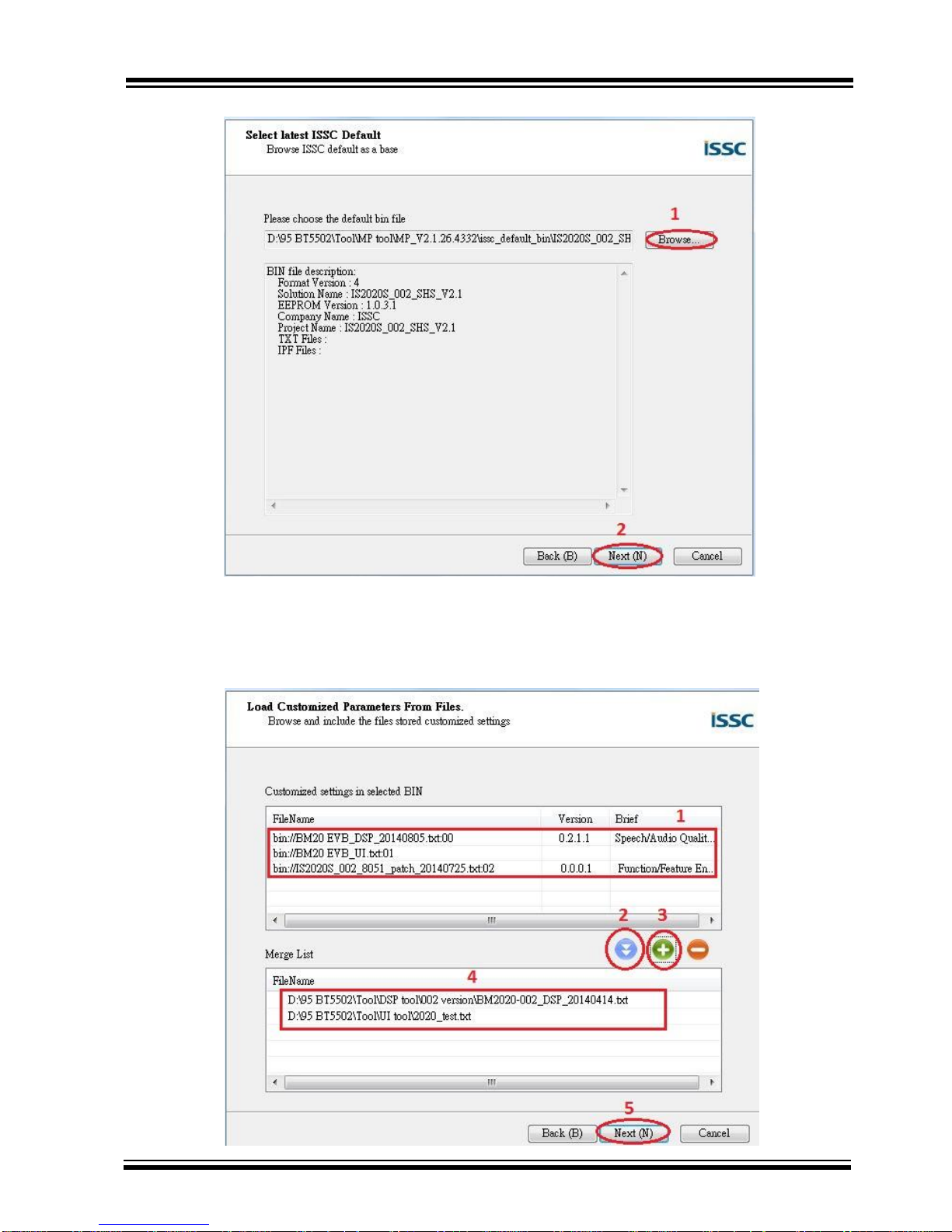
Step3. Select the bin file (full EEPROM table) and click “Next”
Step4. If the bin file had included UI, DSP or patch code parameter, you can see them in block 1 as the
figure below. If you want keep the in your new system, you can select the item which you want to keep and
use “pull down” button to add them to merge list. If you want to add new parameter (e.g. UI and DSP
parameter), click “+” button to add these files into tool for merge with EEPROM table.
Page 21
BM23 BLUETOOTH
EVALUTATION BOARD USER’S GUIDE
Preliminary Edition
2015 Microchip Technology Inc.
page 21
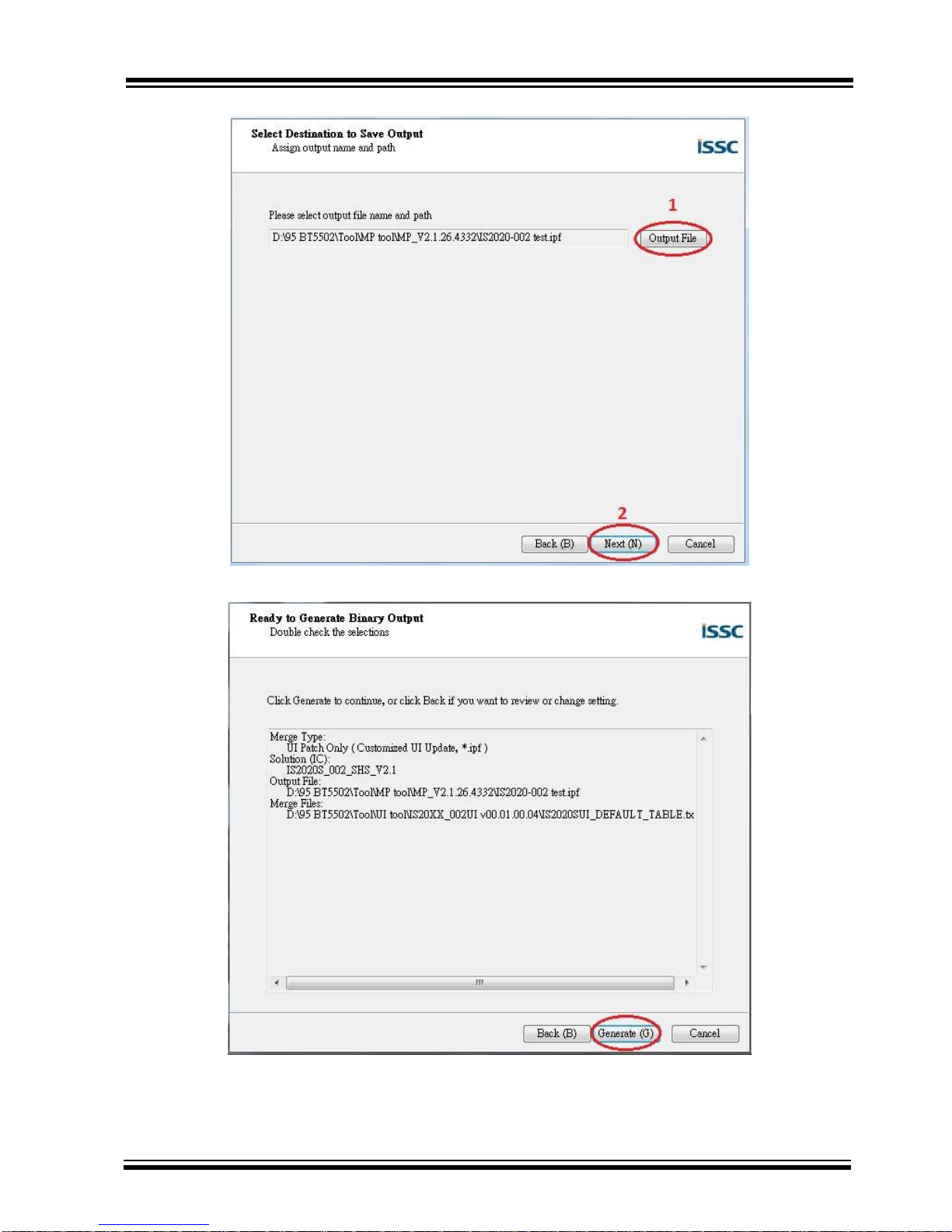
Step5. Select an output path and create a name for the merged EEPROM table.
Step6. Click “Generate” button to generate the new EEPROM table.
Page 22
BM23 BLUETOOTH
EVALUTATION BOARD USER’S GUIDE
Preliminary Edition
2015 Microchip Technology Inc.
page 22
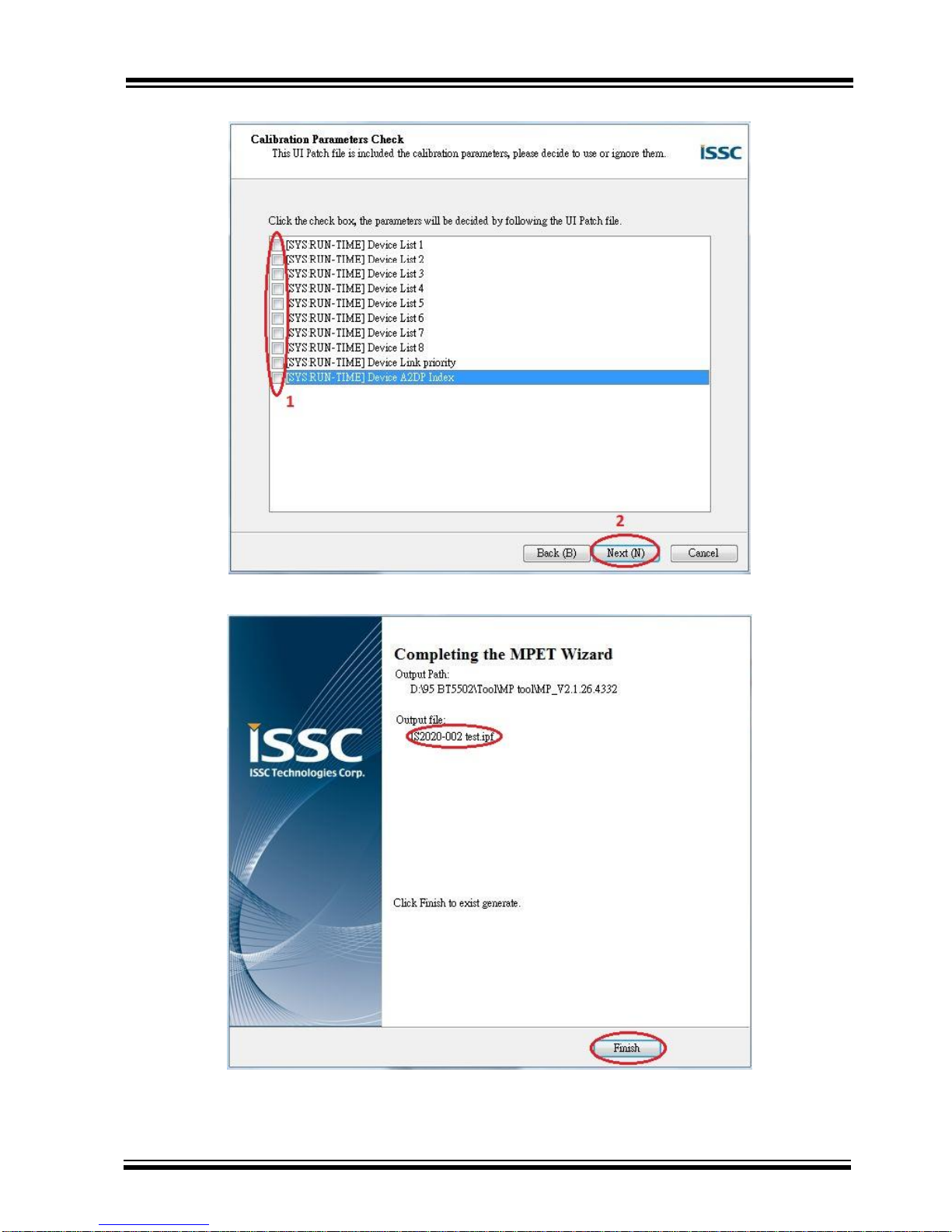
Step7. Select if you want use new setting of these parts.
Step8. Now you have a merged patch file (*.ipf file).
Page 23
BM23 BLUETOOTH
EVALUTATION BOARD USER’S GUIDE
Preliminary Edition
2015 Microchip Technology Inc.
page 23
2.4.4 Procedure to Update EEPROM Parameters
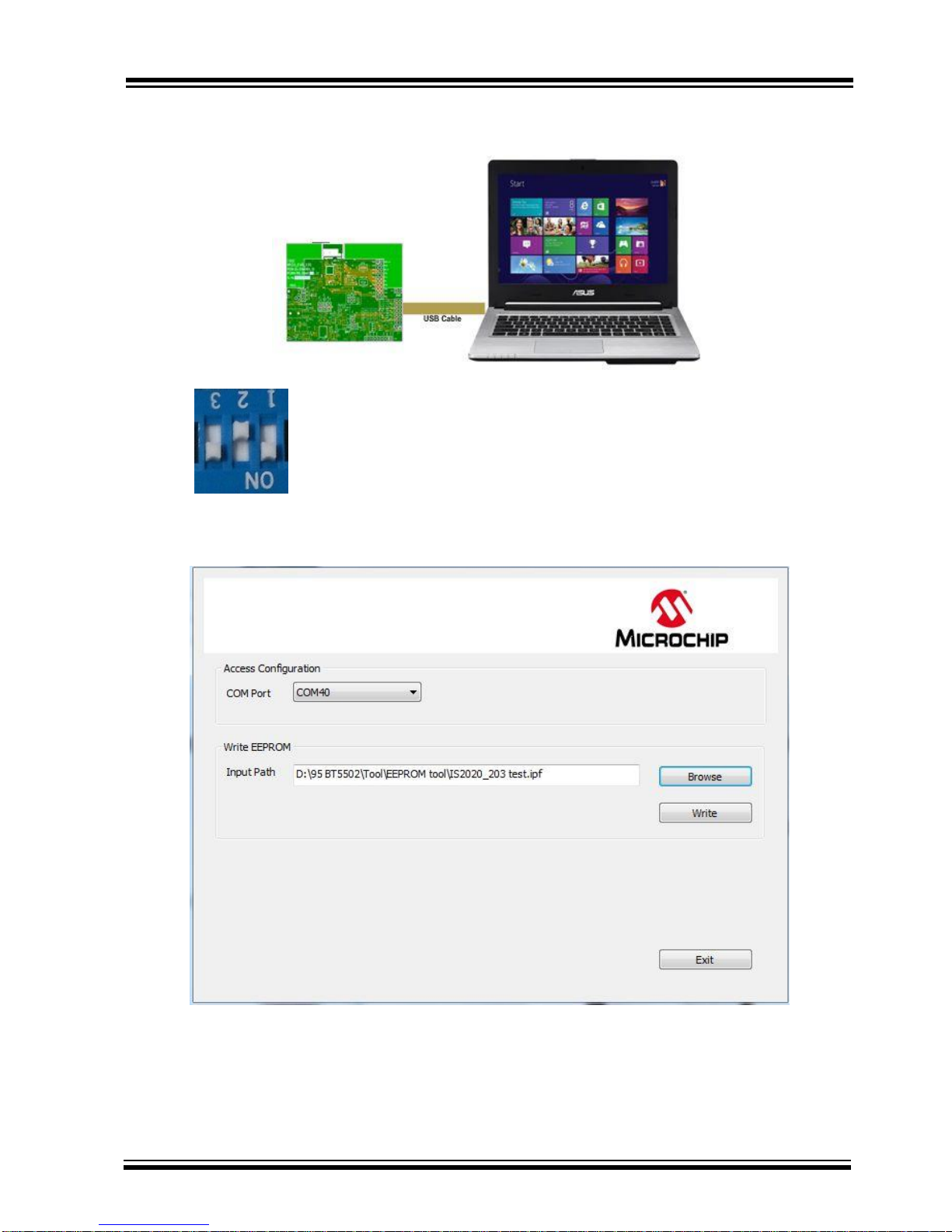
Step 1. Make sure SW9 in “ROM TEST” mode.
Step 2. Connect EVB “P1” port and PC by USB cable. LED1 & LED2 on EVB will keep lighting.
Step 3. Run the E2PROM_tool.exe program and a window will be come up as below
Page 24
BM23 BLUETOOTH
EVALUTATION BOARD USER’S GUIDE
Preliminary Edition
2015 Microchip Technology Inc.
page 24
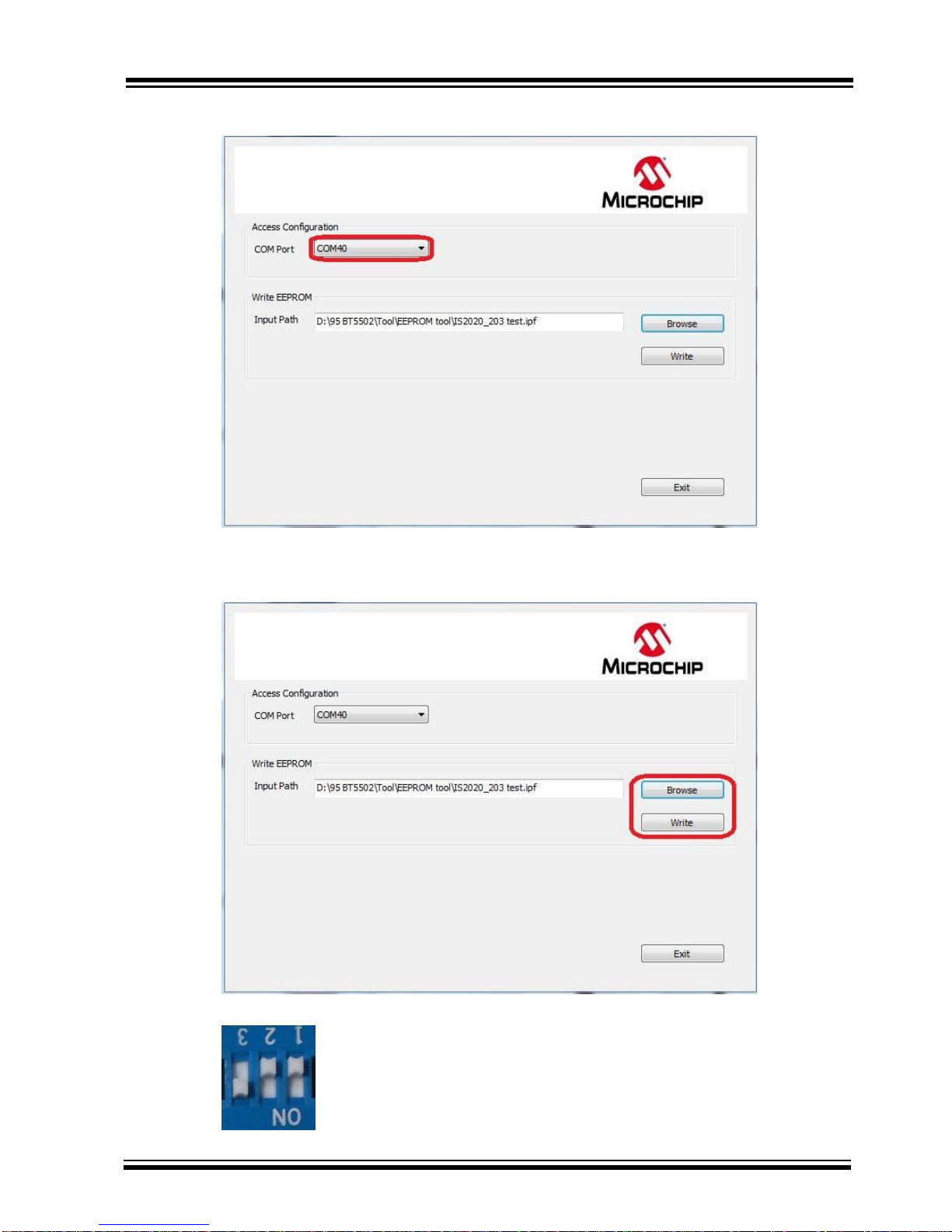
Step 4. Specify the COM Port.
Step5. Press ”Browse” to choose the file where you want to write EEPROM table or patch file.
Step6. Press” Write” to write these setting to EEPROM
Step7. After finish data update, remove USB cable and make SW9 to “ROM APP” mode and reboot.
Now EVB can use the new setting after updated EEPROM parameter.
Page 25
BM23 BLUETOOTH
EVALUTATION BOARD USER’S GUIDE
Preliminary Edition
2015 Microchip Technology Inc.
page 25
2.5 MODULE CONFIGURATION
2.5.1 Mode Settings
Setting in Mode Switch:
For ROM chip application
Mode
SW9 Setting
Switch 9 PIN Definition
Test Mode
1: ON (P2_0: LOW)
2: OFF (P2_4: HIGH)
3: ON (EAN: HIGH)
Application Mode
1: OFF (P2_0: HIGH)
2: OFF (P2_4: HIGH)
3: ON (EAN: HIGH)
Page 26
BM23 BLUETOOTH
EVALUTATION BOARD USER’S GUIDE
Preliminary Edition
2015 Microchip Technology Inc.
page 26
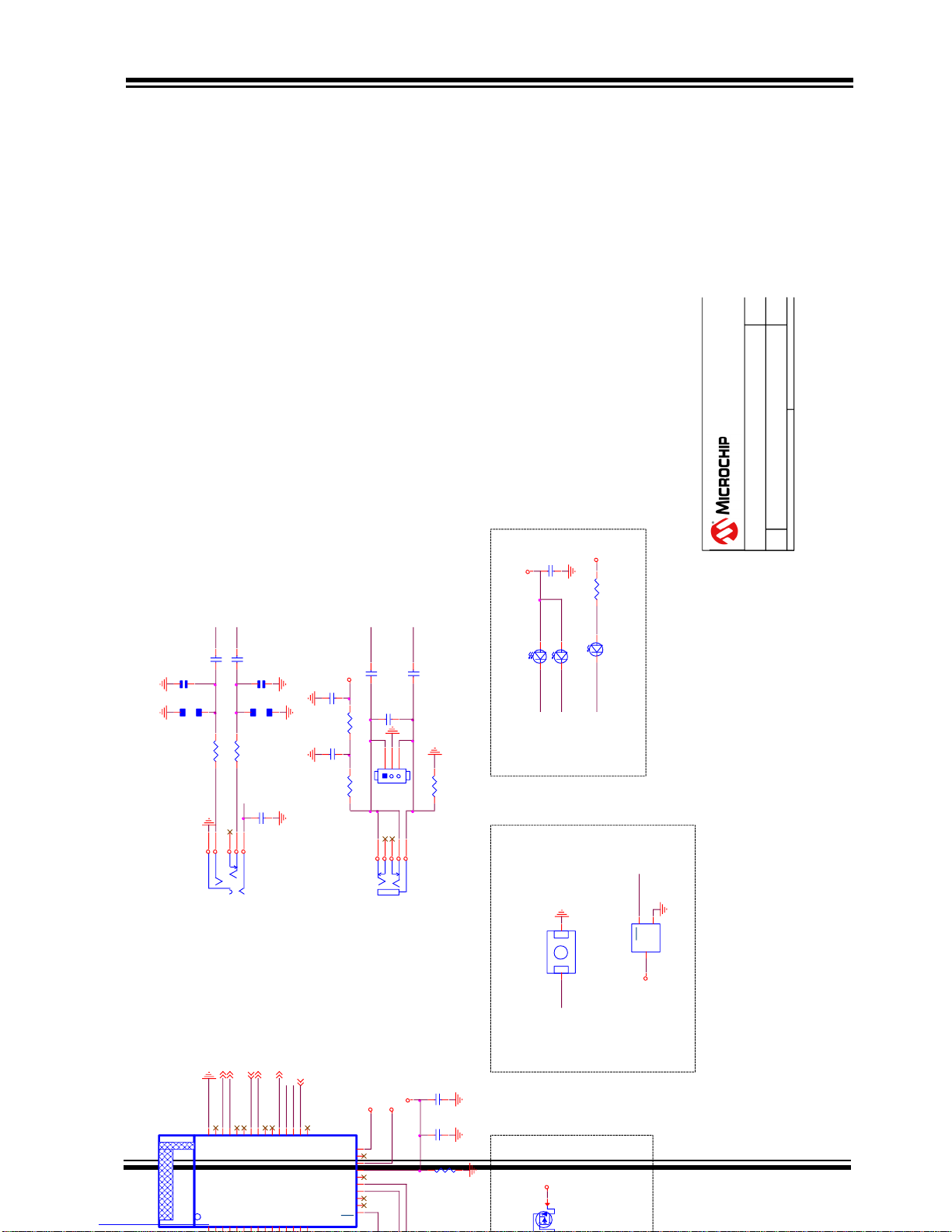
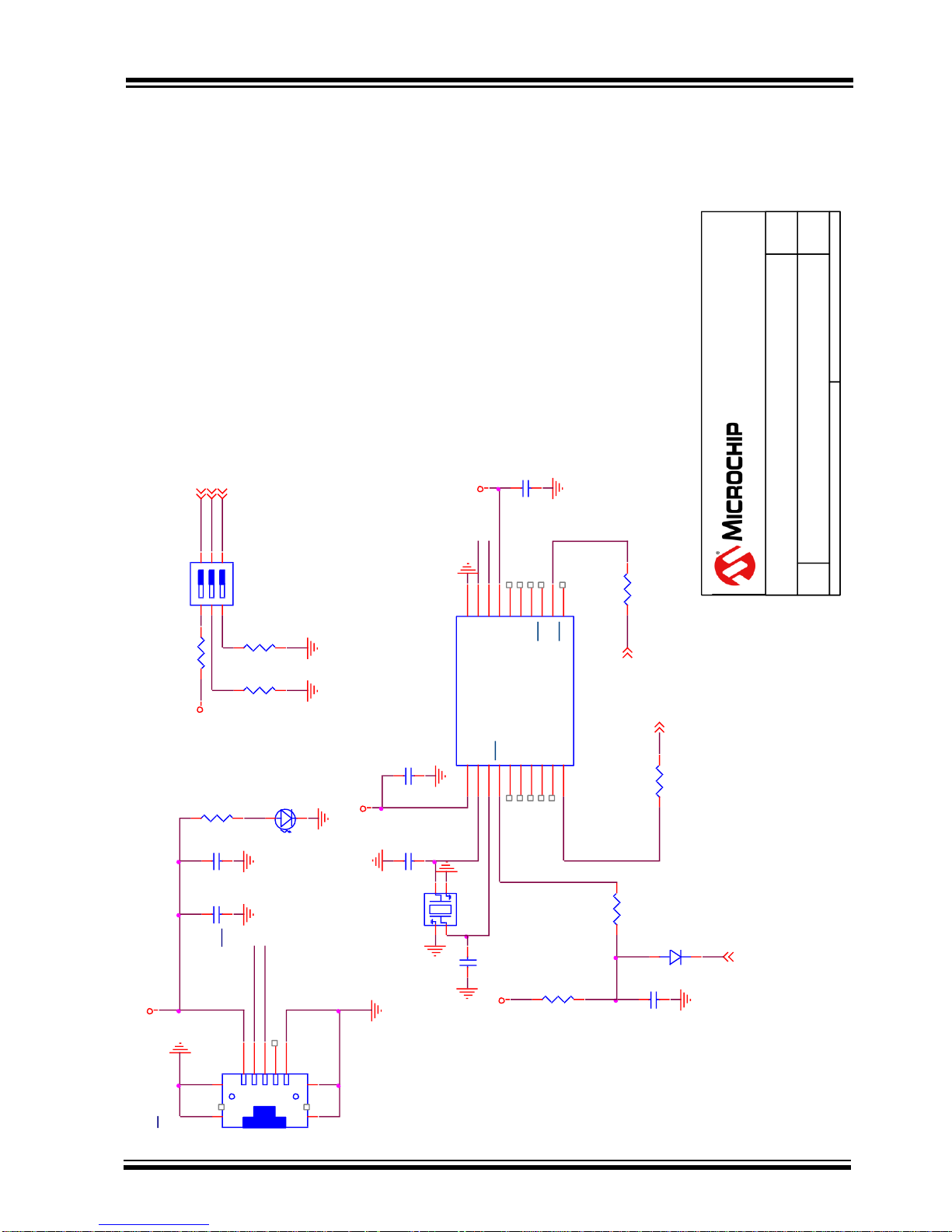
APPENDIX A. BM23 AUDIO EVALUATION BOARD SCHEMATICS
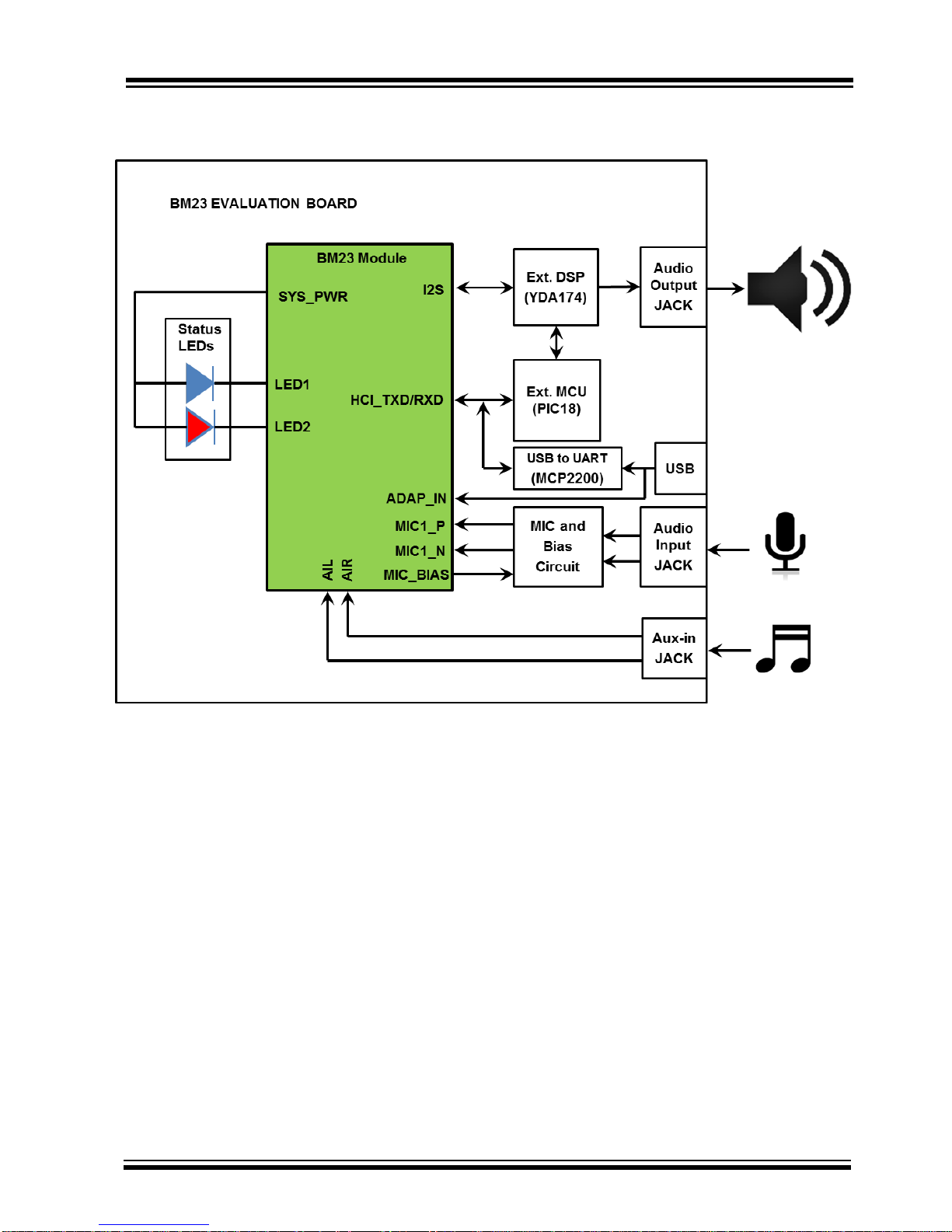
EVB block diagram
Page 27

BM23 BLUETOOTH
EVALUTATION BOARD USER’S GUIDE
Preliminary Edition
2015 Microchip Technology Inc.
page 27
Page 28
BM23 BLUETOOTH
EVALUTATION BOARD USER’S GUIDE
Preliminary Edition
2015 Microchip Technology Inc.
page 28
MIC_P1
MIC1
C20
2.2u/6.3V
R11
1K
1 2
R13
1K
1 2
C22
2.2u/6.3V
MIC_BIAS
JP23
JP 1x3
1
2
3
C27
220p/50V
R14
2K
1 2
C29
0.1u/10V
C28
0.1u/10V
P6
PJ-2001-5K
1
2
345
P2_0
P2_4
P3_0
BAT_IN
G
D
S
Q1
3
BAT_IN
C2
0.1u/10V
C52
1u/16V
R29
1K
1
2
5V
SYS_PWR
RST_N
SYS_PWR
MFB
PCB1
FP-BM23
P0_0
RFS0
TFS0
SLK0
DR0
DT0
P0_4
EAN
MIC1_P
MIC1_N
MIC_BIAS
VDDA
AIR
AIL
GND
SYS_PWR
25
AMB_DET
24
BAT_IN
23
ADAP_IN
22
P0_1
21
P1_5
20
VDD_IO
19
NC
18
NC
17
RST
16
GND40P2_0
39
P3_038P2_0
37
P2_736P0_5
35
HCI_RXD
34
HCI_TXD
33
P0_332P0_2
31
P2_4
30
LED229LED1
28
MFB
27
BK_OUT
26
HCI_TXD
HCI_RXD
P3_0
LED2
LED1
Board Name
Size
Title Rev
Date: Sheet of
P/N
MAIN CIRCUIT
4.0
BM23 EVB
B
4 8Wednesday , July 22, 2015
0360
5F, No.5, Industry E. Rd. VII, Hsinchu Science Park,
Hsinchu City 30078, Taiwan
TEL. 886-3-5778385
U7
G691L293
GND
1
RST
2
VCC
3
R64
1K
1 2
RESET
RST_N
SW10
TS08M-PF
21
VDD_IO
LED2
LED1
LED2
C7
0.1u/10V
LED2 LED-HR
12
LED1 LED-B
12
LED3
SYS_PWR
LED1
LED3 LED-G
12
P2_4
C50
1u/16V
C38
1u/16V
R36
NP-0402R38
0
1 2
R37
NP-0402
R32
0
1 2
C51
NP-0402
AIR
C47
NP-0402
P3_0
AILLINE_L
LINE_R
LINE INPUT
C26
0.1u/10V
P8
TSH-3865D
432
10
1
MIC_N1
Page 29

BM23 BLUETOOTH
EVALUTATION BOARD USER’S GUIDE
Preliminary Edition
2015 Microchip Technology Inc.
page 29
Page 30
BM23 BLUETOOTH
EVALUTATION BOARD USER’S GUIDE
Preliminary Edition
2015 Microchip Technology Inc.
page 30
VDD_IO
ON
SW9
SW-3BIT
1
2
3
4
5
6
R9
4K7
1
2
R8
4K7
1
2
R7
10
12
EAN
P2_4
P2_0
C12
1u/16V
C18
10u/16V
VBUS
D-
D+
ID
GND
P3
UCB02SB3021-99R
1
2
3
4
5
6
8
9
7
10
11
R69
1K
1
2
5V
D-
D+
D1
LED-HR
1
2
D18
CDSU400B
1
2
Board Name
Size
Title Rev
Date: Sheet of
P/N
HCI INTERFACE
4.0
BM23 EVB
A
5 8Wednesday, July 22, 2015
0360
5F, No.5, Industry E. Rd. VII, Hsinchu Science Park,
Hsinchu City 30078, Taiwan
TEL. 886-3-5778385
D-
D+
EXT_3V3
TX
RX
C19
12p/50V
C21
12p/50V
C24
0.1u/16V
U10
MCP2200
VDD
1
OSC1
2
OSC2
3
RST
4
GP7/TxLED
5
GP6/RxLED
6
GP5
7
GP4
8
GP3
9
TX
10
RTS
11
RX
12
CTS
13
GP2
14
GP1/USBCFG
15
GP0/SSPND
16
VUSB
17
D-
18
D+
19
VSS
20
C62
0.1u/16V
X1
X4P-12MHZ
4
1
3
2
R91
3K
1 2
R92
3K
1 2
HCI_TXD
HCI_RXD
EXT_3V3
5V
C23
0.1u/16V
R20
10K
1
2
RST_N
R21
470
1 2
Page 31

BM23 BLUETOOTH
EVALUTATION BOARD USER’S GUIDE
Preliminary Edition
2015 Microchip Technology Inc.
page 31
Page 32

BM23 BLUETOOTH
EVALUTATION BOARD USER’S GUIDE
Preliminary Edition
2015 Microchip Technology Inc.
page 32
Page 33
BM23 BLUETOOTH
EVALUTATION BOARD USER’S GUIDE
Preliminary Edition
2015 Microchip Technology Inc.
page 33
TP11TP2
1
TP31TP4
1
TP5
1
J6
HDR 1x2
1
2
ADJ
4
VOUT
5
J7
HDR 1x2
1
2
R124
3K/1%
1
2
R125
10K
1
2
(0.41V)
C14
10u/16V
1V8
G
G
X2
XTL571300-L118-045
4
1
3
2
SLK0_DSP
DT0_DSP
1V8
C10
1u/50V
DSP_IC_N
OUTML
R93
100K
1
2
C96
0.1u/16V
R4
47K
1
2
C97
1u/50V
1V8
1V8
OUTPL
DSP_SLEEP
C98
0.1u/16V
C6
1u/16V
R94
1M
1
2
R95 220
1 2
DSP_PROT_N
R15
4K7
1
2
R97
4K7
1
2
3V3
DSP_P1_2
3V3
C100
10u/16V
DC_AMP
DSP_P1_3
3V3
C11
0.1u/16V
DSP_IRQ_N
OUTPR
C101
10p/50V
C102
10p/50V
3V3
R99
47K
1
2
3V3
C1
0.1u/16V
R100
47K
1
2
DSP_MUTE
C103
0.1u/16V
OUTMR
3V3
YDA174A30
U2
YDA174A30
DVDD181GPIO6
2
GPIO53GPIO4
4
GPIO35DVSS
6
GPIO27GPIO1
8
GPIO09PLLVDD
10
IC_N11PLLVSS
12
XIN
13
XOUT
14
IOVDD
15
SCL
16
SDA
17
DVDD18
18
IRQ_N
19
OPEN
20
PROT_N
21
SLEEP_N
22
MUTE_N
23
TESTr
24
OPEN
36
PVDDPL
35
OUTPL
34
PVSSL
33
OUTML
32
PVDDML
31
PVDDMR
30
OUTMR
29
PVSSR
28
OUTPR
27
PVDDPR
26
OPEN
25
EP
49
GPIO7
48
IOVDD
47
GPIO8
46
GPIO9
45
GPIO10
44
GPIO11
43
TESTb
42
DVSS
41
OPEN
40
DVSS
39
REFA
38
AVSS
37
R12
100K
1
2
DC_AMP
RFS0_DSP
+
C32
1000u/50V
1
2
DC_AMP
OUTML
OUTPL
SPKOUT
C25
0.1u/50V
C106
0.1u/50V
C107
0.22u/16V
C134
1u/50V
DC_AMP
C8
1u/50V
DC_AMP
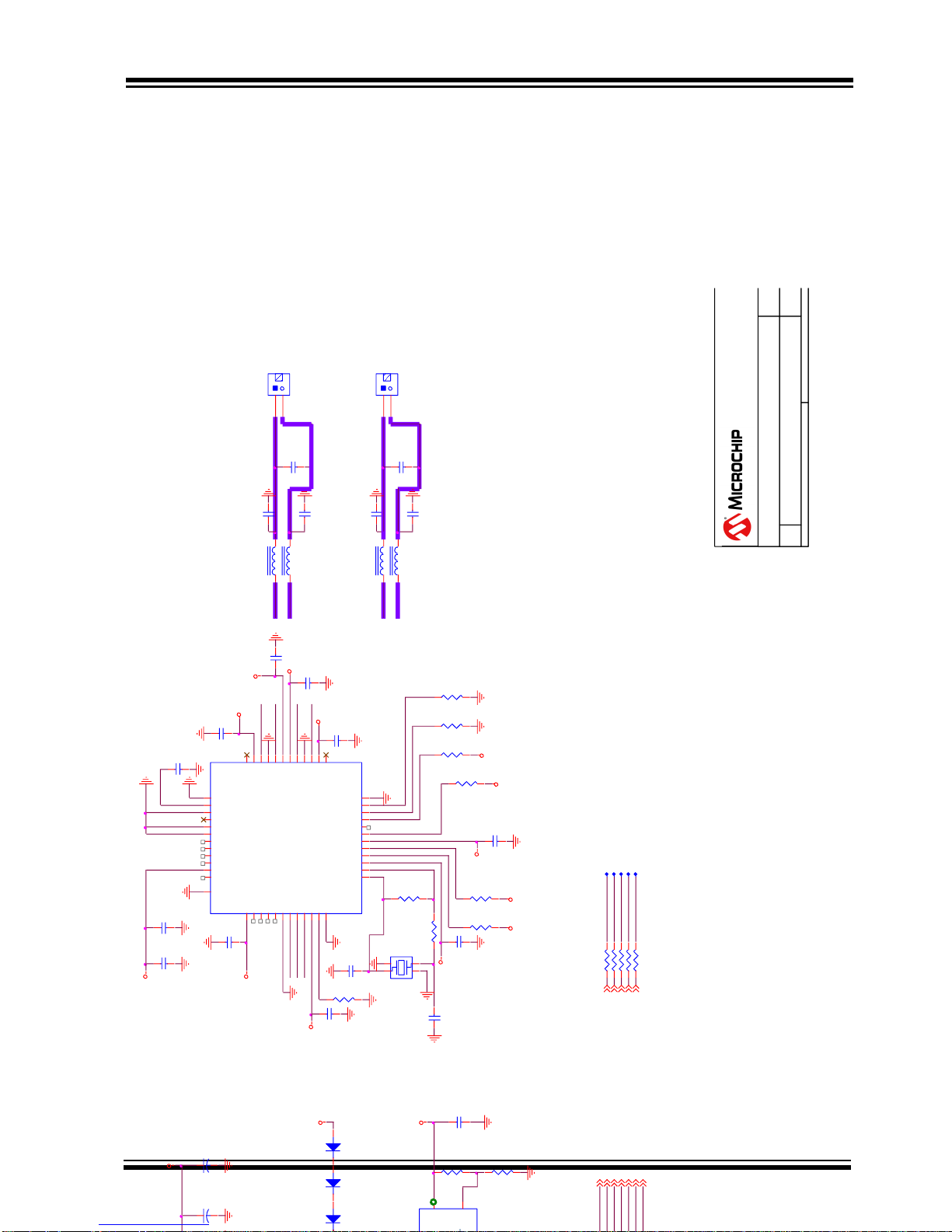
I2S INTERFACE
DT0_DSP
RFS0_DSP
SLK0_DSP
DR0_DSP
R17 33
1 2
R118 33
1 2
TFS0_DSP
R22 33
1 2
R18 33
1 2
R19 33
1 2
Board Name
Size
Title Rev
Date: Sheet of
P/N
DSP_YDA174
4.0
BM23 EVB
B
6 8Wednesday , July 22, 2015
0360
5F, No.5, Industry E. Rd. VII, Hsinchu Science Park,
Hsinchu City 30078, Taiwan
TEL. 886-3-5778385
RFS0
SCLK0
TFS0
DR0
DT0
D15
CDSL4148
DC_AMP
D17
CDSL4148
2 1
D16
CDSL4148
2 1
L4 L22uH
1 2
L3 L22uH
1 2
DSP_MUTE
DSP_SLEEP
DSP_IC_N
DSP_P1_2
DSP_P1_3
DSP_PROT_N
DSP_IRQ_N
C104
0.1u/50V
C105
0.1u/50V
C30
0.22u/16V
OUTMR
OUTPR
L6 L22uH
1 2
L5 L22uH
1 2
+
C133
1000u/50V
1
2
Page 34

BM23 BLUETOOTH
EVALUTATION BOARD USER’S GUIDE
Preliminary Edition
2015 Microchip Technology Inc.
page 34
Page 35
BM23 BLUETOOTH
EVALUTATION BOARD USER’S GUIDE
Preliminary Edition
2015 Microchip Technology Inc.
page 35
MCU_P70
MCU_P71
R122 3K
1 2
R123 3K
1 2
G
D
S
Q2
STS2306
3
1
2
R126
2K
1
2
R127
1K
1
2
5V
RST_PIC18
G
D
S
Q3
STS2306
3
1
2
ICD3_PWR
RST_N
R128
1K
1
2
(Reset PIC18 when connect to USB)
(Reset BT when connect to ICD3)
JP33
JP 1x2
1
2
PGD
RESET
3V3
PGC
J5
JP 1x6
1
2
3
4
5
6
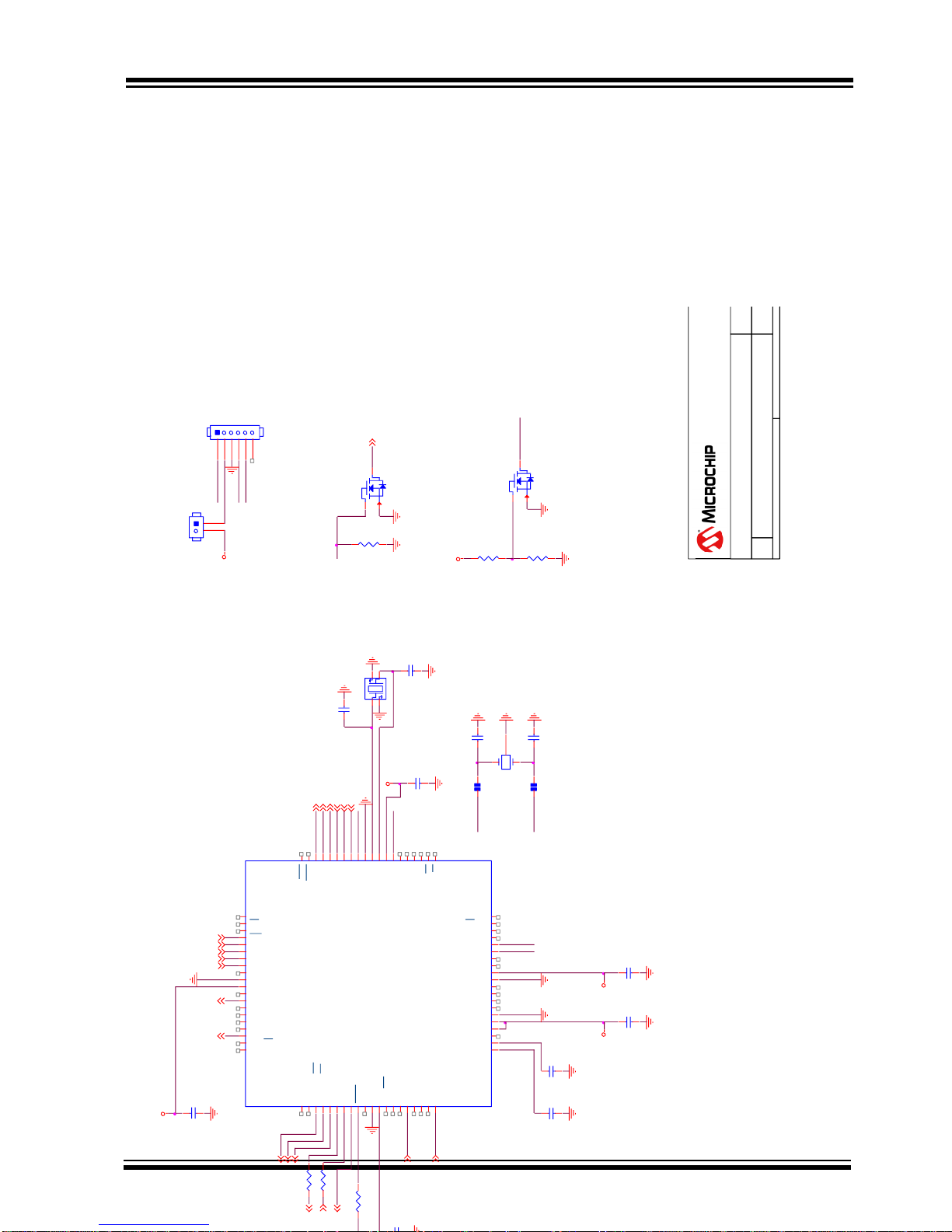
ICSP
Board Name
Size
Title Rev
Date: Sheet of
P/N
MCU_PIC18
4.0
BM23 EVB
B
7 8Wednesday, July 22, 2015
0360
5F, No.5, Industry E. Rd. VII, Hsinchu Science Park,
Hsinchu City 30078, Taiwan
TEL. 886-3-5778385
ICD3_PWR
C4
10p/50V
(TX_IND)
C125
0.1u/25V
C126
0.1u/25V
X4
XTAL-32.768KHZ
1
2
3
DP1
DP-4
2 1
C114
15p/50V
C120
15p/50V
T1OSO
T1OSI
DP2
DP-4
2 1
C3
10p/50V
PIC18F85J10
U13
PIC18F85J10
RH2/A18
1
RH3/A19
2
RE1/AD9/WR/P2C
3
RE0/AD8/RD/P2D
4
RG0/ECCP3/P3A
5
RG1/TX2/CK2
6
RG2/RX2/DT2
7
RG3/CCP4/P3D
8
MCLR
9
RG4/CCP5/P1D
10
VSS
11
VDDCORE/VCAP
12
RF7/SS1
13
RF6/AN11
14
RF5/AN10/CVREF
15
RF4/AN9
16
RF3/AN8
17
RF2/AN7/C1OUT
18
RH7/AN15/P1B
19
RH6/AN14/P1C
20
RH5/AN13/P3B
21
RH4/AN12/P3C
22
RF1/AN6/C2OUT
23
ENVREG
24
AVDD
25
AVSS
26
RA3/AN3/VREF+
27
RA2/AN2/VREF-
28
RA1/AN1
29
RA0/AN0
30
VSS
31
VDD
32
RA5/AN4
33
RA4/T0CKI
34
RC1/T1OSI/ECCP2/P2A
35
RC0/T1OSO/T13CKI
36
RC6/TX1/CK1
37
RC7/RX1/DT1
38
RJ4/BA0
39
RJ5/CE
40
RJ2/WRL
60
RJ3/WRH
59
RB0/INT0/FLT0
58
RB1/INT1
57
RB2/INT2
56
RB3/INT3/ECCP2/P2A
55
RB4/KBI0
54
RB5/KBI1
53
RB6/KBI2/PGC
52
VSS
51
OSC2/CLKO
50
OSC1/CLKI
49
VDD
48
RB7/KBI3/PGD
47
RC5/SDO1
46
RC4/SDI1/SDA1
45
RC3/SCK1/SCL1
44
RC2/ECCP1/P1A
43
RJ7/UB
42
RJ6/LB
41
RH1/A17
80
RH0/A16
79
RE2/AD10/CS/P2B
78
RE3/AD11/P3C
77
RE4/AD12/P3B
76
RE5/AD13/P1C
75
RE6/AD14/P1B
74
RE7/AD15/ECCP2/P2A
73
RD0/AD0/PSP0
72
VDD
71
VSS
70
RD1/AD1/PSP1
69
RD2/AD2/PSP2
68
RD3/AD3/PSP3
67
RD4/AD4/PSP4/SDO2
66
RD5/AD5/PSP5/SDI2/SDA2
65
RD6/AD6/PSP6/SCK2/SCL2
64
RD7/AD7/PSP7/SS2
63
RJ0/ALE
62
RJ1/OE
61
C127
0.1u/25V
RESET
DSP_PROT_N
DSP_IRQ_N
DSP_P1_3
MCU_P44
MCU_P45
MCU_P46
DSP_MUTE
DSP_P1_2
3V3
C128
0.1u/25V
R112
100/1%
1 2
DSP_SLEEP
MCU_P72
P77
DSP_IC_N
MFB
P0_0
(Audio AMP Enable)
P3_0
P1_5
(LINE_IN_DET)
3V3
3V3
X3
X4P-16MHZ
4
1
3
2
C129
0.1u/25V
3V3
PGD
PGC
P20
C130
0.1u/25V
P17
C131
T1OSO
T1OSI
Page 36

BM23 BLUETOOTH
EVALUTATION BOARD USER’S GUIDE
Preliminary Edition
2015 Microchip Technology Inc.
page 36
Page 37
BM23 BLUETOOTH
EVALUTATION BOARD USER’S GUIDE
Preliminary Edition
2015 Microchip Technology Inc.
page 37
P77
SOUND
EFFECT
PAIRING
P77
R3
P77
MCU_P71
MCU_P71
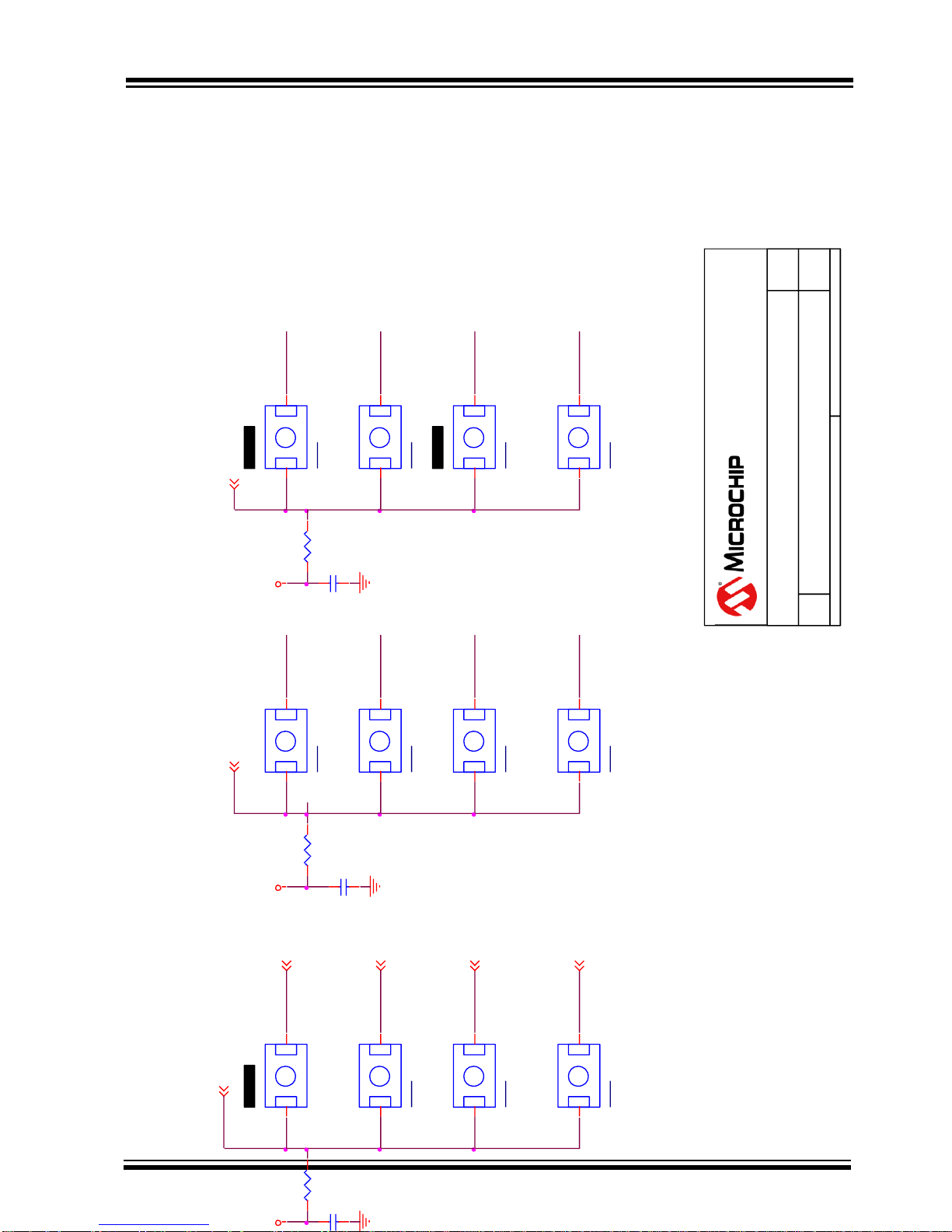
MFB VOL-
PLAY/PAUSE
VOL+
C1
BUTTON
MCU_P45
MCU_P70
MCU_P72
R1
R0
R2
MCU_P71
MCU_P72
MCU_P70
R11410K/1%
1 2
C61
1u/16V
MCU_P70
<< PRV
C0
MCU_P72
MCU_P44
C132
1u/16V
R116
10K/1%
1 2
SW22
TS08M-PF
21
SW23
TS08M-PF
21
SW24
TS08M-PF
21
SW34
TS08M-PF
21
SW27
TS08M-PF
21
SW31
TS08M-PF
21
SW28
TS08M-PF
21
SW35
TS08M-PF
21
SW39
TS08M-PF
21
SW45
TS08M-PF
21
SW40
TS08M-PF
21
SW38
TS08M-PF
21
SW PT
P77
C2
MCU_P70
R11510K/1%
1 2
MCU_P71
C63
1u/16V
FWD >>
MCU_P72
MCU_P46
3V33V3 3V3
Board Name
Size
Title Rev
Date: Sheet of
P/N
MCU_BUTTON
4.0
BM23 EVB
A
8 8Monday, July 27, 2015
0360
5F, No.5, Industry E. Rd. VII, Hsinchu Science Park,
Hsinchu City 30078, Taiwan
TEL. 886-3-5778385
Page 38

Page 39

Mouser Electronics
Authorized Distributor
Click to View Pricing, Inventory, Delivery & Lifecycle Information:
Microchip:
BM-23-EVB
 Loading...