

Page 1

User Manual
P/N: 07529-000 Rev A
Date: 11/01/2018
PCM2-J19 version
Page 1/16
User Manual
PCM2-J19
Page 2

User Manual PCM2-J19
P/N: 07529-000 Rev A
Page 2/16
Disclaimer
ISIC A/S makes no representation or warranties with respect to the contents or use of this
manual, and specifically disclaims any express or implied warranties of merchantability or
fitness for any particular purpose. Further, ISIC A/S reserves the right to revise this
publication and to make changes to its content at any time, without obligation to notify any
person or entity of such revisions or changes.
FCC Warning
Computing devices and peripherals generate, use, and can radiate radio frequency energy, and
if not installed and used in accordance with the instructions advised by ISIC A/S, may cause
interference to radio communication.
The PCM2-J19 computer, manufactured by ISIC A/S, is designed to comply with the emerging
generic EEC standards, that cover applications in maritime environment.
Classification
The computer is classified as Environmental condition “protected” acc. to EN60945 ed. 4.
Approvals
Approval according to EN60945 ed. 4; Maritime navigation and radio communication
equipment and systems – General requirements.
ISIC A/S is complying with the WEEE directive within the European Union, stating that
electronic and electric products must be collected separately. Products are marked according
to the directive.
Copyright 2018 ISIC A/S
ISIC P/N: 07529-000 Rev A
ISIC A/S
Edwin Rahrs Vej 54
DK-8220 Brabrand
Denmark
Phone: +45 70 20 70 77
Fax: +45 70 20 79 76
Web: http://www.isic-systems.com
Page 3

User Manual PCM2-J19
P/N: 07529-000 Rev A
Page 3/16
ISIC PCM2-J19 User Manual
Congratulations on your purchase of ISIC PCM2-J19. This short form manual is designed to get
you started working with your new PCM2-J19.
Table of Contents
1 GENERAL CONSIDERATIONS ON INSTALLATION AND OPERATION ....................... 4
2 GETTING STARTED ................................................................................................ 4
3 PCM2-J19 CONNECTIONS ...................................................................................... 5
4 CONNECTOR PIN-OUT ........................................................................................... 5
5 TECHNICAL SPECIFICATIONS ............................................................................... 7
6 MECHANICAL DIMENSIONS ................................................................................... 8
7 TROUBLESHOOTING GUIDE................................................................................... 9
8 SERVICING THE UNIT ........................................................................................... 9
9 GENERAL NOTES ON USB ...................................................................................... 9
10 ISIC INFO / SUPPORT ...................................................................................... 10
11 REVISION HISTORY ......................................................................................... 11
Page 4

User Manual PCM2-J19
P/N: 07529-000 Rev A
Page 4/16
1 General considerations on Installation and
Operation
The PCM2-J19 is designed to work fanless at conditions according to IEC 60945. However,
keeping the temperature and vibration level at a minimum will extend the life time of the
product. ISIC recommend operating this product at normal room temperature (20-25 °C), with
the lowest level of vibration and humidity.
Installation of the PCM2-J19
When designing the cabinet/console for the PCM2-J19, please ensure that air can flow freely
around the cabinet, in order to avoid any unnecessary rise in temperature. If it is not possible
to have an adequate natural airflow, use a fan to force the airflow to be higher.
The PCM2-J19 can be mounted in all orientations.
2 Getting started
Please refer to the PCM2-J19 connections for location of connectors specified in this section.
Connect Keyboard/Mouse to the to the USB connectors.
Connect the monitor to the DVI connector.
Connect all other needed connectors ending with the Power outlet.
To power up the PCM2-J19, you need to press the power button (dependant on BIOS setting).
Page 5

User Manual PCM2-J19
P/N: 07529-000 Rev A
Page 5/16
Pin1
3 PCM2-J19 connections
Below is a view of connections to the PCM2-J19.
4 Connector pin-out
4.1 Serial (COM2)
Mating part: SUB-D 9 pole female, Norcomp 172-E09-20201 or equivalent.
Pin
RS-232
RS-422
RS-485
1
DCD
Tx-
D-
2
RxD
Tx+
D+
3
TxD
Rx+
4
DTR
Rx-
5
GND
6
DSR
7
RTS
8
CTS
9
RI
COM2 settings RS232/422/485 is set in BIOS
Page 6

User Manual PCM2-J19
P/N: 07529-000 Rev A
Page 6/16
Pin1
Pin1
4.2 Power input
The nominal input power voltage is 24V (18-36VDC). There are two independent galvanic isolated power inputs.
Mating part number: Weidmüller BLZP5.08HC/02/180F
Pin
Power in
1
0VDC
2
24VDC
4.3 Fan output
Mating part: JST XHP-2 (housing), SXH-001T-P0.6 (terminal)
Pin
FAN out
1
12VDC
2
0VDC
Page 7
User Manual PCM2-J19
P/N: 07529-000 Rev A
Page 7/16
5 Technical specifications
General
CPU:
Intel® Celeron® Processor J1900, 2.42 GHz (4 Cores / 4 Threads)
Chipset:
Intel® processor Core, Graphics and Memory Controller in a single system-onchip (SOC) solution
Memory:
1 x SODIMM sockets with 1x 4GB DDR3L 1600MHz mounted
Up to 8GB DDR3L SODIMM
Hard Disk Drive:
80GB Intel® S3500 SSD SATA
Optional sizes available
Video:
External Video out:
Intel® HD Graphics controller on-CPU
DirectX* 11 and OpenGL 4.0 compliant
Dual Independent display capable
1 x DVI-I video output connector
Ethernet:
4 x 10/100/1000 Mbits/s Ethernet LAN on-board, (RJ45) with auto-negotiate
2 x Intel and 2 x Realtek
USB:
2 x USB 2.0 (max 0,5 Amp per USB, max 5 Watt total)
COM:
1 x RS232/422/485 (configurable)
OS:
Windows 7, Windows 8, Windows 10, Linux
Power
Standard:
18-34VDC Galvanic isolated
Optional Dual input DC power, Galvanic isolated
Power Consumption:
P
typ
= 8 Watt, P
max
= 15 Watt
Environmental
Operating Temperature:
-15 to +55 °C
Storage Temperature:
-25 to +70 °C
Relative Humidity:
8 to 95 % (non-condensing)
Approvals
Marine:
IACS E10 Rev. 6 & IEC 60945 Ed. 4
Type Approvals:
Pending
For marine class approvals – see www.isic-systems.com
Dimensions
Size:
213 mm (W) x 156 mm (H) x 58 mm (D)
Weight:
App. 1,5 kg.
Optional Bracket:
Desk/ceiling-and wall-bracket (VESA 75x75mm)
Page 8
User Manual PCM2-J19
P/N: 07529-000 Rev A
Page 8/16
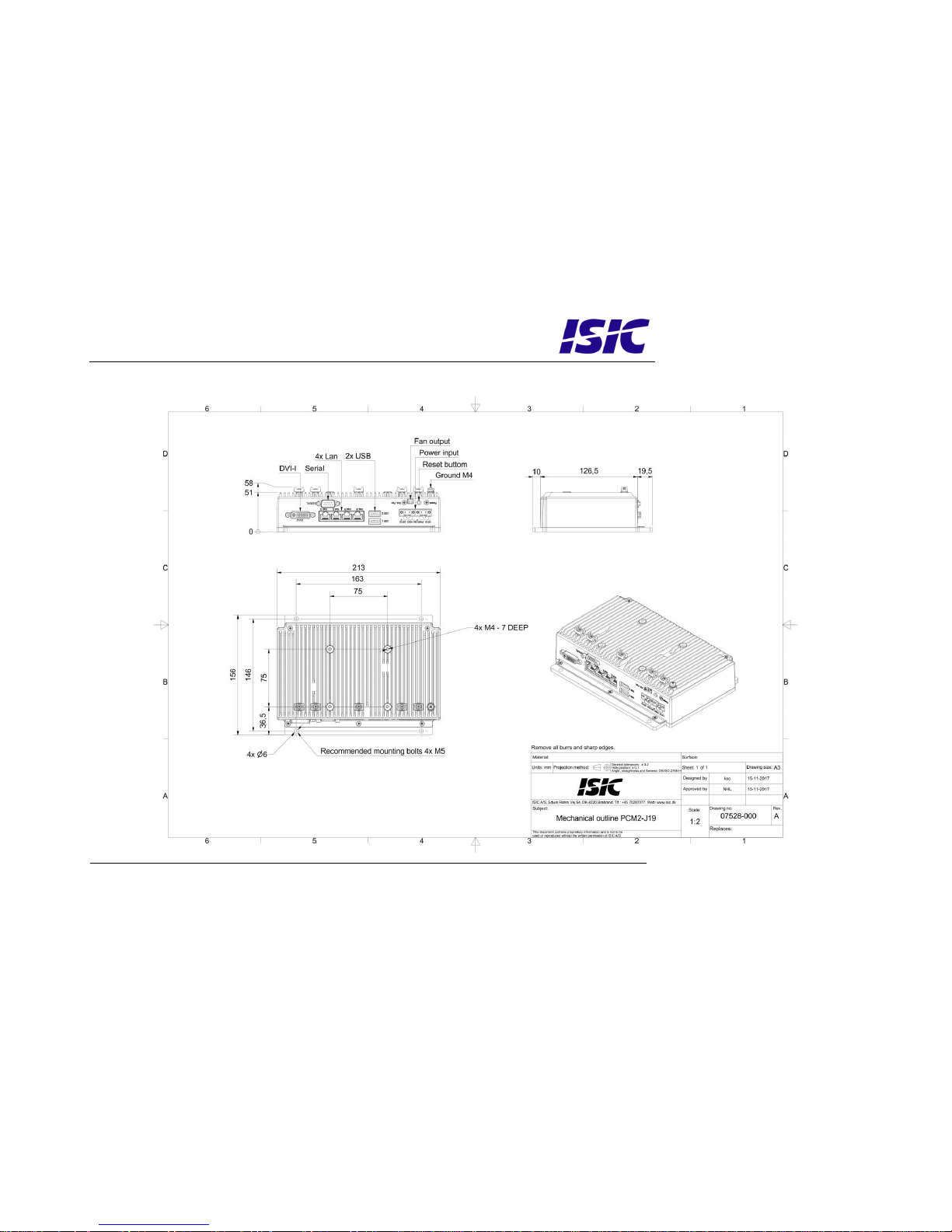
6 Mechanical dimensions
Page 9
User Manual
P/N: 07529-000 Rev A
Date: 11/01/2018
PCM2-J19 version
Page 9/16
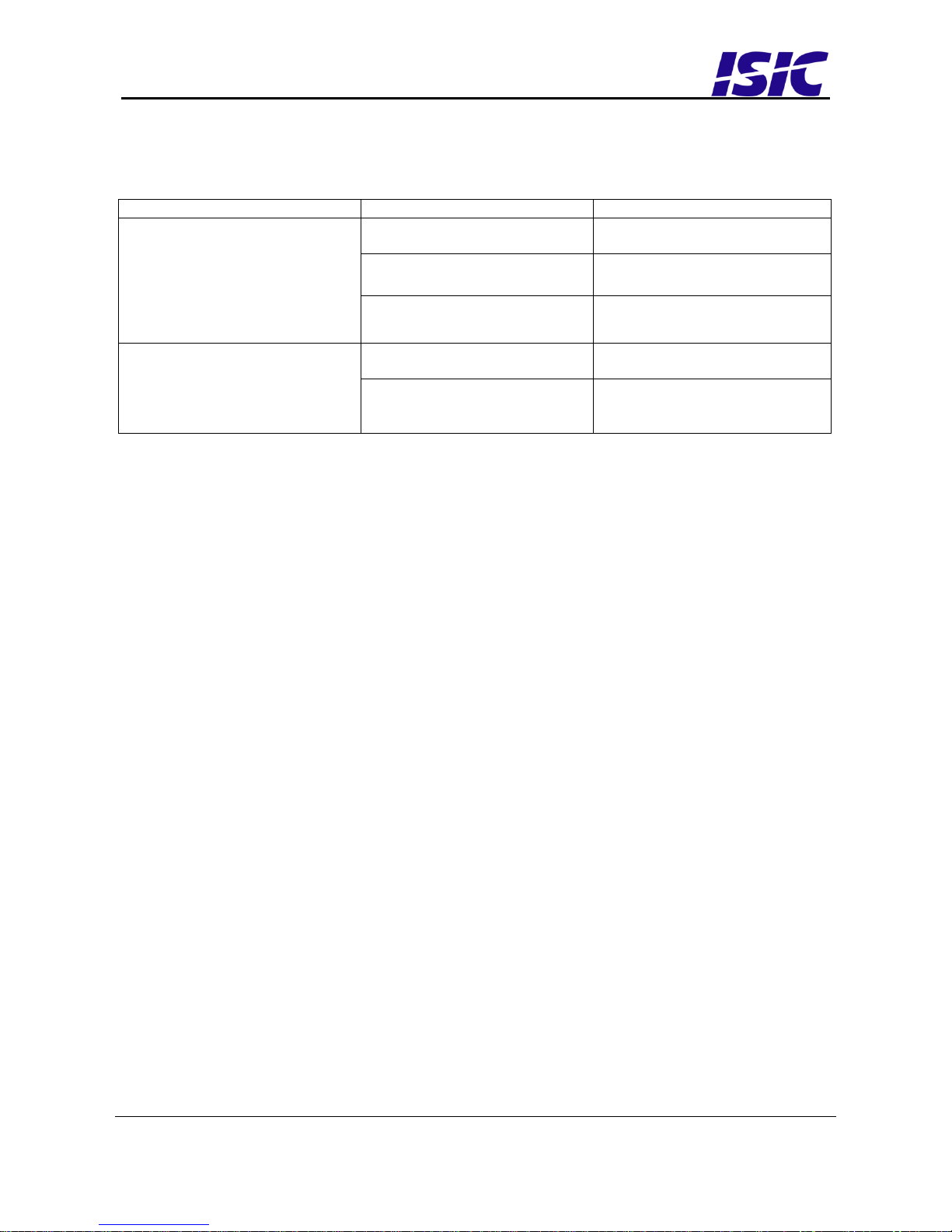
7 Troubleshooting guide
Problem
Cause
Solutions
The PCM2-J19 won’t start
- There is no power
connected
- Connect the power cord
- The polarity of the power is
wrong
- Swap +24V and GND
- USB power overload
- Read paragraph “General
notes on USB”
The PCM2-J19 starts, but there
is no picture on the screen
- The display DVI is not
connected, or has fallen out
- Connect the DVI cable
- Your brightness/contrast on
the monitor is either at max
or min level.
- Turn the brightness/contrast
to the correct levels.
8 Servicing the unit
In case that the unit still fails after following the troubleshooting guide send the unit to ISIC
for repair. There are no user serviceable parts inside.
9 General notes on USB
In the USB specification a max power consumption of 500mA on each USB port is defined.
If you experience start- up problems, start by removing all USB devices, and then try to
restart the PCM2-J19 again.
Faulty USB devices can also cause malfunction of your PCM2-J19.
Page 10

User Manual
P/N: 07529-000 Rev A
Date: 11/01/2018
PCM2-J19 version
Page 10/16
10 ISIC info / Support
In case you have inquiries or problems with your PCM2-J19, you have a number of possibilities
to get support.
Company name: ISIC A/S
Head office: Edwin Rahrs Vej 54
DK – 8220 Brabrand
Denmark
Shipping address: Holmstrupgaardvej 5
DK-8220 Brabrand
Denmark
Telephone: +45 70 20 70 77
Fax: +45 70 20 79 76
VAT number: DK 16 70 45 39
Bank Name/Address: Handelsbanken A/S
Havneholmen 29
DK – 1561 København V
Denmark
Bank Code: 0892
SWIFT: HANDDKKK
IBAN for DKK: DK53 0892 0001 0159 69
IBAN for EUR: DK48 0892 0003 0026 19
IBAN for USD: DK26 0892 0003 0026 27
Support: Via homepage www.isic-systems.com under aftersales
By mail to [email protected]
During office-hours (Mo-Fr: CET 0800 - 1600) at +45 70 20 70 77
Service: Before shipment for service Request Return Material Authorisation
number at homepage www.isic-systems.com under RMA
By mail to [email protected]
Page 11

User Manual
P/N: 07529-000 Rev A
Date: 11/01/2018
PCM2-J19 version
Page 11/16
11 Revision history
Rev A
Jan 2018
Release
 Loading...