

Page 1
Your Communications Solution
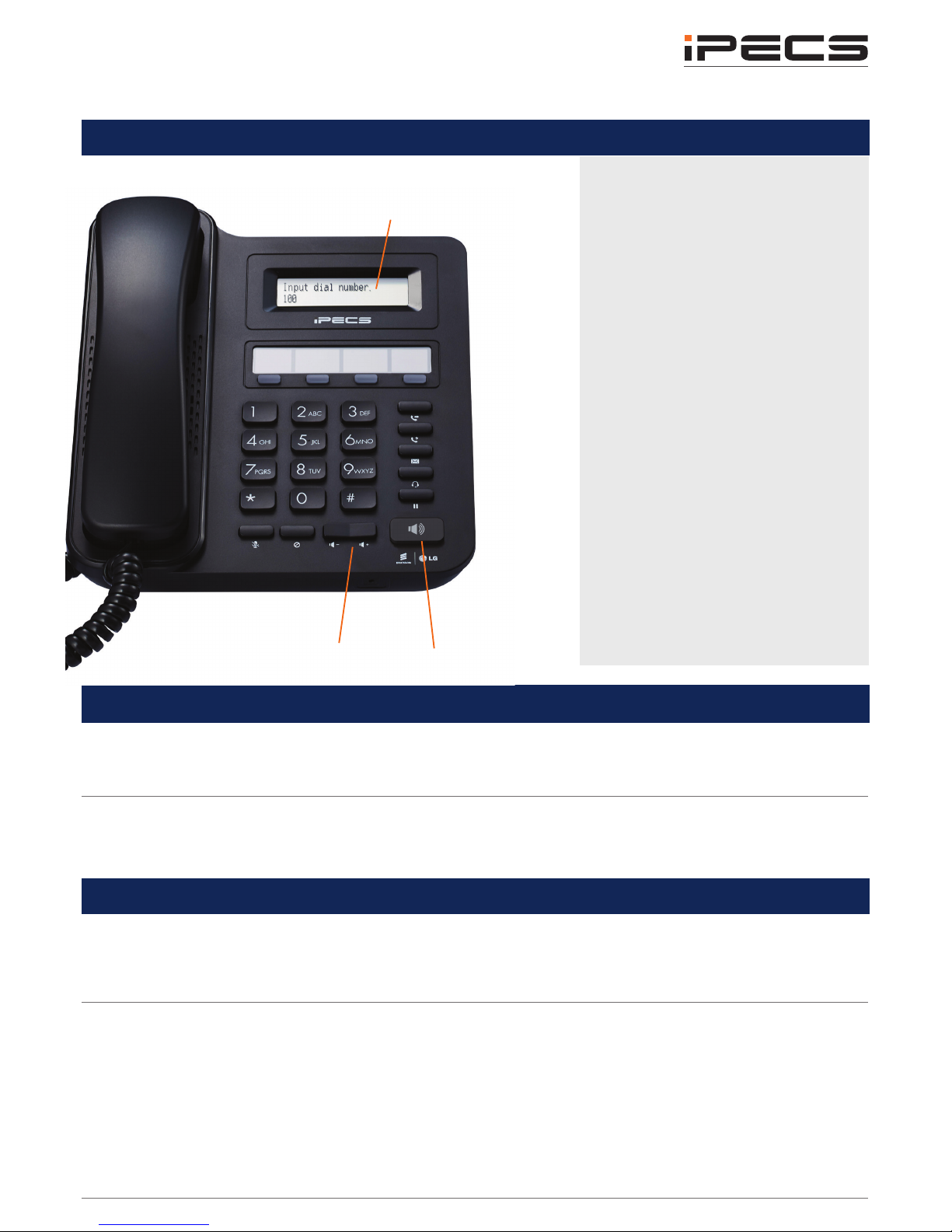
LIP-9002 Button Layout
8. Speaker
9. Volume
Speed Dial
Lift the handset
Press the Speed button
Dial the desired System or Station Speed Dial number
Last Number Redial (LNR)
(stores the last 15 dialed numbers)
Press the Speed button.
Dial *
Use the Volume keys to select from the last 15 numbers dialed
Press HOLD to dial
Accessing your Voicemail
Select the Voice Mail Flexkey (if congured) or press the Message button. Enter your password:
this is is your extension number followed by your pin number.
If you do not know your pin, contact your system administrator
Listening to Voicemail (Options)
Once you have accessed your voicemail inbox here are the options available to you:
Dial 1 – New messages (Dial 1 again to Replay Message)
Dial 2 – Next Message
Dial 3 – Delete Message (Conrm with #)
Dial 4 – Forward message to someone else
Dial 5 – Call back the person who left the message
Dial 6 – To skip the message
Dial 8 – Record/ re-record message
Hang up when nished.
Phone Directory
Voicemail
Ericsson-LG iPECS LIP-9002
Handset User Guide
1. Transfer: transfer the current active call
or access the PGM menu while the phone
is in idle state.
2. Speed: assign or use assigned speed
numbers.
3. Message: access your voicemail box.
4. Headset: if a headset is plugged in this
button allows you to toggle between the
headset and handset.
5. Hold: place a call on hold – the caller will
receive on-hold music.
6. Mute: mute the call so that the caller
cannot hear your voice.
7. DND (Do-Not-Disturb): blocks incoming
calls. You can also activate Do-NotDisturb while the phone is ringing - this
terminates the call and the caller will get a
fast busy tone.
8. Speakerphone: toggle the speakerphone
On and Off during a call. The button will
automatically illuminate when the phone is
in menu mode.
9. Volume control: adjust the Ring,
Headset, Handset, and Speaker volume.
10. Flexkeys: a line or feature can be
assigned to these buttons.
1.
2.
3.
4.
5.
6.
7.
Button Guide
}
10. Flex Keys
LCD Screen: Phone interface for
status, dialing directories, and text
message information.
Page 2

Do-Not-Disturb
(Makes your extension
unavailable for calls)
Press DND button to activate.
Press DND button again to deactivate.
Please note that this is not available on the attendant handset.
Conference Calls
(3 way calling)
Programming Call Forward
(Routes your calls to another
extension/group/speed dial)
This will override your voice mail
functions.
Lift the handset
Press the Speaker button and the DND button
Dial the type of forward code 0-5
Dial the destination number
To deactivate, follow the rst two steps then Dial #.
Transferring a Call
Press the Transfer button, dial the extension number, external number or press the programmed
Flexkey, then either speak to the recipient to announce the call or simply hang up.
Returning to Caller from a Transfer
Press the Green ashing Loop/Line Flexkey.
Parking a call
To park an active external call, press Transfer, dial the park code, and hang up to return to idle.
To retrieve a parked call, lift the handset and dial the park code.
Camp On
When dialing an extension that is engaged, the Camp On feature allows the station to be notied
that there is a call waiting. Press * to wait off-hook or Message to request a call back.
Dealing with calls
Transferring a call
Features
Holding a call
Answering an Incoming Call
Lift the handset. To answer a call on another extension, press the ashing Flexkey and then lift the
handset.
Making an External Call
Press a free Loop/Line Flexkey or the 9 key to pick up an outside line. Once you have the outside
line, dial your number.
Making an Internal Call
Dial the extension number or press the Flexkey assigned to the contact.
Rejecting a Call
Press the DND button when a call comes in.
Call Pick Up
Lift the handset and dial ** to pick up any handset in your group, or dial 77 if not in your group.
Placing a call on hold
Press the HOLD button. To reconnect the call, press the Green ashing Loop/Line Flexkey.
Parking a call
 Loading...