

Page 1

The contents of this document are subject to revision without
notice due to continued progress in methodology, design and
manufacturing. Ericsson-LG Enterprise shall have no liability for
any error or damage of any kind resulting from the use of this
document.
Part No. MMBB9248401 / ISSUE 1.1 www.ericssonlg-enterprise.com
Printed in Thailand © Ericsson-LG Enterprise Co., Ltd. 2016
EHS Adaptor
Quick Installation Guide
Please read this manual carefully before
operating your set. Retain it for future reference.
EHS Adaptor - Quick Installation Guide 4
Regulatory Information
[EU]
European Union Declarations of Conformity
Ericsson-LG Enterprise Co., Ltd. declare that the
equipment specied in this document bearing
the “CE” mark conforms to the Electromagnetic
Compatibility Directive(2004/108/EC).
Copies of these Declarations of Conformity
(DoCs) can be obtained by contacting your
local sales representative.
[USA/Canada]
FCC/IC Interference Statement
This equipment has been tested and found
to comply with the limits for a Class B digital
device, pursuant to part 15 of the FCC Rules.
These limits are designed to provide reasonable
protection against harmful interference in a
residential installation.
This equipment generates, uses and can
radiate radio frequency energy and, if not
installed and used in accordance with the
instructions, may cause harmful interference
to radio communications. However, there is
no guarantee that interference will not occur
in a particular installation. If this equipment
does cause harmful interference to radio or
television reception, which can be determined
by turning the equipment o and on, the user
is encouraged to try to correct the interference
by one or more of the following measures:
• Reorient or relocate the receiving antenna.
• Increase the separation between the
equipment and receiver.
• Connect the equipment into an outlet on
a circuit dierent from that to which the
receiver is connected.
• Consult the dealer or an experienced radio/
TV technician for help
This device complies with part 15 /RSS-Gen of
the FCC/IC rules. Operation is subject to the
following two conditions:
(1) This device may not cause harmful
interference; and (2) This device must
accept any interference received, including
interference that may cause undesired
operation.
(1)l'appareil ne doit pas produire de brouillage,
et (2) l'utilisateur de l'appareil doit accepter
tout brouillage radioélectrique subi, même si le
brouillage est susceptible d'en compromettre
le fonctionnement.
This Class B digital apparatus complies with
Canadian ICES-003.
Cet appareil numérique de la classe B est
conforme à la norme NMB-003 du Canada.
The use of this device in a system operating
either partially or completely outdoors may
require the user to obtain a license for the
system according to the Canadian regulations.
CAUTION : Any changes or modications
in construction of this device which are not
expressly approved by the party responsible for
compliance could void the user's authority to
operate the equipment.
ATTENTION: Tout changement ou modication
dans la construction de cet appareil qui ne
sont pas expressément approuvé par la partie
responsable de la conformité pourraient
annuler l'autorité de l'utilisateur à utiliser
l'équipement.
Disposal of Old Appliance
When the displayed symbol (crossedout wheeled bin) is adhered to a
product, it designates the product is
covered by the European Directive
2012/19/EU.
All electric and electronic products should
be only be disposed of in special collection
facilities appointed by government or local/
municipal authorities.
The correct disposal of your old appliance will
help prevent potential negative consequences
for the environment and human health.
For more detailed information about disposal
of your old appliances, please contact your city
oce, waste disposal service or the place of
product purchase.
Page 2
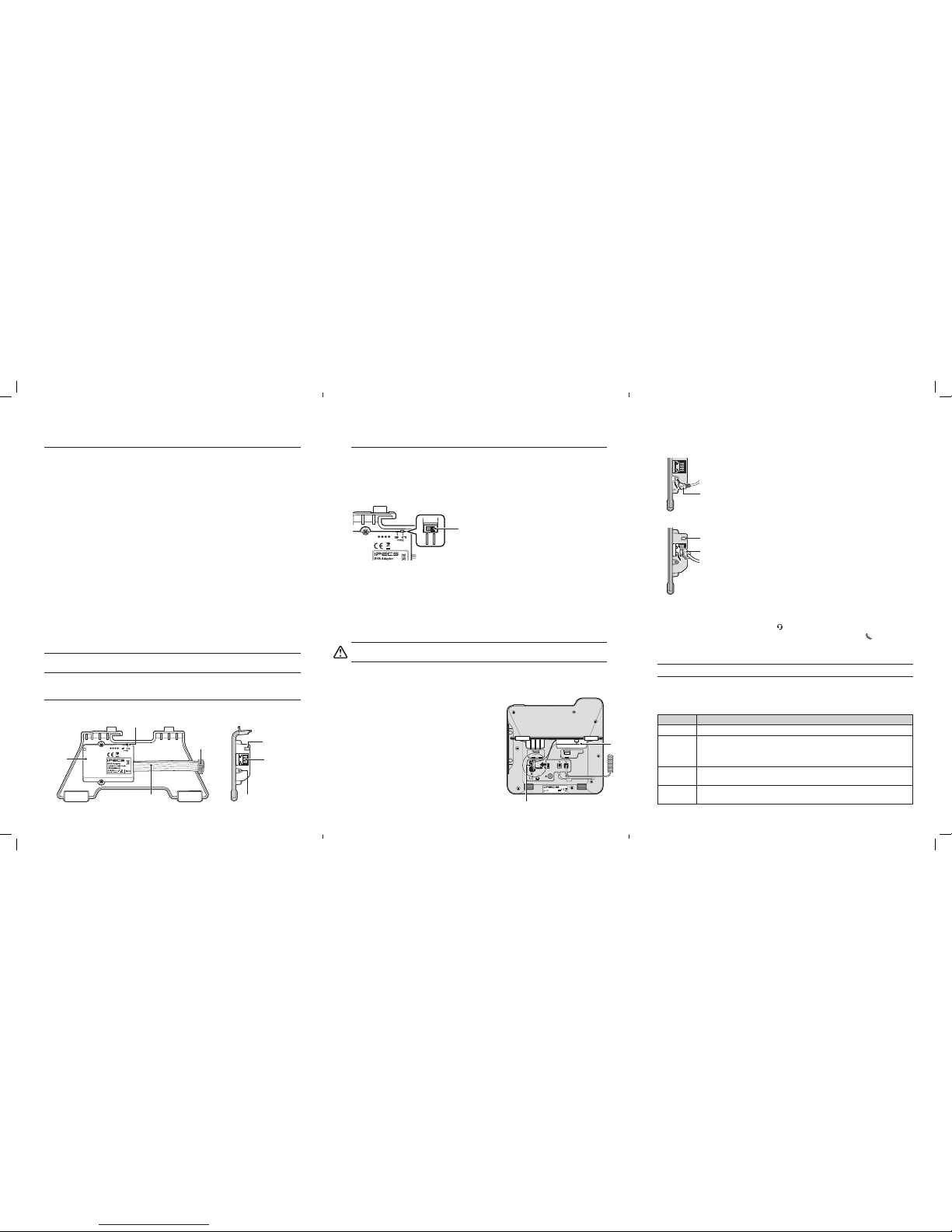
EHS Adaptor - Quick Installation Guide 1 EHS Adaptor - Quick Installation Guide 2 EHS Adaptor - Quick Installation Guide 3
4. Connect one of the data cables supplied with the EHS Adaptor between the EHS Adaptor and
the EHS Base Set.
• If you are using a headset from Plantronics, please use the 3.5 mm Ear Jack cable.
• If you are using a headset from Jabra, please use the RJ-45 Modular Jack cable.
• If the colour of LED is changed to green or blue which means the EHS Adaptor is correctly
linked with the EHS Base Set. (See "LED Indications" table)
5. Connect the audio cable supplied with the EHS Base Set between the EHS Base Set and the
headset port on the phone marked with the symbol.
• The handset must be connected to your phone in the port marked with the symbol.
• To avoid the radio interference, place the EHS Base Set 10 cm for away from your phone.
6. Set the phone in Headset mode to connect a call to your EHS headset directly.
NOTE: For headset mode setting instructions, refer to each phone's manual.
LED Indications
Below is a list of LED and their meaning. LED is located on the left side of the EHS Adaptor that
has been installed.
LED Color What it means
White indicates that the data transceive is disconnected between Phone and EHS Adaptor.
Red
indicates that the link is disconnected or data communication is failed between
Phone and EHS Base Set (such as Plantronics or Jabra). If you experience this
problem we suggest you turn O the power of EHS Base and turn On again.
Green
indicates that the EHS Adaptor protocol type is set with KTS, or EHS Base Set is in
standby mode or during a call.
Blue
indicates that the EHS Adaptor protocol type is set with SIP, or EHS Base Set is in
standby mode or during a call.
Installation
Your phone should be placed on a level surface near an electrical outlet, such as a desk or table
top.
Setting Protocol Type
Prepare your EHS Adaptor for connection depending on a protocol type of your phone. The setting switch is located on the top of the EHS Adaptor.
The TYPE switch is used to choose a protocol type between SIP and KTS. The default switch
position is 'KTS'.
• SIP means the SIP protocol, you can connect the phone which used in SIP.
• KTS means the Ericsson-LG Enterprise own protocol, you can connect the phone which used
in based on Ericsson-LG Enterprise protocol (including Digital Phone).
Connecting a EHS Adaptor
To install this EHS Adaptor correctly, please follow the steps below to connect your phone.
Caution! Disconnect the power cable or remove the network cable to ensure that your phone is O.
Only a peripheral device can be connected to DSS/EHS Adaptor port.
1. Firstrly remove the foot stand from the bottom of your phone and then attach the EHS Adaptor
as a foot stand.
2. Connect the at cable on the EHS Adaptor to the DSS/EHS Adaptor port on the back of your
phone.
• Remove the rubber plug from the DSS/EHS Adaptor
port and connect the EHS Adaptor.
• The red marking on the at cable must turn upwards
(towards the mold pin on the phone, as shown in
illustration).
3. Reconnect power and/or connect the network cable and
wait for your Phone to start.
• LED is changed to red, which means the EHS Adaptor is
correctly linked with your phone.
• The phone is only detecting external equipment at
startup. For this reason the power should be connected
after the EHS Adapter is plugged in.
Before Starting
About this guide
This guide provides information about the EHS (Electronic Hook Switch) Adaptor installation for
your Ericsson-LG Enterprise phone.
Package contents
Before starting the installation, please ensure that you have:
• EHS Adaptor with Foot Stand
• 3.5mm Ear Jack Data Cable for Plantronics
• RJ-45 Modular Jack Data Cable for Jabra
• Quick Installation Guide
Description
Electronic Hook Switch (EHS) is a device which electronically connects a EHS Base Set and
Ericsson-LG Enterprise phone. This EHS Adaptor enables remote control with the compatible
EHS Base Set and the LIP-9000, IP9800, and LDP-9200 Series (except that LIP-9002/IP9802, LIP9050/IP9850, LIP-9071/IP9871 and LDP-9208D).
Compatible EHS Base Set Model List
Below are the recommended models for your phone, please see each model's user guide for
more details.
• Jabra (IQ Protocol): Pro 92x, 94xx
• Plantronics (PSB Protocol): Savi7xx, CS5xx
NOTE: Ericsson-LG Enterprise cannot guarantee other model except the above list or posted on the
web site and this list will be updated if we have nished testing the new one anytime.
Part of the name
The gures below present line drawings of the EHS Adaptor identifying major elements of the
user interface.
RJ-45 Modular Jack
Mold Pin
EHS Adaptor
Flat Cable
LED
TYPE Selection Switch
3.5 mm Ear Jack
TYPE Switch
Use only with approved limited power source
LIP-9040
DSS/EHS Adaptor Port
EHS
Adaptor
3.5 mm Ear jack data cable
LED
RJ-45 Modular jack data cable
 Loading...