

Page 1
Rev. 1.1
Page 2

Technical Support Information
For Technical Support, Toll-Free: 866-896-1818
M-F 8:00am - 6:30pm CST
Email: [email protected]
Web: www.ipdatatel.com
ipDatatel, LLC
13110 Southwest Freeway
Sugar Land, TX 77478
Please visit our website for instructional videos.
About ipDatatel
At ipDatatel, LLC, we are dedicated to serving our dealers with quality
products and support services.
ipDatatel engineers and manufactures innovative security and
automation devices for the alarm industry. As a leader in the design
and development of Cellular and IP connected products, we offer:
•
Proprietary alarm signaling network with no single point of failure;
• No additional central station equipment needed;
• Verizon Cellular Network ready;
• Encrypted IP alarm transmissions; and
• Dealer support and training.
Revision Notes
Rev Notes Date
Initial Release 1/13/2015
1.1 Updated Wi-Fi Joining Process 3/8/2015
Dual-Path Alarm Communicator - Installation Guide ...............................................Page 2
Page 3
Quick Reference
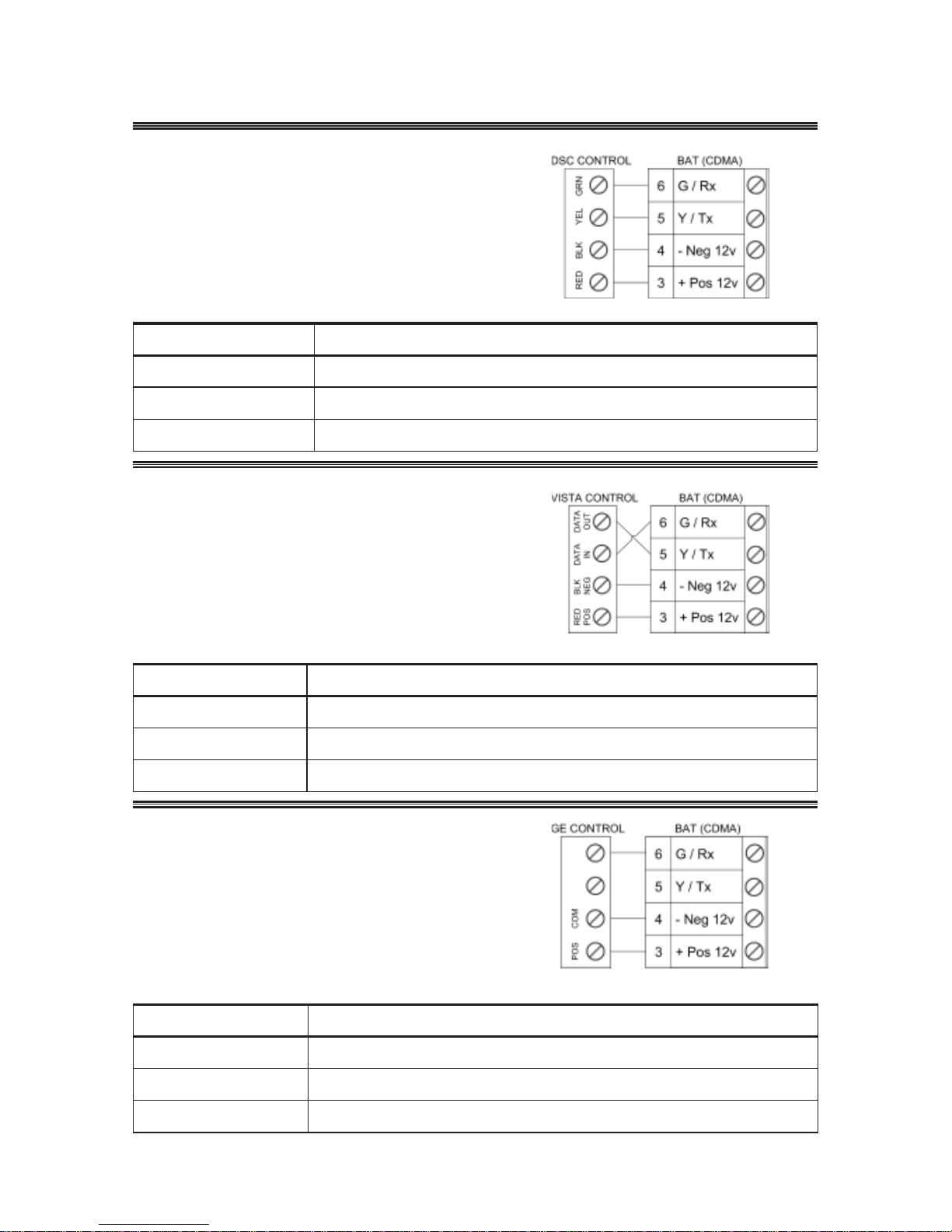
See Supported Panels section page 26-27
DSC:
See page 14 for details
Programming for TELCO use on DSC:
Section Universal Wi-Fi BAT as Sole Communicator
301 Enter Phone Number
310 Enter Account Number
350 Enter ‘03’ for Contact
HONEYWELL / VISTA:
See page 18 for details
Programming for TELCO use on Vista:
Section Universal Wi-Fi BAT as Sole Communicator
41 Enter Phone Number
43 Enter Account Number
193 Enter 1, 0. Enable to turn on Address 20
GE NETWORX:
See page 21 for details
Programming for TELCO use on GE NetworX:
Section Device 0 Universal Wi-Fi BAT as Sole Communicator
Location 0 Enter the Phone Number
Location 1 Enter Account Number
Location 2 Enter ‘13’ for Contact ID
Dual-Path Alarm Communicator - Installation Guide ...............................................Page 3
Page 4

Table of Contents
Revision Notes.......................................................................... 2
Introduction ............................................................................... 5
Product Key Features .............................................................. 5
Installation Guide ..................................................................... 7
General Considerations ........................................................... 7
Wi-Fi Service Provisioning ...................................................... 7
AP Configuration Tool QuickStart Guide .................................. 7
Connecting to a Wireless Network (AP Configuration) ............ 7
Connecting to a Wireless Network (WPS) ............................... 8
Reset the Wireless Network (AP Configuration Tool) .............. 8
CDMA Service Provisioning .................................................... 9
Board Button Configuration .................................................... 10
Pre-Installation.......................................................................... 10
Troubleshooting Diagnostic Information .................................. 13
Validating the Installation ......................................................... 13
Wiring & Programming for Popular Panels ............................ 13
DSC Panel Wiring and Programming ...................................... 14
Vista Panel Wiring and Programming ...................................... 18
GE Panel Wiring and Programming ........................................ 21
Generic Alarm Panel Wiring and Programming ....................... 23
Generic Key Switch Wiring and Programming ........................ 24
Supported Panels .................................................................... 26
Limited Warranty Information ................................................. 28
FCC and Industry Canada Regulatory Compliance .............. 29
Specifications ........................................................................... 31
Dual-Path Alarm Communicator - Installation Guide ...............................................Page 4
Page 5

Introduction
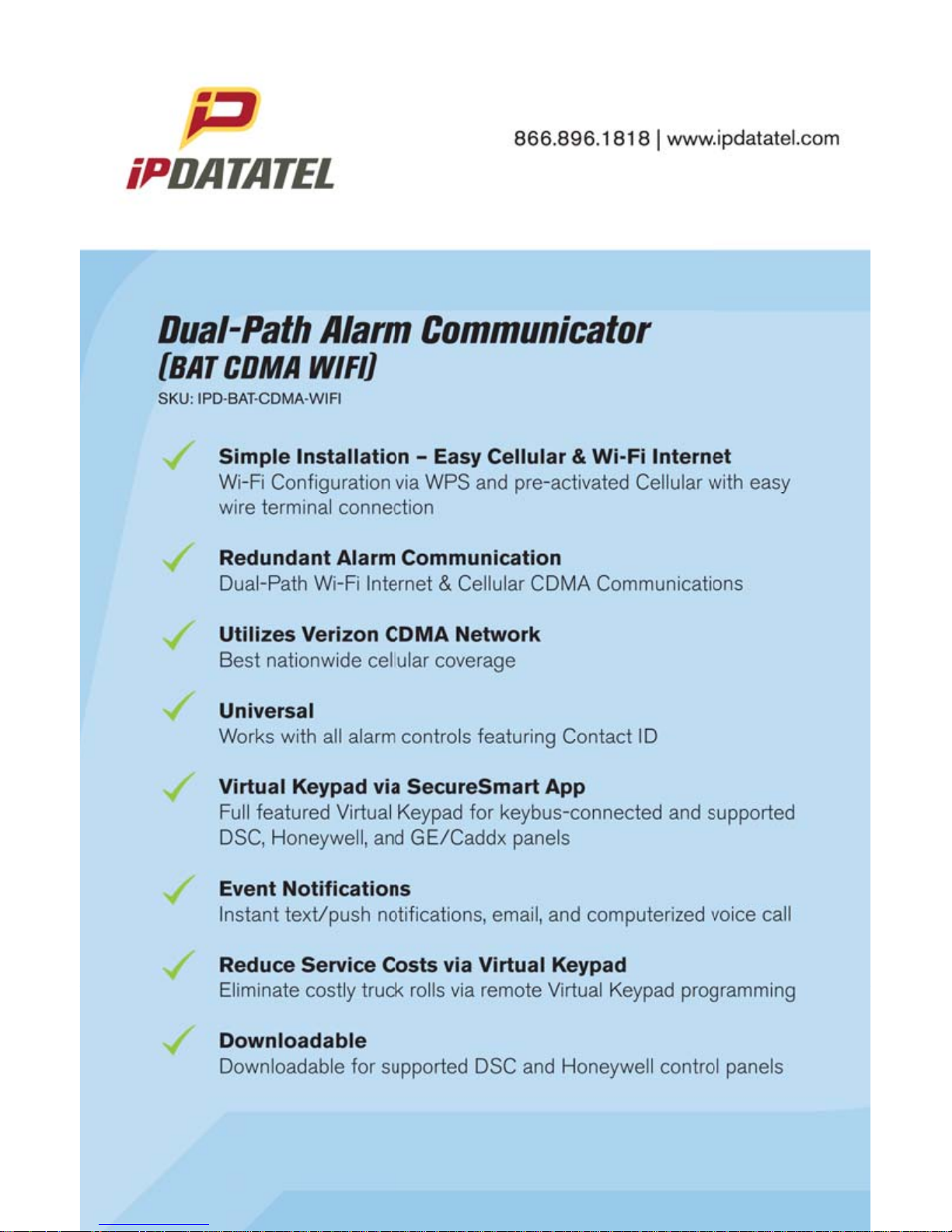
ipDatatel’s Universal Cellular and Wi-Fi Broadband Alarm Transceiver
(BAT-CDMA-WIFI) is a multi-path wireless Cellular and Internet alarm
communicator. The BAT-CDMA-WIFI uses Verizon CDMA which has
the greatest nationwide coverage.
The BAT -CDMA-WIFI is compatible with most alarm control panels that
transmit Contact ID (CID) format from its digital dialer . The BAT-CDMAWIFI also connects to the Keypad Bus of compatible (Honeywell,
DSC and GE) alarm control panels to provide additional interactive
services.
The end user has virtual keypad access via Smartphone and the web,
as well as alarm monitoring notifications via push/text, email, and
computerized voice call.
ipDatatel’s proprietary uDownloader software enables remote management of Honeywell and DSC alarm panels that are connected to the
BAT-CDMA-WIFI.
Product Key Features
• Cellular (Verizon CDMA) and Wi-Fi Communicator
The BAT-CDMA-WIFI replaces outdated conventional phone lines to
provide high-speed IP alarm monitoring transmissions over the Internet
(via Customer’s Wireless Router/Swtich through Wi-Fi) and provides a
cellular backup form of communication if the event the Internet is down
or line is cut.
• Remote Universal Downloader
ipDatatel’s Universal Downloader software, uDownloader, enables
remote management of alarm panels that are connected to ipDatatel’s
BAT products via the Internet uDownloader software. uDowloader
currently supports Honeywell Compass and DSC DLS 5. ipDatatel’s
uDownloader software is available for download at www.alarmdealer.
com in the Dealer Resources section.
Dual-Path Alarm Communicator - Installation Guide ...............................................Page 5
Page 6

• Virtual Keypad Access
Your customers can operate their security system using ipDatatel’s
SecureSmartTM app via their Smartphone. SecureSmartTM is compatible
with iPhone and Android platforms. The free App is available at the
iTunes App Store or the Google Play Store (search for “SecureSmart”).
The virtual keypad is also available as a web application on www.
alarmdealer.com that runs from any Internet connected browser that
supports flash.
• Alarm Notifications via Text/Push and Email
The BAT-CDMA-WIFI provides notifications for alarm, supervisory,
trouble, open/close, and test signals. Notifications by text/push and
email are configurable to identify the alarm system address, alarm
signal and zone, and description.
• Computerized Voice Alarm Notifications
ipDatatel also provides an exclusive feature of notifications via
computerized voice call for customers who may not want text or email
messages.
Dual-Path Alarm Communicator - Installation Guide ...............................................Page 6
Page 7

Installation Guide
General Considerations
• Before installation, your BAT-CDMA-WIFI must also be setup
using the ‘dealer branded’ portal www.alarmdealer.com.
• The BAT-CDMA-WIFI should be installed securely in the supplied
plastic enclosure, and be mounted adjacent to your alarm control
panel.
• Choose a location with good reception by monitoring the
BAT-CDMA-WIFI signal strength LEDs with temporary wiring
for a power-up.
• The BAT-CDMA-WIFI must be completely powered down before
making other wiring terminations to panel.
• Programming is simple using the alarm control panel. Written
instructions are included in the “Wiring & Programming” section of
this manual starting on page 13.
Wi-Fi Service Provisioning for AP & WPS
AP (Access Point) Configuration Tool QuickStart Guide
A QuickStart Guide has been designed to make the BAT-CDMA-WIFI
easily join the customer’s Wi-Fi Network. This guide can be found at:
www.ipdatatel.com/support.php .
Connecting to a Wireless Network (AP Configuration)
The BAT-CDMA-WIFI has an AP Configuration Tool which is designed
to assist joining the wireless network to the BAT-CDMA-WIFI.
The following steps should be followed:
1. Connect the BAT-CDMA-WIFI at the alarm panel.
2. Open your Smartphone or laptop and search for Wireless
Connections.
3. In the list of Wi-Fi connections you should see one labeled:
IPD-CFG-AP-XX-XX-XX. The last six digits will match the
MAC address of your Wi-Fi device. If not, try moving your BA T CDMA-WIFI to a different location for better reception.
4. Connect to the Wi-Fi Network: IPD CFG-AP-XX-XX-XX.
5. After you are connected to your Smartphone or laptop, open
a web browser and type in the following IP Address:
192.168.100.1
Dual-Path Alarm Communicator - Installation Guide ...............................................Page 7
Page 8

6. When you connect to the above IP Address it will launch the
AP Configuration Tool.
7. Click on “Scan for Wireless Networks”. The list will
populate with all available wireless networks in your area.
8. Find the customers Wireless Network and select it. If security
credentials are required, you will be prompted to enter them.
9. You should now be connected to the customers Wi-Fi
Network.
Connecting to a Wireless Network (WPS)
Press the SW1 button (located on the top left side of the board) once,
it should trigger the device to enter into WPS mode. LED 6 will blink
as long as the device is in WPS mode. Follow the router’s directions
to turn WPS on. Typically, enabling WPS involves simply pressing a
button labeled ‘WPS’ on the customer’s router or switch. Once the
Wi-Fi device and the router recognize each other, LED 6 will go solid
indicating it has connected. You can now press the SW1 button twice to
indicate the signal strength of the device.
Reset the Wireless Network (AP Configuration Tool)
Locate the button labeled SW1 on the top left of the board. When this
button is pressed 3 times, it causes the device to perform a software
reset and will allow you to perform the ‘AP Configuration Tool’ again.
Dual-Path Alarm Communicator - Installation Guide ...............................................Page 8
Page 9

Cellular CDMA Service Provisioning
Overview
The BAT-CDMA-WIFI device is “Pre-Provisioned” with Verizon Cellular
to be active once installed. If you deactivate the device, you will need
to re-provision the device.
When re-provisioning, it is necessary to register the device with V erizon
Cellular where an ‘Over The Air Service Provisioning’ (OTASP) is
performed. During an OT ASP the CDMA module obtains an IP address
with the nearest cell tower and provides IP connectivity to the BATCDMA-WIFI.
Resolution
The following steps will re-provision the BAT-CDMA-WIFI with the
Verizon network.
Service Provisioning Steps:
1. To begin, ensure, that the device is powered by 12 VDC either
from a battery or the alarm control.
2. Press and release the SW1 switch 3 times (i.e. triple click the
switch)
3. Once released, the device will auto power cycle. When it
reinitializes you should see LEDs 3 – 6 scrolling
4. Once acquired into the network, you will see the signal strength
indicated on the board via LEDs 3 – 6.
5. Wait approximately 5 minutes before sending signals.
Dual-Path Alarm Communicator - Installation Guide ...............................................Page 9
Page 10

Board Button Configuration
SW1 Button [located on the top left of the board]
There are several uses of the SW1 button on the device. Follow
the instructions below when ‘Tapping’ SW1 for the following various
features:
1 Tap - Device will go into WPS mode and should search for nearest
WPS activated Wi-Fi router in the area.
2 Taps – Device will indicate Wi-Fi signal strength [Device must be
paired to a Wi-Fi]
3 Taps – CDMA Module Service Provisioning (OTAP)
4 Taps – Device will force a firmware upgrade [Device must be paired
to a Wi-Fi router]
5 Taps - Device will factory reset and lose connection to any Wi-Fi it
was previously attached to.
Should any pairing issues occur, press the SW1 button 5 times to
factory reset and start the pairing process over.
Pre-Installation
Hardware Registration
Before installation of your BAT-CDMA-WIFI, it must be registered at
www.alarmdealer.com.
Here are the steps needed to register your hardware:
• Log in to www.alarmdealer.com with the dealer login information
that was emailed upon your initial company registration.
• Navigate to ‘Dealer Menu’->’Hardware Registration.’
• Enter the MAC address for the device you wish to register.
Adding the BAT-CDMA-WIFI to a Customer Account
After registering the hardware, the BAT-CDMA-WIFI must be added to
a Customer Account by following these steps:
• Log in to www.alarmdealer .com with the dealer login information
Dual-Path Alarm Communicator - Installation Guide ...............................................Page 10
Page 11

that was emailed upon your initial company registration.
• Navigate to ‘Dealer Menu’->’User Accounts’, then click ‘Create
Account.’
• Fill in the customer information.
• Click ‘Add Hardware.’
• Find and select the BAT-CDMA-WIFI you previously registered. You
may search it by MAC address.
• Follow other registration steps and options as found on this page,
then click ‘save’ to complete the registration.
Locating and Installing the BAT-CDMA-WIFI
The BA T -CDMA-WIFI connects to the alarm panel’s power connections,
telco, and keypad bus (if available) or key switch connections
(optional).
The BAT-CDMA-WIFI automatically seeks an IP address. There is no
need to program the customer’s router or switch.
Telco - Digital Dialer Connection
The BAT-CDMA-WIFI’s signal collection requires the alarm control
panel send Contact ID format signals from its digital dialer. Wire the
Telco side of the alarm control’s Tip & Ring to the BAT-CDMA-WIFI’s
Tip & Ring.
Virtual Keypad Connection
The BAT-CDMA-WIFI connects to most DSC, Honeywell, and GE
Networx alarm controls as a Virtual Keypad, allowing the customer
virtual keypad access after they authenticate using the customer
username and password you have assigned them in the pre-installation
phase. You will need to refer to the wiring diagram for your specific
panel for Data-in Data-out, YEL-GRN, or just Data. This connects to
the G/RX, Y/TX connections on the BAT-CDMA-WIFI.
Power Connection
The final step is to wire the alarm panel’s 12VDC auxiliary power
and ground to BAT-CDMA-WIFI positive (pin 3) and negative (pin 4)
terminals.
Dual-Path Alarm Communicator - Installation Guide ...............................................Page 11
Page 12

Basic Programming
The BAT-CDMA-WIFI emulates telephone service (dial-tone) to the
panel. Programming for the alarm control is limited to configuring the
signal format as Contact ID, as well as inputting a telephone number to
dial. In this case, the actual telephone number does NOT matter and is
NOT used in the signal delivery process.
Virtual Keypad Programming
For panels that are “Interactive Ready” (See Supported Panels section
page 26-27) the following programming will provide full-feature virtual
keypad access allowing the customer to enter their code to arm &
disarm the system by way of utilizing the SecureSmart
TM
App and web
interfaces.
Panel Type Programming
DSC No programming required to make the virtual keypad operate.
Honeywell Enable *193 with (1,0) to turn on Address 20. Note: insure that
Address 20 is available.
GE Automatically enroll to Keypad Slot (Expansion 240) once you enter
and exit programming.
Dual-Path Alarm Communicator - Installation Guide ...............................................Page 12
Page 13

Troubleshooting Diagnostic Information
Under normal operation the Activity light will periodically blink. A power
cycle is recommended if the Activity light is not periodically blinking.
LED – 1 is used for DHCP & Network connection diagnostics:
• Solid: Indicates a connection has been made to ipDatatel. (The
device is Online)
• 3 Flashes: Indicates the device is not connected to the Internet or
is not assigned an address from the router.
• 7 Flashes: Indicates the device is still working on “AP
Configuration”, therefore is not connected to a WIFI Network.
LED – 2
• Used to indicate keybus connectivity.
LED – 6 (When not connected to a Wi-Fi Router)
• Flashing: Indicates device is searching for a router in WPS
mode.
• Solid: Indicates the device has found a router via WPS Mode.
LEDs – 3 to 6 (When connected to a Wi-Fi Router)
• Displays signal strength, indicated on device startup and updated
every 4 hours.
Validating the Installation
After the device is properly connected to the Alarm Panel and powered
up, use the following steps to validate that the system is functioning
properly:
• Ensure that alarm signals reach your central station.
• Ensure that virtual keypad functionality works through the website:
www.alarmdealer.com and/or the SecureSmart
TM
App.
Wiring & Programming for Popular Panels
The following pages are organized by alarm panel type. Wiring and
programming instructions are provided for:
• Digital Security Control (DSC) Alarm Panels
• Honeywell Vista Alarm Panels
• GE NetworX Alarm Panels
Dual-Path Alarm Communicator - Installation Guide ...............................................Page 13
Page 14
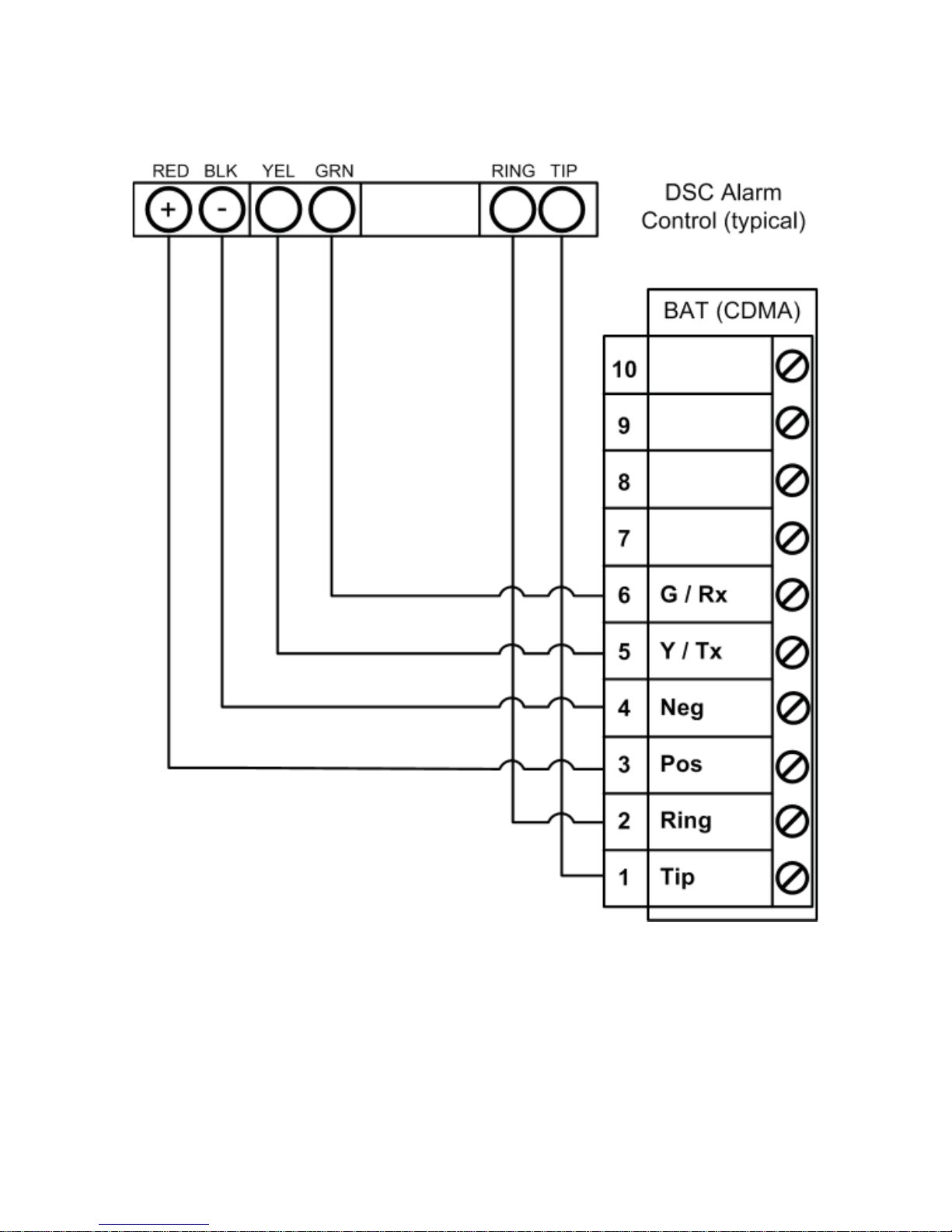
DSC Panel Wiring and Programming
DSC Keybus & Tip/Ring Wiring
Dual-Path Alarm Communicator - Installation Guide ...............................................Page 14
Page 15
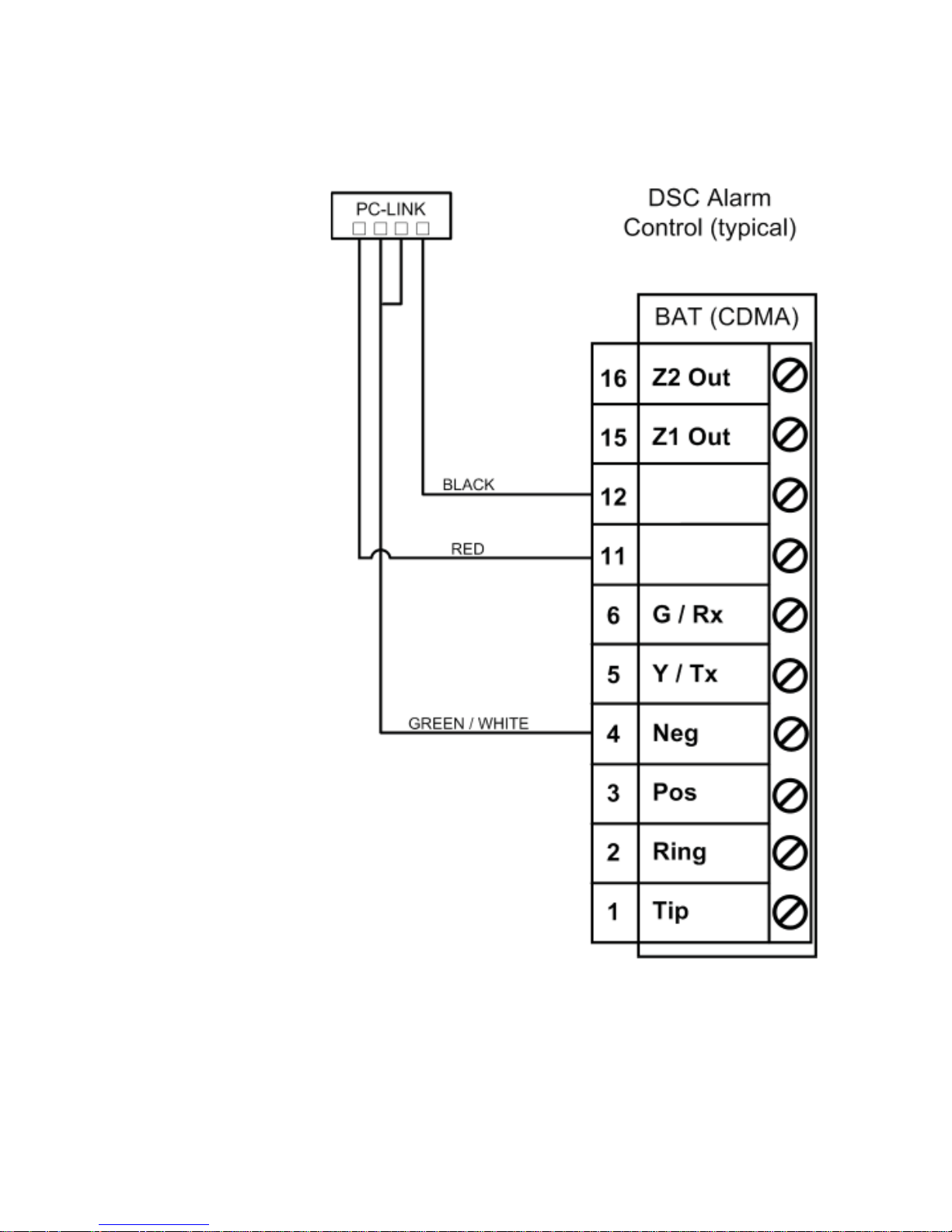
DSC PC-Link Connection
This provides for remote downloader functionality with ipDatatel’s
Universal Downloader (uDownloader) software.
DSC PC-Link Wiring
Dual-Path Alarm Communicator - Installation Guide ...............................................Page 15
Page 16

DSC Panel Programming
See Supported Panels section on page 25. All Control Panels must
have a Phone Number in the Panel and an Account Number in the
Panel. As long as your Reporting Codes are in the Panel and is transmitting in Contact ID it will send signals.
Programming when using TELCO (Recommended): General Concept
Programming on DSC (BAT -CDMA-WIFI as Sole Communicator):
Sec BAT as Sole Communicator Code Summarization
301 Enter a Receiver Number
310 Enter Account Number
350 Enter ‘03’ to send Contact ID Panel default is ‘04’, SIA
Programming ONLY when using the PC-Link to send Signals
(used when Tip/Ring cannot be utilized): DSC Programming for
Communications - GSM Emulation:
If GSM is used, it must be in dialer capture mode.
Sec
BAT as
Sole Communicator
BAT as
Failover w/
Add’l Communication
Device
BAT as Dual Reporting w/ Add’l
Communi-cation
Device
Code Summarization
015 Disable
Option 7
If GSM, Disable Option
7 If Phone
Line, Enable
Option 7
f GSM, Disable
Option 7
If Phone Line, Enable Option 7
Option 7 turns on/off telephone line supervision.
167 Set ‘060’
Seconds
Set ‘060’
Seconds
Set ‘060’ Seconds Sets T-Link acknowledge-
ment delay to 60 secs.
301 Set ‘CAAF’ Set ‘CAAF’ Set ‘CAAF’ ‘CAAF’ has to be set for the
panel to send signals to the
PC-Link
302 N/A N/A Set ‘Central Sta-
tion Receiver #’
Second telephone number
goes here.
303 N/A Set ‘Central
Station
Receiver #’
Set ‘Central Station Receiver #’
This section is the telephone backup of section
301.
350 Set ‘04’ /
‘04’
Set ‘04’ / ’03
for Contact
ID, 04 for SIA
FSK’ **
Set ‘04’ / ’03 for
Contact ID, 04 for
SIA FSK’ **
Format sent as either
contact ID (03), or SIA FSK
(04). The PC-Link / BAT can
ONLY receive signals via
SIA FSK (04).
Dual-Path Alarm Communicator - Installation Guide ...............................................Page 16
Page 17

Programming ONLY when using PC-Link to send Signals
(Used when Tip/Ring cannot utilized):
if GSM is used, it must be in dialer capture mode.
Sec
BAT as Sole
Communicator
BAT as
Failover
w/ Add’l
BAT as
Dual
Code Summarization
351 Enable
Option 1
Enable
Option
1, 5
Enable
Option 1,
2, 5
Options to turn on/off alarm/
restore for telephone 1 (option 1),
telephone 2 (option 2), and alternate
communications (option 5).
359 Enable
Option 1
Enable
Option
1, 5
Enable
Option 1,
2, 5
Options to turn on/off tamper/
restore for telephone 1 (option 1),
telephone 2 (option 2), and alternate
communications (option 5).
367 Enable
Option 1
Enable
Option
1, 5
Enable
Option 1,
2, 5
Options to turn on/off opening/
closing for telephone 1 (option 1),
telephone 2 (option 2), and alternate
communications (option 5).
375 Enable
Option 1
Enable
Option
1, 5
Enable
Option 1,
2, 5
Options to turn on/off maintenance
for telephone 1 (option 1), telephone
2 (option 2), and alternate
communications (option 5).
376 Enable
Option 1
Enable
Option
1, 5
Enable
Option 1,
2, 5
Options to turn on/off testing for
telephone 1 (option 1), telephone
2 (option 2), and alternate
communications (option 5).
380 Enable
Option 1
Enable
Option
1, 5
Enable
Option
1, 5
Option 1 turns on/off communications.
Option 5 turns on/off 3rd phone number.
381 Disable
Option 3,
Enable
Option 5
Disable
Option 3,
Enable
Option
5, 6
Disable
Option 3,
Enable
Option
5, 6
Option 3 turns on/off code
reporting. Options 5 & 6 turns on/off
communication with phone lines 1/3 & 2
respectively.
382 Enable
Option 5
Enable
Option 5
Enable
Option 5
Option 5 enables/disables T-Link/PCLink.
389 Set ‘003’
Seconds
Set ‘003’
Seconds
Set ‘003’
Seconds
The time it will take to periodically check
for faults on the T-Link/PC-Link.
Dual-Path Alarm Communicator - Installation Guide ...............................................Page 17
Page 18
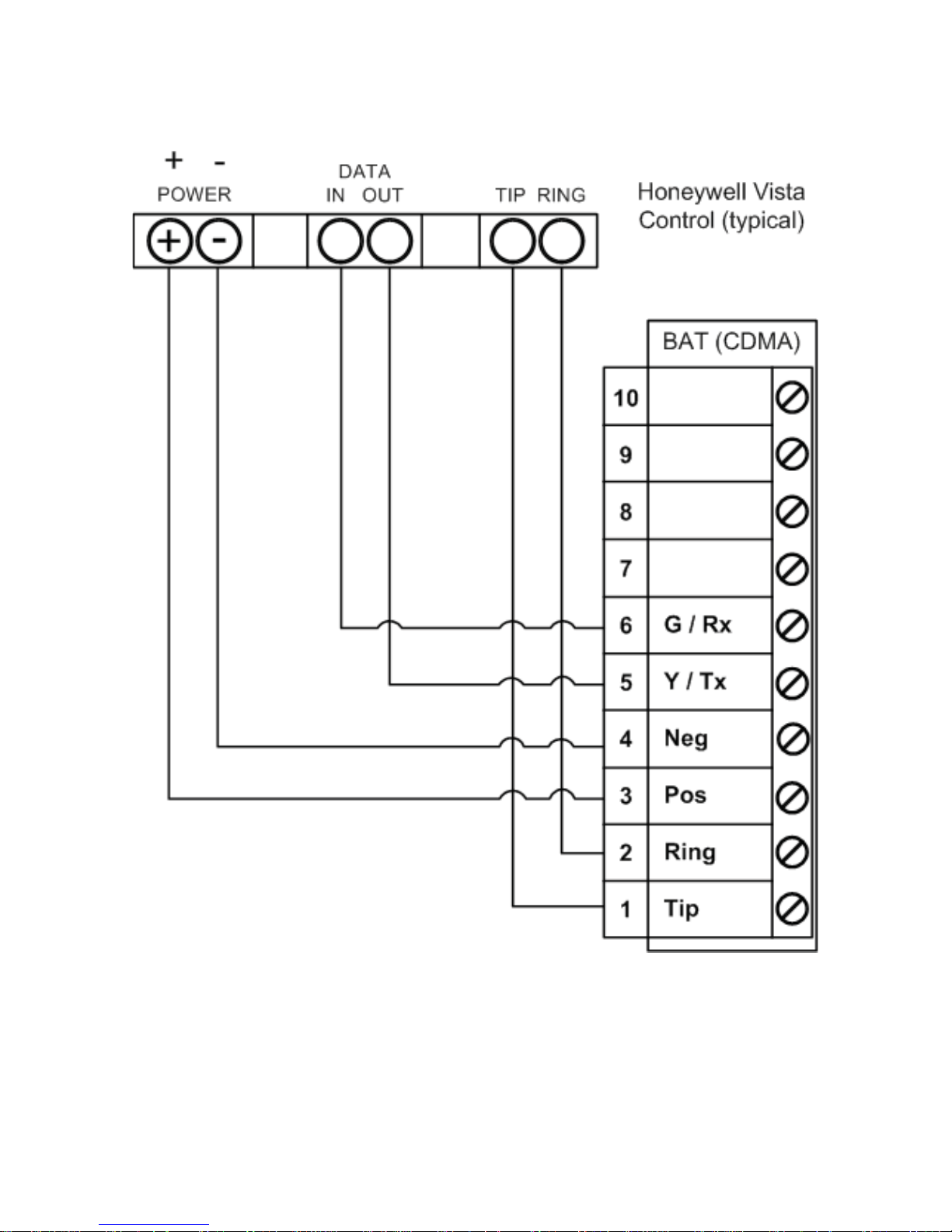
Vista Panel Wiring and Programming
Vista Keybus & Tip/Ring Wiring
Dual-Path Alarm Communicator - Installation Guide ...............................................Page 18
Page 19

Vista Panel Programming
All alarm controls must be programmed to transmit Contact ID, and have
a Phone Number and Account Number in the Panel. See Supported
Panels section on page 26-27.
Programming when using TELCO (Recommended): Programming a
Honeywell Vista for the BAT-CDMA-WIFI as Sole Communicator:
Sec
For BAT as Sole
Communicator
Code Summarization
41 Enter Phone Number
43 Enter Account Number
49 Enter 5 For All Communications to BAT
54 Enter 0 No Delay Between Communicators
55 Enter 0 Phone Line Communicates First
65 & 66 Enter 1 If you want Opening/Closing Reports
193 Enter 1, 0 Enable to turn on Address 20
Dual-Path Alarm Communicator - Installation Guide ...............................................Page 19
Page 20

Programming a Honeywell Vista control using ONLY the Keybus to
send Signals - GSM Emulation:
Sec For BAT
as Sole
For BAT in
use with
another
For Dual
Reporting
Code Summarization
*29 Enter 1 Enter 1 Enter 1 This enables GSM. The
BAT Emulates a GSM.
*42 N/A Enter Central
Station
Receiver
Number
Enter Central
Station
Receiver
Number
Secondary Phone Number
*43 Enter Account
Number
Enter Account
Number
Enter Account
Number
This is the central station
account number
*49 Enter 5 Please refer
to panel
manual for
your particular
application
requirements
Please refer
to panel
manual for
your particular
application
requirements
Dual Reporting; Setting
to 5 sends all reporting
to both primary and
secondary.
*54 Enter 0 Enter 2 Enter 0 The time it takes for the
communicator to switch
from primary to secondary.
*55 Enter 1 Enter 1 Enter 1 (BAT
is Primary
Communicator)
Setting to 1
gives signal
priority to GSM
(BAT).
Setting to 1 gives signal
priority to GSM (BAT).
*65 Enter 1 Enter 1 Enter 1 Report Code for Openings.
*66 Enter 1, 1 Enter 1, 1 Enter 1, 1 Report Code for Arming in
Away and Stay.
*193 Enter 1, 0 Enter 1, 0 Enter 1, 0 1 1 turns on/off keypad
address 20. 0 sets sound
to beep.
See Supported Panels section on page 26 to verify your panel’s revision
number and GSM emulation programming.
Dual-Path Alarm Communicator - Installation Guide ...............................................Page 20
Page 21
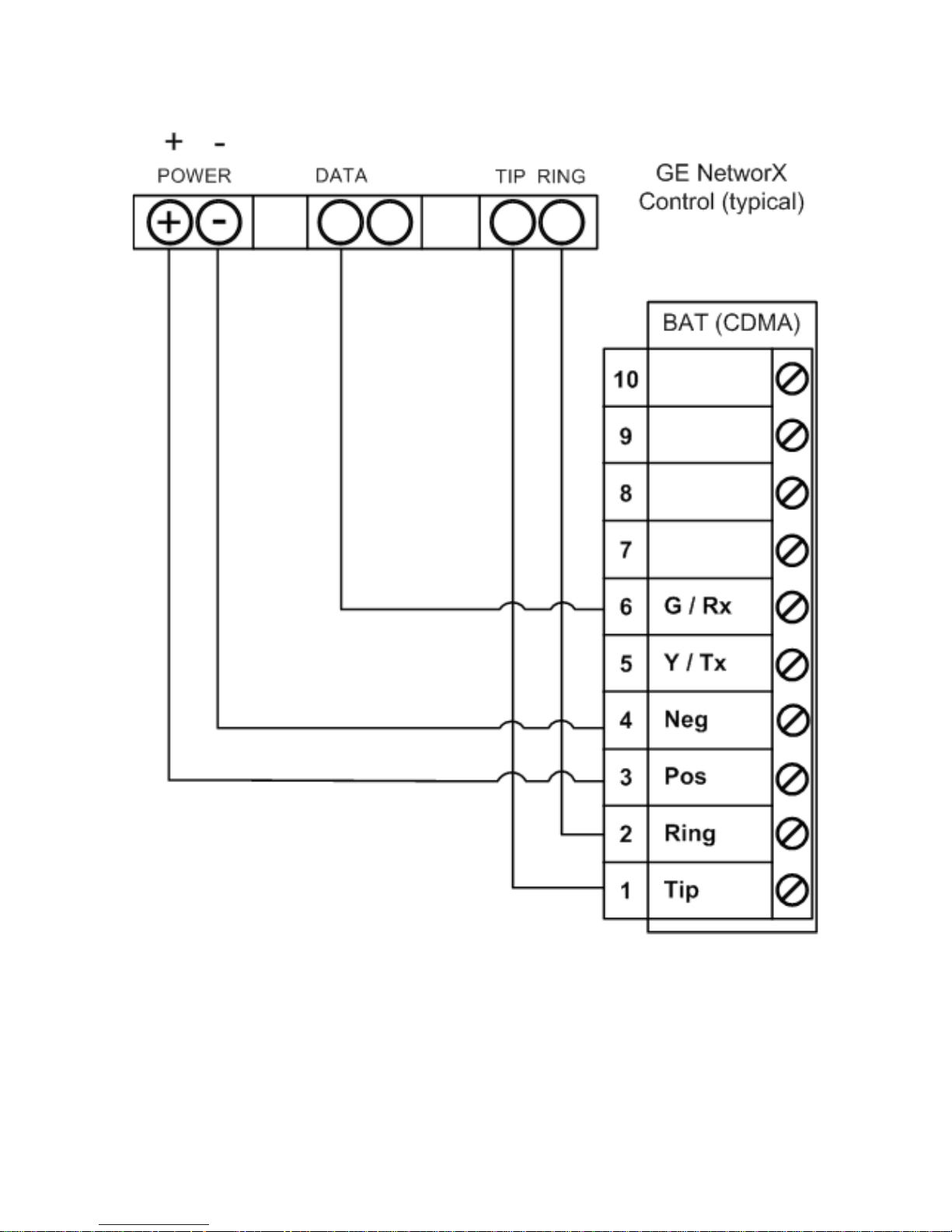
GE Panel Wiring and Programming
GE Keybus & Tip/Ring Wiring
Dual-Path Alarm Communicator - Installation Guide ...............................................Page 21
Page 22

GE Panel Programming
See Supported Panels section on page 27.
Recommended: General Concept Programming on GE NetworX:
Section BAT as Sole Communicator Code Summarization
Device 0, Location 0 Enter the Phone Number
Device 0, Location 1 Enter Account Number
Device 0, Location 2 Enter ‘13’ Recommended
value
Contact ID
Dual-Path Alarm Communicator - Installation Guide ...............................................Page 22
Page 23
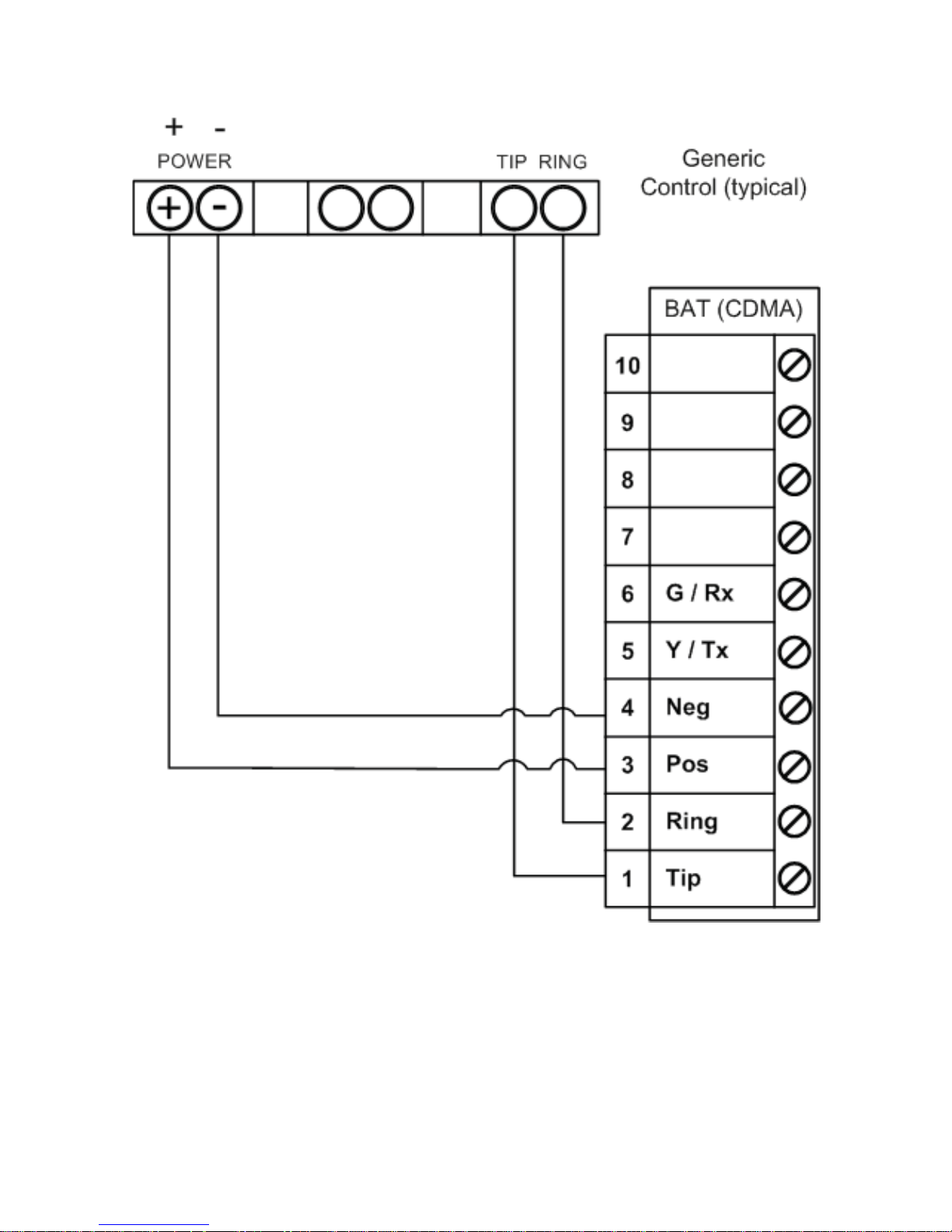
Generic Alarm Panel Wiring and Programming
Generic Keybus & Tip/Ring Wiring:
Generic Alarm Panel Programming
• Program the panel Phone Number into the panel.
• Program the Customers Account Number into the panel.
• Program Reporting codes into the panel.
• Program panel to transmit in Contact ID format.
For interactive key switch wiring and programming see the next section.
Dual-Path Alarm Communicator - Installation Guide ...............................................Page 23
Page 24
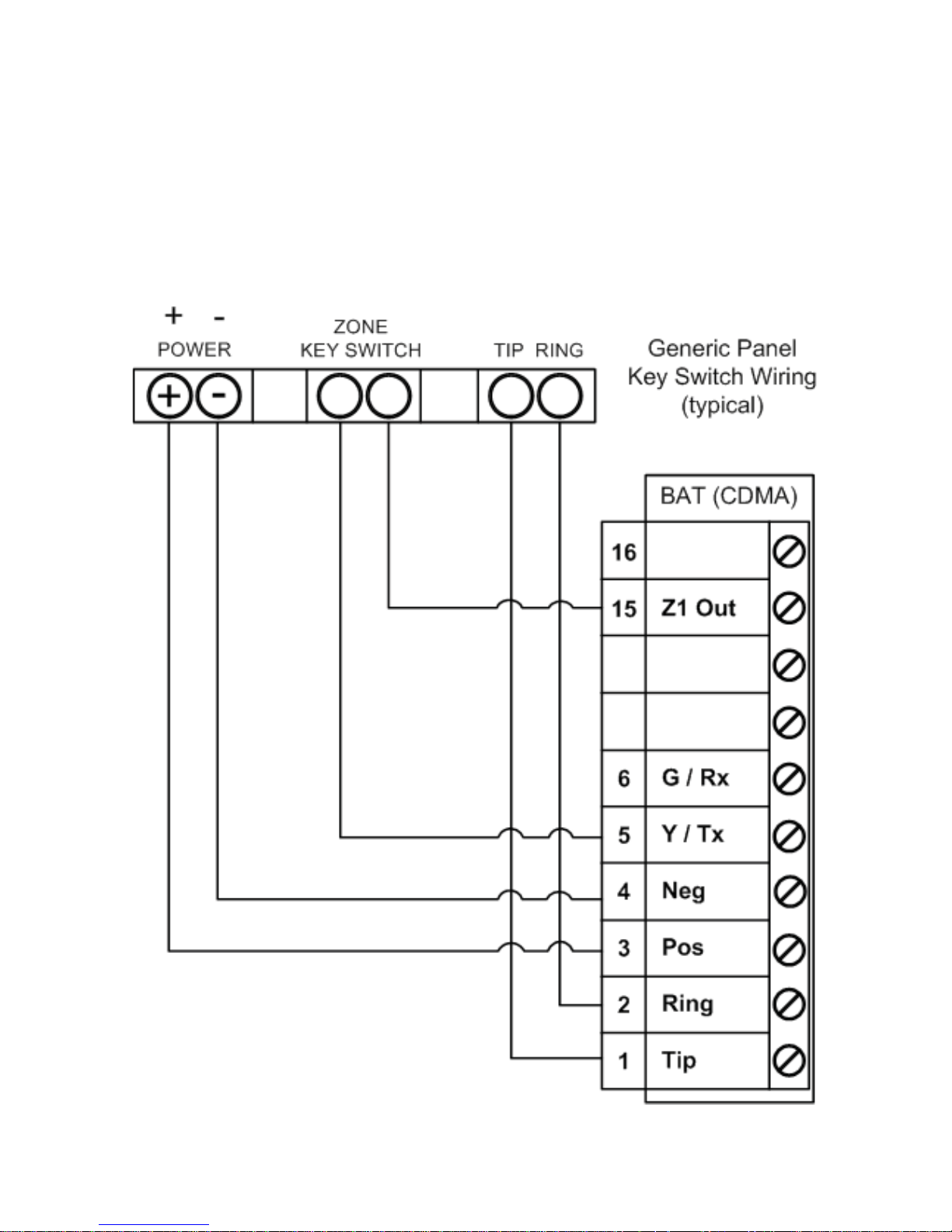
Generic Key Switch Wiring and Programming
For basic key switch interactive services with the BAT-CDMA-WIFI, the
following alarm panel wiring is needed.
• A programmable output on the alarm panel will be used to signal
the BAT (Y/Tx terminal) that the panel has entered Arm/
Disarmed state.
• The Z1 output on the BAT-CDMA-WIFI will be used as a key
switch connecting to a ‘zone’ terminal on the alarm panel.
Dual-Path Alarm Communicator - Installation Guide ...............................................Page 24
Page 25

Generic Key Switch Programming
Key switch state programming examples for DSC, Honeywell, and GE
NetworX for key switch and panel state program output operations are
provided below.
Most alarm panel manufacturers have the capability to configure a zone
as a key switch and generally have at least one on-board programmable
output that can be configured to activate on a number of different
control state conditions. Reference the alarm panel installation manual
for details for your specific installation.
Honeywell (Typical)
56 program zone as type 77
80 Menu LED Outs
Program 17 and 18 zone type 78 and 79
DSC PowerSeries (Typical)
Section 001 - Zone must be programmed as a 22
Section 009 - 05
DSC Alexor (Typical)
Wiring:
Terminal 5 -> I/01
Terminal 15 -> I/02
6.2k ohm resistor from Terminal 3 -> Terminal 5
Programming:
Section 009 - ‘05’/’22’
Section 013 - Enable 2 & Disable 1
Section 134 - Enable 14 (Press 9, then 6)
Section 206 - Enable Option 2.
Section 501 - Enable 3
GE NetworX (Typical)
Device ‘0’ Location 25, press * until you reach desired zone
Program zone as ‘11’
LED Status
Device ‘0’
Location 47 Segment 1: 21
Location 47 Segment 2: 0
Dual-Path Alarm Communicator - Installation Guide ...............................................Page 25
Page 26

Supported Panels
Honeywell
Panel Rev
Digital
Dialer
Full
Interactive
GSM
Emulator
Vista-10P 2.6+ YES YES YES
Vista-10PSIA 4.0+ YES YES YES
Vista-128BP 3.0+ YES YES YES
Vista-128BPE 1.0+ YES YES YES
Vista-128FB 1.0+ YES YES YES
Vista-128FBP 2.0+ YES YES YES
Vista-128FBPE 1.0+ YES YES YES
Vista-128SIA 2008+ YES YES YES
Vista-15 2+ YES YES YES
Vista-15CN 2.6+ YES YES YES
Vista-15P 2.6+ YES YES YES
Vista-15PCN 2.6+ YES YES YES
Vista-15PSIA 4.0+ YES YES YES
Vista-20P 2.6+ YES YES YES
Vista-20PCN 2.6+ YES YES YES
Vista-20PI 5.0+ YES YES YES
Vista-20PS 2.6+ YES YES YES
Vista-20PSIA 1.0+ YES YES YES
Vista-21IP 1.0+ YES YES YES
Vista-21IPSIA 1.0+ YES YES YES
Vista-32FB 1.0+ YES YES YES
First Alert FA130 2.6+ YES YES YES
First Alert FA148 2.6+ YES YES YES
First Alert FA168
2.6+
YES YES YES
ADT Safewatch Pro 3000/3000EN 2.6+ YES YES YES
Dual-Path Alarm Communicator - Installation Guide ...............................................Page 26
Page 27

DSC (Digital Security Control)
Panel Rev
Digital
Dialer
Full
Interactive
GSM
Emulator
PC5010 ALL YES YES
PC1616 4.13+ YES YES YES
PC1832 4.13+ YES YES YES
PC1864 4.13+ YES YES YES
Alexor ALL YES
GE NetworX
Panel Rev
Digital
Dialer
Full
Interactive
GSM
Emulator
NX-4V2 V2+ YES
NX-6V2 V2+ YES
NX-8V2 V2+ YES
Note: Any alarm panel of any brand not on the supported lists herein
should function properly as long as the control transmits Contact ID
format through T ip & Ring. If the panel has the ability to use a Dedicated
Open Zone that acts as a key switch, you can Arm/Disarm from the
website or mobile device.
For non-supported panels: Bridge 12 VDC to “Y/TX” Terminal with
any type of radial resistor with a value of 2.7k to 10k ohms as a weak
“pull up”.
Note: Some features of the Virtual Keypad may not function on all
panels; however, the Arm / Disarm System is fully functional on all
panels.
Dual-Path Alarm Communicator - Installation Guide ...............................................Page 27
Page 28

Limited Warranty Information
LIMITED WARRANTY
ipDatatel, LLC (hereinafter referred to as “Seller”), Located at 13110
Southwest Freeway, Sugar Land Texas 77478, warrants its “Product”
to be in conformance with the product specification, and to be free from
defects in materials and workmanship under normal use and service
for a period of twelve (12) months from the date of original purchase.
Seller’s sole obligation shall be limited to repairing or replacing, at its
option, free of charge for materials or labor , any product which is proved
not to be within Seller’s specifications of the Product, or proves defective
in materials or workmanship under normal use and service.
Any device manufactured that includes the Product mounted in a plastic
enclosure must remain in the plastic enclosure for installation and
regular use. At no point should the Product be removed and/or mounted
without the plastic enclosure, and any non-compliance shall be deemed
an alteration and void the Product Limited Warranty.
LIMITED LIABILITY
Seller shall have no liability or obligation under this Limited Warranty or
otherwise for merchantability or fitness for any particular use; nor shall
it extend its Limited Warranty, if the product is altered, or improperly
installed, repaired, or serviced. There are no warranties, express or
implied, that extend beyond those contained within this document. In no
case shall Seller be liable to person or entity for any consequential, or
any other basis of law or liability whatsoever, whether or not such loss
or damage is caused by Seller’s own negligence or fault.
Seller does not represent that the Product may not be compromised
or circumvented, or that it will provide the service intended; or that the
Product will prevent any personal injury or property loss by burglary,
robbery, or otherwise; or that the Product in all cases will provide
adequate warning or detection.
Customer understands that a properly installed and maintained alarm
system may only reduce the risk of burglary, robbery, or other such
events occurring without providing an alarm, but is not insurance or
guarantee that such will not occur or that there will be no personal injury
or property loss as a result.
Dual-Path Alarm Communicator - Installation Guide ...............................................Page 28
Page 29

Consequently , Seller shall have no liability for any personal injury, property
damage or any other loss based on a claim that the Product or services
therefrom, failed to give warning. However, if seller is held liable, directly
or indirectly, for any loss or damage arising under this Limited Warranty
or otherwise regardless of cause or origin, Seller maximum liability shall
not in any case exceed the purchase price of the Product, which shall be
the complete and exclusive remedy against Seller .
This Limited Warranty replaces any previous warranty, and is the only
warranty made by Seller for this Product. No increase or alteration,
written or verbal.
FCC and Industry Canada Regulatory Compliance
FCC Warning / IC Statement
This device complies with Part 15 of the FCC Rules and with ICES-003,
Issue 4 of Industry Canada. Operation is subject to the following two
conditions:
(1) This device may not cause harmful interference, and
(2) This device must accept any interference received, including
interference that may cause undesired operation.
Note: This equipment has been tested and found to comply with the
limits for a Class B digital device, pursuant to Part 15 of the FCC
Rules. These limits are designed to provide reasonable protection
against harmful interference in a residential installation. This equipment
generates, uses and can radiate radio frequency energy and, if not
installed and used in accordance with the instructions, may cause
harmful interference to radio communications. However, there is no
guarantee that interference will not occur in a particular installation. If
this equipment does cause harmful interference to radio or television
reception, which can be determined by turning the equipment off and
on, the user is encouraged to try to correct the interference by one or
more of the following measures:
• Reorient or relocate the receiving antenna.
• Increase the separation between the equipment and receiver.
• Connect the equipment into an outlet on a circuit different from
that to which the receiver is connected.
• Consult the dealer or an experienced radio/TV technician for
help.
Dual-Path Alarm Communicator - Installation Guide ...............................................Page 29
Page 30

Canada Avertissement de la FCC / IC Déclaration
Cet appareil est conforme à la Partie 15 des règlements de la FCC
et ICES-003, 4 e édition d’Industrie Canada. Son fonctionnement est
soumis aux deux conditions suivantes:
(1) Cet appareil ne doit pas causer d’interférences nuisibles et
(2) Cet appareil doit accepter toute interférence reçue, y compris
les interférences qui peuvent perturber le fonctionnement.
Note: Cet équipement a été testé et trouvé conforme aux limites
pour un dispositif numérique de classe B, conformément à la Partie
15 des règlements de la FCC. Ces limites sont conçues pour fournir
une protection raisonnable contre les interférences nuisibles dans une
installation résidentielle. Cet équipement génère, utilise et peut émettre
des fréquences radio et, s’il n’est pas installé et utilise en conformité
avec les instructions, peut causer des interférences nuisibles aux
communications radio. Cependant, il n’existe aucune garantie que des
interférences ne se produiront pas dans une installation particulière. Si
cet équipement provoque des interférences nuisibles à la réception radio
ou de télévision, qui peut être déterminé en mettant l’équipement hors
tension, l’utilisateur est encouragé à essayer de corriger l’interférence
par un ou plusieurs des mesures suivantes:
• Réorienter ou déplacer l’antenne de réception.
• Augmenter la distance entre l’équipement et le récepteur.
• Branchez l’appareil dans une prise sur un circuit différent de celui
auquel le récepteur est connecté.
• Consulter le revendeur ou un technicien radio / TV.
Dual-Path Alarm Communicator - Installation Guide ...............................................Page 30
Page 31

Specifications
Frequency:
• Wi-Fi 802.11bg (mixed mode)
• Frequencies CDMA 1x 800 MHz/1900 MHz
Power:
• Externally provided 12v DC
• Typical Current 130 mA
• Max Current 185 mA
Environmental:
• Temperature Range - 30° to +70°C (- 22° to +158°F)
• Humidity 0 to 95% non-condensing
Physical:
• Height 7.05 inches
• Width 4.45 inches
• Depth 1.5 inches
Security Protocols Supported (Wi-Fi):
• WPA
• WPAII
• WEP
Dual-Path Alarm Communicator - Installation Guide ...............................................Page 31
Page 32
IPD-CDMA-WIFI IM 3-15
 Loading...