

Page 1

iTYPE
QUICKSTART GUIDE
ENGLISH ( 2 – 4 )
MANUAL DE INICIO RÁPIDO
ESPAÑOL ( 5 – 7 )
GUIDE D’UTILISATION RAPIDE
FRANÇAIS ( 8 – 10 )
MANUALE RAPIDO DI UTILIZZAZIONE
ITALIANO ( 11 – 13 )
KURZANLEITUNG
DEUTSCH ( 14 – 16 )
SNELSTARTGIDS
NEDERLANDS ( 17 – 19 )
Page 2
2
QUICKSTART GUIDE (ENGLISH)
• Make sure that the items listed below are included in the box: iTYPE, phone kickstand,
USB cable, carrying case, Quickstart Guide, Safety Instructions & Warranty Information
• Go to http://www.ionaudio.com
for product registration.
IMPORTANT BATTERY NOTES
• Before using iTYPE for the first time, charge it for at least 6 hours. In the future, iTYPE
requires only 2 hours of charging when the battery is low.
• To charge iTYPE, use the included USB cable to connect it to an available USB port on
your computer. (If you are using a USB hub, make sure it is a powered hub.) You may use
iTYPE as it is charging.
FEATURES
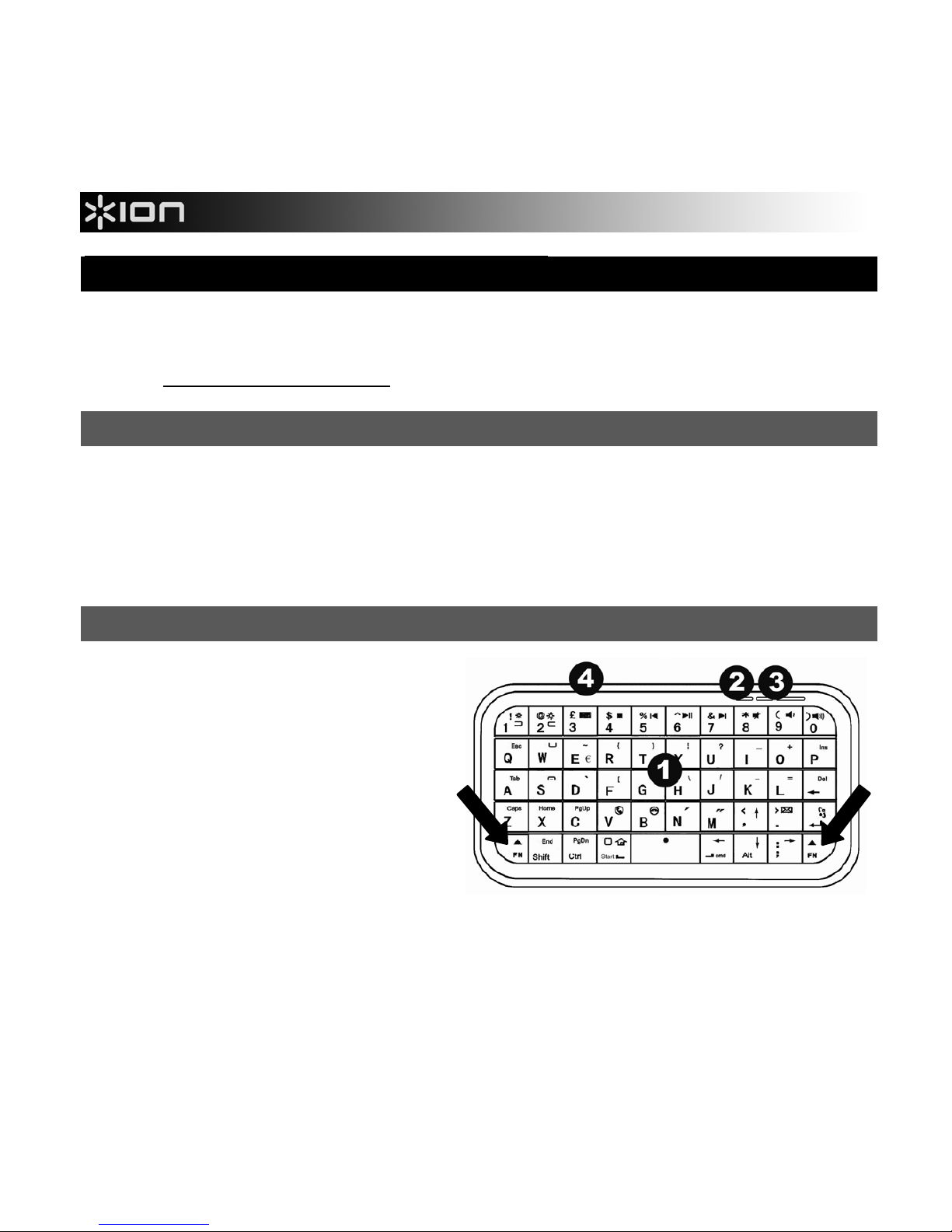
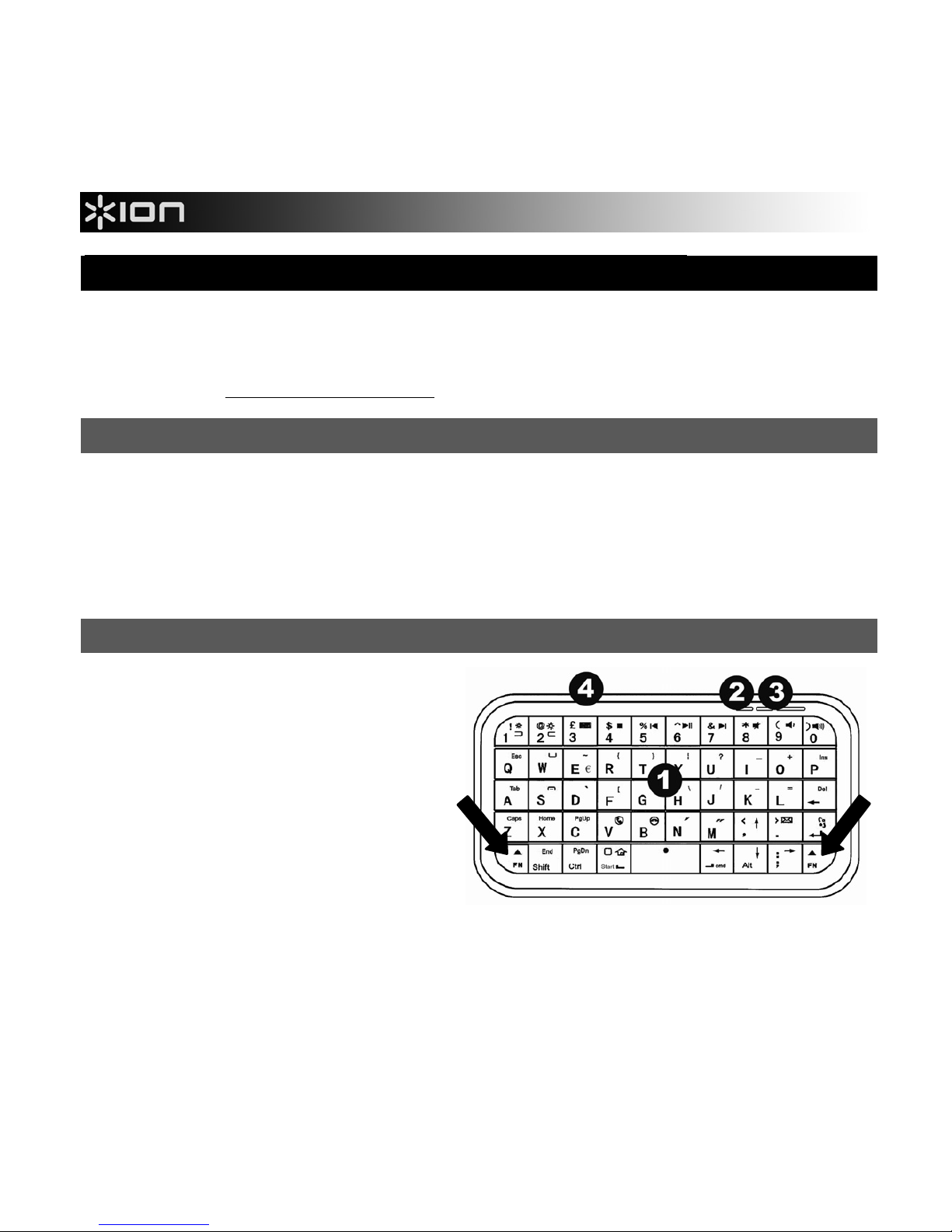
1. KEYBOARD – When iTYPE is
paired with your phone, type on
this keyboard to enter text. Press
and hold either FN (Function)
button to access the keys'
alternate commands (in blue).
2. CHARGE LED – Illuminates when
iTYPE is charging.
3. PAIRING BUTTON & LED –
Press this button to pair iTYPE
with your device (see PAIRING
iTYPE WITH YOUR PHONE). The LED will also blink rapidly when iTYPE's battery is
low.
4. POWER SWITCH – Press this button to turn iTYPE on or off.
Page 3
3
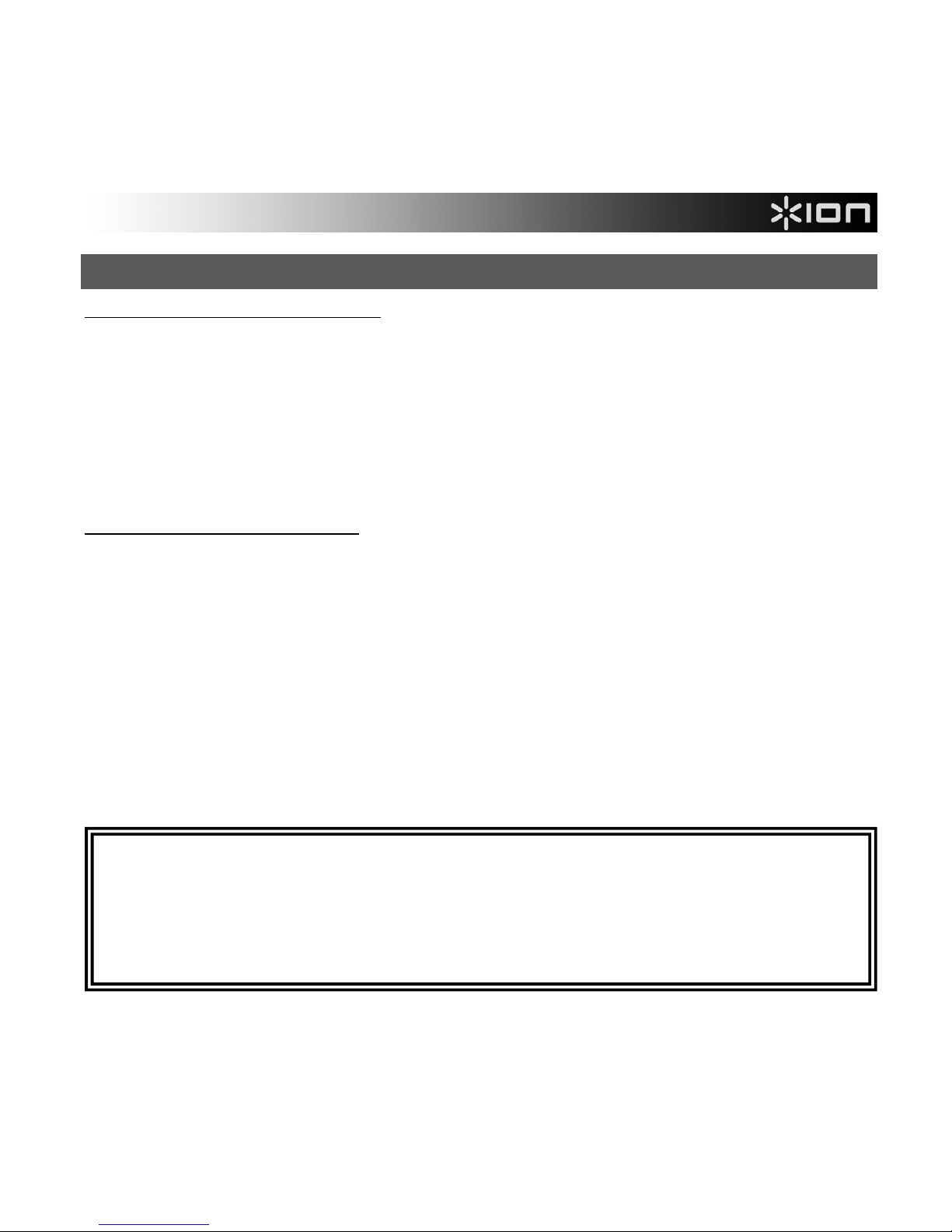
PAIRING iTYPE WITH YOUR PHONE
With iPhone, iPad, iPod touch*:
Note: OS 4.0 or higher is required.
1. Power on iTYPE.
2. On your device, go to Settings f General f Bluetooth. Slide the Bluetooth slider to "On."
3. Press and hold iTYPE's PAIRING BUTTON until the LED flashes.
4. On your device's screen, "Bluetooth Keyboard" will appear as a Bluetooth device. Tap it to
select it.
5. Use iTYPE's KEYBOARD to enter the passcode shown on the screen, then press its Enter key.
iTYPE is now paired with your device.
With Windows Mobile phone:
Note: Windows Mobile 5.0 or higher is required.
1. Power on iTYPE.
2. On your device, go to Start f Settings and select the Connections tab.
3. Select Bluetooth. In the Bluetooth Settings menu, select Mode then tap "Turn on Bluetooth."
4. Select the Devices tab, then New Partnership.
5. Press and hold iTYPE's PAIRING BUTTON until the LED flashes.
6. On your device's screen, "Bluetooth Keyboard" will appear as a Bluetooth device. Tap it to
select it, and press Next.
7. Use your phone's keyboard to enter the passcode shown on the screen, then press its Enter key.
8. Use iTYPE's KEYBOARD to enter that same passcode, then press its Enter key. iTYPE is now
paired with your device.
If you are experiencing problems pairing iTYPE with your device, or if iTYPE's KEYBOARD is
not transmitting to your device, please try the following:
• Make sure Bluetooth is enabled on your device (as described in the steps above).
• Make sure iTYPE is within 32 feet (10 meters) of your device.
• Make sure iTYPE is fully charged. (See IMPORTANT BATTERY NOTES above.)
* iPod, iPhone, and iPad are trademarks of Apple, Inc.,
registered in the U.S.A. and other countries.
Page 4
4
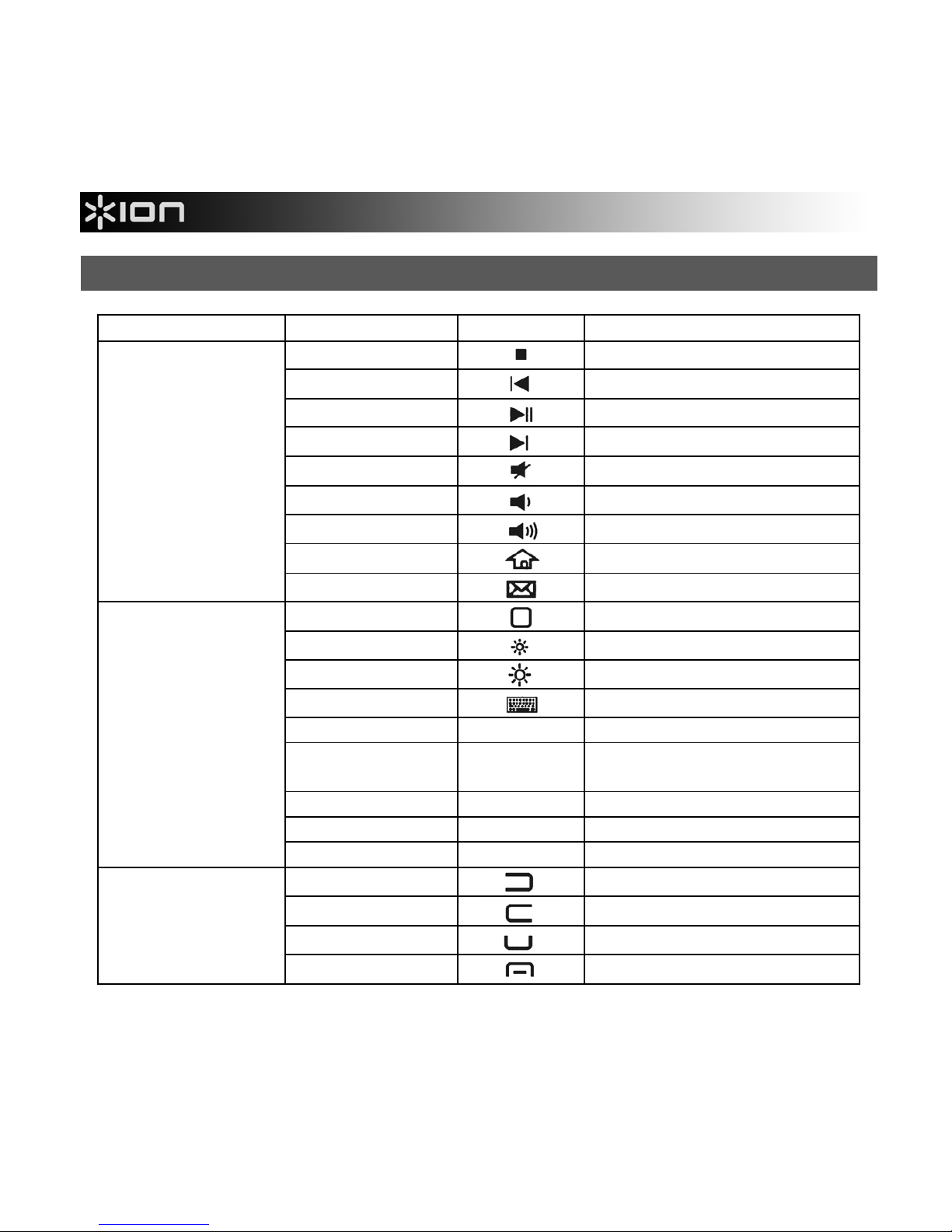
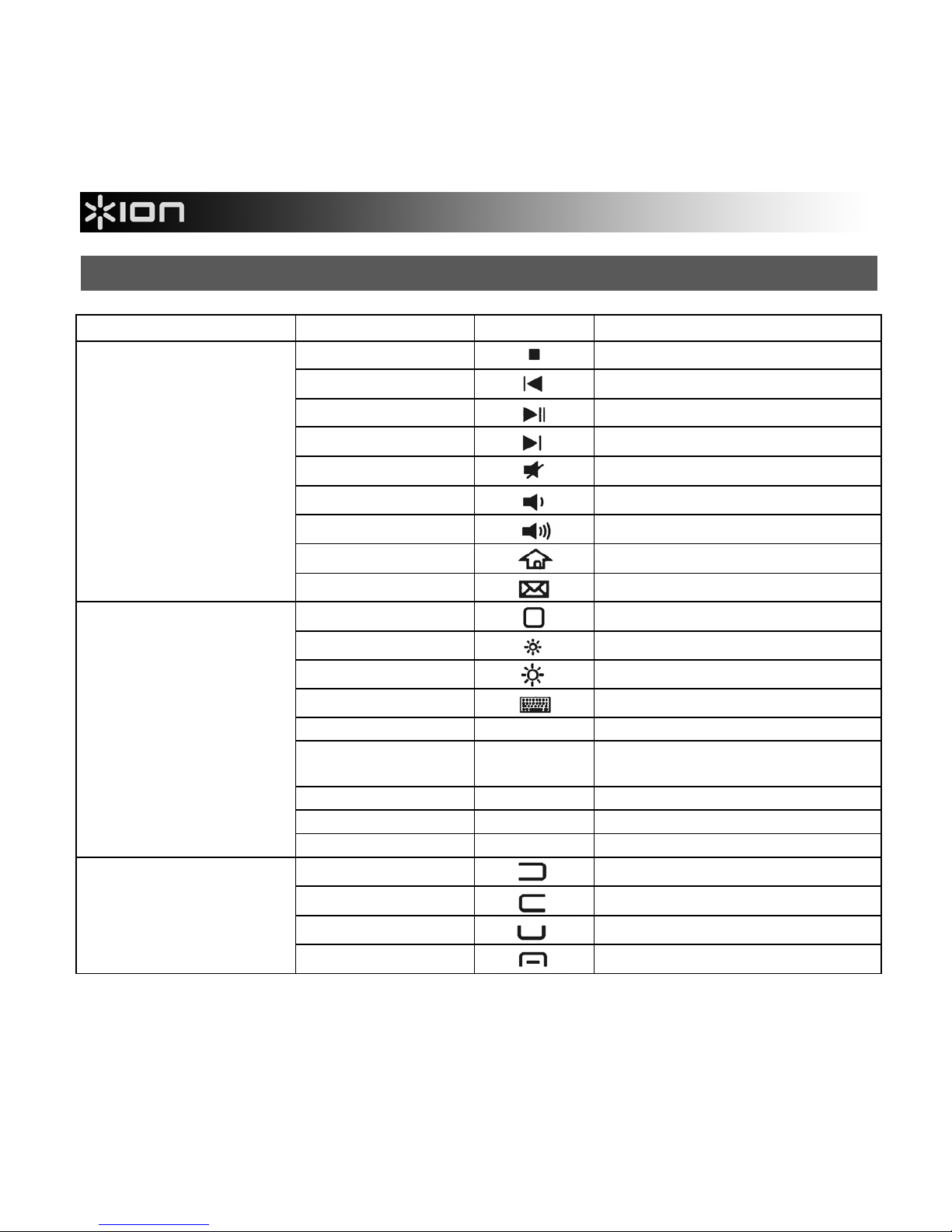
HOTKEYS & SHORTCUTS
PHONE/DEVICE KEYS SYMBOL FUNCTION
FN + 4
Stop
FN + 5
Previous Track
FN + 6
Play / Pause
FN + 7
Next Track
FN + 8
Mute
FN + 9
Volume –
FN + 0
Volume +
FN + Start
Webhome
All devices
FN + >
Mail
FN + Start
Home Screen
FN + 1
Brightness –
FN + 2
Brightness +
FN + 3
Virtual keyboard
CMD + Space Switch languages
CMD + A
Select all items in front
Finder window
CMD + C Copy selected item/text
CMD + V Paste
iPhone, iPad, or
iPod touch
CMD + X Cut
FN + 1
Left key
FN + 2
Right key
FN + W
Call key
Windows Mobile
FN + S
End call key, or Window
Page 5
5
GUÍA DE INICIO RÁPIDO (ESPAÑOL)
• Asegúrese de que todos los elementos abajo indicados estén incluidos en la caja. iTYPE,
soporte para el teléfono, cable USB, estuche de transporte, Guía de inicio rápido, Instrucciones
de seguridad e información sobre la garantía
• Visite http://www.ionaudio.com para registrar el producto.
NOTAS IMPORTANTES ACERCA DE LA BATERÍA
• Antes de usar el iTYPE por primera vez, cárguela durante 6 horas como mínimo. En lo sucesivo,
iTYPE requiere sólo 2 horas de carga cuando la batería tiene poca carga.
• Para cargar el iTYPE, use el cable USB incluido para conectarlo a un puerto USB disponible en
la computadora. (Si está usando un concentrador (hub) USB, asegúrese de que sea un
concentrador alimentado.) Es posible usar el iTYPE mientras se está cargando.
CARACTERÍSTICAS
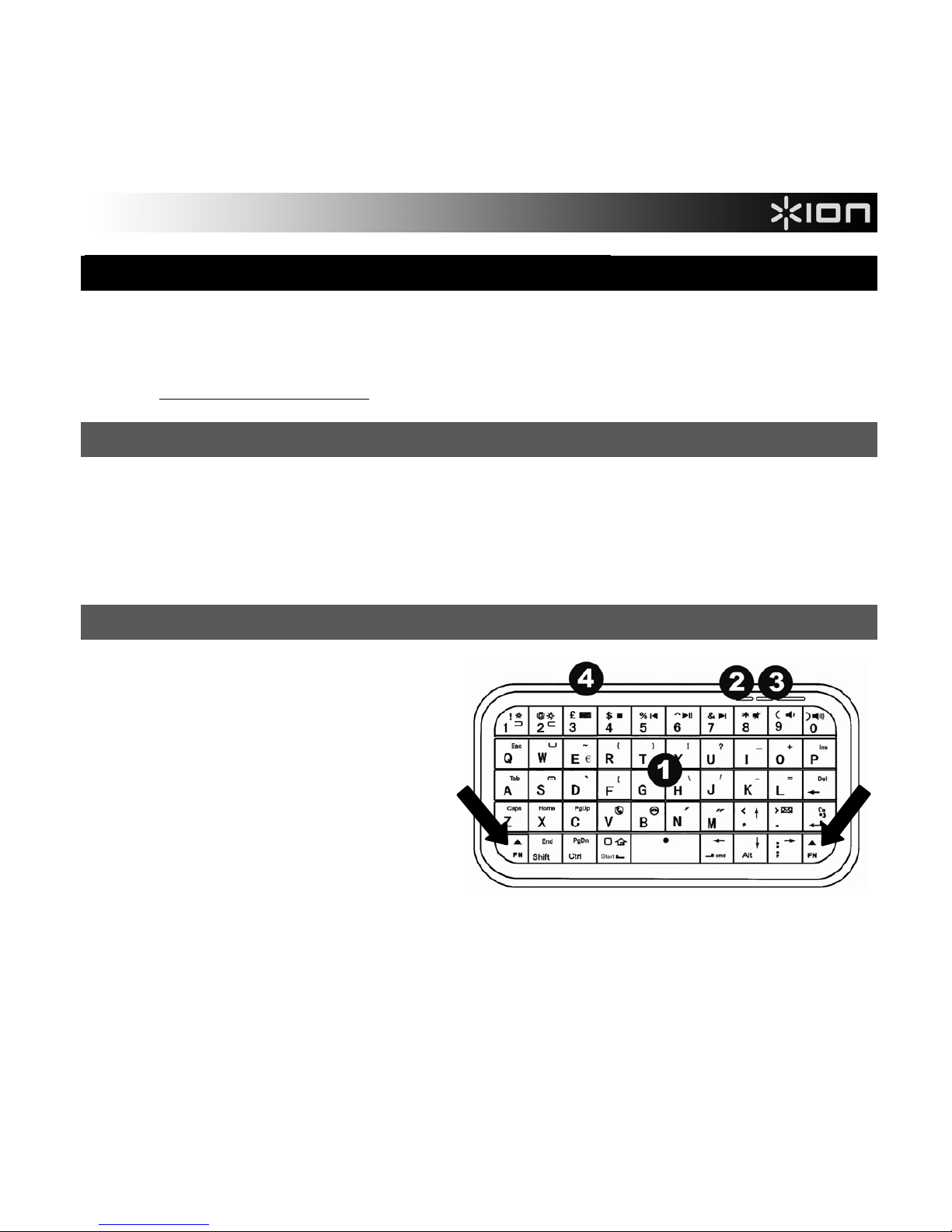
1. TECLADO – Cuando el iTYPE está
apareado con su teléfono, escriba en
este teclado para ingresar texto.
Mantenga pulsado cualquier botón
FN (Función) para acceder a los
comandos alternativos de las teclas
(en azul).
2. LED DE CARGA – Se enciende
cuando el iTYPE se está cargando.
3. BOTÓN DE APAREAMIENTO &
LED – Pulse este botón mientras
aparea el iTYPE con su dispositivo
(consulte CÓMO APAREAR iTYPE CON SU TELÉFONO). El LED también parpadea
rápidamente cuando la batería del iTYPE tiene poca carga.
4. INTERRUPTOR DE ENCENDIDO – Pulse este botón para encender y apagar el iTYPE.
Page 6
6
CÓMO APAREAR iTYPE CON SU TELÉFONO
Con iPhone, iPad e iPod touch*: (Nota: Se requiere OS 4.0 o superior.)
1. Encienda el iTYPE.
2. En su dispositivo, vaya a Settings f General f Bluetooth (Configuración > General >
Bluetooth). Deslice la guía deslizante de Bluetooth a "On" (Encendido).
3. Pulse y retenga el BOTÓN DE APAREAMIENTO del iTYPE hasta que el LED destelle.
4. En la pantalla de su dispositivo, "Bluetooth Keyboard" (Teclado Bluetooth) aparecerá como
un dispositivo Bluetooth. Tóquelo para seleccionarlo.
5. Use el TECLADO del iTYPE para ingresar el código de contraseña indicado en la pantalla y
luego pulse la tecla Enter. De esta forma, el iTYPE está apareado con su dispositivo.
Con teléfono Windows Mobile: (Nota: Se requiere Windows Mobile 5.0 o superior.)
1. Encienda el iTYPE.
2. En su dispositivo, vaya a Start f Settings (Inicio > Configuración) y seleccione la pestaña
Connections (Conexiones).
3. Seleccione Bluetooth. En el menú de configuración de Bluetooth, seleccione Mode (Modo) y
luego toque "Turn on Bluetooth" (Encender Bluetooth).
4. Seleccione la pestaña Devices (Dispositivo) y luego New Partnership (Nueva asociación).
5. Pulse y retenga el BOTÓN DE APAREAMIENTO del iTYPE hasta que el LED destelle.
6. En la pantalla de su dispositivo, "Bluetooth Keyboard" (Teclado Bluetooth) aparecerá como
un dispositivo Bluetooth. Tóquelo para seleccionarlo y pulse Next (Siguiente).
7. Use el teclado de su teléfono para ingresar el código de contraseña indicado en la pantalla y
pulse la tecla Enter.
8. Use el TECLADO del iTYPE para ingresar ese mismo código de contraseña y luego pulse la
tecla Enter. De esta forma, el iTYPE está apareado con su dispositivo.
Si tiene problemas al aparear el iTYPE con su dispositivo o si el TECLADO del iTYPE no
transmite a su dispositivo, intente lo siguiente:
• Asegúrese de que Bluetooth esté activado en su dispositivo (como se explica en los pasos
precedentes).
• Asegúrese de que iTYPE esté dentro de los 10 metros (32 pies) de su dispositivo.
• Asegúrese de que el iTYPE esté totalmente cargado. (Consulte NOTAS IMPORTANTES
ACERCA DE LA BATERÍA más arriba.)
Page 7
7
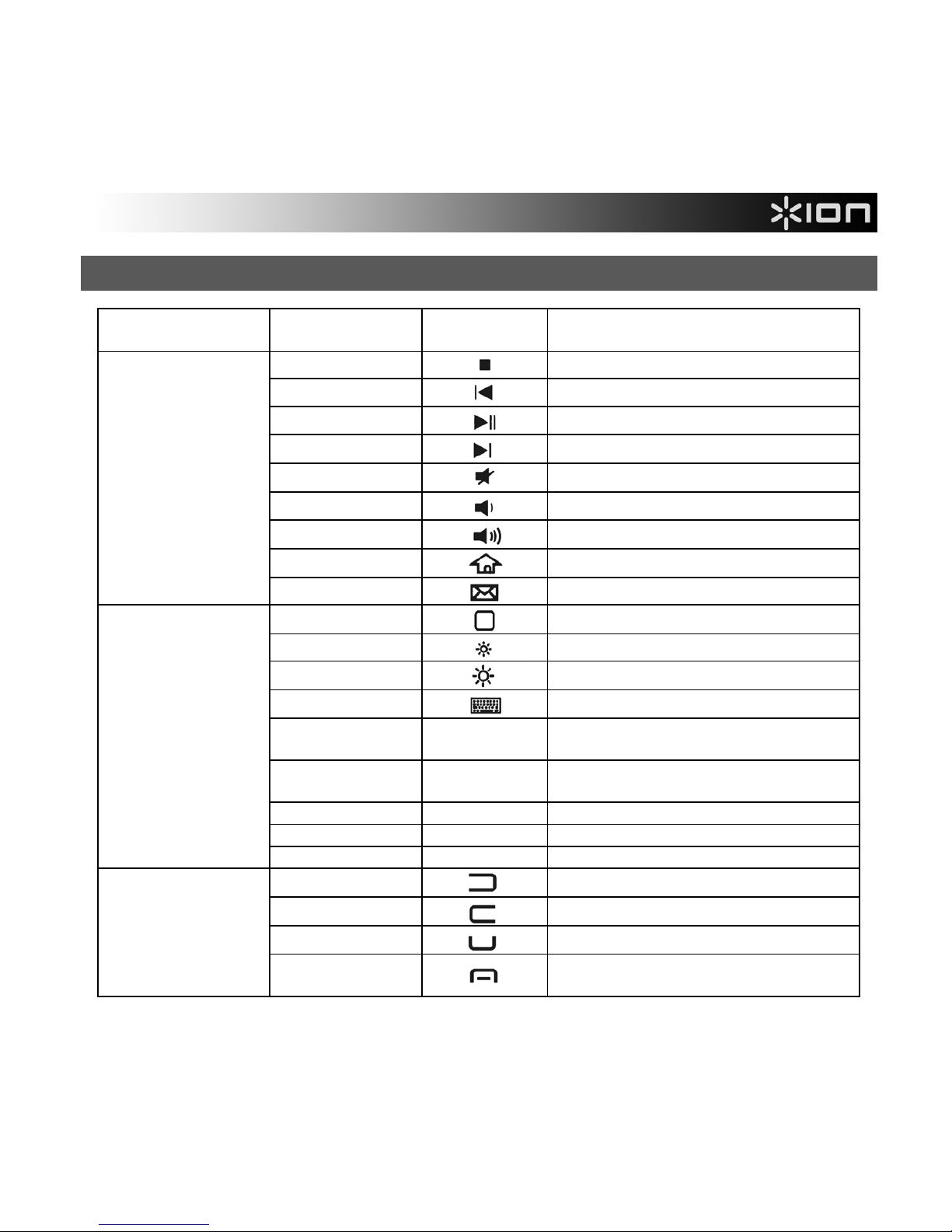
TECLAS DE ACCESO RÁPIDO Y ATAJOS
TELÉFONO/
DISPOSITIVO
TECLAS SÍMBOLO FUNCIÓN
FN + 4
Parar
FN + 5
Pista anterior
FN + 6
Reproducir / Pausa
FN + 7
Pista siguiente
FN + 8
Silenciamiento
FN + 9
Volumen –
FN + 0
Volumen +
FN + Start
Red de origen
Todos los
dispositivos
FN + >
Correo
FN + Start
Pantalla de inicio
FN + 1
Brillo –
FN + 2
Brillo +
FN + 3
Teclado virtual
CMD + barra
espaciadora
Cambiar idiomas
CMD + A
Seleccionar todos los elementos en
la ventana Finder del frente
CMD + C Copiar elemento/texto seleccionado
CMD + V Pegar
iPhone, iPad o
iPod touch
CMD + X Cortar
FN + 1
Tecla izquierda
FN + 2
Tecla derecha
FN + W
Tecla de llamar
Windows Mobile
FN + S
Tecla de terminar llamada o
Window
Page 8
8
GUIDE D’UTILISATION SIMPLIFIÉ (FRANÇAIS)
• Assurez-vous que tous les articles énumérés dans le contenu de la boîte de ce guide sont inclus
dans la boîte : iTYPE, support pour téléphone, câble USB, étui, guide de démarrage, consignes
de sécurité et informations concernant la garantie
• Visiter http://www.ionaudio.com pour enregistrer le produit.
CONSIGNES IMPORTANTES POUR LA PILE
• Assurez-vous de recharger la pile pendant au moins 6 heures avant la première utilisation. Après
la charge initiale, la pile du iTYPE ne requiert que 2 heures de charge lorsqu’elle est faible.
• Pour recharger le iTYPE, utilisez le câble USB inclus pour le brancher à un port USB sur votre
ordinateur. (Si vous utilisez un multiport USB, assurez-vous qu’il est alimenté.) Le iTYPE peut
être utilisé lorsqu’il est sur la charge.
CARACTÉRISTIQUES
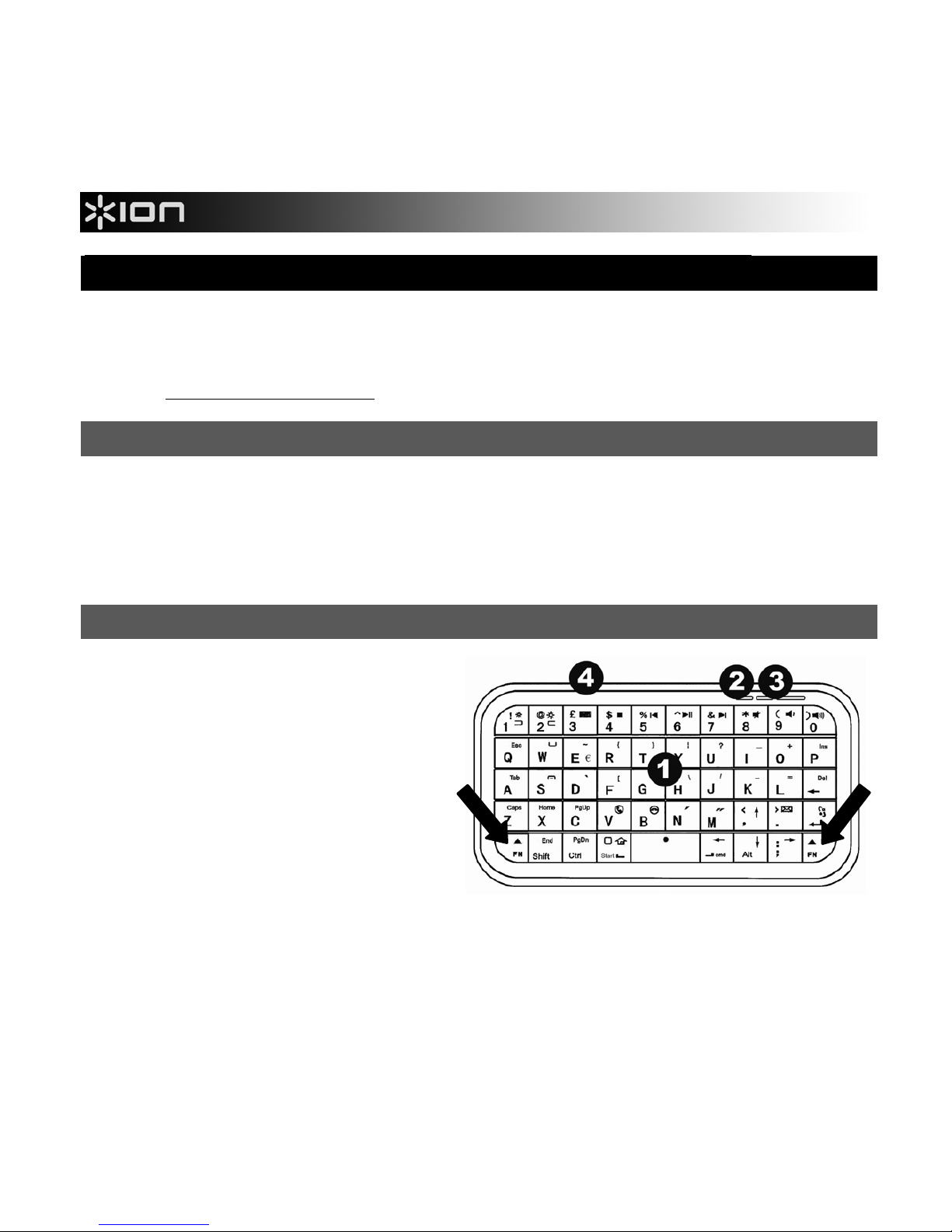
1. CLAVIER – Lorsque le iTYPE est
jumelé à votre téléphone, vous
pouvez l’utiliser pour saisir du texte.
Maintenez une des touches FN
(fonction) afin d’accéder aux
fonctions supplémentaires des
touches (en bleu).
2. TÉMOIN DE CHARGE – L’indicateur
de niveau de charge s’allume
lorsque la pile se recharge.
3. TOUCHE JUMELAGE & DEL –
Appuyez cette touche afin de jumeler
le iTYPE à votre appareil (consultez JUMELAGE DU iTYPE AVEC UN TÉLÉPHONE). La DEL
clignote rapidement lorsque la pile du iTYPE est faible.
4. INTERRUPTEUR DE MISE EN MARCHE – Cette touche permet d’allumer/fermer le iTYPE.
Page 9
9
JUMELAGE DU iTYPE AVEC UN TÉLÉPHONE
Avec iPhone, iPad, iPod touch* : (Remarque : OS version 4.0 ou supérieure requise.)
1. Mettre le iTYPE sous tension.
2. Sur votre appareil, cliquez sur Réglages f Général f Bluetooth. Activez la fonction Bluetooth.
3. Appuyez sur la touche de jumelage du iTYPE et maintenez-la enfoncée jusqu’à ce que la DEL
clignote.
4. Sur votre appareil, « Bluetooth Keyboard » (clavier Bluetooth) devrait s’afficher comme appareil
Bluetooth. Cliquez dessus afin de le sélectionner.
5. Entrez le code affiché à l’écran à l’aide du clavier iTYPE, puis appuyez sur la touche Enter. Le
clavier iTYPE devrait maintenant être jumelé avec votre appareil.
Téléphone doté de Windows Mobile : (Remarque : Windows Mobile version 5.0 ou supérieure est
requise.)
1. Mettre le iTYPE sous tension.
2. Sur votre appareil, cliquez sur Démarrer f Paramètres et sélectionnez l’onglet Connexions.
3. Sélectionner Bluetooth. Dans le menu de configuration Bluetooth, sélectionnez Mode, puis
cliquez sur « Activer Bluetooth ».
4. Sélectionnez l’onglet Appareils, puis cliquez sur Nouveaux partenariats.
5. Appuyez sur la touche de jumelage du iTYPE et maintenez-la enfoncée jusqu'à ce que la DEL
clignote.
6. Sur votre appareil, « Bluetooth Keyboard » (clavier Bluetooth) devrait s'afficher comme appareil
Bluetooth. Cliquez dessus afin de le sélectionner, puis cliquez sur Suivant.
7. Utilisez le clavier de votre téléphone afin d'entrer le code affiché à l’écran, puis cliquez sur la
touche Enter.
8. Utilisez le clavier iTYPE afin d’entrer le même code, puis appuyez sur la touche Enter. Le clavier
iTYPE devrait maintenant être jumelé avec votre appareil.
Si vous avez des problèmes lors du jumelage du iTYPE avec votre appareil, ou si le clavier
iTYPE ne transmet pas les données vers votre appareil, veuillez :
• Vous assurez que la fonction Bluetooth de votre appareil est activée (comme indiqué dans
les étapes précédentes).
• Vous assurez que le iTYPE se trouve à moins de 32 pieds (10 mètres) de votre appareil.
• Vous assurez que la pile du iTYPE est pleinement rechargée. (Consultez la section
CONSIGNES IMPORTANTES POUR LA PILE, ci-dessus.
)
Page 10
10
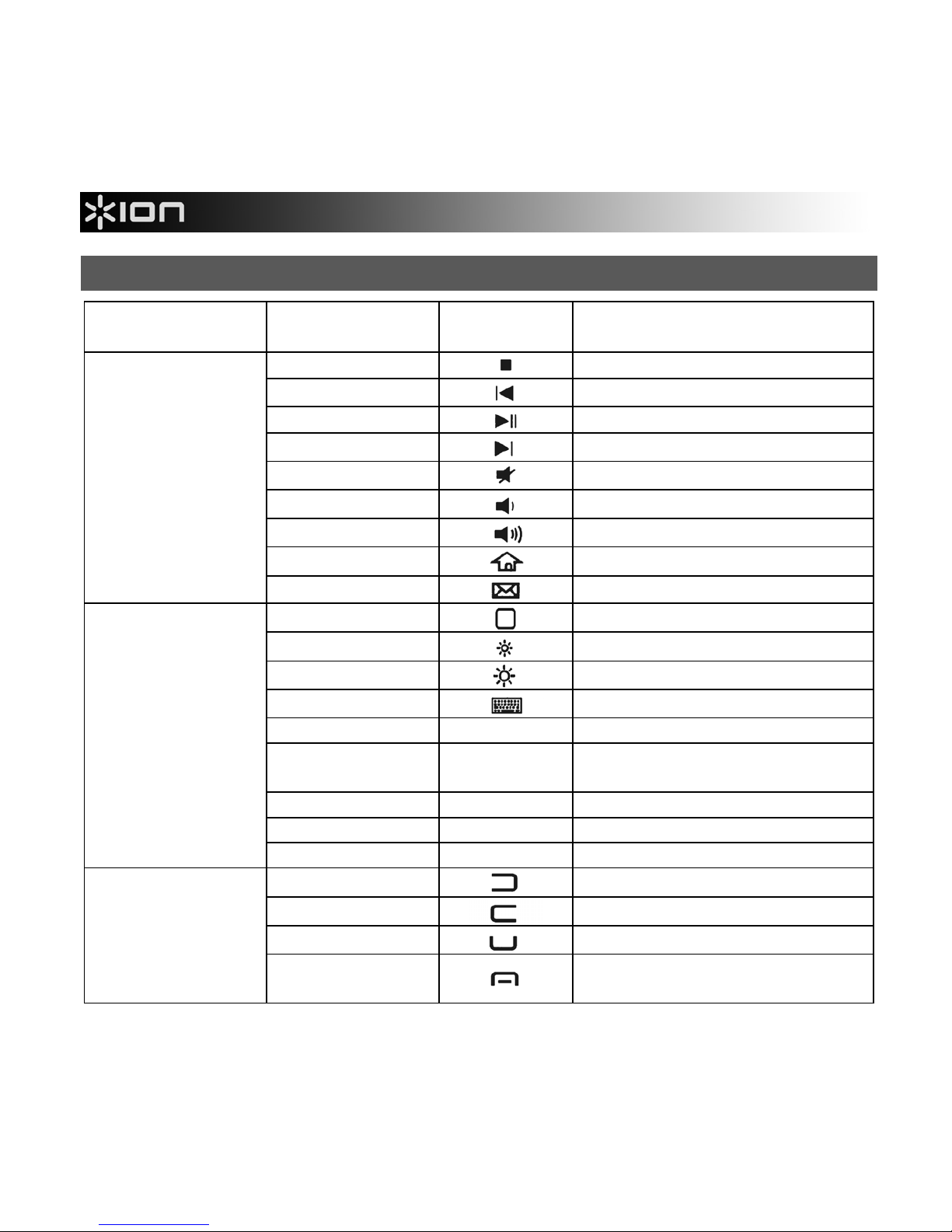
TOUCHES DE RACCOURCI
TÉLÉPHONE/
APPAREIL
TOUCHES SYMBOLE FONCTION
FN + 4
Arrêt
FN + 5
Piste précédente
FN + 6
Lecture/Pause
FN + 7
Piste suivante
FN + 8
Sourdine
FN + 9
Volume –
FN + 0
Volume +
FN + Start
Page d’accueil
Tous les
appareils
FN + >
Courriel
FN + Start
Page d’accueil
FN + 1
Luminosité –
FN + 2
Luminosité +
FN + 3
Clavier virtuel
CMD + Espace Changer de langue
CMD + A
Sélectionner tous les items
devant la fenêtre Finder
CMD + C Copier item/texte sélectionné
CMD + V Coller
iPhone, iPad ou
iPod touch
CMD + X Couper
FN + 1
Touche gauche
FN + 2
Touche droite
FN + W
Touche Appeler
Windows Mobile
FN + S
Touche Raccrocher, ou
Windows
Page 11
11
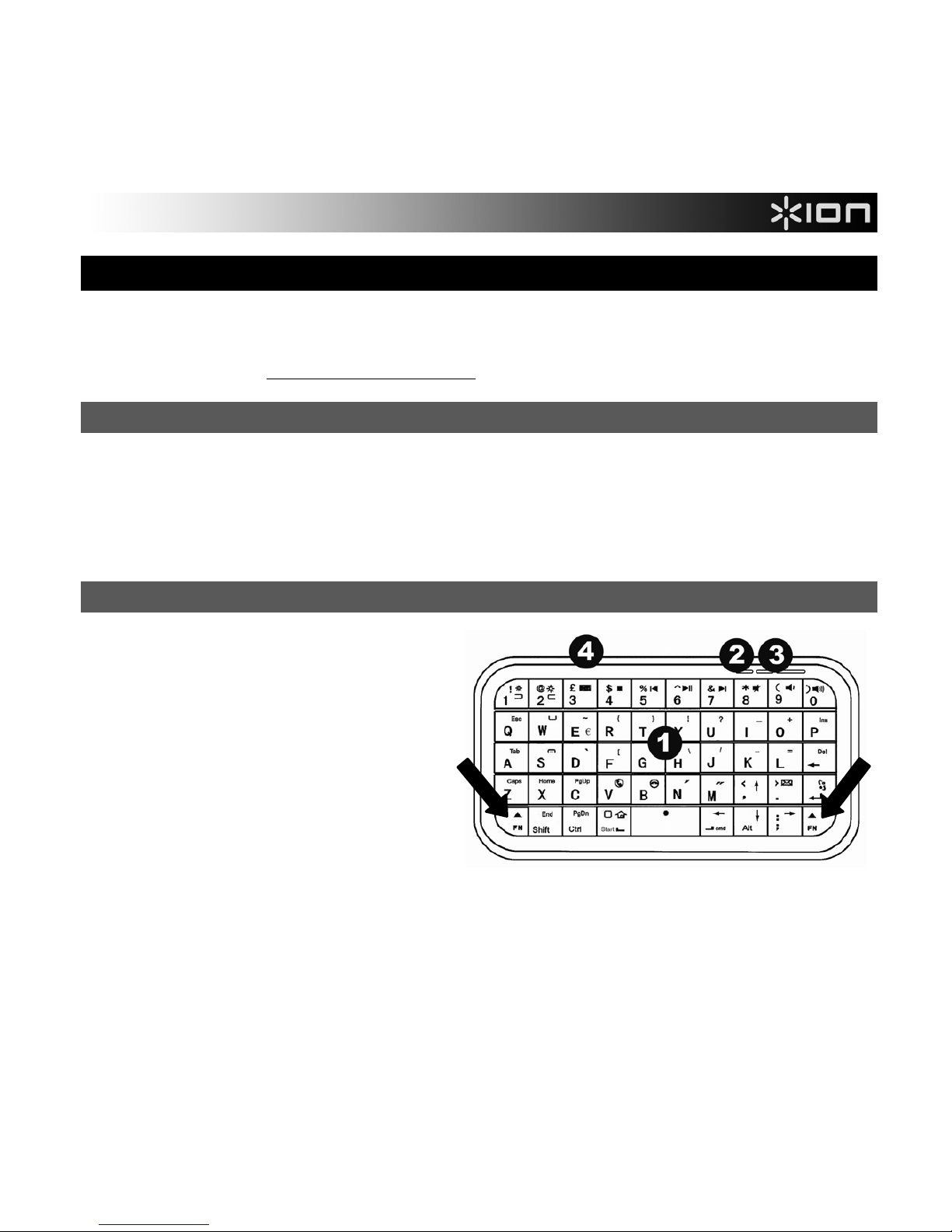
GUIDA RAPIDA (ITALIANO)
• Assicurarsi che gli elementi elencati di seguito siano contenuti nella confezione: iTYPE, cavalletto
per telefono, cavo USB, custodia di trasporto, Guida rapida, Istruzioni di sicurezza e garanzia
• Recarsi alla pagina http://www.ionaudio.com per la registrazione del prodotto.
IMPORTANTI INDICAZIONI RELATIVE ALLA BATTERIA
• Prima di utilizzare l'iTYPE per la prima volta, caricarlo per almeno 6 ore. In futuro, l'iTYPE
richiederà solo 2 ore di ricarica quando la batteria è scarica.
• Per caricare l'iTYPE, servirsi del cavo USB in dotazione e collegarlo ad una porta USB
disponibile del computer. (Se si utilizza un hub USB, assicurarsi che sia alimentato.) L'iTYPE può
essere utilizzato durante la ricarica.
CARATTERISTICHE
1. TASTIERA – Quando l'iTYPE è
accoppiato al telefono, digitare su
questa tastiera per inserire testo.
Tenere premuto il tasto FN
(Function) per avere accesso ai
comandi secondari dei tasti (in blu).
2. LED DI RICARICA – Si accende
quando l'iTYPE si sta caricando.
3. TASTO DI ACCOPPIAMENTO &
LED – Tenere premuto questo tasto
mentre si accoppia l'iTYPEcon il
proprio dispositivo (si veda il
paragrafo "ACCOPPIAMENTO DELL'iTYPE COL TELEFONO). Il LED lampeggia quando la
batteria dell'iTYPE è scarica.
4. INTERRUTTORE DI ALIMENTAZIONE – Premere questo tasto per accendere o spegnere
l'iTYPE.
Page 12
12
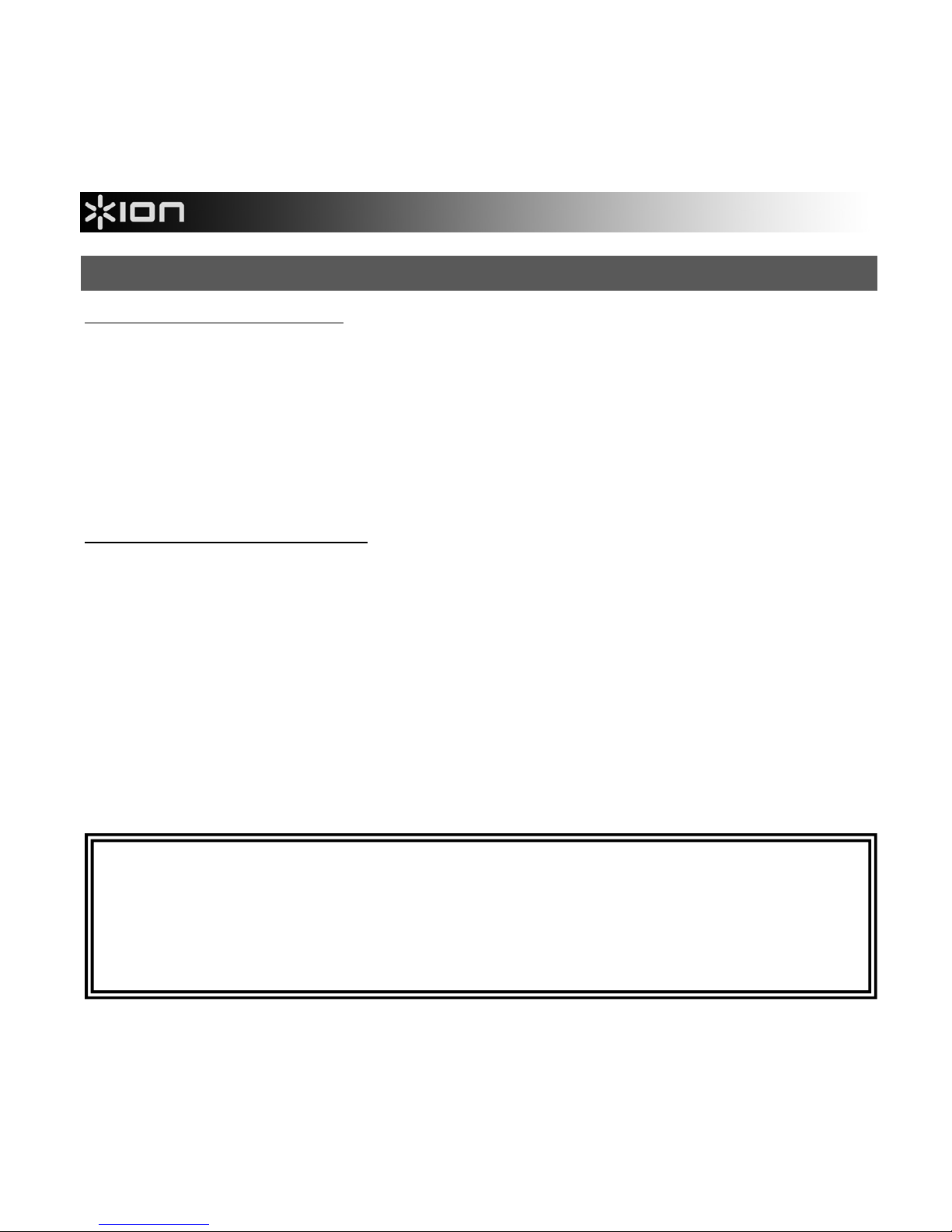
ACCOPPIAMENTO DELL'iTYPE COL TELEFONO
Con iPhone, iPad, iPod touch*: (Nota bene: si richiede un OS 4.0 o superiore.)
1. Accendere l'iTYPE.
2. Sul dispositivo, recarsi su Settings f General f Bluetooth. Far scorrere il cursore del
Bluetooth su "On".
3. Tenere premuto il TASTO DI ACCOPPIAMENTO DELL'iTYPE fino a quando il LED non
lampeggia.
4. Sullo schermo del dispositivo, "Bluetooth Keyboard" compare come dispositivo Bluetooth.
Battere per selezionarlo.
5. Servirsi della TASTIERA dell'iTYPE per inserire la password illustrata sullo schermo, quindi
premere il tasto Invio. L'iTYPE è ora accoppiato col dispositivo.
Con un telefono Windows Mobile: (Nota bene: si richiede Windows Mobile 5.0 o superiore.)
1. Accendere l'iTYPE.
2. Sul dispositivo, recarsi su Start f Settings e selezionare la scheda Connections .
3. Selezionare Bluetooth. nel menu Bluetooth Settings, selezionare Mode quindi battere su "Turn
on Bluetooth" (accendi bluetooth).
4. Selezionare la scheda Devices (dispositivi), quindi New Partnership.
5. Tenere premuto il TASTO DI ACCOPPIAMENTO DELL'iTYPE fino a quando il LED non
lampeggia.
6. Sullo schermo del dispositivo, "Bluetooth Keyboard" compare come dispositivo Bluetooth.
Battere per selezionarlo, quindi premere Next.
7. Servirsi della tastiera del telefono per inserire la password che compare sullo schermo, quindi
premerne il tasto Invio.
8. Servirsi della TASTIERA dell'iTYPE per inserire quella stessa password, quindi premere il tasto
Invio. L'iTYPE è ora accoppiato col dispositivo.
In caso di problemi nell'accoppiamento dell'iTYPE con il dispositivo desiderato, o se la
TASTIERA dell'iTYPE non comunica con il dispositivo, procedere come segue:
• Assicurarsi che il Bluetooth sia abilitato sul dispositivo (come descritto in precedenza).
• Assicurarsi che l'iTYPE si trovi entro un raggio di 10 metri dal dispositivo.
• Assicurarsi che l'iTYPE sia carico. (Si veda il paragrafo IMPORTANTI NOTE RELATIVE
ALLE BATTERIE.)
Page 13
13
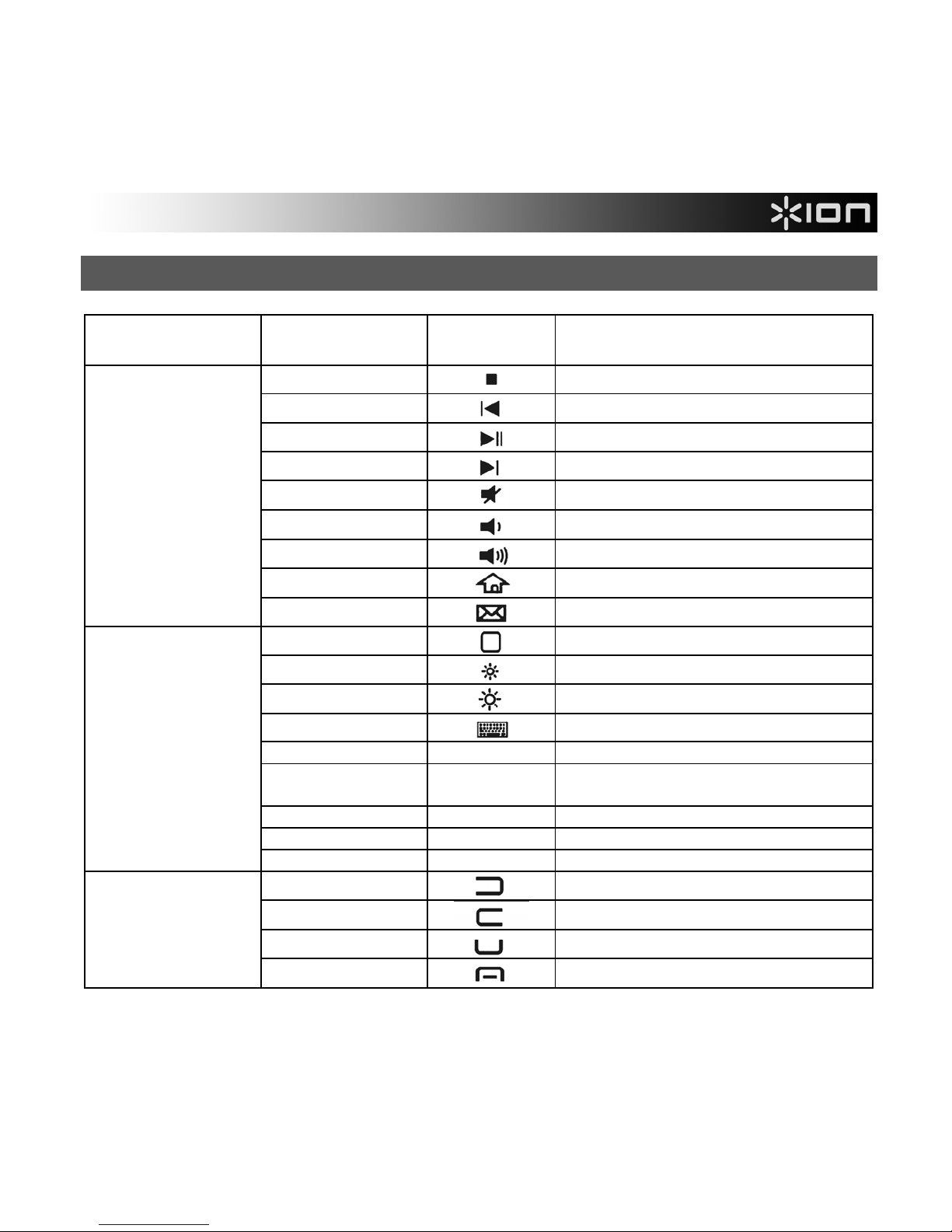
HOTKEY e SCORCIATOIE
TELEFONO /
DISPOSITIVO
TASTI SIMBOLO FUNZIONE
FN + 4
Stop
FN + 5
Traccia precedente
FN + 6
Play / Pausa
FN + 7
Traccia successiva
FN + 8
Muto
FN + 9
Volume –
FN + 0
Volume +
FN + Start
Webhome
Tutti i dispositivi
FN + >
Mail
FN + Start
Schermata Home
FN + 1
Luminosità –
FN + 2
Luminosità +
FN + 3
Tastiera virtuale
CMD + Space Cambia lingua
CMD + A
Seleziona tutte le voci nella finestra
anteriore del Finder
CMD + C Copiare voci / testi selezionati
CMD + V Incolla
iPhone, iPad, o
iPod touch
CMD + X Taglia
FN + 1
Tasto sinistro
FN + 2
Tasto destro
FN + W
Tasto chiamata
Windows Mobile
FN + S
Tasto di fine chiamata o Window
Page 14
14
SCHNELLSTART-ANLEITUNG (DEUTSCH)
• Vergewissern Sie sich, dass alle hier angeführten Komponenten in der Schachtel enthalten sind.
iTYPE, Telefonhalter, USB-Kabel, Tragetasche, Schnellstart-Anleitung, Sicherheitshinweise und
Garantie
• Besuchen Sie http://www.ionaudio.com
, um Ihr Produkt zu registrieren.
WICHTIGE INFORMATIONEN ZUM AKKU
• Bevor Sie iTYPE zum ersten Mal benutzen, laden Sie es mindestens 6 Stunden lang auf. In
Zukunft benötigt iTYPE nur 2 Stunden Ladezeit, wenn der Akku schwach ist.
• Um iTYPE aufzuladen, verwenden Sie das mitgelieferte USB-Kabel, um das Gerät an einen
freien USB-Port Ihres Computers anzuschließen. (Wenn Sie einen USB-Hub verwenden, stellen
Sie sicher, dass der Hub mit Strom versorgt wird.) Sie können iTYPE auch während des
Ladevorgangs verwenden.
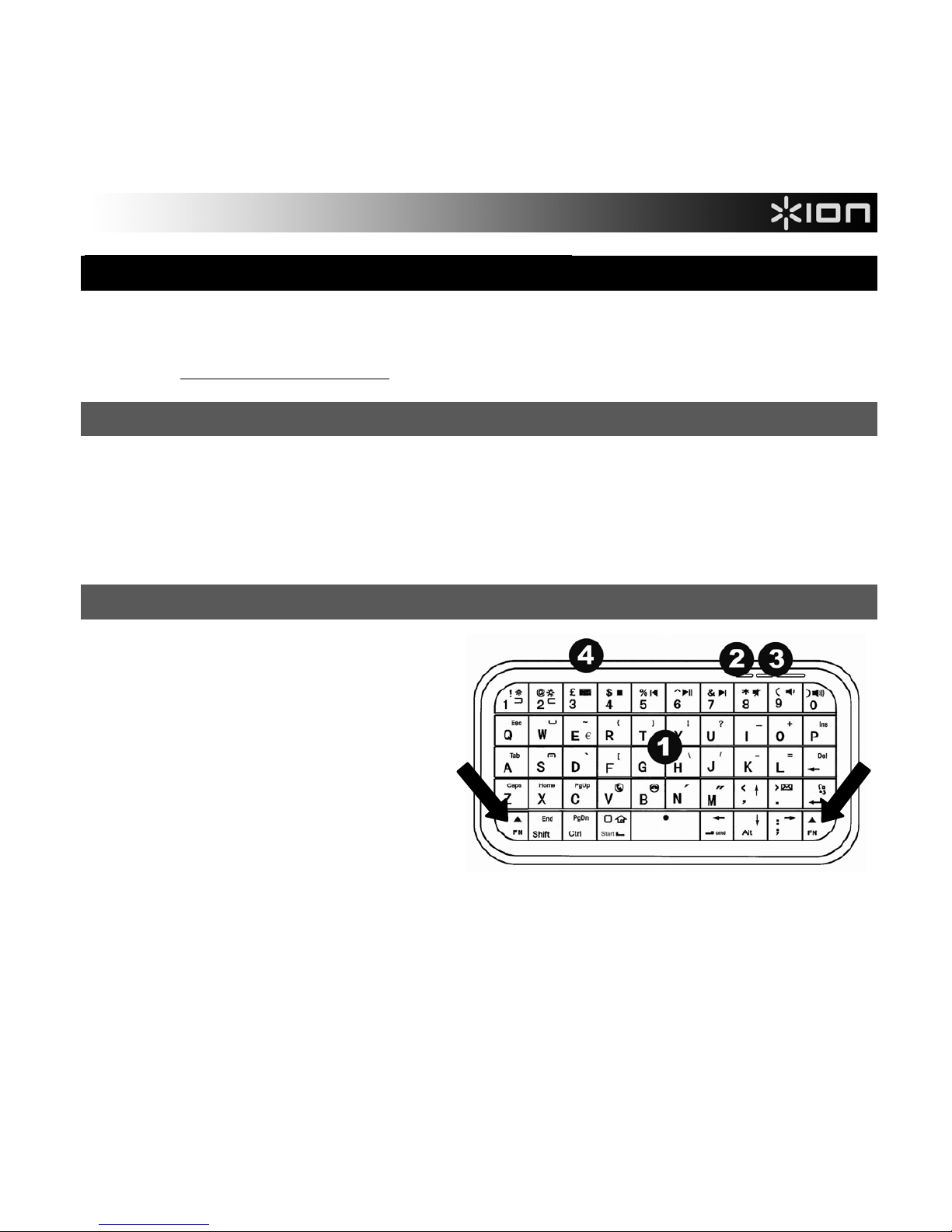
FUNKTIONEN
1. KEYBOARD – Wenn iTYPE mit
Ihrem Telefon verwendet wird,
geben Sie Ihren Text auf dieser
Tastatur ein. Drücken und halten Sie
die FN-Taste (Funktion), um die
alternativen Befehle der Tasten zu
aktivieren (in blau).
2. LADE-LED – Leuchtet, wenn iTYPE
aufgeladen wird.
3. KOMBINATIONSTASTE & LED –
Drücken Sie diese Taste, wenn Sie
iTYPE mit Ihrem Gerät kombinieren
(siehe iTYPE MIT IHREM HANDY KOMBINIEREN). Die LED beginnt auch dann schnell zu
blinken, wenn der Akkustand des iTYPE niedrig ist.
4. NETZSCHALTER – Mit dieser Taste schalten Sie iTYPE ein oder aus.
Page 15
15
iTYPE MIT IHREM HANDY KOMBINIEREN
Mit dem iPhone, iPad, iPod Touch*: (Hinweis: OS 4.0 oder höher erforderlich.)
1. Schalten Sie iTYPE ein.
2. Wählen Sie auf Ihrem Gerät Einstellungen f Allgemein f Bluetooth. Setzen Sie den
Bluetooth-Schieber auf "On".
3. Halten Sie die KOMBINATIONSTASTE des iTYPE gedrückt bis die LED blinkt.
4. Am Bildschirm des Geräts wird "Bluetooth Keyboard" als Bluetooth-Gerät angezeigt. Tippen Sie
darauf, um es auszuwählen.
5. Verwenden Sie das iTYPE KEYBOARD, um den Passcode einzugeben, der auf dem Bildschirm
angezeigt wird und drücken Sie anschließend die Eingabe-Taste. iTYPE ist jetzt mit Ihrem Gerät
gekoppelt.
Mit dem Windows Mobile Phone: (Hinweis: Windows Mobile 5.0 oder höher erforderlich.)
1. Schalten Sie iTYPE ein.
2. Wählen Sie auf Ihrem Gerät Start f Einstellungen und anschließend die Registerkarte
Verbindungen.
3. Wählen Sie Bluetooth. Im Bluetooth-Menü "Einstellungen" wählen Sie Modus und tippen dann
auf "Bluetooth aktivieren."
4. Wählen Sie die Registerkarte Geräte aus und anschließend „Neue Partnerschaft“.
5. Halten Sie die KOMBINATIONSTASTE des iTYPE gedrückt bis die LED blinkt.
6. Am Bildschirm des Geräts wird "Bluetooth Keyboard" als Bluetooth-Gerät angezeigt. Tippen Sie
darauf, um es auszuwählen und drücken dann auf Weiter.
7. Verwenden Sie die Telefontastatur, um den Passcode einzugeben, der auf dem Bildschirm
angezeigt wird und drücken Sie anschließend die Eingabe-Taste.
8. Verwenden Sie das iTYPE KEYBOARD, um denselben Passcode einzugeben und drücken
anschließend die Enter-Taste. iTYPE ist jetzt mit Ihrem Gerät gekoppelt.
Wenn Sie Probleme bei der Kombination von iTYPE und Ihrem Gerät haben oder wenn das iTYPE
KEYBOARD nichts an Ihr Gerät übermittelt, versuchen Sie bitte folgendes:
• Vergewissern Sie sich, dass Bluetooth auf Ihrem Gerät aktiviert ist (wie in den Schritten oben
beschrieben).
• Vergewissern Sie sich, dass iTYPE nicht weiter als 32 Fuß (10 Meter) von Ihrem Gerät entfernt ist.
• Vergewissern Sie sich, dass ITYPE vollständig aufgeladen ist. (Siehe WICHTIGE INFORMATIONEN
ZUM AKKU oben.)
Page 16
16
HOTKEYS & SHORTCUTS
TELEFON/GERÄTE KEYS SYMBOL FUNKTION
FN + 4
Stop
FN + 5
Previous Track
FN + 6
Play / Pause
FN + 7
Next Track
FN + 8
Mute
FN + 9
Volume –
FN + 0
Volume +
FN + Start
Webhome
Alle Geräte
FN + >
Mail
FN + Start
Home Screen
FN + 1
Brightness –
FN + 2
Brightness +
FN + 3
Virtual keyboard
CMD + Leertaste Switch languages
CMD + A
Select all items in front Finder
window
CMD + C Copy selected item/text
CMD + V Paste
iPhone, iPad oder
iPod Touch
CMD + X Cut
FN + 1
Left key
FN + 2
Right key
FN + W
Call key
Windows Mobile
FN + S
End call key, or Window
Page 17
17
SNELSTARTGIDS (NEDERLANDS)
• Controleer of de doos de onderstaande onderdelen bevat: iTYPE, telefoonstandaard, USB-kabel,
draagtas, Snelstartgids, Veiligheidsinstructies & Informatie over de garantie
• Ga naar http://www.ionaudio.com voor productregistratie.
BELANGRIJKE OPMERKINGEN OVER DE BATTERIJ
• Voordat u de iTYPE voor de eerste keer oplaadt, moet u hem voor ten minste 6 uur opladen.
Daarna moet de iTYPE slechts 2 uur worden opgeladen wanneer de batterij bijna leeg is.
• Gebruik om te iTYPE op te laden de meegeleverde USB-kabel, om hem te verbinden met een
beschikbare USB-poort op uw computer. (Als u een USB-hub gebruikt, zorg dan dat de hub over
een eigen voeding beschikt.) U kan de iTYPE gebruiken tijdens het opladen.
EIGENSCHAPPEN
1. TOETSENBORD – Wanneer de
iTYPE verbinding heeft gemaakt met
uw telefoon, kan u typen op dit
toetsenbord om tekst in te voeren.
Druk en houd de FN (functie) -knop
ingeduwd voor toegang tot de
alternatieve commando's (in blauw)
van de toetsen.
2. BATTERIJLED – Brandt wanneer de
iTYPE aan het laden is.
3. KOPPELINGSKNOP & LED – Druk
deze knop in om de iTYPE verbinding te doen maken met uw apparaat (zie DE iTYPE
KOPPELEN AAN UW TELEFOON). De LED begint snel te knipperen wanneer de batterij van
de iTYPE bijna leeg is.
4. AAN/UIT-SCHAKELAAR – Druk op deze knop om de iTYPE aan of uit te zetten.
Page 18
18
DE iTYPE KOPPELEN AAN UW TELEFOON
Met de iPhone, iPad, iPod touch*: (Opmerking: OS 4.0 of hoger nodig.)
1. De iTYPE inschakelen.
2. Ga op uw apparaat naar Instellingen f Algemeen f Bluetooth. Schuif de Bluetoothschuifbalk naar "Aan".
3. Druk en houd iTYPE's koppelingsknop ingedrukt tot de LED begint te knipperen.
4. Op het scherm van uw apparaat verschijnt "Bluetooth Toetsenbord" als Bluetooth-apparaat. Tik
erop om het te selecteren.
5. Gebruik het iTYPE toetsenbord om het wachtwoord op het scherm in te voeren en druk op de
Enter-toets. De iTYPE is nu gekoppeld met uw toestel.
Met Windows Mobile-telefoon: (Opmerking: Windows Mobile 5.0 of hoger nodig.)
1. De iTYPE inschakelen.
2. Ga op uw apparaat naar Start f Instellingen en selecteer het tabblad Verbindingen.
3. Selecteer Bluetooth. Selecteer in het instellingenmenu Bluetooth Modus en tik dan op
"Bluetooth inschakelen."
4. Selecteer het tabblad Apparaten en daarna Nieuw Partnerverband.
5. Druk en houd iTYPE's koppelingsknop ingedrukt tot de LED begint te knipperen.
6. Op het scherm van uw apparaat verschijnt "Bluetooth Toetsenbord" als Bluetooth-apparaat. Tik
erop om het te selecteren en druk op Volgende.
7. Gebruik het toetsenbord van uw telefoon om het wachtwoord op het scherm in te voeren en druk
op de Enter-toets.
8. Gebruik het iTYPE toetsenbord om hetzelfde wachtwoord in te voeren en druk op de Enter-toets.
De iTYPE is nu gekoppeld met uw toestel.
Als u problemen ondervindt met het koppelen van de iTYPE met uw apparaat of als het iTYPE
toetsenbord geen gegevens verzendt naar uw apparaat, probeer dan het volgende:
• Zorg ervoor dat Bluetooth is ingeschakeld op uw apparaat (zoals beschreven in de stappen
hierboven).
• Zorg ervoor dat de iTYPE zich binnen de 10 meter (32 voet) van uw apparaat bevindt.
• Zorg ervoor dat de iTYPE volledig opgeladen is. (zie BELANGRIJKE OPMERKINGEN OVER
DE BATTERIJ hierboven.
)
Page 19
19
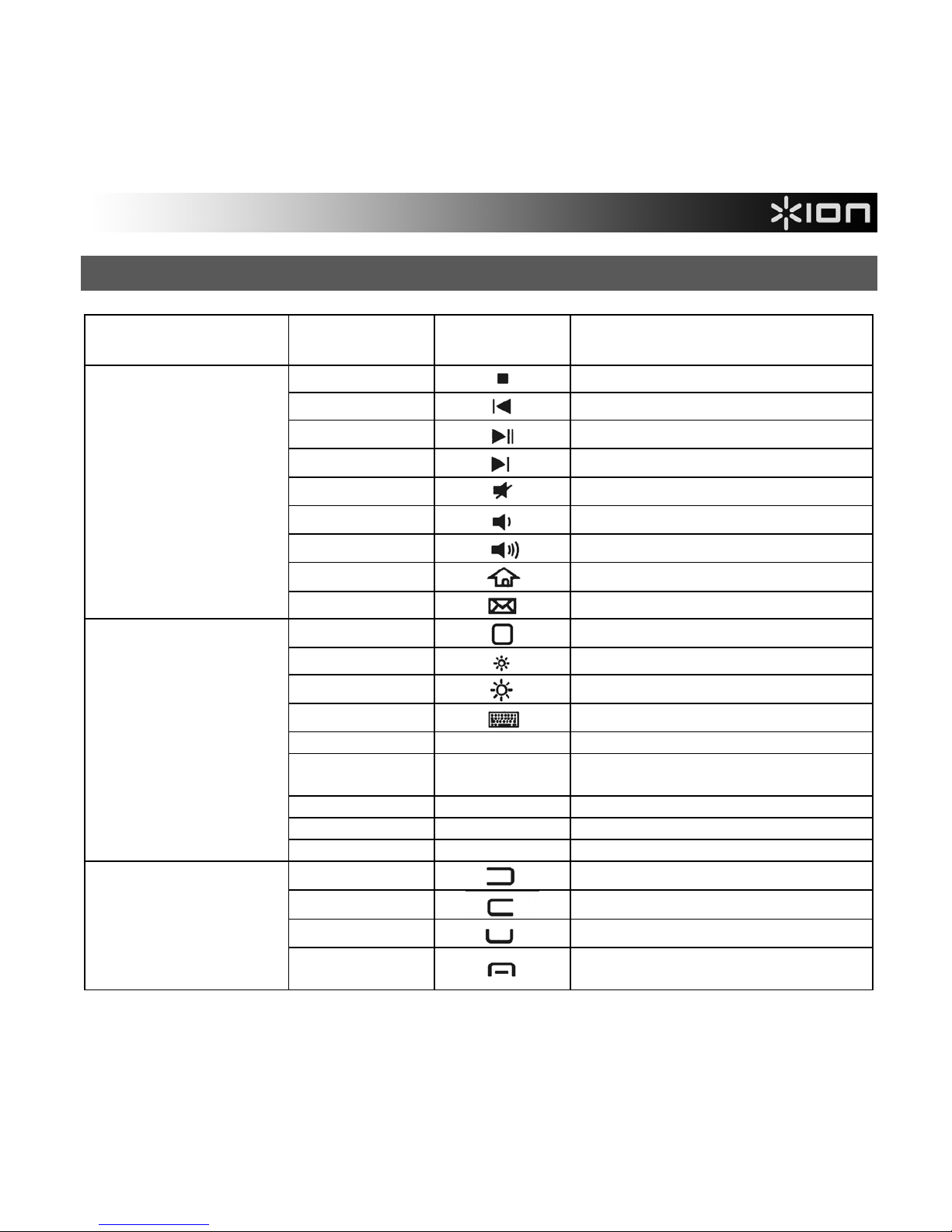
SNELTOETSEN EN SNELKOPPELINGEN
TELEFOON/
APPARAAT
TOETSEN SYMBOOL FUNCTIE
FN + 4
Stoppen
FN + 5
Vorig nummer
FN + 6
Afspelen / Onderbreken
FN + 7
Volgend nummer
FN + 8
Dempen
FN + 9
Volume –
FN + 0
Volume +
FN + Start
Webhome
Alle apparaten
FN + >
E-mail
FN + Start
Beginscherm
FN + 1
Helderheid –
FN + 2
Helderheid +
FN + 3
Virtueel toetsenbord
CMD + Spatie Van taal veranderen
CMD + A
Selecteer alle items in het voorste
Finder-venster
CMD + C Geselecteerde item/tekst kopiëren
CMD + V Plakken
iPhone, iPad, of iPod
touch
CMD + X Knippen
FN + 1
Links-toets
FN + 2
Rechts-toets
FN + W
Beltoets
Windows Mobile
FN + S
Toets oproep beëindigen of
Venster sluiten
Page 20

SPECIFICATIONS
Transmit Range: Up to 32 feet (10 meters)
Bluetooth Specification: Version 2.0, Class 2
Frequency Range: 2.4 GHz spectrum
Operating Voltage: 3.7 V DC (powered by Li-ion battery)
Current: Operation: < 3 mA
Standby: 1.0 mA
Sleep: < 0.2 mA
Dimensions: 4.5" x 2.4" x 0.4" (115 mm x 61 mm x 9 mm)
Weight: 0.11 lbs. (51 g)
www.ionaudio.com/itype
MANUAL VERSION 1.1a
 Loading...