

Page 1

Insta Party
Quickstart Guide English ( 3 – 7 )
Guía de inicio rápido Español ( 8 – 12 )
Guide d’utilisation rapide Français ( 13 – 17 )
Guida rapida Italiano ( 18 – 22 )
Schnellstart-Anleitung Deutsch ( 23 – 28 )
Snelstartgids Nederlands ( 29 – 33 )
Appendix English ( 34 )
Page 2

2
Page 3

3
Quickstart Guide (English)
Introduction
Box Contents
Insta Party
Micro-USB Cable
Quickstart Guide
Safety & Warranty Manual
Support
For the latest information about this product (documentation, technical
specifications, system requirements, compatibility information, etc.) and product
registration, visit ionaudio.com.
For additional product support, visit ionaudio.com/support.
WARNING: DO NOT splash or immerse in water or other liquids. Not for use in rain.
Use only in dry locations.
WARNING: DO NOT look directly into the dome light. Do not sit, stand, or apply
pressure on the dome light.
Page 4
4
DC IN
AUXINAUX
OUT
Setup
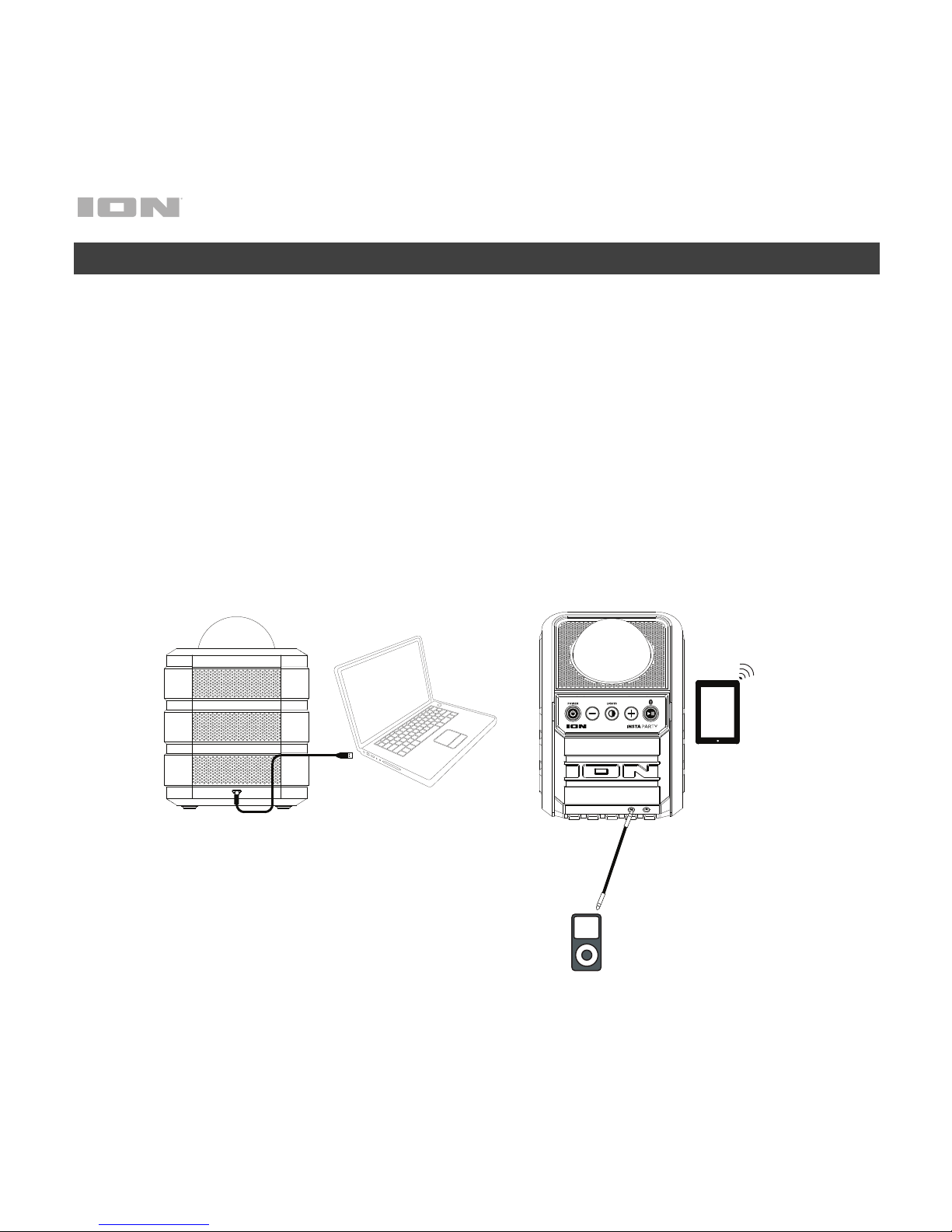
Items not listed under Introduction > Box Contents are sold separately.
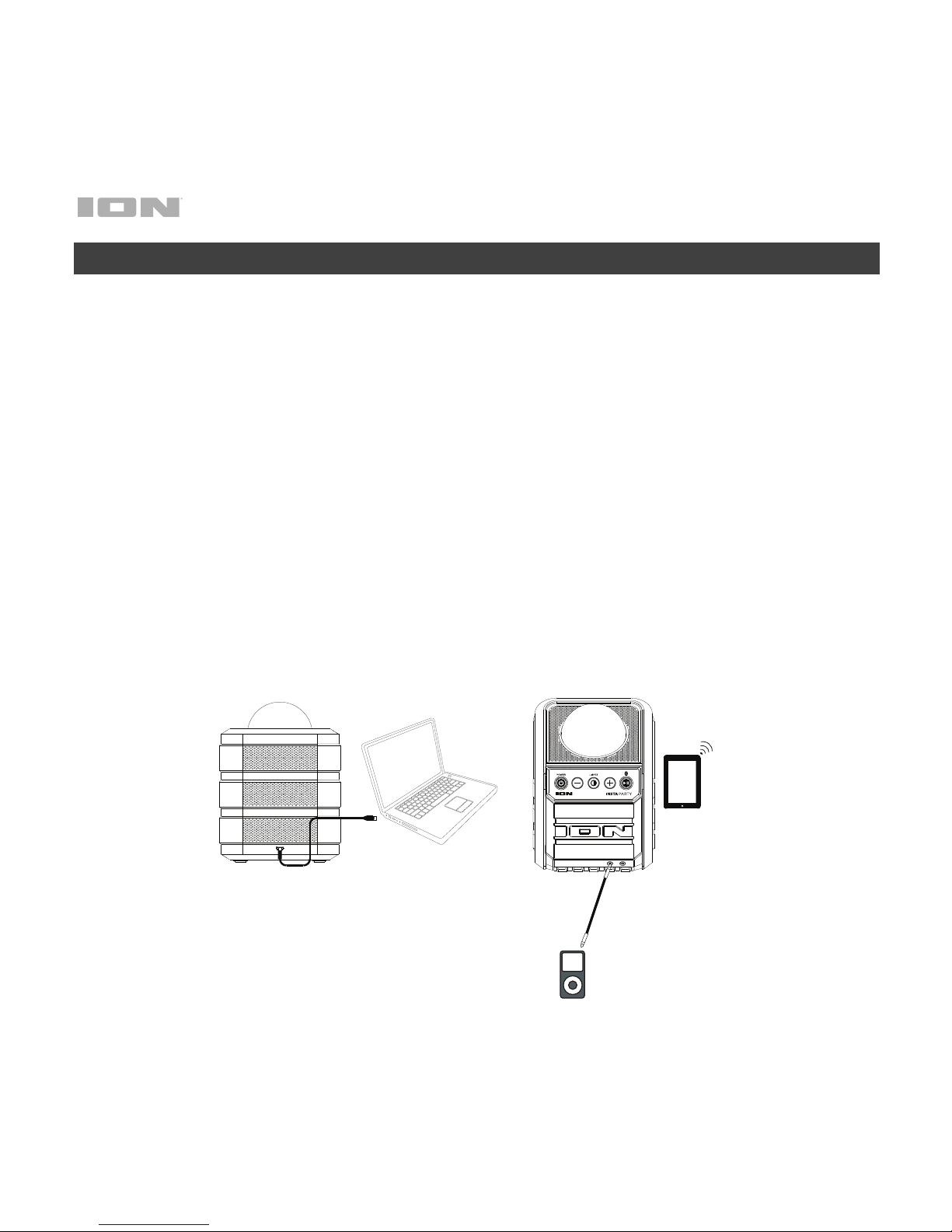
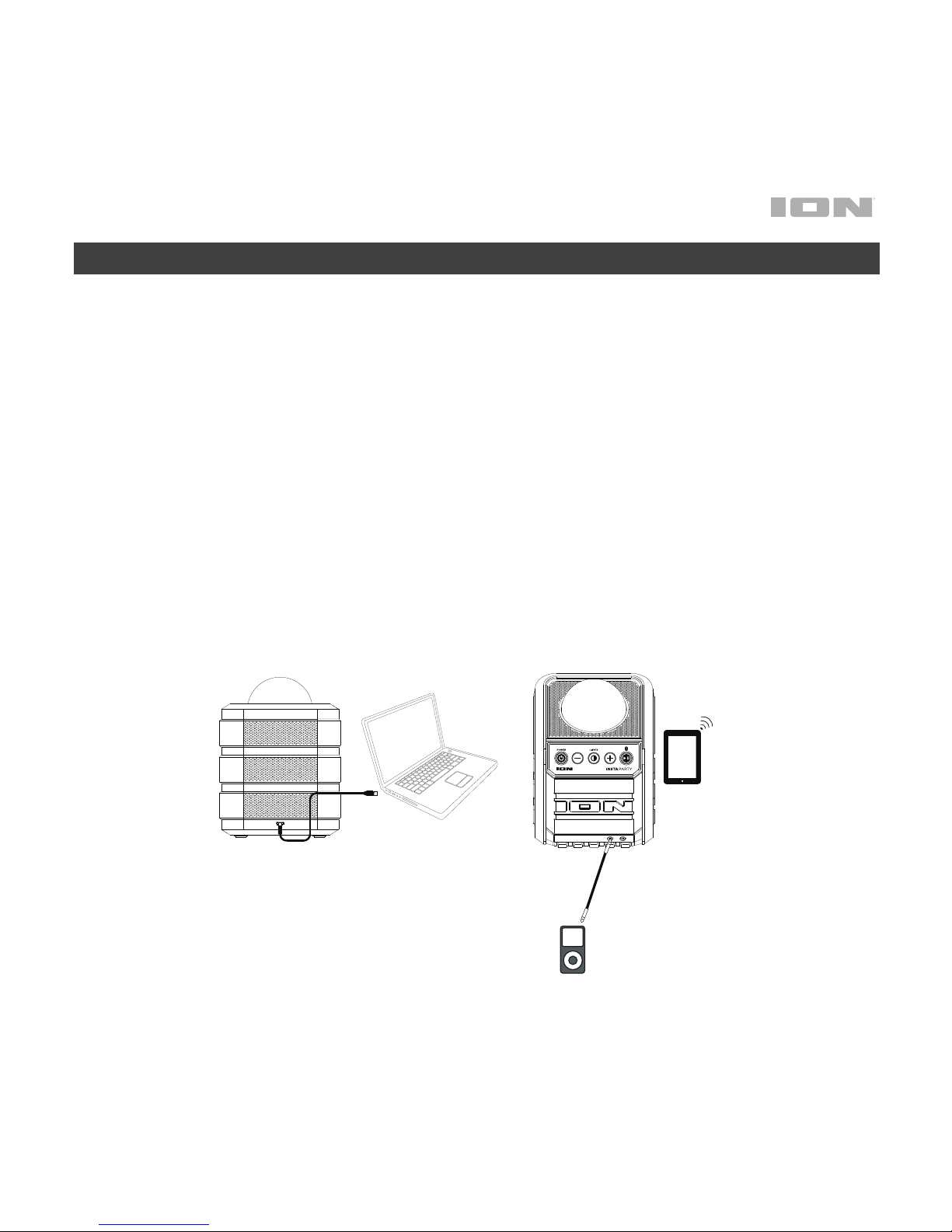
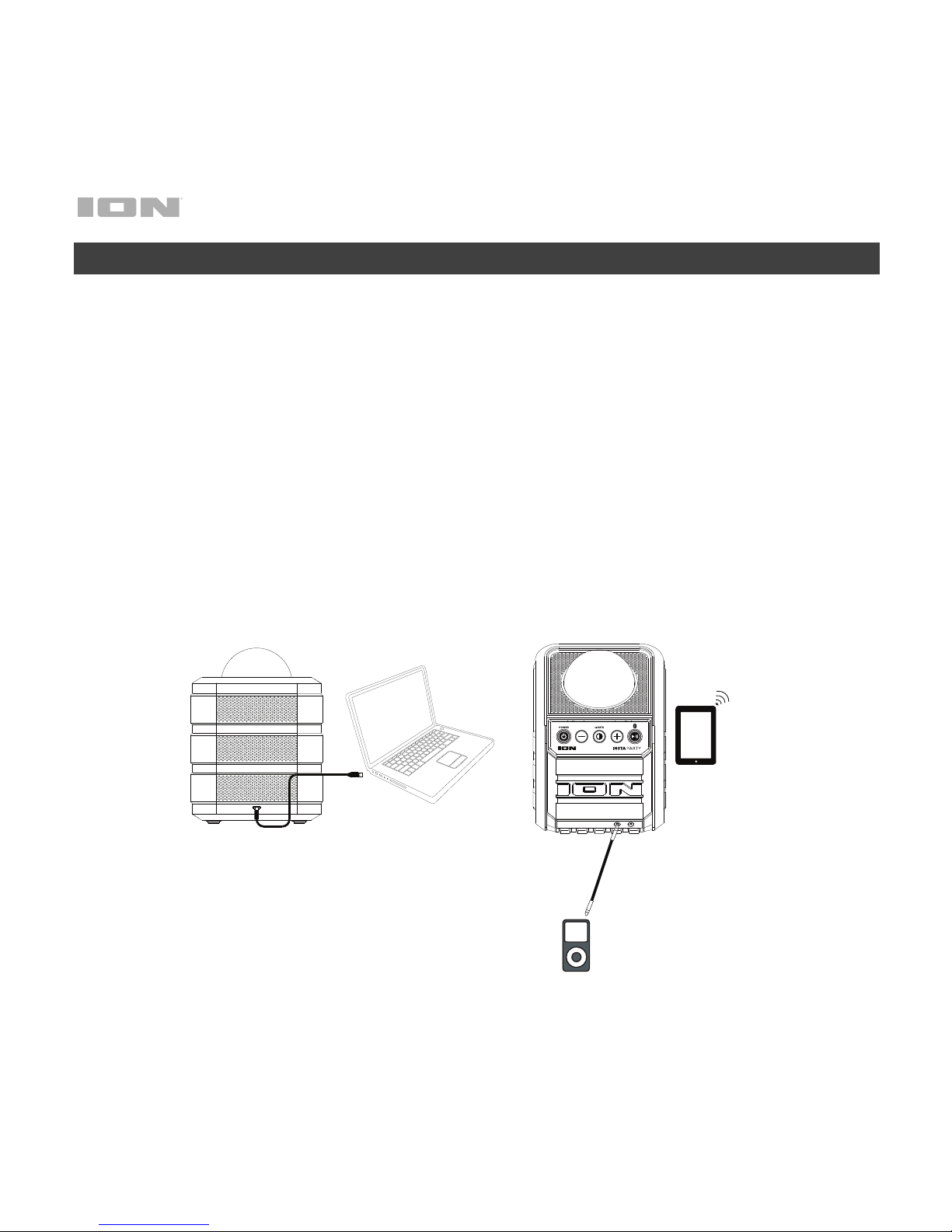
1. For optimal performance, place Insta Party in the center of the room so it is
unobstructed by walls, furniture, etc.
2. Turn down the Master Volume on the Insta Party.
3. Turn on Insta Party.
4. Connect your music player with an audio cable or Bluetooth (see Connecting
with a Bluetooth Device for more details on this).
5. Adjust the volume on your music player and on Insta Party as needed.
6. Press the Light button on Insta Party.
7. Turn off Insta Party when not in use.
Tablet
Media Player
Computer
Page 5
5
Features
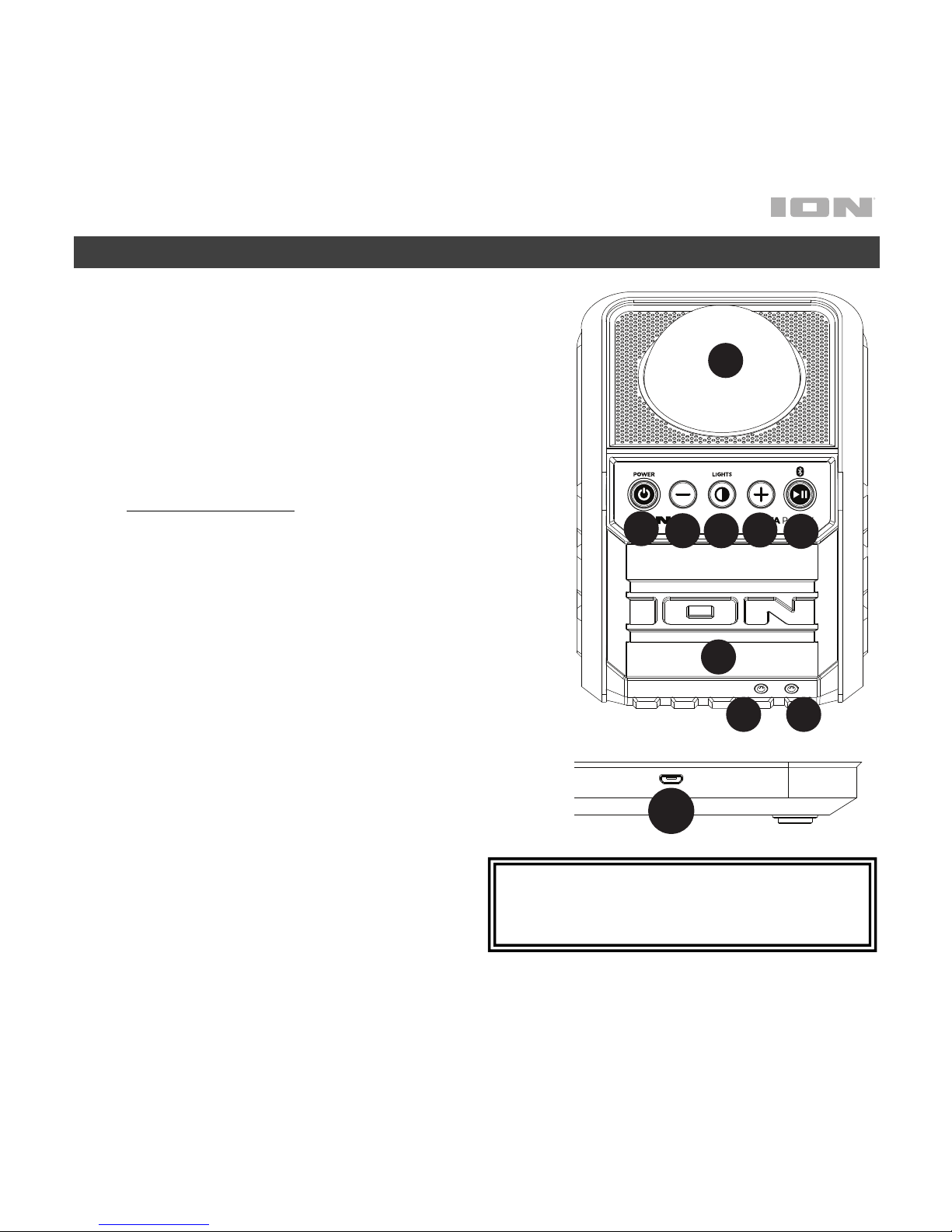
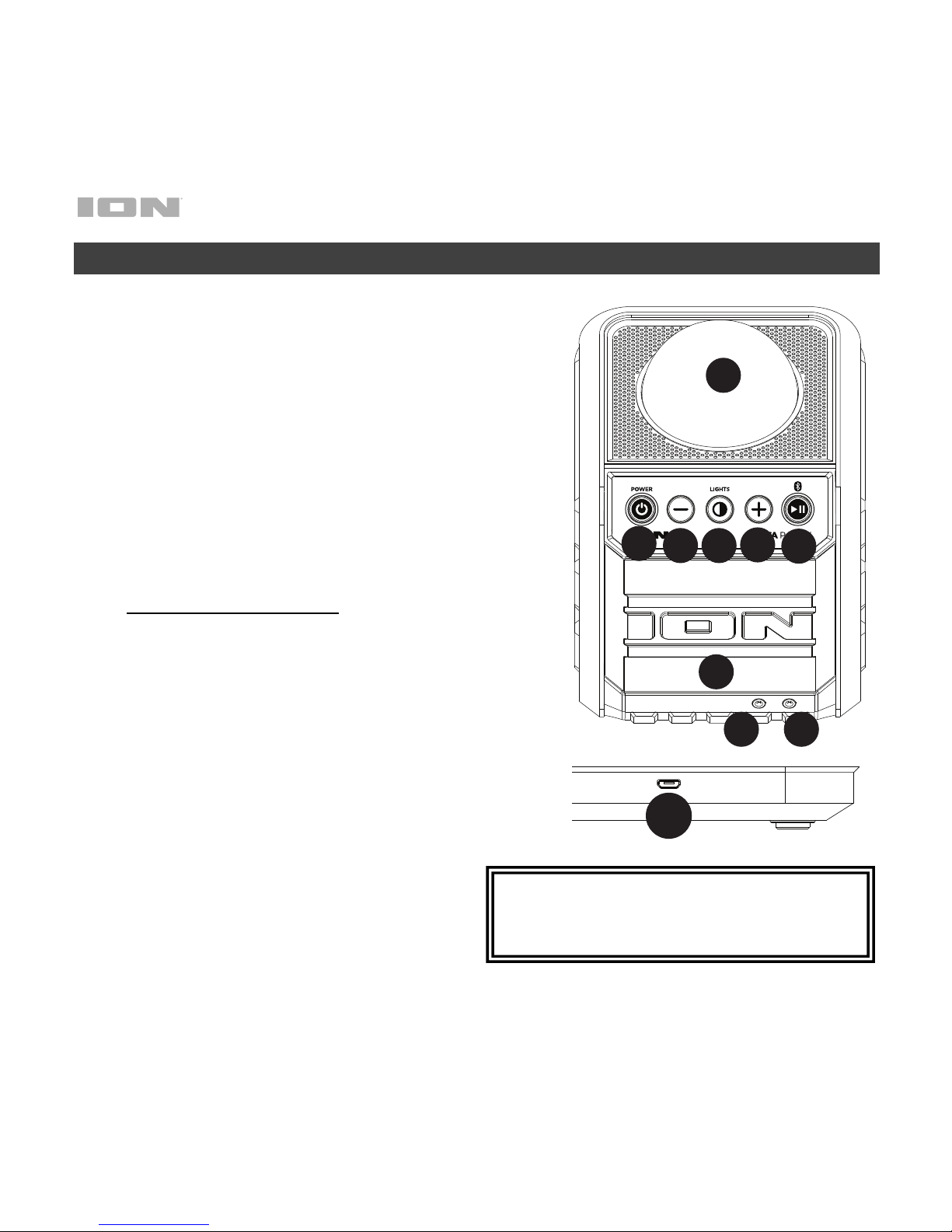
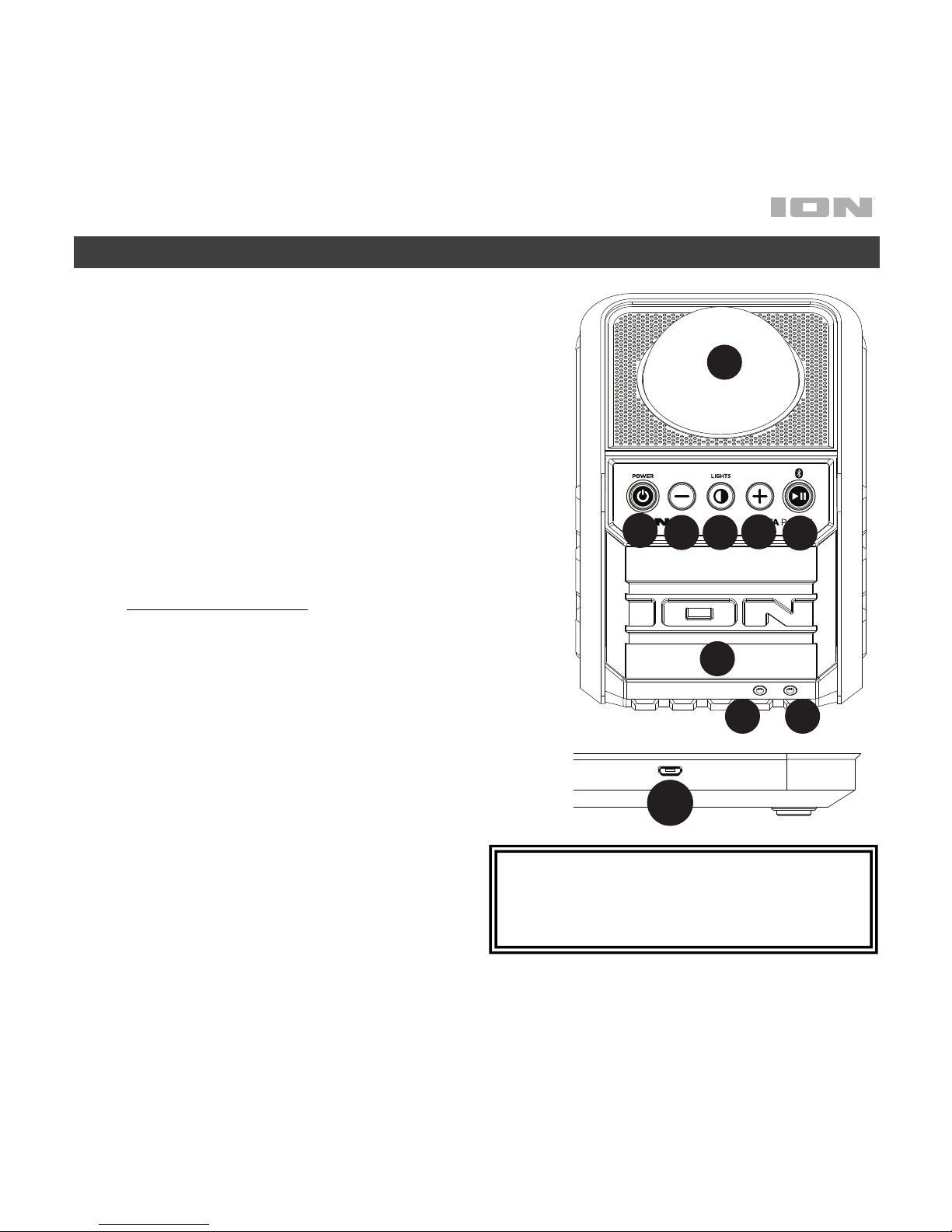
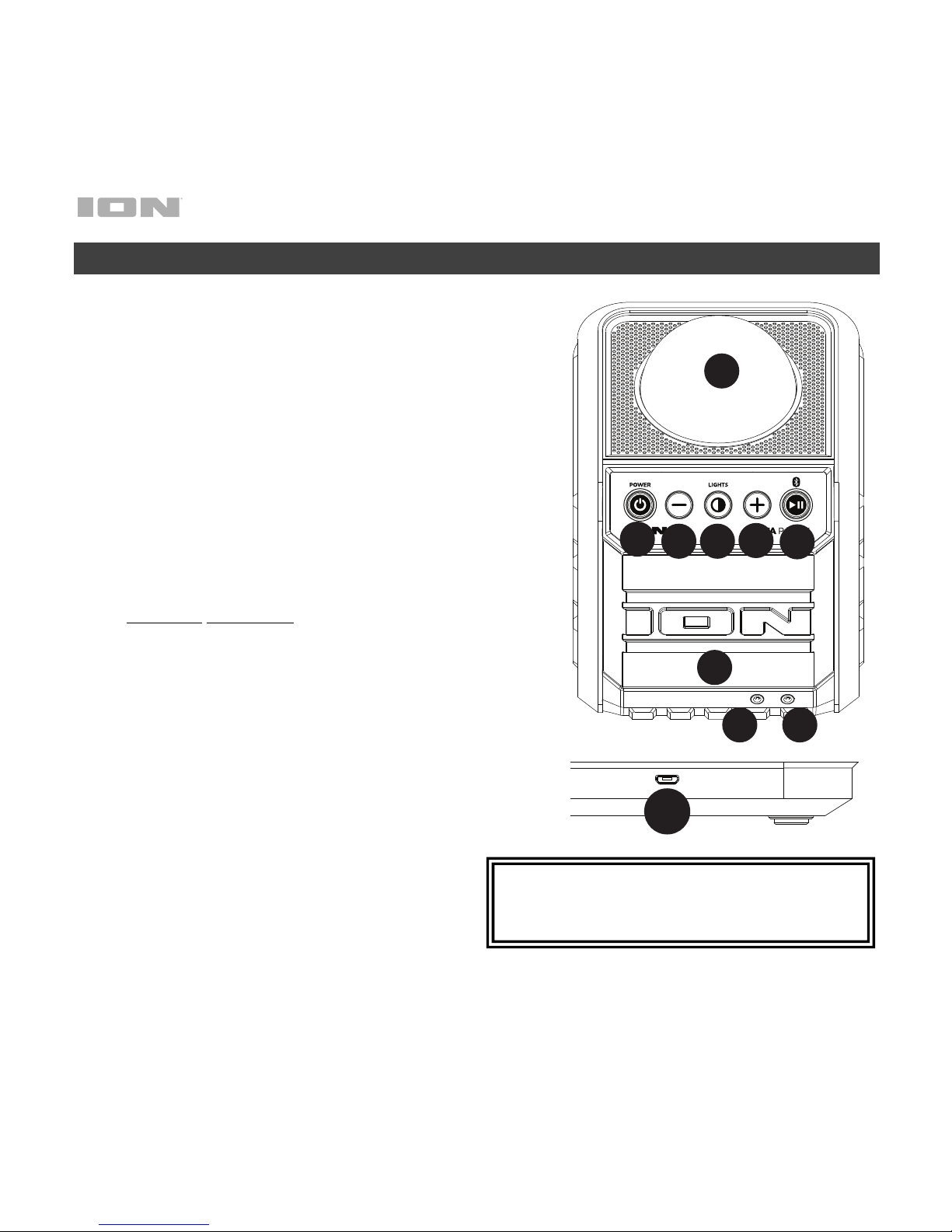
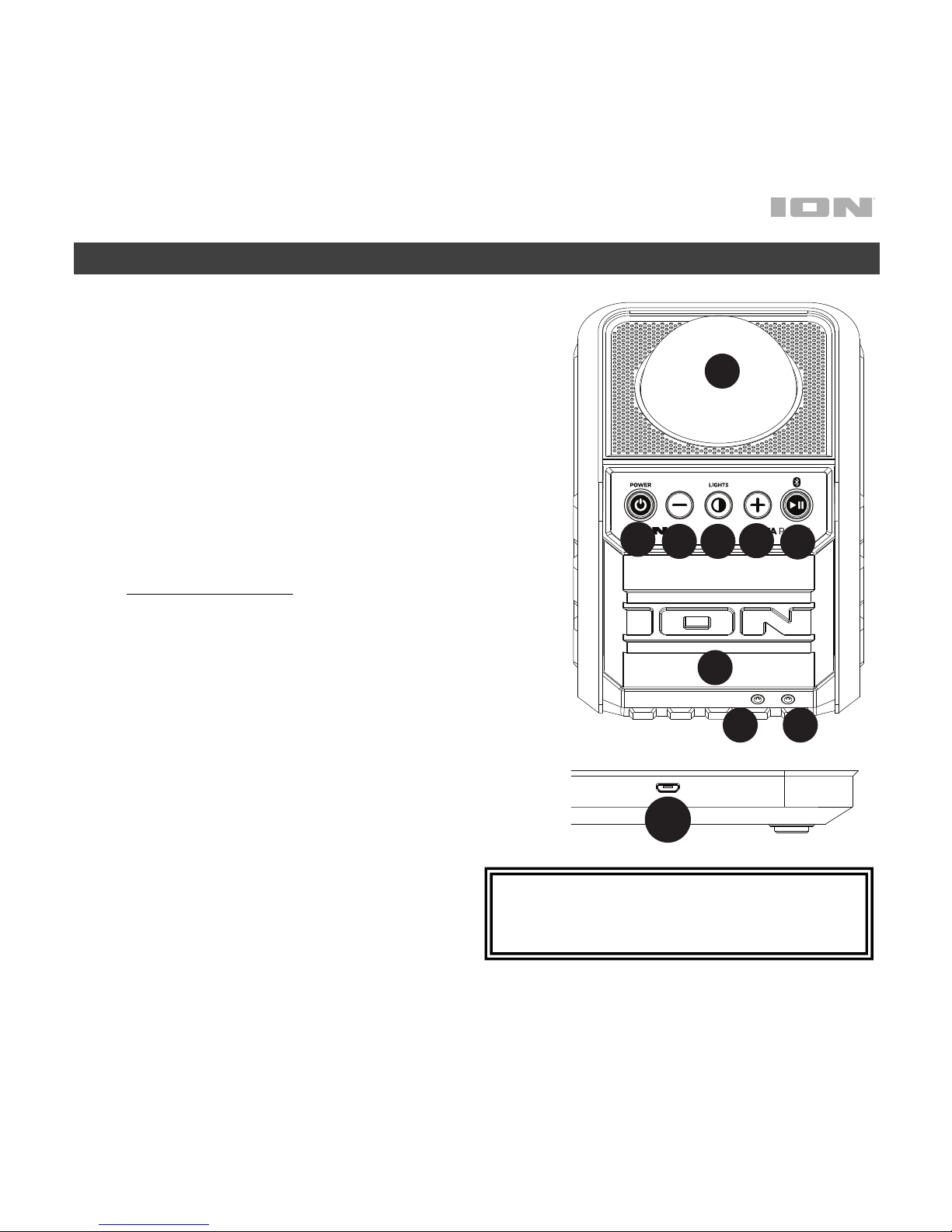
1. Dome*: The lights react to the music playing.
2. Power ON/OFF: Press this button for one second to
turn Insta Insta Party or off.
3. Volume Down/Up Controls: Press these buttons to
decrease or increase the volume level for the aux
input and Bluetooth sources. Please adjust the
volume using your device’s volume controls and
Insta Party’s volume buttons.
4. Play/Pause/Bluetooth: Press to play or pause a
track from a connected Bluetooth device.
Bluetooth Functions
• When the unit is first powered on, it will
automatically enter Pairing mode.
• The Paired LED will be lit when a device is
paired to Insta Party. This LED will not be lit
when Insta Party is first powered on (unless it
was previously paired with a device).
• Press and hold the Bluetooth button for 3
seconds to disconnect a paired Bluetooth
device.
5. Lights: Press and release this button to turn the
dome and grille party lights on and off.
6. Speaker Grille: The audio playback is heard through
here. Also, the illuminated party lights are seen here.
7. Micro-USB Charging Port: Connect the included
micro-USB cable to connect Insta Party to a USB
power adapter connected to a power
outlet or to your computer.
*WARNING: Do not look directly into the
dome light. Do not sit, stand, or apply
pressure on the dome light.
AUXINAUX
OUT
1
2
3
4
3
5
6
89
1
2
3
4
3
5
6
7
Page 6
6
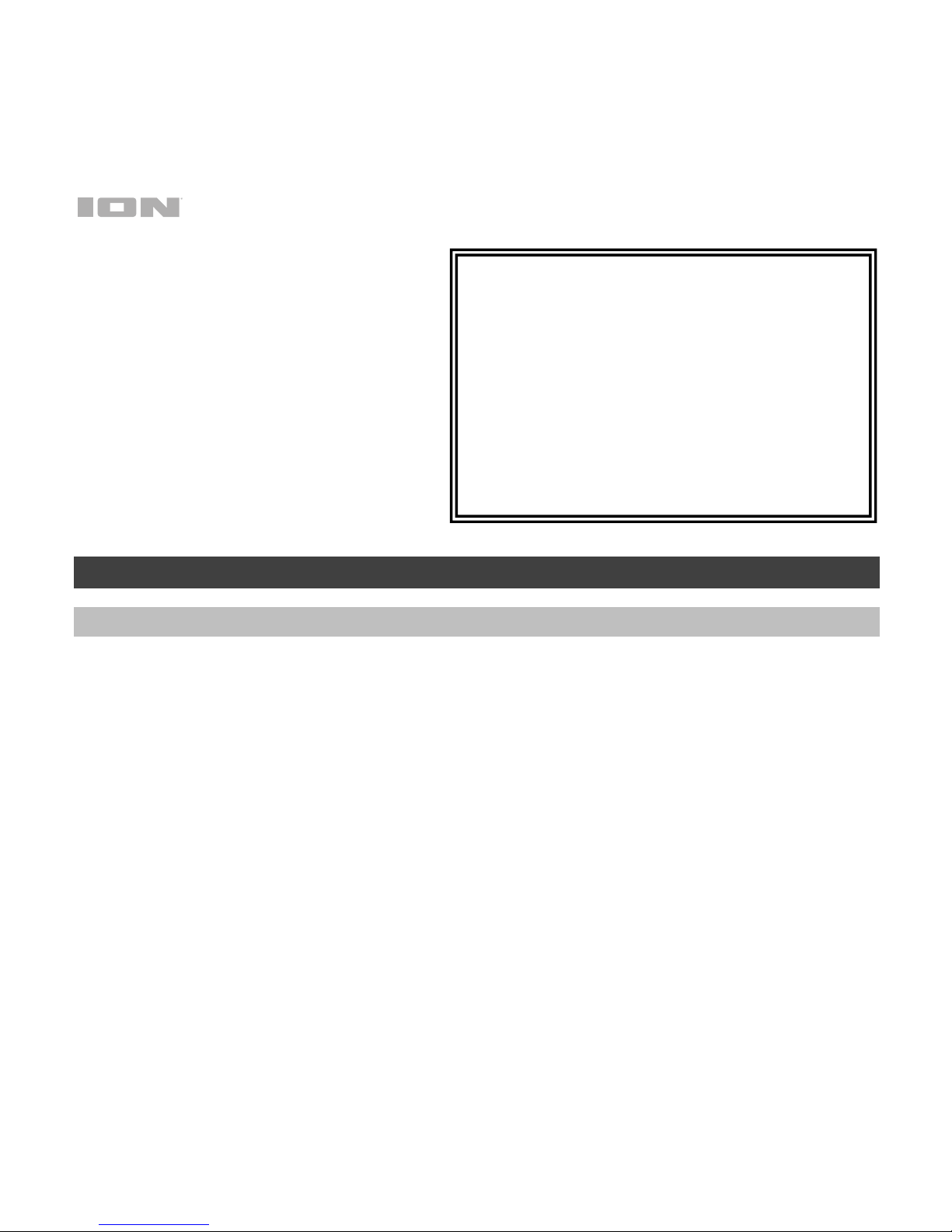
8. Auxiliary Output: Connect this output
to a home stereo or an ION Block
Rocker to increase the overall volume.
9. Auxiliary Input: This stereo 1/8” input
can be used to connect a
smartphone, MP3 player, or other
audio sources.
Operation
Connecting with a Bluetooth Device
1. Turn on Insta Party using the power button.
2. Navigate to your Bluetooth device’s setup screen, find “Insta Party” and connect.
Note: If your Bluetooth device prompts for a pairing code, enter ‘0000’.
Note: The next time you approach Insta Party with your Bluetooth device, it will automatically
re-connect.
3. If your Bluetooth device is not able to connect to Insta Party, press and hold the Bluetooth
button on Insta Party for 3 seconds to break previous Bluetooth connections and reset the
Bluetooth module.
Note: Maximum range will be achieved when using devices with Bluetooth 4.0.
4. Start music playback from your Bluetooth device.
5. To connect to another Bluetooth device, press and hold the Bluetooth button for 3 seconds.
Repeat Step 2.
6. To disconnect a connected Bluetooth device, press and hold the Bluetooth button for 3
seconds.
Note: If you experience trouble connecting or playing music, update your device's OS.
Bluetooth Button LED Activity:
Off: No Bluetooth connection. Not charging.
Solid red: No Bluetooth connection. Charging.
Solid blue: Bluetooth connected. Not charging.
Solid purple: Bluetooth connected. Charging.
Blinking red: Battery is low. No Bluetooth
connection.
Blinking blue/purple: Battery is low. Bluetooth
connected.
Page 7

7
Troubleshooting
If the sound is distorted: Try lowering the volume control of your sound source or musical
instrument. Also, try to reduce the overall volume of Insta Party.
If there is too much bass: Try adjusting the tone or EQ control on your sound source to lower
the bass level. This will allow you to play the music louder before clipping (distortion) occurs.
Page 8

8
Guía de inicio rápido (Español)
Introducción
Contenido de la caja
Insta Party
Cable micro-USB
Guía de inicio rápido
Manual sobre la seguridad y garantía
Soporte
Para obtener la información más reciente acerca de este producto
(documentación, especificaciones técnicas, requisitos de sistema, información de
compatibilidad, etc.) y registrarlo, visite ionaudio.com.
Para obtener soporte adicional del producto, visite ionaudio.com/support.
ADVERTENCIA: NO salpique ni sumerja el producto en agua u otros líquidos. No lo
use bajo la lluvia. Úselo sólo en lugares secos.
ADVERTENCIA: NO mire directamente a la luz del domo. No se siente, se pare o
aplique presión sobre la luz del domo.
Page 9
9
DC IN
AUXINAUX
OUT
Instalación
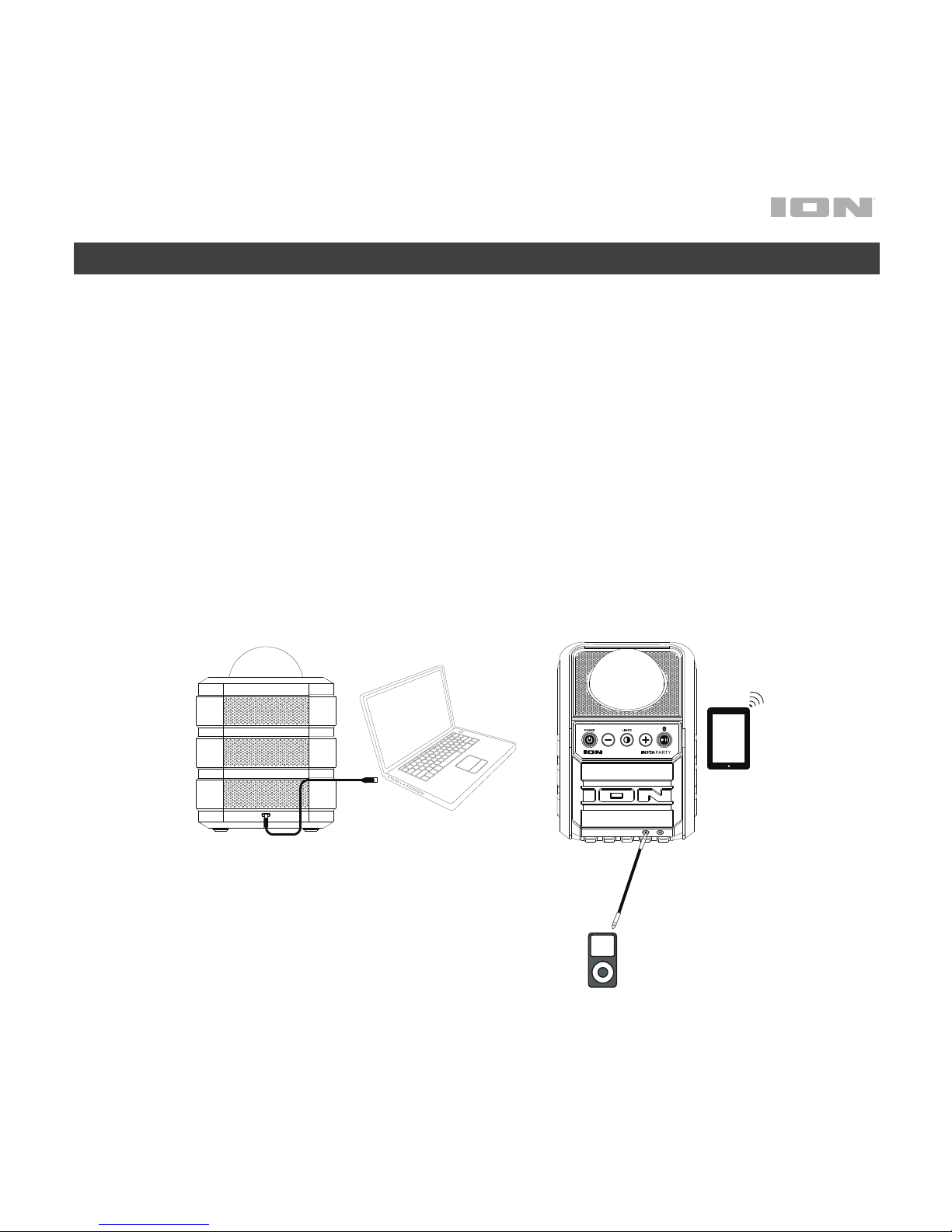
Los elementos que no se enumeran en Introducción > Contenido de la caja se
venden por separado.
1. Para lograr un rendimiento óptimo, coloque el Insta Party en el centro de la
sala donde no esté obstaculizado por paredes, muebles, etc.
2. Baje el control de volumen maestro del Insta Party.
3. Encienda el Insta Party.
4. Conecte su reproductor de música con un cable de audio o Bluetooth (para
obtener más detalles de esto, consulte Conexión con un dispositivo
Bluetooth).
5. Pulse el botón luz del Insta Party.
6. Ajuste el interruptor de modo de luz del Insta Party según sea necesario.
7. Apague el Insta Party cuando no lo use.
Tablet
Media Player
Computadora
Page 10
10
Características
1. Domo*: El domo luz reaccionar a la música que
se reproduce.
2. Encendido/apagado: Pulse este botón durante
un segundo para encender o apagar el Party
Rocker Express.
3. Controles de subir/bajar volume: Pulse estos
botones para reducir o aumentar el nivel de
volumen de las fuentes de la entrada auxiliar y
Bluetooth. Ajuste el volumen utilizando los
controles de volumen de su dispositivo y los
botones de volumen del Insta Party.
4. Botón de Reproducir/Pausa/Bluetooth: Pulse
para reproducir o hacer pausa en una pista de
un dispositivo Bluetooth conectado.
Funciones de Bluetooth
• Cuando se enciende esta unidad por
primera vez, entrará automáticamente al
modo de apareamiento.
• El LED Paired (apareado) se enciende
cuando se aparea un dispositivo al Party
Rocker Express. Este LED no se enciende
cuando el Party Rocker Express se
enciende por primera vez (a menos que
hubiera sido apareado previamente con un
dispositivo).
• Mantenga pulsado el botón de
Bluetooth durante 3 segundos
para desconectar un dispositivo
Bluetooth apareado.
* ADVERTENCIA: No mire directamente a
la luz del domo. No se siente, se pare o
aplique presión sobre la luz del domo.
AUXINAUX
OUT
1
2
3
4
3
5
6
89
1
2
3
4
3
5
6
7
Page 11
11
5. Luces: Pulse y suelte este botón para
encender o apagar el domo y las luces
de fiesta de la rejilla.
6. Rejilla del altavoz: La reproducción de
audio se escucha por aquí. Además, las
luces de fiesta encendidas se ven aquí.
7. Puerto de carga micro USB: Conecte el
cable micro USB incluido para conectar
el Insta Party a un adaptador de corriente
USB conectado a su vez a una toma de
corriente o a su ordenador.
8. Salida auxiliar: Conecte esta salida a un
equipo de audio hogareño o a un ION
Block Rocker para aumentar el volumen
general.
9. Entrada auxiliar: Esta entrada de 3,5
mm (1/8 pulg.) estéreo se puede usar
para conectar un teléfono inteligente
(smartphone), reproductor MP3 u otras
fuentes de audio.
Actividad de luz del botón de
apareamiento Bluetooth:
Apagada: Sin conexión Bluetooth.
No se esté cargando.
Roja permanente: Sin conexión
Bluetooth. Se esté cargando.
Azul permanente: Conexión
Bluetooth. No se esté cargando.
Violeta permanente: Conectado a
un dispositivo Bluetooth. Se esté
cargando.
Roja
intermitente: Nivel de la batería
baje. Conexión Bluetooth.
Azul/violeta intermitente: Nivel de la
batería baje. Conexión Bluetooth.
Page 12

12
Funcionamiento
Conexión con un dispositivo Bluetooth
1. Encienda el Insta Party usando el interruptor de botón.
2. Navegue a la pantalla de configuración de su dispositivo Bluetooth, busque “Insta Party”
y conecte.
Nota: Si su dispositivo Bluetooth solicita un código de apareamiento, ingrese ‘0000’.
Nota: La próxima vez que se acerque al Insta Party con su dispositivo Bluetooth, se
volverá a conectar automáticamente.
3. Si su dispositivo Bluetooth no es capaz de conectarse al Insta Party, mantenga pulsado
el botón Bluetooth en el Insta Party durante 3 segundos para cortar las conexiones
Bluetooth anteriores y reiniciar el módulo Bluetooth.
Nota: El alcance máximo se logra cuando se utilizan dispositivos con Bluetooth 4.0.
4. Comience la música reproducción desde su dispositivo Bluetooth.
5. Para conectar otro dispositivo Bluetooth, mantenga pulsado el botón Bluetooth durante
3 segundos. Repita el paso 2.
6. Para desconectar un dispositivo Bluetooth conectado, mantenga pulsado el botón
Bluetooth durante 3 segundos.
Nota: Si tiene problemas para conectarse o reproducir música, actualice el programa
operativo de su dispositivo.
Solución de Problemas
Si el sonido está distorsionado: Pruebe bajando el control de volumen de su fuente de
sonido o instrumento musical. Pruebe también reduciendo el volumen general del Insta Party.
Si hay demasiados graves: Intente ajustando el control de tono o ecualización de su fuente
de sonido para reducir el nivel de graves. De esta forma podrá reproducir la música con más
volumen antes de que se produzca el recorte (distorsión).
Page 13

13
Guide d’utilisation rapide (Français)
Présentation
Contenu de la boîte
Insta Party
Câble micro-USB
Guide d’utilisation rapide
Consignes de sécurité et informations concernant la garantie
Assistance
Pour les toutes dernières informations concernant la documentation, les
spécifications techniques, la configuration requise, la compatibilité et
l’enregistrement du produit, veuillez visiter ionaudio.com.
Pour de l’assistance supplémentaire, veuillez visiter ionaudio.com/support.
MISE EN GARDE : NE PAS exposer l’appareil aux éclaboussures ou l’immerger
dans de l’eau ou autres liquides. Ne pas utiliser sous la pluie. Utiliser seulement
dans des endroits secs.
MISE EN GARDE : NE PAS regarder directement dans la lumière du dôme. Ne pas
s'asseoir, se tenir debout ou exercer une pression sur le dôme.
Page 14
14
DC IN
AUXINAUX
OUT
Démarrage
Les éléments qui ne figurent pas dans le Présentation > Contenu de la boîte sont
vendus séparément.
1. Pour une performance optimale, placez le Insta Party dans le centre de la
pièce afin qu'il n’y ait aucune obstruction créée par des murs, des meubles,
etc.
2. Mettez le bouton Master Volume du Insta Party au plus bas.
3. Mettez le Insta Party sous tension.
4. Branchez votre lecteur de musique avec un câble audio ou par Bluetooth
(consultez la section Jumelage d’un appareil Bluetooth pour de plus
amples détails).
5. Réglez le volume de votre lecteur de musique et du Insta Party au niveau
souhaité.
6. Appuyez sur la touche d’éclairage de la Insta Party.
7. Mettez le Insta Party hors tension lorsque vous ne l’utilisez pas.
v
Tablet
Media Player
Ordinateur
Page 15
15
Caractéristiques
1. Dôme* : Le dôme lumière réagir à la musique
selon.
2. Interrupteur d’alimentation : Enfoncer cette
touche pendant une seconde permet de mettre
la Insta Party sous et hors tension.
3. Touches Volume: Ces touches permettent de
diminuer ou d’augmenter le niveau du volume
pour l'entrée auxiliaire et les sources Bluetooth.
Veuillez ajuster le volume à l'aide des
commandes de volume de votre appareil et du
Insta Party.
4. Touche Bluetooth: Appuyez sur cette touche
pour lancer la lecture ou interrompre une piste
sur un périphérique Bluetooth connecté.
Fonctions Bluetooth
• Lors de la mise sous tension initiale,
l’enceinte démarre automatiquement en
mode jumelage.
• La DEL de jumelage sera allumée lorsqu'un
périphérique est jumelé à la Insta Party.
Cette DEL ne s’allume pas lorsque la Insta
Party est mise sous tension, à moins qu'elle
n'ait été jumelée avec un périphérique
auparavant.
• Pour déjumeler un périphérique
Bluetooth, maintenez la touche
Bluetooth enfoncée pendant 3
secondes.
* MISE EN GARDE : Ne pas regarder
directement dans la lumière du dôme. Ne pas
s'asseoir, se tenir debout ou exercer une
pression sur le dôme.
AUXINAUX
OUT
1
2
3
4
3
5
6
89
1
2
3
4
3
5
6
7
Page 16

16
5. Lumières : Appuyer et relâcher cette
touche permet d'activer et de
désactiver les lumières du dôme et
de la grille.
6. Grille d’enceinte : Le rendu de la
lecture audio est diffusé à travers
cette grille. Les lumières sont
également diffusées à travers cette
grille.
7. Entrées microphone : Ces entrées
6,35 mm permettent de brancher des
microphones.
8. Port de rechargement mini-USB :
Ce port permet d’utiliser le câble
mini-USB inclus afin de brancher le
Insta Party à un adaptateur
d’alimentation USB branché à une
prise secteur ou à un ordinateur.
9. Entrée auxiliaire : Cette entrée
stéréo 3,5 mm permet de brancher
un smartphone, un lecteur MP3 ou
une autre source audio.
Légende des indicateurs de la touche
de jumelage Bluetooth :
Éteinte : Pas de connexion Bluetooth.
Pas de rechargement de la batterie.
Rouge : Pas de connexion Bluetooth.
Rechargement de la batterie.
Bleue : Connexion Bluetooth. Pas de
rechargement de la batterie.
Violette : Connexion Bluetooth.
Rechargement de la batterie.
Clignotante rouge : Le niveau de la
batterie est faible. Pas de connexion
Bluetooth.
Clignotante bleue/violette : Le niveau
de la batterie est faible. Connexion
Bluetooth.
Page 17

17
Fonctionnement
Jumelage d’un appareil Bluetooth
1. Allumez le Insta Party avec l'touche d'alimentation.
2. Accédez à l'écran de configuration de votre appareil Bluetooth, recherchez «Insta Party»
et lancez le jumelage.
Remarque : Si votre périphérique Bluetooth vous demande d’entrer un code de
jumelage, entrez «0000».
Remarque : La prochaine fois que vous approcherez votre appareil Bluetooth du Insta
Party, il devrait se jumeler automatiquement.
3. Si votre périphérique Bluetooth ne parvient pas à se jumeler à la Insta Party, maintenez
la touche de connexion Bluetooth de l’enceinte enfoncée pendant 3 secondes afin de
supprimer la connexion à d'autres périphériques Bluetooth et réinitialiser le module
Bluetooth.
Remarque : La plage maximale peut être atteinte avec l’utilisation d’appareils dotés de
Bluetooth 4.0.
4. Lancez la musique lecture de votre périphérique Bluetooth.
5. Pour jumeler un autre périphérique Bluetooth, maintenez la touche Bluetooth enfoncée
pendant 3 secondes. Répétez l'étape 2.
6. Pour déjumeler un périphérique Bluetooth, maintenez la touche Bluetooth enfoncée
pendant 3 secondes.
Remarque : Si vous éprouvez de la difficulté à jumeler votre appareil ou à faire jouer de
la musique, faites une mise à jour du système d'exploitation de votre appareil.
Guide de Dépannage
Lorsqu’il y a de la distorsion : Essayez de diminuer le volume sur l’appareil d’entrée audio ou
l’instrument de musique. Essayez également de réduire le volume général du Insta Party.
Lorsqu’il y a trop de basses fréquences : Essayez de régler le niveau de tonalité et
d’égalisation sur l’appareil de source d’entrée audio afin de diminuer le niveau des basses
fréquences. Cela vous permettra d'augmenter le volume de la musique avant que l'écrêtage se
produise.
Page 18

18
Guida rapida (Italiano)
Introduzione
Contenuti della confezione
Insta Party
Cavo micro-USB
Guida rapida
Istruzioni di sicurezza e garanzia
Assistenza
Per le ultime informazioni in merito a questo prodotto (documentazione, specifiche
tecniche, requisiti di sistema, informazioni sulla compatibilità, ecc.) e per effettuarne
la registrazione, recarsi alla pagina ionaudio.com.
Per ulteriore assistenza sul prodotto, recarsi alla pagina ionaudio.com/support.
AVVERTENZA: NON schizzare né immergere in acqua o in altri liquidi. Non va
utilizzato sotto la pioggia. Utilizzare il prodotto unicamente in luoghi asciutti.
AVVERTENZA: NON guardare direttamente la lampada a cupola. Non sedersi, stare
in piedi, né applicare pressione sulla lampada a cupola.
Page 19
19
DC IN
AUXINAUX
OUT
Configurazione
Elementi non elencati sotto Introduzione > Contenuti della confezione sono
venduti separatamente.
1. Per ottenere prestazioni ottimali, collocare l'Insta Party al centro della stanza
in modo che non sia ostacolato da pareti, mobili, ecc.
2. Abbassare il Volume Master sul Insta Party.
3. Accendere il Insta Party.
4. Collegare il lettore musicale con un cavo audio o Bluetooth (per maggiori
informazioni in merito, si veda il paragrafo Collegamento di un dispositivo
Bluetooth).
5. Regolare il volume del lettore musicale e del Insta Party come desiderato.
6. Premere il tasto Light (lluce) sul Insta Party.
7. Spegnere il Insta Party quando non è in uso.
Media Player
Tablet
Computer
Page 20
20
Caratteristiche
1. Dome (cupola)*: la cupola luce può reagire alla
musica che viene riprodotta.
2. Accensione/spegnimento (ON/OFF): premere
questo tasto per un secondo per accendere o
spegnere il Insta Party.
3. Comandi Volume giù/su: Premere questi tasti
per ridurre o aumentare il livello del volume per
l'ingresso aux e le fonti Bluetooth. Regolare il
volume servendosi dei comandi del dispositivo e
i tasti volume del Insta Party.
4. Tasto Lancer/interrompre la
lecture/Bluetooth: premere questo tasto per
riprodurre o mettere in pausa una traccia da un
dispositivo Bluetooth collegato.
Funzioni Bluetooth
• Quando l’apparecchio viene acceso, entra
automaticamente in modalità di
collegamento.
• Il LED di collegamento Paired sarà acceso
quando un dispositivo è collegato al Insta
Party. Il LED non sarà acceso quando il
Insta Party viene acceso (a meno che non
fosse accoppiato in precedenza con un
dispositivo).
• Tenere premuto il tasto Bluetooth
per 3 secondi per scollegare
l’apparecchio da un dispositivo
Bluetooth collegato.
* AVVERTENZA: non guardare direttamente la
lampada a cupola. Non sedersi, stare in piedi, né
applicare pressione sulla lampada a cupola.
AUXINAUX
OUT
1
2
3
4
3
5
6
89
1
2
3
4
3
5
6
7
Page 21

21
5. Luci: premere e rilasciare questo tasto
per accendere e spegnere le luci da
festa della cupola e della griglia.
6. Griglia dell'altoparlante: la
riproduzione dell’audio avviene tramite
questa griglia. A questo livello si vedono
inoltre le luci da festa.
7. Porta di ricarica mini-USB: Collegare il
cavo mini-USB in dotazione per
collegare il Insta Party a un adattatore
di alimentazione USB collegato ad una
presa elettrica o al computer.
8. Uscita ausiliaria: collegare questa
uscita a un home stereo o a un ION
Block Rocker per aumentare il volume
complessivo.
9. Ingresso ausiliario (aux): questo
ingresso stereo da 3,5 mm (1/8”) può
essere utilizzato per collegare uno
smartphone, un lettore MP3 o altre fonti audio.
Attività della luce del pulsante di
accoppiamento Bluetooth:
Spento: Nessuna connessione Bluetooth.
Non caricando.
Fissata rossa: Nessuna connessione
Bluetooth. La batteria è in carica.
Fissata blu: Connessione Bluetooth. Non
caricando.
Fissata violetta: Connessione Bluetooth.
La batteria è in carica.
Lampeggiante rossa: Livello della
batteria basso. Nessuna connessione
Bluetooth.
Lampeggiante blu/violetta: Livello della
batteria basso. Connessione Bluetooth.
Page 22

22
Operazione
Collegamento a un dispositivo Bluetooth
1. Accendere il Party Rocker Express servendosi dell'apposito interruttore.
2. Navigare nella schermata di configurazione del dispositivo Bluetooth, trovare “Insta
Party” e collegarlo.
Nota bene: se il dispositivo Bluetooth richiede un codice, inserire ‘0000’.
Nota bene: la prossima volta che ci si avvicina al Insta Party con il dispositivo Bluetooth,
questo si accoppierà automaticamente.
3. Se il dispositivo Bluetooth non è in grado di collegarsi al Insta Party, tenere premuto il
tasto Bluetooth a livello del Insta Party per 3 secondi per interrompere precedenti
collegamenti Bluetooth e azzerare il modulo Bluetooth.
Nota bene: la portata massima sarà raggiunta utilizzando dispositivi dotati di Bluetooth
4.0.
4. Avviare la musica riproduzione del dispositivo Bluetooth.
5. Per collegare un altro dispositivo Bluetooth, tenere premuto il tasto Bluetooth per 3
secondi. Ripetere la fase 2.
6. Per interrompere il collegamento da un dispositivo Bluetooth, tenere premuto il tasto
Bluetooth per 3.
Nota bene: in caso di problemi nell'accoppiare gli apparecchi o nel riprodurre la musica,
aggiornare il sistema operativo del dispositivo.
Risoluzione di Problemi
Il suono è distorto: provare ad abbassare il volume della propria fonte audio o dello
strumento musicale. Inoltre, provare a ridurre il volume complessivo del Insta Party.
Eccessivi bassi: provare a regolare la tonalità o il comando EQ a livello della fonte audio per
abbasare il livello dei bassi. Ciò permetterà di suonare la musica più forte prima che salti (che
si verifichi distorsione).
Page 23

23
Schnellstart-Anleitung (Deutsch)
Einführung
Lieferumfang
Insta Party
Mikro-USB-Kabel
Schnellstart-Anleitung
Sicherheitshinweise und Garantieinformationen
Kundendienst
Für die neuesten Informationen zu diesem Produkt (Dokumentation, technische
Daten, Systemanforderungen, Informationen zur Kompatibilität etc.) und zur
Produktregistrierung besuchen Sie bitte: ionaudio.com.
Für zusätzlichen Produkt-Support besuchen Sie ionaudio.com/support.
ACHTUNG: VERMEIDEN Sie es, das Gerät mit Wasser oder anderen Flüssigkeiten
zu bespritzen und tauchen Sie das Gerät niemals in eine Flüssigkeit. Verwenden Sie
das Gerät nicht bei Regen. Verwenden Sie es nur in trockenen Räumen.
WARNUNG: Blicken Sie NICHT direkt in das Licht der Kuppel. Vermeiden Sie es,
auf der Lichtkuppel zu stehen, zu sitzen oder Druck auf die Kuppel auszuüben.
Page 24
24
DC IN
AUXINAUX
OUT
Setup
Teile, die nicht unter Einführung > Lieferumfang angegeben sind, sind separat
erhältlich.
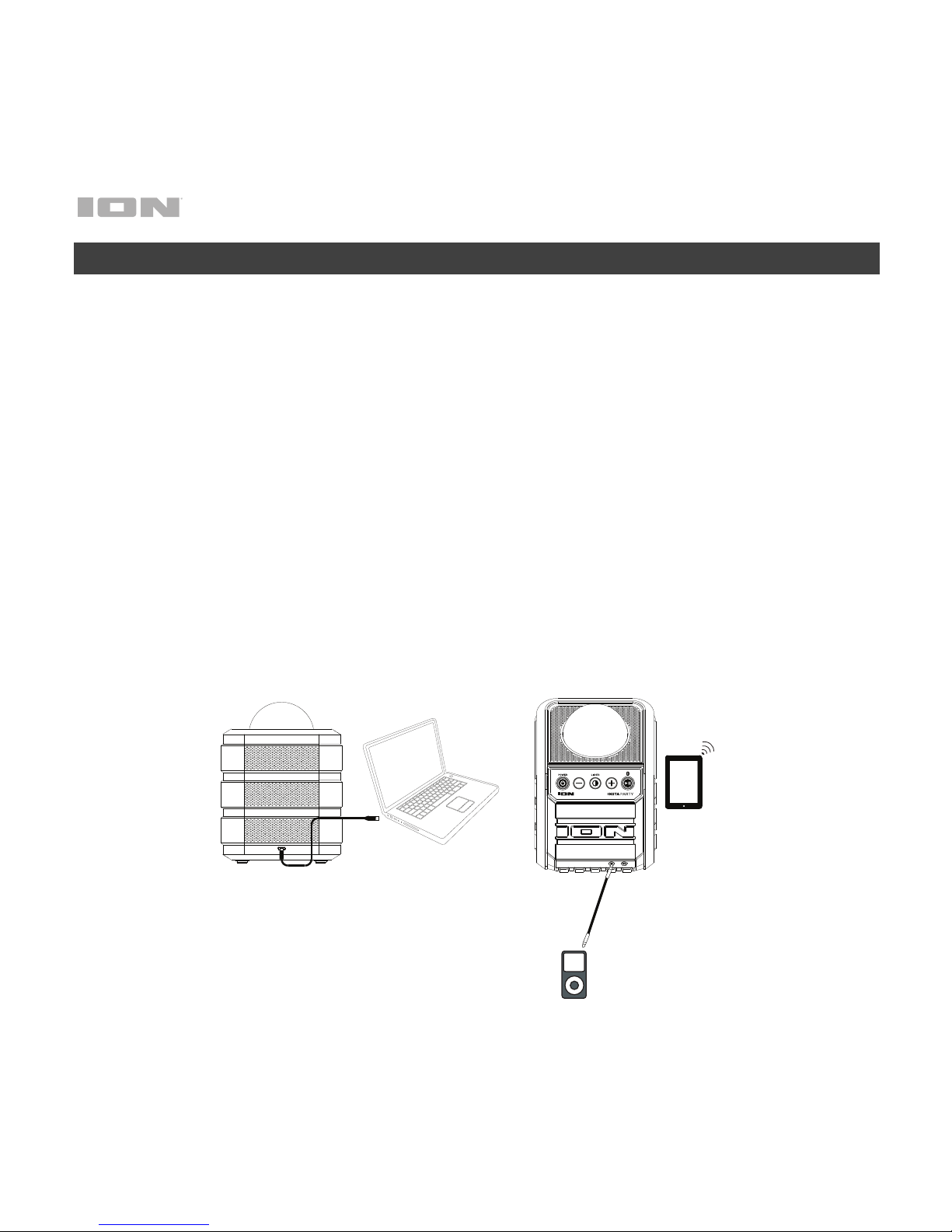
1. Um eine optimale Leistung zu erzielen, platzieren Sie Insta Party am besten in
der Raummitte, damit das Gerät nicht durch Wände, Möbel usw. behindert
wird.
2. Regeln Sie die Gesamtlautstärke am Insta Party herunter.
3. Schalten Sie den Insta Party ein.
4. Verbinden Sie Ihren Musik-Player mit einem Audiokabel oder via Bluetooth
(siehe Verbindung mit einem Bluetooth-Gerät für weitere Details zu diesem
Thema).
5. Stellen Sie die Lautstärke auf Ihrem Musik-Player und am Insta Party nach
Wunsch ein.
6. Drücken Sie die Licht am Insta Party.
7. Schalten Sie den Insta Party aus, wenn das Gerät nicht in Gebrauch ist.
Tablet
Media Player
Computer
Page 25
25
Funktionen
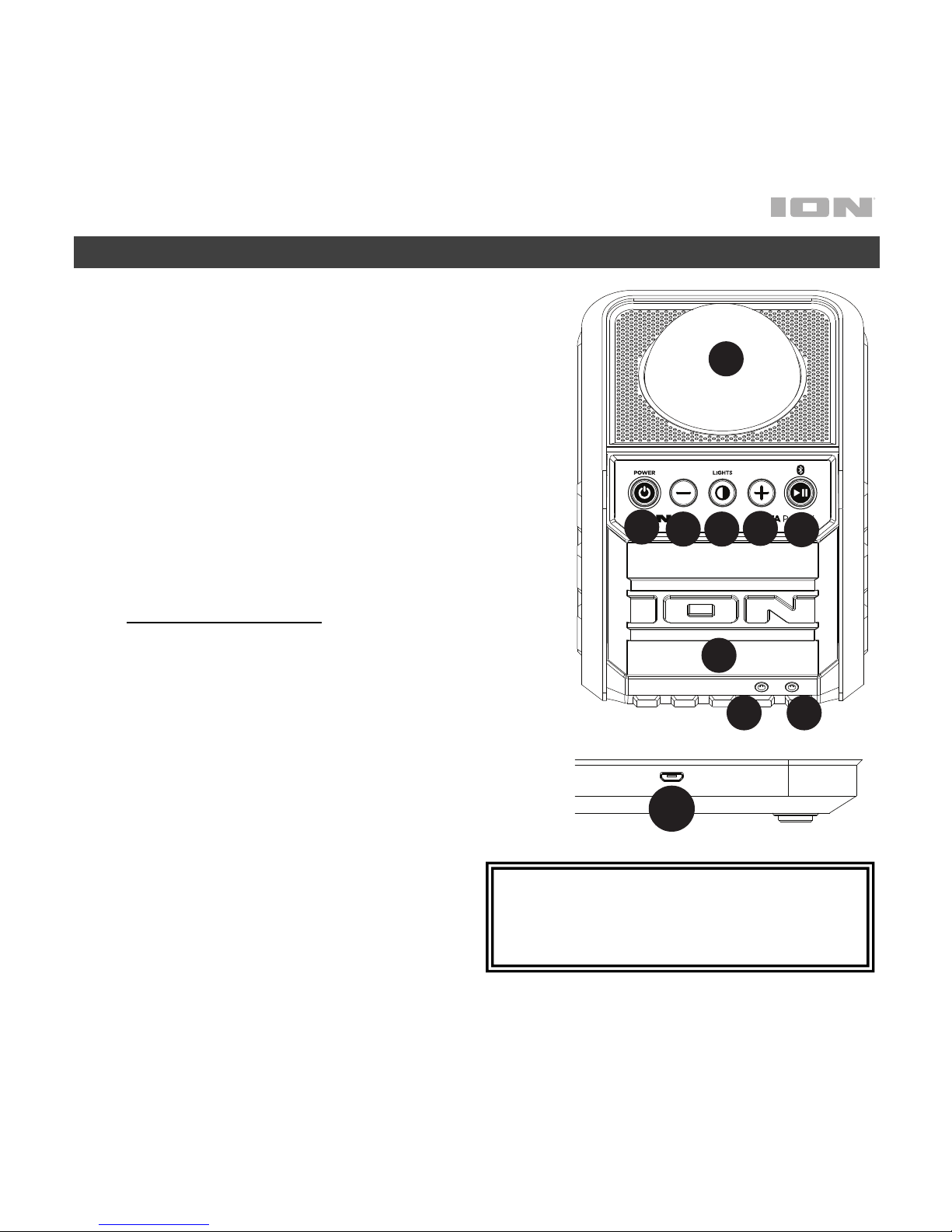
1. Kuppel*: Die Kuppel Licht kann auf die gespielte
Musik reagieren.
2. Einschalten/Ausschalten: Halten Sie diese
Taste eine Sekunde lang gedrückt, um Insta
Party ein- oder auszuschalten.
3. Steuerelemente für Lautstärke: Drücken Sie
diese Tasten zum Erhöhen bzw. Verringern der
Lautstärke des Aux-Eingangs und der BluetoothQuellen. Bitte passen Sie die Lautstärke mit dem
Lautstärkeregler des Geräts und den
Lautstärketasten der Insta Party an.
4. Play/Pause/Bluetooth: Drücken Sie diese Taste,
um einen Track vom angeschlossenen BluetoothGerät abzuspielen oder zu pausieren.
Bluetooth-Funktionen
• Wenn das Gerät zum ersten Mal
eingeschaltet wird, wechselt es
automatisch in den Koppel-Modus.
• Die Koppel-LED leuchtet, wenn ein Gerät
mit dem Insta Party gekoppelt ist. Diese
LED leuchtet nicht, wenn der Insta Party
zum ersten Mal eingeschaltet wird (es sei
denn, er wurde zuvor mit einem Gerät
gekoppelt).
• Um ein gekoppeltes Bluetooth-
Gerät zu trennen, halten Sie die
Bluetooth-Taste 3 Sekunden lang
gedrückt.
* WARNUNG: Blicken Sie nicht direkt in das Licht
der Kuppel. Vermeiden Sie es, auf der
Lichtkuppel zu stehen, zu sitzen oder Druck auf
die Kuppel auszuüben.
AUXINAUX
OUT
1
2
3
4
3
5
6
89
1
2
3
4
3
5
6
7
Page 26

26
5. Lichter: Halten Sie diese Taste kurz
gedrückt, um die Party-Lichter der Kuppel
und des Gitters ein-/auszuschalten.
6. Lautsprechergrill: Das Audiosignal wird
diesen Grill wiedergegeben. Hier sind auch
die Partylichter zu sehen.
7. Mini-USB-Ladeanschluss: Stecken Sie hier
das mitgelieferte Micro-USB-Kabel ein, um
Insta Party mit Ihrem Computer zu verbinden
oder mit einema USB-Netzteil zu verbinden,
das in eine Steckdose gesteckt wird.
8. Aux-Ausgang: Verbinden Sie diesen
Ausgang mit einer Heim-Stereoanlage oder
einem ION Block Rocker, um die
Gesamtlautstärke zu erhöhen.
9. Aux-Eingang: Dieser 3,5 mm-Eingang kann
dazu verwendet werden, ein Smartphone,
einen MP3-Player oder eine andere
Audioquelle anzuschließen.
Bluetooth-Taste Licht-Aktivität:
Aus: Keine Bluetooth Verbindung.
Nicht geladen.
Rote: Keine Bluetooth Verbindung.
Geladen.
Blau: Bluetooth Verbindung. Nicht
geladen.
Violett: Bluetooth Verbindung.
Geladen.
Blinkende rote: Der Akku hat einen
niedrigen Ladestand. Keine
Bluetooth Verbindung.
Blinkende blau/violett: Der Akku
hat einen niedrigen Ladestand.
Bluetooth Verbindung.
Page 27

27
Betrieb
Verbindung mit einem Bluetooth-Gerät
1. Schalten Sie den Insta Party mit dem Netztaste ein.
2. Navigieren Sie zum Setup-Bildschirm Ihres Bluetooth-Geräts, suchen Sie "Insta Party"
und verbinden Sie die Geräte.
Hinweis: Wenn Ihr Bluetooth-Gerät die Eingabe eines Koppel-Codes anfordert, geben
Sie '0000' ein.
Hinweis: Wenn Sie das nächste Mal ein Bluetooth-Gerät in die Nähe des Insta Party
bringen, wird es automatisch wieder eine Verbindung herstellen.
3. Wenn Ihr Bluetooth-Gerät nicht in der Lage ist, eine Verbindung zum Insta Party
herzustellen, halten Sie die Bluetooth-Verbindungstaste am Insta Party 3 Sekunden lang
gedrückt, um vorherige Bluetooth-Verbindungen zu trennen und das Bluetooth-Modul
zurückzusetzen.
Hinweis: Die maximale Reichweite wird erzielt, wenn Sie Geräte mit Bluetooth 4.0
verwenden.
4. Starten Sie die Musik Wiedergabe auf Ihrem Bluetooth-Gerät.
5. Um es mit einem anderen Bluetooth-Gerät zu verbinden, halten Sie die Bluetooth-Taste
3 Sekunden lang gedrückt. Wiederholen Sie Schritt 2.
6. Um ein gekoppeltes Bluetooth-Gerät zu trennen, halten Sie die Bluetooth-Taste 3
Sekunden lang gedrückt.
Hinweis: Wenn Sie Probleme bei der Musikwiedergabe oder beim Verbinden Ihres
Gerätes haben, aktualisieren Sie das OS Ihres Gerätes.
Page 28
28
Fehlerbehebung
Der Ton klingt verzerrt: Drehen Sie den Lautstärkeregler an Ihrer Tonquelle oder dem
Musikinstrument zurück. Versuchen Sie auch, die Gesamtlautstärke des Insta Party zu
reduzieren.
Zu viel Bass: Versuchen Sie, den Ton- oder EQ-Regler Ihrer Tonquelle anzupassen, um den
Bass zu verringern. Dies ermöglicht Ihnen, die Musik lauter abzuspielen, bevor der Klang
verzerrt.
Allgemeinhinweis zur Konformitätserklärung: Hiermit erklären wir, daß sich das Gerät Insta
Party in Übereinstimmung mit den grundlegenden Anforderungen der europäischen Richtlinie
1999/5/EG befindet. Die vollständige EG Konformitätserklärung kann unter folgender Adresse
angefordert werden:
inMusic GmbH
Harkortstrasse 12-32
40880 Ratingen
Germany
Page 29

29
Snelstartgids (Nederlands)
Introductie
Inhoud van de doos
Insta Party
Micro-USB kabel
Snelstartgids
Veiligheids-en garantie handleiding
Ondersteuning
Voor de laatste informatie over dit product (documentatie, technische specificaties,
systeem vereisten, informatie over compatibiliteit, enz.) en productregistratie,
bezoek ionaudio.com.
Voor aanvullende productondersteuning naar ionaudio.com/support.
WAARSCHUWING: NIET BESPATTEN of onderdompelen in water of andere
vloeistoffen. Niet gebruiken in de regen. Enkel op droge plekken gebruiken.
WAARSCHUWING: KIJK NIET RECHTSTREEKS in het licht van de bal. Ga niet
zitten, noch staan en oefen geen druk uit op de lichtbal.
Page 30
30
DC IN
AUXINAUX
OUT
Opstelling
Artikelen die niet zijn opgesomd in Introductie > Inhoud van de doos worden
afzonderlijk verkocht.
1. Plaats de Insta Party voor optimale prestaties in het midden van de kamer,
zodat hij niet wordt gehinderd door muren, meubels, enz.
2. Zet de hoofdvolumeknop van de Insta Party op de laagste stand.
3. Zet de Insta Party aan.
4. Verbind uw muziekspeler met een audiokabel of via Bluetooth (zie voor meer
details Verbinding maken met een Bluetooth-apparaat).
5. Pas het volume op uw muziekspeler en op de Insta Party aan naar behoefte.
6. Druk op de Insta Party de toets Verlichtings in.
7. Zet de Insta Party uit wanneer hij niet wordt gebruikt.
Tablet
Media Player
Computer
Page 31
31
Kenmerken
1. Bal*: De licht kan reageren op de muziek die
speelt.
2. Voeding Aan/Uit: Druk deze knop een seconde
lang in om de Insta Party aan of uit te zetten.
3. Knoppen Volume verlagen/verhogen: Druk op
deze knoppen om het volume van de aux-ingang
of de Bluetooth-bron te verlagen of te verhogen.
U kunt het volume bijregelen via de
volumeregeling van uw apparaat en via de
volumeknoppen van de Insta Party.
4. Wiedergabe/Pause/Bluetooth: Indrukken om
een nummer vanaf een verbonden Bluetoothapparaat af te spelen of te pauzeren.
Bluetooth-functies
• Wanneer het apparaat voor het eerst wordt
aangezet, wordt automatisch de
Koppelingsmodus ingeschakeld.
• Wanneer een apparaat aan de Insta Party
wordt gekoppeld, gaat de Koppelingsled
branden. Deze led brandt niet wanneer de
Insta Party voor het eerst wordt
ingeschakeld (tenzij het apparaat voordien
aan een ander apparaat was gekoppeld).
• Houd de Bluetooth-toets 3 seconden lang
ingedrukt om een gekoppeld Bluetoothapparaat te ontkoppelen.
* WAARSCHUWING: Kijk niet rechtstreeks in het
licht van de koepel. Niet zitten, staan noch druk
uitoefenen op de lichtkoepel.
AUXINAUX
OUT
1
2
3
4
3
5
6
89
1
2
3
4
3
5
6
7
Page 32

32
5. Verlichting: Deze knop indrukken en
loslaten om de verlichting op de koepel
en het luidsprekerrooster aan en uit te
zetten.
6. Luidsprekerrooster: Hier weerklinkt de
afgespeelde audio. Ook de
feestverlichting is hier zichtbaar.
7. Micro-USB ingang voor laden: Gebruik
de meegeleverde micro-USB-kabel om
de Insta Party aan te sluiten op een USBlichtnetadapter of op uw computer.
8. Aux-uitgang: Sluit deze uitgang aan op
een stereo-installatie of een ION Block
Rocker om het totale volume te verhogen.
9. Aux-ingang: Deze stereo-ingang van 3,5
mm kan worden gebruikt om een
smartphone, mp3-speler of andere
audiobronnen aan te sluiten.
Bluetooth Button licht-activiteit:
Off: Geen Bluetooth verbinding. Niet
opgeladen.
Vaste rood: Geen Bluetooth
verbinding. Batterij is aan het laden.
Vaste blauw: Bluetooth verbinding.
Niet opgeladen.
Vaste violet: Bluetooth verbinding.
Batterij is aan het laden.
Knipperende rood: Accuniveau laag
houdt. Geen Bluetooth verbinding.
Knipperende blauw/violet:
Accuniveau laag houdt. Bluetooth
verbinding.
Page 33

33
Operatie
Een Bluetooth-apparaat koppelen
1. Zet de Insta Party aan met de aan/uitschakelaar.
2. Navigeer naar het instelscherm van uw Bluetooth-apparaat, zoek naar "Insta Party" en
maak verbinding.
Opmerking: Als uw Bluetooth-apparaat om een koppelingscode verzoekt, voer dan
'0000' in.
Opmerking: De volgende keer dat u met uw Bluetooth-apparaat de Insta Party nadert,
zal het automatisch opnieuw verbinding maken.
3. Als uw Bluetooth-apparaat geen verbinding kan maken met de Insta Party, druk dan de
Bluetooth-toets op de Insta Party 3 seconden lang in om voorafgaande Bluetoothverbindingen te verbreken en de Bluetooth-module opnieuw in te stellen.
Opmerking: Voor het maximumbereik moeten apparaten met Bluetooth 4.0 worden
gebruikt.
4. Begin het muziek afspelen op uw Bluetooth-apparaat.
5. Houd de Bluetooth-toets 3 seconden lang ingedrukt om verbinding te maken met een
ander Bluetooth-apparaat. Herhaal stap 2.
6. Houd de Bluetooth-toets 3 seconden lang ingedrukt om de verbinding met een ander
Bluetooth-apparaat te verbreken.
Opmerking: Als u problemen ondervindt bij het koppelen van uw apparaat of het
afsppelen van muziek, update dan het besturingssysteem van uw apparaat.
s (S
Problemen Oplossen
Het geluid is vervormd: Probeer het volumeniveau aan de geluidsbron of het muziekinstrument lager
te zetten. Probeer ook om het hoofdvolume van de Insta Party te verminderen.
Er zijn teveel bassen: Probeer op de toon- of EQ-bedieningsknoppen aan uw geluidsbron het niveau
van de lage tonen te verlagen. Dit stelt u in staat de muziek luider te zetten vooraleer “afgeknipte”
(vervormde) klanken optreden.
Page 34
34
Appendix (English)
Technical Specifications
Lighting Dome
3 LEDs (no motor)
Front Lighting Panel
4x4 single color LEDs
Output Power
3W (RMS
)
Bluetooth Specifications Version: 4.2
Range: Up to 33 feet / 10 meters
USB Charging Port
Micro-USB port
Power
Rechargable Lithium-Ion battery (3.7V, 1000mAh
)
Battery Life: 4 hours at 75% volume with LED’s on
Battery Charge Time: Up to 3 hours
Dimensions
(width x depth x height)
5.3” x 5.5” x 7.0”
135 x 140 x 178 mm
Weight
1.26 lbs.
0.57 kg
Specifications are subject to change without notice. Bluetooth and wireless reception and range are affected
by walls, obstructions, and movement. For optimal performance, place the product in the center of the room
so it is unobstructed by walls, furniture, etc. Battery life may vary based on temperature, age, and usage of
product.
Trademarks & Licenses
ION Audio is a trademark of ION Audio, LLC, registered in the U.S. and other countries. The Bluetooth word
mark and logos are owned by the Bluetooth SIG, Inc. and any use of such marks by ION Audio is under
license. All other product names, company names, trademarks, or trade names are those of their respective
owners.
Page 35

35
Page 36

ionaudio.com
Manual Version 1.2
 Loading...