

Page 1
QUICK START GUIDE
3.5mm Audio/Music Streaming Bluetooth Adaptor
iO-BTA3-5
Page 2
www.my-io.com
2
www.my-io.com
3
EN
CONTENTS PAGE
FIRST PAIRING
3m
First Pairing ........................................................... 3
Get Connected .......................................................4
Charging the Adaptor ............................................. 5
The Adaptor .......................................................... 6
The Charger .......................................................... 6
Get Disconnected ................................................... 7
Specification ......................................................... 7
Frequently Asked Questions ....................................8
Warranty Information...............................................9
Notes .................................................................. 10
Product Registration ............................................. 12
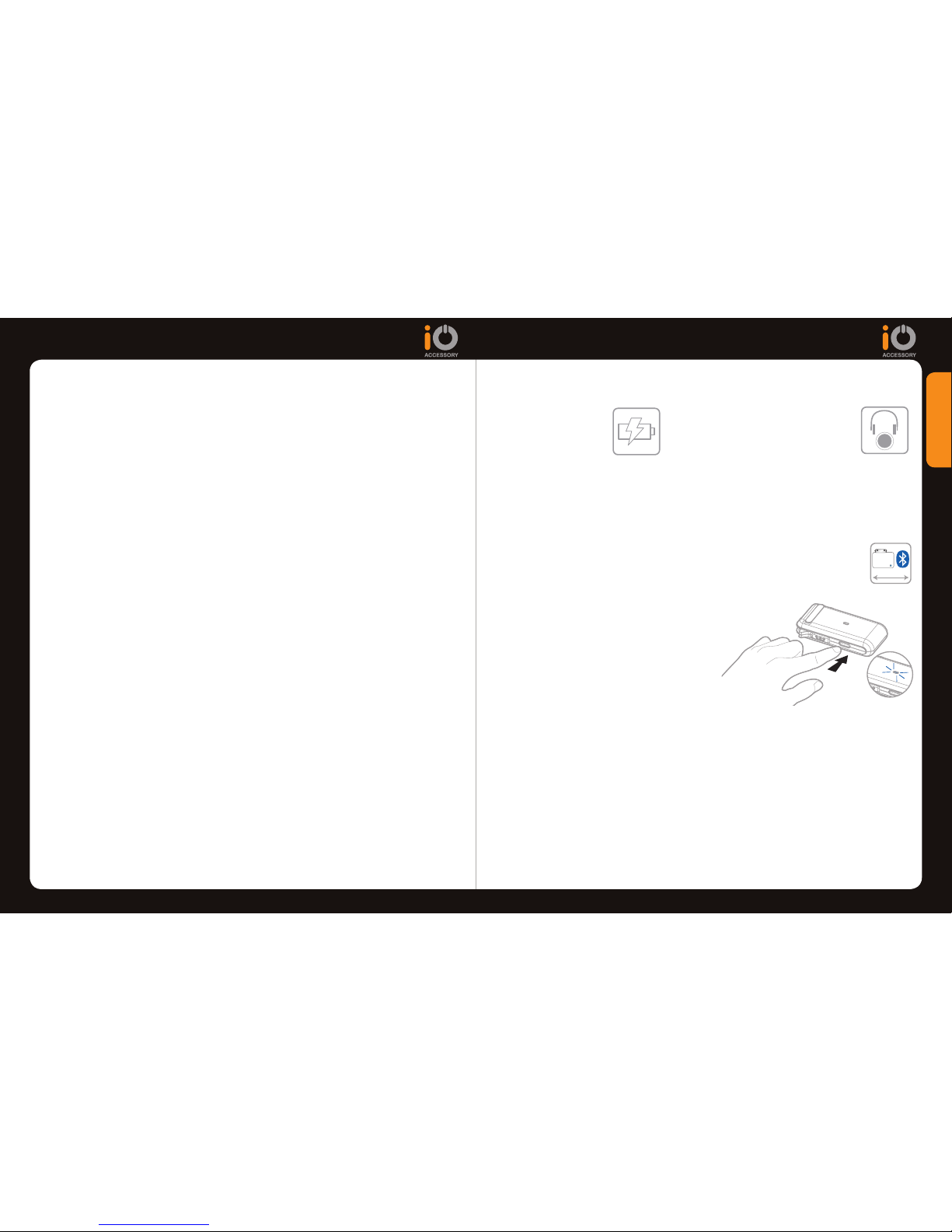
STEP 2
Insert the Adaptor into the
3.5mm stereo headphone
socket of your device.
STEP 1
Ensure your portable
device is charged.
This section will show you how to connect your portable audio device to your
Bluetooth receiver (e.g iO Bluetooth car kit).
STEP 3 (PAIRING)
Pairing and connecting with an iO Bluetooth Music streaming product (e.g iO
PLAY, iO TALK1, iO TALK2, iO TALK3).
Make sure your device and Bluetooth Adaptor is within a 3m range of the A.
iO Music Streaming product (i.e. iO PLAY).
Note: If this is the first time connecting the Bluetooth adaptor
make sure all other bluetooth devices are turned off and make
sure no other device is connected to the iO Bluetooth Car kit.
Ensure the adaptor is switched off B.
(See GET DISCONNECTED), Then
press and hold the “ON/OFF” button
unitl the blue LED indicator flickers
repeatedly. This enters pairing mode.
When the pairing is complete you will C.
hear your device music/audio being played from your iO Bluetooth music
streaming device (i.e iO PLAY). Meanwhile, the Blue LED indicator will
flash regularly and slowly.
If you want to pause music or adjust volume, simply press the relevent D.
buttons on your device.
NOTE: In case the pairing procedure fails, please unplug the Adaptor wait for a few
seconds and repeat STEP 2.
NOTE: Once the first Pairing/Connection has been completed successfully, the next
time you want to connect the iO Bluetooth Adaptor, follow the GET CONNECTED
section.
5
seconds
Page 3
www.my-io.com
4
www.my-io.com
5
GET CONNECTED CHARGING THE ADAPTOR
This Bluetooth Adaptor is battery powered and you will need to re-charge
the adaptor from time to time. A cigar lighter car charger comes with the
adaptor. You can charge the adaptor whilst you are streaming your music
wirelessly into an iO Bluetooth music streaming car kit (e.g iO Play).
To charge your Bluetooth adaptor follow the following steps:
STEP 1
Ensure you have your ignition turned on.
STEP 2
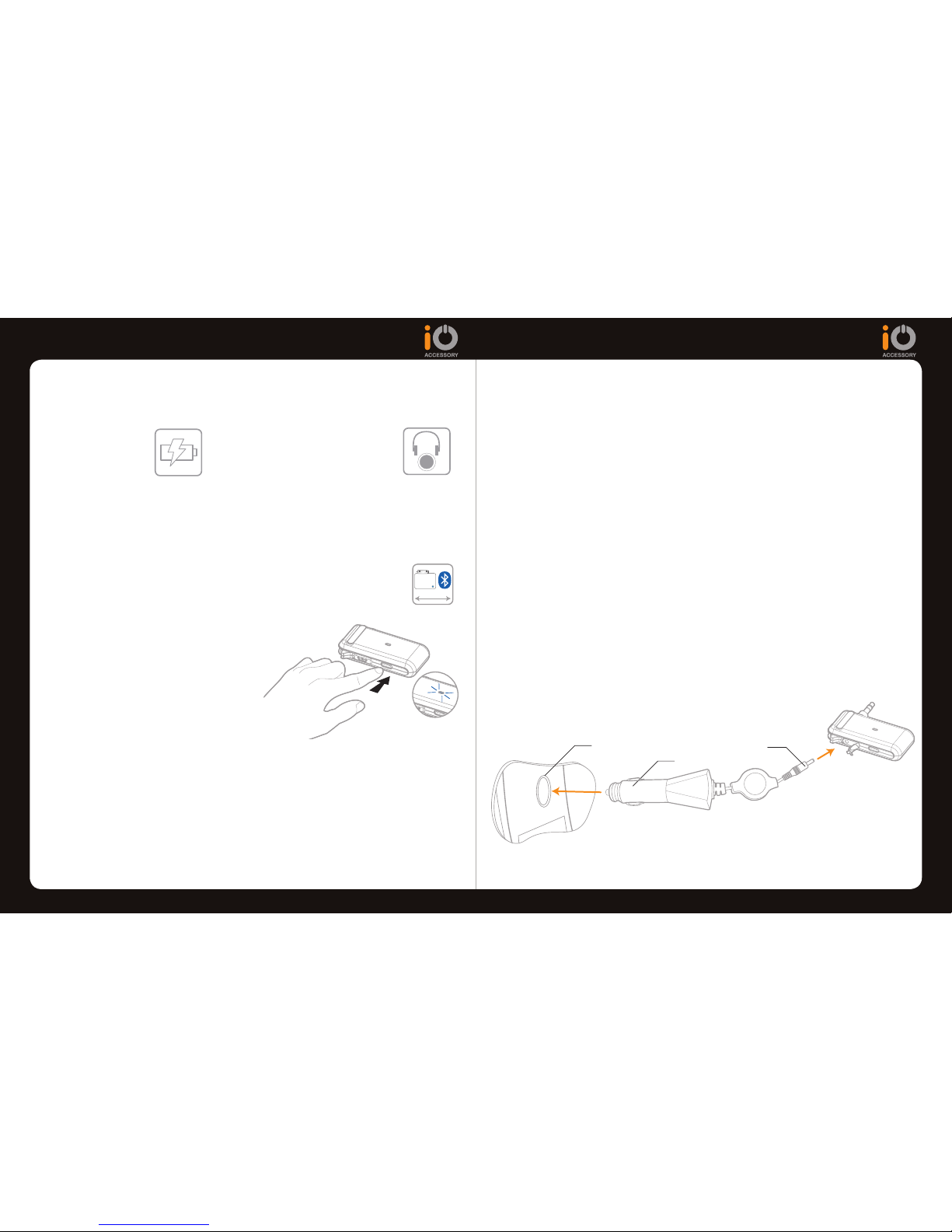
Insert the charger plug (1) into the base of the Bluetooth adaptor.
STEP 2
Insert the Cigar lighter plug (2) into the vehicle’s cigar lighter socket. Your
device will now start charging.
NOTE:
The Red light stays on while the adaptor is charging.1.
The Red light will turn off when the charging is complete.2.
You can still pair/connect & play audio from your device whilst charging 3.
the adaptor but the red charging LED indication will change.
2
Cigar lighter socket in your car
1
STEP 2
Insert the Adaptor into the
3.5mm stereo headphone
socket of your device.
STEP 1
Ensure your portable
device is charged.
This section will show you how to connect your portable audio device to your
Bluetooth receiver (e.g iO Bluetooth car kit) after the FIRST PAIRING has
been completed.
STEP 3 (PAIRING)
Pairing and connecting with an iO Bluetooth Music streaming product (e.g iO
PLAY, iO TALK1, iO TALK2, iO TALK3).
Make sure your device and Bluetooth Adaptor is within a 3m range of the A.
iO Music Streaming product (i.e. iO PLAY).
Note: If this is the first time connecting the Bluetooth adaptor
make sure you have complete the FIRST PAIRING step.
Ensure the adaptor is switched off B.
(See GET DISCONNECTED), Then
press and hold the “ON/OFF” button
for 2 seconds until the blue LED
indicator flickers slowly.
When the pairing is complete you will C.
hear your device music/audio being
played from your iO Bluetooth music
streaming device (i.e iO PLAY). Meanwhile, the Blue LED indicator will
flash regularly and slowly.
If you want to pause music or adjust volume, simply press the relevant D.
buttons on your device.
NOTE: In case the connecting procedure fails, please unplug the Adaptor wait for a
few seconds and repeat the FIRST PAIRING section.
3m
2
seconds
Page 4
www.my-io.com
6
www.my-io.com
7
THE ADAPTOR
THE CHARGER
GET DISCONNECTED
SPECIFICATION
EN EN
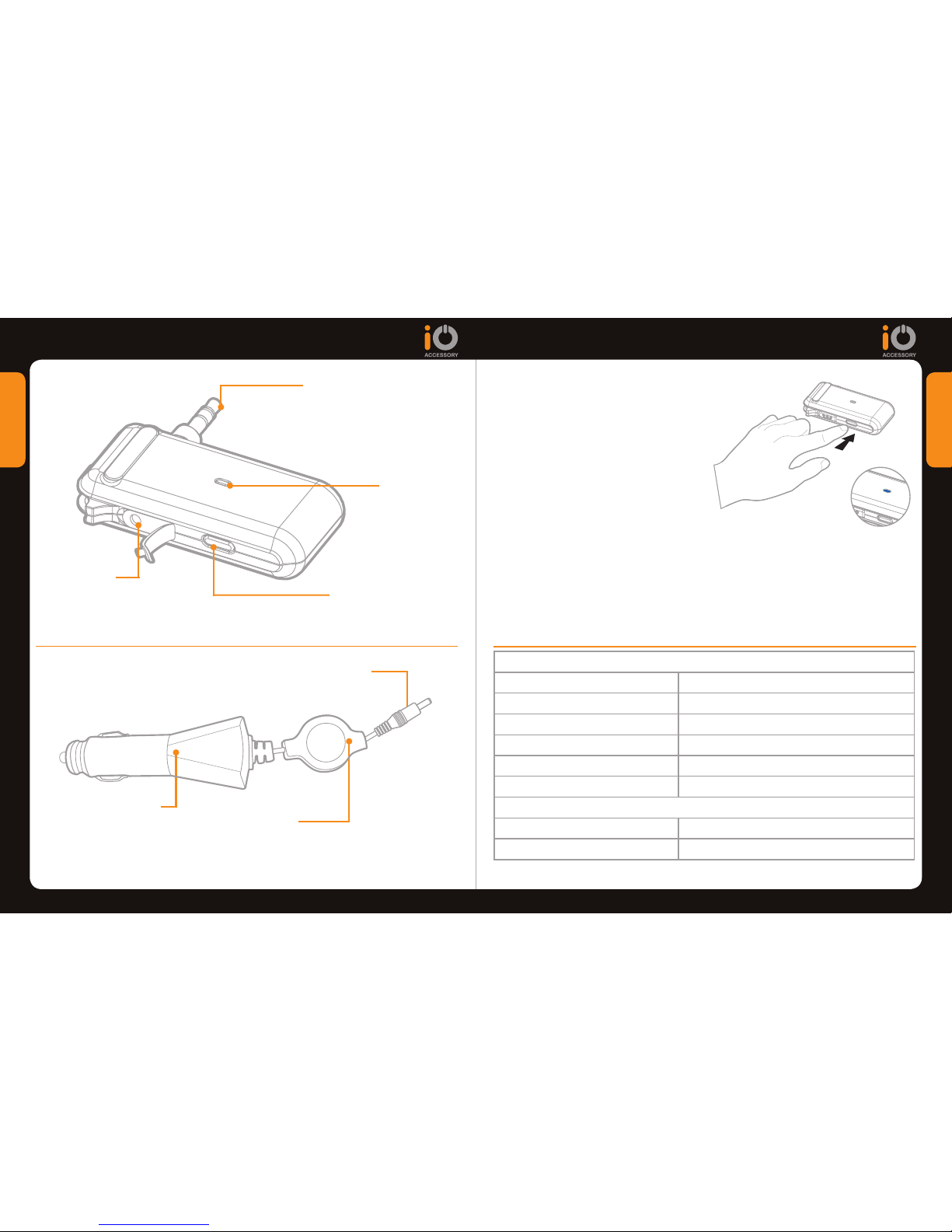
LED Indicator
3.5mm stereo plug
charging plug
ON/OFF/Pairing
button
Charging port
cigar lighter charger
Retractable cable
ADAPTOR SPECIFICATION
Bluetooth Specification: V 1.2
Bluetooth profiles: A2DP
Output Power Class: Class 2
Security: Paring Code: 0000
Transmit Power Consumption: 35mA
Input Power: 3.7v, 230mAh
CHARGER SPECIFICATION
Input: 12~24v DC
Output: 5v DC OUTPUT 500mA
STEP 1
Switch off the adaptor by pressing
and holding the “ON/OFF” button
until the LED continually illuminates,
then release the ON/OFF button.
(The LED should not flash thereafter,
ensuring the adaptor is switched off)
STEP 2
Disconnect the adaptor from the
3.5mm /line out socket of the device.
5
seconds
Page 5
www.my-io.com
8
www.my-io.com
9
FREQUENTLY ASKED QUESTIONS WARRANTY INFORMATION
EN EN
WARRANTY
Armour Automotive warrants this product to be free from defects in material and workmanship under
normal use for a period of 12 months from the date of original purchase with receipt. Should service
be necessary under this warranty for any reason due to manufacturing defect or malfunction during the
warranty period, Armour Automotive will repair or replace (at its discretion) the defective merchandise
with equivalent products. The warranty excludes damage or abuse caused by customer misuse. All
warranties are to be handled by the original retailer where the goods were purchased.
This warranty is valid only for the original purchaser and is not extended to owners of the product
subsequent to the original purchaser. Any applicable implied warranties are limited in duration to a
period of the express warranty as provided herein beginning with the date of the original purchase at
retail, and no warranties, whether express or implied, shall apply to this product thereafter.
LIABILITY
iO shall not, under any circumstances, be liable for damage caused as a result of misuse suffered by
the user when using this product with an nomadic device.
TRADEMARK
All rights reserved. The iO trademarks are the sole and exclusive property of Armour Automotive. Any
other trademarks or names used in iO documentation are copyright protected and are the sole and
exclusive property of their respective owners.
Declaration of Conformity
We Armour Automotive, declare under our sole responsibility that this iO product complies with the
essential requirements for CE Marking when used in a residential, commercial, vehicular or light
industrial environment.
COPYRIGHT
Copyright 2008; Armour Automotive. All rights reserved. The total or even partial reproduction,
transmission or storage of this guide in any form or by any process whatsoever (electronic, mechanical,
photocopy, recording or otherwise) is strictly prohibited without prior consent from Armour Automotive.
MODIFICATIONS
The explanations and specifications in this guide are given for information purposes only and may
be modified without prior notice. They are deemed to be correct at the time of going to press. The
utmost care has been taken when writing this guide, as part of the aim to provide you with accurate
information. However, Armour Automotive shall not be held responsible for any consequences arising
from any errors or omissions in the guide. Armour Automotive reserves the right to amend or improve
the product design or user guide without any restrictions and without any obligation to notify users.
As part of our ongoing concern to improve our products, the product that you have purchased
may differ slightly from the model described in this guide. If so, a later version of this guide might be
available in electronic format at www.my-io.com .
CORRECT DISPOSAL OF THIS PRODUCT (Waste Electrical Electronic Equipment)
This marking shown on the product or its literature, indicates that it should not be disposed with other
household wastes at the end of its working life. To prevent possible harm to the environment or human
health from uncontrolled waste disposal, please separate this from other types of wastes and recycle
it responsibly to promote the sustainable reuse of material resources. Household users should contact
either the retailer where they purchased this product, or their local government office. Business users
should contract their supplier and the terms and conditions of the purchase contract. This product
should not be mixed with other commercial wastes for disposals.
MY BLUETOOTH ADAPTOR WILL NOT PAIR/CONNECT WITH .Q iO
BLUETOOTH CAR KITS?
Ensure the ignition is turned on..A
Ensure no other device is connected to the iO Bluetooth Car kit device. .A
When you press the ON/OFF button on the adaptor, ensure the iO Bluetooth
Adaptor LED is flashing quickly. This tells you it is in pairing mode.
I DO NOT HEAR ANY MUSIC FROM THE BLUETOOTH RECEIVER?.Q
When using iO PLAY, make sure the Bluetooth Adaptor has connected .A
to iO PLAY. The Skip forward and skip back lights will be illuminated when
connected. To reconnect follow the “GET CONNECTED” section.
Make sure the volume on the Bluetooth Receiver is turned up..A
I HAVE STREAMED MUSIC FROM MY A2DP MUSIC MOBILE PHONE, .Q
NOW I CANNOT RECONNECT MY BLUETOOTH ADAPTOR?
Turn off the Bluetooth on your Bluetooth Mobile phone. Then re-connect .A
the Bluetooth Adaptor to the iO Bluetooth car kit following the “GET
CONNECTED” section in this Quick Start Guide. Once the Bluetooth Adaptor is
connected you may enable the Bluetooth on your mobile phone and re-connect
your phone.
Page 6

www.my-io.com
10
www.my-io.com
11
NOTES
Page 7

PRODUCT REGISTRATION
Desc: 3.5mm Stereo Bluetooth
Adaptor
P/N: iO-BTA3-5
RECEIVE GREATER BENEFITS BY REGISTERING YOUR iO
PRODUCT IN FIVE EASY STEPS.
BENEFITS:
Access to online product support.•
Warranty and after sales service.•
Exclusive online login to www.my-io.com.•
STEP 1
Visit www.my-io.com/register
STEP 2
Log-in or Register your details.
STEP 3
Enter the product details shown below on your registration label and follow
the registration steps.
STEP 4
Registration is now complete.
STEP 5
Enjoy your iO Experience with total peace of mind.
www.my-io.com
iO-BTA3-5-QSG_v2
 Loading...