

Page 1
Welcome / Bienvenue
E169
Page 2

U.S. Federal Communications Commission (FCC) Compliance Statement
The changes or modifications not expressly approved by the party responsible for compliance
could void the user’s authority to operate the equipment.
To comply with the FCC RF exposure compliance requirements, this device and its antenna must
not be co-located or operating to conjunction with any other antenna or transmitter.
This device complies with part 15 of the FCC Rules. Operation is subject to the following two
conditions:
(1) This device may not cause harmful interference, and
(2) this device must accept any interference received, including interfences that may cause
undesired operation.
Note: This equipment has been tested and found to comply with the limits for a Class B digital
device, pursuant to part 15 of the FCC Rules.
These limits are designated to provide reasonable protection against harmful interferences in a
residential installation. This equipment generates, uses and can radiate radio frequency energy
and, if not installed and used in accordance with the intructions, may cause harmful interference
to radio communications. However, there is no guarantee that interference will not occur in a
particular installation. If this equipment does cause harmful interferences to radio or television
reception, which can be determined by turning the equipment off and on, the user is
encouraged to try to correct the interference by one or more of the following measures:
- Reorient or relocate the receiving antenna.
- Increase the separation between the equipment and receiver.
- Connect the equipment into an outlet on a circuit different from that to which the receiver is
connected. - Consult the dealer or an experienced radio/TV technician for help.
Page 3

FCC Radiation Exposure Statement:
This equipment complies with FCC radiation exposure limits set forth for an uncontrolled environment .
This transmitter must not be co-located or operating in conjunction with any other antenna or transmitter.
IC warning:
This device complies with Industry Canada licence-exempt RSS standard(s). Operation is subject to the following two conditions:
(1) this device may not cause interference, and
(2) this device must accept any interference, including interference that may cause undesired operation of the device.
Le présent appareil est conforme aux CNR d'Industrie Canada applicables aux appareils radio exempts de licence. L'exploitation est
autorisée aux deux conditions suivantes :
(1) l'appareil ne doit pas produire de brouillage, et
(2) l'utilisateur de l'appareil doit accepter tout brouillage radioélectrique subi, même si le brouillage est susceptible d'en compromettre le
fonctionnement
Under Industry Canada regulations, this radio transmitter may only operate using an antenna of a type and maximum (or lesser) gain
approved for the transmitter by Industry Canada. To reduce potential radio interference to other users, the antenna type and its gain
should be so chosen that the equivalent isotropically radiated power (e.i.r.p.) is not more than that necessary for successful
communication.
Conformément à la réglementation d'Industrie Canada, le présent émetteur radio peut fonctionner avec une antenne d'un type et d'un
gain maximal (ou inférieur) approuvé pour l'émetteur par Industrie Canada. Dans le but de réduire les risques de brouillage
radioélectrique à l'intention des autres utilisateurs, il faut choisir le type d'antenne et son gain de sorte que la puissance isotrope
rayonnée équivalente (p.i.r.e.) ne dépasse pas l'intensité nécessaire à l'établissement d'une communication satisfaisante.
Page 4
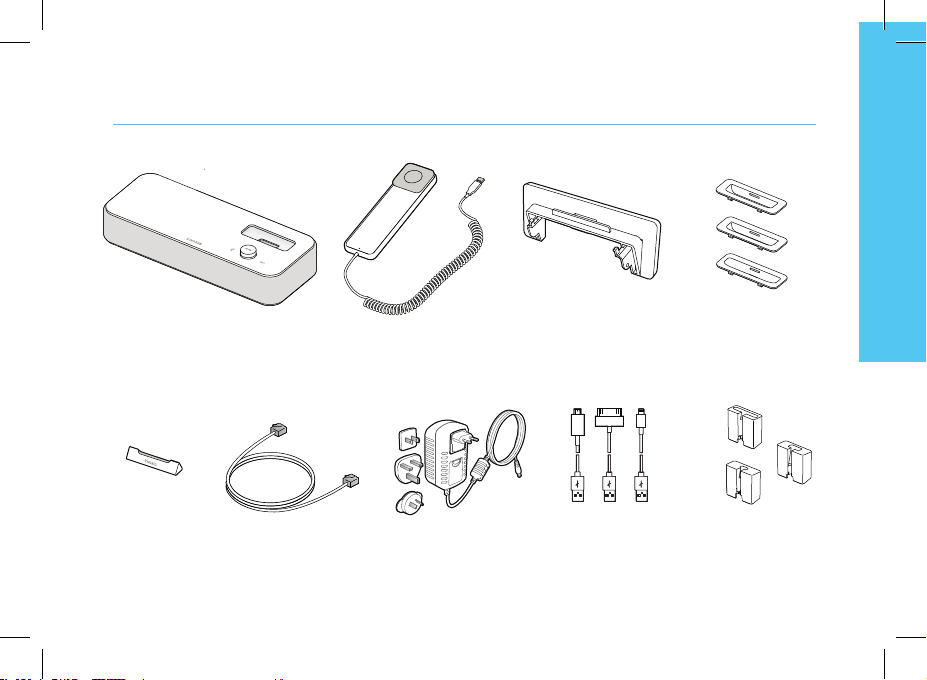
Box content
English
E169 base
Smart holder
Ethernet cable
Handset Tablet stand
AC adapter
Lightening, 30 pin and
micro-USB cables
Lightening, 30 pin and
micro-USB adapters
Lightening, 30 pin and
micro-USB cable adapters
3
Page 5
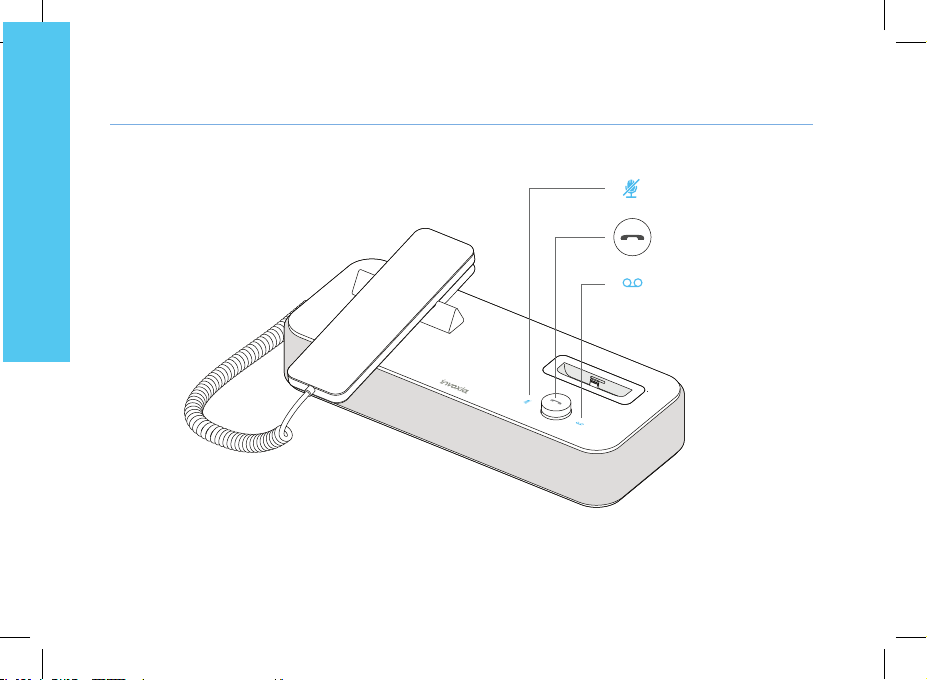
Your E169 Phone
English
4
Designed and produced by invoxia, Paris
Secret
Adjust volume.
Receive and End a call.
Bluetooth pairing.
Voicemail
Page 6
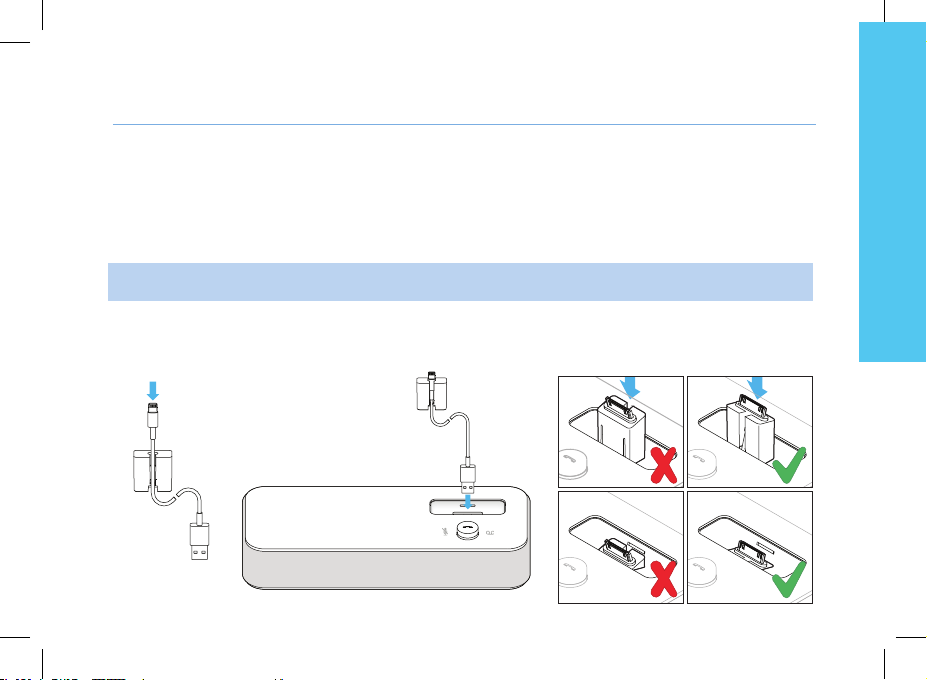
Set up
5
English
Positioning
Pla ce your phone near your network socket (and near your mains s upply socket if you are us ing a mains power adapter).
Connecting the base
This phone is powered by PoE (Power over Ethernet), if your network is compatible, or through your mains AC
100-240V supply.
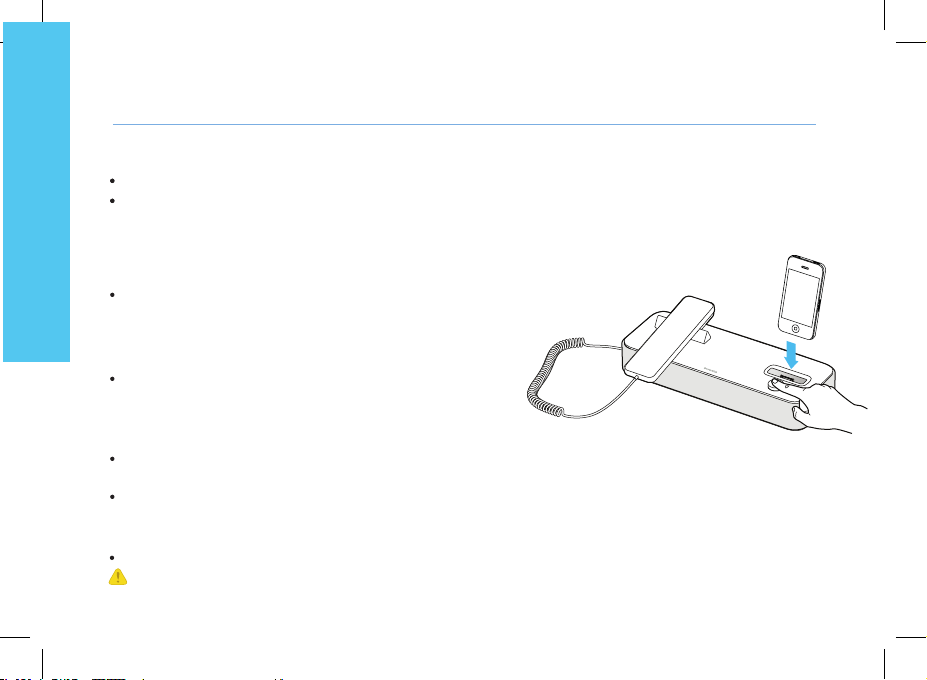
1. Insert the cable suitable to your smartphone into the matching cable adapter.
Place it then in the special pocket of the receptacle.
Page 7
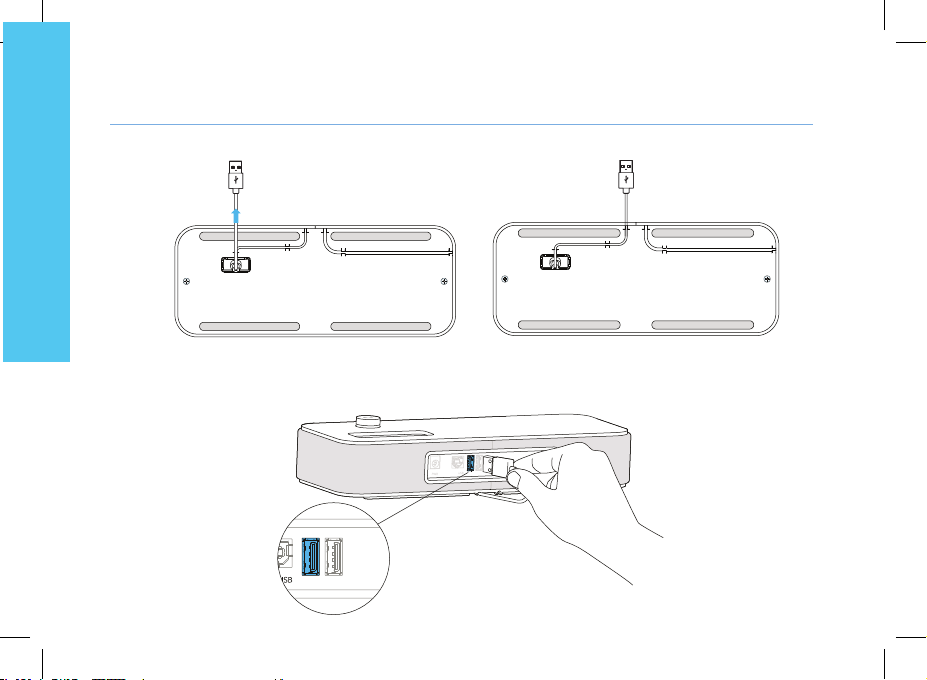
3. Slide the cord into place through the interstices under the base.
English
4. Plug the USB connector to the left USB port at the rear of the device.
6
Page 8
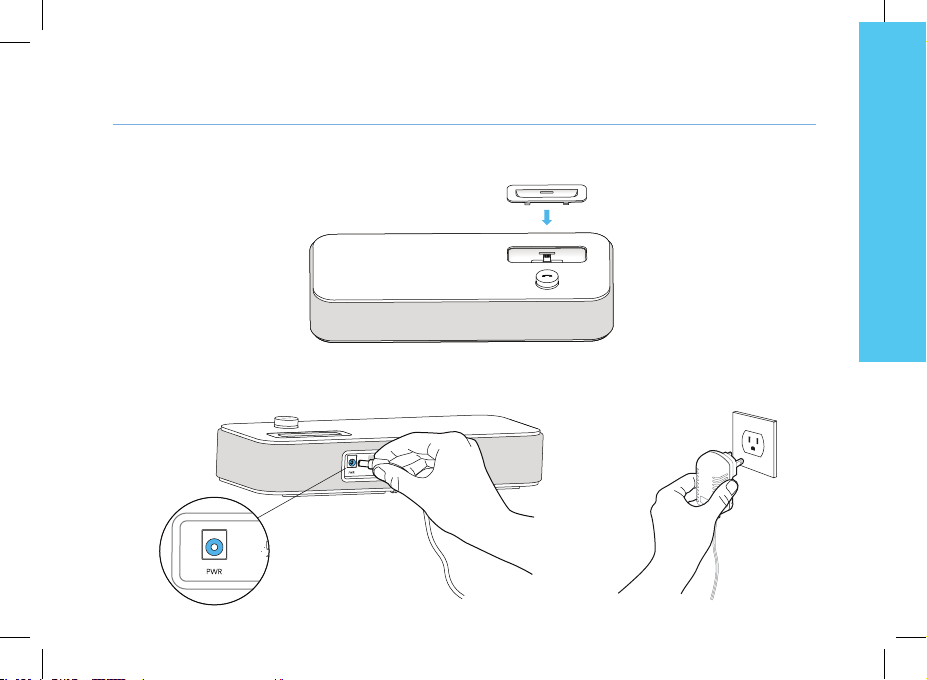
7
English
5. Insert the suitable adapter to your smartphone, or none if you use a case and your device doesn’t t.
To connect a dierent model, please repeat steps 1 to 5.
6. Plug the mains power adapter into the back of the base and into a wall mount socket.
Page 9
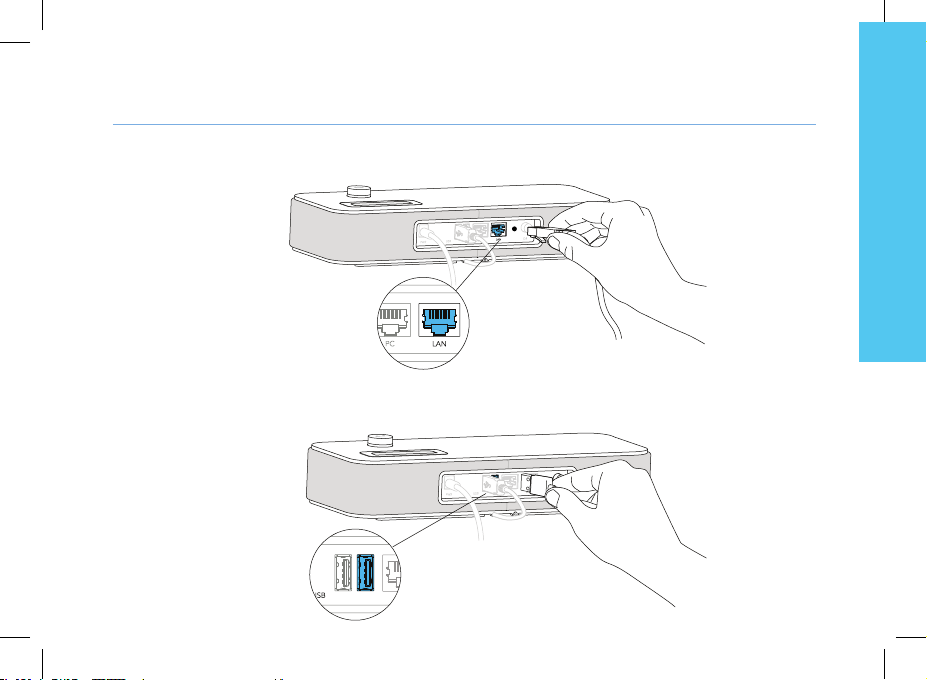
7. Plug one end of the Ethernet cable into the LAN connector at the back of the base and into your network
telephone socket (PC port is to connect to your computer to provide Internet).
Installing the handset
1. Plug the cord of the handset into the right USB port at the back of the base. Slide the cord into place through
the interstices under the base.
8
English
Page 10
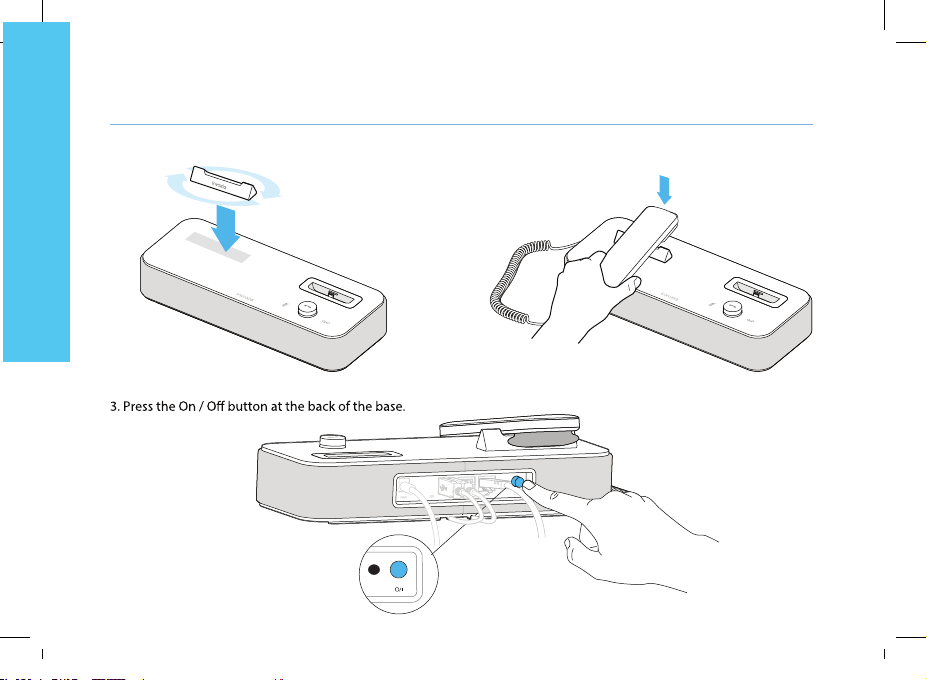
2. Place the Smart Holder and the handset on the top of the base.
English
9
Page 11

Guided by a need for simplicity shared with all smartphones and tablets, and for your own eciency, we have built
an App for your convenience.
This invoxia app let you configure and use the E169.
1. Dock your smartphone or pair your smartphone or tablet via Bluetotth.
2. Download the invoxia app.
3. Follow the instructions on your device to congure your invoxia phone based on your network
provider’s settings.
4. Once the installation is complete, you’re ready to enjoy the full power of your invoxia phone.
You’ll now easily nd your Contacts, Recents, Keypad and Voicemail as well as easily transfer a call, make a
conference call, swap between calls, etc.
10
Configuration
E nglish
Page 12
Bluetooth 1st connection
With iOS 6, be sure your Bluetooth is actived rst.
Dock or connect via USB your iPhone/iPod/iPad. The Bluetooth connection is then automatic!
English
For any d evices, long push the volume button until you hea
connection» m ess age allo ws you to pair your E169 in your device Bluetooth menu. A n al s ound conrms the pairing.
r a so und signal. A «Pa iring mode: in voxia is waiting for
Multiple connections: Pairing a new device / Reconnect a device
With iOS 6, be sure your Bluetooth is actived rst.
For any devices, long push the volume button until you hear a
sound signal. A «Pairing mode: invoxia is waiting for connection»
message allows you to pair your E169 in your device Bluetooth
menu. A final sound confirms the pairing.
Connecting a previously paired device is easy from its Bluetooth
menu. The last connected device is the controlling device.
Disconnect a paired device
Long push the volume button until hearing a double-sound signal. The last connected device is then disconnected and
auto-connection is stopped. A «Disconnecting» message and sound signal conrms the disconnection.
In your invoxia app, go to Settings > Bluetooth , you can tap «Unpair».
Unpair all the connected devices
Long push the volume button until hearing a three-sound signal. A «Clearing all subscriptions» message conrms it.
Also forget the E169 from your device Bluetooth menu in order to complete future pairings between these devices.
Bluetooth
11
Page 13

Need help ?
lea se visit the www.invoxia.c om website for more information. You can view yo ur E169 phone full user guide at
P
www.invoxia.com/en/support.
English
«Made for iPod», «Made for iPhone», and «Made for iPad» mean that an electronic accessory has been designed to connect specically
Invoxia, Exp erience your phone, In Vivo Acoustic , Sma rt holder a re registered trademarks, names and logos are the property of invoxia.
12
to iPod, iPhone, or iPad, respectively, and has been certied by the developper to meet Apple performance standards.
Apple is not responsible for the operation of this device or its compliance with safety and regulatory standards.
Please note that the use of this accessory with iPod, iPhone, or iPad may aect wireless performance.
www.invoxia.com
Reproduction in whole or in part is prohibited without the prior written consent of the copyright holder.
iPad, iP hone, iPod touch, Lig htening are trademarks of Apple Inc., registered in the U.S. and other countrie s.
© 2013 invoxia. All rights reserved.
Bluetooth ® is a trademark of Bluetooth SIG Inc.
Android is a trademark of G oogle Inc.
Printed in China.
Non contractual document.
Page 14

 Loading...