

Page 1
NO NOISE. ONLY YOUR VOICE.
www.invisioheadsets.com
Product Information
Read all safety information below, as well as the operating instructions for the INVISIO headset and the
communication terminal before use to avoid injury.
Basics
When not in use:
● Never apply pressure to the Bone Conduction
Microphone (BCM).
● Keep clean and store in dry conditions.
● Keep BCM away from sharp objects.
● Always store the headset in the supplied
protective case.
Handling
Do not drop, disassemble, open, crush, bend, deform,
puncture, shred, microwave, incinerate, paint, or insert
foreign objects into the headset. Do not expose to direct sunlight or extremely high or low temperatures for
prolonged periods of time. Do not use harsh chemicals, strong detergents or solvents/corrosives to clean
or submerge the product in such solutions. When not
in use, keep in a safe place where it will not be bent
or crushed.
Avoiding Hearing Damage
Permanent hearing loss may occur if the headset is
used at high volume. Set the volume of your communication terminal to a safe level. You can adapt over time
to higher volume of sound that may sound normal, but
can be damaging to your hearing. If you experience
ringing in your ears or muffled speech, discontinue
use and have your hearing checked. The louder the
volume, the less time is required before your hearing
could be affected.
Health and Hygiene
In between use and before transferring a headset from
one person to another, use an alcohol free antiseptic
cleaning solution to clean the headset.
Cleaning
The headset should be cleaned on a regular basis, using a soft tissue or cloth containing ordinary water or
a mild non-alcohol detergent. By gentle cleaning make
sure the loudspeaker tube is never blocked. Always
clean with disinfectant before use by other persons.
Repairing
Never attempt to repair, disassemble, or modify the
headset yourself. Changes or modifications not expressly approved by the party responsible for compliance could void the user ’s authority to operate the
equipment. The user should not attempt to service the
headset beyond that described in the User Guide. All
other servicing should be referred to a qualified service
professional.
Disposal
Do not dispose of this product as normal household
garbage at the end of its life cycle; bring it to a collection point for the recycling of electrical and electronic
appliances. Please inquire at your local community administration for an authorized disposal location.
Potentially Explosive Atmospheres
Do not use the headset when in any area with poten-
tially explosive atmosphere, unless it is certified intrinsically safe (ATEX/FM).
User Guide
Limited 1-Year Warranty
INVISIO Headsets A/S warrants that this product is free from defects in design, material and workmanship that can result in malfunction of the product
during normal use. The warranty period is one (1) year from the purchase
date of the product.
1. The warranty is only valid under the following terms and conditions:
The warranty applies to the consumer on the original receipt from the
dealer and cannot be transferred or re-assigned to another consumer.
2. When returning the product for repair or replacement proof of purchase
MUST be provided.
3. During the warranty period, the product can either be repaired or replaced,
and this will be based on the judgment of personnel authorized by
INVISIO Headsets A/S. After replacement or repair, the product is war-
ranted for the remaining time of the original warranty period.
This warranty does not cover defects due to:
1. Adjustments, modifications, disassembly or any alteration of the product
done by personnel not authorized by INVISIO Headsets A/S.
2. Accidents, exposure to liquids and food, moisture, extreme high or low
temperatures or environmental conditions. Exceptions are products spe-
cifically rated waterproof or flame retardant.
3. Misuse of the product e.g. damages to the Bone Conduction Microphone,
wrongful installation, breaking covers and casing by using force, etc.
4. Conditions due to normal wear and tear when using the product e.g.re chargeable batteries have a limited lifespan and performance is gradually
reduced over time. Soft Springs broken after extensive use.
There are no expressed warranties neither written nor oral other than this
warranty. In no event shall INVISIO Headsets A/S or its vendors be liable for
incidental or consequential damages of any nature whatsoever, including but
not limited to commercial losses, Force Majeure or special contracts/deals.
The Soft Spring™ system and the Bone Conduction Microphone Technology
are patents of INVISIO Headsets A/S. INVISIO Headsets A/S reserves the
right without notice to make changes to specifications for existing products
and to discontinue existing products.
Page 2
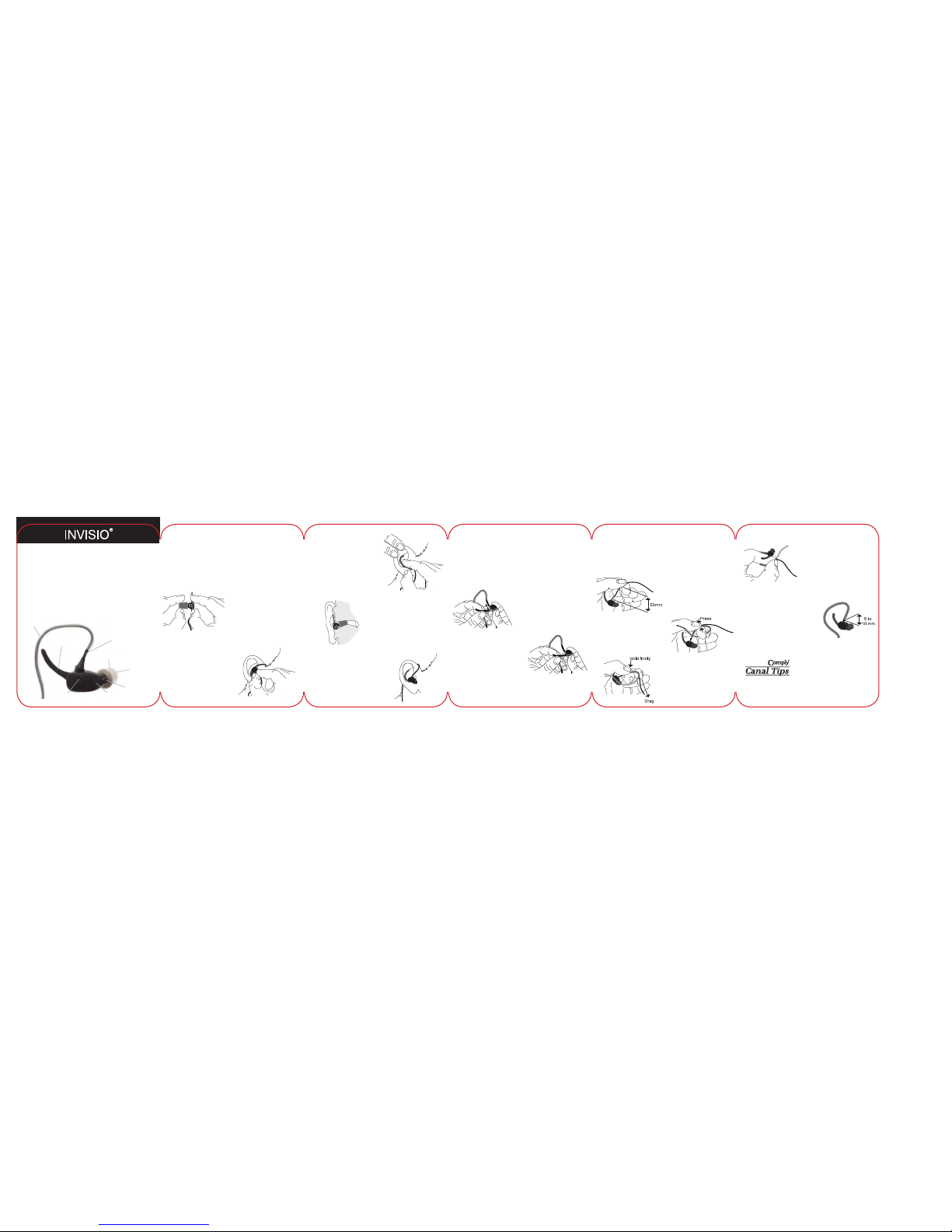
Fitting Headset
Inspect your headset for Left or Right ear usage. The
instructions below are for Right ear usage. Try all 3
sizes of Comply™ Canal Tips to find the correct size
and provide seal and comfort in your ear canal. They
are available as spare parts and are to be exchanged
regularly.
1.
Screw a new Canal Tip on
securely, holding the headset
as shown. Roll and compress
the foam into a thin round
crease -free cylinder.
2.
With the foam compressed,
hold the headset with your
thumb and first two fingers and the Soft Spring
pointing upward and
forward with the loudspeaker
toward your ear.
3.
Push the headset into your ear
with a twisting motion counter
clockwise until the Canal Tip
is completely within the ear
canal and the BCM has contact with the ear canal.
4.
The BCM must touch the ear
canal and not be exter nally visible (behind the
tragus). Hold the headset
in place for 15 - 30 seconds
until the Canal Tip expands.
5.
Use your index finger to push
the Soft Spring into the upper
bend of your ear. Place the Cable Retainer behind your ear.
Fitting Soft Spring™
The Soft Spring™ ensures a secure headset attach-
ment and also a consistent pressure on the BCM.
There are two sizes supplied with headset, 1 large and
1 small. Please try both sizes to ensure the correct fit
and shorten with scissors if required.
1.
The Soft Spring is fitted on
the rear of the headset with the
tip pointing upward towards
the cable.
2.
Push the Soft Spring onto the
mushroom shaped holder so
that it is secure.
Fitting Cable Retainer
The Cable Retainer ensures that the cable is held
comfortably and securely over the ear. The Cable
Retainer is pre-fitted on the headset and the following
instruction is to remount the Cable Retainer.
1.
Begin approximately 50mm
(2 inches) from the headset.
2.
Press the cable firmly into the
Cable Retainer using your
thumb and index finger. You
may use a small stick in front
of the cable to open tube.
3.
Hold the cable and the Cable
Retainer firmly. Drag the cable
into the Cable Retainer,
gradually moving the fix point
along the Cable Retainer.
4.
Use your thumb and index
finger to press the cable
into the last section of the
Cable Retainer.
5.
Keep approximately 5 to
10mm (0.2-0.4 inch) distance
from the headset to the Cable
Retainer.
© 2008 INVISIO Headsets A/S. CUP10197-1
INVISIO is a registered trademark of INVISIO Headsets A/S.
[email protected] - www.invisioheadsets.com
Please read before using your headset.
Product Description
This headset uses the INVISIO patented Bone Conduction Microphone (BCM) which detects sound, in the
form of vibrations transmitted through the jaw bone,
providing you with an outstanding freedom to com-
municate efficiently, even in the noisiest environments.
More information about INVISIO products, can be
found at: www.invisioheadsets.com
Soft Spring™
Cable Retainer
Loudspeaker
Bone
Conduction
Microphone
(BCM)
Headset
Housing
Cable
Comply™ Canal Tip
Hear Thru Microphone
(X-series headsets only)
Comply is a trademark of Hearing Components.
Manufactured under Hearing Components U.S.
Patent numbers 4,880,076 and 5,002,151 -and
international equivalents.
 Loading...