

Page 1

Invacare® Comet Series
Comet
PRO
, Comet
en Scooter
UserManual
ALPINE+
, Comet
ULTRA
ThismanualMUSTbegiventotheuseroftheproduct.
BEFOREusingthisproduct,readthismanualandsaveforfuturereference.
Page 2

©2016Invacare®Corporation
Allrightsreserved.Republication,duplicationormodificationinwholeorinpartisprohibitedwithout
priorwrittenpermissionfromInvacare.Trademarksareidentifiedby™and®.Alltrademarksare
ownedbyorlicensedtoInvacareCorporationoritssubsidiariesunlessotherwisenoted.
Invacare®reservestherighttoalterproductspecificationswithoutfurthernotice.
Page 3

Contents
1General........................................5
1.1Introduction..................................5
1.2Symbolsinthismanual...........................5
1.3Typeclassification..............................5
1.4Intendeduse..................................5
1.5Regulations...................................6
1.6Warranty....................................6
1.7Servicelife....................................6
1.8Limitationofliability.............................6
2Safety..........................................7
2.1Generalsafetynotes............................7
2.2Safetyinformationontheelectricalsystem............8
2.3Safetyinformationonelectromagneticinterference......10
2.4Safetyinformationondrivingandfreewheelmode.......11
2.5Safetyinformationwithregardtocareand
maintenance.................................12
2.6Safetyinformationregardingchangesandmodifications
tothemobilitydevice..........................13
2.7Labelsontheproduct...........................14
3Components....................................17
3.1Mainpartsofthescooter.........................17
3.2Operatingconsole(LEDversion)...................17
3.3Operatingconsole(LCDversion)...................19
4Setup..........................................21
4.1Generalsetupinformation........................21
4.2Movingtheseatpositionforwardsorbackwards........22
4.3Adjustingthearmrestwidth.......................22
4.4Adjustingthearmrestheight.......................23
4.5Adjustingthearmrestangle.......................23
4.6Adjustingbackrestangle..........................23
4.7Adjustingthelordosissupport(Comet
4.8Adjustingtheheadrest...........................24
4.9Disengagingtheseattorotateorremoveit............25
4.10Movingtheseatlifter(option).....................25
4.11Adjustingtheangleofthesteeringcolumn............26
5Accessories.....................................27
5.1Posturebelts..................................27
5.1.1Typesofposturebelts........................27
5.1.2Adjustingtheposturebeltcorrectly...............27
5.1.3Installingtheposturebelt......................27
5.2Rollatorbracket...............................28
5.2.1Attachingtherollator.........................28
5.2.2Removingtherollatorbracket...................29
5.2.3Positioningtherearreflector....................29
5.3Changingthecoloredshrouds.....................30
6Usage..........................................32
6.1Gettinginandout..............................32
6.2Beforedrivingforthefirsttime.....................33
6.3TakingObstacles...............................33
6.3.1Maximumobstacleheight......................33
6.3.2Safetyinformationwhenascendingobstacles........33
6.3.3Thecorrectwaytoovercomeobstacles............33
6.4Drivingupanddowngradients.....................33
6.5Parkingandstationary...........................34
6.6Useonpublicroads.............................34
6.7Pushingthescooterbyhand.......................34
6.7.1Disengagingmotors..........................34
6.8Drivingthescooter.............................35
6.9Switchingthelightsonandoff......................36
6.10Switchingthedirectionindicatoronandoff...........36
6.11Switchingthehazardlightsonandoff...............36
6.12Usingthehorn................................36
ULTRA
only).......24
Page 4

6.13Switchingthelowspeedmodeonandoff............36
6.14Activatinganddeactivatingcurvecontrolduringbend
travel......................................36
6.15Modeselection...............................37
6.16Adjustingthedisplay............................38
7Controlssystem.................................41
7.1Controlsprotectionsystem.......................41
7.1.1Themainfuse...............................41
7.2Batteries.....................................41
7.2.1Generalinformationoncharging.................41
7.2.2Generalinstructionsoncharging.................41
7.2.3Howtochargethebatteries....................42
7.2.4Howtodisconnectthebatteriesaftercharging.......43
7.2.5StorageandMaintenance.......................43
7.2.6Instructionsonusingthebatteries................43
7.2.7Transportingbatteries.........................44
7.2.8Generalinstructionsonhandlingthebatteries.......44
7.2.9Removingthebatteries........................44
7.2.10Howtohandledamagedbatteriescorrectly........44
8Transport......................................46
8.1Transport-Generalinformation....................46
8.2Transferringthemobilitydevicetoavehicle...........46
8.3Transportingthemobilitydevicewithoutoccupant......47
9Maintenance....................................48
9.1Maintenanceintroduction.........................48
9.2Cleaningthemobilitydevice.......................48
9.3Inspectionchecks...............................48
9.4Wheelsandtires...............................49
9.5Long-termstorage..............................50
10AfterUse......................................51
10.1Reconditioning................................51
10.2Disposal....................................51
11Troubleshooting................................52
11.1Diagnosisandfaultrepair........................52
11.1.1Errordiagnosis.............................52
11.1.2Errorcodesanddiagnosticcodes................53
12Technicaldata..................................55
12.1Technicalspecifications..........................55
13Service........................................59
13.1Inspectionsperformed..........................59
Page 5
General
1General
1.1Introduction
ThankyouforchoosinganInvacareproduct.
Thisusermanualcontainsimportantinformationaboutthehandling
oftheproduct.Inordertoensuresafetywhenusingtheproduct,
readtheusermanualcarefullyandfollowthesafetyinstructions.
Ifyoufindthatthefontsizeintheprintversionoftheusermanual
isdifficulttoread,youcandownloaditasapdffromtheInvacare
website(seebackpageofthismanual).Thepdfcanthenbescaledon
screentoafontsizethatismorecomfortableforyou.
Thismobilitydevicehasbeenconstructedforalargecircleofusers
withdifferentrequirements.
Thedecisionwhetherthemodelissuitablefortheusermayonlybe
takenbymedicalspecialistswithappropriateexpertise.
Somemaintenanceandsettingscanbeperformedbytheuser
orhis/hersattendants.Certainadjustmentsdohoweverrequire
technicaltrainingandmayonlybecarriedoutbyyourInvacare
specialistprovider.RefertotheInspectioncheckschapterin9
Maintenance,page48
oftheusermanualorasaresultofincorrectmaintenanceare
excludedfromallguarantees.
Formoreinformationabouttheproduct,forexampleproduct
safetynoticesandproductrecalls,contactyourlocalInvacare
representative.Foraddressandwebsiteseebackpageofthismanual.
.Damagesanderrorscausedbynonobservance
1.2Symbolsinthismanual
Inthismanual,hazardstatementsareindicatedbysymbols.The
symbolsareaccompaniedbyasignalwordthatindicatestheseverity
oftherisk.
1603455-A5
1.3Typeclassification
ThisvehiclehasbeenclassifiedaccordingtoEN12184asaclassC
mobilityproduct(outdoors).Becauseofitssizeitislesssuitable
foruseinindoorenvironments,buthasalongerdrivingrangeand
theabilitytoovercomelargerandmoredifficultobstaclesinoutdoor
settings.
1.4Intendeduse
Thismobilitydevicewasdesignedforpersonswhoseabilitytowalk
isimpaired,butwhoarestillintermsoftheireyesightandphysically
andmentallyabletooperateanelectricmobilitydevice.
WARNING
Indicatesahazardoussituationthatcouldresultin
seriousinjuryordeathifitisnotavoided.
CAUTION
Indicatesahazardoussituationthatcouldresultin
minororslightinjuryifitisnotavoided.
IMPORTANT
Indicatesahazardoussituationthatcouldresultin
damagetopropertyifitisnotavoided.
Givesusefultips,recommendationsandinformation
forefficient,trouble-freeuse.
ThisproductcomplieswithDirective93/42/EEC
concerningmedicaldevices.Thelaunchdateofthis
productisstatedintheCEdeclarationofconformity.
Thissymbolidentifiesalistofvarioustools,
componentsanditemswhichyouwillneedinorder
tocarryoutcertainwork.
Page 6

Invacare®CometSeries
1.5Regulations
ThevehiclewassuccessfullytestedaccordingtoGermanand
internationalstandardsastoitssafety.Itsatisfiestherequirements
accordingtoRoHS2011/65/EU,REACH1907/2006/ECandDIN
EN12184includingEN1021-2andISO7176–14.Itwasalsotested
successfullyaccordingtoEN60529IPX4astoitsresistancetospray
water,andisthereforewellsuitedforweatherconditionssuch
astypicalEuropeanweatherconditions.Whenequippedwithan
appropriatelightingsystem,thevehicleissuitableforuseonpublic
roads.
1.6Warranty
Thetermsandconditionsofthewarrantyarepartofthegeneral
termsandconditionsparticulartotheindividualcountriesinwhich
thisproductissold.
1.7Servicelife
Weestimateaservicelifeoffiveyearsforthisproduct,providedit
isusedinstrictaccordancewiththeintendeduseassetoutinthis
documentandallmaintenanceandservicerequirementsaremet.
Theestimatedservicelifecanbeexceedediftheproductiscarefully
usedandproperlymaintained,andprovidedtechnicalandscientific
advancesdonotresultintechnicallimitations.Theservicelifecan
alsobeconsiderablyreducedbyextremeorincorrectusage.Thefact
thatweestimateaservicelifeforthisproductdoesnotconstitutean
additionalwarranty.
•Technicalmodifications
•Unauthorizedmodificationsand/oruseofunsuitablespareparts
1.8Limitationofliability
Invacareacceptsnoliabilityfordamagearisingfrom:
•Non-compliancewiththeusermanual
•Incorrectuse
•Naturalwearandtear
•Incorrectassemblyorset-upbythepurchaserorathirdparty
61603455-A
Page 7
Safety
2Safety
2.1Generalsafetynotes
WARNING!
Riskofinjuryifmobilitydeviceisusedinany
otherwaythanthepurposedescribedinthis
manual
–Onlyeverusethemobilitydeviceinaccordancewith
theinstructionsinthisusermanual.
–Paystrictattentiontothesafetyinformation.
WARNING!
Riskofinjuryifthemobilitydeviceisdrivenwhen
yourabilitytodriveisimpairedbymedication
oralcohol
–Neverdriveanyvehicleundertheinfluenceof
medicationoralcohol.
WARNING!
Riskofdamageorinjuryifthemobilitydeviceis
accidentallysetintomotion
–Switchthepowersystemoffbeforeyougetin,getout
orhandleunwieldyobjects.
–Beawarethatthemotorbrakesareautomatically
deactivatedwhenthemotorsaredisengaged.Forthis
reason,freewheeloperationisonlyrecommended
onflatsurfaces,neverongradients.Neverleave
yourmobilitydeviceonagradientwithitsmotors
disengaged.Alwaysre-engagethemotorsimmediately
afterpushingthemobilitydevice.
WARNING!
Riskofinjuryifthepowerisswitchedoffwhile
themobilitydeviceisinmotion,duetoitcoming
toanabrupt,sharpstop
–Ifyouhavetobrakeinanemergency,simplyrelease
thedriveleverandallowthemobilitydevicetocome
toacompletestop.
–Iffitted,pullthehandbrakeuntilthemobilitydevice
comestoastop.
–Onlyswitchthemobilitydeviceoffwhileinmotion
asalastresort.
WARNING!
Riskofinjuryifthemobilitydeviceistransported
inanothervehiclewiththeoccupantseatedinit
–Nevertransportthemobilitydevicewiththeoccupant
seatedinit.
WARNING!
Riskofinjuryifyoufalloffthemobilitydevice
–Ifrestrainingsystemsareinstalled(suchasseatbelts),
usethemeachtimeyoudrivethemobilitydevice.
1603455-A7
Page 8

Invacare®CometSeries
CAUTION!
Riskofinjuryifmaximumpermissibleloadis
exceeded
–Donotexceedthemaximumpermissibleload(refer
to12Technicaldata,page55).
–Themobilitydeviceisonlydesignedforusebyasingle
occupantwhosemaximumweightdoesnotexceed
themaximumpermissibleloadofthedevice.Never
usethemobilitydevicetotransportmorethanone
person.
CAUTION!
Riskofinjuryduetowrongliftingordroppingof
heavycomponents
–Whenmaintaining,servicingorliftinganypartofyour
mobilitydevice,takeintoaccounttheweightofthe
individualcomponentsespeciallythebatteries.Be
sureatalltimestoadoptthecorrectliftingposture
andaskforassistanceifnecessary.
CAUTION!
Riskofinjurybymovingparts
–Makesurethatnoinjuryisincurredbymovingparts
ofthemobilitydevice,likewheelsoraseatlifter(if
fitted),especiallywhenchildrenarearound.
CAUTION!
Riskofinjuryfromhotsurfaces
–Donotleavethemobilitydeviceindirectsunlightfor
prolongedperiods.Metalpartsandsurfacessuchas
theseatandarmrestscanbecomeveryhot.
CAUTION!
Riskoffireorbreakingdownduetoelectric
devicesbeingconnected
–Donotconnectanyelectricdevicestoyourmobility
devicethatarenotexpresslycertifiedbyInvacarefor
thispurpose.Haveallelectricalinstallationsdoneby
yourauthorizedInvacaredealer.
2.2Safetyinformationontheelectricalsystem
WARNING!
Riskofdeath,seriousinjuryordamage
Misuseofthemobilitydevicemaycausethemobility
devicetostartsmoking,sparking,orburning.Death,
seriousinjury,ordamagemayoccurduetofire.
–DONOTusethemobilitydeviceotherthanits
intendedpurpose.
–Ifthemobilitydevicestartssmoking,sparking,or
burning,discontinueusingthemobilitydeviceand
seekserviceIMMEDIATELY.
WARNING!
Riskoffire
Switchedonlampsproduceheat.Ifyoucoverthelamps
withfabricssuchasclothes,thereisariskthatthefabric
maycatchfire.
–NEVERcoverthelightsystemwithfabric.
81603455-A
Page 9

Safety
WARNING!
Riskofdeath,seriousinjuryordamagewhen
carryingalongoxygensystems
Textilesandothermaterialsthatnormallywouldnot
burnareeasilyignitedandburnwithgreatintensityin
oxygenenrichedair.
–Checktheoxygentubingdaily,fromthecylinder
tothedeliverysite,forleaksandholdawayfrom
electricalsparksandanysourceofignition.
WARNING!
Riskofinjuryordamageduetoelectricalshorts
Connectorpinsoncablesconnectedtothepower
modulecanstillbeliveevenwhenthesystemisoff.
–Cableswithlivepinsshouldbeconnected,restrained
orcovered(withnon-conductivematerials)sothat
theyarenotexposedtohumancontactormaterials
thatcouldcauseelectricalshorts.
–Whencableswithlivepinshavetobedisconnected,
forexample,whenremovingthebuscablefromthe
remoteforsafetyreasons,makesuretorestrainor
coverthepins(withnon-conductivematerials).
WARNING!
Riskofdeath,seriousinjury,ordamage
Corrodedelectricalcomponentsduetowaterorliquid
exposurecanresultindeath,seriousinjury,ordamage.
–Minimizeexposureofelectricalcomponentstowater
and/orliquids.
–ElectricalcomponentsdamagedbycorrosionMUST
bereplacedimmediately.
–Mobilitydevicesthatarefrequentlyexposedto
water/liquidsmayrequirereplacementofelectrical
componentsmorefrequently.
WARNING!
Riskofdeathorseriousinjury
Failuretoobservethesewarningscancauseanelectrical
shortresultingindeath,seriousinjury,ordamageto
theelectricalsystem.
–ThePOSITIVE(+)REDbatterycableMUSTconnect
tothePOSITIVE(+)batteryterminal(s)/post(s).The
NEGATIVE(-)BLACKbatterycableMUSTconnect
totheNEGATIVE(-)batteryterminal(s)/post(s).
–NEVERallowanyofyourtoolsand/orbatterycable(s)
tocontactBOTHbatterypost(s)atthesametime.
Anelectricalshortmayoccurandseriousinjuryor
damagemayoccur.
–Installprotectivecapsonpositiveandnegativebattery
terminals.
–Replacecable(s)immediatelyifcable(s)insulation
becomesdamaged.
–DONOTremovefuseormountinghardwarefrom
POSITIVE(+)redbatterycablemountingscrew.
1603455-A9
Page 10

Invacare®CometSeries
WARNING!
Riskofdeathorseriousinjury
Electricshockcancausedeathorseriousinjury
–Toavoidelectricshock,inspectplugandcordfor
cutsand/orfrayedwires.Replacecutcordsorfrayed
wiresimmediately.
Riskofdamagetothemobilitydevice
Afailureintheelectricsystemcanleadtounusual
behaviorsuchascontinuouslight,nolight,ornoises
fromthemagneticbrakes.
–Ifafailureexists,switchofftheremoteandswitch
itonagain.
–Ifafailurestillexists,thendisconnectorremovethe
powersource.Dependingonthemobilitydevice
model,youcaneitherremovethebatterypacksor
disconnectthebatteriesfromthepowermodule.
Ifindoubtwhichcabletodisconnect,contactyour
provider.
–Inanycase,contactyourprovider.
2.3Safetyinformationonelectromagnetic interference
Thiselectricvehiclewassuccessfullytestedinaccordancewith
InternationalstandardsastoitscompliancewithElectromagnetic
Interference(EMI)regulations.However,electromagneticfields,
suchasthosegeneratedbyradioandtelevisiontransmitters,and
cellularphonescaninfluencethefunctionsofelectricvehicles.Also,
theelectronicsusedinourvehiclescangeneratealowlevelof
electromagneticinterference,whichhoweverwillremainwithinthe
tolerancepermittedbylaw.Forthesereasonsweaskyoutoplease
observethefollowingprecautions:
WARNING!
Riskofmalfunctionduetoelectromagnetic
interference
–Donotswitchonoroperateportabletransceiversor
communicationdevices(suchasradiotransceiversor
cellularphones)whenthevehicleisswitchedon.
–Avoidgettingnearstrongradioandtelevision
transmitters.
–Incasethevehicleshouldbesetinmotion
unintentionallyorthebrakesarereleased,switchit
offimmediately.
–Addingelectricalaccessoriesandothercomponents
ormodifyingthevehicleinanywaycanmakeit
susceptibletoelectromagneticinterference.Keepin
mindthatthereisnosurewaytodeterminetheeffect
suchmodificationswillhaveontheoverallimmunity
oftheelectronicsystem.
–Reportalloccurrencesofunintentionalmovementof
thevehicle,orreleaseoftheelectricbrakestothe
manufacturer.
101603455-A
Page 11

Safety
2.4Safetyinformationondrivingandfreewheel mode
WARNING!
Riskofinjuryifthemobilitydevicetipsover
–Onlyevernegotiategradientsuptotheratedslope
andonlywiththebackrestinanuprightposition,and
theseatlifterinthelowestposition(ifinstalled).
–Onlyeverdrivedownhillatamaximumof2/3ofthe
topspeed.Avoidabruptbrakingoracceleratingon
gradients.
–Ifatallpossible,avoiddrivingonwet,slippery,icy,or
oilysurfaces(suchassnow,gravel,iceetc.)where
thereisariskofyoulosingcontroloverthemobility
device,especiallyonagradient.Thismayinclude
certainpaintedorotherwisetreatedwoodsurfaces.
Ifdrivingonsuchasurfaceisinevitable,thenalways
driveslowlyandwiththeutmostcaution.
–Neverattempttoovercomeanobstaclewhenonan
uphillordownhillgradient.
–Neverattempttodriveupordownaflightofsteps.
–Alwaysapproachobstaclesstraighton.Ensurethat
thefrontwheelsandrearwheelsmoveoverthe
obstacleinonestroke,donotstophalfway.Donot
exceedthemaximumobstacleheight(referto12
Technicaldata,page55
–Avoidshiftingyourcenterofgravityaswellasabrupt
changesofdirectionwhenthemobilitydeviceisin
motion.
).
WARNING!
Riskofinjuryifthemobilitydevicetipsover
(continued)
–Neverusethemobilitydevicetotransportmorethan
oneperson.
–Donotexceedthemaximumpermissibleload.
–Whenloadingthemobilitydevice,alwaysdistribute
theweightevenly.Alwaystrytokeepthecenterof
gravityofthemobilitydeviceinthemiddle,andas
closetothegroundaspossible.
–Notethatthemobilitydevicewillbrakeoraccelerate
ifyouchangethedrivingspeedwhileitisinmotion.
WARNING!
Riskofinjuryifyoucollidewithanobstacle
whendrivingthroughnarrowpassagessuchas
doorwaysandentrances
–Drivethroughnarrowpassagesinthelowestdriving
speedandwithduecaution.
WARNING!
Thecenterofgravityofthescooterishigherthan
thatofapowerwheelchair.
Thereisanincreasedtippingriskwhennegotiatingbends.
–Reducespeedbeforenegotiatingbends.Only
acceleratewhenyouhavecomeoutofthebend.
–Beawarethattheseatheightstronglyinfluencesthe
centerofgravity.Thehighertheseatheight,the
highertheriskoftipping.
1603455-A
11
Page 12

Invacare®CometSeries
CAUTION!
Itmaybedifficulttoturninfrontofaliftor
buildingentrancebecausethescooterturning
circlemaynotnecessarilycomplywithbuilding
standards
–Alwaysbeawareofthelimitationsofyourscooter,
particularlytheturningcirclecapabilitieswhen
enteringabuildingoralift.Avoiddrivingsituations
inwhichyouwouldnolongerbeabletocomeout
becauseyoucannotturnyourscooteraround.
WARNING!
Riskoftipping
Antitippers(stabilizers)areonlyeffectiveonfirmground.
Theysinkinonsoftgroundsuchasgrass,snowormudif
themobilitydevicerestsitselfonthem.Theylosetheir
effectandthemobilitydevicecantipover.
–Onlydrivewithextremecareonsoftground,
especiallyduringuphillanddownhilljourneys.Inthe
processpayincreasedattentiontothetipstabilityof
themobilitydevice.
12
maintenance
WARNING!
Riskofdeath,seriousinjury,ordamage
Incorrectrepairand/orservicingofthismobilitydevice
performedbyusers/caregiversorunqualifiedtechnicians
canresultindeath,seriousinjury,ordamage.
–DONOTattempttocarryoutmaintenancework
thatisnotdescribedinthisusermanual.Suchrepair
and/orserviceMUSTbeperformedbyaqualified
technician.ContactaproviderorInvacaretechnician.
1603455-A
2.5Safetyinformationwithregardtocareand
Page 13

Safety
CAUTION!
Riskofaccidentandlossofwarrantyif
maintenanceisinsufficient
–Forreasonsofsafetyandinordertoavoidaccidents
whichresultfromunnoticedwear,itisimportantthat
thismobilitydeviceundergoesaninspectiononce
everyyearundernormaloperatingconditions(see
inspectionplancontainedinserviceinstructions).
–Underdifficultoperatingconditionssuchasdailytravel
onsteepslopes,orinthecaseofuseinmedicalcare
caseswithfrequentlychangingmobilitydeviceusers,it
wouldbeexpedienttocarryoutintermediatechecks
onthebrakes,accessoriesandrunninggear.
–Ifthemobilitydeviceistobeoperatedonpublicroads,
thevehicledriverisresponsibleforensuringthatitis
inanoperationallyreliablecondition.Inadequateor
neglectedcareandmaintenanceofthemobilitydevice
willresultinalimitationofthemanufacturer'sliability.
2.6Safetyinformationregardingchangesand modificationstothemobilitydevice
CAUTION!
Riskofseriousinjuryordamage
Useofincorrectorimproperreplacement(service)
partsmaycauseinjuryordamage
–ReplacementpartsMUSTmatchoriginalInvacare
parts.
–Alwaysprovidetheserialnumberofthemobility
devicetoassistinorderingthecorrectreplacement
parts.
CAUTION!
Riskofinjuriesanddamagetomobilitydevicedue
tounapprovedcomponentsandaccessoryparts
Seatingsystems,additionsandaccessorypartswhich
havenotbeenapprovedbyInvacareforusewith
thismobilitydevicecanaffectthetippingstabilityand
increasetippinghazards.
–Onlyeveruseseatingsystems,additionsandaccessory
partswhichhavebeenapprovedbyInvacareforthis
mobilitydevice.
SeatingsystemswhicharenotapprovedbyInvacare
forusewiththismobilitydevicedonot,undercertain
circumstances,complywiththevalidstandardsandcould
increasetheflammabilityandtheriskofskinirritation.
–Onlyuseseatingsystemsthathavebeenapprovedby
Invacareforthismobilitydevice.
Electricalandelectroniccomponentswhichhavenot
beenapprovedbyInvacareforusewiththismobility
devicecancausefirehazardsandleadtoelectromagnetic
damage.
–Onlyeveruseelectricalandelectroniccomponents
whichhavebeenapprovedbyInvacareforthis
mobilitydevice.
BatterieswhichhavenotbeenapprovedbyInvacarefor
usewiththismobilitydevicecancausechemicalburns.
–Onlyeverusebatterieswhichhavebeenapprovedby
Invacareforthismobilitydevice.
1603455-A13
Page 14
Invacare®CometSeries
CEmarkingofthemobilitydevice
–Theconformityassessment/CEmarkingwascarried
outinaccordancewithDirective93/42EECandonly
appliestothecompleteproduct.
–TheCEmarkingisinvalidatedifcomponentsor
accessoriesarereplacedoraddedthathavenotbeen
approvedforthisproductbyInvacare.
–Inthiscase,thecompanythataddsorreplacesthe
componentsoraccessoriesisresponsibleforthe
conformityassessment/CEmarkingorforregistering
themobilitydeviceasaspecialdesignandforthe
relevantdocumentation.
Importantinformationaboutmaintenancework
tools
–Somemaintenanceworkwhichisdescribedinthis
manualandcanbecarriedoutbytheuserwithout
problemsrequirethecorrecttoolsforproperwork.
Ifyoudonothavethecorrecttoolavailablewedo
notrecommendthatyoutrytocarryouttherelevant
work.Inthiscase,weurgentlyrecommendthatyou
contactanauthorizedspecialistworkshop.
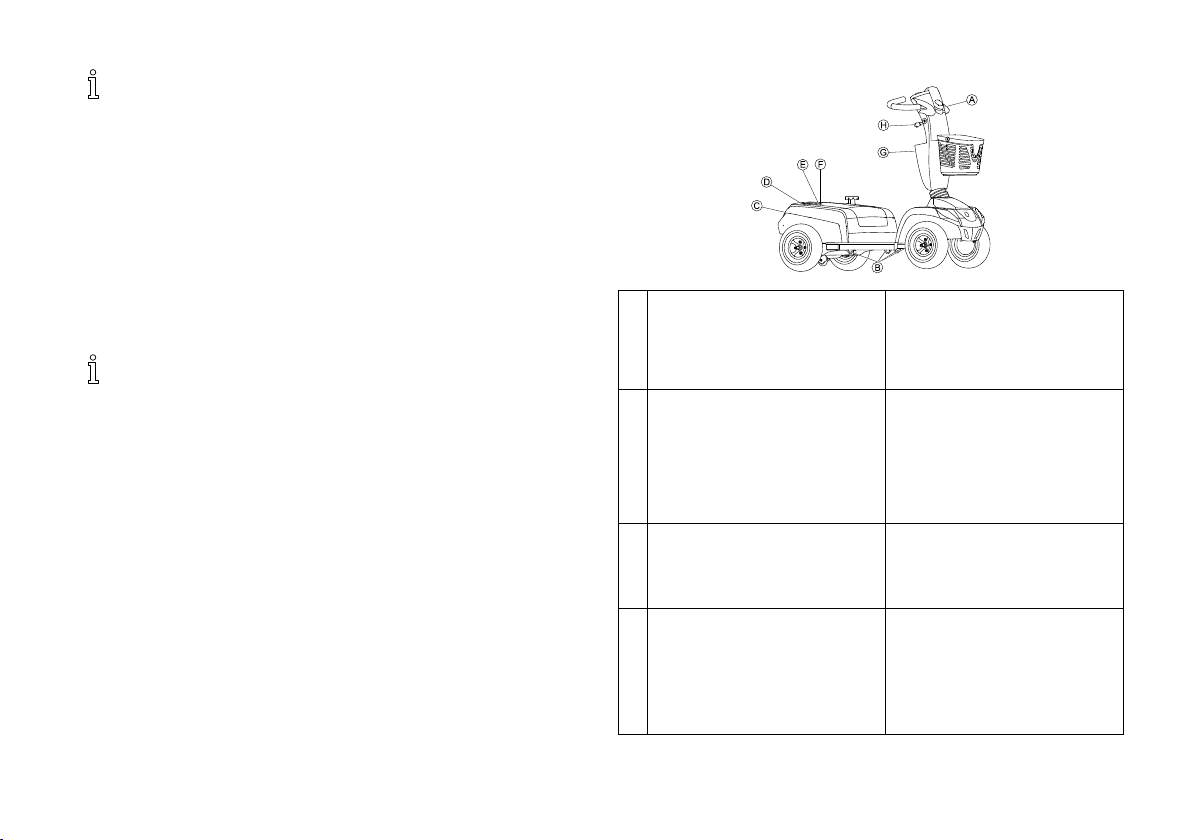
2.7Labelsontheproduct
A
B
C
D
Identificationofcharger
socket(left-handsideof
steeringcolumn,notvisiblein
picture).
Identificationoftransport
fixationhooks.
Identificationlabelstickeron
thechassisattherear.
Fordetailsseebelow.
Europeanrepresentativelabel
onthechassisattherear.
14
1603455-A
Page 15
Safety
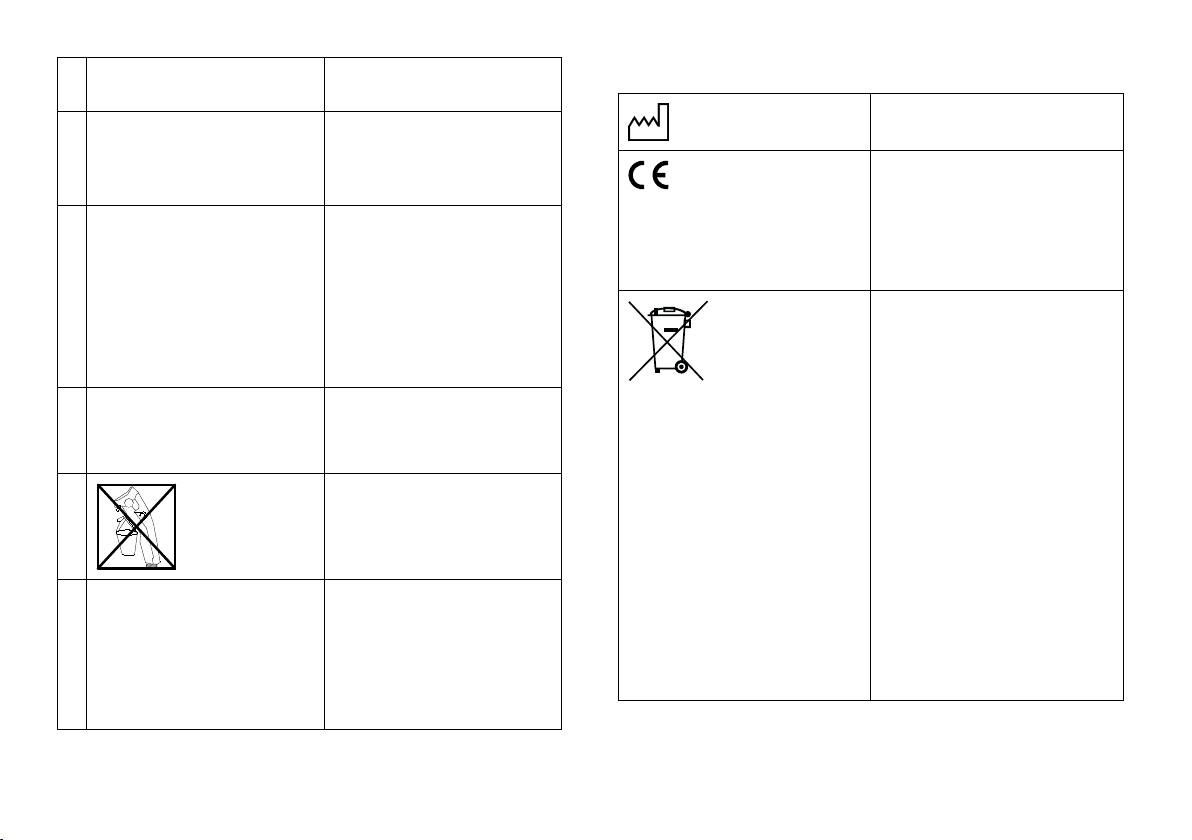
E
F
IdentificationofHDversion
HD
(Comet
only).
Identificationoftheposition
Explanationofsymbolsonlabels
Dateofmanufacture.
ofthespringsonthechassis
attherear(Comet
HD
only).
Thisproductcomplieswith
Directive93/42/EECconcerning
G
Batterylabelunderthecover
attherear.
medicaldevices.Thelaunch
dateofthisproductisstated
intheCEdeclarationof
conformity.
Thisproducthasbeensupplied
fromanenvironmentallyaware
manufacturer.Thisproductmay
containsubstancesthatcould
H
Identificationoftheposition
ofthecouplingleverfor
drivingandpushoperation.
I
Warningthattheleverfor
adjustingthesteeringcolumn
maynotbeusedasahook.
beharmfultotheenvironment
ifdisposedofinplaces(landfills)
thatarenotappropriate
accordingtolegislation.
•The'crossedoutwheelie
bin'symbolisplacedon
thisproducttoencourage
youtorecyclewherever
possible.
J
Warningthatthemobility
devicemaynotbeusedasa
vehicleseat.
Thismobilitydevicedoesnot
satisfytherequirementsof
•Pleasebeenvironmentally
responsibleandrecycle
thisproductthroughyour
recyclingfacilityatitsend
oflife.
ISO7176-19.
1603455-A15
Page 16

Invacare®CometSeries
Thissymbolindicatesthe
“Drive”positionofthecoupling
lever.Inthispositionthemotor
isengagedandthemotorbrakes
areoperational.Youcandrive
themobilitydevice.
Thissymbolindicatesthe
“Push”positionofthecoupling
lever.Inthispositionthemotor
isdisengagedandthemotor
brakesarenotoperational.The
mobilitydevicecanbepushed
byanattendantandthewheels
turnfreely.
161603455-A
Page 17
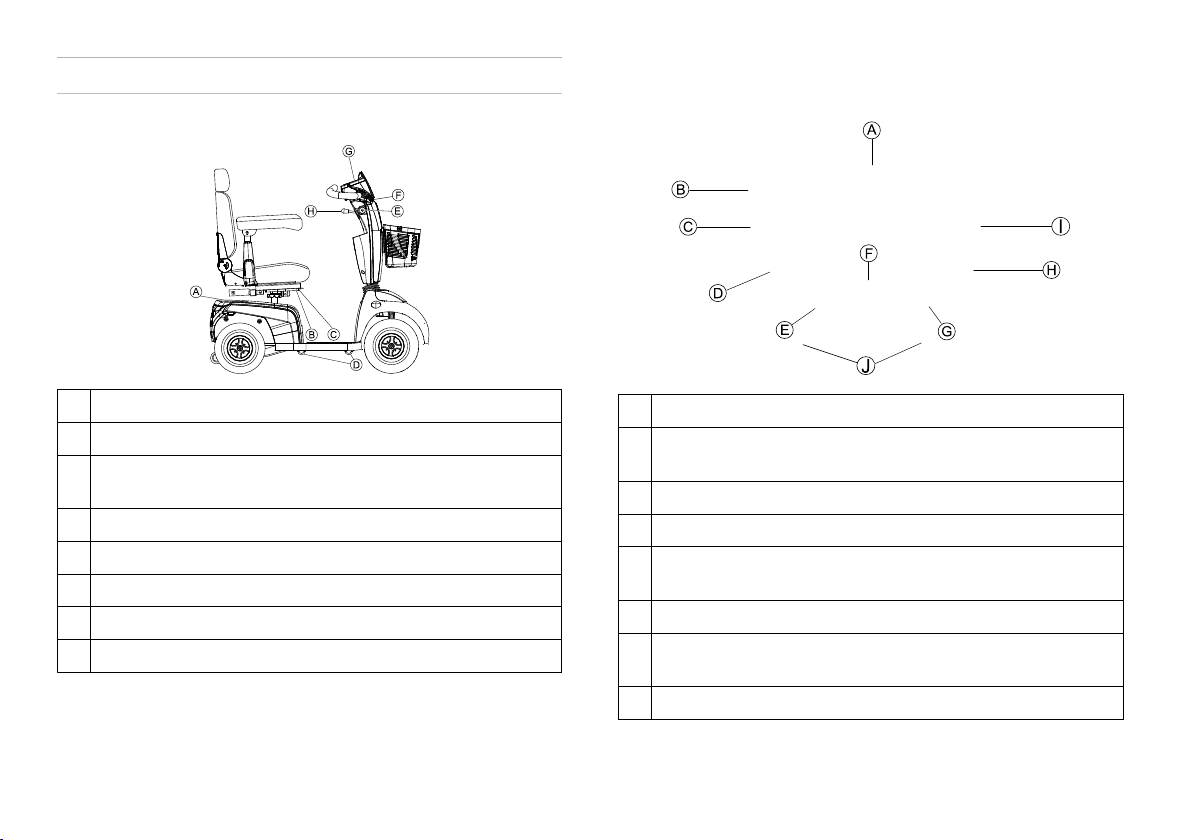
Components
3Components
3.1Mainpartsofthescooter
Disengaginglever
A
Unlockingleverforslidingseatrails(frontrightbelowseat)
B
Unlockingleverforswivellingandremovingseat(leftunder
C
theseat,notvisibleinpicture)
Transportfixationhooks
D
Keyswitch(ON/OFF)
E
Brakelever(right-handlever)
F
Operatingconsole(LEDorLCD)
G
Leverforadjustingsteeringcolumnangle
H
3.2Operatingconsole(LEDversion)
Arrangement
Statusdisplay
A
Switchingon/offcurvecontrol(reductionofspeedwhen
B
drivinginacurve)
Hazardlights
C
Horn
D
Left-handdirectionindicator(switchesitselfoffautomatically
E
after30seconds)
Speedcontroldial
F
Right-handdirectionindicator(switchesitselfoffautomatically
G
after30seconds)
Lighting
H
1603455-A17
Page 18

Invacare®CometSeries
Lowspeedmode
I
Drivelever
J
Statusdisplay
TheON/OFFdiode(1)isusedasafaultdisplay(status
display).Itwillflashifthereisaproblemwiththescooter.
Thenumberofflashesindicatesthetypeoferror.Referto
11.1.2Errorcodesanddiagnosticcodes,page53.
Batteryindicationgauge
Lowbatteryindication:Everytimethescooterisactivated
oratworkwhenbatterycapacityislowerthan25%,the
electronicsystemwillbeepthreetimes.
Overdischargeprotection:afteracertaindrivetimeon
reservebatterypowertheelectronicsystemswitchesthe
driveoffautomaticallyandbringsthescootertoastandstill.
Ifyoudonotdriveyourscooterforawhilethebatteries
will"recuperate"andallowafurther,butshort,journey.
However,afteraverybriefjourneythebatteryreserve
symbolwillilluminateagainandtheelectronicsystemwill
beepthreetimes.Thisprocedureleadstobatterydamage
andshouldbeavoidedifpossible!
Reduceddrivingrange.
Batterycapacity:<25%
Batterycapacity:<20%
(2)(3)(4)(5)(6)(7)(8)
Rechargethebatteriesattheendof
yourjourney.
Batteryreserve=severelyrestricted
drivingrange.
Rechargebatteriesimmediately!
Batterycapacity
>80%
<80%
<65%
<50%
<35%
<25%
<20%
181603455-A
Page 19
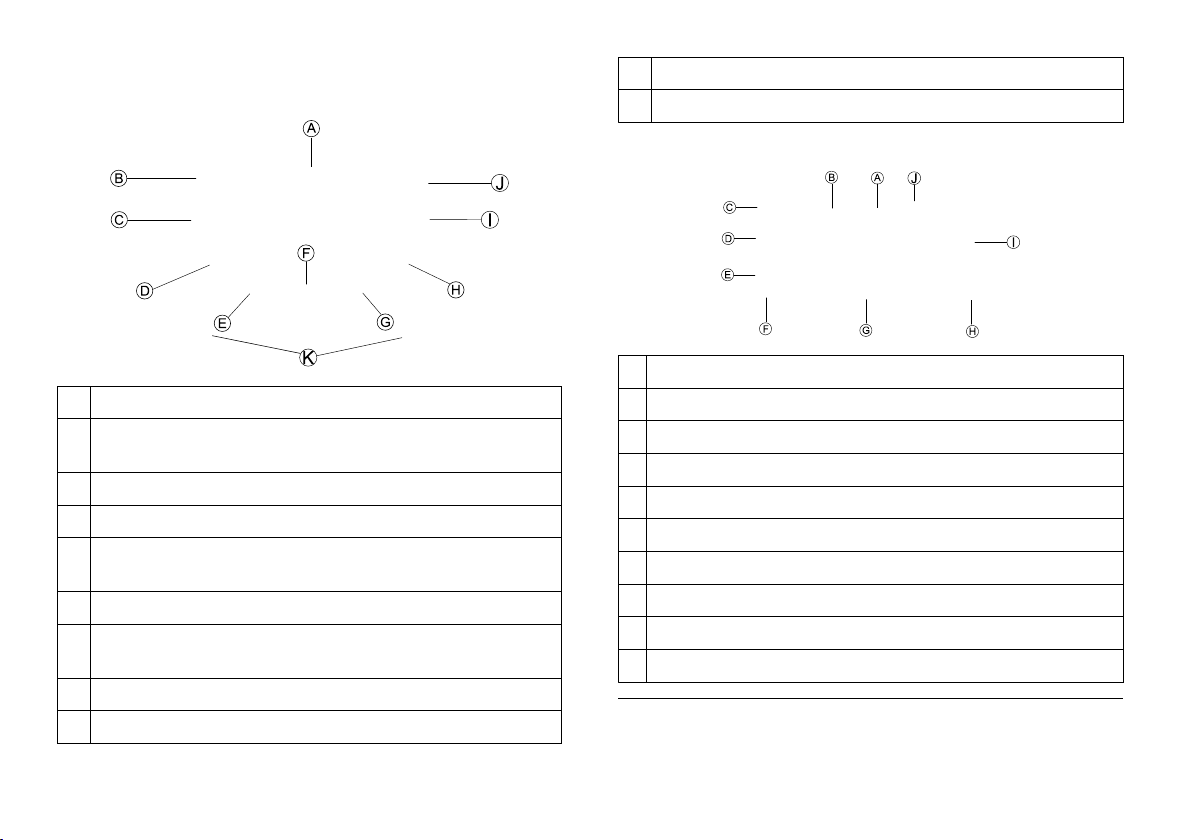
Components
3.3Operatingconsole(LCDversion)
Arrangement
Statusdisplay
A
Switchingon/offcurvecontrol(reductionofspeedwhen
B
drivinginacurve)
Hazardlights
C
Horn
D
Left-handdirectionindicator(switchesitselfoffautomatically
E
after30seconds)
Speedcontroldial
F
Right-handdirectionindicator(switchesitselfoffautomatically
G
after30seconds)
Lighting
H
Lowspeedmode
I
Setting
J
Drivelever
K
Statusdisplay
Speedindication
A
Faultindication
B
Curvecontrolindication
C
Maintenanceindication
D
Headlightindication
E
Leftturnindication
F
Settingsshown:ODO,TRIP,TEMP,TIME
G
Rightturnindication
H
Batterystatus
I
Lowspeedselectionindication
J
1Ifthissymbolstartsflashingforoneminuteeverytimethe
scooterisswitchedon,contactyourprovider.
1
1603455-A19
Page 20

Invacare®CometSeries
Batteryindicationgauge
Lowbatteryindication:Everytimethescooterisactivated
oratworkwhenbatterycapacityislowerthan25%,the
electronicsystemwillbeepthreetimes.
Overdischargeprotection:afteracertaindrivetimeon
reservebatterypowertheelectronicsystemswitchesthe
driveoffautomaticallyandbringsthescootertoastandstill.
Ifyoudonotdriveyourscooterforawhilethebatteries
will"recuperate"andallowafurther,butshort,journey.
However,afteraverybriefjourneythebatteryreserve
symbolwillilluminateagainandtheelectronicsystemwill
beepthreetimes.Thisprocedureleadstobatterydamage
andshouldbeavoidedifpossible!
Reduceddrivingrange.
Batterycapacity:<25%
Batterycapacity:<20%
Rechargethebatteriesattheendof
yourjourney.
Batteryreserve=severelyrestricted
drivingrange.
Rechargebatteriesimmediately!
>80%<80%<65%<50%<35%<25%<20%
201603455-A
Page 21

Setup
4Setup
4.1Generalsetupinformation
1603455-A
WARNING!
Riskofdeath,seriousinjury,ordamage
Continueduseofthemobilitydevicethatisnotsetto
thecorrectspecificationsmaycauseerraticbehavior
ofthemobilitydeviceresultingindeath,seriousinjury,
ordamage.
–Performanceadjustmentsshouldonlybemadeby
professionalsofthehealthcarefieldorpersons
fullyconversantwiththisprocessandthedriver's
capabilities.
–Afterthemobilitydevicehasbeenset-up/adjusted,
checktomakesurethatthemobilitydeviceperforms
tothespecificationsenteredduringtheset-up
procedure.Ifthemobilitydevicedoesnotperform
tospecifications,IMMEDIATELYturnthemobility
deviceOffandre-enterset-upspecifications.Contact
Invacare,ifmobilitydevicestilldoesnotperformto
correctspecifications.
WARNING!
Riskofdeath,seriousinjury,ordamage
Attachinghardwarethatislooselysecuredormissing
couldcauseinstabilityresultingindeath,seriouspersonal
injury,orpropertydamage.
–AfterANYadjustments,repairorserviceandbefore
use,makesurethatallattachinghardwareispresent
andtightenedsecurely.
WARNING!
Riskofinjuryordamage
Incorrectsetupofthismobilitydeviceperformedby
users/caregiversorunqualifiedtechnicianscanresultin
injuryordamage.
–DONOTattempttosetupthismobilitydevice.Initial
setupofthismobilitydeviceMUSTbeperformedby
aqualifiedtechnician.
–Adjustmentbytheuserisonlyrecommendedafter
theyhavebeengivenappropriateguidancebythe
healthcareprofessional.
–DONOTattempttocarryouttheworkifyoudonot
havethelistedtoolsavailable.
CAUTION!
Damagetomobilitydeviceandaccidenthazard
Itispossiblethatcollisionscanoccurbetweenmobility
devicecomponentsduetovariouscombinationsof
adjustmentoptionsandtheirindividualsettings
–Themobilitydeviceisfittedwithanindividual,
multiplyadjustableseatingsystemincludingadjustable
legrests,armrests,aheadrestorotheroptions.These
adjustmentoptionsaredescribedinthefollowing
chapters.Theyareusedtoadapttheseattothe
physicalrequirementsandtheconditionoftheuser.
Whenadaptingtheseatingsystemandtheseat
functionstotheuser,ensurethatnomobilitydevice
componentscollide.
Initialsetupshouldalwaysbedonebyahealthcare
professional.Adjustmentbytheuserisonlyrecommended
aftertheyhavebeengivenappropriateguidancebythe
healthcareprofessional.
21
Page 22

Invacare®CometSeries
Notethattheremaybesectionsinthisusermanual,which
arenotrelevanttoyourproduct,sincethismanualapplies
toallexistingmodules(onthedateofprinting).
4.2Movingtheseatpositionforwardsor backwards
Thedisengagingleverforadjustingtheseatislocatedfrontright
belowtheseat.
1.PulltheleverAtodisengagetheseat.
2.Slidetheseatforwardsorbackwardsintotherequiredposition.
3.Releasethelevertolocktheseatintotherequiredposition.
4.3Adjustingthearmrestwidth
WARNING!
Seriousinjury
Ifoneofthearmrestsisadjustedtoawidthwhich
exceedsthepermissiblevaluethearmrestfallsoutofits
bracketswhichcouldleadtoseriousinjury.
–Thewidthadjustmentisfittedwithsmallstickerswith
markingsandtheword“STOP”.Thearmrestmust
neverbepulledoutfurtherthenthepointatwhich
theword“STOP”iscompletelylegible.
–Alwaystightenthefixingscrewsproperlyonce
adjustmentshavebeencompleted.
Theknobsforreleasingthearmrestsarelocatedundertheseat.
1.TurntheknobsAtoloosenthefixingforthearmrest.
2.Adjustthearmreststotherequiredwidth.
3.Retightentheknobs.
22
1603455-A
Page 23

Setup
4.4Adjustingthearmrestheight
•Phillipsscrewdriver
1.LoosenandremovethearmrestfixingscrewA.
2.Adjustthearmresttotherequiredheight.
3.Insertthescrewandtightenagain.
4.5Adjustingthearmrestangle
•6mmAllenkey
•13mmwrench
1.Swivelupthearmrest.
2.UsethesocketwrenchtoloosenthecounternutA.
3.AdjustthescrewBuntilthedesiredsettingangleofthearmrest
hasbeenachieved.
4.Re-tightenthecounternut.
4.6Adjustingbackrestangle
Comfortseat
•5mmAllenkey
•10mmwrench
1.RemovescrewAononesideoftheseat.
2.Setbackresttodesiredanglebyselectingoneoftwoholesin
metalfixationplate.
3.Insertscrewandtightenit.
4.PulloutpinBandmovebackresttodesiredangle.
Pinsnapsintoplaceautomatically.
Deluxe&Premiumseat
TheleverAforadjustingthebackrestangleislocatedontheleft
oftheseat.
1603455-A23
Page 24

Invacare®CometSeries
1.Pullleverandadjustbackresttodesiredanglebyleaning
forwardsorbackwards.
4.7Adjustingthelordosissupport(Comet
only)
Thelordosissupportistheoutwardswellofthebackrestwhich
supportsthelumbarregionofthespine.Youcanregulatethe
strengthoftheoutwardswellusinganairpumptofititindividually.
Swellingthelordosissupportmore
1.Ensurethattheairventscrew(1)isclosedfullyclockwise.
2.Pumpairintothelordosissupportusingtherubberball(2).
Thelordosissupportwillswelloutwardsmore.
Swellingthelordosissupportless
1.Undotheairventscrew(1)anticlockwiseandallowairtoescape
outofthelordosissupport.
Thelordosissupportwillswelloutwardsless.
ULTRA
4.8Adjustingtheheadrest
24
1603455-A
Page 25

Setup
1.Toraiseheadrest,pushthereleasebuttonAandliftheadrest
uptodesiredposition.
2.Tolowerheadrest,pushthereleasebuttonandlowerheadrest
tothedesiredposition.
4.9Disengagingtheseattorotateorremoveit
Theseatcanbeturnedtoonesidetomakegettinginandoutofthe
scootereasier.Theseatisalsoeasiertoremovefromthisposition.
Theseatleverislocatedundertheseatontheleft.
Removingtheseat
1.PulltheleverAtodisengagetheseat.
2.Holdtheseatfirmlybythebackrestandfrontedgeandremove
itupwards.
Installingtheseat
1.Lowertheseatassemblyontotheseatpost.
2.Allowtheseattodropintothelockedposition.
3.Liftuptheseatassemblytoensuretheseatissecured.
4.10Movingtheseatlifter(option)
Rotatingtheseat
1.PulltheleverAtodisengagetheseat.
2.Turntheseattotheside.
1603455-A25
Page 26

Invacare®CometSeries
TherockerswitchAforadjustingtheseatlifterislocatedonthe
steeringcolumn.
1.Presstheswitchupordown.Theseatlifterraisesorlowers.
4.11Adjustingtheangleofthesteeringcolumn
Theangleofthesteeringcolumncanbeadjustedtoyourpersonal
requirementstoensureagoodseatingpositionwhiledrivingthe
scooter.
1.PushtheleverAdownwardstoadjustthesteeringcolumn.
2.Holdtheleverandmovethesteeringcolumnforwardsor
backwardsuntilitfitstoyourrequirements.
3.Releasethelever.
Theleverautomaticallyswitchesbacktoitsposition.
Themomentyoureleasethelever,thesteeringcolumn
isfixed.
261603455-A
Page 27

Accessories
5Accessories
5.1Posturebelts
Aposturebeltisanoptionwhichcaneitherbefixedtothemobility
deviceex-worksorcanberetrofittedbyyourspecialistprovider.
Ifyourmobilitydeviceisfittedwithaposturebelt,yourspecialist
providerwillhaveinformedyouaboutfittingandusage.
Theposturebeltisusedtohelpthemobilitydeviceuserkeepan
optimumseatingposition.Correctuseofthebeltassiststheuser
insittingsecurely,comfortablyandwell-positionedinthemobility
device,especiallyforsuchuserswhodonothavesuchagoodsense
ofbalancewhilesitting.
Werecommendusingtheposturebeltwheneverthe
mobilitydeviceisused.
5.1.1Typesofposturebelts
Yourmobilitydevicecanbefittedwiththefollowingposturebelt
typesex-works.Ifyourmobilitydevicehasbeenfittedwithadifferent
belttothoselistedbelow,pleaseensurethatyouhavereceivedthe
manufacturer'sdocumentationwithregardtocorrectfittinganduse.
Beltwithmetalbuckleadjustableononeside
5.1.2Adjustingtheposturebeltcorrectly
Thebeltshouldbetightenoughtoensurethatyouare
sittingcomfortablyandthatyourbodyisinthecorrect
sittingposition.
1.Ensurethatyouaresittingcorrectly,whichmeansthatyouare
sittingrightatthebackoftheseat,yourpelvisispositionederect
andassymmetricallyaspossible,nottothefront,tothesideor
atoneedgeoftheseat.
2.Positiontheposturebeltsothatyourhipbonescanbeeasily
feltabovethebelt.
3.Adjustthebeltlengthusingoneoftheadjustmentaidsdescribed
above.Thebeltshouldbeadjustedsothatyoucanfitaflathand
betweenthebeltandyourbody.
4.Thebuckleshouldbepositionedascentrallyaspossible.Indoing
so,carryoutadjustmentsonbothsidesasmuchaspossible.
5.Checkyourbelteveryweektoensurethatitisstillingood
workingcondition,toensureithasnodamageorwear,and
thatitisfixedproperlytothemobilitydevice.Ifthebelt
isonlyfastenedwithaboltedconnection,ensurethatthe
connectionhasnotloosenedorcomeundone.Youcanfind
moreinformationaboutmaintenanceworkonbeltsinthe
servicemanual,whichisavailablefromInvacare.
5.1.3Installingtheposturebelt
•12mmwrench
•13mmwrench
Thebeltcanonlybeadjustedononeside,whichcanresultinthe
bucklenotbeinginthemiddleofthewaist(acrosspelvicarea)after
adjustmenthastakenplace.
1603455-A27
Page 28

Invacare®CometSeries
Themountingbrackets(1)forattachingthebelt,arelocatedunder
theseat(thefigureshowsonlythelefthandside).
1.Takeholdofthebeltmountingandholditinfrontoftheholein
themountingbracket.
2.
Positionthebolt(1),screwthenutonfromtheothersideand
tightenwithawrench.
3.
Repeatsteps1–2ontheoppositesideoftheseatwiththe
remainingsideoftheposturebelt.Checktoensurethatthenut
istightenedproperlyonthebolt.
•DolomiteLegacy600
•InvacareBanjoP452E/3
Themaximumpermittedrollatorweightis9kg.
CAUTION!
Riskoftippingasaresultofalteredcenterof
gravity
Thecenterofgravityofthescootershiftstowardsthe
backasaresultofattachingtherollator.Themaximum
safeangleofinclineistherebyreducedbyupto2°.
–Notethatgradientsthatyouwouldnormallybeable
tonegotiatemaynowbetoosteepandthescooter
couldtip.Donotattempttoclimbordescendsuch
gradients.
5.2.1Attachingtherollator
DolomiteJazz600
5.2Rollatorbracket
Yourscootercanbefittedwithanoptionalrollatorbracket.Only
thefollowingrollators,whichhavebeenapprovedbyInvacare,canbe
transportedusingthisbracket:
•DolomiteJazz600
281603455-A
Page 29

Accessories
DolomiteLegacy600
InvacareBanjo
P452E/3
5.2.2Removingtherollatorbracket
1.Loosenthescrews(1).
2.Pulltherollatorbracketoutofthefixtures.
5.2.3Positioningtherearreflector
CAUTION!
Riskofaccidentduetopoorvisibility
Ifyouwishtouseyourmobilitydeviceonpublicroads
andarearreflectorisrequiredbynationallegislation,
thentherollatorbracketmaynotcovertherear
reflector.
–Makesurethattherearreflectorismountedinsuch
awaythatasufficientamountofthereflectivearea
isvisible.
1603455-A29
Page 30

Invacare®CometSeries
1.Positiontherearreflectorasshowninthedrawing.
5.3Changingthecoloredshrouds
Itispossibletochangethecolorofyourscooterbyreplacingthe
coloredshrouds.
1.Removetheexistingshroudscarefully.
2.PlacetheplasticnoseAintotheintendedholesBandclickin
thenewshrouds.
Changethearmrestshroud
Changetheheadshroud
301603455-A
Page 31

Changethefrontsideshroud
Changetherearsideshroud
Accessories
1603455-A31
Page 32

Invacare®CometSeries
6Usage
6.1Gettinginandout
Thearmrestcanbeswivelledupwardstoassistgettinginandout.
Theseatcanalsoberotatedtoassistgettinginandout.
1.
PullthedetentleverA.
2.
Turntheseattotheside.
321603455-A
Page 33

Usage
Informationonturningtheseat
Thedetentautomaticallyengagesagainineight-turns.
6.2Beforedrivingforthefirsttime
Beforeyoutakeyourfirsttrip,youshouldfamiliarizeyourselfwell
withtheoperationofthemobilitydeviceandwithalloperating
elements.Takeyourtimetotestallfunctionsanddrivingmodes.
Ifinstalled,makesuretoproperlyadjustandusetheposture
belteachtimeyouusethemobilitydevice.
Sittingcomfortably=Drivingsafely
Beforeeachtrip,makesurethat:
•Youarewithineasyreachofalloperatingcontrols.
•Thebatterychargeissufficientforthedistanceintendedtobe
covered.
•Theposturebelt(ifinstalled)isinperfectorder.
•Therearmirror(ifinstalled)isadjustedsoyoucanlookbehind
atalltimeswithouthavingtobendforwardorshiftyourseating
position.
6.3TakingObstacles
6.3.1Maximumobstacleheight
Youcanfindinformationaboutmaximumobstacleheightsinthe
chapterentitled12Technicaldata,page55.
6.3.2Safetyinformationwhenascendingobstacles
WARNING!
Riskoftippingover
–Neverapproachobstaclesatananglebutat90
degreesasshownbelow.
–Putyourbackrestintoanuprightpositionbefore
climbinganobstacle.
6.3.3Thecorrectwaytoovercomeobstacles
Right
Wrong
Drivingupoveranobstacle
1.Approachthecurborobstacleslowlyhead-on.Shortlybefore
thefrontwheelstouchtheobstacle,increasethespeedand
reduceonlyaftertherearwheelshavealsoclimbedtheobstacle.
Drivingdownoffofanobstacle
1.Approachthecurborobstacleslowlyhead-on.Beforethefront
wheelstouchtheobstacle,reducespeedandkeepituntilalso
therearwheelshavecomedownoffoftheobstacle.
6.4Drivingupanddowngradients
Forinformationconcerningtheratedslope,referto12Technical
data,page55.
1603455-A33
Page 34

Invacare®CometSeries
WARNING!
Riskoftippingover
–Onlyeverdrivedownhillatamaximumof2/3ofthe
topspeed.
–Ifyourscooterisfittedwithanadjustablebackrest,
alwaysreturnthebackrestofyourseattoanupright
positionbeforeascendingslopes.Werecommend
thatyouleanthebackrestslightlytotherearbefore
descendingslopes.
–Whendescendingslopes,bringyourseattoa
maximumforwardposition.
–Neverattempttoascendordescendaslopeon
slipperysurfacesorwherethereisadangerof
skidding(suchaswetpavement,iceetc).
–Avoidtryingtogetoutofthescooteronanincline
oragradient.
–Alwaysdriveinastraightdirectionalongtheroador
pathyouaretravellingon,ratherthanattemptingto
zigzag.
–Neverattempttoturnaroundonaninclineoraslope.
CAUTION!
Brakingdistanceismuchlongeronadownhill
slopethanoneventerrain
–Neverdrivedownaslopethatexceedstherated
slope(referto12Technicaldata,page55).
6.5Parkingandstationary
Ifyouparkyourvehicle,orleaveitidleorunattendedforalonger
period:
1.Switchoffthepowersupply(keyswitch)andremovekey.
6.6Useonpublicroads
Thewheelsmaybearthenote"NotForHighwayUse".However,
themobilitydevicemaybeusedonalltrafficroutesforwhichitis
approvedinaccordancewiththerelevantnationallegislation.
6.7Pushingthescooterbyhand
CAUTION!
Riskofinjuryifsomeonesitsonascooterwith
disengagedmotors
Ascooterwithdisengagedmotorscanrolloutof
control.
–Disengagethemotorsonlyifnooneissittingonthe
scooter.
Themotorsofthescooterarefittedwithautomaticbrakes,
preventingthescooterfromrollingawayoutofcontrolwhen
thepowersupplyisswitchedoff.Whenpushingthescooter,the
magneticbrakesmustbedisengaged.
6.7.1Disengagingmotors
CAUTION!
Riskofvehiclerunningaway
Whenthemotorsaredisengaged(forpushoperation
whilstfreewheeling),theelectromagneticmotorbrakes
aredeactivated.
–Whenthevehicleisparked,theleversforengaging
anddisengagingthemotorsmustbelockedfirmlyinto
the“DRIVE”position(electromagneticmotorbrakes
activated).
Theleverforengaginganddisengagingthemotorislocatedonthe
right-handsideattherear.
341603455-A
Page 35

Disengagingthedrive
1.Switchoffthescooter(keyswitch).
2.PresstheunlockingknobAonthedisengaginglever.
3.Pushthedisengagingleverforwards.
Thedriveisdisengaged.Thescootercanbepushedbyhandnow.
Engagingthedrive
1.Pullthelevertotherear.
Thedriveisengaged.
6.8Drivingthescooter
WARNING!
Riskofinjuryfromtheunintendedrollingofthe
vehicle
Whenstoppingthevehicle,thedriveleverneedsto
returnentirelytothemiddlepositiontoactivatethe
electromagneticbrakes.Ifthereisanyobstruction
stoppingtheleverfromreturningtothemiddleposition,
theelectromagneticbrakescannotbeactivated.Thiscan
leadtothevehiclerollingunintentionally.
–Ensurethatthedriveleverisinthemiddleposition,if
thevehicleistoremainstationary.
Usage
1.Switchthepowersupplyon(keyswitch).
Theoperatingconsoledisplayilluminates.Thescooterisready
todrive.
Ifthescooterisnotreadytodriveafterswitchingon,check
thestatusdisplay(referto3.3Operatingconsole(LCD
version),page19and11.1Diagnosisandfaultrepair,page
52).
2.Settherequiredspeedwiththespeedcontroller.
3.Pulltheright-handdrivelevercarefullytotravelforwards.
4.Pulltheleft-handdrivelevercarefullytotravelinreverse.
Thecontrolsystemisprogrammedwithstandardvalues
intheworks.YourInvacareprovidercancarryout
programmingtailoredtofityourrequirements.
WARNING!
Anychangestothedriveprogramcanaffectthe
drivingcharacteristicsandthetippingstability
ofthevehicle.
–Changestothedriveprogrammayonlybecarriedout
bytrainedInvacareproviders.
–Invacaresuppliesallmobilityproductswithastandard
driveprogramex-works.Invacarecanonlygivea
warrantyforsafevehicledrivingbehavior-especially
thetippingstability-forthisstandarddriveprogram.
Tobrakequickly,simplyletgoofthedrivelever.Itwillthen
automaticallyreturntothemiddleposition.Thescooter
willbrake.
Tobrakeinanemergency,followtheaboveandpullthe
handbrakeleveruntilthescootercomestoahalt.
1603455-A35
Page 36

Invacare®CometSeries
6.9Switchingthelightsonandoff
1. PresstheLightkey.
Thelightisswitchedonoroff.
Whenthelightisswitchedon,theLEDbesidethekeyandtheLight
symbolintheLCDdisplay(iffitted)illuminate.
6.10Switchingthedirectionindicatoronandoff
1.PresstheDirectionindicatorkeyforleft
orright.
Thedirectionindicatorisswitchedonoroff.
Whenthedirectionindicatorisswitchedon,theLEDbesidethe
keyandtheDirectionindicatorsymbolintheLCDdisplay(iffitted)
illuminate.Accordingtothesetupanacousticsignalsounds.The
directionindicatorswitchesitselfoffautomaticallyafter30seconds.
6.11Switchingthehazardlightsonandoff
1.
Thehazardlightsareswitchedonoroff.
Whenthehazardlightsareswitchedon,theLEDsbesidethe
DirectionindicatorkeysandtheHazardlightsymbolintheLCD
display(iffitted)illuminate.Accordingtothesetupanacousticsignal
sounds.
361603455-A
PresstheHazardlightskey.
6.12Usingthehorn
1.
Anacousticsignalsounds.
Pressthehornkey.
6.13Switchingthelowspeedmodeonandoff
Yourscooterisfittedwithalowspeedmode.Thisfunctionlowers
thescooter’sspeed.
1.
Thelowspeedmodeisswitchedonoroff.
Whenthelowspeedmodeisswitchedon,theLEDbesidethekey
andtheLowspeedsymbolintheLCDdisplay(iffitted)illuminate.
PresstheLowspeedkey.
6.14Activatinganddeactivatingcurvecontrol
duringbendtravel
Ifyourscooterisfittedwithautomaticcurvecontrolitisactivated
asstandardwhenthescooterisswitchedon.Thisfunctionlowers
thescooter’sspeedassoonasyoustartdrivingroundabend.Itis
primarilydesignedforinexperienceduserswhomayfeelunsureof
thescooter’sdynamicdrivingbehaviorinabend.If,however,you
areanexperienceduser,youmaywishtodeactivatethisfunction.
Youneedtobeawarethatdeactivatingthisfunctionwill
leadtoadifferentdynamicdrivingbehavior.Becarefulwhen
drivingroundabend.
Page 37

Usage
Deactivatingcurvecontrol
1.
Pressthesettingkeyforfiveseconds.TheLEDbesidethekey
andthesymbolforcurvecontrolintheLCDdisplay(iffitted)
illuminate.Curvecontrolisdeactivated.
Activatingcurvecontrol
1.
Pressthesettingkeyforfiveseconds.TheLEDbesidethekey
andthesymbolforcurvecontrolintheLCDdisplay(iffitted)go
out.Curvecontrolisactivated.
6.15Modeselection
IntheLCDdisplayyoucanswitchbetweenfourdifferentmodes.
ODOmode:
TRIPmode:Displaysthedistance,drivensincethelastreset.
TEMPmode:Displaysthetemperature.
TIMEmode:Displaysthetime.
Displaysthetotaldistancedrivenbythescooter.
Adjustingmodes
Youcanadjustthemodestoyourrequirements.
1.
Pressthesettingkeytochoosethemodeyouwanttoadjust.
2.
Pressbothdirectionindicatorkeysfortwoseconds.Depending
onthemodedooneofthefollowing:
a.
ODOmode:Pressleftindicatorkeytoselect
mile>>km>>hour.
b.
TRIPmode:Pressbothdirectionindicatorkeystoreset
lasttrip.
Switchingbetweenmodes
1.Pressthesettingkeytoswitchbetweenthemodes,shownin
thedisplay.
1603455-A37
c.
TEMPmode:Pressleftindicatorkeytoselect°Cor°F.
Page 38

Invacare®CometSeries
d.
TIMEmode:Pressrightindicatorkeytoselecthouror
minutes.
displayflashasconfirmation.TheLEDsarenumberedasshown
below.
Pressleftindicatorkeytochangetime.
3.Wait15secondsorpressanyotherkeyexceptforthedirection
indicatorkeys,tosavethesettings.
6.16Adjustingthedisplay
Activatingordeactivatingacousticsignals
Thescootercontrolscanbeprogrammedtoemitanacousticsignal
inthefollowingsituations:
•Usingthehorn.
•Batterycapacitylow(activatedindeliverystatus).
•Directionindicatorsactivated(activatedindeliverystatus).
•Hazardlampsactivated(activatedindeliverystatus).
•Reversegearactivated(bothreversegearandacousticsignal
areactivatedindeliverystatus).
LEDdisplay
Thecontrolsmustbeswitchedoffinordertoactivateordeactivate
anacousticsignalforparticularfunctions,andaparticularkeystroke
combinationneedstobeenteredwhenswitchingonagain.
Afterasignalforaparticularfunctionhasbeensuccessfully
activated/deactivated,acombinationofLEDsonthebatterycharge
381603455-A
ThekeystrokecombinationsandLEDcodesforvariousoptionsare
asfollows:
Function
Acousticsignal
atlowbattery
capacity
Acoustic
signalwhen
direction
indicators
activated
Acoustic
signalwhen
hazardlamps
activated
Acousticsignal
whenreverse
gearactivated
Proceedasfollowstoactivateordeactivateanacousticsignalfora
particularfunction:
Keystroke
combination
Lighting+
direction
indicatorleft
Lighting+
direction
indicatorright
Lighting+
hazardlamps
Lighting
+Speed
reduction
LED(s)Condition
2
2+3
4activated
4+5deactivated
6
6+7
2+3+4
5+6+7
activated
deactivated
activated
deactivated
activated
deactivated
Page 39

Usage
1.Switchoffthecontrols.
2.
Pressandholdbothdirectionindicatorkeys.
3.Switchonthecontrols.
4.Waittwosecondsuntiltheappropriateflashcodedisplayson
thebatterychargedisplay,thenreleasethekeys.Donothold
thekeystrokecombinationdownformorethanfiveseconds.
5.IfLED7flashesfivetimessubsequently,theacousticsignalhas
beensuccessfullyactivatedordeactivated.
6.Thecontrolsreturntonormaloperatingstatusautomatically.
LCDdisplay
IfyourscooterisfittedwithanLCDdisplay,youcaneitheractivate,
deactivateorchangethevolumeoftheacousticsignals.
1.Switchoffthecontrols.
2.
PressandholdbothdirectionindicatorkeysAandB.
3.Switchonthecontrols.
4.TheBuzzerVolumesetuppageilluminatesaftertwoseconds.
a.PresstheindicatorkeysAorBforthebuzzerselection.
b.PressLightingkeyCfordecreasingthevolume.
c.PressLowspeedkeyDforincreasingthevolume.
d.PressSettingmodekeyEforsavingandenterthenext
setuppage.
1603455-A39
Page 40

Invacare®CometSeries
Adjustingbacklight(onlyLCDdisplay)
1.
PresstheindicatorkeysAorBtoadjustthebacklightintensity.
2.PressSettingmodekeyEforsavingandenterthenextsetup
page.
Adjustingtimesetup(onlyLCDdisplay)
1.
PresstheindicatorkeysAorBtoadjustthetimesetup.
2.PressSettingmodekeyEforsaving.
401603455-A
Page 41

Controlssystem
7Controlssystem
7.1Controlsprotectionsystem
Thescootercontrolsisfittedwithanoverloadprotection.
Ifthedriveisseverelyoverloadedoveralongperiodoftime(for
example,whendrivingupasteephill)andespeciallywhenthe
ambienttemperatureishigh,theelectronicsystemcouldoverheat.
Inthiscasethescooterperformanceisgraduallyreduceduntilit
comestoahalt.Thestatusdisplayshowsacorrespondingerror
code(referto11.1.2Errorcodesanddiagnosticcodes,page53).By
switchingthepowersupplyoffandbackonagain,theerrorcodeis
clearedandthecontrolsisswitchedbackon.Itcanhowevertakeup
tofiveminutesuntilthecontrolshascooleddownenoughforthe
drivetorestorefullperformanceagain.
Ifthedriveisstalledbyaninsurmountableobstacle,forexample,a
curborsimilarwhichistoohigh,andthedriverattemptsdrivingfor
morethan20secondsagainstthisobstacle,thecontrolsautomatically
switchesofftopreventthemotorsfrombeingdamaged.Thestatus
displayshowsacorrespondingerrorcode(referto11.1.2Error
codesanddiagnosticcodes,page53).Byswitchingoffandbackon
again,theerrorcodeisclearedandthecontrolsisswitchedbackon.
7.1.1Themainfuse
Theentireelectricalsystemisprotectedagainstoverloadbytwomain
fuses.Themainfusesaremountedonthepositivebatterycables.
Adefectivemainfusemaybereplacedonlyafterchecking
theentireelectricalsystem.AspecializedInvacareprovider
mustperformthereplacement.Youcanfindinformationon
thefusetypein12Technicaldata,page55.
7.2Batteries
Powerissuppliedbytwo12Vbatteries.Thebatteriesare
maintenance-freeandonlyneedregularcharging.
Inthefollowing,youfindinformationonhowtocharge,handle,
transport,store,maintain,andusebatteries.
7.2.1Generalinformationoncharging
Newbatteriesshouldalwaysbefullychargedoncebeforetheirfirst
use.Newbatterieswillbeattheirfullcapacityafterhavingrun
throughapprox.10-20chargingcycles(break-inperiod).This
break-inperiodisnecessarytofullyactivatethebatteryformaximum
performanceandlongevity.Thus,rangeandrunningtimeofyour
mobilitydevicecouldinitiallyincreasewithuse.
Gel/AGMleadacidbatteriesdonothaveamemoryeffectasNiCd
batteries.
7.2.2Generalinstructionsoncharging
Followtheinstructionslistedbelowtoensuresafeuseandlongevity
ofthebatteries:
•Charge18hourspriortoinitialusage.
•Werecommendchargingthebatteriesdailyafterevery
dischargeevenafterpartlydischarge,aswellaseachnightover
night.Dependingonthelevelofdischarge,itcantakeupto12
hoursuntilthebatteriesarefullychargedagain.
•WhenthebatteryindicatorreachedtheredLEDrange,charge
thebatteriesfor16hoursminimum,neglectingthecharge
completedisplay!
•Trytoprovidea24hourchargeonceaweektomakesurethat
bothbatteriesarefullycharged.
•Donotcycleyourbatteriesatalowstateofchargewithout
regularlyrechargingthemfully.
1603455-A
41
Page 42

Invacare®CometSeries
•Donotchargeyourbatteriesunderextremetemperatures.
Hightemperaturesabove30°Carenotrecommendedfor
chargingaswellaslowtemperaturesbelow10°C.
•UseonlychargingdevicesinClass2.Thisclassofchargersmay
beleftunattendedduringcharging.Allchargingdeviceswhich
aresuppliedbyInvacarecomplywiththeserequirements.
•Youcannotoverchargethebatterieswhenusingthecharger
suppliedwithyourmobilitydevice,orachargerthathasbeen
approvedbyInvacare.
•Protectyourchargerfromsourcesofheatsuchasheaters
anddirectsunlight.Ifthebatterychargeroverheats,charging
currentwillbereducedandthechargingprocessdelayed.
7.2.3Howtochargethebatteries
1.Makesureyoureadandunderstandthebatterycharger'suser
manual,ifsupplied,aswellasthesafetynotesonthefrontand
rearpanelsofthecharger.
WARNING!
Riskofexplosionanddestructionofbatteriesif
thewrongbatterychargerisused
–Onlyeverusethebatterychargersuppliedwithyour
vehicle,orachargerthathasbeenapprovedby
Invacare.
WARNING!
Riskofelectricshockanddamagetothebattery
chargerifitgetswet
–Protectthebatterychargerfromwater.
–Alwayschargeinadryenvironment.
WARNING!
Riskofshortcircuitandelectricshockifthe
batterychargerhasbeendamaged
–Donotusethebatterychargerifithasbeendropped
ordamaged.
WARNING!
Riskofelectricshockanddamagetothebatteries
–NEVERattempttorechargethebatteriesbyattaching
cablesdirectlytothebatteryterminals.
WARNING!
Riskoffireandelectricshockifadamaged
extensioncableisused
–Onlyeveruseanextensioncableifitisabsolutely
necessary.Incaseyoumustuseone,makesureit
isingoodcondition.
WARNING!
Riskofinjuryifusingthewheelchairduring
charging
–DONOTattempttorechargethebatteriesand
operatethewheelchairatthesametime.
–DONOTsitinthewheelchairwhilechargingthe
batteries.
Thechargingsocketislocatedontheleftofthesteeringcolumn.
1.Switchoffthescooter.
2.Foldupthechargingsocketprotectivecap.
3.Connectthebatterychargertothescooter.
4.Connectthebatterychargertothepowersupply.
42
1603455-A
Page 43

Controlssystem
7.2.4Howtodisconnectthebatteriesaftercharging
1.Disconnectthebatterychargerfromthepowersupply.
2.Disconnectthebatterychargerfromthescooter.
3.Closethechargingsocketprotectivecap.
7.2.5StorageandMaintenance
Followtheinstructionslistedbelowtoensuresafeuseandlongevity
ofthebatteries:
•Alwaysstorethebatteriesfullycharged.
•Donotleavethebatteriesinalowstateofchargeforan
extendedlengthoftime.Chargeadischargedbatteryassoon
aspossible.
•Incaseyourmobilitydeviceisnotusedforalongerperiod
oftime(thatismorethantwoweeks),thebatteriesmustbe
chargedatleastonceamonthtomaintainafullchargeand
alwaysbechargedbeforeuse.
•Avoidhotandcoldextremeswhenstoring.Werecommendto
storebatteriesatatemperatureof15°C.
•GelandAGMbatteriesaremaintenance-free.Anyperformance
issuesshouldbehandledbyaproperlytrainedmobilitydevice
technician.
7.2.6Instructionsonusingthebatteries
CAUTION!
Riskofdamagingthebatteries.
–Avoidultra-deepdischargesandneverdrainyour
batteriescompletely.
•PayattentiontotheBatteryChargeIndicator!Chargethe
batterieswhentheBatteryChargeIndicatorshowsthatbattery
chargeislow.
Howfastthebatteriesdischargedependsonmany
circumstances,suchasambienttemperature,conditionofthe
surfaceoftheroad,tirepressure,weightofthedriver,wayof
drivingandutilisationoflighting.
•TrytochargethebatteriesalwaysbeforeyoureachtheredLED
range.
Thelast2LED(oneredandoneorange)meanaremaining
capacityof20—30%.
•DrivingwithblinkingredLEDmeansanextremestressforthe
batteryandshouldbeavoidedundernormalcircumstances.
•WhenonlyoneredLEDisblinking,theBatterySafefeature
isenabled.Fromthistime,speedandaccelerationisreduced
drastically.Itwillallowyoutomovethemobilitydeviceslowly
outofadangeroussituationbeforetheelectronicfinallycutsoff.
Thisisdeepdischargingandshouldbeavoided.
•Beawarethatfortemperaturesbelow20°C,thenominal
batterycapacitystartstodecline.Forexample,at-10°C
thecapacityisreducedtoabout50%ofthenominalbattery
capacity.
•Toavoiddamagingthebatteries,neverallowthemtobefully
discharged.Donotdriveonheavilydischargedbatteriesifitis
notabsolutelynecessary,asthiswillstrainthebatteriesunduly
andshortentheirlifeexpectancy.
•Theearlieryourechargethebatteries,thelongertheylive.
1603455-A43
Page 44

Invacare®CometSeries
•Thedepthofdischargeaffectsthecyclelife.Thehardera
batteryhastowork,theshorterisitslifeexpectancy.
Examples:
–Onedeepdischargestressesthesameas6normalcycles
(green/orangedisplayoff).
–Thebatterylifeisabout300cyclesat80%discharge(first3
LEDoff),orabout3000cyclesat10%discharge.
•Undernormaloperation,onceamonththebatteryshouldbe
dischargeduntilallgreenandorangeLEDareoff.Thisshouldbe
donewithinoneday.A16hourchargeafterwardsisnecessary
asreconditioning.
7.2.7Transportingbatteries
Thebatteriessuppliedwithyourmobilitydevicearenothazardous
goods.ThisclassificationisbasedontheGermanGGVSHazardous
GoodsRoadTransportOrdinances,andtheIATA/DGRHazardous
GoodsRailTransport/AirTransportOrdinances.Batteriesmaybe
transportedwithoutrestrictions,whetherbyroad,railorbyair.
Individualtransportcompanieshave,however,guidelineswhichcan
possiblyrestrictorforbidcertaintransportprocedures.Pleaseask
thetransportcompanyregardingeachindividualcase.
7.2.8Generalinstructionsonhandlingthebatteries
•Nevermixandmatchdifferentbatterymanufacturesor
technologies,orusebatteriesthatdonothavesimilardate
codes.
•NevermixgelwithAGMbatteries.
•Thebatteriesreachtheirendoflifewhenthedriverangeis
significantlysmallerthanusual.Contactyourproviderorservice
technicianfordetails.
•Alwayshaveyourbatteriesinstalledbyaproperlytrained
mobilitydevicetechnicianorapersonwithadequateknowledge.
Theyhavethenecessarytrainingandtoolstodothejobsafely
andcorrectly.
44
7.2.9Removingthebatteries
1.Removeseat.
2.Removebatteryandmotorcompartmentcover.
3.
OpenthebatteryretainingstrapA.
4.UnplugbatteryconnectingplugB.
5.Removebattery.
6.Repeatprocedureforotherbattery.
Replacingbatteriestakesplaceinreverseorder.
7.2.10Howtohandledamagedbatteriescorrectly
CAUTION!
Corrosionandburnsfromacidleakageif
batteriesaredamaged
–Removeclothesthathavebeensoiledbyacid
immediately.
Aftercontactwithskin:
–Immediatelywashaffectedareawithlotsofwater.
Aftercontactwitheyes:
–Immediatelyrinseeyesunderrunningwaterfor
severalminutes;consultaphysician.
1603455-A
Page 45

•Alwayswearsafetygogglesandappropriatesafetyclothingwhen
handlingdamagedbatteries.
•Placedamagedbatteriesinanacid-resistantreceptacle
immediatelyafterremovingthem.
•Onlyevertransportdamagedbatteriesinanappropriate
acid-resistantreceptacle.
•Washallobjectsthathavecomeintocontactwithacidwith
lotsofwater.
Disposingofdeadordamagedbatteriescorrectly
Deadordamagedbatteriescanbegivenbacktoyourprovideror
directlytoInvacare.
Controlssystem
1603455-A45
Page 46

Invacare®CometSeries
8Transport
8.1Transport-Generalinformation
WARNING!
Riskofsevereorfatalinjuriesintheeventofa
trafficaccidentifthismobilitydeviceisusedasa
vehicleseat!Itdoesnotfulfilltherequirements
ofISO7176-19.
–Undernocircumstancesshouldthismobilitydevice
beusedasavehicleseatortotransporttheuserin
avehicle.
WARNING!
Riskofdeathorseriousinjurytothemobility
deviceuserandpotentiallyanyothernearby
occupantofthevehicle,ifamobilitydevice
issecuredusinga4-pointtie-downsystem
availablefromathirdpartysupplierandthe
unladenweightofthemobilitydeviceexceeds
themaximumweightforwhichthetie-down
systemiscertified.
–Makesuretheweightofthemobilitydevicedoesnot
exceedtheweightforwhichthetie-downsystem
iscertified.Consultthetie-downmanufacturer's
documentation.
–Ifyouareunsurehowmuchyourmobilitydevice
weighs,thenyoumusthaveitweighedusingcalibrated
scales.
8.2Transferringthemobilitydevicetoavehicle
WARNING!
Themobilitydeviceisatriskoftippingoverifit
istransferredtoavehiclewhiletheuserisstill
seatedinthemobilitydevice
–Transferthemobilitydevicewithouttheuser
wheneverpossible.
–Ifthemobilitydevicewiththeuserhastobe
transferredtoavehicleusingaramp,ensurethatthe
rampdoesnotexceedtheratedslope(referto12
Technicaldata,page55
–Ifthemobilitydevicehastobetransferredtoavehicle
usingarampthatdoesexceedtheratedslope(refer
to12Technicaldata,page55),awinchmustthenbe
used.Anattendantcanthensafelymonitorandassist
thetransferprocess.
–Alternatively,aplatformliftmaybeused.
–Ensurethatthetotalweightofthemobilitydevice
includingtheuserdoesnotexceedthemaximum
permittedtotalweightfortheramporplatformlift.
–Themobilitydeviceshouldalwaysbetransferredto
avehiclewiththebackrestinanuprightposition,
theseatlifterloweredandtheseattiltintheupright
position(refertoDrivingupanddowngradients).
).
461603455-A
Page 47

WARNING!
Riskofinjuryanddamagetothemobilitydevice
Ifthemobilitydeviceistobetransferredtoavehiclevia
alift,whentheremoteisturnedon,thereisariskthat
thedevicemayacterraticallyandfalloffthelift.
–Beforetransferringthemobilitydeviceviaalift,turn
offtheproductanddisconnecteitherthebuscable
fromtheremoteorthebatteriesfromthesystem.
1.Driveorpushyourmobilitydeviceintothetransportvehicle
usingasuitableramp.
8.3Transportingthemobilitydevicewithout
occupant
CAUTION!
Riskofinjury
–Ifyouareunabletofastenyourmobilitydevice
securelyinatransportvehicle,Invacarerecommends
thatyoudonottransportit.
Yourmobilitydevicemaybetransportedwithoutrestrictions,
whetherbyroad,railorbyair.Individualtransportcompanieshave,
however,guidelineswhichcanpossiblyrestrictorforbidcertain
transportprocedures.Pleaseaskthetransportcompanyregarding
eachindividualcase.
•Beforetransportingyourmobilitydevice,makesurethemotors
areengagedandthattheremoteisswitchedoff.
Invacarestronglyrecommendsthatyouadditionallydisconnect
orremovethebatteries.RefertoRemovingthebatteries.
•Invacarestronglyrecommendssecuringthemobilitydeviceto
thefloorofthetransportingvehicle.
Transport
1603455-A47
Page 48

Invacare®CometSeries
9Maintenance
9.1Maintenanceintroduction
Theterm“Maintenance“meansanytaskperformedtoensurethat
amedicaldeviceisingoodworkingorderandreadyforuseas
intended.Maintenanceencompassesdifferentareas,suchaseveryday
careandcleaning,inspectionchecks,repairtasksandrefurbishment.
Haveyourvehiclecheckedonceayearbyanauthorized
Invacareproviderinordertomaintainitsdrivingsafetyand
roadworthiness.
9.2Cleaningthemobilitydevice
Whencleaningthemobilitydevice,payattentiontothefollowing
points:
•Onlyuseadampclothandgentledetergent.
•Donotuseanyabrasiveorscouringagents.
•Donotsubjecttheelectroniccomponentstoanydirectcontact
withwater.
•Donotuseanyhigh-pressurecleaningdevices.
Disinfection
Sprayorwipedisinfectionusingatestedandrecognisedproductis
permitted.Alistofthecurrentpermitteddisinfectantsisavailable
fromtheRobertKochInstituteathttp://www.rki.de.
befoundintheservicemanualforthisdevice,whichcanbeobtained
fromInvacare.Thatmanual,however,isintendedtobeusedby
trainedandauthorizedservicetechnicians,anddescribestaskswhich
arenotintendedtobeperformedbytheuser.
Beforeeachuseofthemobilitydevice
Ifinspection
ItemInspectioncheck
SignalhornCheckforcorrectfunction.Contactyour
BatteriesMakesurethebatteriesare
charged.
Lighting
system
Checkthatalllights,suchas
turnindicators,frontandrear
lights,arefunctioningcorrectly.
isnotpassed
provider.
Chargethe
batteries(refer
to7.2.3How
tochargethe
batteries,page
42).
Contactyour
provider.
9.3Inspectionchecks
Thefollowingtableslistinspectionchecksthatshouldbeperformed
bytheuserwithintheindicatedintervals.Ifthemobilitydevicefails
topassoneoftheinspectionchecks,refertothechapterindicatedor
contactyourauthorizedInvacareprovider.Amorecomprehensive
listofinspectionchecksandinstructionsformaintenanceworkcan
481603455-A
Page 49

Maintenance
Weekly
ItemInspectioncheck
Armrests/side
parts
Tires
(pneumatic)
Checkthatarmrests
arefirmlyattached
intheirholdersand
donotwobble.
Checkthatthe
tiresareundamaged
andinflatedtothe
correctpressure.
Monthly
ItemInspectioncheck
Seatand
backrest
padding
All
upholstered
parts
Checkforperfectcondition.Contactyour
Checkfordamageandwear.Contactyour
Ifinspectionisnot
passed
Tightenthescrewor
clampingleverthatholds
thearmrest(referto4.3
Adjustingthearmrest
width,page22).
Contactyourprovider.
Inflatethetiretothe
correctpressure(see
chapter12Technicaldata,
page55).Ifyouhave
adamagedtire,contact
yourprovider.
Ifinspection
isnotpassed
provider.
provider.
Ifinspection
ItemInspectioncheck
Drivewheels
Electronics
and
connectors
Checkthatthedrivewheels
rotatewithoutwobbling.Itis
easiesttohavesomeonestand
behindthemobilitydeviceand
observethedrivewheelsasyou
driveawayfromthemtodo
this.
Checkallcablesfordamageand
allconnectingplugsforsnugfit.
isnotpassed
Contactyour
provider.
Contactyour
provider.
9.4Wheelsandtires
Dealingwithwheeldamages
Incaseofhavingadamagedwheel,contactyourprovider.Because
ofsafetyreasonsdonothavethewheelrepairedbyyourselforby
notauthorizedpersons.
Dealingwithpneumatictires
Riskofdamagetotireandrim
Neverdrivewithtoolowtirepressure,thiscouldresult
indamagetotire.
Iftirepressureisexceededrimcouldbedamaged.
–Inflatetirestorecommendedpressure.
Usetiregaugetocheckpressure.
Checkweeklythatthetiresareinflatedtothecorrectpressure,
seechapterInspectionchecks.
1603455-A49
Page 50

Invacare®CometSeries
Forrecommendedtirepressureseeinscriptionontire/rimor
contactInvacare.Comparetablebelowforconversion.
psi
221.5
231.6
251.7
261.8
281.9
292.0
302.1
322.2
332.3
352.4
362.5
382.6
392.7
412.8
44
bar
3.0
9.5Long-termstorage
Incaseyourmobilitydeviceisnotusedforalongerperiodoftime,
youneedtoprepareitforstoragetoensurealongerlifeforyour
mobilitydeviceandbatteries.
Storingmobilitydeviceandbatteries
•Werecommendtostorethemobilitydeviceatatemperature
of15°C,avoidhotandcoldextremeswhenstoringtoensurea
longservicelifeoftheproductandbatteries.
•Thecomponentsaretestedandapprovedforgreater
temperaturerangesasdetailedbelow:
–Allowabletemperaturerangetostorethemobilitydeviceis
-40°upto65°C.
–Allowabletemperaturerangetostorebatteriesis-25°up
to65°C.
•Evennotbeingused,batteriesdischargethemselves.Best
practiceistodisconnectthebatterysupplyfromthepower
moduleifstoringthemobilitydevicelongerthantwoweeks.
Dependingonthemobilitydevicemodel,youcaneitherremove
thebatterypacksordisconnectthebatteriesfromthepower
module.Refertothecorrespondingchapteraboutdisconnecting
thebatteries.Ifindoubtwhichcabletodisconnect,contact
yourprovider.
•Batteriesshouldalwaysbefullychargedbeforestoring.
•Ifstoringthemobilitydevicelongerthanfourweeks,checkthe
batteriesonceamonthandrechargeasneeded(beforegauge
readshalffull)toavoiddamage.
•Storeinadry,well-ventilatedenvironmentprotectedfrom
outerinfluences.
•Slightlyoverinflatepneumatictires.
•Positionthemobilitydeviceonflooringthatisnotdiscoloredby
contactwithtirerubber.
Preparingmobilitydeviceforuse
•Re-connectthebatterysupplytothepowermodule.
•Thebatteriesmustbechargedbeforeuse.
•HavethemobilitydevicecheckedbyanauthorizedInvacare
provider.
501603455-A
Page 51

10AfterUse
10.1Reconditioning
Theproductissuitableforreuse.Toreconditiontheproductfora
newuser,carryoutthefollowingactions:
•Cleaninganddisinfection.Referto9Maintenance,page48.
•Inspectionaccordingtoserviceplan.Consultservice
instructions,availablefromInvacare.
•Adaptationtotheuser.Referto4Setup,page21.
10.2Disposal
•Theequipmentwrappingispotentiallyrecyclable.
•Themetalpartsareusedforscrapmetalrecycling.
•Theplasticpartsareusedforplasticrecycling.
•Electriccomponentsandprintedcircuitboardsaredisposed
ofaselectronicscrap.
•Exhaustedordamagedbatteriescanbereturnedtoyour
medicalequipmentsupplierorInvacare.
•Disposalmustbecarriedoutinaccordancewiththerespective
nationallegalprovisions.
•Askyourcityordistrictcouncilfordetailsofthelocalwaste
managementcompanies.
AfterUse
1603455-A51
Page 52

Invacare®CometSeries
11Troubleshooting
11.1Diagnosisandfaultrepair
Theelectronicsystemoffersdiagnosticinformationtosupportthe
technicianduringtherecognitionandrectificationoffaultsonthe
scooter.
Theelectronicsystemreactsdifferentlydependingontheseriousness
ofthefaultanditseffectonusersafety.Itcan,forexample:
•Displaytheerrorcodeasawarningandallowbothdrivingand
normaloperationtocontinue.
•Displaytheerrorcode,stopthescooterandpreventfurther
traveluntiltheelectronicsystemhasbeenswitchedoffand
switchedonagain.
•Displaytheerrorcode,stopthescooterandnotpermitfurther
traveluntilthefaulthasbeenrectified.
Youcanfinddetaileddescriptionsofindividualerrorcodes,including
possiblecausesandfaultrepair,in11.1.2Errorcodesanddiagnostic
codes,page53
11.1.1Errordiagnosis
Ifthescootershowsafailure,usethefollowingguidetolocatethe
fault.
.
Beforemakinganydiagnosis,ensurethatthescooterhas
beenswitchedonatthekeyswitch.
LEDconsole
Ifthereisafault,thestatusdisplay(1)flashesseveraltimes,pauses,
thenflashesagain.Thetypeoffaultisdisplayedbythenumberof
flasheswhicharealsoknownasthe"flashcode".Countthenumber
offlashesandproceedto11.1.2Errorcodesanddiagnosticcodes,
page53.
LCDconsole
Ifthereisafault,thefaultindicationsymbolA,thenumberBand
thenameofthefaultCareshownintheLCDdisplay.Referto
11.1.2Errorcodesanddiagnosticcodes,page53.
Ifthestatusdisplay/LCDdisplayisOFF:
•CheckwhetherthekeyswitchisSWITCHEDON.
•Checkwhetherallcablesarecorrectlyconnected.
521603455-A
Page 53

11.1.2Errorcodesanddiagnosticcodes
FlashcodeFault
1
2
3
4Powertimeexceeded
5
Batteriesmustbecharged
Batteryvoltagetoolow
Batteryvoltagetoohigh
BrakefailureStopsdriving
Troubleshooting
Consequenceforthe
scooterComments
Continuestodrive•Thebatteriesaredischarged.Chargethebatteriesassoon
aspossible.
Stopsdriving•Thebatteriesaredepleted.Chargebatteries.
•Ifyouswitchthescooteroffforafewminutes,thebatteries
canoftenrecuperatetosuchastagethatashortjourneyisstill
possible.Youshouldonlydothisinanemergency,however,
becausethiscausesthebatteriestobecomeexcessively
discharged.
Stopsdriving•Thebatteryvoltageistoohigh.Ifthebatterychargeris
connected,disconnectitfromthescooter.
•Theelectronicsystemchargesthebatterieswhenrunning
downhillandwhenbraking.Thisfaultiscausedwhenthe
batteryvoltagebecomestoohighduringthisprocess.Switch
thescooteroffandonagain.
Stopsdriving
•Themaximumcurrentwasexceededovertoolongaperiod,
probablybecausethemotorwasoverloadedorhasbeen
workingagainstanimmovableresistance.Switchthescooter
off,waitafewminutesandthenswitchonagain.
•Theelectronicsystemhasdeterminedamotorshort-circuit.
Checkthewiringharnessforshort-circuitandcheckthe
motor.
•ContactyourInvacareprovider.
•Ensurethatthedisengagingleverisintheengagedposition.
•Thereisadefectinthebrakingcoilorinthecabling.Check
themagneticbrakeandcablingforopenorshort-circuited
circuitry.ContactyourInvacareprovider.
1603455-A53
Page 54

Invacare®CometSeries
Consequenceforthe
FlashcodeFault
6
Noneutralpositionwhen
switchingscooteron.
scooterComments
Stopsdriving
•Driveleverisnotinneutralwhenthekeyswitchwasturned.
Putthedriveleverinneutral,turnthepoweroffandthen
turnonagain.
•Itmaybenecessarytoreplacethedrivelever.Contactyour
Invacareprovider.
7Faultinspeedpotentiometer
Stopsdriving•Thedrivelevercontrolscouldbefaultyorincorrectly
connected.Checkthecablingforopenorshort-circuited
circuitry.
•Potentiometerisnotcorrectlyadjustedandmustbereplaced.
ContactyourInvacareprovider.
8
9MiscellaneousinternalfaultStopsdriving•ContactyourInvacareprovider.
10Push/freewheelmodeerrorStopsmoving
Motorvoltageerror
Stopsdriving•Themotororitscablingisdefective.Checkthecablingfor
openorshort-circuitedcircuitry.
•Thescooterhasexceededthepermissiblemaximumspeed
duringpushingorfreewheeling.Switchtheelectronicssystem
offandonagain.
541603455-A
Page 55

Technicaldata
12Technicaldata
12.1Technicalspecifications
Thetechnicalinformationprovidedhereafterappliestoastandardconfigurationorrepresentsmaximumachievablevalues.Thesecanchangeif
accessoriesareadded.Theprecisechangestothesevaluesaredetailedinthesectionsfortherespectiveaccessories.
Notethatinsomecasesthemeasuredvaluesmayvaryupto±10mm.
Permissibleoperatingandstorageconditions
TemperaturerangeforoperationaccordingtoISO7176-9:•-25°…+50°C
Recommendedstoragetemperature:
TemperaturerangeforstorageaccordingtoISO7176-9:•-25°…+65°Cwithbatteries
Chargingdevice
Outputcurrent•8A±8%
•10A
Outputvoltage•24Vnominal(12cells)
Tires
Tiretype
•4.00–5pneumatic
•12.8x4.00-5pneumatic
Tirepressure
Therecommendedmaximumtirepressureinbarorkpaismarkedonthesidewallofthetireortherim.If
morethanonevalueislisted,theloweroneinthecorrespondingunitsapplies.
(Tolerance=-0.3bar,1bar=100kpa)
•15°C
•-40°…+65°Cwithoutbatteries
•13"puncture-proof
1603455-A55
Page 56

Invacare®CometSeries
ElectricalsystemComet
Motor
PRO
•10km/h:S1:550W,Maxpeak1300W
Comet
•10km/h:S1650W,Maxpeak1800W
•12.8km/h:S1:550W,Maxpeak1500W
•15km/h:S1:550W,Maxpeak1600W
Batteries
Mainfuse•100A•100A
Degreeofprotection
DrivingcharacteristicsComet
Speed•10km/h
•2x12V/75Ah(C20)leakproof/AGM
1
IPX4
PRO
ULTRA
Comet
•10km/h
•12.8km/h
•15km/h
Min.brakingdistance
•1800mm(10km/h)
•3300mm(12.8km/h)
•4200mm(15km/h)
Ratedslope
Max.climbableobstacle
height
Turningradius
Turningwidth
Driverangeinaccordance
withISO7176-4
2
•10°(17.6%)
•100mm
•2750mm
•1950mm
3
•12.8km/h:55km
•10km/h:60km
•49km•58km
•15km/h:55km
ULTRA
Comet
/Comet
ALPINE+
ALPINE+
561603455-A
Page 57

DimensionsaccordingtoISO7176–15
Totallength
Driveunitwidth
Totalwidth(armrestadjustment
PRO
Comet
•1450mm
•665mm...685mm
•730mm...840mm
ALPINE+
Comet
ULTRA
Comet
range)
Totalheight
•1255mm•1290mm
Stowagelength•1450mm...1600mm
Stowagewidth•655mm...665mm
Stowageheight•710mm
Seatwidth•510mm
Seatdepth•ComfortandDeluxeseat:470mm
•Premiumseat:460mm
Seatheight
distance)
Seatsurfaceheightatfrontedge•560mm...635mm
Seatangle•4°...8°
Backrestheight
4
(seatbasetofloorpan
5
•440/465/490/515mm
•Comfortseat:500mm
•Deluxeseat:490mm
•Premiumseat:630mm
Backrestangle
Armrestheight•200mm...245mm
Armrestdepth•360mm...520mm•335mm...490mm
•90°...130°
Technicaldata
1603455-A57
Page 58

Invacare®CometSeries
WeightComet
PRO
ALPINE+
Comet
ULTRA
Comet
Curbweight•136kg•143kg•148kg
ComponentweightComet
PRO
ALPINE+
Comet
ULTRA
Comet
Chassis•approx.63kg
Batteries
•approx.26kgperbattery
Seatunit•approx.21kg•approx.26kg
PayloadComet
Max.payload
AxleloadsComet
PRO
/Comet
•160kg•220kg
PRO
ALPINE+
ULTRA
Comet
Comet
ALPINE+
ULTRA
Comet
Max.frontaxleload•87kg•90kg•110kg
Max.rearaxleload
•209kg•212kg•258kg
1IPX4classificationmeansthattheelectricalsystemisprotectedagainstspraywater.
2StaticstabilityaccordingtoISO7176-1=15°(26.8%)
DynamicstabilityaccordingtoISO7176-2=10°(17.6%)
3Note:Thedriverangeofamobilitydeviceisstronglyinfluencedbyexternalfactors,suchasthespeedsettingofthewheelchair,
thechargingstateofthebatteries,surroundingtemperature,localtopography,roadsurfacecharacteristics,tirepressure,weightof
user,drivestyleanduseofbatteriesforlighting,servosetc.
ThespecifiedvaluesaretheoreticalmaximumachievablevaluesmeasuredaccordingtoISO7176-4.
4Measuredwithoutseatcushion
5Measuredwithoutheadrest
581603455-A
Page 59

13Service
13.1Inspectionsperformed
Itisconfirmedbystampandsignaturethatalljobslistedintheinspectionscheduleoftheserviceandrepairinstructionshavebeenproperly
performed.ThelistoftheinspectionjobstobeperformedcanbefoundintheservicemanualwhichisavailablethroughInvacare.
DeliveryInspection1stAnnualInspection
Stampofauthorizedprovider/Date/SignatureStampofauthorizedprovider/Date/Signature
2ndAnnualInspection3rdAnnualInspection
Service
Stampofauthorizedprovider/Date/SignatureStampofauthorizedprovider/Date/Signature
1603455-A59
Page 60

Invacare®CometSeries
4thAnnualInspection5thAnnualInspection
Stampofauthorizedprovider/Date/SignatureStampofauthorizedprovider/Date/Signature
601603455-A
Page 61

Notes
Page 62

Notes
Page 63

Notes
Page 64

Invacarerepresentatives/distributors
Australia:
InvacareAustraliaPTY.Ltd.
1LentonPlace,NorthRocksNSW
2151
Australia
Phone:1800460460
Fax:1800814367
orders@invacare.com.au
www.invacare.com.au
UnitedKingdom:
InvacareLimited
PencoedTechnologyPark,Pencoed
BridgendCF355AQ
Tel:(44)(0)1656776222
Fax:(44)(0)1656776220
uk@invacare.com
www.invacare.co.uk
Canada:
InvacareCanadaLP
570MathesonBlvdE.Unit8
MississaugaOntario
L4Z4G4,Canada
Phone:(905)8908300
Fax:(905)5014336
EasternEurope,MiddleEast&
CIS:
InvacareEUExport
Kleiststraße49
D-32457PortaWestfalica/Germany
Tel:(49)(0)5731754540
Fax:(49)(0)5731754541
webinfo-eu-export@invacare.com
www.invacare-eu-export.com
Europeanrepresentative:
EMERGOEUROPE
Molenstraat15
2513BH,TheHague
TheNetherlands
Ireland:
InvacareIrelandLtd,
Unit5SeatownBusinessCampus
SeatownRoad,Swords,CountyDublin
Tel:(353)18107084
Fax:(353)18107085
ireland@invacare.com
www.invacare.ie
NewZealand:
InvacareNewZealandLtd
4WestfieldPlace,MtWellington1060
NewZealand
Phone:0800468222
Fax:0800807788
sales@invacare.co.nz
www.invacare.co.nz
Manufacturer:
CHIENTIENTERPRISECO.LTD.
No.13,Lane227,FuYingRoad
HsinChuang,Taipei,Taiwan
R.O.C.
1603455-A2016-11-30
*1603455A*
MakingLife’sExperiencesPossible®
 Loading...