

Page 1

Service Manual
STORM SERIES
WHEELCHAIRS
(RWD/MWD/FWD)
®
®
Arrow
Torque SP
Ranger X
DEALER: KEEP THIS MANUAL. THE PROCEDURES
IN THIS MANUAL MUST BE PERFORMED BY AN
AUTHORIZED DEALER ONLY
Page 2

W
A
R
N
I
N
G
WARNING
WARNING
THE PROCEDURES IN THIS MANUAL SHOULD ONLY BE PERFORMED BY
QUALIFIED TECHNICIAN.
DO NOT SERVICE OR OPERATE THIS EQUIPMENT WITHOUT FIRST
READING AND UNDERSTANDING THIS MANUAL AND THE OWNERS
MANUAL SUPPLIED WITH THE WHEELCHAIR. IF YOU ARE UNABLE TO
UNDERSTAND THE WARNINGS, CAUTIONS, AND INSTRUCTIONS,
CONTACT INVACARE TECHNICAL SUPPORT BEFORE ATTEMPTING TO
SERVICE OR OPERATE THIS EQUIPMENT - OTHERWISE INJURY OR
DAMAGE MAY RESULT.
SPECIAL NOTES
S
P
E
C
A
L
N
O
T
E
S
WARNING/CAUTION notices as used in this manual apply to hazards or unsafe practices
which could result in personal injury or property damage.
NOTICE
I
THE INFORMATION CONTAINED IN THIS DOCUMENT IS SUBJECT TO CHANGE WITHOUT
NOTICE.
WHEELCHAIR USER
As a manufacturer of wheelchairs, Invacare endeavors to supply a wide variety of
Action wheelchairs to meet many needs of the end user. However, final selection of
the type of wheelchair to be used by an individual rests solely with the user and his/her
healthcare professional capable of making such a selection.
WHEELCHAIR TIE-DOWN RESTRAINTS AND SEAT POSITIONING STRAPS
Invacare recommends that wheelchair users NOT be transported in vehicles of any
kind while in wheelchairs. As of this date, the Department of Transportation has not
approved any tie-down systems for transportation of a user while in a wheelchair, in a
moving vehicle of any type.
It is Invacare’s position that users of wheelchairs should be transferred into appropriate seating in vehicles for transportation and use be made of the restraints made
available by the auto industry. Invacare cannot and does not recommend any wheelchair transportation systems.
AS REGARDS RESTRAINTS - SEAT POSITIONING STRAPS - IT IS THE OBLIGATION OF THE DME
DEALER, THERAPISTS AND OTHER HEALTHCARE PROFESSIONALS TO DETERMINE IF A SEATING POSITIONING STRAP IS REQUIRED TO ENSURE THE SAFE OPERATION OF THIS EQUIPMENT BY THE USER. SERIOUS INJURY CAN OCCUR IN THE EVENT OF A FALL FROM A WHEELCHAIR.
SAVE THESE INSTRUCTIONS
2
Page 3

TABLE OF CONTENTS
TABLE OF CONTENTS
NOTE: The information in this owner's manual applies to the STORM ARROW, ** ST ORM TORQUE, STORM
X, JUNIOR MODELS and the RECLINER Wheelchairs except where specified.
NOTE: Procedures 1- 14 apply to rear wheel drive, mid wheel drive and front wheel drive wheelchairs EXCEPT
where specified.
SPECIAL NOTES ......................................................................................................................................................2
SPECIFICA TIONS .....................................................................................................................................................6
PROCEDURE 1 - GENERAL GUIDELINES ....................................................................................................................8
REP AIR OR SERVICE INFORMATION ..................................................................................................................8
OPERATING INFORMATION ................................................................................................................................8
WARNING/CAUTION LABEL LOCA TION .............................................................................................................9
PROCEDURE 2 - TROUBLESHOOTING ..................................................................................................................... 11
FIELD LOAD TEST ........................................................................................................................................... 11
USING HYDROMETER TO CHECK BA TTERY CELLS (LEAD ACID) ....................................................................... 11
MOTOR TESTING ............................................................................................................................................ 1 2
MOTOR BRUSH INSPECTION ........................................................................................................................... 1 3
ELECTRO-MECHANICAL P ARKING BRAKE TESTING ......................................................................................... 1 3
PROCEDURE 3 - HARDWARE TORQUE SPECIFICA TIONS ......................................................................................... 1 4
ST ANDARD SEAT FRAME ................................................................................................................................14
CAPT AINS VAN SEA T ...................................................................................................................................... 15
ADJUST ABLE SEAT FRAME ............................................................................................................................. 1 5
REAR WHEEL DRIVE BASE FRAME HARDWARE TORQUE SPECIFICA TIONS..................................................... 1 6
MID-WHEEL DRIVE BASE FRAME HARDWARE TORQUE SPECIFICA TIONS ........................................................ 17
FRONT WHEEL DRIVE BASE FRAME HARDWARE TORQUE SPECIFICA TIONS ............................................... 18
PROCEDURE 4 - ARMS ........................................................................................................................................... 19
REPLACING ARMREST P ADS - CAPTAINS V AN SEAT ........................................................................................ 19
REPLACING CAPT AINS VAN SEA T ARMREST PLATE......................................................................................... 19
PROCEDURE 5 - UPHOLSTERY/POSITIONING STRAP .............................................................................................. 2 0
REPLACING SEA T POSITIONING STRAP - CAPTAINS V AN SEATS ....................................................................... 2 0
REPLACING BACK UPHOLSTERY .................................................................................................................... 20
PROCEDURE 6 - SEAT FRAME ................................................................................................................................22
PREP ARATIONS FOR REMOVING/INST ALLING SEAT FRAME (ST ANDARD FRAME, ADJUSTABLE FRAME AND
CAPT AINS VAN SEA T ...................................................................................................................................... 22
REPLACING EXACT SAME SIZE ST ANDARD SEAT FRAME ................................................................................ 23
REMOVING/INST ALLING STANDARD SEA T FRAME SUB-ASSEMBLY .................................................................. 2 3
CHANGING SEAT DEPTH ................................................................................................................................. 2 4
CHANGING SEA T WIDTH (STANDARD AND ADJUST ABLE SEAT FRAME) .............................................................2 6
INST ALLING/REMOVING ADJUSTABLE SEA T FRAME SUBASSEMBLY AND/OR COMPONENT REPLACEMENT ..... 27
INST ALLING/REMOVING CAPTAINS V AN SEAT ASSEMBL Y ............................................................................. 29
REPLACING CAPT AINS VAN SEA T AND/OR CAPT AINS VAN SEA T FRAME ...................................................... 29
CONVERTING FROM ST ANDARD SEAT FRAME TO ADJUST ABLE SEA T FRAME OR VICE VERSA ................... 3 0
CONVERTING FROM ADJUST ABLE SEAT FRAME T O CAPTAINS V AN SEA T OR VICE VERSA .......................... 30
CONVERTING FROM ST ANDARD SEAT FRAME TO CAPT AINS V AN SEAT OR VICE VERSA ............................. 3 1
REMOVING/INST ALLING SEAT P AN................................................................................................................. 31
MOUNTING PLA TE - SEAT ANGLE ADJUSTMENT AND INST ALLATION ORIENT ATION ........................................ 3 2
PROCEDURE 7 - BASE FRAME ................................................................................................................................33
REPLACING SEAT MOUNTING PLATES ............................................................................................................. 3 3
REPLACING SEAT SUPPOR T BRACKETS ......................................................................................................... 33
REPLACING SEAT SUPPORT BRACKET T-NUTS ............................................................................................... 3 4
REPLACING BA TTERY CHARGER BRACKET AND T-NUT .................................................................................... 3 5
REMOVING/INST ALLING SEAT STOP SCREWS ................................................................................................. 36
PROCEDURE 8 - BACK FRAME ................................................................................................................................37
REPLACING CJ BACK BRACKETS .................................................................................................................... 3 7
CHANGING BACK HEIGHT ............................................................................................................................... 38
BACK ANGLE ADJUSTMENT ............................................................................................................................ 4 0
T
A
B
L
E
O
F
C
O
N
T
E
N
T
S
** The Storm T orque model wheelchair is available in rear wheel drive ONLY.
3
Page 4

TABLE OF CONTENTS
TABLE OF CONTENTS (Continued)
PROCEDURE 9 - BA TTERIES ................................................................................................................................. 4 1
T
A
B
L
E
O
F
C
O
N
T
E
N
T
S
INST ALLING/REMOVING BATTERIES INTO/FROM BA TTERY BOX(ES) ............................................................... 41
CONNECTING BATTER Y CABLES ................................................................................................................... 4 2
WHEN TO CHARGE BA TTERIES ..................................................................................................................... 4 6
CHARGING BA TTERIES .................................................................................................................................. 4 6
REPLACING BA TTERIES ................................................................................................................................. 4 8
INST ALLING/REMOVING GROUP 24 BATTERY BOXES .................................................................................... 48
INST ALLING/REMOVING GROUP 22 BATTERY BOX ......................................................................................... 4 9
PROCEDURE 10 - WIRING HARNESS ...................................................................................................................... 5 0
REMOVIN G/INSTALLING THE WIRING HARNESS .............................................................................................. 50
ADJUSTING LIMIT SWITCH ..............................................................................................................................5 2
PROCEDURE 11 - RETENTION STRAP/RET AINER ................................................................................................. 5 3
REPLACING BA TTERY BOX RETAINER/RET AINER CLIP - GROUP 24 BA TTERY BASE FRAMES ........................... 5 3
PROCEDURE 12 - WHEELS/MOTORS ................................................................................................................... 5 4
REPLACING PNEUMA TIC TIRES/TUBES - DRIVE WHEELS/CASTERS ................................................................. 5 5
REMOVING/INST ALLING DRIVE WHEELS ........................................................................................................... 5 5
REMOVING/INSTALLING DRIVE WHEEL HUB ..................................................................................................... 56
INST ALLING WHEEL LOCK BRACKET ONTO WHEEL CHAIR............................................................................... 56
REMOVING/INST ALLING CASTERS .................................................................................................................... 5 7
REPLACING FORKS ..........................................................................................................................................5 7
REMOVING/INST ALLING THE MOTOR (CONVENTIONAL MOTOR WITH GEARBOX) .............................................. 57
REMOVING/INSTALLING THE MOT OR (GEARLESS BRUSHLESS MOTOR) .......................................................... 5 9
PROCEDURE 13 - ELECTRONICS ......................................................................................................................... 6 1
REPOSITIONING MKIV JOYSTICK - V AN SEAT MODELS ..................................................................................... 61
REMOVING/INST ALLING MKIV CONTROLLER ..................................................................................................... 6 1
PROCEDURE 14 - RECLINER ................................................................................................................................63
POSITIONING LIMIT SWITCH............................................................................................................................... 63
ADJUSTING LIMIT SWITCH ................................................................................................................................. 6 3
REPLACING RECLINER CABLE ASSEMBLIES.................................................................................................... 64
REPLACING/ADJUSTING GAS CYLINDERS......................................................................................................... 6 5
CHANGING BACK HEIGHT ................................................................................................................................. 6 6
CHANGING SEA T DEPTH ................................................................................................................................... 67
CHANGING SEA T WIDTH ................................................................................................................................... 6 7
EQUIPMENT OPTION INST ALLING/REPLACING ADJUSTABLE 16 TO 19-INCH DEEP RECLINER SEA T FRAME ONTO
ARROW OR X BASE FRAME .......................................................................................................................... 6 8
PROCEDURE 15 - MWD WHEELCHAIRS ............................................................................................................... 69
REMOVING/INST ALLING GROUP 24 BATTERY BOX SUB-FRAME........................................................................ 69
REMOVING/INST ALLING GROUP 22 BATTERY BOX TRA Y ................................................................................... 6 9
EQUIPMENT OPTION CONVERTING GROUP 22 BA TTERY BOX TRAY TO GROUP 24 BA TTERY BOX SUB FRAME ..... 70
SHOCK REPLACEMENT .................................................................................................................................... 7 1
SHOCK SPRING REPLACEMENT....................................................................................................................... 73
REPLACING ST ABILIZER FORK ASSEMBLY ....................................................................................................... 7 4
REPLACING ST ABILIZER WHEELS ..................................................................................................................... 74
REPLACING ST ABILIZER CYLINDER SPRING ...................................................................................................... 7 5
ADJUSTING WEIGHT DISTRIBUTION ................................................................................................................... 75
ADJUSTING ST ABILIZERS .................................................................................................................................. 7 6
REMOVING/INST ALLING GEARBOX .................................................................................................................... 77
REPLACING SUSPENSION ARM ........................................................................................................................ 7 7
4
Page 5

TABLE OF CONTENTS
TABLE OF CONTENTS (Continued)
PROCEDURE 16 - RWD WHEELCHAIRS ............................................................................................................... 7 9
REMOVING/INST ALLING GROUP 24 BATTERY BOX SUB-FRAME ........................................................................ 79
REMOVING/INST ALLING GROUP 22 BATTERY BOX TRA Y ................................................................................... 7 9
EQUIPMENT OPTION CONVERTING GROUP 22 BA TTERY BOX TRAY TO GROUP 24 BA TTERY BOX SUB FRAME .... 8 0
SHOCK REPLACEMENT .................................................................................................................................... 8 1
SHOCK SPRING REPLACEMENT....................................................................................................................... 83
RUBBER ELEMENT REPLACEMENT - TORQUE AND X BASE FRAMES .............................................................. 8 4
EQUIPMENT OPTION CONVERTING TORQUE AND X RUBBER ELEMENTS TO SHOCKS .................................... 84
REMOVING/INST ALLING GEARBOX .................................................................................................................... 85
ADJUSTING WEIGHT DISTRIBUTION ................................................................................................................... 85
REPOSITIONING MOTOR/GEARBOX .................................................................................................................. 86
REPOSITIONING THE GEARLESS/BRUSHLESS MOTOR .................................................................................... 8 7
REPLACING SUSPENSION ARM FOR WHEELCHAIRS WITH MOTOR/GEARBOX ASSEMBL Y .............................. 88
REPLACING THE SUSPENSION ARM FOR WHEELCHAIRS WITH GEARLESS/BRUSHLESS MOTOR................... 8 9
ANTI-TIPPER WHEEL REPLACEMENT................................................................................................................ 8 9
REMOVING INST ALLING THE ANTI-TIP ASSEMBLY .............................................................................................9 0
PROCEDURE 17 - FWD WHEELCHAIRS ...................................................................................................................... 91
REMOVING/INSTALLING REAR SHROUD.................................................................................................................. 91
REMOVING/INST ALLING FRONT SHROUD ................................................................................................................ 91
REMOVING/INSTALLING SIDE SHROUD ASSEMBLY................................................................................................ 91
REMOVING/INSTALLING COUNTERWEIGHT ............................................................................................................. 92
REPLACING GROUP 24 BATTERY BOX SUB-FRAME ............................................................................................... 93
REMOVING/INSTALLING SHOCKS ............................................................................................................................. 94
SHOCK SPRING REPLACEMENT.............................................................................................................................. 95
TIE ROD REPLACEMENT .......................................................................................................................................... 95
REMOVING/INSTALLING GEARBOX .......................................................................................................................... 96
SENSOR CABLE ASSEMBLY REPLACEMENT......................................................................................................... 97
REPLACING SUSPENSION ARM ............................................................................................................................... 98
REMOVING/INSTALLING WIRING HARNESS ............................................................................................................. 99
ADJUSTING WEIGHT DISTRIBUTION ....................................................................................................................... 10 1
INST ALLING 90
FOOTBOARD ADJUSTMENTS - DEPTH/HEIGHT/ANGLE......................................................................................... 102
FOOTREST ANGLE ADJUSTMENTS........................................................................................................................ 103
LIMITED WARRANTY ................................................................................................................................................. 107
O
FOOTBOARD ................................................................................................................................. 101
T
A
B
L
E
O
F
C
O
N
T
E
N
T
S
5
Page 6

SPECIFICATIONS
PHYSICAL
S
P
E
C
I
F
I
DIMENSIONS
Seat Width Range:
250 lbs Rating
300 lbs. Rating *16 to 22-in. 16 and 18-in.
400 lbs. Rating *19 to 24-in. *16 to 24 -i n.
Seat Depth Range: *16 to 22-in. 16 and 18-in. *16 to 18-in. *16 to 22-in. *12 to 15-in. w/CJ Back
vARROW ** TORQUE **TORQUE SP X JUNIOR
MWD/RWD
MWD/RWD FWD
C
A
Back Height Range: *16 to 24-in. 16, 18, 20,22-in. *16 to 22-in. *16 to 24-in. *12 to 18-in.
T
Seat-to-Floor
I
(approximate) MWD/RWD FW D Storm Base X Base
Standard: 17-1/2-in. 18-1/4-in. 17-1/2-in. 17-1/2-in. 17-1/2-in. 17-1/2-in. 17-1/2-in.
O
Optional: 19-3/4-in. 20-1/2-in. 19-3/4-in. 19-3/4-in. 19-3/4-in. 19-3/4-in. 19-3/4-in.
N
S
Overall Width
of Base: 24-5/8-in. 25-1/4-in. 24-5/8-in. 24-5/8-in. 24-5/8-in.
(w/o joystick)
Overall Height MWD/RWD FWD Storm Base X Base
Standard: 34-1/4-in. 35-1/2-in 34-1/4-in. 34-1/4-in. 34-1/4-in. 34-1/4-in. 34-1/4-in.
Minimum: 34-1/4-in. 35-1/2-in N/A N/ A 34-1/4-in. 32-1/4-in. 32-1/4-in.
Maximum: 44-1/4-in. 45-1/2-in N/A N/ A 44-1/4-in. 40-1/2-in. 40-1/2-in.
Recliner - (Std.)
Low Seat Frame: 51-1/2-in. 52-3/4-in. N /A N / A 51-1/2-in. N/A
Med. Seat Frame: 53-3/4-in. 55-in. N/ A N / A 53-1/4-in. N/ A
High Seat Frame: 55-1/2 in. 58-1/2-in. N/A N/A 55-1/2-in. N/A
Overall Length
(without front
riggings) MWD/RWD FWD
Standard: 32-1/4-in. 35-1/4-in 32-1/4-in. 32-1/4-in. 32-1/4-in. 32-1/4-in.
Long Frame: 35-1/4-in. N/ A N /A N/ A 35-1/4-in. 35-1/4-in.
Weight
Standard Motor MWD/RWD F W D Storm Base X Base
W/O Batteries: 146 lbs. 199 lbs. 149 lbs. 149 lbs. 149 lbs. 146 lbs. 149 lbs.
W/Batteries:
Standard 248 lbs. 310 lbs. 224 lbs. 224 lbs. 224 lbs. 246 lbs. 224 lbs.
Optional N/A N/A 249 lbs. N/A 249 lbs. N/A 249 lbs.
Shipping (approx.): 176 lbs. 229 lbs. 176 lbs. 176 lbs. 176 lbs. 176 lbs. 176 lbs.
Gearless/Brushless
Motor
W/O Batteries: 166 lbs. N/A 169 lbs. N/A 169 lbs. 166 lbs. 169 lbs.
W/ Batteries:
Standard 243 lbs. N/A 243 lbs. N/A 243 lbs. 266 lbs. 243 lbs.
Optional 268 lbs. N/A 268 lbs. N/A 268 lbs. N/A 268 lbs.
Shipping (approx.): 196 lbs. N/A 196 lbs. N/A 196 lbs. 196 lbs. 196 lbs.
Drive Axle: *◆Adjustable (MWD/RWD only) *◆Adjustable *◆Adjustable *◆Adjustable *Adjustable
Drive Wheels/Tires:
(Foam Filled or
Pneumatic)
Standard: 14 X 3-in. 14 X 3-in. 14 X 3-in. 14 X 3-in. 14 X 3-in. 14 X 3-in.
Optional: 14 X 4-in. 14 X 4-in. 14 X 4-in. 14 X 4-in. 14 X 4-in. 14 X 4-in.
21-in. 21-3/4-in. N /A N/A 21-in.
SPECIFICATIONS
✪ 16 to 20-in. *12 to 16-in.
● 16 to 20-in *16 to 22-in.
Expandable to - *16 to 17-in.
* in 1-inch increments
*
* Storm T orque/Torque SP model wheelchairs are available in rear wheel drive ONL Y . Gearless Brushless Motor Option is
available on Storm T orque ONL Y.
✪
With MKIV RII Controller.
v
Arrow specifications refer to RWD, MWD and FWD wheelchairs except where specified.
●
With MKIV Rx or A Controller.
u
Non-Recliners ONL Y .
6
Page 7
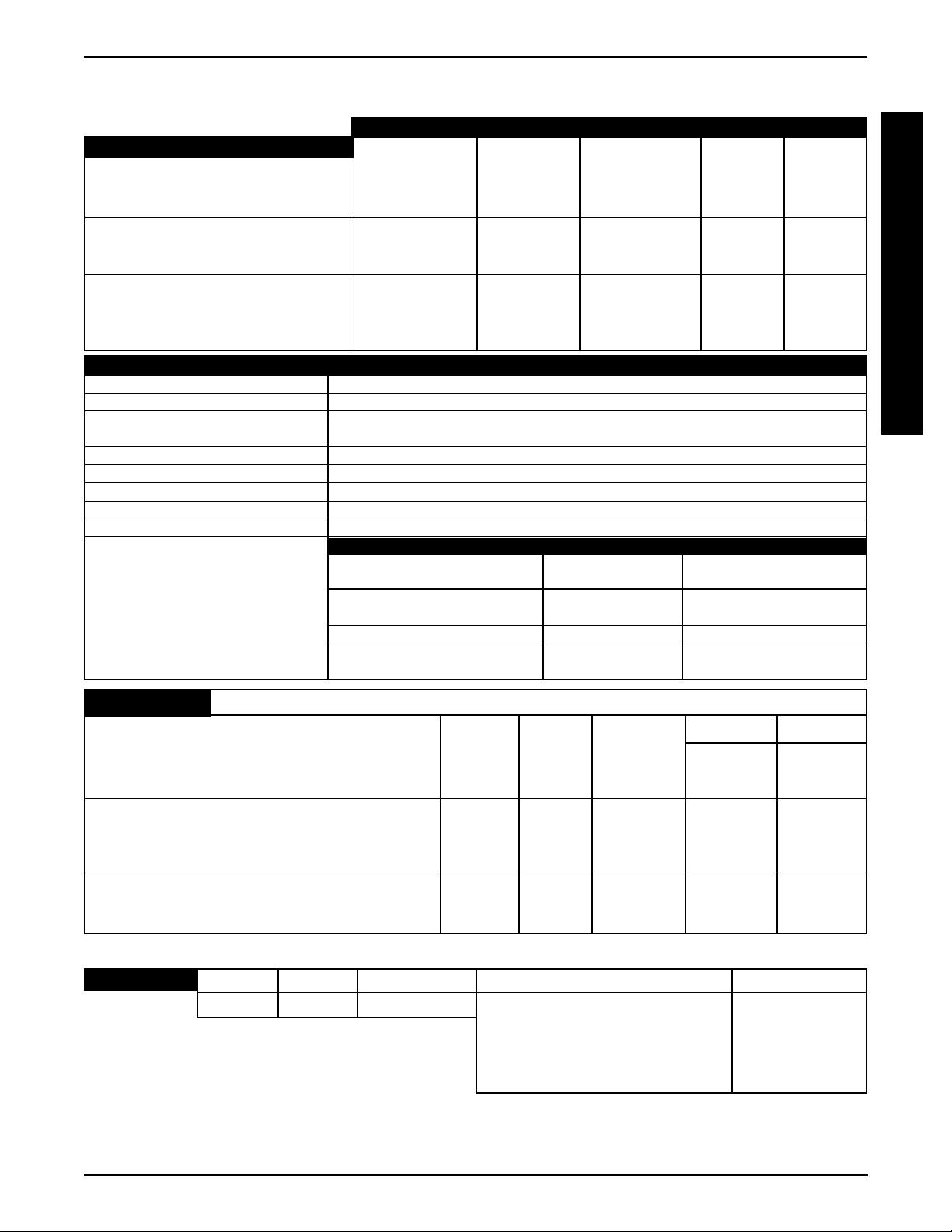
SPECIFICATIONS (Continued)
SPECIFICATIONS
PHYSICAL DIMENSIONS vARROW ** TORQUE **TORQUE SP X JUNIOR
Casters w/Precision Sealed Bearings
Semi-Pneumatic
Standard: 8 X 1-3/4-in. 8 X 1-3/4-in. 8 X 1-3/4-in. 8 X 1-3/4-in. 8 X 1-3/4-in.
Option: 6 X 2-in. 6 X 2-in. 6 X 2-in. 6 X 2-in. 6 X 2-in.
Pneumatic or Foam Filled
Standard: 8 X 2-in. 8 X 2-in. 8 X 2-in. 8 X 2-in. 8 X 2-in.
Option: 9 X 2-3/4-in. 9 X 2-3/4-in. 9 X 2-3/4-in.
Pneumatic or Foam Filled
Standard: 9 X 2-3/4-in.
Option: 8 X 2-in.
▲▲
▲300 lbs. Rating
▲▲
400 lbs. Rating
(RWD,MWD only)
vARROW, ** TORQUE, **TORQUE SP, X and JUNIOR
Anti-Tippers (3-inch wheels): Standard (N/A on FWD)
Caster Forks: Standard, Shock Fork (Optional)
Footrest: T elescoping Front Rigging Supports, Swing-Away (Standard),
Heavy Duty (Optional), 4-inch Longer Pivot Slide Tube (Optional)
Armrests: Flip Back, Fixed or Adjustable Height (Desk and Full Length)
Seat Angle Adjustment: Adjustable (0o to 10o)
Back Angle Adjustment: Adjustable (80o to 100o in 5o increments)
Seat Cushion: Cushion (Optional)
Chair Upholstery Options: Naugahyde and Nylon
Battery/Size (Not Supplied): BASE FRAMES uSTD BATTERIES uOPT BATTERIES
T wo (2) Required Arrow w/ Standard motor Group 24 N/A
(uGel Batteries) - w/ **Gearless/Brushless motor Group 22 Group 24
T orque w/ Standard Motor Group 22 Group 24
- w/ Gearless/Brushless motor Group 22 Group 24
**T orque SP w/ Standard Motor Group 22 N/A
Ranger X w/Standard Motor Group 22 Group 24
- w/ Gearless/Brushless motor Group 22 Group 24
S
P
E
C
I
F
I
C
A
T
I
O
N
S
PERFORMANCE ARROW **TORQUE **TORQUESP X JUNIOR
Speed 0 to 5-3/4 (300 lbs. rating) RWD,MWD 0 to 6-1/2 0 to 4-1/4 0 to 6-1/2 Arrow Base X Base
(M.P.H.): 0 to 4-1/4 (400 lbs. rating) RWD,MWD 0 to 6-1/2 0 to 6-1/2
*0 to 7-1/4 (300 lbs. rating)RWD,MWD *0 to 7-1/4 *0 to 7-1/4 *0 to 7-1/4 *0 to 7-1/4
0 to 4 (400 lbs. rating) FWD
***Range(miles): up to 19 - RWD,MWD up to 16 (Std) Up to 16 up to 16 (Std) up to 19 up to 23 (Std)
(uGel Batteries) *up to 29 (Std) - RWD,MWD up to 19 (Opt) up to 19 (Opt) *up to 29 (Std) up to 19 (Opt)
*up to 29 (Opt) - RWD,MWD *up to 29 (Std) *up to 29 (Std) *up to 35 (Opt) *up to 29 (Std)
up to 16 - FWD *up to 35 (Std) *up to 35 (Opt) up to 35 (Opt)
Weight 300 lbs. (Standard Unit); 400 lbs. (FWD) 300 lbs. ✪ 250 lbs. 300 lbs. 250 lbs. 250lbs.
Limitation: *300 lbs. (Standard Unit)RWD,MWD *300 lbs. ● 300 lbs.
400 lbs. (Heavy Duty Unit) RWD,MWD *300 lbs.
NOTE: Information below is unique to the Recliner. Refer to Arrow , X , Torque, and T orque SP for complete specifications.
RECLINER Widths Depths Back Heights Weight Limits (LBS.) Back Angle Range
14 to 24-in. 16 to 22-in. 18-1/2 to 26-in. Arrow Base -300 Std./400 Optional 90o to 170
* With gearless/brushless motor option.
** Storm Torque/Torque SP wheelchairs are available in rear
wheel drive ONLY. Gearless Brushless Motor Option is available on Storm T orque ONL Y .
***Range will vary with battery conditions,
surface, terrain and operators weight.
✪
With MKIV RII Controller.
✪ Torque SP Base - 250
X, T orque,● T orque SP Base - 300
Arrow, X, Torque Base W/ Gearless/
Brushless Motor - 300 lbs.
●
With MKIV Rx or A Controller.
v
Arrow specifications refer to RWD, MWD and FWD wheel-
chairs except where specified.
▲▲
▲ Arrow FWD has a 400 lb. rating.
▲▲
7
o
Page 8
This Procedure Includes the Following:
Repair or Service Information
G
Operating Information
E
N
E
R
A
L
G
U
I
D
E
L
I
N
E
S
REPAIR OR SERVICE INFORMATION
Set-up of the Electronic Control Unit is to be performed ONLY by individuals certified by
Invacare. The final tuning adjustments of the controller may affect other activities of
the wheelchair. Damage to the equipment could occur under these circumstances. If
non-certified individuals perform any work on these units, the warranty is void.
OPERATING INFORMATION
Performance adjustments should only be made by professionals of the healthcare field
or persons fully conversant with this process and the driver's capabilities. Incorrect settings could cause injury to the driver, bystanders, damage to the chair and to surrounding
property.
After the wheelchair has been set-up, check to make sure that the wheelchair performs
to the specifications entered during the set-up procedure. If the wheelchair does NOT
perform to specifications, turn the wheelchair OFF immediately and reenter set-up specifications. Repeat this procedure until the wheelchair performs to specifications.
GENERAL GUIDELINESPROCEDURE 1
GENERAL WARNINGS
DO NOT use parts, accessories, or adapters other than those authorized by Invacare.
TIRE PRESSURE
DO NOT use your wheelchair unless it has the proper tire pressure (P.S.I.). DO NOT overinflate the tires. Failure to follow these suggestions may cause the tire to explode and
cause bodily harm. The recommended tire pressure is listed on the side wall of the tire.
ELECTRICAL
Grounding Instructions:
DO NOT, under any circumstances, cut or remove the round grounding prong from any
plug used with or for Invacare products. Some devices are equipped with three-prong
(grounding) plugs for protection against possible shock hazards. Where a two-prong wall
receptacle is encountered, it is the personal responsibility and obligation of the customer
to contact a qualified electrician and have the two-prong receptacle replaced with a
properly grounded three-prong wall receptacle in accordance with the National Electrical Code. If you must use an extension cord, use ONLY a three-wire extension cord
having the same or higher electrical rating as the device being connected. In addition,
Invacare has placed RED/ORANGE WARNING TAGS on some equipment. DO NOT remove these tags. Carefully read battery/battery charger information prior to installing,
servicing or operating your wheelchair.
BATTERIES
The warranty and performance specifications contained in this manual are based on
the use of deep cycle gel cell or sealed lead acid batteries. Invacare strongly
recommends their use as the power source for this unit.
Battery connecting cables are NOT interchangeable. Battery connecting cables with
single fuse setup MUST only be used on wheelchairs with conventional motor/gearbox
assembly. Otherwise, damage may result. Refer to INSTALLING/REMOVING BATTERIES
INTO/FROM BATTERY BOX(ES) in PROCEDURE 9 of this manual.
8
Page 9
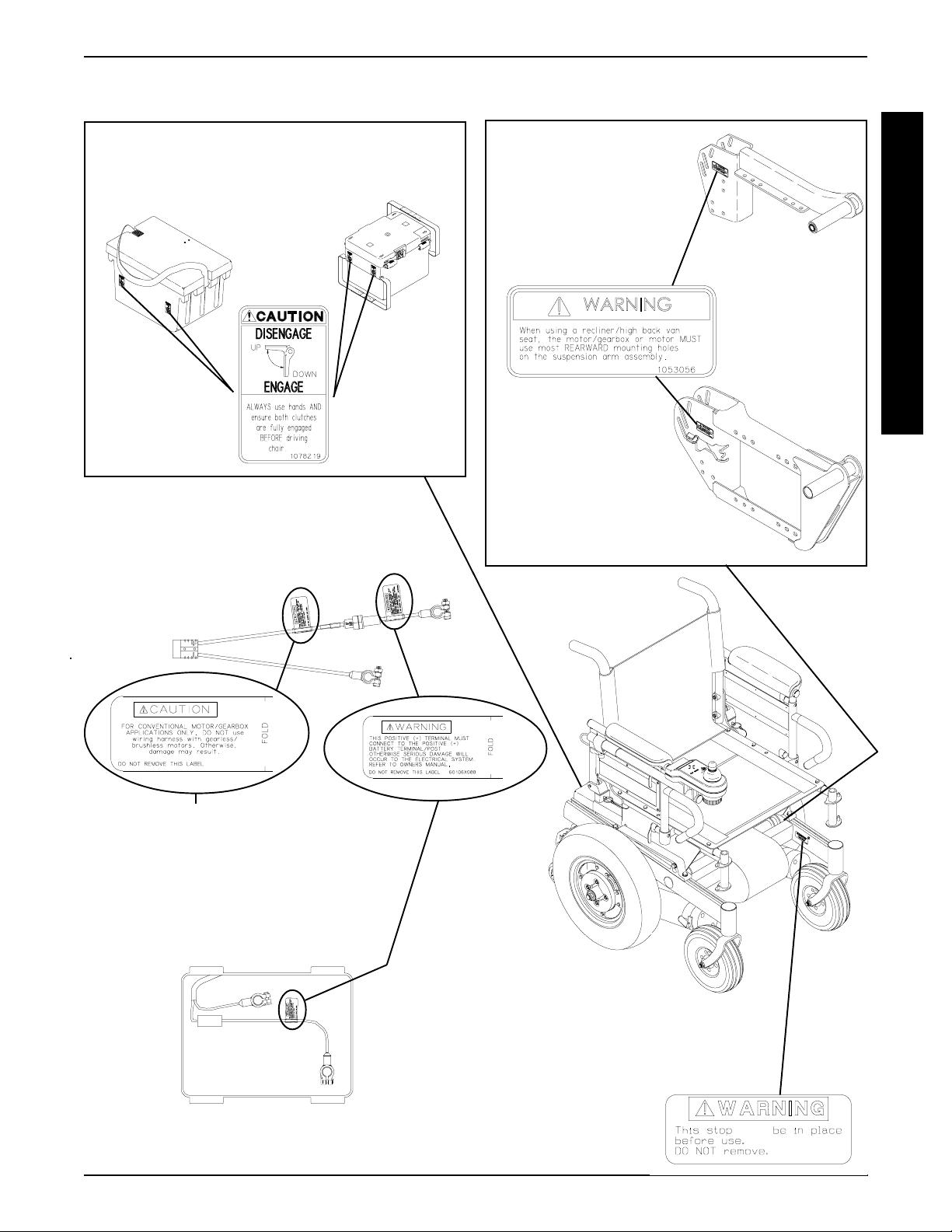
GENERAL GUIDELINES PROCEDURE 1
WARNING/CAUTION LABEL LOCATION - RWD MODELS
NOTE: These caution labels are only found on battery boxes used with the gearless/brushless motor
GROUP 24 BATTERIES
GROUP 22 BATTERIES
ONE (1) CONNECTOR BATTERY
BOX WIRING HARNESS
NOTE: This wiring harness is found on wheelchair models built BEFORE 1 1/15/99.
SUSPENSION ARM
USED
WITH CONVENTIONAL
MOTOR/GEARBOX
ASSEMBLY
SUSPENSION ARM USED
WITH GEARLESS/BRUSHLESS
MOTOR
G
E
N
E
R
A
L
G
U
I
D
E
L
I
N
E
S
NOTE: This caution label is only
found on wiring harnesses used
with the conventional motor/gearbox application.
NOTE: This wiring harness is found on
wheelchair models built AFTER 1 1/15/99.
NOTE: For models with the gearless/brushless motor, read the
manufacturer’s CAUTION LABEL located on side of the motor.
(Drive wheel must be removed to view caution label.)
NOTE: WARNING LABEL also
found on side frame near the rear
of the chair.
MUST
1070497
9
Page 10
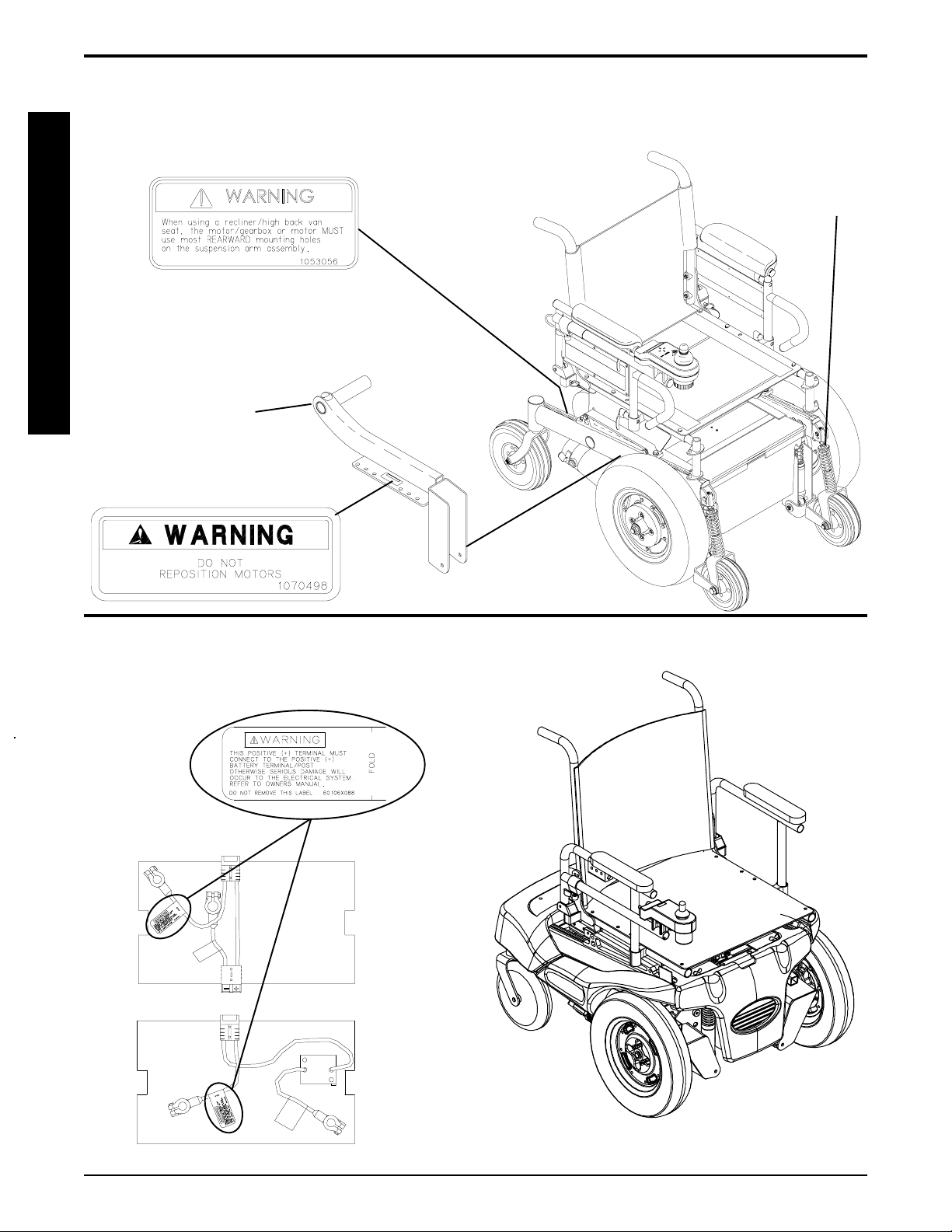
GENERAL GUIDELINESPROCEDURE 1
WARNING/CAUTION LABEL LOCATION
G
E
N
E
R
A
L
G
U
I
D
E
L
I
N
E
S
NOTE: CAUTION LABEL also
found on side frame near the front
of the chair.
Suspension Arm
MWD MODELS
NOTE: Stablilizer springs
are found on models built
BEFORE 7/11/99 ONLY.
(located on inside of
drive wheel)
BATTERY BOX WIRING HARNESS
FWD MODELS
10
Page 11
TROUBLESHOOTING PROCEDURE 2
This Procedure Includes the Following:
Field Load Test
Using Hydrometer To Check Battery Cells (Lead
Acid)
Motor Testing
Motor Brush Inspection
Electro-Mechanical Parking Brake Testing
FIELD LOAD TEST (FIGURE 1)
NOTE: The following test can also be performed through
the controller of the wheelchair along with a remote programmer. Refer to the individual CONTROLLER
MANUAL supplied with each wheelchair.
Old batteries lose their ability to store and release power, due
to increased internal resistance. This means that as you try
to take power from the battery, some of that power is used up
in the process of passing through the battery , resulting in less
voltage at the posts. The more power drawn, the lower the
voltage available. When this lost voltage drops the output 1.0
volts under load (2.0 for a pair), replace the batteries.
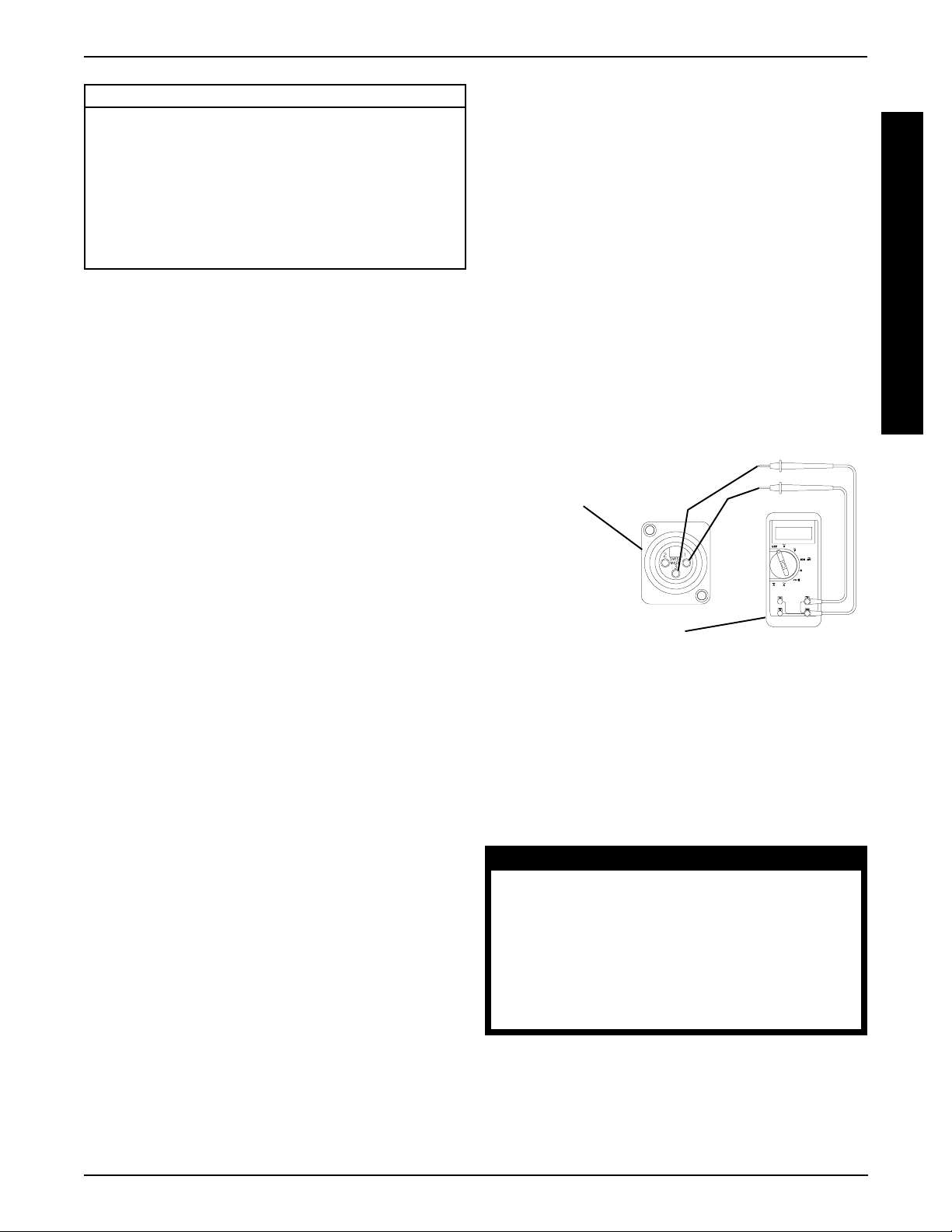
4. Place the voltmeter leads into the charger plug on the
wheelchair. Most digital voltmeters are not af fected by
polarity , however, analog meters (meters with swinging needles) can be and should be used carefully . A
good meter reading should be 25.5 to 26 VDC.
5. Have two (2) individuals (one [1] on each arm) apply
as much downward pressure as possible on the arms
of the wheelchair.
6. Turn the wheelchair ON and push the joystick forward, trying to drive the wheelchair through the stationary object. This puts a heavy load on the batteries
as they try to push through the stationary object. Read
the meter while the motors are straining to determine
the voltage under load.
NOTE: If the voltage drops to less than 23.5 volts from a
pair of fully charged batteries while under load, they should
be replaced regardless of the unloaded voltages.
Battery Charger
(-)
Connector
(+)
T
R
O
U
B
L
E
S
H
O
O
T
I
N
G
Testing under load is the only way to spot this problem.
While special battery load testing equipment is available,
it is costly and difficult to transport.
Use a digital voltmeter to check battery charge level at the charger
connector. It is located on the base of the wheelchair frame.
NOTE: READ the instructions CAREFULL Y before using the digital voltmeter.
NOTE: Invacare recommends that ONLY qualified ser-
vice personnel perform this test.
1. Ensure that power is OFF.
2. Make sure battery is fully charged. An extremely discharged battery will exhibit the same symptoms as a
bad one.
3. Remove the footrests from the wheelchair and perform one (1) of the following:
A. RWD MODELS - place the CASTERS of the
wheelchair against a wall, workbench or other
stationary object.
B. MWD MODELS - place the STABILIZER
wheels of the wheelchair against a wall, workbench or other stationary object.
Digital Voltmeter
FIGURE 1 - FIELD LOAD TEST
USING HYDROMETER TO CHECK
BATTERY CELLS (LEAD ACID)
(FIGURE 2)
NOTE: Perform this procedure when a digital voltmeter is
not available.
WARNING
NEVER smoke or strike a match near the
batteries. If the caps of the battery cells
are removed, NEVER look directly into
them when charging the battery.
The use of rubber gloves and chemical
goggles or face shields is recommended
when working with batteries.
C. FWD MODELS -place the DRIVE wheels of
the wheelchair against a wall, workbench or
other stationary object.
11
Page 12
PROCEDURE 2
TROUBLESHOOTING
WARNING
T
R
O
U
B
L
E
S
H
O
O
T
I
N
G
low any liquid to come in contact with
your eyes or skin. It is a form of acid and
can cause serious burns, and in some
cases, blindness. If you do get battery acid
on you, flush the exposed areas with cool
water IMMEDIATELY. If the acid comes into
contact with eyes or causes serious burns,
get medical help IMMEDIATELY.
The battery acid can damage your wheelchair, clothing, and household items.
Therefore, take readings cautiously and
only in designated areas.
ONLY use distilled water when topping off
the battery cells.
Most batteries are not sold with instructions.
However, warnings are frequently noted
on the cell caps. Read them carefully.
1. Remove the battery box(es). Refer to
REMOVING BA TTERY BOXES - GROUP 24 BA TTERY BASE FRAMES or INST ALLING/REMOVING
BA TTERY BOX - GROUP 22 BATTERY BASE
FRAMES in PROCEDURE 9 of this manual.
2. Remove the battery caps from the battery .
3. Squeeze the air from the hydrometer .
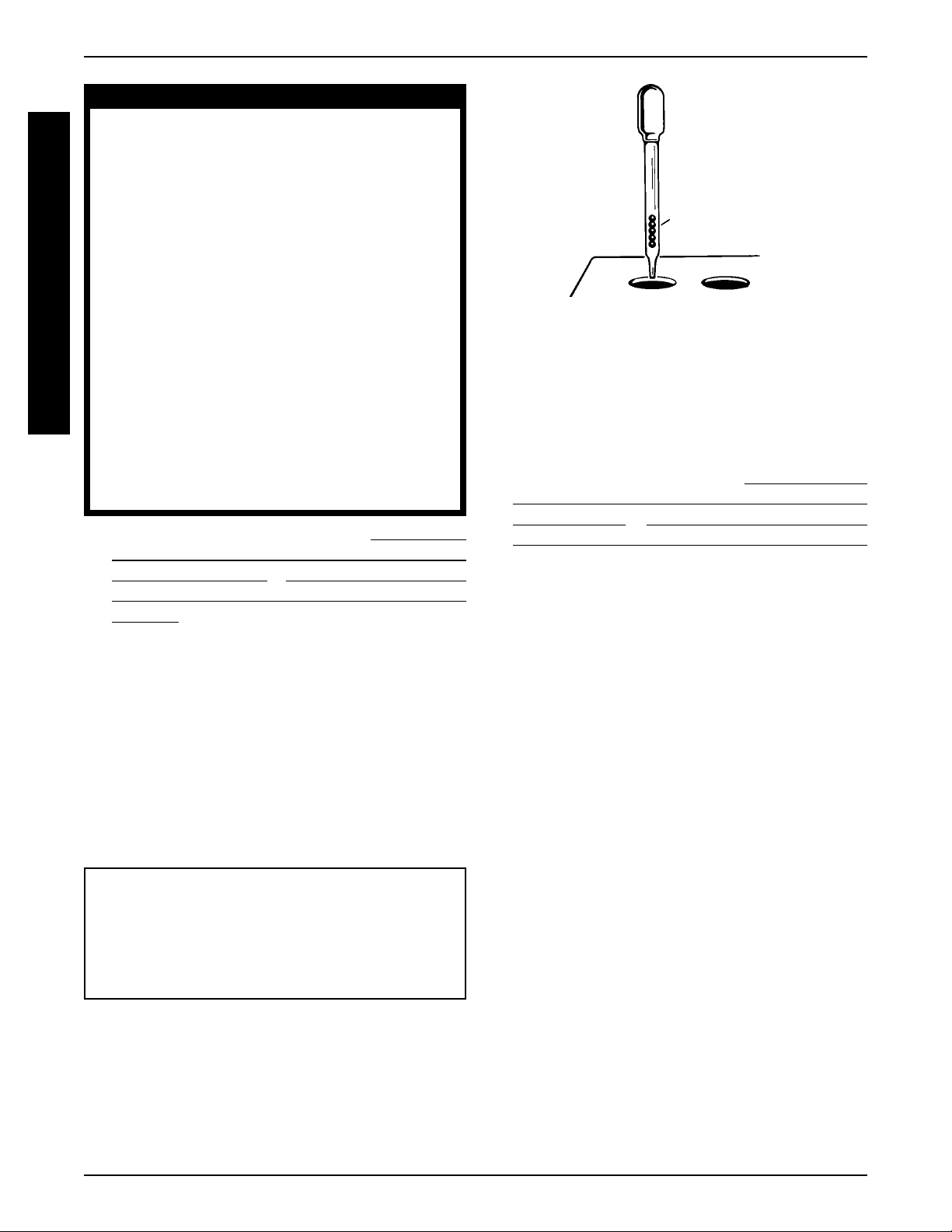
4. Place the hydrometer into a battery cell.
When reading a hydrometer, DO NOT al-
INST ALLING/
Number of Floating
Balls Will Vary
TROUBLESHOOTING
According to Charge
FIGURE 2 - USING HYDROMETER TO CHECK
BATTERY CELLS (LEAD ACID)
9. Flush hydrometer in cold running water by allowing
the water to rise into hydrometer as far as possible.
Do this several times to guard against burn damage.
10. Replace the battery caps.
11. Reinstall battery boxes. Refer to
INSTALLING/REMOVING BATTER Y BOXES - GROUP 24 BATTERY
BASE FRAMES or INST ALLING/REMOVING BA TTERY BOX - GROUP 22 BA TTERY BASE FRAMES
in PROCEDURE 9 of this manual.
MOTOR TESTING (FIGURE 3)
NOTE: This procedure should only be performed on
wheelchairs with the conventional motor/gearbox assembly . For gearless/brushless motors, there are no serviceable parts. Return motor to manufacturer for testing.
NOTE: DO NOT fill hydrometer more than 3/4 full.
5. Draw up sufficient acid to cover float balls.
6. T ap lightly to remove air bubbles.
7. Number of floating balls indicates charge.
Number of Floating Balls
0 Discharged
1 25% Charged
2 50% Charged
3 75% Charged
4 100% Charged
* 5 Overcharged
* Check charging system.
8. Flush the liquid back into the same cell after reading
the float. Repeat this step until all cells have been properly read. A shorted or dead cell can be detected when
it is the only cell that does not charge.
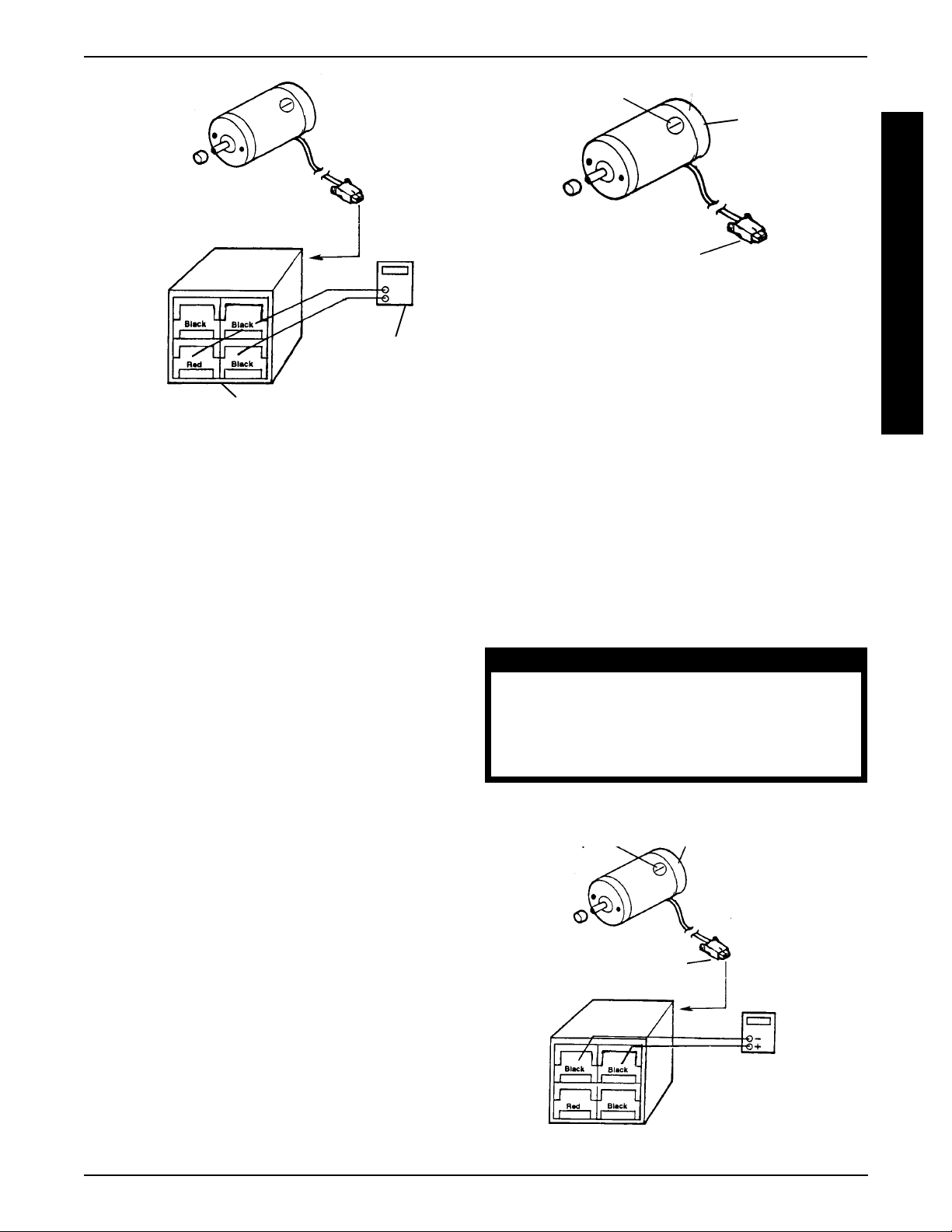
1. On the 4-pin motor connector , locate the two (2) contacts in the red and black housings.
2. Set the digital multimeter to measure ohms (Ω).
3. Measure the resistance between the two (2) motor
contacts.
NOTE: A normal reading is between 1 and 5 ohms
(Ω). A reading of 0 ohms (Ω) or in excess of 15 ohms
(Ω) indicates a problem. High readings are generally
caused by bad connections and/or damaged brushes.
Contact authorized dealer or Invacare.
12
Page 13
TROUBLESHOOTING PROCEDURE 2
Cap
Motor
4 Pin Motor Connector
FIGURE 4 - MOTOR BRUSH INSPECTION
ELECTRO-MECHANICAL PARKING
Ohmmeter
Motor Connector
Motor Connector
Ohmmeter
BRAKE TESTING (FIGURE 5)
NOTE: This procedure should only be performed on
wheelchairs with conventional motor/gearbox assembly .
T
R
O
U
B
L
E
S
H
O
O
T
I
N
G
FIGURE 3 - MOTOR TESTING
MOTOR BRUSH INSPECTION
(FIGURE 4)
NOTE: This procedure should only be performed on wheelchairs with conventional motor/gearbox assembly .
There are two (2) contact brushes on ACTION STORM motors located under the brush caps on the motor housing. If
these caps are hard to remove they are either overtightened or
the motor has become very hot. Let motors cool. If caps still
cannot be removed, it is recommended that the motor be sent
to Invacare T echnical Services for inspection/repair.
NOTE: It is very important to note which way the brush
comes out of the motor. The brush MUST be placed into
the motor exactly the same way to ensure good contact
with the commutator.
1. Once the motor brush caps have been removed, pull
the brushes out of the motor. The end of the brushes
should be smooth and shiny and the spring should
not be damaged or discolored. If one or both of the
brushes are damaged, only the damaged or worn
brushes need be replaced. It is very important that
any time a brush is replaced, it must be “burned in”.
This is accomplished by running the motor for one
hour in each direction with a half hour break in-between. This should also be done with little or no load
on the motor, i.e., put the wheelchair up on blocks so
the drive (large) wheels do not contact the ground
and run the wheelchair. A motor with only one brush
replaced will only carry a small percentage of its rated
load capacity until the NEW brush is burned in.
1. On the four-pin motor connector, locate the side by
side connectors in the black housings.
2. Set the digital multimeter to read ohms (Ω).
3. Measure the resistance between the two (2) brake contacts. A normal reading is 100 ohms (Ω). A reading of 0
ohms (Ω) or a very high reading; i.e., MEG ohms or O.L.
(out of limit) indicates a shorted brake or an open connection respectively . If either condition exists, send the motor
to Invacare T echnical Service for inspection/repair.
CAUTION
A shorted electro-mechanical brake will
damage the brake output section in the controller. DO NOT connect a shorted electromechanical brake to a good controller module. A shorted brake MUST be replaced.
NOTE: A bad motor can damage the controller module
but a bad controller will NOT damage a motor.
Cap
4 Pin Motor Connector
Motor
Ohmmeter
13
FIGURE 5 - ELECTRO-MECHANICAL
PARKING BRAKE TESTING
Page 14
PROCEDURE 3 HARDWARE TORQUE SPECIFICATIONS
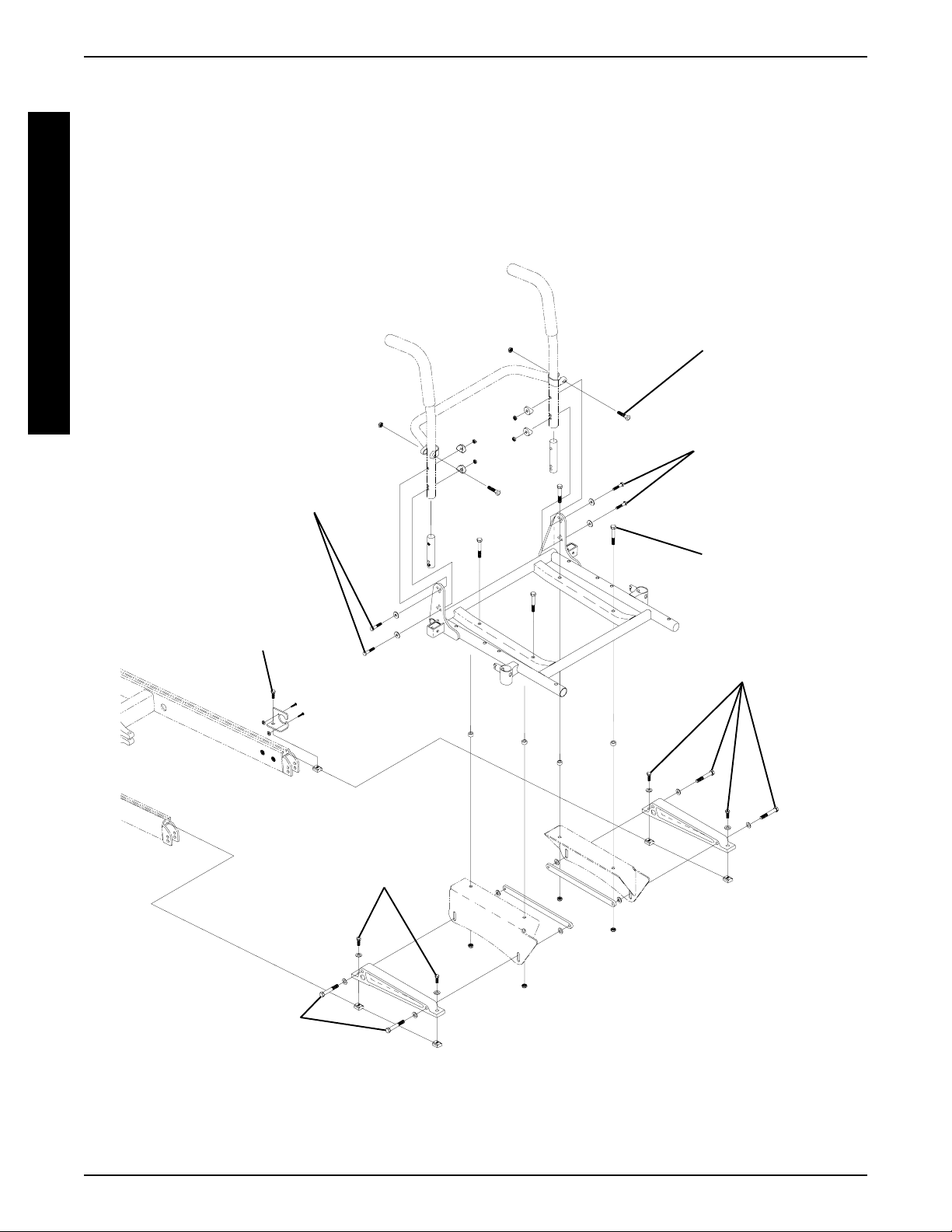
HARDWARE TORQUE SPECIFICATIONS
T
O
R
Q
U
E
S
P
E
C
I
F
I
C
A
T
I
O
N
S
*Loctite® and
T orque to
75 in/lbs
STANDARD SEAT FRAME
*Torque to
60 in/lbs
*Loctite and
T orque to
75 in/lbs
**T orque
to
156 in/lbs
T orque to
156 in/lbs
**Torque to
156 in/lbs
**Torque to
156 in/lbs
**Torque to
156 in/lbs
NOTE:
* These torque specifications also apply to the adjustable seat frame assembly.
** These torque specifications also apply to the captains van seat and adjustable seat frame assemblies.
14
Page 15
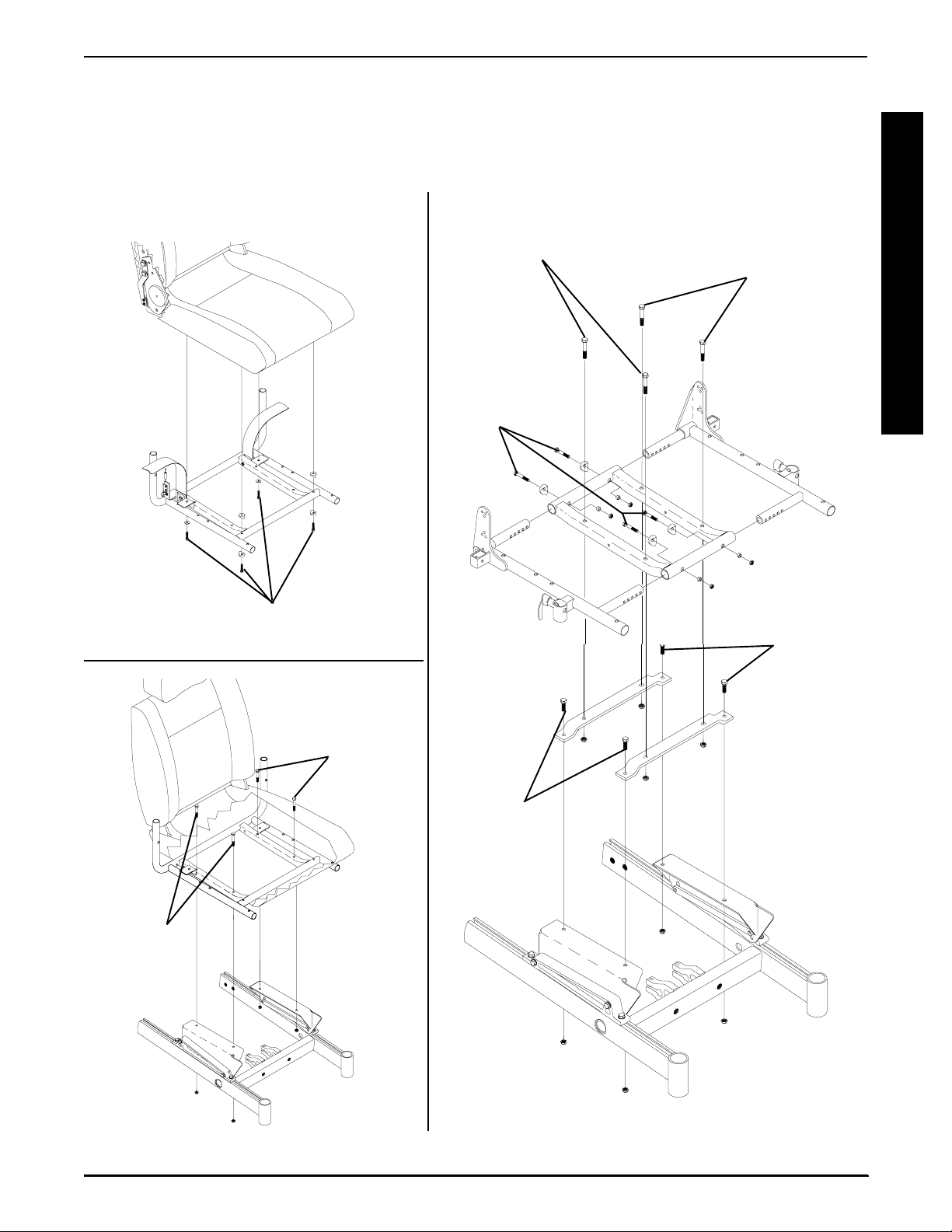
HARDWARE TORQUE SPECIFICATIONS
*CAPTAINS VAN SEAT
PROCEDURE 3HARDWARE TORQUE SPECIFICATIONS
*ADJUSTABLE SEAT FRAME
T
O
R
Q
U
E
Loctite and Torque to
75 in/lbs
Torque to
156-in/lbs
Torque to
75-in/lbs
Torque to
156-in/lbs
Torque to
156-in/lbs
S
P
E
C
I
F
I
C
A
T
I
O
N
S
T orque to
156 in/lbs
Torque to
156-in/lbs
T orque to
156 in/lbs
* NOTE: For additional torque specifications, refer to the torque specifications drawing for the standard
seat frame assembly.
15
Page 16
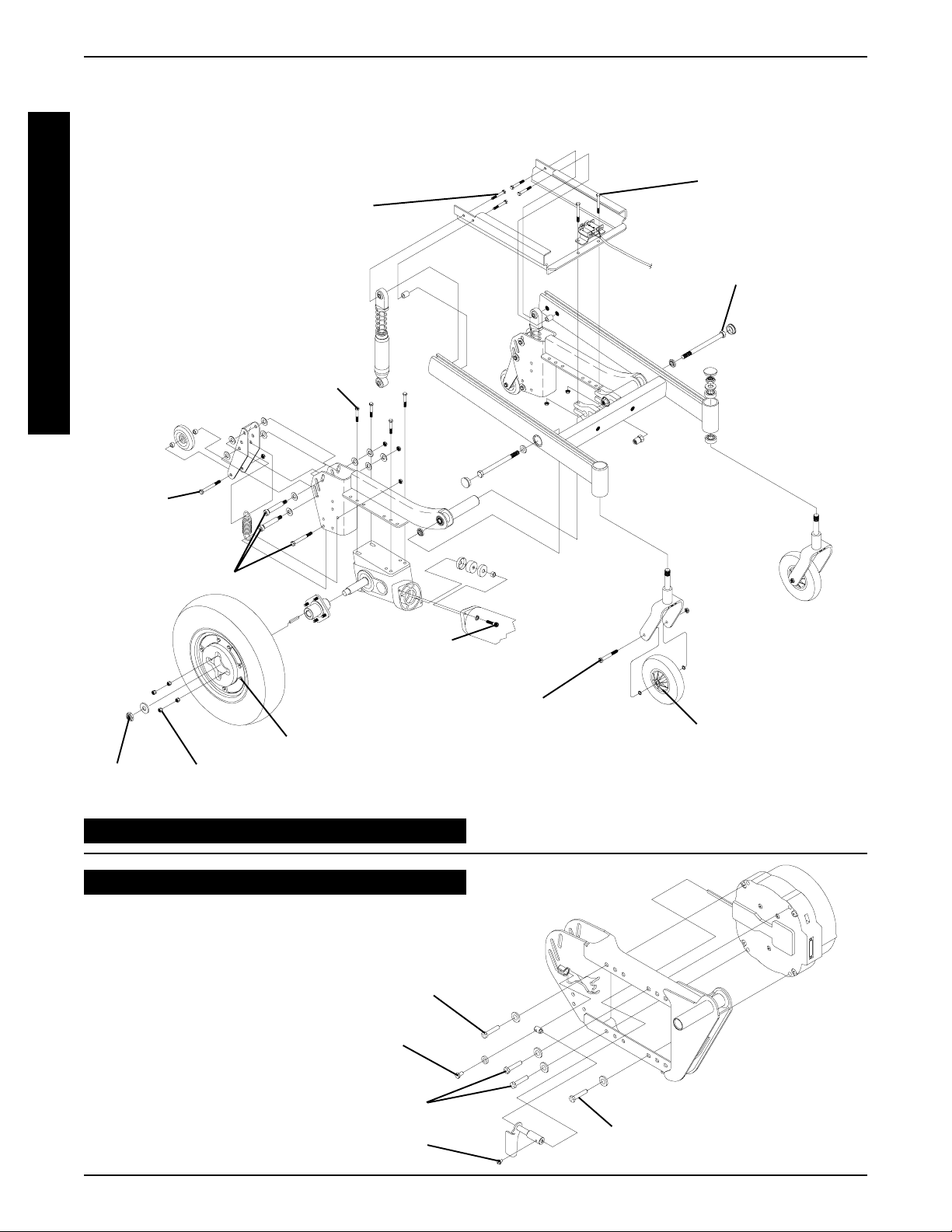
PROCEDURE 3 HARDWARE TORQUE SPECIFICATIONS
REAR WHEEL DRIVE BASE FRAME HARDWARE
T
O
R
Q
U
E
S
P
E
C
I
F
I
C
A
T
I
O
N
S
REAR OF
WHEELCHAIR
Loctite and torque to
TORQUE SPECIFICATIONS
T orque to
160 in/lbs
160 in/lbs
T orque to
1020 in/lbs
Loctite and
T orque to
75 in/lbs
T orque to
160 in/lbs
Tighten until snug
Loctite and
torque to
75 in/lbs
8 - inch Wheels -
Torque to 120 in/lbs
T orque to
160 in/lbs
T orque to
160 in/lbs
Wheel Halves -
Torque to 75 in/lbs
9 - inch Wheels -
Torque to 160 in/lbs
CONVENTIONAL MOTOR/GEARBOX
GEARLESS/BRUSHLESS MOTOR
NOTE: All torque specifications called out for the conventional motor/gearbox assembly are applicable to
the gearless/brushless motor except for the following:
Torque to 13 ft/lbs.
FRONT OF
WHEELCHAIR
Pneumatic with Flat-Free
Wheel Halves - Torque to
160 in/lbs
Pneumatic Wheel Halves -
8 - inch - Torque to 18 in/lbs
9 - inch - Torque to 160 in/lbs
Torque to 75 in/lbs.
Torque to 13 ft/lbs.
Torque to 25 in/lbs.
Torque to 13 ft/lbs.
16
Page 17
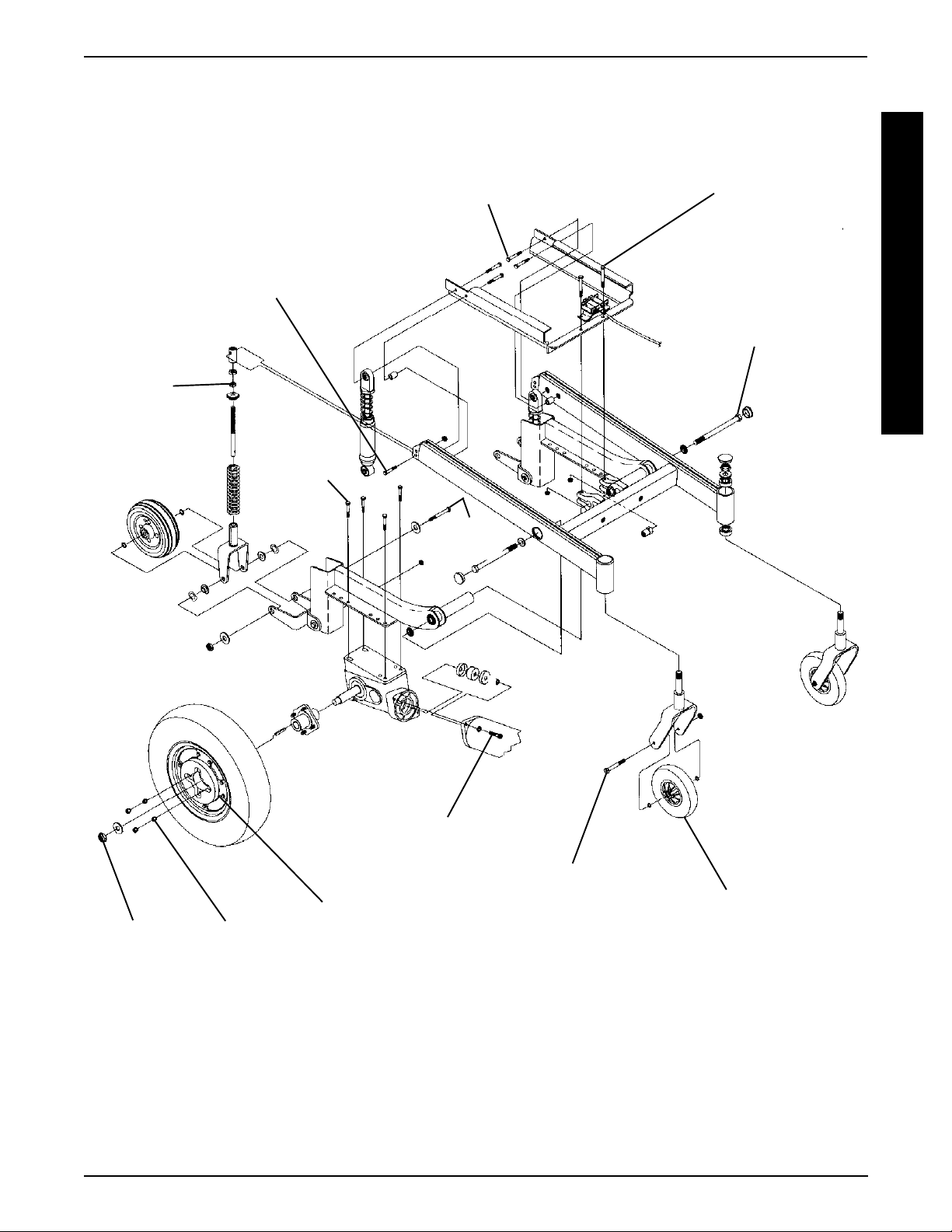
MID-WHEEL DRIVE BASE FRAME HARDWARE
TORQUE SPECIFICATIONS
Loctite and torque to
FRONT OF
WHEELCHAIR
Torque to
40 in/lbs
Tighten
until snug
Loctite and
torque to
75 in/lbs
160 in/lbs
160 in/lbs
PROCEDURE 3HARDWARE TORQUE SPECIFICATIONS
Torque to
Torque to
1020 in/lbs
T
O
R
Q
U
E
S
P
E
C
I
F
I
C
A
T
I
O
N
S
Torque to
160 in/lbs
Torque to
160 in/lbs
Loctite and
Torque to
75 in/lbs
Wheel Halves -
Torque to 75 in/lbs
Torque to
160 in/lbs
8 - inch Wheels -
Torque to 120 in/lbs
9 - inch Wheels -
Torque to 160 in/lbs
REAR OF
WHEELCHAIR
Pneumatic with Flat-Free
Wheel Halves - T orque to 160
in/lbs
Pneumatic Wheel Halves -
8 - inch - Torque to 18 in/lbs 9 -
inch - T orque to 160 in/lbs
17
Page 18
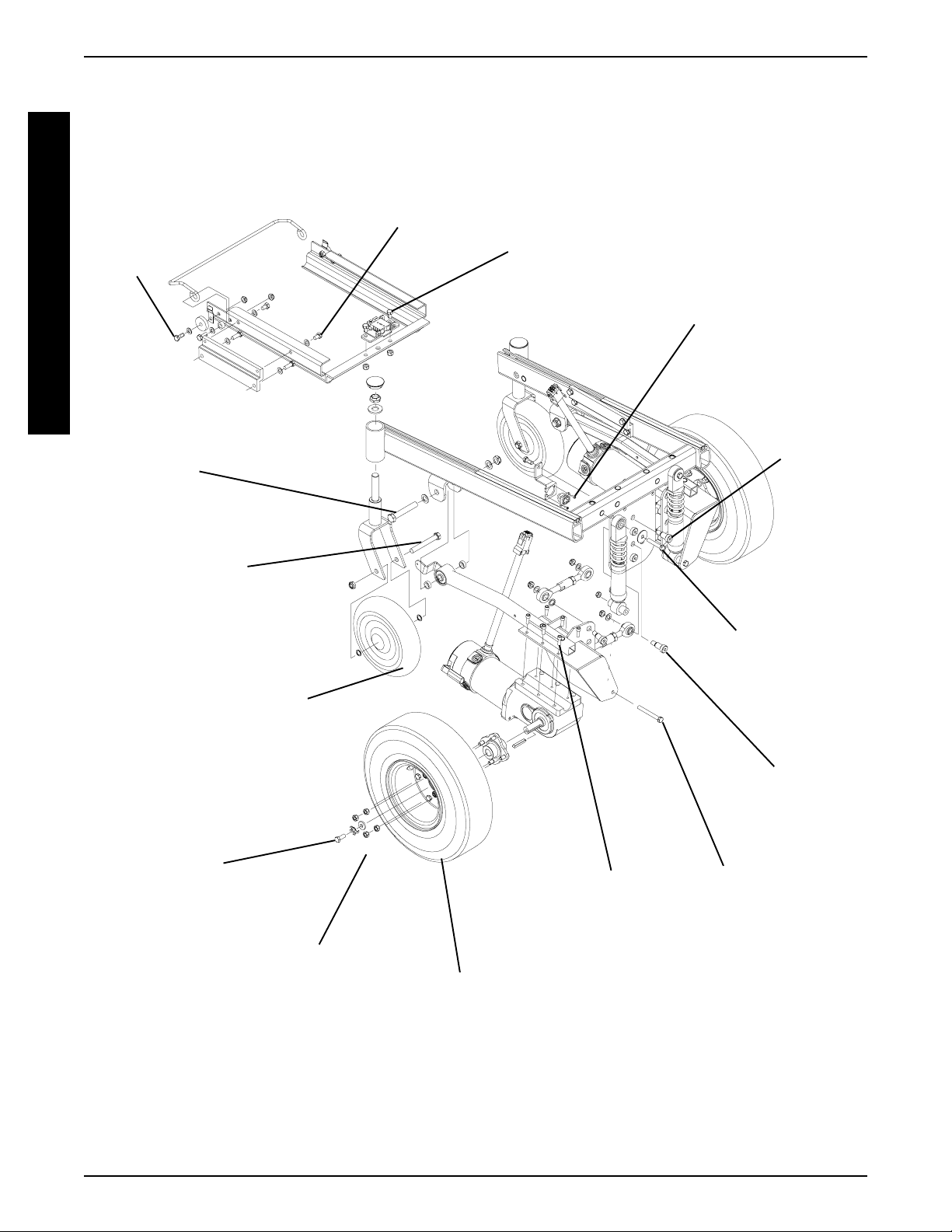
PROCEDURE 3 HARDWARE TORQUE SPECIFICATIONS
FRONT-WHEEL DRIVE BASE FRAME HARDWARE
T
O
R
Q
U
E
S
P
E
C
I
F
I
C
A
T
I
O
N
S
REAR OF
WHEELCHAIR
T orque to
156 in/lbs
T orque to
1020 in/lbs
TORQUE SPECIFICATIONS
T orque to
156 in/lbs
T orque to
160 in/lbs
T orque to
15 in/lbs
T orque to
360 in/lbs
8 - inch Wheels -
Torque to 120 in/lbs
9 - inch Wheels -
T orque to 160 in/lbs
Pneumatic with Flat-Free
Wheel Halves - T orque to 160
in/lbs
Pneumatic Wheel Halves 8 - inch - T orque to 18 in/lbs
9 - inch - T orque to 160 in/lbs
T orque to
156 in/lbs
T orque to
160 in/lbs
Wheel Halves -
T orque to 75 in/lbs
Loctite and
T orque to
75 in/lbs
T orque to
156 in/lbs
T orque to
360 in/lbs
T orque to
156 in/lbs
FRONT OF
WHEELCHAIR
18
Page 19
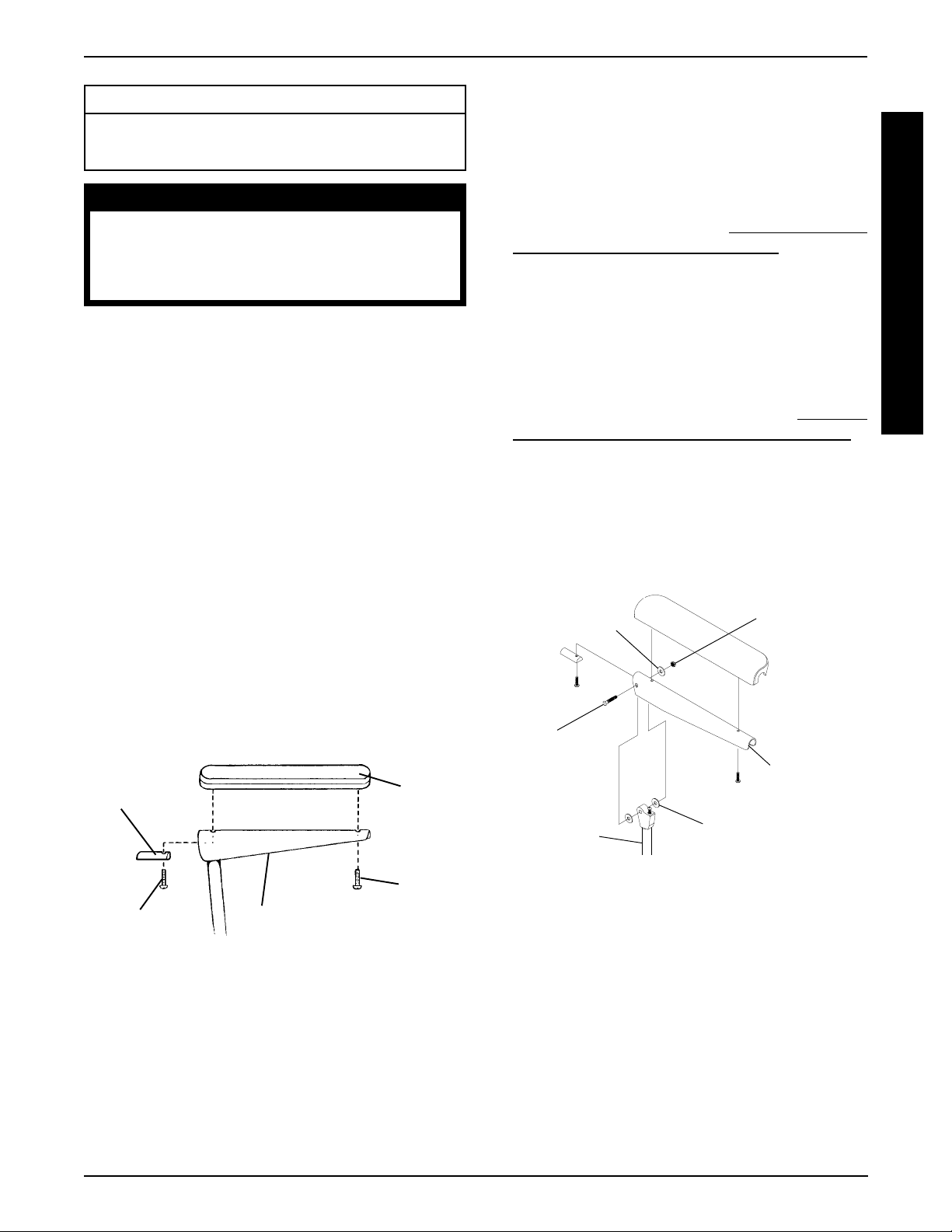
ARMS PROCEDURE 4
This Procedure Includes the Following:
Replacing Armrest Pads - Captains Van Seats
Replacing Captains Van Seat Armrest Plate
WARNING
After ANY adjustments, repair or service
and BEFORE use, make sure that all attaching hardware is tightened securely - otherwise injury or damage may result.
REPLACING ARMREST PADS CAPTAINS VAN SEATS (FIGURE 1)
1. Remove the mounting screws that secures the front
of the armrest pad to the armrest plate.
2. Remove the mounting screw that secures the rear of
the armrest pad and armrest insert to the armrest
plate.
3. Remove the existing armrest pad and position the
NEW armrest pad on the armrest plate.
4. Line up the mounting holes in the armrest insert, armrest plate and NEW armrest pad.
REPLACING CAPTAINS VAN SEAT
ARMREST PLATE (FIGURE 2)
1. If necessary , remove the three (3) mounting screws,
spacers and locknuts that secure the joystick mounting bracket to the armrest plate.
2. Remove armrest pad. Refer to
REST P ADS - CAPTAINS V AN SEATS in this procedure of the manual.
3. Remove the mounting screw, washers and locknut that
secure the existing armrest plate to the arm weldment.
4. Position the NEW armrest plate on the armrest weldment
and secure with the mounting screw, washers, and locknut. Refer to FIGURE 2 for correct hardware orientation.
5. Reinstall van style armrest pad. Refer to
ING ARMREST P ADS - CAPT AINS VAN SEATS in
this procedure of the manual.
6. If necessary , reinstall the three (3) mounting screws,
spacers and locknuts that secure the joystick mounting bracket to the armrest plate.
7. Repeat STEPS 1-6 for the opposite armrest plate, if
necessary .
REPLACING ARM-
REPLAC-
A
R
M
S
5. Reinstall the rear mounting screw through the armrest insert, armrest plate and armrest pad and tighten
securely .
6. Reinstall the front mounting screw into the armrest
plate and NEW armrest pad and tighten securely.
FRONTREAR
Armrest
Insert
Mounting
Screw
FIGURE 1 - REPLACING ARMREST PADS -
CAPTAINS VAN SEATS
Armrest Plate
Armrest
Pad
Mounting
Screw
Washer
Mounting
Screw
Arm Weldment
FIGURE 2 - REPLACING CAPTAINS VAN SEAT
ARMREST PLATE
Washer
Locknut
Armrest
Plate
19
Page 20
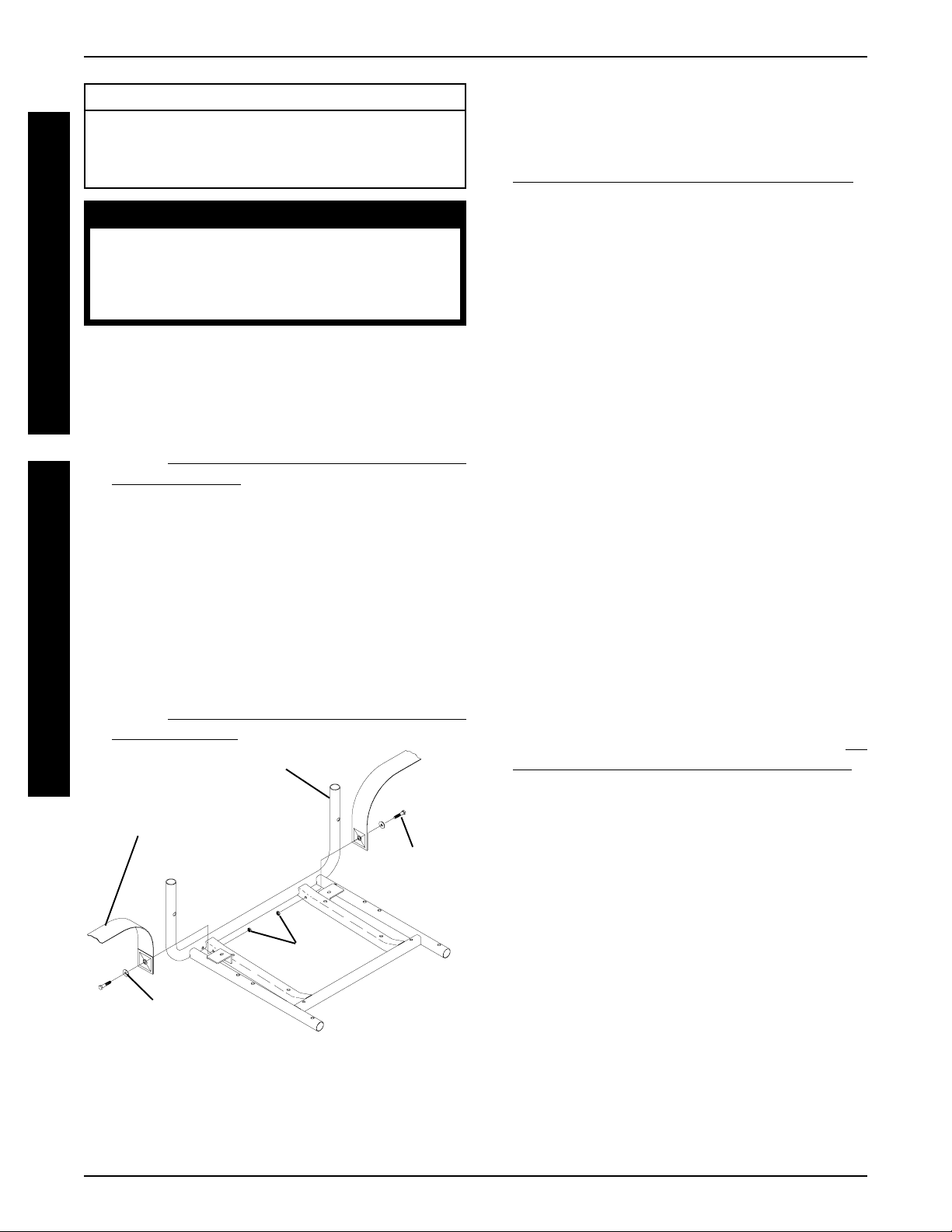
UPHOLSTERY/POSITIONING STRAPPROCEDURE 5
This Procedure Includes the Following:
Replacing Seat Positioning Strap - Captains Van
Seats
Replacing Back Upholstery
U
P
H
O
L
S
T
After ANY adjustments, repair or service and BEFORE use, make sure that all attaching hardware
is tightened securely - otherwise injury or damage
may result.
WARNING
E
REPLACING SEAT POSITIONING
R
Y
STRAP - CAPTAINS VAN SEATS
(FIGURE 1)
1. Remove the van style seat from the van seat frame.
Refer to INST ALLING/REMOVING CAPTAINS V AN
P
O
S
I
T
I
O
N
I
N
G
S
T
R
A
P
SEA T ASSEMBLY in PROCEDURE 6 of this manual.
2. Remove the two (2) rear mounting screws, washers,
and locknuts that secure the seat positioning straps
to the van seat frame.
NOTE: The washer is positioned between the seat positioning strap and the mounting screw.
3. Secure the NEW seat positioning strap halves with
the mounting screws, washers and locknuts to the
van seat frame and torque to 75-inch pounds.
4. Reinstall the van style seat to the van seat frame.
Refer to
SEA T ASSEMBLY in PROCEDURE 6 of this manual.
Seat Positioning
INST ALLING/REMOVING CAPTAINS V AN
Van Seat Frame
Strap
REAR OF SEAT
FRAME
Mounting
Screw
REPLACING BACK UPHOLSTERY
(FIGURE 2)
1. Remove one (1) armrest from the wheelchair . Refer to
INST ALLING/REMOVING FLIP BACK ARMRESTS in
PROCEDURE 4 of the owner’s manual, 1081227.
2. If applicable, remove the two (2) mounting screws
and locknuts that secure the spreader bar to the back
canes.
3. Remove the two (2) mounting screws and washers
that secure the existing back upholstery to the back
canes.
4. Cut the tie-wraps that secure the bottom of the existing back upholstery to the back canes.
NOTE: Note the back angle before disassembly for proper
reinstallation.
5. On the side of the wheelchair that the armrest was
removed, remove one (1) of the mounting screws,
washer, spacer, and locknut that secures the back
cane to the seat frame.
NOTE: T o avoid losing the insert in each back cane, thread
the mounting screw just removed through the cane from
the inside of the wheelchair to hold the insert in place.
6. Remove the other mounting screw, washer, spacer ,
and locknut that secures the back cane to the seat
frame.
7. Slide the back cane out of the spreader bar (If applicable) and the existing back upholstery .
8. Remove other armrest from the chair. Refer to
STALLING/REMOVING FLIP BACK ARMRESTS in
PROCEDURE 4 of the owner’s manual, 1081227.
9. Repeat STEPS 5-7 for the opposite side of the wheelchair.
10. Slide the other back cane out of the spreader bar (if
applicable) and the existing back upholstery .
IN-
Locknuts
Washer
FIGURE 1 - REPLACING SEAT POSITIONING STRAP -
CAPTAINS VAN SEATS
FRONT OF SEAT
FRAME
11. Slide one(1) back cane into NEW back upholstery
and through spreader bar (if applicable).
12. Secure back cane to the seat frame from the outside
of the wheelchair with the existing two (2) mounting
screws, washers, spacers, and locknuts. Use Loctite
242 and torque to 75-in/lbs.
13. Repeat STEPS 1 1-12 for opposite back cane.
14. Secure the top of the NEW back upholstery to the
back canes with the two (2) existing mounting screws.
20
Page 21
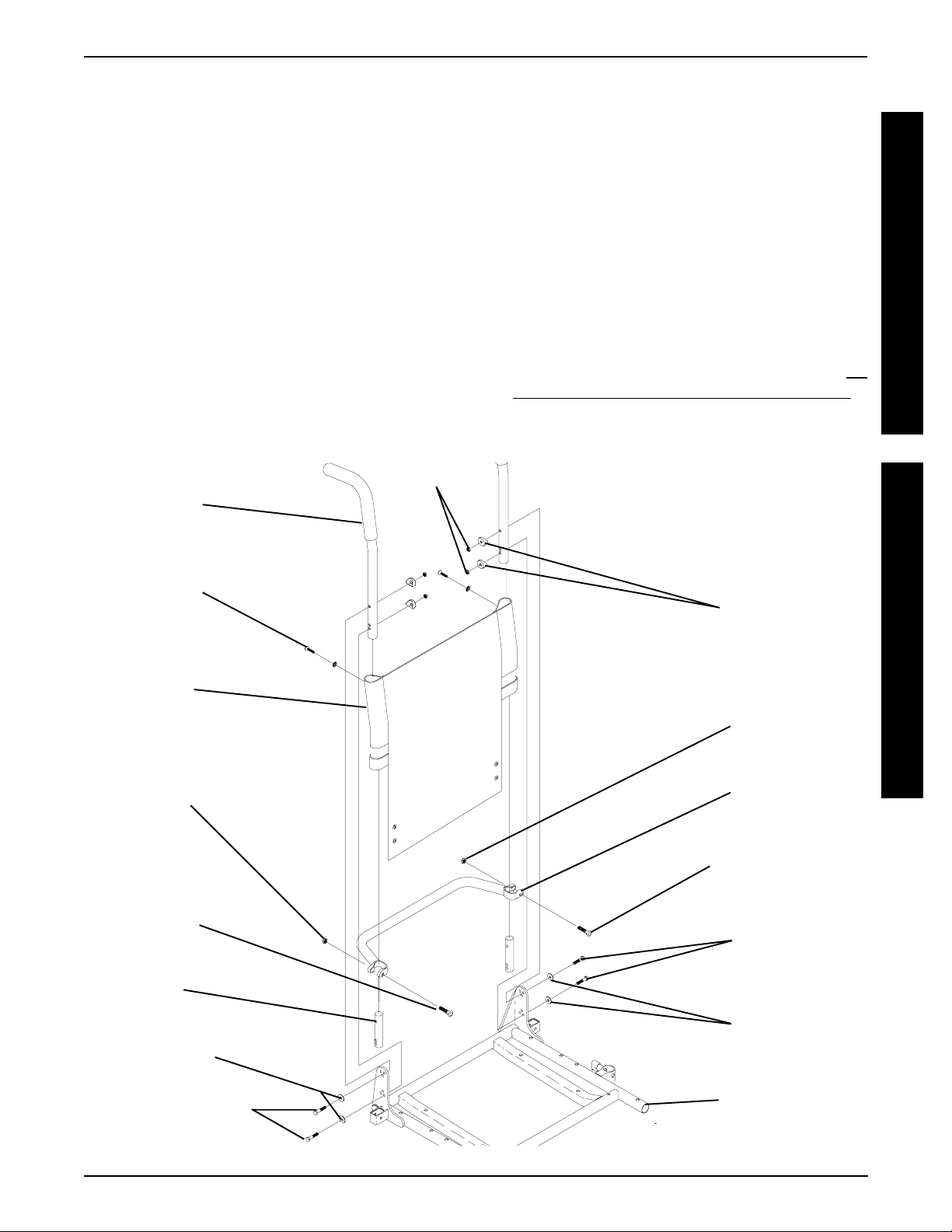
UPHOLSTERY/POSITIONING STRAP PROCEDURE 5
NOTE: When replacing the back upholstery, back assembly or changing back height, follow these guidelines
for spreader bar height:
STANDARD MODELS
BACK HEIGHT u SPREADER BAR
HEIGHT
16-inches* 5-inches
17-inches* 5-inches
18-19-inches* 7-inches
20-24-inches 7-inches
NOTE: Spreader Bar required on ALL back heights between 20-24-inches. *Spreader bar required on back
heights 16,17,18, or 19 ONL Y if the width or depth of the
chair exceeds 19-inches.
uHeight of Spreader Bar from Bottom of Back
Canes to Top of Spreader Bar Clamp.
Locknuts
Back Cane
(STEPS 3, 12)
Mounting
Screw
(STEPS 3, 14)
Washer
(STEPS 3, 14)
Back
Upholstery
(STEPS 3, 7)
Locknut
(STEP 2)
(STEPS 5, 6)
HEAVY DUTY MODELS
NOTE: Spreader bar required on all back heights.
BACK HEIGHT u SPREADER BAR
HEIGHT
16-17-inches 5-inches
18-24-inches 7-inches
uHeight of Spreader Bar from Bottom of Back
Canes to Top of Spreader Bar Clamp.
15. If applicable, reposition the spreader bar at the correct
height for the corresponding back height and torque
the mounting hardware to 60-in/lbs.
16. Reinstall the armrest onto the wheelchair . Refer to INST ALLING/REMOVING FLIP BACK ARMRESTS in
PROCEDURE 4 of the owner’s manual, 1081227.
Spacers
(STEPS 5, 6)
Locknut
(STEP 2)
Spreader Bar
(STEPS 2, 7, 16)
U
P
H
O
L
S
T
E
R
Y
P
O
S
I
T
I
O
N
I
N
G
S
T
R
A
P
Mounting
Screw
(STEP 2)
Insert
Washers
(STEPS 5, 6)
Mounting Screws
Torque to 75 in/lbs
(STEPS 5, 6)
Mounting Screw
Torque to 60 in/lbs
(STEP 2)
Mounting
Screws
(STEPS 5, 6)
Washers
(STEPS 5, 6)
Seat Frame
FIGURE 2 - REPLACING BACK UPHOLSTERY
21
Page 22
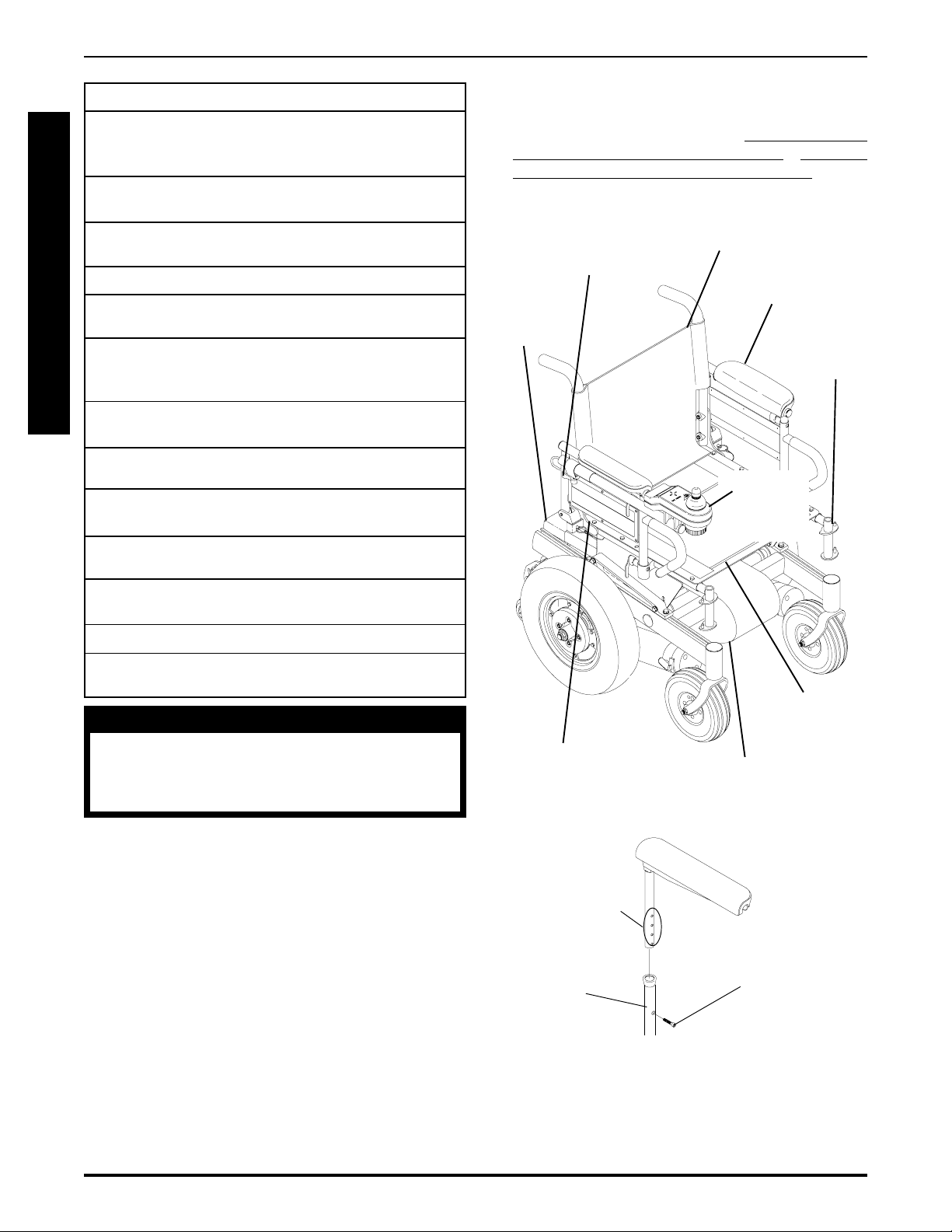
PROCEDURE 6 SEAT FRAME
This Procedure includes the following:
Preparation for Removing/Installing Seat Frame
(Standard Frame, Adjustable Frame,
and Captains Van Seat) ............................Page 21
S
Replacing Exact Same Size Standard
E
Seat Frame ..............................................Page 22
A
Removing/Installing Standard Seat Frame
T
Sub-Assembly .........................................Page 22
F
Changing Seat Depth ...............................Page 23
R
Changing Seat Width (Standard and Adjustable
A
Seat Frame) ............................................. Page 25
M
Installing/Removing Adjustable Seat Frame
E
Sub-Assembly and/or Component
Replacement ...........................................Page 26
Installing/Removing Captains Van Seat
Assembly ................................................Page 28
Replacing Captains Van Seat and/or Captains
Van Seat Frame .......................................Page 28
Converting From Standard Seat Frame to
Adjustable Seat Frame or Vice V ersa .......Page 29
Converting From Adjustable Seat Frame to
Captains Van Seat or V ice Versa...............Page 29
Converting From Standard Seat Frame to
Captains Van Seat or V ice Versa...............Page 30
Removing/Installing Seat Pan ..................Page 30
Mounting Plate - Seat Angle Adjustment and
Installation Orientation .............................Page 31
WARNING
After ANY adjustments, repair or service
and BEFORE use, make sure that all attaching hardware is tightened securely otherwise injury or damage may result.
1. Remove footrest assemblies. Refer to PROCEDURE
4 in of the owner’s manual, 1081227.
2. Remove battery box(es). Refer to
MOVING GROUP 24 BATTERY BOXES or INST ALLING/REMOVING GROUP 22 BATTERY BOX in PROCEDURE 9 of this manual.
Adjustment Lock
Lever for Joystick
(STEP 4)
Battery
Box(es)
(STEP 2)
Seat Positioning
Strap (STEP 7)
Back Upholstery
(STEP 10)
Controller, Left/Right Motor
Connectors (STEPS 8,9)
INSTALLING/RE-
Flip Back
Armrests
(STEP 6A)
Footrest
Location
(STEP 1)
Joystick
(STEPS
3,5)
Seat Pan
(STEP 7)
NOTE: The procedures in this section of the manual refer
to NON-RECLINER seat frames only, EXCEPT Seat
Angle Adjustment. For recliner seat frames, refer to PROCEDURE 14 of this manual.
PREPARATIONS FOR REMOVING/
INSTALLING SEAT FRAME
(STANDARD FRAME, ADJUSTABLE
FRAME, AND CAPTAINS VAN SEAT)
(FIGURE 1)
NOTE: When installing/replacing components of the wheelchair, refer to the individual procedure for correct use of
LOCTITE 242 and torque specifications or PROCEDURE
3 of this manual.
NOTE: T o reinstall these components, reverse the following steps.
STEP 6B
Height
Adjustment
Holes
Captains
Van Seat
Base
NOTE: Illustration depicts tubular seat frame only . Preparation steps for the captains van seat apply in the same
manner.
FIGURE 1 - PREPARATIONS FOR REMOVING/
INSTALLING SEAT FRAME (STANDARD FRAME,
ADJUSTABLE FRAME, AND CAPTAINS VAN SEAT)
22
Socket
Screw
Page 23
PROCEDURE 6SEAT FRAME
3. Cut tie wraps and disconnect joystick from controller .
4. Turn the lever on the adjustment lock to release the
adjustment lock from the joystick mounting tube.
5. Remove the joystick from the wheelchair .
6. Perform one (1) of the following:
A. STANDARD OR ADJUSTABLE SEAT
FRAMES - Remove the flip-back armrests from
the wheelchair. Refer to
FLIP BACK ARMRESTS in PROCEDURE 4 of
the owner’s manual, 1081227.
B. CAPT AINS VAN SEAT - Remove the mounting
screw that secures the armrest to the van seat
frame. Repeat for opposite side.
7. For standard and adjustable seat frames, remove the
seat pan (including seat positioning straps). Refer to
REMOVING/INSTALLING SEAT P AN in this procedure
of the manual.
8. Disconnect battery and left/right motor connectors from
the controller. Refer to
NESS in PROCEDURE 10 of this manual.
INSTALLING/REMOVING
REPLACING WIRING HAR-
4. Reinstall the components previously removed in STEP
1. Perform the instructions outlined in
FOR REMOVING/INSTALLING SEAT FRAME (ST ANDARD FRAME, ADJUST ABLE FRAME, AND CAPT AINS V AN SEAT) in this procedure of the manual.
PREPARA TIONS
REMOVING/INSTALLING
STANDARD SEAT FRAME
SUBASSEMBLY (FIGURE 2)
NOTE: Perform steps required from starting procedure.
Removing
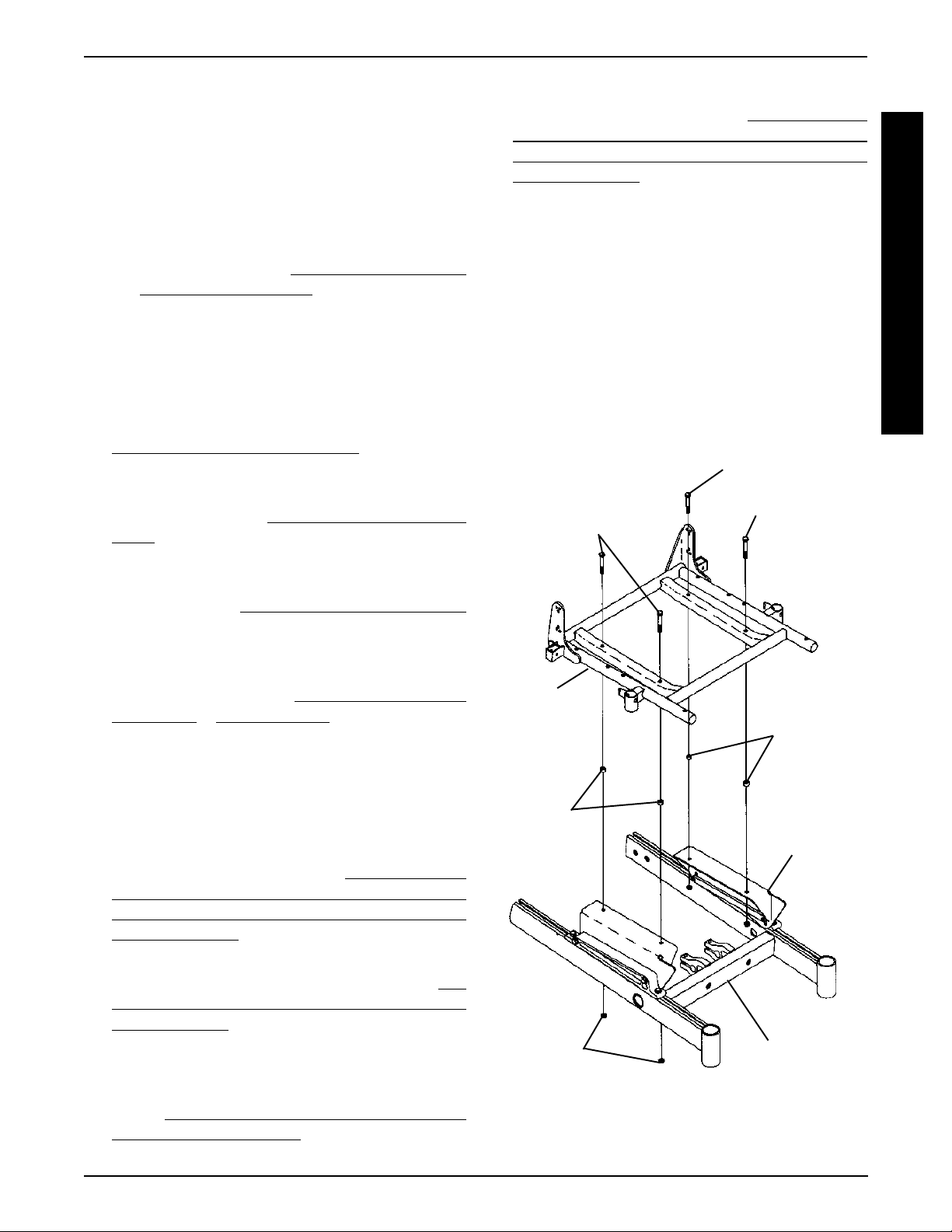
1. Remove the four (4) mounting screws, locknuts and
spacers, if applicable, that secure the standard seat
frame subassembly to the seat mounting plates.
2. Remove the existing standard seat frame.
Mounting Screws
Mounting Screws
(Torque to 156-
inch pounds)
(Torque to 156-
inch pounds)
S
E
A
T
F
R
A
M
E
9. Remove tie-wraps that secures the wiring harness to
the seat frame and the charger cable from its mounting bracket. Refer to
in PROCEDURE 10 of this manual.
10. For standard and adjustable seat frames, remove the
back upholstery (including back canes and spreader
bar, if applicable). Refer to
HOLSTERY in PROCEDURE 5 of the manual.
11. Refer back to the starting procedure to complete the
desired change.
REPLACING WIRING HARNESS
REPLACING BACK UP-
REPLACING EXACT SAME SIZE
STANDARD SEAT FRAME
1. Perform the instructions outlined in PREP ARATIONS
FOR REMOVING/INSTALLING SEAT FRAME (ST ANDARD FRAME, ADJUST ABLE FRAME, AND CAPT AINS V AN SEA T) in this procedure of the manual.
2. Remove the existing standard seat frame subassembly and install the NEW standard frame. Refer to
MOVING/INST ALLING STANDARD SEAT FRAME
SUBASSEMBLY in this procedure of the manual.
3. FOR 12-15-INCH SEAT DEPTHS ONLY: Remove
the CJ back brackets from the existing standard seat
frame and install onto the NEW standard seat frame.
Refer to
ETS FROM SEAT FRAME in this procedure of the
manual.
REMOVING/INSTALLING CJ BACK BRACK-
RE-
Standard
Seat
Assembly
Spacer
(16-inch Wide
Only)
Locknuts
NOTE: For 16-inch wide seat frames, there will be spacers positioned between the seat frame and the seat mounting plates.
FIGURE 2 - REMOVING/INSTALLING STANDARD
SEAT FRAME SUB-ASSEMBLY
Spacer
(16-inch
Wide Only)
Seat
Mounting
Plate
Base Frame
23
Page 24
PROCEDURE 6 SEAT FRAME
3. Refer back to the starting procedure to complete the
desired change.
Installing
S
1. Position NEW standard seat frame subassembly on
E
seat mount plates.
A
2. Secure NEW standard seat frame subassembly onto
T
F
R
A
M
seat mounting plates with the existing four (4) mounting screws, locknuts and spacers, if applicable. T orque
to 156-inch pounds.
3. Refer back to the starting procedure to complete the
desired change.
E
CHANGING SEAT DEPTH
Standard Seat Frame
NOTE: Review the chart below. This will determine the
components needed to obtain the desired seat depth.
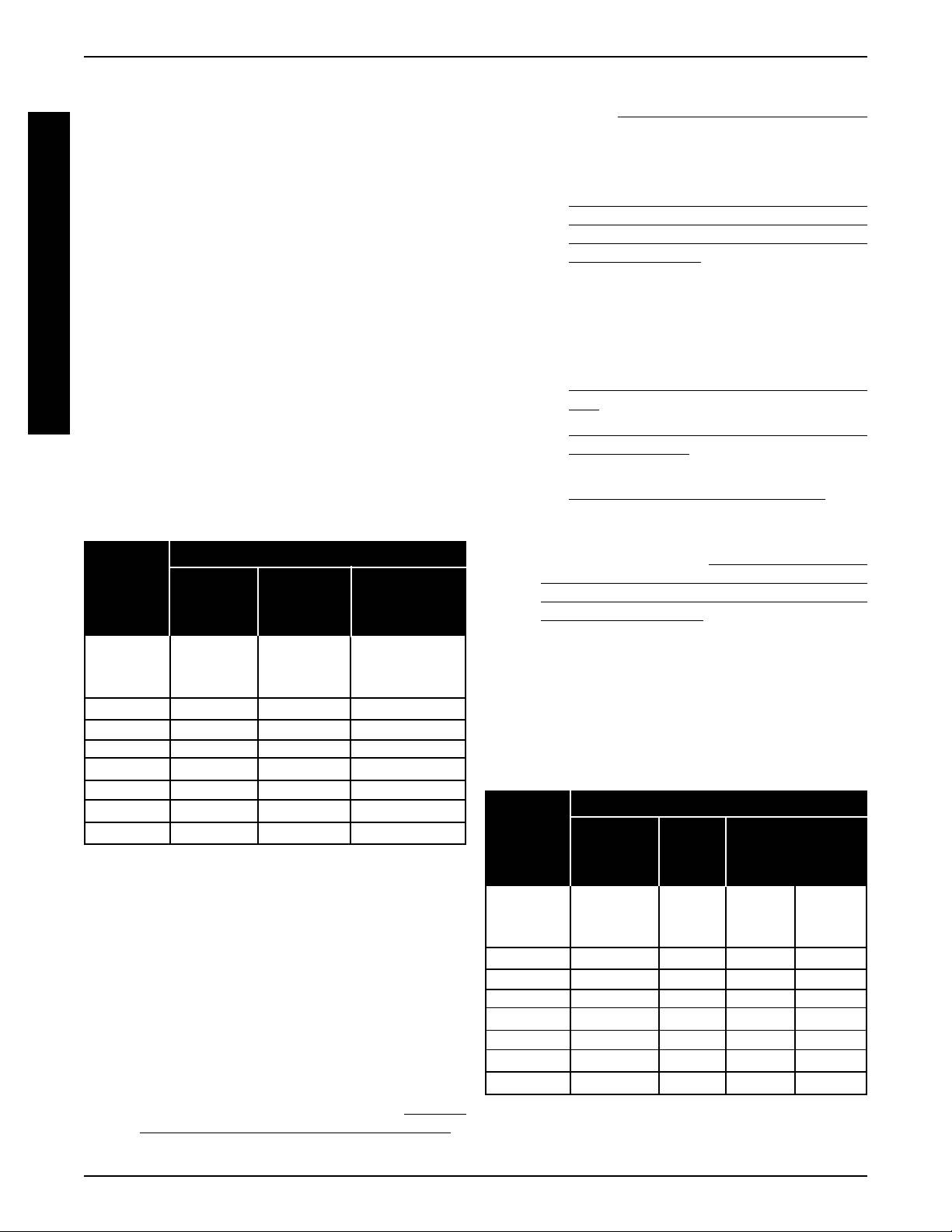
COMPONENT IDENTIFICATION TABLE
FOR STANDARD SEAT FRAME
SEAT FRAME COMPONENTS
CJ BACK SEAT
SEA T BRACKETS SEA T FRAME
DEPTH REQUIRED P A N DEPTH
12-inches
to YES 17-inch 16-inch deep
15-inches
16-inches NO 16-inch 16-inch deep
17-inches NO 17-inch 16-inch deep
18-inches NO 18-inch 18-inch deep
19-inches NO 19-inch 18-inch deep
20-inches NO 20-inch 20-inch deep
21-inches NO 21-inch 20-inch deep
22-inches NO 22-inch 22-inch deep
1. Find current seat depth in left hand column in the chart.
2. Follow that row to right under seat frame components.
3. Verify and note the components of the current seat depth.
4. Repeat STEPS 1-3 for your desired seat depth.
5. Compare existing components of the current seat depth
and the required components for the desired seat depth.
6. Perform one (1) of the following:
A . If the current seat depth and the desired seat depth
is within the 12-15-inch seat depth range, this change
can be accomplished by repositioning the back
canes on the CJ back brackets. Refer to
ING SEA T DEPTH BETWEEN 12-15-INCHES in
this procedure of the manual.
CHANG-
B. If the desired change only requires a NEW seat
pan, refer to
in this procedure of the manual.
C. For all other seat depth changes, perform the fol-
lowing:
l
PREPARATIONS FOR REMOVING/INSTALLING SEAT FRAME (STANDARD
FRAME, ADJUST ABLE FRAME, AND CAPT AINS VAN SEAT) in this procedure of the
manual.
Perform one (1), two (2), or all three (3) of the procedures listed below depending on the components required for the desired seat depth determined from STEPS 1-5:
REMOVING/INST ALLING CJ BACK BRACK-
l
ETS in this procedure of the manual.
l
REMOVING/INST ALLING STANDARD SEA T
SUBASSEMBL Y in this procedure of the
manual.
l
REMOVING/INSTALLING SEAT P AN in this
procedure of the manual.
After completing the procedure(s) listed above, perform the steps outlined in
REMOVING/INST ALLING SEAT FRAME (ST ANDARD FRAME, ADJUSTABLE FRAME, AND
CAPTAINS VAN SEAT) to complete the desired
seat depth change.
Adjustable Seat Frame (FIGURE 3)
REMOVING/INSTALLING SEAT P AN
PREP ARA TIONS FOR
NOTE: Review the chart below. This will determine the components needed to obtain your desired seat depth.
COMPONENT IDENTIFICATION TABLE
FOR STANDARD SEAT FRAME
SEAT FRAME COMPONENTS
CJ BACK
SEA T BRACKETS SEA T SIDE CENTER
DEPTH REQUIRED P AN FRAME FRAME
12-inches
to YES 17-inch Short Short
15-inches
16-inches NO 16-inch Short Short
17-inches NO 17-inch Short Short
18-inches NO 18-inch Medium Short
19-inches NO 19-inch Medium Short
20-inches NO 20-inch Long Long
21-inches NO 21-inch Long Long
22-inches NO 22-inch X-Long Long
NOTE: Note the four (4) different lengths of side frames
short, medium, long, and X-long, as well as the two different center frames, short and long. These components are
interchanged to obtain the various different seat depths.
24
Page 25
PROCEDURE 6SEAT FRAME
1. Find current seat depth in left hand column in the chart.
2. Follow that row to right under seat frame components.
3. Verify and note the components of the current seat depth.
4. Repeat STEPS 1-3 for the desired seat depth.
5. Compare existing components of the current seat depth
and the required components for the desired seat depth.
T o adjust the depth of the seat on the wheelchair, use
the following guidelines:
If the current seat depth is and the desired seat depth are
within the 12-15-inch seat depth range, this change can be
accomplished by repositioning the back canes on the CJ
back brackets. Refer to
TWEEN 12-15-INCHES in this procedure of the manual.
If the desired change only requires a NEW seat pan, refer to
REMOVING/INST ALLING SEAT PAN in this procedure of
the manual.
If the desired change requires the removal/installation of CJ
back brackets, refer to
BRACKETS in PROCEDURE 8 of this manual.
If the desired change requires a new side frame, and/or new
center frame, perform the following steps:
CHANGING SEAT DEPTH BE-
REMOVING/INSTALLING CJ BACK
NOTE: If seat width adjustment is also desired, refer to CHANGING SEA T WIDTH in this procedure
of the manual for mounting hole locations and allowable seat width/seat depth combinations.
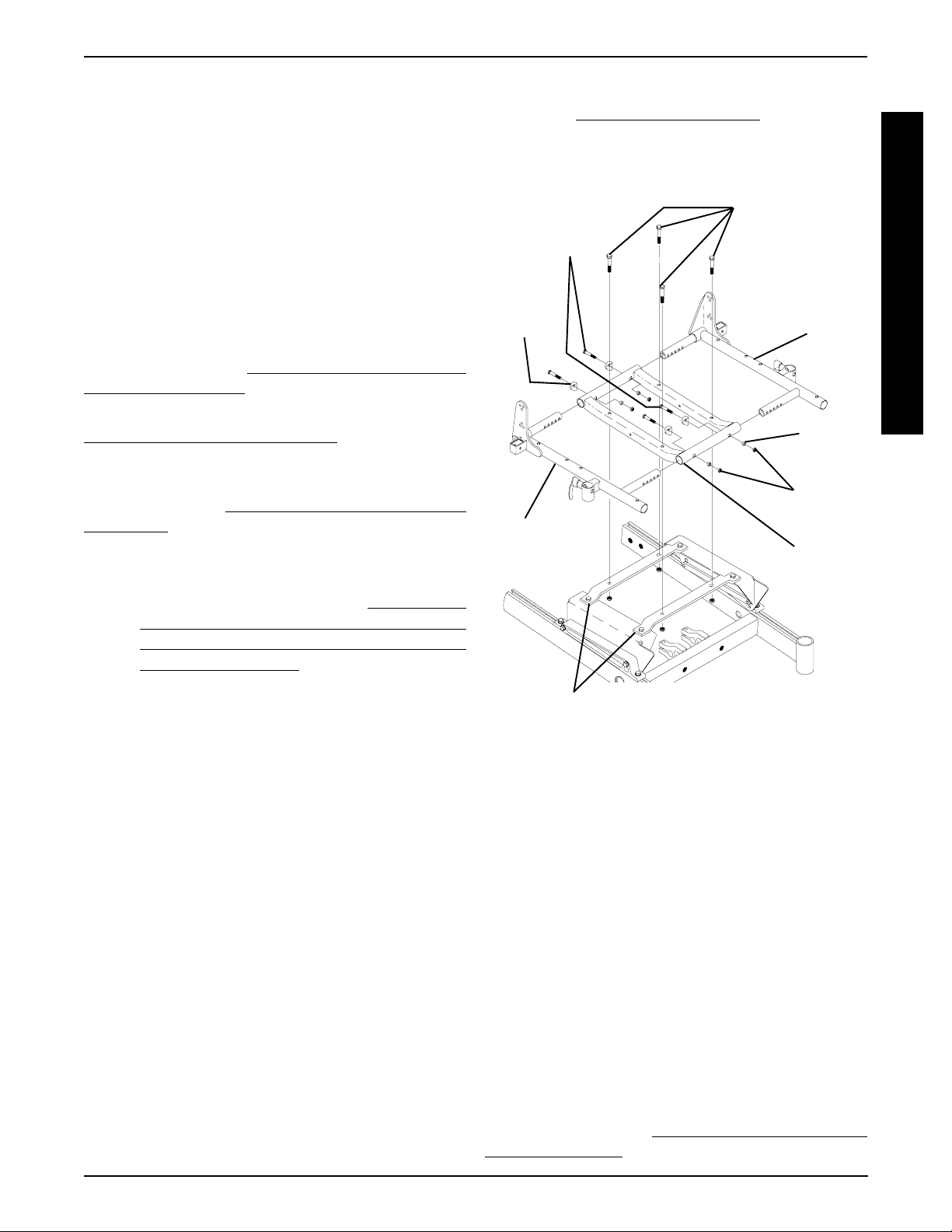
Mounting
Screws
(Torque to 75-
inch pounds)
Coved
Washers
Side Frame
Mounting Screws
(Torque to 156-
inch pounds)
Side
Frame
Spacers
Locknuts
Center
Frame
S
E
A
T
F
R
A
M
E
A . Perform the instructions outlined in
REMOVING/INST ALLING PREPARATIONS FOR
STANDARD FRAME, ADJUSTABLE FRAME, AND
CAPT AINS VAN SEAT in this procedure of the
manual.
SEA T FRAME
NOTE: Note the mounting hole position of the side
frame for proper installation of the NEW side frame.
B. Remove the two (2) mounting screws, coved wash-
ers, spacers, and locknuts that secure the side frame
to the center frame.
C. Remove the side frame from the center frame.
D. Repeat STEPS A and B for opposite side frame.
If the desired seat depth requires a new center
frame, determined in STEPS 1-5 perform STEPS
E - G, otherwise proceed to STEP H.
E. Remove the four (4) mounting screws that secure
the EXISTING center frame to support brackets.
F. Remove existing center frame from seat mount
plates.
G. Secure NEW center frame to support brackets with
the existing four (4) mounting screws and locknuts.
T orque to 156-inch pounds.
H. Secure NEW side frame to the center frame at the
position noted previously. Torque to 75-inch pounds.
Support Brackets
FIGURE 3- CHANGING SEA T DEPTH - ADJUSTABLE
SEAT FRAME
Changing Seat Depth Between 12 and 15Inches (FIGURE 4)
NOTE: There are two (2) sizes of CJ back brackets. Refer
to the following chart to determine if the seat depth required
is obtainable by repositioning the back canes only , or if the
CJ back brackets must be replaced.
CJ BACK BRACKET (SEAT DEPTH) RANGES
12 and 13-inches OR 14 and 15-inches
If seat depth required is within seat depth range of
the original CJ back brackets, only the back canes
need to be repositioned. Refer to the following procedure.
If the seat depth required is NOT within the seat depth
range of the original CJ back brackets, the CJ back
brackets must be replaced before repositioning the
back canes. Refer to
BACK BRACKETS in PROCEDURE 8 of this manual.
REMOVING/INSTALLING CJ
25
Page 26
PROCEDURE 6 SEAT FRAME
1. Remove the armrests from the wheelchair. Refer to INST ALLING/REMOVING FLIP BACK ARMRESTS in
PROCEDURE 4 of the owner’s manual, 1081227.
2. Cut the tie wraps that secure the back upholstery to the
S
CJ back brackets.
E
3. Pull the bottom of the back upholstery away from the
A
T
F
R
rear of the seat pan.
4. Remove mounting screw , washer and coved washer
from the top mounting hole of the CJ back bracket and
back cane.
A
NOTE: Before removing the back canes from the CJ back
M
brackets, note the BACK ANGLE for reinstallation.
E
NOTE: T o avoid losing the insert in each back cane, line up
the holes in the insert with the holes in the back cane and
start one of the screws through the cane from the inside of
the wheelchair to hold the insert in place.
5. Remove the mounting screw, washer and coved
washer from the bottom mounting hole of the CJ back
bracket and the back cane.
6. Reposition the back cane to the desired seat depth
and angle. If changing the back angle as well, refer to
BACK ANGLE ADJUSTMENT in PROCEDURE 8 of
this manual.
7. Secure bottom of the back upholstery to the seat pan.
8. Secure the bottom of the back upholstery to the CJ
back brackets with new tie wraps.
9. Use Loctite 242 and torque the mounting screws to
75-inch pounds.
10. Repeat the STEPS 1-9 for the opposite back cane.
1 1. Reinstall the armrests onto the wheelchair. Refer to
ST ALLING/REMOVING FLIP BACK ARMRESTS in
PROCEDURE 4 of the owner’s manual, 1081227.
IN-
CHANGING SEAT WIDTH
(STANDARD AND ADJUSTABLE
SEAT FRAME)
Standard Seat Frame
NOTE: If changing seat width below 16-inches wide, you must
convert to an adjustable seat frame. Refer to CONVERTING FROM STANDARD TO ADJUSTABLE SEAT
FRAME OR VICE VERSA in this procedure of the manual.
For all changes above 16-inches wide, perform the outlined
steps.
1. Perform the instructions outlined in PREP ARATIONS
FOR REMOVING/INSTALLING SEAT FRAME (ST ANDARD FRAME, ADJUSTABLE FRAME, AND CAPTAINS VAN SEA T) in this procedure of the manual.
2. Remove the existing standard seat frame subassembly and install the NEW standard frame. Refer to
MOVING/INST ALLING STANDARD SEAT FRAME
SUBASSEMBLY in this procedure of the manual.
3. FOR 12-15-INCH SEAT DEPTHS ONLY: Remove
the CJ back brackets from the existing standard seat
frame and install onto the NEW standard seat frame.
Refer to
ETS in PROCEDURE 8 of t his manual.
4. Reinstall the components previously removed in STEP
1. Perform the instructions outlined in
FOR REMOVING/INSTALLING SEAT FRAME (ST ANDARD FRAME, ADJUST ABLE FRAME, AND CAPT AINS V AN SEA T) in this procedure of the manual.
REMOVING/INSTALLING CJ BACK BRACK-
PREPARA TIONS
RE-
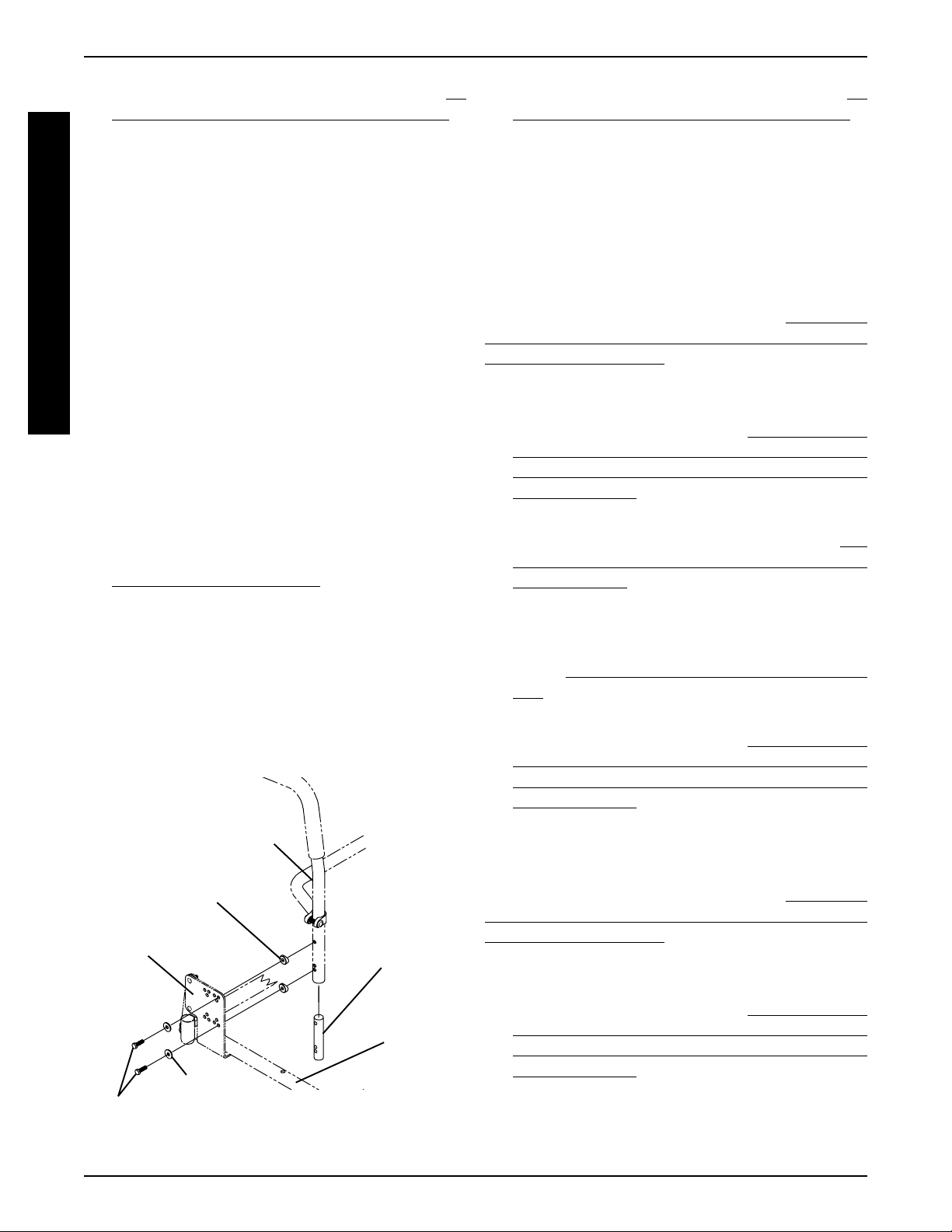
Back Cane
Coved
Washers
CJ Back
Bracket
Washers
Mounting Screws (Torque to 75-inch pounds)
FIGURE 4 - ADJUSTING SEA T DEPTH - CHANGING
SEA T DEPTH BETWEEN 12 AND 15-INCHES
Threaded
Insert
Seat
Frame
Adjustable Seat Frame (FIGURE 5)
NOTE: If changing seat width above 16-inches wide, you
must convert to a standard seat frame. Refer to CONVERTING FROM STANDARD TO ADJUSTABLE SEAT
FRAME OR VICE VERSA in this procedure of the manual.
For all changes below 16-inches wide, perform the outlined
steps.
1. Perform the instructions outlined in PREPARATIONS
FOR REMOVING/INSTALLING SEAT FRAME (ST ANDARD FRAME, ADJUSTABLE FRAME, AND CAPTAINS VAN SEA T) in this procedure of the manual.
2. Review the following chart for the allowable seat width
and seat depth combinations for the adjustable seat
frame.
26
Page 27
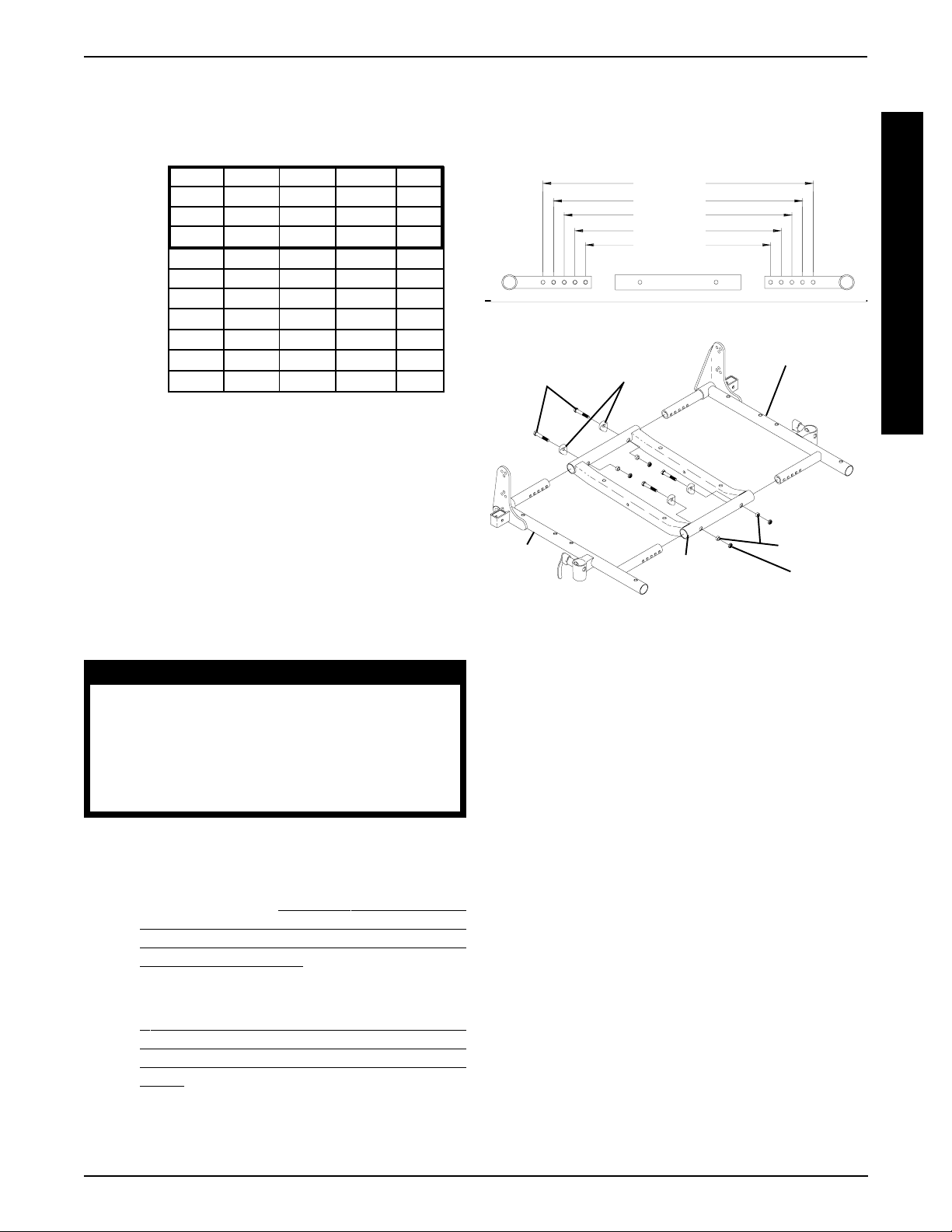
PROCEDURE 6SEAT FRAME
ALLOWABLE SEA T WIDTH AND DEPTH
COMBINA TIONS FOR ADJUSTABLE SEAT FRAME
SEAT WIDTH
12 13 14 15 16
12 ✓✓✓✓✓
S
13 ✓✓✓✓✓
E
14 ✓✓✓✓✓
A
15 ✓✓✓✓✓
T
16 ✓✓✓✓✓
17 N/A N/A ✓✓✓
D
18 N/A N/A ✓✓✓
E
19 N/A N/A ✓✓✓
P
20 N/A N/A ✓✓✓
21 N/A N/A ✓✓✓
T
22 N/A N/A ✓✓✓
H
NOTE: The seat widths and seat depths enclosed in the
outlined box will require the use of CJ back brackets and a
17-inch deep seat pan.
3. Remove the two (2) mounting screws, coved washers,
spacers, and locknuts that secure the side frame to the
center frame.
4. Adjust side frame to desired width determined from
STEP 2. See DETAIL “A” for proper mounting hole
position.
5. Secure side frame to center frame with existing mounting screws, coved washers, spacers, and locknuts.
T orque mounting screws to 75-inch pounds.
B. For all other changes regarding seat frame changes,
refer back to the starting procedure to complete the
desired change.
DETAIL “A”
12-inches
13-inches
14-inches
15-inches
16-inches
STEPS 3-6
Mounting
Screws
Side
Frame
FIGURE 5 -CHANGING SEA T WIDTH - ADJUSTABLE
Coved
Washers
Center
Frame
SEA T FRAME
Side Frame
Spacers
Locknut
S
E
A
T
F
R
A
M
E
WARNING
Both side frames MUST be adjusted to the
same mounting hole position to maintain
proper weight balance of user and seat
frame. If weight is not balanced, injury to
the assistant and/or user and damage to
the wheelchair may result.
6. Repeat STEPS 3-5 for opposite side frame.
7. Perform one (1) of the following:
A. For adjusting the seat width only, perform the in-
structions outlined in
MOVING/INST ALLING SEAT FRAME (STANDARD FRAME, ADJUSTABLE FRAME, AND
CAPTAINS VAN SEAT) in this procedure of the
manual.
NOTE: When performing the steps outlined in
PREPARATIONS FOR REMOVING/INSTALLING SEAT FRAME (STANDARD FRAME, ADJUSTABLE FRAME, AND CAPTAINS VAN
SEAT) the seat pan, seat cushion, back upholstery and spreader bar (if applicable), will need to
be replaced. Spreader bars are only required on
seat depths greater than 19-inches.
PREP ARATIONS FOR RE-
INSTALLING/REMOVING
ADJUSTABLE SEAT FRAME
SUBASSEMBLY AND/OR
COMPONENT REPLACEMENT
(FIGURE 6)
Converting from Adjustable Seat Frame to
Standard Seat Frame or Captains Van Seat
NOTE: This section must be performed in conjunction with
a starting procedure.
1. Remove the four (4) mounting screws that secure the
two (2) support brackets of the adjustable seat frame
subassembly to the seat mounting plates.
2. To complete conversion, refer back to the starting procedure to complete the desired change.
Converting from Standard Seat Frame or
Captains Van Seat To Adjustable Seat Frame
NOTE: This section must be performed in conjunction with
a starting procedure.
NOTE: When converting the seat frame, you will need a
seat pan, seat cushion, back upholstery and spreader bar (if
applicable). Spreader bars are only required on seat depths
of greater than 19-inches.
27
Page 28
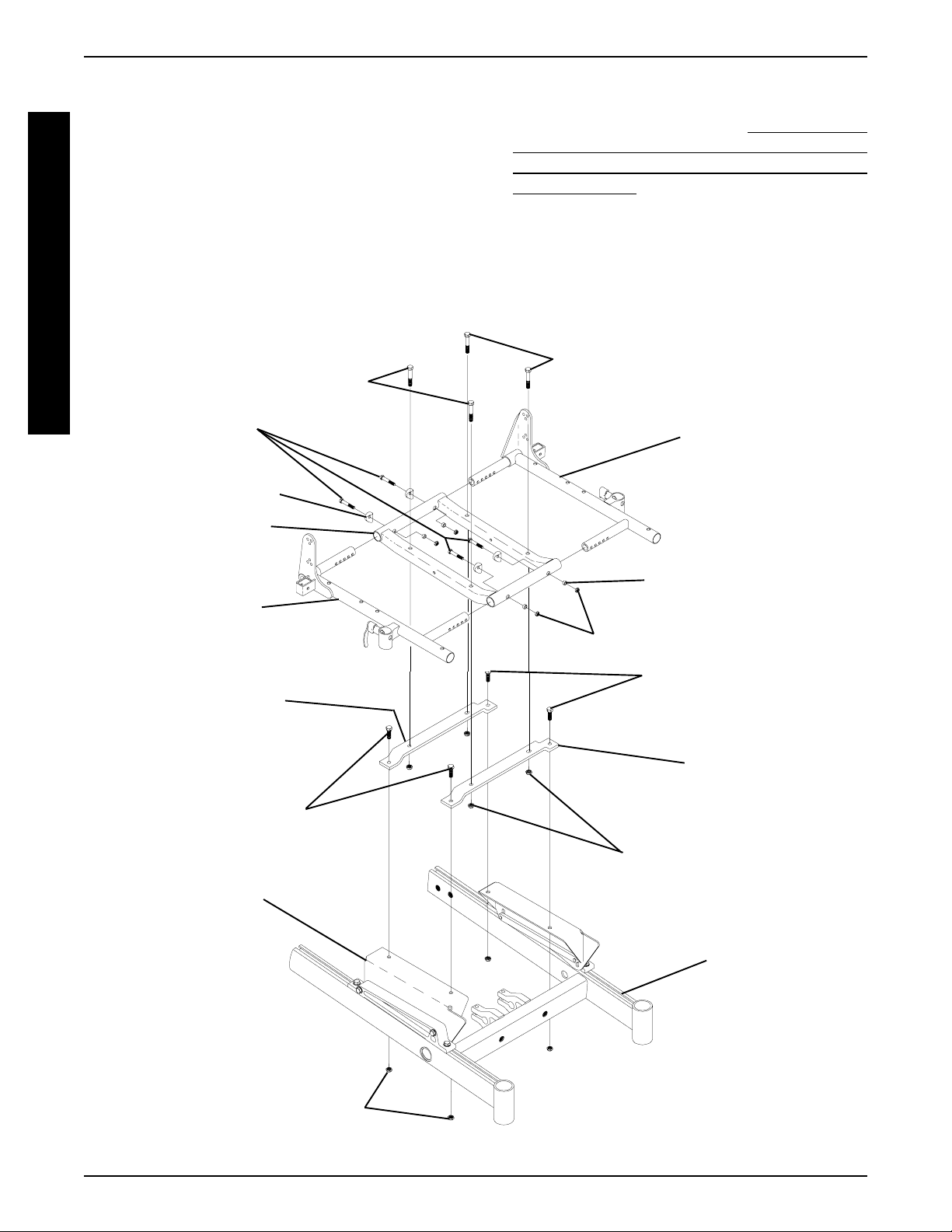
PROCEDURE 6 SEAT FRAME
1. Secure both support brackets to the seat mounting plates
with four (4) mounting screws and locknuts as shown in
FIGURE 6. T orque mounting screws to 156-inch pounds.
2. Secure the center frame to the support brackets with
S
E
A
T
F
R
A
four (4) mounting screws, locknuts, and spacers. T orque
to 156-inch pounds.
3. Insert the side frame into the center frame and secure
with mounting screw, coved spacer, spacer, and locknut. T orque to 75-inch pounds. Repeat for opposite side
frame.
4. T o complete conversion, refer back to the starting procedure to complete the desired change.
M
E
(Torque to 156-inch pounds)
Mounting Screws
(Torque to 75-inch
Mounting Screws
pounds)
Coved Washer
Center Frame
Component Replacement
1. Perform the instructions outlined in
FOR REMOVING/INSTALLING SEAT FRAME (ST ANDARD FRAME, ADJUSTABLE FRAME, AND CAPT AINS V AN SEAT ) in this procedure of the manual.
NOTE: Note the mounting hole position of the current side
frame(s) for proper installation of the NEW side frame(s).
2. Remove the two (2) mounting screws, coved spacers,
spacers, and locknuts that secure the side frame to the
center frame.
Mounting Screws
(Torque to 156-inch pounds)
Side Frame
PREPARATIONS
Side Frame
Support
Bracket
Mounting Screws
(Torque to 156-inch
pounds)
Mounting
Plate
Spacer
Locknuts
Mounting Screws
(Torque to 156-inch
pounds)
Support
Bracket
Locknuts
Base
Frame
Locknuts
FIGURE 6 - INST ALLING/REMOVING ADJUSTABLE SEA T FRAME SUBASSEMBLY AND/OR COMPONENT
REPLACEMENT
28
Page 29
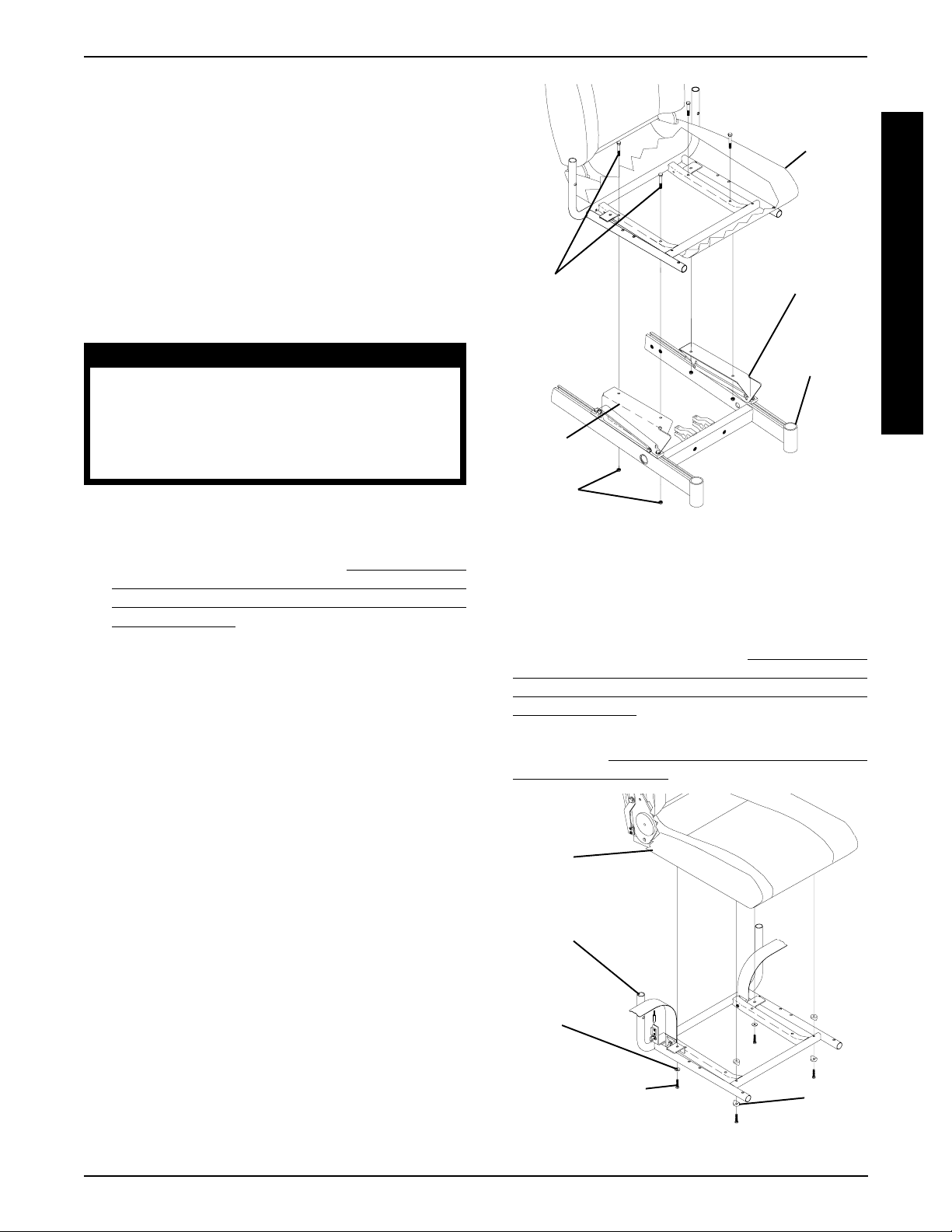
3. Perform one (1) of the following:
PROCEDURE 6SEAT FRAME
A . If center frame needs replaced, repeat STEP 2 for
opposite side frame and proceed to STEP 4.
B. If opposite side frame needs replaced, repeat STEP
2, then proceed to STEP 6. Otherwise proceed to
STEP 6.
4. Remove the four (4) mounting screws and locknuts that
secure the center frame to the support brackets.
5. Secure NEW center frame to support brackets with existing four (4) mounting screws and locknuts. T orque to
156-inch pounds.
WARNING
Both side frames MUST be adjusted to the
same mounting hole position to maintain
proper weight balance of user and seat
frame. If weight is not balanced, injury to
the assistant and/or user and damage to
the wheelchair may result.
6. Install new/existing side frame(s) into new/existing center frame at the mounting position previously noted. T orque
to 75-inch pounds.
7. Perform the instructions outlined in
FOR REMOVING/INSTALLING SEAT FRAME (ST ANDARD FRAME, ADJUST ABLE FRAME, AND CAPT AINS V AN SEA T) in this procedure of the manual.
PREPARATIONS
Captains Van
Seat
Seat Mounting
Mounting
Screws
(Torque to 156-
inch pounds)
Seat
Mounting
Plate
Locknuts
FIGURE 7 - REMOVING/INSTALLING CAPTAINS VAN
SEAT ASSEMBLY
Plate
Base Frame
REPLACING CAPTAINS VAN SEAT
AND/OR CAPTAINS VAN SEAT
FRAME (FIGURE 8)
S
E
A
T
F
R
A
M
E
INSTALLING/REMOVING CAPTAINS
VAN SEAT ASSEMBLY (FIGURE 7)
NOTE: This procedure is to be performed in conjunction with
a starting procedure. Proceed to the section that reflects the
desired change.
Installing Captains Van Seat
1. Position the captains van seat on the seat mounting plates
at the position shown in FIGURE 7.
2. Line up mounting holes in the captains van seat frame
and the mounting holes in the seat mounting plates.
3. Secure the captains van seat to the seat mounting plates
with four (4) mounting screws, and locknuts. Torque to
156-inch pounds.
4. Refer back to the starting procedure to complete the
desired change.
Removing Captains Van Seat
1. Remove the four (4) mounting screws and locknuts that
secure the captains van seat to the seat mounting plates.
2. Remove captains van seat from seat mounting plates.
3. Refer back to the starting procedure to complete the
desired change.
1. Perform the instructions outlined in PREPARATIONS
FOR REMOVING/INSTALLING SEAT FRAME (ST ANDARD FRAME, ADJUST ABLE FRAME, AND CAPT AINS V AN SEA T) in this procedure of the manual.
2. Remove the captains van seat assembly from the wheelchair. Refer to
V AN SEAT ASSEMBL Y in this procedure of the manual.
Captains
Van Seat
Captains
Van Seat
Frame
Washer
Mounting Screw
(Torque to 75-inch
pounds)
FIGURE 8 - REPLACING CAPTAINS VAN SEAT AND/
OR CAPTAINS VAN SEAT FRAME
INST ALLING /REMOVING CAPTAINS
Spacer
29
Page 30

PROCEDURE 6 SEAT FRAME
3. Remove the four (4) mounting screws, two (2) washers, and two (2) spacers that secure the captains van
seat to the seat frame.
4. Replace the captains van seat or the seat frame.
S
5. Secure new/existing captains van seat to the new/exist-
E
A
T
F
R
A
M
E
ing captains van seat frame with existing four (4) mounting screws and spacers. T orque to 75- inch pounds.
6. Install new captains van seat assembly onto the wheelchair. Refer to INST ALLING/REMOVING CAPTAINS V AN
SEAT ASSEMBLY in this procedure of the manual.
7. Perform the instructions outlined in
FOR REMOVING/INSTALLING SEAT FRAME (ST ANDARD FRAME, ADJUSTABLE FRAME, AND CAPTAINS VAN SEA T) in this procedure of the manual.
PREPARATIONS
CONVERTING FROM STANDARD
SEAT FRAME TO ADJUSTABLE
SEAT FRAME OR VICE VERSA
1. Perform the instructions outlined in PREPARATIONS
FOR REMOVING/INSTALLING SEAT FRAME (ST ANDARD FRAME, ADJUST ABLE FRAME, AND CAPT AINS V AN SEA T) in this procedure of the manual.
2. Perform one (1) of the following:
A. Remove the existing standard seat frame subas-
sembly. Refer to
DARD SEA T FRAME SUBASSEMBLY in this procedure of the manual.
B. Remove the adjustable seat frame subassembly.
Refer to
SEA T FRAME SUBASSEMBLY AND/OR COMPONENT REPLACEMENT in this procedure of the
manual.
3. Perform one (1) of the following:
A. Install the standard frame subassembly. Refer to
INSTALLING/REMOVING STANDARD SEAT
FRAME SUBASSEMBL Y in this procedure of the
manual.
B. Install the adjustable seat frame subassembly . Re-
fer to
SEAT FRAME SUBASSEMBLY AND/OR COMPONENT REPLACEMENT in this procedure of
the manual.
4. ADJUSTABLE FRAMES ONLY: Adjust side frame to
desired seat width. Refer to
in this procedure of the manual for mounting hole locations and allowable seat width/seat depth combinations.
5. STANDARD AND ADJUST ABLE FRAME WITH 12-
15-INCH SEA T DEPTHS ONLY : Remove the CJ back
brackets from the existing standard seat frame and install onto the NEW standard seat frame. Refer to
MOVING/INST ALLING CJ BACK BRACKETS i n PROCEDURE 8 of this manual.
REMOVING/INST ALLING ADJUSTABLE
INSTALLING/REMOVING ADJUSTABLE
REMOVING/INSTALLING STAN-
CHANGING SEAT WIDTH
6. Perform the instructions outlined in
FOR REMOVING/INSTALLING SEAT FRAME (ST ANDARD FRAME, ADJUST ABLE FRAME, AND CAPT AINS V AN SEA T) in this procedure of the manual.
PREPARATIONS
CONVERTING FROM ADJUSTABLE
SEAT FRAME TO CAPTAINS VAN
SEAT OR VICE VERSA
1. Perform the instructions outlined in PREPARATIONS
FOR REMOVING/INSTALLING SEAT FRAME (ST ANDARD FRAME, ADJUST ABLE FRAME, AND CAPT AINS V AN SEA T) in this procedure of the manual.
2. Perform one (1) of the following:
A. Remove the adjustable seat frame subassembly.
Refer to
SEAT FRAME SUBASSEMBLY in this procedure
of the manual.
B. Remove the captains van seat Assembly . Refer to
INST ALLING/REMOVING CAPTAINS VAN SEA T
ASSEMBL Y in this procedure of the manual.
3. Perform one (1) of the following sections:
Adjustable Frames
A. Install the adjustable seat frame subassembly . Re-
fer to
SEAT FRAME SUBASSEMBLY AND/OR COMPONENT REPLACEMENT in this procedure of
the manual.
B. Adjust side frames to desired seat width. Refer to
CHANGING SEA T WIDTH in this procedure of the
manual for mounting hole locations and allowable
seat width/seat depth combinations.
C. 12-15-INCH SEA T DEPTHS ONL Y : Install the CJ
back brackets, seat positioning strap, and quick release pin from the onto the adjustable seat frame.
Refer to
BRACKETS in PROCEDURE 8 of this manual.
D. Perform the instructions outlined in
TIONS FOR REMOVING/INSTALLING SEAT
FRAME (STANDARD FRAME, ADJUSTABLE
FRAME, AND CAPT AINS VAN SEAT) in this procedure of the manual.
Captains Van Seat
A. Install the captains van seat. Refer to
REMOVING CAPTAINS VAN SEA T ASSEMBLY in
this procedure of the manual.
B. Adjust the captains van seat to the desired position.
Refer to
RE-
procedure of the manual.
REMOVING/INSTALLING STANDARD
INSTALLING/REMOVING ADJUSTABLE
REMOVING/INSTALLING CJ BACK
ADJUSTING CAPTAINS VAN SEA T in this
PREPARA-
INSTALLING/
30
Page 31

PROCEDURE 6SEAT FRAME
C. Perform the instructions outlined in PREPARA-
TIONS FOR REMOVING/INSTALLING SEAT
FRAME (STANDARD FRAME, ADJUSTABLE
FRAME, AND CAPT AINS VAN SEAT) in this proce-
dure of the manual.
CONVERTING FROM STANDARD
SEAT FRAME TO CAPTAINS VAN
SEAT OR VICE VERSA
1. Perform the instructions outlined in PREPARATIONS
FOR REMOVING/INSTALLING SEAT FRAME (ST ANDARD FRAME, ADJUST ABLE FRAME, AND CAPT AINS V AN SEA T) in this procedure of the manual.
2. Perform one (1) of the following:
A. Remove the standard seat frame subassembly.
Refer to
SEAT FRAME SUBASSEMBLY in this procedure
of the manual.
B. Remove the captains van seat Assembly . Refer to
INST ALLING/REMOVING CAPTAINS VAN SEA T
ASSEMBL Y in this procedure of the manual.
3. Perform one (1) of the following:
A. Install the captains van seat. Refer to
REMOVING CAPTAINS VAN SEA T ASSEMBLY in
this procedure of the manual.
B. Install the standard seat frame. Refer to
ING/INSTALLING ST ANDARD SEAT FRAME SUBASSEMBL Y in this procedure of the manual.
4. STANDARD FRAMES ONL Y ON 12-15-INCH SEA T
DEPTHS ONL Y: Install the CJ back brackets from the
onto the adjustable seat frame. Refer to
INST ALLING CJ BACK BRACKETS in PROCEDURE
8 of this manual.
5. Perform the instructions outlined in
FOR REMOVING/INSTALLING SEAT FRAME (ST ANDARD FRAME, ADJUSTABLE FRAME, AND CAPTAINS VAN SEA T) in this procedure of the manual.
6. Adjust the captains van seat to the desired position. Refer to
ADJUSTING CAPTAINS VAN SEA T in this proce-
dure of the manual.
REMOVING/INSTALLING STANDARD
INSTALLING/
REMOV-
REMOVING/
PREPARATIONS
3. Remove the six (6) mounting screws, locknuts, and spacers that secure the seat pan, seat positioning strap, and
quick release pin to the seat frame.
NOTE: When removing seat pan, note tab position of quick
release pin to the seat positioning strap.
Installing
1. Position the NEW seat pan on the seat frame, aligning
the mounting holes of the seat pan and the mounting
holes of the seat frame.
2. Position the seat positioning strap and quick release pin
tab onto the seat frame and secure with mounting screw
and locknut. See FIGURE 9 for proper orientation. Repeat for other seat positioning strap.
NOTE: Check seat positioning strap for proper length. The
width range for the four (4) seat positioning straps are: 12-16inches wide (Junior), 16-19-inches wide, 20-22-inches wide,
and 23-24-inches wide.
3. Reinstall the remaining mounting screws, locknuts, and
spacers. T orque all mounting screws to 75-inch pounds.
4. Remove the protective strips from new seat pan and
reinstall the seat cushion onto the seat pan.
5. Perform one (1) of the following:
A . When changing the seat width or depth, refer back
to that procedure to complete the desired change.
Mounting
Screws
Seat
Seat
Positioning
Strap
Pan
S
E
A
T
F
R
A
M
E
REMOVING/INSTALLING SEAT PAN
(FIGURE 9)
Removing
1. Remove the seat cushion from the seat pan.
2. Remove the flip-back armrests from the wheelchair. Refer
INST ALLING/REMOVING FLIP BACK ARMRESTS
to
in PROCEDURE 4 of the owner’s manual, 1081227.
Spacer
Seat Frame
Tab
Locknut
NOTE: Illustration shows standard frame only for clarity .
The seat pan removes/installs onto the adjustable seat
frame the way .
FIGURE 9 - REMOVING/INST ALLING SEAT PAN
31
Quick Release Pin
Locknut
Page 32

PROCEDURE 6 SEAT FRAME
B. Reinstall the flip-back armrests from the wheelchair.
Refer to
INSTALLING/REMOVING FLIP BACK ARM-
RESTS in PROCEDURE 4 of the owner’s manual,
1081227.
S
MOUNTING PLATE - SEAT ANGLE
E
ADJUSTMENT AND INSTALLATION
A
ORIENTATION (FIGURE 10)
T
Seat Angle Adjustment
F
R
NOTE: The angle of the seat is factory set providing the user
A
with a 5
either the front or back of the seat mount plate to obtain any
M
angle between 0
E
NOTE: There are three (3) heights of seat mounting plates;
low, medium, and high. See chart below for proper settings.
1. T o obtain a 0o seat dump (DET AIL “A”):
o
seat dump. This angle can changed by adjusting
o
or 10o seat dump.
A. Loosen the two (2) mounting screws that secure
the rear of the seat frame to the seat mount plate.
B. Position the mounting screws at the bottom of the
rear slot.
C. Securely tighten both mounting screws. T orque to
15-in/lbs.
2. T o obtain a 10
o
seat dump (DET AIL “A”):
A . Loosen the two (2) mounting screws that secure
the front of the seat frame to the seat mount plate.
B. Position the mounting screws at the bottom of the
front slot.
C. Securely tighten both mounting screws. T orque to
15-in/lbs.
Installation Orientation
1. Medium and High Seat Mounting Plates: Install with
the angled end toward the front of the wheelchair.
2. Low Seat Mounting Plates: Install with the thicker
end toward the front of the wheelchair.
Rear of Seat Frame
Mounting
Screw
DET AIL “A”
LOW MEDIUM AND HIGH
Angled End of Seat
Thicker End
Mounting Plate
SEA T
MOUNT
PLA TE
LOW
HEIGHT
MEDIUM
HEIGHT
REAR OF
CHAIR
REAR OF
CHAIR
o
0
FRONT OF
FRONT OF
CHAIR
CHAIR
Medium Height
Seat Mount Plate
SEA T DUMP
REAR OF
CHAIR
REAR OF
CHAIR
o
5
FRONT OF
FRONT OF
Mounting Screw
REAR OF
CHAIR
REAR OF
CHAIR
CHAIR
CHAIR
Front of Seat
Frame
o
10
FRONT OF
CHAIR
FRONT OF
CHAIR
REAR OF
CHAIR
FRONT
OF CHAIR
REAR OF
CHAIR
FRONT OF
CHAIR
REAR OF
CHAIR
HIGH
HEIGHT
FIGURE 10 - MOUNTING PLA TE - SE AT ANGLE ADJUSTMENT AND INST ALLATION ORIENTATION
32
FRONT OF
CHAIR
Page 33

BASE FRAME PROCEDURE 7
This Procedure Includes the Following:
Replacing Seat Mounting Plates
Replacing Seat Support Brackets
Replacing Seat Support Bracket T-Nuts
Replacing Battery Charger Bracket and T-Nut
Removing/Installing Seat Stop Screws
WARNING
After ANY adjustments, repair or service and BEFORE use, make sure that all attaching hardware
is tightened securely - otherwise injury or damage may result.
REPLACING SEAT MOUNTING
PLATES (FIGURE 1)
NOTE: When replacing components of the wheelchair, refer
to the individual procedure for correct use of LOCTITE 242
and torque specifications or PROCEDURE 3 of this Manual.
1. Perform the instructions outlined in PREPARATIONS
FOR REMOVING/INSTALLING SEAT FRAME (ST ANDARD FRAME, ADJUST ABLE FRAME, AND CAPT AINS V AN SEA T) in PROCEDURE 6 of this manual.
2. Perform one (1) of the following:
A . Remove standard seat frame subassembly . Refer
to
REMOVING/INST ALLING STANDARD SEAT
FRAME SUBASSEMBLY in PROCEDURE 6 of
this manual.
B. Remove adjustable seat frame subassembly . Re-
fer to
INSTALLING/REMOVING ADJUSTABLE
SEAT FRAME ASSEMBLY AND OR COMPONENT REPLACEMENT in PROCEDURE 6 of
this manual.
C. Remove captains van seat. Refer to INSTALLING/
REMOVING CAPTAINS VAN SEA T ASSEMBLY in
PROCEDURE 6 of this manual.
NOTE: Before removing seat mounting plates, note the position of the washers.
3. Remove the two (2) mounting screws, washers and
bolt strap bracket that secure the seat mounting plate to
the seat support bracket.
4. Secure NEW seat mounting plate with existing two (2)
mounting screws, washers, and bolt straps to seat support bracket using Loctite 242 and torque to 156-inch
pounds.
5. Repeat STEPS 1-2 for opposite side, if necessary .
NOTE: For illustrations of the three (3) different seat mounting plates, refer to
ADJUSTMENT AND INSTALLATION ORIENTATION in
PROCEDURE 6 of this manual.
MOUNTING PLATE - SEAT ANGLE
6. Adjust seat mounting plates to desired angle. Refer to
MOUNTING PLA TE - SEAT ANGLE ADJUSTMENT
AND INSTALLATION ORIENT ATION in PROCEDURE
6 of this manual.
7. Reverse STEP 2A, 2B or 2C.
8. Perform the instructions outlined in
FOR REMOVING/INSTALLING SEAT FRAME (ST ANDARD FRAME, ADJUST ABLE FRAME, AND CAPT AINS V AN SEA T) in PROCEDURE 6 of this manual.
Washer
Bolt Strap
Seat
Mounting
Plate
Seat
Support
Bracket
Washer
Mounting
Screws
FIGURE 1 - REPLACING SEAT MOUNTING PLATES
PREPARATIONS
Mounting
Screws
REPLACING SEAT SUPPORT
BRACKETS (FIGURE 2)
1. Perform the instructions outlined in PREPARATIONS FOR
REMOVING/INSTALLING SEAT FRAME (STANDARD
FRAME, ADJUSTABLE FRAME, AND CAPTAINS VAN
SEAT) in PROCEDURE 6 of this manual.
2. Perform one (1) of the following:
A. Remove standard seat frame subassembly. Refer
to
REMOVING/INSTALLING STANDARD SEAT
FRAME SUBASSEMBLY in PROCEDURE 6 of this
manual.
B. Remove adjustable seat frame subassembly . Re-
fer to
INSTALLING/REMOVING ADJUSTABLE
SEAT FRAME ASSEMBLY AND OR COMPONENT REPLACEMENT in PROCEDURE 6 of
this manual.
C. Remove captains van seat. Refer to
REMOVING CAPTAINS VAN SEA T ASSEMBLY in
PROCEDURE 6 of this manual.
3. Remove seat mount plates. Refer to
MOUNTING PLA TES in this procedure of the manual.
NOTE: Note the position of the seat support brackets before
removing to ensure proper reinstallation.
INST ALLING/
REPLACING SEAT
B
A
S
E
F
R
A
M
E
33
Page 34

BASE FRAMEPROCEDURE 7
WARNING
Do not adjust the position of the seat support bracket in this procedure. If an ad-
ADJUSTING
B
A
S
justment is desired, refer to
WEIGHT DISTRIBUTION in PROCEDURE 15 MWD WHEELCHAIRS, PROCEDURE 16 - RWD
WHEELCHAIRS, or PROCEDURE 17 - FWD
WHEELCHAIRS of this manual.
E
4. Remove the two (2) mounting screws and washers that
F
secure the seat support bracket to the base frame.
R
A
M
E
When installing seat support bracket, ensure the mounting screws are threaded
into the T-Nuts located inside the channel
of the base frame.
5. Secure the NEW seat support bracket to base frame
with the existing two (2) mounting screws and washers.
T orque to 156-inch pounds.
6. Reinstall seat mount plates. Refer to
MOUNTING PLA TES in this procedure of the manual.
7. Adjust seat mount plates to desired angle. Refer to
MOUNTING PLA TE - SEAT ANGLE ADJUSTMENT
AND INSTALLATION ORIENTATION in PROCEDURE
6 of this manual.
8. Reverse STEP 2A, 2B or 2C.
9. Perform the instructions outlined in
FOR REMOVING/INSTALLING SEAT FRAME (ST ANDARD FRAME, ADJUSTABLE FRAME, AND CAPTAINS VAN SEA T) in PROCEDURE 6 of this manual.
Washer
Base
Frame
FIGURE 2 - REPLACING SEAT SUPPORT BRACKETS
WARNING
REPLACING SEAT
PREPARATIONS
Mounting Screws
Seat Support
Bracket
T-Nut
B. Remove adjustable seat frame subassembly . Re-
INSTALLING/REMOVING ADJUSTABLE
fer to
SEAT FRAME ASSEMBLY AND OR COMPONENT REPLACEMENT in PROCEDURE 6 of
this manual.
C. Remove captains van seat. Refer to I
REMOVING CAPTAINS VAN SEA T ASSEMBLY in
PROCEDURE 6 of this manual.
3. Remove the seat mount plates. Refer to
MOUNTING PLATES in this procedure of the manual.
NST ALLING/
REPLACING SEAT
NOTE: Before removing seat mounting plates, note the position of the washers.
4. Remove the seat support brackets. Refer to REPLACING SEAT SUPPORT BRACKETS in this procedure of
the manual.
5. Remove the seat stop screw that is closest to the end
cap. Refer to
SCREWS in this procedure of the manual.
6. Remove the end cap and channel cover.
7. Slide existing T-Nut(s) out of channel.
8. Insert NEW T-Nut(s) into channel in correct orientation.
9. Replace channel cover and end cap.
REMOVING/INST ALLING SEAT STOP
WARNING
The seat stop screws must be in place before operation of your power wheelchair.
Ensure the T-Nut(s) are positioned between
both seat stop screws.
10. Use Loctite 242
frame.
11. Reinstall the seat seat support brackets. Refer to
PLACING SEAT SUPPORT BRACKETS in this procedure of the manual.
Channel Cover
Mounting Screw
Washer
Channel
and reinstall seat stop screw into base
RE-
Seat Support
Bracket
REPLACING SEAT SUPPORT
BRACKET T-NUTS (FIGURE 3)
1. Perform the instructions outlined in PREPARATIONS
FOR REMOVING/INSTALLING SEAT FRAME (ST ANDARD FRAME, ADJUSTABLE FRAME, AND CAPTAINS VAN SEA T) in PROCEDURE 6 of this manual.
2. Perform one (1) of the following:
A . Remove standard seat frame subassembly . Refer
to
REMOVING/INST ALLING STANDARD SEAT
FRAME SUBASSEMBLY in PROCEDURE 6 of
this manual.
Stop
Screw
Base
Frame
FIGURE 3 - REPLACING SEAT SUPPORT BRACKET
T-NUTS
34
End Cap
T-Nut
Page 35

BASE FRAME PROCEDURE 7
12. Reinstall the seat mount plates. Refer to
SEA T MOUNTING PLATES in this procedure of the
manual.
13. Adjust seat mounting plates to desired angle. Refer to
MOUNTING PLA TE - SEAT ANGLE ADJUSTMENT
AND INSTALLATION ORIENTATION in PROCEDURE
6 of this manual.
14. Reverse STEP 2A, 2B or 2C.
15. Perform the instructions outlined in
FOR REMOVING/INSTALLING SEAT FRAME (ST ANDARD FRAME, ADJUSTABLE FRAME, AND CAPTAINS VAN SEA T) in PROCEDURE 6 of this manual.
REPLACING
PREPARATIONS
REPLACING BATTERY CHARGER
BRACKET AND T-NUT
NOTE: There is no T-nut on the FWD models.
RWD and MWD Models (FIGURE 4)
1. Perform the instructions outlined in
FOR REMOVING/INSTALLING THE SEAT FRAME
(STANDARD FRAME, ADJUSTABLE FRAME, AND
CAPT AINS VAN SEAT) in PROCEDURE 6 of this
manual.
2. Perform one (1) of the following:
A . Remove standard seat frame subassembly . Refer
to
REMOVING/INST ALLING STANDARD SEAT
FRAME SUBASSEMBLY in PROCEDURE 6 of
this manual.
B. Remove adjustable seat frame subassembly . Re-
fer to
INSTALLING/REMOVING ADJUSTABLE
SEAT FRAME ASSEMBLY AND OR COMPONENT REPLACEMENT in PROCEDURE 6 of
this manual.
C. Remove captains van seat. Refer to
REMOVING CAPTAINS VAN SEA T ASSEMBLY in
PROCEDURE 6 of this manual.
3. Remove the seat support brackets. Refer to
PLACING SEAT SUPPORT BRACKETS in this
procedure of this manual.
4. Remove the two (2) mounting screws that secure the
battery charger connector to the mount bracket.
5. Remove battery charger connector from mount bracket.
6. Remove the mounting screw which secures the battery
charger mount bracket to the T-nut located in the channel of the base frame.
7. Replace battery charger mount bracket and secure to
base frame with existing mounting screw.
NOTE: T o replace the Battery Charger Bracket T-Nut, perform STEPS 3-13 in
REPLACING SEAT SUPPORT
BRACKET T-NUTS in this procedure of the manual.
PREPARATIONS
INST ALLING/
RE-
8. Secure the battery charger connector to the mount
bracket with the EXISTING two (2) mounting screws.
Tighten securely .
9. Reverse STEP 2A, 2B or 2C.
10. Perform the instructions outlined in
FOR REMOVING/INSTALLING SEAT FRAME (ST ANDARD FRAME, ADJUSTABLE FRAME, AND CAPTAINS VAN SEA T) in PROCEDURE 6 of this manual.
PREPARATIONS
Mounting Screw
Battery
Charger
Mount
Battery
Charger
Connector
Bracket
T-nut
Base
Frame
FIGURE 4 - RWD AND MWD MODELS
Arrow FWD Model (FIGURE 5)
1. Perform one (1) of the following:
A. For LOW MOUNT BRACKETS, perform
STEPS 1-11.
B. For MEDIUM/HIGH MOUNT BRACKETS per-
form STEPS 4-9 ONL Y.
2. Perform the instructions outlined in
FOR REMOVING/INSTALLING THE SEAT FRAME
(STANDARD FRAME, ADJUSTABLE FRAME, AND
CAPT AINS VAN SEAT) in PROCEDURE 6 of this
manual.
3. Perform one (1) of the following:
A . Remove standard seat frame subassembly . Refer
to
REMOVING/INST ALLING STANDARD SEAT
FRAME SUBASSEMBLY in PROCEDURE 6 of
this manual.
B. Remove adjustable seat frame subassembly . Re-
fer to
INSTALLING/REMOVING ADJUSTABLE
SEAT FRAME ASSEMBLY AND OR COMPONENT REPLACEMENT in PROCEDURE 6 of
this manual.
C. Remove captains van seat. Refer to
REMOVING CAPTAINS VAN SEA T ASSEMBLY in
PROCEDURE 6 of this manual.
4. Remove the front shroud. Refer to
STALLING FRONT SHROUD in PROCEDURE 17
of the manual.
PREPARATIONS
INST ALLING/
REMOVING/IN-
B
A
S
E
F
R
A
M
E
35
Page 36

BASE FRAMEPROCEDURE 7
5. Remove the two (2) mounting screws that secure the
battery charger connector to the mount bracket.
6. Remove battery charger connector from mount bracket.
7. Remove the mounting screw which secures the battery
B
A
S
E
F
R
A
M
E
charger mount bracket to the base frame.
8. Replace the battery charger mount bracket and secure it to the base frame with the EXISTING mounting
screw. Securely tighten.
9. Secure the battery charger connector to the mount
bracket with the EXISTING two (2) mounting screws.
Tighten securely .
10. Reverse STEP 3A, 3B or 3C.
11. Perform the instructions outlined in
FOR REMOVING/INSTALLING SEAT FRAME (ST ANDARD FRAME, ADJUSTABLE FRAME, AND CAPTAINS VAN SEA T) in PROCEDURE 6 of this manual.
Mounting Screw
Battery
Charger
Connector
Mounting
Screw
PREPARATIONS
REMOVING/INSTALLING SEAT
STOP SCREWS (FIGURE 6)
NOTE: This procedure is for RWD and MWD wheelchairs ONLY.
NOTE: The front seat stop screw should only be removed
if replacing a T-nut for either the seat support bracket or
the battery charger mount bracket. The rear seat stop
screw should never be removed.
1. Unthread seat stop screw from base frame.
WARNING
The seat stop screws must be in place before operation of your power wheelchair.
Ensure the seat support bracket is posi
tioned between both seat stop screws.
2. When reinstalling the front seat stop screw, ensure
the seat support bracket is located in-between both
seat stop screws. Use loctite 242 and tighten securely .
Seat Support Bracket
Base
Frame
Rear Seat
Stop Screw
Battery
Charger
Mount
Bracket
Front Seat Stop Screw
FIGURE 6 - REMOVING/INSTALLING SEAT
STOP SCREWS
Base Frame
FIGURE 5 - ARROW FWD MODEL
36
Page 37

BACK FRAME
PROCEDURE 8
This Procedure includes the following:
Removing/Installing CJ Back Brackets
Changing Back Height
Back Angle Adjustment
WARNING
After ANY adjustments, repair or service
and BEFORE use, make sure that all attaching hardware is tightened securely - otherwise injury or damage may result.
NOTE: The procedures in this section of the manual refer
to NON-RECLINER seat frames only. For recliner seat
frames, refer to PROCEDURE 14 of this manual.
REMOVING/INSTALLING CJ BACK
BRACKETS (FIGURE 1)
NOTE: The following procedure is for Jr. wheelchairs only .
NOTE: This procedure is to be performed in conjunction with
a starting procedure except when replacement of CJ back
brackets is desired.
Removing CJ Back Brackets
1. If necessary, perform the instructions outlined in
RA TIONS FOR REMOVING/INSTALLING SEAT
FRAME (STANDARD FRAME, ADJUSTABLE FRAME,
AND CAPT AINS VAN SEA T) in PROCEDURE 6 of this
manual.
2. Remove the locknuts and washers that secure the CJ
back bracket to the back angle plate.
3. Remove the mounting screw and locknut that secures
the quick release pin and CJ back bracket and seat positioning strap to the seat frame.
4. Remove the existing CJ back bracket.
5. Repeat STEPS 2-4 for the opposite CJ back bracket.
6. Perform one (1) of the following:
A . For replacement of CJ back brackets, proceed to
REMOVING/INST ALLING CJ BACK BRACKETS
in this procedure of the manual.
B. For all other seat frame changes, refer back to the
starting procedure to complete the desired change.
PREPA-
NOTE: Ensure the CJ back bracket is mounted in the front
holes of the back angle plates as shown in DET AIL “A”.
WARNING
Always wear your seat positioning strap.
3. Position the seat positioning strap and quick release pin
under the CJ back bracket.
4. Secure the quick release pin, seat positioning strap, and
CJ back bracket to the seat frame. Torque to 75-inch
pounds.
5. Install washers and locknuts onto the threaded studs of
the CJ back bracket. T orque to 75-inch pounds.
6. Perform one (1) of the following:
A. For replacing CJ back brackets only, perform the
instructions outlined in PREP ARATIONS FOR REMOVING/INSTALLING SEAT FRAME (STANDARD
FRAME, ADJUSTABLE FRAME, AND CAPTAINS
VAN SEA T) in PROCEDURE 6 of this manual.
B. For all other seat frame changes, refer back to the
starting procedure to complete the desired change.
CJ Bracket
mounts in
Toward Front of
Wheelchair
Back
Angle
Plate
Washers
Locknuts
Mounting
Screw
Front Holes on
Back Angle
Plates.
CJ Back
Bracket
Threaded
Studs
DET AIL “A”
Seat
Positioning
Strap
Quick
Release
Pin
B
A
C
K
F
R
A
M
E
Installing CJ Back Brackets
1. If necessary, perform the instructions outlined in
RA TIONS FOR REMOVING/INSTALLING SEAT
FRAME (STANDARD FRAME, ADJUSTABLE FRAME,
AND CAPT AINS VAN SEA T) in PROCEDURE 6 of this
manual.
2. Install the threaded studs of the CJ back bracket through
the back angle plates as shown in FIGURE 1.
PREPA-
Seat
Pan
FIGURE 1 - REMOVING/INSTALLING CJ BACK
BRACKETS
37
Locknut
Seat Frame
Page 38

BACK FRAMEPROCEDURE 8
CHANGING BACK HEIGHT
(FIGURE 2)
NOTE: If changing the back height, new back upholstery
B
may be needed as well. Refer to the following chart to deter-
A
mine if new back upholstery is needed:
C
K
F
R
A
M
E
BACK UPHOLSTERY HEIGHT RANGES
16-17-INCHES
18-19-INCHES
20-INCHES
21-22-INCHES
23-24-INCHES
If back height required is within the range of the original back height, only new back canes will be needed.
If the back height required is NOT within the range of
the original back height, new back upholstery , as well
as new back canes will be needed.
NOTE: Existing hardware and inserts will be reused.
1. Remove the armrests from the wheelchair. Refer to INST ALLING/REMOVING FLIP BACK ARMRESTS in
PROCEDURE 4 of the owner’s manual, 1081227.
NOTE: Note the correct mounting screw mounting positions
to ensure the proper back angle for reinstallation.
2. Remove the two (2) mounting screws and washers that
secure the existing back upholstery to the back canes.
3. Remove the four (4) mounting screws, washers, spacers, and locknuts that secure the existing back canes to
the seat frame.
4. Remove the inserts from the existing back canes.
5. Remove the back assembly from the wheelchair.
6. If applicable, loosen, but do not remove the mounting
screws and locknuts that secure the spreader bar to the
existing back canes.
7. Remove existing back canes from the back assembly .
8. Slide the inserts into the bottom of the NEW back canes.
9. Line up the mounting holes of the inserts with the mounting holes in the back canes.
NOTE: T o keep the inserts lined up for reinstallation onto the
wheelchair, start one (1) of the mounting screws through the
back cane from inside of the wheelchair to hold the insert in
place.
10. Slide the NEW back canes through the existing/NEW
back upholstery and spreader bar.
11. If applicable, loosely tighten the mounting screws that
secure the spreader bar to the NEW back canes.
12. Line up the mounting holes in the back canes with the
mounting holes in the seat frame.
NOTE: If needing a reference for proper mounting holes
for the back angle required, or if changing the original back
angle, refer to BACK ANGLE ADJUSTMENT in this procedure of the manual.
WARNING
The back canes MUST be fastened securely to the seat frame BEFORE using the
wheelchair. Torque to 75-inch pounds.
13. Secure the two (2) NEW back canes to the seat frame
with the existing four (4) mounting screws, washers,
spacers, and locknuts. Use Loctite 242 and torque to
75-inch pounds.
14. Secure the top of the existing/new back upholstery to
the back canes with the two (2) existing mounting
screws and washers.
15. Secure bottom of the existing/NEW back upholstery
to rear of the seat pan.
16. Secure the bottom of the existing/NEW back upholstery to the back canes with new tie-wraps.
NOTE: Clean upholstery with warm DAMP cloth and mild
detergent to remove superficial soil.
WARNING
Laundering or moisture will reduce flame
retardancy of the upholstery.
NOTE: When replacing the back upholstery, back assembly or changing back height, follow these guidelines
for spreader bar height (where applicable):
BACK HEIGHT u SPREADER BAR
HEIGHT
16-inches* 5-inches
17-inches* 5-inches
18-19-inches* 7-inches
20-24inches 7-inches
NOTE: Spreader Bar required on back heights 20-24inches. *Spreader bar ONLY required on these back
heights if the width or depth of the chair exceeds 19-inches.
u Height of Spreader Bar from Bottom of Back Canes
to Top of Spreader Bar Clamp.
HEA VY DUTY MODELS
NOTE: Spreader bar required on all Heavy Duty models.
BACK HEIGHT u SPREADER BAR
HEIGHT
16-17-inches 5-inches
18-24-inches 7-inches
uHeight of Spreader Bar from Bottom of Back
Canes to Top of Spreader Bar Clamp.
38
Page 39

BACK FRAME PROCEDURE 8
17. If necessary, reposition the spreader bar at the correct height for the corresponding back height and
torque the mounting hardware to 60-inch pounds.
Spacers
(STEPS 3, 13)
Locknuts
(STEPS 3, 13)
Back Cane
(STEPS 3, 10)
Mounting
Screw
(STEPS 2, 14)
18. Reinstall the armrest onto the wheelchair. Refer to
INSTALLING/REMOVING FLIP BACK ARMRESTS
in PROCEDURE 4 of the owner’s manual, 1081227.
B
A
C
K
F
R
A
M
E
Washer
(STEPS 2, 14)
Back
Upholstery
Locknut
(STEPS 6,11)
Mounting
Screw
(STEPS 6,1 1)
Insert
(STEPS 4,8)
Locknut
(STEPS 6,1 1)
Spreader Bar
(STEPS 6,17)
Mounting Screw
Torque to 60 in/lbs
(STEPS 6,1 1)
Mounting Screws
(STEPS 3, 13)
Washers
(STEPS 3, 13)
Mounting Screws
Torque to 75 in/lbs
(STEPS 3, 13)
Washers
(STEPS 3, 13)
Seat Frame
FIGURE 2 - CHANGING BACK HEIGHT
39
Page 40

BACK FRAMEPROCEDURE 8
BACK ANGLE ADJUSTMENT
(FIGURE 3)
1. Remove armrests from the wheelchair. Refer to IN-
B
A
C
K
F
R
A
M
E
STALLING/REMOVING FLIP BACK ARMRESTS in
PROCEDURE 4 of the owner’s manual, 1081227.
2. Remove the mounting screw and washer from the top
mounting hole of back angle plate and back cane.
NOTE: T o avoid losing the insert in each back cane, thread
the mounting screw through the cane from the inside of
wheelchair to hold the insert in place.
TO ACHIEVE A BACK ANGLE OF:
ANGLE BACK CANE MOUNTING HOLE BACK ANGLE PLATE HOLE
O
80
Top TOP Front
Bottom BOTTOM Rear
3. Remove the mounting screw and washer from the
bottom mounting hole of the back angle plate and
back cane.
4. Reposition the back canes into the correct mounting holes of the back angle plate to obtain a back
angle between 80
o
and 100o in 5o increments.
5. Torque mounting screws to 75-inch pounds.
6. Reinstall the armrests onto the wheelchair. Refer
to
INSTALLING/REMOVING FLIP BACK ARM-
RESTS in PROCEDURE 4 of the owner’s manual,
1081227.
85
90
95
O
Top TOP Front
2nd from Bottom BOTTOM Center
O
Top TOP Front
Bottom BOTTOM Front
O
Top TOP Center
2nd from Bottom BOTTOM Front
100
O
Top TOP Rear
Bottom BOTTOM Front
FIGURE 3 - BACK ANGLE ADJUSTMENT
40
Page 41

PROCEDURE 9BATTERIES
This Procedure Includes the Following:
Installing/Removing Batteries Into/From Battery
Box(es)
Connecting Battery Cables
When to Charge Batteries
Charging Batteries
Replacing Batteries
Installing/Removing Group 24 Battery Boxes
Installing/Removing Group 22NF Battery Boxes
WARNING
Make sure power to the wheelchair is OFF before
per for ming this procedure.
The use of rubber gloves and chemical
goggles or face shields is recommended
when working with batteries.
Invacare strongly recommends that battery installation and battery replacement AL W AYS be done
by a qualified technician.
After ANY adjustments, repair or service and BEFORE use, make sure all attaching hardware is
tightened securely - otherwise injury or damage
may result.
INSTALLING/REMOVING
BATTERIES INTO/FROM BATTERY
BOXES (FIGURE 1)
NOTE: If there is battery acid in the bottom or on the sides of
the battery box(es) or battery(ies), apply baking soda to these
areas to neutralize the battery acid. Before reinstalling the
NEW or existing battery(ies), clean the baking soda from the
battery box(es) or battery(ies).
NOTE: When securing battery lifting strap to battery, observe polarity markings located on the ends of the battery
lifting strap, (+) side to POSITIVE (+) battery post and (-) side
to NEGA TIVE (-) battery post.
1. If necessary , remove the battery boxes from the wheelchair. Refer to
BOXES - GROUP 24 BATTERY BASE FRAMES in
this procedure of the manual.
2. Secure battery lifting strap to battery terminal(s)/post(s)
(FIGURE 1).
INSTALLING/REMOVING BATTERY
CAUTION
Some battery manufacturers mold a carrying strap
and/or hold down flanges directly into the battery case. Batteries which interfere with the battery box cannot be used for these applications.
Attempting to “wedge” a battery into a battery
box may damage the box and/or the battery.
3. Place batteries into battery box bottom.
B
A
T
T
E
R
I
E
S
NOTE: T o remove the battery(ies) from the battery box(es),
reverse the following procedure.
NOTE: Have the following tools available:
TOOL QT Y COMMENTS
Battery Lifting Strap 1 Supplied
1/2-inch (6 pt) Box Wrench 1 Not Supplied
WARNING
ALW A YS use a battery lifting strap when lifting a battery. It is the most convenient method and assures
that the battery acid will not spill. It also helps to
prolong the life of the battery.
DO NOT tip the batteries. Keep the batteries in an
upright position.
Place the wheelchair in a well ventilated area
where work can be perfo rmed without risking
damage to carpeting or floor covering.
The warranty and performance specifications contained in this manual are based on the use of deep
cycle gel cell or sealed lead acid batteries.
Invacare strongly recommends their use as the
power source for this unit.
Battery
Lifting
Strap
Group 24
Battery Box Bottom
Molded Carrying Straps (Must be
removed before installation)
Group 22NF
Battery Box
Bottom
FIGURE 1 - INSTALLING/REMOVING BA TTERIES
INTO/FROM BA TTERY BOXES
41
Page 42

PROCEDURE 9 BATTERIES
CONNECTING BATTERY CABLES
(FIGURE 2)
WARNING
NEVER allow any of your tools and/or battery
B
A
T
T
E
R
I
E
S
cable(s) to contact BOTH battery post(s) at the
same time. An electrical short may occur and serious personal injury or damage may occur.
The use of rubber gloves and chemical
goggles or face shields is recommended
when working with batteries.
When tightening the clamps, always use a
box wrench. Pliers will “round off” the nuts.
NEVER wiggle the battery terminal(s)/post(s)
when tightening. The battery may become
damaged.
The POSITIVE (+) RED battery cable MUST connect to the POSITIVE (+) battery terminal(s)/
post(s), otherwise serious damage will occur
to the electrical system.
Group 24 Batteries
NOTE: Perform this procedure on one (1) battery and battery box at a time. Repeat procedure for other battery box.
3. Connect NEGA TIVE N battery cable clamp to NEGATIVE(-) battery post and connect POSITIVE P battery
cable clamp to POSITIVE (+) battery post (DETAIL “A”).
4. Secure the battery cable clamp(s) to the battery post(s)
with provided hex screws and nuts. Securely tighten.
5. Verify battery cable clamps(s) are correctly installed
and securely tightened.
6. Reposition battery clamp covers over battery post(s).
7. Install the battery box top(s).
9. Install the battery box(es) into the wheelchair . Refer to
INST ALLING/REMOVING BATTERY BOX(ES) in this
procedure of this manual.
NOTE: New Battery(ies) MUST be fully charged BEFORE
using, otherwise the life of the battery(ies) will be reduced.
10. If necessary , charge the battery(ies). Refer to CHARGING BA TTERIES in this procedure of the manual.
1. Position battery box top next to battery box bottom as
shown in FIGURE 2.
2. Peel back battery clamp covers to expose battery clamp
on each battery cable as follows:
A . RED battery clamp cover from RED battery cable.
B. BLACK battery clamp cover from BLACK battery
cable.
42
Page 43

PROCEDURE 9BATTERIES
P
Black
NEGA TIVE (-)
Battery
Cable
Clamp
NEGA TIVE (-)
Battery T ermi-
nal/Post
NEGATIVE
Battery
Terminal/
RED POSITIVE (+)
Battery Cable
Battery Box
Bottom
POSITIVE (+)
Battery T erminal/Post
N
DET AIL “A”
(-)
Post
Battery Box Bottom
T wo (2) Connector
Battery Box T op
BLACK
NEGA TIVE (-)
Battery
Cable
RED
Battery
Clamp
Cover
RED
POSITIVE (+)
Battery
Cable Clamp
Battery
ONE (1) CONNECTOR BA TTERY BOXTWO (2) CONNECTOR BA TTERY BOX
BLACK
Battery
Clamp
Cover
Black NEGA-
TIVE (-)
Battery Cable
Clamp
NEGA TIVE (-)
Battery
T erminal/Post
Battery Box
Bottom
POSITIVE
(+)
Battery
Terminal/
Post
Black NEGA-
TIVE (-)
Battery Cable
POSITIVE (+)
Terminal/Post
Battery
B
A
T
T
E
R
I
E
S
One (1) Connector
Battery Box T op
RED POSI-
TIVE (+)
Battery
Cable
RED
Battery
Clamp
Cover
Red POSI-
TIVE (+)
Battery Cable
Clamp
FIGURE 2 - CONNECTING BA TTERY CABLE(S) - GROUP 24 BA TTERIES
43
Page 44

PROCEDURE 9 BATTERIES
Group 22 Battery Base Frames (FIGURE 3)
NOTE: Refer to WARNINGSand CAUTIONS i n the front
of this procedure.
B
NOTE: Note polarity of white battery cable (jumper)
A
battery terminal ends.
T
1. Remove battery terminal cap(s) from battery
T
E
R
I
E
S
terminal(s) ends. Refer to DET AIL “A” in FIGURE
3.
2. Connect WHITE battery cable (jumper) NEGATIVE
N
terminal end to NEGATIVE (-) battery terminal/
post of front battery and connect POSITIVE P terminal end to POSITIVE (+) battery terminal/post of
rear battery .
3. Place battery top upside down on top of rear battery .
4. Connect NEGATIVE (-) BLACK battery cable of
the battery box top to NEGA TIVE (-) battery terminal/post of rear battery .
5. Position battery box top right side up and rotate
outward toward right to expose POSITIVE (+) battery terminal/post of front battery .
6. Connect POSITIVE (+) RED battery cable on battery
box top to POSITIVE (+) battery terminal/post of front
battery .
7. Replace battery terminal cap(s) onto battery cable
terminal end(s).
8. Rotate top toward left into position. Secure in place.
9. Install the battery box into the wheelchair. Refer to
INST ALLING/REMOVING 22NF BATTERY BOX in
the Owner’s Manual supplied with the chair.
NOTE: New Battery(ies) MUST be fully charged BEFORE using, otherwise the life of the battery(ies) will
be reduced.
10. If necessary, charge the battery(ies). Refer to
CHARGING BATTERIES in the Owner’s Manual
supplied with the wheelchair.
44
Page 45

PROCEDURE 9 BATTERIES
Front
Battery
Single
Battery
Box
Bottom
Rear
Battery
P
STEP 2
FRONT
REAR
N
WHITE Bat-
tery Cable
(Jumper)
STEPS 3 AND 4
Front
Battery
Rear
Battery
POSITIVE (+)
RED Battery
Cable
FRONT
STEPS 5 AND 6
POSITIVE (+) RED Battery Cable
Battery
Box Bottom
NEGA TIVE (-)
Battery
T erminal/Post
NEGA TIVE (-)
BLACK Battery
Cable
Battery
Box T op
(Under Side
shown)
Fuse
Block
B
A
T
T
E
R
I
E
S
POSITIVE (+)
Battery
DET AIL “A”
Terminal/Post
Terminal Cap
Front
Battery
Rear
Battery
Battery Box Bottom
NOTE: Battery box top cut away for clarification purposes only.
Terminal End
FIGURE 3 - CONNECTING BA TTERY CABLES - SINGLE 22NF BA TTERY BO X
Battery
Box T op
45
Page 46

PROCEDURE 9 BATTERIES
WHEN TO CHARGE BATTERIES
(FIGURE 6)
The Battery Discharge Indicator (BDI) is a bar graph display located on the MKIV joystick. It will keep you informed
B
as to power availability . A visual warning is given before the
A
power becomes too low to operate the wheelchair. At full
T
charge the two (2) LEFT segments and the farthest RIGHT
T
segment of the bar graph will be illuminated. As the battery
E
becomes discharged, the farthest RIGHT segment will pro-
R
gressively move to the LEFT until only the last two (2) bars
(LEFT) are illuminated. At this level the last two (2) bars
I
(LEFT) will start to Flash ON and OFF to indicate that the
E
end user should charge the batteries as soon as possible.
S
Battery Discharge
Battery Discharge
Indicator (BDI)
MKIV- A JOYSTICK MKIV- A+ JOYSTICK
Battery Discharge
Indicator (BDI)
Indicator (BDI) (in LCD
Readout)
CHARGING BATTERIES (FIGURE 7)
NOTE: New batteries MUST be fully charged prior to initial
use of the wheelchair.
WARNING
Never attempt to recharge the batteries
by attaching cables directly to the battery terminals or clamps. Always use the
recharging plug located on the side of the
wheelchair frame.
DO NOT attempt to recharge the batteries and operate the power wheelchair at
the same time.
During use and charging, unsealed batteries will vent hydrogen gas which is explosive in the right concentration with air.
CAUTION
Always charge new batteries before initial use or battery life will be reduced.
NOTE: As a general rule, batteries should be recharged
daily to assure the longest possible life and minimize
the required charging time. Plan to recharge the batteries when it is anticipated the wheelchair will not be
used for a long period of time.
The range per battery charge using recommended batteries should be approximately 5 to 9 hours of typical operation. Extensive use on inclines may substantially reduce
per charge mileage.
Description and Use of Battery Chargers
MKIV- X JOYSTICK
FIGURE 6 - WHEN TO CHARGE BATTERIES
The charger automatically reduces the charge from an initially high rate to a zero reading at a fully charged condition.
If left unattended, the charger should automatically shut-off
when full charge is obtained.
There are some basic concepts which will help you
understand this automatic process. They are:
The amount of electrical current drawn within a given time
to charge a battery is called the “charge rate”. If, due to
usage, the charge stored in the battery is low, the charge
rate is high, as indicated by the green light on the charger.
Initially , the green light will stay illuminated for a short period
of time followed by a longer period of off time. As a charge
builds up, the charge rate is reduced, and the green light will
stay illuminated for a longer period of time followed by a
shorter off time.
WARNING
If the charger circuit breaker is tripping ON
and OFF, unplug the charger and contact
Invacare Technical Services, 1-800-832-4707.
46
Page 47

PROCEDURE 9BATTERIES
NOTE: If performing the charging procedures independently,
READ and CAREFULL Y follow the individual instructions
for each charger (supplied or purchased).
NOTE: If charging instructions are not supplied, consult a
qualified service technician for proper procedures.
Required Items:
TOOL QUANTITY COMMENTS
Battery Charger 1 Supplied
uExtension Cord 1 Not Supplied
u (3-prong plug, 15 ampere current rating; industrial type)
1. Attach the battery charger connector to the charger cable/
battery harness.
NOTE: The battery charger connector is factory installed on
the RIGHT side of the wheelchair. It can be positioned on
either side of the wheelchair for user convenience.
NOTE FOR RECLINERS ONLY: If the wheelchair is a recliner, the battery charger connector as well as the limit switch,
are factory set on the RIGHT side of the wheelchair. However, they can be positioned on either side for user convenience. The limit switch MUST BE positioned on the same
side as the battery charger connector.
RWD/MWD MODELS
Battery Charger Connector
From Battery Charger
Three (3)
Pronged Plug
T op View
of Wheelchair
Battery Charger
Battery Charger Mount Bracket
From
Battery
Charger
ARROW FWD MODEL
Charger Cable
Battery Boxes
Base Frame
B
A
T
T
E
R
I
E
S
2. Plug the charger’s AC power cord, or extension, into the
grounded 120 V AC wall outlet.
3. Wait until charging is complete.
REAR OF
WHEELCHAIR
Battery Charger
Mount Bracket
and Connector
NOTE: Shrouds and drive wheels not shown for
clarification purposes only.
FIGURE 7 - CHARGING BATTERIES
NOTE: Allow eight (8) hours for normal charging. Larger
batteries (greater than 55 ampere-hours) or severely discharged batteries may require up to sixteen (16) hours to
be properly charged and equalized. If charger operates
for sixteen (16) hours and is unable to fully charge the
batteries, an internal timer turns the charger off and begins to fast blink the green light.
47
Page 48

PROCEDURE 9 BATTERIES
It is advantageous to recharge frequently rather than only
when necessary. In fact, a battery’s life is extended if the charge
level is maintained well above a low condition.
REPLACING BATTERIES
B
NOTE: Invacare recommends that both batteries be replaced
A
if one (1) battery is defective.
T
T
Recommended Battery Types
E
R
E
S
I
The warranty and performance specifications contained in this manual are
based on the use of deep cycle gel cell
or sealed lead acid batteries. Invacare
strongly recommends their use as the
power source for this unit.
Failure to use the correct battery size and/
or voltage may cause damage to your
wheelchair and give you unsatisfactory
performance.
BA TTERY SIZE
POWER CHAIR QTY VOLTS Standard Optional
Arrow
w/ motor/gearbox 2 12 Group 24 Group 22
w/ G/B motor 2 12 Group 22 Group 24
T orque
with motor/gearbox 2 12 Group 22 Group 24
with G/B motor 2 12 Group 22 Group 24
T orque SP
with motor/gearbox 2 12 Group 22 N/A
with G/B motor N/A N/A N/A N/A
Storm X
with motor/gearbox 2 12 Group 22 Group 24
with G/B motor 2 12 Group 22 Group 24
WARNING
NOTE: G/B denotes gearless/brushless.
NOTE: Both battery sizes are deep cycle batteries.
NOTE: Charge batteries daily . It is critical not to let them run
low at any time.
1. Remove the battery box(es) from the wheelchair. Re-
INSTALLING/REMOVING GROUP 24 BATTERY
fer to
BOXES or INSTALLING/REMOVING GROUP 22 BA TTERY BOX in this procedure of the manual.
2. Remove the existing batteries from the battery box(es).
Refer to
FROM BATTERY BOX(ES) in this procedure of the
manual.
3. Clean the new battery terminals. Refer to
BA TTER Y TERMINALS in this procedure of the manual.
4. Install the new batteries into the battery box(es). Refer
to
BATTERY BOX(ES) in this procedure of the manual.
INSTALLING/REMOVING BATTERIES INTO/
INST ALLING/REMOVING BATTERIES INTO/FROM
CLEANING
Cleaning Battery Terminals
WARNING
Most batteries are not sold with instructions.
However, warnings are frequently noted
on the cell caps. Read them carefully.
DO NOT allow the liquid in the battery to
come in contact with skin, clothes or other
possessions. It is a form of acid and harmful
or damaging burns may result. Should the
liquid touch your skin, wash the area IMMEDIATELY and thoroughly with cool water. In serious cases or if eye contact is
made, seek medical attention IMMEDIAT ELY.
1. Examine the battery clamps and terminals for corrosion.
2. Verify plastic caps are in place over the battery cell holes.
3. Clean the terminals and inside the battery clamps by
using a battery cleaning tool, wire brush, or medium grade
sand paper.
NOTE: Upon completion, these areas should be shiny,
not dull.
4. Carefully dust off all metal particles.
INSTALLING/REMOVING GROUP
24 BATTERY BOXES (FIGURE 8)
NOTE: To remove the battery boxes from the wheelchair,
reverse the following procedure.
Installing
NOTE: FWD wheelchairs only - Remove the counterweight before performing this procedure. Refer to
ING/INST ALLING COUNTERWEIGHT in PROCEDURE 16 of this manual.
1. V erify that the ON/OFF switch on the joystick is in the
OFF position.
2. Place two (2) connector battery box onto the battery subframe assembly with guide pins facing the inside of the
wheelchair.
3. Slide the two (2) connector battery box along the subframe until its guide pins are engaged in the sub-frame
connector.
4. Secure the battery box carrying strap to the lid of the two
(2) connector battery box.
NOTE: Visually inspect to ensure the connection is properly made. Connectors MUST be fully engaged.
REMOV-
48
Page 49

PROCEDURE 9BATTERIES
NOTE: Make certain that the carrying strap of the first
battery box installed is positioned on top of the battery box
and will not interfere with the second battery box guide
pins during installation.
5. Place one (1) connector battery box onto battery subframe.
6. Slide one (1) connector battery box along the subframe until its guide pins are engaged in the connector of the two (2) connector battery box.
7. Secure the battery box carrying strap to the lid of the one
(1) connector battery box.
NOTE: Visually inspect to ensure the connection is
properly made. Connectors MUST be fully engaged.
CAUTION
The battery box retainer MUST be locked
(clipped) securely to hold the battery
boxes firmly in place or battery box connectors may be damaged causing erratic chair operation.
8. Pull the battery box retainer down over the end of
front battery box until it is securely clipped (locked)
into place.
*Base Frame
INSTALLING/REMOVING GROUP
22 BATTERY BOX (FIGURE 9)
NOTE: This procedure is for MWD/RWD chairs ONLY.
NOTE: To install the battery box onto the wheelchair, re-
verse the following procedure.
1. Place the wheelchair in a well ventilated area where
work can be performed without risking damage to carpeting or floor covering.
2. V erify that the ON/OFF switch on the joystick is in the
OFF position.
3. Disconnect the battery cable from the outside of the
battery box.
4. Disconnect the battery box retention strap.
5. Remove the battery box.
6. Slide the four (4) clips that secure the battery box cover
to the battery box to the OPEN position.
NOTE: Arrows on the battery box cover point to the open
position.
7. Remove battery box cover from the battery box.
Arrows
B
A
T
T
E
R
I
E
S
NOTE: Position
carrying strap on top
of battery box
Guide Pins
Battery Box
Sub-Frame
Guide Pins
T wo (2) Connector
Battery Box
One (1) Connector Battery Box
*Base Frame
Battery Box
Retainer Bar
*NOTE: Illustration depicts base frame for RWD and
MWD models. Batteries remove/Install for the Arrow
FWD in the same manner.
Battery Box
Retention Strap
FIGURE 9 - INSTALLING/REMOVING GROUP
22 BATTERY BOX
FIGURE 8 - INSTALLING/REMOVING GROUP
24 BATTERY BOXES
49
Page 50

PROCEDURE 10 WIRING HARNESS
This Procedure includes the following:
W
Removing/Installing the Wiring Harness
I
Adjusting Limit Switch
R
N
G
H
A
I
After ANY adjustments, repair or service and BEFORE use, make sure that all attaching hardware
is tightened securely - otherwise injury or damage may result.
WARNING
R
REMOVING/INSTALLING THE
N
WIRING HARNESS (FIGURE 1)
E
S
NOTE: This procedure is for the FWD and MWD
S
models ONL Y . For the removing and installing the wiring harness on the Arrow FWD refer to REMOVING/
INSTALLING WIRING HARNESS in PROCEDURE
17 of this manual.
Removing
1. Remove the battery box(es). Refer to
MOVING GROUP 24 BATTERY BOXES or INSTALLING/REMOVING GROUP 24 BATTERY BOX in PROCEDURE 9 of this manual.
2. Perform one (1) of the following:
For Group 24 Batteries - remove the two mounting
screws and locknuts that secure the wiring harness
bracket to the base frame (DET AIL “A”).
For Group 22 Batteries - cut the tie wrap that secures the rear portion of the wiring harness and joystick cable to the rear of the seat frame (DET AIL “B”).
3. Perform one (1) of the following sections:
INSTALLING/RE-
4. Disconnect the battery harness/charger cable (BLUE)
from the controller connector (BLUE).
5. Remove the two mounting screws that secure the
charger cable to the mounting bracket.
6. Remove the wiring harness.
Installing
1. For Group 24 Batteries Only - Install NEW wiring harness w/bracket to the rear of the sub-frame
and torque mounting screws to 160-inch pounds
(DET AIL “A”).
2. For Group 22 and Group 24 Batteries - Secure
the charger cable to the mounting bracket with the
two (2) mounting screws. Securely tighten (DETAIL “C” OR “D”).
3. For Group 22 and Group 24 Batteries - Con-
nect the battery harness/charger cable (BLUE) to
the controller connector (BLUE) (DETAIL “C” or
“D”).
4. Perform one (1) of the following sections:
SECOND GENERATION WHEELCHAIRS
WITH MOTOR/GEARBOX ASSEMBLY
A. For Group 22 and Group 24 Batteries -
Group the two (2) motor/controller connections
together along with the controller/wiring harness connection (BLUE) and secure with TIE-
WRAPS A and B (DET AIL “C”).
B. For Group 22 and Group 24 Batteries - Se-
cure the Wiring Harness Cable, Battery Charger
Cable, Controller Connector Cable, and Motor
Connector Cable to the suspension arm with
TIE-WRAP C (DET AIL “C”).
SECOND GENERATION WHEELCHAIRS
WITH MOTOR/GEARBOX ASSEMBLY
A. Cut tie-wraps A and B that secure the two (2)
motor/controller connections and the controller/
wiring harness connection (BLUE connectors)
together (DET AIL “C”).
B. Cut tie-wrap C that secures the battery charger
cable, motor connector cable, controller connector cable, and wiring harness cable to the base
frame (DET AIL “C”).
SECOND GENERATION WHEELCHAIRS
WITH GEARLESS/BRUSHLESS MOTOR
A. Cut tie-wrap A that secures the battery charger
cable to the base frame (DET AIL “B”).
NOTE: For STEPS 4-6 refer to Detail “C” or “D”.
SECOND GENERATION WHEELCHAIRS
WITH GEARLESS/BRUSHLESS MOTOR
OPTION:
A. For Group 22 and Group 24 Batteries - Se-
cures the battery charger cable to the base
frame with TIE-WRAP A (DET AIL “D”).
5. For Group 22 Batteries Only - Tie-wrap NEW wiring harness and joystick cable to the rear of the seat
frame (DETAIL “B”).
6. Reinstall the battery box(es). Refer to
REMOVING GROUP 24 BATTERY BOXES or INSTALLING/REMOVING GROUP 22 BATTERY BOX
in PROCEDURE 9 of this manual.
50
INSTALLING/
Page 51

PROCEDURE 10WIRING HARNESS
DET AIL A - GROUP 24 BATTERIES
Mounting
Screws
Wiring Harness
Bracket
Battery Box
Sub-Frame
REAR OF
CHAIR
Locknuts
Base
Frame
FRONT OF
CHAIR
NOTE: Battery box sub-frame exploded away for clarification purposes only .
DETAIL B - GROUP 22 BATTERIES
Joystick
Cable
Wiring
Harness
NOTE: Illustration depicts gearless/brushless motor.
Wiring harness is secured to the rear of the seat frame
in the same manner for wheelchairs with conventional
motor/gearbox assembly.
W
I
R
I
N
G
H
A
R
N
E
S
S
DET AIL “C” -SECOND GENERA TION
Controller
Connector
Motor
Connector
Controller
Connector
Controller
Connector
(BLUE)
WHEELCHAIRS
Mounting
Screws
Tie-Wraps
A and B
Wiring Harness
Connector
(BLUE)
Battery
Charger
Cable
Tie-Wrap
C
Wiring
Harness
Cable
Motor
Connector
Cable
Motor
Connector
DET AIL “D” - SECOND GENERA TION
WHEELCHAIRS WITH GEARLESS /BRUSHLESS
MOTOR
Controller
Connector
(BLUE)
Wiring
Harness
Connector
(BLUE)
NOTE: There is no
need to cut this
tie-wrap.
Mounting
Screws
Charger
Mount
Bracket
Charger
Cable
Tie-Wrap
A
FIGURE 1 - REMOVING/INSTALLING THE WIRING HARNESS
51
Page 52

PROCEDURE 10 WIRING HARNESS
ADJUSTING LIMIT SWITCH
(FIGURE 2)
W
I
NOTE: The following procedure is for high back captains
van seat model wheelchairs only .
R
I
N
G
H
A
R
N
E
S
S
NEVER operate the wheelchair while in any
recline position over 114o RELATIVE TO THE SEAT
FRAME. If the limit switch does not stop the
wheelchair from operating in a recline position greater than 114o RELATIVE TO THE SEAT
FRAME, DO NOT operate the wheelchair. Adjust the limit switch BEFORE using the wheelchair, otherwise injury or damage can occur.
1. Place the wheelchair on a level surface.
2. Recline the captains van seat back to a 24
the 1 14o angle relative to the seat frame. Refer to ADJUSTING CAPT AINS VAN SEA T in PROCEDURE 4 of
the owner’s manual, 1081227.
NOTE: The captains van seat frame is at a 5o angle relative
to the ground. When the back angle is adjusted to 1 14o relative to the seat, it will measure 61o relative to the ground.
NOTE: To determine 114
frame, place a magnetic protractor (available at any hardware store) on the back as shown in FIGURE 2 and adjust
the back until the magnetic protractor reads 61o.
WARNING
o
back angle relative to the seat
o
to achieve
3. Turn the wheelchair power switch on the joystick to the
ON position.
NOTE: The wheelchair should not operate.
4. IF wheelchair operates, proceed to the following steps
to adjust the actuator on the upper limit switch bracket:
A . Fully recline the back. Refer to
TAINS VAN SEAT in PROCEDURE 4 of the
Owner’s Manual, 1081227.
ADJUSTING CAP-
NOTE: This will make access to the limit switch easier.
B. Loosen, but do not remove, the two (2) phillips
screws, washers and locknuts that secure the actuator to the upper limit switch bracket.
C. Slide the actuator UP (towards the top of the wheel-
chair).
CAUTION
DO NOT over tighten the phillips screws that
secure the actuator to the upper limit switch
bracket. Damage to the actuator can occur.
D. Only tighten the two (2) phillips screws, washers
and locknuts that secure the actuator to the upper
limit switch bracket until the actuator does not move.
E. Repeat STEPS 1-3 until the wheelchair does not
operate when the captains van seat back is at a 24
angle.
o
Upper Limit
Switch
Bracket
Phillips
Screws,
Washers and
Locknuts
Actuator
Recline Angle
5-3/4 inches
o
61
Magnetic Protractor - (Will read 61o when back
recline angle is at 1 14o relative to the seat frame)
FIGURE 2 - ADJUSTING LIMIT SWITCH
52
24o Back
o
114
5o Seat Angle
Page 53

RETENTION STRAP/RET AINER PROCEDURE 11
This Procedure Includes the Following:
Replacing Battery Box Retainer Bar/ Retainer Clip
-Group 24 Battery Base Frames
WARNING
After ANY adjustments, repair or service and BEFORE use, make sure that all attaching hardware
is tightened securely - otherwise injury or damage may result.
REPLACING BATTERY BOX
RETAINER BAR/RETAINER CLIP GROUP 24 BATTERY BASE FRAMES
(FIGURE 1)
1. Remove the battery box. Refer to INSTALLING/REMOVING GROUP 24 BA TTERY BOXES in PROCEDURE 9 of this manual.
Replacing Retainer Clip
1. Perform one (1) the following:
A. RWD AND MWD MODELS - Remove the
mounting screw that secures the retainer clip and
shock (or rubber element) to the base frame.
B. FWD MODEL - Remove the mounting screw,
washer, spacer, and locknut that secure the retainer clip to the battery box sub-frame.
2. Remove the existing retainer clip.
3. Perform one (1) the following:
A. RWD AND MWD MODELS - Position the NEW
retainer clip between the shock (or rubber element) and the battery box sub-frame as shown
in FIGURE 1. Make sure the angled end of the
retainer clip is facing up.
B. FWD MODEL - Position the NEW retainer clip
between the spacer and the battery box subframe as shown in FIGURE 1. Make sure the
angled end of the retainer clip is facing upwards.
WARNING
The Battery Box Retainer Bar/Retainer Clip MUST
be fastened securely in place before using the
wheelchair. Use Loctite 242 and torque to 160inch pounds.
4. Perform one (1) the following:
A. RWD AND MWD MODELS -Reinstall the mount-
ing screw that secures the retainer clip and shock
(or rubber element) to the base frame. Use Loctite
242 and torque to 160-inch pounds.
B. FWD MODEL - Reinstall the mounting screw,
washer, spacer , and locknut that secure the retainer
clip to the battery box sub-frame. Use Loctite 242
and torque to 160-inch pounds.
5. Reinstall the battery boxes. Refer to
MOVING BA TTERY BOXES - GROUP 24 BATTER Y
BASE FRAMES in PROCEDURE 9 of this manual.
Replacing Retainer Bar
1. Perform one (1) the following:
A. RWD AND MWD MODELS -Remove the two (2)
mounting screws and spacers that secure the battery box retainer bar to the base frame.
B. FWD MODELS - Remove the two (2) mounting
screws, spacers, washers, and locknuts that secure the retainer bar to the battery box sub-frame.
2. Pull up on the battery box retainer bar to remove it from
the base frame.
3. Install the two (2) existing spacers through the mounting
holes in the NEW battery box retainer bar.
INST ALLING/RE-
WARNING
The Battery Box Retainer Bar/Retainer Clip MUST be
fastened securely in place before using the wheelchair . Use Loctite 242 and torque to 160-inch
pounds.
4. Perform one (1) the following:
A. RWD AND MWD MODELS - Line up the NEW
battery box retainer bar and spacers with the mounting holes in the battery box sub frame and the base
frame.
B. FWD MODELS - Line up the NEW battery box
retainer bar and spacers with the mounting holes in
the battery box sub frame.
5. Perform one (1) the following:
A. RWD AND MWD MODELS - Reinstall the mount-
ing screws that secure the battery box retainer bar
between battery box sub frame and the base frame.
Use Loctite 242 and torque to 160-inch pounds.
B. FWD MODELS - Reinstall the mounting screws
that secure the battery box retainer bar onto battery
box sub frame. Use Loctite 242 and torque to 160inch pounds.
6. Reinstall the both battery boxes. Refer to
REMOVING GROUP 24 BA TTERY BOXES in PROCEDURE 9 of this manual.
INST ALLING/
R
E
T
E
N
T
I
O
N
S
T
R
A
P
R
E
T
A
I
N
E
R
53
Page 54

PROCEDURE 12 WHEELS/MOTORS
RWD AND MWD MODELS
W
H
E
E
L
S
/
M
O
T
O
R
Base Frame
Angled End
(Facing Upward)
Battery Box
Sub-frame
Shock
Assembly
Mounting
Screws
S
Retainer
ASSEMBLED VIEW
Clip
Spacer
Top of Shock
Assembly
FWD MODELS
Retainer Bar
Retainer
Bar
Retainer
Clip
Locknuts
Spacer
Washers
Spacer
Mounting Screws
Battery Box
Sub-Frame
FIGURE 1 - REPLACING BA TTER Y BOX RETAINER BAR/RET AINER CLIP - GROUP 24 BATTERY BASE FRAMES
54
Page 55

PROCEDURE 12WHEELS/ MOTORS
This Procedure includes the following:
Replacing Pneumatic Tires/Tubes - Drive Wheels/
Casters
Removing/Installing Drive Wheels
Removing/Installing Drive Wheel Hub
Installing Wheel Lock Bracket onto Wheelchair
Removing/Installing Casters
Replacing Forks
Motor Replacement
WARNING
After ANY adjustments, repair or service and BEFORE
use, make sure all attaching hardware is tightened
securely - otherwise injury or damage may result.
CAUTION
As with any vehicle, the wheels and tires should
be checked periodically for cracks and wear
and should be replaced.
REPLACING PNEUMATIC TIRES/
TUBES - DRIVE WHEELS/CASTERS
WARNING
DO NOT use your wheelchair unless it has the
proper tire pressure (p.s.i.). DO NOT overinflate the
tires. Failure to follow these suggestions may cause
the tire to explode and cause bodily harm.
If ti res are pneumatic, replacement of tir e or tube
MUST be perfo rmed by an authorized Invacare
dealer or qualified technician.
2. Remove the four (4) beveled hex nuts that secure the
drive wheel assembly to the wheel hub assembly.
3. Remove existing drive wheel assembly from wheel hub.
Installing
1. Reinstall new/existing drive wheel assembly to the
wheel hub assembly and torque the four (4) beveled
hex nuts to 160-inch pounds.
2. Repeat procedure for opposite side of wheelchair, if
necessary .
3. Reinstall the battery box(es). Refer to
REMOVING GROUP 24 BATTERY BOXES or INSTALLING/REMOVING GROUP 22 BATTERY
BOXES in PROCEDURE 9 of this manual.
INST ALLING/
CONVENTIONAL MOTOR WITH GEARBOX
Drive Wheel Assembly
Four (4)
Beveled
Hex Nuts
*Washer
*Locknut
*NOTE: It is not required to remove the locknut and
washer to remove the drive wheel.
Gearbox Drive Shaft
Keystock
Wheel Hub
Assembly
GEARLESS/BRUSHLESS MOTOR
W
H
E
E
L
S
/
M
O
T
O
R
S
NOTE: If drive wheels or casters are pneumatic, under-inflation causes excessive wear which results in poor performance of the tires.
REMOVING/INSTALLING DRIVE
WHEELS (FIGURE 1)
CAUTION
Perform the following procedure in a designated
work area to p revent damage to flooring (carpeting, tile, etc.).
Removing
1. Remove the battery box(es). Refer to
REMOVING GROUP 24 BATTERY BOXES or INSTALLING/REMOVING GROUP 22 BATTERY
BOXES in PROCEDURE 9 of this manual.
INSTALLING/
Drive Wheel
Assembly
Wheel Hub
Assembly
Four (4) Beveled Hex Nuts
FIGURE 1 - REMOVING/INSTALLING DRIVE WHEELS
55
Page 56

PROCEDURE 12 WHEELS/MOTORS
REMOVING/INSTALLING DRIVE
WHEEL HUB (FIGURE 1)
W
NOTE: This procedure can only be performed on sec-
H
ond generation storm wheelchairs with the conven-
E
tional motor/gearbox assembly. On second genera-
E
tion storm wheelchairs with the gearless/brushless
L
motor, the drive wheel hub CANNOT be removed.
S
Return motor to manufacturer for service.
/
Removing
M
1. Remove the drive wheel from the wheelchair. Refer to
O
T
O
R
S
REMOVING/INST ALLING DRIVE WHEELS in this
procedure of the manual.
2. Remove the locknut, washer, keystock and existing
drive wheel hub from the drive shaft of the gearbox.
Installing
1. Position the keystock on the gearbox drive shaft.
CAUTION
DO NOT apply more than a one (1)-inch (in length)
thin film of anti-seize compound to the drive shaft.
Applying more than one (1)-inch (in length) can
cause the anti-seize compound to leak resulting
in damage to flooring (carpet, tile, etc.).
2. Apply a thin film of anti-seize compound one (1) inch in
length to the end of the drive shaft.
3. Reinstall drive wheel hub onto the gearbox drive shaft.
NOTE: While installing the drive wheel hub onto the drive
shaft, spin the drive wheel hub to evenly distribute the antiseize compound over the entire drive shaft.
INSTALLING WHEEL LOCK BRACKET
ONTO WHEELCHAIR (FIGURE 2)
NOTE: This procedure only pertains to second generation storm wheelchairs with the conventional motor and gearbox. On second generation storm wheelchairs with the gearless/brushless motor, the wheel
lock bracket is not required.
1. Remove the two (2) mounting screws closest to the large
wheel that secure the gearbox to the suspension arm.
2. Line up mounting holes in the wheel lock mounting bracket
with the gearbox mounting holes in the suspension arm.
3. Apply Loctite 242 to the two (2) mounting screws.
4. Reinstall the two (2) mounting screws into the mounting
holes of the wheel lock mounting bracket and gear box
and torque to 75-inch pounds.
5. Repeat STEPS 1-4 for opposite wheel lock bracket.
6. Adjust the wheel locks. Refer to
LOCKS in PROCEDURE 9 of the owner’s manual,
1081227.
Mounting
Screws
Gearbox
ADJUSTING WHEEL
Wheel Lock
Mounting
Bracket
Suspension
Arm
4. Reinstall the washer and locknut and torque locknut to
45 foot pounds (540-inch pounds).
5. Reinstall the drive wheel assembly to the wheelchair.
Refer to
in this procedure of the manual.
6. Repeat procedure for the opposite side of the wheelchair, if necessary.
REMOVING/INST ALLING DRIVE WHEELS
FIGURE 2 - INSTALLING WHEEL LOCK BRACKET
ONTO WHEELCHAIR
56
Page 57

WHEELS/MOTORS PROCEDURE 12
REMOVING/INSTALLING CASTERS
(FIGURE 3)
WARNING
DO NOT use your power wheelchair unless it has
the proper tire pressure (p.s.i.). DO NOT over-inflate
the tires. Failure to follow these suggestions may
cause the tire to explode and cause bodily harm.
The recommended tire pressure is listed on the side
wall of the tire.
Periodically , the tires will need to be replaced due to wear or
puncture.
Removing Casters
1. Remove the mounting screw, spacers and locknut that
secure the existing caster to the fork.
2. Remove the existing caster from the fork.
Installing Casters
1. Position the new/existing caster into the fork.
2. Reinstall the mounting screw, spacers and locknut that
secure the caster to the fork.
3. Torque locknut to 10-foot pounds (120-inch) pounds.
4. Loosen the locknut 1/8 of a turn.
5. Move the caster side to side.
NOTE: If the caster moves side to side, tighten the locknut
slightly . Repeat STEP 4 until there is no side to side movement of the caster.
6-INCH
Locknut
Locknut
8-INCH
Mounting
Screw
NOTE: Check bearing assemblies. Replace if necessary .
6. Ensure new fork slides completely into caster headtube.
7. Install nylon washer and secure with locknut.
WARNING
Improper positioning of the washer will prohibit the
free movement of the forks.
8. Install the caster onto the new fork. Refer to
ING/INST ALLING CASTERS in this procedure of the
manual.
9. Adjust the forks. Refer to
PROCEDURE 9 of the owner’s manual, 1081227
Fork
FIGURE 4 - REPLACING FORKS
ADJUSTING FORKS in
Dust Cover
Locknut
Nylon Washer
Caster Headtube
REMOV-
REMOVING/INSTALLING THE
MOTOR (CONVENTIONAL MOTOR
WITH GEARBOX) (FIGURE 5)
Removing
RWD AND MWD MODELS.
1. Disconnect the right and/or left motor connector from
the controller.
2. Remove the two (2) allen screws and washers that
secure the motor to the gearbox.
W
H
E
E
L
S
/
M
O
T
O
R
S
Mounting
Screw
FIGURE 3 - REMOVING/INSTALLING CASTERS
Spacers
Spacers
REPLACING FORKS (FIGURE 4)
1. Remove the caster from the existing fork. Refer to
REMOVING/INSTALLING CASTERS in this procedure of the manual.
2. Remove the head tube cap.
3. Remove the locknut and nylon washer .
4. Drop the existing fork out of the caster head tube.
5. Slide the new fork into the caster head tube.
CAUTION
DO NOT damage the motor/gearbox coupling.
3. Carefully pull the motor away from the gearbox.
ARROW FWD MODEL.
1. Remove the front shroud. Refer to
STALLING SIDE SHROUD ASSEMBLY in PROCEDURE 17 of this manual.
2. Remove the counterweight. Refer to
INSTALLING COUNTERWEIGHT in PROCEDURE
17 of this manual.
3. Remove the battery box(es). Refer to
MOVING GROUP 24 BA TTERY BOXES in PROCEDURE 9 of this manual.
57
REMOVING/IN-
REMOVING/
INSTALLING/RE-
Page 58

PROCEDURE 12 WHEELS/MOTORS
4. Remove the two (2) mounting screws, spacers, and
washers that secure the MKIV controller to the base
W
H
E
E
L
S
/
M
O
T
O
R
S
frame. Set MKIV controller onto ground/floor.
NOTE: STEPS 5, 6, and 7 are necessary to obtain
easier access to the motor/controller connection.
5. Remove the mounting screw and spacer that secure
the top of the shock to the base frame.
6. Loosen, DO NOT remove, the mounting screw that secures the bottom of the shock to the suspension arm.
7. Rotate top of shock toward the inside of the wheelchair.
]
8. Disconnect the motor connector from controller .
9. Remove the two (2) allen screws and washers that
secure the motor to the gearbox.
CAUTION
DO NOT damage the motor/gearbox coupling.
10. Carefully pull the motor away from the gearbox.
Installing
1. Perform one (1) of the following:
A. For RWD and MWD perform STEPS 2-3.
B. For FWD ONLY perform STEPS 2-10.
2. Perform the following:
8. Install the battery box(es). Refer to INST ALLING/REMOVING GROUP 24 BATTER Y BOXES in PROCEDURE 9 of this manual.
9. Install the counterweight. Refer to
STALLING THE COUNTERWEIGHT in PROCEDURE 17 of this manual.
10. Install the front shroud. Refer to
ING FRONT SHROUD in PROCEDURE 17 of this
manual.
ARROW FWD MODEL ONLY
Base
Frame
Locknut
REMOVING/IN-
REMOVING/INSTALL-
Mounting Screw
(REMOVE)
Spacer
MKIV
Controller
Washer
Shock
Suspension
Arm
Mounting Screw
(Loosen, DO NOT
Mounting
Screws
REMOVE)
RWD, MWD, AND ARROW FWD MODELS
A. Inspect the coupling for wear and damage. If dam-
age is evident, replace coupling.
B. Install coupling onto gearbox input shaft inserting cou-
pling drive plate onto slot on shaft.
C. Carefully align motor and coupling and place motor
against gearbox.
D. With motor against gearbox, turn gearbox drive shaft
until the coupler seats into gearbox.
NOTE: When properly aligned, motor will be seated into
gearbox.
E. Install two (2) allen screws. Use Loctite 242, tighten
allen screws evenly and then torque to 75-inch lbs.
3. Reconnect right and/or left motor connector to controller.
4. Rotate the top of the shock of the shock toward the inside
of the wheelchair.
5. Install the mounting screw and spacer that secure the top
of the shock to the base frame. Torque to 156 - inch
pounds.
6. Tighten the mounting screw that secures the bottom of
the shock to the suspension arm. T orque to 156 - inch
pounds.
7. Install the two mounting screws that secure the MKIV
controller to the base frame. Torque to 156 - inch pounds.
Motor
Connector
Motor Connector
Motor
Coupling
Allen
Gearbox
Screw
Washer
Slots*
*NOTE: The following slot locations must line up for proper
installation: Slots on coupling of motor, the slots on the
coupling and the slots on the gearbox.
FIGURE 5 - REMOVING/INSTALLING THE MOTOR -
CONVENTIONAL MOTOR/GEARBOX FOR RWD,
MWD AND FWD MODELS
58
Page 59

PROCEDURE 12WHEELS/MOTORS
REMOVING/INSTALLING THE
MOTOR (GEARLESS/BRUSHLESS
MOTOR) (FIGURE 6)
Removing
1. Remove the battery box(es). Refer to
REMOVING GROUP 24 BATTERY BOXES or INSTALLING/REMOVING GROUP 22 BATTERY
BOXES in PROCEDURE 9 of this manual.
2. Unthread the mounting screws that secure the wiring
harness connector to the motor (DET AIL “A”).
3. Unplug the wiring harness connector from the motor .
4. If necessary, remove the group 22 battery box tray.
Refer to
TERY BOX TRAY in PROCEDURE 16 of this
manual.
5. Remove the drive wheel from the wheelchair. Refer to
REMOVING/INST ALLING DRIVE WHEELS in this
procedure of the manual.
6. Note the mounting position of the motor on the suspension arm before removing the motor.
7. Loosen adjustment screw that secures the motor lock
lever in place on the brake release shaft.
NOTE: Alignment pin is located inside of bushing guide
on the suspension arm.
REMOVING/INST ALLING GROUP 22 BAT-
INSTALLING/
3. Secure motor to the suspension arm with existing
four (4) mounting screws. Torque to 13 foot/pounds.
4. Slide the motor lock lever along brake release shaft
until the end is flush with the bushing guide.
5. Slide alignment pin, located inside of bushing guide,
into the end of the motor lock lever and secure in
place with existing mounting screw and washer. Securely tighten.
6. Secure motor lock lever in place on the brake release shaft with existing mounting screw.
7. Install the drive wheel from the wheelchair. Refer to
REMOVING/INSTALLING DRIVE WHEELS in this
procedure of the manual.
8. If necessary , install the group 22 battery box tray . Refer to
REMOVING/INSTALLING GROUP 22 BATTERY BOX TRAY in PROCEDURE 16 of this
manual.
9. Plug the wiring harness connector into the motor .
10. Secure the wiring harness connector to the motor
with the existing two (2) mounting screws.
1 1. Remove the battery box(es). Refer to
REMOVING GROUP 24 BATTERY BOXES or INSTALLING/REMOVING GROUP 22 BATTERY
BOXES in PROCEDURE 9 of this manual.
INST ALLING/
W
H
E
E
L
S
/
M
O
T
O
R
S
8. Remove the mounting screw and washer that secure the alignment pin in place.
9. Slide the alignment pin back out of the end of the
motor lock lever.
10. Remove the four (4) mounting screws and washers
that secure the motor to the suspension arm.
11. Remove motor with motor lock lever from suspension arm.
12. If replacing motor, remove the motor lock lever from
the brake release shaft of the existing motor.
Installing
NOTE: Do not tighten adjustment screw of motor lock lever until motor is secured in place on the suspension arm.
1. If necessary, install motor lock lever onto new brake
release shaft of motor.
2. Position the new/existing motor with motor lock lever
onto the suspension arm in the mounting position
noted from STEP 4 of
BRUSHLESS MOTOR in this procedure of the
manual.
REMOVING THE GEARLESS/
59
Page 60

PROCEDURE 12 WHEELS/MOTORS
Brake Release Shaft
Guide
W
H
E
E
Bushing
*Alignment Pin
Mounting Screw
Washer
L
S
/
M
O
T
Motor
O
R
S
Suspension
Arm
Washer
Mounting
Screw
Washer
DETAIL “A”
Mounting Screws
Motor
Mounting
Screws
*NOTE: Alignment pin exploded away suspension arm for clarification purposes only .
FIGURE 2 - REMOVING/INST ALLING MOTOR - GEARLESS/BRUSHLESS
Wiring Harness
Connector
Mounting
Screws
Motor Lock
Lever
Adjustment
Screw
60
Page 61

PROCEDURE 13ELECTRONICS
This Procedure Includes the Following:
Repositioning MKIV Joystick - Van Seat Models
Removing/Installing MKIV Controller
WARNING
After ANY adjustments, repair or service and BEFORE
use, make sure that all attaching hardware is tightened
securely - otherwise injury or damage may result.
REPOSITIONING MKIV JOYSTICK VAN SEAT MODELS (FIGURE 1)
1. Turn the lever on the adjustment lock to release the
adjustment lock from joystick mounting tube.
2. Remove the joystick mounting tube from wheelchair.
3. Remove the three (3) hex bolts, spacers and locknuts
that secure joystick mounting bracket to armrest plate.
4. Remove the phillips screws that secures the front of the
armrest pad to the armrest plate.
5. Remove the phillips screw that secures the rear of the
armrest pad and armrest insert to the armrest plate.
6. Remove the armrest pad from the armrest plate.
7. Remove the lug bolt, washers and locknut that secure
the existing armrest plate to the armrest weldment.
8. Repeat STEPS 4-7 for opposite side of the wheelchair .
9. Position armrest plate with joystick mounting holes on
desired side of armrest weldment and secure with lug
bolt, washers and locknut. Refer to FIGURE 1 for cor-
rect hardware orientation.
10. Position armrest plate without joystick mounting holes
on opposite side of the armrest weldment and secure
with lug bolt, washers and locknut. Refer to FIGURE
1 for correct hardware orientation.
Armrest Plate
Armrest Insert
Phillips Screw
(STEPS 5, 13)
Locknut
(STEPS 7, 9)
Washer
(STEPS 7, 9)
Hex Bolts
(STEPS 3, 16)
Joystick Mounting
Bracket
(STEPS 3, 16)
FIGURE 1 - REPOSITIONING MKIV JOYSTICK -
Washers
(STEPS 7, 9)
VAN SEAT MODELS
Lug Bolt
Armrest
Weldment
(STEPS 7, 9)
Locknuts
(STEPS 3,16)
Armrest
Pad
Phillips
Screws
(STEPS 4,
14)
Spacers
(STEPS 3, 16)
1 1. Position the armrest pad on the armrest plate.
12. Line up the mounting holes in the armrest insert, armrest plate and armrest pad.
13. Reinstall rear phillips screw through the armrest insert,
armrest plate and armrest pad and tighten securely .
14. Reinstall the front phillips screw into the armrest plate
and new armrest pad and tighten securely .
15. Repeat STEPS 1 1-14 for opposite side of wheelchair.
16. Install the three (3) hex bolts, spacers and locknuts
that secure the joystick mounting bracket to the armrest plate.
17. Slide the joystick mounting tube through the joystick
mounting bracket to the desired position.
18. Secure the adjustment lock to the joystick mounting
tube by turning the lever on the adjustment lock.
REMOVING/INSTALLING MKIV
CONTROLLER (FIGURE 2)
RWD and MWD Models
REMOVING.
1. Remove the shroud that covers the MKIV controller .
2. Disconnect the left/right motor leads and battery leads.
3. Remove the two (2) hex bolts that secure the existing
MKIV controller to the wheelchair.
4. Remove existing MKIV controller from the wheelchair .
5. Remove the three (3) mounting screws that secure
the mounting plate to the MKIV controller.
INSTALLING.
1. Install the three (3) mounting screws into the mounting
plate and secure to the MKIV controller.
2. Secure the new/existing MKIV controller to the wheelchair with two (2) hex bolts.
3. Connect the left/right motor leads and battery leads
4. Install shroud over the MKIV controller .
Mounting
Plate
Base Frame
Mounting Screws
MKIV Controller
NOTE: Controller for gearless/brushless motor removes in the same manner.
FIGURE 2 - REMOVING/INSTALLING MKIV
CONTROLLER
61
Hex
Bolts
E
L
E
C
T
R
O
N
I
C
S
Page 62

PROCEDURE 13 ELECTRONICS
Arrow Fwd Model
REMOVING.
1. Remove the front shroud. Refer to
E
L
E
C
T
R
O
N
I
C
S
STALLING FRONT SHROUD in PROCEDURE 17 of
this manual.
2. Remove the counterweight. Refer to
STALLING COUNTERWEIGHT in PROCEDURE 17
of this manual.
3. Remove the battery box(es). Refer to
MOVING GROUP 24 BATTERY BOXES in PROCEDURE 9 of this manual.
4. Disconnect the joystick cable from the top of the controller .
5. Disconnect the battery wiring harness and controller connection.
6. Remove the two (2) mounting screws, spacers, washers, and locknuts that secure the MKIV controller to the
base frame. Set MKIV controller onto ground/floor.
7. Remove the mounting screw and spacer that secure the
top of right shock to the base frame.
8. Loosen, DO NOT remove, the mounting screw that secure the bottom of the right shock to the suspension arm.
9. Rotate top of right shock toward inside of the wheelchair.
10. Disconnect right hand motor/controller connection.
11. Rotate top of right shock back into position.
12. Loosely install mounting screw through top of shock and
into base frame. DO NOT tighten at this point.
13. To disconnect left hand motor/controller connection, perform STEPS 5-8 for opposite side of controller.
REMOVING/IN-
REMOVING/IN-
INST ALLING/RE-
INSTALLING.
1. Connect left hand motor/controller connection of NEW
controller.
2. Rotate top of left shock into position.
3. Secure top of left shock to base frame with washer and
mounting screw. T orque to 360 - inch pounds.
4. Remove mounting screw and washer that secure the top
of the right shock to the base frame.
5. Rotate shock toward inside of wheelchair.
6. Connect right hand motor/controller connection.
7. Rotate shock back into position.
8. Secure top of right shock to base frame with washer and
mounting screw. T orque to 156 - inch pounds.
9. T orque the bottom mounting screw of each shock to 160
- inch pounds.
10 . Secure the MKIV controller to the base frame with the
two (2) existing mounting screws, spacers, washers, and
locknuts.
11. Connect the joystick cable to the top of the controller.
12. Connect the battery wiring harness and controller connection.
13. Install the battery box(es). Refer to
ING GROUP 24 BA TTERY BOXES in PROCEDURE
9 of this manual.
14. Install the counterweight. Refer to
ING COUNTERWEIGHT in PROCEDURE 17 of this
manual.
15. Install the front shroud. Refer to
STALLING FRONT SHROUD in PROCEDURE 17
of this manual.
INSTALLING/REMOV-
REMOVING/INSTALL-
REMOVING/IN-
Base Frame
Locknut
T op Mounting
Screw and
Washer
Spacer
Washer
Shock
Bottom Mounting
Controller
Screw
FIGURE 2 - REMOVING/INST ALLING MKIV CONTROLLER - ARROW FWD MODEL
62
Mounting
Screw
Page 63

PROCEDURE 14RECLINER
This Procedure Includes the Following:
Positioning Limit Switch
Adjusting Limit Switch
Replacing Recliner Cable Assemblies
Replacing/Adjusting Gas Cylinders
Changing Back Height
Changing Seat Depth
Changing Seat Width
Installing/Replacing Adjustable 16 to 19-inch Deep
Recliner Seat Frame onto Arrow or X Base
WARNING
After ANY adjustments, repair or service and BEFORE
use, make sure that all attaching hardware is tightened securely - otherwise injury or damage may
result.
POSITIONING LIMIT SWITCH
(FIGURE 1)
NOTE: The battery charger connector, as well as, the limit
switch are factory set on the RIGHT side of the wheelchair.
However, they can be positioned on either side for user
convenience. The limit switch MUST BE positioned on the
same side as the battery charger connector.
1. Cut the two (2) tie wraps that secure the limit switch
wire to the seat frame.
2. Remove the two (2) mounting screws and washers
that secure the actuator to the gas cylinder pivot block.
3. Position actuator on opposite gas cylinder pivot block.
CAUTION
DO NOT over tighten the mounting screws that secure the actuator to the pivot block. Damage to
actuator will occur.
4. Secure the actuator to the pivot block with the two (2)
mounting screws and washers. DO NOT overtighten.
5. Remove the mounting screw that secures the wire
retainer to the inside of the seat frame.
6. Remove the two (2) mounting screws and washers
that secure the limit switch sensor to the seat frame.
7. Turn limit switch sensor over so opposite side is facing
up and the wire is on the INSIDE of the seat frame.
8. Position the limit switch sensor onto the opposite side
of the seat frame.
CAUTION
DO NOT over tighten the mounting screws that
secure the limit switch sensor to the seat frame.
Damage to the limit switch sensor will occur.
9. Secure limit switch sensor to the seat frame with the
two (2) mounting screws and washers.
10. Secure the wire retainer onto the INSIDE of the seat
frame with the mounting screw.
1 1. Tie wrap the limit switch wire to the seat frame.
12. Adjust the limit switch. Refer to
SWITCH in this procedure of the manual.
Mounting Screws (DO
ADJUSTING LIMIT
Limit Switch Sensor
NOT Over Tighten)
Washers
Tie
Wraps
Mounting
Screws
Wire
Retainer
Seat
Actuator
Frame
Gas Cylinder
Limit
Pivot Block
Switch
Sensor
FIGURE 1 - POSITIONING LIMIT SWITCH
Washers
Actuator
Mounting Screws
(DO NOT
Overtighten)
ADJUSTING LIMIT SWITCH
(FIGURE 2)
WARNING
NEVER operate the wheelchair while in any recline position over 105
FRAME. If the limit switch does not stop the wheelchair from operating in a recline position greater
than 105
operate the wheelchair. Adjust the limit switch
BEFORE using the wheelchair, otherwise injury
or damage can occur.
1. Recline the back of the wheelchair until the gas cylinder rod measures 3-21/32 of an inch.
2. T urn the power of the joystick to the ON position.
o
RELATIVE TO THE SEAT FRAME, do not
NOTE: ALL segments of the bar graph on the joystick should
start to flash on and off and the wheelchair should not operate.
3. IF the wheelchair operates, proceed to the following
steps to adjust the actuator on the gas cylinder pivot
block:
A. Loosen, but do not remove, the two (2) mounting
screws and washers that secure the actuator to
the gas cylinder pivot block.
o
RELATIVE TO THE SEAT
R
E
C
L
I
N
E
R
63
Page 64

PROCEDURE 14 RECLINER
B. Slide actuator UP (towards top of the wheelchair).
CAUTION
DO NOT over tighten the mounting screws that
secure the actuator to the pivot block. Damage
to the actuator will occur .
R
E
C
L
I
N
E
R
C. Only tighten the two (2) mounting screws and
washers that secure the actuator to the gas cylinder pivot block until the actuator does not move.
D. Repeat STEPS 1 and 2 until the wheelchair does
not operate when the gas cylinder rod is 3-21/32inch long.
POSITION OVER
105O RELATIVE TO
Gas Cylinder
THE SEA T FRAME
Rod Measures
3-21/32-inches
Mounting Screws and Washers
(DO NOT Over-Tighten)
Gas Cylinder
Actuator
Pivot Block
FIGURE 2 - ADJUSTING LIMIT SWITCH
REPLACING RECLINER CABLE
ASSEMBLIES (FIGURE 3)
NOTE: There are three (3) different cable lengths depending on back height:
CABLE LENGTH BACK HEIGHT
Short 18-1/2 and 20-inches
Medium 22 and 24-inches
Long 26-inches
WARNING
Replace ONE (1) recliner cable assembly at a
time to avoid injury.
1. Cut the tie wraps that secure the existing recliner cable
assembly to the back cane.
2. Remove the pan screw that secures the handle of
the existing recliner cable assembly to the back cane.
3. Loosen the jam nut on the gas cylinder rod.
4. Remove the mounting screw, washer, nylon washers and locknut that secure the TOP of the gas cylinder to the mounting bracket on the back cane.
5. Unscrew the gas cylinder from the operator of the
existing recliner cable assembly but do not remove
the gas cylinder from the pivot block.
6. Remove the operator of the existing recliner cable
assembly from the pivot block.
7. Make sure the threads of the gas cylinder rod are
flush with the inside of the pivot block.
8. With the operator of the NEW recliner cable assembly on the inside of the recliner seat frame, line up the
mounting hole in the operator of the new recliner cable
assembly with the gas cylinder rod.
CAUTION
DO NOT force the gas cylinder rod into the operator of the recliner cable assembly.
DO NOT cross thread the operator of the recliner
cable assembly with the gas cylinder .
If slack in the recliner cable or movement in the
operator of the cable assembly can not be eliminated, DO NOT use the recliner cable assembly.
9. Screw the NEW gas cylinder into the operator of the
cable assembly until the jam nut sits on the pivot block,
there is no slack in the recliner cable and there is no
movement in the operator of the recliner cable assembly.
Pan Screw
Handle
Nylon
Washers
Tie
Wraps
Cable
Operator
Gas Cylinder
Rod
Jam
Nut
Pivot
Block
NO Movement in Operator
of the Recliner Cable
Assembly
FIGURE 3 - REPLACING RECLINER CABLE ASSEMBLIES
Mounting Bracket
Mounting Screw
Washer
Locknut
Gas Cylinder
Back Cane
No Slack
in Cable
Cable
Snapped
into Slot
Handle
Cable Fitting
Seated Properly
64
Page 65

PROCEDURE 14RECLINER
10. Visually inspect the handle to make sure that the cable
is snapped completely into slot in handle and cable fitting is seat properly in the handle.
11. Reinstall the mounting screw through the mounting
bracket of the back cane, nylon washer, gas cylinder,
nylon washer, mounting bracket and washer and securely tighten with the existing locknut. Torque to 75inch pounds.
12. Line up the mounting hole in the handle of the recliner
cable assembly with the mounting hole in the back cane.
13. Insert the pan screw through the handle of the recliner
cable assembly and the back cane and torque to 9-inch
pounds.
14. Tie wrap the recliner cable assembly to the recliner back
cane.
15. Adjust the gas cylinder. Refer to
CYLINDERS in this procedure of the manual.
ADJUSTING GAS
REPLACING/ADJUSTING GAS
CYLINDERS (FIGURE 4)
WARNING
Replace ONE (1) gas cylinder at a time to avoid
injury.
Both gas cylinders MUST be operational and adjusted properly BEFORE using the recliner . DO NOT
operate the recliner if only one (1) of the gas cylinders is operational or adjusted properly.
Replacing Gas Cylinder
1. Remove the mounting screw , washer , nylon washers
and locknut that secure the TOP of the gas cylinder to
mounting bracket on back cane.
If slack in the recliner cable or movement in the operator of
the cable assembly can not be eliminated, DO NOT use
the recliner cable assembly .
6. Screw the NEW gas cylinder into the operator of the
cable assembly until the jam nut sits on the pivot block,
there is no slack in recliner cable and there is no movement in the operator of the recliner cable assembly .
7. Visually inspect the handle to make sure that the cable
is snapped completely into slot in handle and cable
fitting is seat properly in the handle.
8. Press the operator of the recliner cable assembly to
extend the NEW gas cylinder.
9. Line up the mounting holes of the NEW gas cylinder
and the bracket of the back cane.
10. Reinstall the mounting screw through the mounting
bracket of the back cane, nylon washer, NEW gas
cylinder, nylon washer , mounting bracket and washer
and securely tighten with the existing locknut. T orque
to 75-inch pounds.
1 1. Adjust the NEW gas cylinders. Refer to
GAS CYLINDERS in this procedure of the manual.
Nylon Washer
Mounting Bracket
Handle
ADJUSTING
Mounting
Screw
Washer
Locknut
Gas Cylinder
Rod
No Slack
in Cable
Jam Nut
R
E
C
L
I
N
E
R
2. Loosen the jam nut on existing gas cylinder rod.
3. Unscrew the existing gas cylinder from the operator of
the recliner cable assembly and the pivot block and
remove the existing gas cylinder from the wheelchair.
4. Screw cylinder rod of the NEW gas cylinder into the
pivot block until the threads of the cylinder rod are flush
with inside of pivot block (FIGURE 4).
5. With the operator of the recliner cable assembly on
the inside of the recliner seat frame, line up the mounting hole in the operator of the recliner cable assembly
with the new gas cylinder rod.
CAUTION
DO NOT force the gas cylinder rod into the operator of the recliner cable assembly.
DO NOT cross thread the operator of the recliner
cable assembly with the gas cylinder .
Gas Cylinder
Gas
Rod Threads
Cylinder
Pivot Block
NO Movement in Operator
Cable
Snapped
of the Recliner Cable
Assembly
into Slot
Cable Fitting
Handle
Seated Properly
FIGURE 4 - REPLACING/ADJUSTING GAS CYLINDERS
65
Page 66

PROCEDURE 14 RECLINER
Adjusting Gas Cylinder
1. T o adjust the LEFT gas cylinder: Squeeze the handle
of the RIGHT recliner cable assembly and try to re-
cline the back. The back should not recline.
2. If the LEFT side of the back releases without
R
E
C
L
I
N
E
R
squeezing the handle of the LEFT recliner cable
assembly , perform the following steps:
A. Finger tighten the jam nut on the rod of the gas
cylinder until it bottoms out on the rod of the
cylinder (FIGURE 4).
B. Turn the jam nut on the LEFT gas cylinder
COUNTERCLOCKWISE approximately onehalf (1/2) revolution.
NOTE: The gas cylinder rod will turn.
C. Repeat STEP 1.
D. Repeat STEP B until the LEFT side of the back
DOES NOT recline.
3. T o adjust the RIGHT gas cylinder: Repeat STEPS
1 and 2 for the LEFT handle of the cable assembly .
CAUTION
Damage to the gas cylinder rod WILL occur if the following steps are NOT followed
when the jam nut is torqued against the
pivot block.
4. Using NO LARGER than 1/4-inch wide, fine toothed
pliers, wrap masking tape around the teeth of the
pliers two (2) or (3) revolutions.
5. Using NO excessive force, hold the gas cylinder
rod just above the jam nut.
6. While holding the gas cylinder rod and using a 17mm
wrench, turn the jam nut CLOCKWISE and torque
the RIGHT and LEFT jam nuts against the RIGHT
and LEFT pivot blocks to 156-inch pounds.
CHANGING BACK HEIGHT
(FIGURE 5)
1. Press the push pins on the headrest extension tubes
in and remove headrest extension from back canes.
2. Remove the recliner cables from the back canes.
Refer to
BLIES in this procedure of the manual.
REPLACING RECLINER CABLE ASSEM-
6. Turn the spreader bar on the existing back canes
CLOCKWISE (toward back upholstery) and remove
the spreader bar from the existing back canes.
7. Loosely install the spreader bar onto the NEW back
cane handles by rotating the spreader bar COUN-
TERCLOCKWISE (away from the back canes).
NOTE: If the spreader bar does not thread onto the back
canes, do not force. Turn the spreader bar around and
repeat STEP 7.
8. Line up two (2) bottom mounting holes of back canes
with the two (2) mounting holes in the seat frame.
WARNING
The back canes MUST be fastened securely to the seat frame BEFORE using the
wheelchair. Torque mounting screws to
156-inch pounds.
9. Reinstall the mounting screw, washer and locknut
through the back cane and seat frame mounting holes
and torque to 156-inch pounds.
10. Reinstall the mounting screw through the mounting
bracket of the back cane, nylon washer, mounting
hole in the TOP of the gas cylinder, nylon washer,
mounting bracket and washer and securely tighten
with the existing locknut. T orque to 75-inch pounds.
1 1. Reinstall the recliner cable assemblies onto the back
canes. Refer to
in this procedure of the manual.
Extension
Spreader
Bar
Push
Pin
REPLACING RECLINER CABLES
Headrest
Tube
Mounting
Bracket
Back Cane
Mounting
Screw
Washers
Locknut
Mounting
Screw
3. Remove the mounting screws, washers and locknuts that secure the TOP of the gas cylinders to the
mounting bracket on the back canes.
4. Remove the mounting screws, washers and locknuts that secure the back canes to the seat frame.
5. Remove the existing recliner back assembly from
the wheelchair.
Seat Frame
NOTE: Upholstery not shown for clarity.
FIGURE 5 - CHANGING BACK HEIGHT
66
Page 67

PROCEDURE 14RECLINER
NOTE: There are three (3) different cable lengths depending
on back height:
BACK HEIGHT (in inches) 18-1/2, 20 22, 24 26
CABLE LENGTH Short Medium Long
NOTE: New recliner cables will be needed if back height is
changed to a height not within the length of the original cable.
12. Install the NEW back upholstery onto the back canes.
13. Install the ten (10) or twelve (12) mounting screws
(depending on back height) that secure the back upholstery to the recliner back canes.
14. Reinstall headrest extension onto recliner back canes.
15. Adjust the tautness of the back and headrest upholstery . Refer to
UPHOLSTERY in this procedure of the manual.
ADJUSTING BACK OR HEADREST
CHANGING SEAT DEPTH (FIGURE 6)
NOTE: 16-inch, 17-inch, 18-inch or 19-inch seat depths CAN
NOT be increased to 20-inches or deeper. If needing to increase to a seat depth of 20-inches or deeper, the base frame
MUST be converted from a STANDARD base frame to a
LONG base frame as well.
NOTE: 20-inch, 21-inch or 22-inch seat depths CAN NOT
be decreased to 19-inches or less. If needing to decrease to
a seat depth of 19-inches or less, the base frame MUST be
converted from a LONG base frame to a STANDARD base
frame.
T o adjust seat depth of wheelchair , use following guidelines:
If the current seat depth is an ODD number, i.e., 17-inches,
19-inches or 21-inches, the seat depth CANNOT be INCREASED without changing the seat frame. Refer to
STALLING/REPLACING ADJUSTABLE 16 TO 19-INCH
DEEP RECLINER SEA T FRAME ONTO ARROW OR X
BASE FRAMES in this procedure of the manual.
If the current seat depth is an ODD number, i.e., 17-inches,
19-inches or 21-inches, the seat depth can be DECREASED
by 1-inch by installing a 1-inch shorter seat pan. Refer to the
following procedures:
If the current seat depth is an EVEN number, i.e., *16-inches,
18-inches, 20-inches or 22-inches, the seat depth CANNOT
be DECREASED without changing the seat frame. Refer to
INST ALLING/REPLACING ADJUSTABLE 16 TO 19-INCH
DEEP RECLINER SEA T FRAME ONTO ARROW OR X
BASE FRAME in this procedure of the manual.
*NOTE: 16-inch seat depth is the smallest seat depth available on recliner seat frames.
If the current seat depth is an EVEN number, i.e., 16-inches,
18-inches, 20-inches or *22-inches, the seat depth can be
INCREASED by 1-inch by installing a 1-inch deeper seat
pan. Refer to the following procedures:
*NOTE: 22-inch seat depth is the deepest seat depth available on recliner seat frames.
IN-
Seat Pan Removal/Replacement Procedures:
1. Remove the seat cushion from the wheelchair.
2. Remove the six (6) mounting screws and locknuts
that secure seat pan, seat positioning strap to the
seat frame.
3. Install new 1-inch deeper/shorter seat pan onto seat
frame.
4. Reinstall the mounting screws, spacers and locknuts and torque to 75-inch pounds.
5. Remove the protective strips on the seat pan and
reinstall the seat cushion onto the seat pan.
NOTE: Clean upholstery with a warm damp cloth and mild
detergent to remove superficial soil.
WARNING
Laundering or moisture will reduce the flame
retardation of the upholstery.
Hex Screws
Seat
Seat Pan
Positioning
Strap
Seat
Frame
Locknuts
FIGURE 6 - CHANGING SEAT DEPTH
CHANGING SEAT WIDTH
T o change seat width, the seat frame must be changed to
the desired width. Refer to
JUST ABLE 16 TO 19-INCH DEEP RECLINER SEAT
FRAME ONTO ARROW OR X BASE FRAME in this
procedure of the manual.
NOTE: If changing the seat width of the wheelchair, the
back and headrest upholstery , seat pan and cushion also
need to be changed.
NOTE: If changing the seat width of the wheelchair, the back
canes, spreader bar and headrest pillow may also need to
be changed. Refer to the following charts:
BACK CANES AND SPREADER BAR SEAT WIDTH
14-17-INCHES OR 18-24-INCHES
HEADREST PILLOWS SEAT WIDTH RANGES (IN
14-15, 16-18, 19-20 OR 21-24
67
INST ALLING/REPLACING AD-
RANGES
INCHES)
R
E
C
L
I
N
E
R
Page 68

PROCEDURE 14 RECLINER
If the seat width required is within the range of the original
back canes, spreader bar and headrest pillow, the original
components can still be used.
If the seat width required is NOT within the range of the original back canes, spreader bar and headrest pillow, the original components can not be used.
R
E
C
INSTALLING/REPLACING
L
ADJUSTABLE 16 TO 19-INCH DEEP
I
RECLINER SEAT FRAME ONTO
N
ARROW OR X BASE FRAME
E
(FIGURE 7)
R
1. Perform instructions outlined in PREP ARATIONS FOR
REMOVING/INSTALLING SEAT FRAME (ST ANDARD
FRAME, ADJUSTABLE FRAME, AND CAPTAINS V AN
SEAT) in PROCEDURE 6 of this manual:
2. Perform one (1) of the following in PROCEDURE 7 of
this manual:
A . Remove standard seat frame subassembly . Refer
to
FRAME SUBASSEMBL Y.
B. Remove adjustable seat frame subassembly . Re-
fer to
SEAT FRAME ASSEMBLY AND OR COMPONENT REPLACEMENT .
C. Remove captains van seat. Refer to
REMOVING CAPTAINS VAN SEA T ASSEMBLY.
EQUIPMENT OPTION
REMOVING/INST ALLING STANDARD SEAT
INSTALLING/REMOVING ADJUSTABLE
INST ALLING/
10. Perform instructions outlined in
FOR REMOVING/INSTALLING SEAT FRAME
(STANDARD FRAME, ADJUST ABLE FRAME, AND
CAPT AINS VAN SEAT) in PROCEDURE 6 of this
manual:
Recliner
Seat Assembly
PREPARATIONS
Mounting
Screws
Spacer
Base
Frame
3. Remove seat pan on recliner.
4. Install new recliner seat assembly onto seat mount plates.
5. Secure recliner seat assembly to seat mount plates with
the mounting screws, spacers and locknuts. T orque the
mounting screws to 156-inch pounds.
NOTE: There are three (3) types of seat mount plates; low,
medium, and high heights. The seat mount plate shown in
this illustration represents the medium height. Refer to
MOUNTING PLA TE - SEAT ANGLE ADJUSTMENT AND
INST ALLATION ORIENT A TION in PROCEDURE 6 of this
manual for illustrations of the low and high heights.
6. Position limit switch onto wheelchair. Refer to POSITIONING LIMIT SWITCH in this procedure of the manual.
7. Reinstall recliner seat pan with existing six (6) mounting screws.
8. Install the two (2) warnings labels onto the two (2)
suspension arm assemblies. Refer to FIGURE 7 for
correct label placement.
9. Install battery box(es). Refer to
ING BATTERY BOXES- GROUP 24 BATTERY
BASE FRAMES or INST ALLING/REMOVING BA TTERY BOX - GROUP 22 BA TTERY BASE FRAMES
in PROCEDURE 9 of this manual.
INST ALLING/REMOV-
Seat Mount
Locknuts
Plate
Warning Label
Inside of
Suspension Arm
Assembly
FIGURE 7 - INSTALLING/REPLACING ADJUSTABLE 16
TO 19-INCH DEEP RECLINER SEAT FRAME ONTO
ARROW OR X BASE
68
Page 69

PROCEDURE 15MWD WHEELCHAIRS
This Procedure includes the following:
Removing/Installing Group 24 Battery Box Sub-Frame
Removing/Installing Group 22 Battery Box Tray
Converting Group 22 Batteries To Group 24 Batteries
Shock Replacement
Shock Spring Replacement
Replacing Stabilizer Fork Assembly
Replacing Stabilizer Wheels
Replacing Stabilizer Cylinder Springs
Adjusting Weight Distribution
Adjusting Stabilizers
Installing/Removing Gearbox
Replacing Suspension Arm
WARNING
After ANY adjustments, repair or service and BEFORE use, make sure that all attaching hardware
is tightened securely - otherwise injury or damage may result.
2. Reinstall the four (4) mounting screws that secure the
shocks, retainer bar, spacers and retainer clips to the
base frame. Refer to
RETAINER/RETAINER CLIP - GROUP 24 BA TTERY
BASE FRAMES in PROCEDURE 1 1 of this manual.
Use Loctite 242 and torque mounting screws to 160inch pounds.
3. Reinstall the battery boxes. Refer to
MOVING GROUP 24 BA TTERY BOXES in PROCEDURE 9 of this manual. Use Loctite 242 and torque
mounting screws to 160-inch pounds.
REPLACING BATTERY BOX
INST ALLING/RE-
Mounting
Screws
Wiring Harness
w/Bracket
FRONT OF
CHAIR
Sub-Frame
Locknuts
REAR OF CHAIR
M
W
D
W
H
E
E
L
C
H
A
I
R
S
REMOVING/INSTALLING GROUP 24
BATTERY BOX SUB-FRAME (FIGURE 1)
Removing
1. Remove the battery boxes. Refer to
MOVING GROUP 24 BA TTERY BOXES in PROCEDURE 9 of this manual.
2. Remove the two (2) mounting screws and locknuts
that secure the wiring harness w/bracket and the rear
of the existing sub-frame to the base frame. Refer to
REMOVING/INSTALLING WIRING HARNESS in
PROCEDURE 10 of this manual.
3. Remove the four (4) mounting screws that secure the
shocks, retainer bar, spacers and retainer clips to the
base frame. Refer to
RETAINER/RETAINER CLIP - GROUP 24 BA TTERY
BASE FRAMES in PROCEDURE 1 1 of this manual.
4. Remove the existing sub-frame assembly .
Installing
1. Install the two (2) mounting screws and locknuts that
secure the wiring harness w/bracket and the back of
the NEW sub-frame to the base frame. Refer to
MOVING/INST ALLING THE WIRING HARNESS in
PROCEDURE 10 of this manual. Use Loctite 242 and
torque mounting screws to 160-inch pounds.
REPLACING BATTERY BOX
INST ALLING/RE-
RE-
REAR OF
CHAIR
Battery Box
Retainer
Bar
FIGURE 1 - REMOVING/INSTALLING GROUP 24 BATTERY
Spacer
BOX SUB-FRAME
Battery Box Sub-frame
Mounting
Retainer Clip
FRONT OF CHAIR
Screws
REMOVING/INSTALLING GROUP
22 BATTERY BOX TRAY (FIGURE 2)
Removing
1. Remove battery box. Refer to
ING GROUP 22 BATTER Y BOX in PROCEDURE 9
of this manual.
2. Remove the two (2) mounting screws and locknuts
that secure rear of battery box tray to the base frame.
3. Remove the two (2) front locknuts that secure the battery box tray to battery mount brackets.
4. Remove the battery box tray .
INST ALLING/REMOV-
69
Page 70

PROCEDURE 15 MWD WHEELCHAIRS
Installing
1. Install battery box tray onto base frame.
M
2. Secure the front of the battery box tray to battery
W
D
W
H
E
E
L
C
H
A
I
R
S
mount brackets with existing locknuts. Torque to
160-inch pounds.
3. Secure the rear of the battery box tray to the base
frame with existing mounting screws and locknuts.
T orque to 160-inch pounds.
4. Reinstall the battery box. Refer to
ING GROUP 22 BA TTERY BOX in PROCEDURE 9
of this manual.
Front Locknuts
INSTALLING/REMOV-
Battery Mount
Bracket
FRONT OF
CHAIR
3. Disconnect the right and left motor connectors from
the controller connectors.
4. Remove the two (2) mounting screws that secure
the charger cable to the mount bracket.
5. Remove the charger cable from the mount bracket.
5. Cut the tie-wrap that secures the wiring harness to
the seat frame.
6. Remove the wiring harness.
7. Remove the four (4) mounting screws that secure
the battery mount brackets to the base frame and
remove the battery mount brackets.
Tie Wrap
Mounting
Screws
Charger Cable/
Bracket
REAR OF
Battery
Box Tray
FIGURE 2 - REMOVING/INSTALLING GROUP 22
Base
Frame
BATTERY BOX TRAY
EQUIPMENT OPTION
Rear Locknuts
CHAIR
CONVERTING GROUP 22 BATTERY
BOX TRAY TO GROUP 24 BATTERY
BOX SUB FRAME
NOTE: The battery box tray and battery mount brackets will
not be used with this option. Keep for future use.
Removing Group 22 Components (FIGURE 3)
1. Remove the battery box. Refer to
MOVING GROUP 22 BATTERY BOX in PROCEDURE 9 of this manual.
2. Remove the existing battery box tray . Refer to
ING/INST ALLING THE GROUP 22 BATTERY BOX
TRA Y in this procedure of the manual.
INSTALLING/RE-
REMOV-
Motor
Connector
Motor Connector
Spacer
Locknut
Mounting
Screws
Base Frame
Shock
Battery Mount Bracket
FIGURE 3 - REMOVING GROUP 22 COMPONENTS
Installing Group 24 Components (FIGURE 4)
1. Align the mounting holes of the NEW wiring harness
w/bracket, the NEW battery box sub-frame and the
mounting holes in the base frame.
2. Install the two (2) mounting screws through all three (3)
parts and secure with locknuts. Torque to 160-inch
pounds.
70
Page 71

MWD WHEELCHAIRS PROCEDURE 15
WARNING
The Battery Box Retainer/Retainer Clip
MUST be fastened securely in place before using the wheelchair. Use Loctite 242
and torque to 160-inch pounds.
3. Position the NEW retainer clip between the NEW battery box sub-frame and shock making sure the retainer
clip mounting hole is towards the bottom and the closed
end of the clip is against the battery box retainer bar.
STEPS 1-2
FRONT OF
CHAIR
Locknuts
Mounting
Screws
Wiring Harness
w/Bracket
Battery Box
Sub-Frame
4. Install the mounting screw that secures the retainer
clip to the battery box sub-frame. Use Loctite 242 and
torque to 160-inch pounds.
5. Align the NEW battery box retainer and spacers with
the mounting holes in the base frame making sure the
closed end of the battery box retainer is pointing up.
6. Reinstall the mounting screws that secure the battery
box retainer to the base frame. Use Loctite 242 and
torque to 160-inch pounds.
7. Install charger cable to existing mounting bracket secure with existing two (2) mounting screws.
8. Tie-wrap NEW wiring harness to the seat frame.
9. Connect the following cables:
a. The right and left motor connectors to the control-
ler connectors.
b. The battery harness/charger cable (BLUE) to the
controller connector (BLUE).
10. Install the NEW battery boxes. Refer to
INST ALLING/
REMOVING GROUP 22 BA TTERY BOX in PROCEDURE 9 of this manual.
M
W
D
W
H
E
E
L
C
H
A
I
R
S
Base Frame
STEPS 3-6
REAR OF
CHAIR
Spacer
Mounting Screws
Retainer
Shock
REAR OF CHAIR
Battery Box
Sub-frame
FRONT OF
CHAIR
Battery Box
Retainer
Bar
Clip
SHOCK REPLACEMENT
Group 24 Battery Base Frames (FIGURE 5)
1. Remove the front battery box. Refer to
REMOVING GROUP 24 BA TTERY BOXES in PROCEDURE 9 of this manual.
2. Remove the drive wheel assembly . Refer to
ING/INST ALLING THE DRIVE WHEEL in PROCEDURE 12 of this manual.
3. Loosen the mounting screw that secures the battery
box retainer between the battery box sub frame assembly and the base frame.
4. Remove the mounting screw that secures the top of
the shock and retainer clip between the battery box
sub frame assembly and the base frame.
NOTE: Remove and hold onto the retainer clip for installation of the NEW shock.
5. Remove the mounting screw, two (2) flat washers,
two (2) spring washers, two (2) inner link spacers,
and locknut that secures the bottom of the shock,
suspension arm, and stabilizer bracket together.
6. Remove the existing shock.
INST ALLING/
REMOV-
Closed End
FIGURE 4 - INSTALLING GROUP 24 COMPONENTS
7. Install the NEW shock.
71
Page 72

PROCEDURE 15 MWD WHEELCHAIRS
8. Secure the bottom of the NEW shock, suspension arm,
and stabilizer bracket together with the mounting screw,
two (2) flat washers, two (2) spring washers, two (2) inner
M
W
D
W
H
E
E
L
C
H
A
I
R
S
link spacers, and locknut. T orque to 160-inch pounds.
Base Frame
Battery Box
Retainer Bar
Stabilizer
Battery Box
Assembly*
Sub- Frame
Mounting Screw
Loosen, DO NOT
REMOVE (STEPS
3,1 1)
Shock
Battery Box Sub-Frame
Retainer Clip
T op of Shock
WARNING
The Battery Box Retainer/Retainer Clip
MUST be fastened securely in place before using the wheelchair. Use Loctite 242
and torque to 160-inch pounds.
9. Position retainer clip between shock and battery box
sub-frame making sure the retainer clip mounting hole
is towards the bottom and the closed end of clip is
against battery box retainer.
10. Secure top of shock and retainer clip between battery
box sub frame and base frame. Apply Loctite 242 and
torque to 160-inch pounds.
11. Apply Loctite 242 and torque the mounting screw that
secures the battery box retainer between the battery box
sub frame and base frame. T orque to 160-inch pounds.
12. Reassemble large wheel to hub assembly and T orque
to 160-inch pounds.
13. Repeat this procedure for the opposite shock.
14. Reinstall the front battery box. Refer to
REMOVING GROUP 24 BA TTERY BOXES in PROCEDURE 9 of this manual.
INST ALLING/
NOTE: T op of stabilizer*
Mounting
Screw
exploded away for clarity only .
Base
Frame
Mounting
Shock
Screw
Spring
Washer
Inner Link
Spacer
Suspension
Arm
Flat Washer
Locknut
Stabilizer
Bracket
NOTE: The spacer and retainer are not shown for clarity .
*NOTE: The spring shown on the stabilizer is for wheel-
chair models built before 7/1/1999
FIGURE 5 - SHOCK REPLACEMENT - GROUP 24
BATTERY BASE FRAMES
Group 22 Battery Base Frames (FIGURE 6)
1. Remove the battery box. Refer to
INST ALLING/REMOVING GROUP 22 BATTERY BOX in PROCEDURE 9 of this manual.
2. Remove the four (4) nuts that secure the large wheel
assembly to the to the hub assembly and remove the
large wheel assembly .
3. Loosen the mounting screw that secures the spacer
between battery mount bracket and the base frame.
4. Remove mounting screw that secures top of the shock
between battery mount bracket and base frame.
5. Remove the mounting screw, two (2) flat washers,
two (2) spring washers, two (2) inner link spacers,
and locknut that secures the bottom of the shock,
suspension arm, and stabilizer bracket together.
6. Remove the existing shock.
7. Install the NEW shock.
8. Secure the bottom of the NEW shock, suspension arm,
and stabilizer bracket together with the mounting screw,
two (2) flat washers, two (2) spring washers, two (2) inner
link spacers, and locknut. T orque to 160-inch pounds.
9. Secure the top of shock between battery mount
bracket and base frame. Apply Loctite 242 and torque
to 160-inch pounds.
72
Page 73

MWD WHEELCHAIRS PROCEDURE 15
10. Apply Loctite 242 and torque the mounting screw that
secures the spacer between the battery mount bracket
and base frame. T orque to 160-inch pounds.
1 1. Reassemble large wheel to hub assembly and Torque
to 160-inch pounds.
12. Repeat this procedure for the opposite shock.
13. Reinstall the battery box. Refer to
INST ALLING/REMOVING GROUP 22 BATTERY BOX in PROCEDURE 9 of this manual.
Battery Mount Bracket
Base Frame
Mounting
Screw
Flat Washer
Mounting
Screw
Suspension
Arm
Spring
Washer
Inner Link Spacer
Shock
Locknut
Stabilizer Bracket
Stabilizer*
NOTE: T op of stabilizer exploded away for clarity only .
*NOTE: The spring shown on the stabilizer is for wheel-
chair models built before 7/1/1999
FIGURE 6 - SHOCK REPLACEMENT - GROUP 22
BATTERY BASE FRAMES
SHOCK SPRING REPLACEMENT
(FIGURE 7)
NOTE: Heavy Duty Models Only . Shock springs on standard models cannot be individually replaced. A new shock
assembly must be installed. Refer to SHOCK REPLACEMENT in this procedure of the manual.
1. Remove the front battery box. Refer to INST ALLING/
REMOVING GROUP 24 BATTERY BOXES or INSTALLING/REMOVING GROUP 22 BATTERY BOX
in PROCEDURE 9 of this manual.
2. Perform one (1) of the following:
A. (Group 24 Battery Base Frames) Loosen the
mounting screw that secures the battery box retainer between the battery box sub frame assembly and the base frame.
B. (Group 22 Battery Base Frames) Loosen the
mounting screw that secures the battery box
spacer between the battery box tray mount bracket
and the base frame.
3. Remove the mounting screw that secures the top of
the stabilizer cylinder to the base frame.
4. Perform one (1) of the following:
A. (Group 24 Battery Base Frames) Remove the
mounting screw that secures the top of the shock
between the battery box sub-frame and the base
frame.
B. (Group 22 Battery Base Frames) Remove the
mounting screw that secures the top of the shock
between retainer clip and the battery box tray
mount bracket and the base frame.
NOTE: (Group 24 Battery Base Frames Only) Remove
and hold onto the retainer clip for reinstallation of shock.
5. Swing the top of both the stabilizer cylinder and the
shock forward.
6. Hold the spring retainer and turn the shock eyelet assembly COUNTERCLOCKWISE to unthread it from
the shock.
7. Remove the spring retainer and spring.
8. Place the NEW spring onto the shock.
9. Reinstall the shock eyelet assembly and the spring
retainer onto the NEW spring.
10. While holding the spring retainer, torque the shock
eyelet assembly to 245-inch pounds.
11. (Group 24 Battery Base Frames) Position the re-
tainer clip between the shock and the battery box subframe making sure the retainer clip mounting hole is
towards the bottom and the closed end of the clip is
against the battery box retainer.
12. Perform one (1) of the following:
A. (Group 24 Battery Base Frames) Apply Loctite
242 and torque the mounting screw that secures
the battery box retainer to the base frame to 160inch pounds.
B. (Group 22 Battery Base Frames) Apply Loctite
242 and torque the mounting screw that secures
the battery mount bracket to the base frame to
160-inch pounds.
13. Secure the top of the shock and retainer clip (Group
24) to base frame. Apply Loctite 242 and torque to
160-inch pounds.
M
W
D
W
H
E
E
L
C
H
A
I
R
S
73
Page 74

PROCEDURE 15 MWD WHEELCHAIRS
14. Reinstall the front battery box. Refer to INST ALLING/
REMOVING GROUP 24 BATTERY BOXES or IN-
M
W
D
ST ALLING/REMOVING GROUP 22 BA TTERY BOX
in PROCEDURE 9 of this manual.
Shock Eyelet
W
H
E
E
L
C
H
A
I
R
S
Assembly
FIGURE 7 - SHOCK SPRING REPLACEMENT
Spring
Retainer
Shock
Spring
Spring
Base
Shock
2. Remove the mounting screw, two (2) washers, two
(2) spring washers, two (2) outer link spacers, two
(2) flat washers, and locknut that secure the stabilizer fork assembly, stabilizer bracket, and stabilizer wheel together.
3. Secure NEW stabilizer fork assembly to stabilizer
bracket and stabilizer wheel with existing mounting screw, two (2) washers, two (2) spring washers, two (2) outer link spacers, two (2) flat washers, and locknut. Securely tighten.
4. Secure top of stabilizer fork assembly to base frame
with existing mounting screw and locknut. Torque to
40 in/lbs.
REPLACING STABILIZER WHEELS
(FIGURE 8)
1. Remove the mounting screw, two (2) washers, two
(2) spring washers, two (2) outer link spacers, two
(2) flat washers, and locknut that secure the stabilizer wheel, stabilizer bracket, and stabilizer fork
assembly together.
REPLACING STABILIZER FORK
ASSEMBLY (FIGURE 8)
1. Remove the mounting screw and locknut that secures
the top of the stabilizer fork assembly to the base frame.
Base Frame
Mounting Screw
Locknut
Stabilizer
Bracket
Flat
Washer
Locknut
2. Secure NEW stabilizer wheel to stabilizer bracket
and stabilizer fork assembly with existing mounting screw, two (2) washers, two (2) spring washers, two (2) outer link spacers, two (2) flat washers, and locknut. Securely tighten.
NOTE: Remove this mounting screw and
locknut only when replacing the stabilizer
fork assembly .
Mounting Screw
Stabilizer
Fork
Assembly*
Washer
Spring Washer
Outer Link Spacers
Stabilizer Wheel
Washer
*NOTE: The spring shown on the stabilizer fork assembly is for wheelchair models built before 7/1/1999
FIGURE 8 - REPLACING ST ABILIZER FORK ASSEMBLY/REPLACING STABILIZER WHEELS
74
Page 75

MWD WHEELCHAIRS PROCEDURE 15
REPLACING STABILIZER
CYLINDER SPRING (FIGURE 9)
NOTE: Stabilizer springs are only on wheelchair models built before 7/1/1999.
1. Remove mounting screw and locknut that secures
top of the stabilizer fork assembly to the base frame.
2. Unthread adjustment barrel and remove from stabilizer rod.
3. Unthread jam nut and remove from stabilizer rod.
4. Unthread adjustment nut and remove from stabilizer
rod.
5. Remove spring retainer from stabilizer rod.
6. Remove existing stabilizer spring.
7. Install NEW stabilizer spring.
8. Reinstall spring retainer .
9. Reinstall adjustment nut.
10. Reinstall jam nut.
1 1. Reinstall adjustment barrel.
12. Adjust stabilizer . Refer to
in this procedure of the manual.
ADJUSTING STABILIZERS
Base Frame
ADJUSTING WEIGHT DISTRIBUTION
(FIGURE 10)
NOTE: The seat mount plates and seat support brackets
allow seat frame to be repositioned along the base frame.
NOTE: The position of the seat support brackets is factory
set at 5-1/2-inches from the front end of the base frame.
Use the following chart as a starting point.
Weight of Distance of Seat
User Support Bracket*
under 200-lbs 5-7-inches
over 200-lbs 6-8-inches
* Distance measured from the front of the base frame to
the front of the seat support bracket.
NOTE: Following the above chart will put 85-90% of the
total weight of the chair and user over the large wheels.
However, these settings may not be the most desirable in
terms of maneuverability and comfort for the user.
Adjustment for Optimum Performance
1. Loosen the four (4) mounting screws that secure the
seat support brackets to the base frame.
2. Adjust seat back until one (1) of the following occurs:
A. The clearance of the front riggings and the stabi-
lizers is at a minimum or
M
W
D
W
H
E
E
L
C
H
A
I
R
S
Mounting
Screw
Locknut
Adjustment
Barrel
Jam Nut
Adjustment
Nut
Stabilizer
Spring
Spring
Retainer
Stabilizer
Rod
FIGURE 9 - REPLACING ST ABILIZER CYLINDER SPRING
B. The rear stop is contacted.
WARNING
DO NOT adjust seat beyond limit stops.
3. Retighten mounting screws securing the seat support
brackets to the base frame.
4. Test wheelchair for handling.
5. If handling of the power wheelchair is drifting, repeat
this procedure moving seat up in small increments until
the chair handles properly .
6. Once the seat is adjusted to the point of proper handling, comfort adjustments can be made
7. Check distance the stabilizer wheels are off the floor .
A. If distance is between 3/8 and 1/2-inches off of the
floor the user will experience a “normal” amount of
rocking when stopping or negotiating steeper inclines, depending on the amount of braking.
B. If distance is greater than 1/2-inches off of floor
the amount of rocking the user experiences when
stopping or negotiating steeper inclines will increase.
75
Page 76

MWD WHEELCHAIRSPROCEDURE 15
NOTE: This setting would allow the wheelchair to
roll better on thicker carpeting and minimize scuffing.
M
W
D
W
H
E
E
L
C
H
A
I
R
S
C. If distance is between 0 and 3/8-inch, along with
an increase in spring compression, the amount
of rocking the user experiences will decrease. Although, this setting would minimize rocking, obstacles protruding from the ground as well as negotiating steeper inclines will be more difficult.
8. Adjust the stabilizers to the desired setting determined
in STEP 7. Refer to
this procedure of the manual.
ADJUSTING STABILIZERS in
Seat Support Bracket
Base Frame
Front of
WARNING
The threaded rod must be engaged in the
adjustment barrel at least eight (8) full threads.
Otherwise, injury or damage may occur.
5. Realign the top of stabilizer fork assembly with the
mounting hole in the base frame noted earlier.
NOTE: Further height adjustment can be accomplished
by using the alternate mounting hole in the base frame.
See DET AIL “A”.
6. Secure stabilizer to base frame with existing mounting screw and locknut.
7. To increase spring compression, refer to
ING SPRING COMPRESSION in this procedure of
the manual.
NOTE: Adjust both stabilizers equally to maintain proper
handling.
8. Repeat for opposite stabilizer .
9. T est wheelchair for handling/maneuverability .
10. Repeat STEPS 1-7 until desired comfort and maneuverability is achieved
ADJUST-
Mounting Screws
(T wo (2) on each
bracket)
FIGURE 10 -ADJUSTING WEIGHT DISTRIBUTION
Front of Seat
Support Bracket
ADJUSTING STABILIZERS
(FIGURE 11)
NOTE: Adjust the stabilizers to the desired handling/maneuverability determined in ADJUSTING WEIGHT DISTRIBUTION in this procedure of the manual.
NOTE: Note the mounting position of the stabilizer to the
base frame for proper reinstallation.
Height Adjustment
1. Remove the mounting screw and locknut that secures
the top of the stabilizer fork assembly to the base
frame.
2. Swing top end of stabilizer fork assembly forward.
3. Loosen jam nut, located below adjustment barrel.
Adjusting Spring Compression
1. Perform one (1) of the following
A . T o increase spring compression, turn adjustment
nut CLOCKWISE two (2) to four (4) revolutions.
B. T o decrease spring compression, turn adjustment
nut COUNTERCLOCKWISE two (2) to four (4)
revolutions.
Base
Frame
Alternate Mounting Hole
Mounting Screw
Top of
Stabilizer Fork
Assembly
DET AIL “A”
T op of Stabilizer
Fork Assembly
Locknut
Adjustment
Barrel
Jam Nut
4. Perform one (1) of the following:
Turn the adjustment barrel CLOCKWISE to raise the
stabilizer wheel.
Turn the adjustment barrel COUNTERCLOCKWISE
to lower the stabilizer wheel.
Adjustment Nut
Spring
FIGURE 11 - ADJUSTING STABILIZERS
76
Threaded
Rod
Page 77

PROCEDURE 15MWD WHEELCHAIRS
2. Count the number of exposed threads and repeat this
procedure for the opposite shock.
3. Proceed to STEP 9 in
ST ABILIZERS in this procedure of the manual.
HEIGHT ADJUSTMENT OF
REMOVING/INSTALLING GEARBOX
(FIGURE 12)
CAUTION
Perform the following procedure in a designated work area to prevent damage to
flooring (carpeting, tile, etc.).
Removing
1. Remove the drive wheels from the wheelchair. Refer to
REMOVING/INST ALLING DRIVE WHEELS in PROCEDURE 12 of this manual.
2. Remove the drive wheel hub from the existing gearbox
drive shaft. Refer to
WHEEL HUBS in PROCEDURE 12 of this manual.
NOTE: Note the mounting position of gearbox to the suspension arm before gearbox disassembly .
3. Remove the four (4) mounting screws that secure the
motor/gearbox to the suspension arm.
REMOVING/INST ALLING DRIVE
2. When reassembling the gearbox to the suspension arm,
use Loctite 242 and torque mounting screws to 160inch pounds.
NOTE: Replace any parts that show signs of wear or damage.
3. Reinstall the drive wheel hub to the new gearbox drive
shaft. Refer to REMOVING/INSTALLING DRIVE
WHEEL HUBS in PROCEDURE 12 of this manual.
4. Reinstall the drive wheels onto the wheelchair. Refer to
REMOVING/INST ALLING DRIVE WHEELS in PROCEDURE 12 of this manual.
5/16-18 x 1-1/4-inch
Mounting Screws
WARNING
When reinstalling the
gearbox ALWAYS
use the mounting
holes furthest back
on the suspension
arm. DO NOT reposition the motors.
5/16-18 x 2-1/2-inch
Mounting Screws
M
W
D
W
H
E
E
L
C
H
A
I
R
S
4. If necessary , remove existing motor from gearbox. Refer to
REMOVING/INST ALLING THE MOTOR in PRO-
CEDURE 12 of this manual.
5. If necessary , install existing motor onto NEW gearbox.
Refer to
PROCEDURE 12 of this manual.
Installing
REMOVING/INST ALLING THE MOTOR in
WARNING
When reinstalling the gearbox ALWAYS use
the mounting holes furthest back on the suspension arm. DO NOT reposition the motors.
CAUTION
The FRONT mounting screws that secure the
gearbox to the suspension arm MUST be 5/
16-18 x 2-1/2-inches long and the REAR hex
screws that secure the gearbox to the suspension arm MUST be 5/16-18 x 1-1/4-inches
long. Otherwise damage to the gearbox
casting can result.
1. Position the NEW gearbox with the mounting holes furthest back on the suspension arm.
Motor
Gearbox
Suspension Arm
FIGURE 12 - REMOVING/INSTALLING GEARBOX
REPLACING SUSPENSION ARM
(FIGURE 13)
1. Remove the drive wheels from the wheelchair. Refer to
REMOVING/INST ALLING DRIVE WHEELS in PROCEDURE 12 of this manual.
2. Perform one (1) of the following:
A. (GROUP 24) - Loosen the mounting screws that
secures the wiring harness and the battery subframe to the base frame assembly .
B. (GROUP 22) - Loosen the two (2) mounting
screws that secures the rear of the battery tray to
the sub-frame assembly.
77
Page 78

MWD WHEELCHAIRSPROCEDURE 15
3. Remove gearbox from the existing suspension arm. Refer to REMOVING/INSTALLING GEARBOX in this procedure of the manual.
M
4. Remove the mounting screw, two (2) flat washers,
W
D
two (2) spring washers, two (2) inner link spacers,
and locknut that secures the bracket end of the sus-
W
H
E
E
L
C
H
A
I
R
S
pension arm, the bottom of the shock, and stabilizer
bracket together.
5. Remove plug button from the middle of base frame.
6. Remove the mounting screw and the beveled washers that secures the tubular end of the suspension
arm assembly to the base frame.
7. Remove the suspension arm from the wheelchair .
8. Position bracket end of NEW suspension arm around
shock.
9. Thread existing mounting screw through stabilizer
bracket, bracket end of suspension arm, and bottom
of shock with mounting screw, two (2) flat washers,
two (2) spring washers, two (2) inner link spacers,
and locknut. See DET AIL “A” for proper hardware orientation.
Bracket End of Suspension Arm
Tubular End of
Suspension Arm
NOTE: When installing the tubular end of the NEW suspension arm, the beveled washer MUST be placed on
the inside and outside of the base frame, with the bevels
facing each other.
10. Secure tubular end of the NEW suspension arm assembly to base frame with existing mounting screw.
11. Torque suspension arm mounting screw (1/2 x 7inches) to 85 FOOT pounds (approximately 1,020inch pounds) and replace plug buttons.
12. Reinstall the gearbox onto the existing suspension arm.
Refer to
REMOVING/INSTALLING GEARBOX in this
procedure of the manual.
13. Perform one (1) of the following:
A. (GROUP 24) - Tighten the mounting screws that
secures the wiring harness and the battery subframe to the base frame assembly .
B. (GROUP 22) - tighten the two (2) mounting
screws that secures the rear of the battery tray to
the sub-frame assembly.
14. Reinstall the drive wheel onto the wheelchair. Refer
to
REMOVING/INST ALLING DRIVE WHEELS in
PROCEDURE 12 of this manual.
15. Repeat STEPS 1-14 for the opposite side of the
wheelchair, if necessary.
Tubular End of
Suspension Arm
(STEPS 6,10)
Beveled
Washer
(STEPS
6,10)
Plug Button (STEP 5)
STEPS 4,8, AND 9
Bracket End of
Suspension Arm
Hex Nut
(STEPS 6,11)
Mounting Screw (STEPS 6,10)
FIGURE 13 - REPLACING SUSPENSION ARM
Inner Link
Spacer
Spring Washer
78
Base Frame
Bottom of Shock
NOTE: Top of shock and stabilizer exploded away for clarification purposes only. Removal from
base frame is not required.
Mounting
Screw
Flat
Washer
Stabilizer Bracket
Locknut
Page 79

RWD WHEELCHAIRS PROCEDURE 16
This Procedure includes the following:
Removing/Installing Group 24 Battery Box Sub-Frame
Removing/Installing Group 22 Battery Box Tray
Converting Group 22 Batteries to Group 24 Batteries
Shock Replacement
Shock Spring Replacement
Rubber Element Replacement
Converting Torque and X Rubber Elements to Shocks
Anti-Tipper Wheel Replacement
Removing/Installing Gearbox
Adjusting Weight Distribution
Repositioning Motor/Gearbox Assembly
Repositioning Gearless/Brushless Motor
Replacing Suspension Arm for Wheelchairs with
Motor/Gearbox assembly
Replacing Suspension Arm for Wheelchairs with
Gearless/Brushless Motor
Removing/Installing the Anti-tip Assembly
WARNING
After ANY adjustments, repair or service and BEFORE use, make sure that all attaching hardware
is tightened securely - otherwise injury or damage may result.
2. Reinstall the four (4) mounting screws that secure the shocks,
retainer bar, spacers and retainer clips to the base frame.
Refer to
T AINER CLIP - GROUP 24 BA TTERY BASE FRAMES in
PROCEDURE 11 of this manual. Use Loctite 242 and
torque mounting screws to 160-inch pounds.
3. Reinstall the battery boxes. Refer to
ING GROUP 24 BATTERY BOXES in PROCEDURE 9
of this manual. Use Loctite 242 and torque mounting screws
to 160-inch pounds.
REPLACING BA TTERY BOX RET AINER/RE-
INSTALLING/REMOV-
Mounting
Screws
Wiring Harness
w/Bracket
REAR OF
CHAIR
Sub-Frame
Locknuts
FRONT OF CHAIR
R
W
D
W
H
E
E
L
C
H
A
I
R
S
REMOVING/INSTALLING GROUP 24
BATTERY BOX SUB-FRAME (FIGURE 1)
Removing
1. Remove the battery boxes. Refer to
MOVING GROUP 24 BATTER Y BOXES in PROCEDURE 9 of this manual.
2. Remove the two (2) mounting screws and locknuts
that secure the wiring harness w/bracket and the rear
of the existing sub-frame to the base frame. Refer to
REMOVING/INSTALLING THE WIRING HARNESS
in PROCEDURE 10 of this manual.
3. Remove the four (4) mounting screws that secure the
shocks, retainer bar, spacers and retainer clips to the
base frame. Refer to
RETAINER/RETAINER CLIP - GROUP 24 BA TTERY
BASE FRAMES in PROCEDURE 1 1 of this manual.
4. Remove the existing sub-frame assembly .
Installing
1. Install the two (2) mounting screws and locknuts that
secure the wiring harness w/bracket and the back of
the NEW sub-frame to the base frame. Refer to
MOVING/INST ALLING THE WIRING HARNESS in
PROCEDURE 10 of this manual. Use Loctite 242 and
torque mounting screws to 160-inch pounds.
REPLACING BATTERY BOX
INST ALLING/RE-
RE-
FRONT OF
CHAIR
Battery Box
Sub-frame
Mounting
Battery Box
Retainer
Bar
FIGURE 1 - REMOVING/INSTALLING GROUP 24 BATTERY
Spacer
Retainer Clip
BOX SUB-FRAME
Screws
REAR OF CHAIR
REMOVING/INSTALLING GROUP
22 BATTERY BOX TRAY (FIGURE 2)
Removing
1. Remove the battery box. Refer to INSTALLING/REMOVING GROUP 24 BA TTERY BOX in PROCEDURE 9
of this manual.
2. Remove the two (2) rear locknuts that secure the battery
box tray to battery mount brackets.
3. Remove the two (2) front bolts and locknuts that secure
the battery box tray to the base frame.
4. Remove the battery tray from the base frame.
79
Page 80

RWD WHEELCHAIRSPROCEDURE 16
Installing
1. Install battery tray onto base frame.
R
2. Secure the rear of the battery tray to battery mount
W
D
W
H
E
E
L
C
H
A
I
R
S
brackets with existing locknuts. Torque to 160-inch
pounds.
3. Secure the front of the battery tray to the base frame
with existing mounting screws and locknuts. Torque
to 160-inch pounds.
4. Reinstall the battery box. Refer to
ING BATTERY BOX - GROUP 22 BATTERY BASE
FRAMES in PROCEDURE 9 of this manual.
INSTALLING/REMOV-
Locknuts
Bolts
4. Remove the four (4) mounting screws that secure
the battery mount brackets to the base frame.
5. Remove the battery mount brackets.
Spacer
Battery Mount
Bracket
Mounting
Screws
Base
Frame
*Rubber Element
(or Shock Assembly)
*NOTE: Illustration depicts rubber element. Battery
Mount Brackets remove in the same manner for the
shock assembly.
FIGURE 3 - REMOVING GROUP 22 COMPONENTS
*Rubber
Element
Battery Tray
Base
Frame
*NOTE: Illustration depicts the rubber element. Battery Box
T ray removes in the same manner for shock assembly.
FIGURE 2 - REMOVING/INSTALLING GROUP 22
BATTERY BOX TRAY
EQUIPMENT OPTION
CONVERTING GROUP 22 BATTERY
BOX TRAY TO GROUP 24 BATTERY
BOX SUB FRAMA ASSEMBLY
Removing Group 22 Components (FIGURE 3)
1. Remove the battery box. Refer to
MOVING GROUP 22 BATTER Y BOX/BA TTERIES
in PROCEDURE 9 of this manual.
2. Remove the battery box tray. Refer to
INSTALLING THE GROUP 22 BA TTERY BOX TRA Y
in this procedure of the manual.
3. Remove the wiring harness. Refer to
INSTALLING THE WIRING HARNESS in PROCEDURE 10 of this manual.
NOTE: The battery box tray and the battery mount brackets will
not be reused. Mounting screws and spacers will be reused.
INST ALLING/RE-
REMOVING/
REMOVING/
Installing Group 24 Components (FIGURE 4)
1. Line up the mounting holes in the front of the NEW
battery box sub-frame and the NEW wiring harness
w/bracket with the mounting holes in the base frame
(FIGURE 5).
2. Install the two (2) mounting screws through the wiring
harness w/bracket, battery box sub-frame, and base
frame (FIGURE 5).
3. Install the locknuts onto mounting screws. Torque to
160-inch pounds (FIGURE 5).
WARNING
The Battery Box Retainer/Retainer Clip
MUST be fastened securely in place before using the wheelchair. Use Loctite 242
and torque to 160-inch pounds.
4. Position the retainer clip between the NEW battery box
sub-frame and the top of the rubber element or shock
assembly making sure the retainer clip mounting hole is
towards the bottom and the closed end of the clip is
against the battery box retainer bar (FIGURE 5).
NOTE: Make sure the closed end of the battery box retainer clip is pointing up.
5. Install the mounting screw that secures the retainer
clip to the battery box sub-frame. Use Loctite® 242
and torque to 160-inch pounds (FIGURE 5).
6. Line up the NEW battery box retainer bar and spacers
with mounting holes in the base frame (FIGURE 5).
80
Page 81

RWD WHEELCHAIRS PROCEDURE 16
7. Reinstall the mounting screws that secure the battery box retainer bar to the base frame. Use Loctite
242 and torque to 160-inch pounds (FIGURE 5).
8. Perform STEPS 2-7 of
REMOVING/INSTALLING
THE WIRING HARNESS in PROCEDURE 10 of this
manual to complete the wiring harness installation.
9. Install the group 24 battery boxes. Refer to
INST ALLING/REMOVING GROUP 24 BA TTERY BOXES in
PROCEDURE 9 of this manual.
STEPS 1 - 3
Mounting
Screws
Wiring Harness
w/Bracket
Battery Box
Sub-Frame
REAR OF
CHAIR
Locknuts
Base
Frame
FRONT OF
CHAIR
SHOCK REPLACEMENT (FIGURE 5)
1. Remove the group 22 battery box or group 24 battery
boxes. Refer to INST ALLING/REMOVING GROUP
22 BATTERY BOX or INSTALLING/REMOVING
GROUP 24 BA TTER Y BOXES in PROCEDURE 9
of this manual.
2. Remove the drive wheel from the wheel hub. Refer to
REMOVING/INST ALLING THE DRIVE WHEELS in
PROCEDURE 12 of this manual.
3. GROUP 24 BATTERIES ONLY - Loosen the hex
screw that secures the battery box retainer bar to the
base frame.
4. Remove the mounting screw that secures the top of
the shock to the base frame.
5. Remove the mounting screw and locknut from the bottom of the suspension arm.
6. Remove the shock from the base frame.
7. Install the NEW shock.
8. Perform one (1) of the following sections:
A. GROUP 24 BATTERIES -
R
W
D
W
H
E
E
L
C
H
A
I
R
S
FRONT OF
CHAIR
Spacer
STEPS 4 - 7
Mounting Screws
Battery Box
REAR OF
CHAIR
Battery Box
Retainer
Bar
● Position retainer clip between shock and battery box sub-frame making sure the retainer clip
mounting hole is towards the bottom and the
closed end of clip is against battery box retainer
bar.
● Secure the top of shock and retainer clip
to base frame. Apply Loctite 242 and torque
to 160-inch pounds.
● Apply Loctite 242 and torque the hex screw
that secures the battery box retainer bar to
the base frame to 160-inch pounds.
B. GROUP 22 BATTERIES - Secure the top of
shock to base frame. Apply Loctite 242 and
torque to 160-inch pounds.
9. Secure the bottom of the new shock to the suspension arm with the existing mounting screw and
locknut. Apply Loctite 242 and torque to 160-inch
pounds.
10. Install the drive wheel from the wheel hub. Refer to
REMOVING/INSTALLING THE DRIVE WHEELS in
PROCEDURE 12 of this manual.
Retainer
Clip
Shock Assembly
(or Rubber Element)
Closed End
FIGURE 4 -INSTALLING GROUP 24 COMPONENTS
1 1. Remove the group 22 battery box or group 24 battery
boxes. Refer to
INST ALLING/REMOVING GROUP
22 BATTERY BOX or INSTALLING/REMOVING
GROUP 24 BA TTER Y BOXES in PROCEDURE 9
of this manual.
81
Page 82

R
W
D
RWD WHEELCHAIRSPROCEDURE 16
TOP OF SHOCK
GROUP 24 BATTERIES GROUP 22 BATTERIES
Battery Box
Sub-frame
W
H
E
E
L
C
H
A
R
S
FRONT OF
CHAIR
Shock
REAR OF
I
CHAIR
Mounting Screw
(LOOSEN)
Mounting
Spacer
Screw
Suspension
Arm
Retainer Clip
Top of
Shock
Battery Box
Retainer
Bar
(Closed End)
NOTE: Suspension arm for conventional motor shown.
Shock removes in the same manner for gearless/
brushless motor.
BOTTOM OF SHOCK
GROUP 22 AND GROUP 24 BATTERIES
Locknut
Shock
Mounting
Screw
Suspension
Arm
NOTE: Suspension arm shown is for conventional motors. Shock removes in the same manner for gearless/
brushless motor.
FIGURE 5 - SHOCK REPLACEMENT
82
Page 83

RWD WHEELCHAIRS PROCEDURE 16
SHOCK SPRING REPLACEMENT
(FIGURE 6)
1. Remove the group 22 battery box or group 24 battery
boxes. Refer to INST ALLING/REMOVING GROUP
22 BATTERY BOX or INSTALLING/REMOVING
GROUP 24 BA TTER Y BOXES in PROCEDURE 9
of this manual.
2. GROUP 24 BATTERIES ONL Y - Loosen the mount-
ing screw that secures the battery box retainer bar to the
base frame.
3. Remove the mounting screw that secures the top of
the shock to the suspension arm.
4. Swing the top of the shock rearward.
5. Hold the spring retainer and turn the shock eyelet assembly counterclockwise to unthread it from the shock.
6. Remove the spring retainer and spring.
7. Place the NEW spring onto the shock.
8. Reinstall the shock eyelet assembly and the spring retainer onto the NEW spring.
9. While holding the spring retainer, torque the shock eyelet
assembly to 245-inch pounds.
GROUP 22 BATTERIES
Shock
Mounting
Screw
Suspension
Arm
NOTE: Shock exploded away for clarity. There is no
need to remove shock from suspension arm.
GROUP 24 BATTERIES
R
W
D
W
H
E
E
L
C
H
A
I
R
S
10. Position the retainer clip between the shock and the battery box sub-frame making sure the retainer clip mounting hole is towards the bottom and the closed end of the
clip is against the battery box retainer.
1 1. Secure top of shock and retainer clip to base frame.
Apply Loctite 242 and torque to 160-inch pounds.
12. GROUP 24 BATTERIES ONLY - Apply Loctite 242
and torque the hex screw that secures the battery box
retainer bar to the base frame to 160-inch pounds.
13. Reinstall the group 22 battery box or group 24 battery
boxes. Refer to
22 BATTERY BOX or INSTALLING/REMOVING
GROUP 24 BA TTER Y BOXES in PROCEDURE 9
of this manual.
INST ALLING/REMOVING GROUP
Spacer
Shock Eyelet
Shock Eyelet
Assembly
Hex
Screws
Battery Box
Retainer
Bar
Retainer Clip
Assembly
Spring
Retainer
Shock
Spring
Spring
Base
83
Shock
FIGURE 6 - SHOCK SPRING REPLACEMENT
Page 84

RWD WHEELCHAIRSPROCEDURE 16
RUBBER ELEMENT REPLACEMENT
(FIGURE 7)
R
NOTE: Rubber elements are only found on Storm
W
T orque and Storm X wheelchairs.
D
1. Remove the battery box. Refer to INSTALLING/REMOV-
W
H
E
E
L
C
H
A
I
R
S
ING GROUP 22 BA TTERY BOX in PROCEDURE 9
of this manual.
2. Remove the battery box tray. Refer to
BA TTERY BOX TRAY in this procedure of the
manual.
3. Loosen the mounting screw that secures the battery
mount bracket to the base frame, but do not remove.
4. Remove the mounting screw that secures the top of
the rubber element and battery mount bracket to the
base frame.
6. Remove the three (3) mounting screws and locknuts
that secure the bottom of the rubber element to the rubber element mount bracket.
7. Remove the existing rubber element and install the new
rubber element.
8. Resecure the bottom of the rubber element to the rubber element mount bracket with the existing three (3)
mounting screws. Use Loctite 242 and torque to 160inch pounds.
9. Reinstall the hex screw that secures the top of the rubber element and battery mount bracket to the base frame.
Use Loctite 242 and torque to 160-inch pounds.
10. Torque the hex screw that secures the battery mount
bracket to the base frame to 160-inch pounds.
11. Reinstall the battery box tray onto the hanger bracket
and torque the locknut to 160-inch pounds.
12. Reinstall the battery box. Refer to
ING GROUP 22 BA TTERY BOX in PROCEDURE 9
of this manual.
REMOVING THE
INSTALLING/REMOV-
EQUIPMENT OPTION
CONVERTING TORQUE AND X
RUBBER ELEMENTS TO ARROW
SHOCKS (FIGURE 8)
1. Remove the battery box. Refer to INSTALLING/REMOVING GROUP 22 BA TTERY BOX in PROCEDURE 9
of this manual.
2. Remove the existing T orque and X rubber element. Refer to
TORQUE AND X BASE FRAMES in this procedure of
the manual.
3. Line up the bottom of the new Storm Arrow shock with
the BOTTOM hole in the rubber element mount plate.
4. Install the new hex screw and locknut through the bottom hole of the mount bracket and shock. Torque to
160-inch pounds.
NOTE: The original hardware that secured the BOTTOM of
the T orque and X rubber element to the shock mount bracket
will not be used with this option. Keep for future use.
5. Reinstall the hex screw that secures the top of the shock
assembly and battery mount bracket to the base frame.
Use Loctite 242 and torque to 160-inch pounds.
6. Torque the hex screw that secures the battery mount
bracket to the base frame to 160-inch pounds.
7. Reinstall the battery box tray onto the battery mount
bracket and torque the locknut to 160-inch pounds.
8. Reinstall the battery box. Refer to
ING GROUP 22 BA TTERY BOX in PROCEDURE 9
of this manual.
Shock
RUBBER ELEMENT REPLACEMENT -
INSTALLING/REMOV-
Hex Screw
Battery Mount
Bracket
Battery Mount
Spacer
Bracket
Mounting
Screw
Mounting Screw
(LOOSEN)
Rubber Element
FIGURE 7 - RUBBER ELEMENT REPLACEMENT
Base
Frame
FIGURE 8 - CONVERTING TORQUE AND X RUBBER
ELEMENTS TO ARROW SHOCKS
84
Page 85

RWD WHEELCHAIRS PROCEDURE 16
REMOVING/INSTALLING
GEARBOX
(FIGURE 10)
CAUTION
Perform the following procedure in a designated work area to prevent damage to
flooring (carpeting, tile, etc.).
Removing
1. Remove the drive wheels from the wheelchair. Refer to
REMOVING/INST ALLING DRIVE WHEELS in PROCEDURE 12 of this manual.
2. Remove the drive wheel hub from the existing gearbox
drive shaft. Refer to
WHEEL HUBS in PROCEDURE 12 of this manual.
NOTE: Note mounting position of gearbox to suspension
arm before disassembly.
NOTE: To reposition the gearbox on the suspension arm,
refer to
WEIGHT DISTRIBUTION in this procedure of the
manual.
3. Remove the four (4) hex screws that secure the existing
motor/gearbox to the suspension arm.
REMOVING/INST ALLING DRIVE
5/16-18 x
2-1/2-inch
Hex
Screws
5/16-18 x
1-1/4-inch
Hex
Screws
Suspension
Arm
Gearbox
Motor
FIGURE 10 - REMOVING/INSTALLING GEARBOX
ADJUSTING WEIGHT
DISTRIBUTION (FIGURE 11)
R
W
D
W
H
E
E
L
C
H
A
I
R
S
4. Remove existing motor from gearbox. Refer to
REPLACEMENT in PROCEDURE 12 of this manual.
5. Install existing motor onto new gearbox. Refer to
REPLACEMENT in PROCEDURE 12 of this manual.
Installing
MOTOR
MOTOR
CAUTION
The REAR hex screws that secure the gearbox to the suspension arm MUST be 5/1618 x 2-1/2-inches long and the FRONT hex
screws that secure the gearbox to the suspension arm MUST be 5/16-18 x 1-1/4-inches
long. Otherwise damage to the gearbox
casting can result.
1. Position NEW gearbox with noted mounting holes.
2. When reassembling gearbox to suspension arm, use
Loctite 242 and torque hex screws to 160-inch pounds.
NOTE: Replace any parts that show signs of wear or damage.
3. Reinstall the drive wheel hub to the new gearbox
driveshaft. Refer to REMOVING/INSTALLING DRIVE
WHEEL HUBS in PROCEDURE 12 of this manual.
4. Reinstall the drive wheels onto the wheelchair. Refer to
REMOVING/INSTALLING DRIVE WHEELS in PROCEDURE 12 of this manual.
NOTE: Seat mount plates and seat support brackets allow the seat frame to be repositioned along the base frame.
The range is determined by position of the seat stop
screws. The front seat stop screw is positioned at 4-inches
and the rear seat stop screw is positioned at 10-inches.
Both seat stop screw positions are measured from the
front of the base frame.
NOTE: The position of the seat support brackets is factory
set at 7-inches, this measured from the front of the base
frame to the front of the seat support bracket. This will put
about 70% of the total weight of the chair and user over the
large wheels. However, this setting may not be the most desirable in terms of maneuverability, front rigging clearance
and comfort for the user.
Adjustment Options
NOTE: This section will provide the user with some knowledge of what to expect if the following adjustments are made.
1. Moving the seat forward.
Advantage: This adjustment allows more clear-
ance for front riggings and a more stable
“feel” for the user.
Disadvantage: More weight is put on front casters and
makes turning more difficult.
NOTE: This option can also be accomplished by moving
the motor backward on the suspension arm. Refer to
RE-
POSITIONING GEARBOX in this procedure of the manual.
85
Page 86

RWD WHEELCHAIRSPROCEDURE 16
2. Moving the seat rearward.
Advantage: Makes turning easier and provide bet-
R
W
D
Disadvantage: This adjustment, however, allows less
ter traction for the large wheels.
clearance for front riggings and the user
will experience more engagement of
W
H
NOTE: This option can also be accomplished by moving
E
the motor forward on the suspension arm. Refer to
E
SITIONING GEARBOX in this procedure of the manual.
L
C
Adjusting Weight Distribution Procedure
H
A
1. Loosen the four (4) mounting screws that secure the
I
R
S
seat support brackets to the base frame.
the anti-tippers.
WARNING
DO NOT adjust seat beyond limit stops.
2. Adjust seat forward or back to the position determined
from the previous section
ADJUSTMENT OPTIONS.
3. Retighten the four (4) mounting screws securing the
seat support brackets to the base frame.
4. T est wheelchair maneuverability, comfort, and handling.
REPO-
MOTOR/GEARBOX ASSEMBLY
Standard -
Approximately 65% of
weight over rear
wheels
2 - Inch Forward -
Approximately 75% of
weight over rear
wheels
1 - Inch Forward -
Approximately 70% of
weight over rear
wheels
5. Repeat STEPS 1-4 for further adjustment, if necessary .
Mounting Screws
Washer
Seat Support
Bracket
Base
Frame
FIGURE 11 - ADJUSTING WEIGHT DISTRIBUTION
REPOSITIONING THE MOTOR/
GEARBOX (FIGURE 12)
NOTE: The motor/gearbox assembly can be repositioned to
lengthen or shorten the wheelbase by 2-inches in 1-inch increments.
STANDARD POSITION - LENGTHENS the wheelbase and
gives you the most stability and standard maneuverability .
1 - INCH FORW ARD - CENTERS the wheelbase and gives
you standard stability and maneuverability .
2 - INCH FORW ARD - SHORTENS the wheelbase and increases maneuverability and distributes additional weight on
rear wheels.
FIGURE 12 - REPOSITIONING MOTOR/GEARBOX
WARNING
When using a recliner/high back van seat,
the motor/gearbox or motor MUST use most
REARWARD mounting holes on the suspension arm assembly.
1. Determine the desired position for the gearbox on the
wheelchair.
2. Remove the drive wheels from the wheelchair. Refer to
REMOVING/INST ALLING DRIVE WHEELS in PROCEDURE 12 of this manual.
3. Remove gearbox from the suspension arm. Refer to
REMOVING/INSTALLING GEARBOX in this procedure
of the manual.
4. Move gearbox to the position determine in STEP 1.
NOTE: If the wheelchair is equipped with 9-inch casters on a
standard or heavy duty base, the 2-inch forward position CAN
NOT be utilized.
5. Reinstall the gearbox onto the existing suspension arm.
Refer to REMOVING/INSTALLING GEARBOX in this procedure of the manual.
6. Repeat STEPS 3-5 for opposite side of the wheelchair.
7. Reinstall the drive wheel onto the wheelchair. Refer to
REMOVING/INST ALLING DRIVE WHEELS in PROCEDURE 12 of this manual.
86
Page 87

RWD WHEELCHAIRS PROCEDURE 16
REPOSITIONING THE GEARLESS/BRUSHLESS MOTOR (FIGURE 13,14)
Acceptable mounting positions for the gearless/brushless motor.
NOTE: The motor/gearbox assembly or gearless/brushless motor can be repositioned to lengthen or shorten the wheelbase by 2-inches in 1-inch increments.
R
W
D
ARROW AND STORM X
NOTE: These mounting positions apply to the Arrow
and Storm X with fixed back or recliner and torque
with manual recline option
STANDARD POSITION - LENGTHENS the wheelbase and gives you the most stability and standard
maneuverability.
1-INCH FORWARD - CENTERS the wheelbase and
gives you standard stability and maneuverability .
2-INCH FORW ARD - SHORTENS the wheelbase and
increases maneuverability and distributes additional
weight on rear wheels.
Standard -
Approximately 65%
of weight over
rear wheels
TORQUE
NOTE:These mounting positions apply to the Torque
with fixed back.
ST ANDARD POSITION - SHORTENS the wheelbase and
increases maneuverability and distributes additional weight
on rear wheels.
1-INCH REARW ARD - CENTERS the wheelbase and
gives you standard stability and maneuverability .
2-INCH REARW ARD - LENGTHENS the wheelbase
and gives you the most stability and standard maneuverability .
2 - Inch Rearward -
Approximately 65%
of weight over
rear wheels
W
H
E
E
L
C
H
A
I
R
S
1 - Inch Forward -
Approximately 70%
of weight over
rear wheels
1 - Inch Rearward -
Approximately 70%
2 - Inch Forward -
Approximately 75%
of weight over
rear wheels
of weight over
rear wheels
Standard -
Approximately 75%
of weight over
rear wheels
FIGURE 13 - REPOSITIONING THE GEARLESS/BRUSHLESS MOTOR
87
Page 88

RWD WHEELCHAIRSPROCEDURE 16
1. Determine the desired mounting position of the gearless/brushless motor. Refer to ACCEPTABLE
R
W
D
W
H
E
E
L
C
H
A
I
R
S
MOUNTING POSITIONS FOR THE GEARLESS/
BRUSHLESS MOTOR in this procedure of the
manual.
2. Remove the group 22 battery box or group 24 battery
boxes. Refer to
BOX - GROUP 22 BA TTERY BASE FRAMES or INSTALLING/REMOVING BATTERY BOXES - GROUP
24 BA TTERY BASE FRAMES in PROCEDURE 9 of
this manual.
3. If necessary , remove the battery box tray. Refer to
MOVING THE BA TTERY BOX TRAY in this procedure of the manual.
4. R emove the drive wheel from the wheelchair. Refer to
REMOVING/INST ALLING DRIVE WHEELS in PROCEDURE 12 of this manual.
5. Loosen the adjustment screw that secures the motor
release handle to the brake release shaft.
6. Remove the four (4) mounting screws and washers
that secure the motor to the suspension arm.
7. Slide the motor forward or backward to the desired
mounting position.
8. Secure the motor to the mounting position determined
in STEP 1 and secure with the four (4) existing mounting screws and washers. T orque to 13 foot/pounds.
9. Securely tighten adjustment screw .
Motor
INSTALLING/REMOVING BA TTERY
Brake Release
Shaft
Motor Release
Lever
Adjustment
Screw
RE-
10. R einstall the drive wheel to the wheelchair. Refer to
MOVING/INST ALLING DRIVE WHEELS in PROCEDURE 12 of this manual.
1 1. Repeat STEPS 1-9 for opposite side of wheelchair.
12. If necessary , reinstall th e battery box tray . Refer to
MOVING THE BA TTERY BOX TRAY in this procedure of the manual.
13 . Remove the group 22 battery box or group 24 battery
boxes. Refer to
BOX - GROUP 22 BA TTERY BASE FRAMES or INSTALLING/REMOVING BATTERY BOXES - GROUP
24 BA TTERY BASE FRAMES in PROCEDURE 9 of
this manual.
INSTALLING/REMOVING BA TTERY
RE-
RE-
REPLACING SUSPENSION ARM FO R
WHEELCHAIRS WITH MOTOR/
GEARBOX ASSEMBLY (FIGURE 15)
1. Remove the drive wheels from the wheelchair. Refer to
REMOVING/INST ALLING DRIVE WHEELS in PROCEDURE 12 of this manual.
2. Loosen the hex screws that secure wiring harness to
sub-frame assembly.
3. Remove gearbox from the existing suspension arm. Refer to
REMOVING/INSTALLING GEARBOX in this proce-
dure of the manual.
4. Remove plug buttons from the middle of the base frame.
5. Remove the hex screws and the beveled washers that
secure the suspension arm assembly to the base frame.
6. Remove existing suspension arm from the wheelchair.
NOTE: When installing the NEW suspension arm, the
beveled washers MUST be placed on the inside and outside of the base frame, with the bevels facing each other.
Suspension Arm
Mounting
Washer
FIGURE 14 - REPOSITIONING THE GEARLESS/
BRUSHLESS MOTOR
Screws
7. Install the NEW suspension arm assembly onto the
base frame.
Suspension Arm
Beveled
Washers
Plug
Button
Suspension Arm Hex Screw
(1/2 x 7-inches)
FIGURE 15 - REPLACING SUSPENSION ARM FOR
WHEELCHAIRS WITH MOTOR/GEARBOX ASSEMBLY
88
Page 89

RWD WHEELCHAIRS PROCEDURE 16
8. T orque suspension arm hex screws (1/2 x 7-inches) to
85 FOOT pounds (approximately 1,020-inch pounds)
and replace plug buttons.
9. Reinstall the gearbox onto the existing suspension arm.
Refer to
procedure of the manual.
10. Tighten the hex screws that secure wiring harness to
sub-frame assembly securely.
1 1. Reinstall the drive wheel onto the wheelchair . Refer to
REMOVING/INST ALLING DRIVE WHEELS in PROCEDURE 12 of this manual.
12. Repeat STEPS 1-12 for the opposite side of the wheelchair, if necessary.
REMOVING/INST ALLING GEARBOX in this
REPLACING SUSPENSION ARM
FOR WHEELCHAIRS WITH
GEARLESS/BRUSHLESS MOTORS
(FIGURE 16)
1. Perform one (1) of the following:
A . Remove the seating system. Refer to the seating
systems owner’s manual for removal/installation
instructions.
B. Remove the seat pan. Refer to
STALLING THE SEAT P AN in PROCEDURE 6 of
this manual.
2. Remove the motor. Refer to
THE MOTOR in PROCEDURE 12 of this manual.
REMOVING/INSTALLING
REMOVING/IN-
12. Install the shock onto the new suspension arm. Refer
to REMOVING/INST ALLING THE SHOCK ASSEMBL Y in this procedure of the manual.
13. Install the motor onto the new suspension arm. Refer
to
REMOVING/INST ALLING THE MOTOR in PRO-
CEDURE 12 of this manual.
14. Install anti-tip assembly onto the rear of the new suspension arm. Refer to
ANTI-TIP ASSEMBLY in this procedure of the manual.
15. Perform one (1) of the following:
A . Remove the seating system. Refer to the seating
systems owner’s manual for removal/installation
instructions.
B. Remove the seat pan. Refer to
STALLING THE SEAT P AN in PROCEDURE 6 of
this manual.
REMOVING/INST ALLING THE
REMOVING/IN-
Suspension Arm
Beveled
Washers
Plug
Button
Suspension Arm Hex Screw
(1/2 x 7-inches)
R
W
D
W
H
E
E
L
C
H
A
I
R
S
3. Cut the tie-wrap(s) that secure the wiring harness/
charger cable to the suspension arm.
4. Remove the anti-tip assembly from the rear of the suspension arm. Refer to
ANTI-TIP ASSEMBLY in this procedure of the manual.
5. Remove the shock from the suspension arm. Refer to
REMOVING/INST ALLING THE SHOCK ASSEMBLY
in this procedure of the manual.
6. Remove the plug buttons from the side of the base
frame.
7. Remove the mounting screw and beveled washers
that secure the front of the suspension arm to the base
frame.
8. Remove the existing suspension arm from the base
frame.
9. Install the new suspension arm onto the base frame.
10. Install mounting screw and beveled washers that secure the front of the suspension arm to the base frame.
1 1. Install the plug buttons into the side of the base frame
REMOVING/INST ALLING THE
FIGURE 16 - REPLACING SUSPENSION ARM FOR
WHEELCHAIRS WITH GEARLESS/BRUSHLESS MOTOR
ANTI-TIPPER WHEEL
REPLACEMENT (FIGURE 9)
1. Remove the locknuts, hex screws and spacers that
secure the anti-tipper wheels to the shock mount plates.
2. Replace anti-tipper wheel(s) and torque existing hardware to 30-35-inch pounds. DO NOT overtighten.
Anti-Tipper Wheel
Spacer
Hex Screw
FIGURE 9 - ANTI-TIPPER WHEEL REPLACEMENT
Shock Mount Plates
Locknut
89
Page 90

RWD WHEELCHAIRSPROCEDURE 16
REMOVING/INSTALLING THE
ANTI-TIP ASSEMBLY
R
Removing
W
D
1. Remove the mounting screw, washers, and spacers
W
H
E
E
L
C
H
A
I
R
S
that secure the top of the anti-tip bracket to the suspension arm.
2. Remove the mounting screw and locknut that secure
the extension spring in place.
3. Remove the mounting screw, washers, and spacers
that secure the bottom of the anti-tip bracket to the suspension arm.
Installing
1. Align top mounting hole of anti-tip bracket with top mounting slot in rear of suspension arm.
Mounting
Anti-Tip
Bracket
Top
Hole
2. Secure top of anti-tip bracket to suspension arm with
existing mounting screw, washers, spacers, and locknut. Securely tighten.
3. Align lower mounting hole of the anti-tip mounting bracket
with the lower slot of the suspension arm.
4. Secure the anti-tip bracket to the suspension arm
with the existing mounting screw, washers, spacers, and locknuts. Securely tighten.
5. Hook one end of the extension spring around
mounting screw.
6. Install mounting screw through lower mounting
hole in suspension arm, other end of extension
spring and opposite side of suspension arm. Securely tighten with locknut.
Spacers
Washers
Locknuts
DO NOT
USE THIS
MOUNTING
Locknut
HOLE
DO NOT
Lower
Mounting
Hole
USE THIS
MOUNTING
HOLE
Extension
Spring
Lower
Mounting
Mounting
Hole
Screws
Suspension
Arm
DO NOT
USE THIS
MOUNTING
SLOT
Lower
Mounting
Slot
Mounting
Screw
DO NOT use this mounting hole. This
mounting hole is used to secure the
shock assembly.
NOTE: Suspension arm shown is for gearless/brushless motor. The Anti-tip assembly removes/installs in the
same manner on the suspension arm used with the conventional motor/gearbox assembly.
FIGURE 17 - REMOVING/INSTALLING THE ANTI-TIP ASSEMBLY
90
Page 91

FWD WHEELCHAIRS PROCEDURE 17
This Procedure includes the following:
Removing/Installing Rear Shroud
Removing/Installing Front Shroud
Removing/Installing Side Shroud Assembly
Removing/Installing Counterweight
Replacing Group 24 Battery Box Sub-Frame
Removing/Installing Shocks
Shock Spring Replacement
Tie Rod Replacement
Removing/Installing Gearbox
Sensor Cable Assembly Replacement
Replacing Suspension Arm
Removing/Installing The Wiring Harness
Adjusting Weight Distribution
WARNING
After ANY adjustments, repair or service
and BEFORE use, make sure that all attaching hardware is tightened securely otherwise injury or damage may result.
REMOVING/INSTALLING FRONT
SHROUD (FIGURE 2)
Removing
1. Turn the two (2) wing nuts on the TOP of the front
shroud COUNTERCLOCKWISE.
2. T urn the wing nut on the BOTTOM of the front shroud
COUNTERCLOCKWISE and lift up on the front
shroud.
Installing
1. Position the front shroud on the wheelchair frame.
2. Align the wing nut on the BOTTOM of the front shroud
with the mounting bracket on the wheelchair frame.
3. Align the two (2) wing nuts on the TOP of the front
shroud with the mounting holes in the wheelchair frame.
4. T urn the wing nut on the BOTTOM of the front shroud
CLOCKWISE to secure front shroud in place.
5. Turn the two (2) wing nuts on the TOP of the front
shroud CLOCKWISE to secure front shroud in place.
F
W
D
W
H
E
E
L
C
H
A
I
R
S
REMOVING/INSTALLING REAR
SHROUD (FIGURE 1)
Removing
1. T urn the two (2) wing nuts COUNTERCLOCKWISE
and lift up on the rear shroud.
Installing
1. Position the rear shroud on the wheelchair frame aligning the two (2) wing nuts with the mounting brackets.
2. Turn the two (2) wing nuts CLOCKWISE to secure
rear shroud in place.
Wing
Nut
Rear
Shroud
Wing
Nut
Wing Nut
Front
Shroud
Mounting
Bracket
Wing Nut
FIGURE 2 - REMOVING/INSTALLING FRONT
SHROUD
REMOVING/INSTALLING SIDE
SHROUD ASSEMBLY (FIGURE 3)
Removing
1. Remove the rear shroud. Refer to
ING REAR SHROUD in this procedure of the manual.
REMOVING/INSTALL-
FIGURE 1 - REMOVING/INSTALLING REAR
SHROUD
2. Remove the drive wheel from the wheelchair. Refer
REMOVING/INST ALLING DRIVE WHEEL in PRO-
to
CEDURE 12 of this manual.
91
Page 92

FWD WHEELCHAIRSPROCEDURE 17
3. Remove the two (2) socket screws that secure the
side shroud bracket to the suspension arm.
4. Remove the mounting screw and washer that se-
F
W
D
cures the REAR of the side shroud to the suspension
arm.
5. Remove the side shroud assembly.
W
Installing
H
E
1. Position the side shroud on the wheelchair frame.
E
L
2. Install the two (2) socket screws that secure the side
C
H
A
I
R
S
shroud bracket into the mounting holes of the suspension arm. Securely tighten.
3. Install the mounting screw and washer that secures
the REAR of the side shroud to the suspension arm.
4. Repeat STEPS 1-3 for the opposite side shroud assembly , if necessary.
5. Reinstall the drive wheel from the wheelchair. Refer
to
REMOVING/INST ALLING DRIVE WHEEL in PRO-
CEDURE 12 of this manual.
6. Reinstall the rear shroud. Refer to
REMOVING/INSTALLING REAR SHROUD in this procedure of the
manual.
Rear
Socket
Screws
Mounting
Hole
Mounting
Screw
Front
Mounting
Hole
REMOVING/INSTALLING
COUNTERWEIGHT (FIGURE 4)
WARNING
The sensor on the wheelchair should prevent the wheelchair from operating without the counterweight secured to the rear
of the wheelchair. If the wheelchair operates without the counterweight, DO NOT operate the wheelchair. Have the wheelchair
serviced by a dealer or qualified technician.
The counterweight weighs 42 pounds. Use
proper lifting techniques (lift with your legs)
to avoid injury.
Removing
1. Remove the rear shroud. Refer to
ING REAR SHROUD in this procedure of the manual.
2. While using proper lifting techniques, use ONE hand
to firmly grasp the handle and the OTHER hand to
firmly grasp the OUTSIDE LOWER EDGE of the
counterweight.
3. Pull the outside lower edge toward you, releasing the
bottom shoulder screws on the counterweight from the
bottom slots in the mounting brackets.
4. Lift the counterweight up and remove the top shoulder
screws from the top slots in the mounting brackets.
REMOVING/INSTALL-
Washer
Side Shroud Bracket
Suspension Arm
FIGURE 3 - REMOVING/INSTALLING SIDE
SHROUD ASSEMBLY
Installing
1. While using proper lifting techniques, use ONE hand
to firmly grasp the handle and the OTHER hand to
firmly grasp the OUTSIDE LOWER EDGE of the
counterweight.
2. Hold the counterweight at an angle (DET AIL “C”) and
position the top shoulder screws into the top slots on the
mounting brackets.
3. Lower the counterweight down until the bottom shoulder
screws engage in the bottom slots on the mounting brackets.
4. Push in the bottom rear of the counterweight to secure the counterweight to the wheelchair until it locks
into place (DET AIL “A”).
5. Install the rear shroud. Refer to
REMOVING/INSTALL-
ING REAR SHROUD in this procedure of the manual.
92
Page 93

FWD WHEELCHAIRS PROCEDURE 17
DETAIL “A” - REMOVING - STEP 2;
INSTALLING - STEP 5
Outside
Lower Edge
Counterweight
DETAIL “B” - REMOVING - STEP 3;
INSTALLING - STEPS 3, 4
Handle
Mounting Bracket
REPLACING GROUP 24 BATTERY
BOX SUB-FRAME (FIGURE 5)
Removing
1. Remove the rear shroud. Refer to
ING REAR SHROUD in this procedure of the manual.
2. Remove the counterweight. Refer to
ING COUNTERWEIGHT in this procedure of the manual.
3. Remove the battery boxes. Refer to
MOVING GROUP 24 BATTERY BOXES in PROCEDURE 9 of this manual.
4. Cut tie wrap A, which secures the sensor cable AND
the LEFT motor cable to the battery box sub-frame.
5. Cut tie-wrap B, which secures the battery charger cable
AND the RIGHT motor cable to the battery box sub-frame.
6. Remove the two (2) mounting screws and locknuts
that secure the wiring harness w/bracket to the battery box sub-frame.
7. Remove the wiring harness w/bracket from the battery box sub-frame.
REMOVING/INSTALL-
REMOVING/INSTALL-
INSTALLING/RE-
F
W
D
W
H
E
E
L
C
H
A
I
R
S
Counterweight
Bottom Shoulder Screw
DETAIL “C” - REMOVING - STEP 4;
INSTALLING - STEP 2
Counterweight
Bottom Shoulder Screw
FIGURE 4 - REMOVING/INSTALLING
Bottom
Slot
T op Slot in
T op Shoulder
Screw
Mounting
Bracket
Bottom Slot in Mounting Bracket
COUNTERWEIGHT
8. Remove the four (4) mounting screws and washers
that secure the battery box sub-frame to the mounting brackets.
9. Remove the EXISTING sub-frame assembly .
10. Remove the four (4) mounting screws and washers that secure the two (2) mounting brackets to
the sub-frame.
11. Install the four (4) mounting screws and washers
that secure the two (2) NEW mounting brackets
to the sub-frame.
12. Install the four (4) mounting screws that secure the
NEW battery box sub-frame to the mounting brackets. Use Loctite 242 and torque mounting screws to
156-inch pounds.
13. Install the two (2) mounting screws and locknuts that
secure the wiring harness w/bracket to the NEW battery box sub-frame. Use Loctite 242 and torque mounting screws to 160-inch pounds.
14. Secure the sensor cable AND the LEFT motor cable
to the NEW battery box sub-frame using tie wrap A.
Refer to FIGURE 5 for tie wrap positioning.
15. Secure the battery charger cable AND the RIGHT
motor cable to the NEW battery box sub-frame using
tie wrap B. Refer to FIGURE 5 for tie wrap positioning.
16. Reinstall the battery boxes. Refer to
INST ALLING/REMOVING GROUP 24 BA TTERY BOXES in PROCEDURE 9 of this manual.
93
Page 94

FWD WHEELCHAIRSPROCEDURE 17
17. Reinstall the counterweight. Refer to REMOVING/INST ALLING COUNTERWEIGHT in this procedure of
F
W
D
W
H
E
E
L
C
H
A
I
R
S
the manual.
Mounting Screw
(STEPS 8 and 12)
Battery Box
Sub-frame
REAR OF
CHAIR
Mounting
Screw
(STEPS 6
and 13)
Position
Tie Wrap
“B” Here
Locknut
18. Reinstall the rear shroud. Refer to REMOVING/INSTALLING REAR SHROUD in this procedure of the
manual.
Washer (STEP 8 and 12)
Position
Tie Wrap
Wiring Harness
“A” Here
W/ Bracket
Mounting
Screw
(STEPS 10
and 1 1)
Mounting
Bracket (Only
One (1) Shown
For Clarity)
Washer
(STEP 10
and 1 1)
Sub-Frame
FIGURE 5 - REMOVING/INSTALLING GROUP 24 BATTERY BOX SUB-FRAME
REMOVING/INSTALLING SHOCKS
(FIGURE 6)
Removing
1. Remove the front shroud. Refer to
ST ALLING FRONT SHROUD in this procedure of the
manual.
2. Remove the rear shroud. Refer to
STALLING REAR SHROUD in this procedure of the
manual.
3. Remove the counterweight. Refer to
ST ALLING COUNTERWEIGHT in this procedure of
the manual.
4. Remove the battery boxes. Refer to
MOVING GROUP 24 BATTERY BOXES in PROCEDURE 9 of this manual.
5. Remove the mounting screw and washer that secures the top of the EXISTING shock to the base frame.
6. Remove the mounting screw and locknut that secures
the bottom of the EXISTING shock to the suspension
arm.
7. Remove the EXISTING shock.
REMOVING/IN-
REMOVING/IN-
REMOVING/IN-
INST ALLING/RE-
FRONT OF
CHAIR
Installing
1. Secure the top of the NEW shock to base frame using the existing washer and mounting screw. Apply
Loctite 242 and torque to 156-inch pounds.
2. Secure the bottom of the NEW shock to the suspension arm with the existing mounting screw and locknut. Apply Loctite 242 and torque to 160-inch pounds.
3. Reinstall the battery boxes. Refer to
MOVING GROUP 24 BA TTERY BOXES in PROCEDURE 9 of this manual.
4. Reinstall the counterweight. Refer to
ST ALLING COUNTERWEIGHT in this procedure of
the manual.
5. Reinstall the rear shroud. Refer to
STALLING REAR SHROUD in this procedure of the
manual.
6. Reinstall the front shroud. Refer to
STALLING FRONT SHROUD in this procedure of
the manual.
94
INST ALLING/RE-
REMOVING/IN-
REMOVING/IN-
REMOVING/IN-
Page 95

FWD WHEELCHAIRS PROCEDURE 17
Base Frame
Washer
Mounting Screw
Shock
Suspension Arm
Locknut
FIGURE 6 - REMOVING/INSTALLING SHOCKS
Mounting Screw
SHOCK SPRING REPLACEMENT
(FIGURE 7)
1. Remove the shock. Refer to REMOVING/INST ALLING SHOCKS in this procedure of this manual.
2. Hold the spring retainer and turn the shock eyelet assembly counterclockwise to unthread it from the shock.
3. Remove the spring retainer and spring.
4. Place the NEW spring onto the shock.
5. Reinstall the shock eyelet assembly and the spring
retainer onto the NEW spring.
6. While holding the spring retainer, torque the shock
eyelet assembly to 245-inch pounds.
Spring
Shock Eyelet
Assembly
Retainer
7. Secure top of shock and spring retainer to base frame.
Apply Loctite 242 and torque to 160-inch pounds.
8. Reinstall the shock. Refer to
ING SHOCKS in this procedure of this manual.
REMOVING/INST ALL-
TIE ROD REPLACEMENT (FIGURE 8)
Removing
1. Remove the front shroud. Refer to
ING FRONT SHROUD in this procedure of the manual.
2. Remove the rear shroud. Refer to
ING REAR SHROUD in this procedure of the manual.
3. Remove the counterweight. Refer to
ST ALLING COUNTERWEIGHT in this procedure of
the manual.
4. Remove the battery boxes. Refer to
MOVING GROUP 24 BATTERY BOXES in PROCEDURE 9 of this manual.
5. Remove the shocks. Refer to
ING SHOCKS in this procedure of this manual.
6. Remove the MKIV controller . Refer to
INST ALLING MKIV CONTROLLER in PROCEDURE
13 of this manual.
7. Remove the locknut, small washer , larger washer and
mounting screw that secures the tie rod to the suspension arm.
8. Remove the locknut, small washer, large washer and
mounting screw that secures the tie rod to the base frame.
9. Remove the tie rod from the wheelchair .
NOTE: In order to ensure that the replacement tie rod(s)
are adjusted properly, it is necessary to remove ALL
of the tie rods from the wheelchair and install both the
NEW and the EXISTING tie rods as described in the
section below .
10. Repeat STEPS 7-9 to remove the three (3) remaining tie rods.
Adjusting/Installing
REMOVING/INSTALL-
REMOVING/INSTALL-
REMOVING/IN-
INST ALLING/RE-
REMOVING/INSTALL-
REMOVING/
F
W
D
W
H
E
E
L
C
H
A
I
R
S
Spring
Spring
Base
Shock
FIGURE 7 - SHOCK SPRING REPLACEMENT
1. Before installing, adjust the collar on one (1) tie rod
until the length of the tie rod is approximately five (5)
inches (DET AIL “A).
NOTE: The length of the tie-rod is measured from the
center of one eyelet to the center of the opposite eyelet.
NOTE: Turn the collar CLOCKWISE to shorten the tie
rod and COUNTER-CLOCKWISE to lengthen the tie rod.
2. Lock the collar on the tie rod into place by turning
the nut on the tie rod until it is FLUSH against the
collar (DET AIL “A”).
95
Page 96

FWD WHEELCHAIRSPROCEDURE 17
3. Install the tie rod onto the base frame using the mounting screw, large washer, small washer and locknut.
F
W
D
W
H
E
E
L
C
H
A
I
R
S
HAND TIGHTEN ONL Y .
4. Install the tie rod in the suspension arm using the
mounting screw, large washer , small washer and locknut. HAND TIGHTEN ONLY.
5. Repeat STEPS 1-4 to install the three (3) remaining tie rods.
NOTE: To complete proper tie rod adjustment, Perform STEPS 6-7 on the TOP TWO (2) tie rods ONLY .
6. T urn the collar COUNTER-CLOCKWISE for one (1)
complete revolution on the TOP TWO (2) tie rods.
7. Lock the collar on the TOP TWO (2) tie rods into
place by turning the nuts on the TOP TWO (2) tie
rods until they are FLUSH against the collars.
Center
5 inches
Tie Rod
Nut
Collar
(Turn CLOCKWISE To
Shorten And COUNTER-
CLOCKWISE To Lengthen)
DETAIL “A”
Center
8. Securely tighten the tie rods to the base frame AND to
the suspension arm. Apply Loctite 242 and torque to
360-inch pounds.
9. Reinstall the MKIV controller. Refer to
ING/INSTALLING MKIV CONTROLLER in PROCEDURE 13 of this manual.
10. Reinstall the shocks. Refer to
ING SHOCKS in this procedure of this manual.
1 1. Reinstall the battery boxes. Refer to
MOVING GROUP 24 BATTERY BOXES in PROCEDURE 9 of this manual.
12. Reinstall the counterweight. Refer to
ST ALLING COUNTERWEIGHT in this procedure of
the manual.
13. Reinstall the rear shroud. Refer to
ING REAR SHROUD in this procedure of the manual.
14. Reinstall the front shroud. Refer to
ING FRONT SHROUD in this procedure of the manual.
REMOVING/INST ALL-
INST ALLING/RE-
REMOVING/INSTALL-
REMOVING/INSTALL-
REMOV-
REMOVING/IN-
REMOVING/INSTALLING
GEARBOX (FIGURE 9)
CAUTION
Perform the following procedure in a designated work area to prevent damage to
flooring (carpeting, tile, etc.).
Removing
Tie Rod
Locknut
Small
Washer
Large
Washer
FIGURE 8 - TIE ROD ASSEMBLIES
Base
Frame
Mounting
Screw
Suspension
Arm
Mounting
Screw
Suspension Arm
1. Remove the rear shroud. Refer to
STALLING REAR SHROUD in this procedure of the
manual.
2. Remove the counterweight. Refer to
ST ALLING COUNTERWEIGHT in this procedure of
the manual.
3. Remove the battery boxes. Refer to
MOVING GROUP 24 BATTERY BOXES in PROCEDURE 9 of this manual.
4. Remove the drive wheel from the wheelchair . Refer
to
REMOVING/INST ALLING DRIVE WHEELS in
PROCEDURE 12 of this manual.
5. Remove the side shroud assembly . Refer to REMOVING/INST ALLING THE SIDE SHROUD in this procedure of the manual.
6. Remove the six (6) socket screws that secure the
existing motor/gearbox to the suspension arm.
7. Remove existing motor from gearbox. Refer to
TOR REPLACEMENT in PROCEDURE 12 of this
manual.
REMOVING/IN-
REMOVING/IN-
INST ALLING/RE-
MO-
96
Page 97

FWD WHEELCHAIRS
PROCEDURE 17
Installing
CAUTION
The longer socket screws MUST be positioned in the mounting holes on the OUTSIDE of the suspension arm, and the SHORTER
socket screws MUST be positioned in the
mounting holes on the INSIDE of the suspension arm. Otherwise, damage to the
gearbox may result.
1. Install the EXISTING motor onto the NEW gearbox.
Refer to
12 of this manual.
2. Secure the gearbox to the suspension arm using the
six (6) socket screws. Use Loctite 242 and torque
the socket screws to 75-inch pounds.
NOTE: Replace any parts that show signs of wear or damage.
3. Reinstall the side shroud assembly . Refer to REPLACING THE SIDE SHROUD in this procedure of the
manual.
4. Reinstall the drive wheels onto the wheelchair . Refer
to
PROCEDURE 12 of this manual.
MOTOR REPLACEMENT in PROCEDURE
REMOVING/INST ALLING DRIVE WHEELS in
LONG
Socket
Suspension
Arm
Screw
SHORT
Socket
Screw
5. Reinstall the battery boxes. Refer to
INST ALLING/REMOVING GROUP 24 BATTERY BOXES in PROCEDURE 9 of this manual.
6. Reinstall the counterweight. Refer to
REMOVING/INST ALLING COUNTERWEIGHT in this procedure of
the manual.
7. Reinstall the rear shroud. Refer to
REMOVING/INSTALL-
ING REAR SHROUD in this procedure of the manual.
SENSOR CABLE ASSEMBLY
REPLACEMENT (FIGURE 10)
1. Remove the rear shroud. Refer to REMOVING/INSTALLING REAR SHROUD in this procedure of the manual.
2. Remove the counterweight. Refer to
ST ALLING COUNTERWEIGHT in this procedure of
the manual.
3. Remove the battery boxes. Refer to
MOVING GROUP 24 BATTERY BOXES in PROCEDURE 9 of this manual.
4. Cut tie-wrap A, which secures the EXISTING sensor
cable to the sensor bracket (DET AIL “A”).
5. Cut tie-wrap B, which secures the EXISTING sensor
cable AND the LEFT motor cable to the battery box
sub-frame (DET AIL”B”).
6. Cut tie-wrap C, which secures the EXISTING “Lego”
block connector of the sensor cable and the “Lego”
block connector of the battery wiring harness to the
base frame.
REMOVING/IN-
INST ALLING/RE-
F
W
D
W
H
E
E
L
C
H
A
I
R
S
Motor
Gearbox
FIGURE 9 - REMOVING/INSTALLING
GEARBOX
7. Disconnect the EXISTING “Lego” block connector of
the sensor cable from the “Lego” block connector of
the battery wiring harness (DET AIL “C”).
]
8. Remove the two (2) mounting screws, washers and
locknuts that secure the EXISTING sensor to the sensor bracket (DET AIL “D”).
9. Remove the EXISTING sensor cable assembly .
10. Install the two (2) mounting screws, washers and locknuts to secure the NEW sensor to the sensor bracket
(DET AIL “D”). Securely tighten.
1 1. Connect the NEW “Lego” block connector of the sen-
sor cable assembly to the “Lego” block connector of
the wiring harness (DET AIL ‘C”).
12. Secure the two (2) “Lego” block connectors to the
base frame with a NEW tie wrap (DET AIL “C”).
13. Secure the NEW sensor cable AND the LEFT motor
cable to the battery box sub-frame with a NEW tie
wrap (DET AIL”B”).
97
Page 98

FWD WHEELCHAIRSPROCEDURE 17
14. Secure the NEW sensor cable to the sensor bracket
with a NEW tie wrap (DET AIL “A”).
15. Reinstall the battery boxes. Refer to INSTALLING/
F
W
D
W
H
E
E
L
C
H
A
I
R
S
REMOVING GROUP 24 BATTERY BOXES in PROCEDURE 9 of this manual.
Sensor
Bracket
Sensor
Cable
Tie Wrap A
DET AIL “A”
16. Reinstall the counterweight. Refer to REMOVING/IN-
17. Reinstall the rear shroud. Refer to
Battery Box
Sub-Frame
ST ALLING COUNTERWEIGHT in this procedure of
the manual.
REMOVING/INSTALLING REAR SHROUD in this procedure of the
manual.
Base Frame
“Lego”
Block
Connector
Of The
Battery
Wiring
Harness
CHAIR
Base
Frame
“Lego”
Block
Connector
Of The
Sensor
Cable
Tie Wrap C
DETAIL “C”
FRONT OF
Locknut
Sensor
Bracket
REAR OF
CHAIR
Sensor
Washer
Mounting
Screw
DETAIL “D”
NOTE: Seat frame and drive wheels removed for clarification purposes ONL Y.
FIGURE 10 - SENSOR CABLE ASSEMBLY REPLACEMENT
REPLACING SUSPENSION ARM
(FIGURE 11 )
1. Remove the rear shroud. Refer to REMOVING/INSTALLING REAR SHROUD in this procedure of the
manual.
2. Remove the counterweight. Refer to
ST ALLING COUNTERWEIGHT in this procedure of
the manual.
Battery
Box Sub-
Frame
LEFT Motor
Tie Wrap B
Cable
DETAIL “B”
Sensor
Cable
REMOVING/IN-
98
Page 99

FWD WHEELCHAIRS PROCEDURE 17
3. Remove the battery boxes. Refer to INST ALLING/REMOVING GROUP 24 BATTERY BOXES in PROCEDURE 9 of this manual.
4. Remove the drive wheel from the wheelchair. Refer
REMOVING/INST ALLING DRIVE WHEELS in
to
PROCEDURE 12 of this manual.
5. Remove the shock. Refer to
REMOVING/INST ALL-
ING SHOCKS in this procedure of this manual.
6. Remove the tie rods from the EXISTING suspension
arm. Refer to
TIE ROD REPLACEMENT in this pro-
cedure of the manual.
7. Remove the side shroud assembly. Refer to
REPLACING SIDE SHROUD ASSEMBL Y in this procedure of the manual.
8. Remove the gearbox from the EXISTING suspension
arm. Refer to
REMOVING/INST ALLING GEARBOX
in this procedure of the manual.
9. Remove the locknut, two (2) spacers, two (2) washers and the mounting screw that secures the EXISTING suspension arm to the base frame.
10. Remove EXISTING suspension arm from the base
frame.
1 1. Secure the NEW suspension arm to the base frame
using the mounting screw, two (2) washers, two (2)
spacers and the locknut. T orque the locknuts to 85
-inch pounds.
REMOVING/INSTALLING WIRING
HARNESS (FIGURE 12)
Removing
1. Remove the battery boxes. Refer to
MOVING GROUP 24 BATTERY BOXES in PROCEDURE 9 of this manual.
2. Remove the two (2) mounting screws that secure
the battery charger port to the mounting bracket and
remove the battery charger port (DET AIL “A”).
3. Remove the two (2) mounting screws and locknuts
that secure the wiring harness w/bracket to the battery
box sub-frame (DET AIL “B”).
4. Cut tie-wrap A, which secures the “Lego” block
connectors to the base frame (DET AIL “C”).
5. Disconnect the “Lego” block connector of the battery wiring harness from the “Lego” block connector of the sensor cable assembly (DET AIL “C”).
6. Cut tie-wrap B, which secures the battery charger
cable and the RIGHT motor cable to the battery
box sub-frame (DET AIL “ D”).
7. Disconnect the battery harness/charger cable
(BLUE) from the controller connector (BLUE)
(DETAIL”E”).
8. Remove the wiring harness.
INSTALLING/RE-
F
W
D
W
H
E
E
L
C
H
A
I
R
S
12. Reassemble the wheelchair by reversing STEPS 1-8.
Locknut
WasherWasher
Mounting
Screw
Base
Frame
Spacer
Spacer
Suspension Arm
Installing
1. Connect the battery harness/charger cable (BLUE)
to the controller connector (BLUE) (DET AIL”E”).
2. Connect the “Lego” block connector of the battery wiring harness to the “Lego” block connector of the sensor cable assembly (DET AIL “C”).
3. Secure the “Lego” block connectors to the base frame
with a NEW tie wrap (DET AIL “C”).
4. Install the two (2) mounting screws and locknuts that
secure the wiring harness w/bracket to the battery
box sub-frame. Use Loctite 242 and torque mounting
screws to 160-inch pounds (DET AIL “B”).
5. Secure the battery charger cable and the RIGHT motor cable to the battery box sub-frame with a NEW tie
wrap (DET AIL “D”).
FIGURE 11 - REPLACING THE SUSPENSION ARM
99
Page 100

FWD WHEELCHAIRSPROCEDURE 17
6. Reinstall the mounting screw that secures the battery
charger port to the mounting bracket (DETAIL”A”). Se-
F
W
D
W
H
E
E
L
C
H
A
I
R
S
curely Tighten.
Wiring
Harness W/
Bracket
Base Frame
“Lego”
Block
Connector
Of The
Sensor
Cable
“Lego” Block
Connector
Of The
Battery
Wiring
Harness
7. Reinstall the battery boxes. Refer to
Mounting Screws
Locknuts
DETAIL “B”
INST ALLING/REMOVING GROUP 24 BATTERY BOXES in PROCEDURE 9 of this manual.
Mounting
Battery
Box Sub-
Frame
Bracket
Battery
Charger
Port
Mounting
Screw
DET AIL “A”
Tie Wrap B
Tie Wrap A
DETAIL “C”
Battery
Box Sub-
Frame
RIGHT
Motor
Cable
Battery
Harness/
Charger
Cable (Blue)
Battery Charger
Cable
DETAIL “D”
Controller
Connector
(Blue)
DETAIL “E”
FIGURE 12 - REMOVING/INSTALLING WIRING HARNESS
100
 Loading...