

Page 1
USER MANUAL
Page 2

EN – TUTY User Manual ed. September 2011
English
© 2011 INV SRL , All rights reserved.
All rights reserved, no part of this publication may be reproduced, stored in
digital archives, in any form or method, except those permitted by Italian law,
without the written consent of the author and / or publisher.
This document contains confidential information and property INV SRL. No part
of this document may be copied, reprinted or reproduced in any material form
or electronically, either completely or in part, and no information may be used
or disclosed to third parties except by prior written agreement with INV SRL.
providing that the relevant terms and conditions.
Trademark:
All terms used herein which are known as brand, product or service, have been
identified as such. INV SRL can not certify the accuracy of those identifications.
Other product or company names used herein may be trademarks, product or
service, or trademarks of other companies are used only for explanatory
purposes and for the benefit of their owner, with no intention of infringement.
The use of a term in this document should not be considered as touching the
validity of any trademark, product or service.
Only for the Documentation of Product: This publication is subject to change
without notice. INV SRL reserves the right to make changes to the description
of the system or its components as a result of technological change, the change
in manufacturing methods or other circumstances.
This document is for informational purposes only. For permitted uses refer to
the above. It does not constitute a contract with the user or a guarantee
regarding the products INV SRL. described herein and may even constitute a
licensing or similar rights of intellectual property rights related to information or
materials included or referred to in this document.
INV SRL claims not to grant any warranty, whether express or implied, with
respect to the information contained herein. Any contract, license, or warranties
between INV SRL and the customer will be effective only as an object of the
appropriate legal document.
Printed in Arezzo, Italy
TUTY – User Manual 2
Page 3

This manual is related to TUTY with firmware version S0.1.09
TUTY-103 are produced in the PRC and are projected and imported from:
INV S.r.l.
Email: [email protected]
Website: www.tuty.it
Via Calamandrei, 120/h
52100 Arezzo
Italy
It is highly recommended that you register your name and contact information on our website
should we need to contact you for important information regarding your Tuty.
Go to www.tuty.it for more information and details on our privacy policy
European Compliance
This product conforms to the following:
EMC Directive 89/336/EEC as amended by 92/31/EEC and 93/68/EEC.
Mains operated products for the European market comply with Low Voltage Directive
2006/95/EC.
Communication / RF wireless products for the European market comply with R&TTE Directive
1999/5/EC.
CAUTION: To comply with the Europe CE requirement, this device must be installed with CE
certified computer equipment which meet with Class B limits.
All cables used to connect this device must be shielded, grounded and no longer than 3m in
length. Operation with non-certified computers or incorrect cables may result in interference to
other devices or undesired effects to the product.
MODIFICATION: Any changes or modifications not expressly approved by INV S.r.l. or one of its
affiliated companies could void the user’s warranty and guarantee rights.
FCC Information
This device complies with part 15 of the FCC Rules. Operation is subject to the following two
conditions: (1) This device may not cause harmful interference, and (2) this device must accept
any interference received, including interference that may cause undesired operation.
This equipment has been tested and found to comply with the limits for a Class B digital device,
pursuant to Part 15 of the FCC Rules. These limits are designed to provide reasonable protection
against harmful interference in a residential installation. This equipment generates, uses and
can radiate radio frequency energy and, if not installed and used in accordance with the
instructions, may cause harmful interference to radio communications. However, there is no
guarantee that interference will not occur in a particular installation. If this equipment does
cause harmful interference to radio or television reception, which can be determined by turning
the equipment off and on, the user is encouraged to try to correct the interference by one or
more of the following measures:
- Reorient or relocate the receiving antenna.
- Increase the separation between the equipment and receiver.
- Connect the equipment into an outlet on a circuit different from that to which the receiver is
connected.
- Consult the dealer or an experienced radio/TV technician for help.
This Class B digital apparatus complies with Canadian ICES-003.
TUTY – User Manual 3
Page 4
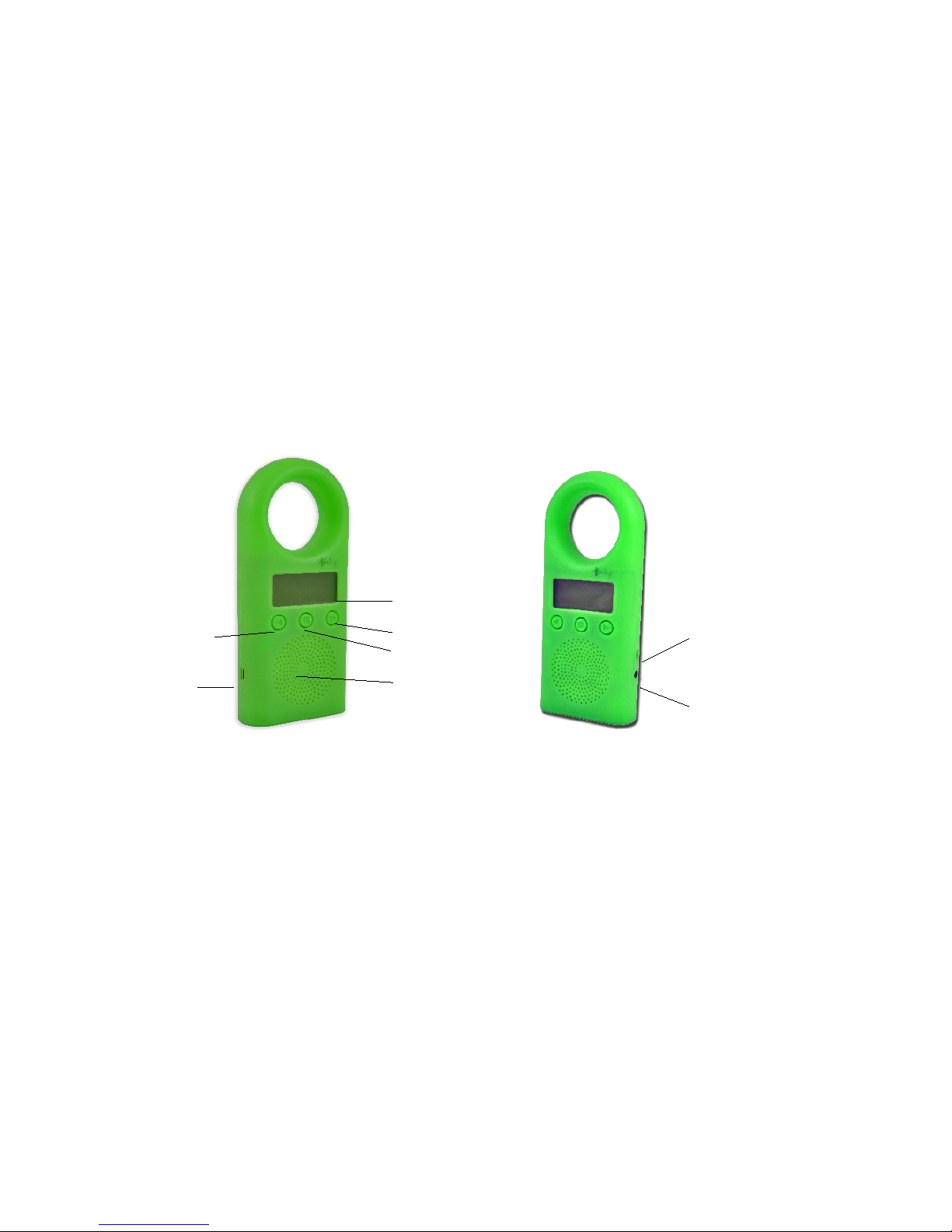
Thank you for purchasing Tuty – the first Early Age Smart Player Toy designed
to grow with your child.
package Contents
1. Tuty
2. USB cable for PC connection
3. Alkaline battery
4. Quick User Guide
5. Registration Cards
Description of component parts and Tuty
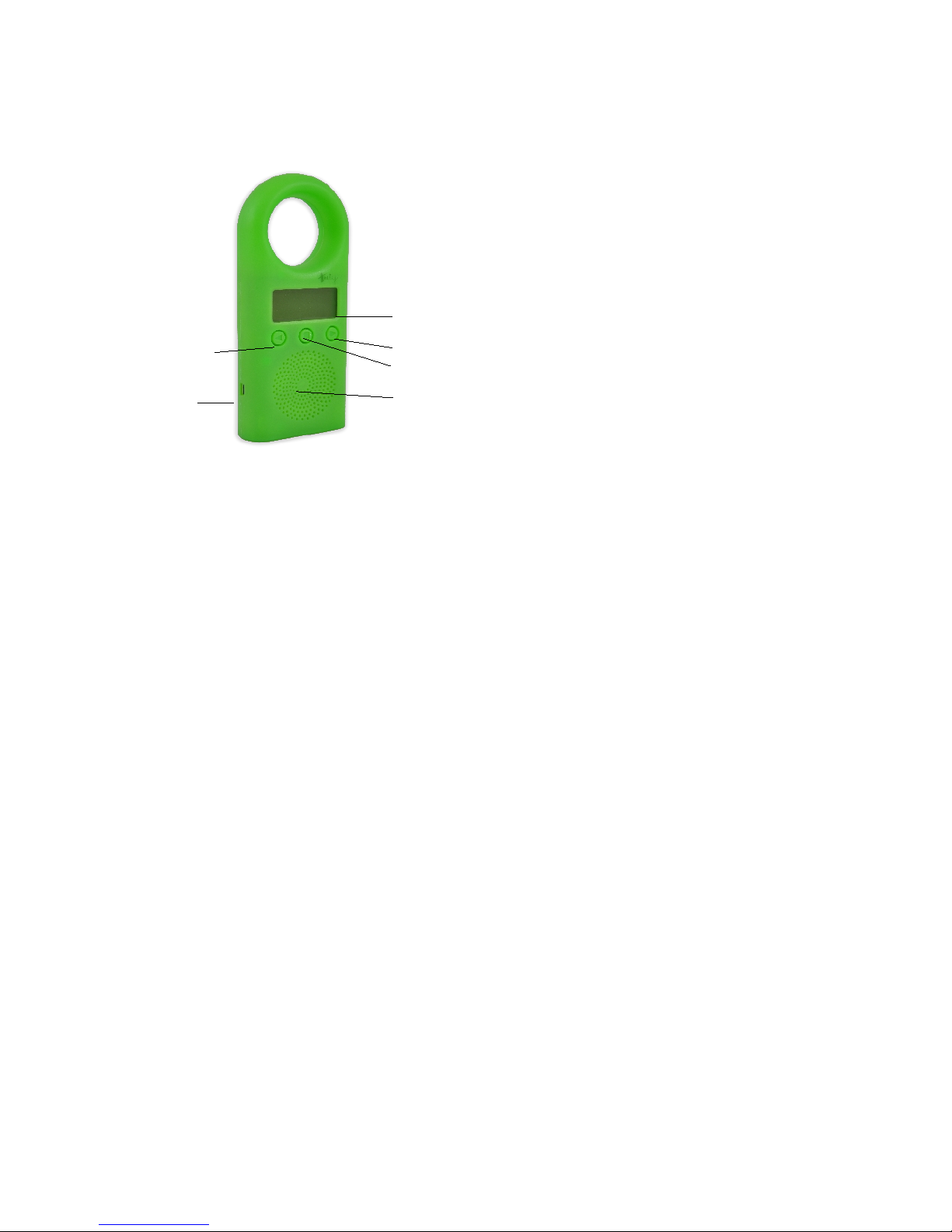
The figure below shows the image of Tuty and description of the various
functional parts that compose it.
Specifications and special features
Your Tuty has the following specifications and special features:
• Fully functional MP3 player with integrated speaker
• 2 GB memory (32 hours at 128 kbit/s data rate. More than 30 CDs!)
• Hidden volume control (controlled by the parents)
• Programmable Auto Off time
• Over 40 hours on a single AA battery (included)
• Durable exterior of soft, food-grade rubber
• USB port
• Headphone jack
• Safety tested: meets CE, RoHS and ASTM F963 Toy Safety
• No toxic paints and lead-free
• Dimensions: 16,5x7,0x2,75 cm
TUTY – User Manual 4
DISPLAY
Middle Button
Speaker
Left Button
Rigth Button
USB
Socket
Non-operating
external power
socket
headphone
jack
Page 5

Special Features
• Graphic Display (96x40 pixels)
• Multiple Playlists (max 99) with sub-folders
• Real Time Clock
• Log all the play times, durations and files played
• Firmware updateable as new features and functionality become available
• “Smile and Play with me” function
Encourages usage by playing an audio prompt that invites the child to
play with the Tuty. After enough play time, the child is rewarded with a
happy face on the display.
• Automatic change of unit lesson
• Birth Day management
• Tuty Name management
Computer System
Requirements
• Pentium III 500MHz or higher recommended
• Macintosh iMac G3 or higher
• Windows® 2000 SP4, XP, Vista or 7
• Mac OS X Version 10.1.5 or higher
• USB port
• CD-ROM (for transferring music from a CD)
• Internet connection (for purchasing music online)
Hearing Safety
The Tuty speaker volume levels are safe during normal operation. Prolonged
exposure to the speaker at very close proximity could lead to hearing damage
now or later in your child’s life.
• Do not allow your child to sleep holding the Tuty.
• The speaker could fall too close to the ear for a prolonged period.
• Do not allow your child to hold the speaker directly to their ear for a
prolonged period of time.
• Do not use headphones for children under age 6. Older children may use
headphones occasionally for very short lengths of time (less than 20
minutes).
• Do not allow your child to use headphones when the HPhone Loud setting
is ON (see Settings information on p.6). This setting is not intended for
use by children and can harm their hearing.
TUTY – User Manual 5
Page 6
General Safety
• Do not allow children under age 6 to use headphones because they may
not hear warning sounds in their environment.
• Do not allow your child to play with the Tuty while it is plugged into the
USB cable.
• Do not allow your child to play with the Tuty with the battery door open or
missing.
Care for your product
• Your Tuty is water resistant but is not waterproof.
• Do not immerse your Tuty in liquids.
• Do not allow your child to play with the Tuty in water such as a bath or
pool.
• Avoid direct spray of liquids.
• Clean with a mild detergent and a soft damp cloth. Never use solvents.
• Do not open the Tuty. There are no user serviceable parts inside.
• Do not store the Tuty in direct sunlight or near high temperatures. Avoid
parked cars on hot days.
About the battery
To replace the battery used by Tuty follow these steps.
Please note that the type of battery can be any battery type AA, alkaline or
rechargeable. Rechargeable batteries are recharged externally Tuty.
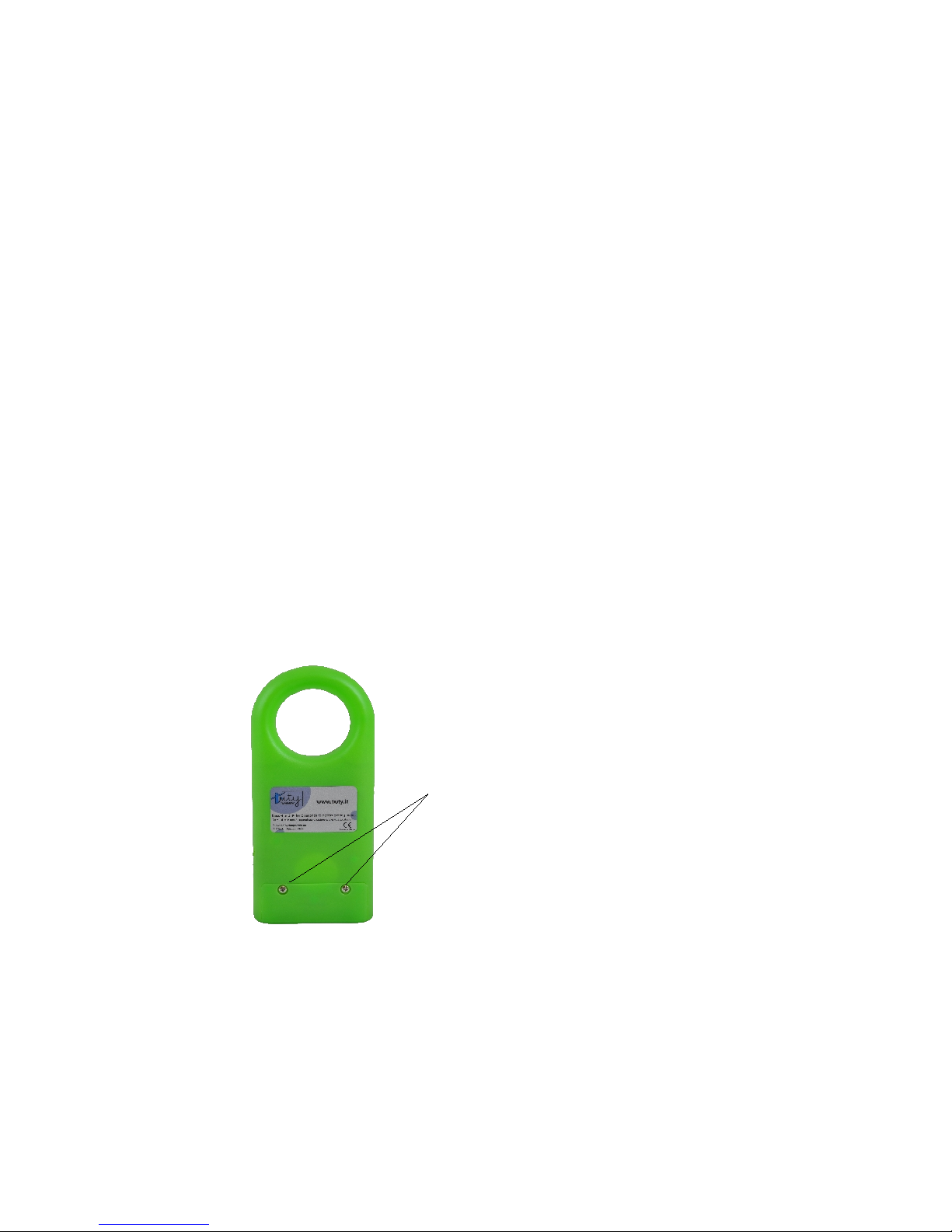
• Use a small screwdriver to open the battery compartment.
• Do not remove the small plastic retaining washers, as loose screws can
pose a choking hazard.
• Insert one ‘AA’ battery with polarity corresponding to the diagram on the
bottom of the battery compartment.
• Replace the battery door using a screwdriver. Do not over-tighten.
TUTY – User Manual 6
Battery compartment
screws
Page 7
• Remove batteries before storing the player for long periods of time, as
they may leak and damage the player. Discard leaking batteries
immediately, as they can cause skin injury.
• Do not attempt to charge batteries that are not intended to be recharged.
• Dispose of batteries according to federal, state and local regulations.
• The Tuty does not recharge batteries.
What is special about an MP3 Player like Tuty?
MP3 players store the music on a chip inside the player. This means no moving
parts. Music can be transferred directly from your computer using a USB cable.
For a child’s music player, nothing is better. No small parts to break off, no CDs
to scratch and hours of music with the push of a button.
Tuty has special features that make it a truly interactive toy to help children
learn a second language. Tuty will ensure that the child plays the content
several times a day as required by various methods of learning.
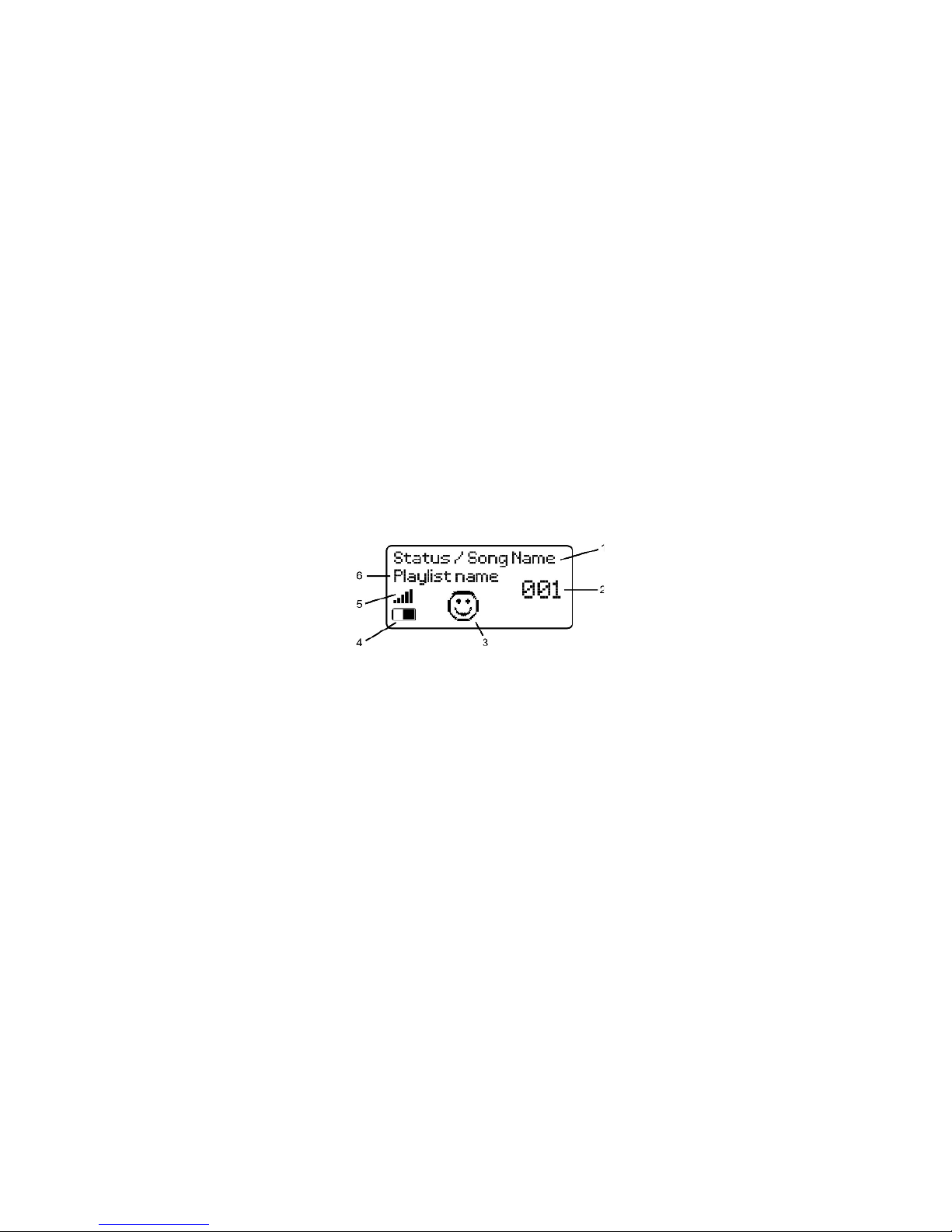
Display
1) Displays player status information
2) Song number
3) Smiley – “Smile and Play with me” Function
4) Battery level indicator
5) Volume level indicator
6) Current playlist name
TUTY – User Manual 7
Page 8
Getting Started
Turning ON
Press any button to turn the Tuty On. It takes a few seconds for the music to
queue up before it plays.
Turning OFF
The Tuty will shut itself off after one minute when no music is playing (when the
display reads “Stopped”). The player may also shut itself off while playing
music, depending on the Auto-Off and Continuous Play settings (see Auto-Off
and Continuous Play section below).
Song Selection
The display shows the number of the current song. Press the Left or Right
buttons to play the previous or the next song respectively. When the player
reaches the end of the music list, it will continue playing from the beginning.
Settings Menu
The settings menu has been hidden from your child to give you control of
functions such as Playlist, Volume and auto-off times.
Entering the Settings Menu
Press and hold the Left and Right buttons simultaneously for over 6 seconds.
When the display reads “Menu”, release the buttons.
TUTY – User Manual 8
DISPLAY
Middle Button
Speaker
Left Button
Rigth Button
USB
Socket
Page 9
Scrolling through the Settings menu
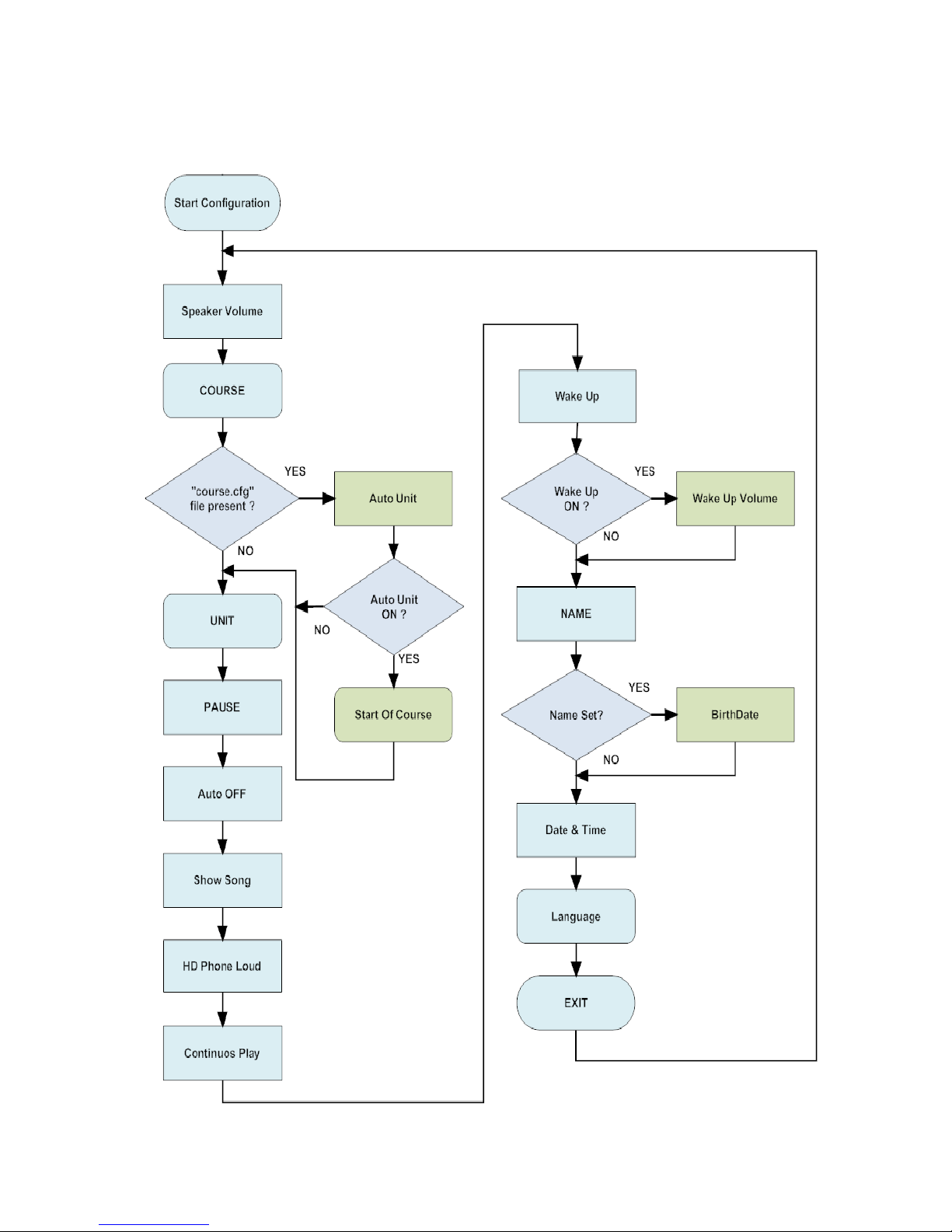
Pressing the middle button will scroll through the Settings menu. Pressing the
left and right buttons will adjust the value of each setting.
TUTY – User Manual 9
Page 10

Each item in the menu is described as follows:
• Speaker Volume
The current speaker volume setting is displayed as a number between 1
and 10 (loudest).
• HdPhone Volume
The current headphone volume setting is displayed as a number between
1 and 10 (loudest).
• COURSE
A playlist is simply a group of songs. You can create up 99 playlists (see
Playlist section below) and group songs however you like. For instance,
you might put high energy songs in a playlist called “Fun” and lullaby
songs in “Relax”.
Note: empty playlists are not displayed and cannot be selected.
• Auto Unit
If the folder of the selected playlist (Option "COURSE") is a file
"course.cfg", containing instructions for automatic playback units, you can
set this parameter. Otherwise this parameter is not visible and can not be
set to auto mode for playing the courses. For details on how to create this
file refer to the appropriate chapter. To use this function properly it
requires that the system date is set correctly.
• Start of Course
This parameter is visible if the parameter "Automatic Unit" is set to ON.
You configure the start date from which the course will start calculating
the slip of lesson units.
• UNIT
This parameter is visible if the parameter and set "Automatic Unit" is set
to OFF. This option allows you to select, manually, the unit of the course
in question. That is the sub folder inside the folder of the selected playlist.
If there are no sub-folders will be presented only one choice ("root")
representing the root folder.
* Please note that displays only the folders containing audio files.
• Pause
Pause ON allows the middle button to pause/resume the song. Pause OFF
allows the middle button to start and stop the song from the beginning.
Very young children may find the Tuty more intuitive with the pause
feature off.
• Auto Off
The current Auto Off setting is displayed (minutes). This feature turns the
player off automatically after playing for a set time. This can be handy at
bedtime or to conserve battery power when the child leaves the player
TUTY – User Manual 10
Page 11

running.
• Show Song
Shows the song name on the display.
• HdPhone Loud
When ON, boosts the headphone volume.
Warning: Do not use the Tuty with headphones on children when HdPhone
Loud is ON. Turn this setting ON for playing the Tuty through a car stereo
or for when adults require loud headphones.
• Continuous Play
When ON the Tuty automatically plays the next song in the playlist.
When OFF the Tuty stops playing after each track. This option can be
very useful to use the Tuty to tell fairy tales to children.
• Wake Up
This option is related to the “Smile & Play with me” Function (see below).
When ON, allows the Tuty to periodically play audio messages inviting the
child to play. Important: The correct date and time must be set for this
function to work properly.
• Wake Up Volume
Sets the volume used to play the invitation messages. The possible values
are 1 to 10.
• Name
This feature allows you to record the name of the owner of Tuty.
When starting the appliance, after displaying the logo "Tuty" will be
displayed for a few seconds the name. This feature allows you to have
visibility of the owner of Tuty if you own more than one unit. In addition,
this configuration is essential to promote the management of your
birthday.
Going into the feature you can select each letter of the name using the
side keys, with the center button confirms the letter. Confirming a second
time with the middle button closes the configuration of the name and the
system will proceed with the next configuration option.
• Birthday
This parameter is visible and can be set if the parameter "Name" is
configured.
You can enter your birthday with the same date setting mode.
During the power on of Tuty if the current day is the birthday, after
displaying the LOGO Tuty and "name" configured displays an icon with a
birthday cake and reported Tuty will play a short song birthday.
TUTY – User Manual 11
Page 12

• Date&Time
Sets the Date and Time. Press the right button to enter edit mode. Scroll
through the fields using the middle button and change the value using the
left and right buttons.
This setting is required for the Wake Up and log file functions.
• Log
By activating this function, the system records the use of Tuty in a file as
detailed in subsequent chapters. Setting this parameter to OFF this
feature will be inhibited.
• Language
Selects the language on the display and in the invitation messages used
in the “Smile & Play with me” function.
• Exit
Press the Left or Right buttons to exit from the Settings menu and return
to the normal mode for playing music. The other way to exit from the
Settings menu is to simply not press any button for 10 seconds. Press the
middle button to scroll back to the top of the Settings menu.
Music Management
The Tuty appears to your computer as a USB hard drive. This means that you
can transfer music files to and from the Tuty using Windows Explorer or Mac
Finder. You can also drag songs from iTunes to the Tuty.
Playlists
Each folder within the Tuty is a playlist. The folder name is the playlist name.
Keep the folder names to 8 characters or less for proper display on the Tuty.
Create new folders to create new playlists. The Tuty supports up to 99 playlists.
Empty folders do not appear in the playlist list in the settings menu.
Each folder can contain more sub-folders. TUTY can select this with “unit” menù
option.
Transferring songs
To load songs from your computer onto the Tuty, simply drag and drop them
from your computer into a folder. Songs not in a folder are not played. You can
also drag songs directly from iTunes into a folder.
Songs play in the order they are placed in the folders, in other words, new
songs are added to the end of the playlist. One convenient method to order
your songs is to place them in a temp folder on the Tuty then drag them one at
a time to the playlist folder.
TUTY – User Manual 12
Page 13
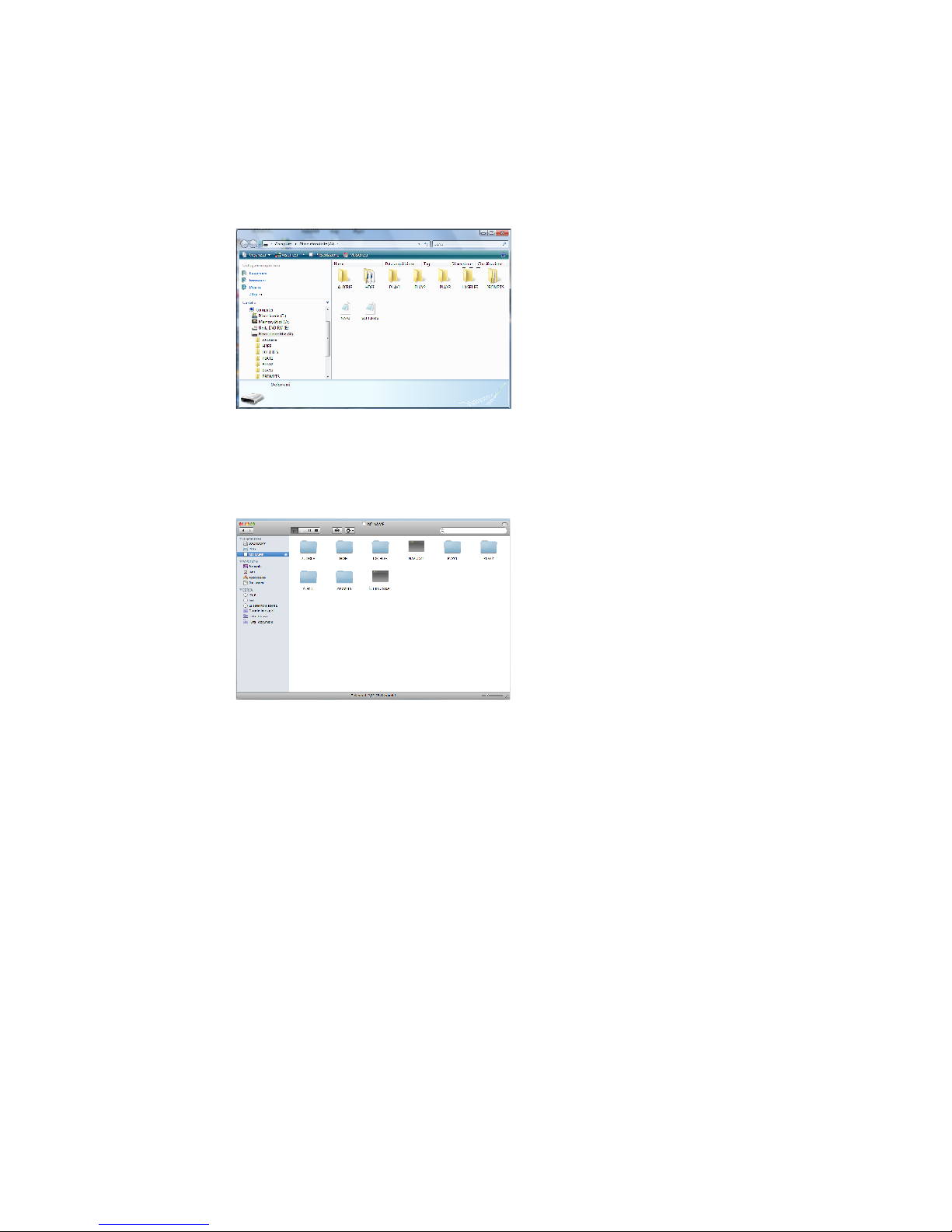
Example Using Windows Explorer
Plug your Tuty into the USB port of your computer using the supplied USB
cable. A screen asking what you want Windows to do will appear. Select the
Windows Explorer option and select OK. The following screen will appear. Drag
and drop songs, normally located in your “My Music” folder, to the playlist
folders.
Example Using Mac Finder
Plug your Tuty in to the USB port of you computer using the supplied USB cable.
The Tuty should appear in your “Devices” list in the Mac Finder as shown in the
screen pictured here. Drag and drop songs from iTunes to the playlist folders.
Licensed (protected) music
The Tuty will play DRM9 encrypted (protected) music. Use a program like
Windows Media Player to transfer songs to the Tuty. This will automatically take
care of all required license files.
TUTY – User Manual 13
Page 14
Getting Songs onto your computer
Use the media player on your computer, such as Windows Media Player or
iTunes, to copy songs from your CD collection to your computer. Insert the CD
into the drive and your media player should open automatically, giving you the
option to copy the CD. Consult the media player’s documentation for more
information. The recommended import settings are: MP3 encoder, 128kbps, no
protection.
You can also purchase music from www.tuty.it or on many online sources such
as iTunes and Amazon.com. The Tuty currently plays MP3, WMA, AAC and OGG
formatted songs. Go to www.tuty.it occasionally to check for the availability of
other decoders.
Audio Books (Windows only)
The Tuty plays audiobooks from audible.com. Go to www.audible.com for more
information and to download audiobooks for your children.
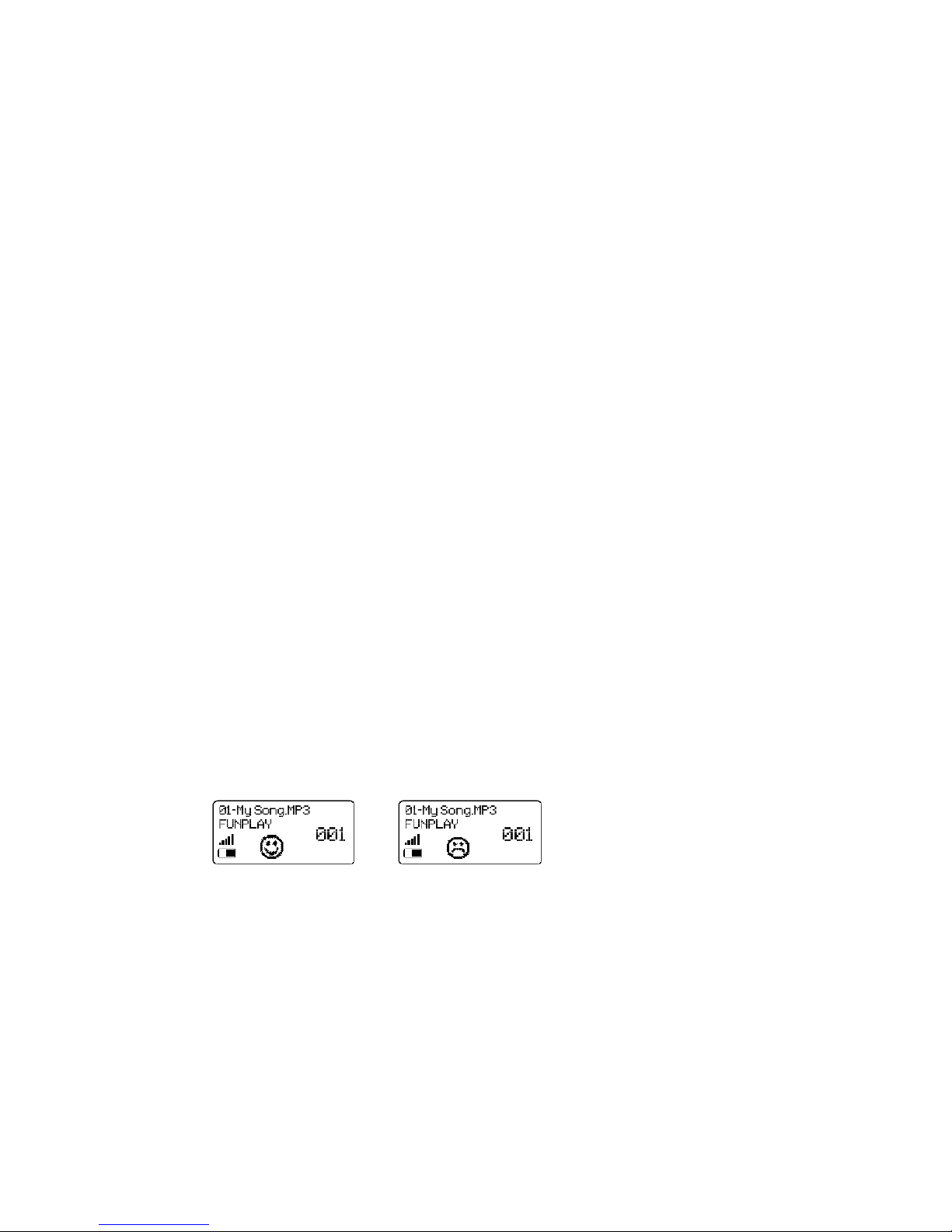
“Smile & Play with me” function
This function allows the player to occasionally wakeup and play a musical
prompt to invite the child to play with the player. The player will also display an
appropriate graphic based on how often the player has been played with.
Tuty will play the prompt:
• only between the core hours of 9am and 7pm
• 2 hours since the last listening session
• 30 minutes since the last prompt
When the unit is powered up, the happy face prompt will display if the player
was listened to a total of 20 minutes in the past 4 hours, otherwise a sad face
prompt will display.
The prompts are language dependent based on the selected language in the
settings menu.
Log Files
Tuty can record a log that keeps track of the songs that were heard by the child
and exactly when. This function is very useful for parents but also for teachers
who use the Tuty as a tool for teaching foreign languages.
TUTY – User Manual 14
Page 15

The Tuty will log the following information:
• Date and time
• Files played
• Duration of play
The data will be stored in the folder LOGFILES in a file denoted by the year and
the month. For example, “2010_09”, “2011_01”.
This data will be in the format: date, time, file, duration, CR (carriage return)
Example: 2010-01-14, 13:05:30, song1.mp3, 03:22:00, CR
Play times shorter than 30 seconds will not be logged.
Name of the owner
Introduced the possibility to customize TUTY configuring the name of the owner.
When you turn the TUTY on, the Logo will appear after a few seconds, and
afterwards the name of the owner configured and then will start to play the
Playlist configured. Very usefull when there are many TUTYs in a single
place/room and finally it's possible to recognize them.
Auto Select Unit
Setting the AUTO UNIT mode, when created a special configuration file in the
COURSE folder, TUTY will switch automatically between the UNIT folders
depends the number of the days programmed. For example for a Course of 40
weeks with 4 Units (CD), TUTY will play the first Unit (CD) for 10 weeks and
then will switch to the second one for other 10 weeks and so on.
AUTOMATIC UNIT configuration file.
As specified in the previous paragraph in order to activate the automatic switch
of the lessons, it's required the creation of a configuration file that will program
the logic of TUTY operation.
The file need to be named "COURSE.CFG";
Each line of the file must contain a number, representing the number of days of
playing the list, followed by the character ":" and the name of the subfolder
containing the audio files of the Lesson (Unit).
For example if we have a course "EFI", Lessons (Units) EFI1, EFI2, EFI3, EFI4
and we want to set the playback of Playlist "EFI1" for 4 weeks, "EFI2" for 4
weeks, "EFI3" for 4 weeks "EFI4 for 5 weeks we will have to write the file with
this content:
28: EFI1
28: EFI2
28: EFI3
35: EFI4
TUTY – User Manual 15
Page 16

Birthday Function
After you configured the name of the owner you can set also the date of his
birthday.
During the date of the birthday, when TUTY will be switch on, on the display will
appear the picture of a birthday cake and will play the “Birthday Song”.
If it is configured the "Alarm" will play the “Birthday Song” as an alternative to
the default reminder message.
You can personalize the Icon and the Music of BirthDay
function by changing the “bday.bmp” file for the logo image
and “bday.mp3” file for the Birthday music. This file are
located in the “prompts” folder.
AC Adapter
Tuty in the current version does not use the input for external power supply.
Although physically present is not functionally operational. This in order to be
compatible with the regulations for toys for children.
TUTY – User Manual 16
Page 17

Approvazioni
Tuty - The Audiotutor is been approved by Helen
Doron Early English as the ideal music player to
listen the contents of the courses for children (from
3 months to 14 years) following the concept of the
repeating hearing.
Visit www.helendoron.com for more informations.
Troubleshooting
Visit www.tuty.it for the latest information on troubleshooting.
The player does not turn on when a button is pressed.
• the battery may be dead
• the battery may be in backwards
The sound quality is bad
• the battery level may be too low. Replace the battery.
Powers up but does not play
• there may not be any songs in the memory or current playlist.
USB display does not appear when connected to a computer
• ensure the USB drivers are correctly installed on the computer
TUTY – User Manual 17
Page 18

Recycling/Disposal
Please consult your local regulations regarding recycling of electronic products. The Tuty is leadfree as it complies with RoHS specifications.
Si prega di consultare le normative locali in materia di riciclaggio dei prodotti elettronici. Il Tuty
è esente da piombo in quanto conforme alle specifiche RoHS.
Under Article Legislative Decree 13 of July 25, 2005, No 151
(Implementation of Directives 2002/95/EC, 2002/96/EC and 2003/108/EC,
regarding the reduction of hazardous substances in electrical and electronic
equipment and disposal of waste).
The crossed out wheelie bin symbol on the equipment or its packaging
indicates that the product at the end of its useful life must be collected
separately from other waste. The user must therefore dispose of the product
in question at the appropriate recycling centers for electronic and electrical
waste, or hand it to the dealer when purchasing new equipment.
Proper waste collection equipment for subsequent recycling, treatment and
environmentally compatible disposal contributes in preventing possible adverse effects on the
environment and health and promotes the reuse and / or recycling of materials that make up
equipment.
Illegal dumping of the product by the user involves the application of administrative sanctions
provided by law.
Warranty
Consult the online troubleshooting guide before making a warranty claim. Many issues can be
resolved without the need for factory servicing. To make a warranty claim, go to www.tuty.it
and fill out the form under “Returns” or directly to the reseller where you purchased the Tuty.
Include as much information about the problem as possible. You will be provided with further
instructions by email regarding how and where to send your Tuty for servicing.
INV S.r.l. warrants to the purchaser or gift recipient that if any manufacturing defect becomes
apparent in this product within 2 years from the original date of purchase, it will be replaced
free of charge through the local reseller. This warranty does not include damage to the product
resulting from accidents, misuse or leaking batteries.
The provisions of this written warranty are in addition to and not a modification of or subtraction
from the statutory warranties and other rights and remedies contained in any applicable
legislation, and to the extent that any such provisions purport to disclaim, exclude or limit any
such statutory warranties and other rights and remedies, such provisions shall be deemed to be
amended to the extent necessary to comply therewith.
Limitation of Warranty:
THE WARRANTY STATED ABOVE IS THE ONL Y WARRANTY APPLICABLE TO THIS PRODUCT. ALL
OTHER WARRANTIES, EXPRESS OR IMPLIED (INCLUDING ALL IMPLIED WARRANTIES OF
MERCHANTABILITY OR FITNESS FOR A PARTICULAR PURPOSE ) ARE HERE BY DISCLAIMED. NO
VERBAL OR WRITTEN INFORMATION GIVEN BY INV S.R.L., ITS AGENTS OR EMPLOYEES SHALL
CREATE A GUARANTY OR IN ANY WAY INCREASE THE SCOPE OF THIS WARANTY.
REPAIR OR REPLACEMENT AS PROVIDED UNDER THIS WARRANTY IS THE EXCLUSIVE REMEDY
OF THE CONSUMER. INV S.R.L. SHALL NOT BE LIABLE FOR INCIDENTAL OR CONSEQUENTIAL
DAMAGES RESULTING FROM THE USE OF THIS PRODUCT OR ARISING OUT OF ANY BREACH OF
ANY EXPRESS OR IMPLIED WARRANTY ON THIS PRODUCT. THIS DISCLAIMER OF WARRANTIES
AND LIMITED WARANTY ARE GOVERNED BY THE LAWS OF THE ITALIAN REPUBLIC.
EXCEPT TO THE EXTENT PROHIBITED BY APPLICABLE LAW, ANY IMPLIED WARRANTY OF
MERCHANTABILITY OR FITNESS FOR A PARTICULAR PURPOSE ON THIS PRODUCT IS LIMITED
TO THE APPLICABLE WARANTY PERIOD SET FORTH ABOVE.
TUTY – User Manual 18
 Loading...