

Page 1
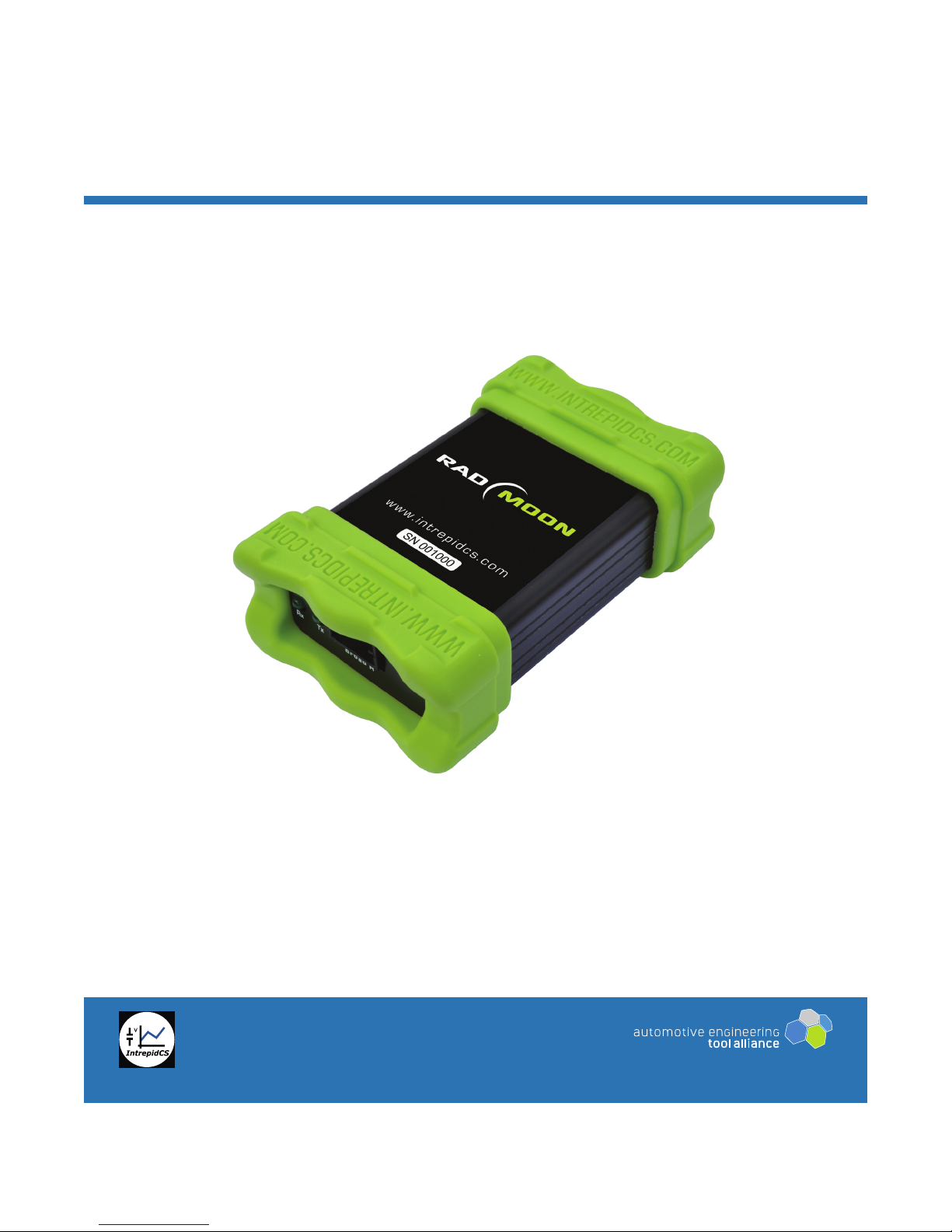
RAD-Moon
BroadR-Reach® / Ethernet Media Converter
Intrepid Control Systems, Inc.
31601 Research Park Drive Madison Heights, MI 48071 USA
(ph) +1-586-731-7950 (fax) +1-586-731-2274
www.intrepidcs.com www.aeta-rice.com
User’s Guide
Version 1.1 - May 6, 2015
Page 2

RAD-Moon User’s Guide
Table of Contents
1 Introduction to the Intrepid RAD-Moon .....................................................................................................1
2 Package Contents ........................................................................................................................................1
3 Overview of Operation and Features ........................................................................................................1
4 Description of RAD-Moon Interfaces and Indicators ...............................................................................3
5 Hardware Requirements .............................................................................................................................4
6 RAD-Moon Hardware Setup .......................................................................................................................5
7 Troubleshooting ............................................................................................................................................8
8 Support ........................................................................................................................................................10
i © 2015 Intrepid Control Systems, Inc.Version 1.1 - May 6, 2015
Page 3

RAD-Moon User’s Guide
1 Introduction to the Intrepid RAD-Moon
Thank you for purchasing a RAD-Moon media converter from Intrepid Control Systems (ICS).
The RAD-Moon is an inexpensive yet powerful tool that effectively bridges the gap between
Automotive Ethernet and conventional Ethernet.
Elegantly simple, the RAD-Moon contains one BroadR-Reach Automotive Ethernet port and
one standard, 4-wire 10/100 Mb/s Ethernet port. Data received on either port is copied to
the other, allowing an Automotive Ethernet ECU to be connected to a standard PC network
interface card or Ethernet switch. Powered by USB for convenience, the RAD-Moon is
packaged in a rugged, lightweight enclosure, making it easy to take anywhere it’s needed.
The RAD-Moon media converter is ideal for monitoring, analysis, diagnostics and other
applications in an Automotive Ethernet environment.
2 Package Contents
Your RAD-Moon package includes the following:
• The RAD-Moon device.
• A standard 4-wire Ethernet cable.
• A standard USB to mini-USB cable.
If anything is missing, please contact Intrepid for prompt assistance, using the information at
the end of this guide.
3 Overview of Operation and Features
We’ll now briey outline the RAD-Moon’s construction, operation and features. While the RAD-
Moon is a pretty straightforward device, understanding its design will help you get the most of
its capabilities.
General Operation
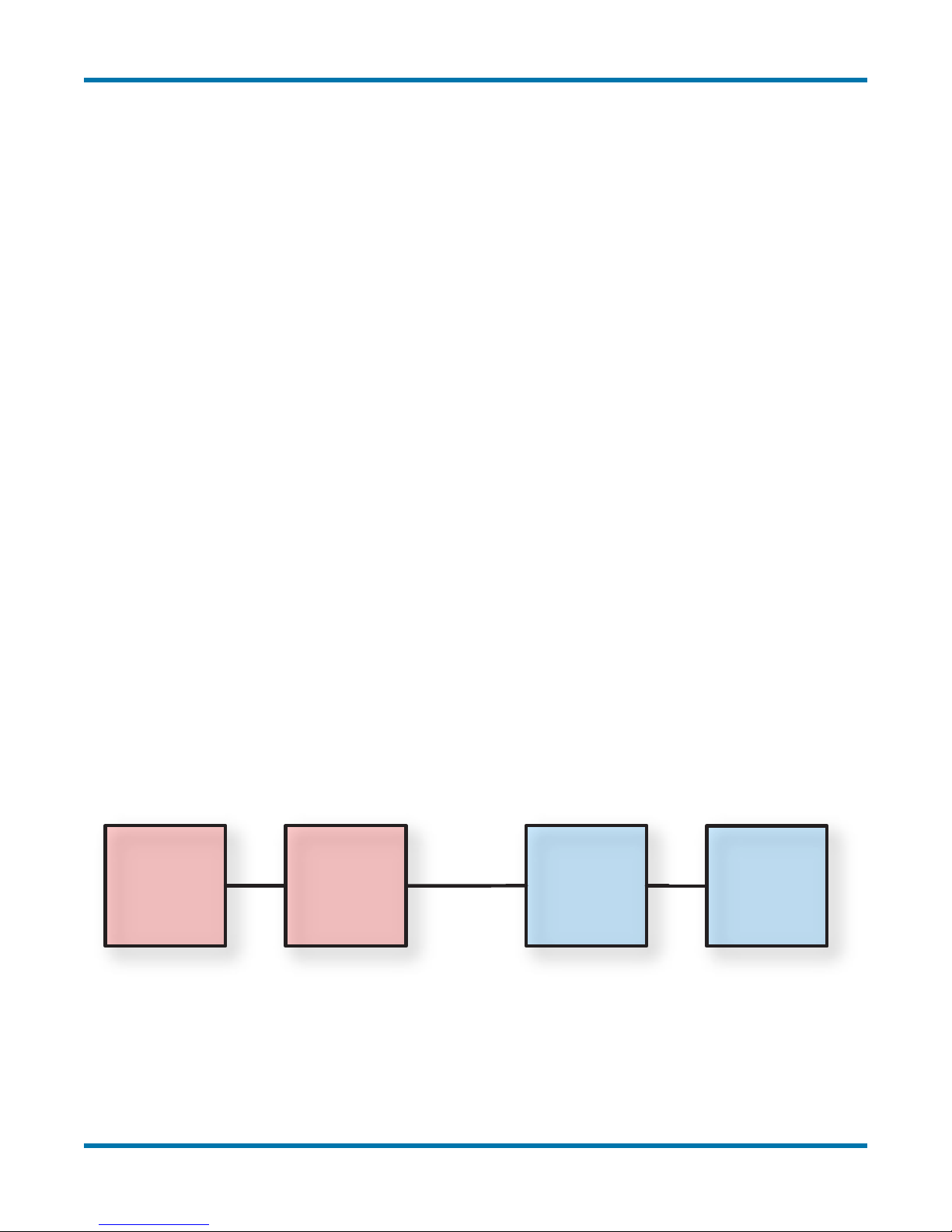
The RAD-Moon contains two different Ethernet physical layer implementations (PHYs) that are
internally connected: a BroadR-Reach PHY, and a conventional 10/100 twisted pair Ethernet
PHY. An Automotive Ethernet ECU or other device can be connected to the BroadR-Reach
PHY using the RAD-Moon’s Molex Mini50 connector, while a regular Ethernet device attaches
through the RAD-Moon’s RJ-45 jack.
Whenever any data is received over either connection, it is automatically sent out on the other,
creating a seamless link between the two attached devices. Full-duplex operation is supported,
so data can be sent in both directions simultaneously.
1 © 2015 Intrepid Control Systems, Inc.Version 1.1 - May 6, 2015
Page 4
RAD-Moon User’s Guide
The RAD-Moon’s third input is a standard mini-USB connector, which provides power to the
device. A number of LEDs provide useful information about the status of the converter.
A typical application of the RAD-Moon is to connect an Automotive Ethernet ECU to the
Ethernet jack on a laptop or desktop PC. Ethernet frames from the ECU can then be monitored
using Intrepid’s Vehicle Spy 3 software. Messages can also be transmitted from Vehicle Spy
3 through the RAD-Moon to the ECU, allowing any Automotive Ethernet device to be queried,
tested and managed.
Features
Here are some of the noteworthy features of the RAD-Moon:
• Powered by an industry-standard mini-USB connection
• BroadCom BCM89810 BroadR-Reach PHY
• Automatic master/slave conguration for the attached Automotive Ethernet device
• Molex Mini50 for Automotive Ethernet connection
• Standard RJ-45 for 10/100 Ethernet connection
• Link and activity LEDs for both connections
• Full-duplex support for simultaneous data transmission and reception across both PHYs
• Rugged aluminum enclosure with rubber bumpers for durability
• Ethernet cable and USB cable included
Block Diagram
Figure 1 illustrates the main functional elements of the RAD-Moon.
BroadR
Mini50
Connector
Broad R
PHY
10/100
Ethernet
PHY
10/100
Ethernet
RJ-45
Connector
Figure 1: RAD-Moon Block Diagram.
2 © 2015 Intrepid Control Systems, Inc.Version 1.1 - May 6, 2015
Page 5
RAD-Moon User’s Guide
4 Description of RAD-Moon Interfaces and Indicators
Let’s now take a short tour of the RAD-Moon, looking at the device’s external components
and explaining what each does. The RAD-Moon is designed so that all of its components are
located on its two sides, to make the device easier to use in cramped quarters. We’ll identify
the sides by the type of Ethernet port each contains, calling one the Conventional Ethernet
Side and the other the Automotive Ethernet Side.
Conventional Ethernet Side
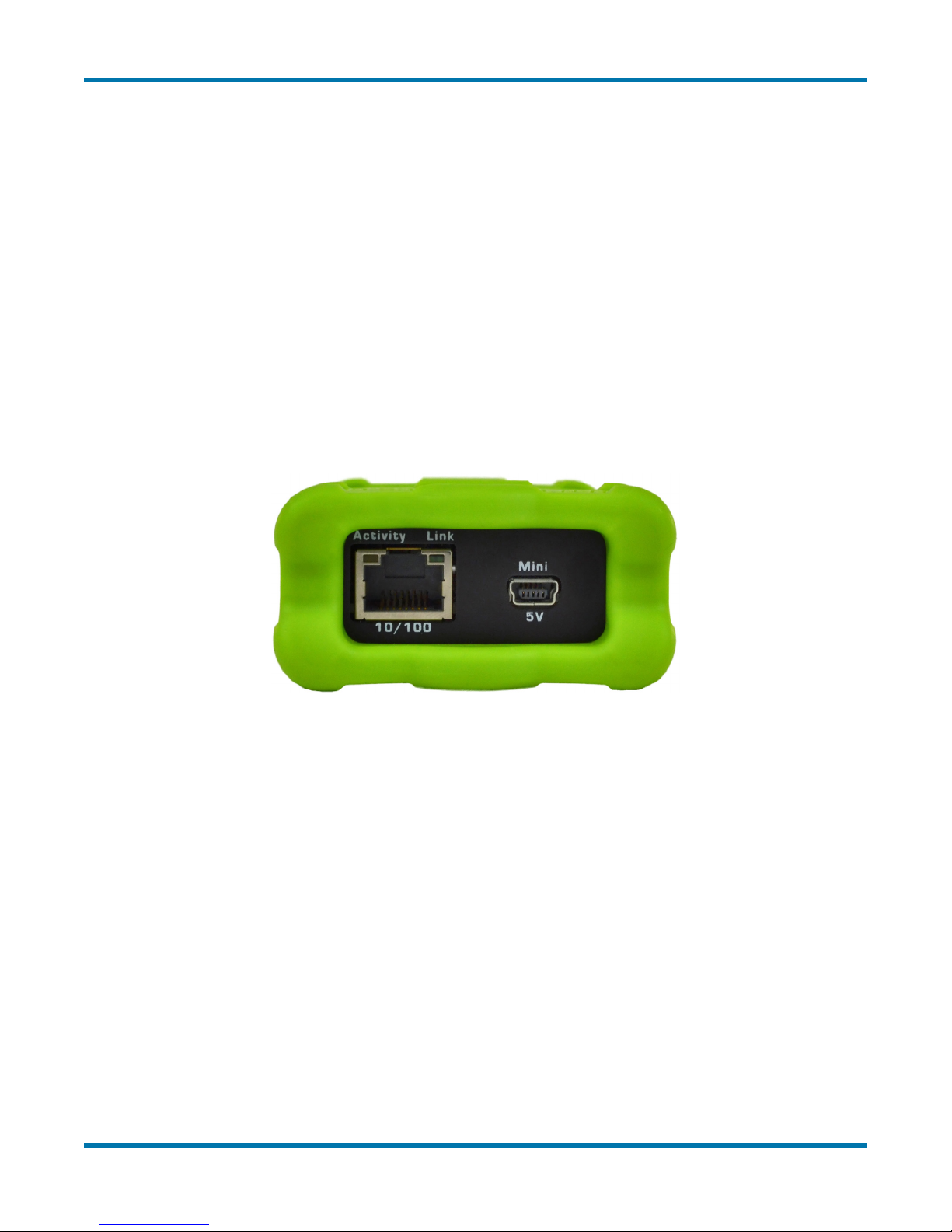
Figure 2 shows the side of the RAD-Moon that attaches to a conventional Ethernet network.
The two components are as follows:
• RJ-45 Port: An industry-standard conventional Ethernet jack.
• Mini-USB Port: A standard mini-USB port.
Figure 2: RAD-Moon Conventional Ethernet Side. Left, the standard Ethernet RJ-45 jack with integrated Link and Activity
LEDs; right, a mini-USB jack that provides power to the device.
The RJ-45 port has a pair of integrated LEDs that provide information about the RAD-Moon’s
conventional Ethernet connection:
• Link LED (Green): Indicates that a valid link has been established between the RAD-
Moon and another 10/100 Ethernet device.
• Activity LED (Orange): Flashes when trafc passes in either direction over the
attached Ethernet cable.
In normal operation you should see the Link LED always on, and the Activity LED ashing at a
variable rate, with faster ashing meaning that more data is being transferred.
3 © 2015 Intrepid Control Systems, Inc.Version 1.1 - May 6, 2015
Page 6
RAD-Moon User’s Guide
Automotive Ethernet Side
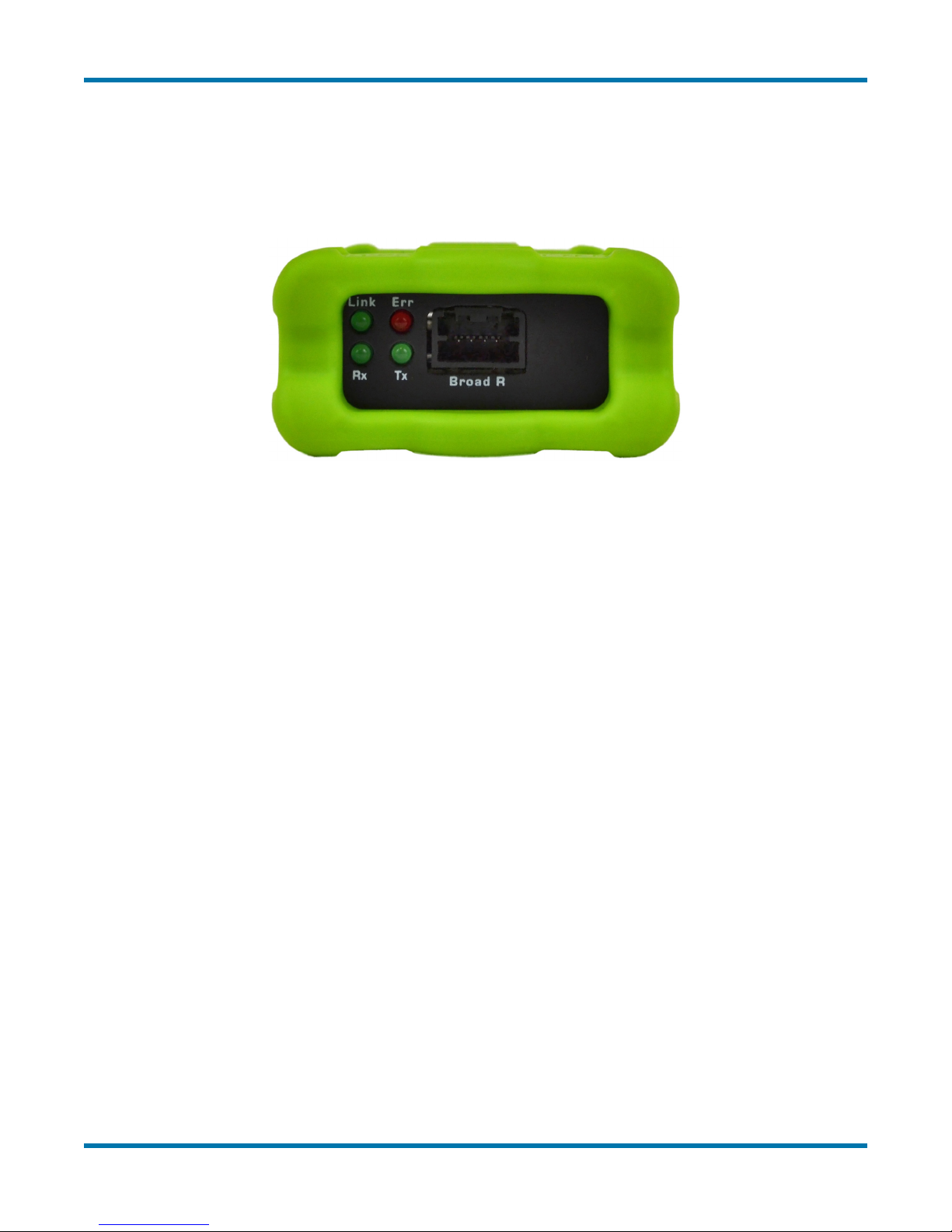
This side of the RAD-Moon (Figure 3) contains just one interface: a Molex Mini50 jack. While
there is no standardized Automotive Ethernet connector type, the Mini50 is used by many
BroadR-Reach devices, including Broadcom switches and other Intrepid AE hardware.
Figure 3: RAD-Moon Automotive Ethernet Side. The Mini50 BroadR-Reach connector can be seen here in the center, with
the bank of status LEDs to the left.
Four LEDs indicate the status of the RAD-Moon’s AE link:
• Link (Green): Turns on when the RAD-Moon is connected to an active Automotive
Ethernet device, and remains on as long as the link is maintained.
• Err (Red): Flickers when an error is detected by the RAD-Moon’s BroadR-Reach PHY,
such as a data transmission error being seen in a received frame.
• Rx (Green): Flashes when data is received by the RAD-Moon from the connected
Automotive Ethernet device.
• Tx (Green): Flashes each time data is transmitted by the RAD-Moon to the attached
Automotive Ethernet device.
Under normal circumstances you will see the Link LED always on, with the Rx and Tx
LEDs ashing at different rates depending on how much data is being sent by each device
connected to the RAD-Moon. Assuming that all devices are functioning correctly, the Err LED
should rarely, if ever, light up.
5 Hardware Requirements
The following hardware is required to put the RAD-Moon to good use:
• An ECU or other device that uses Automotive Ethernet (BroadR-Reach).
• A BroadR-Reach cable terminated with a Molex Mini50 plug.
4 © 2015 Intrepid Control Systems, Inc.Version 1.1 - May 6, 2015
Page 7
RAD-Moon User’s Guide
• A PC, switch or other Ethernet device with a free 10 Mb/s or 100 Mb/s twisted pair
Ethernet port.
• A PC, USB hub or other device with a free USB port.
The BroadR-Reach cable must have a Mini50 on one end to attach to the RAD-Moon. The
other end can be terminated with whatever connector is needed by the application, or may be
integrated into a unit to be tested.
The RAD-Moon uses very little electricity, so just about any device can provide the power it
needs over USB. The Ethernet connection and USB connection can be to the same device or
two different ones.
The RAD-Moon has no software requirements, though a license of Vehicle Spy 3 can be very
useful in working with a connected Automotive Ethernet device.
6 RAD-Moon Hardware Setup
Setting up the RAD-Moon is not difcult, but we have provided step-by-step instructions below
for those who may be new to the process. Note that while the steps are listed in a particular
order so that it’s easier for you to conrm that the correct connections have been made, the
exact sequence in which the setup is performed does not affect operation.
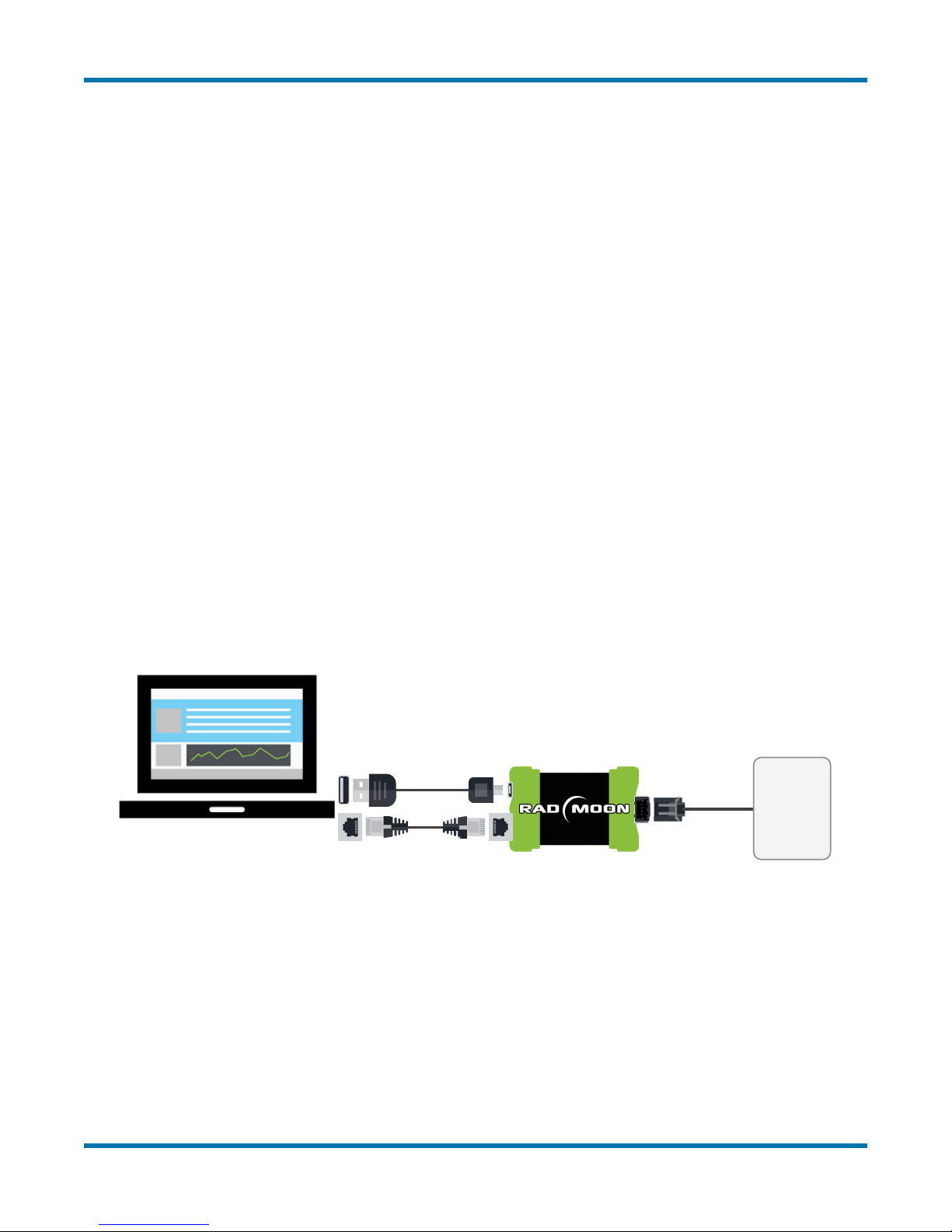
The hookup diagram in Figure 4 shows you the RAD-Moon setup at a glance.
ECU
Figure 4: RAD-Moon Hookup Diagram.
Different methods may be used to connect an Automotive Ethernet cable to an ECU. For this
reason, we assume in the following instructions that the device to be connected to the RADMoon already has its BroadR-Reach cable attached.
1. Remove Components from Package: Remove the RAD-Moon, Ethernet cable and
USB cable from the RAD-Moon package.
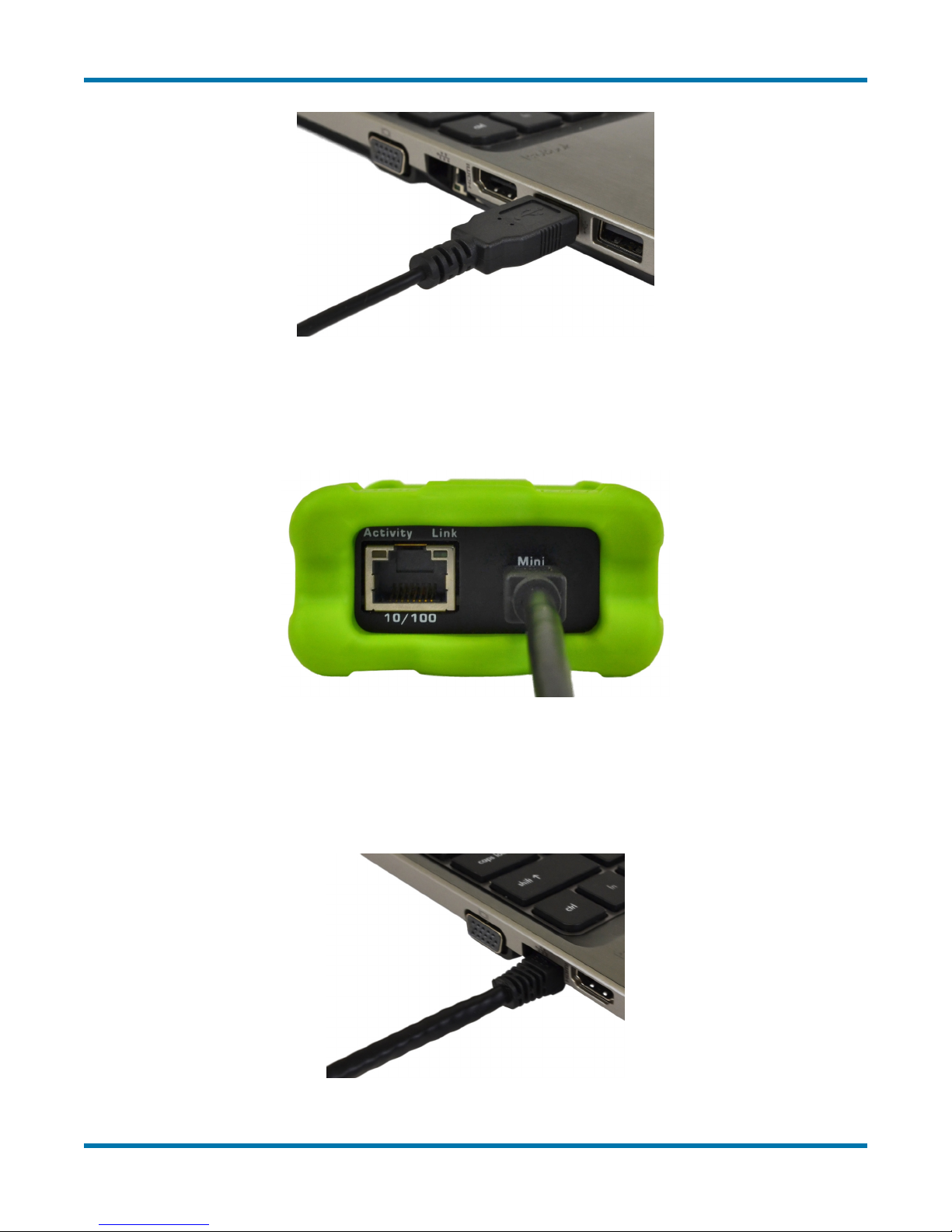
2. Connect USB Cable to PC or USB Hub: Attach the larger USB connector on the USB
cable to an open USB port on a PC or a USB hub (Figure 5).
5 © 2015 Intrepid Control Systems, Inc.Version 1.1 - May 6, 2015
Page 8
RAD-Moon User’s Guide
Figure 5: Connecting the USB Cable to a Laptop USB Port. Attaching the cable to a USB hub will also work.
3. Connect USB Cable to RAD-Moon: Connect the mini-USB connector on the other end
of the USB cable to the RAD-Moon, as shown in Figure 6.
Figure 6: Connecting the USB Cable to the RAD-Moon.
4. Connect Ethernet Cable to Ethernet Device: Attach one end of the included standard
Ethernet cable to an RJ-45 jack on a PC, switch or other Ethernet device. You should
hear a click indicating that the cable is properly seated in the jack (Figure 7).
Figure 7: Connecting the Ethernet Cable to a PC. You can also connect it to an Ethernet switch, hub or other standard
Ethernet device.
6 © 2015 Intrepid Control Systems, Inc.Version 1.1 - May 6, 2015
Page 9
RAD-Moon User’s Guide
5. Connect Ethernet Cable to RAD-Moon: Attach the other end of the Ethernet cable
to the RAD-Moon’s standard Ethernet port, as shown in Figure 8; you will again hear
a click. If the PC or other Ethernet device is powered on, you should now see the Link
LED light up and remain lit; the Activity LED may also begin to ash.
Figure 8: Connecting the Ethernet Cable to the RAD-Moon.
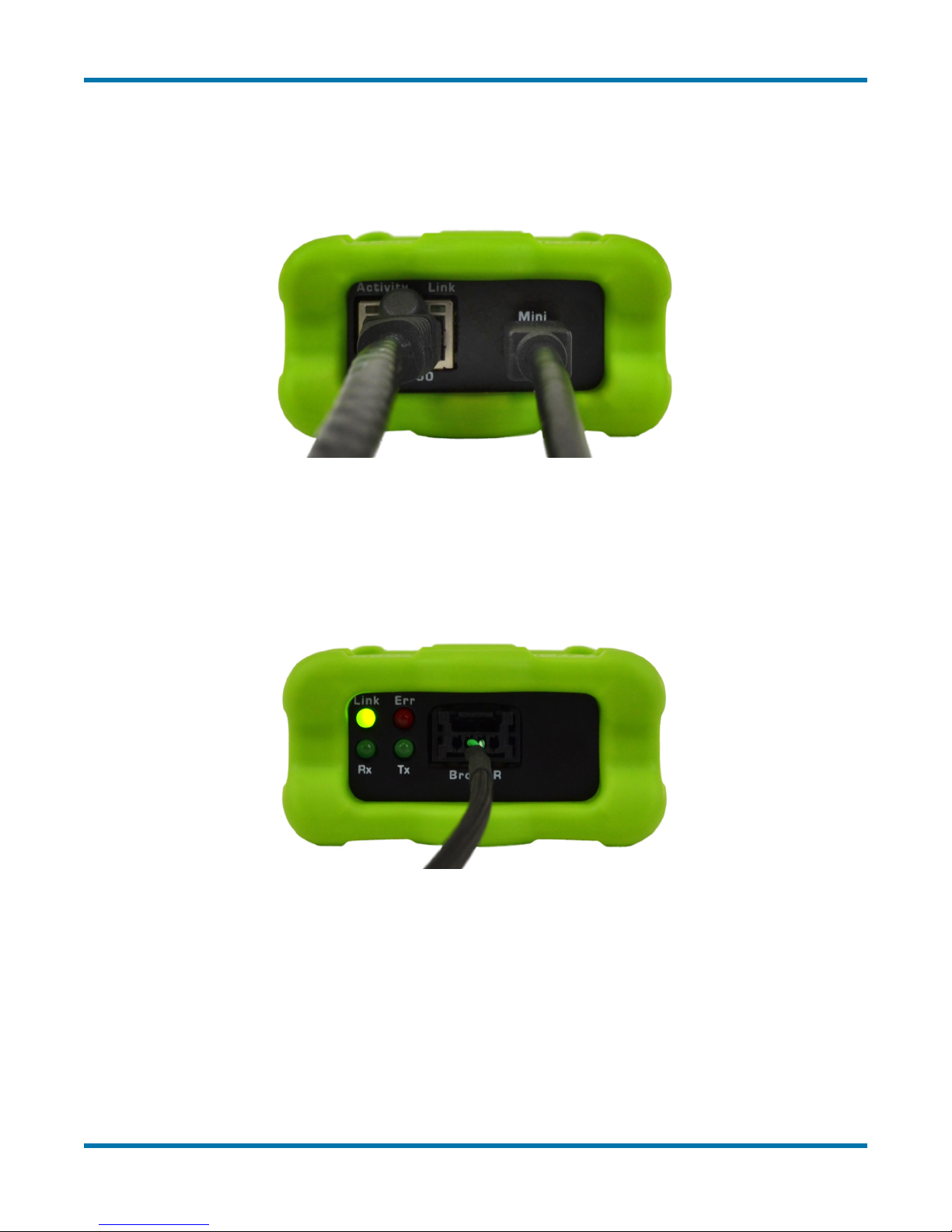
6. Connect BroadR-Reach to RAD-Moon: Plug the Mini50 connector on the BroadR-
Reach cable attached to the Automotive Ethernet ECU into the matching socket on the
RAD-Moon. The green Link LED will illuminate, and you may see the Rx and Tx LEDs
light up as well.
Figure 9: Connecting the BroadR-Reach Cable to the RAD-Moon.
Congratulations, your RAD-Moon is now ready for operation!
If you experience any issues setting up the hardware, please refer to the enclosed
troubleshooting and support information.
7 © 2015 Intrepid Control Systems, Inc.Version 1.1 - May 6, 2015
Page 10

RAD-Moon User’s Guide
7 Troubleshooting
Like all Intrepid products, the RAD-Moon has been designed, manufactured and tested to
provide you with years of trouble-free service. However, as with any complex engineered
device, problems can occasionally arise, either with the product itself, or with the process of
setting up and using it.
If you’re experiencing difculties with your RAD-Moon, please try some of the troubleshooting
ideas in this section. You may be able to save time by solving the problem yourself!
No LEDs are Illuminated
This can happen if the RAD-Moon has not been connected to any other devices. Check that at
least one of its Ethernet connections has been correctly made to either type of Ethernet device.
If the RAD-Moon has been attached to at least one device and still has no LEDs lit, this usually
means that the RAD-Moon is not receiving power. Try the following:
• Check the USB connections on the RAD-Moon and the USB device.
• Remove and then reconnect the USB cable.
• Ensure that the USB device is powered on.
• Try a different USB port.
• Try a different USB cable.
• Try connecting to a different USB device.
If the USB cable that came with the RAD-Moon doesn’t work, but a different USB cable does,
please contact Intrepid for a replacement.
Conventional Ethernet Link LED is not Illuminated
The RAD-Moon has not established a link to the conventional Ethernet device to which it has
been connected. Here are a few things that may help:
• Double-check the Ethernet connections on the RAD-Moon and Ethernet device.
• Ensure that the Ethernet port on the device is enabled and active.
• Remove and reconnect the Ethernet cable.
• Try a different Ethernet port, if possible.
• Try a different Ethernet cable.
• Disable and then reenable the Ethernet port within Windows on the PC.
Again, in the unusual case that the supplied Ethernet cable is defective, Intrepid will replace it.
8 © 2015 Intrepid Control Systems, Inc.Version 1.1 - May 6, 2015
Page 11

RAD-Moon User’s Guide
Automotive Ethernet Link LED is not Illuminated
The RAD-Moon is not linked correctly to the BroadR-Reach device. Since BroadR-Reach
devices and cables may vary, this issue may be application-dependent. However, please try
the following:
• Double-check the connections at both ends of the cable.
• Remove the cable from the RAD-Moon and reconnect it.
• Check for a loose connection at the Automotive Ethernet device.
• Try a different cable, if possible.
Err LED Lights Up
Errors can occur occasionally on correctly-functioning Ethernet networks, so it is not a
problem to occasionally see the Err LED icker. However, if you see this often, or the LED is lit
continuously, this typically indicates a problem that must be resolved.
Here are some suggestions:
• Fully check the setup of the device to ensure all cables are connected correctly.
• Try connecting the RAD-Moon to a different BroadR-Reach device. If this solves the
problem, the issue is likely related to that particular device.
• Connect the RAD-Moon to a different Ethernet port, device or network. Again here,
resolution of the issue in this way indicates a problem with the attached Ethernet unit.
• Unplug the USB connection from the RAD-Moon and then reconnect it. If this xes the
problem but it occurs again shortly thereafter, please contact Intrepid for assistance.
Note that if you are connecting the RAD-Moon to a shared Ethernet network—one that uses
hubs rather than switches—you may see more errors than usual. Very few modern networks
are set up in this manner, however.
Data Sent by the Automotive Ethernet Device is Not Received
Check the Rx LED on the RAD-Moon. If it is not ickering, then data is not actually being
received by the RAD-Moon. Double-check the attached device to ensure that it is transmitting
and the BroadR-Reach cable is functional.
If the Rx LED is lighting up, check the link to the conventional Ethernet device, and try a
different cable if possible.
If both attached devices and cables seem to be correct, the issue may be with the RAD-Moon
itself; please contact Intrepid.
9 © 2015 Intrepid Control Systems, Inc.Version 1.1 - May 6, 2015
Page 12

RAD-Moon User’s Guide
Data Sent by the Conventional Ethernet Device is Not Received
The conventional Ethernet side does not have separate transmit and receive LEDs, so start
by disconnecting the BroadR-Reach cable from the RAD-Moon. This will ensure that any
ickering of the Activity LED indicates data received by the RAD-Moon from the conventional
Ethernet device (rather than data the RAD-Moon is transmitting). If after doing this you do not
see this LED lit, the device may not be transmitting, or there may be a problem with the regular
Ethernet cable.
If the Activity LED is lighting up, reattach the BroadR-Reach cable to the RAD-Moon, and
check the connection to the Automotive Ethernet device. Again, try a new cable if this is
feasible.
If you are unable to resolve the issue, please contact Intrepid using the information below.
Difculty Removing BroadR-Reach Cable from Mini50 Jack
Mini50 connectors can be troublesome to use for those not familiar with them. Be sure to press
all the way down on the small tab in the middle of the cable connector before attempting to pull
it out of the jack. Do not pull the plug out by the wires or you may damage the cable.
8 Support
If you have a problem you cannot resolve on your own, or need any other assistance in using
your RAD-Moon, feel free to contact Intrepid Control Systems by phone or email using the
following contact information:
• Phone: (800) 859-6265 or (586) 731-7950, extension 1.
• Fax: (586) 731-2274.
• Email: [email protected]
Intrepid’s normal support hours are from 8 am to 5 pm, Monday to Friday, United States
Eastern time. If you require assistance outside standard business hours, feel free to contact us
and a member of our support team will get back to you as soon as possible.
10 © 2015 Intrepid Control Systems, Inc.Version 1.1 - May 6, 2015
 Loading...