

Page 1
Precautions
» Before using th e camera, read the precaut ions to ensure correct use,
the best per formance and longer life span.
» Do not leave or store t he camera in direct sunligh t, especially the
lens, as prolon ged exposure to direct su nlight can damage the
image sensor.
» Store in a cool, dr y environment.
» During stora ge, note that battery must b e recharged periodica lly
to maintain oper ating ability. Allowing total dis charge may ruin the
bat tery.
» Clean with a sof t dry cloth and take specia l care around lens.
» Format Memor y Card prior to rst use.
» Do not use a memor y card that contains les fro m a dierent device
as this may cause came ra to malfunction.
LIMITED WARRANTY: This prod uct has a limited 1 year warrant y, to the
original purcha ser, to be free from defect s in materials and workmanshi p.
Follow all produc t instructions and wa rnings as warranty does n ot cover
damage due to misuse , improper care, accidents , or alterations. See
www.intova.com for further details, limitations, and restrictions.
FCC STATEMENT:
This device compl ies with part 15 of the FCC Rules. Operati on is subject
to the following t wo conditions:
(1) This device may not cause harmfu l interference, and
(2) this device must accept a ny interference received, in cluding
interference that may cause undesired operation.
This equipme nt has been tested and found to comp ly with the limits
for a Class B digital d evice, pursuant to Part 15 of the FCC Rules. The se
limits are designed to provide reasonable protection against harmful
interference in a residential installation. This equipment generates, uses
and can radiate ra dio frequency energ y and, if not installed and use d
in accordance with th e instructions, may cause ha rmful interference
to radio communic ations. However, there is no guarantee t hat
interferen ce will not occur in a particular i nstallation. If this equipm ent
does cause harm ful interference to radio o r television reception, whi ch
can be determi ned by turning the equipment o and on, the user is
encouraged to tr y to correct the inter ference by one or more of the
following measures:
» Reorient or re locate the receiving antenn a.
» Increase the sep aration between the e quipment and receiver.
» Connect the e quipment into an outlet on a circui t dierent from that
to which the receive r is connected.
» Consult the deale r or an experienced radio/ TV technician for he lp.
Changes or modi cations not expressly app roved by the party
responsible f or compliance could void the user ’s authority to operate
the equipment .
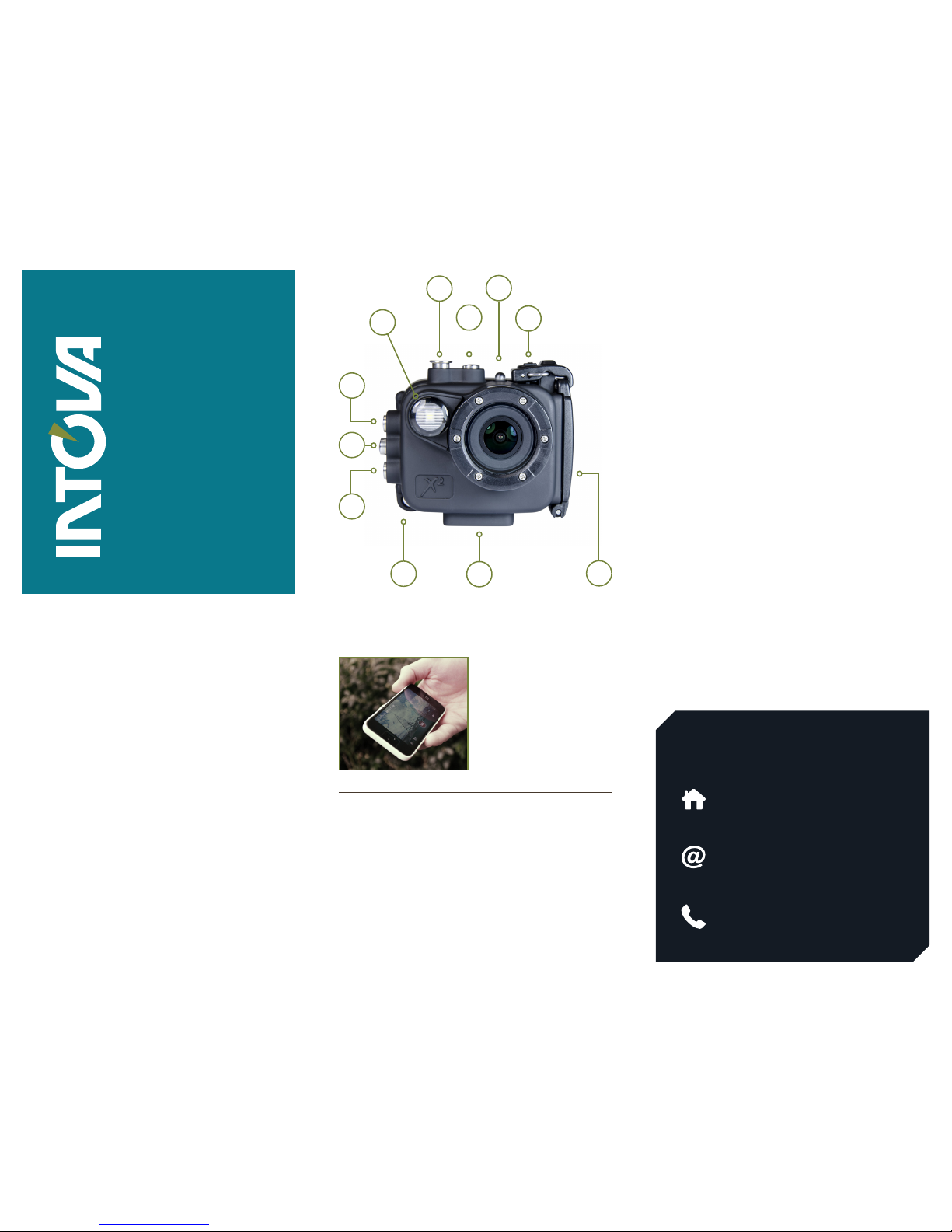
C
D
E
G
H
I
K
J
F
B
BUTTONS AND INTERFACE
X2
QUICK START GUIDE
Need help using your camera?
WE’RE HERE FOR YOU.
Visit our website:
www.intova.com
Call customer support:
+1(808) 837-0074
Email customer support:
1. Install Intov a App onto an iOS
or Android wire less device such as
a smart phon e or tablet.
2. Turn on Wi by pressing
and holding MEN U button until
“Processing” in r ed appears. WiFi
icon should turn green.
3. Connect t o X2 Camera
Wi signal: INTO VA X2.
Password: 1234567890
4. Open app & c ontrol camera.
WIFI CONTROL
A. Video Light/Flash
B. Shutter Button
» Video mode: start/stop
recording.
» Photo mode: shut ter button.
» Thumbnail view mode: select.
» Playback mode: R eturn to
thumbnail view.
» Exit menu.
C. Power But ton
» Power the camera on /o
(press & hold).
» Power ash on/o (halfp ress).
» Video/Photo/ View mode:
Select.
» Playback mode: e xit menu and
return to vide o screen.
D. Indicator Light
» Red LED is ON whi le charging
and OFF when charg e is
complete. FLAS HES when
video recording is in progress.
E. Door Lock
F. Removable Housing Door
G. Tripod Mount
H. Float Stra p Attachment
K/I. Up/D own Buttons
» Scroll up/down to sele ct
thumbnail to view.
» Video/photo mo de: Adjust
digital zoom.
» Playback mode: sp eed up
video playba ck (down button)
and slow down vid eo playback
(up button).
J. Menu/OK Button
» Access Menu.
» Select.
» Playback mode: s tart/stop
video/go to thumbnail v iew.
» Press and hold to tur n on WiFi.
A
Page 2
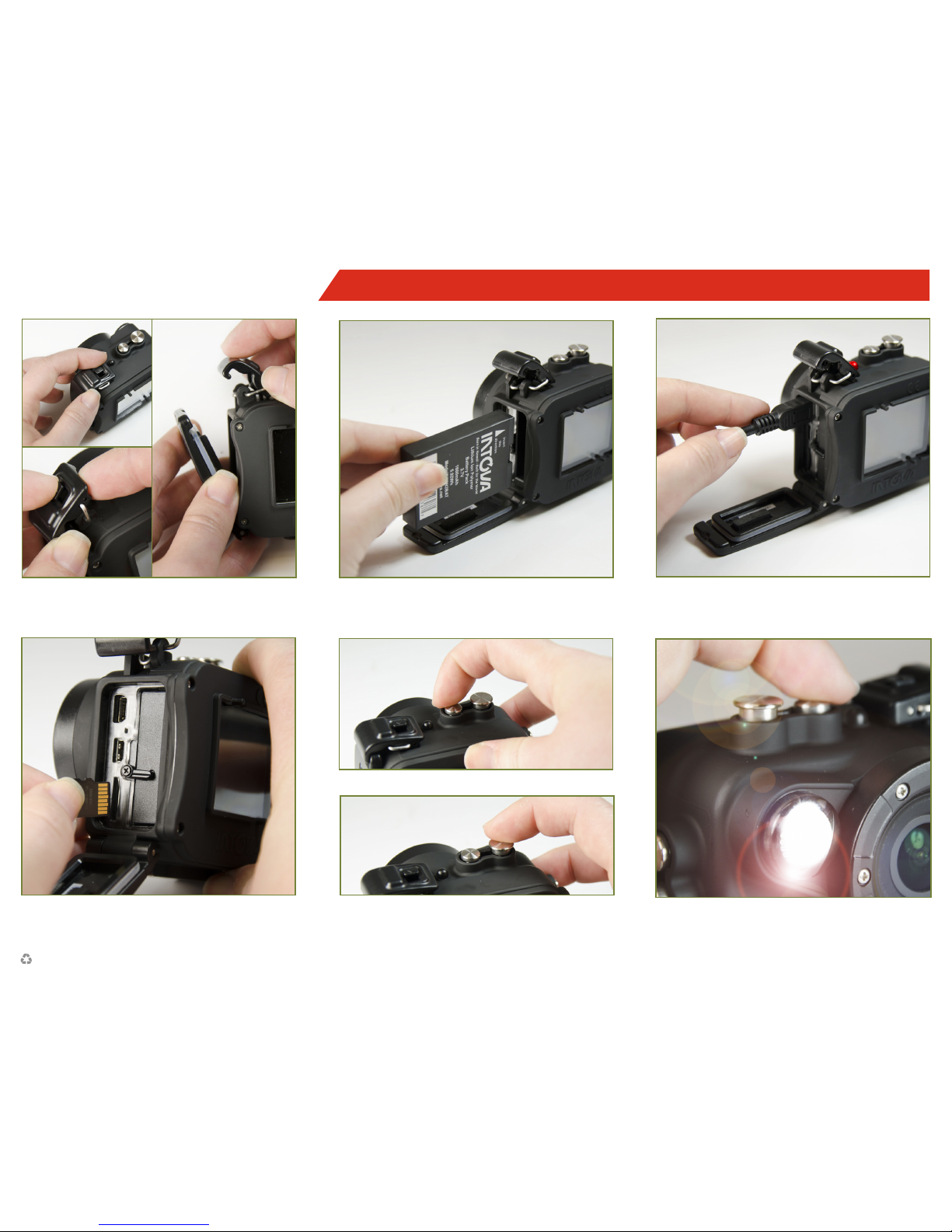
1.OPEN HOUSING DOOR
4. INSERT MICRO SD CARD
(Up to 64GB class 10 microSD c ard)
2.INSERT BATTERY 3. CHARGE
X2
QUICK START GUIDE
INSERT # 1194 - 4/16
INDUSTRIAL REVOLUTION, INC.
SEATTLE, WA • (888) 297-6062
5. POWER ON (PRESS & HOLD)
PRESS POWER (HALFPRESS) FOR LIGHT6. PRESS SHUTTER TO SHOOT/RECORD
For complete instructions go to www.intova.com.
 Loading...