

Page 1
24/7 Technical Support (877) 484-9119
InTouch Vantage™ Quick Reference Guide
Operating the Vantage
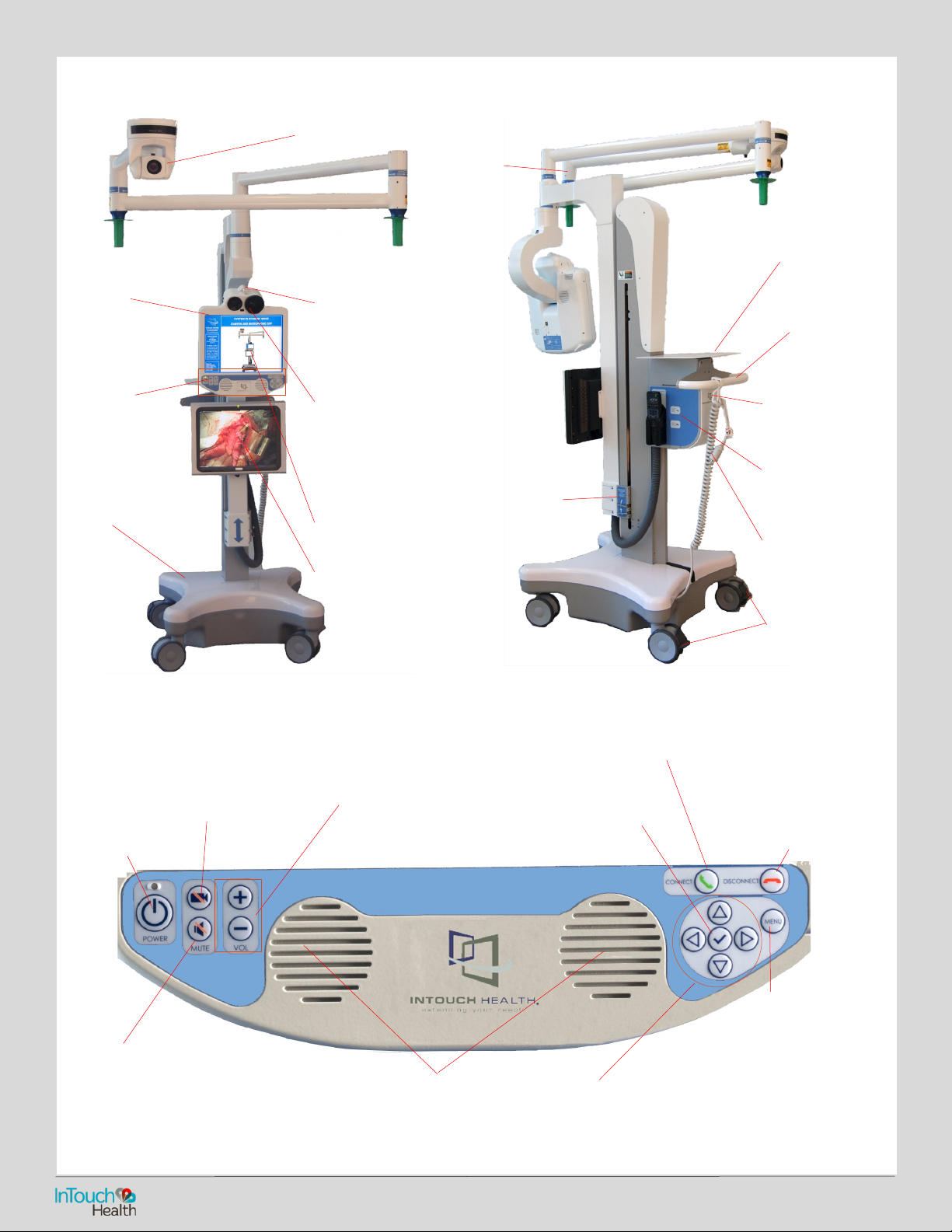
Vantage Button Panel
Boom Camera/Microphone
Directional
Microphone
Head Camera
Head Display
Boom Display
Head
Button
Panel
Base
Neck
Hinged Laptop
Tray
Handle
Power Cord
Shelf Hook
Expansion Bay
Power Plug
and Cord
Wheel Locks
Height
Adjustment
Handle
Power Button
Pause Video Button
Temporarily stops the live
video feed from the Vantage.
Volume Controls
Adjusts the speaker
volume when in
session.
CONNECT
(Limited functionality)
DISCONNECT
Disconnects remote
users and ends session
following a disconnect
conrmation prompt.
Mute Button
Mutes microphones so that audio from the
Vantage is not heard by the remote provider.
Speakers
Arrow Keys
Use arrow keys to navigate to the
desired function.
P/N: MA
-13916
-005
Menu Button
Wakes device so that
user can interact.
Check Button
Displays Diagnostic Information,
acts as an Enter Key when
navigating with arrow keys.
Page 2
24/7 Technical Support (877) 484-9119
Moving the Vantage
The Vantage is designed to be movable by hospital sta.
• Ensure that Boom is completely folded.
• Ensure that Head is set at its lowest position.
• Ensure that the power cord is unplugged.
• Ensure that the wheels are unlocked before moving.
• Exercise caution when encountering thresholds.
• Move to the desired location.
• Lock the wheels.
• Plug in the power cord.
CAUTION: Force from above – Observe the overhead Boom when
moving or adjusting the position of the Vantage. Overhead
objects such as lights, can be damaged by unexpected collisions.
CAUTION: Do not pull down or place any heavy objects on the
Boom, especially when the Boom is extended.
CAUTION: The Vantage is a large and heavy piece of equipment.
As such, caution must be exercised to avoid collision with
persons, inanimate objects, and critical equipment when moving
or re-positioning during use or transport.
CAUTION: Avoid the labeled pinch points on the Vantage,
especially operating the lifting mechanism, extending or folding
the Boom, and during remote sessions when the Vantage head and
the Boom camera can be moved remotely.
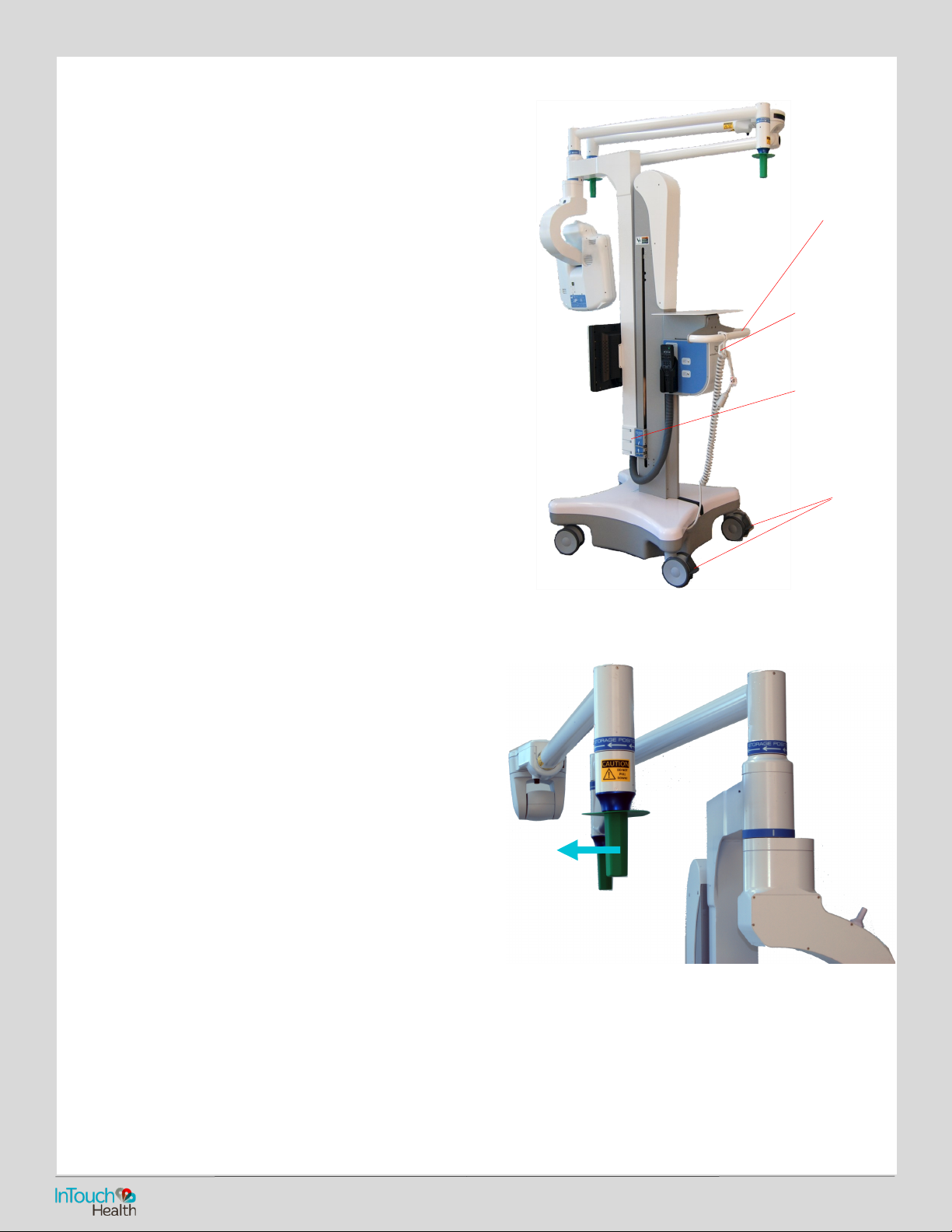
Extending and Folding the Boom
CAUTION: Do not connect any Auxiliary equipment to the
Vantage in such a way as to cause or lead to a sterile eld
being penetrated if the Vantage is moved (remotely or
otherwise).
CAUTION: Force from above – Observe the overhead Boom
when moving or adjusting the position of the Vantage.
Overhead objects such as lights, can be damaged by
unexpected collisions.
CAUTION: Do not pull down or place any heavy objects on the
Boom, especially when the Boom is extended.
CAUTION: Avoid the labeled pinch points on the Vantage,
especially operating the lifting mechanism, extending or folding
the Boom, and during remote sessions when the Vantage head
and the Boom camera can be moved remotely.
CAUTION: The Vantage is not being provided sterile and any potential peripherals attached to the Vantage may not be
provided sterile. The Vantage Boom can be extended up to 146 inches ahead measured from the back of the handle.
• Ensure that Head is set at its lowest position.
• Lock the wheels.
• Pull the handles to rotate the joints of the Boom into the approximate position required.
The arrows indicate the direction to rotate the arms when folding the Boom.
Fold Boom
Push with
handle
Power Cord
Shelf Hook
Head at
lowest
position
Unlock
wheels
To Open
InTouch Vantage™ Quick Reference Guide
Page 3
24/7 Technical Support (877) 484-9119
• Adjust the Boom Camera location by grasping the boom
at the Boom Camera.
Adjusting the Height
CAUTION: Force from above – Observe the overhead Boom
when moving or adjusting the position of the Vantage.
Overhead objects such as lights, can be damaged by
unexpected collisions.
CAUTION: Do not pull down or place any heavy objects on
the Boom, especially when the Boom is extended.
CAUTION: Avoid the labeled pinch points on the Vantage,
especially operating the lifting mechanism, extending or
folding the Boom, and during remote sessions when the
Vantage head and the Boom camera can be moved
remotely.
CAUTION: The Vantage is not being provided sterile and any
potential peripherals attached to the Vantage may not be
provided sterile.
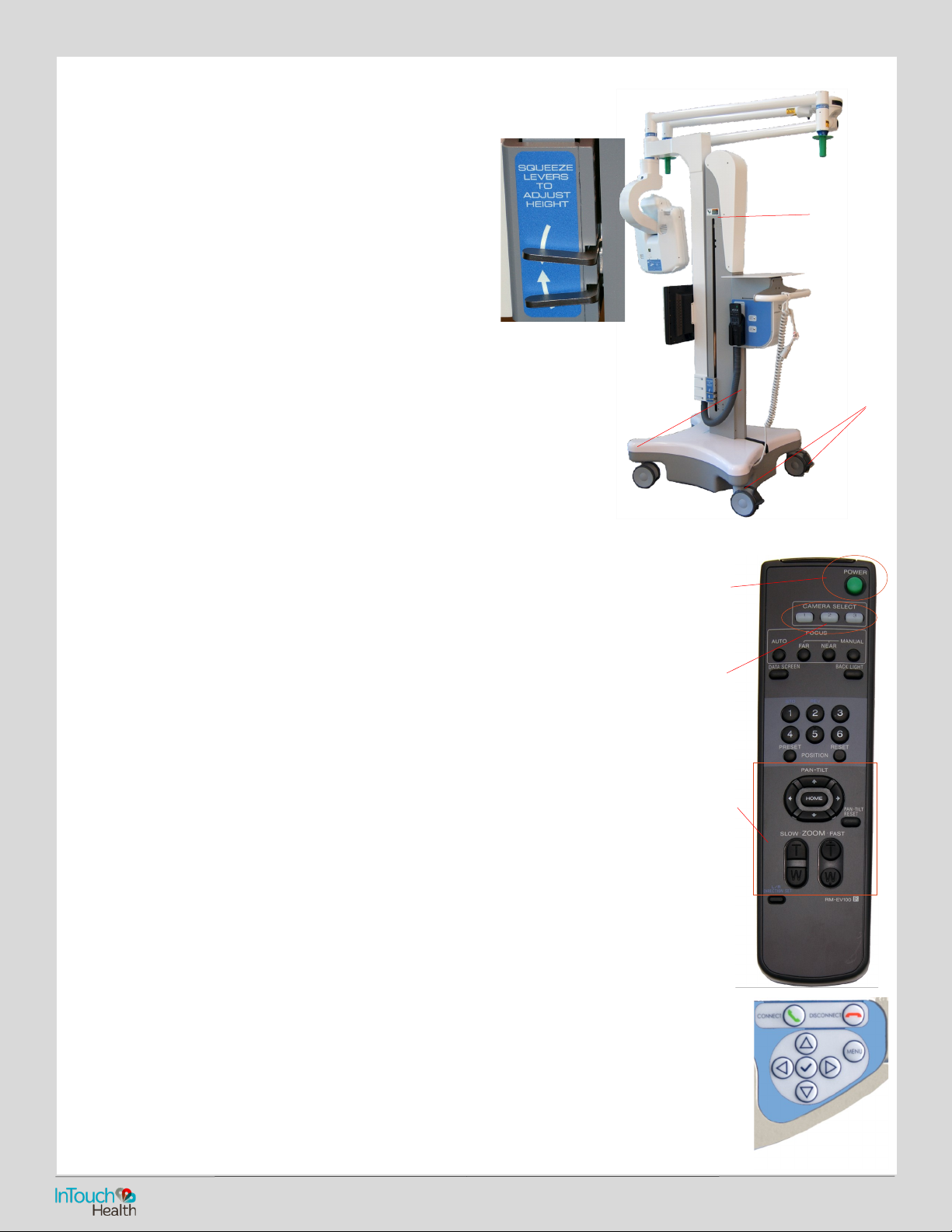
The Vantage Boom can be placed between 80 inches and
111 inches o the oor.
• Squeeze the levers and raise or lower the Boom height.
Boom Camera
The Boom Camera system is powered whenever the Main power is on.
If either the Camera or the Display is turned o, the power light will be orange
and the component must be turned on.
Boom Camera Remote Commander
The Boom Camera Remote Commander allows you to control the
Boom Camera at times when the Vantage computer is not
powered or when a Provider Access Software login is not available.
CAUTION: Do not use the Boom Camera Remote Commander
during an active session.
• Ensure Boom Camera is on.
• Press Camera Select #1.
• Use PAN-TILT and ZOOM to get the desired view.
Refer to the Sony EVI-D70 Color Video Camera Operating
Instructions and the LCD Display CD-ROM for important
information and operating and user maintenance procedures.
Menu Button
Pressing the Menu button will enable out of session interaction with the Vantage. Use the arrow
keys to navigate to the desired function, and press the Check button to select.
Power
Button
Camera
Select
Camera
Motion
Controls
Note pinch
points
2. Squeeze levers
and pull up or push
down.
1. Ensure
wheels are
locked.
InTouch Vantage™ Quick Reference Guide
Page 4
24/7 Technical Support (877) 484-9119
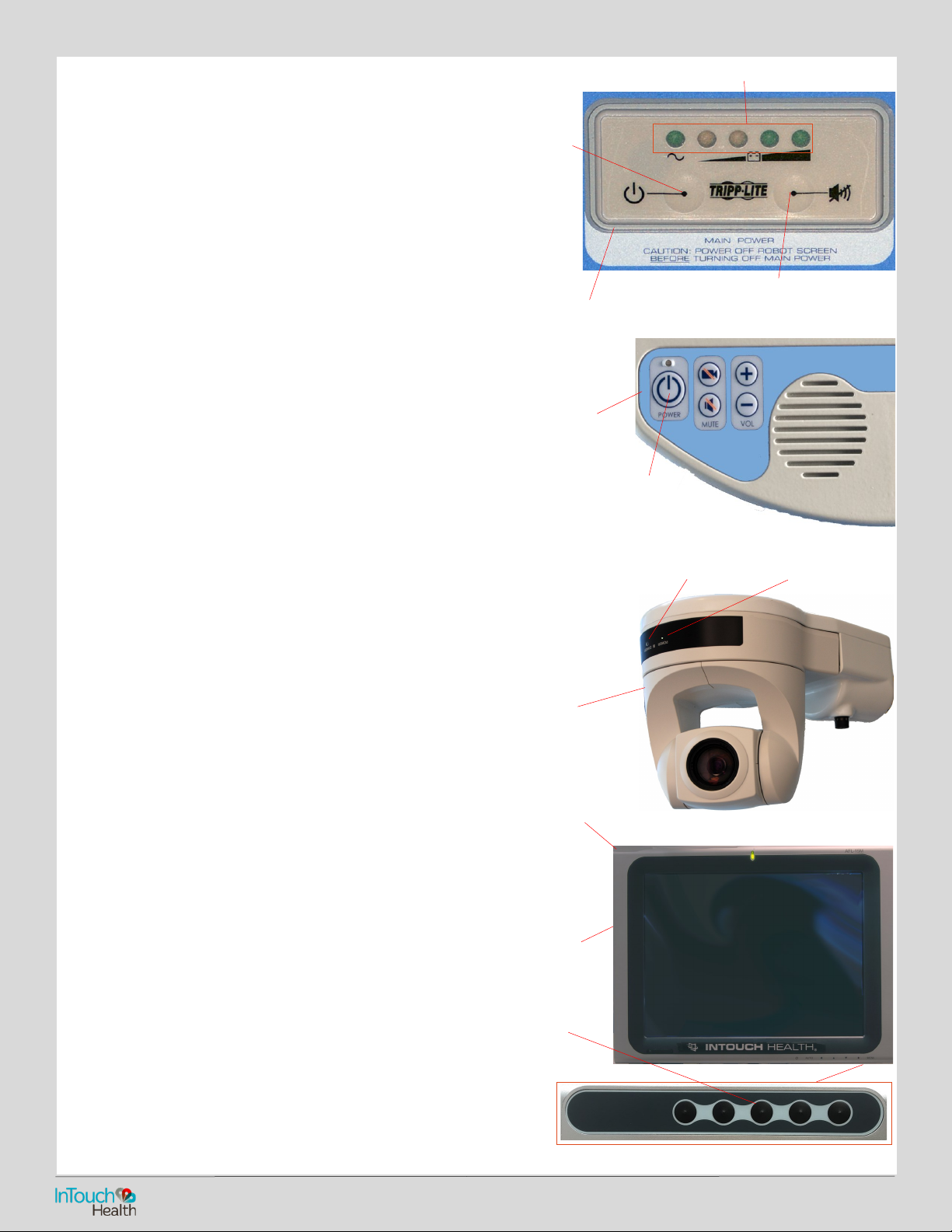
Power On Sequence
The Vantage should be plugged in and left powered on at all
times.
1. Plug in the power cord:
Ensure that the power cord is plugged into an approved wall
socket.
2. Turn On the Main Power at the Expansion Bay:
Press and hold (3-5 sec.) the main power button.
Ensure that the power light is lit.
CAUTION: To ensure system readiness, connectivity, and charged
batteries, power on the Vantage Display at least two hours before
its intended use.
3. Turn On the Power at the Button Panel:
Press the Power button once.
After a short period of self-testing (1-2 minutes), a screensaver
should appear on the display.
4. Turn on the Boom Camera, if required:
Change to: If the Boom Camera has been turned o, the STANDBY
light will be orange; the Camera is in standby and will need to be
turned on.
Press the power button on the Remote Commander while
pointing at the Boom Camera. The power light should be green.
5. Turn on the Boom Camera Display, if required:
If the Boom Camera Display has been turned o, you are
powering the Vantage for the rst time, or the Vantage has been
in storage, you may need to turn on the display. If the power light
is orange, the display is in standby and will need to be turned on.
Press the power button on the bottom, right edge of the display.
The power light should light green.
Check to ensure the display powers up successfully.
Power O Sequence
CAUTION: Only power o this device when instructed by InTouch
Technical Service.
1. Turn o the power at the button panel:
Press the power button once.
Press the check button within seven seconds after the “Do Not
Turn O” message appears.
Conrm shutdown as indicated by the screen going black after
approximately 30-45 seconds.
2. Turn o the main power at the expansion bay:
Press and hold (3-5 sec) the main power button.
Standby Light (orange) Power Light
(green)
BOOM CAMERA/
MICROPHONE
BUTTON PANEL
Power Button
Main
Power
Low-Power Alarm
Battery Charge Indicator Lights
EXPANSION BAY
InTouch Vantage™ Quick Reference Guide
Power
Light
Power
Button
BOOM CAMERA
DISPLAY
 Loading...