

Page 1
Page 2
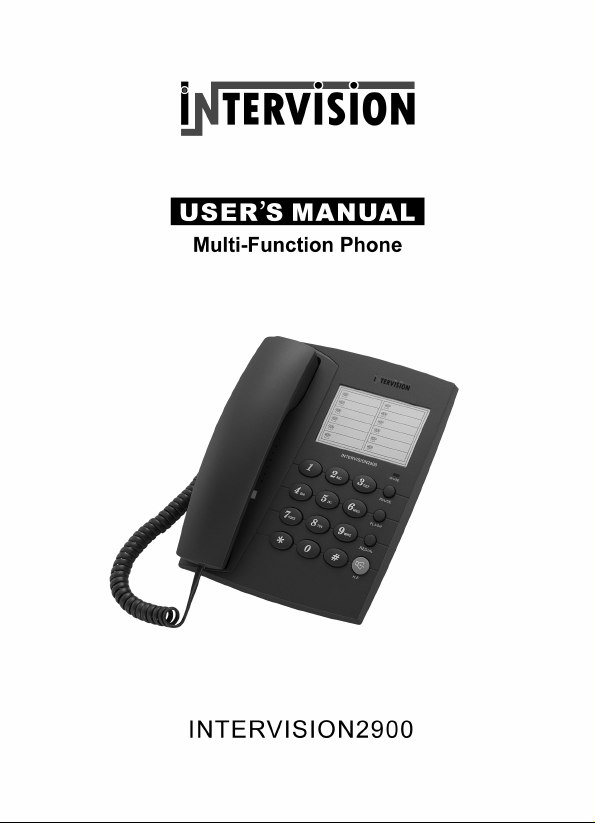
TELEFON INTERVISION 2900
Va multumim pentru achizitionarea telefonului INTERVISION 2900.Prezentul manual
este conceput pentru a va familiariza cu acest telefon si va sfatuim sa-l cititi cu atentie
inainte de a utiliza aparatul.
Masuri de precautie inainte de folosirea aparatului
1. Cititi si urmariti instructiunile cu atentie.
2. Scoateti aparatul din priza inainte de a-l curata. Nu folositi lichide pentru a-l curata.
Folositi o carpa uscata pentru curatire.
3. Nu amplasati aparatul pe suprafete instabile. Aparatul ar putea cadea si s-ar putea strica.
4. Nu supraincarcati priza si cordoanele de legatura deoarece ar putea cauza un incendiu
sau socuri electrice.
5. Nu amplasati obiecte straine pe aparat deoarece ar putea scurtcircuita aparatul s i
produce un incendiu. Evitati scurgerea oricarui fel de lichid pe aparat.
6. Evitati mutarea sau deconectarea apa ratului pe timp de furtuna deoarece exis ta riscul
unor socuri electrice de la tunete sau fulgere.
7. Numai persoanele autorizate p ot u mbla in interiorul aparatului pentru a- l repa ra . Daca
apare vreo defectiune contactati cel mai apropiat service autorizat pentru a evita pierde rea
garantiei.
Caracteristici
Formare si vorbire in modul
maini libere
Sistem compatibil Puls/Ton
Reapelarea ultimului numar
format
Selectarea volumului soneriei
Functiile Pauza, Flash
2 nivele de blocare a telefonului
Indicarea convorbirii in
desfasurare printr-un beculet
LED
Posibilitate de montare pe perete
sau pe birou
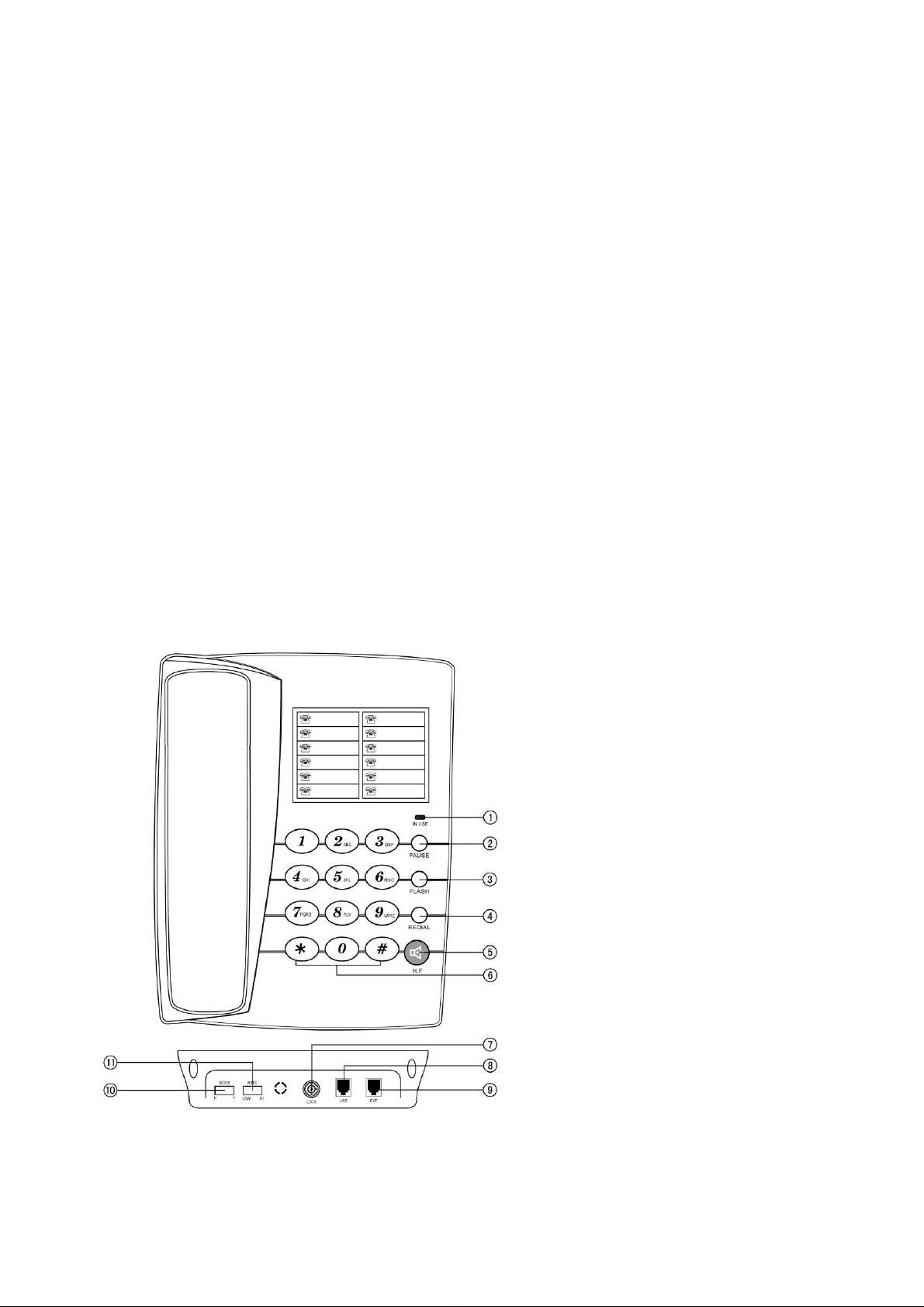
Schema telefonului
1- In USE ( in folosinta,
desfasurare)
2- Pause
3- Flash
4- Redial (reapelarea ultimului
numar format)
5- H.F.
1
Page 3

6- Tastele numerice
7- LOCK (blocare)
8- LINE (mufa pentru receptor)
9- EXT (mufa pentru cordonul telefonic co nectat la priza)
10- MODE (Puls-Ton)
11- RING (Low-Hi-) –soneria (volum inalt/jos)
Instalarea
1. Conectati cablul telefonic la muf a co respunzatoare , iar celalalt capat al firului la priza
telefonica.
2. Conectati receptorul la unitate.
3. Setati telefonul la reteaua loca l a de telefonie, T pentru form area cu Ton sau P pentru cu
pulse.
4. Setati volumul soneriei HI/LOW. (inalt/jos)
Primirea unui apel
Folosind receptorul
1. Ridicati receptorul si vorbiti.
2. Cand ati terminat, puneti la loc receptorul in furca.
Schimbarea la difuzor
1. Cand folositi receptorul, apasa ti H.F. si punet i receptorul in furca.
2. Cand terminati, apasati din nou H.F.
Folosind difuzorul
1. Cand suna telefonul, apasati H.F. si v or bi ti cu cealalta persoana de la capatul firului.
Pentru ca persoana respectiva sa va auda , vorbiti in difuzor de la o distanta de 32 de cm
sau mai putin.
2. Cand terminati apasati H.F. din nou.
Efectuarea unei convorbiri
Folosind receptorul
1. Ridicati receptorul
2. Cand auziti tonul, formati numarul dorit.
3. Cand terminati, puneti receptorul la loc in furca.
Folosind difuzorul
1. Apasati H.F.
2. Cand auziti tonul, formati numarul dorit.
3. Cand terminati, apasati H.F. din nou.
Cand auziti tonul “Dudu---“ indica faptul ca linia este ocupata.
Apasati tasta pentru a avea ton, dupa care REDIAL pentru a forma numarul.
Pause
Daca numarul format are extensie P ABX, apasati numarul PABX (0 sau 9 de
obicei)+PAUSE+numarul dorit. Cand formati din nou, nu mai trebuie sa tastati numarul
PABX si PAUSE, doar apasati REDIAL.
2
Page 4

Flash
Cand formati un numar si linia este ocupata, apasati FLASH dupa care REDIAL pentru a
forma din nou.
Schimbarea P-T
Selectati modul dorit atunci ca nd formati, P (pulse) sau T (ton).
Montarea pe perete
Telefonul poate fi folosit pe nt ru a fi montat pe perete sau pentru a fi p oz i tionat pe birou.
Blocarea telefonului
Intoarceti cheia la punctual verde si toate numerele incepand cu 0 vor fi blocate si nu vor
putea fi formate. Intoarceti la punctual rosu si toate numerele vor putea fi formate.
Disfunctional itati
Fara voce
Verificati daca receptorul este in furca sau daca cordoanele de legatura sunt rupte.
Numai primire
Verificati daca modul P/T este setat corect. Verificati daca aparatul este blocat (folositi
tastele de deblocare pentru a dezactiva.
Zgomot
Verificati daca este afectat circuitul (schimbati-l)
Verificati daca conector ul este uzat sau ud (schimbati co nectorul)
Suna o data dupa care se deconecteaza cand primiti un telefon. Formarea
numerelor este valabila
Verificati daca sunt prea multe extensii sunt folosite impreuna sau calitatea extensiilor
nu este suficient de buna (schimbati extensiile neco respunzatoare)
Verificati daca conectorul este intr-un mediu prafuit sau umed.
3
Page 5

INTRODUCTION
Thank you for purchasing our products with advanced IC and novel design, excellent
performance. It meets all the standards of approval from the telecom dept. To get the maximum
use from this phone, please read this user’s guide before use.
SAFETY INSTRUCTION
When using your telephone equipment, the following basic safety precautions should always be
followed to reduce the risk of fire, electric shock and injury to persons:
1. Read and understand all instructions
2. Follow all warnings and instructions.
3 Unplug the product from the wall outlet before cleaning .Do not uses liquid cleaners or aerosol
cleaners. Use damp cloth for cleaning.
4. Do not place this product on an unstable cart, stand or table. The product may fall, causing
serious damage to the product.
5. Do not overload wall outlets and extension cords as this can result in the risk of fire or electric
shock.
6. Never push objects of any kind into this product through cabinet slots as they may touch
dangerous voltage points or short out parts that could result in a risk of fire or electric shock.
Never spill liquid of any kind on the product.
7. Avoid using this unit during an electrical storm, move or disconnect the unit, there may be a
remote risk of electronic shock from lightning and thunder.
FEATURES
¾ Hand-free dialing and speaking
¾ P/T dialing systems compatible
¾ Redial the last dialed number
¾ Ring Volume selectable
¾ Pause, Flash function
¾ 2-steps lock function
¾ In use LED indicator
¾ Desk/wall mountable
4
Page 6
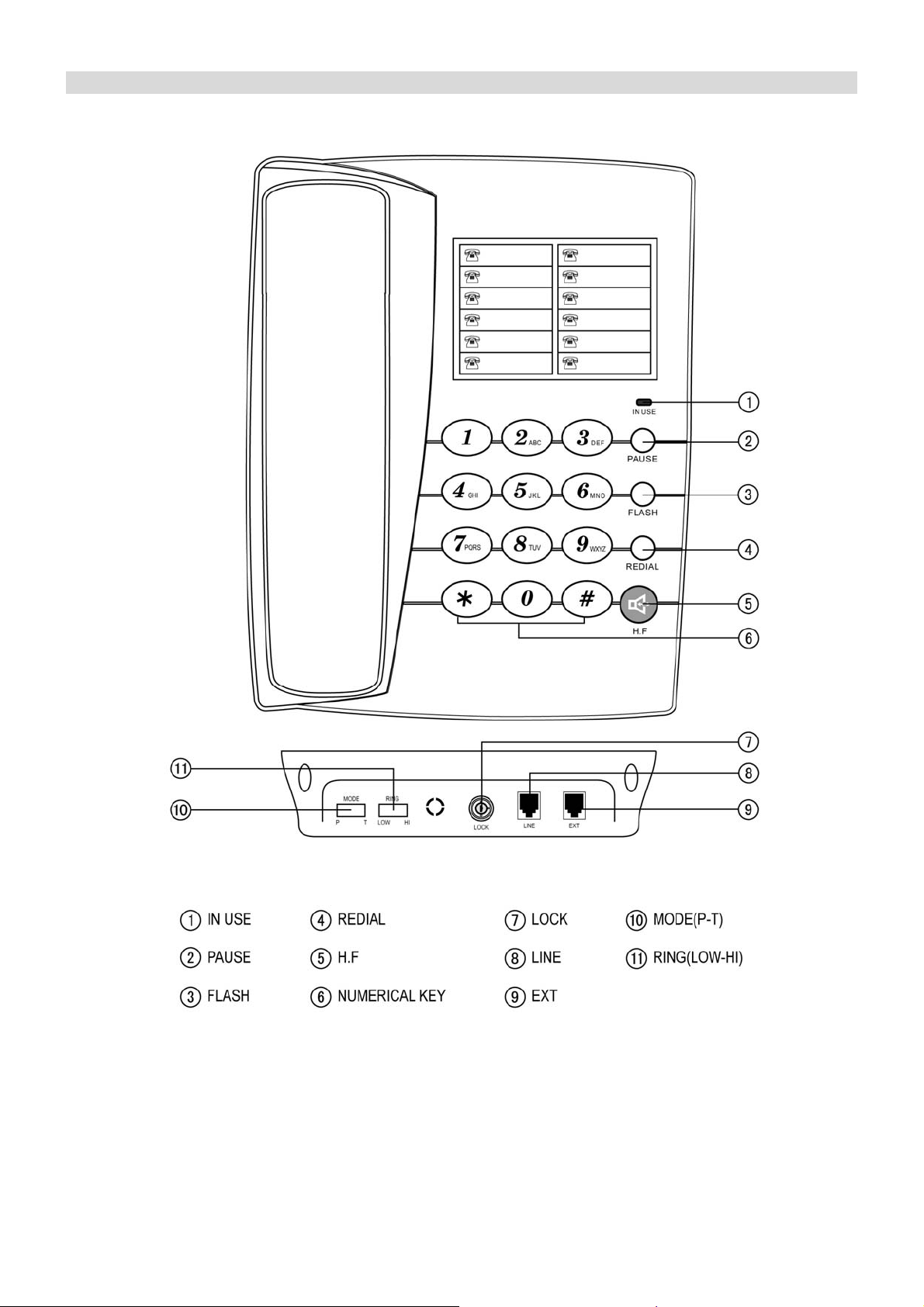
LOCATION DESCRIPTION
5
Page 7

INSTALLATION
Insert one end of line cord into socket of the phone, the other connect with local network
Use coiled cord connect base unit and handset.
Set P/T according to the local telecom style.
Set HI/LOW of ringing volume.
RECEIVE A CALL
¾ From handset
1. Pick up the handset and talk to the other party.
2. When finished, return the handset to the base.
¾ Switching to speakerphone
1. When using the handset, press H.F key and return the handset to the base.
2. When finished, press H.F key again.
¾ From speakerphone
1. When the telephone rings, press H.F key and talk to the caller. For the other party to hear
your voice clearly, speak into the speaker from a distance of 32cm or less.
2. When finished, press H.F key again.
NOTE:
Generally telecom transmits the incoming message between the first ring and the second ring.
So please answer the phone after the second ring.
MAKING CALLS
¾ From handset
1. Pick up the handset.
2. When you hear the dial tone, dial the desired number.
3. When finished, return the handset to the base.
¾ From Speakerphone
1. Press H.F key
2. When you hear the dial tone, dial the desired number.
3. When finished, press H.F key again.
When you hear “ Dudu---” tone that indicates line is busy:
Press hook switch and REDIAL key to redial the last dialed number.
PAUSE
If dial a number from PABX extension, press PABX number (normally “0” or ”9”) +PAUSE +
desired number. When redial, need not dial PABX number and PAUSE key, just press REDIAL
key.
FLASH
When dial a number, and the line is busy, press the FLASH key and then press REDIAL key to
dial it out again.
6
Page 8

P-T SWITCH
Slide the mode switch to T(TONE) or P(PULSE) to select dialing mode.
ADJUSTING RINGING VOLUME
Slide the ringing volume switch to HI or LOW to select desired ringing volume.
WALL MOUNTABLE
It can be used as wall-mounted, and it can also be used for desktop.
LOCK
Turn the key to green the numbers led by “0” will be locked so cannot be dialed.
Turn the key to red point of the lock all numbers can be dialed out.
TROUBLE SHOOTING
? No voice
+ Check if the handset is on the phone or line is broken.
? Receive only
+ Check if P/T mode is properly set.
Check if the unit is locked (use the key to unlock it)
? Noise
+ Check if the circuit is broken. (Change the circuit)
Check if the connector is moist or rust (Change the connector)
? Ring once then disconnect when receive a call. Dialing function is available
+ Check if connector is in a moist environment.
Check if too many extensions are used together or the quality of extension is not good
enough (Change the bad extension)
7
 Loading...