

Page 1
WARNING ON T HE BATTERY OF T HE PRODUCT
Fully charge the battery before using the product for the first time.
Do not store the Product without charging it. Failure to do so may cause irreversible damage to the bat tery capacity. Charge the batter y every TWO months.
WARNING ON T HE WATER RESISTANCE O F THE PRODUC T
The external unit (control unit), connected to the audio kit , is classified IP67 according to
the IEC6 0529 standard. The control unit , can therefore be immersed in a meter of fresh
water for a maximum of 30 (thirty) minutes.
Despi te this cla ssifica tion, the d evice is no t immune to g reater st ress, such a s prolong ed
immersions or high pressure water jets.
Using the product during intense meteorological phenomena, at high speeds, may be
equivalent to subjecting the product to a high pressure jet .
FOLLOW ALL SU GGESTIO NS CAREF ULLY TO AVOID DAMAG ING THE DEVICE :
Do not immerse the product in fresh water which is more than a metre deep for more than
30 minutes.
Do not store th e product whe n still wet: d ry it with a clean, soft cl oth.
Do not ex pose the product to s alt water or ionised water, drinks or other li quids.
If the device is exposed to liquids other than fresh water, wash the device with cold fresh
water and dry it carefully w ith a clean, soft cloth.
Do not ex pose the product to high pressure water jets.
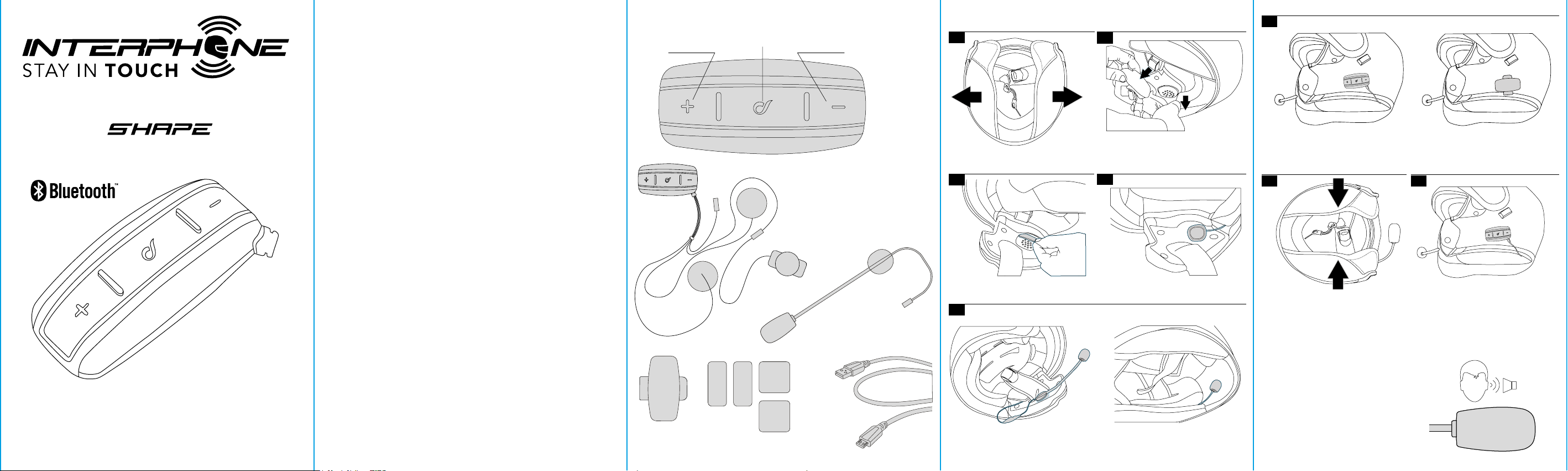
CHAPTER 1 – COMPOSITION OF THE KIT
Vol + Vol -
MFB (On-O)
Bluetooth unit
CHAPTER 2 – INSTALLATION INSTRUCTIONS
1
If possible, remove the two
cushions or padding
3
2
Locate the area in correspondence
with the ear
4
Choose the bracket to use, to be attached on the le side of the helmet:
6
Sticker
7
8
Bracket
QUICK GUIDE
CHECK FOR SOFTWARE UPDATES ON WEBSITE
www.interphone.com
Position the strips of Velcro
for the speakers
Choose the microphone to use:
5
Filp-up/jet helmet Full face helmet
Place the speakers
Re-install the cushions
(!) Warnings on installation:
1. The centre of the speakers must be placed
in correspondence with the ears, as close as
possible.
2. The marking “MIC” on the microphone
must be directed towards the mouth.
Install the control unit
MIC
Page 2
Via Lam brakis 1/A, 421 22 Reggio Em ilia, Italy
www.cellu larline.com
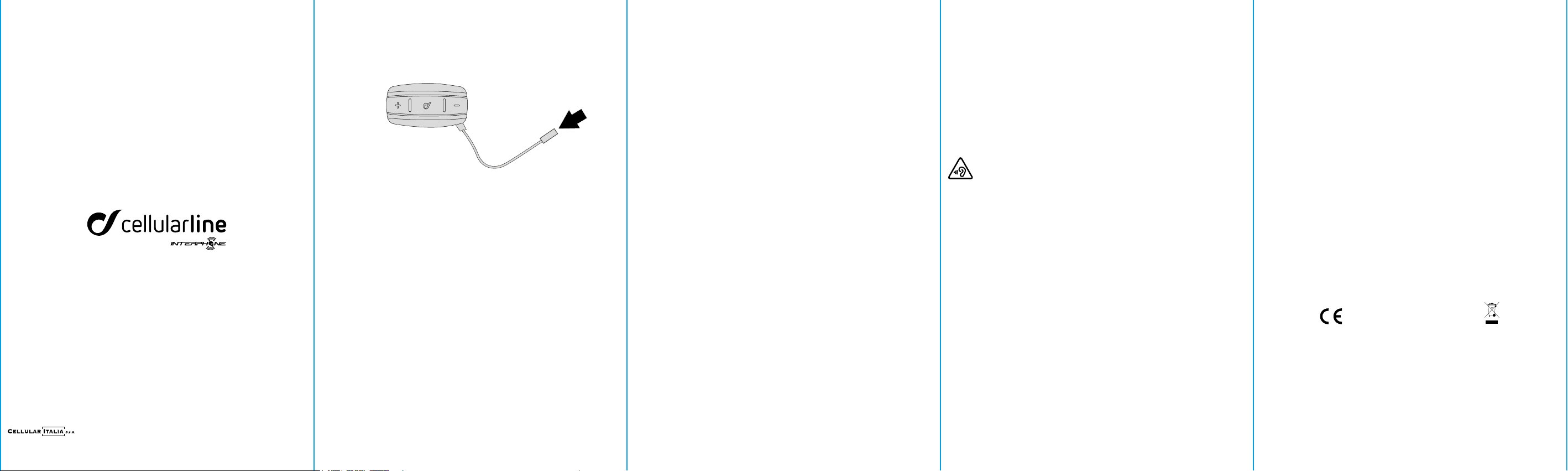
CHAP TER 3 - BATTERY CHARG E
Inser t the micro USB charging cable in the special intercom connector, as shown in the
picture. Connect the cable to a standard USB charger.
LED indications:
- red LED: charging .
- green L ED: fully charged
CHAPTER 4 - BASIC CONFIGURATION
Turn the device on
Press MFB unt il the blue LED comes on.
Turn the device off
Press MFB unt il the red LED lights up and the device turns off.
Activate / Deactivate automatic volume control
1. With the device of f, press MFB until the second beep. Led will flash red/blue.
2. To activate, press Volume + until the fir st beep. Led will flash green for 4 seconds.
3. To deact ivate, press Vol ume - until the first beep. Led will flash red for 4 seconds.
Acti vate / Deact ivate phone c alls voice answer
1. With the device of f, press MFB until the second beep. Led will flash red/blue.
2. To activate, press Volume + until the second beep. Led will flash green for 4 seconds.
3. To deact ivate, press Volume - until the second beep. Led w ill flash red for 4 seconds.
Factor y Reset
With the device off, press together MFB and Volume + and Volume – until the device
switches on. All settings and pair ings will be erased.
CHAP TER 5 - TELEPHONE / GPS
Pairing
1. With the device of f, press MFB until the second beep. Led will flash red/blue.
2. Star t searching for new dev ices on the mobile phone / GPS
3. Select the intercom on the phone / GPS “interphone shape”.
4. Once the pairing has been confirmed, the LED will f lash BLUE twice, every three
seconds.
Answering a call
Just say loudly “HEL LO” or short press MFB.
Voice dial
Short press MFB.
S1217 QUICKGUIDESHAPEEN
Redial last number
Double press MFB.
CHAP TER 6 – MUSIC
Enable/disable playback from the phone
Press MFB until the second beep.
Next track
On music playback, press Volume + until the first beep.
Previous track
On music playback, press Volume - until the first beep.
Share t he music with another in tercom
On music playback, press Volume + until the second beep.
To stop sharing , press Volume - until the second beep.
CHAP TER 7 – INTERCOM
Pairi ng with anot her Interph one device (for the first ti me only)
1. With both the intercom devices off, on each unit press power-on button until led will
flash red/blue.
2. Press once MFB but ton on Interphone SHAPE, units will pair and connect.
Pairi ng with a NON -Interphone dev ice (for the fir st time only)
1. In the NON-Interphone unit, start the telephone search/pair ing mode; refer to the
user manual of the intercom to be paired .
2. With Interphone SHAPE off, press MFB until led will flash red/blue.
3. Press once MFB button on Interphone SHAPE , units will pair and connec t.
Two way intercom talk
On one unit only, press MFB until the first beep.
To stop communication, on one unit only, press MFB until the f irst beep.
SPECIFICHE TECNICHE
Bluetooth® compliance: Bluetooth v. 3.0 - Class II
Supported Bluetooth profiles: HFP A2DP AVRCP
Freque ncy: 2.402 – 2.480GHz
Power: 4dBm EIRP
Operating temperature: 0 – 45°C
Charging temperature: 10 - 45°C
Dimensions mm: 36x78x18
Weight : 61 g
Capacity: Up to 10 meters
Talk time: 12 h
Stand-by time: 700 h
Charging time: 3 h
Batt ery type: Lithium-ion rechargeable
SAR is meas ured with th e device at 0 mm to t he body, while t ransmitt ing at the hig hest cert ified outp ut power level i n all frequen cy bands of th e device.
The max imum SAR value i s 1.75 W/kg (head/bo dy) averaged ove r 10 gram of tissue .
WARNING: To prevent po ssible heari ng damage, do no t listen at high vo lume levels fo r long periods .
Federal Communications Commission (FCC) Statement
Industry Canada (IC) Statement
15.21
You are caut ioned t hat chan ges or modi ficat ions no t expres sly appro ved by the p art resp onsibl e for compl iance cou ld void the u ser’s au thori ty to
operate the equipment.
15.105(b)
This equi pment has been tes ted and found to comp ly with the limit s for a Class B digit al device, pursu ant to part 15 of the F CC/IC rul es. These limit s
are desig ned to provid e reasonable p rotectio n against har mful interf erence in a resi dential ins tallati on. This equip ment genera tes, uses and ca n radiate
radio fr equenc y energ y and, if not insta lled and u sed in acco rdance w ith the in struc tions, may caus e harmfu l interf erence to r adio com municat ions.
However, th ere is no guarante e that interfer ence will not occu r in a particula r installat ion. If this equip ment does cause ha rmful interfer ence to radio
or telev ision recepti on, which can be de termined by tur ning the equip ment off and on, t he user is encour aged to try to cor rect the inter ference by one
or more of th e following m easures :
-Reorient or relocate the receiving antenna.
-Incre ase the separa tion betwe en the equipme nt and receiver.
-Conne ct the equipm ent into an out let on a circuit di fferent fro m that to which th e receiver is conn ected.
-Consu lt the dealer or an e xperience d radio/TV t echnician fo r help.
This dev ice complies wi th part 15 of th e FCC rules and Ind ustry Cana da licence-e xempt RSS st andard(s)
Operation is subject to the following two conditions :
1)This dev ice may not caus e interfere nce and
2)This dev ice must accept a ny interfer ence, includin g interfere nce that may caus e undesired op eration of th e device.
FCC/IC RF Ra diation Ex posure State ment :
This equipment complies with FCC/IC radiation exposure limits set forth for an uncontrolled environment. End users must follow the specific operating
instru ctio ns for sat isfy ing RF ex posure co mplian ce. This tr ansmit ter mus t not be co- locate d or opera ting in co njunc tion wi th any oth er anten na or
transmitter.
EN - Hereby, Ce llular It alia S.p. A declare s that the rad io equipmen t type
BTF7 (Interphone Shape) is in compliance with
Direct ive 2014/53/E U and Dire ctive R OHS (2011/65/EU) . The use r is
prohibi ted from makin g any type of cha nge or variat ion to the dev ice.
Variat ions or ch anges not e xpress ly approv ed by Cellu lar Ita lia S.p .A
will can cel the user’s a uthorisat ion to use the de vice.
Only upda te with soft ware provid ed by Cellular I talia S.p. A.
®
is a tradem ark owned by Bl uetooth SIG, I nc.
Bluetooth
The ful l text of th e EU decl arati on of confor mity is a vailab le at the
following internet address: http://www.cellularline.com/it_it/dichiarazione-conformita/
EN - INSTRU CTION S FOR THE DIS POSAL OF A PPLIA NCES FOR D OMEST IC
USERS
(Appli cable in co untri es in the Eur opean Un ion and th ose wit h separa te
waste collection systems)
This mark o n the produc t or documenta tion indica tes that this pr oduct must
not be disp osed of with ot her household w aste at the end o f
its life . To avoid any damage to he alth or the envir onment due to impr oper
disposa l of waste, the use r must separa te this produc t from
other t ypes of waste and re cycle it in a resp onsible manner t o promote the
sustain able re-use o f the materia l resources.
Domest ic users sh ould contac t the deale r where they p urchased th e product
or the loc al governmen t office for al l the informat ion
regardi ng separate waste c ollection and r ecycling for thi s type of p roduct.
Corporate users should contact the supplier and verify the
terms and c onditi ons in th e purchas e contra ct. Thi s produc t must no t be
mixed wi th other comme rcial waste.
This prod uct has a b atter y than ca nnot be re placed b y the user. D o not
attem pt to open the dev ice to remove the b attery as t his could
cause mal funct ions and serious ly damage t he prod uct. Wh en dispos ing of
the prod uct, please c ontact the l ocal waste disp osal author ity
to remove t he batter y. The bat tery insid e the device w as designe d to be able
to be used du ring the ent ire life cycle o f the product
 Loading...