

Page 1
Troubleshooting
Internet Radio
b
a
c
k h
o
m
e
d
i
s
p
l
a
y
o
p
t
io
n
s
24
Li
t
tle
R
i
ch
a
rd
Lucille
Intern
et
Bufferin
g
+
Symptom Solution
Wi-Fi network does n ot
appear in the list
Stiletto displays Un able to
Conn ect
Stiletto displays Ch annel
Unav ailable Connecti on
Erro r
Stiletto displays Ch annel
Unav ailable Signal L ost
Stiletto displays ch annel
information, but the re is
no audio
Stiletto displays Bu fferi ng
and there is no audi o
Cannot save songs an d
shows using Love
Cannot use Play/Paus e,
Fast Forward, and Rewind
For additional support visit http://www.sirius.com/Stiletto100support or call Sirius Customer
Support at 1-800-869-5364.
The wireless network ’s SSID may be hidden . Change the setting in th e router
•
so that the SSID is broadcast.
You may be out of ra nge of the wireless n etwork. Try moving closer to the
•
router and connectin g again.
You may have entered an incorrect passwor d. Try entering it again.
•
The wireless network may use an unsupport ed password format such as
•
WPA-Enterprise. Only WEP and WPA-PSK are currently supported.
The wireless network may use the 802.11a or 802.11g wireless standa rd.
•
Only 802.11b is curr ently supported. If y ou’re connecting to an 802 .11g
router, make sure th at “mixed b/g mode” i s enabled in the router.
The router may requi re the entry of the M AC address of your Stilett o before it
•
will allow you to co nnect. For details, p lease see the I ntern et Rad io section in
the Stiletto 100 Use r Guide.
You may have connect ed to an open wireles s network which requires
•
additional authentic ation (e.g., a T-Mobi le® account or a wirele ss network
that requires proxy configuration). These wireless networks are not currently
supported.
An unknown connectio n problem may have oc curred. Try connecting aga in.
•
You may have moved o ut of range of the wi reless network. Try moving closer
•
to the router, then connect again.
The router may have been turned off or re started. Verify that the r outer is on
•
and connect again.
Your router may be h aving problems connec ting to the Internet. Chec k your
•
broadband connection to the Internet and the router’s configuration settings,
or try turning the r outer off and then on again.
You may have connect ed to a network which requires you to access a
•
web page and enter a password or credit c ard information. These wir eless
networks are not cur rently supported.
The Stiletto is stre aming channel informa tion from the Internet. Wh en
•
completed, the Buffe ring message will dis appear and the radio will begin
playing.
Because Internet Rad io is streamed and no t broadcast, certain featu res
•
available when liste ning to satellite rad io are not supported. It i s not possible
to record any materi al from Internet Radi o, or pause and rewind liv e content.
Stilet to 100 Wi Fi Insert (091906b )
Just the FAQs
Listening to SIRIUS Internet Radio using Wi-Fi
The Stiletto™ 100 features a Wi-Fi receiver that can connect to any accessible
Wi-Fi network, allowing you to listen to SIRIUS® Internet Radio when satellite
service is not available.
Which SIRIUS Channels are Available?
All SIRIUS 100% commercial free music channels and select talk channels are
available with your active SIRIUS subscription.
Page 2
Connecting to a Wi-Fi Network
Area25
Middletown
revolution
Choose Wi-Fi Network
Enter Password
Turn the dial and press
SELECT to enter password
for “Area25”.
Press BACK to erase.
Press OPTIONS when done
A B C D E
24
Little Richard
Lucille
Internet
Buffering
+
Conne cted to
Area25
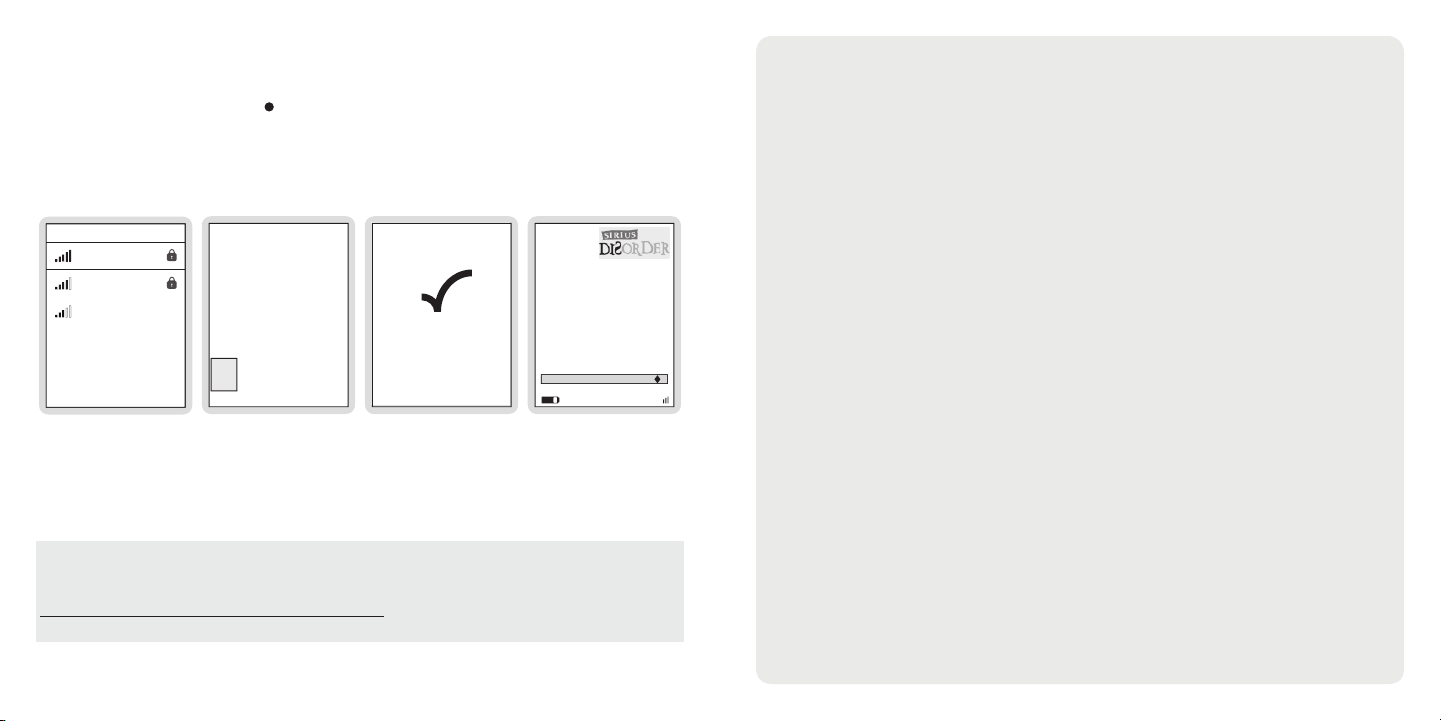
If you’re within range of a wireless network, go to the Home screen, highlight
Internet Radio, and press the Select button. The Stiletto 100 will then search for
available wireless networks and present a list of them ordered by the strength of the
wireless signal. If a network has a lock symbol next to it, a password is required in
order to connect to that network. Make sure you know this password before trying
to connect to a locked network.
Next, choose a network, enter the password (if prompted), and the Stiletto 100 will
attempt to connect to the network. If successful, a Connected to network message
will appear and a list of channel categories will be displayed. Select a channel and
the audio will play for as long as you remain within range of the wireless network.
For troubleshooting information, see the back page of this insert.
Note: Certain brands and models of wireless routers do not fully comply with
Note: Certain brands and models of wireless routers do not fully comply with
industry specifications and may have interoperability problems with Stiletto.
industry specifications and may have interoperability problems with Stiletto.
Software updates for your Stiletto may be available to correct these issues. Visit
Software updates for your Stiletto may be available to correct these issues. Visit
http://www.sirius.com/Stiletto100support or call Sirius Customer Support at
http://www.sirius.com/Stiletto100support or call Sirius Customer Support at
1-800-869-5364 for the latest support information.
1-800-869-5364 for the latest support information.
© 2 006 Si rius Sa tellite Radio Inc. A ll Rig hts Res erved. ® “SIRI US” a nd rel ated marks, the SI RIUS do g logo , chann el nam es and logos are
regis tered t rademarks of Sirius Satellite Radio Inc. T-Mobile is a registered trademark of Deutsche Telekom AG. ™ Stilett o Serie s is a trad emark
of Si rius Sate llite Rad io Inc.
About Wi-Fi and Wireless Networking
Wi-Fi (also known as 802.11) provides a way to connect wirelessly to the
Internet. You may already use a wireless network at your home or office to
browse the web via a PC. The Stiletto 100 supports the most common type of
wireless network, 802.11b. Networks which use 802.11a or 802.11g are not
supported.
Open vs. Password Protected Networks
Open networks require no password and are often available at public locations.
Password protected networks require you to enter a password in the Stiletto
100 in order to connect. The Stiletto 100 supports two types of password
protection, WEP and WPA. Ask the person in charge of your network to find
out the password. Networks which require you to access a web page to enter a
password or credit card information are not currently supported.
Usage at “Wireless Hotspots”
Wireless hotspots are increasingly available at coffee shops, airports, and other
public locations. The Stiletto 100 does not currently support paid networks
which charge an access fee or require a monthly subscription.
Setting Up a Wi-Fi Network
To set up a wireless network, you need a broadband connection to the Internet
(check with your local cable or phone company), and a router which can be
purchased inexpensively from major electronics stores. A router typically
provides a range of 50 to 100 feet, depending on how the walls of your home
are built.
 Loading...