

Page 1
Manual
Supplement
730IS
Mobile
Computer
1730IS Manual Supplement
Page 2
730 Intrinsically Safe (730IS) Mobile
Computer
Important Operating Instructions
The Model 730IS Mobile Computer has been qualified by the Underwriters Laboratories Inc., to the requirements of the USA and Canada for use in Class I,
Division 1, Groups C and D; Class II, Division 1,
Groups F and G locations; and Class III Division 1. It
has a T4 temperature code..
Warnings and Cautions
Explosion Hazard-Substitution of
components may impair suitability for
Class I, Class II, and Class III Division 1
locations.
Note: This unit has no operator replaceable parts other than the battery pack and
SD Card. Repair of the 730IS Mobile
Computer must be performed by trained
Intermec service personnel.
Explosion Hazard-Batteries must only be
changed or charged in an area known to
be non-hazardous. Use Intermec battery
pack p/n: 318-011-006 only.
Note: From time to time additional battery
packs may be added to the qualifications of
the 730IS. Contact your local Intermec
representative if battery pack (p/n:
318-011-006) is no longer available as a
replacement battery pack.
The battery pack used in this device may
present a fire or chemical burn hazard if
mistreated. Do not disassemble, heat
above 100°C (212°F) or incinerate.
Dispose of used battery packs promptly.
Keep away from children.
2
730IS Manual Supplement
Page 3
The following additional warnings and cautions must
be observed for the safety of the operator and others in
potentially hazardous locations:
S The 730IS must only be used when the ambient
temperature is between -20°C and +40°C(-4°F
and +104°F).
S Use only Intermec part number 715-370-001 Se-
cure Digital memory card while in potentially hazardous locations. This card must not be removed or
changed while in the hazardous location.
Battery Pack Removal
For maximum effectiveness it is important to leave the
main battery installed in your 730IS Mobile Computer even if it is discharged. If the main battery is re-
moved, it should be replaced within 10 minutes to
avoid the possibility of data loss. Before removing
the battery ensure that your 730IS Mobile Computer
is in sleep mode. Not doing this could result in a loss
of data.
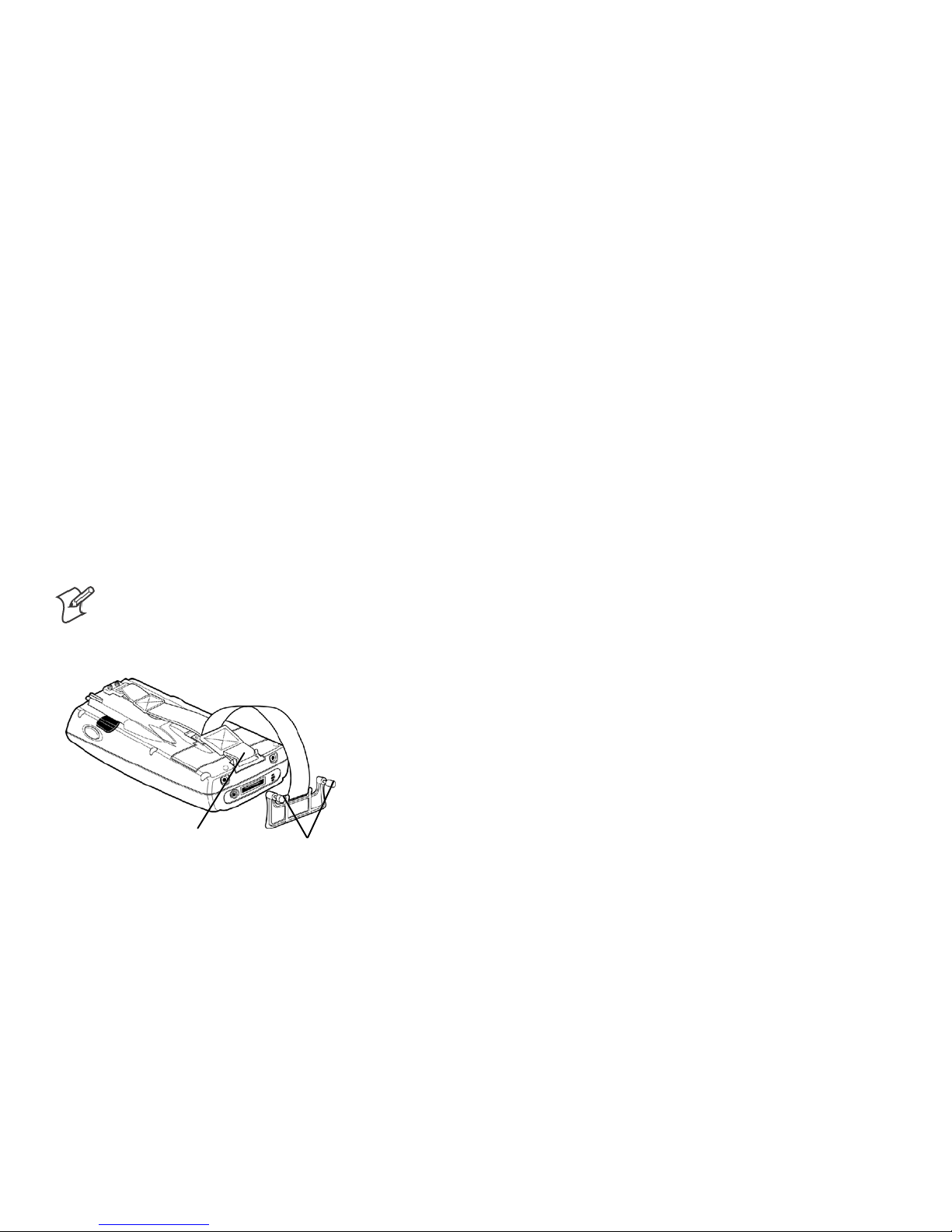
730IS Hand Strap
Install the hand strap and docking connector cover as
shown in the following illustration. When you need to
gain access to the connector loosen the two thumb
screws to remove the connector cover.
Note: It’s recommended that the docking
connector cover be installed whenever your
730IS Mobile Computer is not in the
dock.
Slide bottom of strap forward
to release from the retaining slot.
Thumb screws
3730IS Manual Supplement
Page 4

Corporate Headquarters
6001 36th Avenue West
Everett, Washington 98203
U.S.A.
tel 425.348.2600
fax 425.355.9551
www.intermec.com
730IS Manual Supplement
*962-054-124A*
P/N: 962-054-124A
© 2005 Intermec Technologies Corporation. All rights reserved.
 Loading...