

Page 1
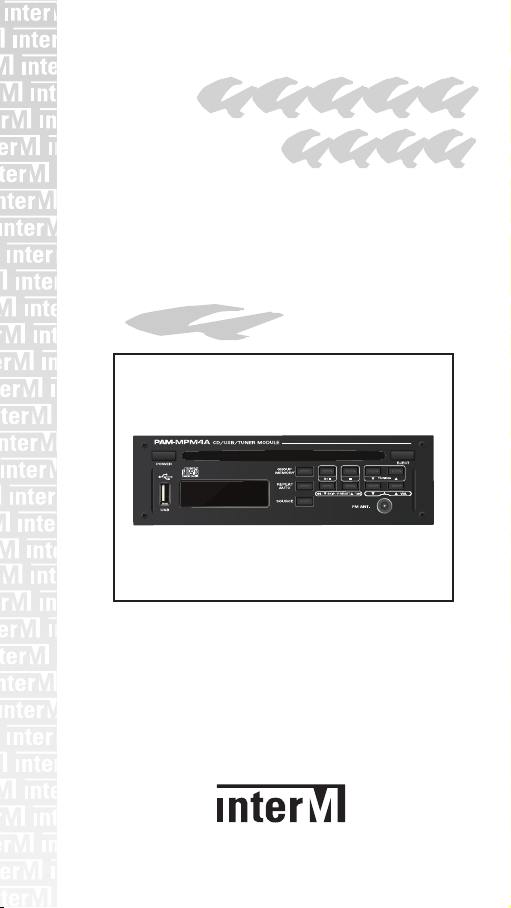
Operation
Manual
PAM-MPM4A
* 본 제품을 사용하기 전에 반드시 방송방식 및 전원 전압을 확인하여 사용하시기 바랍니다.
CD/USB/TUNER MODULE
Page 2
Warning
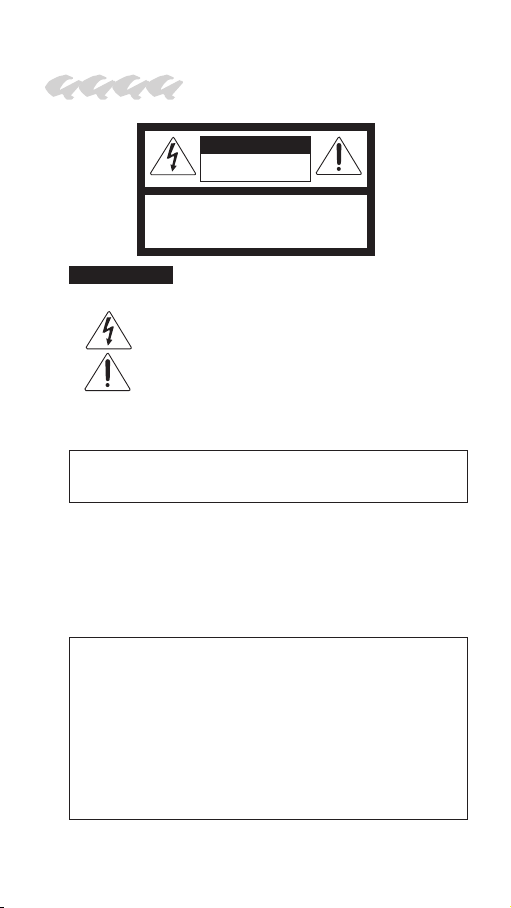
CAUTION
RISK OF ELECTRIC SHOCK
DO NOT OPEN
CAUTION: TO REDUCE THE RISK OF ELECTRIC SHOCK.
DO NOT REMOVE COVER (OR BACK).
NO USER-SERVICEABLE PARTS INSIDE.
REFER SERVICING TO QUALIFIED SERVICE PERSONNEL.
WARNING
To prevent fire or shock hazard, do not expose the unit to rain or moisture.
Caution: These servicing instructions are for use by qualified service person-
Attentions: Pour prévenir les chocs électriques ne pas utiliser cette fiche
*Do not install this equipment in a confined space such as a book case or
similar unit.
*The apparatus shall not be exposed to dripping or splashing and no objects
filled with liquids, such vases, shall be placed on the apparatus.
*Worded: “WARNING FOR YOUR PROTECTION PLEASE READ THE
FOLLOWING-WATER AND MOISTURE: Unit should not be used near
water(e.g. near a bathtub, washbowl, kitchen sink, laundry tub, in a wet
basement, or near a swimming pool, etc). Care should be taken so than
objects do not fall and liquids are not spilled into the enclosure through
openings.”
NOTE : This equipment has been tested and found to comply with the limits
* It can be heated up if you use this product in closed box or ill-ventilated place.
This symbol is intended to alert the user to the presence of
uninsulated “dangerous voltage” within the product’s enclosure
that may be of sufficient magnitude to constitute a risk of electric shock to persons.
This symbol is intended to alert the user to the presence of important operation and maintenance (servicing) instructions in
the literature accompanying the appliance.
nel only. To reduce the risk of electric shock, do not any perform
any servicing other than that contained in the operating instructions
unless you are qualified to do so.
polarisée avec un prolongateur, une prise de courant on une
autre sortie de courant, sauf si les lames peuvent étre insérées
à fond sans en laisser aucune partie à découvert.
for a Class A digital device, pursuant to Part 15 of the FCC Rules.
These limits are designed to provide reasonable protection against
harmful interference when the equipment is operated in a commercial environment. This equipment generates, uses, and can
radiate radio frequency energy and, if not installed and used in accordance with the instruction manual, may cause harmful interference to radio communications. Operation of this equipment in a
residential area is likely to cause harmful interference in which
case the user will be required to correct the interference at his own
expense.
Page 3

Contents
Welcome .............................................................................4
Unpacking ...........................................................................4
Installation
Environment.........................................................................5
Important Safety Instructions ...............................................5
Additional Explanation ........................................................7
Method to treat Compact Disc (CD)....................................8
Features..............................................................................9
Contents and Accessories ..................................................9
Part Names and Function .................................................10
Method to Use CD/USB....................................................12
Method to Use FM Tuner ..................................................15
Block Diagram...................................................................16
Specification......................................................................17
Service
Procedures ........................................................................18
Schematic ..........................................................................18
Parts List............................................................................18
Warranty ...............................................................................18
Page 4

Welcome
A personal welcome to you from the management
and employees of Inter-M
All of the co-workers here at Inter-M are dedicated to
providing excellent products with inherently good
value, and we are delighted you have purchased
one of our products.
We sincerely trust this product will provide years
of satisfactory service, but if anything is not to your
complete satisfaction, we will endeavor to make
things right.
Welcome to Inter-M, and thank you for becoming
part of our worldwide extended family!
Unpacking
Please take a few minutes to read this manual to familiarize yourself with important information regarding installation, product features, and operation.
As with most electronic devices, ORIGINAL PACKAGING (OR EQUAL) IS REQUIRED in the unlikely event
that the product needs to be returned for servicing.
PAM-MPM4A (CD/USB/Tuner Module)
4
Page 5

Installation
Environment
Never place this product in an environment which
could alter its performance or reduce its service life.
Such environments usually include high levels of heat,
dust, moisture, and vibration.
ImportantSafetyInstructions
1. Read these instructions.
2. Keep these instructions.
3. Heed all warnings.
4. Follow all instructions.
5. Do not use this apparatus near water.
6. Clean only with dry cloth.
7. Do not block any ventilation openings. Install in accor-
dance with the manufacturer’s instructions.
8. Do not install near any heat sources such as radia-
tors, heat registers, stoves, or other apparatus (including amplifiers) that produce heat.
9. Do not defeat the safety purpose of the polarized or
grounding-type plug. A polarized plug has two
blades with one wider than the other. A grounding
type plug has two blades and a third grounding
prong. The wide blade or the third prong are provided for your safety. If the provided plug does not
fit into your outlet, consult an electrician for replacement of the obsolete outlet.
10. Protect the power cord from being walked on or
pinched particularly at plugs, convenience receptacles, and the point where they exit from the apparatus.
11. Only use attachments/accessories specified by
the manufacturer.
12. Use only with the cart, stand, tripod,
bracket, or table specified by the
manufacturer, or sold with the apparatus. When a cart is used, use
caution when moving the cart/ap-
S3125A
PAM-MPM4A (CD/USB/Tuner Module)
5
Page 6

paratus combination to avoid injury from tip-over.
13. Unplug this apparatus during lightning storms or
when unused for long periods of time.
14. Refer all servicing to qualified service personnel.
Servicing is required when the apparatus has been
damaged in any way, such as power-supply cord or
plug is damaged, liquid has been spilled or objects
have fallen into the apparatus, the apparatus has
been exposed to rain or moisture, does not operate
normally, or has been dropped.
- AVOID EXCESSIVE HEAT, HUMIDITY, DUST AND VIBRATION
Keep the unit away from locations where it is likely to
be exposed to high temperatures or humidity-such as
near radiators, stoves, etc. Also avoid locations which
are subject to excessive dust accumulation, or to vibration that could cause mechanical damage.
- AVOID PHYSICAL SHOCKS
Strong physical shocks to the unit may cause damage.
Handle the unit with care.
- DO NOT OPEN THE CASE OR ATTEMPT REPAIRS
OR MODIFICATIONS YOURSELF
This product contains no user-serviceable parts. Refer
all maintenance to qualified Inter-M service personnel.
Opening the case and/or tampering with internal circuitry voids the warranty.
- ALWAYS POWER OFF BEFORE MAKING CONNECTIONS
Always turn the AC mains OFF before connecting or
disconnecting cables. This is important to prevent damage to the unit itself as well as other connected equipment.
- HANDLE CABLES CAREFULLY
Always plug and unplug cables (including the AC
mains power cord) by gripping the connector, not the
cord.
- CLEAN WITH A SOFT DRY CLOTH
Never use solvents such as benzine or paint thinner to
clean the unit. Wipe clean with a soft, dry cloth.
PAM-MPM4A (CD/USB/Tuner Module)
6
Page 7

AdditionalExplanation
MP3 (MPEG AUDIO LAYER-3)
■
■■
MP3 is one of music file formats that can contain music with
stereo sound quality similar to audio CD using a type of
MPEG which is compressive standards for audio and video.
About 3~5MB is sufficient if recording music for 3min~5min
as the compression ratio is average 1Mb per minute. In addition, 130 music or more can be contained in a CD for
songs or folk song if making music files with MP3 differently
from audio CD and MP3 has advantage in play time of 10
hours. MP3 has also advantage of compacting music into
about 1/12 size while maintaining sound quality of the CD
level as it can remove frequency range impossible for human
to identify. For example, capacity of 50MB or so can be
achieved if extracting music of a CD while maintaining sound
quality of CD as it is but its size can be largely reduced to
4~5MB if compressing and converting it to a MP3.
WMA (WINDOWS MEDIA AUDIO)
■
■■
WMA is Microsoft’s multimedia compression method and is
technology to compress only music data from 'Window
Media Technologies'. It provides sound quality equivalent to
128Kbps format of MP3 with 64Kbps format lower than MP3.
In other word, the file size of 1.2 MP3 provides same sound
quality as MP3.
DIGITAL OUTPUT AND SPECIFICATIONS
■
■■
Sound signal of a CD is recorded via digital-conversion and
digital sound signal is converted to analog signal by digitalanalog converter (DAC) within the usual player for output.
Conversely, electrical digital signals are substituted with optical signal by coaxial cables, semiconductor or light emitting
diode (LED), etc and can be connected with other devices
with optical fiber cables. The device of the party which received optical signals converts optical signals to electrical
signals for various treatments. Direct transmission of digital
data has advantage that there is less data error as it is not
affected by electrical noise than electrical signals.
PAM-MPM4A (CD/USB/Tuner Module)
7
Page 8

Digital interface used in this product, which has format of
S/PDIF (Sony/Philips/Digital/Interface), complies with standard specifications called IEC958.
MethodtotreatCompactDisc(CD)
This device is a player only for a CD.
Please use a CD with following mark:
Make the character surface where
■■■
music name, etc is described on if mounting a CD on the disc tray of the DC player.
Open a case with holding the right ending part of a case with the left hand and hold the both sides
with the right hand from below.
Take off the CD with lightly holding both sides with the right
■■■
hand while pressing the center of the case with right thumb.
Lightly wipe out the CD with a soft cloth if fingerprint or dirt is
■■■
stained on the signal recording surface. There is no sound slot
like general record in the CD. Wiping out dirt or fingerprint
stained with a smooth cloth if necessary is sufficient. There is
no obstacle to sound quality even if some dirt or fingerprint remains.
Record spray, charge preventing agent, benzene and thinner,
■■■
etc should not be used. The surface of a CD may be damaged
by these chemical drugs as it is a plastic product.
Please keep the disc whose play is completed in a case. If the
■■■
disc is bent or damaged, sound may be broken or become impossible to play with the disc.
Avoid of leaving the disc at a place where direct light is shone
■■■
or which is disclosed to high temperature or a great of humidity.
Leaving it for a place where temperature is high may cause
deformation, etc.
Do not paste papers, etc to the character surface or write let-
■■■
ters on it.
■■■
PAM-MPM4A (CD/USB/Tuner Module)
8
Page 9

Features
MODULE FOR MOUNTING PAM SERIES
■
■■
This is a module for mounting and is used with connecting to
PAM-SERIES.
VARIOUS SOUND SOURCES
■
■■
Desired sound source of the CD/USB/TUNER can be output.
USB DRIVE AUDIO PLAY FUNCTION
■
■■
USB thumb drive supports audio play.
SYSTEM INFORMATION VIA OLED DISPLAY
■
■■
The system information can be checked through the OLED
display which is easy to operate.
SLIDING MOUNTING METHOD (PAM-312/324/336/348)
■
■■
It is convenient to install in PAM-Series by applying sliding
mounting method.
※ The PAM-510/520/340A/480A systems are not sliding
mounting types. Open the top cover for this model and connect it with the inner connector.
40 TOTAL MEMORIES OF TUNER
■
■■
40 total memory functions exist with high sensitivity of digital
tuner. It is possible to conveniently memorize frequency of the
desired broadcasting stations for convenient use.
MP3/WMA/WAV RESPONSE
■
■■
This device responds to both CD-DA and MP3/WMA/WAV.
Contents and Accessories
1. PAM-MPM4A x 1EA
2. FM TUNER Antenna x 1EA
3. Screws for PAM-Series x 4EA
4. Power and Audio Cable x 1EA
5. Operation Manual x 1EA
PAM-MPM4A (CD/USB/Tuner Module)
9
Page 10
3 7 10 11 12
8 9
13 14
PartNamesandFunction
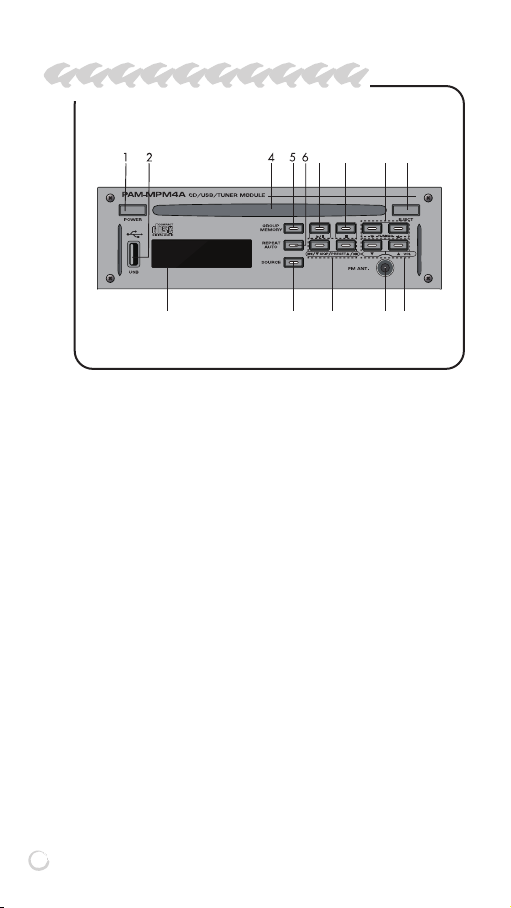
1. POWER BUTTON
This is a button to turn ON/OFF your device. Press more than
3 seconds to switch power ON/OFF your device.
2. USB TERMINAL
This is a terminal to mount USB memory, which can play audio
file from USB.
3. OLED DISPLAY
This is a window to display system operation information.
4. CD SLOT
This is a slot for CD. If inserting CD in the slot, it is automatically
inserted.
※ Caution
1. Insert the CD with the label side facing up.
2. Never insert a 8cm CD into the slot.
5. GROUP/MEMORY BUTTON
1) Use this button to move between folders when files exist
under various folders for MP3/WMA/WAV from CD/USB
operation.
PAM-MPM4A (CD/USB/Tuner Module)
10
Page 11

2) This button is used to memorize broadcasting frequency
from TUNER operation.
6. REPEAT/AUTO BUTTON
1) This is used when playing in the mode of Repeat (REPEAT
ONE/REPEAT FLD/REPEAT ALL) from CD/USB operation.
2) This is a button to select Manual or Automatic frequency
Select mode when moving frequency from TUNER operation.
7. SOURCE SELECT BUTTON
This is a button to select input signal and is changed in order
of CD > USB > TUNER.
8. PLAY/PAUSE BUTTON
This is a button used for play and pause of audio files and the
player temporarily stops if pressing this button during play.
9. STOP BUTTON
This button is function to stop during play of CD/USB.
10. SKIP/PRESET BUTTON
1) This button is function to move the previous or next music
of the music currently played from CD/USB operation. Press
and hold to fast forward or rewind.
2) This function is used to move the next channel of the mem-
orized channel at TUNER.
11. FM ANTENNA TERMINAL
This is a terminal to connect with FM antenna.
12. VOLUME BUTTON
This button is function to tune volume.
13. TUNING BUTTON
This function is used to decrease channel frequency from
TUNER.
14. EJECT BUTTON
This button is used when taking out a CD.
PAM-MPM4A (CD/USB/Tuner Module)
11
Page 12

Method to Use CD/USB
1. Play/Pause
1) Method to use CD
(1) Lightly push a CD until it is automatically inserted into the
CD slot.
(2) Select CD by pressing SOURCE select button in the front
panel.
(3) Reading music information of CD is displayed on the OLED
Display.
- For the CD DA 00 (track numbers) 00:00:00 (total play time
indication)
- For the CD-MP3 00 (folder numbers) 000 (total file numbers)
- “NO DISC” is displayed on the OLED Display if there is no
CD.
(4) Use the SKIP button to select the music to play.
- CD-DA: Use the SKIP button to select the track to play.
- CD-MP3: Press the GROUP button to display the GROUP
in OLED DISPLAY. At this time, press the SKIP button to
select a folder. However, you can select a folder only if it
is divided into folders. Press the SKIP button to select your
desired track or folder.
(5) Press the PLAY button to play the selected music.
(6) Press the SKIP button during playback to advance to the
previous or next music. Press and hold the SKIP button to
fast forward or rewind.
(7) Press the PLAY button again to pause. Press the STOP
button to stop playing.
※ Caution
1. If the CD is poorly formatted or cannot be played, the CD
will be in the stopped state.
2. When you insert a CD of a different format, NO FILES appears in the OLED DISPLAY.
3. When the CD is inserted upside down, CD READ ERR is
displayed on the OLED DISPLAY.
2) Method to use USB
(1) Insert USB memory.
PAM-MPM4A (CD/USB/Tuner Module)13PAM-MPM4A (CD/USB/Tuner Module)
12
Page 13

(2) Select USB by pressing SOURCE select button in the front
panel.
(3) Reading music information of USB is displayed on the
OLED Display.
- 00 (folder numbers) 000 (total file numbers)
- If USB memory is not inserted, USB UNMOUNT is displayed in OLED DISPLAY.
- If there is no playable sound source FILE, NO FILES is displayed on the OLED DISPLAY.
(4) Use the SKIP button to select the music to play.
- Press the GROUP button to display the GROUP in OLED
DISPLAY. At this time, press the SKIP button to select a
folder. However, you can select a folder only if it is divided
into folders. Press the SKIP button to select your desired
track or folder.
(5) Press the PLAY button to play the selected music.
(6) Press the SKIP button during playback to advance to the
previous or next music. Press and hold the SKIP button to
fast forward or rewind.
(7) Press the PLAY button again to pause. Press the STOP
button to stop playing.
※ If there is a problem with the USB sound source file, USB
READ ERR will be displayed on the OLED DISPLAY and the
next sound source file will be played.
2. REPEAT Mode
1) REPEAT ONE: Music currently played is continuingly and
repetitively played.
2) REPEAT FLD: Repeat the song in the currently playing group
(CD / USB).
3) REPEAT ALL: Repetitively play the whole sector of CD/USB.
3. EJECT
1) This function is used to take out CD.
2) CD comes out if pressing this button irrespective of operation
status of operation.
Page 14

4. Note
1) In this unit, up to 99 songs are played on CD-DA, and up to 499
songs are played on CD-MP3.
2) The USB plays back up to 499 songs.
3) In case of CD-MP3, it may not be able to display all the files
depending on the status of CD.
4) When CD contents are combined with CD-DA and MP3 file,
both CD-DA track and MP3 file are played.
5) MP3 file can be played with 16 bit and 64kbps bit rate at sampling frequency 44.1kHz. WMA file can be played with 16bit ps
~ 320kbps bit rate at sampling frequency of 44.1kHz or 16bit
64kbps ~ 192kbps bit rate at sampling frequency of 48kHz.
WAV file can play 16bit, PCM, stereo file at sampling frequency
of 44.1kHz.
5. Cautions
1) Never insert an 8cm CD into the CD slot.
2) If CD READ ERR or USB ERR is continuously displayed on
the OLED DISPLAY, please contact our A/S center.
3) USB memory is supported up to 32GB.
PAM-MPM4A (CD/USB/Tuner Module)
14
Page 15

MethodtoUseFM/Tuner
1. Auto and Manual selection method of broadcasting frequency
1) Select TUNER by pressing SOURCE select button in the front
panel.
2) Frequency decreases or increases if pressing the TUNING
button. You can select desired broadcasting frequency.
(1) Auto Music Select: Auto Broadcasting Station Select mode
is selected if “AUTO” is displayed by pressing the REPEAT/AUTO button. Operation of the Auto Broadcasting
Station Select starts if pressing the TUNING button (▲/▼)
and automatically stops at the position of broadcasting frequency receivable. “TUNED” is displayed on the OLED Display and broadcasting is output.
(2) Manual Select: Frequency can be increases or decreases
in unit of 50kHz (North America : 100kHz) for adjustment
by pressing the TUNING button (▲/▼) shortly once.
Frequency moves until unhand if holding to press it for a
long time. If broadcasting frequency receivable is selected,
“TUNED” is displayed on the OLED Display and broadcasting is output.
2. Memory method of frequency and recall of memorized
broadcasting channel
1) Select desired frequency with the TUNING button.
2) Press the MEMORY button and the address to be stored in
the OLED DISPLAY will blink.
3) Selected broadcasting frequency is saved at the relevant address if pressing the MEMORY button by selecting the address
to memorize with the PRESET button. In this case, saving is
done the given address even though current frequency is
saved at other address.
4) No. 1 through No. 40 frequencies can be saved.
5) Memorized broadcasting frequency can select the desired
broadcasting frequency using the PRESET button.
PAM-MPM4A (CD/USB/Tuner Module)
15
Page 16
!"#
$%&'()"$*+
,*-+.,/#
"%0(1%&
!"#,2!3/45$,
678#/!9:/9;6
<9=#
"65>26
,5!;,
"!?"!
)@A>
)B>
)C>
)-D->
)AE>"
)AE>/
;=2"
F2G
22*6;,
:$<
=5,598#;*24+!=;$2
>;=:,2#
!;496;=
H#
$;:6!2#
$2=2!9;6
22*6;,$6/,
7,#
9:426
*.,
/:"5;#;:9
!"+:$<#=6#?!3
7,#=6?!3
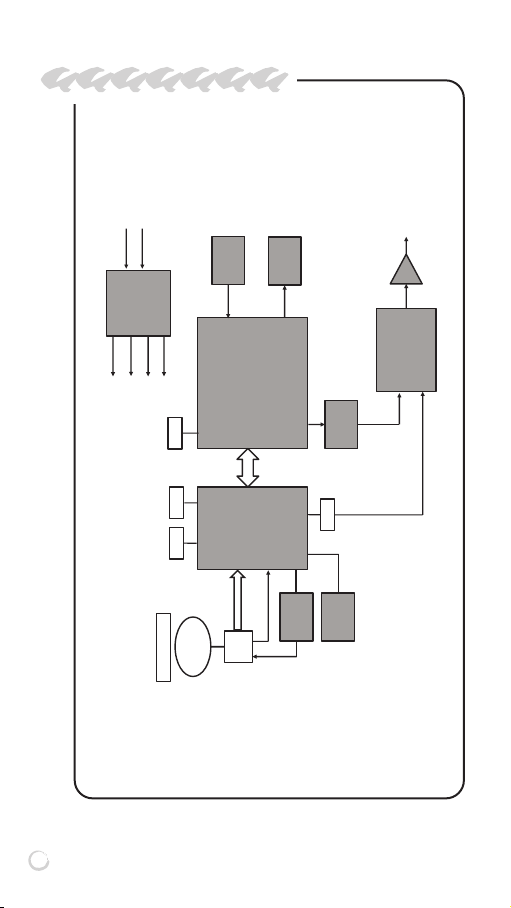
BlockDiagram
PAM-MPM4A (CD/USB/Tuner Module)
16
Page 17
Specification
PAM-MPM4A
CD/USB
Frequency Response 20Hz~20KHz
THD + N (20KHz LPF) Less than 0.3%
S/N Ratio More than 80dB
Output Signal Level 0dBV ±3dBV
TUNER
Range of receipt frequency FM : 87.5-108.0MHz
Antenna input 75Ω Unbal
Sensitivity for practical use 2μV
Operating temperature -10˚C ~ +40˚C
Power Source DC 24V
Weight(Set) 0.88kg/1.94lb
Dimensions(Set)
* Design and specification are subject to be changed for the improvement
of product quality without pre notice.
184(W) x 55(H) x 182(D)mm/
7.24(W) x 2.16(H) x 7.16(D)in
PAM-MPM4A (CD/USB/Tuner Module)
17
Page 18

Service
Procedures
Ensure the problem is not related to operator error, or external system devices, Once it is certain that the problem
is related to the product contact your warranty provider as
described in the warranty section of this manual.
Schematic
A Schematic is available by contacting your warranty
provider.
Parts List
A Parts List is available by contacting your warranty
provider.
Warranty
Warranty terms and conditions vary by country and may not
be the same for all products. Terms and conditions of warranty for a given product may be determined first by locating
the appropriate country which the product was purchased
in, then by locating the product type.
To obtain specific warranty information and available service locations contact Inter-M directly or the authorized InterM Distributor for your specific country or region.
PAM-MPM4A (CD/USB/Tuner Module)
18
Page 19

NOTE
Page 20

NOTE
Page 21

NOTE
Page 22

Inter-M, Ltd. (Korea) began operations in 1983.
Since then, Inter-M has grown to become one of the largest manufacturers
of professional audio and commercial sound electronics equipment in the world.
Inter-M has gained worldwide recognition for its own branded products,
as well as private label manufacturing of electronics sold under other names (OEM).
The company is no longer just a Korean company, but rather a global company
that is truly international in scope, with factories and offices in Korea and China,
and sales and marketing operations located in Japan, Europe, and the U.S.A.
With more than 850 employees around the globe,
Inter-M is well-poised for further growth and expansion.
INTER-M AMERICAS, INC.
13875 ARTESIA BLVD. CERRITOS, CA 90703 USA
TEL : +1-562-921-0313, FAX : +1-562-921-0370
Home Page : http://www.inter-m.net, E-mail : [email protected]
INTER-M Corporation
SEOUL OFFICE : 719, DOBONG-RO, DOBONG-GU, SEOUL, KOREA
TEL : +82-2-2289-8140~8, FAX : +82-2-2289-8149
Home Page : http://www.inter-m.com, E-mail : [email protected]
MADE IN KOREA
March 2019 147780
 Loading...