

Page 1
p2 p1
IFA-2500
IFA-4800
p2 p1
Page 2
01 02
tor.
01 02
Page 3
03 04
03 04
Page 4
05 06
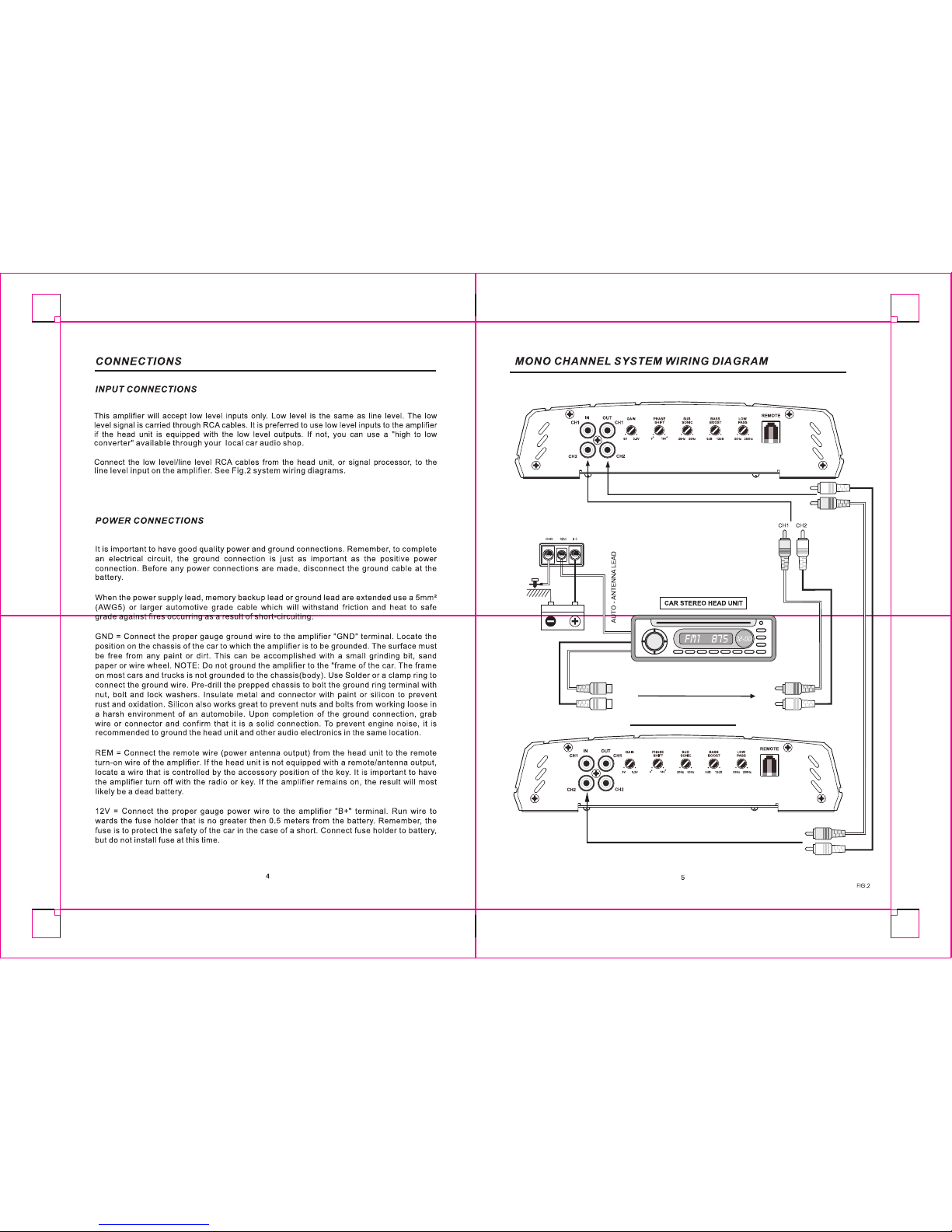
Extend Amplifier
05 06
Page 5
07 08
Extend Amplifier
07 08
Page 6
09 10
09 10
Page 7
11 12
11
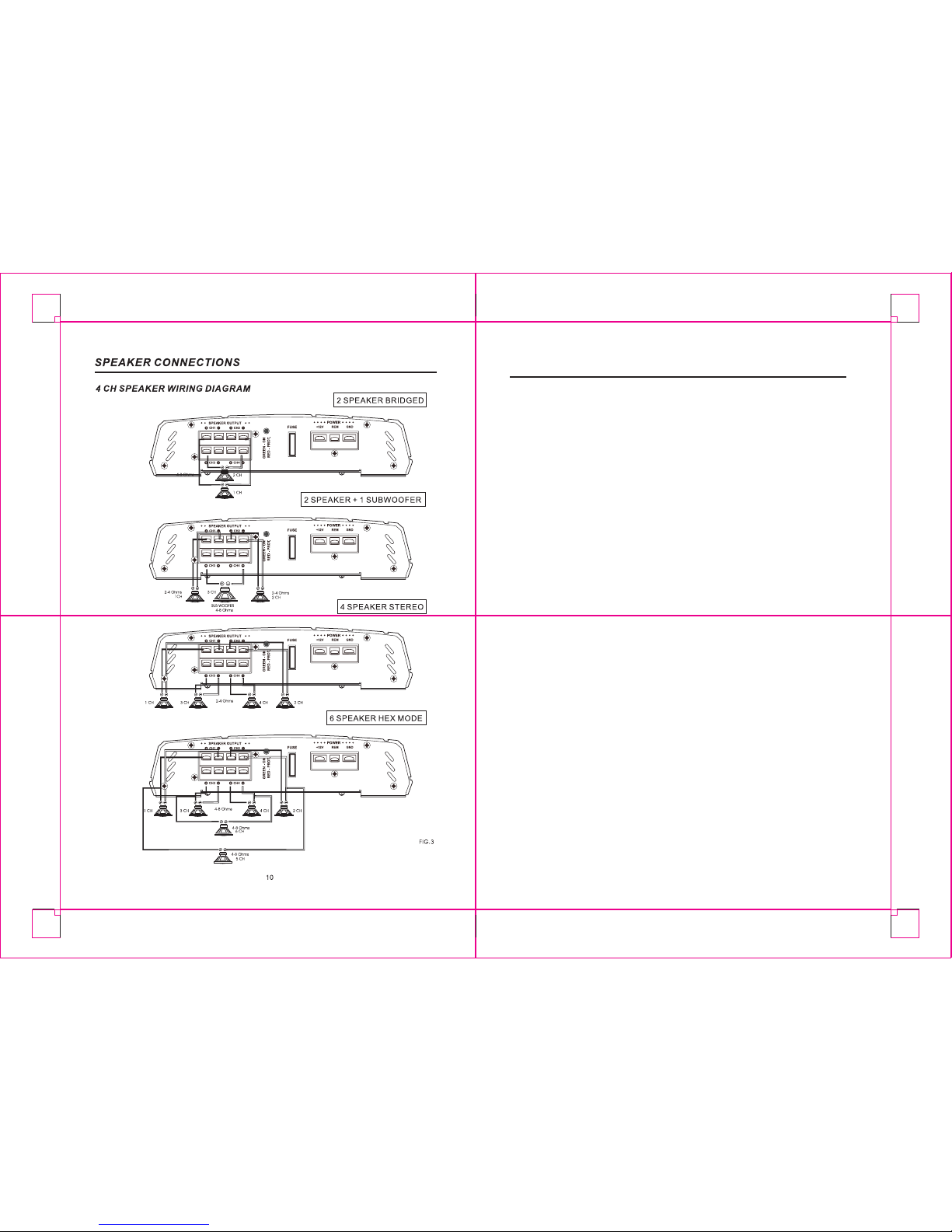
A DJ U ST ME N TS
1.Set to the "H.P.F" pos ition wh en the amplif ier i s use d to drive a tweeter/ midrange system.
The freque ncies bel ow the cross over poin t w ill be attenuat ed at 12dB/octa ve. Permits
adj ustmen t of the c rossov er freq uency ,b y rotating the kn ob to sel ect any fre quency
2.Set to the "L. P.F" po sition wh en the a mplifier i s used to d rive a sub woofer. T he freq uencie s
abov e the crosso ver p oint will be at tenuat ed at 12d B /oct ave. P ermits adjustme nt of the
cros
sover frequenc y, by r otatin g the knob t o sele ct any frequency between 50Hz to 2 50Hz
3.Set to the "O FF" position when the a mplifier will be us ed for drivin g full -range speak ers.
The f ull fr equency band wid th (20Hz - 20kHz ) wil l be output t o the s peaker s wit hout high
4.Lev el a djustm ent-The sensi tivity adj ustmen t is t o al low the amplif ier to work with many
d ifferen t br ands of head units. It allows input sign al t o vary between 350 milliv olts to 5
volt fr om the hea d un
it or other sign al proces sor. Sta rt by s etting the sensi tivity adjustmen t
to the " MIN" (3 volts).U sing a cassette or com pact dis c that you are familia r with ,turn on
head unit to the 3/4 v olume setting. Slow ly tu rn up s ensiti vity adjust ment toward s the
" MAX" (2 00 millivo lts) using a flat hea d screw driver. Sto p turni ng on th e onset of distor tion
and turn back ju st a slight . The 3/4 v olume s etting is n ow th e "maxi mum" vo lume for the
head unit. T he go al is t o kee
p th e level control to the lowest setting yet sti ll ha ve en ough
signal to driv e the am plifier. T his is done to prevent over dr iving th e amp lifier and to keep
syste m noise to a m inimum. It is i mportant not ove r drive speakers (at po int of distortio n)
this wi ll cause perm anent damag e to the speake rs. Also, if the am plifier its elf is over dri ven,
5.The "BAS S" func tion can b e selec ted to inc rease l ow frequen cy respon se outp ut, or
decr ease frequen cy respon se output . Th e " BASS" functi on
will be workin g a t o nly "OFF"
betw een 80Hz t o 1.2kHz & 50H z to 500Hz a s the crosso ver poin t.
& 50HZ t o 500Hz as t he crossov er point .
or low f requen cy attenua tion.
it cou ld be dama ged.
or "L. P.F" pos ition.
6. The BASS is adjustable from 0 ~ 12dB boost at 50Hz.
11 12
Page 8
13 14
13 14
Page 9
15 16
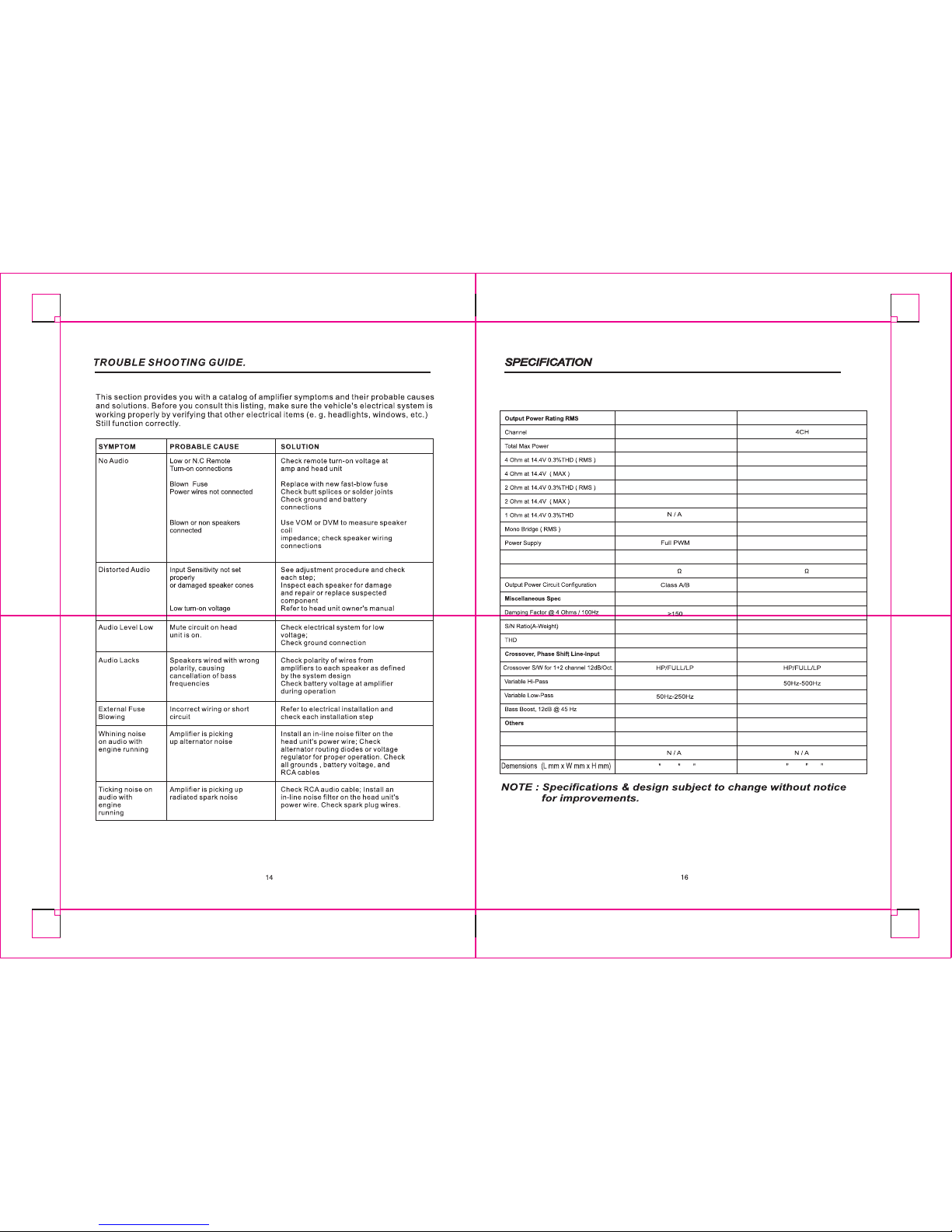
Fuse Rating
Remote Controller
(12dB)
(12dB)
Variable Input Gain Control
Input Impedance
20A
8 x9 1/4 x2 ½
2CH
IFA-2500
500 Watts
60 W x 2
110 W x 2
80 W x 2
150 W x 2
150 W x 1
80Hz ~ 1.2kHz
0 ~ 12dB
0.2V ~ 6.0V
20k
>95dB
0.05%
50Hz-500Hz
>150
N / A
Full PWM
Class A/B
40A
11 x9 1/4 x2 ½
IFA-4800
800 Watts
60 W x 4
110 W x 4
80 W x 4
150 W x 4
150 W x2
0 ~ 12dB
0.2V ~ 6.0V
20k
>95dB
0.05%
15 16
Page 10
17 18
17
17 18
 Loading...