

Page 1
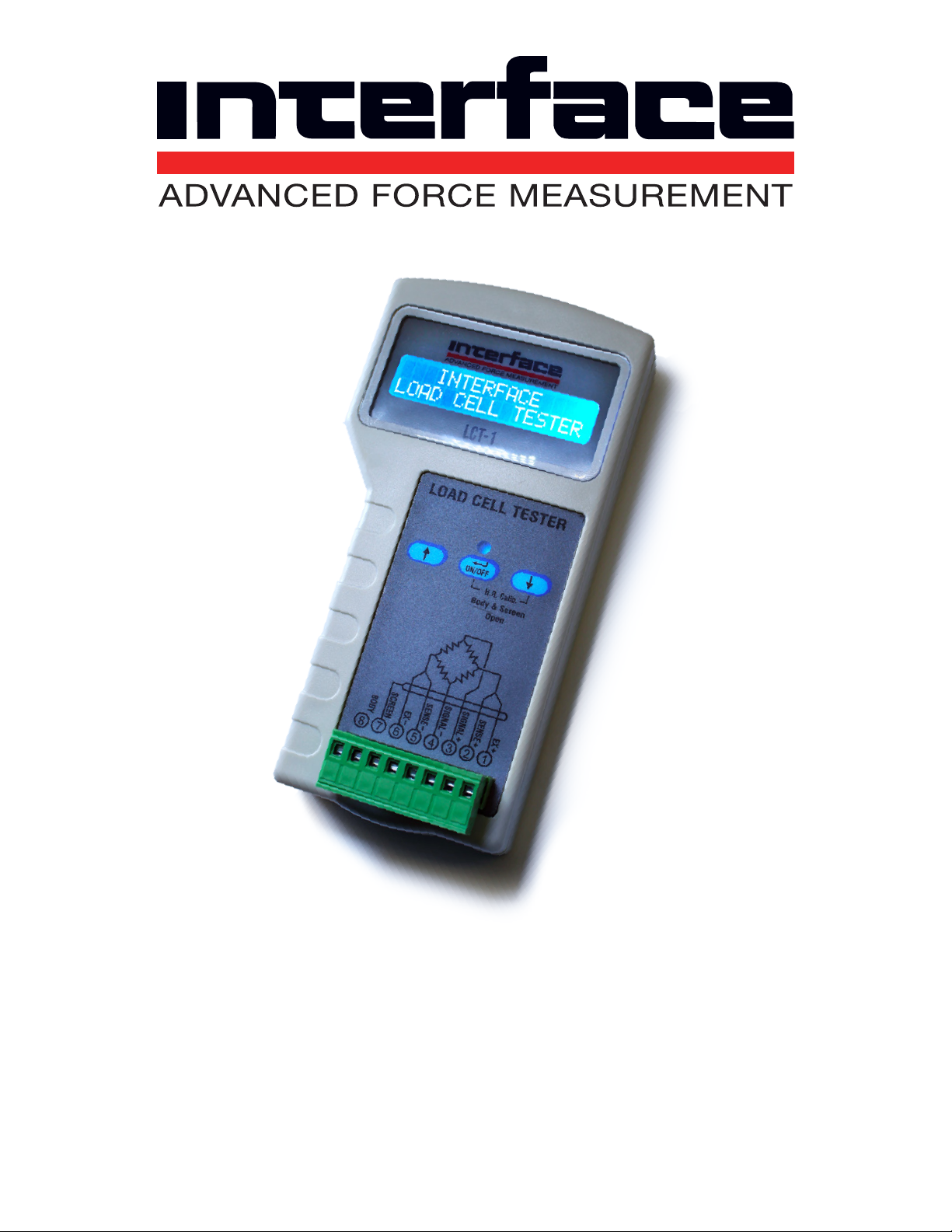
LCT-1 Ultimate
Load Cell Tester
Issue: 15-256 Revision A
User’s Guide
www.interfaceforce.com
Page 2

LCT-1 Ultimate
Specifications
• Insulation resistance { 5 GΩ at 10% accuracy (Min. >10 MΩ)}
• Input and output resistance: { 5 kΩ at 0.5 Ω resolution & ± 0.5 Ω accuracy}
• Sense resistance (for 6 wire L/C): up to 500 Ω at 0.1 Ω resolution
• Load cell output in percentage of full scale (input resistance > 175 Ω): ± 250%
at 0.01% resolution and 0.1 % accuracy
• Gain adjustment: {0.1 to 5 mv/V in steps of 0.01} of accuracy
• High resistance test: 10Vdc
• 16 bit A/D conversion
• Bridge test: 1.25Vdc
How Do You Use It?
See how simple it is...
Main Features
• Industrial 8-pin screw connector
• Bridge resistance and integrity
• Very user freindly, full test within seconds
• Size: 150mm x 80mm x 28mm; Weight: 250g
• Check 4 or 6-wire Load Cell connecting at all rated gain output
• Rugged ABS enclosure with rubberized over case for drop protection
• Continuous signal reading for checking linearity and repeatability
• Insulation resistance (points to moisture or chemical ingress)
• Physical distortion (zero balance)
• Alphanumeric display: 16 x 2 lines
Interface Inc. • 7401 East Butherus Drive, Scottsdale, Arizona 8 5260 USA • Phone 480.948.5555 • Fax 480.948.1924
www.interfaceforce.com • Email: [email protected] • ORDER TOLL-FREE 800.947.5598
2
Page 3
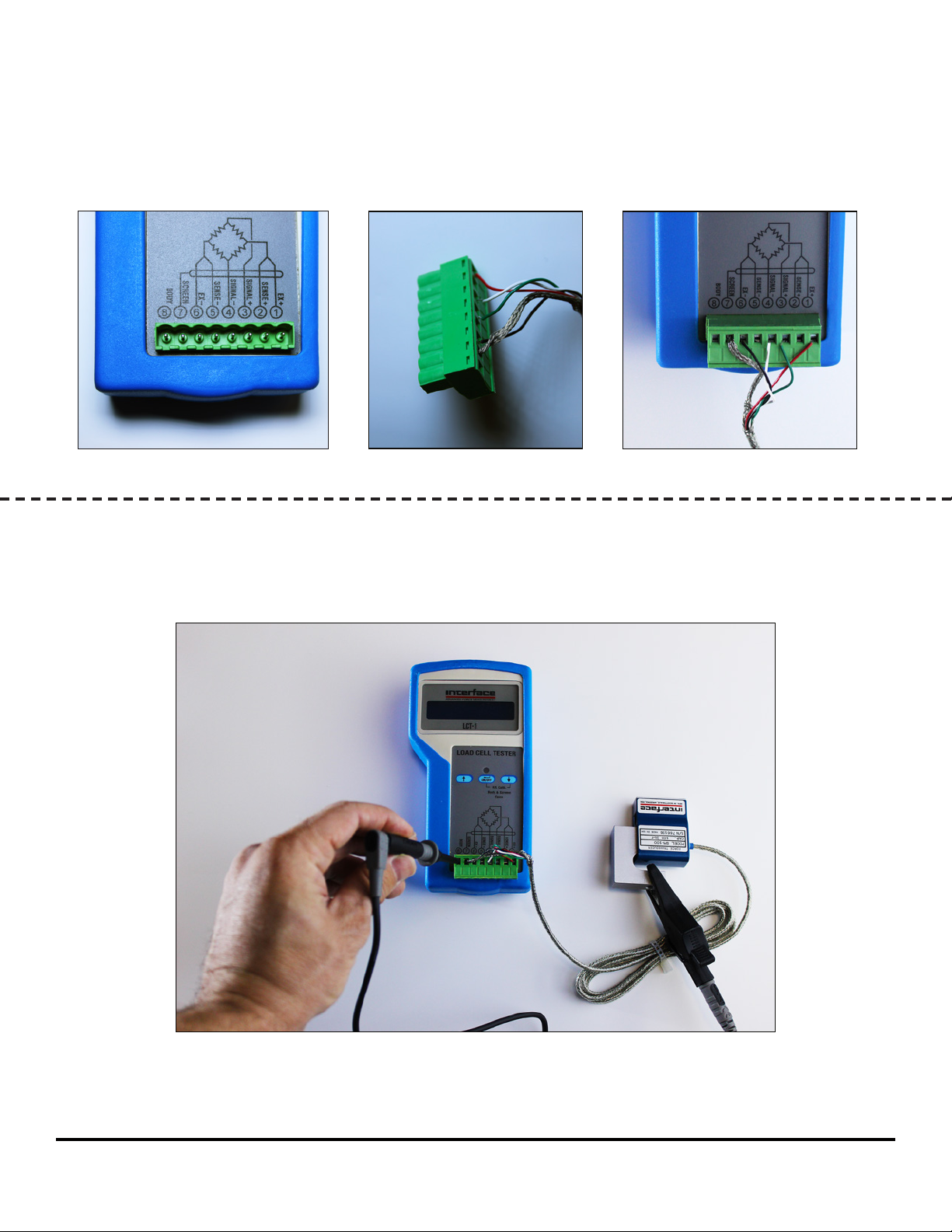
Follow the pin assignment and connect the Load Cell
Cable to the connector:
+ =
In case you wish to check the isolation between
the L/C body and the bridge, connect the body to pin 8.
Important: Make sure NOT to connect the SCREEN (shield) and
BODY (PINs 7 & 8) at this stage!!
Interface Inc. • 7401 East Butherus Drive, Scottsdale, Arizona 8 5260 USA • Phone 480.948.5555 • Fax 480.948.1924
www.interfaceforce.com • Email: [email protected] • ORDER TOLL-FREE 800.947.5598
3
Page 4
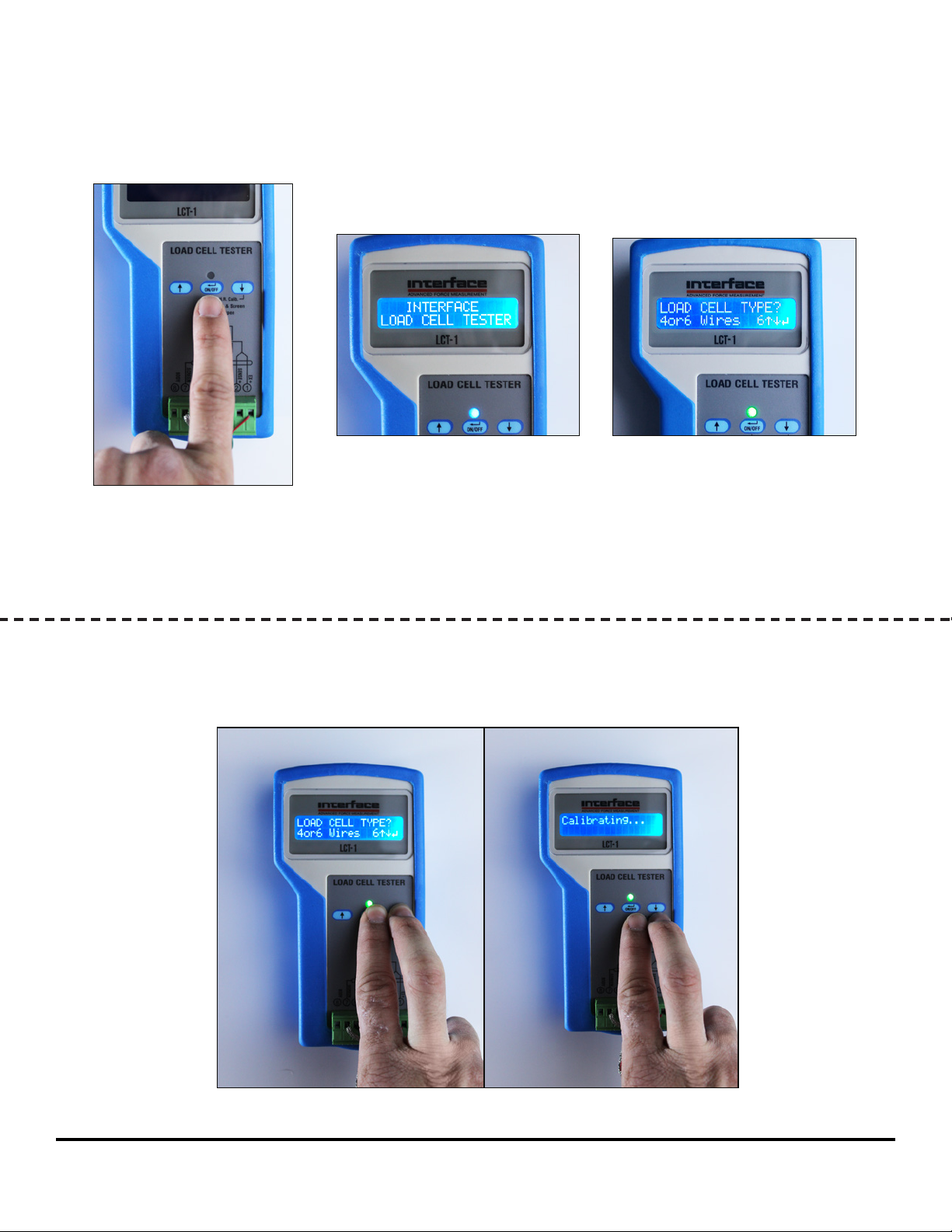
Now turn on the LCT by pressing and holding the
ON/OFF key ( ) for two seconds (a). You will see the title
screen (b). After about six seconds, the following screen appears (c).
b
c
a
In order to save battery, the backlit LCD display turns off if nothing is done for 15 seconds. To turn the dis-
play on, just push any arrow key that won't affect your settings or your current menu. To shut off the unit,
press the Enter key ( ) for a few seconds, or leave it on. It will turn off automatically after a few minutes.
For inital calibration, press simultaneously the two right keys for just a second (a)
until you see the "Calibrating..." screen - which will display for three seconds (b).
a b
Interface Inc. • 7401 East Butherus Drive, Scottsdale, Arizona 8 5260 USA • Phone 480.948.5555 • Fax 480.948.1924
www.interfaceforce.com • Email: [email protected] • ORDER TOLL-FREE 800.947.5598
4
Page 5
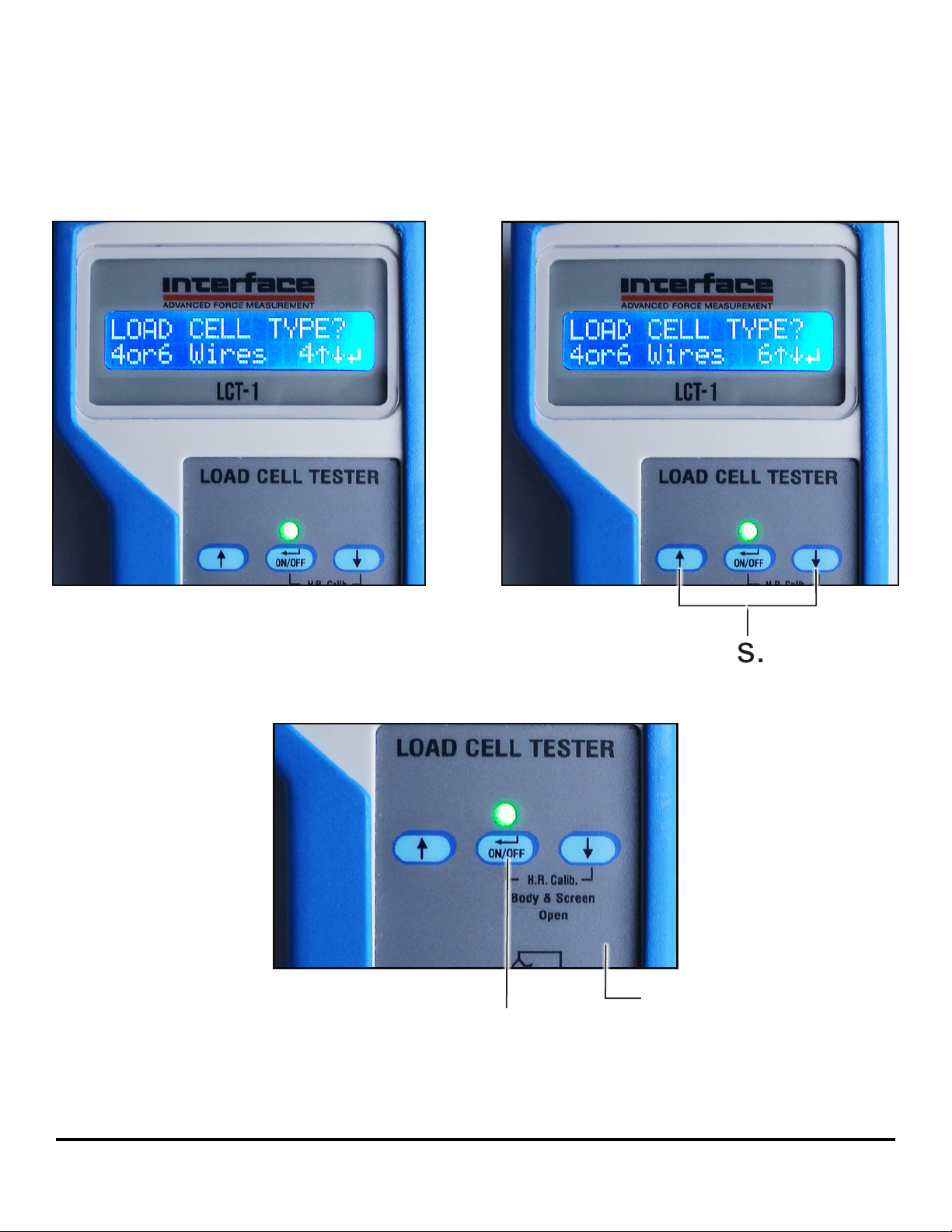
Choose type of Load Cell
4 wires
6 wires
or
by pressing the up or down arrows.
Next, press the Enter key ( )
Now you may connect the SCREEN and BODY (pins 7 & 8)
Interface Inc. • 7401 East Butherus Drive, Scottsdale, Arizona 8 5260 USA • Phone 480.948.5555 • Fax 480.948.1924
www.interfaceforce.com • Email: [email protected] • ORDER TOLL-FREE 800.947.5598
5
Page 6
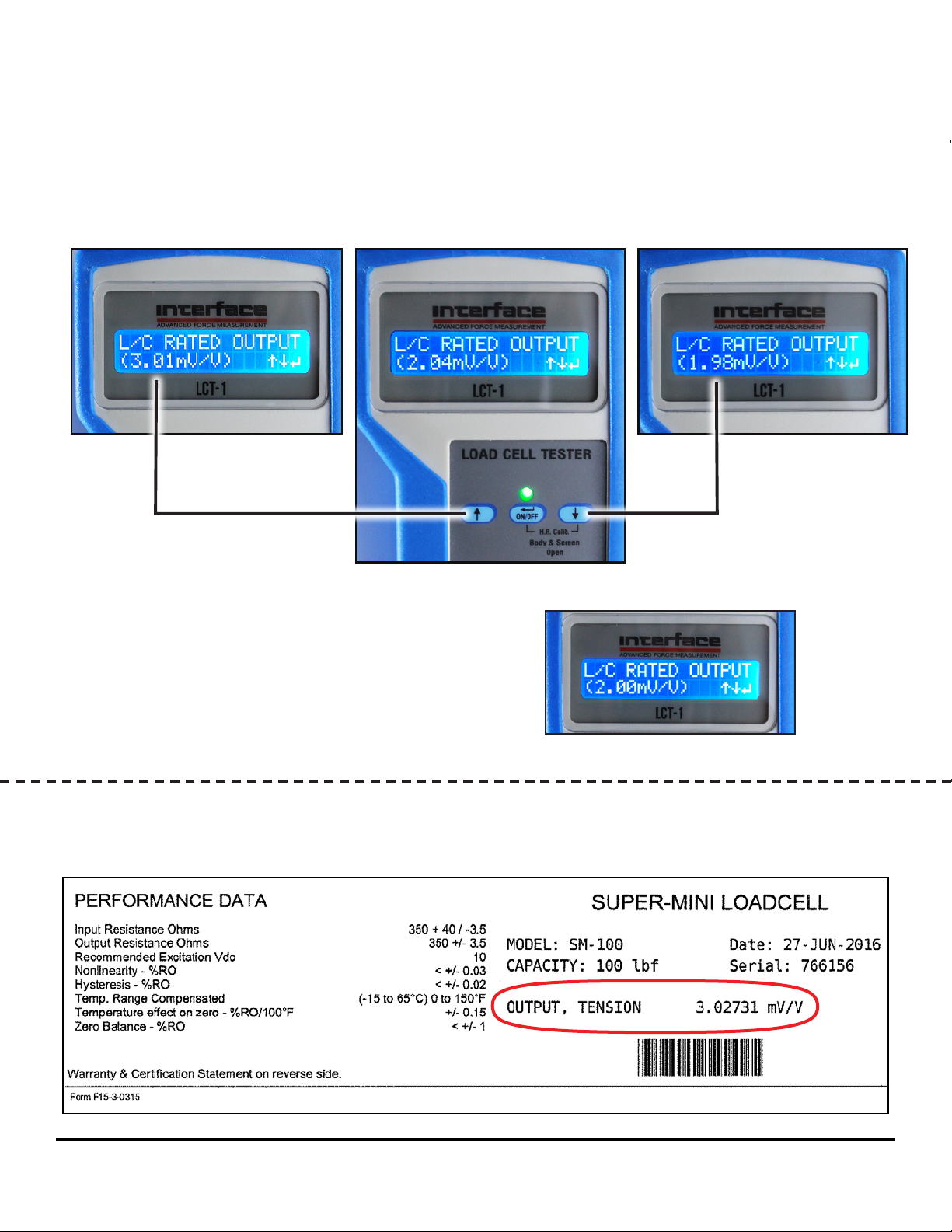
Choose L/C gain by pressing the up or down arrows, changing
the number by increments of hundreths (or by speeding
through tenths if you hold the button down).
In case of the absence of such a certificate,
you may stay with the default gain of 2mv/v.
Note: L/C details can be found on the Calibration Certificate that came with the load cell.
Interface Inc. • 7401 East Butherus Drive, Scottsdale, Arizona 8 5260 USA • Phone 480.948.5555 • Fax 480.948.1924
www.interfaceforce.com • Email: [email protected] • ORDER TOLL-FREE 800.947.5598
6
Page 7
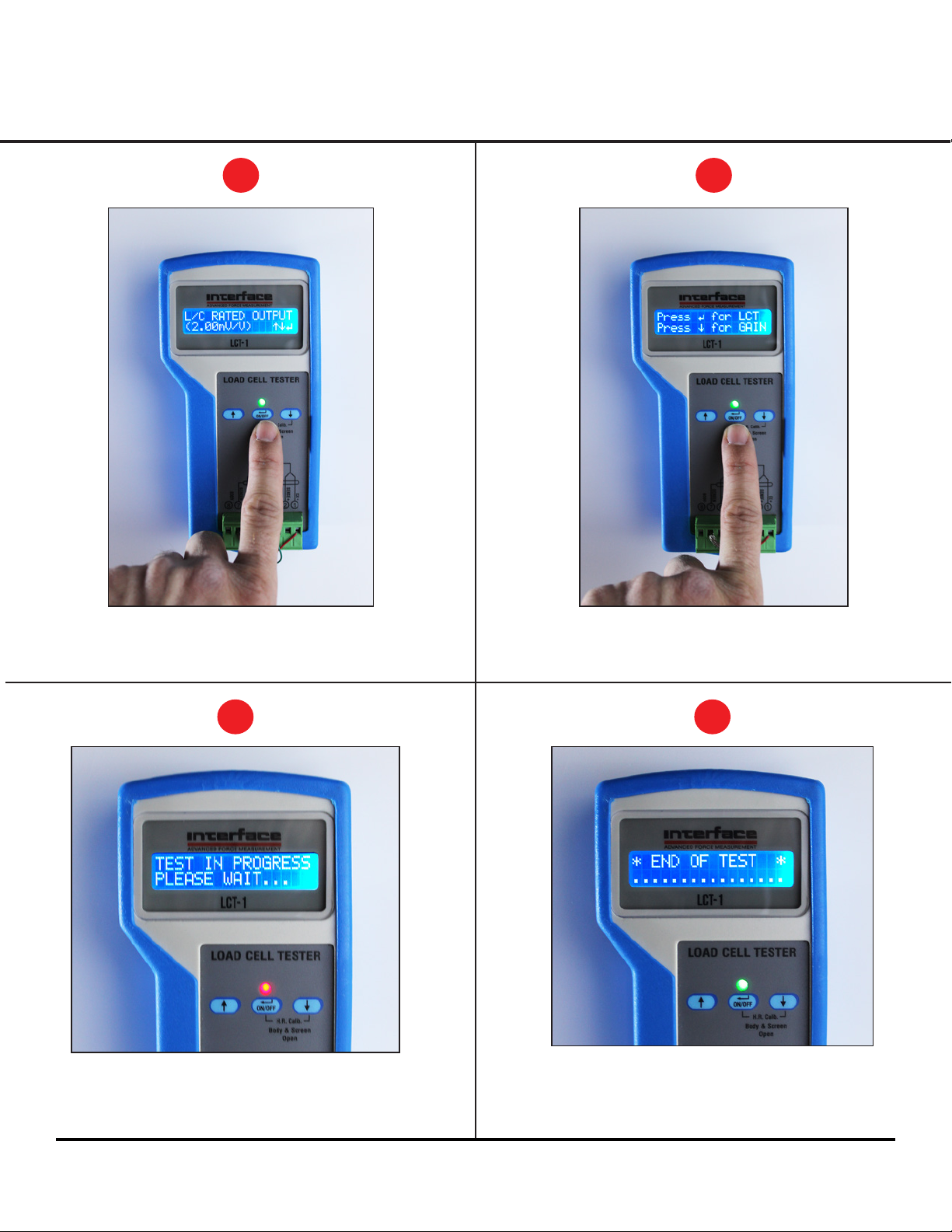
Initiating the LCT test
i
Press the Enter key ( )
ii
Press the Enter key ( ) again
for LCT...
iii
Test in progress...
LED is blinking...
Interface Inc. • 7401 East Butherus Drive, Scottsdale, Arizona 8 5260 USA • Phone 480.948.5555 • Fax 480.948.1924
www.interfaceforce.com • Email: [email protected] • ORDER TOLL-FREE 800.947.5598
"END OF TEST" when complete
The unit will display
iv
7
Page 8
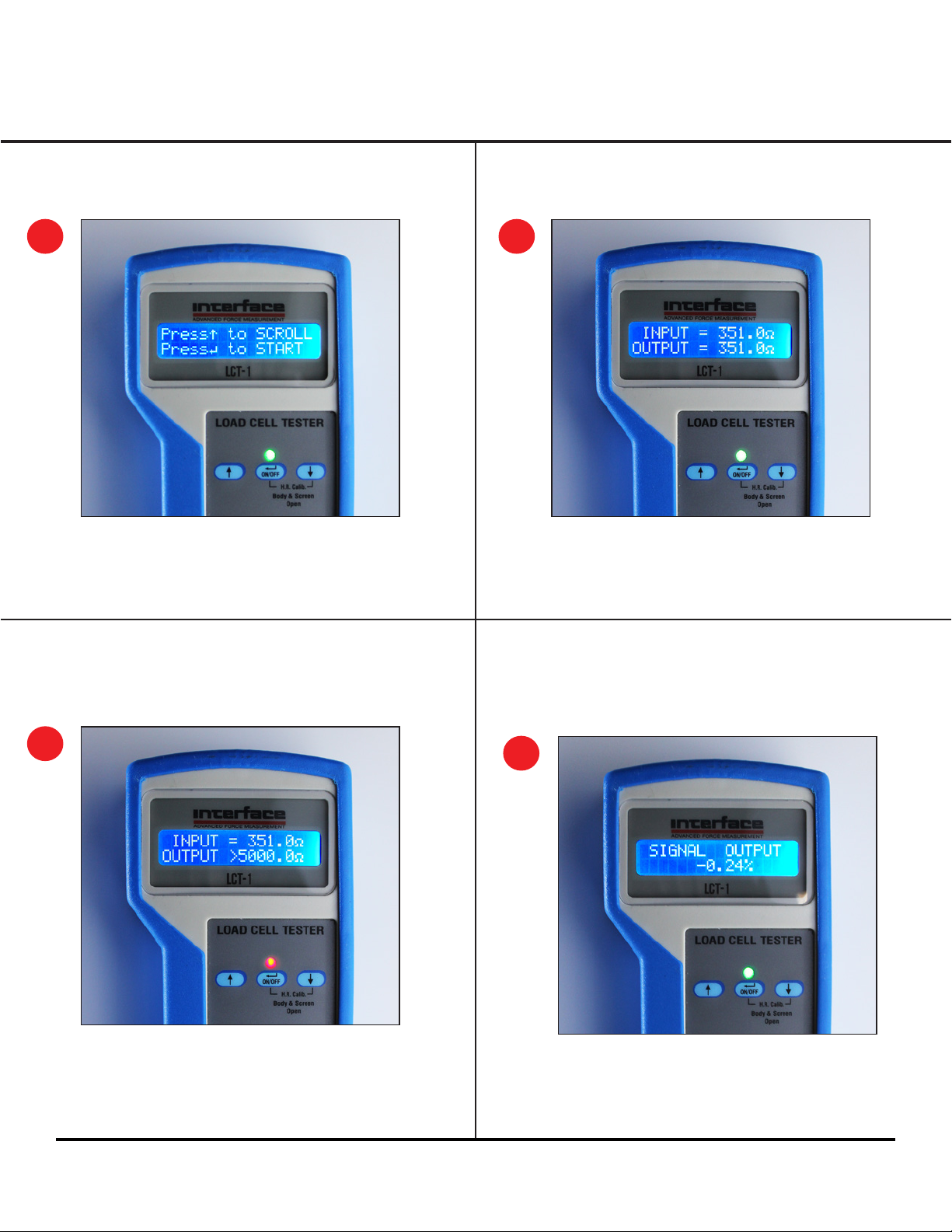
Scrolling through the results
1
Press the up key to scroll results...
As you go through, press the up key
whenever you want in order to scroll to the
next result until you see this screen again.
Bridge Input and Output Resistance Results
2a
2b
In case of a suspicious
reading, the LED turns red.
Signal output of load
cell rated output
(in percentage)
3
Note: When Load Cell is not loaded, the output should
be around 0% (zero balance). Reference the loadcell
specification for acceptable zero balance range.
Interface Inc. • 7401 East Butherus Drive, Scottsdale, Arizona 8 5260 USA • Phone 480.948.5555 • Fax 480.948.1924
www.interfaceforce.com • Email: [email protected] • ORDER TOLL-FREE 800.947.5598
8
Page 9
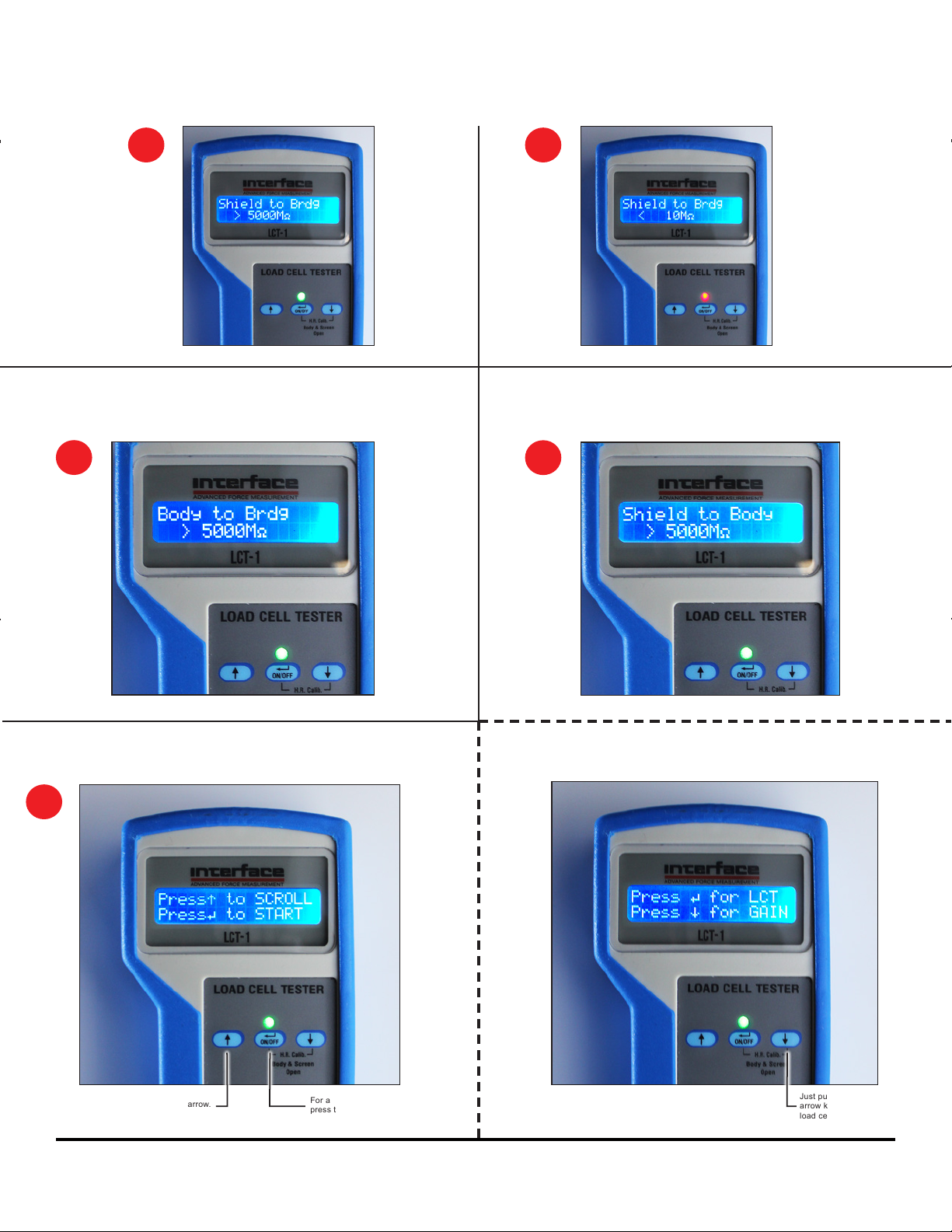
Insulation resistance testing:
Shield to Bridge
4a 4b
Note: LED turns red in
case of low insulation
resistance
7
Insulation resistance testing:
Body to Bridge
5
End of results
Insulation resistance testing:
Shield to Body
6
The LCT-Ultimate can also continuously display the
load cell signal in percentage of L/C full capacity.
To scroll again, press the up arrow.
Interface Inc. • 7401 East Butherus Drive, Scottsdale, Arizona 8 5260 USA • Phone 480.948.5555 • Fax 480.948.1924
www.interfaceforce.com • Email: [email protected] • ORDER TOLL-FREE 800.947.5598
For a new test
press the Enter key ( )
Just push the down
arrow key after entering
load cell parameters.
9
Page 10
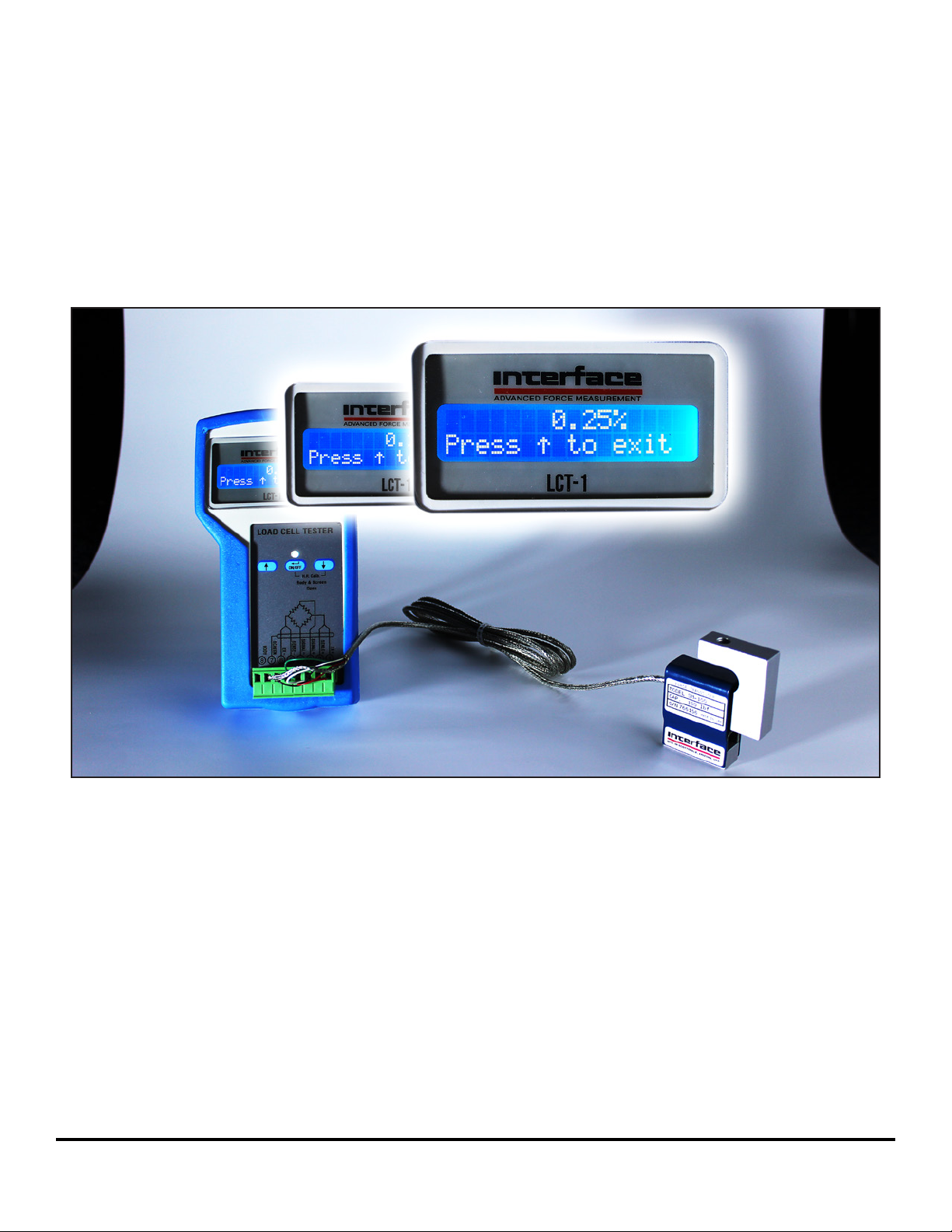
Applying dierent weights
to check the linearity
In this mode, the LED flickers different colors
*Signal output when scale is empty*
Model LCT-1 Ultimate is being calibrated with Model SM-100 (shown above)
and the max weight is set for 100lbf (45,400gf). For Model SM-100, the
maximum zero balance is ±1.0% FS. When Model SM-100 (pictured above)
was measured, the zero balance was actually +0.25%.
Interface Inc. • 7401 East Butherus Drive, Scottsdale, Arizona 8 5260 USA • Phone 480.948.5555 • Fax 480.948.1924
www.interfaceforce.com • Email: [email protected] • ORDER TOLL-FREE 800.947.5598
10
Page 11
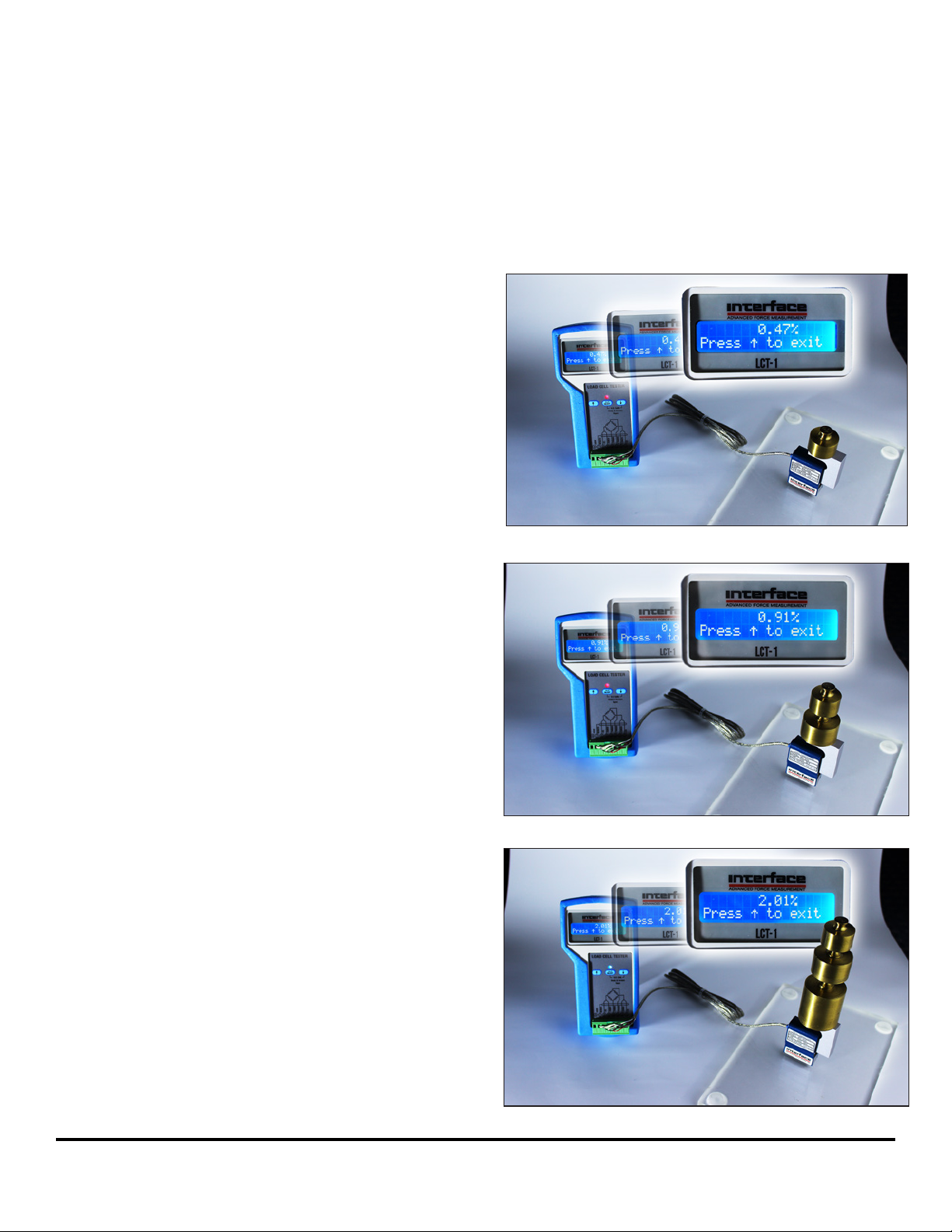
Applying dierent weights
to check the linearity
Apply 100g onto 45.4kg L/C,
calculating the reading to be 0.47%
---------------------------------------------(100g / 45400g) x 100 = 0.22%
♦
0.25% + 0.22% = 0.47%
LED continues t o flicker different colors
Apply 300g onto 45.4kg L/C,
calculating the reading to be 0.91%
---------------------------------------------(300g / 45400g) x 100 = 0.66%
♦
0.25% + 0.66% = 0.91%
Applying 800g calculates the
reading to 2.01%, and so on...
Interface Inc. • 7401 East Butherus Drive, Scottsdale, Arizona 8 5260 USA • Phone 480.948.5555 • Fax 480.948.1924
www.interfaceforce.com • Email: [email protected] • ORDER TOLL-FREE 800.947.5598
11
Page 12

Warranty
The LCT-1 Ultimate is warranted against defective material and workmanship for a period of (1) one year from the date of dispatch.
If the Interface, Inc. product you purchase appears to have a defect in material or workmanship or fails during
normal use within the period, please contact your Distributor, who will assist you in resolving the problem. If it is
necessary to return the product request an RMA # and include a note stating name, company, address, phone
number and a detailed description of the problem. Also, please indicate if it is a warranty repair. The sender is
responsible for shipping charges, freight insurance and proper packaging to prevent breakage in transit.
The warranty does not apply to defects resulting from action of the buyer such as mishandling, improper interfacing, operation outside of design limits, improper repair or unauthorised modification. No other warranties are
expressed or implied. Interface, Inc. specifically disclaims any implied warranties of merchantability or fitness for a
specific purpose. The remedies outlined above are the buyer’s only remedies. Interface, Inc. will not be liable for
direct, indirect, specInterface, Inc. will not be liable for direct, indirect, special, incideacntal or consequential
damages whether based on the contract, tort
or other
legal theory.
In the interests of continued product development, Interface, Inc. reserves the right to alter product specifications
without prior notice.
Doc 15-256 Revision A Issue 1.0 Dated 01/06/17
Interface Inc. • 7401 East Butherus Drive, Scottsdale, Arizona 8 5260 USA • Phone 480.948.5555 • Fax 480.948.1924
www.interfaceforce.com • Email: [email protected] • ORDER TOLL-FREE 800.947.5598
12
 Loading...