

Page 1
User Manual
Page 2

Contacts
USA: 1-877-988-9388 (Toll Free)
E-mail: [email protected]
United Kingdom: 0800-177-7778 (Toll Free)
E-mail: [email protected]
Israel: +972-73-220-7000
E-mail: [email protected]
Other Countries: +1-646-652-5800 (USA)
Manufactured by InterCure Ltd.
www.intercure.com
Copyright © 2002–2009 InterCure, Ltd. All rights reserved. RESPeRATE®,
RESPeRATE UltraTM, and InterCure® are trademarks of InterCure.
Page 3

1
Table of Contents
Introduction .........................................................................................3
Using Your RESPeRATE Device
..................................................... 7
I. RESPeRATE Device and Display .......................................
7
II. Set Up ..........................................................................13
III. Using Your RESPeRATE for the 1st Time ........................15
IV. Using RESPeRATE Daily .................................................19
V. Tips ..............................................................................22
Functions ............................................................................................ 24
I. Melody Selection ..........................................................
24
II. Guiding Arrows ............................................................25
III. Mute ............................................................................26
IV. Default Session Duration ..............................................26
Performance Statistics .................................................................. 27
Page 4

2
Troubleshooting .............................................................................. 36
I. Troubleshooting ............................................................
36
II. Manual Sensor Positioning ............................................39
Additional Product Information ............................................... 40
I. RESPeRATE Limited Warranty ........................................
40
II. Cleaning and Maintenance ...........................................41
III. Technical Information ...................................................42
IV. Country Specific Market Clearance ...............................43
V. Indication for Use .........................................................44
VI. Customer Support ........................................................46
Page 5

3
RESPeRATE To Lower
Blood Pressure
Introduction
Congratulations on the purchase of your
RESPeRATE, the first medical device
clinically proven to lower blood pressure in
an effective and pleasant way.
Please note: RESPeRATE should only be used as part of your
overall health program for achieving goal blood pressure, as
recommended by your doctor. RESPeRATE can be safely used
in conjunction with medication and lifestyle modifications
such as diet and exercise.
Page 6

4
The therapeutic power of breathing
The therapeutic power of breathing has been known for
centuries and is used predominantly in relaxation techniques
such as meditation and yoga. Modern science has, only recently,
confirmed that certain therapeutic breathing exercises, performed
without conscious effort, can significantly lower blood pressure.
The problem is that these exercises can be difficult to perform
effectively on your own without years of training and individualized
coaching. RESPeRATE makes therapeutic breathing easy to do on
your own.
Page 7

5
Breathing with RESPeRATE makes the difference
RESPeRATE’s patented “Device Guided Breathing” technology
ingeniously takes advantage of the body’s natural tendency to
follow musical rhythms.
RESPeRATE automatically analyzes your individual breathing
pattern. It then creates a personalized melody composed of two
distinct tones – a high inhale tone and a low exhale tone. By
prolonging the tones, RESPeRATE guides you into the Therapeutic
Breathing Zone without any conscious effort on your part.
The physiological result? The muscles surrounding
the small blood vessels in your body dilate
and relax. Blood is allowed to flow more
freely, and pressure is significantly
lowered. After each exercise with
RESPeRATE, your breathing
returns to its normal rate and
pattern. Nevertheless, the
beneficial ef fect on blood
pressure will accumulate.
Page 8

6
To Achieve Best Results
J
Create a relaxing environment for your RESPeRATE sessions.
Sit in a comfortable chair in a quiet room with minimal
distractions.
J
Therapeutic breathing occurs when you are breathing slower
than 10 breaths per minute, with prolonged exhalation and
without a conscious effort.
J
Your goal is to log at least 10 minutes of slow therapeutic
breathing per session. Significant reductions and all day
blood pressure lowering can be achieved by accumulating
at least 40 minutes of therapeutic breathing per week.
J
Additional use may provide even better results. RESPeRATE
has a normalizing effect and will not lower your blood
pressure below a healthy level. Daily sessions, if possible, are
recommended.
J
Be patient. As with any physical exercise program, you can
expect to see notable progress within 3-4 weeks.
Page 9
7
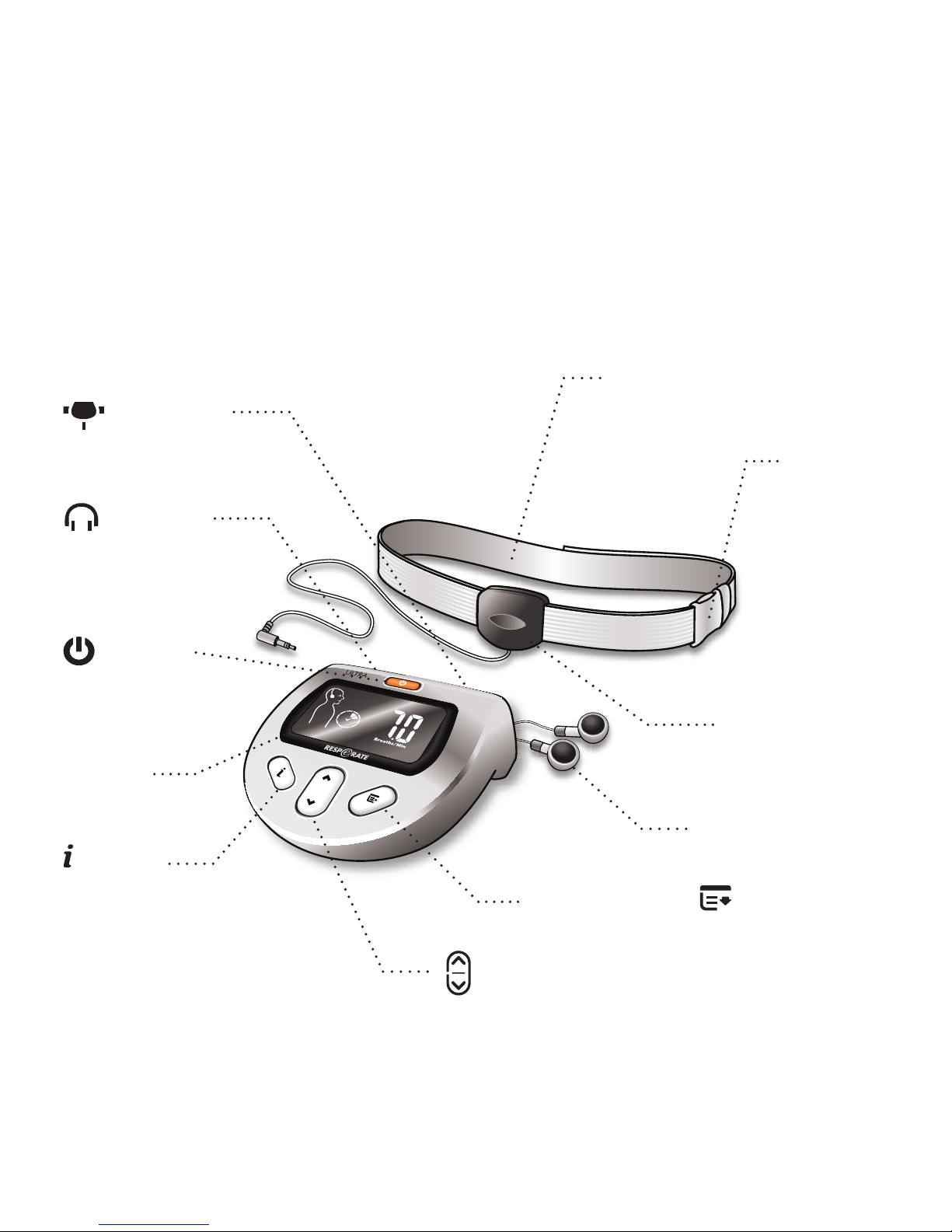
Using Your RESPeRATE Device
I. RESPeRATE Device and Display
Elastic belt
Breathing
sensor socket
Ear buds
socket
ON/OFF
(POWER)
Button
Display
screen
INFO
button
Breathing
sensor
Ear buds
MENU Button
UP/DOWN Button
(volume button)
Buckle
Page 10
8
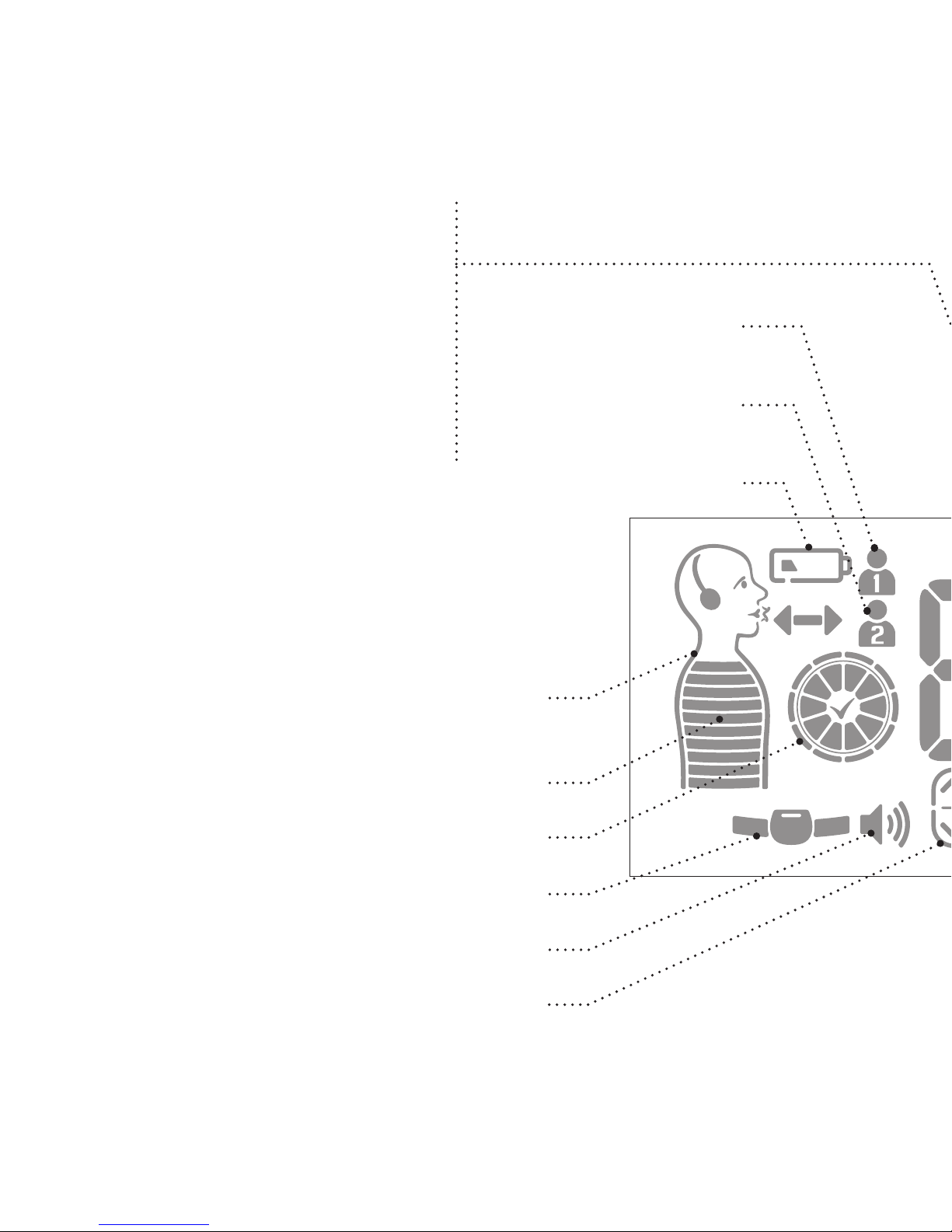
Main Display
The following values appear here:
Breaths per minute
Volume level
Melody selection number
Session duration (minutes)
Therapeutic minutes
Statistics
Therapeutic Minutes Clock
Volume
Scroll Up/Down & Volume
Guiding Figure
(with guiding arrows and notes)
Sensor Belt Errors (tight/loose/improper)
Breathing Gauge
Low Battery
User # 1
(Ultra Duo model)
User # 2
(Ultra Duo model)
Page 11
9
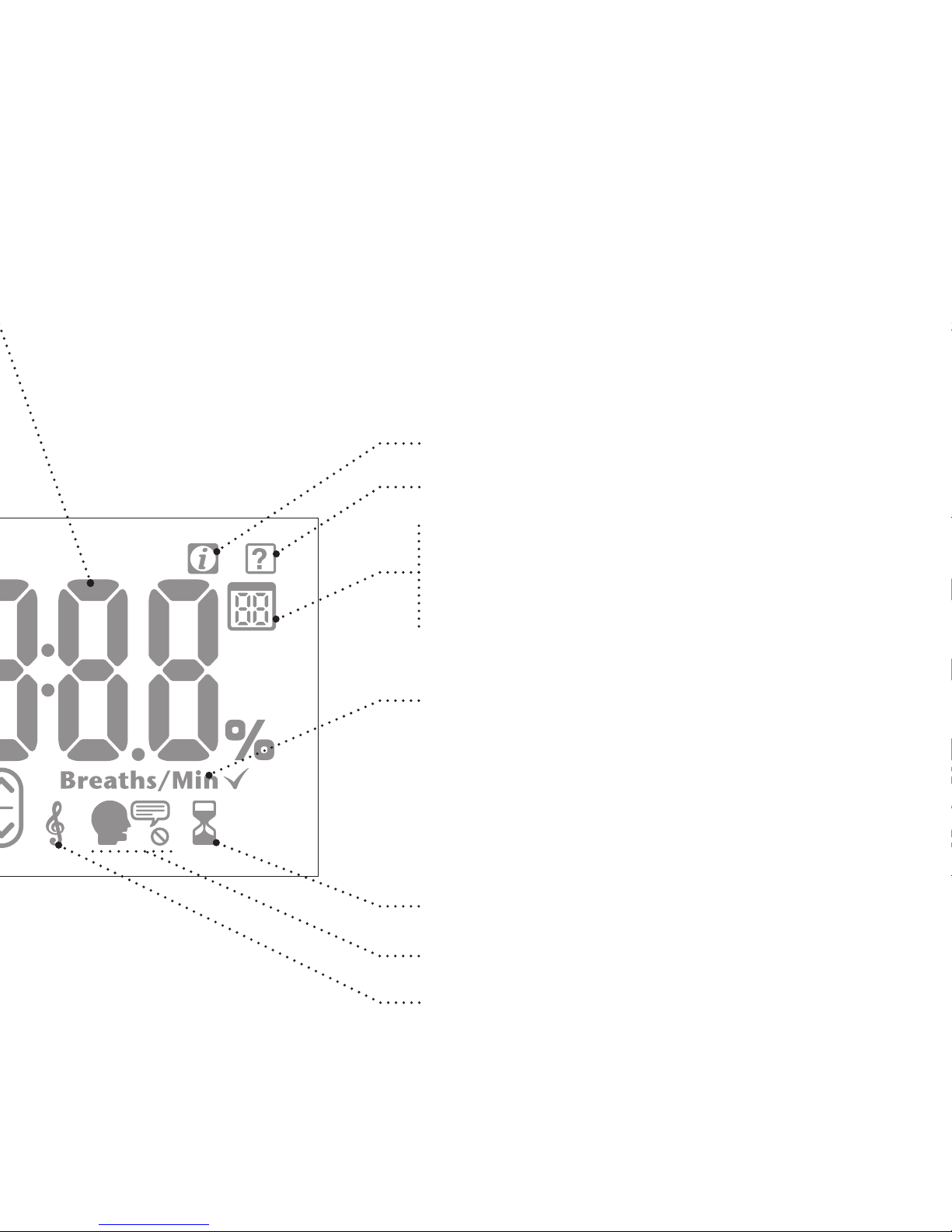
Secondary Display
Session duration (seconds)
Performance report period
Info Function
Tutorial On
Session Duration
Voice Instructions On/Off
Melody Selection
Breaths/Min = breaths per minute
Page 12
10
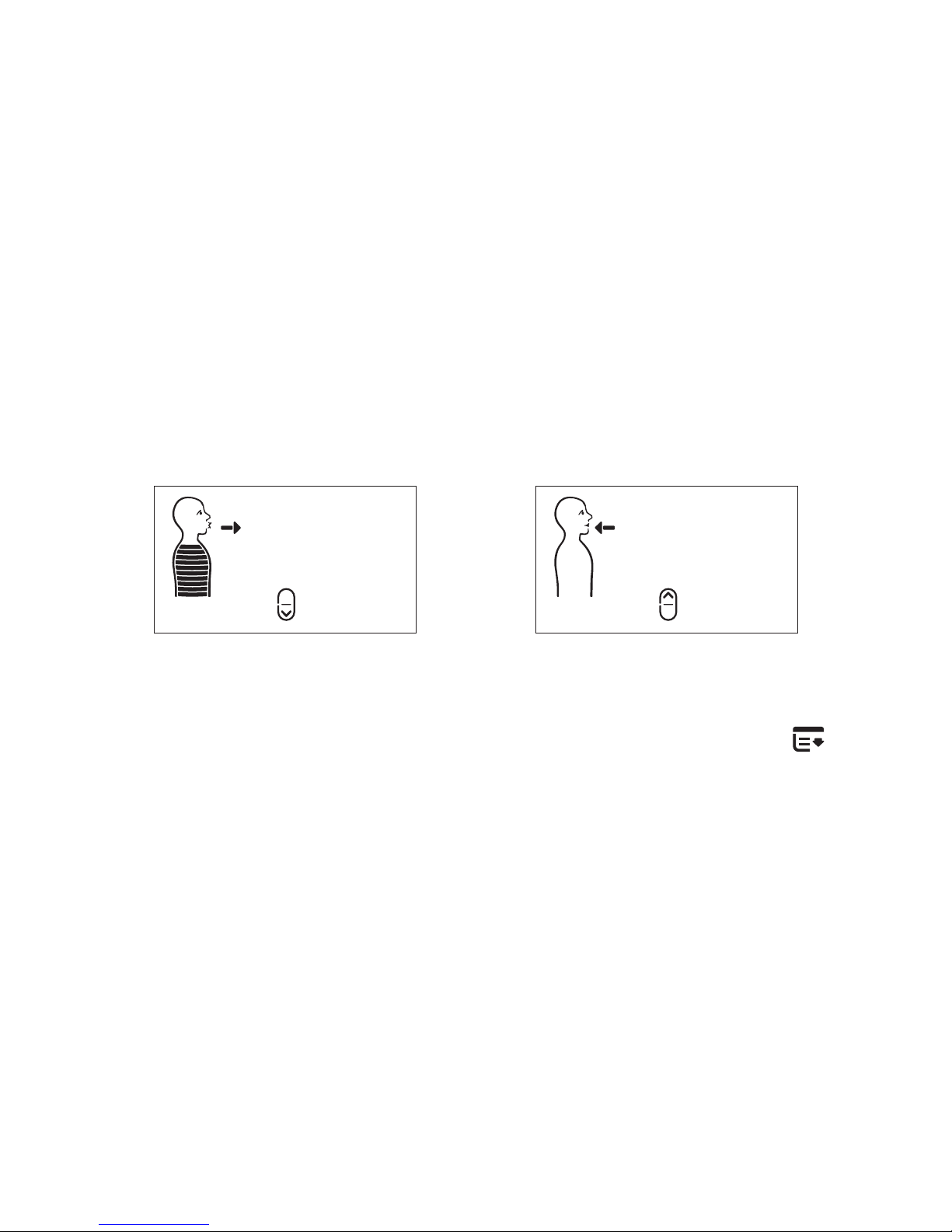
Recognition Phase
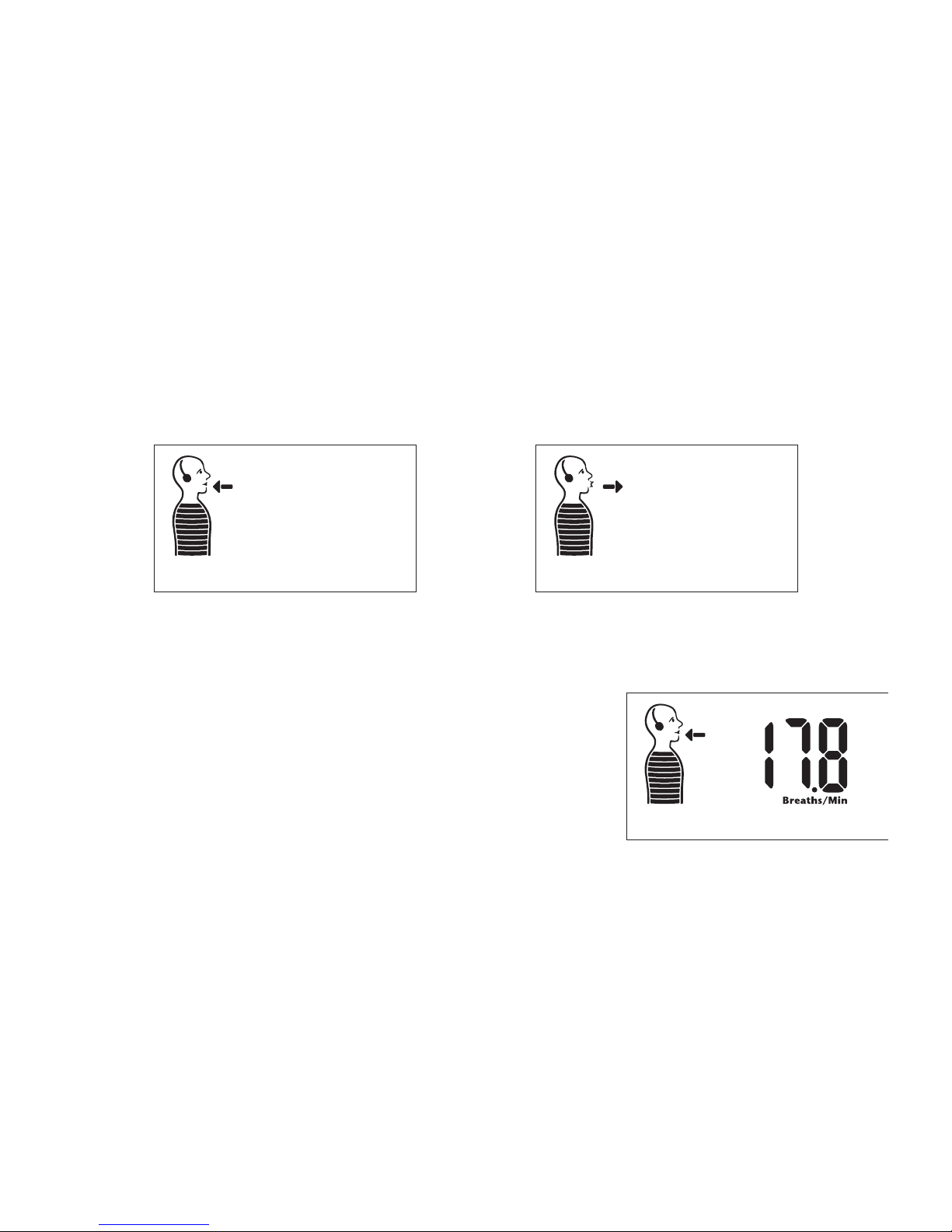
Each session begins with a Recognition phase. During this phase
background music will play and a figure showing your breathing
movements will appear on the screen.
The figure fills up as you breathe in and empties as you breathe out.
Breathe In Breathe Out
You should relax and breathe while
RESPeRATE learns your breathing rate and
pattern. Once RESPeRATE has successfully
learned your breathing pattern it will
display your current breaths per minute
(Breaths/min) on the screen.
Breaths per minute
Page 13
11
Breathing Exercise Phase
RESPeRATE composes a melody based on your individual
breathing pattern. It contains two distinct guiding tones. The
high tone signals to “breathe in” and the low tone signals to
“breathe out”. Synchronize your breathing, inhaling and exhaling
gradually, with the tones.
To help you get started, voice instructions
will be provided
for the first few breaths. Continue to breathe according to
the inhale and exhale tones and they will guide you into the
therapeutic breathing zone.
Therapeutic Minutes
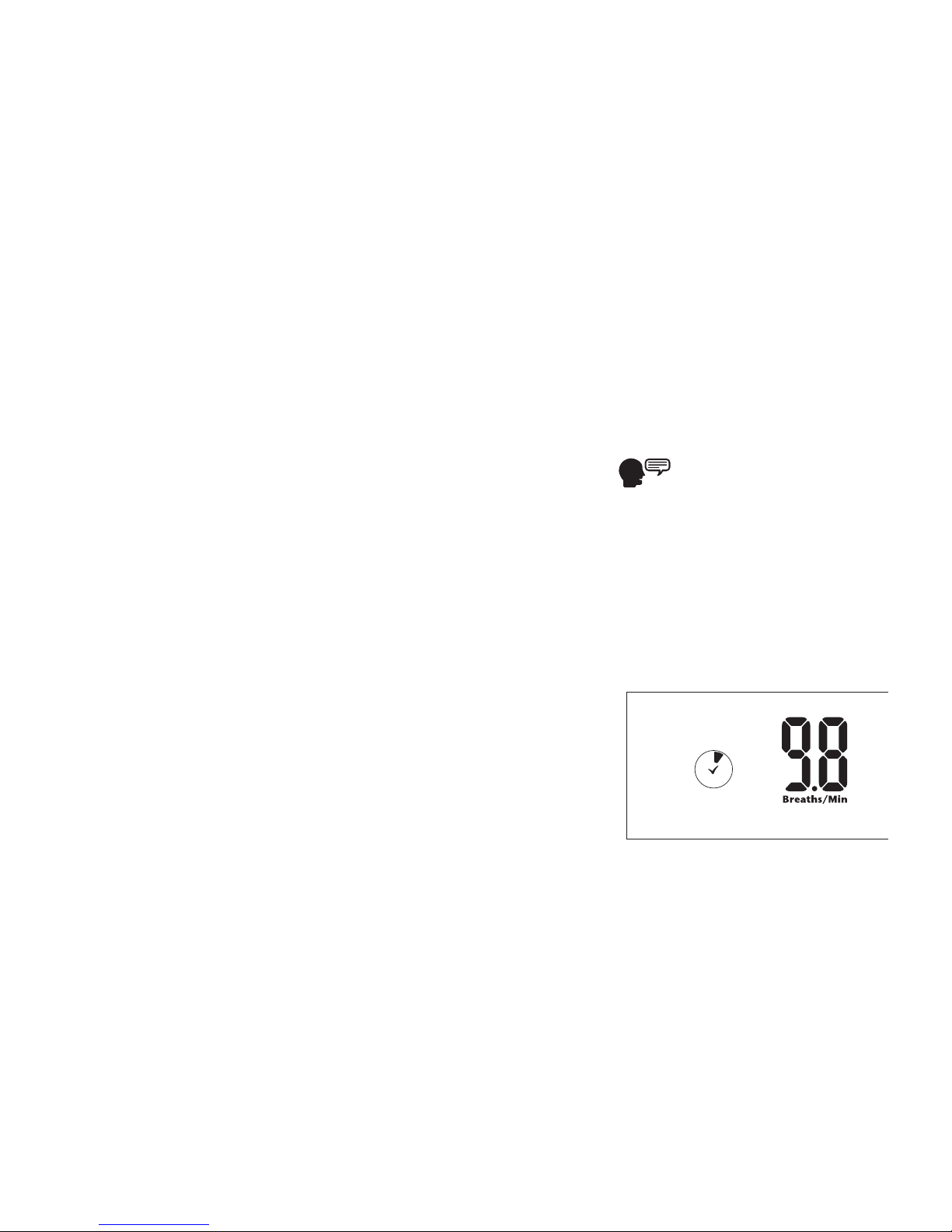
When your breathing rate is below
10 breaths per minute you enter the
therapeutic breathing zone. RESPeRATE
will tell you when this occurs and the
“Therapeutic Minutes Clock” icon will
appear on the screen.
Therapeutic
Minutes Clock
Page 14
12
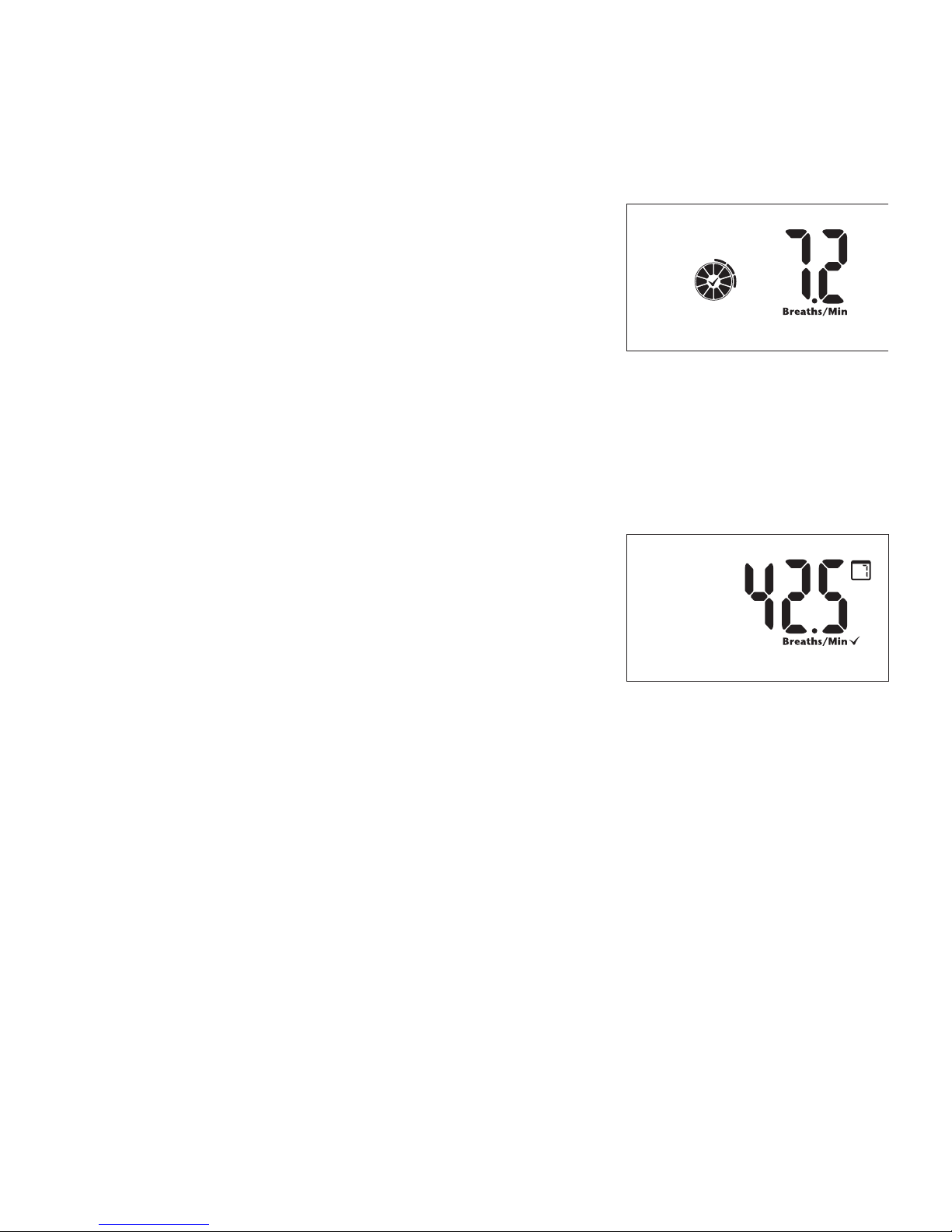
Each minute spent in the Therapeutic
Breathing Zone appears as a filled
segment in the clock. When the clock
fills in completely, you have successfully
spent 10 minutes in the therapeutic
breathing zone. Each additional minute
will now be displayed as a ring outside
of the clock.
To achieve best results, accumulate
at least 40 minutes of therapeutic
br e at hi n g p er we e k. Fo r you r
convenience, RESPeRATE momentarily
displays the therapeutic minutes
accumulated in the past 7 days each
time you turn on the device. When
starting to use RESPeRATE, this number
will show “0” minutes. Once you start using the device and
accumulating therapeutic minutes, this number will show
a “running tab” of your last 7 days. It will never show “0”
minutes again unless you have accumulated zero therapeutic
breathing time for 7 consecutive days.
Clock with Ring
42.5-Therapeutic
Minutes for the past
7 days
Page 15
13
II. Set Up
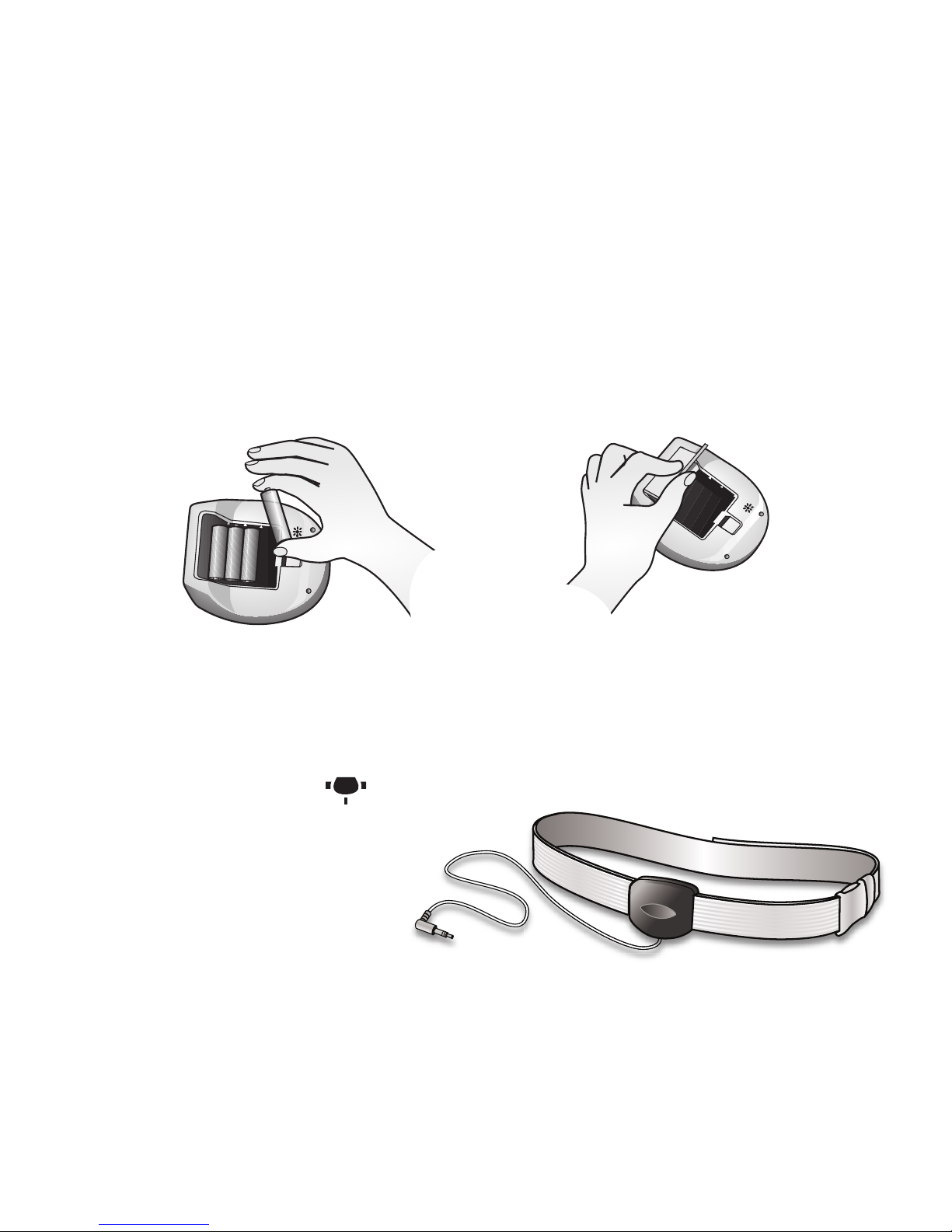
1. Install the batteries
Place the 4 AA batteries into the battery compartment located
on the bottom of the device. Position the batteries as shown
inside the compartment.
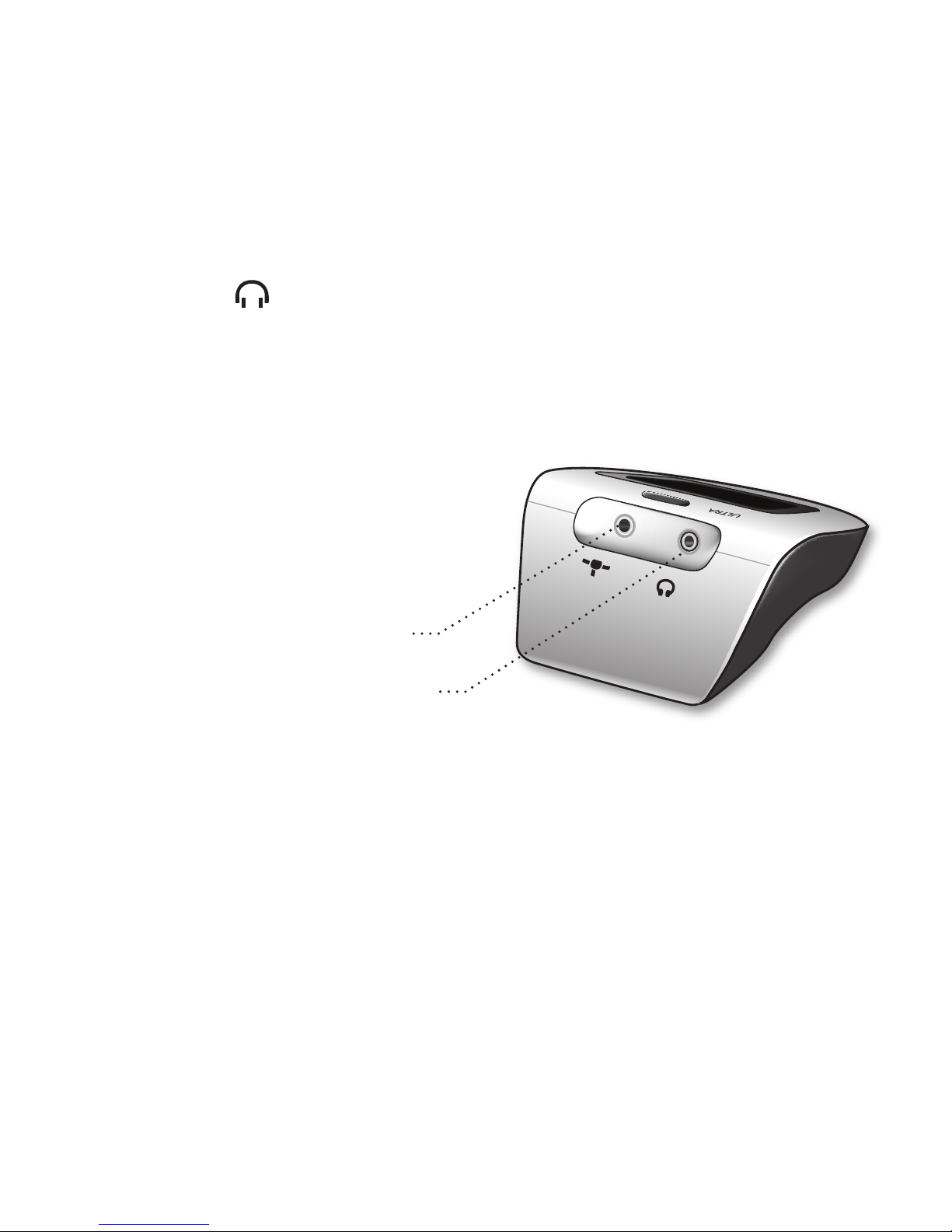
2. Plug in the sensor
Insert the sensor plug into the smaller socket in the back of the
device marked with
.
Page 16
14
3. Plug in the ear buds
Insert the ear buds plug into the socket at the back of the device
marked with
.
Sponges for the ear buds are provided should you need them.
Please note that any standard headphones can be used with
RESPeRATE.
Ear buds Socket
Sensor Socket
Page 17
15
III. Using Your RESPeRATE for the 1st Time
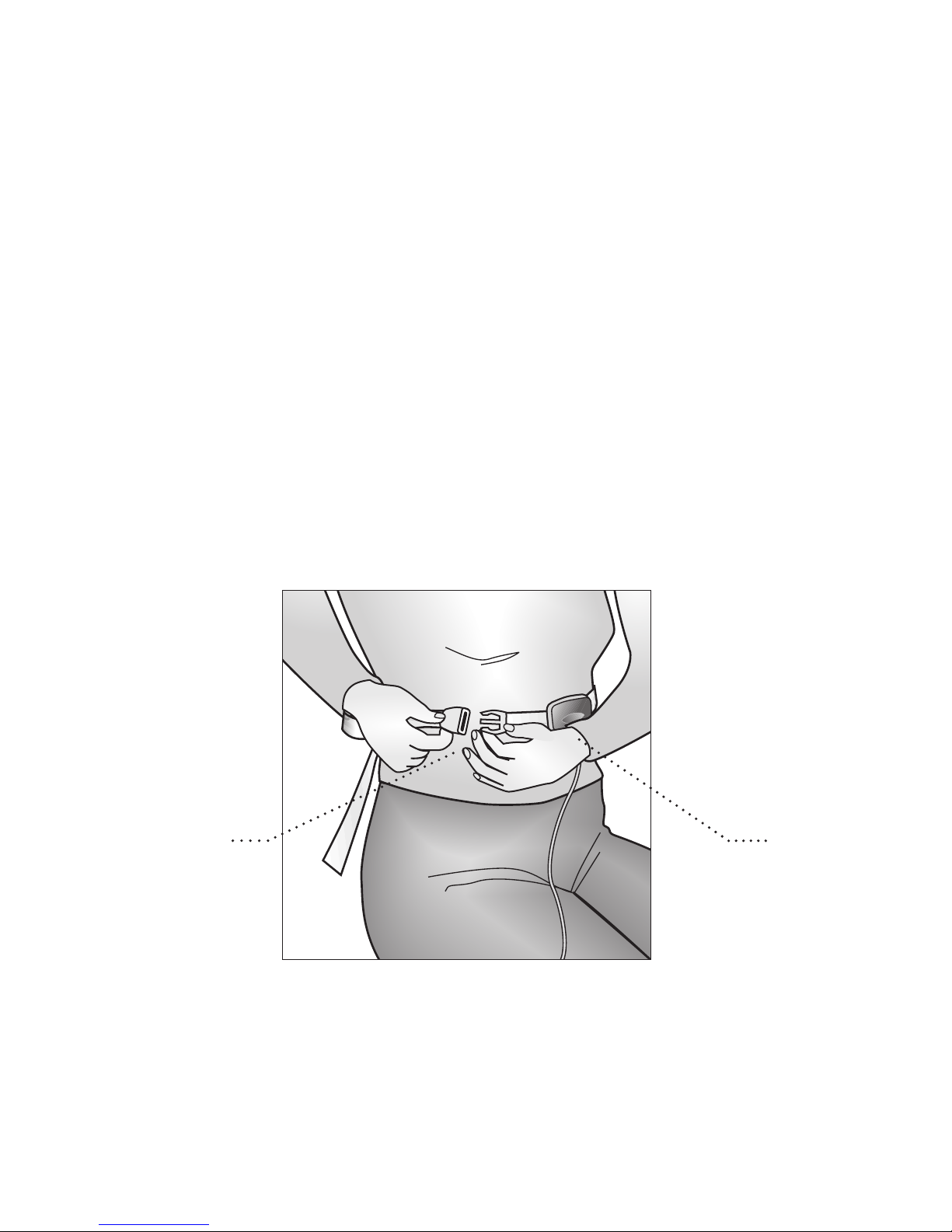
1. Putting on the sensor belt
The belt should be wrapped around your upper abdomen,
halfway between your navel and chest, and buckled. Buckling
the belt in front, as illustrated, will be more convenient. The
label of the sensor is to be placed against your body and the
sensor cable should hang down. The sensor belt should not be
on too tightly. Slide the sensor slightly to the left and right to
ensure that it can move freely.
SensorBelt Buckle
Page 18
16
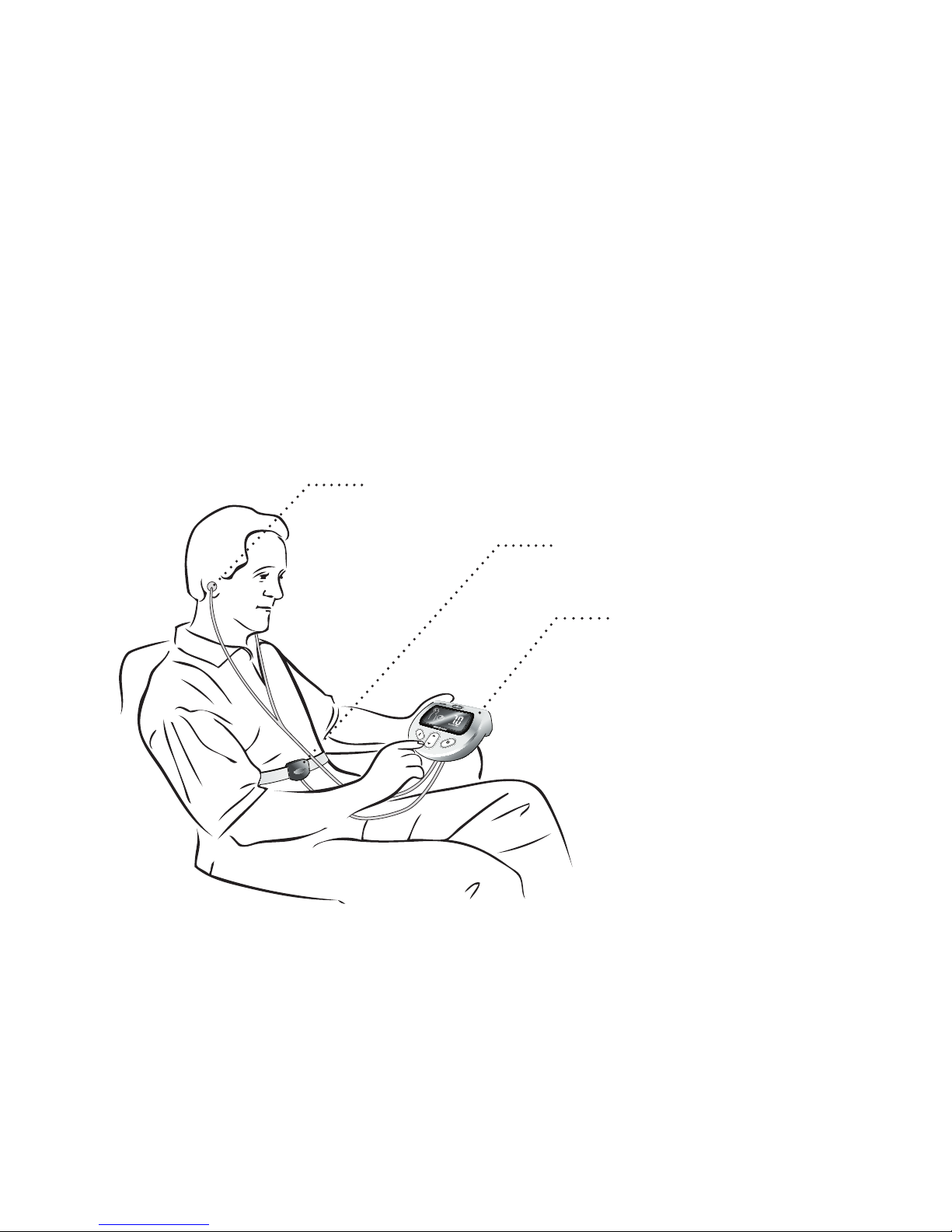
2. Putting in the ear buds and leaning back
It is important to make sure that your breathing is not being limited
in any way. Loosen restrictive clothing (tight pants, belt, etc) and
place the device in a comfortable position such as on your lap or
a nearby table. It’s important to avoid leaning forward which may
limit the breathing movement of the abdomen or chest.
Ear buds
Breathing sensor
RESPeRATE device
Breathing exercise with RESPeRATE
Page 19
17
The Tutorial
When using RESPeRATE for the first time, start by using the
Tutorial. It will check your sensor position, guide you through
an abbreviated session, and provide additional information. It
takes about 10 minutes to complete and will familiarize you
with RESPeRATE.
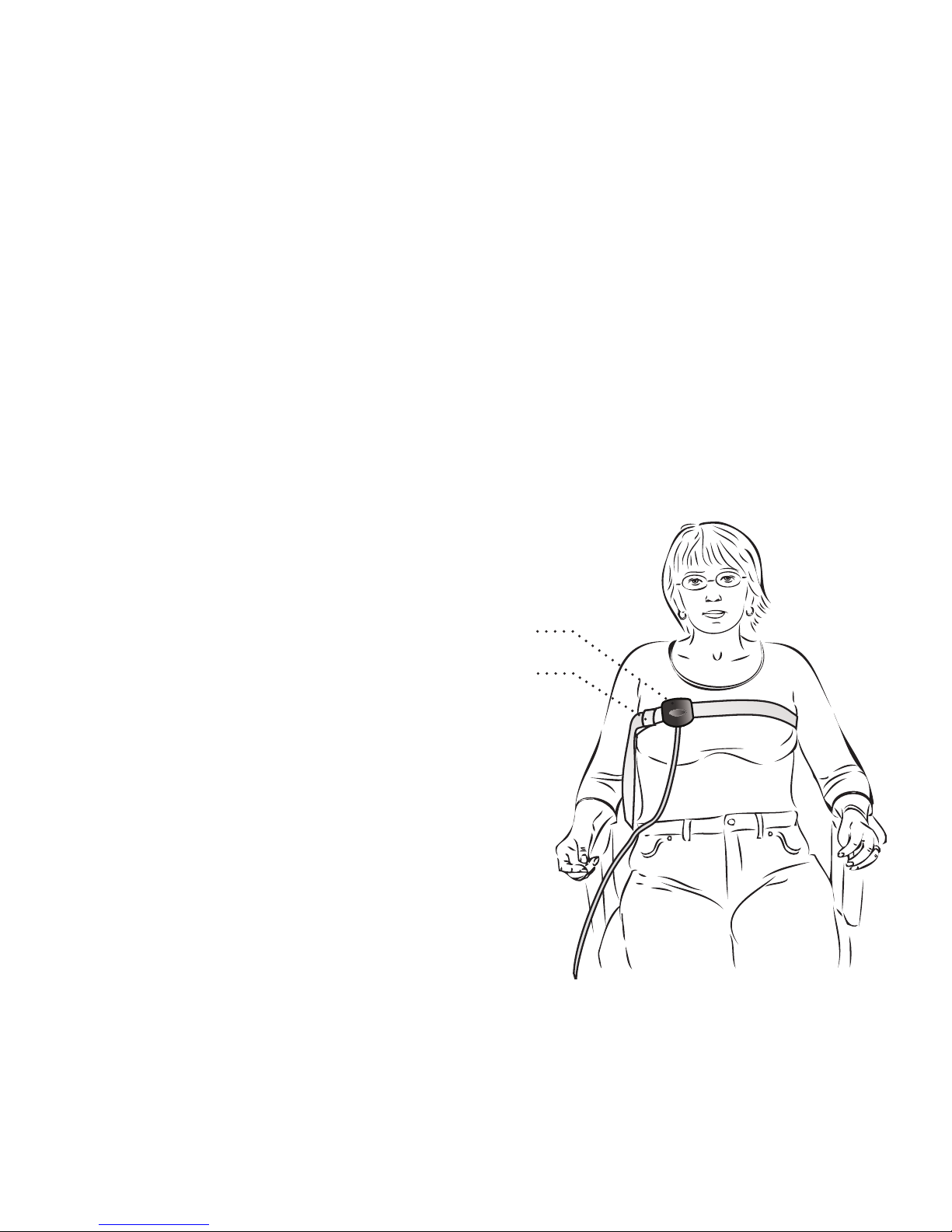
The Tutorial will determine where you should
position the sensor while using RESPeRATE abdomen or chest. Currently you have
the sensor belt wrapped
ar ou nd you r up p er
abdomen. During the
Tutorial you may be
instructed to move the
sensor belt to your chest.
If so, move the belt above your
chest and slide the sensor over
to the right as illustrated. Make
sure the sensor is not placed over
a bra strap.
Sensor
Belt Buckle
Chest sensor position
Page 20
18
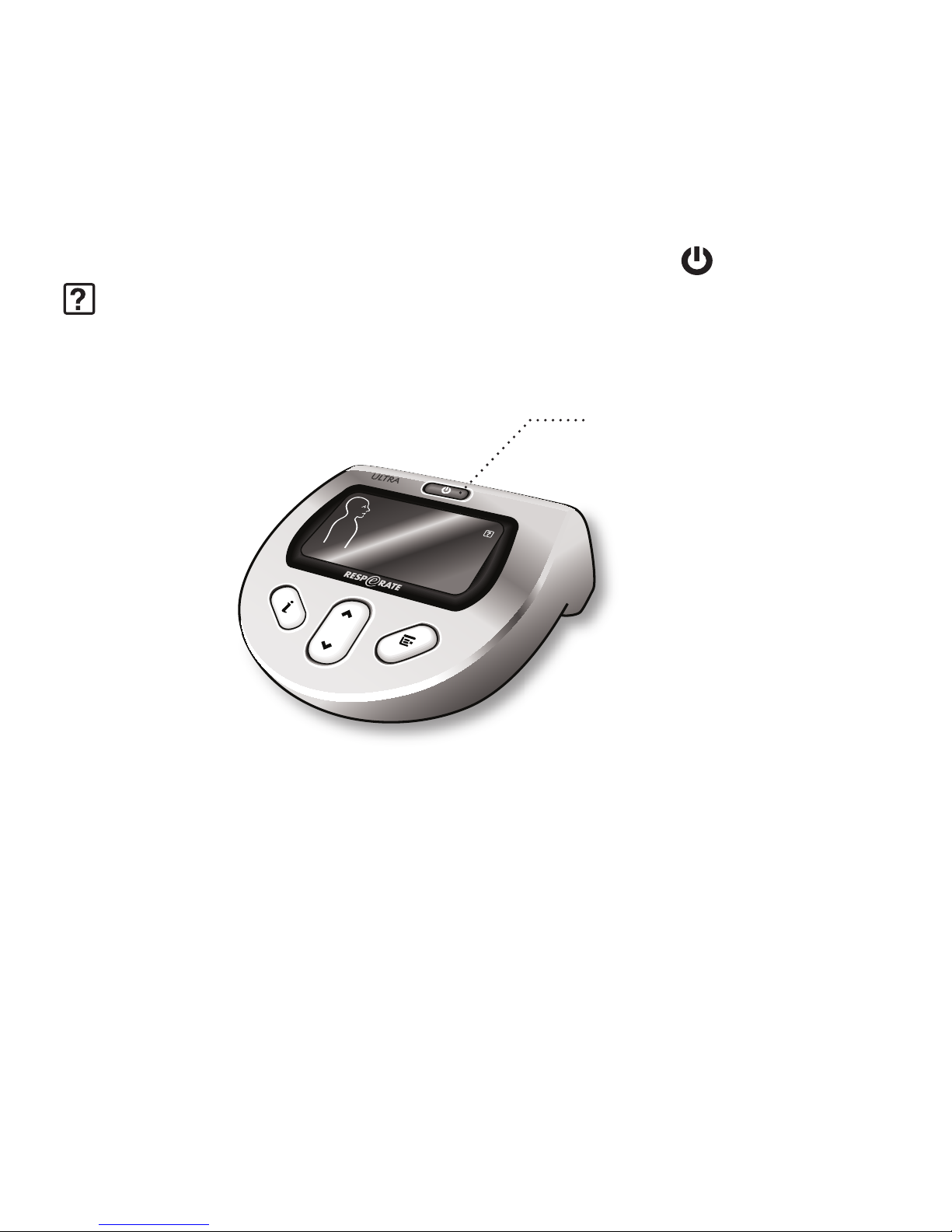
3. Activating the Tutorial
To activate, press and hold the POWER button
until you see
icon appear on the screen. While in the Tutorial, put aside all
distractions and listen to the voice instructions.
Press and hold to activate
Page 21
19
IV. Using RESPeRATE Daily
Turning on RESPeRATE
To begin a session, turn on the device by pressing the POWER
button
. The recognition phase will begin and your initial
breaths per minute will be displayed.
Next a session will begin in which your breathing will be guided
by musical tones into the therapeutic breathing zone.
Each session and every breath will bring you closer to achieving
and maintaining your goal blood pressure.
For RESPeRATE Duo Model
The duo model is capable of storing performance data for two
different users on one device. However, only one person can use
the device at a time.
After the device has been turned on, select User 1
or User 2
by pressing the UP/DOWN button
respectively.
If a user is not selected within the first 5 seconds, the device will
default to function and store information for the last user.
Page 22
20
Adjusting the Volume
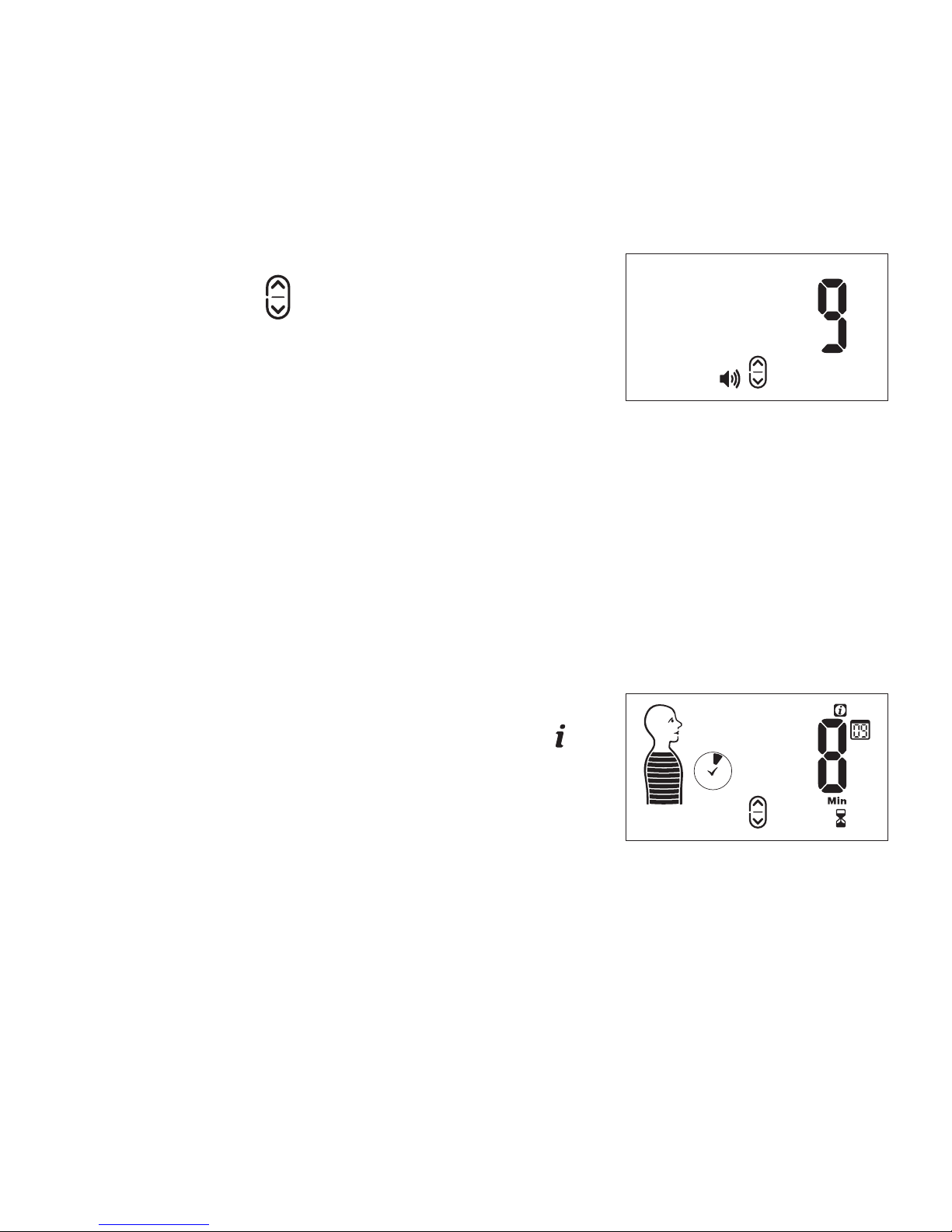
To adjust the volume press the UP/
DOWN button
until you reach your
preferred level (1-15). When you press
the button, the current level will be
displayed on the screen. After you
adjust, the new level will be displayed
for a few seconds and then return to the previous screen.
You can adjust the volume at any time while using RESPeRATE.
It will be stored as the last set volume for the next session.
Viewing/Changing Session Duration
To view how much time you have left
in a session, press the INFO button
and it will be displayed on the right of
the screen.
Volume Display
Session Duration -
Remaining Time
Page 23

21
RESPeRATE sessions are set for a default time of 15 minutes. If
you would like to extend or shorten the time, press the INFO
button
and then the UP/DOWN button until you reach your
preferred time. The change will only apply to the particular
session. Changing default session duration is explained in the
functions section.
Status Feedback
At any point during a session you can press the INFO button
to receive feedback. RESPeRATE will tell you if you are or are not
following the tones. If you are having some difficulty, the device
will suggest a solution. If you continue to have difficulties, the
“Troubleshooting” section of the user manual can provide answers.
Refresh Function
If at any time during the session you feel that following the guiding
tones is uncomfortable, press and hold the INFO button
.
The guiding tones stop temporarily, allowing you to breathe
comfortably with quiet background music. RESPeRATE adjusts
itself to your comfortable breathing pattern and then continues
the guiding tones. The therapeutic minutes accumulated will not
be affected.
Page 24

22
V. Tips
Breathe effortlessly. In order to effectively lower blood pressure,
it is essential to breathe effortlessly during the entire RESPeRATE
session. Normal breathing is usually 12–18 breaths per minute.
In the first few sessions, your slowest comfortable breathing rate
achieved might be higher than 10 breaths per minute. Don’t push
yourself. Within a few RESPeRATE sessions, your breathing rate
will likely drop to below 10 breaths per minute.
Breathe gradually. While following the guiding tones avoid
holding your breath after inhaling or exhaling. Breathing excessively
deep is counterproductive. Effortless breathing is best achieved by
a gradual inhalation through the nose, then a gradual exhalation
through the mouth. One easy way to prolong exhalation is to
purse your lips as if you were blowing out a candle. If at any time
during the session you feel that following the guiding tones is
uncomfortable, use the Refresh function by pressing and holding
the INFO button
.
It’s not a competition. The slowest breathing rate and pattern
that is comfortable for each individual varies from person to person
and from day to day. Only you can decide when breathing becomes
uncomfortable. The goal is to reach the Therapeutic Zone of slower
Page 25

23
than 10 breaths per minute, not to reach as slow a breathing rate as
possible. Making an effort to achieve an excessively slow breathing
rate may not be as beneficial in lowering blood pressure levels.
The more therapeutic breathing minutes, the better!
Be sure to accumulate no less than 40 therapeutic breathing
minutes per week. Remember that the more time spent in
the Therapeutic Breathing Zone, the better your chances of
achieving greater blood pressure reduction.
Avoid other breathing techniques. During the RESPeRATE
session, don’t try other breathing techniques such as breathholding or Buteyko. These types of breathing require effort
which is counter-productive to lowering blood pressure.
Stay awake to lower blood pressure. RESPeRATE is very
relaxing. Some users have been known to fall asleep. When
sleeping, your breathing rate may become faster and you will
not accumulate therapeutic minutes. You may use RESPeRATE
to fall asleep as a secondary purpose.
Be patient. As with any physical exercise program, long
term results are not immediate. Each session can provide an
immediate sense of calm and relaxation. However, an all-day
blood pressure reduction starts to be seen within - 3-4 weeks.
Page 26
24
Functions
Your RESPeRATE can be adjusted based on your preferences.
The following section will explain how to set the functions to
your likings. The functions are listed according to the order they
appear when the MENU button
is pressed.
To select a function, press the MENU button
and then
press the UP/DOWN button
to reach your preferred setting.
RESPeRATE will return to the previous screen after the change is
made and it will save the change for the next session.
I. Melody Selection
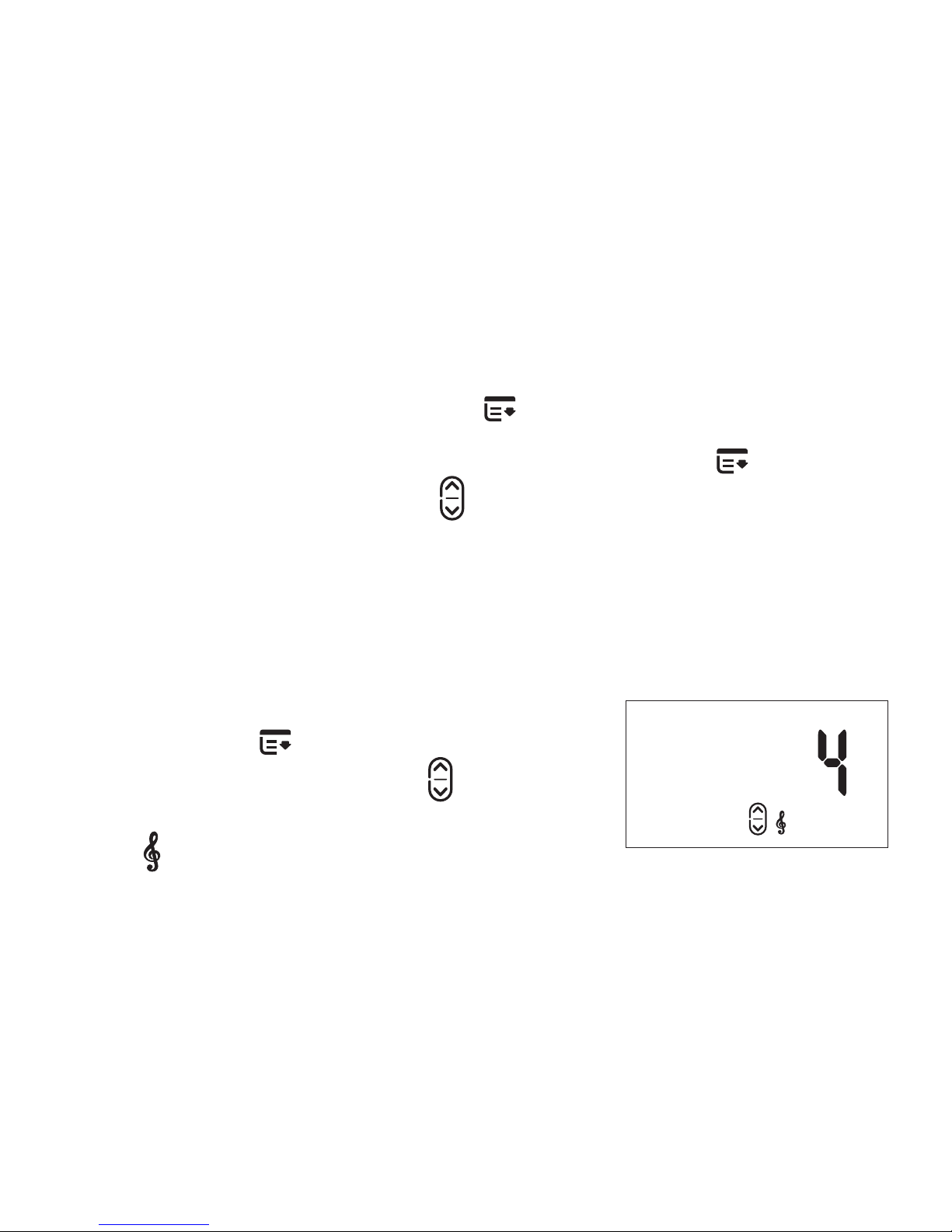
To select a different melody, press the
MENU button
one (1) time. Then
press the UP/DOWN button
to reach
your preferred melody. The melody
icon
and the selected melody
number will appear on the screen.
Melody Display
Page 27
25
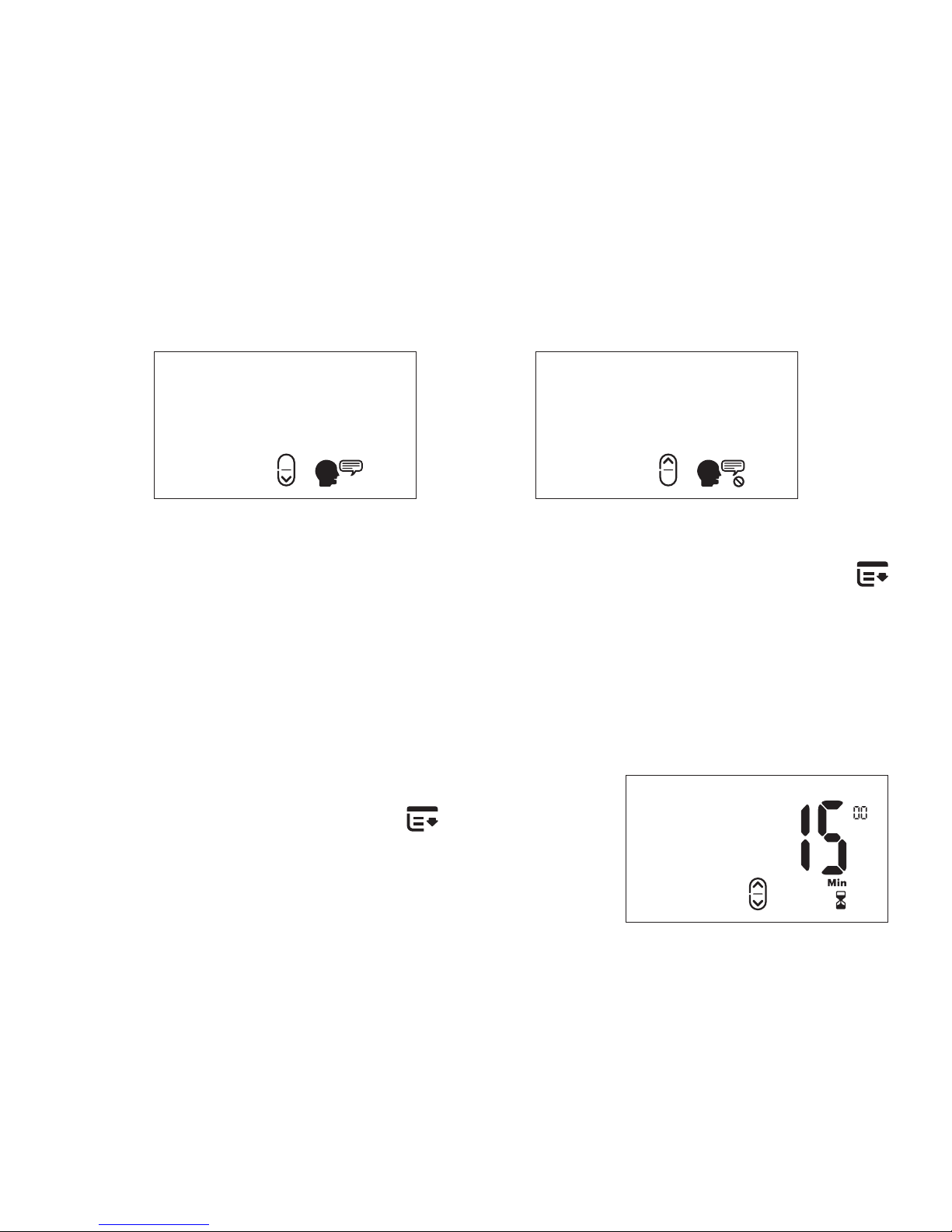
II. Guiding Arrows
The guiding arrows depict when to breathe in and when to
breathe out. By default they will turn off one minute into a session
as some people tend to constantly focus on them. However, if
you are having problems following the tones or prefer to have
the visual aid, you can activate them.
Guiding Arrows On Guiding Arrows Off
To turn the guiding arrows on/off, press the MENU button two
(2) times. Then press the UP button to turn it on and the DOWN
button to turn it off. Your display will change accordingly.
Page 28
26
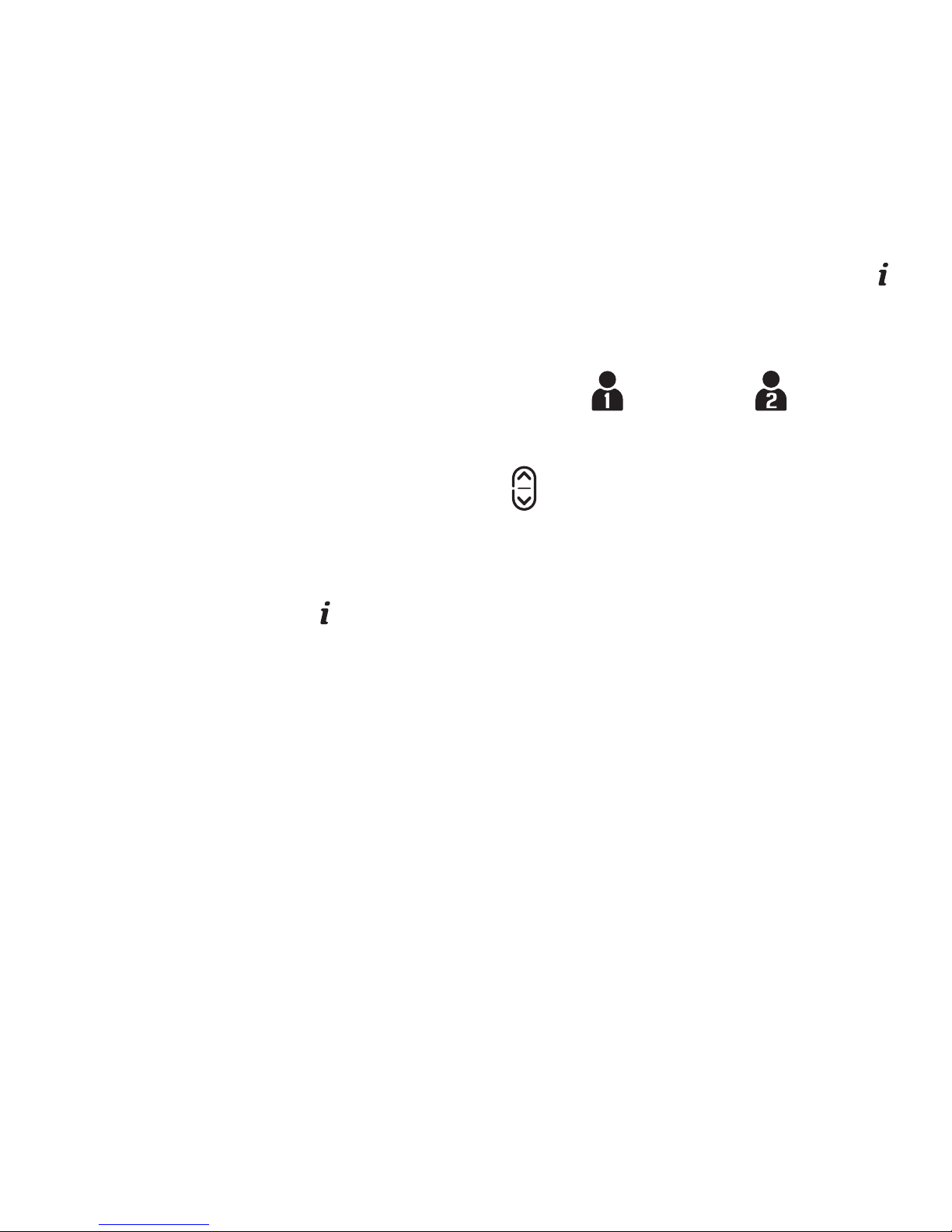
III. Mute
During the session voice instructions and warnings will be spoken.
However, if they become a distraction they can be muted.
Voice Instructions On Voice Instructions Off
To turn the voice instructions on/off, press the MENU button
three (3) times. Then press the UP button to turn it on or the
DOWN button to mute. Your display will change accordingly.
IV. Default Session Duration
To change the default session duration
press the MENU button
four (4)
times. Then press the UP/DOWN
button to increase/decrease the time.
The time changes in increments of 5
minutes. Sessions can range between
10 and 60 minutes.
Session Duration
Page 29

27
Performance Statistics
Performance statistics track and provide feedback on your
performance using RESPeRATE. This feature is optional and is
not necessary to lower blood pressure.
The two simplest ways to assess your performance are the
therapeutic minutes clock icon (during session) and the weekly
therapeutic breathing time (displayed momentarily on the device
display when it is turned on).
For a more advanced assessment, RESPeRATE’s built–in memory
stores the following six statistics related to your performance:
number of sessions, therapeutic minutes, initial breathing rate,
final breathing rate, synchronization, and breath detection.
Furthermore, each of these performance statistics is provided
for three different time periods: last session, last 7 days, and last
30 days.
Page 30
28
To View Performance Statistics
1. When RESPeRATE is off, press and hold the INFO button
until the screen displays the statistic. The data that appears is
for your last session.
For the Duo Model, first select User 1 or User 2 to view
the results for the appropriate user.
2. Press the UP/DOWN button to browse between the
performance statistics.
3. To choose a time period other than your last session press
the INFO button
. Press it once to view data for the last 7
days and twice to view data for the past 30 days.
Page 31
29
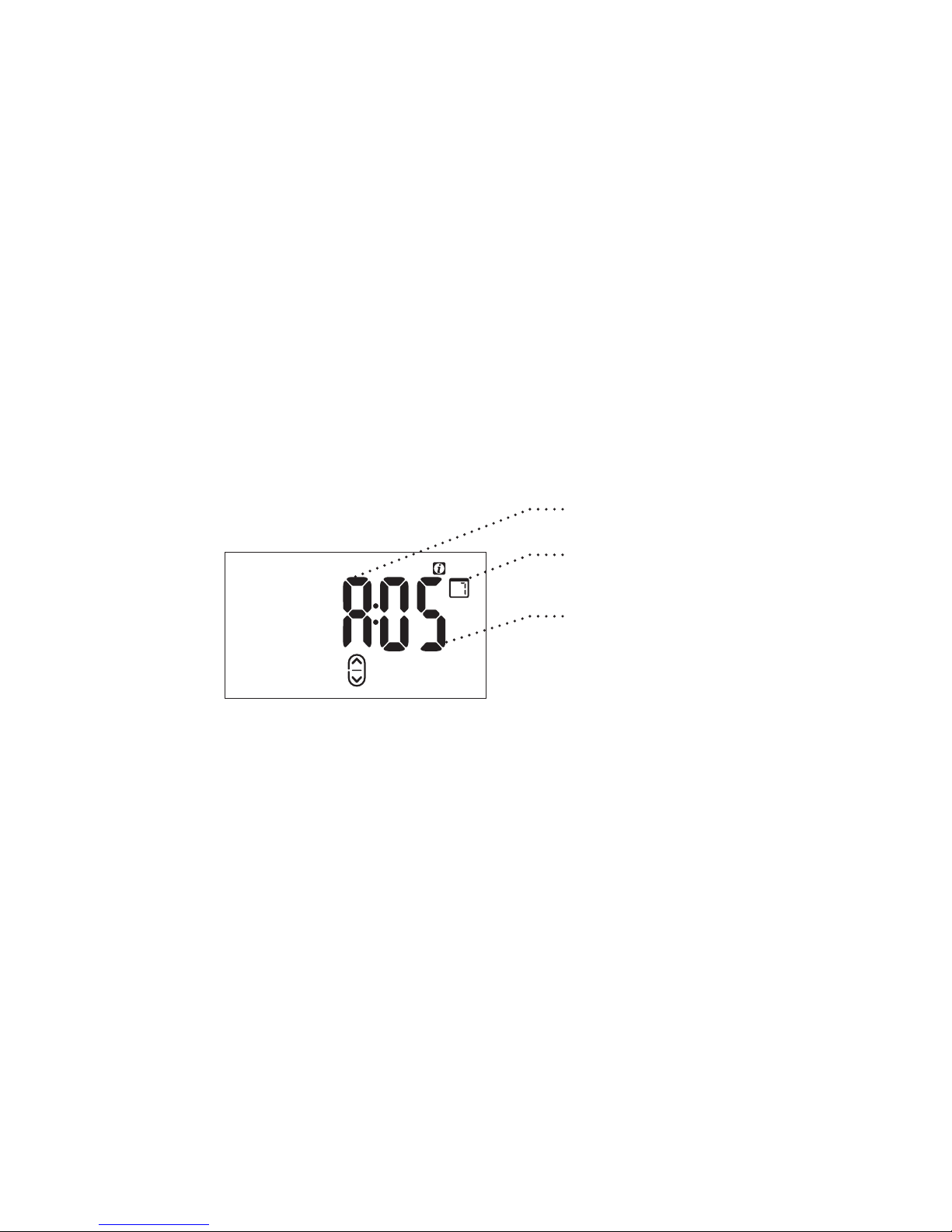
To Understand Performance Statistics Display
Performance statistics are expressed as shown in the example:
a letter and a value together with the Report Period.
The letter corresponds to the statistic type and range from A to F.
The value shows the performance for that particular statistic. The
report period varies depending on the time frame selected.
Performance Display
Report Period
Value
Statistic type
Page 32
30
Performance Statistics
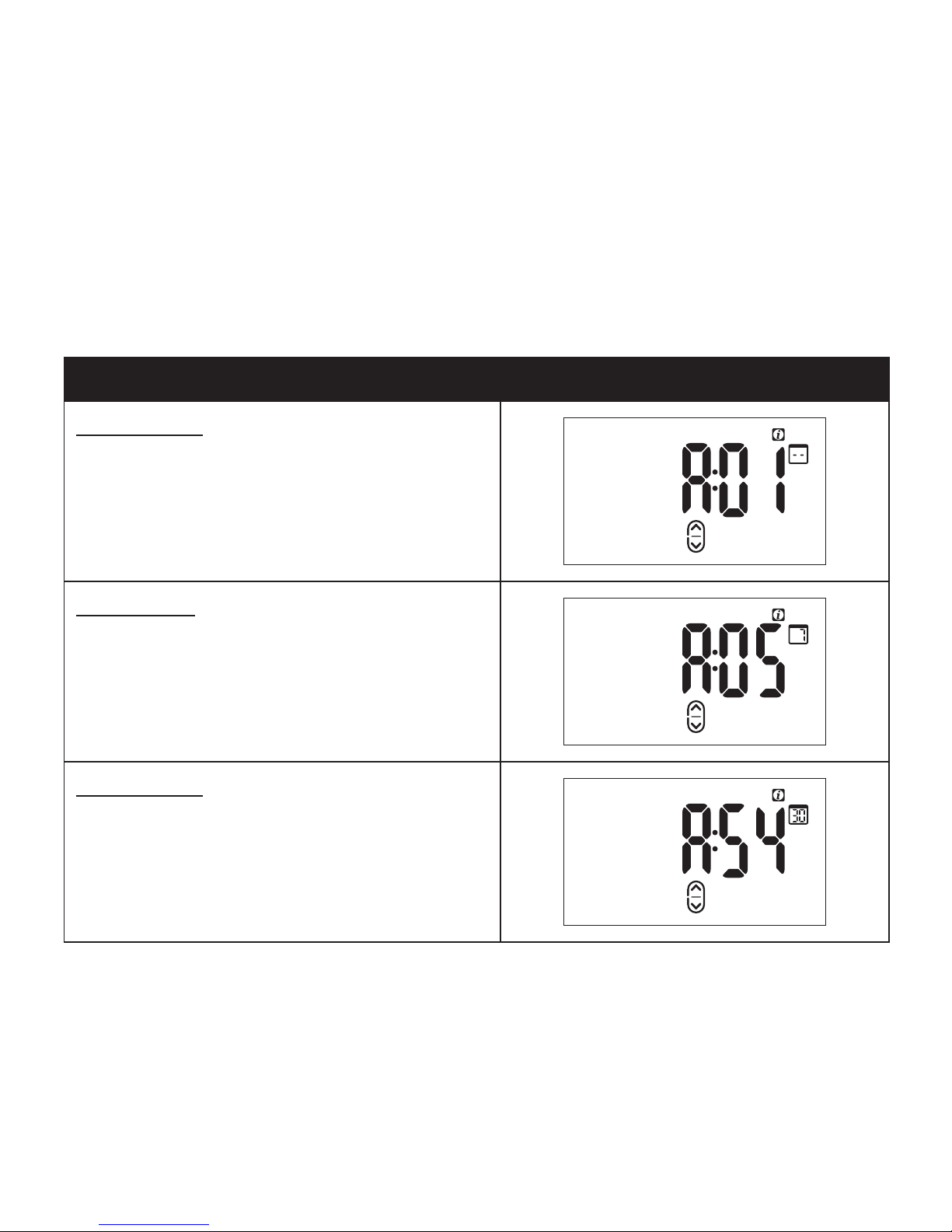
Statistic A: Number of Sessions
The number of sessions that reached the breathing exercise phase.
Description Example
Last session report reads A:01
After your first RESPeRATE session,
this value will always be “1.”
Last 7 days report reads A:05
Means that in the past 7 days,
5 sessions reached the guided
breathing exercise period.
Last 30 days report reads A:54
Means that in the past 30 days, 54
sessions reached the guided breathing
exercise period.
Page 33
31
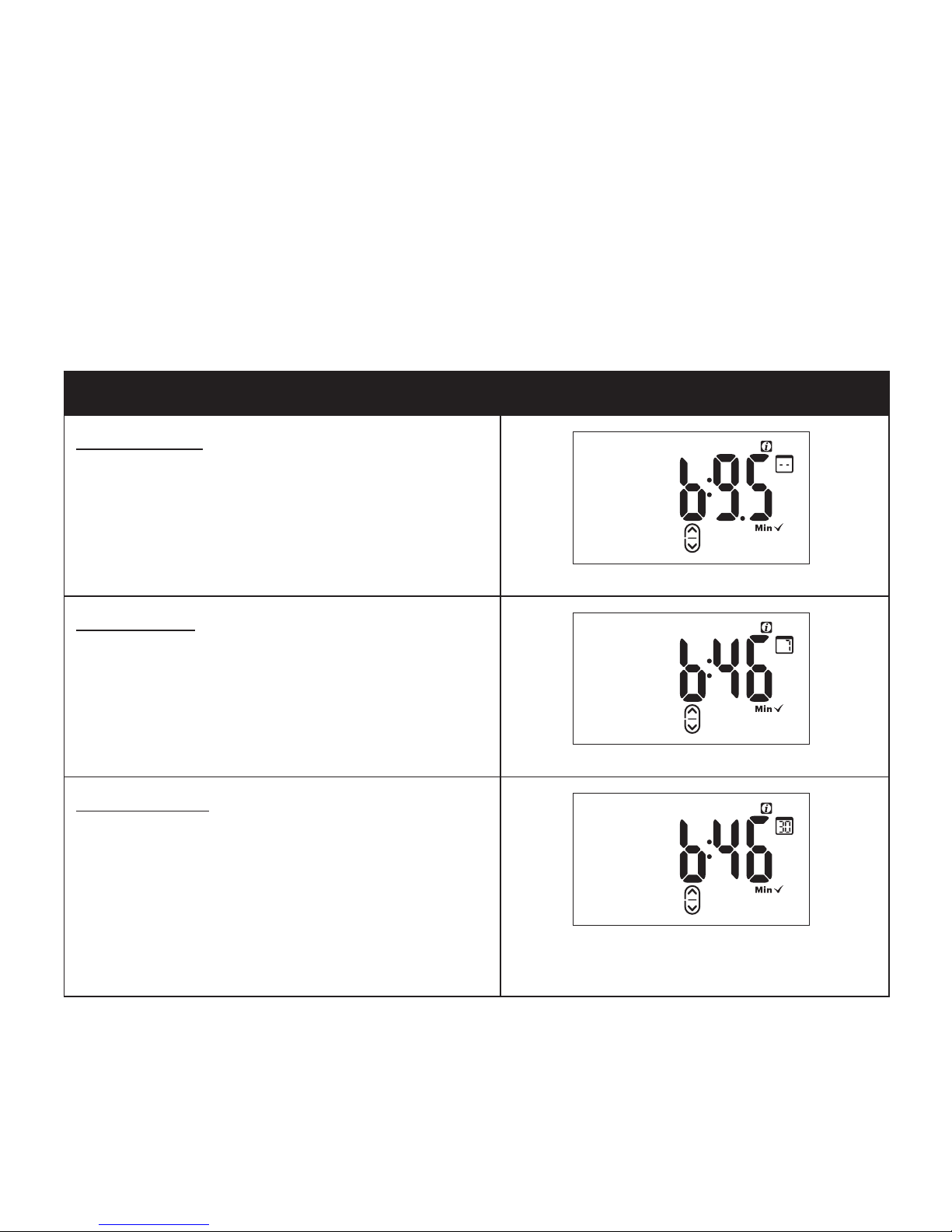
Statistic B: Therapeutic Minutes
Amount of Time (in minutes) spent in the therapeutic breathing
zone. The goal is to accumulate at least 10 therapeutic minutes
per session and 40 minutes per week.
Description Example and Goal
Last session report reads b:9.5
Means that 9.5 minutes were spent in
the therapeutic zone during the last
Session.
Goal > 10 Min
Last 7 days report reads b:46
Means that a total of 46 minutes were
spent in the therapeutic zone over the
last 7 days.
Goal > 40 Min
Last 30 days report reads b:46
Means that on average, 46 minutes
per week of use were spent in the
therapeutic zone.
Note: If value is 100 or greater
(therapeutic minutes), a blinking
“99” appears.
Goal > 40 Min
Page 34
32
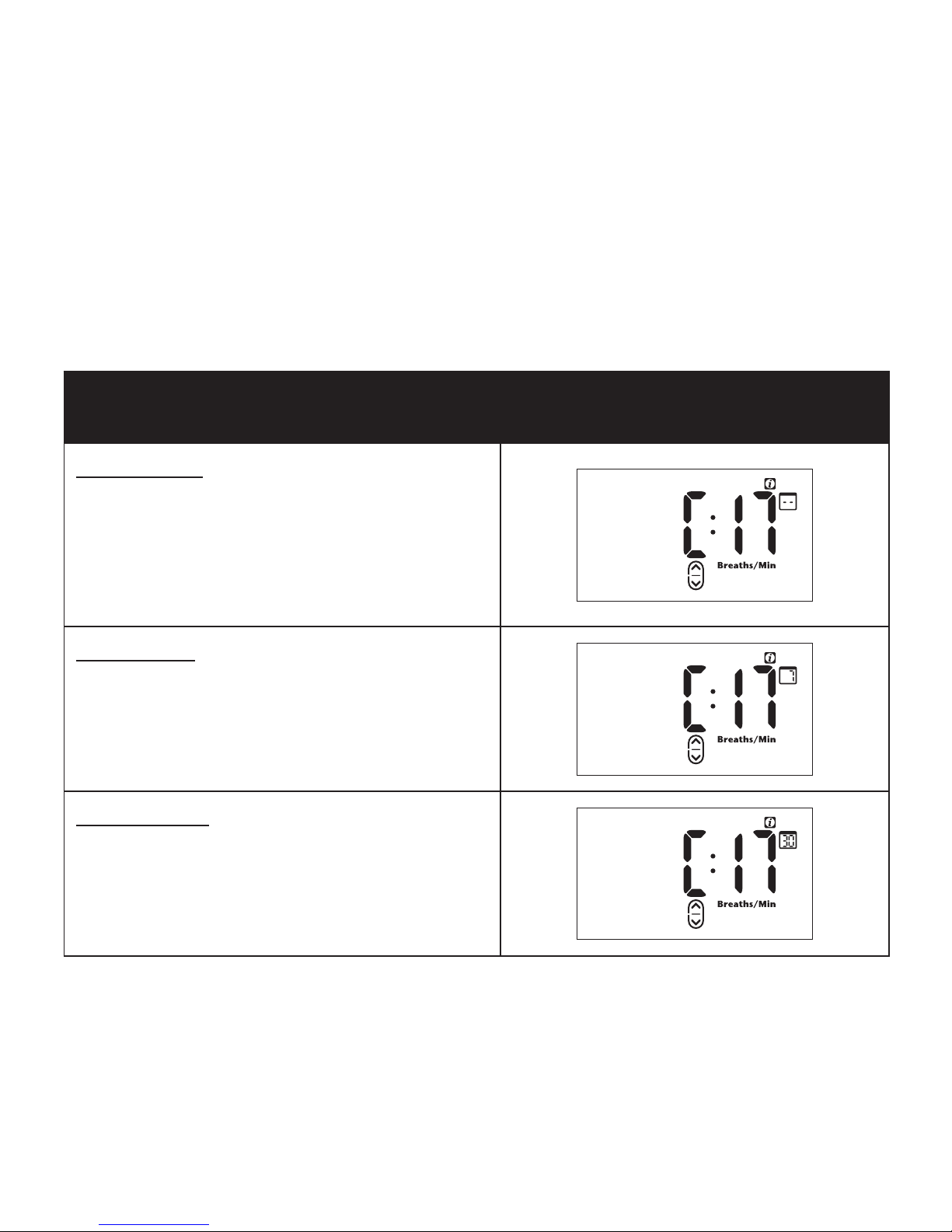
Statistic C: Initial Breathing Rate
Number of breaths per minute at the beginning of the breathing
exercise phase. The acceptable range is between 6-30 breaths
per minute.
Description
Example and
Acceptable Range
Last session report reads C:17
Means that the initial breathing rate
was 17 breaths per minute. Initial
breathing rates are “normal” levels
and typically vary from 12 to18
breaths per minute.
Last 7 days report reads C:17
Means that the average initial
breathing rate was 17 breaths per
minute.
Last 30 days report reads C:17
Means that the average initial
breathing rate was 17 breaths per
minute.
Page 35
33
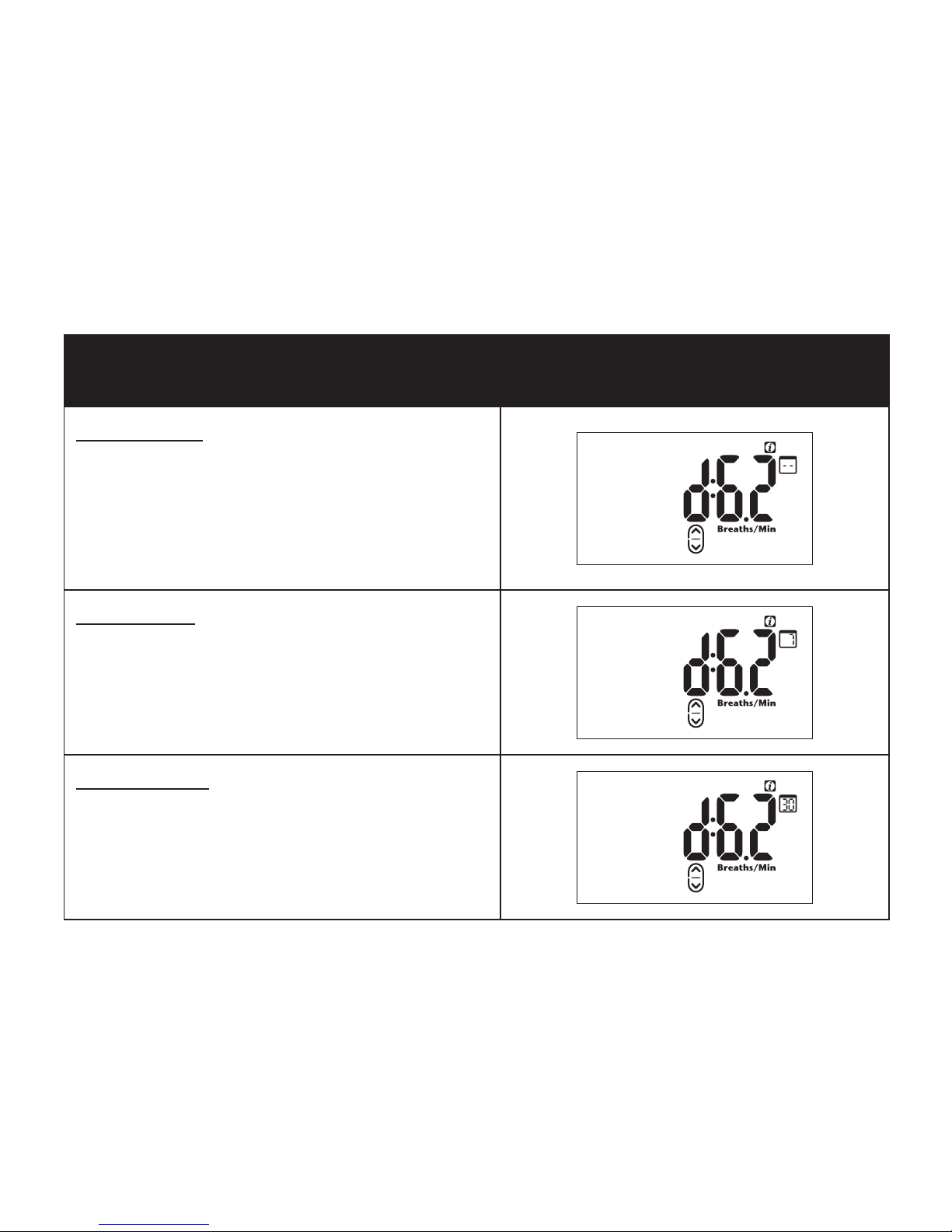
Statistic D: Final Breathing Rate
Number of breaths per minute at the end of the RESPeRATE
session. The recommended range is 5-10 breaths per minute.
Description
Example and
Recommended Range
Last session report reads d:6.2
Means that the final breathing rate
was 6.2 breaths per minute. Final
breathing rates vary and can typically
reach 6–8 breaths per minute within
a few weeks of use.
Last 7 days report reads d:6.2
Means that the average final
breathing rate was 6.2 breaths
per minute.
Last 30 days report reads d:6.2
Means that the average final
breathing rate was 6.2 breaths
per minute.
Page 36
34
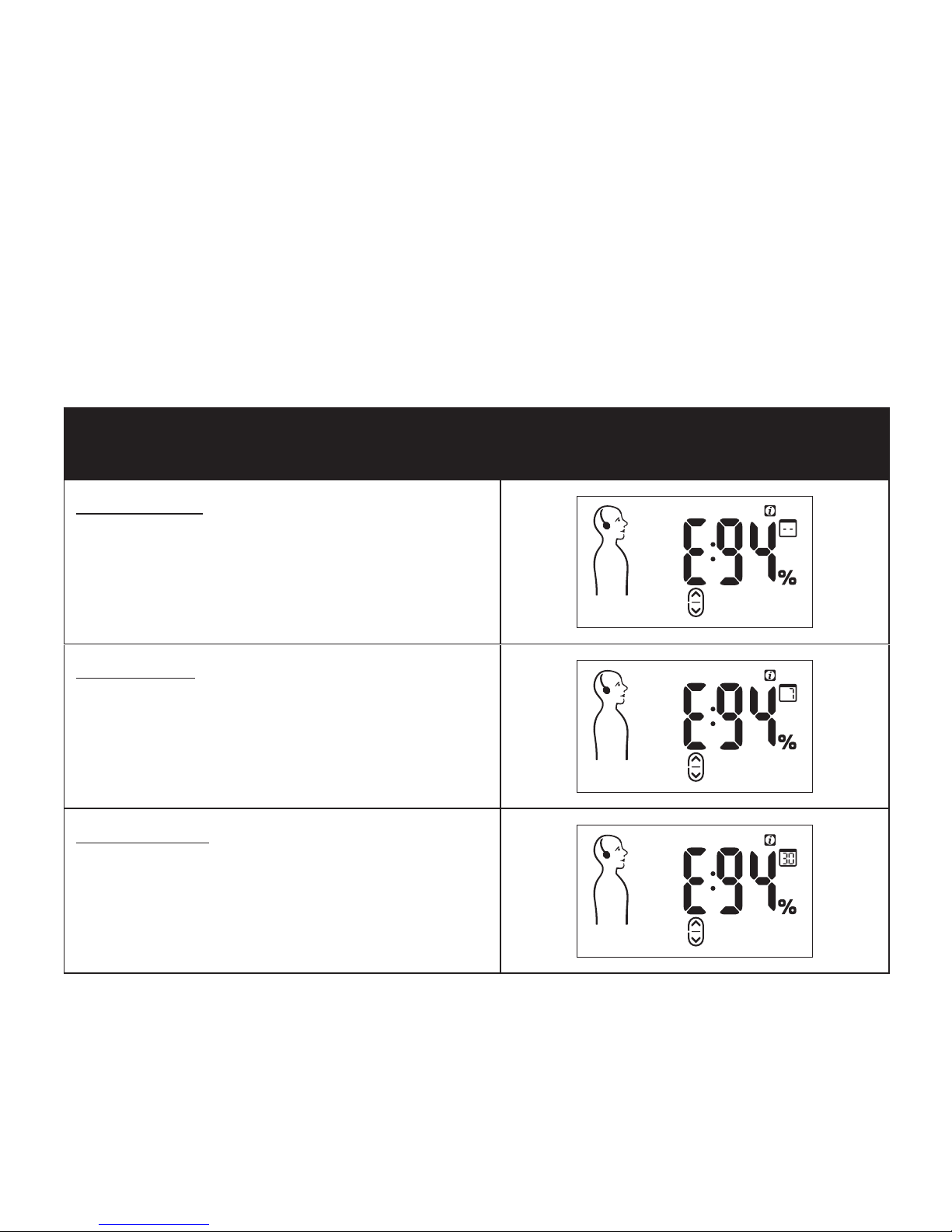
Statistic E: Synchronization
Indicates how well you are following the guiding tones.
Specifically, it is the percentage of time in which breathing was
synchronized with the guiding tones. The acceptable range is
from 60-99%.
Description
Example and
Acceptable Range
Last session report reads E:94 means
that 94% of the time, breathing was
synchronized with the guiding tones.
Last 7 days report reads E:94
Means that on average, 94% of the
time, breathing was synchronized with
the guiding tones.
Last 30 days report reads E:94
Means that on average, 94% of the
time, breathing was synchronized with
the guiding tones.
Page 37
35
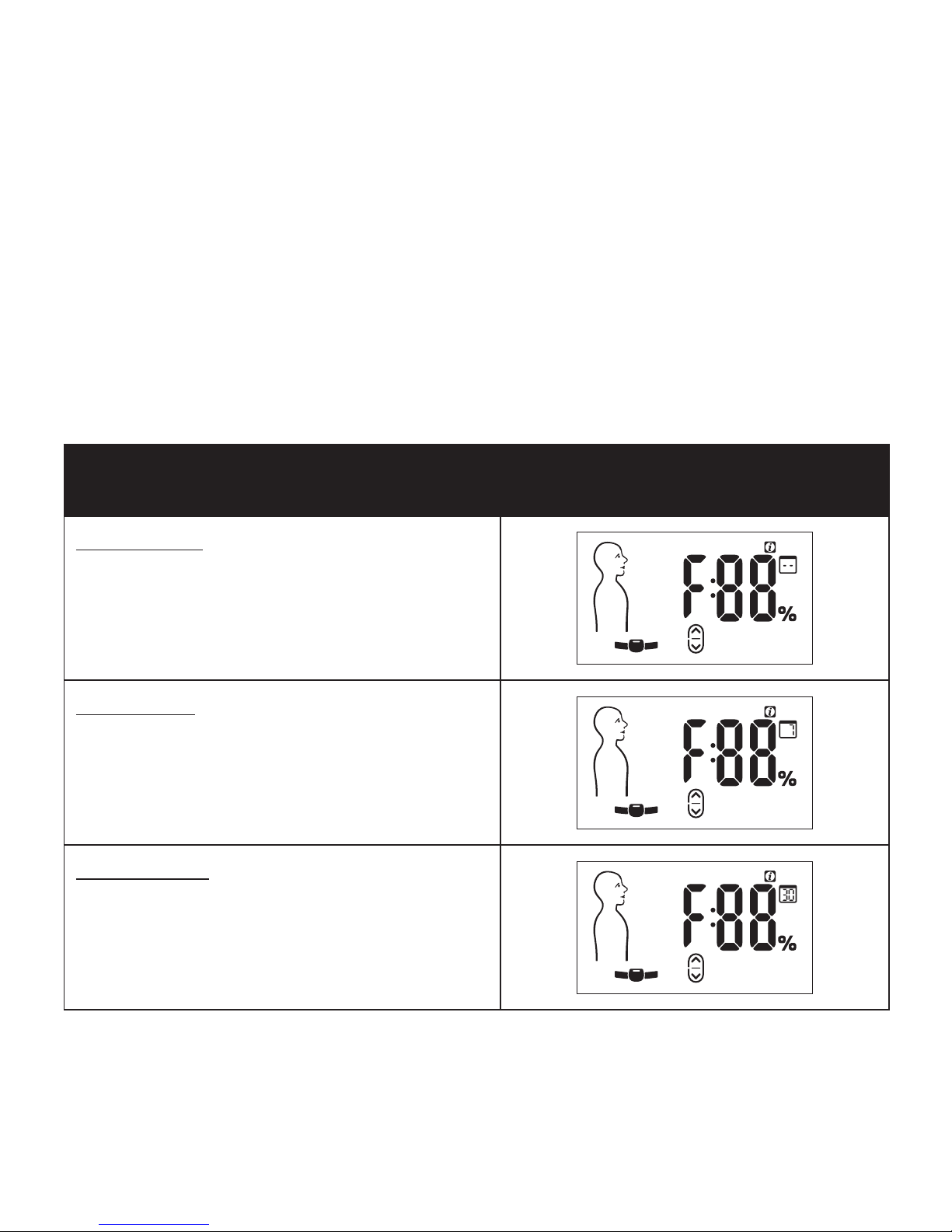
Statistic F: Breath Detection
Indicates how well the sensor is able to recognize inhalation and
exhalation as a result of the placement of the sensor. Specifically,
it is the percentage of session time that the breathing sensor
could identify the respiration data. This should range from
80-99%.
Description
Example and
Recommended Range
Last session report reads F:88
Means that 88% of the time, sensor
was able to identify respiration data.
Last 7 days report reads F:88
Means that on average 88% of the
time the sensor was able to identify
the respiration data.
Last 30 days report reads F:88
Means that on average 88% of the
time the sensor was able to identify
the respiration data.
Page 38
36
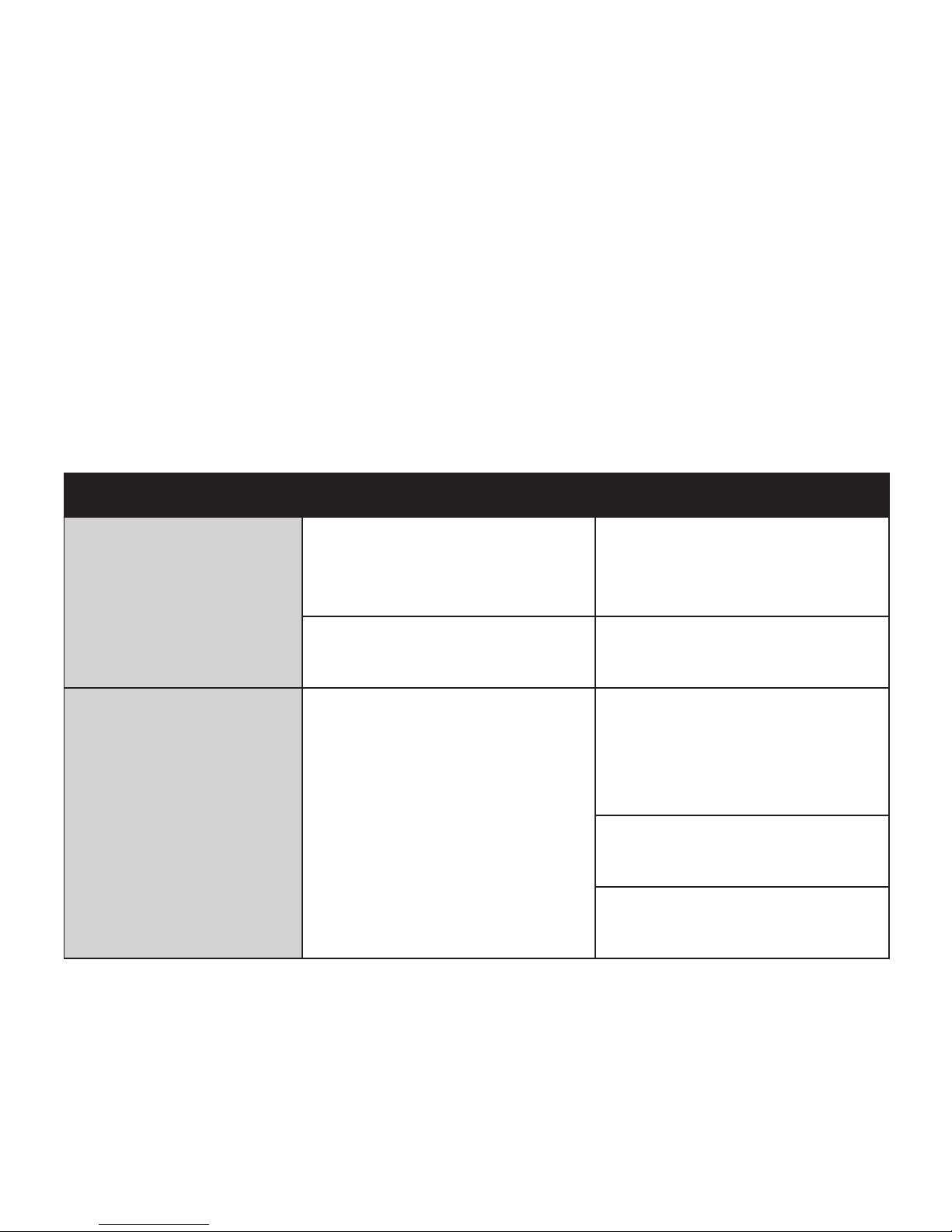
Troubleshooting
I. Troubleshooting
The table below describes some situations which may occur
and how to best solve them. If your particular problem is not
addressed, contact customer service.
Problem Explanation Solution
The Recognition
Phase takes longer
than two minutes.
The sensor is improperly
positioned.
Refer to Tutorial and
Manual Sensor Positioning
section (page 39)
Breathing is too unstable Relax and breathe
normally.
I repeatedly hear
a voice message,
“Breathe with the
guiding tones.”
Breathing is not
synchronized with
the guiding tones.
Begin to gently inhale
then, gradually exhale
soon after the start of
the guiding tones.
Activate the guiding
arrows for assistance.
Try following
Melody #4.
Page 39
37
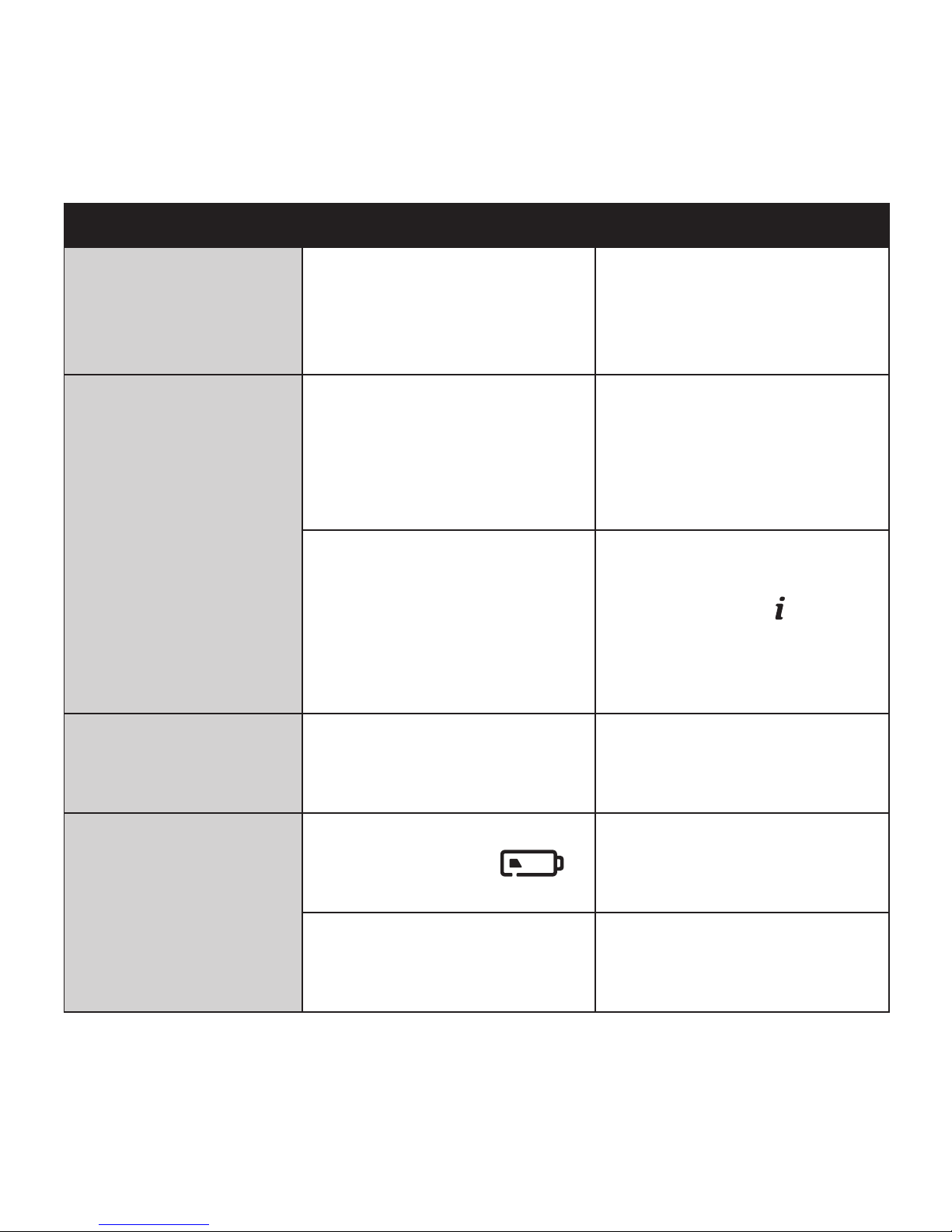
Problem Explanation Solution
I am unable to
complete sensor
positioning in the
tutorial
Breathing is not
synchronized with the
voice instructions.
Begin to gently inhale
then, gradually exhale
soon after the voice
instructions.
One or both of
the guiding tones
are too fast or
too slow for my
current breathing
to the point I’m
uncomfortable or
lightheaded.
Your breathing rate has
changed abruptly.
RESPeRATE will adapt
within a few breaths
to guide you according
to your natural
breathing pattern.
You are following
the tones but feel
uncomfortable or
lightheaded.
Use the Refresh function
by pressing and holding
the INFO button
.
RESPeRATE will re-calibrate
to your comfortable
breathing pattern.
Breath per Minutes
display is flashing.
You are breathing more
than 30 or less than 3
breaths per minute.
Breathe according
to the guiding tones.
The display does
not turn on when
the device is
turned on.
Batteries need to be
replaced. This icon
indicates battery power.
Install new batteries.
The +/– poles of the
batteries are positioned
incorrectly.
Reinstall the batteries
with the +/– poles
positioned correctly.
Page 40

38
Problem Explanation Solution
Music is not heard
through the ear
buds.
The volume is not
high enough.
Press the Up button to
increase the volume level.
The Ear buds are not
connected properly
to the device.
Reconnect the ear buds
to the device. A click will
sound when they are
properly inserted.
RESPeRATE automatically
switched off because the
session is over.
Restart to begin
a new session.
Static noise is
heard through
the ear buds.
Ear buds are not fully
plugged into the ear
buds socket.
Reconnect the ear buds
to the device. A click will
sound when they are
properly inserted.
Electronic
communication device
(cell phone, beeper, etc)
is operating within 5 feet
of RESPeRATE
Remove electronic
communication device
while conducting the
session.
Page 41
39
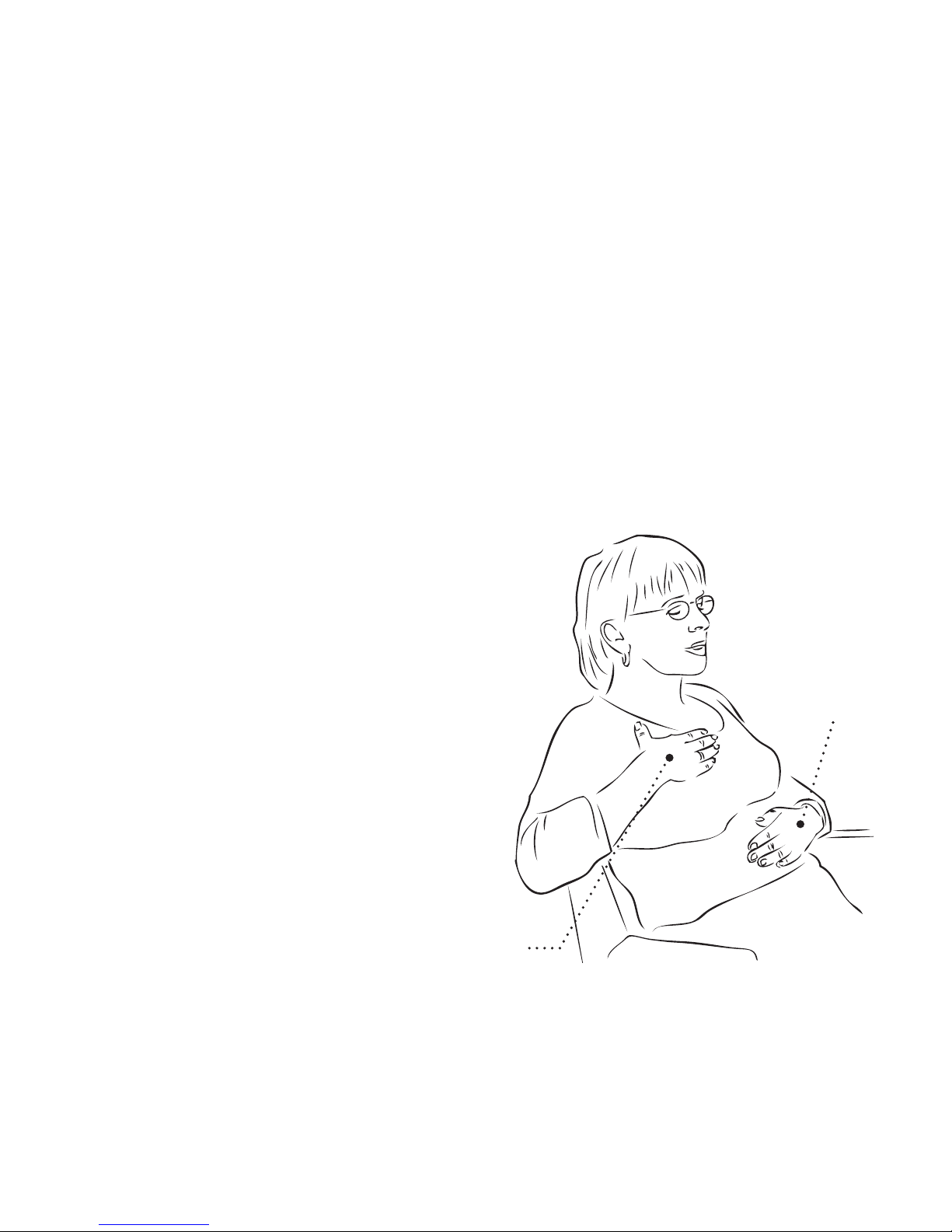
II. Manual Sensor Positioning
The Tutorial should determine where you are to position the
sensor – abdomen or chest. If you are experiencing difficulty,
there is an alternative way to assess the appropriate position.
First, any restrictive clothing (tight pants belt or bra) should be
loosened. Second, too many layers (heavy sweaters/sweatshirts)
may disrupt the signal and should be removed.
If the issue persists, try manual sensor
positioning. Sit comfortably on a
chair. Lean back and place your right
hand on the right side of your chest.
Place your left hand on the upper
abdomen, above the navel.
Take a few breaths. Feel which
hand moves first when you start
to inhale and exhale. The sensor
position is determined by which
hand moves first.
Place the sensor
accordingly.
Left hand
on upper
abdomen
Right hand on
right chest
Manual sensor positioning
Page 42

40
Additional Product Information
I. RESPeRATE Limited Warranty
RESPeRATE is warranted to be free from manufacturing defects
for a period of one year from date of purchase under normal
use. This warranty extends only to the original purchaser.
Should repair be needed within the warranty period, please call
RESPeRATE Customer Support. We will either repair or replace
(at our discretion) free of charge any parts necessary to correct
defects in the materials or workmanship.
If it is necessary to replace the entire product, it may be replaced
with a remanufactured product. The above warranty is complete
and exclusive. The warrantor expressly disclaims liability for
incidental, special, or consequential damages of any nature.
To ensure activation of your warranty, please complete the
registration form online at: www.resperate.com/register.
Some counties and/or states do not allow the exclusion or
limitation of incidental or consequential damages, so the above
warranty may not apply to you. Any implied warranties arising
by the operation of law shall be limited in duration to the term
Page 43

41
of this warranty. This warranty gives you specific legal rights,
and you may have other rights which vary from state to state.
II. Cleaning and Maintenance
To clean RESPeRATE, use a soft, slightly damp cloth. Do not
wash the sensor or the RESPeRATE device. Do not use petroleum
products, thinners, or cleaning solvents!
Protect your RESPeRATE against excessive vibrations.
Do not leave your RESPeRATE in a place where temperatures are
below -14°F (-10°C) or above 158°F (70°C), or in conditions of
very high humidity (>85%).
Do not attempt to make repairs of any kind on RESPeRATE.
Contact Customer Care if repairs are necessary.
Please use only Alkaline batteries.
If you do not plan to use RESPeRATE for a period of more than
two months, remove batteries from the battery compartment to
avoid damaging the device.
Page 44

42
III. Technical Information
Model Name: RESPeRATE Ultra ™, RESPeRATE Ultra Duo ™;
Model #: RR152,RR152D, RR152-1M, RR152-1DM, RR152-1,
RR152-1D
Display type: LCD;
Power source: four alkaline batteries, 1.5V (type AA);
Battery life: two months, with regular use of 15 minutes per day;
Maximum audio output: 10mW with 16 Ohm Ear buds;
Device display respiration rate range of 2-42 BPM but guides
between 5-20 BPM;
Operating temperature: 10°C - 40°C (50°F - 104°F);
Operation humidity: 30 - 75%;
Storage temperature: -10°C - 70°C (14°F - 158°F);
Storage humidity: 30 - 85%;
Weight: 360 grams;
Outer product dimensions:
12.4 L x 11.7 W x 6.6 H cm,
4.9” L x 4.6” W x 2”.6 H
Page 45

43
IV. Country Specific Market Clearance
United States: 510(k) number K020399 (OTC) and K000405 (Rx)
European Union: CE 0473
Israel: Ministry of Health number 237-0000
South Korea: Korean KFDA 04-259
Canada: Health Canada 63948
Thailand: ISR 4700595
China: SFDA 2260351
Manufacturer Authorized Representative in Europe:
MEDES Ltd.
9, Beaumont Gate, P.O.Box 231
Shenley Hill, Radlett, Hearts
London WD78BX, UK
tel/fax: +44 (0) 192 385 9810
email: [email protected]
Page 46

44
V. Indication for Use
RESPeRATE is intended for use as a relaxation treatment for
the reduction of stress by leading the user through interactively
guided and monitored breathing exercises. The device is
indicated for use only as an adjunctive treatment for high blood
pressure together with other pharmacological and/or nonpharmacological interventions. Over-the-counter.
Contraindication: None known.
Precautions: Do not use this device without consulting your
physician if you suffer or have suffered in the past from: active
ischemic heart disease/unstable angina, severe congestive heart
failure, chronic arterial fibrillation, stroke resulting in permanent
impairment, chronic renal failure, severe asthma, chronic
obstructive pulmonary disease (COPD), like chronic bronchitis
and emphysema, major organ failure or sleep paralysis, have a
pacemaker or if you are pregnant.
InterCure strongly recommends that you do not modify your
hypertension treatments without the advice and consent of
your physician.
Page 47

45
Do not use your RESPeRATE when you need to be alert or
to concentrate, or when using heavy equipment. Do not use
RESPeRATE while driving. If you experience any side effects
or if you feel any change in your general health or mood,
immediately discontinue use of your RESPeRATE, and contact
your physician.
Breathe effortlessly throughout the exercise. Excessive deep
breathing may cause dizziness and palpitations.
Please note: RESPeRATE should only be used as part of your overall health program
for achieving goal blood pressure, as recommended by your doctor. RESPeRATE
can be safely used in conjunction with medication and lifestyle modifications such
as diet and exercise.
Page 48

46
VI. Customer Support
RESPeRATE Customer Care Representatives are available for
guidance and support. If you have any questions or feedback,
call Customer Care Department to speak or schedule a call.
You can also post your questions or feedback on the RESPeRATE
User Forum at www.resperate.com/forum
USA: 1-877-988-9388 (Toll Free)
E-mail: [email protected]
United Kingdom: 0800-177-7778 (Toll Free)
E-mail: [email protected]
Israel: +972-73-220-7000
E-mail: [email protected]
Other Countries: +1-646-652-5800 (USA)
Page 49

For more information or customer service:
www.resperate.com
USA: 1-877-988-9388 (Toll Free)
United Kingdom: 0800-177-7778 (Toll Free)
Israel: +972-73-220-7000
Other Countries: +1-646-652-5800 (USA)
InterCure, Inc
589 8
th
Avenue
New York, NY 10018, USA
InterCure, Ltd
The Forum Business Centre
Lansdown Road, Cheltenham
Gloucestershire, GL50 2JA, England
InterCure, Ltd
6 Haba’al Shem-Tov Street
Lod 71289, Israel
www.intercure.com
Manufactured by:
Page 50
721 E 0100 C
0473
User Manual
 Loading...